
Complex Systems Informatics and Modeling Quarterly (CSIMQ) eISSN: 2255-9922
Published online by RTU Press, https://csimq-journals.rtu.lv Article 115, Issue 20, September/October 2019, Pages 1–19 https://doi.org/10.7250/csimq.2019-20.01
Situation Analytics and Model-based User Interface Development:
A Synergetic Approach for Building Runtime-Adaptive Business
Applications
Christian Märtin1*, Felix Kampfer1, Christian Herdin1,2, and Lionnelle Biawan Yameni1
1
Augsburg University of Applied Sciences, Faculty of Computer Science, An der Hochschule 1, 86161 Augsburg, Germany
2
University of Rostock, Institute of Computer Science, Albert-Einstein-Straße 22, 18051 Rostock, Germany
{Christian.Maertin, Felix.Kampfer, Christian.Herdin, Lionelle.BiawanYameni1}@hs-augsburg.de
Abstract. Situation analytics can be used to recognize the changing behavior, emotional state, cognitive load and environmental context of a user during complex task processing. This article discusses the SitAdapt 2.0 architecture that combines a situation analytics platform with pattern- and model-based user interface construction tools in order to build runtime-adaptive interactive business applications with enhanced user experience and task-accomplishment characteristics. The article focuses on the software components and tools for observing and tracking the user, data types for modeling situations, recognizing situations, and modeling structural changes and actions for generating the dynamic adaptations. The situation recognition capabilities and adaptive functionality of the system are demonstrated for web-applications for long-distance travel booking and a beauty products web-portal.
Keywords: Situation Analytics, Adaptive User Interfaces, Model-based User Interface Development Environments (MBUID), HCI-patterns, Emotion Recognition, User Tracking, E-business Applications.
1
Introduction
Situation- and context-aware computing has an established tradition in the area of distributed mobile computing [1] and complex interactive systems [2]. The availability of easy-to-use soft- and hardware tools for gathering visual or bio-physical user data and for observing user interactions and tracking activities has created the desire to systematically exploit the collected data for engineering dynamically adaptive software systems. Application domains range from
*
Corresponding author
© 2019 Christian Märtin et al. This is an open access article licensed under the Creative Commons Attribution License (http://creativecommons.org/licenses/by/4.0).
Reference: Ch. Märtin, F. Kampfer, Ch. Herdin, and L. B. Yameni, “Situation Analytics and Model-based User Interface Development: A Synergetic Approach for Building Runtime-Adaptive Business Applications,” Complex Systems Informatics and Modeling Quarterly, CSIMQ, no. 20, pp. 1–19, 2019. Available: https://doi.org/10.7250/csimq.2019-20.01
2 sport and fitness apps, medical applications, driver assistance systems to web shops and other business systems, e.g. support for digital marketing activities. The term situation analytics [3] was coined in order to define the requirements for a new branch of software engineering that deals with the construction of user-centered applications that are able to dynamically adapt to the situations of users, and to guide them to meeting their objectives and successfully finishing their tasks.
1.1 SitAdapt
The SitAdapt interpreter is a structured HCI-focused approach for building situation aware interactive software with a current focus on web applications. The SitAdapt interpreter is integrated into the PaMGIS model-based user interface development environment (MBUIDE) [4] and has access to its pattern- and model based tools and resources. It uses a situation analytics component for observing the interactions and emotions of users at work and for finding and generating the adaptive changes needed for supporting users during work sessions. The SitAdapt architecture provides a new and flexible approach for constructing high-quality interactive applications by recognizing and interpreting individual user situations in real-time. It enables rapid dynamic changes of the appearance and the behavior of interactive systems and raises the overall user experience level when working with such applications.
An observer component records and synchronizes eye-tracker-signals, recognized visual emotions, bio-physical wristband data, as well as user tracking and application meta-data. These data are interpreted by the situation analytics component. An adaptation component then decides whether a dynamic adaptation is necessary or not and controls the generation of an appropriate modification of the target software at runtime.
Using an MBUID environment [5] for constructing interactive applications generally offers many advantages before, during, and after target system construction. For instance, models at different abstraction levels can even be accessed after the target system was implemented or generated. To enable real-time adaptations we use an enhanced version of the PaMGIS development environment that was developed in accordance with the CAMELEON reference framework (CRF) [6].
1.2 PaMGIS
PaMGIS [4], [7] offers pattern and model repositories that can be used for the development of interactive applications. The resources available in the repositories, e.g. HCI-patterns, user interface templates, or glue code for linking the user interface to business objects play an important role during the dynamic adaptation process.
The framework also supports automated generation of model refinements and final user interface code. To specify, organize and apply patterns and models, several software tools were integrated into the framework. An interface for improving the resource base with usability evaluation results is also provided by the framework. Another main contribution of PaMGIS is the PPSL (PaMGIS Pattern Specification Language) [8], an extended superset of all major HCI-pattern modeling languages that can also be used to define the resources for HCI-pattern-based code generation and to embed patterns into the overall modeling context.
1.3 Focus of this Article
3 in its current version SitAdapt 2.0 and the interplay between SitAdapt and the PaMGIS models and pattern-resources. It also discusses the administrator tools for defining new situation rules and adaptations and demonstrates, how situations are recognized and adaptations are triggered by situation rules. It is also shown that SitAdapt can be used for adding adaptive behavior to applications that were developed without the PaMGIS framework.
In addition to the work presented in [12] we have modified and extended the article in the following areas:
The related work section is updated and deepened
The SitAdapt adaptation process and the data types exploited for making adaptation decisions are discussed in greater detail
The co-operation between situation rules and the context of use models is clarified
A new E-business application example with focus on customer experience is introduced
The conclusion and future work section is extended.
The rest of this article is structured as follows: Section 2 gives an overview of the field of context- and situation-aware computing and discusses the related work. Section 3 examines the SitAdapt 2.0 implementation and its components and tools. Section 4 discusses the concepts for modeling adaptability within the environment and the interplay between the situation analytics component, the target applications, and the pattern- and model-based resources of the PaMGIS framework. Section 5 demonstrates the system at work, e.g. with scenarios from a long-distance travel booking web-application and a web-shop for beauty products. Section 6 concludes the article and gives an outlook to the planned future work.
2
Related Work
The CRF [6], [13], a de-facto standard architecture for the model-driven construction of interactive systems, contains a set of structural guidelines for adapting the target software in pre-defined ways, mainly for responding to the requirements of different platforms and for dynamically migrating applications from device to device.
However, in order to design interactive systems that are able to adapt dynamically to situational and contextual changes in a way completely tailored to the needs of the individual user, a new approach had to be engineered that has to support two major goals:
Improved task accomplishment and quality of work. By observing the user on her way to reaching a goal or possibly failing to reach this goal, the system can compare the actual path taken by the user with the workflow proposed by the task model. If necessary, the system can offer help or dynamically restructure the user interface or the task workflow to support the successful completion of the task.
Better user experience. By observing the current emotional and physical state of the user, the system can propose or generate modifications of the user interface or even the business layer in order to improve the individual user’s sentiments and the overall user experience.
2.1 Context- and Situation-Awareness
Central to this new approach is the concept of situation-awareness that is strongly related with context-aware computing. The concept of context-aware computing was first proposed for distributed mobile computing in [1]. In addition to software and communication challenges to be solved when dynamically migrating an application to various devices and locations within a distributed environment, the definition of context then also included environmental and social aspects (e.g. lighting and sound environment, persons in the room, roles of the persons, etc.).
4 landing phase, by defining situation-dependent requirements for allowing a smooth and correct task accomplishment [2], [14].
With a rising level of machine intelligence the borderline between a human operator, who easily recognizes a situation, because the software system delivers helpful visualizations and data, or a technical system that recognizes the situation and acts on its own behalf, is flexible. Situation-awareness has to cover both concepts.
Context, however, is a complex and not easily tangible concept. In [15] it is shown that context can either be seen in a reifying way by defining the semantics of every relevant object surrounding the entities engaged in interactions. Or, context can play a deeper role in interactions and must be considered, when users are forming meanings over time by also interpreting pragmatic contextual information contained in utterances of all types. For incorporating the latter view on context into automated recognition systems, deep knowledge of the domain and common-sense reasoning are required.
To capture the individual requirements of a situation, Chang [3] has suggested that a situation specification must cover the user’s operational environment E, the user’s social behavior B, by interpreting his or her actions, and a hidden context M that includes the users’ mental states and emotions. A situation Sit at a given time t can thus be defined as Sit = <M, B, E>t. A user’s intention for using a specific software service for reaching a goal can then be formulated as a temporal sequence <Sit1, Sit2, …, Sitn>, where Sit1 is the situation that triggers the usage of a service or the execution of an activity and Sitn is the goal-satisfying situation. For recognizing and evaluating situations adaptive runtime environments have to provide the cognitive and analytic capabilities to interpret the multitude of available signals and meta-data and to infer a goal-oriented set of adaptations.
In [16] the Situ framework, that was designed as a probabilistic situation analytics environment, is used for supporting the recommendation of tasks necessary for executing activities like cooking or washing in the daily life of patients in the early states of Alzheimer’s disease in smart home environments. The Situ framework was constructed around the situation model introduced in [3]. In this application Situ is combined with a reinforcement learning component that allows the application to recommend patients the correct action sequences for successful task accomplishment in situations of cognitive uncertainty.
SitAdapt was also inspired by [3]. Our aim is to design a high-quality and practicable software engineering environment for building situation-aware target systems. Therefore, we follow a combined approach by linking the PaMGIS MBUID-framework and its domain and user interface models with a user-centric situation-aware adaptation component. For integrating the necessary reasoning capabilities, we introduce situation rules that have access to both, the observed raw situations and the modeling resources of the MBUID.
2.2 Observing the User
For implementing the emotion recognition functionality SitAdapt captures both visual and biometric data signals. In its current version user monitoring within several e-business scenarios (e.g. travel booking, online banking, finding and ordering beauty products in a web-shop) is implemented in an advanced usability lab environment. The user is observed already before starting to interact with the application, during interaction, and until after the session is closed.
In [17] we discuss the interplay of the various recognition methods used in the SitAdapt system. Our work was influenced by several current research approaches for visual and bio-physical emotion recognition, e.g. [18], [19], [20]. We have also studied the practical aspects of integrating runtime analytics, e.g. [21], and the consequences for sharing such information and privacy issues, e.g. [22].
5 A study for recognizing negative emotions with a high-level of accuracy by only exploiting mouse movement and cursor speed data is presented in [24]. Such methods can help to build more unobtrusive affective systems. As SitAdapt also records mouse interaction data, a study for analyzing correlations between visually recognized emotions and mouse behavior is currently set up at our lab.
A central tool in our environment for obtaining precise behavioral user-data is the eye-tracker. In [25] the different categories of eye-movement data are introduced. For most purposes eye fixations are exploited, because of their stability and duration. As typical measures the number of fixations to a certain area of interest (AOI), first fixation to the AOI, fixation duration, and accumulated fixation duration, that can be visualized by a heat map, are most widely used. The authors use eye-tracking data for deciding which product of a certain category, e.g. digital cameras, is the most interesting for the user. In a prototype that was evaluated by a user-study they combined eye-tracking with a genetic algorithm in order to adapt a product recommendation system to the real preferences of the users.
The evaluation of observed user emotions and eye-movements while interacting with the target system and executing different tasks can lead to a precise recognition of users’ intentions and their current mental states. To exploit this information, e.g. for individualized adaptations of commercial applications in order to change customer behavior, not only UX related aspects are affected, but also ethical questions are posed.
The recent evolution of individualized and very private personal services and sensing technologies, thus also requires a general discussion and integration of ethical aspects and a sensitivity towards the affected social values. Therefore our future designs and implementations will be accompanied by appropriate design methods [26], [27] for detecting and avoiding unwanted ethical conflicts. These approaches are used to integrate moral aspects and human values into innovative design processes and to analyze the direct and indirect effects of the emerging services and technologies on the stakeholders.
In order to arrive at a better understanding of user reactions to automatically generated adaptations, e.g. when are they welcomed, when are they taken as manipulations, when aren’t they recognized at all by the target applications’ users, we will include these aspects into the mentioned lab study, both for a travel-booking application and a beauty products web-shop.
2.3 Adaptive User Interface Approaches
Some recent related approaches for adaptive user interfaces [28], [29] either focus on adaptation or migration to other devices and platforms, or also cover user-related context-adaptations.
In [30] a new approach for a website user interface adaptation architecture based on emotion interpretation is presented and evaluated in a study. The Perso2U architecture, like SitAdapt, uses various user observation tools. Two detection tools, Microsoft emotion API and Noldus FaceReader, are used to measure the emotional states when the same website contents are presented in different versions with a variable focus on usability and aesthetics. The emotional state values are aggregated to allow for a robust categorization of positive, negative, and neutral emotional states. The study showed that the level of similarity with respect to the emotional states recognized by both tools is good enough to use them as base tools for an aggregated approach to decision making based on emotion detection. In contrast to SitAdapt 2.0, however, Perso2U does not include a flexible implementation for using it as a generic runtime-adaptation platform.
6 rules can hide and show pre-modeled UI elements, change navigation paths in pre-modeled ways, and react to simple user-related aspects that can be provided by a face detection library.
With its underlying concept of situation-awareness SitAdapt 2.0 has a much broader view on possible adaptations and focuses more on user experience aspects and the individual requirements of the user for task accomplishment. SitAdapt rules can affect the models and UI artifacts of the target application, but also react to new situations by directly communicating with the business content of the application and by exploiting user interface patterns for runtime UI generation.
In [32] an architecture for an authoring tool A-UI/UX-A is presented that allows to build runtime-adaptive user interfaces that react to context changes and monitored user requirements. By comparing the adaptational features of earlier adaptive user interface environments, the authors explore new directions for possible runtime-adaptations. In addition to platform and environment aspects, the system, like SitAdapt, uses rules and exploits individual user characteristics that change over time. In a scenario-based study the authors observed that user feedback, social sharing and recommendation buttons can be exploited for finding new adaptation rules.
3
SitAdapt Implementation and Operation
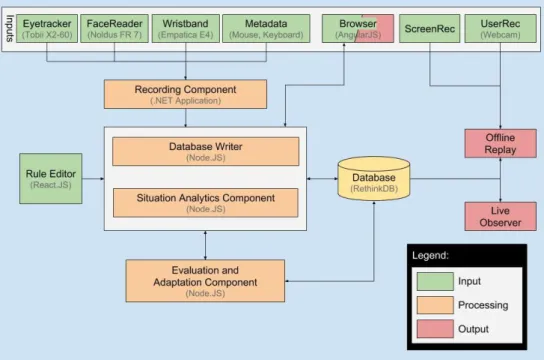
The SitAdapt 2.0 Interpreter is an integrated software system for enabling situation-aware real-time adaptations for web and mobile applications. A recording component stores and synchronizes the various input signals as well as application meta-data in real-time (Figure 1). These data are interpreted by the situation analytics component that is responsible for deciding whether a dynamic adaptation is necessary or not and controls the generation of an appropriate modification of the target software at runtime.
Figure 1. Structure and compoments of the SitAdapt Interpreter in its current implementation SitAdapt 2.0
7 way of accessing the collected situation analytics data and the resources of the coupled PaMGIS system. Future implementations could include a learning component that improves the quality of adaptations by altering and optimizing situation rules based on the assessment of the observed user reactions and level of task accomplishment.
In order to benefit from earlier results in the field of MBUID systems, we planned to integrate the SitAdapt interpreter into the PaMGIS (Pattern-Based Modeling and Generation of Interactive Systems) development framework from the beginning since we created our first prototype [9]. With the integration now fully operational this allows for at least three different use cases for the resulting development environment:
1. The SitAdapt 2.0 Interpreter can be used as a situation-rule-based stand-alone system for adapting all sorts of web applications at runtime. In this case the situation rules trigger adaptations via a direct interface to the application. The application has to provide the necessary resources or settings for modifying the user interface or the accessed content. 2. With the SitAdapt 2.0 Interpreter integrated into the PaMGIS framework, adaptations due to
context and situational changes can be modeled at design time. The user interface or even the accessed business objects will be adapted at runtime, if a pre-modeled situation or context change arises. The resources for adaptation are kept in the pattern and model repositories of the PaMGIS system.
3. The integrated framework can also be used for enhancing web applications with support for modeling and adaptation, e.g. user interface and task models can be added to an existing app without a priori models. The new models can link an app to model and code fragments that are used for implementing possible adaptations. When a predefined situation occurs, situation rules trigger the generation of the adaptations typically in one or more additional windows or by generating separate interaction objects or actions.
In the following sections the components of the SitAdapt 2.0 system are discussed in detail.
3.1 Data Interfaces
Data interfaces are established between the different devices (eye-tracker, wristband, facial expression recognition, metadata from the application) and the recording component. Our prototypical adaptive applications were built with Angular JS and are executed in the browser. The communication between the application and the PaMGIS models, if available, is controlled by the situation analytics and the adaptation components.
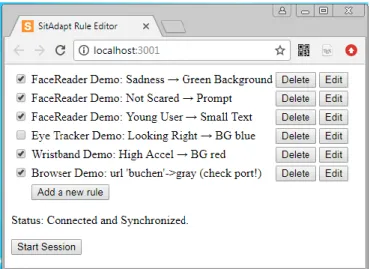
SitAdapt uses two different data types for the generation and adaptation of the user interface received from the different input devices (Figure 1). Atomic data types and temporal date types. Temporal data management makes it possible, to document and analyze changes in the recorded data by time-stamping these data. This allows to reconstruct, which value was valid at which time. For instance, blood pressure or eye positions. With the aid of the SitAdapt rule editor (Figure 2), these temporal data can be used to create rules, that have an effect on the adaptation of the user interface.
Atomic data types are static data types like age or the wearing of glasses by a user. These data can be incorporated directly into the context of use user model (Figure 4) or for combination with temporal data in the rule editor.
3.2 Recording Component
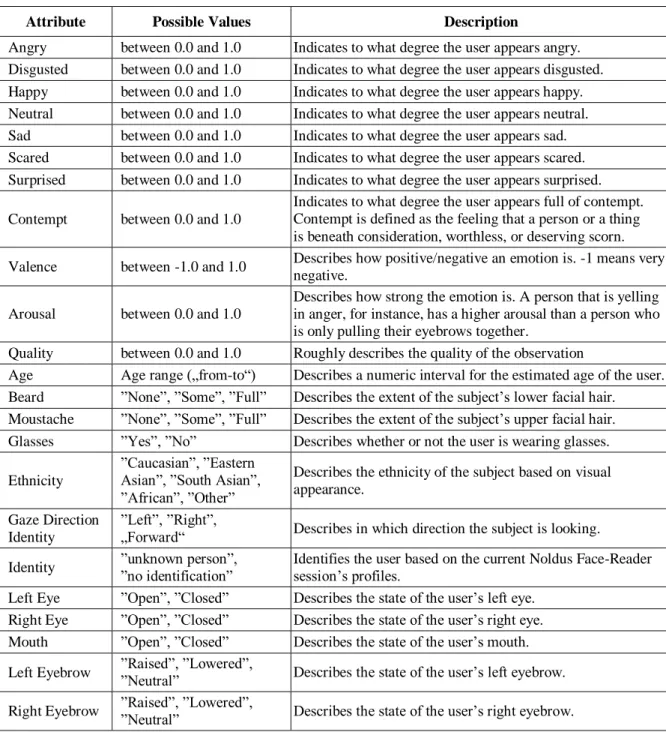
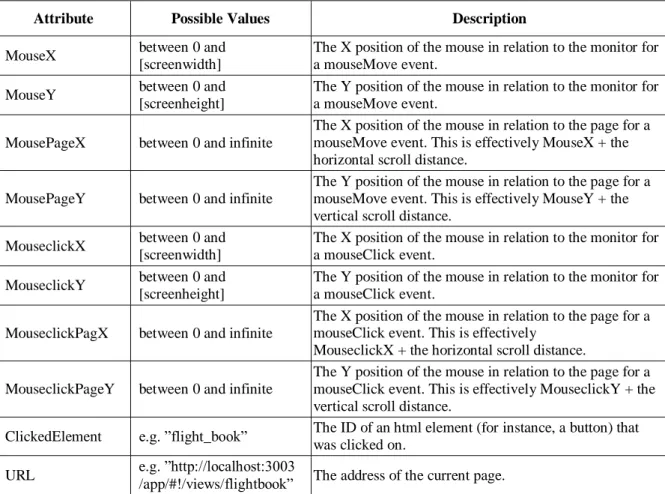
8 recorded by reading the data from a wristband or other signal-emitting devices in real-time. In addition, mouse movements are protocolled. Tables 1 to 4 lists all the values that are recorded by the SitAdapt System.
Table 1. Data input from the eyetracking system
Attribute Possible Values Description
LeftPupilDiameter between ca. 2.0 and
8.0 Describes the dilation of the subject’s left pupil in mm. RightPupilDiameter between ca. 2.0 and
8.0 Describes the dilation of the subject’s right pupil in mm. LeftEyeX between 0.0 and 1.0 Indicates the normalized x-coordinate of the subject’s left eye. LeftEyeY between 0.0 and 1.0 Indicates the normalized y-coordinate of the subject’s left eye. RightEyeX between 0.0 and 1.0 Indicates the normalized x-coordinate of the subject’s right
eye.
RightEyeY between 0.0 and 1.0 Indicates the normalized y-coordinate of the subject’s right eye.
Table 2. Input data from emotion tracking
Attribute Possible Values Description
Angry between 0.0 and 1.0 Indicates to what degree the user appears angry. Disgusted between 0.0 and 1.0 Indicates to what degree the user appears disgusted. Happy between 0.0 and 1.0 Indicates to what degree the user appears happy. Neutral between 0.0 and 1.0 Indicates to what degree the user appears neutral. Sad between 0.0 and 1.0 Indicates to what degree the user appears sad. Scared between 0.0 and 1.0 Indicates to what degree the user appears scared. Surprised between 0.0 and 1.0 Indicates to what degree the user appears surprised. Contempt between 0.0 and 1.0
Indicates to what degree the user appears full of contempt. Contempt is defined as the feeling that a person or a thing is beneath consideration, worthless, or deserving scorn. Valence between -1.0 and 1.0 Describes how positive/negative an emotion is. -1 means very
negative. Arousal between 0.0 and 1.0
Describes how strong the emotion is. A person that is yelling in anger, for instance, has a higher arousal than a person who is only pulling their eyebrows together.
Quality between 0.0 and 1.0 Roughly describes the quality of the observation
Age Age range („from-to“) Describes a numeric interval for the estimated age of the user. Beard ”None”, ”Some”, ”Full” Describes the extent of the subject’s lower facial hair. Moustache ”None”, ”Some”, ”Full” Describes the extent of the subject’s upper facial hair. Glasses ”Yes”, ”No” Describes whether or not the user is wearing glasses. Ethnicity
”Caucasian”, ”Eastern Asian”, ”South Asian”, ”African”, ”Other”
Describes the ethnicity of the subject based on visual appearance.
Gaze Direction Identity
”Left”, ”Right”,
„Forward“ Describes in which direction the subject is looking.
Identity ”unknown person”, ”no identification” Identifies the user based on the current Noldus Face-Reader session’s profiles. Left Eye ”Open”, ”Closed” Describes the state of the user’s left eye.
9 Table 3. Input data from the wristband
Attribute Possible Values Description
x between -128 and 127 Acceleration value for the x axis y between -128 and 127 Acceleration value for the y axis z between -128 and 127 Acceleration value for the z axis
bvp between -1000 and 1000 Blood Volume Pulse ”derived from the light absorbance of the arterial blood.
gsr between 0 and 6 Galvanic Skin Response, a measure of the skin’s electrical conductivity, ”expressed in microsiemens” tmp between 15 and 40 Temperature in degrees Celsius.
ibi between 0.4 and 1.9 Interbeat Interval, ”the distance from the previous detected heartbeat in seconds.” hr between 30 and 160 Heartrate in beats per minute
bat either 0.01 or 0.1 Battery level (note this value appears to be bugged) Table 4. Metadata from the application
Attribute Possible Values Description
MouseX between 0 and [screenwidth]
The X position of the mouse in relation to the monitor for a mouseMove event.
MouseY between 0 and [screenheight]
The Y position of the mouse in relation to the monitor for a mouseMove event.
MousePageX between 0 and infinite
The X position of the mouse in relation to the page for a mouseMove event. This is effectively MouseX + the horizontal scroll distance.
MousePageY between 0 and infinite
The Y position of the mouse in relation to the page for a mouseMove event. This is effectively MouseY + the vertical scroll distance.
MouseclickX between 0 and [screenwidth]
The X position of the mouse in relation to the monitor for a mouseClick event.
MouseclickY between 0 and [screenheight]
The Y position of the mouse in relation to the monitor for a mouseClick event.
MouseclickPagX between 0 and infinite
The X position of the mouse in relation to the page for a mouseClick event. This is effectively
MouseclickX + the horizontal scroll distance. MouseclickPageY between 0 and infinite
The Y position of the mouse in relation to the page for a mouseClick event. This is effectively MouseclickY + the vertical scroll distance.
ClickedElement e.g. ”flight_book” The ID of an html element (for instance, a button) that was clicked on.
URL e.g. ”http://localhost:3003
/app/#!/views/flightbook” The address of the current page.
3.3 Database Writer
10 Figure 2. SitAdapt 2.0 Rule Editor
3.4 Rule Editor
The rule editor allows the definition and modification of situation rules, e.g. for specifying the different user states (e.g. if an angry state is observed, it will only become relevant, if the state lasts more than five seconds and the grade of the emotion surpasses a certain activation level) and the resulting actions. The rule editor is very flexible and can use all input data types and values and their temporal changes for formulating rule conditions.
Figure 2 shows the creation of a simple situation rule with four conditions and two simple actions. Figure 3 shows, how existing situation rules are activated at design time. At runtime they are fired by the situation analytics component for adapting the user interface, if the conditions of one or more rules apply. In this example none of the PaMGIS models is affected and only a dialog with the user or a modified presentation attribute is created. However, situation rules can also activate HCI-patterns in the pattern repository. These patterns come with different levels of abstractions. They may contain concrete templates for generating interaction objects or modifying low-level user interface attributes. A more abstract HCI-pattern can be exploited by the PaMGIS framework at runtime to generate user interface adaptations from predefined UI-, task-, or domain-model fragments directly referenced by the HCI-pattern.
11 3.5 Situation Analytics Component
The situation analytics component analyzes and assesses situations by exploiting the observed data. Situation rules are fired by the situation analytics component when the rule conditions are satisfied. Situation rules interact with the situation profiles stored in the SitAdapt database. The rule actions either directly trigger simple adaptations or interact with the PaMGIS resources as described above.
3.6 Evaluation and Decision Component
The evaluation and decision component uses the data that are provided by the situation analytics component to decide whether an adaptation of the user interface is currently meaningful and necessary. For this purpose the component evaluates one or more applicable situation rules and has to solve possible conflicts between the rules. Whether an adaptation is meaningful depends on the predefined purpose of the situation-aware target application. Goals to meet can range from successful marketing activities in e-business, e.g. having the user buying an item from the e-shop or letting her or him browse through the latest special offers, to improved user experience levels, or to meeting user desires defined by the hidden mental states of the user.
Such goals can be detected, if one or more situations in the situation profile trigger an application dependent or domain independent situation rule. Situation rules are related to patterns. They define behavioral and context-related situational patterns. If the decision component decides that a complex adaptation is necessary, it has to provide the artifacts from the PaMGIS pattern and model repositories to allow for the modification of the target application by the adaptation component. The situation rules provide the links and control information for accessing and composing HCI-patterns and model fragments, necessary for constructing the modifications.
3.7 Adaptation Component
The adaptation component finally generates the necessary modifications of the interactive target application. The process for modeling adaptations is discussed in Section 4.
Together these architectural components provided by the SitAdapt Interpreter are necessary for enabling the PaMGIS framework to support automated adaptive user interfaces.
4
Modeling Adaptations
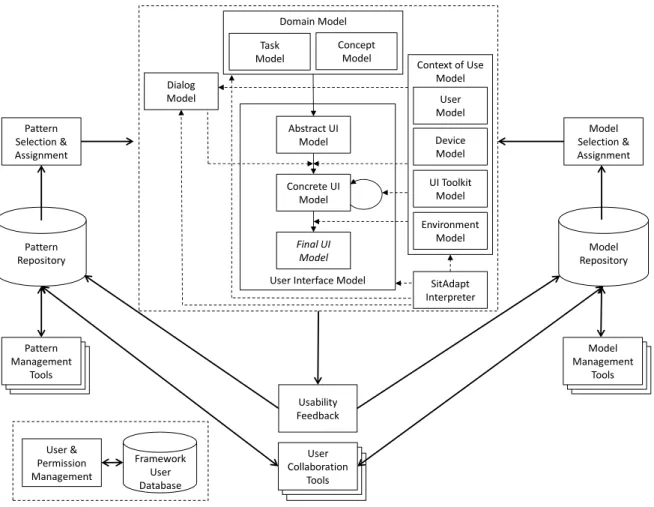
The SitAdapt interpreter is integrated into the PaMGIS-framework (Figure 4), a pattern- and model-based MBUID environment that uses the ontological domain- and context models as proposed by the CAMELEON reference framework (CRF) [6].
The SitAdapt interpreter has full access to all sub-models of PaMGIS and directly interacts with the user interface model. It supports (semi-)automated dynamic adaptation before and during runtime [33]. Within CRF-conforming systems the abstract user interface model (AUI) is generated from the information contained in the domain model of the application that includes a task model and a concept model and defines abstract user interface objects that are still independent of the context of use.
12 Figure 4. PaMGIS MBUID framework with SitAdapt Interpreter and communication flow for CRF-model interaction [10]. The situation analytics component resides in the SitAdapt Interpreter. Adaptations triggered by the situation analytics component may involve the pattern and model resources of the PaMGIS framework.
If an adaptation requires predictable structural changes of the user interface or different task workflows, an adaptation variant can be modeled by providing alternative models for all affected modeling levels. The technical details of the adaptation process are discussed in [10].
For implementing the situation-aware adaptation process, the task, dialog and context of use models are the most relevant of the PaMGIS sub-models. The user model holds both static information about the user and dynamic data describing the emotional state as well as the biometric state. It is structured as follows [10]:
<UserCharacteristics> <UserIdentData> <UserAbilities> <USRUA_Agerange> <USRUA_Visual> <USRUA_Acoustic> <USRUA_Motor> <USRUA_Mental> <UserExperiences> <USRUE_Domain> <USRUE_Handling> <UserDistraction> <UserLegalCapacity> <UserEmotionalState> <UserPsychologicalState>
User Interface Model Abstract UI Model Concrete UI Model Final UI Model Domain Model Task Model Concept Model
13 Not all of these attributes need to be filled with concrete data values. The dynamic values concerning emotional state and biometric state are taken from the situation profile that resides in the SitAdapt database, whenever an adaptation decision has to be made. Note, that the situation profile that is generated by the SitAdapt Interpreter contains the whole sequence of emotional and biometric user states from session start until session termination. The temporal granularity of the recorded raw situations is variable. An example of a situation profile with a granularity of one second for a ticket booking application is the following:
<SituationProfile> <TargetApplication> <User>
...
<Situation_booking>
<SituationTime> 29 s ...
<Eye_Tracking> eye_t(29 s) ...
</Situation_booking> <Situation_booking>
<SituationTime> 30 s <FUI_link> Wizard_Part_1 <AUI_link> model_AUI_1 <CUI_link> model_CUI_1 <Dialog_link> order_ticket <Task_link> order_ticket <Concept_link> concept_1 <Eye_Tracking> eye_t(30 s) <EmotionalState> neutral <UserPsychologicalState> tired
<BiometricState> <Pulse> normal <StressLevel> orange </Situation_booking>
...
</SituationProfile>
Along with the recorded data, the situations are also linked with the PaMGIS models of the currently used interactive components. The links can be modified whenever an adaptation occurs. Via the FUI_link information about the currently used interaction object as well as the mouse and keyboard input data is immediately available.
Before starting a target application, a UI configuration file is generated that contains a ContextOfUse tag field for each modeled task. It has sub-tags that may serve as context variables holding information relevant for controlling the UI configuration and later, at runtime, the adaptation process.
For instance, one of the sub-tags may contain information that a task “ticket sale” is only authorized for users from age 16. When the situation analytics component at runtime discovers that the current user is less than 16 years old, a hint is given in the final user interface (FUI) model that she or he is not authorized to buy a ticket.
5
SitAdapt at Work
14 5.1 Travel-Booking Web Application
The application features elements typical for e-commerce applications, including the ability to enter query parameters, viewing and selecting query results, viewing product details, registering as a new user, logging in, modifying a selected product, and viewing a summary of all entered data before making a purchase.
Having the ability to collect information about a user's physical, physiological and emotional properties allows application designers to offer products and product enrichment opportunities ("extras") that center on the user's immediate and/or long-term needs, benefitting producers and consumers. In the field of air travel, for instance, knowledge of a user's demographic and his or her current disposition can influence the kinds of seat and airline upgrade opportunities offered to the user.
In our first example (Figure 5), the system can recognize fear, anger, or a higher pulse rate, while a user is in the process of choosing a flight. In response, it offers an effective remedy to combat the customer's fear of flying and/or other negative flight-associated emotions.
Figure 5. Offering an additional meal service
Figure 6. (a) Offering Wi-Fi upgrade for young passengers. (b) Offering more legroom for senior citizens.
In the second example (Figure 6a, b), the system uses a demographic-focused approach to determine positive flight-related desires and presents an option to fulfill these desires to the user. A user between the ages of 15 and 40 may be presented with an option to purchase Wi-Fi access, while for users with an age over 50 a seat upgrade opportunity may be presented to increase their level of comfort throughout the flight.
15 or reconsider their budgetary restrictions when looking at the different opportunities. Such data can be exploited by specific situation rules.
The SitAdapt interpreter’s capabilities used by the prototypical applications are not limited to targeted advertising. Application developers can also use our system to change color schemes to appeal to the user's current mood, change layouts to suit demographic-based technological prowess, change styles to suit possible accessibility needs, record specific diagnostic information and offer help (or ask for specific feedback) when a user becomes frustrated with a certain feature.
5.2 Customer Experience Evaluation in a Beauty Products Web-Shop
In a recent user study with 9 female test persons we tested the usability, user experience and emotional behavior for different scenarios when interacting with a real-world cosmetics industry web-portal [34]. These tests served as the basis for finding typical domain-dependent situations and formulating situation rules.
Figure 7. Emotional reaction when reading the textual description after finding the right product [34]
In order to illustrate the potential of situation-aware adaptation we present some real-world situation examples and possible adaptive reactions. In the first example (Figure 7) a test person is searching for a specific winter skin cream. Upon reading the detailed description of the product Winter Silk Crème, the user’s emotional state significantly changes to happy. A situation rule could now exploit this knowledge to give additional information about other winter products.
In the next example (Figure 8 and Figure 9), the system has gathered a priori knowledge about the varying fixation behavior of test persons, who are either recurring customers of the business or who are here for the first time, by distinguishing between the lab-created heat maps. The fixation behavior can be exploited to categorize anonymous users. The customer experience during the pre-purchase phase can be improved. When the system assumes a returning customer, the focus will be put on showing some related aesthetic images or backgrounds, while in the other case more descriptive information will be given during the rest of the session.
16 Figure 9. Heatmap for first time users of the website [34]. Fixation focuses on content information.
Another application area for using situation analytics in the e-business field is the evaluation and fine-tuning of pre-defined customer personas, which are used for pre-runtime adaptations and configurations of an application. Focusing on personas for a priori adaptation of the cosmetics portal can, e.g. affect the visual appearance, the product content structure, the level of the product description language, the appearance of special advertisements, or the gaming and social media orientation of the website. Are test persons behaving like their respective personas or are there significant deviations from the expected behavior? This can be evaluated by comparing the situation profiles that come up during persona-adapted user tests with the typical situation profiles specified during the persona definition process.
On the other hand SitAdapt 2.0 can also classify unknown customers or first time visitors into one of the given persona categories by analyzing the situations appearing during the session and by analyzing the users’ behavior after situation-rule triggered adaptations.
In a final example we specify a situation rule that can also be used in the beauty products web-shop environment. Here, SitAdapt recognizes the user’s interest in a certain product. After three minutes a text is displayed that notifies the user that in case of the purchase of product (Id) within a certain time-span, a voucher is granted for the user’s next purchase. A link to the voucher-processing task in the task model is activated:
<SituationRule> OfferingVoucher
FOR N <Situationi> IN 180s
<Eye_Tracking> Field Product Product(Id) <Gaze_Tracking> Contains Field Product Product(Id) (>5)
<Pulse> (85-100) <PulseRate> rising <Emotion> excited <StressLevel> orange
<Action> SHOW AT 180s VoucherText1FUI <Action> WAIT VoucherText1FUIInput <Action> LINK VoucherText1FUIInput
TaskModel VoucherProcessingTask
17
6
Conclusion
In this article we have presented the SitAdapt 2.0 system that supports situation-aware dynamic adaptations of the user interface at design and runtime. The system is currently being evaluated for several business applications in a use- and situation-analytics-lab environment.
The evaluation process includes user studies for both the travel-booking application and the beauty products portal and will assess the quality of the real-time adaptations during a session, their impact on task accomplishment, on usability, as well as on the way users perceive and rate such adaptations with respect to user experience, privacy, and possible manipulative effects.
We use the results for different purposes:
Defining and testing situational patterns and possible user interface adaptations
Testing ideas for digital marketing activities in the later stages of the customer journey
Identifying domain-dependent and domain-independent user personas
Analyzing recorded user and meta-data to mine correlations between visual, bio-physical and mouse- and keyboard tracking data in order to support anonymous or at least less intrusive support for emotion-based adaptations in the future.
In order to also record and assess the cognitive load, the attention level, and stress-related parameters we have recently added g.Tec EEG measurement hard- and software to our lab equipment and integrated it into the SitAdapt architecture. We are currently carrying out a large study within the customer experience domain, where we are interested in comparing and aggregating the results obtained with visual emotion recognition software with the data gathered with the brain-computer interface equipment.
We expect a rapid evolution of visual and sensor-based emotion recognition technology and its hard- and software integration into all device types from desktop computers to smart phones and other personal devices. If the recorded data can be securely kept privately on the devices, the benefits generated from individualized adaptations will be experienced by the users without compromising their privacy.
Better user experience and task accomplishment, fine-tuned with privacy-keeping ethical and value-based design strategies can thus also drive the success of business models built around situation-aware software technology.
Acknowledgements
We would like to thank our reviewers for the valuable comments and hints for possible future research directions and the Dr. Grandel GmbH for letting us use their real-world E-Business platform for experimental purposes.
References
[1] B. N. Schilit and M. M. Theimer, “Disseminating Active Map Information to Mobile Hosts,” IEEE Network, vol. 8, no. 5, pp. 22–32, 1994. Available: https://doi.org/10.1109/65.313011
[2] J. M. Flach, “Situation awareness: The emperor’s new clothes,” Mouloua, M., Parasuaman, R. (Eds.) Human
performance in automated systems: Current research and trends, pp. 241–248, Erlbaum, 1994.
[3] C. K. Chang, “Situation Analytics: A Foundation for a New Software Engineering Paradigm,” IEEE Computer, vol. 49, no. 1, pp. 24–33, Jan. 2016. Available: https://doi.org/10.1109/MC.2016.21
[4] J. Engel, C. Märtin, and P. Forbrig, “A Concerted Model-driven and Pattern-based Framework for Developing User Interfaces of Interactive Ubiquitous Applications,” Proc. First Int. Workshop on Large-scale and
Model-based Interactive Systems, Duisburg, pp. 35–41, 2015.
[5] G. Meixner, G. Calvary, and J. Coutaz, “Introduction to model-based user interfaces,” W3C Working Group
18 [6] G. Calvary, J. Coutaz, and L. Bouillon et al., “The CAMELEON Reference Framework,” CAMELEON
Project, 2002. [Online]. Available:
http://giove.isti.cnr.it/projects/cameleon/pdf/CAMELEON%20D1.1RefFramework.pdf
[7] J. Engel, C. Märtin, and P. Forbrig, “Practical Aspects of Pattern-supported Model-driven User Interface Generation,” Proc. HCI International 2017, Part I, Springer, LNCS, vol. 10271, pp. 397–414, 2017. Available: https://doi.org/10.1007/978-3-319-58071-5_30
[8] J. Engel, C. Märtin, and P. Forbrig, “A Unified Pattern Specification Formalism to Support User Interface Generation,” Proc. of HCII 2016, Part I, Springer, LNCS, vol. 9731, pp. 445–456, 2016. Available: https://doi.org/10.1007/978-3-319-39510-4_41
[9] C. Märtin, S. Rashid, and C. Herdin, “Designing Responsive Interactive Applications by Emotion-Tracking and Pattern-Based Dynamic User Interface Adaptations,” Proc. HCII 2016, Springer, LNCS, vol. 9733, pp. 28–36, 2016. Available: https://doi.org/10.1007/978-3-319-39513-5_3
[10] C. Märtin, C. Herdin, and J. Engel, “Model-based User-Interface Adaptation by Exploiting Situations, Emotions and Software Patterns,” Proc. CHIRA 2017, SCITEPRESS, vol. 1, pp. 50–59, 2017. Available: https://doi.org/10.5220/0006502400500059
[11] C. Märtin and C., Herdin, “Enabling Decision-Making for Situation-Aware Adaptations of Interactive Systems,” Proc. 10th Forum Media Technology, ceur-ws.org, vol. 2009, pp. 48–52, 2017.
[12] C. Märtin, F. Kampfer, and C. Herdin, “Merging Situation Analytics and Model-Based User Interface Development for Building Runtime-Adaptive Business Applications,” J. Zdravkovic et al. (Eds.): BIR 2018, LNBIP, vol. 330, pp. 175–189, 2018. Available: https://doi.org/10.1007/978-3-319-99951-7_12
[13] J. Melchior, J. Vanderdonckt, and P. Van Roy, “A Model-Based Approach for Distributed User Interfaces,”
Proc. EICS 2011, pp. 11–20, ACM, 2011. Available: https://doi.org/10.1145/1996461.1996488
[14] J. M. Flach, M. Mulder, and M. M Van Paassen, “The Concept of the Situation in Psychology,” in: Banbury, S. and Tremblay, S. (Eds.): A Cognitive Approach to Situation Awareness: Theory and Applications, Ashgate Publisching, Oxon (UK), pp. 42–60, 2004.
[15] S. Vieweg and A. Hodges, “Rethinking Context: Leveraging Human and Machine Computation in Disaster Response,” Computer, vol. 47, no. 4, pp. 22–27, 2014. Available: https://doi.org/10.1109/MC.2014.97
[16] R. O. Oyeleke, C.-Y.Yu, and C. K. Chang, “Situ-centric Reinforcement Learning for Recommendation of Tasks in Activities of Daily Living in Smart Homes,” Proc. 42nd IEEE Int. Conf. on Computer Software
&Applications, COMPSAC 2018, pp. 317–322, IEEE, 2018. Available:
https://doi.org/10.1109/COMPSAC.2018.10250
[17] C. Herdin, C. Märtin, and P. Forbrig, “SitAdapt: An Architecture for Situation-aware Runtime Adaptation of Interactive Systems,” Proc. HCI International 2017, Part I, Springer, LNCS, vol. 10271, pp. 447–455, 2017. Available: https://doi.org/10.1007/978-3-319-58071-5_33
[18] R. W. Picard, “Recognizing Stress, Engagement, and Positive Emotion,” Proc. IUI 2015, pp. 3–4, 2015. Available: https://doi.org/10.1145/2678025.2700999
[19] F. Qu and S.-J. Wang et al., “CAS(ME)2: A Database of Spontaneous Macro-expressions and Micro-expressions,” Proc. HCI 2016, Part III, Springer, LNCS, vol. 9733, pp. 48–59, 2016. Available: https://doi.org/10.1007/978-3-319-39513-5_5
[20] A. Schmidt, “Biosignals in Human-Computer Interaction,” Interactions, vol. 23, no. 1, pp. 76–79, 2016. Available: https://doi.org/10.1145/2851072
[21] Y. Lee and R. K. Balan, “The Case for Human-Centric Personal Analytics,” Proc. WPA ’14, pp. 25–29, ACM, 2014. Available: https://doi.org/10.1145/2611264.2611267
[22] J. Warshaw, J. et al. “Can an Algorithm Know the “Real You”? Understanding People’s Reactions to Hyper-personal Analytics Systems,” Proc. CHI 2015, pp. 797–806, ACM, 2015. Available: https://doi.org/10.1145/2702123.2702274
[23] M. Hoque and R. W. Picard, “Rich Nonverbal Sensing Technology for Automated Social Skills Training,”
Computer, vol. 47, no. 4, pp. 28–35, 2014. Available: https://doi.org/10.1109/MC.2014.98
19 [25] S. Cheng and Y. Liu, “Eye-tracking based adaptive user interface: implicit human-computer interaction for preference indication,” J Multimodal User Interfaces, vol. 5, pp. 77–84, 2012. Available: https://doi.org/10.1007/s12193-011-0064-6
[26] B. Friedmann and D. G. Hendry, Value Sensitive Design: Shaping Technology with Moral Imagination, MIT Press, 2018. Available: https://doi.org/10.7551/mitpress/7585.001.0001
[27] S. Thew and A. Sutcliffe, “Value-based requirements engineering: method and experience,” Requirements Eng., vol. 23, no. 4, pp. 443–464, 2018. Available: https://doi.org/10.1007/s00766-017-0273-y
[28] P. A. Akiki et al. “Integrating adaptive user interface capabilities in enterprise applications,” Proc. of the 36th
International Conference on Software Engineering (ICSE 2014), pp. 712–723, ACM, 2014. Available:
https://doi.org/10.1145/2568225.2568230
[29] T. Deuschel, “On the Influence of Human Factors in Adaptive User Interface Design,” Proc. UMAP’ 18, pp. 187–190, ACM, 2018. Available: https://doi.org/10.1145/3213586.3213587
[30] J. A. Galindo, “Perso2U: Exploration of User Emotional States to Drive Interface Adaptation,” M. Botto-Tobar et al. (Eds.), Technology Trends CITT 2018, Springer, CCIS, vol. 895, pp. 288–301, 2019. Available: https://doi.org/10.1007/978-3-030-05532-5_21
[31] E. Yigitbas, S. Sauer, and G. Engels, “Adapt-UI: An IDE Supporting Model-Driven Development of Self-Adaptive UIs,” Proc. EICS '17, ACM, pp. 99–104, 2017. Available: https://doi.org/10.1145/3102113.3102144 [32] J. Hussain et al. “Model-based adaptive user interface based on context and user experience evaluation,” J
Multimodal User Interfaces, Springer, vol. 12, no. 1, pp. 1–16, 2018. Available: https://doi.org/10.1007/s12193-018-0258-2
[33] E. Yigitbas, S. Sauer, and G. Engels, “A Model-Based Framework for Multi-Adaptive Migratory User Interfaces,” Proc. of the HCI 2015, Part II, Springer, LNCS, vol. 9170, pp. 563–572, 2015. Available: https://doi.org/10.1007/978-3-319-20916-6_52
[34] C. Märtin, C. Herdin, and B. Bissinger, “Modeling User Interface Adaptation for Customer-Experience Optimization,” Seidl, M., Blumenstein, K. et al. (Eds.), FMT 2018, Proc. of the 11th Forum Media Technology

![Figure 8. Heatmap for customers of the business [34]. Fixation focuses on subjective information](https://thumb-us.123doks.com/thumbv2/123dok_us/7975214.2116740/15.892.194.749.919.1132/figure-heatmap-customers-business-fixation-focuses-subjective-information.webp)
![Figure 9. Heatmap for first time users of the website [34]. Fixation focuses on content information](https://thumb-us.123doks.com/thumbv2/123dok_us/7975214.2116740/16.892.193.744.81.293/figure-heatmap-users-website-fixation-focuses-content-information.webp)
