User Authentication System using Cryptography
Involving Arithmetic Operations
Saddam Husain
Ankur Sharma
Gaurav Gupta
Vijaishri Tewari
Indian Institute of Information Technology-Allahabad, India-211012
Indian Institute of Information Technology-Allahabad, India-211012
Indian Institute of Information Technology-Allahabad, India-211012
Indian Institute of Information Technology-Allahabad, India-211012
ABSTRACT
The concept of having to identify an entity before being allowed to perform any action is quite acceptable, and expected, and required in today’s wired world. Password managers, graphical systems, pattern recognition, biometrics have always been found to be incapable of providing robust security in some or the other aspect, in critical authentication systems [24]. In our approach, the user at the time of profile creation is required to enter the password, minimum of 6 characters and a secret numeric PIN of minimum 4 digits. Now during subsequent login attempts, the user will be asked to enter the password as an answer to a random mathematical question displayed in front of him in the form of an image (readable only by human and not by a software entity) [15]. Example; Consider the password: KOREAN and secret pin: 1234, the question would be; your 2nd character of password varies by 1+3rd character of your secret pin. Now instead of the original password, the user will enter the new password as KSREAN. The password can contain any combination of the available 96 characters on the keyboard. Every time only the same character of the password will be changed. The secret pin must contain only digits (to increase security, length can be increased to 10 or more digits). If the user enters the correct password he is authenticated otherwise denied access. This concept has some assumptions that the site locks the account if number of attempts for a particular user name exceeds a predetermined threshold.
Keywords
Information security; user authentication; cryptography, phishing; click recorders; screen recorders; arithmetic operations;
1.
INTRODUCTION
“The “password problem” germinate from the theory of the users that are required to have an ever-increasing quantity of passwords, each with different necessary requirements (i.e. “must be 8 characters long”, “must be changed every 3 months”, “Must contain a number”), making it complex for even high security-conscious human to remember all of them[21] [22]. Recent advancements have been provided in the feature of biometric based identity systems where an individual’s physical assets are used as an identity. But the drawback in this, such as change of a human voice, face, etc. over to the years or according to illness or damage tends to vindicate the biometric system fruitless. Bring together with huge expenses and complexity mixed, these systems cannot be recognized at all levels. Pattern recognition, password
managers [14], as choice have not been utilized prodigally because of the various natural drawbacks involved [8] [10].
DejaVu:A User Study Using Images for Authentication, in its effort to ease the process of authentication, clearly is vulnerable to the prominent attacks such as screen recorder programs; also the approach is unexplained at necessary places [25]. The works by Blonder, Jeryman et al, Passlogix Inc, IDArts [13], have involved a time consuming authentication process and still though incremental in their proposition, have failed to address the issue of screen recorders and Phishing attacks, which account for the majority of identity theft incidences.
Our system simply incorporates a simple password and a pin number (similar to the ATM pins, etc). A mathematical question displayed or expressed towards user in the form of “only human readable image” [17] makes the system's defensive against bots and the random question simply makes the author of the screen recorder and the owner of the phishing website, both, baffled even after receiving the credentials.[18] Even with minimum characters used, the system successfully defends against a manifold of attacks. And, this system is equipped with a flexibility to enhance security by changing minimal components. [2]
The rest of the paper is structured as follows: Section II deals with providing an overview of the background work done so as to understand the research problem. Section III represents suggested approach and also deals with related work and Section IV concludes the paper.
2.
BACK GROUND
In this section we provide background information involving authentication concepts, major attacking techniques, types of attacks, cryptanalysis, etc.
2.1
Authentication
scheme). For a positive identification, security researches have determined at least two or all the three factors to be verified [19]. The above described three factors with some of its elements are as follows:
1. The ownership factors: Something the user or person has (e.g., Identity card, security and software tokens, cell phone s, etc.).
2. The knowledge factors: Something the user or person knows (e.g., an authentication password, a pass phrase, a personal identification number (PIN), a challenge-response (where the user needs to answer a question).
3. The inherence factors: Something the user or person is or does (e.g., fingerprints DNA sequences, retinal patterns, signature, facial and voice recognitions, unique bio-electric signals, or other biometric identifier).
2.2
Major Attacking Techniques
2.2.1
Phishing
The process of acquiring information that may sometime lead to illegitimately gaining monetary benefits for example, details of a credit card, username and passwords by masquerading in an electronic communication system is termed as Phishing. Phishing performed through emails link users to likely or exactly malware infected websites. Phishing is now hardly carried out by instant messaging or e-mail spoofing, and now it often directs authentic users to provide details at a forge/fake website whose looks and feels are almost original as that of the legitimate one.
List of phishing techniques
i. Spear Phishing: Phishing attempts directed at some specific individuals and on numbers of companies are termed as spear phishing. Attackers may collect personal information of their targets to increase probability of success.
ii. Clone Phishing: A form of phishing attack where a legitimate, and previously delivered, e-mail containing a link or an attachment /attachments has had its contents and recipients addresses used to make an identical to same or cloned email. And then this email containing malicious link or attachment replaced with the original one is send from a spoofed email address to be looked as a legitimate email. It may seem to the user as a re-send of the original copy or an updated copy version to the original. As both parties receive the original emails, the social trust established with the connection is exploited and the attack progresses from an infected machine towards exploiting the other machines. iii. Whaling: Several This terms is coined for phishing
attempts made on high profile users like senior executives within the business.
2.2.2
Screen Recorder (Screen cast)
A Digital recording of the computer screen output is termed as screen cast, also known as a video screen capture, with audio narration. While we compare screen cast with screen shots, we can say that screen cast is a moving of changes that a person or user sees on the screen with audio narration whereas screenshot
is just picture taken of the computer screen. Software features can be taught and demonstrated by the screen casts. Creating a screen cast helps software developer’s show off their work. Educators might use screen casts as another means of integrating technology into the curriculum. The procedures for solving a difficult problem on interactive white boards can be recorded by the students while demonstrating. Certainly, the positives of screen casts can be used for negative intentions.
2.3
Types of Attacks
The following are the types of attacks classified as classes.
TABLE 1: Types of attacks
Class of Attack
Time taken to crack passwords/sec(speed)
Hardware used to crack the passwords
A 10,000 Pentium 100
B 100,000 Pentium 100
C 1,000,000 Pentium 100
D 10,000,000 Fast PC, Dual
Processor PC
E 100,000,000 Workstation, or
multiple PC's working together
F 1,000,000,000 Typical for medium to large scale distributed computing, Supercomputers
2.4
Cryptanalysis
Cryptanalysis aims to find some weakness or insecurity in a cryptographic technique, thus permitting its evasion or subversion. While pure cryptanalysis utilizes weaknesses in the cryptographic algorithms, other attacks performed on the cryptosystems are on the basis of actual use of these algorithms within real devices, and that are called side-channel attacks [1]. If cryptanalyst has access to, for example, the amount of time that the device had taken to encrypt a number of plaintexts or report an wrongness in a PIN character or password, he may be able to take a timing attack that is to crack a cipher which is other way resistant to analysis. An attacker might also learn the pattern, length of messages and sample to prove valuable information; this is termed as traffic analysis and this can be quite useful for an alert adversary.
3
CONCEPT
following the problems involved in the authentication systems technical aspects, we attempted to provide a robust authentication system with an ease on technical aspects.
The various phases contain steps, along with necessary pertaining information, recommendations, assumptions, etc. for each phase.
3.1
Phases
3.1.1 Profile creation phase
On the time of profile creation, when asked to enter his/her authentication credentials, the user will be asked to enter a minimum of 6 characters password of which there should be at least 1 alphanumeric characters and the rest can be any other character. [12]
The user is also required to enter a PIN number. It should contain only digits, should be minimum of length 4. [3] The user can use easy to remember numbers such as its ATM pin number or it can also use his mobile number as his pin number.
The user will also be given a short training as a step towards the completion of its profile. The process of training will be elaborated in the impending phases.
3.1.2 Subsequent login phase
When the user will be attempting his first (or subsequent) logins, he will be displayed an image which contains a simple, random mathematical question [11]. This image is readable by human only and not by any software entity.[7] [16]
Consider the password: KOREAN and PIN: 1234. Example of a question: Your 2nd character of the password varies by 1+3rd digit of your secret PIN.
The user will now enter his password as KSREAN. Because the 2nd character of the password is ‘O’, it is varied by 1+3rd digit of secret pin, so it will be 1+3=4 (As 3rd digit of secret pin is 3) [20]. So O is varied by 4 and it becomes S and hence the password to be entered is KSREAN.
Every time only the same character will be changed and this character can be chosen by the user at the time of profile creation phase. This character should be an alphanumeric character only.
These and such random, simple, mathematic questions described in step 3 will be provided to the user at the time of his training step in profile creation phase. User can request as many questions as he/she wants till it gains a firm mastery with agility in proceeding with this authentication system.
3.2
Password and PIN storage
This system will store the passwords not with the help of regular and the prominent storage encryption techniques such as MD5 or SHA-1, as these systems have been through various cryptanalysis procedures since their inception and are vulnerable to various modern attacks. [5]
We hereby suggest all the implements and the concerned entities employ an encryption and decryption technologies of their own to avoid any impersonation and detrimental attacks to the organizational infrastructure. [9]
3.3
Attacks and countermeasures
3.3.1
Phishing
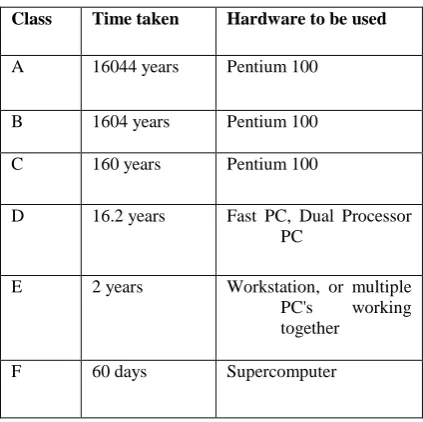
[image:3.595.338.550.416.627.2]A gullible user when directed to a Phishing website will enter his credentials to the corresponding website. The author of the phished page gets these credentials. But as explained in phase A and B, this password will not be the actual password of the user. Even after receiving the pseudo password, for a password of minimum length 6 and a PIN of minimum of length 4, there would be much more than 5.05 quadrillion combinations( 1 quadrillion= 10^15). This is because for a question as follows “Your 2nd password character varies by 1+3rd character of your secret PIN”, as it is mandatory that at least one password character should be an alphanumeric one, so that character can be filled in 62 ways, remaining 5 characters can be filled in 96 ways (assuming a 6 character password). So the combinations till this stage are 62*(96^5). Now interpreting this part of the question (password varies by 1), now this number 1 can be filled in 10 ways. The total combinations till this stage are 62*(96^5)*10. Now for a PIN of 4 characters (minimum constraint), each of these 4 positions can be filled in 10 ways, making a total of 10^4 ways. The final total number of combinations is now 62*(96^5)*10*(10^4) = 5.0553107e+16 (more than 5 quadrillion combinations). In regards to the table 1 shown in the above sections, the following are the times taken to break this kind of password by each class of attack.
TABLE 2: Time taken by various attacks
Class Time taken Hardware to be used
A 16044 years Pentium 100
B 1604 years Pentium 100
C 160 years Pentium 100
D 16.2 years Fast PC, Dual Processor PC
E 2 years Workstation, or multiple PC's working together
F 60 days Supercomputer
3.3.2
Key logger programs
A similar argument can be made for the key logger program tool. This tool after recording the keystrokes sends the collected data to its human installer. Even after receiving this data, the cracker will have to make the combinations as shown in the immediately preceding section. Similar statistics can be concluded for this type of cracking tool thereby rendering a robust system invulnerable to these major attacks to which even existing critical infrastructures fail to withstand against.
3.3.3
Screen Recorders
These programs are not useful in a password based authentication system as the passwords are disguised by the substitution or *(asterisk) or similar characters.
3.3.4
Brute Force attack
This most common attacking approach will apparently take much more time than the times specified above and also will be strictly limited by the consideration of a threshold attempt limit set by the particular website. It is definitely a necessity to impose a minimum threshold limit to maintain a high level of security. This attack also encompasses the well-known dictionary attack. [6]
4
CONCLUSION
The use of different passwords for various systems is apparently becoming a serious issue since users tend to keep all such passwords in a repository which eventually becomes a single point of failure. This system takes a step forward to determine a solution for the same and makes itself robust by defending against major attacks. The time required for user authentication is also equal to the time required for the prevailing authentication systems. This system however might be close to vulnerability with a dedicated attack carried for some years (please see table 2). The advantages of the system are certainly more powerful than the shortcomings and can be enhanced in future period thereby making it more robust against any attacking technique. [4]
5. REFERENCES
[1] RossJ.Anderson, “Why Cryptosystems Fail”. Communications of the ACM, 37(11):32-40, November 1994.
[2] Anne, Adams and Martina Angela Sasse, “Users are not the enemy: Why users compromise computer security mechanisms and how to take remedial measures”. Communications of the ACM, 42(12):40-46, December 1999.
[3] W.Belgers, “Unix password security”, 1993. “http://www.het.brown.edu/guide/UNIX-password-security.txt”
[4] D.W.Davies and W.L.Price, “Security for Computer Networks”. John Wiley & Sons, Inc. New York, NY, USA ©1984. ISBN 0-471-90063-X
[5] Carl Ellison, Chris Hall, Randy Milbert, and Bruce Schneier. “Protecting secret keys with personal entropy”,
future Generation Computer Systems, v. 16, 2000, pp. 311-318, 2000.
[6] D.C.Feldmeier and P.R.Karn. “UNIX password security—ten years later (invited)”, 1989. Lecture Notes in Computer Science Volume 435.
[7] Ralph Norman Haber. “How we remember what we see”. Scientific American, 222, May 1970, l04-ll5.
[8] Ian Jermyn, Alain Mayer, Fabian Monrose, Michael K. Reiter, and Aviel D. Rubin. “The design and analysis of graphical passwords”. In Proceedings of the 8th
USENIX Security Symposium, August1999.
[9] The Knightmare. “Secrets of a Super Hacker”. Loompanics Unlimited, Port Towns end, Washington, 1994. ISBN 13: 9781559501064.
[10]Rosa R. Heckle, Wayne G. Lutters, “Privacy Implications for Single Sign-on Authentication in a Hospital Environment”, In proceeding of: Proceedings of the 3rd Symposium on Usable Privacy and Security, SOUPS 2007, Pittsburgh, Pennsylvania, USA, July 18-20, 2007.
[11]Michael D. Leonhard, V. N. Venkatakrishnan, “A Comparative Study of Three Random Password Generators”. Proceedings of the IEEE Electro/Information Technology Conference (EIT) may 2007. Page 271—276.
[12] Dustin D. Trammell. “Mnemonic Password Formulas, Remembering Secure Passwords”. May, 2007.
“http://www.uninformed.org/?v=7&a=3.”
[13]Passlogix. v-go. WWW at “http://www.passlogix.com/, 2000”.
[14]Sonia Chiasson, Paul van Oorschot, Robert Biddle “A Usability Study and Critique of Two Password Managers”, 15th
USENIX Security Symposium - July 2006. “https://www.usenix.org/conference/15th-usenix- security-symposium/usability-study-and-critique-two-password-managers”
[15]Sonia Chiasson, Paul van Oorschot, Robert Biddle “Graphical Password Authentication Using Cued Click Points”. Proceedings of ESORICS 2007. 09/2007; DOI:10.1007/978-3-540-74835-9_24
“http://www.researchgate.net/publication/225193580_Gr aphical_Password_Authentication_Using_Cued_Click_P oints”.
[16]Sonia Chiasson, Robert Biddle, Paul van Oorschot “A Second Look at the Usability of Click-Based Graphical Passwords”, Proceedings of the Symposium on Usable Privacy and Security (SOUPS) 2007. Pages 1-12, ISBN: 978-1-59593-801-5
[17]Di Lin, Paul Dunphy, Patrick Olivier, Jianxin Jeff Yan, “Graphical Passwords & Qualitative Spatial Relations”. Proceedings of the Symposium On Usable Privacy and Security (SOUPS) 2007, Pages 161-162.
[18]Ahmet Emir Dirik, Nasir Memon, Jean-Camille Birget. “Modeling User Choice in the PassPoints Graphical Password Scheme”, Proceedings of the Symposium on Usable Privacy and Security (SOUPS) 2007, Pages 20-28.
usable authenticators for untrustworthy environments”, Proceedings of the Symposium on Usable Privacy and Security (SOUPS) 2007, Pages 169-170.
[20]Michael D. Leonhard, V. N. Venkatakrishnan. “A Comparative Study of Three Random Password Generators”, Proceedings of the IEEE Electro/Information Technology Conference (EIT) 2007, Page(s): 227 – 232.
[21]Sonia Chiasson, Robert Biddle. “Issues in User Authentication”, CHI 2007 Workshop on Security User Studies - April 2007. “http://www.verbicidal.org/hcisec-workshop/papers/chiasson.pdf”.
[22]Shirley Gaw, Edward W. Felten. “Password Management Strategies for Online Accounts”. Proceedings of the
Symposium on Usable Privacy and Security (SOUPS) 2006, Pages 44 – 55.
[23]Steven Furnell, Leith Zekri. “Replacing Passwords: In Search of the Secret Remedy”, Network Security, Volume 2006, Issue 1, Pages 4-8.
[24]Steven Furnell. “Authenticating Ourselves: Will We Ever Escape the Password?” Network Security, Volume 2005, Issue 3, Pages 8-13.