1500 ·,SYNCHRONOUS ..
\
DATAPOLL
DISK
MASTER PROGRAM
DPS15M
User's Guide
Version
1
November, 1977
Model Code No. 50301
1500 SYNCHRONOUS DATAPOLL DISK MASTER PROGRAM DPS15M
User's Guide
Version 1
November, 1977,
PREFACE
This user's guide contains information on the operating
procedures for DPS15M and is intended to be used in conjunction
with the synchronous DATAPOLL System's Guide. Before attempting to
use this program, it is essential that the synchronous DATAPOLL
System's Guide be read and understood. Also, it is imperative that
the associated slave station's User's Guide be referred to.
DPS 15M is intended fo.r use only wi th the. 1500 processor. The
communications protocol is compatIble with th~ version 3 (or
later) synchronous slave stations which operate on either the
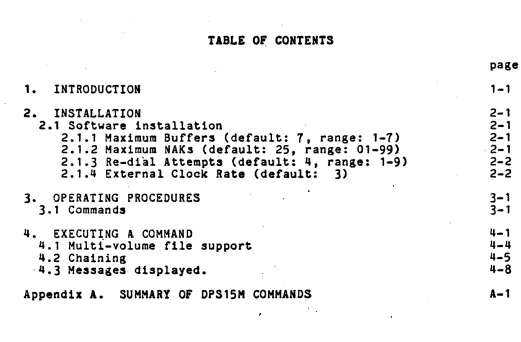
TABLE
O~CONTENTS
1. INTRODUCTION
2. INSTALLATION
2.1 Software installation.
2.1.1 Maximum Buffers (default:
1.
range: 1-7)2.1.2 Maximum NAKs (default: 25, range: 01-99) 2.1.3 Re-dial Attempts (default: 4, range: 1-9) 2.1.q External Clock Rate (default:
3)
3.
OPERATING PROCEDURES3.1 Commands
'I. EXECUTING A COMMAND
lI.l Multi-volume file support 4.2 Chaining
·4.3 Messages displayed.
Appendix A. SUMMARY OF DPS15M COMMANDS
i1
page
1-1
2-1 2-1 2-1 ·2-1
2-2
2-2
3-1 3-1
4-1 4-lI lI-5 '1-8
[image:4.612.79.600.101.443.2]CHAPTER 1. INTRODUCTION
DPS15H is
a
communications program for disk systems in thesynchronous DATAPOLL communications system. DPS15M is a master
program as defined in the synchronous DATAPOLL Systems Guide and can be used to collect data and distribute data to the remote stations.
Automatic control is provided through the use of DOS CHAIN
which tells DPS15H which operations to perform and in what
sequence to perform them. This allows the user to collect data
. from the remo~e stations, process the data, and distribute reports
or data back to the remote stations. However, DPS15M requires an
operator to respond to error messages and cannot ~ executed._~~
unattended mode.
DPS15M is compatible with any of the synchronous DATAPOLL
slave stations version 3 or later. Thus, it can collect data from
and distribute data to cassette, magnetic tape, and disk systems,
CHAPTER 2. INSTALLATION
DPS15M requires a Datapoint 1500 processor which contains an integral synchronous communications adaptors, a disk drive, a disk operating system, and a RS232 compatible modem. The modem must be
RS232 compatible~
2.1 Software installation
When DPS15M is loaded from diskette, it attempts to process configuration data contained on disk in the file named\DPS15M/CFG. If the configuration file is not found, or there is an error in any of the configuration options, the documented defauft values will be used and the message 'DEFAULT CONFIGURATION ASSUMED' will
ba displayed to the operator. If the configuration record is
found, the values specified are those used for the current
execution of the program. The values may be changed using the DOS EDIT program provided the option record is the first text record in the file. Additional comment records follow the options, which· are not processed by the program. The four options are separated from one another by one and only one blank. The second field must contain two digits, even if the leading digit 1s zero. A detailed discussion of each option is provided below.
2.1.1 Maximum Buffers (default:
1,
range:1-1)
DPS15M is initially configured to transmit seven buffers before requesting a response. This value may be changed to any value between one and seven as recommended in the synchronous
DATAPOLL System's Guide. The slave station must be configured for the same number of buffers for communication to succeed.
2.1.2 Maximum NAKs (default: 25, range: 01-99)
DPS15M will, if necessary, send 2~ consecutive negative acknowlegements (NAKs) before terminating the link with a Device Error ~5. The counter is reset any time a transmission is
positively acknowledged. This value may be changed to any v~lue
between 01 ana 99, dependin~upon the requirements of the user.
2.1.3 Re-dial Attempts (default: ~, range: 1-9)
DPS15M is initially configured to limit its attempt to
re-establish an aborted connection to four times. If a valid
connection cannot be established in four additional tries for a particular station. no information (or what partial information
was collected) is accepted for that station. Any ~alue from one
to nine is valid.
-2.1.4 External Clock Rate (default: 3)
DPS15M is initially configured to use the clock signal
provided by the proc~ssor. The user should configure the system
to use the same cloc~ rate as the modem being used. The default
rate of 2400 baud is indicated by the diglt-"3d
• The possible
values are:
0 - use external clock signal
1 - 1800 baud 2 - 2000 baud 3 - 2400 baud
4 - 4800 baud
CHAPTER 3. OPERATING PROCEDURES
After DPS15H has been loaded, the program title is displayed followed by the message 'PHONE NUMBER?'. In response to this
message, the operator must enter one of the following:
1) An asterisk - this will cause DPS15M to reload DOS.
2) A telephone number or any string of up 25 ~haracters which does
NOT begin with an asterisk.
The phone number
!!
not dialed by. the program. When the program is prepared for a connection, tEe\operator will beinstructed to dial the desired number. Th~ phone number entry is used to allow compatibility with chain command files to control Datapoint DATAPOLL Disk Master Programs on other systems. The entry is also re-dlsplayed to prompt the operator to re-dial the phone number if the line is dropped.
3.1
CommandsAfter a telephone number has been entered, DPS15H will
display 'COMMAND?'. DPS15H ~xpects the operator to enter a valid command which will tell it which task to perform. A command is entered by typing on the keyboard. The backspace key can be used to back up the cursor one position and the cancel key can be used to back up the cursor to tne beginning of the entry. After a
command has been typed, the ENTER key must be pressed before DPS15M will recognize the command. If a valid command i~ not entered the machine will BEEP and the operator will be given another opportunity to enter a command. A list of valid commands follow with the command given on the top line followed by an explanation of the command.· Before entering any commands, disk drive zero must be write enabled.
1) ? (question mark)
Entering
a
question mark causes DPS15H to roll up the screen and display a list of all valid commands.2) • (asterisk)
An aster~sk is used to terminate various operations. If an asterisk is ent~red in response to the question 'COMMAND?', the program will terminate the present connection and request another phone number from the operator. If an asterisk is entered in
response to the question 'PHONE NUMBER?', the program will reload DOSo If an asterisk is entered as the first item in response to
the question 'FILE NAME?', the program will re-display the
question 'COMMAND?'. If one or more flle names have been entered after the program displayed 'FILE NAME?', an asterisk will
terminate the list of file names. An asterisk is also used to terminate 'AS IS' text.
3) 1 (number 1) TRANSMIT TO UNITl
Before explaining this command, it is necessary to explain the meaning of UNITl and UNIT2. UNITl and UNIT2 are used to refer to device dependent peripherals at the slave station. If the slave station is a cassette system, UNITl refers to deckl (rear) and UNIT2 refers to deck2 (front). If the slave station is a disk system, UNITl refers to
a
file named TUNIT1/TXT or RUNIT1/TXT and UNIT2 refers to a file named TUNIT2/TXT or RUNIT2/TXT. These files are used to contain a list of file names which are to betransmitted or received. For instance, if we told DPS15M to transmit to UNITl at the slave station, the sla~e station would use RUNIT1/TXT to obtain a list of file names where the received data would be written. RUNIT1/TXT at the disk slave station would have to· contain a list of file names or a device error would· occur. For a magnetic tape slave, UNITl and UNIT2 both refer to the same magnetic tape drive. Refer to the user's guide for the disk slave, magnetic tape slave, and the cassette slave stations for further information.
When the operator enters command 1, it causes DPS15H to transmit to UNITl at the slave. At this point, DPS15M does not
k~ow which files to transmit. So, it will request a list of file names from the operator by displaying 'FILE NAME?'. The operator must enter the file names in the format specified in the DOS USERS GUIDE. If an extension is not given, 'TXT' will be assumed. If a ,drive is not given, all drives will be searched. Only one file
name may be entered on a line followed by the ENTER key. After each file name is entered, the message 'FILE NAME?' will be displayed again and the operator can enter the next file name. When all file names have been entered, an asterisk must be entered
(in the first position where a file name would be entered) to terminate the list of file names. After an asterisk is entered, DPS15M will execute the command as described in Chapter 4. If an asterisk is entered as the first file name, the program will ignore the command a~d request another command by displaying
~) 2 (number 2) TRANSMIT TO UNIT2
Entering the number 2 causes DPS15M to transmit to UNIT2 at the slave. This command works exactly as command 1 except that
UNIT2 is used instead of UNIT1. A list of file names will be
requested from the operator in the same manner as described for
command 1.
5)
3
(number3)
TRANSMIT TO PRINTEREntering the number 3 causes DPS15M to transmit to the
printer at the slave station. This command worKS exactly as
command 1 except that the data is sent to the printer instead of
UNITl. A list of file names wl1lbe requested from the operator
in the same manner as described for comman~ 1. Non-text files
should not be listed on the printer, as the( results will be
unpredictable.
6) 4 (number 4) TRANSMIT TO UNITl + PRINT OFF-LINE
Entering the number 4 causes DPS15M to transmit to UNITt at
the slave station and after all files have been transmitted, the connection will be terminated and the files will be listed on the
printer 1n an offline mode. A list of file names will be requested
from the operator in the same manner as described for command 1.
Non-text files will be skipped over during the off-line print operation.
7) 5 (number 5) TRANSMIT TO UNIT2 + PRINT OFF-LINE
Entering the number 5 causes DPS15M to transmit to UNIT2 at
th~ slave station and after all files have been transmitted, the
connection will be terminated and the files will be listed on the
printer in an offline mode. A list of file names will be requested
from the operator in the same manner as described for command 1.
Nan-text files will be skipped over during the off-line print operation.
8) 6 (number 6) TRANSMIT "AS IS" TEXT TO UNITl
Entering the number 6 causes DPS15M to transmit 'as is' text
to UNIT1. This command can be used for mailbox operations. After the master station has transmitted or received data from the slave station, the 'AS IS' command can be used to send free-form data to the slave. The 'AS IS' text can be anything the customer desires.
After entering command 6, DPS15M will display 'ENTER AS IS TEXT~.
The operator can ·then type on the keyboard to enter his text. A
new line can be-started by pressing the ENTER key. When an
asterisk is entered (must be in the first position of a line) the
command will be executed as described in chapter 4. There is no
limit to the amount of 'as is' text that may be entered because it
is stored in the SCRATCH/TXT file as it is entered. When the
command is actually executed, the scratch file is transmitted.
9) 7 (number 7) TRANSMIT "AS IS" TEXT TO UNIT2
Entering the number 7 causes DPS15M to transmit 'as is' text to UNIT2 at the slave station. This command works exactly as
command 6 except that the 'as is' text is transmitted to UNIT2.
10) 8 (number 8) TRANSMIT KEYBOARD MESSAGE TO'CRT
Entering the number 8 causes DPS15M to transmit a keyboard message from the master station to the crt at the sl~ve station. After the digit 8 has been entered, DPS15M ~ill display 'ENT£R MESSAGE'. The operator can type the message on the bottom line and when the ENTER key is pressed the message will be transmitted to the slave station. After the message has been sent, DPS15M will request another command from the operdtor.
11) 9 (number 9)' RECEIVE UNITl FROM SLAVE'
Entering the number 9 causes DPS15M to receive UNITl from the slave station. If the slave s~ation is a cgssecte system, the r~a~
cassette will be transmitted. If the slave station is a disk
system, a list of file names will be obtained from TUNIT1/TXT and the files named in the list will be transmitted.
After entering the number .9, DPS15~ will request a list of file names where the data will be written. The file names are entered in the same manner as described for command 1.
12) 10 (number 10) RECEIVE UNIT2 FROM SLAVE
Entering the 'number 10 causes DPS15M to receive UNIT2 from the slave station. This command works exactly as command 9 \lith the exception that UNIT2 is received instead of UNIT1.
13) 11 (number 11) RECEIVE KEYBOARD MESSAGE FROM SLAVE
Entering the number 11 causes DPS15M to request a keyboard message from the slave station. This command is executed
immediately after the operator enters the number 11 and presses the ENTER key.
Command 11 will cause the following events to occur at the slave station. The message 'KEYIN REQUESTED' will be displayed and the cursor will.be pcsitioned in the left hand bottom corner of the screen. The operator at the slave station can enter a message on the bottom line ~y typing on the keyboard. When the slave
station operator presses the ENTER key, th~ message will be transmitted to the master station where it will be displayed on the crt. After receiving the message from t~e slave station, DPS15M will request another command from the operator. If a
timeout will occur and a device error
43
will be generate~ and the phone connection will be terminated.14) 12 (number 12) SET PRINTER CONTROL FLAG
Entering the number 12 causes DPS15M to set the printer
control flag at the slave station. This command is executed immediately and upon completion, DPS15M will request another command from the operator.
When the printer control flag is set at the slave station, all records which are printed are assumed to contain carriage control information in the first byte of the record. No character
from column one of the logical record is ever printed. Column 2 of
the logical record is printed in column 1 of the printer. If a
valid carriage control character is not found, the line is single
spaced. A list of carriage control characters can be found in the
synchronous Datapoll systems guide.
If the printer control flag is not set, the paper is single spaced after printing each record. A top of form is executed after
printing 54 lines.
15) 13 (number 13) RETURN SLAVE STATION TO DOS
Entering the number 13 causes the master station to send a
command to the slave station which will cause the slave station to
reload DOS. After sending the polling command, DPS15M will
terminate the connection and request another phone number from the operator.
Command 13 is 'useful for chaining. Once the slave station has transmitted some data and received data' back, the master station can tell it to return to DOS and if DOS CHAIN is being used, the next entry in the chain file could be the name of a program which would process the data which the slave station received.
16) 14 (number 14) CREATE CONTROL FILE AT SLAVE
This command will cause the disk slave station to create the control file specified. If the control 'file specified does not exist, it will be created. If the control file specified exists, it will be overwritten with the list of file names entered. This command is not needed for cassette slave stations and is most
useful for disk slave stations. Before a disk slave station can
transmit or receive data, it must be told the names of the files
which are going ~o be transmitted or received. This is done by
using 4 control files. When the disk slave statton is told to
transmit UNIT1, it uses a control file called TUNIT1/TXT to obtain a list of the file names which are to be transmitted. If told to transmit UNIT2, a file named TUNIT2/TXT is used to obtain the list
of file names. When told to receive to UNIT1, the disk slavo station will use a file named RUNIT1/TXT to obtain a list of the flle names where the received data will be written. RUNIT2/TXT will be used to obtain the '.file name' list if the disk slave
station is told to r.ceive to UNIT2.
Command 14 can be used by the operator at the master station to create RUNIT1/TXT, RUNIT2/TXT, TUNIT1/TXT, or TUNIT2/TXT at the
slave station. Entering the number 14 causes DPS15H to display the
following message:
SELECT'ONE OF THE FOLLOWING CONTROL FILES TO BE CREATED AT THE
SLAVE STATION:
1 :: RUNIT1 2
=
RUNIT23 = TUNITl
" =
TUNIT2In'response to this question, the operator must enter a
number between 1 and 4 which will select one of the control files
to be created. After the control file has been selected, DPa15M
will display
'ENTER LIST OF FILE NAMES: (ONE FILE NAME PER LINE)'
In response to the above message, the operator must enter the file names that will go into the control file selected. Each file name must be on a separate line and an asterisk entered on a line by itself will terminate the list. After the asterisk is entered,
the command will be executed as described in chapter 4.
An example of command 1q will illustrate its function.
Suppose a disk slave station has a file called XYZ/TXT which is to
be received. The disk slave station requires a file called
TUNIT1/TXT which contains tXYZ/TXT'. This file can be created by
entering command 14. After entering command 14, the number 3 would
be entered to select TUNIT1. When told to enter the list of file names, XIZ/TXT would be entered. On the next line, an asterisk would be entered to terminate the list and begin execution. After
the command completed, a command 9 could be entered and the file
17) If the letter '5' is entered while the DISPLAY key 1s
pressed, the message 'OPERATOR DISCONTINUED' will be displayed. The program will stop whatever it was doing and terminate the
current telephone conneotion. When the message 'PHONE NUMBER?' 1s
dIsplayed, the operator can enter the next phone number. This
command becomes operational only after a telephone connection has been establl$hed.
CHAPTER _. EXECUTING A COMMAND
After a valid command has been entered and any pertinent
information (file names, keyboard message, etc.) has been entered, the command is executed. After the command is executed, another command will be requested. from the operator. This cycle of
entering a command and executing a command will continue until a
13 or an asterisk is entered in response to the question
'COMMAND?'. When either Command 13 or the.asterisk is entered, the current connection will be disconnected and DPS15M will request another phone number.
After a command has been entered, DPS15M will roll up the screen and display the following format while the command 1s being executed •.
PHONE NUMBER:
STATUS FILE NAME ERROR MESSAGES OTHER INFORMATION
A description of the column headings follows.
PHONE NUMBER:
If a connection has not been established, DPS15M will display
'DIAL!' and wait for the operator to establish a connection with
the slave station. If a connection has been established, DPS15M will immediately send the appropriate polling command as defined' in the synchronous Datapoll systems guide. In either case, the current telephone number is displayed after 'PHONE NUMBER:'~
STATUS
DPS15M displays the current status at all times under the
column entitled 'STATUS'. Below is a list of the messages which may be displayed, and where necessary an explanation of the
message follows.
DIAL!
DPS15H is waiting for the 6perator to dial the indicated
number and place'the phone in "data mode".
REDIAL!
POLLING
DPS15M has established communication with the slave station. The program is currently instructing-the slave what function is to
be performed, and if necessary is waiting for the files to
-be-opened or located.
TRANSMITTING
DPS15M is transmitting the disk file listed under 'FILE
NAME'.
RECEIVING
DPS15M is receiving the disk file listed under 'FILE NAME'.
COMPLETED
This message is displayed when any operation has been
successfully completed. After displaying 'COMPLETED'. DPS15M
will display the number of cassette block images transmitted or
received under the column entitled 'OTHER INFORMATION'. Atter
displaying the above messages, the screen is rolled up one line. If more polling commands are transmitted, their status will be
displayed. If the connection has been terminated, a new phone
number will be requested.
INCOMPLETE
This message is displayed if either a time-out or device
error occured. More specific information will be provided to the
operator.
FILE NAME
Under the column entitled 'FILE NAME', DPS15M will display
the file name of the file which is currently being used. DPS15M always displays the file name before it attempts to open the file and displays the drive number where the file was found immediately
after the file has been opened. If more than one file name was
entered, the screen is rolled up one line and the next file name
is displayed when that file is opened. ThUS, a history is provided
of which files have been transmitted (or received) and which file
is currently being transmitted (or received).
,
ERROR MESSAGES
Errors which may occur while DPS15M is executing fall into two classes --- device errors and line errors.
A device error occurs when a device either at the slave
station or the master station is not operating in a mann6r which the program expects. For instance, if the master station told the slave station to receive data" to the printer but the printer was turned off, a device error would occur. Likewise. if the master station was transmitting to the slave station and the disk at the master station went offline, a device error would occur.
When a device error occurs, DPS15M displays 'DEVICE ERROR XX'
under the column entitled 'ERROR MESSAGES'. The 'XX' is replaced with a number between 01 and 99. A complete list of all device errors and their meaning can be found in-the synchronous Datapoll systems guide.
I
The only other message which ma~ be displayed under the
column entitled ERROR MESSAGE is 'TIMEOUT'. A timeout can occur if 30 consecutive seconds go by and DPS1~M has not received a valid
mes~age. This could denote either a very bad phone connection or a power failure at the slave station. In either case, DPS15M
attempts to re-establish communications up to the maximum number of configured times. As provided in the synchronous Datapoll line discipline, DPS15H will continue from the last valid data message transmitted. If the maximum number of dialup retries has been reached, DPS15M will beep once every second until the operator presses the ENTER key to acknowledge the abnormal condition.
OTHER INFORMATION
An example of a possible screen format is given below.
PHONE NUMBER: 1*512-690-1341
STATUS FILE NAME ERROR MESSAGES TRANSMITTING DATA1/TXT:DRO
COMPLETED RECEIVING
COMPLETED
DATA2/TXT:DR1 DATA3/TXT:DR2 DATA4/ABS:DRO OATAS/ABS:DR2
DATA6/ABS:ORO OATA1ITXT:DRO OATA8/ABS:DR3 OATA9/TXT:DRO
4.1 Multi-volume Cile support
OTHER INFORMATION
712 RECORDS
234 RECORDS
Within communica~ion prdgrams, text files on disk may have a multi-volume format. This facilitates-Feceiving and transmitting more data than which can be contained on a single disk volum~.
The format of a multi-volume text file is that the <filename> always remains the same and the <extension> is increased by one in
the least significant position, and if necess,ary, a carry to the next position. If the character is not a digit, it is changed to a one. For example: MULTI/TXT, .MULTI/TX1, MULTI/TX2, MULTI/TX3.
On input, final end of file is determined by not being able to find an extension within the present sequence. Note that the program will NOT skip a missing file to find a following sequence. For example: MULTI/TXT, MULTI/TX1, MULTI/TX3; end of file is
returned after reading MULTI/TX1.
On output, any eXisting multi-volume file-segment will be over-written if necessary, and if it does not already exist, it will be placed on the first available drive. Also when creating a multi-volume file, a logical record will NOT cross file
boundaries. If necessary, the program will backspace into the file and carry the\entire logical record over e~the new file.
The process of creating multi-volume segments will be repeated as necessary until either all of the data has been
wr~tten or all online disk space has been filled.
q.2 Cbaining
DPS15H can be used with DOS CHAIN. This allows the operator to set up _a chain file which can be used to collect data from
several slave stations, process the collected data, and distribute
the processed data back to the slave stations. DPS15M IS NOT
INTENDED TO BE USED IN UNATTENDED MODE. THE USER MAY ENCOUNTER
PROBLEMS USING A CHAIN FILE BECAUSE SOME ERROR MESSAGES REQUIRE AN
OPERATOR RESPONSE AND WILL NOT DISCONNECT THE PHONE LINE UNTIL THE
ENTER KEY IS DEPRESSED. The ENTER key must be depressed on the
keyboard. Two examples ot chain files are given to demonstrate
how DPS15M operates. In the examples, the contents of the chain file is given on the lett hand side and an explanation is gtven on the right.
In the following example, the master station will collect data from the slave station, process the data, and distribute the processed data back to the slave station.
DPS15M 690-75~1 9 COLLECT1/TXT COLLECT2/TXT
•
•
•
PROCESS/ABSThis causes DPS15M to be loaded.
Phone number.
Command 9 tells DPS15M to receive UNIT' from the
slave station. If the slave station was a cassette
system, the cassette in the rear deck would be
transmitted. However, assume that the slave station is a disk system in which case, the file named
TUNIT'/TXT will be used to obtain a list of the
files to be transmitted.
DPS15M will write the first file received into a file called COLLECT'/TXT.
The second received flle will be written into a file called COLLECT2/TXT.
This terminates the list of file names and tells DPS15M to begin executing the command.
After the above command has been executed, this asterisk will terminate the connection and DPS15M
will request another phone number from the operator.
,
This asterisk causes DPS15M to return to DOS.
COLLECT 1 ITXT and COLLECT2/TXT,.' It will produce two output flIes called OUTPUT1/TXT and OUTPUT2/TXT which must be sent to the slave station.
DPS15M When the PROCESS program is completed and returns to
DOS, DPS15H will be loaded again.
690-7541 Phone number.
1 Command 1 caus.s OPS15M to transmit to UNITl at the
slave station. At the slave station, there MUST be a file called RUNIT1/TXT which contains the file names where the received data will be written.
OUTPUT1/TXT First file to be transmitted to the slave station.
OUTPUT2/TXT Second file to be transmitted to the slave station.
• This asterisk terminates the list of file names and
causes DPS15M to execute the command.
13 Command 13 causes DPS15M to tell the slave station
to return to DOS. If the slave station is also using CHAIN, the next item in its chain file could be a program which would process the files it received back from the master station.
• This asterisk causes DPS15M to reload DOS. An
additional asterisk is not needed to terminate the
connection because command 13 automatically
terminates the connection.
The next example of using CHAIN with DPS15H demonstrates how the master station can create the control files at the slave
station. This chain file will cause the following events·to occur.
1) Master station sends a list of file names to slave station.
2) Master station 'sends the files named in the preceding list to
the slave station.
3) Master station sends another list of file names to slave
s~ation.
~) Master station receives the flIes named in the preceding flle
list.
S) Master station tells slave station to reload DOS.
6) Master station reloads DOS.
OPS15M 690-73~1 14 1 DATAl/TXT DATAl/ASS
•
1 DATAl/TXT DATAl/ASS•
Causes DPS15H to be loaded.
Phone number.
Command lq will allow us to create the necessary
control file at the slave station.
This will seleot RUNITl to be created at the slave
station. The following entrles will be written into RUNIT1/TXT at the slave station.
First flle name
Second file name
Terminates file list and begin execution of the command.
Command 1 causes DPS15M to transmit to UNITl at the
slave station.
File name of the first file to be transmitted.
File name of the second file to be transmitted.
Terminates the list of file names. DPS15M will now
transmit DATAl/TXT and DATAl/ASS and the slave
station will write the reoeived files in files named DATAl/TXT and DATAl/ASS •.
1~
3
DATAl/TXT
:DATA1/A8S
•
9
DATAl/TXT
DATA1/ABS
•
13
•
Create control file at the slave station.
Select TUNIT1/TXT to be created at the slave
station. The entries listed below will be written
into TUNIT1/TXT~at the slave station.
First file name.
Second file name.
Terminates file list and begins execution or the command. After this command has been executed, the slave station will have a file called TUNIT1/TXT which contains a list of file names consisting of DATAl/TXT and DATA1/ABS.
Command 9 causes DPS15M to receiva UNITl from the
slave station. This will cause the slave station to transmit the files named in TUNIT1/TXT.
First received file will be written in DATAl/TXT.
Second received file will be written 1n DATA1/ABS.
Thi, asterisk terminates the list of file names and
begins execution of the command.
Command 13 causes DPS15Mto tell the slave station to reload DOS.
This asterisk cause~ DPS15H to reload DOS.
4.3 Messages displayed.
DPS15M may display any or all of the following messages. If
a response is required, DPS15M will cause the 1500 to 'SEEP' once
every second until the ENTER key has been depressed.
RANGE ERROR ,
Self explanatory.
FORMAT ERROR
Self explanatory.
BAD DEVICE
An invalid drive or 4evice specification was entered with the f1le name.
XIX NOT FOUND
The X/X is replaced with a file name entered by the operator. This message is displayed when the operator enters a list of file names which are to be transmitted and DPS15M cannot find the
s p e c i
r
1 ed f i Ie.REl.OADING DOS
APPENDII A. SUMMARY OF DPS15H COMMANDS
COMMAND MEANING
1 TRANSMIT TO UNIT 1
2 TRANSMIT TO UNIT 2
3 TRANSMIT TO PRINTER
~ TRANSMIT TO UNIT 1 + PRINT OFF-LINE
5 TRANSMIT TO UNIT 2 + PRINT OFF-LINE
6 TRANSMIT "AS IS" TEXT TO UNIT 1
1 TRANSMIT "AS IS" TEXT TO UNIT 2
8 TRANSMIT KEYBOARD MESSAGE TO CRT
9 RECEIVE UNIT 1 FROM SLAVE
10 RECEIVE UNIT 2 FROM SLAVE
11 RECEIVE KEYBOARD MESSAGE " FROM SLAVE
12 SET PRINTER CONTROL FLAG 13 RETURN SLAVE STATION TO DOS
1~ CREATE CONTROL FILE AT SLAVE
• TERMINATE CONNECTION
Manual Name ______________________________________ __
Manual Number. ____________________________________ ___
READER'S COMMENTS
Did you find errors in this manual? If so, specify by page.
Did you find this manual understandable, usable, and well-organized? Please make suggestions for improvement.
Name _______________________________________ Date ________________________________ __
Organization ____________________
~---5treet __________________________________________________________________________ ___
,
Fold Her.
--~----~---~~--~---~--
---Fold Her. and Staple
.---~---~----~-~~-~
BUSINESS REPLY MAIL
No Postage Necessary if mailed in the United States
Postage will be paid by:
DATAPOINT CORPORATION
Product M arketinQ 8400 Datapoint Drive
San Antonio, Texas 78284
First Class Perrrlit
5774