An Extensible Query Language for Content Based Image Retrieval
Raoul Pascal Pein
1,2, Joan Lu
1, and Wolfgang Renz
21
Department of Informatics, School of Computing and Engineering, University of Huddersfield,
Queensgate, Huddersfield HD1 3DH, United Kingdom ,
<
[email protected]
>
<
[email protected]
>
2
Multimedia Systems Laboratory (MMLab), Faculty of Engineering and Computer Science,
Hamburg University of Applied Sciences, Berliner Tor 7, 20099 Hamburg, Germany ,
<
[email protected]
>
Abstract
One of the most important bits of every search engine is the query interface. Complex interfaces may cause users to struggle in learning the handling. An example is the query language SQL. It is really powerful, but usually re-mains hidden to the common user. On the other hand the usage of current languages for Internet search engines is very simple and straightforward. Even beginners are able to find relevant documents.
This paper presents a hybrid query language suitable for both image and text retrieval. It is very similar to those of a full text search engine but also includes some exten-sions required for content based image retrieval. The lan-guage is extensible to cover arbitrary feature vectors and handle fuzzy queries.
INTRODUCTION
After several years of research the idea of content based image retrieval (CBIR) (Eakins JISCTAP 1999) [1] (Renz OTDGI 2000) [2] is still not established in daily life. Cur-rently most effort in CBIR is put into closing the seman-tic gap between simple visual features and the real age semantics. The work done in this area is very im-portant to allow untrained users to work with image re-trieval systems. A survey about such systems is available from Liu (Liu PR 2007) [3]. None of the systems
anal-ysed there is really capable of closing the gap completely. Either the solutions are far too specific or require much human attention. Liu concludes with the demand for ”a CBIR framework providing a more balanced view of all the constituent components”. The most important open tasks identified are ”query-language design, integration of image retrieval with database management system, high-dimensional image feature indexing” and ”integration of salient low-level feature extraction, effective learning of high-level semantics, friendly user interface, and efficient indexing tool” [3].
The cross-language image retrieval campaign Image-CLEF (Clough AMIR 2006) [4] (Clough EMMIR 2007) [5] aims to evaluate different approaches of text and con-tent based retrieval methods. The focus is set on a (natu-ral) language independent solution for image retrieval ex-ploiting both textual annotations as well as visual features. This effort also shows quite clearly the need for a power-ful image retrieval system.
This paper introduces one approach to solve some of the claims stated above. It describes a query language
which is designed to be reasonablyuser friendlyand al-lows the integration ofhigh-level semanticsandlow-level feature extractionin a single query.
on image features usually produces a list of results with decreasing similarity. In contrast, a full text search can determine separate hit and miss lists, even if some fuzzi-ness is added by language analysis (e.g. ignoring word endings).
Such a language must tackle the tasks of synthesizing simple result sets with fuzzy sets (Fagin PODS 1996) [6] as well as keeping the final result in a maintainable size. The latter requirement is important because every similar-ity above 0.0 is somehow part of the hits.
At the same time, query composing in CBIR environ-ments is often much more difficult as there are no key-words for low-level features. The query language pre-sented in this paper is rooted in the established area of text retrieval and is extended by essential CBIR related additions.
RELATED WORK
This section surveys some related research dealing with query composing in information retrieval and different ways of describing content.
Query Language
The Lucene Query Language (Apache Lucene 2006) [7] is a full text retrieval language. The Lucene library in-cludes a parser which converts a query string into a query object. This object represents all query details and the search engine generates the result based on it. This lan-guage is not suitable to handle fuzzy results out of the box, but provides a simple and clear structure. It allows boolean and nested queries as well as the definition of document fields. These fields hold some meta informa-tion (i.e. title, content, author, ...) and can be used to compose reasonably complex queries.
With the development of object-oriented DBMS the ODMG-93 (Cattell SIGMOD 1994) [8] standard emerged. The OQL query language (Alashqur VLDB 1989) [9] has been created. It combines SQL syntax with the OMG object model. An interesting extension to this language is called FOQL (Nepal ICDE 1999) [10]. This language extension tries to capture fuzzy aspects which are required for CBIR applications. The FOQL approach
is to attach a set of matching-methods to each stored ob-jects. These methods are used to match any two objects of the same kind in a specific way. The resulting similarity is somewhere between 0.0 (no similarity) and 1.0 (identity). The newly introduced data type is calledFuzzy-Boolean. In addition, the result can be limited by a threshold defin-ing the minimum similarity.
Another query language is OQUEL (Town CBAIVL 2001) [11] (Town IVC 2004) [12] which is designed to be user friendly. It is based on a simplified natural lan-guage and an extensible ontology. The system extracts a syntax tree from the query to retrieve images.
Data Description
The feature vector paradigm states a plain list of several float values to create a vector. But looking at any random technique reveals, that features may be composed in many different ways, containing probably complex data struc-tures. These structures need to be mapped to the query language.
The language MPEG-7 (Martinez IEEEMM 2002) [13] is rather a multimedia description than a query language. It is an emerging standard used in multimedia archives, often containing high-level semantic information. Using an XML based language for typed queries appears to be very unhandy and overly complex.
A possible alternative is the minimalistic approach in JSON. This sub set of JavaScript is an important part of the current Ajax technology. JSON is intended to be a simple data interchange format with minimal overhead.
METHODOLOGY
The proposed query language is based on the Lucene Query Parser [7] which defines a common language for full text search. It is intentionally chosen to provide be-ginners with a simple and familiar syntax. The language allows queries similar to those used in traditional search engines and the parser is generated by JavaCC.
There are two changes made to the Lucene grammar to fit the requirements of an extensible feature vector based query language:fuzzy related operatorsand anested two-layer grammar.
The previousboost parameter for terms has been ex-tended to multipleTermParamsallowing additional con-trol of fuzzy result sets.
To provide a high extensibility the grammar is split into two different layers.
The basic layer (see ) is parsed and interpreted by the search engine directly. Here the grammar is predefined and fixed. Users may specify which meta information should be searched for by using fields. Images hold other fields than normal text documents, typically EXIF and IPTC information. In the near future, this information may be replaced by the XML based XMP (Riecks IPTC 2005) [14]. Additionally, a CBIR environment provides one or multiple feature vectors holding low-level informa-tion about the pixels. These feature vectors can be added by plug-ins, each one having a unique identifier which is the field name for content based queries. The difficulty now lies in specifying how the query feature vector is en-tered. There are at least three different ways possible:
• ID of an image stored in the repository
• URI of a query image
• specification of the feature vector itself
The simplest way is to use an existing image for a query (query-by-example). Images already in the repos-itory have the prepared feature vector available. Spec-ifying the URI of an image requires the engine to load the image and to extract the feature vector. The most ad-vanced and complicated way is to let the user specify a feature vector in detail.
As a custom feature vector may contain any kind of proprietary data, offering an all-embracing lan-guage is not possible. Thus a second layer is added to the query language. A Term may contain the string
<FEATURE START> [<FEATURE CONTENT>] <FEATURE END>. The parenthesized part
<FEATURE CONTENT> is extracted by the search engine and passed to the responsible plug-in. The plug-in is fully responsible for parsing and interpreting this string to return the object representation of the feature vector.
Grammar
Conjunction ::= [ <AND> | <OR> ]
Modifiers ::= [ <PLUS> | <MINUS> | <NOT> ]
Query ::= ( Conjunction Modifiers Clause )*
Clause ::= [ LOOKAHEAD(2)
( <TERM> <COLON> | <STAR> <COLON> ) ]
( Term | <LPAREN> Query <RPAREN> [TermParams] )
Term ::= (
( <TERM> | <STAR> | <PREFIXTERM> | <WILDTERM> | <NUMBER> | <URI> ) [ <FUZZY_SLOP> ]
[ TermParams [ <FUZZY_SLOP> ] ] | ( <RANGEIN_START>
( <RANGEIN_GOOP>|<RANGEIN_QUOTED> ) [ <RANGEIN_TO> ]
( <RANGEIN_GOOP>|<RANGEIN_QUOTED> ) <RANGEIN_END> )
[ TermParams ] | ( <RANGEEX_START>
( <RANGEEX_GOOP>|<RANGEEX_QUOTED> ) [ <RANGEEX_TO> ]
( <RANGEEX_GOOP>|<RANGEEX_QUOTED> ) <RANGEEX_END> )
[ TermParams ] |
( <FEATURE_START> [ <FEATURE_CONTENT> ]
<FEATURE_END> ) [ TermParams ] | <QUOTED>
[<FUZZY_SLOP> ] [ TermParams ] )
TermParams ::= (
<CARAT> boost (
([ <HASH> maxCount ] [ <AT> threshold ]) | ([ <AT> threshold ] [ <HASH> maxCount ]) )
| <HASH> maxCount (
([ <CARAT> boost ] [ <AT> threshold ]) | ([ <AT> threshold ] [ <CARAT> boost ]) )
| <AT> threshold (
) )
Operators
The main difficulty of combining sub results from a CBIR system is the fuzzy nature of the results. Some simple features with filtering character (e.g. keywords) deliver a rather clean set of hits. But it is essential to have a a fuzzy model for merging these with highly similarity based fea-tures. Those results are usually a sorted list (Fagin PODS 1996) [6] (Ramakrishna ADC 2002) [15].
The approach by Fagin (Fagin PODS 1996) [6] inter-prets results asgraded sets, which are lists sorted by sim-ilarity and set characteristics. He uses the basic rules de-fined by Zadeh (Zadeh WSPC 1996) [16]:
• Conjunction:
µA∧B(x) =min{µA(x), µB(x)}(AND)
• Disjunction:
µA∨B(x) =max{µA(x), µB(x)}(OR)
• Negation:
µ¬A(x) = 1−µA(x)(NOT)
The text retrieval concept ofboostingsingle terms by any float value is adapted to the extended engine. Before merging sub results, the similarities are boosted as speci-fied to shift the importance into the desired direction.
An additional acknowledgement to the fuzzy nature is the use of additional set operators to keep the results at a reasonable size. Theminimum similarityis a value be-tween 0.0 and 1.0 and forces the engine to drop all results below this similarity threshold. As the efficiency of the threshold highly depends on the available images and fea-tures, amaximum sizeparameter limits the result to the specified size.
Plug-Ins
The plug-in concept of the retrieval framework described in (Pein ICCS 2007) [17] allows the definition of any new feature. To make such a plug-in available in this language, only a few requirements need to be met.
The plug-in needs an identifier which is automatically used as a term field. With this information it is already
possible to formulate queries containing an example im-age (either by internal id or URI).
The tricky part is to develop a syntax for user defined feature vector information embedded in a query. As fea-tures can be arbitrarily complex, it is intended to support a simple default language like JSON. Otherwise the em-bedded data string of a query is forwarded directly to the feature plug-in where it needs to be converted into a valid feature object.
Wildcards and Ranges
Wildcards and ranges can be used to express uncertainty or to allow the search engine to be less strict during re-trieval. The meaning of those concepts depends on the described feature. Some features may well benefit, but for others they may not be required.
In text retrieval, wildcards stand for letters in a word that don’t have to match an explicit query. In the example case of a RGB mean value, a wildcard can express, that a certain colour channel does not need to be considered. For spatial features it can be useful to define regions of interest as well as regions of non-interest.
Ranges are an intermediate concept between concrete queries and wildcards. They are used to specify a cer-tain space where parameters can be matched. Searching for images with a creation time stamp is only feasible, if a range can be specified. It is very unlikely, that the searcher knows the exact time, especially when it is extremely ac-curate (i.e. milliseconds). In such a case, usually a time span is provided (e.g. “between 03/06/08 and 10/06/08” or “within the last week”). Analogous, image features such as the trivial RGB mean could specify a tolerance range for each colour channel.
Unfortunately, these definitely useful concepts cannot be fully generalized. At this point, the plug-in developer needs to decide how to address them. Taking the RGB means of an image, the user could specify an array like
Examples
The following examples demonstrate the use of different language constructs, where the ”keywords” field is the only text based one.
1. IPTC keyword:
keywords:oystercatcher
2. external image, similarity at least 95%:
histogram:”file://query.jpg”@0.95
3. wavelet of three images by internal ID:
wavelet:(3960 3941 3948)
4. two histograms, maximum of 10 results each and the first one boosted by 2.0:
histogram:3963#10ˆ2.0 OR histogram:3960#10
5. spatial histogram without the 50 most similar images to image 190:
spatial histo:5456 -histogram:190#50
6. mean colour with embedded feature and filtering keyword:
rgb mean:($[200, 50, *]$) +keywords:car
Example query 1 is a simple text based query based on the IPTC meta information. It works exactly like every common full text retrieval. The fieldkeywordsis derived directly from the IPTC data and other fields such astitle,
authororcreatedateare also available.
More interesting in this context are queries allowing CBIR relevant features. The fields are picked by the fea-ture identifier and processed in the plug-ins.
Number 2 searches for similarities based on a his-togram plug-in that implements a feature proposed by Al-Omari and Al-Jarrah (Al-Omari DKE 2005) [18]. An URI to an image is specified which is used for query-by-example. The engine loads the image and extracts the re-quired query feature. The final result is limited to images with at least 95% similarity.
Query 3 calls thewaveletplug-in which is an imple-mentation of a feature by Jacobs et al. (Jacobs ACS 1995) [19]. The query contains three internal image IDs. The engine performs three parallel sub retrievals and merges the three result lists by default withOR. Using the IDs shortens the query string itself and allows the engine to
load the prepared feature vectors directly from the persis-tence.
Because of the fuzziness in CBIR it is not clear how many results are returned when giving a similarity thresh-old. Dependent on the quality of the feature implemen-tation and the repository size, many thousands of images could have a similarity above a given threshold. This is usually a waste of resources because users want the result to appear in the first few hits, say the first result page.
Query 4 presents the second way to keep the result size tight. Here the result set of each term is cut off after a maximum of 10 results. This restricts the maximum result size to10 + 10 = 20images. Additionally the first term is boosted by factor 2, giving it a higher weight than the second term.
Having access to multiple feature plug-ins opens an in-teresting new field to composing CBIR queries. Differ-ent features often mean very differDiffer-ent result sets. The
NOT modifier in query 5 shows an example how to re-move unwanted content from the result. First the engine searches for the featurespatial histo, which is a histogram with additional information about spatial colour distribu-tion (Pein IKE 2006) [20]. As this query might return sev-eral images which do not correspond to the wanted con-text, aNOT term filters out the 50 highest results similar to an unwanted result which are hopefully very similar in the simplerhistogramspace.
Finally the conjunction of the two different worlds is done by example 6. The first term searches for the content basedrgb mean. The embedded part within the brackets is interpreted by the simplergb meanplug-in, where the three values stand for red, green and blue. The desired values for red and green are defined and the blue colour does not matter at all. Because this low-level feature is far too simple for efficient retrieval, a second term is spec-ified. In this example the keywords field is mandatory (AND) and has a filtering effect. Only images containing the keyword ”car” are allowed to be in the result.
System Design
Query Search Results
[image:6.612.77.295.208.361.2]Refining Navigation
Figure 1: Generic Retrieval Workflow [22]
Result viewer Optimized
Index FV specific
Parser
Query Parser Retrieval Results
Abstract View / Retrieval Workflow
Framework Components
Feature Vector Components / Plug Ins
Generic
Query Editor GenericParser RetrievalLinear OpenSearchResults
FV specific Query Editor
FV specific
Parser OptimizedIndex Resultviewer FV specific
Parser OptimizedIndex Resultviewer FV specific
Query Editor FV specific Query Editor
Figure 2: Layers in the Retrieval Process
features. Concepts such as boolean joins were impossi-ble to formulate. Plus, the interface required the use of some proprietary query objects. Adding a query language opened up a range of new possibilities.
Most retrieval systems follow a simple workflow cycle (fig. 1) (Pein CIT 2008) [22]. A successful retrieval is performed as follows. Users submit a query to the en-gine to trigger a search and receive a set of results. Those results may be satisfying and the user finds the required information. If not, the user may navigate through the re-sults and eventually refines the previous query to trigger a new search. In this paper, the stages from the query to the results are examined in more detail (fig. 2).
At a very high abstraction level, a simple retrieval sys-tem receives a query from the user, parses it somehow to understand the meaning, gathers the most relevant doc-uments and finally returns them. This workflow is very common and can be offered by a generic framework, which simply offers all the basic functionality required. Those framework components do not have to be special-ized. They only need to understand basic input and gener-ate basic output. All the details and optimizing are meant
to be implemented in exchangeable plug-ins.
IMPLEMENTATION
The design proposed in sections and has been imple-mented in Java. The prototype uses a modified version of the original Lucene Query Parser. The parser analy-ses an input string and converts it into the corresponding
Queryobject. Dependent on the terms given, theQueryis composed of different clauses, such as an array of boolean clauses or may be even nested.
For the new parser, some amendments are required. A block for additional term parameters and the encapsula-tion of arbitrary strings have been added. In the current version, the parser ignores everything between the open-ing brackets “($” and the correspondopen-ing closopen-ing ones “$)”. This part of the query is stored in a special sub query ob-ject as a simple string. At a later stage, this string gets parsed by the corresponding module to create an object instance, that can be used for the partial retrieval itself.
Query Objects
The retrieval software works internally with well defined query objects rather than a query string. This ensures that the query can be easily processed and does not contain syntactic errors.
In the Lucene library, queries are composed of differ-ent object types. The basic class is the abstract Query. It contains a boost parameter and either a simple Term
(TermQuery) or a nestedQuery. A commonly used imple-mentation of the nested query is theBooleanQuery, which contains a list of clauses. Each Clauseinstance wraps a query and an occurrence parameter (MUST,SHOULD,
MUST NOT).
Parse Trees
Based on the grammar, the parser generates a hierarchy of sub queries wrapped up in a single root query object. By traversing the tree, the sub results can be merged ac-cordingly. This section shows the decomposition on a rel-atively complicated query. The images used in this exam-ple are part of the Caltech-101 collection (Fergus CVPR 2003) [23].
( (
histogram:"file://query.jpg" OR rgb_mean:($[200, 50, *]$)ˆ2.0 )@0.8
-wavelet:(89 244 345)@0.9 +keywords:airplane
)#100
Verbally, this query can be read as follows:
“Find me images, that have a similar his-togram as the sample imagequery.jpgOR have a mean colour close to200 red and50 green. The blue channel can be anything. Rank the mean colour twice as high as normal. Both sub results should have at least a similarity value of 0.8. Please remove any result, that has a mini-mum wavelet similarity of 0.9 to the images 89, 244 and 345. Every result must be annotated with the keywordairplane. Give me not more than 100 results in total.”
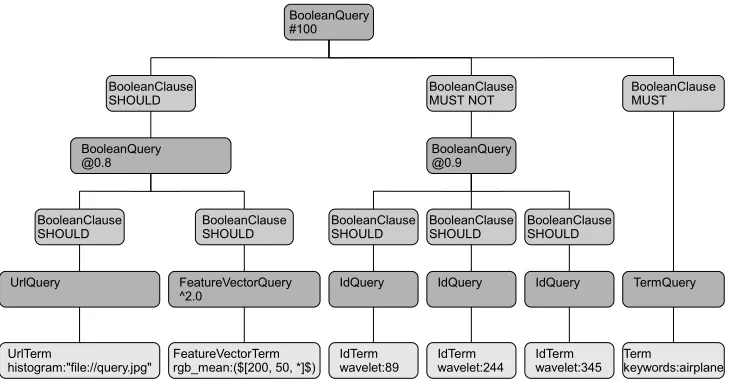
After parsing, the query string is converted into a parse tree that contains all of the relevant concepts (fig. 3). The root node is represented by aQuery, which is the single data object that is processed by the retrieval core. Each leaf is aTerm, representing a partial search, which gener-ates a sub result. The tree structure in between represents the rules how to merge the sub results into a final one.
The search engine then traverses the tree and generates the answer to this particular request. At this point, it is advisable to integrate a query optimizer to reduce the re-sponse time. In the current prototype, some straightfor-ward query optimizing already takes place.
First, the MUST clauses are processed, then the
SHOULDand finally the MUST NOT clauses. This al-lows for an early reduction of the search space, which is
especially of importance, if no or only a slow index is available for certain features. Depending on the availabil-ity of indexes, certain other term could also be pre-drawn. The optimization strategy should always be aimed at an early reduction of search space as well as preferring the use of fast indexes. The strategy used in this cases uses a strict definition ofMUST andMUST NOT. If an image is not part of all theMUST clauses or part of aMUST NOT
clause, it is removed from the final result. This approach is considered to be a useful trade-off between a perfect fuzzy algebra and speed optimizations.
In this case, the first term to be processed is “key-words:airplane”. This triggers a keyword search, which is backed by a fast and efficient index, resulting in a list of matching images. As the parent BooleanClause is flagged asMUST, the final results of the query can only be amongst those sub results. Assuming, that only about 1% of the repository is related to the keyword “airplane”, every subsequent linear search time can also be reduced to only 1% of the otherwise total scan time.
The second branch to be processed is the SHOULD
clause on the left, that is split into a nested boolean query. One leaf contains a UrlTerm, pointing at an external query image and requesting a comparison based on its his-togram. To process this part, the engine reads the image from the URL and extracts the histogram automatically. This search only needs to compare the query histogram with the stored histograms from the previous sub result.
The other leaf contains a FeatureVectorTerm. The string embedded between the “($” “$)” brackets is parsed by the rgb meanplug-in. In this case, the string stands for the three mean colour values red (200), green (50) andblue(“don’t care” wildcard) of an image. Again, the search space is drastically reduced by the first sub result.
After both terms have been processed, the sub results are merged into a single one. Their combined similarity must be at least0.8, otherwise the image is removed from the result set. There is no “best” rule to merge the sub results. In the current prototype, the combined similarity is calculated by determining the weighted and normalized sum of the sub similarities. In this case, the rgb mean
branch has a weight of2.0and thus gains a higher impor-tance in the merged result.
( ( histogram:"file://query.jpg" OR rgb_mean:($[200, 50, *]$)^2.0 )@0.8 -wavelet:(89 244 345)@0.9 +keywords:airplane)#100
UrlQuery FeatureVectorQuery
^2.0
BooleanClause SHOULD
TermQuery BooleanQuery
@0.8
IdQuery IdQuery IdQuery
BooleanClause
SHOULD BooleanClauseSHOULD
BooleanClause MUST
BooleanQuery @0.9 BooleanClause MUST NOT BooleanQuery
#100
BooleanClause SHOULD
BooleanClause
SHOULD BooleanClauseSHOULD
UrlTerm
[image:8.612.127.492.128.319.2]histogram:"file://query.jpg" FeatureVectorTermrgb_mean:($[200, 50, *]$) IdTermwavelet:89 IdTermwavelet:244 IdTermwavelet:345 Termkeywords:airplane
Figure 3: Parse Tree of a complex Query
They require a retrieval on the wavelet feature and use sample images from the repository by stating the image id directly. Again, the search space is already limited, not only by theMUSTbranch, but also by theSHOULD
branch. It is only necessary to check the images contained in the previously retrieved sub result. The sub results of the middle branch are merged accordingly and cropped at a minimum similarity of 0.9.
To generate the final answer, the MUST NOT results are removed from the temporary sub result. The last step required is to cut the sorted list after the 100 best hits.
Alternative Data Representation
The string representation of a query can be manipulated directly by users. This query string can be edited in every basic text editor without the need for any extended user interface. It also allows experienced users to access every aspect of the search engine directly.
As the query language is based on the Lucene tool kit, it always has an object representation of the whole query. This query object could also be created by a suitable front end. Such a tool eliminates parsing errors, because the query structure would always be bound to the
compo-nents.
XML The parse tree containing a query (section ) can be directly mapped to an XML hierarchy. Plug-ins could also specify their feature conversion into XML and back to. This allows for consistent XML files and simplifies the use of the MPEG-7. Below, the XML structure matching the example parse tree (section ) is shown:
<boolean-query max-count="100">
<boolean-clause occur="SHOULD"> <boolean-query threshold="0.8">
<boolean-clause occur="SHOULD"> <url-query>
<url-term>
<field>histogram</field> <url>file://query.jpg</url> </url-term>
</url-query> </boolean-clause>
<boolean-clause occur="SHOULD"> <feature-vector-query boost="2.0">
<string-data> [200, 50, *] </string-data> <data>
<red>200</red> <green>50</green> <blue>*</blue> </data>
</feature-vector-term> </feature-vector-query> </boolean-clause>
</boolean-query> </boolean-clause>
<boolean-clause occur="MUST_NOT"> <boolean-query threshold="0.9">
<boolean-clause occur="SHOULD"> <id-query>
<id-term>
<field>wavelet</field> <id>3960</id>
</id-term> </id-query> </boolean-clause>
<boolean-clause occur="SHOULD"> <id-query>
<id-term>
<field>wavelet</field> <id>3941</id>
</id-term> </id-query> </boolean-clause>
<boolean-clause occur="SHOULD"> <id-query>
<id-term>
<field>wavelet</field> <id>3948</id>
</id-term> </id-query> </boolean-clause>
</boolean-query> </boolean-clause>
<boolean-clause occur="MUST"> <term-query>
<term>
<field>keywords</field> <text>airplane</text> </term>
</term-query> </boolean-clause>
</boolean-query>
This XML data contains the same information as the example query string. Clearly, this format is much more verbose than the suggested query language. Being prob-ably less readable for humans, its advantage is the stan-dardized format. The XML code does not require a spe-cial parser to be processed or validated by any program.
One example of generic and specialized data represen-tation is contained in the XML query above. The feature-vector-term for the rgb mean plug-in shows two alter-natives. In the generic case, the string-data is left un-touched. This is the output generated by the main parser. To extract the real meaning of the data string, it needs to be processed by the corresponding plug-in. The result-ingdatatag would then contain each piece of feature data separately.
<feature-vector-term> <field>rgb_mean</field> <string-data>
[200, 50, *] </string-data> <data>
<red>200</red> <green>50</green> <blue>*</blue> </data>
</feature-vector-term>
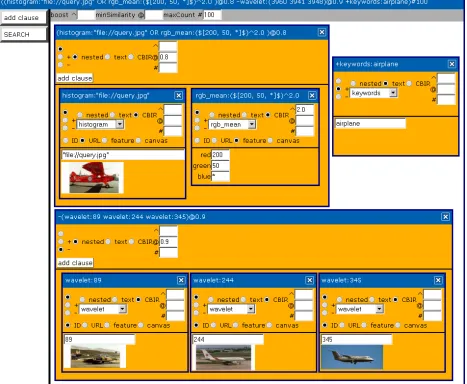
Visual Query A clearly structured query language like the proposed one can optionally be mapped to a visual representation to guide the user. The resulting graphical user interface helps to assemble queries that are syntacti-cally correct, displays query images, provides a canvas for query-by-example and may also support to adjust feature plug-in specific parameters.
Figure 4 shows the visual query composer of the proto-type, where the example query has been assembled from multiple clauses. Every clause of the parse tree is mod-elled by a window. Each clause window contains several options to choose the occurrence, the added parameters, a field name and the query type. Textual queries usually contain a generic term with one ore multiple keywords.
a query image. Clause windows specifying a query im-age can directly display a small preview imim-age to provide feedback what is going to be searched. Windows contain-ing a feature description can either show the data fields directly (e.g. red, green, blue) or a convenient editor (e.g. a colour chooser).
TESTING
Language Features
There are only a few query languages which try to tackle the task of merging aspects of full text and CBIR re-trieval. These languages need to address the requirements of fuzzy decisions between hit and miss. In section , sev-eral important features are discussed. Below, some lan-guages are checked against them. Additionally, the pro-posed query language is tested against some synthetic re-trieval tasks to evaluate its expressiveness in a reasonably realistic environment.
Test Repository The testing repository consists of 6480 images from three different sources. Each source contains several photographs with certain topics. The level of an-notation for each source is varying. As the images were from German sources, most image annotation is in Ger-man.
The first set of 415 images contains images from the cities of Dublin and Liverpool. There are many build-ings and bird views as well as scenes from a football sta-dium, without any annotation. The only textual hints can be taken from the file names and paths.
The second set contains 5399 images and is by far the largest part of the repository. Apart from 417 photographs from a botanical garden and some large animals, the main content is birds. Most images contain a bird in the centre part and the background is dominated by water, grass or sky. Almost every photograph contains IPTC annotation with the name of the depicted animal. Some keywords also denote the location where the photograph was taken. In the third set there are 666 images from 4 different lo-cations, Beijing, Shanghai, Dubai and the USA. The im-ages have an average of 3 keywords describing the loca-tion and the content. Similar to the first set, most pictures show buildings or landscapes.
Single Feature Test Cases
To assess the retrieval quality of single features, two im-age series from the repository are chosen. In these se-ries there are several images with similar content as well as some more difficult changes. Each feature plug-in is tested by taking some of the images and afterwards preci-sion and recall are determined on the results.
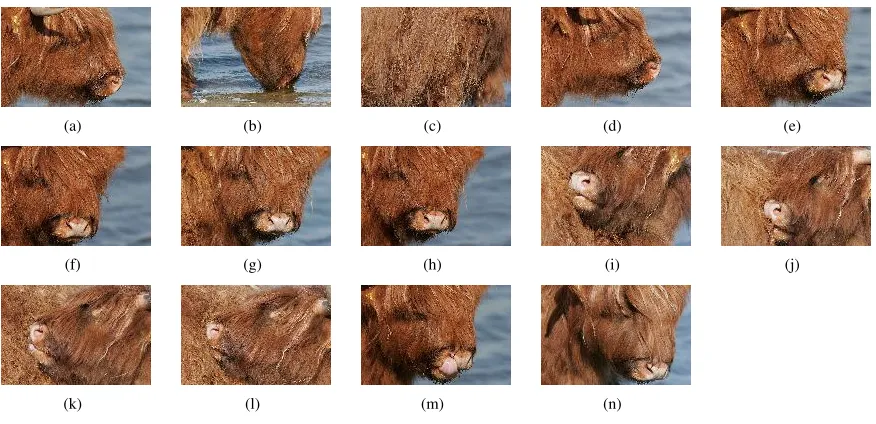
Testing Sets The first testing set contains 14 closeup views from Highland cattle (figure 5). The images are dominated by the typical auburn fur and some water in the background. In human perception there are no other images with similar content in the repository.
The second testing set containing 57 images of a meadow pipit (figure 6) is much more challenging. More than 50 percent of the repository images show birds. This image set consists of 7 different sceneries. The feature vectors should at least be able to find the images of the same series. As none of the implemented feature vector plug-ins is capable of identifying a small bird in the cen-tral part of images, it is expected that all of them will get to serious issues to find images depicting the same bird from another series.
Queries For testing some of the images from the image sets are taken as query. For the first set only one image (figure 5(a)) is used, because of the relative high similar-ity within the set. From the second set always the first image of each series is chosen as query except from the single one (6(b)) are used for the query. Sometimes the first image is obviously not the best choice but these test cases try to capture real and maybe unclear conditions.
Multi Feature Language Test Cases
In this testing series it is attempted to create queries which are more efficient than the simple queries from section . To allow a “natural” progress of query composing and refining, the IDs of the other related images are treated as unknown. Each related ID needs to be present in a previous result set in order to be used in the next query. Each retrieval starts with the query image.
(a) (b) (c) (d) (e)
(f) (g) (h) (i) (j)
[image:12.612.74.512.160.372.2](k) (l) (m) (n)
Figure 5: Cattle Images
(a) 6 images (b) 1 image (c) 13 images (d) 17 images (e) 8 images
[image:12.612.73.511.170.600.2](f) 9 images (g) 3 images
images would be pointless for testing. The impact of key-words is examined in the user survey below (section ).
The basic search strategy is as follows: First the query image is used with every basic single feature. Only the first 50 hits are browsed for found relevant images. Start-ing with the best performStart-ing feature, the IDs of all rele-vant images are used in new queries. Other images found are also used for querying. If still some images are miss-ing, the same procedure is repeated with the other avail-able features. The found images are then combined in a single query and optimized for a high recall. In difficult cases the results are browsed in depth and the approximate ranking of the related images is determined.
If other image series with a high similarity clutter the results, it is attempted to filter them out with aNOTterm. The final query containing all targeted images is then cut to the minimum size possible.
User Survey
A first small-scale user survey has been carried out to evaluate the language in the context of the related master thesis (Pein 2008) [21]. For this survey, the same repos-itory as described above is used. It has been carried out with 5 testers with at least basic experience in comput-ing sciences. The testcomput-ing prototype only offered a plain HTML page with a single input line for textual queries. The visual query composer was not available at that time. Each tester got a short introduction into the query lan-guage and some technical basics of the different available features. During the procedure the testers were allowed to ask for further advice concerning the system abilities and usage. It is important that the direct influence of the test supervisor is kept as low as possible. He must not give direct hints how to solve a task. The only support al-lowed is to mention basic technical possibilities available or workarounds to avoid bugs.
Tasks
The tasks demand both CBIR and keyword based ap-proaches. The basic tasks were: retrieving images based on a textual description or visual examples, tracking a given example image, optimizing queries (high Preci-sion/Recall) for a specific content and ascertain the name of birds from given images.
The first task is starting simple to let the testers get used to the search engine. First some blue images need to be found. This could be easily done by using theRGB Mean plug-in and the word “blue” or alternatively the RGB value[0,0,255]. The second subtask is basically the same with “white” or[255,255,255]. The two remaining subtasks are not trivial, because noquery-by-sketch mod-ule is available. The testers need to find examples directly from the repository and then use them for querying. It is expected that a random search produces a suitable query image and that theSpatial Histogramfeature or promising keywords are used.
The second task is to spot predefined images. All of them have some keyword annotation. One image (a Chi-nese stop sign) is very easy to find. The keywords “stop”, “sign” and “china” all narrow down the search space dras-tically. Additionally a search for red content can be help-ful. The other images require to use less obvious key-words and maybe CBIR. In one case, some background knowledge in ornithology was beneficial. Testers know-ing that a “great crested grebe” was depicted, could find this image by keyword. Others need to browse a bit more and do some CBIR.
retrieval by yellow content or less specific keywords like “Dubai” lead to success. The final sub task was to findcity skylines. The search for the “city” only returns pictures from the “forbidden city” in Beijing. Here it is advisable to either use known city names from the repository or by picking random images.
The final task was a bit tricky. The testers are supplied with a small image of a certain bird. Either they know the name or they need to do some retrieval work. There are several ways to find the images. This required some kind of freestyle retrieval with no best solution or short cut (except from knowing the bird names).
RESULTS
Language Features
Table 1 compares some query languages and lists which important requirements are met. Each language addresses all of the fuzzy aspects. They only differ in “comfort func-tions”. The language proposed here lacks a user-defined sorting and the direct implementation of high-level con-cepts. FOQL is very expressive, but is very verbose in comparison. OQUEL is a very high-level language and its abilities ultimately depend on the ontology used.
Single Feature Test Cases
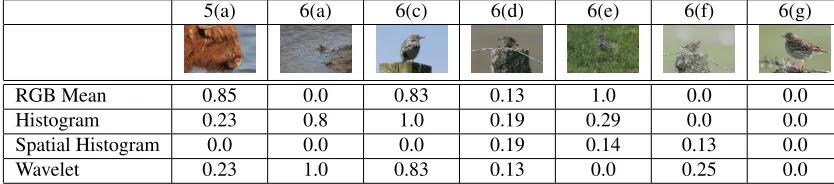
The results of the testing is summarized in tables 2 and 3. Table 2 shows the recall values for a result set of 50 im-ages. This size is chosen because it is assumed that 50 re-sults are reasonably displayable at the same time. Some-times a couple of relevant images still show up in later positions, but these may be already ignored by an impa-tient user (in fact, the user survey revealed, that single hits are often overlooked when scrolling quickly through the results). The query image is always at the first position and is deducted from the recall. A recall of1.0means that all expected images could be successfully retrieved. The value0.0however indicates a complete failure.
Table 3 lists the similarity values of the 50th image in the result. This value indicates how satisfactorily a fea-ture is capable to avoid a false positive. The more images gain a high similarity, the more difficult it is to do the final ranking in a right way. In the end, the similarity is
sim-ply an indicator for the manner how the results should be sorted. The quality itself is determined by the ranking.
Multi Feature Language Test Cases
In this section a possible progress of query refining is listed. Each query image from the tests above is used as initial query to find all the other ones from the related se-ries. It is aimed to gain the highest recall possible with the final query. During optimization, usually the hard lim-itation of images has been chosen (#) to indicate the final result set size. In a repository that is assumed to be chang-ing, it is recommended to use the more flexible similarity (@) restriction. Otherwise, hits may be pushed out by new false positives.
Search for Image Series 5(a) The best results are achieved by using the simple RGB mean feature. This query already returns 12 of the 14 possible images among the 50 highest ranked results. Only two images are miss-ing. To find them, the other images found are used for querying. With only two additional queries all 14 im-ages are successfully retrieved, resulting in the optimized query:
(
fv_mean:4833#40 fv_wavelet:4839#5 fv_wavelet:4843#5 )#42
Search for Image Series 6(a) The second task is trivial, as the wavelet feature is almost perfect to solve it:
fv_wavelet:6424#10
Search for Image Series 6(c) Similar to the previous one this image series is easily found by a single feature:
fv_stochastic:6431#37
Language CBIR
approach
fuzzy
boolean
min
threshold
user
defined
sorting
extensible
(features)
AND-OR-NO
T
weights high-le
v
el
concepts
simple
structure
base
language
this feature driven Y Y N Y Y Y N1 Y Lucene
FOQL object driven Y Y Y Y Y Y2 Y3 N ODMG/OQL
OQUEL ontology driven Y Y N N4 Y Y Y Y none/natural
1 mapping only possible by nesting/meta features containing prepared low-level queries 2 sum of partial weights must be 1.0
[image:15.612.134.482.139.268.2]3 keyworddefineto map low-level queries to high-level concepts 4 ontology can be modified
Table 1: Languages Compared
5(a) 6(a) 6(c) 6(d) 6(e) 6(f) 6(g)
RGB Mean 0.85 0.0 0.83 0.13 1.0 0.0 0.0
Histogram 0.23 0.8 1.0 0.19 0.29 0.0 0.0
Spatial Histogram 0.0 0.0 0.0 0.19 0.14 0.13 0.0
[image:15.612.94.511.367.459.2]Wavelet 0.23 1.0 0.83 0.13 0.0 0.25 0.0
Table 2: Single Features Recall Recall for the first 50 hits
5(a) 6(a) 6(c) 6(d) 6(e) 6(f) 6(g)
RGB Mean 0.9939 0.9997 0.9992 0.9997 0.9975 0.9992 0.9992
Histogram 0.9936 0.9837 0.9862 0.9972 0.9947 0.9971 0.9926
Spatial Histogram 0.9943 0.9877 0.9880 0.9951 0.9969 0.9834 0.9937
Wavelet 0.7190 0.7044 0.7809 0.7569 0.7094 0.7626 0.7951
[image:15.612.92.520.532.624.2]images. Otherwise this term would contain a relevant im-age and thus cut it away. The others default to a maximum of 1000 hits:
(
fv_stochastic:6431#37 -fv_wavelet:4280#1000 -fv_mean:4345#1000 -fv_wavelet:5461#600 )#21
Search for Image Series 6(d) This one is the first chal-lenging task. For this reason, all search iterations are de-scribed. The four available features all return some rele-vant images but they differ. In the first iteration, the user gets in 7 different hits in total:
fv_mean:6444 3 hits
fv_stochastic:6444 4 hits
fv_stoch_quad:6444 4 hits
fv_wavelet:6444 3 hits
Because the Wavelet feature does not add much
new content the three other features are combined by SHOULD clause. The result is promising and contains 12 hits. Compared to the previous simple queries 6 new images are retrieved. In this series only 5 other images are missing:
fv_mean:6444
fv_stochastic:6444 fv_stoch_quad:6444
Playing around a bit with NOT clauses reveals more images. This simple addition already caused a 15th image to appear:
fv_mean:6444
fv_stochastic:6444 fv_stoch_quad:6444 -fv_wavelet:1476#1000
Some exhaustive testing with lengthy queries finally re-vealed all 17 relevant images. Each NOT clause is first checked for positive hits. If it contains some irrelevant
images and no relevant one, it is simply added to the query. The new query should now generate fewer results and still contain all previous relevant images. Else, the NOT clause is simply cut down to a smaller size:
fv_mean:6444 fv_stochastic:6444 fv_stoch_quad:6444
-fv_wavelet:1476 -fv_wavelet:2753#50 -fv_stochastic:2765#200
-fv_wavelet:2003#800 -fv_stochastic:5154#400 -fv_mean:2588#500
Based on the retrieved images each feature is tested with the other images for query. In this case a combi-nation of three SHOULD-clauses proves to be highly ef-ficient. Among the 17 hits only two false positives are contained. The optimized and reasonably compact query retrieves all 17 target images within 19 hits:
(
fv_wavelet:[email protected] fv_wavelet:[email protected] fv_stoch_quad:[email protected] )#19
Search for Image Series 6(e) Again this task is very easily solved by a single feature, but further optimization is possible. All 8 images are already among the first 50 results. Taking another image for querying shows that the 7 other images of the series are very closely related. The
Waveletfeature easily retrieves all of the required images with a perfect precision. Only the initial query image can-not be found again without big effort. To get the perfect result set, theWaveletfeature is used to find the 7 closely related images and the single one is directly retrieved by id. If there would be more images similar, a feature should be used instead:
(id:6461 fv_wavelet:[email protected])#8
Based on this ID the remaining images are very easily found by a single feature, in this case theWavelet. Hav-ing this information at hand, the final query is short and concise. The precision is also very good and all 9 relevant images are contained in a result of only 10 hits.
(
fv_wavelet:[email protected] fv_wavelet:6472 )#10
Search for Image Series 6(g) The final retrieval task completely failed with the available features. As already visible in the previous section , none was able to find a single relevant image. An analysis of the result set showed that the best ranked image was byRGB Meanat position 800. The other features performed even worse.
User Survey
The survey was carried out with 5 volunteers aged be-tween 20 and 40 years old. A questionnaire indicates that all of them were experienced computer users. Their ex-pertise in digital photography and image processing was mostly slightly below average. A remarkable result is that all of them were very comfortable with Internet search engines, about average with local search engines and had almost no experience with CBIR engines. It was further revealed in the questionnaire, that no one has a very spe-cific knowledge of any of the images stored in the repos-itory. Only a single person declared that he knows more than average from China. These preconditions are quite useful, because it is not very likely that all of the testers succeed by only using the keyword search.
After a short training time, most testers were able to use both textual and content aspects in their queries. Mostly understandable features (colour mean, histogram) were used in combination with the query image IDs and the wavelet plug-in was often ignored. The simplergb mean
with its 3 values was a preferred feature. In some cases even the detailed histogram specification was tried out. As it was not allowed to draw query images, a popular approach was the use of random images to start with.
Most tasks were solved by the testers within less than 10 query iterations, but in some cases the available in-formation and tools were not sufficient to ensure a quick
success. The testers requested additional tools for query-by-sketchand complex feature composing.
Tasks
This section briefly describes the different approaches the testers chose. Except from single constellations, the testers succeeded in most tasks. Sometimes the search engine returned unexpected results. The testers learned the basic syntax very quickly.
The first two subtasks were solved by all testers in a single attempt. Interestingly some users chose the natu-ral language and others chose to type in the appropriate RGB values. The remaining tasks were difficult without the ability to submit a query image. Some testers endeav-oured to find suitable images by keywords, but failed be-cause of missing annotation. Finally the random search combined with theSpatial Histogramwas the most used approach.
The “stop” sign was nearly almost found immediately by a keyword search containing “stop” or “sign”. One tester chose to use theRGB Meanin combination with the changing keywords “beijing”, “china”, and finally “sign”. He succeeded after he set the keyword clause mandatory. Finding the second image, a lotus pond, turned out to be very challenging. The query with theRGB Meanto find green images returned hundreds of green images with the target image at rank 457. No one attempted to browse the results to this point. One person tried to filter out irrele-vant images by keyword, but the annotation was simply too sparse. Only the hint that it might be a plant from china helped the testers to succeed very quickly. The “great crested grebe” was found very quickly. Either the testers knew the bird or they found it by a random search followed by a direct keyword search.
The “oyster catcher” series was found by either random search or theRGB Meanto find green images in combi-nation with the folder name to narrow down the search space. Finding the cathedral from different angles took a long time. Using theRGB Meanto find the brownish building with the blue sky did not succeed, but sometimes it was helpful to find out the city’s name faster than by random search. Having pinpointed a single image, it was used for relatively successful CBIR queries.
key-words. The next subtask of finding images of a desert turned out to be more difficult. When entering the key-words a simple “desert” was not enough (see section ). One tester made use of wild cards and found all relevant images. Some other ones tried to find the images byRGB Meanand the parameter “yellow”, which not immediately returns correct results. One user tried to alter the RGB parameters manually. After a few queries all of the users found the useful keyword “Dubai”. To find city images, three users simply typed “city” and found the “forbidden city”. Based on these images they either used different features with an adequate query image or they used the keyword “beijing”. The other two testers exploited their previous results. One chose the keyword “dubai” and the other one picked some images for pure CBIR queries.
The last task turned out to be the most challenging one. Because no one knew any of the birds, there was no indi-cation on how to begin. The favourite solution in all three cases was to start with a random search. Based on images with a promising content the testers massively used the CBIR features. With some luck the correct bird appeared in a result set and the name could be verified. Sometimes the result set reduction by NOT clauses was helpful. A captivating way to success was chosen by two users. In-stead of giving up at this point, they used an external pro-gram to determine the mean colour values of the desired images and used them in a well directedRGB Meanquery.
Tester Comments
The most wanted addition was tool support for query-by-sketchor to upload example images. Also the keyword quality was often criticized. They were often far too spe-cific or too general to be of real use.
In general the query language was accepted due to the prototype status of the system. However, the wish for a more comfortable user interface was obvious.
Observations
Throughout the tests it was observed that the searcher sometimes simply missed relevant images in the result set. In some cases the relevant image was already visible on the screen, but not noticed.
Concerning the available features, an aversion against the more complicated features is obvious. Actually only a
single person used theWaveletfeature. Most testers pre-ferred theRGB Meanfor simple tasks and theHistogram
for more complex ones. The offer with the natural lan-guage in theRGB Meanfeature was generally accepted. In two cases, the testers opened an external program to determine the exact mean values of an example query im-age. Only two persons attempted to enter the 12 rather cryptic values for theHistogram.
The boost parameter was only used by a single person. The other parameters for result set restriction were not even tried out. This could be explained by the fact, that in most cases, the basic functionality was sufficient. Only the optimization task required its use, but the testers were hardly motivated to optimize their results further.
DISCUSSION
Language Features
The language presented in this paper represents the mid-dleware of the previously described retrieval framework (Pein ICCS 2007) [17]. It is easily parseable and allows composition of any query that is supported by the frame-work. New feature plug-ins extend the language automat-ically by adding a new field. Currently the language does not inherently support high-level concepts. A plug-in for semantics could surely be implemented with some effort by collecting pre-defined queries with low-level features.
FOQL appears to be too complex and thus unsuitable for untrained users. Nevertheless many concepts like
Fuzzy-Booleans andFuzzy-Sets are valuable. It is pos-sible to add any kind of feature by defining an appropriate method for object comparison. Due to its complexity and sorting ability the language is adequate in SQL like envi-ronments.
Single Feature Test Cases
The results in table 2 may seem confusing at the first glance. The performance of most queries is very poor. One reason is that there are many images in the reposi-tory which are actually really similar to the queries but which are not contained in the related set for evaluation. If the query results would be judged by humans by asking which results are acceptable, they would often perform much better.
It is remarkable that the simplest feature of all, theRGB meanproves to be very efficient in some cases where more detailed ones completely failed. In return the similarity values always remain on a very high level (table 3) leaving not much space to avoid false positives.
Queries
Query 5(a) Starting with the cattle, this image series contains several different images compared to the query image. The only advantage is, that the repository does not contain other images with semantically similar con-tent. From an algorithmic point of view the changes of the background are challenging. Sometimes there is blue water visible and sometimes not. Interestingly theRGB Mean performs very well. The impact of the blue wa-ter is too small to cause trouble. Also the amount of this brownish shade of red seems to be not too prominent in the database.
TheSpatial Histogramis very weak in this case. Only very few images of the relevant part are actually com-posed similarly. While three quarters on the left side are dominated by the animal, the right margin is dominated by water. Yet many greenish or brownish images with a brindled texture have been retrieved. The impact of colours should have been higher.
Query 6(a) In this case the Wavelet can play out its strengths. Every single image has been found, even if the lighting and the waves on the water changed. The feature vector seems to be very robust against these changes. The
Histogramalso performed very well, but it missed out the image with the strongest change in lighting. The two other features seem to have stumbled over the lack of difference in the similarity. Both ranked other images way too high. This query is not very specific about the bird in the
cen-ter. Instead, most of the image is featureless background showing a water surface. Taking theSpatial Histogram, about 40 results in the first 50 hits actually show birds surrounded by water.
Query 6(c) Here three of the four feature vectors were obviously suitable. They are very robust against the slight changes in the images. Especially theHistogramfeature was able to find all relevant images. The only feature with not a single hit is again theSpatial Histogram. Most of the retrieved results contain much blue and a darker, brown-ish central part. Again the ranking is blinded by the other possible matches. The modifications in the image compo-sition seem to be too strong to be caught.
Query 6(d) At this point the retrieval gets wrong with all four features even if each one is able to find some of the related images. Each feature actually finds different images of the targeted ones. For theSpatial Histogramthe shifting perspective remains the main problem. In general the image colours from many images are similar.
Query 6(e) The bird sitting in the green grass is a very captivating query. The image is dominated by the grass and with a closer look the grass pattern of the query im-age is indeed different from the other ones. Taking this into account it is not very surprising that features focus-ing on the spatial information fail. In this case theWavelet
feature is the only one with no results. TheRGB Mean
obviously benefits from the fact that most images contain different shades of green.
If another image of the series is selected for query, all features are capable of retrieving most images correctly.
Query 6(f) This series again contains two differently il-luminated sub series. In the query one of the lighter set is used. Under those conditions the most detailed features
Spatial Histogram andWavelet are at least able to pick the correct sub series. The two simpler features fail be-cause they rank too many wrong images too high. In this case a feature robust to the change of lighting seems to be appropriate.
match of the series (figure 7). In the human perception these three images are actually quite similar, but the im-plemented features obviously did not capture the relevant information to achieve good ranking results.
Conclusion
The analysis of the different features acknowledges that each feature vector has certain strengths and weaknesses. The remarkably good performance of the RGB Mean
in special cases is surprising. At least it is very robust against several changes in the image composition as long as the colour does not change very much. Of course this feature gets very weak as soon as there are other images with similar colours.
The lighting of the scene has a visible impact on the retrieval. Under these circumstances a feature with a high robustness against it is required. It should be based on shapes or maybe also wavelets without colour informa-tion. Conceivably also a region based approach would be beneficial in many cases.
Multi Feature Language
Testing the multi feature ability revealed many advantages compared to the single feature search. Nevertheless there is still much work to do.
Using the query language with boolean clauses some-times helps to improve the result. Especially searching for the third bird series (fig. 6(d)) was much more efficient by using three SHOULD clauses with different features. Of course the following optimisation effort by adding sev-eral NOT clauses does not seem to be very realistic in daily use, but it showed that a directed filtering may in-deed help. It needs to be pointed out that it is advisable to use different features for NOT clauses to avoid that cor-rect hits are removed.
Another issue when combining two features is the dis-crepancy of similarities. The normalisation to a the range from 0.0 to 1.0 is only part of the solution. In addition the calculation needs to be calibrated to be efficient. Some features return many results with a similarity above 0.99 (especiallyRGB Mean), while others have a much lower similarity even for images from the same set. TheWavelet
implementation often returned similarities of about 0.75. Merging the two subsets is very inefficient because the
less distinctive features are dominant. Altering the boost for single terms can be used as a workaround to reduce the problem.
The effort of constructing a well performing query may be too high in many retrieval scenarios if the user only wants to find a certain image. In other scenarios, the opti-mised query can be seen as some kind of classificator for a certain type of images.
Retrieval Hints
Using the advanced capabilities of the query language re-quires deeper understanding and some experience with the underlying ranking system. For this prototype some default techniques should be used.
If a fuzzy retrieval is performed, the clauses in a boolean query should be used normally, i.e. they are best joined bySHOULD. This ensures that no relevant docu-ment is cut away from the result set.
Having a more specific query with a high separability between hit and miss, theMUSTclause is helpful to effi-ciently restrict search space.
Finally theMUST NOT clause needs to be used care-fully. It is useful for removing a certain image series com-pletely from the result set, if it is annotated and the wanted results are not. Using it for a fuzzy search term may be dangerous, because all of the documents contained in the sub result are removed. In this case the size of theMUST NOT clause should be restricted by appropriate parame-ters.
Recommended Tools
Optimising queries is already possible with the current user interface but it is a tedious task. Some additional tools seem to be beneficial.
It should be possible to mark all desired images. Then the engine may check whether single documents are miss-ing when performmiss-ing a refined query. Especially when addingMUSTandMUST NOTterms, a warning message could be generated.
(a) (b) (c)
Figure 7: Meadow Pipit Series 6
In a productive environment the similarity could be spread by a power-law function analogous to the gamma correction known from image processing. Based on a set of reference images the parameters could be tuned to achieve a sound calibration.
User Survey
In general the testers behaved as expected and solved the tasks. Additional knowledge of certain image content (e.g. bird names) sometimes sped up the retrieval dras-tically. Where no or insufficient annotation was available, the search took much longer.
Some of the main critics were actually intentionally built into the repository. Especially the demand for bet-ter keywords clearly shows that a sound annotation is a very important factor for retrieval systems. Extending the current keyword search to a more powerful semantic en-vironment like topic maps could boost the quality. An internal substitution mechanism of very specific words to more general ones could be the first step.
What needs to be done as soon as possible is to create a simple user interface where queries can be easily com-posed and images can be uploaded. Also an integrated drawing tool seems to be beneficial. Especially the fea-tures which are difficult to understand could profit by a stronger integration and by hiding the complexity.
Further the testers had almost no problems in under-standing the query language and the boolean operators. During the first testing sessions a small bug in the rank-ing system caused strange effects. Fortunately a simple workaround in the query was enough to avoid serious problems and the bug could be fixed soon. The three
dif-ferent operatorsMUST,SHOULDandMUSTNOT were
accepted by all testers.
All testers are quite professional computer users and have some experience in searching. But no one had
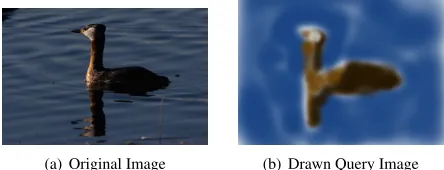
expe-(a) Original Image (b) Drawn Query Image
Figure 8: Query-by-Example
rienced a CBIR system before and the user interface was very basic. Keeping that in mind, this is still a remarkable success for the query language.
Addendum At the time of the main survey, the user interface only consisted of a simple HTML web page. Queries had to be typed manually into a single text field. Many problems were caused by syntax errors. In the be-ginning, it usually took a couple of attempts to formulate a valid query. After a while, they got accustomed to the lan-guage and were able to create more complex ones. This quick learning was surely affected by the fact, that most testers were used to programming languages.
[image:21.612.312.534.234.319.2]retrieve the requested image 8(a) at the first position.
CONCLUSION
Achievements The proposed query language has a sim-ple structure and is very similar to a full text search en-gine while also allowing fuzzy terms. Further it is easily extensible and allows arbitrary constructs for individual features. Complex queries are possible but not necessary, giving experts the chance to fine tune all parameters as re-quired. Normal users could either enter simple queries or generate them with a graphical user interface.
One interesting feature of boolean queries is the ability to reduce the search space. Setting the occurrences of the clauses restrictively, it provides a way to cut the retrieval time drastically, even if the CBIR terms require a linear scan.
Further the language can be easily mapped to machine readable formats like objects or XML.
Problems Remaining Providing a basic parser like JSON only simplifies the low-level query information. To support higher abstractions it is necessary to fully under-stand the feature itself, which is impossible for a generic language. For this reason, keeping the language simple is the task of the feature developers. They need to design ap-propriate sub languages which contain all feature specific information and remain as readable as possible.
Another issue is the naming of feature vector based fields. Currently the prototype compares each field name in the query with the list of available feature plug-in tifiers. If the field name does not match a feature idtifier, the term is handled by the underlying Lucene en-gine, executing a “classical” full text search on the field. Otherwise the term is forwarded to the corresponding fea-ture plug-in. Having overlapping feafea-ture identifiers, basic search fields could be hidden. It is necessary to formu-late naming conventions like reserved words or a prefix for each feature identifier.
Future Work Unlike FOQL/SQL the language does not support user defined sorting likeORDER BYbut sorts re-sults by an overall similarity. It is to decide whether this extension is relevant for retrieval issues or not.
Depending on the combining functions and feature vec-tors used, query processing can be sped up drastically. A heuristic approach to query optimizing has been evaluated by Ramakrishna (Ramakrishna ADC 2002) [15].
The currently implemented indexing structures for the plug-ins are merely a proof-of-concept. A set of generic indexing structures (such as for multidimensional vectors) is planned to support standard types of features directly.
Another crucial topic is the merging strategies. Es-pecially for iterative search, additional work needs to be done. Until now, the engine always returns the optimal re-sult by checking all features and keeping the whole rere-sult in the memory. An approach to get page-wise additional results as requested is planned.
The query language proposed in this article does not yet support query-by-example directly. This requires to encode pixel images in a string, which may be done by mime encoding.
The support of high-level concepts is not realized yet. This could be a feature of the language itself by introduc-ing constructs likedefinein FOQL which substitute cer-tain terms by a pre-defined low level term. Alternatively the retrieval engine itself could be extended by high-level plug-ins which map semantics to predefined low level re-quests. Developing such feature plug-ins is a very com-plex task. A lot of testing is required to capture meaning-ful feature vectors information which represents seman-tics.
ACKNOWLEDGEMENTS
A major part of the testing repository images were con-tributed by external persons. Many thanks to Prof. Dr. J¨org Raasch from the Hamburg University of Applied Sci-ences for his large and nicely annotated collection. Also thanks to Benjamin Striepke for his contribution of many images.
Finally, I want to thank all testers involved in the us-ability study and gave much useful feedback.
REFERENCES
Appli-cations Programme. University of Northumbria at Newcastle; 1999. Available from: http://www. unn.ac.uk/iidr/VISOR.
[2] Renz M, Renz W. Neue Verfahren im Bildretrieval. Perspektiven f¨ur die Anwendung. In: Schmidt R, editor. Proceedings der 22. Online-Tagung der DGI; 2000. p. 102–128.
[3] Liu Y, Zhang D, Lu G, Ma WY. A survey of content-based image retrieval with high-level semantics. Pat-tern Recognition. 2007;40:262–282.
[4] Clough P, M¨uller H, Deselaers T, Grubinger M,
Lehmann TM, Jensen J, et al. The CLEF 2005
CrossLanguage Image Retrieval Track. In: Ac-cessing Multilingual Information Repositories. vol. 4022/2006. Springer; 2006. p. 535–557.
[5] Clough P, Grubinger M, Deselaers T, Hanbury A, M¨uller H. Overview of the ImageCLEF 2006 Photo-graphic Retrieval and Object Annotation Tasks. In: Evaluation of Multilingual and Multi-modal Infor-mation Retrieval. vol. 4730/2007. Springer; 2007. p. 579–594.
[6] Fagin R. Combining fuzzy information from multi-ple systems (extended abstract). In: PODS ’96: Pro-ceedings of the fifteenth ACM SIGACT-SIGMOD-SIGART symposium on Principles of database sys-tems. New York, NY, USA: ACM; 1996. p. 216– 226.
[7] Apache Software Foundation. Apache Lucene;
2006. Available from: http://lucene.
apache.org/.
[8] Cattell RGG. ODMG-93: a standard for object-oriented DBMSs. In: SIGMOD ’94: Proceedings of the 1994 ACM SIGMOD international confer-ence on Management of data. New York, NY, USA: ACM; 1994. p. 480.
[9] Alashqur AM, Su SYW, Lam H. OQL: a query lan-guage for manipulating object-oriented databases. In: VLDB ’89: Proceedings of the 15th international conference on Very large data bases. San Francisco, CA, USA: Morgan Kaufmann Publishers Inc.; 1989. p. 433–442.
[10] Nepal S, Ramakrishna MV. Query Processing Issues in Image(Multimedia) Databases. icde. 1999;00:22.
[11] Town C, Sinclair D. Ontological query language for content based image retrieval. In: Content-Based Access of Image and Video Libraries, 2001. (CBAIVL 2001). IEEE Workshop on; 2001. p. 75– 80.
[12] Town C, Sinclair D. Language-based querying of image collections on the basis of an extensible on-tology. Image and Vision Computing. 2004;22:251– 267.
[13] Martinez JM, Koenen R, Pereira F. MPEG-7: The Generic Multimedia Content Description Standard, Part 1. IEEE MultiMedia. 2002;09(2):78–87.
[14] Riecks D. ”IPTC Core” Schema for XMP - Version 1.0. International Press Telecommunications Coun-cil; 2005.
[15] Ramakrishna MV, Nepal S, Srivastava PK. A
heuristic for combining fuzzy results in
multime-dia databases. In: ADC ’02: Proceedings of
the 13th Australasian database conference. Dar-linghurst, Australia, Australia: Australian Computer Society, Inc.; 2002. p. 141–144.
[16] Zadeh LA. Fuzzy sets. River Edge, NJ, USA: World Scientific Publishing Co., Inc.; 1996.
[17] Pein RP, Lu Z. A Flexible Image Retrieval Frame-work. In: Shi Y, van Albada GD, Dongarra J, Sloot PMA, editors. International Conference on Compu-tational Science (3). vol. 4489 of Lecture Notes in Computer Science. Springer; 2007. p. 754–761.
[18] Al-Omari FA, Al-Jarrah MA. Query by image and video content: a colored-based stochastic model ap-proach. Data Knowl Eng. 2005;52(3):313–332.
[19] Jacobs CE, Finkelstein A, Salesin DH. Fast Mul-tiresolution Image Querying. Computer Graph-ics. 1995;29(Annual Conference Series):277–286.
Available from: citeseer.ist.psu.edu/
[20] Pein RP, Lu Z. Content Based Image Retrieval by Combining Features and Query-By-Sketch. In: Arabnia HR, Hashemi RR, editors. IKE. CSREA Press; 2006. p. 49–55.
[21] Pein RP. Hot-Pluggable Multi-Feature Search En-gine; 2008. Master’s thesis, Hamburg University of Applied Sciences.
[22] Pein RP, Amador M, Lu J, Renz W. Using CBIR and Semantics in 3D-Model Retrieval. In: Computer and Information Technology, 2008. CIT 2008. 8th IEEE International Conference on; 2008. p. 173–178.
![Figure 1: Generic Retrieval Workflow [22]](https://thumb-us.123doks.com/thumbv2/123dok_us/374869.1038314/6.612.77.295.208.361/figure-generic-retrieval-workow.webp)