Introducing the Internet to Medical Practitioners
Pages with reference to book, From 214 To 218
Parkash Mandhan ( Department of Pediatric Surgery, National Institute of Child Health, Karachi. )
Abstract
The benefits of using the Internet to medical practitioners are growing rapidly, as the Internet becomes easier to use and ever more biomedical resources become available on net. The Internet is the largest computer network in the world that connects millions of corn puters in a web and makes almost immediate communication possible, irrespective of the location of its users. There are various ways to be connected with Internet and once connected, it is easy to take advantage from this space of unlimited potentials. Several Internet applications are available today that will bring more information to the doctors’ desk. Although, it is difficult to predict the future of medicine on the Internet, but the net has opened up many new possibilities for medical professionals, which were not available through previous technologies. It is now up to them to realize the Internet’s full potential.
A non-technical overview of Internet, a glimpse of electronically available information and the methods available to access, manipulate and disseminate biomedical data from the Internet are discussed. These methods are useful for beginners as well as beneficial for experienced physicians (JPMA 48:214, 1998).
Introduction
Imagine a working environment, like Department of Pediatrics Surgery, National Institute of Child Health, Karachi, where, without moving from your desk , you could:
- Consult colleagues world wide on a clinical problem at the click of a mOUSe: - Hold real time discussions with fellows in Europe, North America. Australia: - Send a draft of a paper to co-authors to France aixi receive their reply same day: - Brush up on your continuing medical education by studying a CAT scan in UK: - Retrieve a file of Magnetic Resonance Imaging, published on the same day: - Ask for the details of a scientific meeting in Canada and fill the registration form: Write to the Registrar of Royal College of Surgeons in London:
- Read dozens of Journals on your screen:
- Browse through a bookshop’s catalogue in Germany, and then order your choice.
Such an environment already exists... known as “Internet”. The Internet is a rapidly growing digital communications network that promises tO transform the way, in which people work and communicate. Many doctors in our country see the Internet as unfamiliar territory with strange customs and
impenetrable jargon, but the objectives of usig the Internet by medical practitioners are changing fast as the amount of accessible biomedical information on line is increasing rapidly and the costs and learning times are plummeting.1-3 Today the Internet is an essential tool in medical research and has become an important resource for teaching, for clinical practice for postgraduate training, publication and
continuing medical cducaiion4-8.
This article will summarize the basics of Internet and its application, the best resources that are available for medical practitioners and the means to access theni from home of office, as well as possible future directions.
What is Internet?
Government, Defence Department and Universieties as a means of communication and sharing
information. At present the Internet is readily available to the general public and it has 20 to 30 million active users, increasing by 160,000 persons per month9. Assessing the size of Internet is difficult, however according to one recent survey, around 4852000 computers were connected to the Internet in January 1995 and this figure had tripled this year10. Internet. just like any other computer network consists of a set of computers and of physical (or wireless) links between the computers with a separate set of protocols that govern the exchange of info rmation between computers.
Making the Connection and Getting Started
There arc three levels of Internet access. The most basic is through electronic mail from a machine that is outside the Internet but still in the matrix. The next option is connection through a shell account, where a real time interactive connection between a personal computer and another machine, which is permanently attached with Internet, is established. Third way of getting connected with the internet is via a software protocol, which provides a connection that allows user to be a full peer on the net. The most important of this software is the Transmission Control Protocol/Internet Protocol (TCP/IP), which provides concrete runway for file transfers, mail, text and graphic data.
One of the strengths of the Internet is that almost any type ofcomputer can connect to it. Gaining access to this place of unlimited potentials can be accomplished easily from home or office with minimal efforts and expense using an existing telephone line. Once connected, one can pull himself up on the Internet by his own bootstraps. There is no charge for the movement of the information over the Internet. The speed at which information is transmitted across the Internet varies depending on the machine you use to access it. the type of connection you have and the volume of usage at any one time. The Internet as a community has its own rules and customs. The net users are bound by an informal code of conduct, termed as “netiquette”, like inappropriate line behavior is also strongly discouraged and posting unsolicited advertising to network groups or e-mail recipient is also foibidden.
Internet Applications
There are two categories of applications that handle the various forms of data and the means by which data are transferred from one place to another, Basic and Advanced11.
Bask Internet Applications
Electronic mail: Electronic mail or e-mail is the transmission of text based data betw een netw orked computers and is the simplest application on the Internet used by many people than any other function. It has many advantages over the snail mail12. It is faster, cost effective and requires less physical effort, as there is no need to buy stamps or envelops or for a trip to post office. With c-mail it is easy to send the same piece of information to several people simultaneously and one can easily disseminate educational material or exchange amended paper drafts many times with colleagues without re-typing13,14.
Internet e—mail addresses are written in a standard format, where the username comes first, followed by an (a: sign (pronounced at) and then the user’s location. tbr example [email protected] or [email protected]. No blank spaces arc allowed in an c—mail address, nor does it matter whether capital or small letters are used. Usually the location can be identified easily as two or three letters for host type (like, “cdu,” education, “coin.” company, “gov.” government) and country code (like “au.” Australia, “fr” France and ‘uk.” United Kingdom) are included in the format of an e-mail address. An e-mail address is easily understood if it is dc-coded from right to left.
An e—mail message consists of a header and a body. The header is a kind of vi ual envelope, co nta ini n g “To:” “From:”. “Date:”, “Subject:” and “CC:”. The both containsthe message itself. E— mail messages are usually w ri Ueu in a less formal, more conversational style than conventional letters. A standard e—mail message consists of simple text, without the sophistication of bold, italic or
number and preferred e-mail address (Figure 1).
E-mail has also a faciliv to attach a binary file, like data, with message, which will be received by the recipient in same format.
Table I provides a list of Current Medical Usenet Groups, in which groups with prefixes “alt.support, nptn.clinic" and “nptn.hosp” provide information about diseases, treatment and alternatives to
treatment and suggest other resources.
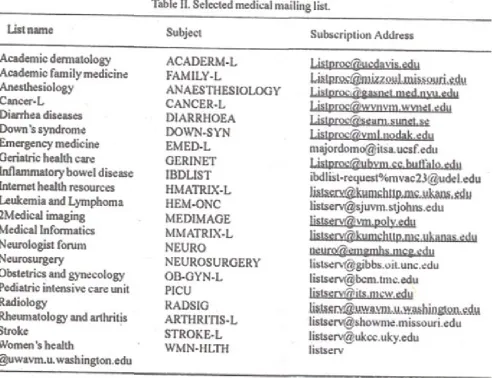
Table II contains some of the listserver related to medicine and information on such lists can be obtained from the medical matrix and other resources16,17.
Advanced Internet Applications
The advanced Internet applications and resources have inspired most discussion in lay media and require real-time interactive input and responses between personal computer user and the host computer.
Telnet and File Transfer Protocol (FTP): With these two Internet applications, it is possible to log onto a distant computer and sift through its resources. Telnet is useful to read text file, but is limited to simple interactions, whereas with FTP almost any file containing graphic images. sounds, short movies and text, can be transferred from the host computer to the personal computer. Many FTP files are in compressed form in host computer to conserve space and time, therefore these files need lobe in uncompressed state before they can be used.
Gophers: It isa very popular Internet service designed to provide Internet resources in an organized format. It allows navigation within the Internet w’ithout the complexity of knowing computer addresses and navigation commands. Gopher applications allow viewing of the text resources or transferring them to a personal computer in much the same way as was done with FTP, but with gopher. downloading is more simple and interesting.
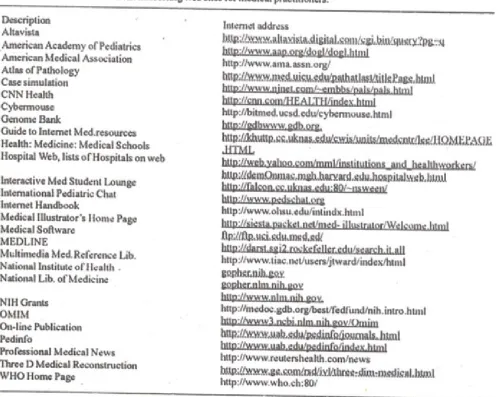
and the areas of text and graphics are highlighted in different colors, indicating that its selection will launch the user to a related resource or an expansion of that idea. Hidden beneath its simple exterior, the heart of the web format is called the HyperText Markup Language (HTML), which allows text documents to be enhanced with graphics and links to other resources. These resources are located by their unifonu resource locators (URLs). A URL is special www address that not only indicates the location of the resources but also the type of method used to access it.
The web allows information to be presented in a sophisticated and attractive format, interlacing pictures with the text and sounds. Navigating the net with this has become as simple as pointing and clickIng on, highlighted text or graphic icon of interest. Once an interesting web site is found, one can easily revisit it by using history list or bookmark list.
[image:6.612.61.559.276.673.2]The histoiy list is a temporary log of all the sites visited since the program is opened, whereas the bookma& list is the index of important sites that are marked and also survive quitting and restarting the program. Searching and surfing the web is pleasurable and fascinating. Simply by following one hypertext link after another in a stream of consciousness fashion, one can travel vast distances in medicine, information and geographical spaces, often stumbling on hidden treasures.
Other Internet Services:
The Internet is always changing and it seems to be a haphazard arrangement of resources and computers. To provide order to this electronic world various applications have been developed, like archie, veronica and Wide Area Information Service (WAIS). Archie is a database of text files and computer applications and their locations that can be searched by name or key word. To use archie, it is necessaiy to have a Telnet application such as Win QVT or WSarchie. A good listing of active veronica sites is located at Washington and Lee University,Lexington, Va. Use WinQVT or a similar
telnetprgmmto go into liberty.uc,wlu.edu and log inas “lawlib”. Lastly, WAIS is full indexing software that is used to index documents and periodicals. Check the University of Minnesota Gopherforalist of all WAIS Serverby location and topic.
Conclusion
The Internet has opened a new forum for medical practitioners through which medical resources can be obtained fmm all corners of the globe. Whether to access database such as MEDLINE, which can keep medical practitioners in touch with the latest medical literature, or to know up to minute health news on your computer screen, net provides all these facilities with a click of icon. Today, it is possible for medical practitioners of different specialties to converse on a unique medical topic with his peers from his office desktop screen. There are many sites on the Internet, which offer free medical educational material, like integrating text, photos, sounds and video clips. These interactive programs with special aims are useful for basic science training, post-graduation and also useful for continuing medical education. The main benefit of Internet to research is probably as a tool for interaction and
collaboration. E-mail makes it easy to exchange information, such as spreadsheets with patient’s data, or to develop research programs, or to collaborate with the authors of paper. Immediate access to specific research database, like GENOME PEDINFO, and downloading of electronic addition of particular biomedical journal with upto date information, is very helpful to research workers. The Internet has also provided a level of interaction and communication among the various medical specialists around the world that is being used to form a strong alliance of medical professionals. The computer and computer communications have occuccupied an increasingly prominent role in medical practitioner’s workplace. Sometime in the near future most doctors will be connected to some form of computer network. There are good reasons to be connected now because intercommunication through Internet has become easy and fast. The net in all its forms has changed the way the medicine is practiced and taught. A medical practitioner needs to integrate with this tool to participate in this rapidly growing means of clinical practice, education, research and communication.
References
1. McKinney WP, Bunton G. Exploring the medical applicaiton of the Internet: A guideforbeginningusers. Am. J. Med. Sci , 1993;306:141-144.
2. Faughnan JG, Doukas Di, Ebell MH et al. Cruising the information highway. Online services and electronic mail for physician and families J Fam. Pract, 1994;39;365-71.
3. Frisse ME. Kelly EA, Metacalfe ES An Internet primer Resources and responsibilities Acta Med 1994;69:20-24.
4. Akelsen S. Likkehau S. ‘leaching and learning aspects of remote medical consultation. Telek tronnik, 1993;89:42-47.
7. Kruper JA, Lavenanat MG, Maskay M14 et al. Building Internet accessible medical education software using the world wide web. Proc. Annu. Symp. Comput. Appl.Med. Care., 1994;19:32-6. 8. LaPorte RE, Marler E, Akazawa S. et al. The death of biomedical journals. Br. Med. J.,
1995;310:1387-1389.
9. Karmar JM. Medical resources and the internet. Arch Intern. Med., 1996;156:833-42. 10. PaIlen M. Introducing the Internet. Br. Med. J., 1995;311:1422-1424.
11. Glowniak JV, Bushway M K Computer networks as a medical resource. JAMA., 1994;217:1934-1939.
12. Stagers N. Electronic mail basics, J. Nurs. Adm. 1989;19:31-5.
13. Letterie OS, Morgenstem I.L and Johnson L. The role of an electronic mail system in educational strategies of’ a residency in Obstetrics and gynaecology. Obstet. Gynaecol, 1994;84:137-9.
14. Sands DZ, Sarfran C. Slack WV et al. Use of electronic mail in teaching hospital. Proc. Ann. Symp. Comput. AppI. Med. Care., 1993;17:306-10.