2017 2nd International Conference on Manufacturing Science and Information Engineering (ICMSIE 2017) ISBN: 978-1-60595-516-2
Implementation of Sending Push Information
for Android Mobile Terminal
Yin Tong, Jingjing Zhang, Qing Yan and Lina Xun
ABSTRACT
This system is a real-time push system designed and developed on the Android platform, take Android Studio as the development tool, Java as the development language, Android SDK as the system development kit, Open fire as the real-time collaboration server, MySQL as the data base and achieve a convenient way to send push messages on the Android mobile terminal. In the paper we introduce the technical requirements of the system's mobile and server ,we also introduce the specific implementation of the respective functions, Experimental results show that the system can achieve real-time text data push on Android phone ,the system is tested on the virtual machine, packaged into apk files and run successfully in the real machine.1
INTRODUCTION
Android is the mobile operating system with the biggest market share now. Its greatest strength is its openness, The openness of the platform allows any handset vendor to use Android for free, Developers are also more likely to opt for Android[1].The Android system consists of the libraries, the Linux kernel, the application layer, the application framework and the Android runtime, use Java as the language of the application[2].
Users is getting higher and higher to mobile phone dependence with the development of times, especially the popularity of smart phones[3]. The push of
1Yin Tong, Jing-jing Zhang, Qing Yan, Li-na Xun, College of Electrical Engineering and Automation, Anhui University, Hefei, China;
mobile phone is also one of the most important functions of Android APP, but the vast majority of Android systems in the country block Google services, making Google's official GCM service difficult to use. So the push of the most android apps used in the country are based on third-party push platforms, this makes it impossible to operate the push anytime and anywhere. Based on this, the system is designed and implemented by using the Android Studio integration tool to develop mobile terminals and based on Open fire server, the sending of push messages can be achieved on the phone, making the push more convenient.
OVERALL FRAME DESIGN OF THE SYSTEM
[image:2.612.106.501.367.401.2]This system uses XMPP protocol, the main components are Android mobile terminal, push server, database and WIFI network, The Android mobile terminal contains the sending end and receiving end, the overall framework of the system is shown in Figure 1. In this case, after the sender successfully connects to the push server, edit the content to be pushed and send to the push server through WIFI network, then the push server push the message to the receiving end by WIFI network.
Figure 1. The overall framework of the system.
SYSTEM DESIGN OF EACH MODULE
The Design Of The Android Mobile Terminal
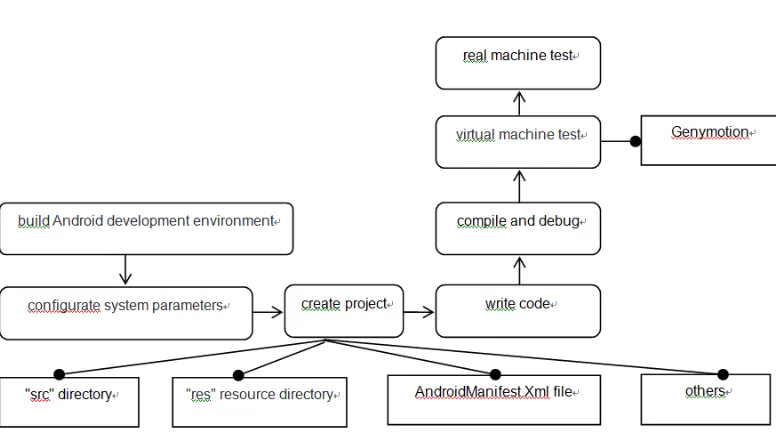
The development language for Android applications is Java, Android runtime consists of two parts: Android core library and Dalvik virtual machine[2], Figure 2 is the Android client development process. Various resource files of the Android project are stored under the "res" directory, the Java source file is saved in the "src" directory, the overall specification for the entire Android project is Androidmanifest.xml[4]. The virtual machine used in the development of this system is Genymotion[5].
Figure 2. The Android client development process.
PROGRAM DEVELOPMENT UNDER "SRC" DIRECTORY
(1) Send and receive push message
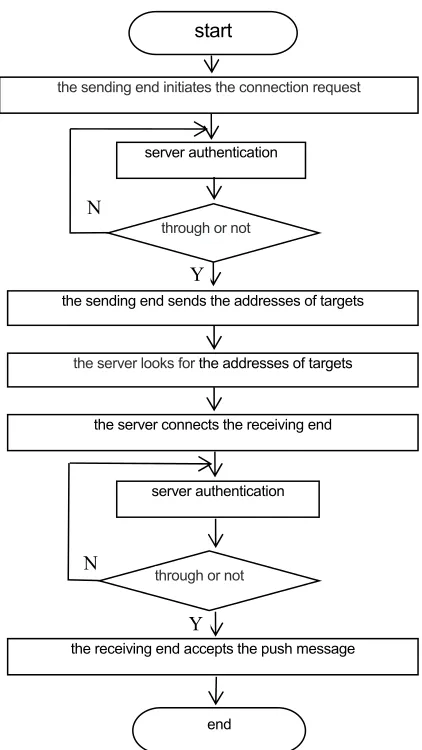
Both the sending and receiving end require a java-based open source XMPP protocol package asmack[6], the system design the sending end using the register() method to register on the server, and the receiving end is registered with the Registration class. The push end is connected to the server by creating the openConnection() method after the successful registration, then call the login() method login authentication, then associate all the receiving and sending accounts with the addFriend() method[7], when the Push. Java class loads, sending end will automatically obtain the receiving end user information from the server side via the getFriend() method, user jid (jid object) can be obtained from the user information, create PushUtil class object pu, pu.subscription(jid) can create push list, then use the submit() method, for-loop and the thread to complete the push of the message, the receiving end will receive authentication from the server, after passing authentication, the receiving end will receive push information from the sending end.
Figure 3. The interaction flow diagram of the server and Android mobile end.
(2) Display push message
Write the PushService class on the receiving end which extends Service and running in the background, the PushService class needs to be registered in the Androidmanifest.xml file:
<service android:name=".PushService"></service>,
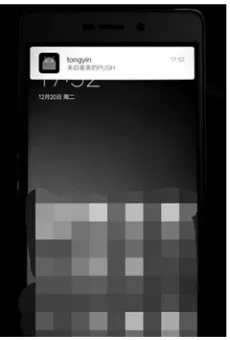
When the program is running in the background, it receives the push message and sends the notification through the Broadcast Receiver, then through Notification Compat. Builder object set the title, content, icons, notice form, the title here is the user name that is registered on the sending end, the content is filled in on the sending end EditText, Both the icon and the notification form are the default values, finally, push message is displayed through the system's notification bar management object.
the sending end sends the addresses of targets the sending end initiates the connection request
start
server authentication
through or not
the server looks for the addresses of targets
the server connects the receiving end
server authentication
through or not
the receiving end accepts the push message
end
Y N
Server-side Design And Development
Install Open fire in Ubuntu, Before installation, it needs to modify the Hostname of the "/etc/sysconfig/network" and "/etc/hosts", And then install the JDK, add the following code to "vi/etc/profile":
export JAVA_HOME=/usr/local/jdk, export PATH=$JAVA_HOME/bin:$PATH,
export CLASSPATH=.:$JAVA_HOME/lib/dt.jar:$JAVA_HOME/lib/tools.jar, It's easy to download and install Openfire and install mysql using yum libraries, not tired in words here, it will need to configure Openfire when the installation is complete, the process is as follows:
(1) Openfire directory, ./bin/openfire, start Openfire.
(2) Access the console IP through the browser, ip: http://127.0.0.1:9090(Conf/openfire.xml can change the port, or change in the administrative console).
(3) Memory is allocated on demand, connection user name of client is username@ubuntu.
(4) The database selects MySQL and then fills out the external configured database URL:
jdbc:mysql://172.168.111.13:3306/openfire?rewriteBatchedStatements=true. (5) Because it is test, the connection number is set to 30, the administrator account is set to "admin", and password is set to "admin".
Network Design
The project uses the WIFI as the communication network for Android mobile terminals and the server. WIFI gateway information is obtained by the wireless network card of Android phone, combining the available SSID (service set identification),then the Android phone can connect to the wireless access point. Next, connect the server to this WIFI network, Now that the data exchanges between Openfire server and Android mobile terminals(sending and receiving end) can be implemented.
THE EXPERIMENTAL RESULTS
Figure 4. Running interface of sending end.
Figure 5. The push message is displayed on the receiving end.
CONCLUSIONS
[image:6.612.241.356.308.478.2]ACKNOWLEDGEMENT
This work was supported by the China Postdoctoral Science Foundation (2015M582826), Anhui Provincial Natural Science Foundation(1608085MF136) and Key Laboratory of Optical Calibration and Characterization/Chinese Academy of Sciences Project.
REFERENCES
1. Hui Xiaowei, and Wang Ke, 2014," Realisation Of Mobile Video Surveillance System.", Computer Applications and Software, 30(1) 148-150.
2. Li Gang, 2015 "Crazy Java Handouts", Publishing House of Electronics Industry, pp. 3-5. 3. He Wenjuan, 2015, "Research of Mobile Terminal User-Based Recommendation System", Hohai
University,10-11.
4. Bill Phillips, and Brian Hardy, 2016, "Android programming: the big nerd ranch guide", Posts & Telecom Press,pp.13-16.
5. Yao Yunfei, Du Hongbo, Liang Jianhui, Liu Hongtao, Wang Ao, and Wei Zhitong,2016," Design of "Palm SUT" Campus Information System based on Android Studio + Genymotion", Software Engineering, 19(5): 39-40+38.
6. Zhu Shu, 2 015," Research and Implementation of Android Instant Messaging system based on XMPP", Nanjing University Of Posts And Telecommunications, 48-49.