IBM DB2 10.1
for Linux, UNIX, and Windows
Getting Started with Database
Application Development
Updated January, 2013
GI13-2046-01
IBM DB2 10.1
for Linux, UNIX, and Windows
Getting Started with Database
Application Development
Updated January, 2013
GI13-2046-01
Note
Before using this information and the product it supports, read the general information under Appendix C, “Notices,” on page 93.
Edition Notice
This document contains proprietary information of IBM. It is provided under a license agreement and is protected by copyright law. The information contained in this publication does not include any product warranties, and any statements provided in this manual should not be interpreted as such.
You can order IBM publications online or through your local IBM representative.
v To order publications online, go to the IBM Publications Center at http://www.ibm.com/shop/publications/
order
v To find your local IBM representative, go to the IBM Directory of Worldwide Contacts at http://www.ibm.com/
planetwide/
To order DB2 publications from DB2 Marketing and Sales in the United States or Canada, call 1-800-IBM-4YOU (426-4968).
When you send information to IBM, you grant IBM a nonexclusive right to use or distribute the information in any way it believes appropriate without incurring any obligation to you.
Contents
About this book . . . v
Chapter 1. The DB2 database application
development environment . . . 1
Chapter 2. Support for elements of the
database application development
environment . . . 3
Chapter 3. Supported operating systems
for database application development . . 5
Installation requirements for DB2 servers and IBM data server clients (AIX) . . . 5
Installation requirements for DB2 servers and IBM data server clients (HP-UX) . . . 7
Installation requirements for DB2 servers and IBM data server clients (Linux) . . . 11
Installation requirements for DB2 servers and IBM data server clients (Solaris) . . . 12
Installation requirements for DB2 database servers and IBM data server clients (Windows) . . . 13
Chapter 4. IBM Data Server Client
support for database application
development . . . 17
Chapter 5. Supported database
application programming interfaces . . 19
ADO.NET development for IBM Data Servers . . . 19
IBM Data Server Provider for .NET . . . 19
ODBC .NET Data Provider . . . 20
OLE DB .NET Data Provider . . . 21
Introduction to DB2 Call Level Interface and ODBC 22 Introduction to embedded SQL . . . 24
Supported drivers for JDBC and SQLJ . . . 25
IBM OLE DB Provider for DB2 . . . 26
Perl DBI . . . 27
PHP application development for IBM data servers 28 Python, SQLAlchemy and Django Framework application development for IBM data servers . . . 29
The IBM_DB Ruby driver and Rails adapter . . . 29
Chapter 6. Programming languages
and compilers for database application
development . . . 31
Supported .NET development software . . . 31
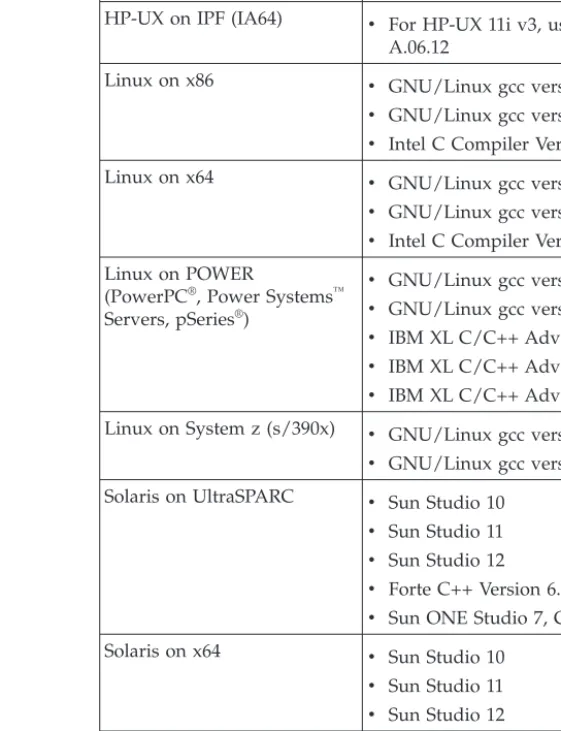
Support for database application development in C 32 Support for database application development in C++ . . . 33
Support for database application development in COBOL. . . 35
Support for database application development in Fortran . . . 35
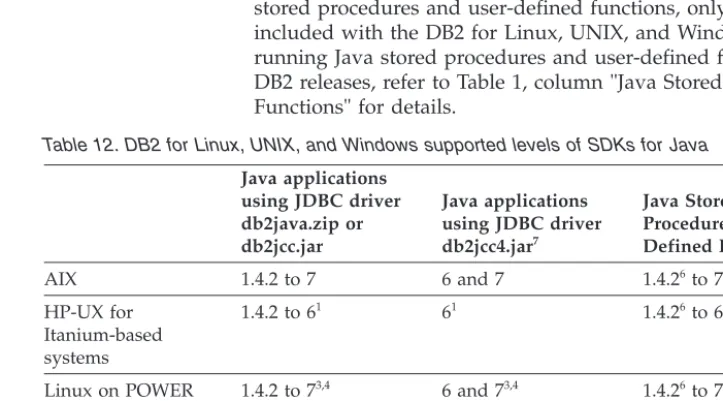
Java software support for DB2 database products. . 36
Support for database application development in Perl . . . 38
Support for database application development in PHP . . . 39
Support for database application development in Ruby/Ruby on Rails . . . 40
Support for database application development in REXX . . . 41
Chapter 7. Supported transaction
managers
. . . 43
Chapter 8. Supported database
application development tools
. . . . 45
Chapter 9. Configuring the database
application development environment . 47
Configuring the operating system for database application development . . . 48Setting up the application development environment (Linux and UNIX) . . . 48
Setting up the application development environment (Windows) . . . 50
Configuring the IBM Data Server Client for database application development . . . 51
Configuring the development environment for application programming interfaces . . . 51
Configuring your development environment to build and run CLI and ODBC applications . . . 52
Installing the IBM Data Server Driver for JDBC and SQLJ . . . 53
Transaction managers . . . 57
X/Open distributed transaction processing model 57 Setting up the unixODBC driver manager . . . 79
Appendix A. DB2 database product and
packaging information . . . 81
Appendix B. Overview of the DB2
technical information
. . . 83
DB2 technical library in hardcopy or PDF format . . 83
Displaying SQL state help from the command line processor . . . 86
Accessing different versions of the DB2 Information Center . . . 86
Updating the DB2 Information Center installed on your computer or intranet server . . . 86
Manually updating the DB2 Information Center installed on your computer or intranet server . . . 88
DB2 tutorials . . . 90
DB2 troubleshooting information . . . 90
Terms and conditions . . . 90
Appendix C. Notices . . . 93
About this book
TheGetting Started with Application Development Guide provides key concepts for supporting and configuring your database applications in the following key areas:
v database application programming interfaces v database application programming languages v compilers
v transaction managers v development tools v operating systems
The information presented in this book will help to provide you with the necessary resources for successful database application development.
Chapter 1. The DB2 database application development
environment
The DB2®database application development environment is composed of several software elements.
These software elements include:
v operating system
v IBM® Data Server Client
v database application programming interface (API)
v programming language
v transaction manager v development tools
For many of these elements, there are multiple choices available. For example: there might be several operating systems available for your hardware; DB2
database supports several APIs; and any XA-compliant transaction manager can be used to manage distributed transactions with DB2 databases.
The Data Server Clients periodically invoke the SYSIBM.DB2CONN_LIC stored procedure for licensing and configuration purposes.
Chapter 2. Support for elements of the database application
development environment
Application development for DB2 databases is supported for a wide range of operating systems and database clients, along with numerous programming interfaces, languages, compilers, and tools.
The following documentation topics define the support for database application development on DB2 products:
v Chapter 3, “Supported operating systems for database application development,”
on page 5
v Chapter 4, “IBM Data Server Client support for database application
development,” on page 17
v Chapter 5, “Supported database application programming interfaces,” on page
19
v Chapter 6, “Programming languages and compilers for database application
development,” on page 31
v Chapter 7, “Supported transaction managers,” on page 43
v Chapter 8, “Supported database application development tools,” on page 45
Chapter 3. Supported operating systems for database
application development
Application development for DB2 databases is supported on a range of operating systems and architectures.
You can develop DB2 database applications on the following operating systems:
v AIX® v HP-UX v Linux v Solaris v Windows
There are restrictions about when you can use available 32-bit or 64-bit architectures:
v With Linux on x86 and Windows operating systems on x86, only 32-bit DB2
database instances are supported. On 64-bit Windows operating system, both the 32-bit and 64-bit instances are supported. On all other operating systems, only 64-bit DB2 database instances are supported.
v You can run 32-bit database applications with either a 32-bit or 64-bit version of
one of the IBM data server clients and develop with either the 32-bit or 64-bit IBM Data Server Client
v The steps for building applications in a 32-bit environment are sometimes
different from the steps for building applications in a 64-bit environment.
Installation requirements for DB2 servers and IBM data server clients
(AIX)
Before you install DB2 database products on AIX operating systems, ensure that the system you choose meets the necessary operating system, hardware, software, and communications requirements. Thedb2prereqcheckcommand checks whether your system meets the prerequisites for the installation.
DB2 database products are available in several different editions. Some DB2 database products and features are only available on specific operating systems. If you are planning to install the IBM DB2 pureScale®Feature, different installation
prerequisites are required. See the Installing the DB2 pureScale Feature topic. To install a DB2 database product, the following requirements must be met:
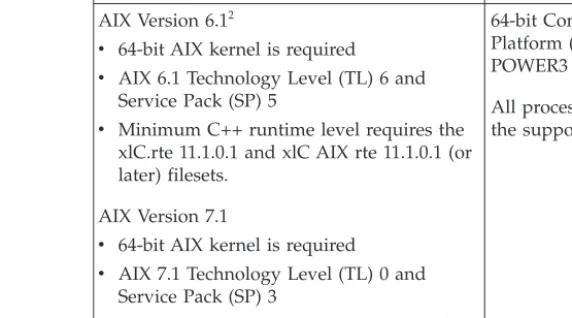
Table 1. AIX installation requirements
Operating System Hardware
AIX Version 6.12
v 64-bit AIX kernel is required
v AIX 6.1 Technology Level (TL) 6 and
Service Pack (SP) 5
v Minimum C++ runtime level requires the
xlC.rte 11.1.0.1 and xlC AIX rte 11.1.0.1 (or later) filesets.
AIX Version 7.1
v 64-bit AIX kernel is required
v AIX 7.1 Technology Level (TL) 0 and
Service Pack (SP) 3
v Minimum C++ runtime level requires the
xlC.rte 11.1.0.1 and xlC AIX rte 11.1.0.1 (or later) filesets.
64-bit Common Hardware Reference Platform (CHRP) architecture, excluding POWER3 processor-based systems.1 All processors that are capable of running the supported AIX operating systems.
v 1To verify that it is a CHRP architecture system, issue the command lscfgand
look for the following output:Model Architecture: chrp. For POWER3 processor-based systems, first upgrade to POWER4 processor-based systems. POWER3 processor-based systems are not supported.
v 2In AIX 6.1 there are two types of Workload Partitions (WPARs): system WPARs
and application WPARs. DB2 installation is supported only on a system WPAR. AIX 6.1 also supports the ability to encrypt a JFS2 file system or set of files.
v 3Additional considerations for POWER7®systems:
– DB2 products running on POWER7 systems support Active Memory™
Expansion.
v 32-bit clients are also supported
Note: If the minimum operating system requirements were applied using an operating system upgrade rather than using a new operating system installation, you must install I/O completion ports (IOCP) separately. You can obtain the IOCP libraries from the AIX installation CD and configure IOCP on the DB2 server. For a client only installation, IOCP is not required. For more information, see
“configuring IOCP on AIX” inTroubleshooting and Tuning Database Performance.
Software considerations
v For application development and runtime considerations, see the topics in
Supported programming languages and compilers for database application development.
v You can download the latest IBM C++ Runtime Environment Components for
AIX at the IBM AIX XL C and C++ support website.
v (Clients only) If you plan to use Kerberos Authentication, you require IBM
Network Authentication Service client v1.4 or later.
v Use thebosbootcommand to switch to the 64-bit kernel.
To switch to a 64-bit kernel, you require root authority and enter the following commands:
ln -sf /usr/lib/boot/unix_64 /unix
ln -sf /usr/lib/boot/unix_64 /usr/lib/boot/unix bosboot -a
v One of the following browsers is required to view online help and to run First
Steps (db2fs):
– Firefox 3.0 and later – Google Chrome – Safari 4.0
v An X Window System software capable of rendering a graphical user interface is
required if:
– you want to use the DB2 Setup wizard to install a DB2 database product on Linux or UNIX operating systems
v For details regarding known AIX issues, see www.ibm.com/support/
docview.wss?uid=swg21165448
Mounting considerations
For root installations of DB2 products on UNIX operating systems, do not mount your file system with thenosetuidoption.
Installation requirements for DB2 servers and IBM data server clients
(HP-UX)
Before you install DB2 database products on HP-UX operating systems, ensure that the system you choose meets the necessary operating system, hardware, software, and communications requirements. Thedb2prereqcheckcommand checks whether your system meets the prerequisites for the installation.
DB2 database products are available in several different editions. Some DB2 database products and features are only available on specific operating systems. To install a DB2 product on an HP-UX operating system, the following operating system, hardware, and communications requirements must be met:
Note: A 64-bit HP-UX operating system is required to support DB2 products. Table 2. HP-UX installation requirements
Operating System Hardware
DB2 products are supported on:
v HP-UX 11iv3 (11.31) with:
– PHSS_37202 – PHKL_41481 – PHKL_42035 – PHKL_42335 – PHKL_41588 – PHSS_41496
Itanium based HP Integrity Series Systems
Any hardware that is explicitly compatible and fully capable of running the specified operating system, all the corresponding supporting software, and any associated applications unmodified.
Kernel configuration considerations
A system restart is required if you update the kernel configuration parameters. The kernel configuration parameters are set in/etc/system. Depending on the values of your kernel configuration parameters, modify some of them before you install the client or DB2 server products. If the kernel parameter being modified is not
listed as dynamic, a system reboot is required to make the changes to /etc/system
take effect.
Software considerations
v libpam.so.0 (32-bit)is required for DB2 database servers to run 32-bit
non-SQL routines.
v (Clients only) If you plan to use Kerberos authentication, your DB2 applications
must be 64-bit.
v (Client and server) To use Kerberos authentication, install the HP krb5 Kerberos
support via the Kerberos packages on the operating system.
v One of the following browsers is required to view online help and to run First
Steps (db2fs):
– Firefox 3.0 and later – Google Chrome – Safari 4.0
v An X Window System software capable of rendering a graphical user interface is
required if you want to use the DB2 Setup wizard to install a DB2 product.
v For details regarding known HP-UX issues, see www.ibm.com/support/
docview.wss?uid=swg21257602
Note: DB2 products installed on the HP-UX operating system support long host names. The length has been extended to 255 bytes, in any combination of characters or digits.
To enable long host name support, complete the following tasks:
1. Turn on the kernel tunable parameterexpanded_node_host_name.
Kctune expanded_node_host_name=1
2. Compile applications requiring long host name support with the
-D_HPUX_API_LEVEL=20040821option.
Mounting considerations
For root installations of DB2 products on UNIX operating systems, do not mount your file system with thenosetuidoption.
Installation requirements for DB2 servers and IBM data server clients
(Linux)
Before you install DB2 database products on Linux operating systems, ensure that the system you choose meets the necessary operating system, hardware, software, and communications requirements. Thedb2prereqcheckcommand checks whether your system meets the prerequisites for the installation.
DB2 database products are available in several different editions. Some DB2 database products and features are only available on specific operating systems. If you are planning to install the IBM DB2 pureScale Feature, different installation prerequisites are required. See the Installing the DB2 pureScale Feature topic. DB2 database products are supported on the following hardware:
v x86 (Intel Pentium, Intel Xeon, and AMD) 32-bit Intel and AMD processors v x64 (64-bit AMD64 and Intel EM64T processors)
v POWER®(System i®, System p®, and POWER Systems that support Linux) v System z®: zEnterprise (z196, z114, zBX), System z10®or System z9®
The minimum supported operating systems for Linux include:
v Red Hat Enterprise Linux (RHEL) 5 Update 6 v Red Hat Enterprise Linux (RHEL) 6
v SUSE Linux Enterprise Server (SLES) 10 Service Pack 3 v SUSE Linux Enterprise Server (SLES) 11 Service Pack 1 v Ubuntu 10.04
For the latest information about supported Linux distributions, see http://www.ibm.com/software/data/db2/linux/validate/. Note:
v Version 9.7 Fix Pack 2 and later fix packs (and Version 9.8 Fix Pack 2 and later
fix packs) include an updated version of IBM Tivoli® System Automation for Multiplatforms (SA MP) Base Component that you can use in environments with SLES 11 or POWER7 systems. For more information, see “Installing IBM Tivoli System Automation for Multiplatforms (SA MP) Base Component” or
“Upgrading IBM Tivoli System Automation for Multiplatforms (SA MP) Base Component”.
Multithreaded architecture limitations
If you are installing a DB2 32-bit database product on a Linux operating system, consider upgrading to a 64-bit operating system and installing the DB2 64-bit database product instead. The multithreaded architecture generally simplifies memory configuration. However, this could affect the memory configuration of 32-bit DB2 database servers. For example:
v Private memory for agent threads is allocated within a single process. The
aggregate of all private memory allocations for database agents might not fit in a single process memory space.
v Support for multiple databases is limited because all database shared memory
segments for all databases are allocated in a single process. You might need to reduce the memory usage for some databases in order to activate all databases successfully at the same time. However, the database manager performance might be impacted. Another alternative is to create multiple instances and catalog the databases across the instances. However, sufficient system resources is required to support this configuration.
Distribution Requirements
You should update your kernel configuration parameters before installing a DB2 database product. The default values for particular kernel parameters might not be sufficient when running a DB2 database system.
You might also have other products or applications that require Linux system resources. You should modify the kernel configuration parameters based on the needs of your Linux system working environment.
The kernel configuration parameters are set in/etc/sysctl.conf.
Refer to your operating system manual for information about setting and activating these parameters using thesysctlcommand.
Package requirements
The following tables list the package requirements for SLES and RHEL distributions:
v libpam.so.0 (32-bit)is required for DB2 database servers to run 32-bit
non-SQL routines.
v libaio.so.1is required for DB2 database servers using asynchronous I/O. v libstdc++.so.6is required for DB2 database servers and clients.
Package requirements for SLES and RHEL
Package name Description
libaio Contains the asynchronous library required for DB2 database servers.
compat-libstdc++ Containslibstdc++.so.6(not required for Linux on POWER)
The following tables list the package requirements for SUSE Linux and Red Hat distributions for DB2 partitioned database servers.
v Theksh93Korn shell is required for SUSE10 and RHEL5 systems. Thepdksh
Korn Shell package is required for all other DB2 database systems.
v A remote shell utility is required for partitioned database systems. DB2 database
systems support the following remote shell utilities: – rsh
– ssh
By default, DB2 database systems usersh when executing commands on remote DB2 nodes, for example, when starting a remote DB2 database partition. To use the DB2 database system default, thersh-serverpackage must be installed (see following table). More information aboutrsh andssh is available in the DB2 Information Center.
If you choose to use thershremote shell utility, inetd(orxinetd) must be installed and running as well. If you choose to use the ssh remote shell utility, you need to set theDB2RSHCMD communication variable immediately after the DB2 installation is complete. If this registry variable is not set,rsh is used.
v Thenfs-utilsNetwork File System support package is required for partitioned
database systems.
All required packages should be installed and configured before continuing with the DB2 database system setup. For general Linux information, see your Linux distribution documentation.
Package requirements for SUSE Linux
Package name Description pdksh or ksh93 Korn Shell.
openssh This package contains a set of server programs which allow users to run commands on (and from) remote computers via a secure shell. This package is not required if you use the default configuration of DB2 database systems withrsh.
rsh-server This package contains a set of server programs which allow users to run commands on remote computers, login in to other computers, and copy files between computers (rsh,rexec,
rlogin, andrcp). This package is not required if you configure
Package requirements for SUSE Linux
Package name Description
nfs-utils Network File System support package. It allows access to local files from remote computers.
Package requirements for Red Hat
Directory Package name Description
/System Environment/Shell pdkshorksh93 Korn Shell.
/Applications/Internet openssh This package contains a set of client
programs which allow users to run commands on a remote computer via a Secure Shell. This package is not required if you use the default configuration of DB2 database systems withrsh.
/System Environment/Daemons openssh-server\ This package contains a set of server programs which allow users to run commands from a remote computer via a Secure Shell. This package is not required if you use the default configuration of DB2 database systems withrsh.
/System Environment/Daemons rsh-server This package contains a set of programs which allow users to run commands on a remote computer. Required for partitioned database environments. This package is not required if you configure DB2 database systems to usessh.
/System Environment/Daemons nfs-utils Network File System support package. It allows access to local files from remote computers.
Software considerations
v (Client and Server) To use Kerberos authentication, install the Linux krb5
Kerberos support via the operating system Kerberos packages.
v One of the following browsers is required to view online help and to run First
Steps (db2fs):
– Firefox 3.0 and later – Google Chrome – Safari 4.0
v An X Window System software capable of rendering a graphical user interface is
required if:
– you want to use the DB2 Setup wizard to install a DB2 database product on Linux or UNIX operating systems, or
– you want to use any DB2 graphical tools on Linux for x86 and Linux on AMD 64/EM64T.
v Micro Focus does not offer support for any of its COBOL compiler products on
SLES 11.
Security-enhanced Linux considerations
On RHEL systems, if Security-enhanced Linux (SELinux) is enabled and in enforcing mode, the installer might fail due to SELinux restrictions.
To determine if SELinux is installed and in enforcing mode, you can do one of the following:
v check the/etc/sysconfig/selinuxfile v run thesestatuscommand
v check the/var/log/messagesfile for SELinux notices.
To disable SELinux, you can do one of the following:
v set it in permissive mode and run thesetenforce 0command as a superuser v modify/etc/sysconfig/selinuxand reboot the machine.
If your DB2 database product installs successfully on a RHEL system, DB2
processes will run in the unconfined domain. To assign DB2 processes to their own domains, modify the policy. A sample SELinux policy is provided in the
sqllib/samplesdirectory.
Installation requirements for DB2 servers and IBM data server clients
(Solaris)
Before you install a DB2 database product on Solaris, ensure that your system meets the operating system, hardware, and software requirements. The
db2prereqcheckcommand checks whether your system meets the prerequisites for the installation.
DB2 database products are available in several different editions. Some DB2 database products and features are only available on specific operating systems.
Table 3. Solaris installation requirements
Operating System Hardware
Solaris 10
v 64- bit kernel v Update 9
UltraSPARC or SPARC64 processors
Solaris 10
v 64- bit kernel v Update 9
Solaris x64 (Intel 64 or AMD64)
v Support is only for the DB2 product to be installed on either local zone or global
zone. When installed in the global zone, it can be shared by other zones.
Kernel configuration considerations
The kernel configuration parameters are set in/etc/system. If the kernel parameter being modified is not listed as dynamic, a system reboot is required to make the changes to /etc/systemtake effect. These parameters must be set before you install an IBM data server client.
Software considerations
v libpam.so.0 (32-bit)is required for DB2 database servers to run 32-bit
v (Client and server) To use Kerberos authentication, install the krb5 Kerberos
support via the available Kerberos packages.
v One of the following browsers is required to view online help and to run First
Steps (db2fs):
– Firefox 3.0 and later – Google Chrome – Safari 4.0
v An X Window System software capable of rendering a graphical user interface is
required if you want to use the DB2 Setup wizard to install a DB2 database product
v For details regarding known Solaris issues, see www.ibm.com/support/
docview.wss?uid=swg21257606
Security patches can be obtained from the http://java.sun.com website. From the SunSolve online website, clickPatchesin the left panel.
The Java2 Standard Edition (J2SE) Solaris Operating System Patch Clusters and the SUNWlibC software are also required and can be obtained from the
http://java.sun.com website.
The Fujitsu PRIMEPOWER patches for the Solaris Operating System can be downloaded from FTSI at: http://download.ftsi.fujitsu.com/.
DB2 database products support the following Solaris concepts:
v Solaris Logical Domains (LDoms) v Solaris Zones
v ZFS filesystems
For details about virtualization technology supported by DB2 products, see http://www.ibm.com/developerworks/wikis/display/im/
DB2+Virtualization+Support.
Mounting considerations
For root installations of DB2 products on UNIX operating systems, do not mount your file system with thenosetuidoption.
Installation requirements for DB2 database servers and IBM data
server clients (Windows)
Before you install a DB2 database product on Windows operating systems, ensure that the system you choose meets the necessary operating system, hardware, and software requirements. Thedb2prereqcheckcommand checks whether your system meets the prerequisites for the installation.
DB2 database products are available in several different editions. Some DB2 database products and features are only available on specific operating systems.
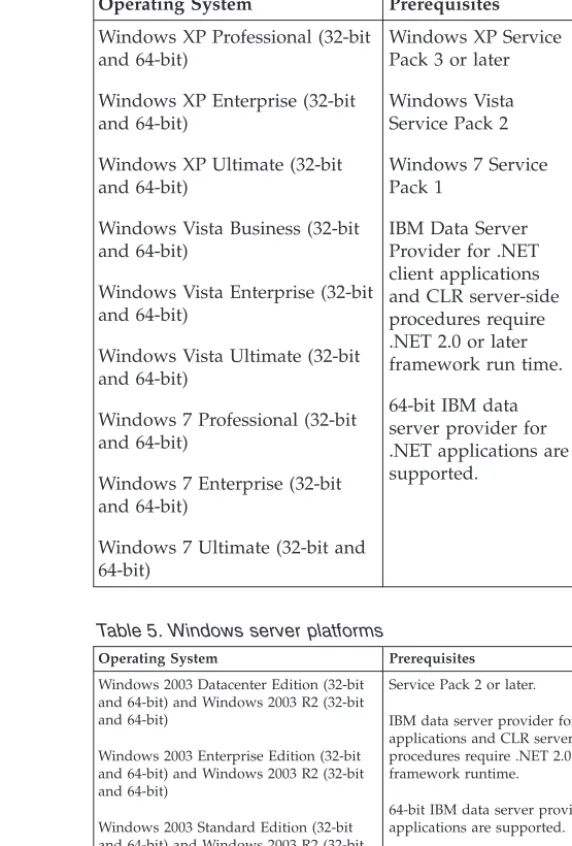
Table 4. Windows workstation platforms
Operating System Prerequisites Hardware Windows XP Professional (32-bit
and 64-bit)
Windows XP Enterprise (32-bit and 64-bit)
Windows XP Ultimate (32-bit and 64-bit)
Windows Vista Business (32-bit and 64-bit)
Windows Vista Enterprise (32-bit and 64-bit)
Windows Vista Ultimate (32-bit and 64-bit)
Windows 7 Professional (32-bit and 64-bit)
Windows 7 Enterprise (32-bit and 64-bit)
Windows 7 Ultimate (32-bit and 64-bit) Windows XP Service Pack 3 or later Windows Vista Service Pack 2 Windows 7 Service Pack 1
IBM Data Server Provider for .NET client applications and CLR server-side procedures require .NET 2.0 or later framework run time. 64-bit IBM data server provider for .NET applications are supported.
All Intel and AMD processors capable of running the supported Windows operating systems (32-bit and 64-bit based systems)
Table 5. Windows server platforms
Operating System Prerequisites Hardware
Windows 2003 Datacenter Edition (32-bit and 64-bit) and Windows 2003 R2 (32-bit and 64-bit)
Windows 2003 Enterprise Edition (32-bit and 64-bit) and Windows 2003 R2 (32-bit and 64-bit)
Windows 2003 Standard Edition (32-bit and 64-bit) and Windows 2003 R2 (32-bit and 64-bit)
Service Pack 2 or later.
IBM data server provider for .NET client applications and CLR server-side procedures require .NET 2.0 or later framework runtime.
64-bit IBM data server provider for .NET applications are supported.
All Intel and AMD processors capable of running the supported Windows operating systems (32-bit and 64-bit based systems).
Windows Server 2008 Datacenter Edition (32-bit and 64-bit) and Windows Server 2008 R2 (64-bit)
Windows Server 2008 Enterprise Edition (32-bit and 64-bit) and Windows Server 2008 R2 (64-bit)
Windows Server 2008 Standard Edition (32-bit and 64-bit) and Windows Server 2008 R2 (64-bit)
Windows Server 2008 requires Service Pack 2 or later.
Windows Server 2008 R2 requires GA level.
IBM data server provider for .NET client applications and CLR server-side procedures require .NET 2.0 or later framework runtime.
64-bit IBM data server provider for .NET applications are supported.
Note: DB2 database products support the hardware-enforced Data Execution Prevention (DEP) feature that is built into some Windows operating systems. Additional software considerations
v Windows Installer 3.0 is required. It is installed by the installer if is it
v IBM Data Server Provider for .NET client applications and CLR
server-side procedures require .NET 2.0 or later framework runtime. In an x64 environment, 32-bit IBM data server provider for .NET
applications runs in the WOW64 emulation mode.
v If you plan to use LDAP (Lightweight Directory Access Protocol), use
either a Microsoft LDAP client or the IBM Tivoli Directory Server v6 client (also known as the IBM LDAP client which is included with DB2 database products). Before installation of the Microsoft Active Directory, you must extend your directory schema using the db2schexutility, which can be found on the installation media under thedb2\Windows\utilities
directory.
The Microsoft LDAP client is included with Windows operating systems.
v One of the following browsers is required to view online help, run the
DB2 installation launchpad (setup.exe), and to run First Steps (db2fs): – Firefox 3.0 and later
– Internet Explorer 7.0 and later – Google Chrome
– Safari 4.0
Chapter 4. IBM Data Server Client support for database
application development
The Data Server Client supports application development for databases. The Data Server Client includes the following features:
v Precompilers for C/C++, COBOL, and Fortran, (providing the language is
supported for that platform).
v Embedded SQL application support, including programming libraries, include
files and code samples.
v ODBC and DB2 Call Level Interface (DB2 CLI) application support, including
programming libraries, include files, and code samples for developing applications which are easily ported to ODBC and compiled with an ODBC SDK. An ODBC SDK is available from Microsoft for Windows operating systems, and from various other vendors for many of the other supported platforms. On Windows operating systems, the ODBC and CLI driver is installed by default with the DB2 Client, supporting applications developed with the Microsoft ODBC Software Developer's Kit. For all other platforms, the ODBC and CLI driver can optionally be installed with the DB2 Client, supporting applications that can be developed with an ODBC SDK for that platform, if one exists.
v The IBM Data Server Driver for JDBC and SQLJ, which includes:
– Support for JDBC 3 and JDBC 4 compliant applications
– SQLJ support, for developing Java™applications with static SQL
v Java 5environment is embedded in DB2 servers to support server-side Java
application artifacts including stored procedures and user-defined functions
v ActiveX Data Objects (ADO) and Object Linking and Embedding (OLE)
automation routines (UDFs and Stored Procedures)on Windows operating systems, including code samples implemented in Microsoft Visual Basic and Microsoft Visual C++.
v Object Linking and Embedding Database (OLE DB) table functionson
Windows operating systems.
v C# and Visual Basic .NET applications and CLR .NET routineson Windows
operating systems.
v Ruby and Ruby on Rails application support, including IBM_DB gem for easy
install and code samples. Ruby is a fully-integrated object-oriented programming language used to develop web applications. Ruby on Rails (RoR), also known as Rails, is a framework for developing web applications that access databases according to the Model-View-Control architectural framework
v PHP Hypertext Preprocessor application support, including programming
libraries and code samples. PHP is a scripting language used to develop web applications. It also supports object-oriented programming
v Data Studiois a comprehensive suite of integrated Eclipse tools for the database
developer and development DBA. Data Studio reduces the time to perform day-to-day administration tasks, create, deploy, and debug SQL and Java stored procedures, deploy data-centric web services, and create queries for relational and XML data using SQL and XQuery for DB2 and Informix®data servers.
v Interactive SQLthrough the Command Line Processor (CLP) to prototype SQL
statements or to perform ad hoc queries against the database.
v A set of documented APIsfor other application development tools to
implement precompiler support for DB2 directly within their products. For example, IBM COBOL on AIX uses this interface.
Chapter 5. Supported database application programming
interfaces
You can use any of the following programming interfaces to manage or access DB2 databases.
You can:
v Use DB2 APIs to perform administrative functions such as backing up and
restoring databases.
v Embed static and dynamic SQL statements in your applications programmed in
C, C++, COBOL, FORTRAN, and REXX.
v Code DB2 Call Level Interface (DB2 CLI) function calls in your applications to
invoke dynamic SQL statements.
v Develop Java applications and applets using the Java Database Connectivity
application programming interface (JDBC API) or embedded SQL for Java (SQLJ).
v Develop Microsoft Visual Basic and Visual C++ applications using ActiveX Data
Object (ADO).
v Develop ADO.NET applications using IBM Data Server Provider for .NET (DB2
.NET).
v Develop applications using IBM or third-party tools such as Excel, Perl, and
Open Database Connectivity (ODBC) end-user tools such as Lotus®Approach®,
and its programming language, LotusScript®.
v Develop web applications using PHP scripting language and Ruby on Rails
(RoR) which is a framework for developing web applications that access databases.
v Develop web applications using Python, which is a general purpose, high-level
scripting language that is well-suited for rapid application development.
v Use Oracle Call Interface (OCI) applications to access DB2 databases. The IBM
Data Server Driver for DB2CI provides support for calls to a number of OCI APIs.
ADO.NET development for IBM Data Servers
The IBM Data Server Provider for .NET is an extension of the ADO.NET interface that allows .NET applications to access an IBM data server through a secure connection, execute commands, and retrieve result sets.
Reference documentation is included with the IBM Data Server Provider for .NET when installing the IBM Data Server Client, presenting detailed information about all the IBM Data Server Provider for .NET objects and their members. During the DB2 installation process, this documentation is registered with Microsoft Visual Studio .NET. To view the IBM Data Server Provider for .NET documentation from Microsoft Visual Studio .NET, select theHelpmenu option, andContents. Once the help viewer opens, filter by IBM Database Documentation.
IBM Data Server Provider for .NET
The IBM Data Server Provider for .NET extends data server support for the ADO.NET interface. The provider delivers high-performing, secure access to IBM data servers.
Two providers are included in the IBM Data Server Provider for .NET client package. These providers are sometimes referred to as the Common .NET Providers.
The DB2 .NET Provider (IBM.Data.DB2.dll)
With the DB2 .NET Provider your .NET applications can access the following database management systems:
v DB2 for Linux, UNIX, and Windows, Version 9.1, Version 9.5, Version
9.7, Version 9.8, and Version 10.1
v DB2 Universal Database™Version 8 for Windows, UNIX, and Linux v DB2 for z/OS®Version 8, Version 9, and Version 10 , through DB2
Connect™
v IBM DB2 for IBM i Version 5 Release 4, Version 6 Release 1 and Version
7 Release 1, through DB2 Connect (for IBM DB2 Version 9.7 Fix Pack 4 and higher versions)
v IBM DB2 for IBM i Version 5 Release 4 and Version 6 Release 1, through
DB2 Connect (for IBM DB2 Version 9.7 Fix Pack 3 and earlier versions)
v IBM Informix Version 11.10, and later
The remainder of these topics discuss the Common DB2 .NET Provider. The Informix database server .NET Provider (IBM.Data.Informix.dll)
With the Informix database server .NET Provider your .NET applications can access the following database management systems:
v IBM Informix, Version 11.10, and later
For more information about this provider, see the: IBM Informix Dynamic Server Information Center.
To develop and run applications that use Data Server Provider for .NET you need the .NET Framework.
In addition to the IBM Data Server Provider for .NET, the IBM Database Add-Ins for Visual Studio enable you to quickly and easily develop .NET applications for IBM data servers using Microsoft Visual Studio. You can also use the Add-Ins to create database objects such as indexes and tables, and develop server-side objects, such as stored procedures and user-defined functions.
ODBC .NET Data Provider
The ODBC .NET Data Provider makes ODBC calls to a DB2 data source using the CLI Driver. Therefore, the connection string keywords supported by the ODBC .NET Data Provider are the same as those supported by the CLI driver. This provider is no longer tested. Users are recommended to use the IBM Data Server Provider for .NET.
Also, the ODBC .NET Data Provider has the same restrictions as the CLI driver. There are additional restrictions for the ODBC .NET Data Provider, which are identified in the topic: “ODBC .NET Data Provider restrictions” in Developing ADO.NET and OLE DB Applications.
In order to use the ODBC .NET Data Provider, you must have the .NET Framework Version 2.0, 3.0, or 3.5 installed. For DB2 Universal Database for AS/400® V5R4 and earlier, the following fix is required on the server: APAR
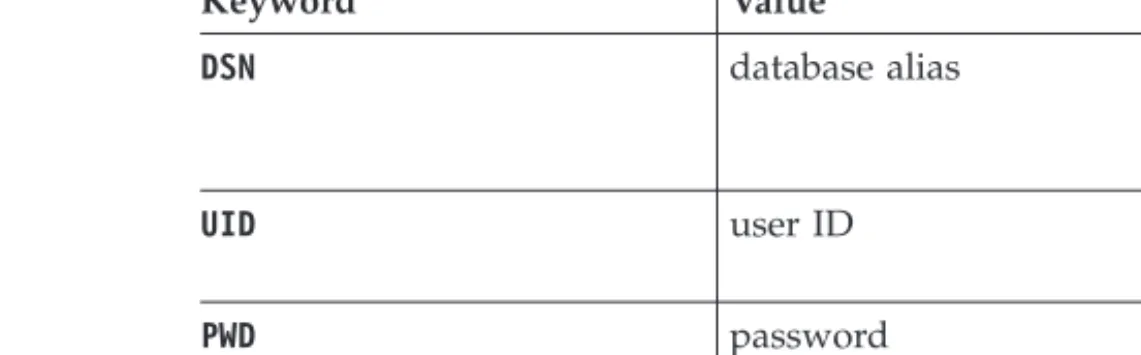
The supported connection keywords for the ODBC .NET Data Provider are listed in the table 1:
Table 6. UsefulConnectionStringkeywords for the ODBC .NET Data Provider
Keyword Value Meaning
DSN database alias The DB2 database alias as
cataloged in the database directory
UID user ID The user ID used to connect
to the DB2 server
PWD password The password for the user ID
used to connect to the DB2 server
Note: For the full list ofConnectionStringkeywords, see the Microsoft documentation.
The following code is an example of creating anOdbcConnectionto connect to the SAMPLE database:
[Visual Basic .NET]
Dim con As New OdbcConnection("DSN=sample;UID=userid;PWD=password;") con.Open()
[C#]
OdbcConnection con = new OdbcConnection("DSN=sample;UID=userid;PWD=password;"); con.Open()
OLE DB .NET Data Provider
The OLE DB .NET Data Provider uses the IBM DB2 OLE DB Driver, which is referred to in a ConnectionStringobject asIBMDADB2.
The connection string keywords supported by the OLE DB .NET Data Provider are the same as those supported by the IBM OLE DB Provider for DB2. This provider is no longer tested. Users are recommended to use the IBM Data Server Provider for .NET.
Also, the OLE DB .NET Data Provider has the same restrictions as the IBM DB2 OLE DB Provider. There are additional restrictions for the OLE DB .NET Data Provider, which are identified in the topic: “OLE DB .NET Data Provider restrictions” inDeveloping ADO.NET and OLE DB Applications.
In order to use the OLE DB .NET Data Provider, you must have the .NET Framework Version 2.0, 3.0, or 3.5 installed.
For DB2 Universal Database for AS/400 R520, R530 and R540, the following fix is required on the server: APAR ii13348.
All the supported connection keywords for the OLE DB .NET Data Provider are shown in table 1:
Table 7. UsefulConnectionStringkeywords for the OLE DB .NET Data Provider
Keyword Value Meaning
PROVIDER IBMDADB2 Specifies the IBM OLE DB
Provider for DB2 (required)
Table 7. UsefulConnectionStringkeywords for the OLE DB .NET Data Provider (continued)
Keyword Value Meaning
DSN orData Source database alias The DB2 database alias as
cataloged in the database directory
UID user ID The user ID used to connect
to the DB2 data server
PWD password The password for the user ID
used to connect to the DB2 data server
Note: For the full list ofConnectionStringkeywords, see the Microsoft documentation.
Example of creating anOleDbConnectionto connect to the SAMPLE database is:
[Visual Basic .NET]
Dim con As New OleDbConnection("Provider=IBMDADB2;" + "Data Source=sample;UID=userid;PWD=password;") con.Open()
[C#]
OleDbConnection con = new OleDbConnection("Provider=IBMDADB2;" + "Data Source=sample;UID=userid;PWD=password;" ); con.Open()
Introduction to DB2 Call Level Interface and ODBC
DB2 Call Level Interface (CLI) is IBM's callable SQL interface to the DB2 family of database servers. It is a 'C' and 'C++' application programming interface for relational database access that uses function calls to pass dynamic SQL statements as function arguments.
You can use the CLI interface to access the following IBM data server databases:
v DB2 Version 9 for Linux, UNIX, and Windows
v DB2 Universal Database Version 8 (and later) for OS/390®and z/OS v DB2 for IBM i 5.4 and later
v IBM Informix database server Version 11.70
CLI is an alternative to embedded dynamic SQL, but unlike embedded SQL, it does not require host variables or a precompiler. Applications can be run against a variety of databases without having to be compiled against each of these
databases. Applications use procedure calls at run time to connect to databases, issue SQL statements, and retrieve data and status information.
The CLI interface provides many features not available in embedded SQL. For example:
v CLI provides function calls that support a way of querying database catalogs
that is consistent across the DB2 family. This reduces the need to write catalog queries that must be tailored to specific database servers.
v CLI provides the ability to scroll through a cursor:
– Forward by one or more rows – Backward by one or more rows
– Backward from the last row by one or more rows – From a previously stored location in the cursor.
v Stored procedures called from application programs that were written using CLI
can return result sets to those programs.
CLI is based on the Microsoft Open Database Connectivity (ODBC) specification, and the International Standard for SQL/CLI. These specifications were chosen as the basis for the DB2 Call Level Interface in an effort to follow industry standards and to provide a shorter learning curve for those application programmers already familiar with either of these database interfaces. In addition, some DB2 specific extensions have been added to help the application programmer specifically exploit DB2 features.
The CLI driver also acts as an ODBC driver when loaded by an ODBC driver manager. It conforms to ODBC 3.51.
CLI Background information
To understand CLI or any callable SQL interface, it is helpful to understand what it is based on, and to compare it with existing interfaces.
The X/Open Company and the SQL Access Group jointly developed a specification for a callable SQL interface referred to as theX/Open Call Level Interface. The goal of this interface is to increase the portability of applications by enabling them to become independent of any one database vendor's programming interface. Most of the X/Open Call Level Interface specification has been accepted as part of the ISO Call Level Interface International Standard (ISO/IEC 9075-3:1995 SQL/CLI). Microsoft developed a callable SQL interface called Open Database Connectivity (ODBC) for Microsoft operating systems based on a preliminary draft of X/Open CLI.
The ODBC specification also includes an operating environment where
database-specific ODBC drivers are dynamically loaded at run time by a driver manager based on the data source (database name) provided on the connect request. The application is linked directly to a single driver manager library rather than to each DBMS's library. The driver manager mediates the application's function calls at run time and ensures they are directed to the appropriate
DBMS-specific ODBC driver. Because the ODBC driver manager only knows about the ODBC-specific functions, DBMS-specific functions cannot be accessed in an ODBC environment. DBMS-specific dynamic SQL statements are supported through a mechanism called an escape clause.
ODBC is not limited to Microsoft operating systems; other implementations are available on various platforms.
The CLI load library can be loaded as an ODBC driver by an ODBC driver
manager. For ODBC application development, you must obtain an ODBC Software Development Kit. For the Windows platform, the ODBC SDK is available as part of the Microsoft Data Access Components (MDAC) SDK, available for download from http://www.microsoft.com/downloads. For non-Windows platforms, the ODBC SDK is provided by other vendors. When developing ODBC applications that may connect to DB2 servers, use the Call Level Interface Guide and Reference Volume 1 and the Call Level Interface Guide and Reference Volume 2 (for information about
DB2 specific extensions and diagnostic information), in conjunction with the ODBC Programmer's Reference and SDK Guide available from Microsoft.
Applications written using CLI APIs link directly to the CLI library. CLI includes support for many ODBC and ISO SQL/CLI functions, as well as DB2 specific functions.
The following DB2 features are available to both ODBC and CLI applications:
v double byte (graphic) data types v stored procedures
v Distributed Unit of Work (DUOW), two phase commit v compound SQL
v user defined types (UDT) v user defined functions (UDF)
Introduction to embedded SQL
Embedded SQL database applications connect to databases and execute embedded SQL statements.
Embedded SQL database applications connect to databases and execute embedded SQL statements. Embedded SQL statements are embedded within a host language application. Embedded SQL database applications support the embedding of SQL statements to be executed statically or dynamically.
You can develop embedded SQL applications for DB2 in the following host programming languages: C, C++, COBOL, FORTRAN, and REXX.
Note: Support for embedded SQL in FORTRAN and REXX has been deprecated
and will remain at the DB2 Universal Database , Version 5.2 level.
Building embedded SQL applications involves two prerequisite steps before application compilation and linking.
v Preparing the source files containing embedded SQL statements using the DB2
precompiler.
ThePREP (PRECOMPILE)command is used to invoke the DB2 precompiler, which reads your source code, parses and converts the embedded SQL statements to DB2 run-time services API calls, and finally writes the output to a new modified source file. The precompiler produces access plans for the SQL statements, which are stored together as a package within the database.
v Binding the statements in the application to the target database.
Binding is done by default during precompilation (thePREPcommand). If binding is to be deferred (for example, running theBINDcommand later), then theBINDFILEoption needs to be specified atPREPtime in order for a bind file to be generated.
Once you have precompiled and bound your embedded SQL application, it is ready to be compiled and linked using the host language-specific development tools.
To aid in the development of embedded SQL applications, you can refer to the embedded SQL template in C. Examples of working embedded SQL sample applications can also be found in the %DB2PATH%\SQLLIB\samplesdirectory.
Note: %DB2PATH% refers to the DB2 installation directory
Static and dynamic SQL
SQL statements can be executed in one of two ways: statically or dynamically. Statically executed SQL statements
For statically executed SQL statements, the syntax is fully known at precompile time. The structure of an SQL statement must be completely specified for a statement to be considered static. For example, the names for the columns and tables referenced in a statement must be fully known at precompile time. The only information that can be specified at run time are values for any host variables referenced by the statement. However, host variable information, such as data types, must still be precompiled. You precompile, bind, and compile statically executed SQL statements before you run your application. Static SQL is best used on databases whose statistics do not change a great deal.
Dynamically executed SQL statements
Dynamically executed SQL statements are built and executed by an application at run-time. An interactive application that prompts the end user for key parts of an SQL statement, such as the names of the tables and columns to be searched, is a good example of a situation suited for
dynamic SQL. Related information:
Installing and configuring Optim Performance Manager Extended Insight
Supported drivers for JDBC and SQLJ
The DB2 product includes support for two types of JDBC driver architecture. According to the JDBC specification, there are four types of JDBC driver architectures:
Type 1
Drivers that implement the JDBC API as a mapping to another data access API, such as Open Database Connectivity (ODBC). Drivers of this type are generally dependent on a native library that limits their portability. The DB2 database system does not provide a type 1 driver.
Type 2
Drivers that are written partly in the Java programming language and partly in native code. The drivers use a native client library specific to the data source to which they connect. Because of the native code, their portability is limited. Type 3
Drivers that use a pure Java client and communicate with a data server using a data-server-independent protocol. The data server then communicates the client's requests to the data source. The DB2 database system does not provide a type 3 driver.
Type 4
Drivers that are pure Java and implement the network protocol for a specific data source. The client connects directly to the data source.
DB2 for Linux, UNIX, and Windows supports the following driver:
Driver name Packaged as Driver type IBM Data Server Driver for
JDBC and SQLJ
v db2jcc.jar and sqlj.zip for
JDBC 3.0 support
v db2jcc4.jar and sqlj4.zip for
support of some JDBC 4.0 or later functions
Type 2 and Type 4
IBM Data Server Driver for JDBC and SQLJ (type 2 and type 4)
The IBM Data Server Driver for JDBC and SQLJ is a single driver that includes JDBC type 2 and JDBC type 4 behavior. When an application loads the IBM Data Server Driver for JDBC and SQLJ, a single driver instance is loaded for type 2 and type 4 implementations. The application can make type 2 and type 4 connections using this single driver instance. The type 2 and type 4 connections can be made concurrently. IBM Data Server Driver for JDBC and SQLJ type 2 driver behavior is referred to asIBM Data Server Driver for JDBC and SQLJ type 2 connectivity.IBM Data Server Driver for JDBC and SQLJ type 4 driver behavior is referred to as IBM Data Server Driver for JDBC and SQLJ type 4 connectivity.
Two versions of the IBM Data Server Driver for JDBC and SQLJ are available. IBM Data Server Driver for JDBC and SQLJ version 3.5xis JDBC 3.0-compliant. IBM Data Server Driver for JDBC and SQLJ version 4.x is compliant with JDBC 4.0 or later.
The IBM Data Server Driver for JDBC and SQLJ supports these JDBC and SQLJ functions:
v Version 3.5x supports all of the methods that are described in the JDBC 3.0
specifications.
v Version 4.xsupports all of the methods that are described in the JDBC 4.0 or
later specifications.
v SQLJ application programming interfaces, as defined by the SQLJ standards, for
simplified data access from Java applications.
v Connections that are enabled for connection pooling. WebSphere®Application
Server or another application server does the connection pooling.
v Connections to a data server from Java user-defined functions and stored
procedures use IBM Data Server Driver for JDBC and SQLJ type 2 connectivity only. Applications that call user-defined functions or stored procedures can use IBM Data Server Driver for JDBC and SQLJ type 2 connectivity or IBM Data Server Driver for JDBC and SQLJ type 4 connectivity to connect to a data server. The IBM Data Server Driver for JDBC and SQLJ is the default driver for Java routines.
v Support for distributed transaction management. This support implements the
Java 2 Platform, Enterprise Edition (J2EE) Java Transaction Service (JTS) and Java Transaction API (JTA) specifications, which conform to the X/Open standard for distributed transactions (Distributed Transaction Processing: The XA Specification, available from http://www.opengroup.org).
IBM OLE DB Provider for DB2
The IBM OLE DB Provider for DB2 allows DB2 to act as a resource manager for the OLE DB provider. This support gives OLE DB-based applications the ability to extract or query DB2 data using the OLE interface.
Microsoft OLE DB is a set of OLE/COM interfaces that provides applications with uniform access to data stored in diverse information sources. The OLE DB
architecture defines OLE DB consumers and OLE DB providers. An OLE DB consumer is any system or application that uses OLE DB interfaces; an OLE DB provider is a component that exposes OLE DB interfaces.
The IBM OLE DB Provider for DB2, whose provider name is IBMDADB2, enables OLE DB consumers to access data on a DB2 database server. If DB2 Connect is installed, these OLE DB consumers can also access data on a host DBMS such as DB2 for z/OS, DB2 Server for VM and VSE, or DB2 Universal Database for AS/400.
The IBM OLE DB Provider for DB2 offers the following features:
v Support level 0 of the OLE DB provider specification, including some additional
level 1 interfaces.
v A free threaded provider implementation, which enables the application to
create components in one thread and use those components in any other thread.
v An Error Lookup Service that returns DB2 error messages.
Note that the IBM OLE DB Provider resides on the client and is different from the OLE DB table functions, which are also supported by DB2 database systems. Subsequent sections of this document describe the specific implementation of the IBM OLE DB Provider for DB2. For more information about the Microsoft OLE DB 2.0 specification, refer to the Microsoft OLE DB 2.0 Programmer's Reference and Data Access SDK, available from Microsoft Press.
Version Compliance
The IBM OLE DB Provider for DB2 complies with Version 2.7 or later of the Microsoft OLE DB specification.
System Requirements
Refer to the announcement letter for the IBM OLE DB Provider for DB2 data servers to see the supported Windows operating systems.
To install the IBM OLE DB Provider for DB2, you must first be running on one of the supported operating systems listed previously. You also need to install a full DB2 product, IBM Data Server Driver for ODBC and CLI, or IBM Data Server Driver Package.
Perl DBI
DB2 supports the Perl Database Interface (DBI) specification for data access through the DBD::DB2 driver.
The DB2 Perl DBI website is located at:
http://www.ibm.com/software/data/db2/perl/
and contains the latest DBD::DB2 driver, and related information.
Perl is an interpreted language and the Perl DBI Module uses dynamic SQL. These properties make Perl an ideal language for quickly creating and revising DB2 applications. The Perl DBI Module uses an interface that is quite similar to the CLI
and JDBC interfaces, which makes it easy to port Perl applications to CLI and JDBC, or to port CLI and JDBC applications to Perl.
PHP application development for IBM data servers
PHP: Hypertext Preprocessor (PHP) is an interpreted programming language that is widely used for developing web applications. PHP has become a popular language for web development because it is easy to learn, focuses on practical solutions, and supports the most commonly required functionality in web applications.
PHP is a modular language that enables you to customize the available
functionality through the use of extensions. These extensions can simplify tasks such as reading, writing, and manipulating XML, creating SOAP clients and servers, and encrypting communications between server and browser. The most popular extensions for PHP, however, provide read and write access to databases so that you can easily create a dynamic database-driven website.
IBM provides the listed PHP extensions for accessing IBM data server databases: ibm_db2
A procedural application programming interface (API) that, in addition to the normal create, read, update, and write database operations, also offers extensive access to the database metadata. You can compile the ibm_db2 extension with either PHP 4 or PHP 5. This extension is written,
maintained, and supported by IBM. pdo_ibm
A driver for the PHP Data Objects (PDO) extension that offers access to IBM data server databases through the standard object-oriented database interface introduced in PHP 5.1.
These extensions are included as part of the IBM Data Server Driver Package (DS Driver) of Version 1.7.0. This version or a later version is supported to connect to IBM DB2 Version 9.7 for Linux, UNIX, and Windows. You can check the version of ibm_db2 extension by issuing the php --re ibm_db2command.
The most recent versions of ibm_db2 and pdo_ibm are also available from the PHP Extension Community Library (PECL) at http://pecl.php.net/.
PHP applications can access the listed IBM data server databases:
v IBM DB2 Version 9.1 for Linux, UNIX, and Windows, Fix Pack 2 and later v IBM DB2 Universal Database (DB2 UDB) Version 8 for Linux, UNIX, and
Windows, Fixpak 15 and later
v Remote connections to IBM DB2 for IBM i V5R3
v Remote connections to IBM DB2 for IBM i Version 5.4 and later v Remote connections to IBM DB2 for z/OS, Version 8 and later
A third extension, Unified ODBC, has historically offered access to DB2 database systems. For new applications, however, you can use either ibm_db2 and pdo_ibm because they offer significant performance and stability benefits over Unified ODBC. The ibm_db2 extension API makes porting an application that was previously written for Unified ODBC almost as easy as globally changing the
Python, SQLAlchemy and Django Framework application development
for IBM data servers
Python is a general purpose, high level scripting language that is well suited for rapid application development. Python emphasizes code readability and supports a variety of programming paradigms, including procedural, object-oriented,
aspect-oriented, meta, and functional programming. The Python language is managed by the Python Software Foundation.
The listed extensions are available for accessing IBM data server databases from a Python application:
ibm_db
This API is defined by IBM and provides the best support for advanced features. In addition to issuing SQL queries, calling stored procedures, and using pureXML®, you can access metadata information.
ibm_db_dbi
This API implements Python Database API Specification v2.0. Because the ibm_db_dbi API conforms to the specification, it does not offer some of the advanced features that the ibm_db API supports. If you have an
application with a driver that supports Python Database API Specification v2.0, you can easily switch to ibm_db. The ibm_db and ibm_db_dbi APIs are packaged together.
ibm_db_sa
This adaptor supports SQLAlchemy, which offers a flexible way to access IBM data servers. SQLAlchemy is a popular open source Python SQL toolkit and object-to-relational mapper (ORM).
ibm_db_django
This adaptor provides access to IBM data servers from Django. Django is a popular web framework used to build high-performing, elegant web applications quickly.
Python applications can access the listed IBM data servers:
v IBM DB2 Version 9.1 for Linux, UNIX, and Windows, Fix Pack 2 and later v IBM DB2 Universal Database (DB2 UDB) Version 8 for Linux, UNIX, and
Windows, Fixpak 15 and later
v Remote connections to IBM DB2 for IBM i V5R3, with PTF SI27358 (includes
SI27250)
v Remote connections to IBM DB2 for IBM i 5.4 and later, with PTF SI27256 v Remote connections to IBM DB2 for z/OS, Version 8 and Version 9 v IBM Informix Dynamic Server v11.10 and later
The IBM_DB Ruby driver and Rails adapter
With the introduction of support for the Ruby on Rails framework, Rails applications can now access data on IBM data servers.
Collectively known as the IBM_DB gem, the IBM_DB Ruby driver and Rails adapter allows Ruby applications to access the listed database management systems:
v DB2 for Linux, UNIX, and Windows Version 9 and later
v DB2 Universal Database (DB2 UDB) Version 8 for Linux, UNIX, and Windows
v DB2 UDB Version 5, Release 1 (and later) for AS/400 and iSeries®, through DB2
Connect
v DB2 for z/OS, Version 8 and Version 9, through DB2 Connect v Informix Dynamic Server, Version 11.10 and later
Note: Client applications must use IBM Data Server Driver Version 9.5 or later when accessing Informix Dynamic Server Version 11.10. Previous versions are not supported. Client applications can also use IBM Data Server Runtime Client or IBM Data Server Client.
The IBM_DB Ruby driver can be used to connect to and access data from the IBM data servers mentioned previously. The IBM_DB Ruby adapter allows any
database-backed Rails application to interface with IBM data servers.
For more information about IBM Ruby projects and the RubyForge open source community, see http://rubyforge.org/projects/rubyibm/
For a list of installation requirements for DB2 database products, see http://publib.boulder.ibm.com/infocenter/db2luw/v9r7/topic/ com.ibm.db2.luw.qb.server.doc/doc/r0025127.html
For a list of installation requirements for IBM Informix Dynamic Server, see http://publib.boulder.ibm.com/infocenter/idshelp/v111/topic/com.ibm.expr.doc/ ids_in_004x.html
For information about downloading an IBM Data Server Driver Package (DS Driver), see http://www.ibm.com/software/data/support/data-server-clients/ index.html.
Chapter 6. Programming languages and compilers for
database application development
Application development for DB2 databases is supported on a range of programming languages and compilers.
You can develop DB2 database applications in the following languages:
v C++
v C#, VB .NET, and other .NET languages v C v COBOL v Fortran v Java v Perl v PHP v Python v REXX
v Ruby and Ruby on Rails
The APIs and programming languages for developing external routines are generally compatible with those for database application development. There are some minor differences in prerequisites and support. To review the supported APIs and programming language for external routine development see:Supported APIs and programming languages for external routine development.
Supported .NET development software
To develop and deploy .NET applications that run against IBM data servers, you must use supported development software and operating systems.
Supported operating systems for developing and deploying .NET
Framework 2.0, 3.0, 3.5, and 4.0 applications
The following operating systems are supported for developing and deploying .NET Framework 2.0, 3.0, 3.5, and 4.0 applications:
v Windows XP, Service Pack 2 (32-bit and 64-bit editions) v Windows Server 2003 (32-bit and 64-bit editions) v Windows Vista (32-bit and 64-bit editions) v Windows Server 2008 (32-bit and 64-bit editions) v Windows Server 2008 R2 (64-bit edition)
v Windows 7 (32-bit and 64-bit editions)
Supported operating systems for developing and deploying .NET
Framework 4.5 applications
The following operating systems are supported for developing and deploying .NET Framework 4.5 applications:
v Windows Vista Service Pack 2 (32-bit and 64-bit editions)