Informix Dynamic Server 11:
Extending Availability
and Replication
Chuck Ballard
Joseph Baric
Ajay Gupta
Holger Kirstein
Rajesh Naicken
Nilesh Ozarkar
Enterprise Replication: dynamic
configuration and faster performance
Less and easier administration
and high reliability
Load balancing and
failover strategies
Informix Dynamic Server 11: Extending Availability
and Replication
November 2007
First Edition (November 2007)
Note: Before using this information and the product it supports, read the information in
Contents
Notices . . . xi
Trademarks . . . xii
Preface . . . xiii
The team that wrote this book . . . xiv
Become a published author . . . xvi
Comments welcome . . . xvii
Chapter 1. Introduction . . . 1
1.1 Terminology and definitions . . . 2
1.2 High availability and replication features of IDS 11 . . . 4
1.2.1 Online backup and restore . . . 4
1.2.2 Online tuning . . . 4
1.2.3 Disk mirroring . . . 5
1.2.4 High availability data replication . . . 5
1.2.5 Enterprise Replication . . . 7
1.2.6 Remote Standalone Secondary . . . 8
1.2.7 Shared disk secondary servers . . . 10
1.2.8 Continuous log restore . . . 11
1.3 Recoverable Groups . . . 12
1.3.1 Recoverable Groups based on Shared Disk Secondaries . . . 14
1.3.2 Recoverable Groups with multi-layer HA solutions . . . 18
1.4 Choosing a replication strategy . . . 20
1.5 Combining IDS availability options . . . 20
1.6 Summary . . . 22
Chapter 2. Preparing the technical infrastructure . . . 23
2.1 Hardware considerations. . . 24
2.1.1 Data storage . . . 24
2.1.2 Network communication . . . 26
2.2 Database server . . . 29
2.2.1 In-place upgrade and migration . . . 29
2.2.2 Database server configuration . . . 30
2.2.3 Encrypted communication . . . 33
2.2.4 Connection security. . . 34
2.3 Database setup and considerations . . . 36
2.4 Application redirection . . . 39
2.4.3 Automatic redirection using server groups . . . 41
2.4.4 Example of automatic redirection . . . 42
Chapter 3. High availability data replication . . . 45
3.1 How it works . . . 46
3.1.1 HDR threads and architecture. . . 47
3.2 Prerequisites to setting up HDR . . . 49
3.3 ONCONFIG parameters relevant to HDR . . . 50
3.3.1 DRAUTO . . . 50 3.3.2 DRINTERVAL . . . 52 3.3.3 DRTIMEOUT . . . 53 3.3.4 DRLOSTFOUND . . . 54 3.3.5 DRIDXAUTO . . . 56 3.3.6 LOG_INDEX_BUILDS. . . 57 3.3.7 ENCRYPT_HDR . . . 58 3.3.8 OFF_RECVRY_THREADS . . . 58 3.4 Setting up HDR . . . 59
3.4.1 Setup with oninit -R . . . 60
3.4.2 Setup with ontape . . . 61
3.4.3 Setup with an imported onbar restore . . . 62
3.4.4 Setup with an external archive and restore . . . 63
3.5 Recovering from an HDR Failure . . . 64
3.5.1 Restarting HDR after scheduled maintenance . . . 64
3.6 Utilities to monitor and troubleshoot HDR . . . 68
3.6.1 onstat . . . 68
3.6.2 Online log . . . 70
3.6.3 onmode . . . 72
3.6.4 The sysmaster database . . . 73
Chapter 4. HDR: advanced use scenarios . . . 75
4.1 Hardware cluster for high availability. . . 77
4.2 Combining HDR and other technology . . . 79
4.2.1 Continuous log restore . . . 79
4.2.2 Combining HDR with continuous log restore . . . 81
4.2.3 Combining HDR with a hardware cluster . . . 81
4.3 Managing multiple instances with HDR . . . 82
4.3.1 Multiple independent instances of IDS . . . 83
4.3.2 Star connection for multiple HDR . . . 83
4.3.3 Cascading multiple HDR pairs . . . 84
4.4 Data partitioning with multiple HDR. . . 85
4.4.1 Simple table-level partitioning . . . 86
4.5 High availability solutions . . . 91
Chapter 5. Remote Standalone Secondary servers . . . 93
5.1 RSS technologies and concepts . . . 94
5.1.1 The Primary server in an RSS environment . . . 94
5.1.2 The RSS server. . . 96
5.1.3 Index Page Logging . . . 96
5.1.4 SMX . . . 97
5.2 RSS threads and architecture . . . 98
5.3 ONCONFIG parameters that affect RSS. . . 99
5.4 Setting up RSS . . . 100
5.4.1 Setting up RSS with ontape . . . 101
5.4.2 Setting up RSS with an imported OnBar restore. . . 101
5.4.3 Adding an RSS server with an external archive and restore. . . 103
5.5 Changing modes . . . 104
5.6 Monitoring and troubleshooting RSS. . . 105
5.6.1 onstat -g rss . . . 106
5.6.2 onstat -g rss verbose. . . 107
5.6.3 onstat -g smx. . . 108
5.6.4 onstat -g smx ses . . . 109
5.6.5 The sysmaster database . . . 109
5.6.6 Event alarms . . . 110
Chapter 6. Shared Disk Secondary servers . . . 111
6.1 Basic concepts . . . 112
6.1.1 Dbspaces and load balancing . . . 112
6.1.2 SDS and other HA solutions . . . 113
6.1.3 Communication and message flow . . . 113
6.1.4 Threads . . . 115
6.1.5 Temporary dbspaces . . . 117
6.1.6 Page files . . . 119
6.1.7 The sysha database . . . 121
6.2 Configuration and setup . . . 122
6.2.1 Primary server . . . 122
6.2.2 Secondary server . . . 124
6.3 Troubleshooting for the setup phase . . . 128
6.4 Monitoring . . . 131
6.4.1 Monitoring SDS with onstat . . . 131
6.4.2 Monitoring facilities provided by sysmaster database . . . 134
6.5 Special considerations . . . 136
6.5.1 Using SDS_ENABLE . . . 136
6.5.4 Switch off the SDS on the primary . . . 138
6.6 SDS secondary server and some new features . . . 139
6.6.1 Administration . . . 139
6.6.2 DataBlade and application development features. . . 141
6.6.3 Advanced security with LBAC . . . 143
6.7 The Recoverable Group and transfer of the primary . . . 144
6.7.1 Planned outage . . . 145
6.7.2 Unplanned outage: primary down . . . 146
6.7.3 Unplanned outage: cluster down. . . 147
6.7.4 Unplanned outage: shared disk down . . . 149
Chapter 7. Enterprise Replication . . . 151
7.1 Basic concepts . . . 152
7.1.1 Why you should use replication . . . 152
7.1.2 Strengths of Enterprise Replication. . . 153
7.1.3 ER integrates with high availability . . . 155
7.2 Enterprise Replication overview . . . 156
7.2.1 Database servers . . . 156
7.2.2 Replicates and replicate sets . . . 156
7.2.3 Replication templates . . . 158
7.2.4 Frequency of replication . . . 158
7.2.5 Automatic conflict resolution . . . 159
7.2.6 Data synchronization. . . 160
7.3 Topologies for replication . . . 161
7.3.1 Fully-connected database servers . . . 161
7.3.2 A hierarchical tree set of database servers . . . 161
7.3.3 A forest of trees set of database servers . . . 162
7.4 Topology considerations . . . 163
7.4.1 Communications network considerations . . . 164
7.4.2 Workload considerations . . . 164
7.5 Building a replication network . . . 164
Chapter 8. Instantiating Enterprise Replication . . . 167
8.1 Defining a sample ER infrastructure . . . 169
8.2 Additional replication server resource requirements . . . 170
8.2.1 Disk space requirements. . . 170
8.2.2 Logical log space . . . 172
8.3 Prepare the database server. . . 176
8.3.1 Define ER related dbspaces . . . 176
8.3.2 Server groups and the sqlhosts file . . . 181
8.3.3 Setting ONCONFIG parameter . . . 182
8.4 Prepare the data . . . 184
8.4.2 Primary keys . . . 184
8.4.3 Data consistency across the replication server . . . 187
8.4.4 Shadow columns . . . 189
8.4.5 Delete tables . . . 191
8.4.6 Schema changes versus data changes . . . 192
8.4.7 User defined types (UDT) . . . 193
8.5 Define the replication server . . . 194
8.5.1 Creating a replication server . . . 194
8.5.2 Verification of success . . . 200
8.5.3 Troubleshooting . . . 202
8.6 Defining the replicates. . . 203
8.6.1 Strict mastered, mastered, or normal replicates . . . 204
8.6.2 Update-anywhere or primary target . . . 210
8.6.3 Conflict resolution . . . 211
8.6.4 Which columns will be replicated . . . 223
8.6.5 When to replicate the data . . . 225
8.6.6 Error handling, scope, and ATS and RIS files. . . 227
8.6.7 Create missing tables automatically . . . 230
8.6.8 Floats, triggers, and update columns . . . 232
8.6.9 Some common mistakes . . . 236
8.7 Defining replicates with ISA. . . 240
8.7.1 Defining replicate sets . . . 243
8.8 Starting Enterprise Replication . . . 243
8.9 How to use templates . . . 244
8.9.1 Terms and conditions . . . 244
8.9.2 Defining a template . . . 245
8.9.3 Realizing templates . . . 246
8.10 Other replication considerations . . . 249
8.10.1 Blocking replication in a transaction . . . 249
8.10.2 Replicating user-defined types and routines . . . 249
Chapter 9. Making changes in Enterprise Replication . . . 251
9.1 An example replication scenario . . . 252
9.2 Database and tables . . . 252
9.3 Replication server . . . 254
9.3.1 Finding replication servers in an ER domain. . . 254
9.3.2 Modifying a replication server . . . 256
9.3.3 Stopping and restarting a replication server . . . 257
9.3.4 Suspending and resuming a replication server . . . 259
9.3.5 Deleting a replication server . . . 260
9.4 Replicates . . . 262
9.5 Replicate sets . . . 265
9.5.1 Listing replicate sets . . . 265
9.5.2 Modifying replicate sets. . . 267
9.5.3 Considerations for stopping or suspending a replicate set . . . 269
9.6 Templates . . . 270
9.7 Altering tables with defined replicates . . . 273
9.7.1 Remastering replicates . . . 275
9.8 Resynchronization options . . . 276
9.8.1 Use of cdr check repl . . . 277
9.8.2 Use of cdr sync repl . . . 280
9.8.3 Use of cdr repair ats . . . 281
9.8.4 Use of cdr define repair and cdr start repair . . . 287
9.8.5 Use of synchronization and cdr realize template . . . 291
9.8.6 Use of synchronization and cdr start repl . . . 295
9.9 Making changes while ER is active . . . 297
9.9.1 TRUNCATE TABLE on a replicated table . . . 297
9.9.2 Renaming with defined replicates . . . 299
9.9.3 Dynamically altering onconfig parameters . . . 304
9.10 Upgrade considerations in an ER environment . . . 306
9.10.1 Rolling upgrades for servers . . . 306
9.10.2 Rolling upgrades for applications . . . 309
Chapter 10. Monitoring and troubleshooting ER . . . 315
10.1 How Enterprise Replication works internally . . . 316
10.2 Monitoring ER . . . 320
10.2.1 Onstat and ER components . . . 321
10.2.2 Global Catalog statistics . . . 322
10.2.3 Monitoring the global ER variable settings . . . 328
10.3 Monitoring the source replication server . . . 330
10.3.1 Log snooping statistics . . . 330
10.3.2 Grouper statistics . . . 333
10.3.3 Reliable Queue Manager (RQM) statistics on the source . . . 336
10.3.4 Network Interface (NIF) statistics . . . 346
10.4 Monitoring the target replication server . . . 348
10.4.1 Reliable Queue Manager (RQM) statistics on the target . . . 348
10.4.2 Receive Manager statistics . . . 351
10.4.3 Data Sync statistics . . . 354
10.5 Troubleshooting a running ER environment . . . 355
10.5.1 The ATS/RIS file and data inconsistency . . . 355
10.5.2 Monitoring the RQM sendq queue . . . 359
10.5.3 Possible negative effects of monitoring. . . 363
10.5.4 Handling asynchronous communication of ER . . . 365
10.5.6 Data not being replicated . . . 366
Chapter 11. Coexistence of HA technologies . . . 369
11.1 Mix of HDR and RSS. . . 370
11.1.1 Failover of primary to HDR secondary . . . 371
11.1.2 Swapping roles of the HDR primary and HDR secondary . . . 373
11.1.3 Failover of HDR secondary to an RSS node. . . 374
11.1.4 Promoting an HDR secondary to RSS . . . 375
11.1.5 Breaking the HDR connection at the HDR secondary . . . 376
11.1.6 Making RSS a standard . . . 377
11.1.7 Breaking the HDR connection at the primary . . . 379
11.2 Mix of HDR and SDS. . . 380
11.2.1 Failover of primary to HDR secondary . . . 381
11.2.2 Swapping the roles of the HDR primary and HDR secondary . . . 382
11.2.3 Failover of the primary to an SDS node . . . 384
11.2.4 Transfer of the primary to an SDS node . . . 386
11.2.5 Breaking the HDR connection at the HDR secondary . . . 387
11.2.6 Breaking the HDR connection at the primary . . . 388
11.3 Mix of RSS and SDS . . . 389
11.3.1 Failover of the primary to an SDS node . . . 391
11.3.2 Transfer of primary to an SDS node. . . . 392
11.3.3 Making an RSS node a standard node . . . 392
11.4 Mix of HDR, RSS, and SDS . . . 394
11.4.1 Using the onmode command in an HA configuration . . . 396
11.5 Mix of HDR and ER . . . 397
11.6 Mix of SDS, RSS, HDR, and ER . . . 406
11.7 Multi-layer HA strategies . . . 407
11.7.1 Workload balancing with SDS and ER . . . 407
11.7.2 Planning for handling multiple disasters . . . 409
Appendix A. Setting up replication on a single machine . . . 411
Setting up HDR on a single machine . . . 412
Setting it up . . . 412
Tricking the engine . . . 413
Setting up two instances on the same machine with ontape . . . 415
Windows platform . . . 416
Other concerns . . . 418
RSS on a single machine . . . 418
Setting it up . . . 418
Tricking the engine . . . 419
Setting up SDS with a single machine . . . 419
Glossary . . . 421
Abbreviations and acronyms . . . 425
Related publications . . . 429
IBM Redbooks publications . . . 429
Other publications . . . 429
How to get IBM Redbooks publications . . . 430
Help from IBM . . . 430
Notices
This information was developed for products and services offered in the U.S.A.
IBM may not offer the products, services, or features discussed in this document in other countries. Consult your local IBM representative for information on the products and services currently available in your area. Any reference to an IBM product, program, or service is not intended to state or imply that only that IBM product, program, or service may be used. Any functionally equivalent product, program, or service that does not infringe any IBM intellectual property right may be used instead. However, it is the user's responsibility to evaluate and verify the operation of any non-IBM product, program, or service.
IBM may have patents or pending patent applications covering subject matter described in this document. The furnishing of this document does not give you any license to these patents. You can send license inquiries, in writing, to:
IBM Director of Licensing, IBM Corporation, North Castle Drive, Armonk, NY 10504-1785 U.S.A.
The following paragraph does not apply to the United Kingdom or any other country where such provisions are inconsistent with local law: INTERNATIONAL BUSINESS MACHINES CORPORATION
PROVIDES THIS PUBLICATION "AS IS" WITHOUT WARRANTY OF ANY KIND, EITHER EXPRESS OR IMPLIED, INCLUDING, BUT NOT LIMITED TO, THE IMPLIED WARRANTIES OF NON-INFRINGEMENT, MERCHANTABILITY OR FITNESS FOR A PARTICULAR PURPOSE. Some states do not allow disclaimer of express or implied warranties in certain transactions, therefore, this statement may not apply to you. This information could include technical inaccuracies or typographical errors. Changes are periodically made to the information herein; these changes will be incorporated in new editions of the publication. IBM may make improvements and/or changes in the product(s) and/or the program(s) described in this publication at any time without notice.
Any references in this information to non-IBM Web sites are provided for convenience only and do not in any manner serve as an endorsement of those Web sites. The materials at those Web sites are not part of the materials for this IBM product and use of those Web sites is at your own risk.
IBM may use or distribute any of the information you supply in any way it believes appropriate without incurring any obligation to you.
Information concerning non-IBM products was obtained from the suppliers of those products, their published announcements or other publicly available sources. IBM has not tested those products and cannot confirm the accuracy of performance, compatibility or any other claims related to non-IBM products. Questions on the capabilities of non-IBM products should be addressed to the suppliers of those products.
This information contains examples of data and reports used in daily business operations. To illustrate them as completely as possible, the examples include the names of individuals, companies, brands, and products. All of these names are fictitious and any similarity to the names and addresses used by an actual business enterprise is entirely coincidental.
COPYRIGHT LICENSE:
This information contains sample application programs in source language, which illustrate programming techniques on various operating platforms. You may copy, modify, and distribute these sample programs in any form without payment to IBM, for the purposes of developing, using, marketing or distributing application programs conforming to the application programming interface for the operating platform for which the sample programs are written. These examples have not been thoroughly tested under all conditions. IBM, therefore, cannot guarantee or imply reliability, serviceability, or function of these programs.
Trademarks
The following terms are trademarks of the International Business Machines Corporation in the United States, other countries, or both:
AIX 5L™ AIX®
BladeCenter® DataBlade® developerWorks®
Distributed Relational Database Architecture™
DB2 Universal Database™ DB2®
DRDA®
General Parallel File System™ GPFS™ Informix® IBM® IMS™ Redbooks® Redbooks (logo) ® RETAIN® UC2™
The following terms are trademarks of other companies:
SAP, and SAP logos are trademarks or registered trademarks of SAP AG in Germany and in several other countries.
EJB, Java, JDBC, JDK, JRE, JVM, J2EE, Solaris, Sun, SunOS, and all Java-based trademarks are trademarks of Sun Microsystems, Inc. in the United States, other countries, or both.
Windows, and the Windows logo are trademarks of Microsoft Corporation in the United States, other countries, or both.
Intel, Itanium, Intel logo, Intel Inside logo, and Intel Centrino logo are trademarks or registered trademarks of Intel Corporation or its subsidiaries in the United States, other countries, or both.
UNIX is a registered trademark of The Open Group in the United States and other countries. Linux is a trademark of Linus Torvalds in the United States, other countries, or both.
Preface
In this IBM® Redbooks® publication, we provide an overview of the high availability and Enterprise Replication features of Informix® Dynamic Server (IDS) 11. These capabilities can simplify and automate enterprise database deployment.
IDS 11 is an exceptional online transaction processing (OLTP) database that offers outstanding performance, reliability, scalability, and manageability for enterprise and workgroup computing. With a full-featured relational database management system (RDBMS) platform, IDS offers extensive capabilities to meet unique business requirements with the speed of native database functions. Examples include enhanced performance, availability, and database
administrator and programmer productivity. In addition, there is reduced deployment and management costs. As examples, you can customize the data server footprint with the Deployment Wizard, and the SQL API and scheduler make it even easier to automate maintenance activities. The GUI-based OpenAdmin Tool for IDS provides a global view of remote servers, with flexible analysis and drill-down to the query level.
Specific to this book, the high availability capability can reduce or eliminate costly downtime through, as examples, the online index rebuild, the capability to create and drop indexes online without locking tables, and point-in-time table level restore. Enhanced Enterprise Replication provides solutions for those customers requiring reliable and quick dissemination of data across a global organization. The replicated data can also participate in the high availability environment with capabilities such as seamless online resynchronization of Enterprise Replication (ER) nodes at startup, for example. There is also enhanced capability for the high-availability disaster recovery (HDR) customers in the form of the ability to resend primary server indexes to secondary servers without requiring a rebuild of the index on the primary server.
These capabilities enable faster, easier, and reliable distribution and high availability of data, enabling improved access and use throughout the enterprise.
The team that wrote this book
This book was produced by a team of specialists from around the world working at the International Technical Support Organization, San Jose Center. The team members are depicted below, along with a short biographical sketch of each:
Chuck Ballard is a Project Manager at the International
Technical Support organization, in San Jose, California. He has over 35 years experience, holding positions in the areas of Product Engineering, Sales, Marketing, Technical Support, and Management. His expertise is in the areas of database, data management, data warehousing, business intelligence, and process re-engineering. He has written extensively on these subjects, taught classes, and
presented at conferences and seminars worldwide. Chuck has both a Bachelors degree and a Masters degree in Industrial Engineering from Purdue University.
Joseph Baric has been in Advanced Support for
approximately 10 years in the Down Systems Group. He joined Informix in 1996. In that period he has taught and helped develop classes, code features, and bug fixes. He has been the point person in the group for such things as Shared Memory Dump Analysis. He has recently accepted a position with the Technical Enablement Center. He lives and works in Kansas.
Ajay Gupta is a Software Architect for Backup/Restore,
High Availability, and Data Replication Technology. He has held several technical leadership positions in the
Development and QA organizations working on all major components of the IBM Informix Dynamic Server. Before joining IBM, he worked in the Operating Systems Group of the National Center for Software Technology (NCST), a premier R&D organization in India. Ajay holds a Master of Technology (M.Tech) Degree in Computer Science from the Indian Institute of Technology (IIT), Bombay, India.
Holger Kirstein is a resolution team engineer with the
European Informix support team. He joined the Informix support team in 1996 and has over 15 years experience in application development and support for Informix database servers and Informix clients. He holds a Masters of Applied Computer Science from Technische Universität, Dresden.
Rajesh Naicken is a Senior Software Engineer. He started his career with Informix Software in 1998 and later joined IBM as part of the Informix acquisition. Rajesh works as a Development Engineer in the Enterprise Replication and Availability areas of the Informix Dynamic Server. He has also worked as a Development/QA Engineer in DB2® Server areas such as LBAC and Q Replication. Before joining Informix, Rajesh worked at the Electronics
Corporation of India as an entry level engineer. He holds a B.Tech degree in Electrical and Electronic Engineering from Calcutta University in India.
Nilesh Ozarkar is Staff Software Engineer in the IBM
Information Management Division, in Lenexa, Kansas. After joining IBM Informix in 2000, he worked on several IDS components, participated in IDS beta programs, and presented at technical conferences. In recent years, his primary focus was on high availability and Enterprise Replication technology. Before joining IBM, he worked in the payment processing industry, providing technical support for a card management system. Nilesh holds a Bachelors degree in Electronics and Telecommunication from Amravati University, India. Thanks also to the following people for their contributions to this project:
From IBM Locations Worldwide
Guy Bowerman
Software Architect for Windows®, Install, and Common Libs, IBM Informix R&D, Beaverton, Or.
Cindy Fung
Software Engineer, IDS Product Management, Menlo Park, Ca. Demi Lee
Pat Moffatt
Program Manager, Education Planning and Development, Markham, ON Canada.
Madison Pruet
Software Engineer, R&D Informix Dynamic Server, Dallas, Tx.
From the International Technical Support Organization, San Jose Center
Mary Comianos
Operations and Communications Deanna Polm
Residency Administration Emma Jacobs
Graphics
From the International Technical Support Organization, Austin Center
Wade Wallace Editor
Become a published author
Join us for a two- to six-week residency program! Help write a book dealing with specific products or solutions, while getting hands-on experience with
leading-edge technologies. You will have the opportunity to team with IBM technical professionals, Business Partners, and Clients.
Your efforts will help increase product acceptance and customer satisfaction. As a bonus, you will develop a network of contacts in IBM development labs, and increase your productivity and marketability.
Find out more about the residency program, browse the residency index, and apply online at:
Comments welcome
Your comments are important to us!
We want our books to be as helpful as possible. Send us your comments about this book or other IBM Redbooks publications in one of the following ways:
Use the online Contact us review IBM Redbooks publication form found at:
ibm.com/redbooks
Send your comments in an e-mail to: [email protected]
Mail your comments to:
IBM Corporation, International Technical Support Organization Dept. HYTD Mail Station P099
2455 South Road
Chapter 1.
Introduction
High availability (HA) has become a standard operating procedure in many businesses and enterprises, especially now that applications such as online purchasing have become so ubiquitous. Losing minutes can cost thousands, if not millions of dollars to a company and so it is incumbent on them to provide uninterrupted and continuous service, minimizing downtime and maintenance. Informix Dynamic Server (IDS) has a full suite of technologies to enable a business to provide this necessary uninterrupted service. For example, in Informix Online 5, it became possible to have users on the system while an archive was performed. The concept of mirrored chunks was also introduced to avoid having applications abend in the event of a hardware failure. Since then, IDS has kept changing with the times by introducing new technologies to keep up with customer demand.
In the early days of the Informix Dynamic Scalable Architecture (DSA), starting with Informix Online 6, Heuristic Data Replication (HDR), better known as High Availability Data Replication, was introduced. This basic functionality has remained stable and robust for over ten years, functioning as a hot site backup as well as an
ad hoc
tool for distribution of work load. In IDS 7.2, Continuous Data Replication, better known as Enterprise Replication (ER), was introduced. This new technology allowed Database Administrators (DBAs) to actually choose which tables were to be replicated, giving them much greater flexibility.Complex topologies began to be supported with IDS 7.3, and IDS 9.3 supported replication with User Defined Types (UDTs). Then with IDS 9.4, encryption was supported. In IDS 10.X, Informix started to address ease of administration with Templates, as well as adding enhanced syncing tools for Enterprise Technology. ER has been a continuously evolving component and has become more robust and useful with each new version.
Now, with IDS 11, Informix has returned to the original HDR model. And in doing so, has introduced two new types of replication technologies to better fit
customer needs. They are called Remote Standalone Secondary (RSS) and the Shared Disk Secondary (SDS).
In this chapter, we provide a brief introduction to the concepts and associated terminology of the HA features in IDS. We also discuss how to use those features and provide some sample scenarios on how best to use them.
1.1 Terminology and definitions
To put into the proper context the various features and technologies we have described, it might be best to begin with some definitions and terminology that we use in this book.
The term or concept of computing high availability (HA) will, in this book, refer to the online capability or availability of components in a computer system. This availability includes both hardware (such as CPU, memory, disk, and backplane) and software (such as operating system, utilities, and applications such as database servers) components. HA is not the same as Continuous Availability (CA), which is defined for our purposes here as a system that is always available, or is very rarely unavailable. And it is not the same as a Fault Tolerance, which is defined as a system that uses a duplicate stand-by secondary servers capable of automatically assuming control in the event of a failure of a primary server. HA technology can be used to build a CA system, but to do so means you must identify and militate each single point of failure (SPoF) in the system. Typically however, the costs of doing so escalate almost exponentially as more single point(s) of failure are identified and failure tolerances decrease. For example, it is easy and relatively inexpensive to militate against disk failure through the use of RAID technology.
Costs begin to increase when a SPoF such as disk-to-server connections, backplane, and even electrical power are identified. As examples, while many disk enclosure manufacturers provide duplicate or failover power supplies, they are only useful in the event of a power outage. So an uninterruptible power
there are redundant circuits providing power in and out of the UPS so if a breaker fails, another is already online and can carry the load. Also, if there is service to the building from different locations, you must ensure that if one source fails the building does not lose service. Is there a generator system to provide backup power in the event of an extended outage? How much extra fuel is there and how does it get loaded into the generator? What procedures are in place to secure and deliver additional fuel if needed? All these questions and costs are only to provide HA for disks! Each component of a computing system adds another layer of complexity and cost as their SPoFs are identified.
Another brief example is with network access. Are there redundant internet connections that use different providers and technologies? The network
connections would hardly be considered robust if both providers used the same fibre optic conduit to reach the building. Nor would it be wise to use providers that in turn draw from the same router one level above them. Ideally, the connections would use different physical transport layers (such as copper and fiber), arriving at the building from different paths, using different upstream connections to the backbone providers, and so on. Building this level of reliability requires a great deal of time and money but illustrates what is involved when trying to create HA components to build a FT system that can deliver CA.
HA components utilize failover (FO) technology, or the (usually
automated/automatic) transfer of service or processing support from a failed component to a similar, available component. For some components, such as disks, this might involve disk mirroring, which means disk operations are
duplicated on two separate sets of disks.
Replication
is also used to provide FO from a transaction perspective. In this case, logical data operations aretransferred, with a guarantee of delivery and application, from the originating server to one or more servers so the transaction results can be used from those servers as well. This is not the same as
copying
data or transactions because with a simple copy, the transaction state as well as conflict resolution inherent with replication is not involved. It is possible to copy an older transaction over a newer one, but this cannot be done with replication.Most administrators would also include High Availability Data Replication (HDR) as well as Enterprise Replication (ER) in the IDS HA portfolio. However, they would only be half right in that they both replicate data. There are significant differences in the design goals and implementation of the technologies. The result is that HDR is included in the IDS HA portfolio, but not ER.
1.2 High availability and replication features of IDS 11
IDS has a number of HA components that help it survive and continue operations even though there might be hardware or software failures. With its innovative and unmatched light-weight threaded Dynamic Scalable Architecture (DSA), most database server operations are isolated from all others so if one fails, it does not affect the others. This is leveraged to a significant degree with DataBlade® and User-Defined Routines (UDRs). The functions and access methods can, and usually are, executed by a specific Virtual Processor (VP) so restricted access rights can be enforced and their actions from core database server functionality can be isolated.
Let us begin with a brief review of the already existing technologies, which include:
1. Online backup and restore 2. Online tuning
3. Disk mirroring
4. High availability data replication 5. Enterprise Replication
1.2.1 Online backup and restore
IDS was one of the first database servers to introduce online backup. With backup and restore, an online backup of the system onto an external device, such as tape media, is performed. The media is then taken off-site to a secure location. In the event of a catastrophic system loss, the external backup is used to restore the system to the point at which the backup was taken.
The logical logs, which contain a list of changes made to the database, are also backed up. By applying the logical log backup to the system being restored, the database can be recovered up to the point at which the last backup of the logical logs was made.
1.2.2 Online tuning
Another significant HA component is the ability to tune and modify almost all the instance parameters or database objects while they are online and processing user requests. In some cases, thanks to DSA, the database server will
automatically adjust instance resources such as memory pools for an unexpected heavier than normal workload. For the others, the administrative commands can be executed and either take effect immediately or gradually as older sessions disconnect from the instance and newer sessions connect. With each new release of the database server, more and more administrative
functionality is either automatically managed based on administrator defined priorities and policies, or can be changed without interrupting user operations.
1.2.3 Disk mirroring
Disk mirroring is commonly performed using software or hardware to mirror the database chunks (chunks are physical storage locations of data in IDS) on another storage device for backup and restore purposes.
IDS provides built-in support for dual or mirrored chunks. When using mirrored chunks, the chunks are stored in two separate files: the primary and its mirror. Writes occur to both the primary and to the mirror chunk. Then, if the primary chunk becomes unavailable while the server is active, the server will
automatically switch to using the mirror chunk.
In recent years, customers have increasingly chosen to use hardware disk mirroring rather than mirrored chunks. With hardware disk mirroring, the entire disk complex is mirrored, usually through some form of RAID or other disk volume manager. The advent of Storage Area Network (SAN) and Network Attached Storage (NAS) solutions has made it possible to separate the physical storage media from the systems that use that storage. In effect, instead of the disk media being attached to the server, the server is attached to the disk. This means that it is possible to have a separate idle standby system with IDS installed that can be used to provide availability in the event of the loss of the primary server. Since it is possible to locate the mirrored disk some distance away from the primary, a high degree of availability is possible.
1.2.4 High availability data replication
As early as IDS Version 6, Informix adopted HDR technology, which is fully integrated within the data server. HDR is very easy to set up and administer and does not require any additional hardware or software for automatically handling server or disk failures. Client application performance is improved through means of localized database server connections.
HDR maintains two identical IDS server instances on servers with similar configurations and operating systems, as depicted in Figure 1-1. HDR employs a log record shipping technique to transfer the logical log records from the primary server to the secondary server. The secondary server is in perpetual roll-forward mode so that data on the secondary server remains current with data on the primary server. The secondary server supports read access to data, allowing database administrators to spread workload among multiple servers.
Figure 1-1 High Availability Data Replication
The secondary server can be configured to operate in SYNC (synchronous) or ASYNC (asynchronous) mode. In SYNC mode, HDR guarantees that when a transaction is committed on the primary server, its logs have been transmitted to the HDR secondary server. In ASYNC mode, transaction commitment on the primary and transmission of updates to the secondary are independent. This can provide better performance, but brings with it the risk of possibly losing
transactions.
HDR provides automatic failover (using the DRAUTO configuration parameter) and automatic client redirection. With DRAUTO set, if the primary server fails, the HDR secondary server automatically takes over and switches to a standard or primary server (based on the DRAUTO value). When the original primary server becomes available, it is synchronized when HDR is restarted.
Current HDR replication technology also supports the automatic client redirection feature, which makes failover transparent to the application. To activate
automatic client redirection, the primary and secondary servers must be defined as a group in the SQLHOSTS file. Clients use the group name to connect to the IDS server. The network layer and the client server protocol ensures that the client is always connected to the primary server in the group. If the primary server fails and the secondary server becomes the new primary server, clients connected to the group will be automatically connected to the new primary
P rim a ry S e rv e r S e c o n d a ry S e rv e r
Please refer to the IBM Redbooks publication Informix Dynamic Server V10:
Superior Data Replication for Availability and Distribution, SG24-731919, which
contains additional detail about existing HDR features in IDS 10. A softcopy of that book is available for download at:
http://www.redbooks.ibm.com/abstracts/sg247319.html?Open
1.2.5 Enterprise Replication
Enterprise Replication (ER) provides replication of data across multiple
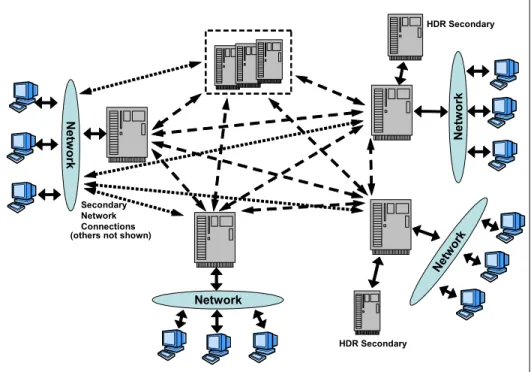
independent IDS servers and has the ability to support both active-passive and active-active replication. That is, you can write to any of the servers participating in ER. Conflicts between servers are resolved in ER by reconciling transactions. ER can also be used to replicate individual tables or subsets of tables rather than the entire database (as is the case with HDR). ER is designed to support multiple servers with complex topologies, such as that depicted in Figure 1-2.
Figure 1-2 Enterprise Replication
Network Secondary Network Connections Net wor k Netw o rk Netw o rk HDR Secondary HDR Secondary (others not shown)
1.2.6 Remote Standalone Secondary
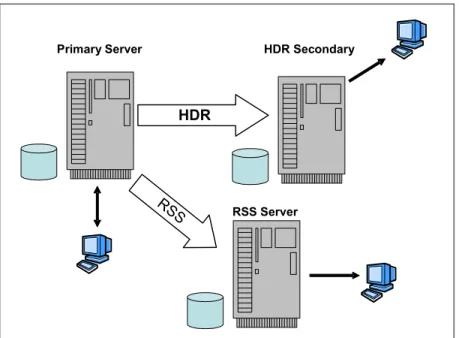
Like HDR, RSS servers can provide geographically remote,
application-accessible copies of the database. Logical logs are continuously transmitted from the primary server and applied to the database on the RSS server, as depicted in Figure 1-3.
Figure 1-3 Remote Standalone Secondary Server
The RSS servers use a fully duplexed communication protocol, allowing the primary server to send data to the RSS servers without waiting for an acknowledgement that the data was received. Using full duplexed
communication means that RSS servers have very little impact on the primary server performance.
An RSS server can be switched to become an HDR secondary server if the HDR secondary becomes unavailable, or if an existing secondary is promoted to a primary. An RSS server can become a standard server if the primary server and the current HDR secondary server become unavailable.
Multiple RSS servers in geographically diverse locations can be used to provide continuous availability and faster query than if all users had to access the primary server. The application traffic that only reads the data can be sent to local RSS servers. For example, RSS servers can feed data to Web applications that do not require up-to-the-minute data currency. If the applications need to
Primary Server
RSS Server
HDR
RSS
update the data, they will connect to the primary; otherwise, they read the data from the local RSS server. This configuration will reduce network traffic and the time required by the application to access the data.
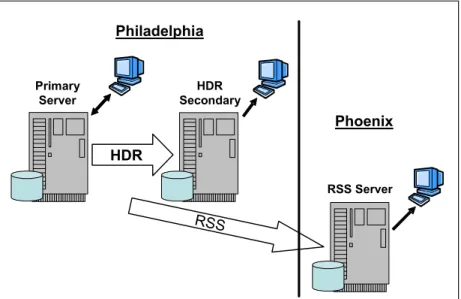
As depicted in Figure 1-4, remote application servers can access local database servers to minimize latency and improve performance.
Figure 1-4 Physically Remote Standalone Secondary server
HDR Primary Server HDR Secondary RSS Server Philadelphia Phoenix RSS
1.2.7 Shared disk secondary servers
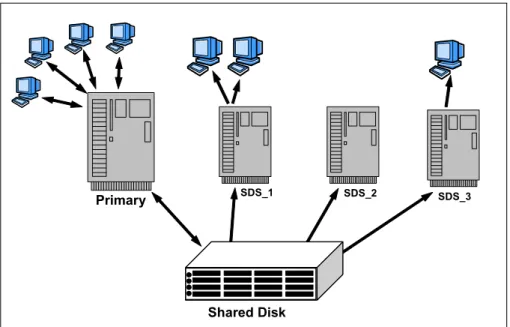
SDS servers access the same physical disk as the primary server. They provide increased availability and scalability without the need to maintain multiple copies of the database. This is depicted in Figure 1-5.
Figure 1-5 Shared disk secondary servers
An SDS server can be made available very quickly. Once configured, an SDS server joins an existing system and is ready for immediate use. Because SDS servers also use fully duplexed communications with the primary, having multiple SDS servers has little effect on the performance of the primary server. SDS servers are completely compatible with both hardware and software-based disk mirroring.
If the primary server becomes unavailable, fail over to an SDS server is easily accomplished. The specified SDS server becomes the new primary server and all other SDS servers automatically connect to the new primary.
Multiple SDS servers also provide the opportunity to off load reporting, backup, and other functionality from the primary server.
Primary SDS_1 SDS_2 SDS_3
1.2.8 Continuous log restore
Continuous Log Restore (CLR) is useful when the backup database server is required to be fairly current, but the two systems need to be completely
independent of each other for reasons such as security, network availability, and so on. CLR can also be useful when the cost of maintaining a persistent network connection is too high. With CLR, log files are manually transferred to a backup database server where they are restored.
This is a robust way to set up a hot backup of a database server. The hot backup of the primary IDS server is maintained on the backup server, which contains similar hardware and an identical version of IDS. To configure a backup server using CLR, a physical backup of the primary server is created and the backup copy is transported to the backup server. The backup is then restored on the backup server. After the restore is complete, the backup server is ready for a logical recovery. In the event that a logical log on the primary server becomes full, it is backed up and then transported to the backup server where logical recovery (log roll-forward) is performed. Operation of CLR is depicted in Figure 1-6.
Figure 1-6 Illustrating Continuous Log Restore
Should the primary server become unavailable, a final log recovery is performed on the backup server, which is brought up in online mode as the primary server. CLR can also be combined easily with other high-availability solutions from IDS 11, or with hardware solutions, such as cluster failover.
Backup Server
Full Backup Restore
Apply Log Ba ckup Log Transport Log
Step 1: Setup – A full backup is applied to the backup server
Step 2: Logs are applied as each is backed up
1.3 Recoverable Groups
In this section, we discuss Recoverable Groups based on the HDR and Remote Standalone Secondary servers. Until now, the HDR secondary has been the traditional means of providing high availability with IDS. Over the years, we have been aware that customers would like additional functionality. Some of the things that have been mentioned are:
Have additional HDR secondary servers
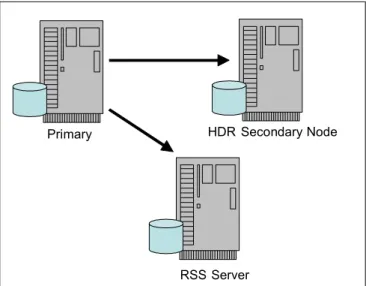
Impact the primary as little as possible with the workload on the secondaries Remote Standalone Secondary (RSS) servers, as shown in Figure 1-7, directly address these desires. In either case, additional secondary servers can provide the extra workload relief that is desired. In addition, since the RSS server operates in a fully-duplexed communications protocol, the primary does not have to wait for the RSS server to acknowledge each packet. This allows the RSS server to be able to support a very high rate of data transfer with the primary even when there is a large latency on the network between the two. It also greatly improves the performance of the primary since it does not have to wait for an ACK (acknowledgement) for each packet. The downside of this is that an RSS server cannot be directly updated to be a primary. It must first assume the role of HDR secondary before it can become a primary.
Figure 1-7 Recoverable Groups
Primary HDR Secondary Node
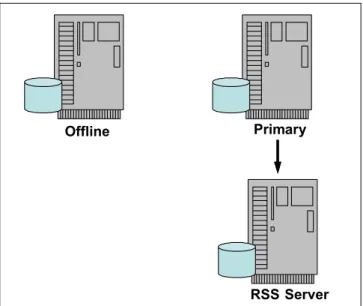
If at any time the primary fails, the HDR secondary server will take over control by switching to read/write mode. It will be made the primary and will start sending logs to the RSS server, as depicted in Figure 1-8.
Figure 1-8 HDR secondary becomes primary
Offline Primary
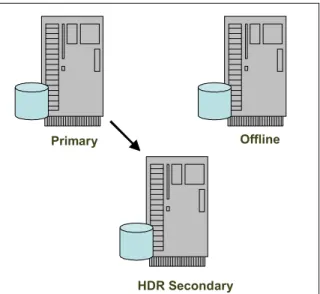
If for any reason the HDR secondary server fails and it appears that the HDR secondary server will be off line for an extended period of time, the RSS server can be converted into the HDR secondary server, as depicted in Figure 1-9.
Figure 1-9 Converting RSS server to a HDR secondary server
1.3.1 Recoverable Groups based on Shared Disk Secondaries
Figure 1-10 shows an example of a primary server configured with two SDS servers. In this case, the primary server role could be transferred to either of the two SDS servers. This includes the case where the primary needs to be taken out of service for a planned outage or because of a failure of the primary server.Figure 1-10 Primary with SDS servers
Primary Offline
HDR Secondary
Since both of the SDS servers are reading the same disk subsystem, it makes no difference which of the two SDS servers becomes the primary; they are equally able to assume the role of the primary server if they are similarly sized servers. This is illustrated in Figure 1-11.
Figure 1-11 Failure of Primary in SDS Cluster
There are also a number of recovery options to handle the loss of the shared disk itself. The most common recovery options are to have the shared disk use either RAID technology (such as RAID 5), or to use disks based on SAN technology, which may include some form of remote disk mirroring, as depicted in
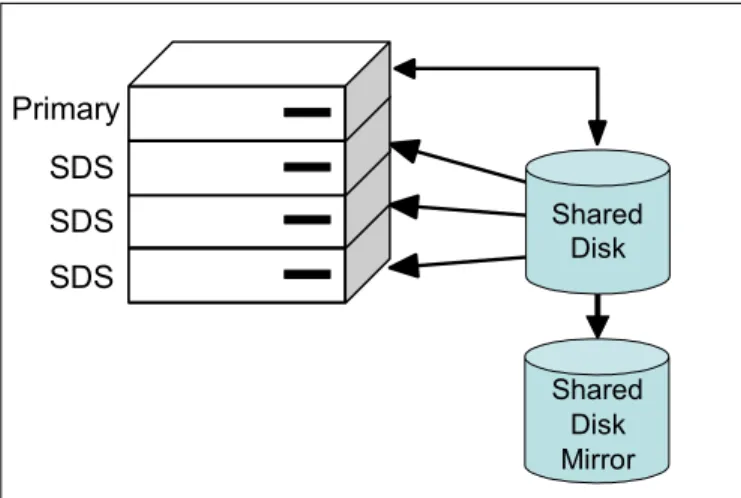
Figure 1-12. Since the disk and its mirror can be located in different areas, this provides a high degree of availability for both planned and unplanned outages of either the server(s) or of the disk subsystem(s).
Primary
(Offline) SDS (Offline) SDS Primary
SDS SDS Primary Shared Disk Shared Disk Mirror
If the primary disk fails, the primary and all SDS clones can be redirected to the mirrored disk, as shown in Figure 1-13.
Figure 1-13 SDS with primary shared disk offline
In addition to configuring a mirrored disk subsystem, you may want to have extra redundancy with additional servers. For example, you may want to have the primary and two SDS servers shown in Figure 1-13 contained within a single blade server enclosure. The configuration, depicted in Figure 1-14, shows that it is an attractive solution when you need to periodically increase the processor read capability, such as when performing large reporting tasks.
Figure 1-14 Single blade server housing the primary and three SDS servers
SDS SDS Primary Shared Disk (Offline) Shared Disk Mirror Primary SDS SDS SDS Shared Disk Shared Disk Mirror
In such a configuration, you may decide to avoid the possible failure of a single blade server by using multiple blade servers, as depicted in Figure 1-15.
Figure 1-15 Two blade servers used to house SDS servers
However, if Blade Server A should fail, it would be possible to transfer the primary server role to the SDS server on Blade Server B. Since it is possible to bring additional SDS servers online very quickly, you can dynamically add SDS servers to Blade Server B, as shown in Figure 1-16.
Figure 1-16 Transferring the Primary Server Role
Primary SDS SDS SDS
SDS
Blade Server A Blade Server B Shared Disk Shared Mirror Disk Blade Server A (Offline) Blade Server B Primary SDS SDS SDS Shared Disk Shared Disk Mirror
1.3.2 Recoverable Groups with multi-layer HA solutions
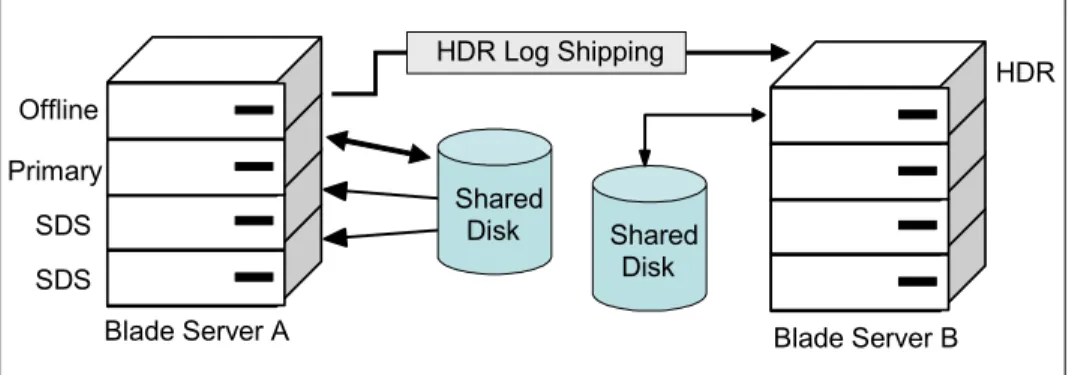
Because of the limits on the distance that disk mirroring can support, you may need an alternative to using shared disks and shared disk mirroring to provide availability. For example, if you prefer that there be a significant distance between the two copies of the disk subsystem, you might choose to use either an HDR secondary or an RSS server to maintain the secondary copy of the disk subsystem. Figure 1-17 shows an example of an HDR secondary server in a blade server configuration.
Figure 1-17 Using an HDR secondary in conjunction with SDS servers
In this configuration, if the primary server should fail, but the shared disks are intact and the blade server is still functional, it is possible to transfer the primary server role from Blade Server A to another server in the same blade server as depicted in Figure 1-17. Changing the primary server would cause the source of the remote HDR secondary server to automatically reroute to the new primary server, as illustrated in Figure 1-18.
Figure 1-18 Transfer of the primary server to an SDS server
Primary
SDS SDS SDS
HDR
Blade Server A Blade Server B Shared Disk HDR Log Shipping Shared Disk Primary SDS SDS HDR
Blade Server A Blade Server B
Shared
Disk Shared
Disk HDR Log Shipping Offline
Suppose, however, that the failure described was not simply a blade within the blade server, but the entire blade server or the entire site. In this case you may have to fail over to the HDR secondary, as depicted in Figure 1-19.
Figure 1-19 Transferring the primary to the HDR Secondary
Since only one instance of IDS was running on Blade Server B as an HDR secondary, only one instance of the IDS (primary server) was started on Blade Server B. But you could easily add SDS servers. Once the primary has been transferred to Blade Server B, then it becomes possible to start SDS servers on Blade Server B as well, as shown in the Figure 1-20.
Figure 1-20 Adding SDS in Blade Server B
Primary
Blade Server A
(Offline) Blade Server B
Shared
Disk Shared
Disk
Primary
Blade Server A
(Offline) Blade Server B
Shared Disk Shared Disk SDS SDS SDS
1.4 Choosing a replication strategy
So which technology should a business use? It depends! Much like choosing the correct database server for the task, the correct replication technology must be used to solve the business needs.
If an exact duplicate of the database environment maintained in real time is required, then there are three different options. HDR is the one to choose if there is only one backup site necessary. If multiple clones of the server are desired, then RSS is the solution. If IDS lies in a clustered architecture, then SDS is ideally suited to fit that need. If the real-time requirement is lifted so that near real time is acceptable or the need to militate against transaction waits exists, ER can be used as well as HDR in an asynchronous mode.
Previous to IDS11, if multiple backup copies of an instance was desired, then ER was the only possibility. But now with the enhancements of RSS and SDS, a DBA has much more flexibility in how to handle availability concerns. And while it is outside the scope of this document, HDR/RSS/SDS are used by many
customers for off loading read-only activity to ensure good performance of critical applications.
Perhaps the need is to replicate a subset of database tables, or maybe just a small number of columns or even columns whose values are between a certain range; ER replicate definitions allow for a very precise definition of what gets replicated. In addition, within the ER replicate definition, specific target instances can be specified rather than all available instances. It is possible then to define some replicates to send data to one set of targets while other replicates within the same instance send data to other target instances.
1.5 Combining IDS availability options
Even with the enhancements of RSS and SDS, the replication strategies
provided by IDS may not satisfy all possible needs. For example, there could be a complex scenario where ER is used to replicate part of a master table, but the details of that are so important that it is a requirement for all the data on that coserver to be backed up. IDS supports mixing these technologies so ER can work with HDR, SDS, or RSS seamlessly. These technologies can be combined to suit a variety of business situations. Table 1-1 on page 21 illustrates some examples of combinations that can be used to address different scenarios.
Table 1-1 Availability need and recommended solution
Application requirements Recommended solution
You periodically need to increase reporting capacity.
Use SDS or RSS servers. If the amount of data is very large and making multiple copies is difficult, SDS servers are more useful. On the other hand, RSS servers can reduce the total cost of ownership. You are using SAN devices, which provide
ample disk hardware availability, but are concerned about server failures.
Use SDS servers.
You are using SAN devices, which provide ample disk hardware mirroring, but also want a second set of servers that are able to be brought online if the primary operation should fail (and the limitations of mirrored disks are not a problem).
Consider using two blade centers running SDS servers at the two sites.
You want to have a backup site some moderate distance away, but cannot tolerate any loss of data during failover.
Consider using two blade centers with SDS servers on the primary
BladeCenter® and an HDR secondary in SYNC mode on the remote server. You want to have a highly available
system in which no transaction is ever lost, but must also have a remote system on the other side of the world.
Consider using an HDR secondary located nearby running SYNC mode and an RSS server on the other side of the world.
You want to have a high availability solution, but because of the networks in your region, there is a large latency.
Consider using an RSS server.
You want a backup site, but you do not have any direct communication with the backup site.
Consider using Continuous Log Restore with backup and recovery.
You can tolerate a delay in the delivery of data as long as the data arrives
eventually; however, you need to have quick failover in any case.
Consider using SDS servers with hardware disk mirroring in conjunction with ER.
You need additional write processing power, can tolerate some delay in the delivery of those writes, need something highly available, and can partition the workload.
1.6 Summary
IDS provides many new innovative features to support high availability of data. The replication technology in earlier versions of IDS is widely used by customers. Now with IDS 11, the replication technology is enhanced further with new features, such as RSS, SDS, and CLR. What makes it more interesting is that all the technologies can coexist and they work together. That makes IDS a very powerful sever to meet the more challenging database requirements. HDR, ER, Storage Solution, SDS, RSS, and CLR can provide many combinations to satisfy an extremely wide range of requirements for database solutions. What makes the IDS solution unique is that all the features are built within the server and can interact with each other. This modular approach makes them simple to implement and use. At the same time, the simplicity of IDS is maintained because any issues that may arise due to combination of technologies used, can be resolved inside the server and thus can minimize DBA activity and overall cost of ownership.
Chapter 2.
Preparing the technical
infrastructure
At this point, you have gone through the introduction section and have gotten an overview of the high availability and replication solutions that Informix Dynamic Server (IDS) 11 has to offer. Now you can start to focus on how they can help in meeting your business problems/requirements. So let us take a brief look at the hardware, software, and other technical infrastructure details that can help in understanding how to get started.
In this chapter, we describe the technical requirements and consideration needed to set up high availability, Enterprise Replication, and disaster recovery solutions using IDS 11.
In addition, please refer to the Informix Dynamic Server Administrator's Guide:
Using High Availability Data Replication, G251-2267 for more details on
requirements. It is located at:
http://publib.boulder.ibm.com/epubs/pdf/25122672.pdf
2.1 Hardware considerations
The IBM Informix Dynamic Server High Availability Data Replication (HDR), Remote Standalone Secondary (RSS), Shared Disk Secondary (SDS), and Continuous Log Restore (CLR) solutions work in a homogeneous environment. That means each of the computers that are running the database server in a replication environment must be from the identical vendor, and have the identical architecture and operating system. In addition, in a high availability cluster, database servers are usually in different geographical locations, so the system must support networking in order to replicate the database changes.
Unlike HDR, Enterprise Replication (ER) works in both homogeneous and heterogeneous environments. That means each of the computers running Enterprise Replication servers can be on same or different hardware architectures and operating systems. In addition, when using ER, you can replicate the data between different versions of IDS. For example, you could replicate the data from IDS 11 (32-bit) on Linux® to IDS 10 on Solaris™ (64-bit), and vice versa.
2.1.1 Data storage
HDR Secondary, RSS, and CLR servers maintain a complete copy of the databases on their own physical disks. Maintaining the complete copy of the databases increases the data availability, and provides hot backup in case of unplanned outages and disaster recovery scenarios.
The amount of disk space allocated to dbspaces for the primary and secondary database servers must be equal. In addition to having the identical disk space requirements, the path to the dbspaces should also be identical on the primary and secondary servers. The type of disk space is irrelevant; you can use any mixture of raw or cooked spaces on the two database servers.
Figure 2-1 on page 25 shows an example of the primary, RSS, HDR secondary, and CLR backup servers. Each of the servers maintain their own physical disks. In the case of Enterprise Replication (ER), each of the participating database servers is an independent IDS instance. ER is not an instance-wide replication, so it does not require the disk space or path to be identical across the
participating database servers. The disk space requirement for each of the IDS instances will depend on that database server usage and other business needs.
Figure 2-1 Local physical disks
Unlike HDR Secondary and RSS, the SDS server does not maintain a copy of the physical database; rather, it shares the disks with the primary server. So, the requirement for the SDS server is to have reliable shared disks.
SDS servers provide increased availability and scalability without the need to maintain multiple copies of the database, which can lower the data storage costs. Except for the disk requirements, the hardware and software requirements for the SDS server are same as for the HDR secondary server. In addition, the primary server disks must be shared across the computers that are hosting the SDS servers. This means that the path to the dbspace from the SDS server is the same dbspace path as the primary server.
Once shared disk file system is configured, verify that computers participating in the high availability cluster can read from and write to the same disks.
Primary
Continuous Log Restore HDR Secondary
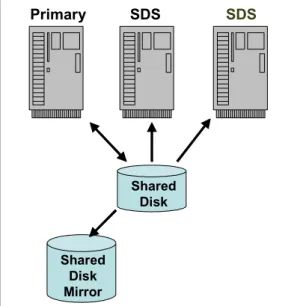
Figure 2-2 shows an example of a Shared Disk subsystem with a single primary and two SDS servers.
Figure 2-2 Shared disks
There are several shared disk file systems availablein the market, which guarantee the concurrent use by different systems in a high availability cluster. For example, the IBM General Parallel File System™ (GPFS™) is a high performance shared disk file system that can provide fast, reliable data access from all servers on AIX® and Linux clusters.
For more details on the IBM General Parallel File System (GPFS), refer to: http://www-03.ibm.com/systems/clusters/software/gpfs.html
Similarly, other shared disk technologies such as Veritas Storage Foundation Cluster File System, Redundant Array of Independent Disks (RAID) and Storage Area Network (SAN), can also be used to set up an SDS cluster.
2.1.2 Network communication
The database servers involved in high availability and Enterprise Replication solutions are usually deployed in different geographical locations. ER and HDR are both log based replication technologies in which database updates are logged in logical logs, also called the redo logs, and are transferred from the
Note: The use of a mounted Network File System (NFS) is not recommended
for the Shared Disk Secondary servers for performance reasons.
Primary
SDS
SDS
primary to the secondary servers. Both types of servers must be connected by some form of network.
To use the network protocol, set the nettype field of the database server in the sqlhosts file or registry, as shown in Example 2-1. Update the NETTYPE configuration parameter to a network protocol such as
ontlitcp, onsoctcp
, orontlispx,
so that the database servers on two different computers cancommunicate with each other. Applications connecting to database servers can either use network or non-network protocols, such as shared memory
(onipcshm), or named pipes.
Example 2-1 Sample sqlhost file
dbserver1_tcp ontlitcp host1-name service1-name dbserver2_tcp ontlitcp host2-name service2-name dbserver1_shm onipcshm host1-name place-holder
In a network, latency, a synonym for delay, is measured by sending a packet, that is then returned to the sender. The round-trip time is considered the latency. Network latency between the database servers plays an important role in establishing a robust high availability and enterprise-wide replication solution. A quick check of network latency can be performed by the simple ping command. For example, when the ping command was issues from a SunOS™ system located in Lenexa, KS to various locations in other parts of the world, the network latency differed greatly. This is depicted in Example 2-2.
Example 2-2 Network latency
$ ping -s <hostname> 56 10 #Same building
----hp-mach1 PING
Statistics----10 packets transmitted, Statistics----10 packets received, 0% packet loss round-trip (ms) min/avg/max = 0/0/0
#Menlo Park, California ----menlo PING
Statistics----10 packets transmitted, Statistics----10 packets received, 0% packet loss round-trip (ms) min/avg/max = 62/62/65
10 packets transmitted, 10 packets received, 0% packet loss round-trip (ms) min/avg/max = 124/125/131
#Bangalore, India
----bangalore PING
Statistics----10 packets transmitted, Statistics----10 packets received, 0% packet loss round-trip (ms) min/avg/max = 343/344/346
Availability of such statistics can help database administrators design their high availability and replication solutions. For example, if a DBA is not sure whether or not to use HDR Secondary or Remote Standalone Secondary (RSS), then looking at the network latency data can help make the determination of which type of secondary server to use. Network latency is not the only criteria that needs to be considered, but it is one of the important criteria in building robust high availability solutions, and it aids in the decision making process. Since RSS uses a fully duplexed communication protocol, and communication between primary and RSS is completely asynchronous, it would be alright to use RSS over the high latency network. And, where network latency is lower, choosing HDR Secondary should be the better option because HDR uses half duplex communication protocol to perform synchronous database updates.
In the case of the SDS servers, the primary requirement is the availability of a shared disk subsystem. The network requirement will vary depending on how far the systems hosting the SDS servers can be placed in an shared disk
environment. Usually, systems involved in a shared disk environment are geographically closer, and network latency between those systems will then be quite lower.
In addition, the network usage in an SDS cluster is less because the primary database server sends only the Log Sequence Number (LSN) information. This consists of the current logical log file number and the log position to the SDS server, and not the complete log pages as in the case of HDR Secondary and RSS servers.
In the case of continuous log restore, network dependency is very minimal to none. CLR is useful when the backup database server is required to be fairly current, but the two systems need to be completely independent of each other for reasons such as security or network availability. CLR can also be useful when the cost of maintaining a persistent network connection is high. With CLR, log files are manually transferred to a backup database server where they are restored.