Model 1207B
MultiMode™ Electronic Motor Controller
2. INSTALLATION AND WIRING ...3
Mounting ...3
Connections: Low Current ...4
Connections: High Current ...5
Wiring: Standard Configuration (Series Motor) ...6
Wiring: Compound Motor Configuration ...8
Wiring: Throttle ...10
5kΩ–0 throttle (“Type 1”) ...10
0–5V, 3-wire potentiometer, and electronic throttles (“Type 2”) ...11
0–5kΩ throttle (“Type 3”) ...13
Wiring: Emergency Reverse Check ...13
Switches and Other Hardware ...14
Keyswitch ...14
Main contactor ...14
Forward/reverse contactors ...14
F/R and emergency reverse switches ...14
Circuitry protection devices ...14
Installation Checkout ...15
3. ADJUSTMENT OF PARAMETERS ...17
Changing Parameter Values ...17
Cloning Controllers ...17
4. MAINTENANCE ...18
Cleaning ...18
Fault History ...18
Testing the Fault Detection Circuitry ...19
5. DIAGNOSTICS AND TROUBLESHOOTING ...20
LED Diagnostics ...20
Programmer Diagnostics ...21
FIGURES fig. 1: Curtis 1207B motor controller
and 1311 handheld programmer ... 1
fig. 2: Mounting dimensions, Curtis 1207B controller ... 3
fig. 3: Standard wiring diagram (series motors) ... 6
fig. 4: Compound motor wiring diagram ... 8
fig. 5: Wiring for 5kΩ–0 throttle ... 10
fig. 6: Wiring for 20kΩ potentiometer used as a wigwag-style throttle ... 10
fig. 7: Wiring for 0–5V throttle ... 11
fig. 8: Wiring for 3-wire pot throttle ... 12
fig. 9: Wiring for Curtis ET-XXX electronic throttle ... 12
fig. 10: Wiring for 0–5kΩ throttle ... 13
fig. 11: Alternative wiring for emergency reverse check ... 13
fig. A-1: Ramp shape, with max speed = 100% and creep speed = 0% ... A-7 fig. A-2: Ramp shape, with max speed = 100% and creep speed = 10% ... A-7 fig. A-3: Ramp shape, with max speed = 60% and creep speed = 10% ... A-8 TABLES table 1: LED codes ... 20
1
OVERVIEW
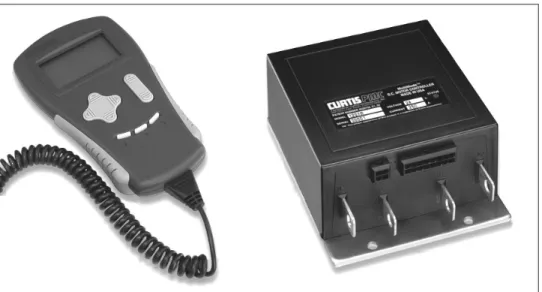
The Curtis 1207B programmable motor speed controller provides efficient, cost-effective, and simple-to-install control for a variety of small electric ve-hicles. Typical applications include walkie fork/pallet trucks, mini personnel carriers, and sweepers. The microprocessor-based logic section combined with a proven MOSFET power section gives the 1207B controller high power and advanced features in a simple, compact package. The optional programmers (Curtis 1311 and 1314) enable the user to set parameters, conduct tests, and obtain diagnostic information quickly and easily.
Fig. 1 Curtis 1207B electronic motor controller and 1311 handheld programmer.
Like all Curtis motor controllers, the 1207B models offer superior operator control of the vehicle’s motor drive speed. Featuresinclude:
✓ Power MOSFET design, providing
• infinitely variable drive and plug brake control • silent high-frequency operation
• high efficiency (for reduced motor and battery losses)
✓ Compact size
✓ Overvoltage and undervoltage protection
✓ Thermal protection and compensation circuitry provides
✓ Circuitry and software detects faults in the throttle circuit, MOSFET drive circuit, MOSFET transistors, contactor drivers, and contactors— ensuring that the controller meets EEC fault detect requirements
✓ Input sequencing options include neutral start and static return to off
(SRO)
✓ Microprocessor-controlled contactor sequencing provides true arcless
contactor switching
✓ Smooth, controlled plug braking—with either variable (throttle-dependent) or fixed plug current limit
✓ Neutral braking option provides automatic plug braking in neutral
✓ MultiMode™ input selects between two different operating modes,
thus allowing optimization of vehicle characteristics for different driving conditions
✓ Emergency reverse (belly-button switch) with a single input
✓ Ramp-start feature provides full power for starting on ramps
✓ Simple contactor and switch wiring, with coil drivers monitored for
faults—thus ensuring fail-safe operation
✓ Flexible throttle circuitry accommodates a variety of throttle types ✓ Programmable “ramp shape” (static throttle map) provides flexibility in
selecting throttle response feel
✓ Connections made by solid copper power busses with a polarized Molex
connector for control signals
✓ Solid, well-protected construction—with an aluminum mounting plate
and injection-molded cover.
Familiarity with your Curtis controller will help you install and operate it prop-erly. We encourage you to read this manual carefully. If you have questions, please contact the Curtis office nearest you.
INSTALLATION AND WIRING
MOUNTING
The 1207B controller can be oriented in any position, but the location should be carefully chosen to keep the controller as clean and dry as possible. If a clean mounting location cannot be found, a cover must be used to shield the controller from water and contaminants.
To ensure full rated output power, the controller should be fastened to a clean, flat metal surface with three screws. The case outline and mounting hole dimensions are shown in Figure 2.
Although not usually necessary, a thermal joint compound can be used to improve heat conduction from the case to the mounting surface.
2
Fig. 2 Mounting dimensions, Curtis 1207B controller. 66 (2.6) 28 (1.1) 122 (4.80) 152 (6.00) 6.3 (0.25) 22 (0.85) 66 (2.60) 4.8 (0.19) 21 × 16 × 1.5 (0.83 × 0.63 × 0.06); 8.4 (0.33) dia. hole thru 6.7 (0.265) dia., 3 plcs Status LED CL 165 (6.50) 127 (5.00)CONNECTIONS: Low Current
An integrated 16-pin low power connector molded into the front of the con-troller provides the low power logic control connections (see pin list below). The mating connector is Molex Mini-Fit Jr., part number (5557) 39-01-2165. Contact Molex regarding compatible pins for various wire sizes.
Pin 1 shunt field driver output; n/c for series motors
Pin 2 reverse contactor driver output
Pin 3 forward contactor driver output
Pin 4 main contactor driver output
Pin 5 throttle: 3-wire pot high
Pin 6 throttle: 3-wire pot wiper or 0–5V
Pin 7 throttle: pot low
Pin 8 throttle: 2-wire 5kΩ–0 or 0–5kΩ input
Pin 9 n/c
Pin 10 emergency reverse (BB) check output [optional]
Pin 11 reverse input
Pin 12 forward input
Pin 13 emergency reverse input
Pin 14 mode selection input
Pin 15 brake input
Pin 16 keyswitch input (KSI)
16 15 14 13 12 11 10 9
CONNECTIONS: High Current
Four tin-plated copper bus bars are provided for the high current connections to the battery and motor:
M- output to motor armature
B- negative connection to battery
B+ positive connection to battery/field
A2 plug diode to motor armature
Cables are fastened to the bus bars by M8 (5⁄16") bolts.
When tightening the bolts, two opposing wrenches should be used to prevent bending the bus bars and putting undue strain on the internal connections.
Programmer Connector
A 4-pin Molex connector is provided for the 1311 handheld programmer or the 1314 PC Programming Station. A mating cable is supplied with the 1311 handheld programmer.
Status LED
The Status LED, located on top of the controller, displays flashing codes to indicate controller status; the codes are listed in Section 5.
M-
A2
B+
B-WIRING: Standard Configuration (Series Motor)
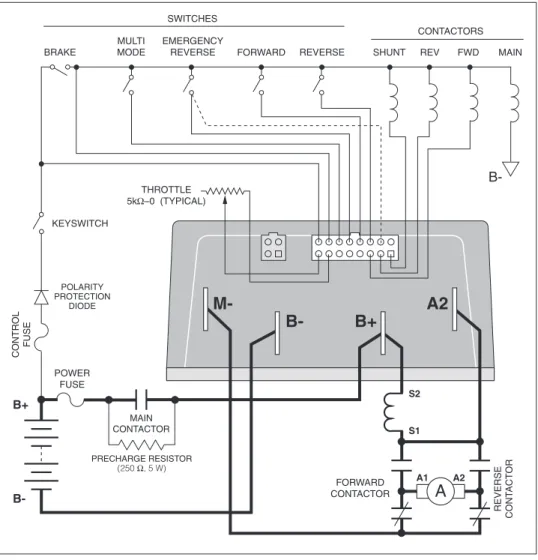
The basic wiring for series motors with field reversing is shown in Figure 3.
Fig. 3 Standard wiring diagram (series motor),
Curtis 1207B controller.
The configuration shown in Figure 3 is a typical arrangement for a series mo-tor. Curtis controllers are designed for use in a wide range of applications, and accordingly can be installed in a variety of ways to best meet customer needs. Note: The emergency reverse check feature (wiring shown by dashed line) is a factory option. MULTI MODE EMERGENCY REVERSE A2 A1 REVERSE CONTACTOR PRECHARGE RESISTOR (250 Ω, 5 W) BRAKE FORWARD CONTACTORS MAIN REVERSE SWITCHES CONTROL FUSE M- A2 B+ B-FORWARD CONTACTOR POWER FUSE KEYSWITCH POLARITY PROTECTION DIODE S1 S2 MAIN CONTACTOR B-B+ FORWARD REVERSE THROTTLE 5kΩ–0 (TYPICAL) A
Power Wiring for Series Motor
In every wiring configuration, it is imperative that the field be wired between the controller’s B+ and A2 terminals and that the armature be wired between the M- and A2 terminals. The internal plug diode used in the 1207B is con-nected between M- and A2. Therefore, the armature and field positions cannot be interchanged. Reversing contactors can be used to switch either the armature or the field.
Control Wiring for Series Motor
Wiring for the input switches and contactors is shown in Figure 3 (see detail below). The main contactor, if one is used, is normally connected directly to the controller. Optionally, the main contactor can be switched directly by the keyswitch or brake, leaving Pin 4 unconnected.
The throttle shown in Figure 3 is a 5kΩ–0 type. Various other throttles can also be accommodated, and are discussed in the throttle wiring section.
16-pin detail (see Fig. 3):
BRAKE MULTI MODE EMERGENCY REVERSE FORWARD REVERSE KEYSWITCH EMERGENCY REVERSE CHECK OUTPUT MAIN CONTACTOR FORWARD CONTACTOR REVERSE CONTACTOR 2-WIRE POT (5 kΩ) POT LOW 8 7 6 5 4 3 2 1 16 15 14 13 12 11 10 9
WIRING: Compound Motor Configuration
A specially configured controller is available for compound motor applications. In this controller, the MOSFET output driver is used to drive the shunt field. The wiring for a compound wound motor with armature reversing is shown in Figure 4.
Fig. 4 Compound motor wiring diagram, Curtis 1207B controller.
The configuration shown in Figure 4 requires the use of a compound wound motor. Pure shunt motors cannot be used with 1207B controllers. Although the configuration shown is typical, various other configurations are possible. Note: The emergency reverse check feature (wiring shown by dashed line) is a factory option.
MULTI
MODE EMERGENCYREVERSE
A2 A1 REVERSE CONT ACT OR PRECHARGE RESISTOR (250 Ω, 5 W) BRAKE FWD CONTACTORS MAIN REV SWITCHES CONTROL FUSE M- A2 B+ B-FORWARD CONTACTOR POWER FUSE KEYSWITCH POLARITY PROTECTION DIODE S1 S2 MAIN CONTACTOR B-B+
FORWARD REVERSE SHUNT
THROTTLE 5kΩ–0 (TYPICAL)
A
B-Power Wiring for Compound Motor
The field must be wired between B+ and A2 and the armature between M- and
A2. The internal plug diode in the 1207B is connected between M- and A2; therefore, the armature and field positions cannot be interchanged.
If the shunt is rated for under 2 amperes, it can be connected directly to the controller as shown in Figure 4. If the shunt is rated for higher than 2 amperes, a contactor must be used to control the shunt field.
Control Wiring for Compound Motor
Control wiring for the compound motor application is like that for the standard (series motor) wiring. The main contactor, if one is used, is normally connected directly to B-.
The throttle shown in Figure 4 is a 5kΩ–0 type. Various other throttles can also be accommodated, and are discussed in the throttle wiring section.
Polarity protection diodes and control fuses must be sized appropriately to handle the increased current from the shunt field.
16-pin detail (see Fig. 4):
BRAKE MULTI MODE EMERGENCY REVERSE FORWARD REVERSE KEYSWITCH EMERGENCY REVERSE CHECK OUTPUT FORWARD CONTACTOR REVERSE CONTACTOR 2-WIRE POT (5 kΩ) POT LOW 8 7 6 5 4 3 2 1 16 15 14 13 12 11 10 9 SHUNT
WIRING: Throttle
Wiring for various throttles is described below. They are characterized as Type 1, Type 2, and Type 3 throttles in the programming menu of the handheld pro-grammer. Note: In the text, throttles are identified by their nominal range and not by their actual active range.
If the throttle you are planning to use is not covered, please contact the Curtis office nearest you.
5kΩ–0 Throttle (“Type 1”)
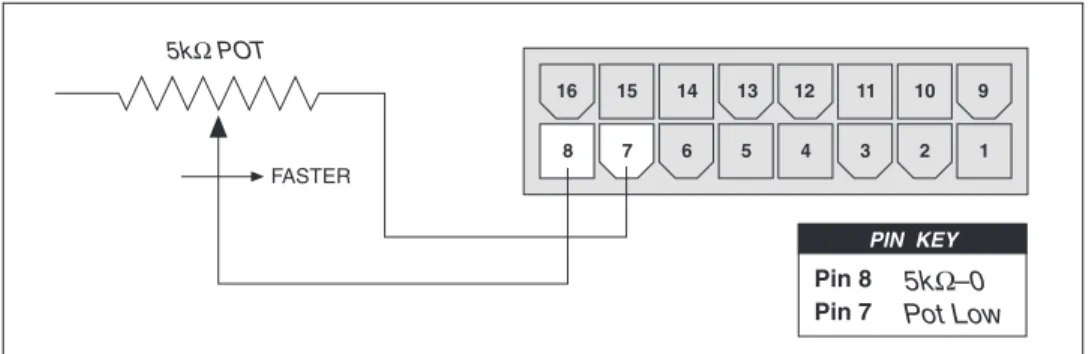
The 5kΩ–0 throttle (called a “Type 1” throttle in the programming menu of the handheld programmer) is a 2-wire resistive throttle that connects between the 5kΩ–0/0–5kΩ pin (Pin 8) and the Pot Low pin (Pin 7), as shown in Fig-ure 5. It doesn’t matter which wire goes on which pin. Zero speed corresponds to 5kΩ and full speed corresponds to 0Ω.
Fig. 5 Wiring for 5kΩ–0 throttle (“Type 1”).
In addition to accommodating the basic 5kΩ–0 throttle, the Type 1 throttle is the easiest with which to implement a wigwag-style throttle. Using a 20kΩ potentiometer wired as shown in Figure 6, the pot wiper can be set such that the controller has 5kΩ between Pins 7 and 8 when the throttle is in the neutral position (i.e., at the center of the pot). The throttle mechanism can then be designed such that rotating it either forward or back decreases the resistance between Pins 7 and 8, which increases the controller output. The
Fig. 6 Wiring for 20kΩ potentiometer used as a wigwag-style throttle (“Type 1”). 8 7 6 5 4 3 2 1 FASTER 16 15 14 13 12 11 10 9 5kΩ POT Pin 8
Pin 7 5kPot LowΩ–0
PIN KEY 8 7 6 5 4 3 2 1 FASTER FASTER 16 15 14 13 12 11 10 9 20kΩ POT Pin 8 Pin 7 5kΩ–0 Pot Low PIN KEY
(b) Ground-referenced 0–5V throttle
(a)0–5V throttle sensor
Fig. 7 Wiring for 0–5V throttle (“Type 2”).
throttle mechanism must provide signals to the controller’s forward and reverse inputs independent of the throttle pot resistance. The controller will not sense direction from the pot resistance.
0–5V, 3-Wire Potentiometer, and Electronic Throttles (“Type 2”)
With these throttles (“Type 2” in the programming menu), the controller looks for a voltage signal at the pot wiper/0–5V input of the controller (Pin 6). Zero speed corresponds to 0V and full speed corresponds to 5V. Pot Low is the cur-rent return path for all Type 2 throttles.
0–5V Throttle
Two ways of wiring the 0–5V throttle are shown in Figure 7. If a throttle sen-sor is used, the sensen-sor’s ground return current must be less than 10 mA. If the 0–5V throttle input (Pin 6) exceeds 8 volts, the controller will shut down.
8 7 6 5 4 3 2 1 8 7 6 5 4 3 2 1 16 15 14 13 12 11 10 9
+
-+
B-16 15 14 13 12 11 10 9 4.7 kΩ(Shunt impedance 150 kΩ to ground)
Pin 7 Pin 6 Pin 5 Pot Low 0–5V Input Pot High PIN KEY Pin 7
Pin 6 Pot Low0–5V Input PIN KEY
SENSOR GROUND SENSOR OUTPUT 0–5V
3-Wire Potentiometer (500Ω–10kΩ) Throttle
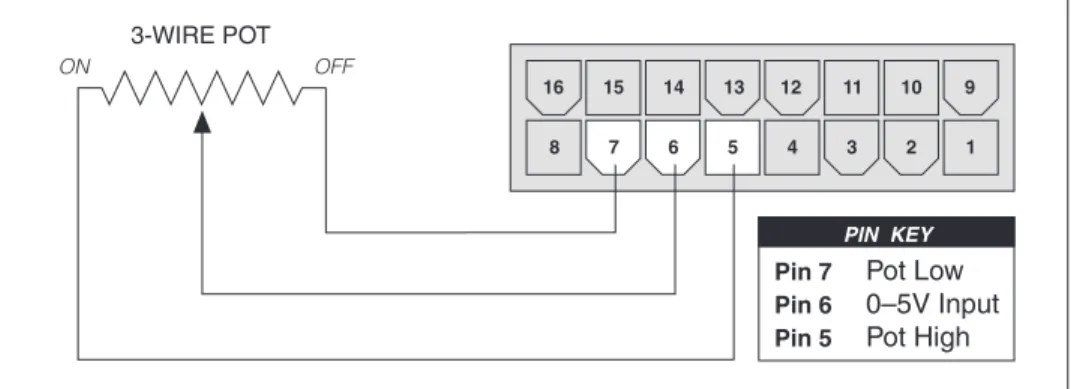
The 3-wire potentiometer is used in its voltage divider mode—with the voltage source and return being provided by the 1207B controller. Pot High provides a current-limited 5V source to the potentiometer, and Pot Low provides the return path. Wiring is shown in Figure 8.
Fig. 8 Wiring for 3-wire potentiometer throttle (“Type 2”).
Fig. 9 Wiring for Curtis ET-XXX electronic throttle (“Type 2”).
Curtis ET-XXX Electronic Throttle
The Curtis ET-XXX provides throttle and forward/reverse inputs to the 1207B controller. Wiring for the Curtis ET-XXX is shown in Figure 9.
8 7 6 5 4 3 2 1 16 15 14 13 12 11 10 9 OFF ON 3-WIRE POT Pin 7 Pin 6 Pin 5 Pot Low 0–5V Input Pot High PIN KEY 8 7 6 5 4 3 2 1 16 15 14 13 12 11 10 9 ET-XXX B-B+ B-GREEN ORANGE BLACK BLACK/WHITE WHITE WHT/BRN Pin 16 Pin 12 Pin 11 Pin 6 KSI Input Forward Reverse 0–5V Input PIN KEY KEYSWITCH WHT/ GRN
0–5kΩ Throttle (“Type 3”)
The 0–5kΩ throttle (“Type 3” in the programming menu) is a 2-wire resistive throttle that connects between the 5kΩ–0/0–5kΩ pin (Pin 8) and the Pot Low pin (Pin 7), as shown in Figure 10. It doesn’t matter which wire goes on which pin. Zero speed corresponds to 0Ω and full speed corresponds to 5kΩ.
Fig. 11 Alternative wiring for 1207B emergency reverse check. Fig. 10 Wiring for 0–5Ω throttle (“Type 3”).
WIRING: Emergency Reverse Check
An optional wire connected directly to the emergency reverse (belly button) switch provides for broken wire detection when that option is enabled at the factory. The emergency reverse check output wire provides a dc bias to the emergency reverse circuit to check for continuity. If there is no continuity in the circuit, the controller shuts down and a fault code is indicated.
This feature must be enabled at Curtis. If the option is selected and the check wire is not connected, the vehicle will not operate. If the option is not selected and the check wire is connected, no harm will occur—but continuity will not be checked.
The emergency reverse check output wire is connected to Pin 10, as shown by the dashed lines in the two basic wiring diagrams (Figures 3 and 4).
Alternatively, a 9.1 kΩ resistor can be wired directly across the emer-gency reverse switch to provide the dc bias, as shown by the dashed line in Figure 11. 8 7 6 5 4 3 2 1 FASTER 16 15 14 13 12 11 10 9 5kΩ POT Pin 8
Pin 7 5kΩ–0Pot Low PIN KEY
MULTI EMERGENCY CONTACTORS
SWITCHES AND OTHER HARDWARE
Keyswitch
The vehicle should have a master on/off switch to turn the system off when not in use. The keyswitch provides logic power for the 1207B controller, coil cur-rent for the contactors, and shunt curcur-rent (in compound motor applications). The keyswitch must be capable of carrying these currents.
Main Contactor
A main contactor allows the 1207B controller to be disconnected from the bat-tery. A heavy-duty single-pole, single-throw (SPST) contactor with silver-alloy contacts is recommended, such as an Albright SW80 or SW180.
After initial closing of the contacts, inrush currents flow as the controller’s internal filter capacitors are charged. A 250Ω, 5W resistor (such as Curtis p/n MP-2) can be used across the contactor to precharge the capacitors and reduce the inrush current through the contacts.
In compound motor applications, the main contactor driver is used to drive the shunt field. The main contactor—if one is used—is normally con-nected directly to B- in this configuration.
Forward/Reverse Contactors
For forward/reverse, a paired single-pole, double-throw (2×SPDT) contactor is recommended, such as an Albright DC88 or DC182. With 4-terminal split field motors, two single-pole, single-throw (SPST) contactors are typically used. The coil voltage should match the vehicle voltage. The maximum allowed coil current is 1 ampere.
Forward/Reverse, Emergency Reverse, and Mode Switches
These input switches can be any type of single-pole, single-throw (SPST) switch capable of switching the battery voltage at 10 mA.
Circuitry Protection Devices
For reverse polarity protection, a diode should be added to the control circuit. It must be sized appropriately for the maximum contactor coil currents (and shunt current, in compound motor applications). To protect the control wiring from accidental shorts, a low current fuse (appropriate for the maximum cur-rent draw) should be connected in series with the battery feed. These devices are both shown in the wiring diagrams.
INSTALLATION CHECKOUT
Before operating the vehicle, carefully complete the following checkout proce-dure. If you find a problem during the checkout, refer to the diagnostics and troubleshooting section (Section 5) for further information.
The installation checkout can be conducted with or without the handheld programmer. The checkout procedure is easier with a programmer. Otherwise, observe the Status LED for codes.
Put the vehicle up on blocks to get the drive wheel(s) off the ground before beginning these tests.
Turn the keyswitch off and make sure that the brake is applied (brake switch open), the throttle is in neutral, and the forward/reverse switches are open.
Do not stand, or allow anyone else to stand, directly in front of or behind the vehicle during the tests.
1. If a programmer is available, connect it to the programmer connector. 2. Turn the keyswitch on. The programmer should “power up” with an
initial display, and the controller’s Status LED should begin steadily blinking a single flash. If neither happens, check for continuity in the keyswitch circuit and controller ground.
3. If you are using a programmer, put it into the fault mode by entering the System Faults menu (Fault » System Faults). The display should indicate “Currently no faults.”
Release the brake (close the brake switch). To do this on a walkie, pull the tiller down to the operating position. The LED should continue blinking a single flash and the programmer should continue to indicate no faults. If there is a problem, the LED will flash a diagnostic code and the programmer will display a diagnostic message. If you are conducting the checkout without a programmer, look up the LED diagnostic code in Section 5: Diagnostics and Troubleshooting.
☞
5. If you are using a programmer, put it into monitor mode by entering the Monitor menu. Scroll down the Monitor menu to observe the status of the forward, reverse, brake, emergency reverse, and mode switches. Cycle each switch in turn, observing the programmer. Each input should show the correct state on the programmer.
6. Specific material handling directives, such as prEN1175, require testing of the controller’s fault detection circuitry. This can be done as follows:
a) Disconnect the battery and make sure the keyswitch is off. b) Using an inline fuse holder fitted with a 10-amp fuse and alligator
clips, connect the controller’s M- and B- terminals.
c) Turn the keyswitch on, release the brake, and apply the throttle. The motor should not operate, and the direction contactors should not pull in.
d) Leave the keyswitch on and remove the inline fuse wire. The vehicle status should continue to remain off.
e) Cycle the keyswitch off and on, release the brake, and apply the throttle. The vehicle should now operate normally.
7. Take the vehicle off the blocks and drive it in a clear area. It should have smooth acceleration and good top speed.
8. Test the plug braking of the vehicle. Verify that the plug braking option is as desired (variable or fixed).
9. Verify that all options, such as high pedal disable (HPD), static return to off (SRO), and anti-tiedown, are as desired.
10. Check to see whether the emergency reverse (belly button) feature is working correctly. If you have the optional emergency reverse check wir-ing, verify that the circuit is operational by momentarily disconnecting one of the emergency reverse wires. The vehicle should be disabled and a fault indicated.
3
ADJUSTMENT OF PARAMETERS
A number of controller parameters can be adjusted electronically via the op-tional programmers: either the 1311 handheld programmer or the 1314 PC Programming Station.*
For a complete list of the adjustments that can be made, see Section 6: Handheld Programmer.
CHANGING PARAMETER VALUES
To change a parameter using the programmer, enter the Program menu and scroll through the Program menu to select the desired parameter. Press the appropri-ate Data Inc/Dec key (“up” or “down”) until the desired value is reached. The parameter is now set at the desired value. All programming occurs in real time. That is, the parameters can be changed while the vehicle is in operation.
The upper and lower limits of parameters are set at the factory. Some parameters have dependencies on other parameters. When the programmer is being used to adjust a parameter and a limit is reached, the display will stop changing.
Use of the programmer is described more fully in Section 6.
CONTROLLER CLONING
The optional handheld programmer also allows you to “clone” controllers, via options in its Functions menu. You program one controller to the desired settings, save these settings in the programmer, and then load them into other similar (same model number) controllers, thus creating a family of controllers with identical settings.
* Instructions for using the 1314 PC Programming Station are included in that programmer’s software. In this 1207B controller manual, only the 1311 handheld programmer is described. However, the 1314 has all the capabilities and
4
MAINTENANCE
There are no user-serviceable parts inside the Curtis 1207B controller. No at-tempt should be made to open the controller. Opening the controller may damage it and will void the warranty.
However, it is recommended that the controller exterior be cleaned peri-odically, and—if a handheld programmer is available—this periodic cleaning provides a good opportunity to check the controller’s fault history file. It is also recommended that the controller’s fault detection circuitry be checked whenever the vehicle is serviced.
The 1207B controller is inherently a high power device. When working around any battery powered vehicle, proper safety precautions should be taken. These include, but are not lim-ited to: proper training, wearing eye protection, avoiding loose clothing and jewelry, and using insulated wrenches.
CLEANING
Although the 1207B controller requires virtually no maintenance if properly installed, the following minor maintenance is recommended in certain ap-plications.
1. Remove power by disconnecting the battery.
2. Discharge the capacitors in the controller by connecting a load (such as a contactor coil or a horn) across the controller’s B+ and B- terminals. 3. Remove and dirt or corrosion from the bus bar area. The controller
should be wiped clean with a moist rag. Allow it to dry before recon-necting the battery.
4. Make sure the connections to the bus bars are tight. Use two well insu-lated wrenches for this task in order to avoid stressing the bus bars.
FAULT HISTORY
The handheld programmer can be used to access the controller’s fault history file. Connect the programmer, and select the Fault History menu (Fault » Fault History). The programmer will read out all the faults the controller has experienced since the last time the fault history file was cleared. The faults may be intermittent faults, faults caused by loose wires, or faults caused by operator errors. Faults such as contactor faults may be the result of loose wires; contactor
☞
After a problem has been diagnosed and corrected, clearing the fault history file is advisable. This allows the controller to accumulate a new file of faults. By checking the new fault history file at a later date, you can readily determine whether the problem was indeed completely fixed.
To clear the fault history file, select the Clear Fault History menu (Fault » Clear Fault History). The programmer will prompt you to acknowledge or cancel. See Section 6 for more detail on programmer operation.
TESTING THE FAULT DETECTION CIRCUITRY
Specific material handling directives, such as prEN1175, require periodic testing of the controller’s fault detection circuitry. It is recommended that each time the vehicle is serviced, the M- fault detection circuitry be checked as follows:
1. Put the vehicle up on blocks to get the drive wheel(s) off the ground, disconnect the battery, and make sure the keyswitch is off.
2. Using an inline fuse holder fitted with a 10 A fuse and alligator clips, connect the controller’s M- and B- terminals.
3. Turn the keyswitch on, release the brake, and apply the throttle. The motor should not operate, and the direction contactors should not pull in.
4. Leave the keyswitch on and remove the inline fuse wire. The vehicle status should continue to remain off.
5. Cycle the keyswitch off and on, release the brake, and apply the throttle. The vehicle should now operate normally.
5
DIAGNOSTICS AND TROUBLESHOOTING
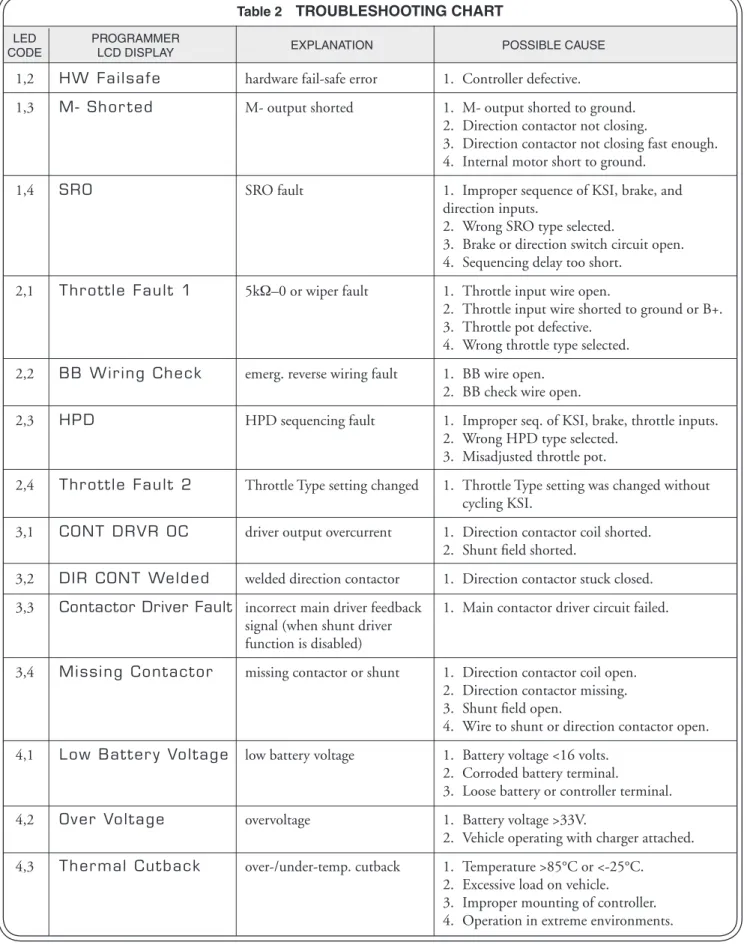
The 1207B controller provides diagnostics information to assist technicians in troubleshooting drive system problems. The diagnostics information can be obtained in two ways: reading the appropriate display on the programmer or observing the fault codes issued by the Status LED. The Status LED is located on top of the controller.
LED DIAGNOSTICS
During normal operation, with no faults present, the Status LED flashes a single flash at approximately 1 flash/second. If the controller detects a fault, a 2-digit fault identification code is flashed continuously until the fault is corrected. For example, code “3,2”—welded direction contactor—appears as:
( 3 , 2 ) ( 3 , 2 ) ( 3 , 2 )
The codes are listed in Table 1. For suggestions about possible causes of the various faults, refer to the troubleshooting chart (Table 2).
Table 1 LED CODES
LED CODE EXPLANATION
LED off no power or defective controller
solid on defective controller
single flash controller operational; no faults
1,2 hardware fail-safe error
1,3 M- fault or motor output short 1,4 sequencing fault (SRO)
2,1 5kΩ–0 or throttle wiper input fault 2,2 emerg. rev. circuit check fault (BB wiring) 2,3 high-pedal-disable fault (HPD)
2,4 Throttle Type setting changed 3,1 contactor or shunt driver overcurrent 3,2 welded direction contactor
3,3 incorrect main driver feedback signal 3,4 missing contactor or shunt
4,1 low battery voltage 4,2 overvoltage
PROGRAMMER DIAGNOSTICS
With a programmer, diagnostics and troubleshooting is more direct than with the LED alone. The programmer presents complete diagnostic information in plain language—no codes to decipher. Faults are displayed in the Fault menu, and the status of the controller inputs/outputs is displayed in the Monitor menu.
The following 4-step process is generally used for diagnosing and troubleshoot-ing an inoperative vehicle: (1) visually inspect the vehicle for obvious problems; (2) diagnose the problem, using the programmer; (3) test the circuitry with the programmer; and (4) correct the problem. Repeat the last three steps as necessary until the vehicle is operational.
Example: A vehicle that does not operate in “forward” is brought in for repair.
step 1: Examine the vehicle and its wiring for any obvious problems, such as broken wires or loose connections.
step 2: Connect the programmer, enter System Faults menu (Fault » System Faults), and read the displayed fault information. In this example, the display shows “Currently no faults,” indicat-ing the controller has not detected anythindicat-ing out of the norm.
step 3: Enter the Monitor menu, and observe the status of the inputs and outputs in the forward direction. In this example, the display shows that the forward switch did not close when “forward” was selected, which means the problem is either in the forward switch or the switch wiring.
step 4: Check or replace the forward switch and wiring and repeat the test. If the programmer shows the forward switch closing and the vehicle now drives normally, the problem has been corrected.
Refer to the troubleshooting chart (Table 2) for suggestions covering a wide range of possible faults.
Table 2 TROUBLESHOOTING CHART
LED PROGRAMMER
CODE LCD DISPLAY EXPLANATION POSSIBLE CAUSE
1,2 HW Failsafe hardware fail-safe error 1. Controller defective.
1,3 M- Shor ted M- output shorted 1. M- output shorted to ground.
2. Direction contactor not closing.
3. Direction contactor not closing fast enough. 4. Internal motor short to ground.
1,4 SRO SRO fault 1. Improper sequence of KSI, brake, and
direction inputs.
2. Wrong SRO type selected.
3. Brake or direction switch circuit open. 4. Sequencing delay too short.
2,1 Throttle Fault 1 5kΩ–0 or wiper fault 1. Throttle input wire open.
2. Throttle input wire shorted to ground or B+. 3. Throttle pot defective.
4. Wrong throttle type selected. 2,2 BB Wiring Check emerg. reverse wiring fault 1. BB wire open.
2. BB check wire open.
2,3 HPD HPD sequencing fault 1. Improper seq. of KSI, brake, throttle inputs.
2. Wrong HPD type selected. 3. Misadjusted throttle pot.
2,4 Throttle Fault 2 Throttle Type setting changed 1. Throttle Type setting was changed without cycling KSI.
3,1 CONT DRVR OC driver output overcurrent 1. Direction contactor coil shorted. 2. Shunt field shorted.
3,2 DIR CONT Welded welded direction contactor 1. Direction contactor stuck closed. 3,3 Contactor Driver Fault incorrect main driver feedback 1. Main contactor driver circuit failed.
signal (when shunt driver function is disabled)
3,4 Missing Contactor missing contactor or shunt 1. Direction contactor coil open. 2. Direction contactor missing. 3. Shunt field open.
4. Wire to shunt or direction contactor open. 4,1 Low Batter y Voltage low battery voltage 1. Battery voltage <16 volts.
2. Corroded battery terminal.
3. Loose battery or controller terminal.
4,2 Over Voltage overvoltage 1. Battery voltage >33V.
2. Vehicle operating with charger attached. 4,3 Thermal Cutback over-/under-temp. cutback 1. Temperature >85°C or <-25°C.
2. Excessive load on vehicle. 3. Improper mounting of controller.
6
HANDHELD PROGRAMMER
The universal Curtis 1311 handheld programmer (optional) allows you to program, test, and diagnose Curtis programmable controllers. The program-mer is powered by the host 1207B controller, via a 4-pin Molex connector on the front panel.
PROGRAMMER OPERATION Menu structure
When the programmer is first plugged into the controller, it uploads informa-tion from the controller and then displays the Main Menu:
You scroll up and down the Main Menu by using the up and down arrows on the Navigation Key. A blinking square (shown here as solid black) indicates the selected item.
You can go deeper into the Main Menu by using the right arrow of the Navigation Key; you return to the Main Menu by using the left arrow.
Pressing the right arrow when the Program menu is selected will bring you to the list of programmable parameters, displayed in a second column to the right. The LCD on the programmer can show seven lines of text at a time.
Selecting a parameter (in this example, Creep Speed) and then pressing the right arrow of the Navigation Key will display a screen with additional information, which in this example is a bar graph.
Program Monitor Fault Functions Information System Settings Program
EMR Rev C/L 250A Throttle Type 2 Ramp Shape 30 Creep Speed 5% EMR Rev Speed 90% Sequencing DLY 1.0s Program
Creep Speed
5%
min 0 max 25Changing parameter values
When the programmer is first connected to a 1207B controller, that controller’s parameter list is uploaded to the programmer along with the present settings. You can scroll through this list and adjust parameter settings and test the results.
Select “Program” (the top item in the Main Menu), and then press the right arrow on the Navigation Key to see the list of parameters. Use the down arrow to scroll down to the parameter you wish to adjust. The present value of the parameter, and its units, will be displayed. Use the Data Inc/Dec Key to change the parameter’s value.
Alternatively, before adjusting the parameter value from this screen, you can press the right arrow key. This will cause a bar graph of that parameter to appear, showing its present value and also the minimum and maximum allowed values. You can change the value of the parameter from this screen, as well, using the Data Inc/Dec Key.
The programmer automatically sends the change to the controller. The new value is set when the Data Inc/Dec Key is released.
Use the left arrow on the Navigation Key to return to the previous screen.
Real-time monitoring
The programmer can request and display real-time data from the 1207B con-troller. Select “Monitor” in the Main Menu, and use the right arrow on the Navigation Key to display the list of Monitor variables. The values are periodi-cally updated in this list view.
To view a single variable at a faster rate, select that variable in the list view and press the right arrow to show a detail screen. The update rate will be faster on this screen, because only one variable is being updated.
Use the left arrow on the Navigation Key to return to the previous screen.
Faults and fault history
The programmer allows access to the present and past status of the 1207B con-troller. The controller runs continuous self-diagnostics and will record and log each error event in non-volatile memory. When the programmer is connected to the controller, this log file is automatically uploaded into the programmer.
PROGRAMMER MENUS
Items are listed for each menu in the order they appear in the actual menus displayed by the handheld programmer.
Program Menu (not all items available on all controllers)
EMR Rev C/L Emergency reverse current limit Throttle Type Throttle type*
Ramp Shape Throttle map
Creep Speed Creep speed, as percent PWM duty cycle EMR Rev Speed Emerg. reverse speed, as % PWM duty cycle Sequencing DLY Sequencing delay, in seconds
Variable Plug Throttle-variable plug braking:
on (variable plug) or off (fixed plug)
High Pedal Dis High pedal disable (HPD): type†
SRO Static return to off (SRO): type‡
Anti-Tiedown Anti-tiedown: on or off BB Check BB wiring check: on or off Quick Star t Quick-start throttle factor M1 Main C/L Mode 1 main current limit M1 Plug C/L Mode 1 plug current limit M1 Ramp C/L Mode 1 ramp start current limit M1 Accel Rate Mode 1 acceleration rate, in seconds M1 Max Speed Mode 1 maximum speed, as % PWM output M2 Main C/L Mode 2 main current limit
M2 Plug C/L Mode 2 plug current limit M2 Ramp C/L Mode 2 ramp start current limit M2 Accel Rate Mode 2 acceleration rate, in seconds M2 Max Speed Mode 2 maximum speed, as % PWM output Neut Brake C/L Neutral brake current limit
Neutral Brake Neutral brake: on or off * Throttle types: Type 1 = 5kΩ–0
Type 2 = 0–5V, 3-wire pot, and electronic throttles
Type 3 = 0–5kΩ throttles
†HPD types: Type 0 = no HPD
Type 1 = HPD on brake input
Type 2 = HPD on KSI
‡ SRO types: Type 0 = no SRO
Type 1 = SRO on brake input
Monitor Menu (not all items available on all controllers)
Throttle Throttle reading, as percent of full throttle
Batt Voltage Battery voltage
Heatsink Temp Heatsink temperature
Max Temp Maximum temperature seen*
Min Temp Minimum temperature seen*
Brake Input Brake switch: on/off
Speed Input Mode switch: on (Mode 1) / off (Mode 2) EMR Rev Input Emergency reverse switch: on/off For ward Input Forward switch: on/off
Reverse Input Reverse switch: on/off
Fwd Cont Forward contactor: on/off
Rev Cont Reverse contactor: on/off
* Maximum/minimum temperatures recorded since the Fault History was last cleared.
Fault List
This is not a menu as such, but simply a list of the possible messages you may see displayed in the “Fault » System Faults” menu or the “Fault » Fault History” menu. The messages are listed here in alphabetical order.
BB Wiring Check BB wiring check failed
Contactor Driver Fault Incorrect main driver feedback signal
(when shunt function is disabled)
CONT DRVR OC Contactor driver overcurrent Currently no faults No known faults
DIR CONT Welded Direction contactor welded
HPD High-pedal-disable (HPD) activated
HW Failsafe Hardware failsafe activated
APPENDIX A
GLOSSARY OF FEATURES AND FUNCTIONS
Acceleration/deceleration rate
The acceleration rate is the time required for the controller to increase from 0% to 100% duty factor. The shape of the acceleration curve is controlled by the dynamic throttle response, which is linear.
The acceleration rates in Mode 1 and in Mode 2 are independently adjust-able via the handheld programmer.
Anti-tiedown
Before enabling Mode 1 operation, the anti-tiedown function checks that the mode selection switch has been released after the last cycling of the brake switch. This feature discourages operators from taping or otherwise “tying down” the mode switch. If Mode 1 is already selected before the brake is released, the controller remains in Mode 2 until the mode switch is released and pressed again.
Arcless contactor switching
The controller output duty factor is quickly reduced to zero any time a direc-tion is de-selected, so that the controller current will be reduced to zero before the direction contactor drops out.
BB (see Emergency reverse) Brake
The brake must be released (brake input “high”) for the controller to operate. This is a safety interlock used on most material handling vehicles.
APPENDIX A: GLOSSARY
The shunt winding of a compound motor can be wired directly to the shunt driver, provided that the maximum current does not exceed the driver’s current rating.
Creep speed at first throttle
Creep speed is activated when a direction is first selected. The output maintains creep speed until the throttle is rotated out of the throttle deadband (typically 10% of throttle). Creep speed is adjustable from 0 to 25% of the controller duty factor; the adjustment can be made via the handheld programmer. Current limiting
Curtis controllers limit the motor current to a preset maximum. This feature protects the controller from damage that might result if the current were limited only by motor demand. PWM output to the power section is reduced smoothly until the motor current falls below the set limit level.
In addition to protecting the controller, the current limit feature also pro-tects the rest of the system. By eliminating high current surges during vehicle acceleration, stress on the motor and batteries is reduced and their efficiency enhanced. Similarly, there is less wear and tear on the vehicle drivetrain, as well as on the ground on which the vehicle rides (an important consideration with golf courses and tennis courts, for example).
The main current limit, plug current limit, and ramp start current limit in Mode 1 and in Mode 2 are independently adjustable via the handheld pro-grammer, as is the emergency reverse current limit.
Current multiplication
During acceleration and during reduced speed operation, the Curtis controller allows more current to flow into the motor than flows out of the battery. The controller acts like a dc transformer, taking in low current and high voltage (the full battery voltage) and putting out high current and low voltage. The battery needs to supply only a fraction of the current that would be required by a conventional controller (in which the battery current and motor current are always equal). The current multiplication feature gives vehicles using Curtis controllers dramatically greater driving range per battery charge.
Deceleration rate
Emergency reverse
Emergency reverse is activated when the brake is released, KSI is activated, and the emergency reverse switch (the BB, or “belly button” switch) is pressed. After the BB switch is released, normal controller operation is not resumed until neutral (no direction) is selected or until the brake is cycled (brake, then brake release). However, repeatedly pressing the BB switch will reactivate the emergency reverse function each time.
Because emergency reverse immediately powers the reverse contactor, some arcing may occur.
Fault detection
An internal microcontroller automatically maintains surveillance over the func-tioning of the controller. When a fault is detected, the appropriate fault code is signalled via the LED, externally visible on top of the controller. The diagnostic codes flashed by the LED are listed in Section 5, Troubleshooting.
If the fault is critical, the controller is disabled. More typically, the fault is a remediable condition and temporary—for example, an undervoltage fault is cleared when the condition is removed.
The automatic fault detection system includes:
contactor coil open / shorted driver (F/R and shunt contactors) contactor driver overcurrent / contactor coil short
contactor welded
emergency reverse circuit check M- output fault
memory checks upon start-up overvoltage cutoff
power supply out of range (internal) throttle fault
undervoltage cutback
watchdog (external and internal) watchdog (internal)
Fault recording
APPENDIX A: GLOSSARY
Fault recovery (including recovery from disable)
Almost all faults require a cycling of the KSI or brake input to reset the con-troller and enable operation.
The only exceptions are these:
fault recovery
anti-tiedown release and re-select Mode 1 emergency reverse BB re-applied or brake cycled
HPD lower throttle to below HPD threshold overvoltage when battery voltage drops below overvoltage SRO when proper sequence is followed
thermal cutback when temperature comes within range throttle fault 1 clears when condition gone
undervoltage when battery voltage rises above undervoltage
High-pedal-disable (HPD)
The HPD feature prevents the vehicle from being started while the throttle is applied. The controller can be programmed to have HPD based on either brake input or KSI.
Brake-type HPD
To start the vehicle, the controller must receive a brake input (brake released) before receiving a throttle input. Controller operation will be disabled imme-diately if pedal demand (throttle input) is greater than 25% duty factor at the time the brake is released (brake input “high”). Normal controller operation is regained by reducing the throttle demand to less than 25%.
Sequencing delay, which can be set with the handheld programmer, provides a variable delay before disabling the controller. If the brake is applied while the throttle is above the HPD threshold (25%), HPD is not activated if the brake is then released before the delay time elapses.
KSI-type HPD
The HPD feature can be activated by KSI input instead of brake input, if preferred. To start the vehicle, the controller must receive a KSI input before receiving a throttle input.
KSI
KSI (Key Switch Input) provides power to the logic board, and initializes and starts diagnostics. In combination with the brake input, KSI enables all logic functions.
LED
A Status LED located on top of the controller flashes a fault identification code if a fault is detected by the controller. The fault codes are listed in Table 1. The code will continue to flash until the fault condition has been cleared during active fault detection. This will typically happen after cycling KSI for power-up fault conditions, and cycling the brake for faults detected during operation. MOSFET
A MOSFET (Metal Oxide Semiconductor Field Effect Transistor) is a type of transistor characterized by its fast switching speeds and very low losses.
MultiMode™
The MultiMode™ feature of these controllers allows the vehicle to be operated with two distinct sets of characteristics. The two modes can be programmed to be suitable for operation under different conditions, such as slow precise maneuvering in Mode 2 and faster, long distance travel in Mode 1. The fol-lowing parameters can be set independently in the two modes:
— main current limit — plug current limit — ramp start current limit — acceleration rate
— maximum speed
The operating mode is selected by means of the mode selection switch. If Mode 1 is not selected, the controller operates by default in Mode 2. When the controller returns to Mode 2 from Mode 1, it automatically changes the main current limit, the plug current limit, the ramp start current limit, the acceleration rate, and the maximum speed to their Mode 2 values.
If the anti-tiedown feature is active, Mode 1 must be re-selected each time the brake is released.
Neutral brake
APPENDIX A: GLOSSARY
The operating PWM frequency is shifted to 1.5 kHz when the controller is operating in the overtemperature range.
Overvoltage protection
Overvoltage resets the microprocessor, inhibits PWM, and opens the contac-tors, thereby shutting down the controller. Overvoltage can result during bat-tery charging or from an improperly wired controller. Controller operation resumes when the voltage is brought within the acceptable range. The cutoff voltage and re-enable voltage are percentages of the battery voltage, and are set at the factory.
Plug braking
Plug braking takes place when a series motor is driven electrically in a direction opposite from the direction it is turning. The 1207B controls the field current to obtain smooth and controlled plug braking torque. During plug braking, the maximum current limit is automatically changed to the plug current limit, and the PWM frequency is changed to 1.5 kHz. Note: Plug current limit on the 1207B controls the field current. The armature current in plug mode will be higher than the field current.
There are two types of plug braking control — fixed and variable. The fixed plug current limit is set to a fixed level. The variable plug current limit varies the current limit to correspond to the throttle position.
The plug current limits in Mode 1 and in Mode 2 are independently ad-justable via the handheld programmer.
PWM
Pulse width modulation (PWM), also called “chopping,” is a technique that switches battery voltage to the motor on and off very quickly, thereby control-ling the speed of the motor. Curtis 1200 series controllers use high frequency PWM—15 kHz—which permits silent, efficient operation.
Quick-start
Upon receiving a quick throttle demand from neutral, the controller will exceed normal acceleration momentarily in order to overcome inertia. The “quick-start” algorithm is applied each time the vehicle passes through neutral and is not in plug mode. If the vehicle is in plug, the quick-start function is disabled, allowing normal plug braking to occur.
Ramp shape (throttle map)
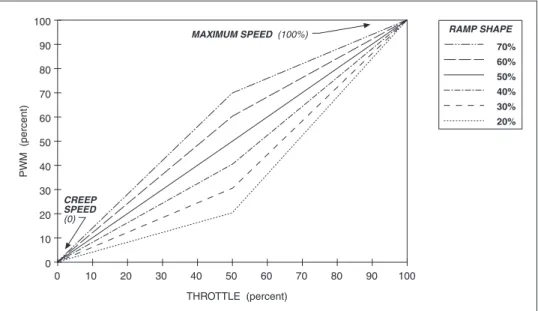
“Ramp shape” is a programmable parameter that determines the static throttle map of the 1207B controller. Eleven preprogrammed ramp shapes are available, in 5% steps between 20% and 70% (20, 25, 30, 35, 40, 45, 50, 55, 60, 65, and 70%). The ramp shape number refers to the PWM output at half throttle, as a percentage of its full range. For example, if maximum speed is set at 100% and creep speed is set at 0, a ramp shape of 50% will give 50% output at half throttle. The 50% ramp shape corresponds to a linear response. The six “even number” ramp shapes for maximum and creep speeds set at 100% and 0 are shown in Figure A-1.
Fig. A-1 Ramp shape
(throttle map) for controller with maximum speed set at 100% and creep speed set at 0. THROTTLE (percent) PW M (percent) 70% 60% 50% 40% 30% 20% RAMP SHAPE 100 90 80 70 60 50 40 30 20 10 0 100 90 80 70 60 50 40 30 20 10 0 CREEP SPEED (0) MAXIMUM SPEED (100%)
Changing either the maximum speed setting or the creep speed setting changes the output range of the controller. Ramp shape output is always a percentage of that range. Ramp shapes with the creep speed setting raised to 10% are shown in Figure A-2.
Fig. A-2 Ramp shape
(throttle map) for controller with maximum speed set at 100% and creep speed set at 10%. 70% 60% 50% 40% 30% 20% RAMP SHAPE 100 90 80 70 60 MAXIMUM SPEED (100%)
APPENDIX A: GLOSSARY
In Figure A-3, the creep speed is kept at 10% and the maximum speed setting dropped to 60%.
In all cases, the ramp shape number is the PWM output at half throttle, as a percentage of its full range. So, for example, in Figure A-3, a 50% ramp shape gives 35% PWM output at half throttle (halfway between 10% and 60%). A 30% ramp shape gives 25% PWM at half throttle (30% of the range {which is 50%, from 10% to 60%}, starting at 10% output, or {[.30 x 50%] + 10%} = 25%).
Ramp start
The ramp start feature allows the vehicle to be started with a higher plug current limit to prevent rolling downhill. Ramp start increases the plug current limit for the selected direction only. When the opposite direction is selected, ramp start will be canceled and a 3-step sequence must be followed to re-activate it:
step 1. select a direction for more than 1 second, step 2. return to neutral, and
step 3. re-select the same direction.
Once the vehicle is operating in ramp start mode, it will continue to do so until the opposite direction is selected for more than one second.
When the brake is first released, the ramp start current limit level will be obtained when either direction is selected in plug braking mode. In ramp start mode, either direction selected will allow the ramp start current limit level. This condition remains until the other direction is selected for more than one second. The new direction then becomes the decision direction, and the 3-step ramp start sequence is required to regain the ramp start current limit level in plug.
Fig. A-3 Ramp shape
(throttle map) for controller with maximum speed set at 60% and creep speed set at 10%. THROTTLE (percent) PW M (percent) 70% 60% 50% 40% 30% 20% RAMP SHAPE 100 90 80 70 60 50 40 30 20 10 0 100 90 80 70 60 50 40 30 20 10 0 CREEP SPEED (10%) MAXIMUM SPEED (60%)
Reset
Almost all faults require a cycling of the KSI or brake input to reset the control-ler and enable operation; see Fault recovery for exceptions.
Sequencing delay
Sequencing delay allows the brake to be cycled within a set time (the sequencing delay), in order to prevent inadvertent activation of HPD or SRO. This feature is useful in applications where the brake switch may bounce or be momentarily cycled during operation. The delay can be set with the handheld programmer from 0 to 3 seconds, where 0 corresponds to no delay.
Shunt field control
The shunt field of a compound motor can be directly controlled by using the shunt winding driver (if the current requirement meets the contactor driver specifications). The shunt is activated while a direction is selected, as long as the controller is not in plug braking mode. A programmable delay is available for the shunt drive. This delays the shunt turn-on until some time after the reversing contactors have shuttled. The delay can be set with the handheld programmer from 0 to 0.5 seconds, where 0 corresponds to no delay.
Smooth, stepless operation
Like all Curtis 1200 Series controllers, the 1207B allows superior operator control of the vehicle’s drive motor speed. The amount of current delivered to the motor is set by varying the “on” time (duty cycle) of the controller’s power MOSFET transistors. This technique—pulse width modulation (PWM)—per-mits silent, stepless operation.
Speed settings
The maximum speed setting defines the upper-limit speed as a percentage of PWM output at full throttle. The maximum speed settings in Mode 1 and in Mode 2 are independently adjustable via the handheld programmer; the
APPENDIX A: GLOSSARY
a direction is selected before or simultaneously (within 50 msec) with the brake input, the controller is disabled. There are three types of SRO: SRO relative to brake input alone (Type “1” in the programming menu); SRO relative to both KSI and brake input (Type “2”); and SRO relative to KSI, brake, and forward inputs (Type “3”). The handheld programmer can be used to set the controller to operate with any of these types of SRO, or with no SRO (SRO Type “0”).
If your controller is programmed so that both KSI and brake input are required (SRO Type “2”), the following sequence must be followed to enable the controller:
step 1. KSI on,
step 2. brake released (brake input “high”), and step 3. direction selected.
The interval between steps 1 and 2 is the same as between steps 2 and 3; that is, KSI input must precede brake input by at least 50 msec. Once the controller is operational, turning off either KSI or the brake causes the controller to turn off; re-enabling the controller requires the 3-step sequence.
Similarly, if your controller is programmed so that KSI, brake, and forward inputs are all required (SRO Type “3”), they must be provided in that sequence in order to enable the controller. Note, however, that operation is allowed if a reverse input precedes the brake input; this can be useful when operating a walkie on ramps.
Sequencing delay, which can be set with the handheld programmer, provides a variable delay before disabling the controller. If the brake is applied while direction is selected, SRO is not activated if the brake is then released before the delay time elapses.
Temperature compensation for current limits
Full temperature compensation provides constant current limits throughout the normal operating range (heatsink temperatures of -25°C to +85°C). The temperature sensor is also used to calculate and display the heatsink temperature on the handheld programmer.
Temperature extreme current-limit cutback (see Overtemperature, Undertemperature)
Temperature extreme data storage
The maximum and minimum temperatures read at the heatsink at any time during powering of the controller are stored in the controller’s memory. These
Throttle map
The throttle map (duty factor as a function of throttle position) is adjustable, so that you can provide the proper feel for the many types of vehicles that use the 1207B controller. The throttle map parameter is called “ramp shape”; see
Ramp shape for more information.
Throttle response
The dynamic throttle response (duty factor as a function of time) is shaped by the acceleration rate setting. Dynamic throttle response is linear. The newest throttle input is mapped to the throttle map, and the controller then automati-cally accelerates (or decelerates) through a straight line until the new throttle demand is obtained.
Throttle types
The 1207B controller accepts a variety of throttle inputs, through various combinations of its four throttle input pins. The most commonly used throttles can all be hooked up directly: 5kΩ–0 and 0–5kΩ 2-wire rheostats, 3-wire pots, 0–5V throttles, and the Curtis ET-XXX electronic throttle.
Throttle full range produces 0–100% duty factor at the controller output (unless limited by other conditions). Throttle fault detect is performed on the throttle input signals and virtually eliminates the possibility of runaway op-eration. Adjustments and settings are independent of throttle type. However, throttle fault conditions will vary by throttle type.
Undertemperature
When the controller is operating at less than -25°C, the current limit is cut back to approximately one-half of the set current. The operating PWM frequency is shifted to 1.5 kHz when the controller is operating at undertemperature. Undervoltage protection
APPENDIX A: GLOSSARY
If the voltage continues to drop below the undervoltage level to a severe undervoltage condition (due to battery drain or external load), the controller continues to behave in a predictable fashion, with its output disabled.
Watchdog (external, internal)
The external watchdog timer guards against a complete failure of the micropro-cessor, which would incapacitate the internal watchdog timer. This independent system check on the microprocessor meets the EEC’s requirement for backup fault detection.
The external watchdog timer safety circuit shuts down the controller (and the microprocessor) if the software fails to generate a periodic external pulse train. This pulse train can only be created if the microprocessor is operating. If not periodically reset, the watchdog timer times out after 150 msec and turns off the controller. The external watchdog also directly disengages all contactors and directly shuts down the PWM drive to the MOSFETs. It can only be reset by cycling KSI.
The internal watchdog timer must be reset periodically by correct sequen-tial execution of the software. If not reset, the internal timer times out and the microprocessor is “warm booted.” This causes the microprocessor to shut down its outputs (thus shutting down the controller) and attempt to restart.
SPECIFICATIONS: 1207B CONTROLLERS
Nominal input voltage 24 V
Maximum operating voltage 30 V
Overvoltage point 33 V
Minimum operating voltage 16 V (= undervoltage point)
Electrical isolation to heatsink 500 V ac (minimum)
PWM operating frequency 15 kHz
Output current * 1207B-41XX 1207B-51XX
250 amps for 1 minute 300 amps for 30 seconds
200 amps for 2 minutes 210 amps for 2 minutes
150 amps for 5 minutes 160 amps for 5 minutes
100 amps for 1 hour 110 amps for 1 hour
Contactor voltage 24 V
Contactor current (maximum) 1 amp (current limit at 2 amps)
Contactor coil spike protection internal diode to brake; internal diode from brake to KSI
Shunt driver current (maximum) 2 amps
Shunt driver spike protection active clamp at 47 V
KSI input voltage 16–30 V
KSI input current (typical) 80 mA without programmer; 130 mA with programmer
Logic input current (typical) 10 mA at 24 V
Logic input threshold 8 V
Ambient operating temperature range -25°C to 50°C
Heatsink overtemperature cutback 85°C
Heatsink undertemperature cutback -25°C
Package splash resistant
Weight 1.1 kg (2.5 lbs)
Dimensions 122 × 165 × 66 mm (4.8" × 6.5" × 2.6")