Application Note
Time Warner Cable Business Class (TWCBC):
Connecting Cisco Unified Communications Manager
10.5.1/Business Edition 6000 with Cisco Unified Border Element
[CUBE 10.5.0] - (IOS 15.4(3) M1) using a TWCBC SIP Trunk
December 03, 2014Table of Contents
Introduction ... 4
Network Topology ... 5
System Components ... 7
Hardware Components ... 7 Software Requirements ... 7 Features Supported ... 7Features Not Supported ... 7
Caveats ... 8
Configuration ... 9
Configuring the Cisco Unified Border Element ... 9
Network Interface and CUBE HA ... 9
Global CUBE settings ... 12
Media Passing through CUBE (media flow-through vs. media flow-around) ... 13
Codecs ... 13
Dial peer ... 14
Call flow ... 15
Configuration example ... 16
Configuring the Cisco Unified Communications Manager ... 43
Cisco Unified CallManager version ... 43
Cisco CallManager service parameter ... 44
Offnet calls via TWCBC SIP Trunk ... 55
Translation Pattern ... 65
Dialplan ... 66
Configuring the Cisco Voice Gateway VG224 ... 71
Acronyms ... 77
Important Information ... 78
Appendix A: Test Results (Test results will be kept on file at Cisco, but will be stripped out of the
application note before publishing to Cisco.com) ... 79
Table of Figures
Figure 1 Network Topology ... 5
Figure 2: CUBE High Availability ... 6
Figure 3: Outbound Voice Call ... 16
Figure 4: Outbound Fax Call ... 16
Figure 5 CUCM Version ... 43
Figure 6 Service Parameter ... 44
Figure 7 Service Parameter cont. ... 45
Figure 8 Service Parameter cont. ... 46
Figure 9 Service Parameter cont. ... 47
Figure 10 Service Parameter cont. ... 48
Figure 11 Service Parameter cont. ... 49
Figure 12 Service Parameter cont. ... 50
Figure 13 Service Parameter cont. ... 51
Figure 14 Service Parameter cont. ... 52
Figure 15 Service Parameter cont. ... 53
Figure 16 Service Parameter cont. ... 54
Figure 17 SIP Trunk Security Profile ... 55
Figure 18 SIP Profile ... 56
Figure 19 SIP Profile Cont. ... 57
Figure 20: SIP Profile cont. ... 58
Figure 21 SIP Trunks List ... 59
Figure 22 SIP Trunk to CUBE ... 60
Figure 23 SIP Trunk to CUBE Cont. ... 61
Figure 24 SIP Trunk to CUBE Cont. ... 62
Figure 25 Normalization Script ... 64
Figure 26 Translation Pattern ... 65
Figure 27 Route Pattern ... 66
Figure 28 Route Pattern for Voice ... 67
Figure 29 Route Pattern Unity Connection ... 68
Introduction
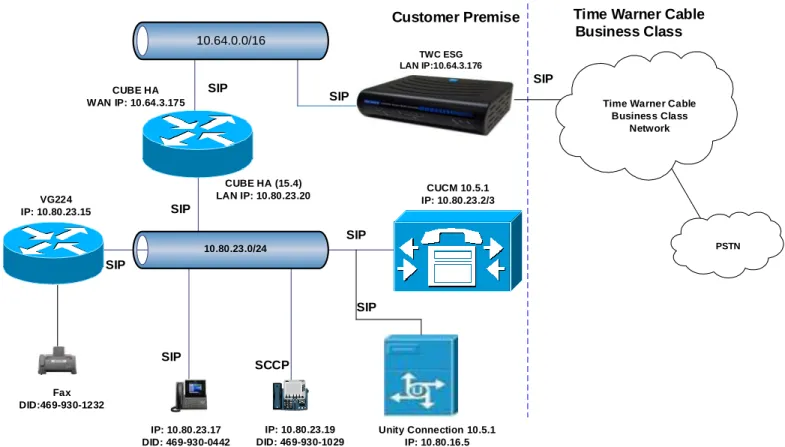
Time Warner Cable Business Class (TWCBC) SIP Trunks allows connection to the PSTN and offer the end customer a superior alternative to traditional PSTN connectivity. A demarcation device between these services and customer owned services is recommended. As an intermediary device between Cisco Unified Communications Manager and TWCBC Enterprise SIP Gateway (ESG), Cisco Unified Border Element (CUBE) can be used. The Cisco Unified Border Element provides demarcation, security, interworking and session control services for Cisco Unified Communications Manager 10.5.1 connected to TWCBC IP network.
This document assumes the reader is knowledgeable with the terminology and configuration of CUCM (Cisco Unified Communications Manager). Only configuration settings specifically required for TWCBC interoperability are
presented. Feature configuration and most importantly the dial plan are customer specific and need individual approach.
This application note describes how to configure a Cisco Unified Communications Manager (Cisco UCM) 10.5.1 and Cisco Unified Border Element (Cisco UBE) 15.4(3) M1 for connectivity to TWCBC SIP Trunk service. The deployment model covered in this application note is CPE (Cisco UCM 10.5.1) to PSTN (TWCBC).
Testing was performed using the approved Cisco test plan and among features verified were – basic calls, DTMF transport, Music on Hold, Semi-attendant and attendant transfers, call forward, conferences, and interoperability with Cisco Unity Connection
The CUCM configuration detailed in this document is based on a lab environment with a simple dial-plan used to ensure proper interoperability between TWCBC SIP network and Cisco Unified Communications. The configuration described in this document details the important configuration settings to have enabled for interoperability to be successful and care must be taken by the network administrator deploying Cisco UCM to interoperate to TWCBC SIP Trunking network.
This application note does not cover the use of calling search spaces (CSS) or partitions on Cisco Unified Communications Manager. To understand and learn how to apply CSS and partitions refer to the cisco.com link below: http://www.cisco.com/c/en/us/td/docs/voice_ip_comm/cucm/srnd/collab10/collab10/dialplan.html
Network Topology
Basic Call Setup
10.80.23.0/24 Customer Premise CUCM 10.5.1 IP: 10.80.23.2/3 PSTN TWC ESG LAN IP:10.64.3.176 10.64.0.0/16 CUBE HA WAN IP: 10.64.3.175 CUBE HA (15.4) LAN IP: 10.80.23.20 IP: 10.80.23.17 DID: 469-930-0442 IP: 10.80.23.19 DID: 469-930-1029 VG224 IP: 10.80.23.15 Fax DID:469-930-1232 Unity Connection 10.5.1 IP: 10.80.16.5 SIP SIP SIP SIP SIP SIP SCCP
Time Warner Cable Business Class
Time Warner Cable Business Class
Network
SIP
SIP
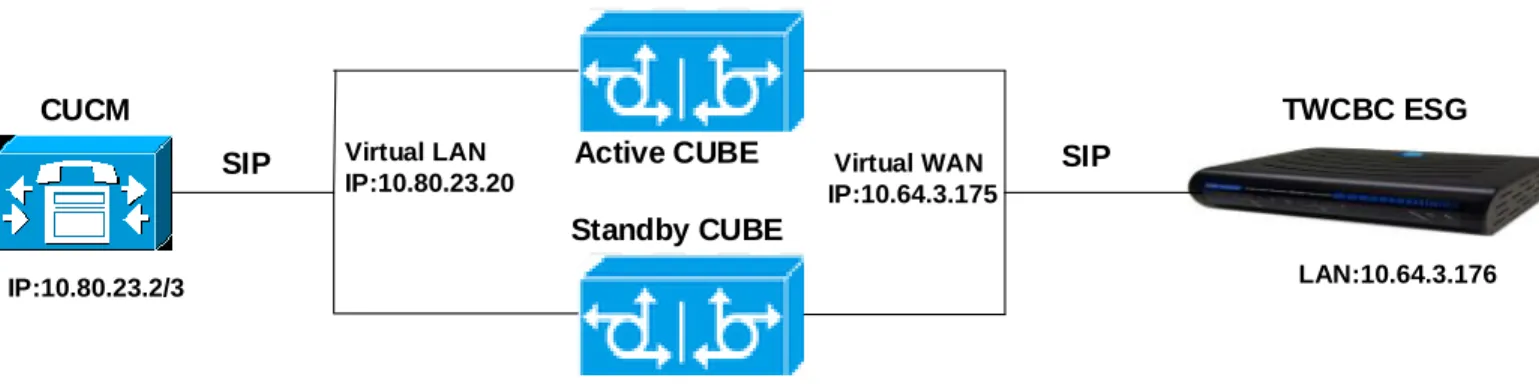
CUCM IP:10.80.23.2/3 Active CUBE Standby CUBE LAN:10.80.23.21 WAN:10.64.3.68 LAN:10.80.23.22 WAN:10.64.3.191 Virtual WAN IP:10.64.3.175 SIP SIP TWCBC ESG LAN:10.64.3.176 Virtual LAN IP:10.80.23.20
System Components
Hardware Components
Cisco UCM and Unity Connection on UCS C-240 running ESXi 5.5
ISR G2 3945 routers (2 Routers were used for CUBE HA setup)
IP phones 8900 and 7900 (different models, both SIP and SCCP where supported)
Cisco Voice Gateways VG224
Software Requirements
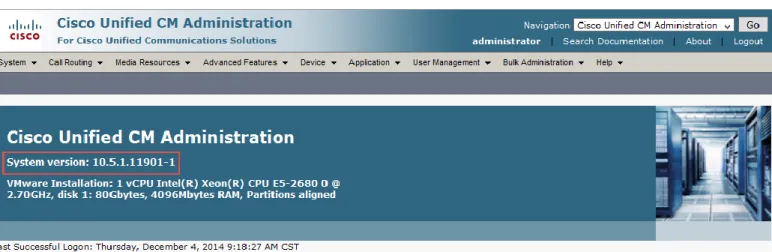
Cisco Unified Communications Manager 10.5.1.11901-1
IOS 15.4(3) M1 for Cisco Unified Border Element
IOS 15.1(3) T3 for VG224 Voice Gateways
Cisco Unity Connection 10.5.1.10000-7
Features Supported
Incoming and outgoing off-net calls using G711Ulaw (TWCBC only offer G711Ulaw) with 20ms packetization
Call hold/Resume
Call transfer (Semi-attendant and Attendant)
Call conference
Call forward (all, busy, no answer)
Calling line (number) identification presentation (CLIP)
Calling line (number) identification restriction (CLIR)
DTMF (RFC2833)
Media flow-through on CUBE
Auto Attendant
CUBE HA
Fax G711 Pass-through
Fax T38(Outbound only)
Features Not Supported
Outbound SIP REFER with Replaces. Cisco UCM does not currently support generation of an outbound SIP REFER with Replaces message,
Cisco IP phones used in this test only do Semi-attendant and Attendant transfer
Though inbound T38 fax was successfully received during the test, TWCBC recommend to receive inbound fax with G711 pass-through only
Caveats
It was observed that during semi-attendant transfer to off-net tests, the original caller does not hear ringback tone after PBX Extension completes the transfer and before target off-net phone answers. This is a known issue and was reported to Cisco before. This is not an issue with TWCBC SIP Trunk.
ISR G2 will not support calls during switch over. During CUBE HA tests, existing active calls while call processing switching from Secondary CUBE back to Primary CUBE lost speech path. No issue for new calls after switchover.
The Transcoding Profile Setting (under Telephone/Advanced section) in TWCBC ESG must be disabled to avoid audio issue in certain Hold call scenarios.
Configuration
Configuring the Cisco Unified Border Element
Network Interface and CUBE HA
Configure Ethernet IP address and sub interface. The IP address and VLAN encapsulation used are for illustration only, the actual IP address can vary. For SIP trunks two IP addresses must be configured—LAN and WAN. Configure CUBE High Availability (HA) using HSRP (Hot Standby Router Protocol). Two identical ISR G2s
equipped with UC Technology Package License installed, 1G DRAM memory and Cisco IOS software release 15.1.2t or later are required. Both routers must be physically located on the same Ethernet LAN. The CUBE configuration of both routers need to be identical except slight difference in HSRP configuration between the Active and standby routers. In our lab test, Dual-Attached deployment is used as shown in chapter Network Topology
Active CUBE Standby CUBE
ipc zone default ipc zone default association 1 association 1 no shutdown no shutdown protocol sctp protocol sctp local-port 5000 local-port 5000 local-ip 10.80.23.21 local-ip 10.80.23.22 remote-port 5000 remote-port 5000 remote-ip 10.80.23.22 remote-ip 10.80.23.21 Explanation Command Description
Ipc zone default Configures the Inter-Device Communication Protocol(IPC) and enters IPC zone configuration mode
Association 1 Configures an association between the 2 routers
No shutsown Restarts a disabled association and its associated transport protocol Protocol sctp Configure Stream Control Transmission Protocol(SCTP) as the
transport protocol
Local-port port_num Configures the local SCTP port number to communicate with redundant peer, 5000 must be used.
redundant peer
Remote-port port_num Configures the remote SCTP port number, 5000 must be used Remote-ip ip_addr Defines remote router’s IP address to use to communicate with
redundant peer
Active CUBE Standby CUBE
voice service voip voice service voip
ip address trusted list ip address trusted list ipv4 10.64.3.176 ipv4 10.64.3.176
no ip address trusted authenticate no ip address trusted authenticate address-hiding address-hiding
mode border-element mode border-element
allow-connections sip to sip allow-connections sip to sip redundancy redundancy
! !
.. ..
redundancy inter-device redundancy inter-device
scheme standby TWC scheme standby TWC
! !
track 1 interface GigabitEthernet0/1 track 1 interfaceGigabitEthernet0/1 line-protocol line-protocol
track 2 interface GigabitEthernet0/0 track 2 interfaceGigabitEthernet0/0 line-protocol line-protocol
Explanation
Command Description
Mode border-element Enable CUBE on both routers
allow-connections sip to sip Allow IP2IP connections between two SIP call legs
Redundancy inter-device Enable HSRP
Scheme standby SB Enable standby(HSRP) as redundancy state tracking scheme with group name---SB
Tracking obj_num interface int_id line-protocol
Create a tracking list to track the line-protocol state of an interface
The obj_num identify the tracked object with range from 1 to 500.
The int_id is the interface being tracked.
Active CUBE Standby CUBE
interface GigabitEthernet0/0 interface GigabitEthernet0/0
description TWC CUBE LAN description TWC CUBE LAN
ip address 10.80.23.21 255.255.255.0 ip address 10.80.23.22 255.255.255.0 standby delay minimum 30 reload 60 standby delay minimum 30 reload 60 standby version 2 standby version 2
standby 6 ip 10.80.23.20 standby 6 ip 10.80.23.20 standby 6 priority 60 standby 6 priority 50
standby 6 preempt delay minimum 10 standby 6 preempt delay minimum 10 standby 6 track 1 decrement 20 standby 6 track 1 decrement 20 standby 6 track 2 decrement 20 standby 6 track 2 decrement 20
duplex auto duplex auto
speed auto speed auto
! !
interface GigabitEthernet0/1 interface GigabitEthernet0/1
description TWC CUBE WAN description TWC CUBE WAN
ip address 10.64.3.68 255.255.0.0 ip address 10.64.3.191 255.255.0.0 standby delay minimum 30 reload 60 standby delay minimum 30 reload 60 standby version 2 standby version 2
standby 1 ip 10.64.3.175 standby 1 ip 10.64.3.175 standby 1 priority 60 standby 1 priority 50
standby 1 name TWC standby 1 name TWC
standby 1 track 1 decrement 20 standby 1 track 1 decrement 20 standby 1 track 2 decrement 20 standby 1 track 2 decrement 20
duplex auto duplex auto speed auto speed auto
Explanation
Command Description
Interface type number Configures an interface type and enters interface configuration mode Ip address ip-addr mask Specifies the ip address and mask for the interface
Standby delay minimum min-sec reload reload-sec
Configures the delay period before the initialization of HSRP groups
Standby version ver Specify the version of HSRP groups, ver1 or ver2
Standby grp ip ip-addr Configures the HSRP group and associated virtual IP address Standby grp priority pri Configures HSRP group grp priority
Standby grp preempt delay minimum sec Configures HSRP preemption and preemption delay Standby grp name name Configures HSRP group name
Standby grp track obj_num decrement pri
Configures HSRP to track an object and change the Hot Standby priority on the basis of the state of the object
Global CUBE settings
In order to enable CUBE IP2IP gateway functionality, following command has to be entered: voice service voip
ip address trusted list ipv4 10.64.3.176
no ip address trusted authenticate address-hiding
mode border-element
redundancy
fax protocol t38 version 3 ls-redundancy 0 hs-redundancy 0 fallback pass-through g711ulaw
sip
rel1xx supported "rel100" session refresh asserted-id pai early-offer forced midcall-signaling passthru Explanation Command Description
ip address trusted list Enters ip address trusted list mode and allows to manually add additional valid IP addresses
fax protocol Specifies the fax protocol
asserted-id Specifies the type of privacy header in the outgoing SIP requests and response messages
early-offer forced Enables SIP Delayed-Offer to Early-Offer globally midcall-signaling passthru Passes SIP messages from one IP leg to another IP leg
Media Passing through CUBE
(media flow-through vs. media flow-around)
Default CUBE configuration enables CUBE to work in flow-through mode (this test use Flow-through mode). If you want to enable flow-around mode, please perform the following actions:
voice service voip media flow-around
Codecs
TWCBC allow only G.711ulaw codec for voice calls. For customers using G.711ulaw codec:
codec preference 1 g711ulaw
Dial peer
CUCM uses dial-peer to route the call based on the digit to route the call accordingly.
! incoming voice call to CUCM
dial-peer voice 201 voip description to CUCM
destination-pattern 469930.... session protocol sipv2
session target ipv4:10.80.23.3 session transport udp
voice-class codec 1
voice-class sip bind control source-interface GigabitEthernet0/0 voice-class sip bind media source-interface GigabitEthernet0/0 dtmf-relay rtp-nte
no vad !
for outgoing calls to TWCBC ESG
dial-peer voice 100 voip description to TWC
destination-pattern 1... session protocol sipv2
session target sip-server session transport udp voice-class codec 1
voice-class sip bind control source-interface GigabitEthernet0/1 voice-class sip bind media source-interface GigabitEthernet0/1 dtmf-relay rtp-nte
!
dial-peer voice 300 voip
description to TWC-International destination-pattern 011T
session protocol sipv2 session target sip-server session transport udp voice-class codec 1
voice-class sip bind control source-interface GigabitEthernet0/1 voice-class sip bind media source-interface GigabitEthernet0/1 dtmf-relay rtp-nte
no vad !
dial-peer voice 400 voip
description to TWC-special service destination-pattern ...
session protocol sipv2 session target sip-server session transport udp voice-class codec 1
voice-class sip bind control source-interface GigabitEthernet0/1 voice-class sip bind media source-interface GigabitEthernet0/1 dtmf-relay rtp-nte
no vad !
Call flow
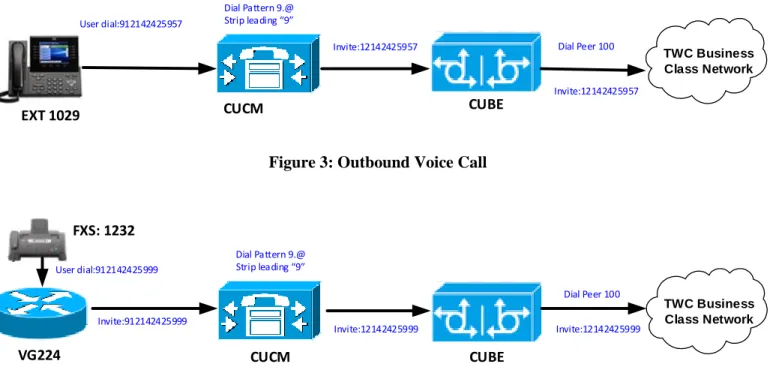
In the sample configuration presented here, CUCM is provisioned with four-digit directory numbers corresponding to the last four DID digits. No digit manipulation is performed on the CUBE.
For incoming PSTN calls, the CUBE presents the full ten-digit DID number to CUCM. The CUCM Translation Pattern strips all but the last four digits and routes the call based on those digits. Voice calls are routed to IP phones; fax calls are routed via a 4-digit route pattern to a SIP trunk that terminates on the VG224
CPE callers make outbound PSTN calls by dialing a “9” prefix followed by the destination number. For outbound fax calls from the analog fax endpoint, VG224 sends to Cisco UCM the DID with leading access code “9”. A “9.@” Route Pattern strips the prefix and routes the call with the remaining digits via a SIP trunk terminating on the CUBE for Voice call or outbound Fax.
TWC Business Class Network
EXT 1029 CUCM CUBE
Dial Pattern 9.@ Strip leading 9
Invite:12142425957 Dial Peer 100
Invite:12142425957 User dial:912142425957
Figure 3: Outbound Voice Call
TWC Business Class Network CUBE CUCM VG224 FXS: 1232 Invite:912142425999 User dial:912142425999 Dial Pattern 9.@ Strip leading 9 Dial Peer 100 Invite:12142425999 Invite:12142425999
Figure 4: Outbound Fax Call
Configuration example
The following configuration snippet contains a sample configuration of Cisco Unified Border Element with all parameters mentioned previously.
Active CUBE:
User Access Verification login as: cisco
Using keyboard-interactive authentication. Password:
TWC_CUBE1#show version
Cisco IOS Software, C3900e Software (C3900e-UNIVERSALK9-M), Version 15.4(3)M1, RELEASE SOFTWARE (fc1)
Technical Support: http://www.cisco.com/techsupport Copyright (c) 1986-2014 by Cisco Systems, Inc. Compiled Fri 24-Oct-14 22:33 by prod_rel_team
ROM: System Bootstrap, Version 15.1(1r)T5, RELEASE SOFTWARE (fc1)
TWC_CUBE1 uptime is 18 hours, 0 minutes
System returned to ROM by reload at 22:13:41 UTC Wed Dec 3 2014 System image file is "flash0:c3900e-universalk9-mz.SPA.154-3.M1.bin" Last reload type: Normal Reload
Last reload reason: reload
This product contains cryptographic features and is subject to United States and local country laws governing import, export, transfer and use. Delivery of Cisco cryptographic products does not imply
third-party authority to import, export, distribute or use encryption. Importers, exporters, distributors and users are responsible for
compliance with U.S. and local country laws. By using this product you agree to comply with applicable laws and regulations. If you are unable to comply with U.S. and local laws, return this product immediately.
A summary of U.S. laws governing Cisco cryptographic products may be found at: http://www.cisco.com/wwl/export/crypto/tool/stqrg.html
If you require further assistance please contact us by sending email to [email protected].
Cisco CISCO3945-CHASSIS (revision 1.0) with C3900-SPE250/K9 with 1788928K/308224K bytes of memory.
Processor board ID FTX1744AM3X 4 Gigabit Ethernet interfaces
1 Virtual Private Network (VPN) Module
DRAM configuration is 72 bits wide with parity enabled. 256K bytes of non-volatile configuration memory.
4001760K bytes of ATA System CompactFlash 0 (Read/Write)
License Info: License UDI: --- Device# PID SN --- *1 C3900-SPE250/K9 FOC17426ADY
Technology Package License Information for Module:'c3900e'
--- Technology Technology-package Technology-package Current Type Next reboot
--- ipbase ipbasek9 Permanent ipbasek9
security securityk9 EvalRightToUse securityk9 uc uck9 Permanent uck9
data None None None NtwkEss None None None CollabPro None None None
Configuration register is 0x2102 TWC_CUBE1#show run
Building configuration...
Current configuration : 8388 bytes !
version 15.4
service timestamps debug datetime msec service timestamps log datetime msec service password-encryption ! hostname TWC_CUBE1 ! boot-start-marker boot-end-marker ! aqm-register-fnf !
logging buffered 51200 warnings
! !
ipc zone default association 1 no shutdown protocol sctp local-port 5000 local-ip 10.80.23.21 remote-port 5000 remote-ip 10.80.23.22 ! no aaa new-model ! ! ip name-server 10.64.1.3 ip cef no ipv6 cef ! !
multilink bundle-name authenticated !
password encryption aes cts logging verbose !
crypto pki trustpoint TP-self-signed-2131491120 enrollment selfsigned
subject-name cn=IOS-Self-Signed-Certificate-2131491120 revocation-check none
! !
crypto pki certificate chain TP-self-signed-2131491120 certificate self-signed 01 3082022B 30820194 A0030201 02020101 300D0609 2A864886 F70D0101 05050030 31312F30 2D060355 04031326 494F532D 53656C66 2D536967 6E65642D 43657274 69666963 6174652D 32313331 34393131 3230301E 170D3133 31313031 31363436 31315A17 0D323030 31303130 30303030 305A3031 312F302D 06035504 03132649 4F532D53 656C662D 5369676E 65642D43 65727469 66696361 74652D32 31333134 39313132 3030819F 300D0609 2A864886 F70D0101 01050003 818D0030 81890281 8100AC64 457DC991 57967FE0 A1AD6097 4F1358E1 3721B264 13A1D71B 90556619 D711054C F27B071E 91464C54 EACBD884 DC242E08 1BC34A7E 1FA49C2F 4A130BD1 461AC476 BA1352B7 F54C4714 5990E43E 1FF4824D 8A75A247 F4AB488A 3F9EFD9C 6CED7728 4CE96D86 B43594A1 6684B645 4302389A 99F337D9 5C04D4D6 ECD7BA8C 1AEF0203 010001A3 53305130 0F060355 1D130101 FF040530 030101FF 301F0603 551D2304 18301680 14B70ED5 6EF1FA77 9D2F8B0B 644BF4DE 972096BC 27301D06 03551D0E 04160414 B70ED56E F1FA779D 2F8B0B64 4BF4DE97 2096BC27 300D0609 2A864886 F70D0101 05050003 81810063 E882FC60 E29C53FE 5A982721 14405614 B1A00023 124C03D7 677F2A10 178A4A9A B83448B1 EFBC136A 4080D4FC 493C3CDB 623B6343 A3639AEB 2A7753B8 9DFB4C79 F3BF9E03 A3146AA0 11AA9FC1 9F739424 2E4D57CB 78413BD3 10C790EE CBBBE796 A8490BE1 D0524A64 0259DC8B 91E6A14C 6FAF8DB9 3139310F 425B3B8C 713265 quit voice-card 0 dsp services dspfarm ! !
no voice hunt unassigned-number !
voice service voip
ip address trusted list ipv4 10.64.3.176
no ip address trusted authenticate address-hiding
mode border-element
allow-connections sip to sip redundancy
fax protocol t38 version 3 ls-redundancy 0 hs-redundancy 0 fallback pass-through g711ulaw
sip
rel1xx supported "rel100" session refresh
asserted-id pai early-offer forced
midcall-signaling passthru !
voice class codec 1
codec preference 1 g711ulaw !
!
license udi pid C3900-SPE250/K9 sn FOC17426ADY
license boot module c3900e technology-package securityk9 !
!
hw-module pvdm 0/0 !
username cisco privilege 15 password 7 021201503D5715701C40 !
redundancy inter-device scheme standby TWC ! ! redundancy ! !
track 1 interface GigabitEthernet0/1 line-protocol !
track 2 interface GigabitEthernet0/0 line-protocol !
!
interface GigabitEthernet0/0 description TWC CUBE LAN
ip address 10.80.23.21 255.255.255.0 standby delay minimum 30 reload 60 standby version 2
standby 6 ip 10.80.23.20 standby 6 priority 60
standby 6 preempt delay minimum 10 standby 6 track 1 decrement 20 standby 6 track 2 decrement 20 duplex auto
speed auto !
interface GigabitEthernet0/1 description TWC CUBE WAN
ip address 10.64.3.68 255.255.0.0 standby delay minimum 30 reload 60
standby version 2
standby 1 ip 10.64.3.175 standby 1 priority 60
standby 1 preempt delay minimum 10 standby 1 name TWC
standby 1 track 1 decrement 20 standby 1 track 2 decrement 20 duplex auto speed auto ! interface GigabitEthernet0/2 no ip address shutdown duplex auto speed auto ! interface GigabitEthernet0/3 no ip address shutdown duplex auto speed auto ! ip forward-protocol nd ! no ip http server no ip http secure-server ! ip route 0.0.0.0 0.0.0.0 10.64.3.176 !
! nls resp-timeout 1 cpd cr-id 1 ! ! control-plane !
mgcp behavior rsip-range tgcp-only mgcp behavior comedia-role none
mgcp behavior comedia-check-media-src disable mgcp behavior comedia-sdp-force disable
!
mgcp profile default !
dial-peer voice 100 voip description to TWC
destination-pattern 1... session protocol sipv2
session target sip-server session transport udp voice-class codec 1
voice-class sip bind control source-interface GigabitEthernet0/1 voice-class sip bind media source-interface GigabitEthernet0/1 dtmf-relay rtp-nte
no vad !
dial-peer voice 101 voip description from CUCM session protocol sipv2
session target sip-server session transport udp
incoming called-number 1... voice-class codec 1
voice-class sip bind control source-interface GigabitEthernet0/0 voice-class sip bind media source-interface GigabitEthernet0/0 dtmf-relay rtp-nte
no vad !
dial-peer voice 200 voip description from TWC session protocol sipv2 session target sip-server session transport udp
incoming called-number 469930.... voice-class codec 1
voice-class sip bind control source-interface GigabitEthernet0/1 voice-class sip bind media source-interface GigabitEthernet0/1 dtmf-relay rtp-nte
no vad !
dial-peer voice 201 voip description to CUCM
destination-pattern 469930.... session protocol sipv2
session target ipv4:10.80.23.3 session transport udp
voice-class codec 1
voice-class sip bind media source-interface GigabitEthernet0/0 dtmf-relay rtp-nte
no vad !
dial-peer voice 300 voip
description to TWC-International destination-pattern 011T
session protocol sipv2 session target sip-server session transport udp voice-class codec 1
voice-class sip bind control source-interface GigabitEthernet0/1 voice-class sip bind media source-interface GigabitEthernet0/1 dtmf-relay rtp-nte
no vad !
dial-peer voice 400 voip
description to TWC-special service destination-pattern ...
session protocol sipv2 session target sip-server session transport udp voice-class codec 1
voice-class sip bind control source-interface GigabitEthernet0/1 voice-class sip bind media source-interface GigabitEthernet0/1 dtmf-relay rtp-nte
no vad !
description to TWC operator destination-pattern 0
session protocol sipv2 session target sip-server session transport udp voice-class codec 1
voice-class sip bind control source-interface GigabitEthernet0/1 voice-class sip bind media source-interface GigabitEthernet0/1 dtmf-relay rtp-nte no vad ! ! sip-ua no remote-party-id sip-server ipv4:10.64.3.176:5060 ! gatekeeper shutdown ! line con 0 exec-timeout 0 0 password 7 060506324F41 logging synchronous login local line aux 0 line vty 0 4 exec-timeout 0 0 password 7 1511021F0725 logging synchronous
login local
transport input all line vty 5 15
exec-timeout 0 0 logging synchronous login local
transport input all ! scheduler allocate 20000 1000 ntp server 10.10.10.5 ! end Standby CUBE:
User Access Verification Username: cisco
Password:
TWC_CUBE2#show version
Cisco IOS Software, C3900e Software (C3900e-UNIVERSALK9-M), Version 15.4(3)M1, RELEASE SOFTWARE (fc1)
Technical Support: http://www.cisco.com/techsupport Copyright (c) 1986-2014 by Cisco Systems, Inc. Compiled Fri 24-Oct-14 22:33 by prod_rel_team
ROM: System Bootstrap, Version 15.1(1r)T4, RELEASE SOFTWARE (fc1)
TWC_CUBE2 uptime is 17 hours, 58 minutes
System returned to ROM by reload at 22:43:40 UTC Wed Dec 3 2014 System image file is "flash0:c3900e-universalk9-mz.SPA.154-3.M1.bin"
Last reload type: Normal Reload Last reload reason: reload
This product contains cryptographic features and is subject to United States and local country laws governing import, export, transfer and use. Delivery of Cisco cryptographic products does not imply
third-party authority to import, export, distribute or use encryption. Importers, exporters, distributors and users are responsible for
compliance with U.S. and local country laws. By using this product you agree to comply with applicable laws and regulations. If you are unable to comply with U.S. and local laws, return this product immediately.
A summary of U.S. laws governing Cisco cryptographic products may be found at: http://www.cisco.com/wwl/export/crypto/tool/stqrg.html
If you require further assistance please contact us by sending email to [email protected].
Cisco CISCO3945-CHASSIS (revision 1.0) with C3900-SPE250/K9 with 1786880K/310272K bytes of memory.
Processor board ID FTX1541A032 4 Gigabit Ethernet interfaces
1 Virtual Private Network (VPN) Module 4 Voice FXS interfaces
DRAM configuration is 72 bits wide with parity enabled. 256K bytes of non-volatile configuration memory.
License Info: License UDI: --- Device# PID SN --- *1 C3900-SPE250/K9 FOC15391VLH
Technology Package License Information for Module:'c3900e'
--- Technology Technology-package Technology-package Current Type Next reboot
--- ipbase ipbasek9 Permanent ipbasek9
security securityk9 RightToUse securityk9 uc uck9 Permanent uck9
data None None None NtwkEss None None None CollabPro None None None
Configuration register is 0x2102
Building configuration...
Current configuration : 8418 bytes !
version 15.4
service timestamps debug datetime msec service timestamps log datetime msec no service password-encryption
!
hostname TWC_CUBE2 !
boot-start-marker
boot system flash0:c3900e-universalk9-mz.SPA.154-3.M1.bin boot-end-marker
!
aqm-register-fnf !
logging buffered 51200 warnings
enable secret 5 $1$q/Bk$BuOl4yptT4JPxDeWSCcBd. !
!
ipc zone default association 1 no shutdown protocol sctp local-port 5000 local-ip 10.80.23.22 remote-port 5000
remote-ip 10.80.23.21 ! no aaa new-model ! ip name-server 10.64.1.3 ip cef no ipv6 cef ! !
multilink bundle-name authenticated !
!
crypto pki trustpoint TP-self-signed-3709846528 enrollment selfsigned subject-name cn=IOS-Self-Signed-Certificate-3709846528 revocation-check none rsakeypair TP-self-signed-3709846528 ! !
crypto pki certificate chain TP-self-signed-3709846528 certificate self-signed 01 3082022B 30820194 A0030201 02020101 300D0609 2A864886 F70D0101 05050030 31312F30 2D060355 04031326 494F532D 53656C66 2D536967 6E65642D 43657274 69666963 6174652D 33373039 38343635 3238301E 170D3134 30383236 32313335 35325A17 0D323030 31303130 30303030 305A3031 312F302D 06035504 03132649 4F532D53 656C662D 5369676E 65642D43 65727469 66696361 74652D33 37303938 34363532 3830819F 300D0609 2A864886 F70D0101 01050003 818D0030 81890281 8100CE51 F561CD41 24990148 0E798600 71068690 366B3A6B A7E16F02 A66F8471 71E35FA6 C13EBD9D C6887395 683BB37A 27B11487 97EEDF44 0E881127 EC99BC0F
4B8D3C31 B36459DC FAA585B5 DD209151 8AEDCEA7 847D8ACB 9DEB0523 3818EF93 B21AD7EB B41CEC57 39FBD6C5 F4BD27E6 6B548ECC 7C85320F 00436C79 F5978280 44250203 010001A3 53305130 0F060355 1D130101 FF040530 030101FF 301F0603 551D2304 18301680 14841E1D 28893357 F087CC1E BBD3BD76 C91253B9 4E301D06 03551D0E 04160414 841E1D28 893357F0 87CC1EBB D3BD76C9 1253B94E 300D0609 2A864886 F70D0101 05050003 81810013 876F5E4D 896D48AB B4E92489 B1C42EE6 60EAC45D BD88C5A7 39EA149E F2576DD3 95177726 7C63256F B1746B16 2A22BEBE 06DDCB83 0B8A373E 5FE2813D B70E577D 54926FA5 6B17CFB3 97575471 9587DC43 7428A023 11E71071 9E6EFD10 473A4DA6 FBD2209C 1DE25F6D 4CDF4AF5 A0EF1B13 8994EB81 B772150C 6A0416ED E295DA
quit voice-card 0 !
!
no voice hunt unassigned-number !
voice service voip
ip address trusted list ipv4 10.64.3.176
no ip address trusted authenticate address-hiding
mode border-element
allow-connections sip to sip redundancy
fax protocol t38 version 3 ls-redundancy 0 hs-redundancy 0 fallback pass-through g711ulaw
sip
rel1xx supported "rel100" session refresh
asserted-id pai early-offer forced
midcall-signaling passthru !
voice class codec 1
codec preference 1 g711ulaw !
!
license udi pid C3900-SPE250/K9 sn FOC15391VLH license accept end user agreement
license boot module c3900e technology-package securityk9 !
!
hw-module pvdm 0/0 !
username cisco privilege 15 password 0 tekV1z10n ! redundancy inter-device scheme standby TWC ! ! redundancy !
track 1 interface GigabitEthernet0/1 line-protocol !
track 2 interface GigabitEthernet0/0 line-protocol !
!
description TWC CUBE LAN
ip address 10.80.23.22 255.255.255.0 standby delay minimum 30 reload 60 standby version 2
standby 6 ip 10.80.23.20 standby 6 priority 50
standby 6 preempt delay minimum 10 standby 6 track 1 decrement 20 standby 6 track 2 decrement 20 duplex auto
speed auto !
interface GigabitEthernet0/1 description TWC CUBE WAN
ip address 10.64.3.191 255.255.0.0 standby delay minimum 30 reload 60 standby version 2
standby 1 ip 10.64.3.175 standby 1 priority 50
standby 1 preempt delay minimum 10 standby 1 name TWC
standby 1 track 1 decrement 20 standby 1 track 2 decrement 20 duplex auto speed auto ! interface GigabitEthernet0/2 no ip address shutdown
duplex auto speed auto ! interface GigabitEthernet0/3 no ip address shutdown duplex auto speed auto ! ip forward-protocol nd ! no ip http server no ip http secure-server ! ip route 0.0.0.0 0.0.0.0 10.64.3.176 ! ! nls resp-timeout 1 cpd cr-id 1 ! ! control-plane ! ! voice-port 0/2/0 ! voice-port 0/2/1 ! voice-port 0/2/2
!
voice-port 0/2/3 !
mgcp behavior rsip-range tgcp-only mgcp behavior comedia-role none
mgcp behavior comedia-check-media-src disable mgcp behavior comedia-sdp-force disable
!
mgcp profile default !
!
dial-peer voice 100 voip description to TWC
destination-pattern 1... session protocol sipv2
session target sip-server session transport udp voice-class codec 1
voice-class sip bind control source-interface GigabitEthernet0/1 voice-class sip bind media source-interface GigabitEthernet0/1 dtmf-relay rtp-nte
no vad !
dial-peer voice 101 voip description from CUCM session protocol sipv2 session target sip-server session transport udp
voice-class codec 1
voice-class sip bind control source-interface GigabitEthernet0/0 voice-class sip bind media source-interface GigabitEthernet0/0 dtmf-relay rtp-nte
no vad !
dial-peer voice 200 voip description from TWC session protocol sipv2 session target sip-server session transport udp
incoming called-number 469930.... voice-class codec 1
voice-class sip bind control source-interface GigabitEthernet0/1 voice-class sip bind media source-interface GigabitEthernet0/1 dtmf-relay rtp-nte
no vad !
dial-peer voice 201 voip description to CUCM
destination-pattern 469930.... session protocol sipv2
session target ipv4:10.80.23.3 session transport udp
voice-class codec 1
voice-class sip bind control source-interface GigabitEthernet0/0 voice-class sip bind media source-interface GigabitEthernet0/0 dtmf-relay rtp-nte
!
dial-peer voice 300 voip
description to TWC-International destination-pattern 011T
session protocol sipv2 session target sip-server session transport udp voice-class codec 1
voice-class sip bind control source-interface GigabitEthernet0/1 voice-class sip bind media source-interface GigabitEthernet0/1 dtmf-relay rtp-nte
no vad !
dial-peer voice 400 voip
description to TWC-special service destination-pattern ...
session protocol sipv2 session target sip-server session transport udp voice-class codec 1
voice-class sip bind control source-interface GigabitEthernet0/1 voice-class sip bind media source-interface GigabitEthernet0/1 dtmf-relay rtp-nte
no vad !
dial-peer voice 302 voip description to TWC operator destination-pattern 0
session target sip-server session transport udp voice-class codec 1
voice-class sip bind control source-interface GigabitEthernet0/1 voice-class sip bind media source-interface GigabitEthernet0/1 dtmf-relay rtp-nte no vad ! ! sip-ua no remote-party-id sip-server ipv4:10.64.3.176:5060 ! gatekeeper shutdown ! line con 0 login local line aux 0 line vty 0 4 exec-timeout 0 0 privilege level 15 logging synchronous login local
transport input telnet ssh line vty 5 15
exec-timeout 0 0 privilege level 15 logging synchronous
login local
transport input telnet ssh !
scheduler allocate 20000 1000 !
Configuring the Cisco Unified Communications Manager
Cisco Unified Communications Manager version
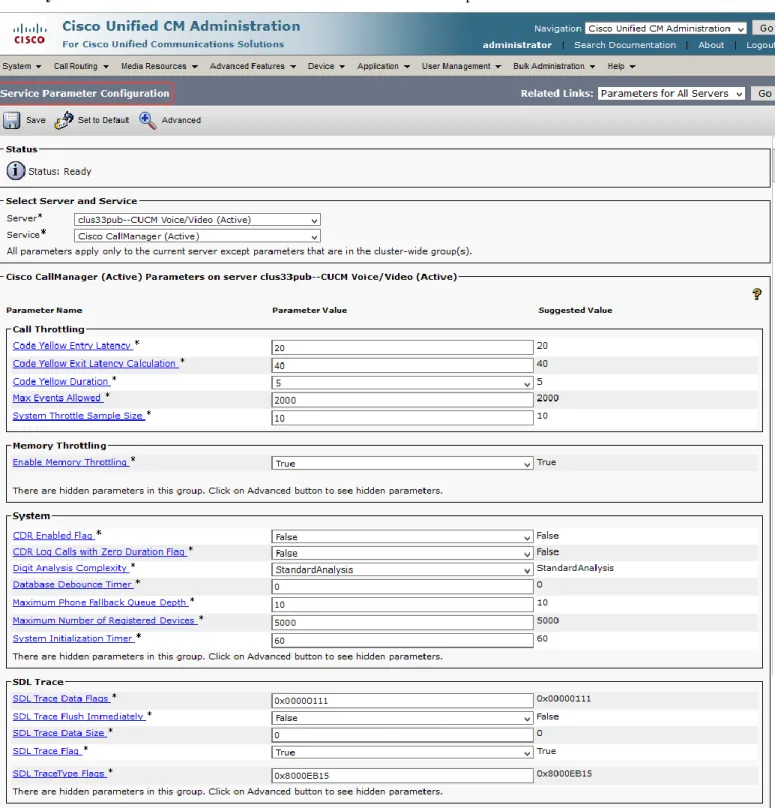
Cisco CallManager Service Parameter
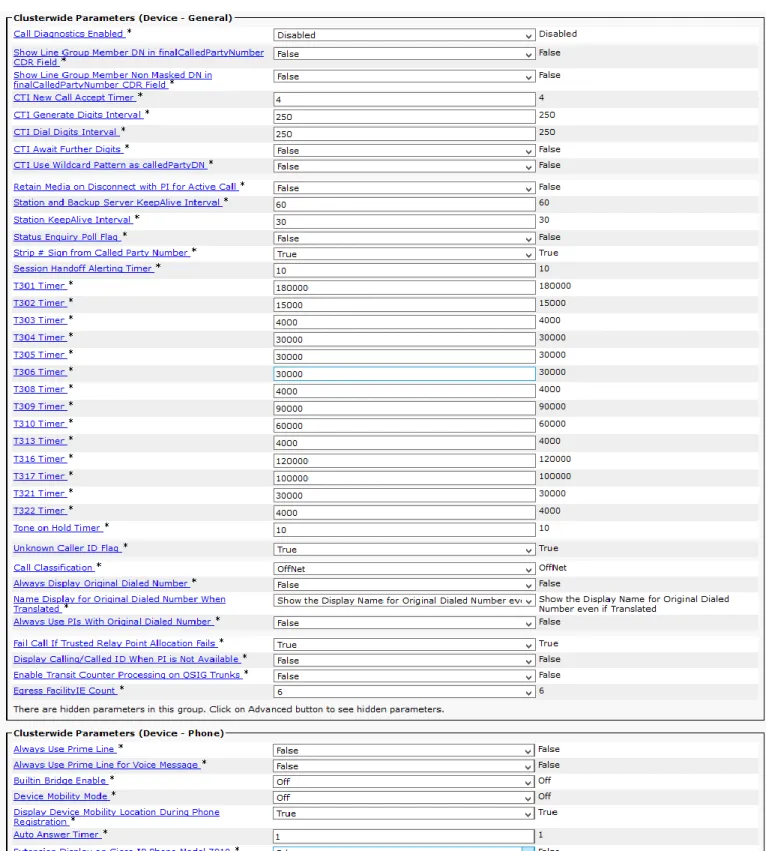
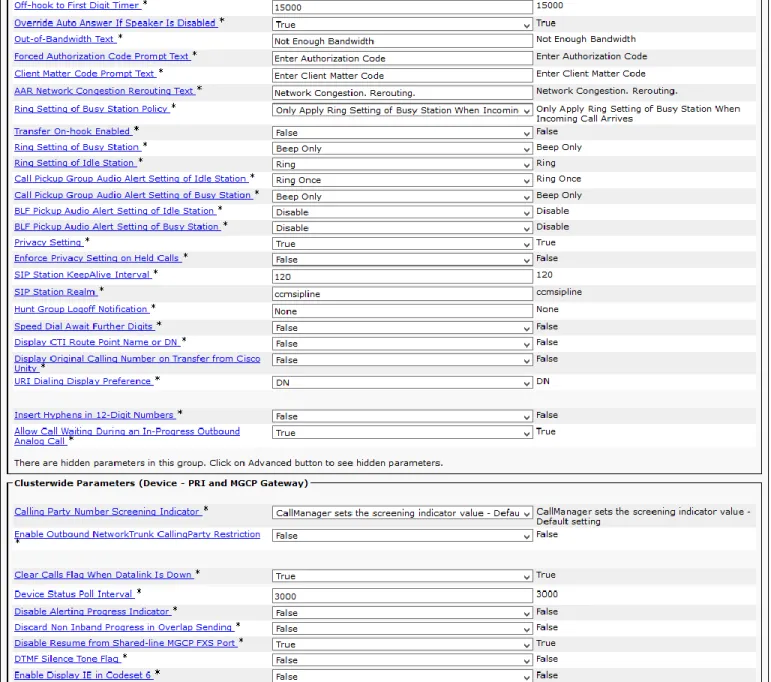
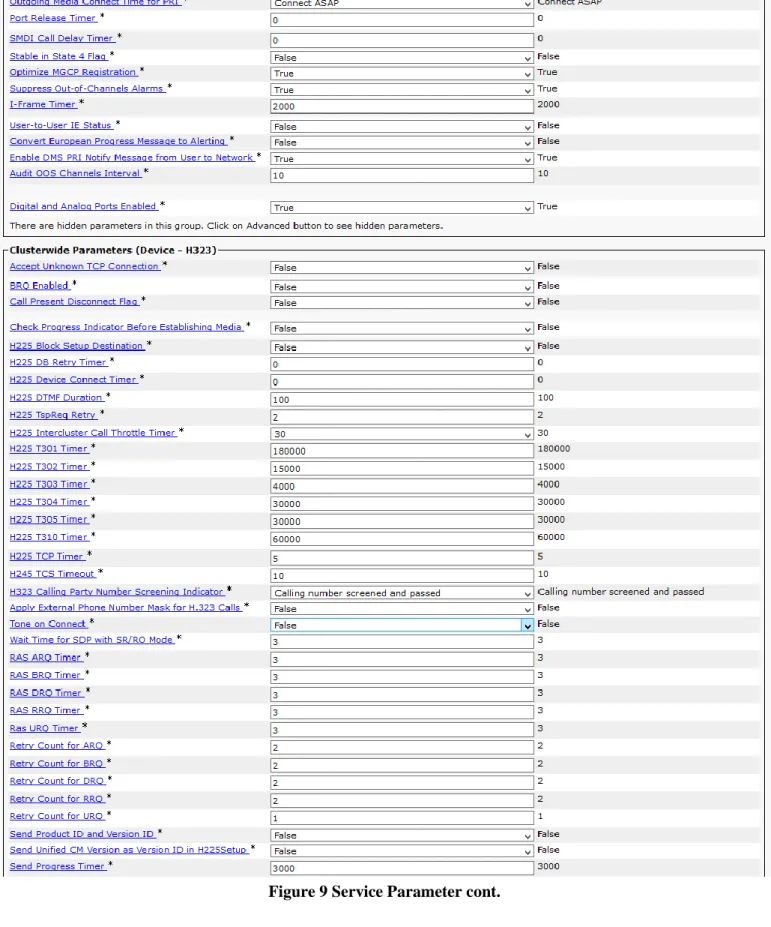
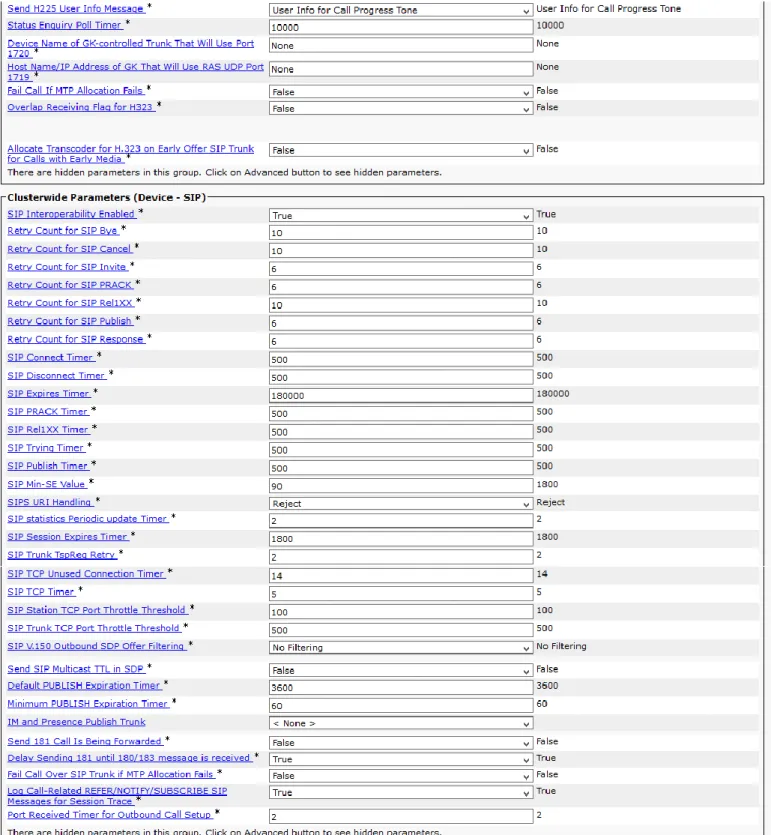
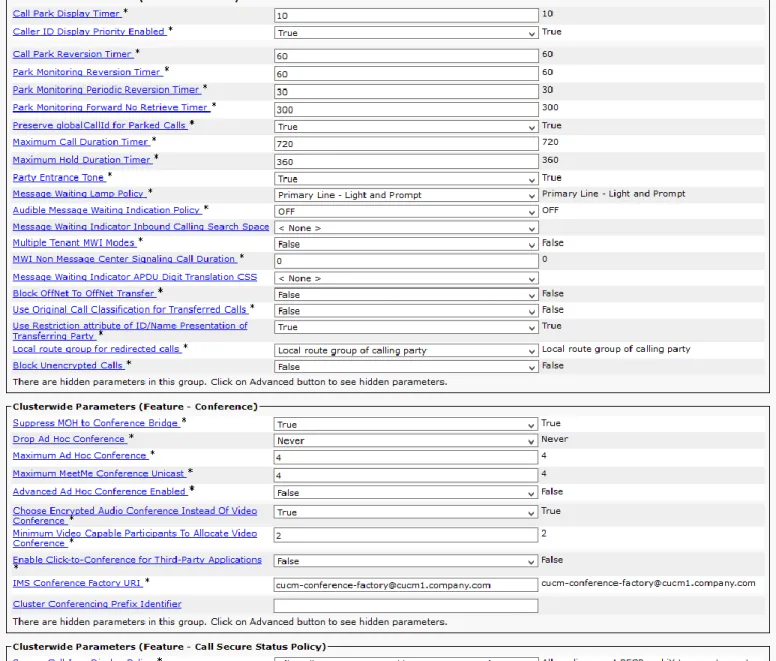
Go to System > Service Parameters .we leave all fields in the service parameter as default values for this test
Off-net calls via TWCBC SIP Trunk
Off-net calls are served by SIP trunks configured between CUCM and TWCBC ESG. Calls are routed via CUBE.
SIP Trunk Security Profile
Go to System > Security > SIP Trunk Security Profile and click on Add New.
Figure 17 SIP Trunk Security Profile
Parameter Value Description
Incoming Transport Type TCP + UDP
Outgoing Transport Type UDP SIP trunks to TWCBC ESG should use UDP as a transport protocol for SIP. This is configured using SIP Trunk Security profile, which is later assigned to the SIP trunk itself.
SIP Profile
SIP Profile will be later associated with the SIP trunk.
Navigate to Device > Device Settings > SIP Profile and modify default SIP Profile by clicking on a Copy button in its row.
Figure 20: SIP Profile cont.
Parameter Value Description
Default MTP Telephony Event Payload Type
101 RFC2833 DTMF payload type
Require SDP Inactive Exchange for Mid-Call Media Change
Checked Send SDP with Inactive when call on hold
SIP Rel1XX Options Send PRACK for 1xx Messages
Enable Provisional Acknowledgements (Reliable 100 messages)
Early Offer support for voice and video calls
Best Effort (no MTP inserted)
Support early media
Enable OPTIONS Ping to monitor destination status for trunks with Service Type “None (Default)”
Checked Send OPTIONS Ping to CUBE
Ping Interval for In-service and Partially In-service Trunks (seconds)
60 OPTIONS message parameters- interval time
Ping Interval for Out-of-service Trunks (seconds)
SIP Trunk Configuration
Create SIP trunks to TWCBC by navigating to Device > Trunk and clicking Add New button. Same apply to create SIP trunks to Cisco Unity Connection and VG224
Figure 24 SIP Trunk to CUBE Cont.
Parameter Value Description
Device Name TWC_SIP_Trunk Name for the trunk
Device Pool G711 G711 Pool used to use 711Ulaw as preferred voice codec
Media Resource Group List MRGL MRG with resources: ANN, CFB, MOH and MTP
Significant Digits All Received all digits for incoming call and Translation Pattern strips all but the last four digits and routes the call based on those digits Calling Party Selection Originator Send original caller ID
Redirecting Diversion Header Delivery - outbound
Checked Adding Diversion Header for calls outbound from site
SIP Trunk Security Profile TWC Non Secure SIP Trunk Profile
SIP Trunk Security Profile configured earlier
SIP Profile TWC SIP Trunk Profile SIP Profile configured earlier
DTMF Signaling Method RFC 2833 RFC 2833 is supported for DTMF transport to/from TWCBC Normalization Script TWC_11Digits_Diversion Convert 4 digits EXT to 11 digits DID for Diversion header
Diversion-Mask 1469930XXXX Used in Normalization Script
Note: Reset the trunk after the configuration is completed.
SIP Normalization Script
A SIP Normalization Script is used to convert SIP Diversion Headers from 4-digit EXT to the full 11-digit E.164 telephone number, this is required for call redirecting over TWCBC SIP network.
Navigate to Device>Device Settings>SIP Normalization Script to create Normalization Script
Figure 25 Normalization Script
SIP Normalization Script (Text) M = {}
local mask = scriptParameters.getValue("Diversion-Mask")
-- handle the mask of the diversion header for non-911 calls function M.outbound_INVITE(message) if mask then message:applyNumberMask("Diversion", mask) end end return M
Translation Pattern
A Translation Pattern is created to convert 10-digit Incoming Called Number to 4-digit Extension
Navigate to Call Routing>Translation Pattern and press ADD New button to create Translation Patterns
Dialplan
Route Pattern configuration
Route patterns are configured as below, Cisco IP phones dial 9+11 digits number to access PSTN via CUBE, “9” is removed before send to CUBE; for FAX call, Access Code 9 is used at VG224, “9” is removed at UCM and 11 digits number is send to CUBE to TWCBC network. Incoming fax call to 1232 will send to VG224. 1000 is the Pilot Number for Voice mail to Unity Connection.
Navigate to Call Routing > Route/Hunt > Route Pattern and press Add New button to create Route Patterns
Figure 27 Route Pattern
Setting Value Description
Route Pattern 9.@ for outbound call Specify appropriate Route Pattern Gateway/Route List TWC_SIP_Trunk SIP Trunk name configured earlier Require Forced
Authorization Code
Checked when doing Authorization Code test
Specify if Authorization Code required when make call through this Route Pattern
Require Client Matter Code
Check when doing Account Code test
Specify if Account Code required when make call through this Route Pattern
Use Calling Party’s External Phone Number Mask
Checked Send the Calling Party information based on the configuration for each phone
Calling Party Transform mask
1469930XXXX Specify the Calling Line ID for outgoing call through this Route Pattern, TWCBC require 11-digit Calling Line ID Discard Digits PreDot for RP 9.@ specifies how to modify digit before they are sending to
Configuring the Cisco Voice Gateway VG224
The following configuration snippet contains a sample configuration of Cisco Voice Gateway VG224 for fax services. VG224#show run
Building configuration...
Current configuration : 2308 bytes !
! Last configuration change at 19:21:00 UTC Sat Mar 6 1993 by cisco !
version 15.1 no service pad
service timestamps debug datetime msec service timestamps log datetime msec no service password-encryption ! hostname VG224 ! boot-start-marker boot-end-marker ! !
enable secret 5 $1$2vXb$mom3hjaQF.cY7CZ0YP3Oo. !
no aaa new-model
crypto pki token default removal timeout 0 !
!
ip cef ! ! ! no ipv6 cef ! !
voice service voip
allow-connections sip to sip redirect ip2ip
fax protocol t38 version 3 ls-redundancy 0 hs-redundancy 0 fallback pass-through g711ulaw sip asserted-id pai early-offer forced midcall-signaling passthru !
voice class codec 1
codec preference 1 g711ulaw !
!
voice-card 0 !
username cisco privilege 15 password 0 tekV1z10n !
!
interface FastEthernet0/0
ip address 10.80.23.15 255.255.255.0 duplex auto
speed auto ! interface FastEthernet0/1 no ip address shutdown duplex auto speed auto ! ip forward-protocol nd ! no ip http server no ip http secure-server ip route 0.0.0.0 0.0.0.0 10.80.23.1 ! ! ! control-plane ! ! voice-port 2/0 ! voice-port 2/1
description **telephone analog/fax** ! voice-port 2/2 ! voice-port 2/3 ! voice-port 2/4
! voice-port 2/5 ! voice-port 2/6 ! voice-port 2/7 ! voice-port 2/8 ! voice-port 2/9 ! voice-port 2/10 ! voice-port 2/11 ! voice-port 2/12 ! voice-port 2/13 ! voice-port 2/14 ! voice-port 2/15 ! voice-port 2/16 ! voice-port 2/17 ! voice-port 2/18 !
voice-port 2/19 ! voice-port 2/20 ! voice-port 2/21 ! voice-port 2/22 ! voice-port 2/23 !
no ccm-manager fax protocol cisco ! no mgcp package-capability fxr-package no mgcp timer receive-rtcp ! mgcp profile default ! !
dial-peer voice 1232 pots destination-pattern 1232 incoming called-number [0-9]T no digit-strip port 2/1 forward-digits 0 !
dial-peer voice 100 voip description outbound call
destination-pattern 91... session protocol sipv2
session target ipv4:10.80.23.3:5060 session transport udp
voice-class codec 1 dtmf-relay rtp-nte no vad ! line con 0 speed 115200 line aux 0 line vty 0 4 session-timeout 900 exec-timeout 960 0 login local
transport input all !
Acronyms
Acronym Definitions
CPE Customer Premise Equipment CUBE Cisco Unified Border Element
CUCM Cisco Unified Communications Manager ESG Enterprise SIP Gateway
MTP Media Termination Point POP Point of Presence
PSTN Public Switched Telephone Network SCCP Skinny Client Control Protocol SIP Session Initiation Protocol
Important Information
THE SPECIFICATIONS AND INFORMATION REGARDING THE PRODUCTS IN THIS MANUAL ARE SUBJECT TO CHANGE WITHOUT NOTICE. ALL STATEMENTS, INFORMATION, AND RECOMMENDATIONS IN THIS MANUAL ARE BELIEVED TO BE ACCURATE BUT ARE PRESENTED WITHOUT WARRANTY OF ANY KIND, EXPRESS OR IMPLIED. USERS MUST TAKE FULL RESPONSIBILITY FOR THEIR APPLICATION OF ANY PRODUCTS. IN NO EVENT SHALL CISCO OR ITS SUPPLIERS BE LIABLE FOR ANY INDIRECT, SPECIAL, CONSEQUENTIAL, OR INCIDENTAL DAMAGES, INCLUDING, WITHOUT LIMITATION, LOST PROFITS OR LOSS OR DAMAGE TO DATA ARISING OUT OF THE USE OR INABILITY TO USE THIS MANUAL, EVEN IF CISCO OR ITS SUPPLIERS HAVE BEEN ADVISED OF THE POSSIBILITY OF SUCH DAMAGES.
Application Note
Appendix A: Test Results
(Test results will be kept on file at Cisco, but will be stripped out
of the application note before publishing to Cisco.com)
SP_SIP_master_testp lan_V1.2.xls
Corporate Headquarters
Cisco Systems, Inc. 170 West Tasman Drive San Jose, CA 95134-1706 USA www.cisco.com Tel: 408 526-4000 800 553-NETS (6387) Fax: 408 526-4100 European Headquarters
Cisco Systems International BV Haarlerbergpark Haarlerbergweg 13-19 1101 CH Amsterdam The Netherlands www-europe.cisco.com Tel: 31 0 20 357 1000 Fax: 31 0 20 357 1100 Americas Headquarters
Cisco Systems, Inc. 170 West Tasman Drive San Jose, CA 95134-1706 USA
www.cisco.com Tel: 408 526-7660 Fax: 408 527-0883
Asia Pacific Headquarters
Cisco Systems, Inc. Capital Tower 168 Robinson Road #22-01 to #29-01 Singapore 068912 www.cisco.com Tel: +65 317 7777 Fax: +65 317 7799 Cisco Systems has more than 200 offices in the following countries and regions. Addresses, phone numbers, and fax numbers are listed on
the Cisco Web site at www.cisco.com/go/offices.
Argentina • Australia • Austria • Belgium • Brazil • Bulgaria • Canada • Chile • China PRC • Colombia • Costa Rica • Croatia • Czech Republic • Denmark • Dubai, UAE • Finland • France • Germany • Greece • Hong Kong SAR • Hungary • India • Indonesia • Ireland • Israel • Italy • Japan • Korea • Luxembourg • Malaysia • Mexico • The Netherlands • New Zealand • Norway • Peru • Philippines • Poland • Portugal • Puerto Rico • Romania • Russia • Saudi Arabia • Scotland • Singapore • Slovakia • Slovenia • South Africa • Spain • Sweden • Switzerland • Taiwan • Thailand • Turkey Ukraine • United Kingdom • United States • Venezuela • Vietnam • Zimbabwe © 2014 Cisco Systems, Inc. All rights reserved.
CCENT, Cisco Lumin, Cisco Nexus, the Cisco logo and the Cisco Square Bridge logo are trademarks of Cisco Systems, Inc.; Changing the Way We Work, Live, Play, and Learn is a service mark of Cisco Systems, Inc.; and Access Registrar, Aironet, BPX, Catalyst, CCDA, CCDP, CCVP, CCIE, CCIP, CCNA, CCNP, CCSP, Cisco, the Cisco Certified Internetwork Expert logo, Cisco IOS, Cisco Press, Cisco Systems, Cisco Systems Capital, the Cisco Systems logo, Cisco Unity, EtherFast, EtherSwitch, Fast Step, Follow Me Browsing, FormShare, GigaDrive, HomeLink, Internet Quotient, IOS, iPhone, iQ Expertise, the iQ logo, iQ Net Readiness Scorecard, iQuick Study, LightStream, Linksys, MeetingPlace, MGX, Networking Academy, Network Registrar, Packet, PIX, ProConnect, ScriptShare, SMARTnet, StackWise, The Fastest Way to Increase Your Internet Quotient, and TransPath are registered trademarks of Cisco Systems, Inc. and/or its affiliates in the United States and certain other countries.
All other trademarks mentioned in this document or Website are the property of their respective owners. The use of the word partner does not imply a partnership relationship between Cisco and any other company. (0705R)