
San Jose State University
SJSU ScholarWorks
Master's Projects Master's Theses and Graduate Research
Fall 12-17-2018
Pantry: A Macro Library for Python
Derek Pang
San Jose State University
Follow this and additional works at:https://scholarworks.sjsu.edu/etd_projects
Part of theProgramming Languages and Compilers Commons, and theSoftware Engineering Commons
This Master's Project is brought to you for free and open access by the Master's Theses and Graduate Research at SJSU ScholarWorks. It has been
Recommended Citation
Pang, Derek, "Pantry: A Macro Library for Python" (2018).Master's Projects. 657. DOI: https://doi.org/10.31979/etd.pydk-c57j
Pantry: A Macro Library for Python
A Project Presented to
The Faculty of the Department of Computer Science San José State University
In Partial Fulfillment
of the Requirements for the Degree Master of Science
by Derek Pang December 2018
© 2018 Derek Pang
The Designated Project Committee Approves the Project Titled
Pantry: A Macro Library for Python
by Derek Pang
APPROVED FOR THE DEPARTMENT OF COMPUTER SCIENCE
SAN JOSÉ STATE UNIVERSITY
December 2018
Dr. Thomas Austin Department of Computer Science Dr. Tim Disney Shape Security
ABSTRACT
Pantry: A Macro Library for Python by Derek Pang
Python lacks a simple way to create custom syntax and constructs that goes outside of its own syntax rules. A paradigm that allows for these possibilities to exist within languages is macros. Macros allow for a shorter set of syntax to expand into a longer set of instructions at compile-time. This gives the capability to evolve the language to fit personal needs.
Pantry, implements a hygienic text-substitution macro system for Python. Pantry achieves this through the introduction of an additional preparsing step that utilizes parsing and lexing of the source code. Pantry proposes a way to simply declare a pattern to be recognized, articulate instructions that replace the pattern, and replace the pattern in the source code. This form of meta-programming allows its users to be able to more concisely write their Python code and present the language in a more natural and intuitive manner.
We validate Pantry’s utility through use cases inspired by Python Enhancement Proposals (PEPs) and go through five of them. These are requests from the Python
community for features to be implemented into Python. Pantry fulfills these desires through the composition of macros that that performs the new feature.
ACKNOWLEDGMENTS
I want to Dr. Thomas Austin for his guidance and patience as this project developed.
TABLE OF CONTENTS SECTION 1 Introduction . . . 1 2 Background . . . 5 2.1 Macros . . . 5 2.1.1 Why Macros? . . . 6 2.1.2 Use of Macros . . . 7 2.1.3 Macro Hygiene . . . 8 3 Related Work . . . 11 3.1 C Preprocessor . . . 11 3.2 Lisp . . . 14 3.3 MacroPy . . . 16
3.3.1 MacroPy, an implementation of Python macros using Abstract Syntax Trees . . . 16
3.3.2 Changing grammar for Literal String Interpolation . . . 18
4 Implementation. . . 24
4.1 Pantry’s Structure . . . 24
4.2 Declaring a Pantry Macro . . . 25
4.3 Preprocessing Stages of Pantry . . . 26
4.4 Pantry’s Hygiene Implementation . . . 28
4.5 Pantry Context Methods . . . 29
5.1 Style Standardization Macro . . . 32
5.2 Do-While Macro . . . 35
5.3 Coalesce Macro . . . 39
6 Conclusion . . . 42
LIST OF FIGURES
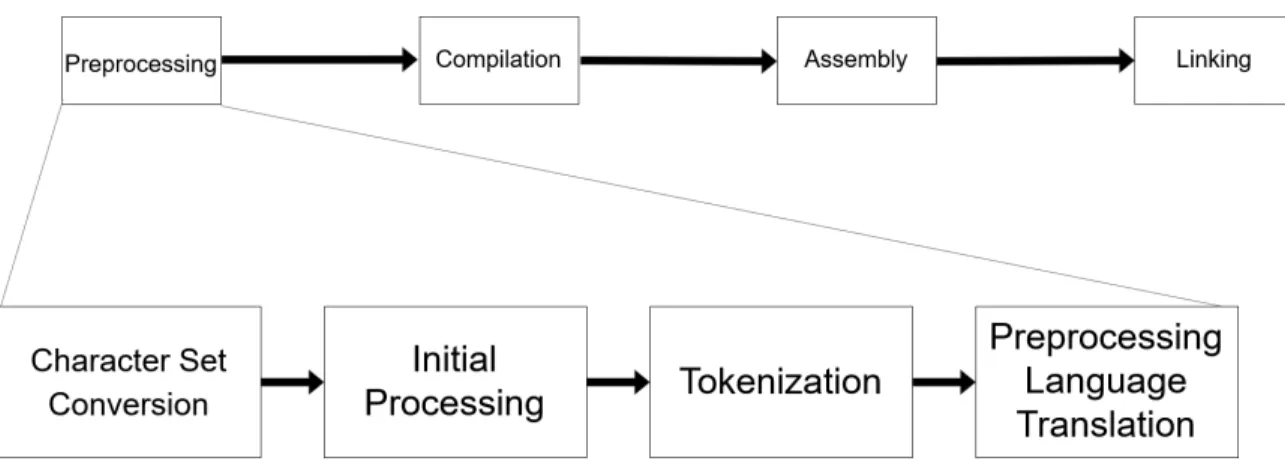
1 A closer look at the preprocessing stage in the stages of C compilation 12 2 Taken from [1] a) shows undisciplined CPP usage b) shows
equivalent disciplined CPP usage . . . 13 3 Standard Python Stages in Interpretation . . . 24 4 Preprocessing Stages of Pantry . . . 26
SECTION 1 Introduction
Macros are the specification on how a particular instruction is transformed into another, often longer, instruction. The programming language of Python does not have built-in support for macros unlike many other languages such as C [2] or Racket [3].
Programmers should be able to express a set of instructions more concisely and in a more intuitive manner than what is currently available in the Python language. To facilitate this, the ability to take commonly used patterns, clean them up, and contain them in a macro is imperative. Macro-formed syntax allows code to look shorter, cleaner, and more readable. In addition, macros allow for further features to be developed and promotes the evolution of the Python language.
1 x = 2 2 y = 3
3 print( x , y ) # o u t p u t : 2 3
4 swap x y #swap macro s t a t e d h e r e
5 print( x , y ) #e x p e c t e d o u t p u t : 3 2
Listing 1.1: Before Macro Expansion
1 x = 2 2 y = 3
3 print( x , y ) # o u t p u t : 2 3
4 tmp =x ; x =y ; y =tmp #Exp an sio n
5 print( x , y ) #o u t p u t : 3 2
Listing 1.2: After Macro Expansion Take for instance listings 1.1 and 1.2. The goal is to create a simple macro, called
swap, that takes the next two variables and swaps their values. In Python, line 4 in
listing 1.1 would cause a syntax error since Python would not know what to do with the swap keyword. As a macro, swapis able to expand right into the calling context
of where it is called. This allows variable reassignment to happen in the macro itself. If swapwere a function, variable reassignment would not be able to occur within the
function as the scope inside that function would be separate from the scope of where it was called. With macros, the swapkeyword along with the variables x andy would
be replaced with line 4 in listing 1.2, accomplishing the goal of swapping the two values through a custom syntax construction of our own creation.
This project introduces Pantry, a library that implements a hygienic text-substitution macro expression system for the Python language. The library permits Python programmers to detail how and what replaces a particular code pattern of their choice. Pantry uses parsing and lexing to introduce macros in a natural and easy-to-use library. The library grants the capability for users to simply declare a pattern to be recognized as a macro, articulate a set of instructions that will replace that pattern, have the library go through the code to find and replace the established patterns. With this library, the user will be able to reduce verbose syntax into simpler, more concise forms that will be more readable for the programmer.
1 @starttoker . macro 2 def swap ( ctx=ctx ) :
3 x = ctx .next( ) #Pantry p a t t e r n t r a v e r s a l f u n c t i o n
4 y = ctx .next( )
5 aVar = ctx . clea n ( ’tmp ’ ) #H y g i e n i z e a d e c l a r e d v a r i a b l e name
6 return "{2} = {0}; {0} = {1}; {1} = {2}" .format( x , y , aVar )
7 #Macro e x p a n s i o n t e m p l a t e r e t u r n e d by macro
Listing 1.3: Swap Macro in Pantry
Listing 1.3 shows how the simple swap macro used in listing 1.1 and 1.2 would be written. The user just needs to follow the basic pattern of declaring a macro: have the decorator @starttoker.macro as seen in line 1, have a basic function declaration
with the name of the function being the name the user wishes for the macro (in this caseswap in line 2), have in the argument a Pantry context object imported from the
Pantry library, and finally have this macro function return the text template that will be the expansion for the macro (line 6). The macro uses Pantry provided methods
to consume patterns from the scope of its location (lines 3-4) and uses the captured pattern in its expansion (line 6).
The creation of Pantry is influenced by a macro library in JavaScript called Sweet.js [4]. From this library we see an intuitive structure that allows the user to determine the pattern to be replaced in the code and what should replace it. Pantry borrows inspiration from that structure to give its users a well-formed and intuitive system of generating macros for their programs with the ability of choosing what and how the original instruction set is used in the macro.
The contribution that Pantry gives to Python macros is to have a portable potential to add new grammars to Python without having to dive into the Python source code to edit the Python grammar. MacroPy [5], another macro library, is restricted by Python’s grammar and must make its macro constructions fit Python’s existing grammar. As Python files are interpreted completely before they are outputted, syntax errors (such as user defined keywords) that exist in a Python file cause a compilation error. Pantry allows for users to introduce new language features into the existing Python language even if it breaks syntax. The Pantry macro library is designed to be utilized through conceptualizing the pattern in terms of tokens. So digesting the pattern of the macro would depend on consuming all of the pattern tokens that would be part of the macro. The expansion of the macro is returned by the macro in terms of strings or, that is to say, how the expansion would appear in the file itself. This is opposed to thinking about how the macro and its expansion would be in terms of tokens or nodes of the AST. This abstraction provides a streamlined approach in comparison to other possible implementations. MacroPy [5], (another library that proposes macros for Python), leans more towards manipulation of the Python AST. This approach encounters some limitations which we discuss later in this report.
This paper is divided into five main sections. Section 2 introduces various aspects of macros; from what macros are used for, programming languages that have macros as part of their design, and various stages and topics relating to macros that are important for the understanding of this project. Section 3 reviews related research on macros. This section includes some Pantry predecessors like the C preprocessor and the Lisp macro system and their contribution towards Pantry’s design. This section also covers another Python macro system, MacroPy, and emphasizes the proficiencies and differences of Pantry in comparison. Section 4 is an in-depth walk-through of Pantry’s implementation, various aspects of the system, and discussion on design decisions of the library. Section 5 demonstrates Pantry in action, along with a how-to on writing macros for personal use and various utilization of macros in practice. The final section is a summary of the project, thoughts on future directions, and concludes this paper.
SECTION 2 Background
To fully understand and utilize Pantry, a sound understanding of what macros are and what they are used for will be beneficial to its user. Section 2 highlights some of the important concepts relating to macros.
2.1 Macros
Macros fit into the broader programming paradigm known as metaprogramming. Metaprograms can be thought of as programs that manipulate programs. In other words, a program that works on a program using it as data to be analyzed or transformed. While some forms of metaprogramming, like reflection, happen at
run-time, macros are a compile-time construct.
Two forms of macros are important to consider. The first type is the
text-substitution macro system that is usually associated with the C language. The
C preprocessor (CPP) takes a macro that a user defines and substitutes a macro
expansion wherever it encounters the macro. While this simplistic macro system can bring about the improvement of portability and readability of a program, due to working on the flat level of lexical tokens, it causes many complicated and often subtle problems. The simple text substitution method often overlooks its surrounding scope leading to poor abstraction and unintended results. Poor abstraction, in this case, means that the macro and its pattern may make sense by itself but when expanded into the location the macro is in the file, it turns to mean something different or not intended. Hygiene is also an issue of poor abstraction and occurs when variables in the program and variables in the macro collide unintentionally. This is discussed in more detail later in Section 2.1.3. A deeper look into the CPP can be found in Section 3.1.
the Lisp language. In this system macros work on the level of the Abstract Syntax Tree (AST). Working on this level means that the expansion of a macro is a tree of nodes that is spliced into the program’s AST, which is also a tree of nodes. This is unlike the text-substitution macros, which takes the text as lexical tokens or keeps it as text and replaces sections of the file in that manner. The benefit of working in the AST level is that structure is preserved, providing better abstraction and safety. This means that its macros are better structured and are conscious of their position in the tree. As such, the macro expansion tends to have fewer invalid expansions and subtle bugs and errors. A closer look at syntactic macros and Lisp can be found in Section 3.2.
Pantry is a text-substitution macro system that leverages contextual information to make macros aware of surrounding information. This curbs possible errors from traditional text-substitution macro systems despite working on the flat level of lexical tokens. So while it does not form a tree, like a syntactical macro system, it is still able to garner some of the features and safety that that system provides by recording context cues.
2.1.1 Why Macros?
In a language like Lisp, macros are considered a core part of the language and provide constructs that help evolve the language. However, in computer languages with a more inclusive syntax and semantics, the built-in design of macros is not an essential as part of their design. As macros provide additional complexity and can produce obscurity in analyzing code, languages designers can shy away from the implementation of such a feature. A common question is then to ask why would the use of macros be needed if some languages can do without it. This question is especially significant in the terms of this project which introduces macros into Python,
a computer language that is designed without macros and which has a wealth of semantics and syntax available for the programmer.
2.1.2 Use of Macros
Macros should be used when other existing programming language constructs do not fit the programmer’s needs. If a standard function can accomplish what is needed there is no need to complicate the code with macros since doing so can increase the difficulty of debugging as macros bring a level of dissociation to the code body. Two areas in which macros excel are context creation and compile-time computation [6].
Macros are often compared to functions as they do similar things. But while they might look similar, they have significant differences in purpose that sets them apart. As Paul Graham [7] explains it:
A function produces results, but a macro produces expressions—which, when evaluated, produce results.
In regard to context creation, macros retain the lexical context of where the macro is located. In contrast, functions provide a new lexical context and hence lose access to the original scope. Macros can expand into the calling context [7]. An example of this difference would be the earlier example of the swap macro in listing 1.3. A function
has to have a variable passed as one of it parameters to use its value. Since Python is call-by value, reassigning a variable in a function does not change the variable in the calling context. With macros however, since the macro expansion occurs with the lexical context, the variable will be reassigned leading to the increased amount of flexibility that macros can have over other standard language constructs.
Python has a rich set of language features. Even so, it sometimes does not contain the particular structure that is desired. For this reason, macros are particularly effective in providing a means to generate aDomain Specific Language (DSL). Macros
Other times, while the language does contain a particular feature, the syntax might be quite verbose or complicated. Macros can alleviate this by simplifying or compacting boilerplate code to provide a better abstraction. Since macros are expanded before run-time, they have the ability to directly access the source code itself. Additionally, computation can be done at compile-time. If the macro is given the value of an argument (i.e. the number 3 instead of a variable set to 3) at the macro expansion stage, the computation can be done at compile-time lending this concept the name,
compile-time computation [7]. This allows for repeated computation that is done
whenever a program is ran to be separated and done only once at compile-time instead. Racket even has primitives that only work at compile-time to help facilitate such compile-time computations [8].
Macros change the source code and they provide a further level of abstraction. Proper use of this abstraction can improve the program and programming style but improper use further obfuscates and complicates, making the code harder to read and maintain.
2.1.3 Macro Hygiene
Inadvertent variable capture is when the macro uses a variable name that is
already in use from the original scope it was called from. This is an issue that macros must take into account. Free symbol capture and macro argument capture are two
types of inadvertent variable capture [7]. Macro argument capture is when the pattern that is fed into the macro contains a variable name that is also used within the macro function. An example of this is seen in 2.2 where a variable consumed by the swap macro has the same name as a variable generated by the expansion leading to an incorrect result. Free symbol capture is when the macro function uses a variable that is already used in the code, reassigning that variable value. This can lead to errors as
the output of that particular variable could be unexpected or incorrect as seen in 2.1. For a macro system to be a true syntactic abstraction, its users should not need to consider the small details of the macro implementation as they use the macro within their program. This means that variables created and used within the macro should not unintentionally refer to another variable of the same name. Use of the same name might lead to unintended results if the macro expansion encounters a name clash in the scope of the expansion. As mentioned earlier, macros keep the same lexical context where they are located.
1 tmp = 0 #E a r l i e r v a r i a b l e ’ tmp ’ 2 x = 2 3 y = 3 4 print( x y ) 5 tmp =x ; x =y ; y =tmp #Exp an sio n 6 print(tmp) #E x p e c t e d 0 7 #Free Symbol C a p t u r e c a u s e s 2
Listing 2.1: Free Symbol Capture
1 tmp = 2 2 y = 3 3 print(tmp y ) 4 #Macro e x p a n s i o n e r r o r from Macro Argument C a pt u r e 5 tmp =tmp ; tmp =y ; y =tmp
6 #Swap macro w i l l n o t swap v a l u e s
Listing 2.2: Macro Argument Capture Macros are affected by their lexical context and affect it as well. A variable declared earlier in the original scope will be the same variable declared within the macro and its value will have an influence on the macro result. In the same vein, a change to a variable used within the macro will likewise extend to the rest of the original scope. Consider listing 1.1 and 1.2. If earlier in the code there existed a variable tmp = 0 and after the swap macro is called tmpwill no longer be equal to
0 but to 2. If this variable is called later in that program the programmer will be expecting that the variable to be set to 0 but the macro would change that. This is a type of problem called hygiene that macro systems needs to take into account and attempt to avoid.
Hygiene can be achieved in several ways. One way is to use variable names that are unlikely to be used. For example instead of using the variable x, x is instead
renamed to xmacrovariable01. This solution, while the simplest, is not foolproof as
there is an off chance that a variable name could be used no matter how it is named. The only certain way to have hygienic macros is to make sure that the variable vulnerable to inadvertent capture, has a unique name in the macro. To ensure its unique name, a list of variable names is gathered and any macro variable with the same name that wants to be hygienic would be changed to have a unique variation of that name.
SECTION 3 Related Work 3.1 C Preprocessor
The C preprocessor (CPP) is is a tool that is built into the C language. It is not
a direct part of compilation step but instead occurs right before it, transforming the program with text substitutions of any macros that have been defined. Preprocessors in general are not necessarily the same language as the file that they are working on; in fact, CPP has its own grammar separate but related to the C language. Macros in CPP are defined using keywords used by CPP. The keywords in CPP usually start with a # symbol followed by a directive. Some commands include:
• #define • #include • #if • #endif • #ifdef • #ifndef
With these statements and more, the CPP can manipulate the program to replace text, have conditional awareness, as well import header files from other libraries into the program. There are also a few predefined definitions in the CPP such as__DATE__, __TIME__, or defined.
The CPP belongs to the text substitution macro system type. A distinguishing characteristic of these systems is the preprocessing stage. This macro system is also called the lexical macro system because it works on the level of lexical tokens in the preprocessing step. These systems do not take into account syntactic structure when expanding macros in the program.
Figure 1: A closer look at the preprocessing stage in the stages of C compilation tokens and handles the substitutions at that step before it is handed to the compiler. There are two forms of CPP preprocessing: the traditional CPP and the standard CPP. The main difference between the two approaches is that traditional preprocessing does not change the input into tokens but treats it as a text stream. This preprocessing step is further broken down into more detail, which can be found in [2].
There are many pitfalls that can be encountered when using the CPP, so the use of CPP requires careful considerations and following of conventions in order to avoid these issues [2]. One well-known pitfall is theOperator Precedence Problem where
the macro could group its arguments in an unintended way, leading to an incorrect output. This problem can be prevented by liberal use of parentheses to enclose the macro and the arguments that the macro uses in its definition.
As the CPP does not take the syntactic structure into account, it becomes easy for developers to use the CPP directives in an undisciplined manner [1]. An example of this can be seen in Figure 2. Undisciplined use of CPP brings about more complexity, making code harder to understand, maintain, and create tools for.
Although the CPP is rife with problems if not used carefully, it surprisingly is still used quite often. Ernst et al. [9] analyses several packages and find that 48%
Figure 2: Taken from [1] a) shows undisciplined CPP usage b) shows equivalent disciplined CPP usage
32% were thedefine directive, and 15% were the includedirective, though the mix
of directives varied greatly between different packages. Despite widespread agreement that use of the CPP makes bugs easier to introduce into the program and harder to find [10], the flexibility that the CPP brings is hard to ignore. In the same paper, the authors asked developers using the CPP what alternatives they would use to replace CPP and they generally gave three types of answers:
• Guideline utilization when using CPP to prevent problems • In-language mechanisms usage when possible in place of CPP • Reasons as to why the CPP cannot be replaced
3.2 Lisp
Lisp is one of the earlier high-level programming languages and is now a group of languages. The main derivatives of Lisp are Scheme and Common Lisp. Lisp’s name comes from "List processor" due to the fact that its original source code is made up of lists and the list is one of its main data structures. When compiled, a Lisp program will become a list [7]. One of Lisp’s most prominent characteristic is that it has an S-expression syntax. S-expression syntax is defined from the way that the language is made up of nested lists. This means that an element of a list can also be a list and from this an organization of elements can be made into a tree structure. In this form the program is also the program’s data. Lisp can easily manipulate and evaluate these lists easing the implementation of macros in the language. The S-expressions in Lisp are also delimited by parentheses, further simplifying how macros work in the language as it eases the ability to parse the structure of the program. Racket, a language that started off as a Lisp derivative and later branched off into its own entity, also shares the S-expression syntax.
Another aspect of Lisp is its syntactic macro system. Unlike with CPP, a syntactic macro system uses the same language and grammar as the programming language where the macro is used. It has the language available as it is working on the macro expansion. Syntactic macro systems, like the one in Lisp, works on the level of the abstract syntax tree and performs transformations on it to expand the macro. This preserves lexical structure and allows macros to be less error prone.
The Lisp family of languages is especially suited to the creation ofdomain specific languages (DSL) due in part to its macro system. The ability to create new constructs
allows for the creation of constructs especially suited for a particular domain, as can be seen in bioinformatic projects like Pathway Tools or BioBike [11] or big data [12].
[13].
An example of how useful this flexibility can be in other languages can be seen in a Python keyword, with. The with keyword was implemented into the Python
language in Python 2.5 [14]. An example of with in use would be in opening and
closing a file. In programming it is important to close a file after you have opened a file and have finished with performing operations on it to release the allocated memory. Before with, Python programmers would have to explicitly have a close command
to tear down and release the resource. This necessity of having to explicitly have a close command is tedious and opens the door to error if the programmer forgets to release the allocated memory. The with statement does it automatically without
requiring an explicit close statement. Programmers in Python had to wait for the Python developers to implement with into the language.
Lisp programmers would be able to implement this syntax into the language themselves with the use of macros, and not have to wait for the language developers to get around to it.
3.3 MacroPy
As macros are not part of the Python standard library, the Python community has toyed around with possible macro implementations. MacroPy is a project written by Haoyi et al. [5]. This section introduces MacroPy and compares it with Pantry.
3.3.1 MacroPy, an implementation of Python macros using Abstract Syn-tax Trees
MacroPy implements Python syntactic macros. To write macros in MacroPy there are a few requirements to make the macros created valid and usable. One of the requirements and a restraint of MacroPy is that it cannot use the same macros in the file that is being run directly. This library requires that the macros be passed through import hooks, and as such, a certain convention must be followed for the library to be utilized correctly. MacroPy’s documentation recommends creating three files when writing code that uses MacroPy macros.
1 import macropy . a c t i v a t e 2 import t a r g e t
Listing 3.1: MacroPy’s example bootstrapper file
The first file is a simple bootstrapper file that includes an import to the file that has code that the user wants to run (line 2) along with an activation import (line 1) that sets up the MacroPy library as can be seen in listing 3.1. The second file is the file contains code with the macro/s being used. An example of this can be seen in listing 3.2. In the case of listing 3.1 the file would be named target.py. This file must include the import statement "from macro_module import macros, ..." so that MacroPy
knows what macros will be used. In this statement, "macro_module" is the third file
where the user defines their macros and what they expand to. An example of this file is seen in listing 3.3.
the macros that will come from that file. Otherwise, the macro will be imported incorrectly and an error will be returned. The "..." will be replaced by the function
names of the macros that have been defined in the macro_modulefile. The third file
that has the defined macros must contain an instance of the Macros() class from macropy.core.macros. This is used to define what type of macros is being defined
since a Macros()class contains methods for several different types of macros.
The macros that the user defines are functions that access the abstract syntax tree (AST) and perform operations on the AST whenever the macro is called. The macro is given an AST object on which they can then perform the desired operations or transformations. After the transformation, the macro then returns the new AST object which replaces the previous AST tree at the location of the macro. As the target file that has the__main__ module is being walked through, the AST is modified wherever
it encounters a macro. The AST is compiled after the file has been completely walked through.
There are three types of macros available in MacroPy: expression, block, and decorator macros. Each of these macros is denoted through a decorator function to tell MacroPy what type of macro is being defined. Expression macros use square brackets to hold the AST object being modified. Block macros are macros that are used with the Python with keyword. Decorator macros are macros that are used as
decorators represented in Python with the @ symbol.
To make the macros hygenic, MacroPy provides a gen_sym() function which
generates a name that has not been used in the code. When it is called it walks through the code and finds all names that have been used. Then it generates a name that does not match its collection of found names. The MacroPy library includes demos of macros that have come implemented with the library to demonstrate the creation of macros in MacroPy. These macros also showcase the various applications
that are possible with the ability to intercept Python at the level of its abstract syntax tree.
3.3.2 Changing grammar for Literal String Interpolation
This section goes through and compares how macros are written in MacroPy and how an equivalent macro would be written in Pantry. The following macro will be using a Python Enhancement Proposal (PEP) as specifications to the macro being
created as well as the inspiration as to why it would be created.
PEPs are a formatted form of documentation for new Python features that the Python community wishes to see added to or changed in Python. PEPs are gathered together in an index where they accumulate community feedback and input. They can be rejected, accepted, or amended. PEPs are a wonderful source of inspiration for possible macros for this project because they can contain features that the Python community wants to see implemented in Python. As these are features that are wanted by parts of the Python community it is a wonderful way to test the validity of introducing Pantry to Python.
The inspiration for this macro is PEP 536, which requests the lifting of some grammar restrictions onLiteral String Interpolation [15]. This macro will take some of
the PEP’s suggestions and implement it into the Python language. This PEP concerns the limitation of grammar of f-string literal string interpolation. In Python there are several ways to do string interpolation including %-formatting, String.format(),
and f-strings. F-string is a newer form of literal string interpolation introduced in PEP 498. PEP 536 suggests changing the grammar restrictions on f-strings to allow for a more intuitive design. Some of these changes include the allowance of the use of ’\’ characters within the f-string or to allow for the use of the same type of quote that
1 from macro_module import macros , f s t r i n g 2 bag = {}
3 bag [ ’wand ’ ] = ’ works ’
4 print( f s t r i n g [ ’ Magic wand { bag [ \ ’ wand \ ’ ] } ’ ] )
Listing 3.2: MacroPy’s PEP 536 target.py file
Listing 3.2 shows one of the three needed files when using macros in MacroPy. This is the file where the macro is being used and is waited to be expanded by MacroPy. In this case the macro "fstring" is enclosed by square brackets to let MacroPy know what will be included in the macro and replaced. Macros enclosed by square brackets are called expression macros in MacroPy and the code contained in the square brackets is the snippet that will be given to the AST transformer and given to the macro function.
1 import ast
2 from macropy . core . macros import Macros
3 macros = Macros ( ) 4
5 @macros . expr #S i g n a l s e x p r e s s i o n macro
6 def f s t r i n g ( tree , ∗∗kw) : 7 8 i f i s i n s t a n c e( tree , ast . Str ) : 9 sForm = ast . l i t e r a l _ e v a l ( t r e e ) 10 l i s t o f V a r s = [ ] 11 openVar = sForm . f i n d ( ’ { ’ ) + 1 12 closeVar = −1 13 nString = "" 14 while openVar > 0 : 15 . . . 16 . . .
17 nTree = ast . parse ( nString ) . body [ 0 ] . value #Changes t o a s t form
18
19 e l s e:
20 print( ’ I n c o r r e c t Macro content ’ )
21
22 return nTree
Listing 3.3: MacroPy’s PEP 536 partial fstring_macro.py
This is the actual macro that will replace the fstring snippet that was seen in listing 3.2. With MacroPy the macro must be in a separate file from where it will be used in order to work properly. The Macros() class on line 3 must be defined
in order to properly signal what type of macro will be used. The type of macro is signified in the Python decorator as seen in line 5, in this case it is an expression
macro. The different types of macros are all denoted by the @macro.type format
where the type can be of the three types of macros mentioned earlier: expr, block,
decorator. MacroPy takes the code in an Abstract Syntax Tree form (AST). This particular macro was written to takes the AST form and converts it into a string for ease of manipulation. The transformation to a string form is found in line 9. Since it is changed into a string it is important that it is transformed back to an AST form before it is returned so in line 17 it is converted back into the AST format that cooperates with MacroPy.
1 import s t a r t t o k e r , os
2 from s t a r t t o k e r import ctx as ctx 3
4 @starttoker . macro #S i g n a l s a macro
5 def f s t r i n g ( ctx=ctx ) : 6 i n f o r = ctx .next( ) 7 8 l i s t o f V a r s = [ ] 9 openVar = i n f o r . f i n d ( ’ { ’ ) + 1 10 closeVar = −1 11 nString = "" 12 while openVar > 0 : 13 . . . 14 . . .
15 return ’ " ’ + nString + ’ " ’ + ’ . format ( ’ + " , " . j o i n ( l i s t o f V a r s ) + ’ ) ’
#R e t u r n s a t e x t s t r e a m i n s t e a d o f AST
16
17 bag= {}
18 bag [ ’ t e s t ’ ] = ’ works ’
19 print( f s t r i n g ’ Magic wand1 : {bag [ \ ’ t e s t \ ’ ] } ’ )
Listing 3.4: Pantry’s PEP 536 partial macro
Pantry’s macros do not require separate files to function, as can be seen in listing 3.4, the macro (lines 4-15) and the code that the macro will be expanded in (lines 17-19) are in the same file. Pantry also looks at the macro and the code snippet as a string so the additional conversions to and from the AST are not necessary. As an advantage of not having to look at the code in an AST form, the writer of the macro is free to write it in a form that can break the Python syntax. In line 19 the macro does not have to be enclosed by brackets but is more free formed and thus
more closely fits with the specification of PEP 536. MacroPy would not be able to do this because it would be stopped by a Python syntax error preventing it from starting the macro expansion to access the AST. An in-depth look into the implementation and what is needed in writing a Pantry macro can be found in Section 4.
MacroPy has to abide by Python grammar rules. It works on the level of the AST and still requires for the entire file to be interpreted before it is compiled. Pantry however introduces an additional step to the interpretation process. The additional step allows for the bypassing of Python grammar in the initiation of the macro. By allowing macros to be unrestricted by Python grammar rules, the macro is able to consider and accept a custom grammar that fits what the author of the grammar wants.
SECTION 4 Implementation
Section 4 is an in-depth walk-through of Pantry’s implementation. We also review design decisions of the library.
4.1 Pantry’s Structure
An important issue that Pantry desired to solve was to create ways to introduce or make available new grammars and/or syntactic structures to Python. This in-cludes new grammars concepts like the withstatement introduced in Python 2.5 and
mentioned in Section 3.2.
Figure 3: Standard Python Stages in Interpretation
In Python, the entire file is compiled into byte code before anything is executed. This characteristic means that syntax errors in a program stop it from even getting to the stage where the file can be executed. To bypass this limitation, Pantry introduces an additional stage in the preprocessing stage before a Python file is compiled. In this preprocessing stage it finds any defined macros and removes them from the code being compiled into byte code. This allows the Python program to bypass syntax errors caused by the new grammars defined by macros. At this stage, Pantry can start to parse and generate the AST of the file without worry of a returned syntax error from the macros that break Python’s standard grammar rules.
The removed macros are then broken down into Python tokens using a Python standard library, tokenize. A standard library is a library that is included with the
into lexical tokens recognized by Python. Pantry is a macro system that wishes to take a text-substitution/preprocessing macro system and cross it with a syntactic macro system. Text-substitution macro systems are prone to result in unexpected macro expansions because it is not aware of the syntactic structure in its expansion site, while syntactic macros are aware and thus are less prone to such problems. Pantry utilizes a preprocessing stage to perform text substitution macro expansion but has mechanisms in place to garner some of the benefits of syntactic macros. Pantry keeps notes of the syntax structure of where the macro was located allowing expansion to be regulated by the library and reduce improper expansions that result in malformed programs. Furthermore, macros in Pantry are written in Python, enabling Python programmers to learn Pantry more readily and use Python to do work in the macro function.
The Context class is a very important class of Pantry. Syntactic macros utilize
token trees to preserve lexical structure and enable hygienic macros [16]. Pantry, however, uses this class to get a general idea of the lexical structure and how the macro should be expanded. This class keeps track of various information about the macros and the inputted file. Some examples of what is being kept tracked of includes what variables have been used, the location of where in the file the preprocessing stage is currently at, or where macros are located and how to correctly identify them. This class also contains the mechanisms to correctly consume the lexical tokens that the macros envelope to aid the user in extracting from the code the correct arguments to be utilized in or make up the macro expansion.
4.2 Declaring a Pantry Macro
Pantry macros are functions with a specifically marked decorator denoting its status as a Pantry macro.
The decorator is located in Pantry’s starttoker file and tells Pantry that the function decorated with this notation is a macro. The name of the function is recorded and this recorded name is what Pantry scans through the file for to replace with a macro expansion.
4.3 Preprocessing Stages of Pantry
Figure 4: Preprocessing Stages of Pantry
To expand macros Pantry goes through three main preprocessing stages. Pantry’s first stage is to identify and extract macro functions being used within the file. As Pantry allows for syntax breaking in macro names, the unsafe macro names must be recognized and extracted so that the macro definition can be compiled. Pantry extracts any unsafe macro names and replaces it with a Python-syntax-safe substitute. The macro name and this substitute are linked together so calling the substitute will trigger that particular unsafe macro.
The second stage is the marking of macros within the file. In order to bypass Python syntax errors identified macros are isolated from the compilation of the file. Their location is noted by Pantry. During this stage used variables within that file are also noted and their names are stored to facilitate hygienic macros.
The third stage is the macro expansion stage. In this stage Pantry goes through the file and starts replacing and expanding the macros that it has located throughout the file. Pantry tokenizes the entire file into Python lexical tokens through the use of the tokenize module.
Token Token Number Token Name
’x’ 1 NAME
’:’ 53 OP
’ ’ 5 INDENT
’’ 6 DEDENT
This is a small sample and example of tokens that thetokenizemodule generates.
Tokens generated are tuples of five values. The general structure of which is as follows:
TokenInfo(type, string, start, end, line)
The typeof the token is the type of token that it is. It is represented by a number of
which is unique to that particular token. The string of the token is the text value of
the token. Thestart and end value is the location of starting and ending position
of the token. Their values are tuples with the length of two, each element of which contains an integer value. The first number of the tuple is the row that the token is located in. The second number is the column that it is located in. The linevalue is
the entire line of tokens that is fed into the tokenize module. It marches through
the file until it reaches a match for a macro. The macro is then expanded according to the rules and patterns that was listed in the macro function. Any tokens that were utilized within the macro pattern is considered part of the macro and also removed. The macro returns a text stream that goes into the location that the macro is located in. The macro function returns in terms of concrete syntax, or the syntax that the
language is written in, as opposed to theabstract syntax of the AST. Concrete syntax
means that the syntax is the same the language where the expansion happens at. Use of concrete syntax as opposed to abstract syntax promotes understandability and reduction of complexity as well as other benefits in use cases where abstracting the syntax in order to manipulate a program is undesirable [17]. The concrete syntax of the returned text stream is checked for hygiene using a list of variables that is contained within the Contextclass.
4.4 Pantry’s Hygiene Implementation
In order to make Pantry a hygienic macro system, that is to have the the variable bindings be hygienic at the expansion site, the library has adopted the gen_sym()
method found in [7]. It does this through a clean method that makes sure that the
variable name being used does not clash within the file. Pantry does not support
definition-site hygiene, where the variables are renamed automatically in the macro
expansion template but instead renames the variable when it is declared within the macro instructions. If the expansion template explicitly states a variable name to be returned, that variable name will be kept unhygienic but if that variable name is declared and stored in a variable and then used in the return expansion template, it will be hygienic. While renaming variables to make sure they do not have a name clash with other variables is not the only method to achieve hygienic macros, as [18] uses sets of scopes to do so, Pantry decided that the the gen_sym() method would
better fit its library. Pantry automatically goes through the program that the macros takes place in and collects all the variables used in the program. The collection of variables are gathered in the prepocessing stage of Pantry after the macros have been detected and marked. From the list of used variable names, Pantry adjusts the names of any variables created in the macro so that macros are self-contained and users will not have to worry about accidental variable capture. Any new variables created and returned by the macro will have an addition to their name to make them unique. Variables that require the use of variables already existing in the scope where the macro is called will retain their name. Variable names are made unique through a comparison of a list of taken variable names and the addition of a suffix at the end of the variable name. The addition of the suffix is only applied if the searched variable name is already in use and thus on the list. The suffix contains a number that is
1 tmp = 0 #E x i s t i n g l o c a l v a r i a b l e 2 tmp__0 = 0 3 x = 2 4 y = 3 5 print( x , y ) 6 swap x y 7 print( x , y )
Listing 4.1: Before Hygienic Macro Expansion 1 tmp = 0 2 tmp__0 = 0 3 x = 2 4 y = 3 5 print( x , y ) 6 tmp__1 =x ; x =y ; y =tmp__1 7 print( x , y )
Listing 4.2: After Hygienic Macro Expansion
Recall from Section 1 where the swap macro expansion has a new variable, tmp,
in the expansion. If the file has a variable named tmp earlier in the file, the macro
expansion should hygienize that variable name. Using the same macro shown in listing 1.3, listing 4.2 shows that if the macro is hygienic then it returns a variable name that will not clash with earlier variable names.
4.5 Pantry Context Methods
Pantry automatically adds a list of used variable names but if the user wishes to have a specific variable name to be kept hygienic or unhygienic there are two methods from the Context class that allows them explicitly to do that called keepand dirty
respectively. The keep method adds a variable name from the hygiene list while the dirty method removes it. There are reasons to keep certain variables unhygienic.
‘Intended’ variable capture can be used in anaphoric macros where referring to the variable captured is useful to do some particular task [19, 7].
In a language like Python, where the syntax is not explicitly delimited and contains complex syntactic structures like infix expressions, figuring out how to properly obtain the correct context can be an issue. Honu [20] and Sweet.js [4] faced these problems with the approach of enforestation; taking streams of tokens and
converting them into atoken tree to obtain structure and properly traverse through it.
Pantry approaches this issue by having its macro functions state the expected pattern through Context class methods in order to properly traverse through them.
The Context class contains methods to aid in stating the pattern for the macro
to match. In determining the pattern to be obtained by the macro Pantry provides the user several tools to separate the token stream into sections to be gathered by the macro function. These tools belong to Pantry’s Context class and are grouped
together as Pantry’s traversal methods. They include the next method which obtains
the next token from its current location in the file; the nextLine and thenextBlock
methods, which return sections of tokens and is helpful due to Pythons program structure being determined by column spacing; and the prev method, which is like
the next method except it takes the token that appears previous to where it is called
and can be used in infix macros. Infix macros are expanded upon in Section 5.3. All
of these traversal methods consumes the token in the file, removing it from the file. The location of where to use the traversal method is kept track by the Context class.
As the traversal methods are used, the Contextclass increments or decrements the
location in the file. The initial location is always where the macro is found. After the pattern is consumed by the macro function, the location moves to where the next macro is found in the file if there are any left.
The macro expansion returned by the macro function replaces whatever the traversal methods have consumed. There are a few cases of when what is replaced might need to exist not in the location of the macro but just before it. ThesetupCode
method allows for the this to happen by appending a text stream to the location before the line the macro is encountered in. It expands the text stream to the same indentation level as the macro so the macro expansion can be set up to have a tailored
SECTION 5 Experimentation
This section goes through a few examples of macros written in the Pantry library. These macros further demonstrate the use of the Pantry library as well as explore the area that macros have in the Python language. These examples utilize PEPs as a resource to determine what type of macros should be implemented. PEPs are a valuable tool to gauge what features the Python community wishes to see in Python as well as what future direction Python is headed towards.
5.1 Style Standardization Macro
In Python there are sometimes multiple styles to do the same thing. One example of this was mentioned in Section 3.3.2, where there are multiple ways to achieve string interpolation in Python. Another example of multiple styles is how Python parses line continuations. Python’s main style guide mentions that line continuations are implied within parentheses, brackets, or braces so lines can be broken up by wrapping the line with these characters [21]. Another way to do line continuation, although the guide says that it is not preferred, is to use a backslash to show that the line continues.
x = 5 + 6 + 8 +\ 1 + 3 + 5
The author of this PEP states that this style of line continuation should be removed from Python [22].
One goal for Python 3000 should be to simplify the language by removing unnecessary or duplicated features. There are currently several ways to indicate that a logical line is continued on the following physical line. The other continuation methods are easily explained as a logical conse-quence of the semantics they provide; is simply an escape character that needs to be memorized.
1 @starttoker . macro
2 def \( ctx=ctx ) : #F u n c t i o n ’ s name s i g n a l s t h e macro ’ s name
3 nextVar = ctx .next( )
4 c o n t i n u a t i o n = ctx . nextBlock ( )
5 i f nextVar == ’ \n ’ :
6 return ’ ’ ’ ( \ n { } ) ’ ’ ’.format( c o n t i n u at i o n ) #Returned t e m p l a t e
7 e l s e:
8 return ’ \{} ’ .format( nextVar ) #Template r e t u r n e d by macro
Listing 5.1: Pantry’s Backslash Macro
PEP 3125 seeks to eliminate Python support for the backslash line continuation. So this macro searches through the file and replaces the backslash line continuation with the standard line continuation contained within parentheses based on the example shown in PEP 3125. Pantry recognizes the following function as instructions for a macro through the Python decorator in line 1 of listing 5.1 and it takes the name of the function as the name of the macro. As seen in line 2 the macro name is ’\’.
Normally in Python syntax this type of character is not allowed in or as the function name but Pantry bypasses these rules to allow for these forbidden characters to be used in that form. With this name the Pantry library is then able to search through the file and replace it with what the user desires. As this test is following PEP 3125, the goal is to get replace the ’\’ continuation making line continuation more
standardized and with less redundant syntax.
Backslashes are not only used in line continuations so the stated pattern of the macro must account for only the pattern that it wants to match and replace. As seen in listing 5.1 the macro takes the next token after it finds a ’\’ and it makes sure that
it is a ’\’ used in a line continuation (a \ followed by a newline). If it matches the
that as part of the return value. If it was not being used as a line continuation then the macro expansion returns what the Context object has consumed and that there will be no change in that part of the file where the ’\’ was located.
1 a s s e r t val > 4 , \
2 "Not g r e a t e r than 4"
Listing 5.2: Before Backslash Macro Expansion
1 a s s e r t val >4 , ( 2 "Not g r e a t e r than 4" 3 )
Listing 5.3: After Backslash Macro Expansion
As can be seen in listings 5.2 and 5.3, the macro takes away the backslash line continuation and replaces it with a parentheses enclosure. One thing to notice is that the result from the macro does not have column position formatted correctly. This is the result of using the Python tokenize module, which does not guarantee the same spacing between tokens and is a current limitation of the Pantry library. The spacing differs and as such some differences can be seen. Some of the differences in listing 5.3 include the string value of the assert statement not being indented or there not being a space after the greater than symbol. These column spacing differences exist but the result of the code will always stay the same. We plan to explore solving the column spacing format issue in future work.
So while Python has some redundant syntax, Pantry can be utilized to get rid of these features. By utilizing macros the removal of these features can be tested more thoroughly to gauge the impact of the removal, test special cases of what happens if removed, or even transform older versions of Python code to match newer syntax structure. This also demonstrates the ability for Pantry to re-add a feature to the language if it becomes deprecated. If this PEP was accepted and the backslash continuation is no longer a part of the Python language, this macro would allow for
the capabilities of a macro system. A much larger domain of a macro system is the introduction of new features.
5.2 Do-While Macro
Unlike other languages such as C or JavaScript, Python does not have a do-while loop statement. Constructing a macro to introduce such a grammar would be a typical and valid use case of the Pantry library. The want or need of a do-while statement in Python has been expressed in PEP 315 [23].
This PEP proposes adding an optional "do" clause to the beginning of the while loop to make loop code clearer and reduce errors caused by code duplication.
This PEP, however, has been rejected leaving the hope of a Do-While-statement implementation to the Pantry library. So this section will discuss enhancing the while loop in Python based on PEP 315 by adding a "do" parameter to clarify while loops.
1 x = 0 2 dowhile :
3 x += 1 #S e t u p c o d e
4 while( x <= 5) :
5 print( "{}" .format( x ) ) #Loop body
Listing 5.4: Do-While pattern example
When writing a macro for Pantry the pattern must be decided by the user. PEP 315 has outlined what a possible do-while statement would look like in Python. A notable suggestion from PEP 315 include having the setup code be contained within the statement so that the entire statement is provided clarity and can be written more naturally.
An example of the pattern can be seen in listing 5.4. In this example, the macro is named dowhile. The reasoning for naming the macro dowhile instead of do is
because of a limitation of the macro being a lexical macro system. The word do is
general enough to appear in other lines other than where the macro is intended. While there are methods that exist in Pantry to enable the naming of the macro named do
(as can be seen in naming macros with operator characters seen in 5.3), it further complicates the writing of the macro and so I have not included it in this version of Pantry. So this example uses dowhileas the name for the sake of brevity.
The setup code is listed within thedowhile block in line 3. The next block, lines
4-5, contains the condition statement, x <= 5, and the loop body in lines 5. The
code, that can vary as the pattern is used, should be captured and kept by the macro. These captured elements includes the setup code, the condition, and the loop body discussed above. The rest of the pattern should provide the information and context for the macro to work on so it knows when and where to grab the varying code.
1 @starttoker . macro 2 def dowhile ( ctx=ctx ) :
3 colon = ctx . nextLine ( ) #e x p e c t e d p a t t e r n o f a c o l o n and a new l i n e
4 doblock = ctx . nextBlock ( ) #Consumes t h e s e t u p c o d e o f do b l o c k
5 eatWhile = ctx .next( ) #E x p e c t s a w h i l e b l o c k n e x t s o consumes ’ w h i l e ’
6 c o n d i t i o n= ctx . nextLine ( ) #A f t e r w h i l e keyword i s t h e b l o c k c o n d i t i o n
7 loopBody = ctx . nextBlock ( ) #Consumes t h e l o o p body o f w h i l e l o o p
8 return """ {0}
9 w h i l e True :
10 {2}
11 {0}
12 i f n o t {1}
13 b r e a k """.format( doblock , condition , loopBody )
14 #The macro r e t u r n s t h e s t r i n g t e m p l a t e t o expand t h e macro w i t h
To navigate and iterate through the pattern, Pantry uses a collection of traversal methods belonging to the Pantry Context class. In listing 5.5 the Context class is denoted as ctx. The dowhile macro uses the various next traversal methods to digest
the pattern so the user can manipulate the expansion that the macro returns. Part of the dowhile macro where the next methods are being used is shown in listing 5.5.
Once the dowhile macro is detected the pattern expects a colon so line 3 consumes the colon. The next part of the pattern is the setup code and the macro expects that portion to be in a block so the nextBlock method consumes the next block of
code. Then the pattern expects a while statement followed by the condition of the
do-while loop. So thewhile statement is consumed in line 5 and the loop’s condition
statement is consumed and recorded in line 6. The remaining part of the macro is the loop body and that is recorded by line 7. From this point the macro has broken down the pattern into its important components and recorded portions of the pattern to allow for manipulation.
The dowhile macro then manipulates and returns what the expansion should
look like. This return statement replaces the macro from the code body. What is returned is Python code that Python can interpret and execute as can be seen in lines 8-13.
1 x = 0 2 dowhile :
3 x += 1
4 while( x <= 5) :
5 print( "{}" .format( x ) )
Listing 5.6: Before Do-While Macro Expansion 1 x = 0 2 x +=1 3 while True : 4 print ( "{}" .format ( x ) ) 5 x +=1 6 i f not ( x <=5 ) : 7 break
Listing 5.7: After Do-While Macro Expansion
This do-while macro implementation is an example of how Pantry is able to add keywords to Python programs, in this case thedowhilekeyword. The ability to easily
add personal keywords allows for Python developers to change Python grammar and manipulate the language to their own style. They can add constructs to provide clarity, organize structure, or even add functionality.
5.3 Coalesce Macro 1 x = 5 2 print( x ?? 2) 3 x = None 4 x ??= ’ Done ’ 5 print( x )
Listing 5.8: Before Coalesce Macro Expansion 1 x =5 2 i f x ==None : 3 tmp__0 =2 4 e l s e : 5 tmp__0 =x 6 print (tmp__0 ) 7 x =None 8 i f x ==None : 9 tmp__1 =’ Done ’ 10 e l s e : 11 tmp__1 =x 12 x =tmp__1 13 print ( x )
Listing 5.9: After Coalesce Macro Expansion
In listings 5.8 and 5.9 we see the coalesce macro in action. We have line 2, in listing 5.8, expand to lines 2-6 in listing 5.9. The introduction of the coalesce operator also showcases how Pantry can introduce operators normally not used in Python. Other possible operators, not included in Python, would be the increment, ++, or the
decrement, --, operators that are seen in other languages. Custom features such as
these can be made with Pantry allowing for compact and flexible code.
With this macro we see that Pantry can also introduce new operators. This section test the introduction of a new operator to Python. The operator is using PEP 505 as an inspiration and a template for the coalesce operator, "??" [24].
The "None coalescing" binary operator ?? returns the left hand side if it evaluates to a value that is not None, or else it evaluates and returns the right hand side. A coalescing ??= augmented assignment operator is included.
This PEP details an unimplemented operator that is able to have special evaluation rules for the None value in Python. If the left hand side evaluates to None then the
right side of the operator will be the result. If the left hand variable is not Nonethen
the variable value will be the result and right side value will be discarded. If the coalesce operator is followed by = sign then the left hand variable will be reassigned
to the right hand side if it is equal to None.
1 @starttoker . macro
2 def ??( ctx=ctx ) : #Macro name i s c o a l s c e o p p e r a t o r ’ ? ? ’
3 previousVar = ctx . prev ( ) #T r a v e r s e s t o p r e v i o u s v a r i a b l e 4 nextVar = ctx .next( ) 5 equals = False 6 i f nextVar == ’=’ : 7 nextVar = ctx .next( ) #I f i t i s e q u a l t h e n e x t w i l l b e a v a l u e 8 equals = True
9 tmpVar = ctx . cl ean ( ’tmp ’ ) #Makes a h y g i e n i c v a r i a b l e ’ tmp ’
10 setup = """ i f {0} == None :
11 {2} = {1}
12 e l s e :
13 {2} = {0}
14 """.format( previousVar , nextVar , tmpVar )
15 ctx . setupCode ( setup ) #Pantry method t o append c o d e on p r e v i o u s l i n e
16
17 i f equals : tmpVar = ’ {0} = {1} ’ .format( previousVar , tmpVar )
18 return tmpVar
Listing 5.10: Coalesce Macro Initiation
Just like with the backslash macro in listing 5.1 the name for the coalesce macro consists of characters normally not allowed in a function name by Python as seen in listing 5.10 line 2. Pantry provides this bypass to allow for opportunities like creating
a custom operator.
In listing 5.10 the way that the information is obtained from around the macro is seen. The prev() traversal method allows for infix macros. The name for infix
macros comes from infix notation and prefix notation. Prefix notation is where the operand must come before the operators, for example+ 1 2, while infix notation the
operator can be between the operands for example 1 + 2. Likewise, an infix macro is
where the macro can appear after the information it needs to get. Inclusion of infix notation allows for more stylized grammar control in the Pantry library.
Listing 5.10 shows how the captured information of the macro is handled. The if
statement in lines 5-8 and 17 allow for the coalesce operator to have the form "??=" which has the different meaning of assigning the left hand variable to the right hand value. In line 15 we see a special function of the Pantry context class. The method
setupCode(..) is for when the expansion of the macro does not want to occur right
where the macro is located in the file but just before it. This is for manipulation of the code structure and allows for there to be some setup leading up to the macro location. Setting up the macro allows for the context of the scope to be kept, while manipulating the values in that scope right before the macro is reached. In this case the set up is making the variable tmp equal to some value before the coalesce macro
returns tmp, making tmp equal to either the left or the right hand side of where the
coalesce operator was located. The variable tmp is also kept hygienized by through
SECTION 6 Conclusion
A look into the creation of a macro system is worthwhile. Languages that are designed with macros, like Lisp or C, are difficult to imagine without them. They are an integral part of the language, something that completes and makes the language easier to use.
Languages without built-in macros, like Python, are typically languages that are robust with available syntax and structures, making macros not a priority to be implemented. Even so, Python is an evolving language; it is constantly changing and growing as evident by its various version changes and its slew of Python Enhancement Proposals. The PEPs show that the Python community has the desire to change various aspects of their language. They think that certain features could be improved if it was done a particular way instead of how it is currently implemented. They think that the introduction of this new feature would greatly benefit the language if included in the next Python version. Or they think that some old feature of Python no longer has a place in Python’s modern iteration and should be removed. All of these desires influence the growth of Python. Not all these desires are fulfilled, however, as some PEPs are rejected by the Python developers. So while there exists demand from parts of the community for some particular feature, that feature will never be adopted into the language. Macros are an alternative way to use that feature. It is independent from the development cycle of the Python language. It does not need to wait for the feature to be approved, developed, and integrated. A macro can simply be written and used, rejection be damned.
Macros are also able to further refine a new feature or idea. As putting it into use reveals faults in initial design specification as well as openings in which a design can be
use. It reveals where the newly designed construct should work in a particular way in a specific situation. It can reveal uses that the new construct does not adequetly cover. An example of this is seen in the backslash continuation operator where while its removal was wanted the author of the PEP recognized that it still had a place in the unique case of multi-line strings [22].
The predecessors of Pantry revealed various ways that macros can be approached. While the text substitution approach has its own problems it was worth exploring with Pantry to see how these problems could be amended and improved to gain some of the benefits of syntactic macros.
These are still further improvements that can be made to Pantry: ways to improve the formatting of macros, finding new use cases of different types of macros, and creation of macros that have a different style and declaration format are just some of the things that can be explored. One particular thing this project wishes to explore in the future is how modular Pantry can become. Pantry was designed to be self-contained within the Python library through the use of standard Python modules like tokenize, but it is worth looking into separating the language and the
macro system. After all, the macro system and the language that the expansion is in do not need to be the same; a prime example of this is the C Preprocessor. Aria and Wakita [25] accomplish something similar to this sort of separation with a macro system for JavaScript using Scheme as language that does the macro expansion. The language proposed by Lee et al. [26] also seeks to have a macro system scale through multiple languages, having language specific rules handled by that’s language’s compiler/interpreter while the language of the macro system itself only handles only a few certain rules. The creation of a custom parser and lexer with a tool like ANTLR would be something interesting to look at and expand Pantry with to make the system scale across multiple languages.
Along with the separation of system and language new issues would arise and different concepts would have to be tackled. One consideration to take note of would be how ASTs or Tokens would be generated not only in consideration of the language but also the particular implementation that the language is compiled in. An example of this issue being tackled can be found in Liu and Burmako [27] where different implementations of Scala produce different separate but valid ASTs. Macros have a unique place in programming languages. Pantry exposes some of the potential that macros can have on a language.
LIST OF REFERENCES
[1] F. Medeiros, M. Ribeiro, R. Gheyi, S. Apel, C. Kästner, B. Ferreira, L. Carvalho, and B. Fonseca, ‘‘Discipline matters: Refactoring of preprocessor directives in the# ifdef hell,’’ IEEE Transactions on Software Engineering, vol. 44, no. 5, pp.
453--469, 2018.
[2] ‘‘The c preprocessor.’’ [Online]. Available: https://gcc.gnu.org/onlinedocs/cpp/ [3] ‘‘Macros.’’ [Online]. Available: https://docs.racket-lang.org/guide/macros.html [4] T. Disney, N. Faubion, D. Herman, and C. Flanagan, ‘‘Sweeten your javascript:
Hygienic macros for es5,’’ in ACM SIGPLAN Notices, vol. 50, no. 2. ACM,
2014, pp. 35--44.
[5] Lihaoyi, ‘‘lihaoyi/macropy,’’ Sep 2018. [Online]. Available: https://github.com/ lihaoyi/macropy
[6] ‘‘Lisp macro.’’ [Online]. Available: http://wiki.c2.com/?LispMacro
[7] P. Graham, On Lisp: Advanced Techniques for Common Lisp, ser. An Alan R.
Apt book. Prentice Hall, 1994.
[8] C.-T. Bindings, M. Flatt, R. Culpepper, D. Darais, and R. B. Findler, ‘‘Macros that work together,’’ 2002.
[9] M. D. Ernst, G. J. Badros, and D. Notkin, ‘‘An empirical analysis of c preprocessor use,’’IEEE Transactions on Software Engineering, vol. 28, no. 12, pp. 1146--1170,
2002.
[10] F. Medeiros, C. Kästner, M. Ribeiro, S. Nadi, and R. Gheyi, ‘‘The love/hate relationship with the c preprocessor: An interview study,’’ in LIPIcs-Leibniz International Proceedings in Informatics, vol. 37. Schloss
Dagstuhl-Leibniz-Zentrum fuer Informatik, 2015.
[11] B. B. Khomtchouk, E. Weitz, P. D. Karp, and C. Wahlestedt, ‘‘How the strengths of lisp-family languages facilitate building complex and flexible bioinformatics applications,’’ Briefings in bioinformatics, vol. 19, no. 3, pp. 537--543, 2016.
[12] K. Hamacher, ‘‘Using lisp macro-facilities for transferable statistical tests,’’ in
Proceedings of the 9th European Lisp Symposium on European Lisp Symposium.
European Lisp Scientific Activities Association, 2016, p. 4. [13] P. Seibel, Practical common lisp. Apress, 2006.
![Figure 2: Taken from [1] a) shows undisciplined CPP usage b) shows equivalent disciplined CPP usage](https://thumb-us.123doks.com/thumbv2/123dok_us/10110841.2911637/22.918.200.783.153.374/figure-taken-shows-undisciplined-usage-shows-equivalent-disciplined.webp)

