SMTP (Simple Mail Transfer Protocol)
SMTP (Simple Mail Transfer Protocol)
Vladimir V. Riabov,Rivier College
Introduction 1
SMTP Fundamentals 1
SMTP Model and Protocol 2
User Agent 4
Sending e-Mail 4
Mail Header Format 4
Receiving e-Mail 4
The SMTP Destination Address 4
Delayed Delivery 4
Aliases 5
Mail Transfer Agent 5
SMTP Mail Transaction Flow 5
SMTP Commands 6
Mail Service Types 6
SMTP Service Extensions 8
SMTP Responses 8
SMTP Server 8
On-Demand Mail Relay 8
Multipurpose Internet Mail Extensions
(MIME) 8 MIME-Version 10 Content-Type 10 Content-Transfer-Encoding 10 Content-Id 11 Content-Description 11
Security Scheme for MIME 11
Mail Transmission Types 11
Mail Access Modes 11
Mail Access Protocols 11
POP3 11
IMAP4 12
SMTP Security Issues 12
SMTP Vulnerabilities 12
SMTP Server Buffer Overflow Vulnerability 15 Mail Relaying SMTP Vulnerability 15 Mail Relaying SMTP Vulnerability in Microsoft
Windows 2000 15
Encapsulated SMTP Address Vulnerability 15 Malformed Request Denial of Service 16 Extended Verb Request Handling Flaw 16 Reverse DNS Response Buffer Overflow 16 Firewall SMTP Filtering Vulnerability 16
Spoofing 16
Bounce Attack 16
Restricting Access to an Outgoing Mail
Server 17
Mail Encryption 17
Bastille Hardening System 17
POP and IMAP Vulnerabilities 17
Standards, Organizations, and
Associations 18
Internet Assigned Numbers Authority 18 Internet Engineering Task Force Working
Groups 18
Internet Mail Consortium 18
Mitre Corporation 18 Conclusion 18 Glossary 18 Cross References 19 References 19 Further Reading 22
INTRODUCTION
Electronic mail (e-mail) is one of the most popular net-work services nowadays. Most e-mail systems that send mail over the Internet use simple mail transfer protocol (SMTP) to send messages from one server to another. The messages can then be retrieved with an e-mail client us-ing either post office protocol (POP) or Internet message access protocol (IMAP). SMTP is also generally used to send messages from a mail client to a mail server in “host-based” (or Unix-based) mail systems, where a simplembox utility might be on the same system [or via Network File System (NFS) provided by Novell] for access without POP or IMAP.
This chapter describes the fundamentals of SMTP, el-ements of its client–server architecture (user agent, mail transfer agent, ports), request–response mechanism, com-mands, mail transfer phases, SMTP messages, multi-purpose internet mail extensions (MIME) for non-ASCII (American Standard Code for Information Interchange) data, e-mail delivery cases, mail access protocols (POP3
and IMAP4), SMTP software, vulnerability and security issues, standards, associations, and organizations.
SMTP FUNDAMENTALS
SMTP is used as the common mechanism for transporting electronic mail among different hosts within the transmis-sion control protocol/Internet protocol (TCP/IP) suite. It is an application layer protocol. Under SMTP, a client SMTP process opens a TCP connection to a server SMTP process on a remote host and attempts to send mail across the con-nection. The server SMTP listens for a TCP connection on a specific port (25), and the client SMTP process initiates a connection on that port (Cisco SMTP, 2005). When the TCP connection is successful, the two processes execute a simple request–response dialogue, defined by the SMTP protocol (see RFC 821 for details), in which the client pro-cess transmits the mail addresses of the originator and the recipient(s) for a message. When the server process accepts these mail addresses, the client process transmits the e-mail instant message. The message must contain a
message header and message text (“body”) formatted in accordance with RFC 822.
Mail that arrives via SMTP is forwarded to a remote server, or it is delivered to mailboxes on the local server. POP3 or IMAP allow users download mail that is stored on the local server. Most mail programs such as Eudora allow the client to specify both an SMTP server and a POP server. On UNIX-based systems, Sendmail is the most widely used SMTP server for e-mail. Sendmail includes a POP3 server and also comes in a version for Windows NT (“What is SMTP?”, 2005). The MIME protocol defines the way files are attached to SMTP messages. Microsoft Out-look and Netscape/Mozilla Communicator are the most popular mail-agent programs on Window-based systems. The X.400 International Telecommunication Union standard (Tanenbaum, 2003) that defines transfer pro-tocols for sending electronic mail between mail servers is used in Europe as an alternative to SMTP. Also, the message handling service (MHS) developed by Novell is used for electronic mail on Netware networks (“What is SMTP?”, 2005).
SMTP MODEL AND PROTOCOL
The SMTP model (RFC 821) supports both end-to-end (no intermediate message transfer agents [MTAs]) and store-and-forward mail delivery methods. The end-to-end method is used between organizations, and the store-and-forward method is chosen for operating within organiza-tions that have TCP/IP and SMTP-based networks.
A SMTP client will contact the destination host’s SMTP server directly to deliver the mail. It will keep the mail item from being transmitted until it has been success-fully copied to the recipient’s SMTP. This is different from the store-and-forward principle that is common in many other electronic mailing systems, where the mail item may pass through a number of intermediate hosts in the same network on its way to the destination and where success-ful transmission from the sender only indicates that the mail item has reached the first intermediate hop (“Simple Mail Transfer Protocol” [SMTP], 2004).
The RFC 821 standard defines a client–server protocol. The client SMTP is the one, which initiates the session (that is, the sending SMTP) and the server is the one that responds (the receiving SMTP) to the session request. Be-cause the client SMTP frequently acts as a server for a
user-mailing program, however, it is often simpler to re-fer to the client as the sender-SMTP and to the server as the receiver-SMTP.
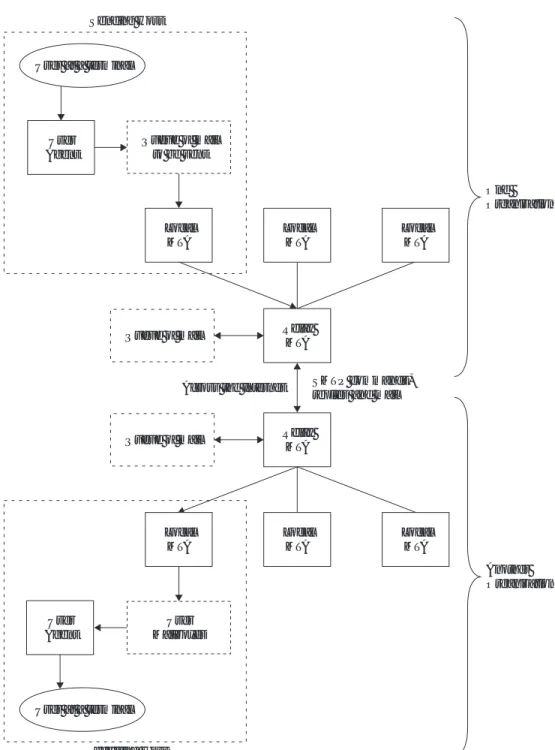
An SMTP-based process can transfer electronic mail to another process on the same network or to another network via a relay or gateway process accessible to both networks (Sheldon, 2001). An e-mail message may pass through a number of intermediate relay or gateway hosts on its path from a sender to a recipient. A simple model of the components of the SMTP system is shown in Figure 1. Users deal with a user agent (UA). Popular user agents for UNIX include Berkeley Mail, Elm, MH, Pine, and Mutt. The user agents for Windows include Mi-crosoft Outlook/Outlook Express and Netscape/Mozilla Communicator. The exchange of mail using TCP is per-formed by an MTA. The most common MTA for UNIX systems is Sendmail, and MTA for Windows is Mi-crosoft Exchange 2000/2003. In addition to stable host-based e-mail servers, Microsoft Corporation has devel-oped LDAP/Active-directory servers and B2B-servers that enhance mail-delivery practices. Users normally do not deal with the MTA. It is the responsibility of the system administrator to set up the local MTA. Users often have a choice, however, for their user agent (Stevens, 1993). The MTA maintains a mail queue so that it can schedule re-peat delivery attempts in case a remote server is unable. Also the local MTA delivers mail to mailboxes, and the information can be downloaded by the UA (see Figure 1). The RFC 821 standard specifies the SMTP protocol, which is a mechanism of communication between two MTAs across a single TCP connection. The RFC 822 stan-dard specifies the format of the electronic mail message that is transmitted using the SMTP protocol (RFC 821) between the two MTAs. As a result of a user mail re-quest, the sender-SMTP establishes a two-way connection with a receiver-SMTP. The receiver-SMTP can be either the ultimate destination or an intermediate one (known as a mail gateway). The sender-SMTP will generate com-mands, which are replied to by the receiver-SMTP (see Figure 1).
Both the SMTP client and server should have two ba-sic components: UA and local MTA. There are few cases of sending electronic-mail messages across networks. In the first case of communication between the sender and the receiver across the network (see Figure 1), the sender’s UA
User at a terminal Sender Receiver User Agent User Agent User Mailboxes SMTP commands, replies and mail
TCP Connection TCP Port 25 Queue of mail to be sent Message Transfer Agent Client Message Transfer Agent User at a terminal Server
SMTP MODEL ANDPROTOCOL 3 User at a terminal User Agent User Mailboxes Queue of mail Queue of mail Local MTA Relay MTA Local MTA Local MTA Local MTA Across the Internet SMTP commands,
replies and mail
Receiving Host Sending Host User at a terminal User Agent Queue of mail to be sent Local MTA Relay MTA Local MTA One Organization Another Organization
Figure 2: The simple mail transfer protocol (SMTP) model with relay mail transfer agents.
prepares the message, creates the envelope, and puts mes-sage in the envelope. The MTA transfers the mail across the network to the TCP-port 25 of the receiver’s MTA. In the second case of communication between the sending host (client) and the receiving host (server),relayingcould be involved (see Figure 2). In addition to one MTA at the sender site and one at the receiving site, other MTAs, act-ing as client or server, can relay the electronic mail across the network.
The system of relays allows sites that do not use the TCP/IP protocol suite to send electronic mail to users on other sites that may or may not use the TCP/IP proto-col suite. This third scenario of communication between the sender and the receiver can be accomplished through
the use of an e-mail gateway, which is a relay MTA that can receive electronic mail prepared by a protocol other than SMTP and transform it to the SMTP format before sending it. The e-mail gateway can also receive electronic mail in the SMTP format, change it to another format, and then send it to the MTA of the client that does not use the TCP/IP protocol suite (Forouzan, 2003). In vari-ous implementations, there is the capability to exchange mail between the TCP/IP SMTP mailing system and the lo-cally used mailing systems. These applications are called mail gateways or mail bridges. Sending mail through a mail gateway may alter the end-to-end delivery specifica-tion, because SMTP will only guarantee delivery to the mail-gateway host, not to the real destination host, which
is located beyond the TCP/IP network. When a mail gate-way is used, the SMTP end-to-end transmission is host-to-gateway, gateway-to-host or gateway-to-gateway; the be-havior beyond the gateway is not defined by SMTP.
USER AGENT
Introduced in RFC 821 and RFC 822, the SMTP defines user agent functionality, but not the implementation de-tails. A survey of the SMTP implementations can be found in RFC 876. The UA is a program that is used to send and receive electronic mail. The most popular user agent programs for UNIX are Berkley Mail, Elm, MH, Mutt, Mush, and Zmail. Some UAs have an extra user inter-face (e.g., Eudora) that allows window-type interactions with the system. The user agents for Windows include Microsoft Outlook/Outlook Express and Netscape/Mozilla Communicator.
Sending e-Mail
Electronic mail is sent by a series of request–response transactions between a client and a server. An SMTP trans-action consists of the envelope and message, which is composed of header (withFrom: andTo: fields) and body (text after headers sent with theDATAcommand). The en-velope is transmitted separately from the message itself using MAIL FROM and RCPT TO commands (see RFC 1123). A null line, that is, a line with nothing preceding the <CRLF> sequence, terminates the mail header. Some implementations (e.g., VM, which does not support zero-length records in files), however, may interpret this dif-ferently and accept a blank line as a terminator (SMTP, 2005). Everything after the null (or blank) line is the mes-sage body, which is a sequence of lines containing ASCII characters. The message body contains the actual infor-mation that can be read by the recipient.
Mail Header Format
The header includes a number of key words and val-ues that define the sending date, sender’s address, where replies should go, and some other information.
The header is a list of lines, of the form (SMTP, 2005): field-name: field-value
Fields begin in column 1: Lines beginning with white space characters (SPACE or TAB) are continuation lines, which are unfolded to create a single line for each field in the canonical representation. Strings enclosed in ASCII quotation marks indicate single tokens within which spe-cial characters such as the colon are not significant. Many important field values (such as those for the “To” and “From” fields) are “mailboxes.” The most common forms for these are the following:
rJohn Smith <[email protected]> r“John Smith” <[email protected]>
The string “John Smith” is intended for human recip-ients and is the name of the mailbox owner. The string
“[email protected]” is the computer-readable ad-dress of the mailbox (the angle brackets are used to de-limit the address but are not part of it). One can see that this form of addressing is closely related to the domain name system (DNS) concept (Internet Assigned Numbers Authority [IANA], 2005). In fact, the client SMTP uses the DNS to determine the IP address of the destination mailbox.
Some frequently used fields (key words) are the follow-ing:
rto Primary recipients of the message.
rcc Secondary (“carbon-copy”) recipients of the
mes-sage.
rfrom Identity of sender.
rreply-to The mailbox to which responses are to be
sent. This field is added by the originator.
rreturn-path Address and route back to the
origina-tor. This field is added by the final transport system that delivers the mail.
rSubject Summary of the message. The user usually provides the summary.
Receiving e-Mail
The UA periodically checks the content of the mailboxes (see Figure 1). It informs the user about mail arrival by giving a special notice. When the user tries to read the mail, a list of arrived mail packages is displayed. Each line of the list contains a brief summary of the information about a particular package in the mailbox. The summary may include the sender mail address, the subject, and the time the mail was received or sent. By selecting any of the packages, the user can view its contents on the terminal display.
The SMTP Destination Address
The SMTP destination address (a mailbox address), in its general form local-part@domain-name, can take several forms (SMTP, 2005):
ruser@host—For a direct destination on the same TCP/IP
network.
ruser%remote-host@gateway-host—For a user on a
non-SMTP destination remote-host, via the mail gateway gateway-host.
r@host-a,@host-b:user@host-c—For a relayed message.
This form contains explicit routing information. The message will first be delivered to host-a, who will re-send (relay) the message to host-b. Host-b will then for-ward the message to the real destination host-c. Note that the message is stored on each of the intermediate hosts; therefore, there is no end-to-end delivery in this case. This address form is obsolete and should not be used (see RFC 1123).
Delayed Delivery
The SMTP protocol allows delayed delivery, and the mes-sage can be delayed at the sender site, the receiver site, or the intermediate servers (Forouzan, 2003).
MAILTRANSFERAGENT 5
In the case of delaying at the sender site, the client has to accommodate a spooling system, in which e-mail messages are stored before being sent. A message created by the user agent is delivered to the spool storage. The client mail transfer agent periodically (usually every 10 to 30 minutes) checks the spool to find the mail that can be sent. The mail will be sent only if the receiver is ready and the IP address of the server has been obtained though DNS. If a message cannot be delivered in the timeout pe-riod (usually about 3 to 5 days), the mail returns to the sender.
Upon receiving the message, the server-MTA stores it in the mailbox of the receiver (see Figure 1). In this case, the receiver can access the mailbox at any convenient time.
Finally, the SMTP standard procedures allow diate MTAs to serve as clients and servers. Both interme-diate clients and servers can receive mail, store mail mes-sages in their mailboxes and spools, and send them later to an appropriate destination.
Aliases
The SMTP mechanism allows one name, an alias, to rep-resent several e-mail addresses (this feature is known as “one-to-many alias expansion”; Forouzan, 2003). Addi-tionally, a single user can also be defined by several e-mail addresses (this is called “many-to-one alias expansion”). The system can handle these expansions by including an alias expansion facility (connected to the alias databases) at both the sender and receiver sites.
MAIL TRANSFER AGENT
MTAs transfer actual mail. The system must have the client MTA for sending e-mail and the server MTA for re-ceiving mail (see Figure 1). The SMTP-related RFCs do not define a specific MTA. The UNIX-based MTA uses com-monly the Sendmail utility. The most common MTA for Windows is Microsoft Exchange 2000/2003.
The “mta-name-type” and “address-type” parameters (e.g.,dncandrfc822for the Internet mail, respectively) are defined for use in the SMTP delivery status notifica-tion document (see RFC1891). An identificanotifica-tion of other mail systems can also be used. One of the identification methods has been described in “The COSINE and Inter-net X.500 Schema” (section 9.3.18) in the RFC1274 doc-ument. The mail system names listed here are used as the legal values in that schema under the “otherMailbox” attribute “mailboxType” type, which must be a Printa-bleString. The “Mapping between X.400 (1988)/ISO 10021 and RFC 822” is described in the section 4.2.2 of the RFC1327 document. The names listed here are used as the legal values in that schema under the “std-or-address” attribute “registered-dd-type” type, which must be a “key-string” (for details, see Mail Parameters, 2002).
SMTP Mail Transaction Flow
The SMTP protocol (RFC 821) defines how commands and responses must be sent by the MTAs. The client sends commands to the server, and the server responds with nu-meric reply codes and optional human-readable strings. There are a small number of commands (less than a
dozen) that the client can send to the server. An example of sending a simple one-line message and an interpretation of the SMTP connection can be found in Stevens (1993).
Although mail commands and replies are rigidly de-fined (see “Commands and Responses” later in this chap-ter), the exchange can easily be followed in Figure 3.
In this scenario (Comer, 1995; SMTP, 2005), the user jsmith at host sun.it.rivier.edu sends a note to usersdarien, steve and bryan at host mail.unh.edu. Here the lines sent by the server (receiver) are preceded byS, and the lines sent by the client (sender) preceded by C. Note that the message header is part of the data being transmitted. All exchanged messages (commands, replies, and data) are text lines, delimited by a <CRLF>. All replies have a numeric code at the beginning of the line.
The scenario includes the following steps (SMTP, 2005):
1. The client (sender-SMTP) establishes a TCP connec-tion with the destinaconnec-tion SMTP and then waits for the server to send a220 Service readymessage or a421 Service not available message when the destination is temporarily unable to proceed.
2. TheHELOcommand is sent, and the receiver is forced to identify himself by sending back its domain name. The client (sender-SMTP) can use this information to verify if it contacted the right destination SMTP. If the sender-SMTP supports SMTP service extensions as defined in the RFC 1651, it may substitute an EHLO command in place of the HELO command. A receiver-SMTP, which does not support service ex-tensions, will respond with a 500 Syntax error, command unrecognizedmessage. The client (sender-SMTP) should then retry with HELO, or if it cannot transmit the message without one or more service ex-tensions, it should send aQUITmessage. If a receiver-SMTP supports service extensions, it responds with a multiline250 OKmessages that include a list of service extensions, which it supports.
3. The client (sender) now initiates the start of a mail transaction by sending a MAIL command to the re-ceiver. This command contains the reverse-path, which can be used to report errors. Note that a path can be more than just theuser-mailbox@host-domain-name
pair. In addition, it can contain a list of routing hosts. Examples of this are when the mail passes a mail bridge or when the user provides explicit routing information in the destination address. If accepted, the server (re-ceiver) replies with a250 OKmessage.
4. The second step of the actual mail exchange consists of providing the server SMTP with the destinations for the message (there can be more than one recipient). This is done by sending one or moreRCPT TO:<forward-path>commands. Each of them will receive a250 OK reply if the destination is known to the server or a550 No such user herereply if it is not.
5. When all RCPT commands are sent, the client (sender) issues a DATA command to notify the server (re-ceiver) that the message contents are following. The server replies with the 354 Start mail input, end with <CRLF>.<CRLF>message.
Figure 3: An example of the interactive session between the client (C) and the server (S).
6. The client now sends the data line by line, ending with the sequence<CRLF>.<CRLF> line on which the re-ceiver acknowledges with a250 OKor an appropriate error message if anything went wrong.
7. The following actions (SMTP, 2005) are possible after that:
rThe sender has no more messages to send; he will end
the connection with a QUIT command, which will be answered with a 221 Service closing trans-mission channelreply (see Figure 3).
rThe client (sender) has another message to send and
simply goes back to Step 3 to send a newMAIL com-mand.
In this description, only the most important commands that must be recognized in each SMTP implementation (see RFC821) have been mentioned. Other optional com-mands (the RFC 821 standard does not require them to be implemented everywhere) implement several impor-tant functions such as forwarding, relaying, mailing lists, and so on.
SMTP Commands
The commands formed with ASCII (text) are sent from the client to the server. The simple structure of the com-mands allows for building mail clients and servers on any platform. The list of commands and their description and formats are shown in Table 1. The command consists of
a key word followed by zero or more arguments. Five commands (HELO, MAIL FROM, RCPT TO, DATA, and QUIT) are mandatory, and every implementation must support them. The other three commands (RSET, VRFY, and NOOP) are often used and highly recommended. The next six programs (TURN, EXPN, HELP, SEND FROM, SOML FROM, and SAML FROM) are seldom used.
For a full list of commands, see the RFC 821 “Simple Mail Transfer Protocol” and RFC 1123 “Requirements for Internet Hosts—Application and Support.” For details of SMTP service extensions, see the RFC 1651 “SMTP Ser-vice Extensions,” RFC 1652 “SMTP SerSer-vice Extension for 8bit-MIMEtransport,” RFC 1653 “SMTP Service Exten-sion for Message Size Declaration,” and RFC 2554 “SMTP Service Extension for Authentication.”
The commands normally progress in a sequence (one at a time). The advanced pipelining feature introduced in the RFC 2920 document allows multiple commands to be sent to a server in a single operation of the TCP-send type.
Mail Service Types
The set of services desired from a mail server are some-times characterized by the “hello” key word. The various mail service types are as follows (Mail Parameters, 2002):
rHELO for Simple Mail (see RFC821)
rEHLO for Mail Service Extensions (see RFC1869) rLHLO for Local Mail (see RFC2033).
MAILTRANSFERAGENT 7 Table 1 Simple Mail Transfer Protocol (SMTP) Commands
Command Description Format References
ATRN Authenticated TURN RFC2645
AUTH Authentication RFC2554
BDAT Binary data RFC3030
DATA Data; used to send the actual message; all lines that follow the DATA command are treated as the e-mail message; the message is terminated by a line containing just a period
DATA Best wishes. RFC821, RFC2821
EHLO Extended Hello RFC1869, RFC2821
ETRN Extended TURN RFC1985
EXPN Expand; asks the receiving host to expand the mailing list sent as the arguments and to return the mailbox addresses of the recipients that comprise the list
EXPN: a b c RFC821, RFC2821
HELO Hello; used by the client to identify itself HELO: sun.it.rivier.edu RFC821, RFC2821
HELP Help; requests the recipient to send information about the command sent as the argument
HELP: mail RFC821, RFC2821
MAIL FROM Mail; used by the client to identify the sender of the message; the argument is the e-mail address of the sender
MAIL FROM: jsmith@ sun.it.rivier.edu
RFC821, RFC2821
NOOP No operation; used by the client to check the status of the recipient; requires an answer from the recipient
NOOP RFC821, RFC2821
QUIT Quit; terminates the message QUIT RFC821, RFC2821
RCPT Recipient; used by the client to identify the intended recipient of the message; if there are multiple recipients, the command is repeated
RCPT TO: [email protected] RFC821, RFC2821
RSET Reset; aborts the current e-mail transaction; the stored information about the sender and recipient is deleted; the connection will be reset
RSET RFC821, RFC2821
SAML Send to the mailbox or terminal; specifies that the mail have to be delivered to the terminal or the mailbox of the recipient; the argument is the address of the sender
SAML FROM: jsmith@ sun.it.rivier.edu
RFC821
SEND Send; specifies that the mail is to be delivered to the terminal of the recipient and not the mailbox; if the recipient is not logged in, the mail is bounced back; the argument is the address of the sender
SEND FROM: jsmith@ sun.it.rivier.edu
RFC821
SOML Send to the mailbox or terminal; it specifies that the mail is to be delivered to the terminal or the mailbox of the recipient; the argument is the address of the sender.
SOML FROM: jsmith@ sun.it.rivier.edu
RFC821
STARTTLS Extended Hello with transport layer security RFC3207
TURN Turn; it lets the sender and the recipient switch positions whereby the sender becomes the recipient and vice versa (most SMTP implementations today do not support this feature; see RFC2821)
TURN RFC821
VRFY Verify; it verifies the address of the recipient, which is sent as the argument; the sender can request the receiver to confirm that a name identifies a valid recipient.
VRFY: [email protected] RFC821, RFC2821
The EHLO key word has a numerical parameter SIZE for specifying the new format of e-mail messages (see RFC1870).
SMTP Service Extensions
SMTP (RFC821) specifies a set of commands or services for mail transfer. A general procedure for extending the set of services is defined in the STD11/RFC1869 docu-ment. The service extensions are identified by key words sent from the server to the client in response to the EHLO command (Mail Parameters, 2002). The set of service ex-tensions are as follows:
rSEND—Send as mail (see RFC821)
rSOML—Send as mail or to terminal (see RFC821)
rSAML—Send as mail and to terminal (see RFC821) rEXPN—Expand the mailing list (see RFC821) rHELP—Supply helpful information (see RFC821) rTURN—Turn the operation around (see RFC821) r8BITMIME—Use 8-bit data (see RFC1652) rSIZE—Message size declaration (see RFC1870) rCHUNKING—Chunking (see RFC3030)
rBINARYMIME—Binary MIME (see RFC3030) rCHECKPOINT—Checkpoint/Restart (see RFC1845) rPIPELINING—Command Pipelining (see RFC2920) rDSN—Delivery Status Notification (see RFC1891) rETRN—Extended Turn (see RFC1985)
rENHANCEDSTATUSCODES—Enhanced Status Codes
(see RFC2034)
rSTARTTLS—Start TLS (see RFC3207).
Some of these key words have parameters (for details, see Mail Parameters, 2002).
SMTP Responses
Responses are sent from the server to the client. A re-sponse is a three-digit code that may be followed by addi-tional textual information. The meanings of the first digit are as follows:
r2bc—positive completion reply; the requested
mand has been successfully completed and a new com-mand can be started.
r3bc—positive intermediate reply; the requested
com-mand has been accepted, but the server needs some more information before completion can occur.
r4ab—transient negative completion reply; the requested
command has been rejected, but the error condition is temporary, and the command can be sent again.
r5ab—permanent negative completion reply; the
re-quested command has been rejected, and the command cannot be sent again.
The second (b) and the third (c) digits provide further details about the responses. The list of typical reply codes and their description are shown in Table 2.
SMTP SERVER
The SMTP server sends and receives mail from other In-ternet hosts using the SMTP. The SMTP server processes all incoming and outgoing mail. Outgoing mail is spooled until the SMTP server can confirm it has arrived at its destination; incoming mail is spooled until users access it by using a POP3 or IMAP4 mail client. Spooling allows the transfer from client and server to occur in the back-ground. The instructions on how to configure the SMTP server in the Windows NT environment and how to set options to provide security for the SMTP server are de-scribed in “How to Set SMTP Security Options” (2005).
ON-DEMAND MAIL RELAY
On-demand mail relay (ODMR), also known as authen-ticated TURN (ATRN), is an e-mail service that allows a user to connect to an Internet service provider (ISP), authenticate, and request e-mail using a dynamic IP ad-dress (instead of static IP adad-dresses used in a “traditional” SMTP model) from any Internet connection (see RFC 2645). The initial client and server roles are short-lived, because the point is to allow the intermittently connected host to request mail held for it by a service provider. The customer initiates a connection to the provider, authenti-cates, and requests its mail. The roles of client and server then reverse, and the normal SMTP scenario proceeds. The provider has an ODMR process listening for connec-tions on the ODMR port 366 (SMTP Specificaconnec-tions, 2005). On the server, this process implements the EHLO, AUTH, ATRN, and QUIT commands. Also, it has to be an SMTP client with access to the outgoing mail queues. An MTA normally has a mail client component, which processes the outgoing mail queues, attempting to send mail for particular domains, based on time or events, such as new mail being placed in the queue or receipt of an ETRN command by the SMTP server component. The ODMR service processes the outgoing queue on request. The ISP provider side has normal SMTP server responsibilities, in-cluding generation of delivery failure notices (SMTP Spec-ifications, 2005).
MULTIPURPOSE INTERNET MAIL
EXTENSIONS (MIME)
The RFC 821/ STD 10 standard specifies that data sent via SMTP is 7-bit ASCII data, with the high-order bit cleared to zero. This is adequate in most instances for the trans-mission of English text messages but is inadequate for non-English text or nontextual data.
There are two approaches to overcoming these limi-tations. In the first approach, the MIME were defined in RFC 1521 and RFC 1522, which specify a mechanism for encoding text and binary data as 7-bit ASCII within the mail envelope defined by the RFC 822 standard. MIME is also described in SMTP (2005).
In the second approach, the SMTP service extensions (RFC 1651, RFC 1652, and RFC 1653) define a mecha-nism to extend the capabilities of SMTP beyond the limi-tations imposed by the RFC 821 standard. The RFC 1651 document introduces a standard for a receiver-SMTP to
MULTIPURPOSEINTERNETMAILEXTENSIONS(MIME) 9 Table 2 Simple Mail Transfer Protocol (SMTP) Reply Codes
Code Description
Positive Completion Reply 211 System status or system help reply
214 Help message
220 Domainservice ready; ready to start TLS
221 Domainservice closing transmission channel
250 OK, queuing for nodenodestarted; requested command completed
251 OK, no messages waiting for nodenode; user not local, will forward toforwardpath
252 OK, pending messages for nodenodestarted; cannot VRFY user (e.g., information is not local) but will take message for this user and attempt delivery
253 OK,messagespending messages for nodenodestarted
Positive Intermediate Reply 354 Start mail input; end with <CRLF>.<CRLF>
355 Octet-offset is the transaction offset
Transient Negative Completion Reply 421 Domainservice not available, closing transmission channel
432 A password transition is needed
450 Requested mail action not taken: mailbox unavailable; ATRN request refused
451 Requested action aborted: local error in processing; unable to process ATRN request now
452 Requested action not taken: insufficient system storage
453 You have no mail
454 TLS not available due to temporary reason; encryption required for requested authentication mechanism
458 Unable to queue messages for nodenode
459 Nodenodenot allowed:reason
Permanent Negative Completion Reply 500 Command not recognized:command; Syntax error
501 Syntax error in parameters or arguments; no parameters allowed
502 Command not implemented
503 Bad sequence of commands
504 Command parameter temporarily not implemented
521 Machinedoes not accept mail
530 Must issue a STARTTLS command first; encryption required for requested authentication mechanism
534 Authentication mechanism is too weak
538 Encryption required for requested authentication mechanism
550 Requested action not taken (command is not executed): mailbox unavailable
551 User not local; please tryforwardpath
552 Requested mail action aborted: exceeded storage allocation
553 Requested action not taken: mailbox name not allowed
554 Transaction failed Note: From “SMTP Specifications,” 2005.
inform a sender-SMTP, which service extensions it sup-ports. New procedures modify the RFC 821 standard to allow a client SMTP agent to request that the server re-sponds with a list of the service extensions that it sup-ports at the start of an SMTP session. If the server SMTP does not support the RFC 1651, it will respond with an error and the client may either terminate the session or attempt to start a session according to the rules of the RFC 821 standard. If the server does support the RFC 1651, it may also respond with a list of the service extensions that it supports. A registry of services is maintained by the Internet Assigned Numbers Authority (IANA, 2005); the initial list defined in the RFC 1651 document contains those commands listed in RFC 1123 as optional for SMTP servers.
Specific extensions are defined in RFC 1652 and RFC 1653. A protocol for 8-bit text transmission (RFC 1652) allows an SMTP server to indicate that it can accept data consisting of 8-bit bytes. A server, which reports that this extension is available to a client, must leave the high-order bit of bytes received in an SMTP message unchanged if requested to do so by the client.
The MIME and SMTP service extension approaches are complementary. Following their procedures (RFC 1652), nontraditional SMTP agents can transmit mes-sages, which are declared as consisting of 8-bit data rather than 7-bit data, when both the client and the server con-form to the RFC 1651 or RFC 1652 options (or both). Whenever a client SMTP attempts to send 8-bit data to a server, which does not support this extension, the client
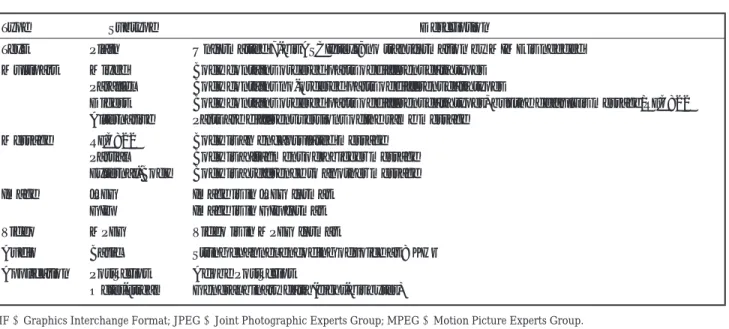
Table 3 Data Types and Subtypes in a Multipurpose Internet Mail Extensions (MIME)Content-TypeHeader Declaration
Type Subtype Description
Text Plain Unformatted 7-bit ASCII text; no transformation by MIME is needed Multipart Mixed Body contains ordered parts of different data types
Parallel Body contains no-ordered parts of different data types
Digest Body contains ordered parts of different data types, but the default is message/RFC822 Alternative Parts are different versions of the same message
Message RFC822 Body is an encapsulated message Partial Body is a fragment of a bigger message External-Body Body is a reference to another message
Image JPEG Image is in JPEG format
GIF Image is in GIF format
Video MPEG Video is in MPEG format
Audio Basic String channel encoding of voice at 8 KHz Application PostScript Adobe PostScript
Octet-stream General binary data (eight-bit bytes)
GIF=Graphics Interchange Format; JPEG=Joint Photographic Experts Group; MPEG=Motion Picture Experts Group.
SMTP must either encode the message contents into a 7-bit representation compliant with the MIME standard or return a permanent error to the user.
The SMTP service extension has the limitation on max-imum length of a line (only up to 1,000 characters as re-quired by the RFC 821 standard). The service extension also limits the use of non-ASCII characters to message headers, which are prohibited by the RFC 822 regulations. The RFC 1653 document introduces the protocol for message size declaration that allows a server to inform a client of the maximum size message it can accept. If both server and client support the message size declaration ex-tension, the client may declare an estimated size of the message to be transferred, and the server will return an error if the message is too large. Each of these SMTP ser-vice extensions is a draft standard protocol and each has a status of elective.
The MIME protocols define five header lines that can be added to the original header section to define the transformation parameters: MIME-version, type, transfer-encoding, id, and content-description. Each header line is described in detail in the following sections.
MIME-Version
The header lineMIME-Version: 1.1 declares that the message was composed using the (current) version 1.1 of the MIME protocol.
Content-Type
The header lineContent-Type:<type/subtype; pa-rameters>defines the type of data used in the body of the message. The identifiers of the content type and the content subtype are separated by a slash. Depending on the subtype, the header may contain other parameters. The MIME standard allows seven basic content types of data, the valid subtypes for each, and transfer encodings,
which are listed in Table 3. Examples of the content-type headers can be found in Forouzan (2003).
Content-Transfer-Encoding
The Content-Transfer-Encoding:<type> header line defines the method to encode the messages into a bit-stream of 0s and 1s for transport. The five types of encoding are as follows:
r7bit—for NVT ASCII characters and short lines of less
than 1,000 characters.
r8bit—for non-ASCII characters and short lines of less
than 1,000 characters; the underlying SMTP protocol must be able to transfer 8-bit non-ASCII characters (this type is not recommended).
rbinary—for non-ASCII characters with
unlimited-length lines; this is 8-bit encoding. The underlying SMTP protocol must be able to transfer 8-bit non-ASCII char-acters (this type is not recommended).
rbase64—for sending data made of bytes when the
high-est bit is not necessarily zero; 6-bit blocks of data are en-coded into 8-bit printable ASCII characters (for details, see Forouzan, 2003; Stevens, 1993), which can then be sent as any type of character set supported by the un-derlying mail transfer mechanism.
rquoted-printable—for sending data that consist of
mostly ASCII characters with a small non-ASCII por-tion; if a character is not ASCII, it is sent as three char-acters: the first character is the equal sign, and the next two are the hexadecimal representation of the byte.
Although the content type and encoding are indepen-dent, the RFC 1521 document recommends quoted-printablefor text with non-ASCII data, andbase64for image, audio, video, and octet-stream application data. This allows maximum interoperability with RFC 821 con-formant MTAs (Stevens, 1993).
MAILACCESSPROTOCOLS 11
Content-Id
The header line Content-Id: id=<content-id> un-iquely identifies the whole message in a multiple message environment.
Content-Description
The header line Content-Description:<descrip-tion>defines whether the body is image, audio, or video.
Security Scheme for MIME
The S/MIME is a security scheme for the MIME proto-col. It was developed by RSA Security and is an alter-native to the pretty good privacy (PGP) encryption and digital signature scheme that uses public-key cryptogra-phy. The S/MIME scheme was standardized by IETF. Ac-cording to “Report of the IAB Security Architecture Work-shop” (RFC 2316), the designated security mechanism for adding secured sections to MIME-encapsulated e-mail is security/multipart, as described in “Security Multiparts for MIME: Multipart/Signed and Multipart/Encrypted” (RFC 1847).
The S/MIME is widely used by large companies that need to standardize e-mail security for both interorga-nization and intraorgainterorga-nization mail exchange (Internet Engineering Task Force [IETF] SMIME, 2005). It requires establishing a public-key infrastructure either in-house or by using any of the public certificate authorities (Sheldon, 2001).
MAIL TRANSMISSION TYPES
The SMTP (RFC821) and the Standard for the Format of Advanced Research Project Agency (ARPA) Internet Text Messages (RFC822) specify that a set of “Received” lines will be prepended to the headers of electronic mail messages as they are transported through the Internet (Mail Parameters, 2002). The received line may option-ally include either or both a “via” phrase or a “with” phrase (or both). The legal value for the “via” phrase is intended to indicate the link or physical medium over which the message was transferred (e.g., theUUCP link type should be specified for the Unix-to-Unix Copy Pro-gram). The “with” phrase is intended to indicate the pro-tocol or logical process that has been used to transfer the message (e.g., SMTP or ESMTP parameters are used re-spectively for SMTP [RFC821] or SMTP with service ex-tensions [RFC1869] protocol types).
MAIL ACCESS MODES
To reach its final destination, an e-mail message should be handled by a mail server, the mail access protocol, and the mail client. A general concept of how these compo-nents work together is described in “Accessing Your Mail” (1997).
An Internet mail server (known as the mail transfer agent, described earlier) is the software responsible for transmitting and receiving e-mail across the Internet. The MTA software is run on a computer that has a connection to the Internet and is managed, monitored, and backed up by ISPs or a company’s information services staff. Some
mail servers store mail only until the user retrieves it, whereas others store user mail permanently. An e-mail user typically uses a mail client program to interact with the mail server (Rose, 1993).
A mail client (known as the mail user agent, described earlier) is the software that a user employs to read, send, file, and otherwise process the electronic mail. Usually running on a user’s desktop computer, the mail client also manages related e-mail data (address books, spelling dic-tionaries, and stationery). The mail client connects to a mail server to retrieve new mail. Some mail clients also use the mail server to store all e-mail (Rose, 1993).
The communication between the mail client and mail server is regulated by the mail access protocol, a standard-ized set of transmitted commands and responses sent over many different types of network connections. The proto-col commands (created for managing access to the Inter-net e-mail only) depend on a design approach that can sig-nificantly affect the manner, modes, characteristics, and capabilities of the interaction between the mail client and mail server (“Accessing Your Mail”, 1997). The SMTP Pro-tocol handles the task of the actual sending of e-mail on the Internet.
A mail access protocol operates in three common modes that differ in where and how a user stores and processes his or her mail (“Accessing Your Mail,” 1997):
rOffline mode—e-mail is downloaded from a temporary
storage on the mail server to the user’s computer. After download, the mail is deleted from the server.
rOnline mode—user’s e-mail, his or her inbox, and all
filed mail remains permanently on the mail server. By connecting to the server and establishing an e-mail ses-sion, the user can download a temporary copy of his or her e-mail and read it, or send e-mail. Once the connec-tion is finished, the copy is erased from user’s computer, and only the original remains on the server.
rDisconnected/resynchronization mode—combines
both offline and online modes. A copy of the user’s e-mail is downloaded to his or her computer(s), and the original message remains on the mail server. The user can change a local copy of his or her e-mail on any computer, then resynchronize all copies, including the original e-mail message on the server and copies on additional computers.
All three modes offer multiplatform support. This in-cludes support for existing platforms such as UNIX, Mi-crosoft Windows, and Apple Macintosh, and future plat-forms such as Java Mail Service–based network comput-ers. All three modes, including their advantages and disad-vantages, are discussed in detail in “Accessing Your Mail” (1997).
MAIL ACCESS PROTOCOLS
POP3
POP is used on the Internet to retrieve e-mail from a mail server. There are two versions of POP. The first, known as POP2 (RFC 937), became a standard in the mid-1980s and requires SMTP to send messages. Nowadays it has a
status of “not recommended.” The newer version, POP3 (RFC 1725), can be used with or without SMTP.
POP was designed primarily to support the offline ac-cess mode (RFC 1939). Typically, e-mail arrives from the network and is placed in the user’s inbox on the server. POP is then used to transfer the mail from the user’s in-box on the server to the user’s computer. POP is designed so that mail client software can determine which mes-sages have been previously downloaded from the server. The mail client can then download only new messages. POP also provides the ability to selectively delete messages from the server. It can be used by a mail client to perform basic resynchronization of the inbox on the server and on the user’s computers. The client can leave the most recent messages on the server after they have been downloaded. These messages can then be downloaded a second time to a second computer. Additionally, some POP implemen-tations provide optional features, such as allowing users to download only headers at one session, to review the topics, and then download selected bodies and attach-ments in a subsequent session to minimize connection times over slow links (“Accessing Your Mail,” 1997).
POP servers are widely available both commercially and as freeware on a number of operating systems. More-over, there are almost no interoperability issues between POP servers and mail clients, and users can use any POP mail client with any POP server. All ISPs support and use POP.
In the end-to-end application related to SMTP, the server must be available whenever a client (sender) trans-mits mail. If the SMTP server resides on an end-user PC or workstation, that computer must be running the server when the client is trying to send mail. For some operating systems (e.g., when a server program is activated on the VM SMTP service virtual machine or the MAIL program on DOS), the server becomes unavailable and unreach-able by the SMTP client (SMTP, 2005). The mail-sending process will fail in these cases. Especially, it is important for single-user systems that the client has an accessible mailbox on various types of server (RFC 1725).
One of the simplest approaches to resolve this prob-lem is to allow the end user to run a client program, which communicates with a server program on a host. This server program acts as both a sender and a receiver SMTP (SMTP, 2005). Here the end-user mailbox resides on the server, and the server system is capable of sending mail to other users.
In another approach, the SMTP server function has to be off-loaded from the end-user workstation, but not the SMTP client function. In this case, the user has a mail-box that resides on a server system, and he can send mail directly from the workstation. To collect mail from the mailbox, the user must connect to the mail server system. The current post office protocol version 3 (RFC 1725) is a draft standard protocol, and its status is elective. POP3 extensions are described in RFC 2449. POP3 security op-tions are introduced in RFC 2595. The RFC 1734 describes the optional AUTH command for indicating an authen-tication mechanism to the POP3 server, performing an authentication protocol exchange, and optionally nego-tiating a protection mechanism for subsequent protocol interactions (Sheldon, 2001).
IMAP4
IMAP is a protocol for retrieving e-mail messages (RFC 1064). The IMAP4 version is similar to POP3 but supports some additional features. For example, with IMAP4, the user can search through his or her e-mail messages for key words while the messages are still on the mail server. The user can then choose which messages to download to his or her machine.
IMAP uses SMTP as its transport mechanism. Follow-ing the simple analogy (Sheldon, 2001), IMAP servers are like post offices, whereas SMTP is like the postal carriers. IMAP uses TCP to take advantage of its reliable data deliv-ery services, which are allocated on the TCP port 143. The latest IMAP version 4, revision 1 (IMAP4rev1) is defined in RFC 2060.
IMAP has many advanced features, such as the abil-ity to address mail not by arrival number, but by us-ing attributes (e.g., “Download the latest message from Smith”). This feature allows the mailbox to be structured more like a relational database system rather than a se-quence of messages (Tanenbaum, 2003). Authentication mechanisms are described in RFC 1731. Security issues have been introduced in “IMAP4/POP Authorization for Simple Challenge/Response” (RFC 2195), “IMAP4 Login Referrals” (RFC 2221), and “IMAP4 Implementation and Best Practices” (RFC 2683).
SMTP SECURITY ISSUES
SMTP Vulnerabilities
The processes of retrieving e-mail from servers and man-aging data communication through the Internet are vul-nerable to various attacks. A review of vulnerabilities can be found in “Vulnerability Tutorials” (2005) released by the Saint Corporation. The Common Vulnerabilities and Exposures (CVE) organization provides a list of standard-ized names for SMTP vulnerabilities and other informa-tion security exposures. All CVE references (CVE entries and CAN candidates) cited in this text can be found at the CVE Web site, provided in the references (CVE, 2005). Summaries of major SMTP vulnerability problems are given in Table 4.
A security audit of selected SMTP problems has been provided by the U.S. Computer Emergency Readiness Team (CERT) Coordination Center operated by Carnegie Mellon University, and E-Soft. Detailed information about vulnerability problems, possible actions of an attacker or spammer, recommendations for downloading updated versions of software, examples of code modification, and test results can be found on the CERT (2005) and Security Space (“SMTP Problems,” 2005) Web sites.
The vulnerability problems can be grouped into several general high-risk categories: buffer overflow; redirection attacks through the firewall; bounced “piping” attacks; and host-shell-gaining attacks (see Table 4).
The medium-to-high risk category includes denial-of-service attacks. Low-to-medium-risk categories include mail relaying on the remote SMTP server, mail-queue manipulation attacks; debug-mode-leak category; and crashing antivirus-software attack (“SMTP Problems,” 2005). Most SMTP-specific vulnerabilities occur from
SMTP SECURITYISSUES 13 Table 4 SMTP Vulnerability Problems(CVE, 2005)
CVE Name Type of Vulnerability Possible Attacker Intrusive Action
CVE-2004-309 Stack-based buffer overflow in the SMTP service support in vsmon.exe in Zone Labs ZoneAlarm before v. 4.5.538, ZoneLabs Integrity client v. 4.0.
It allows remote attackers to execute arbitrary code via a long RCPT TO argument.
CVE-2002-309 SMTP proxy in Symantec Enterprise Firewall v. 6.5.x includes the firewall’s physical interface name and address in an SMTP exchange when NAT translation is made to an address other than the firewall.
It allows remote attackers to determine certain firewall configuration information.
CVE-2002-0055 SMTP service in Microsoft Windows 2000, Windows XP Professional, and Exchange 2000 to cause a DoS via a command with a malformed data transfer (BDAT) request.
An attacker may disrupt the SMTP service and, depending on the system configuration,
potentially IIS and other Internet services as well. See also MS02-012.
CVE-2002-0054 SMTP service in Microsoft Windows 2000 and Internet Mail Connector (IMC) in Exchange Server 5.5 does not properly handle responses to NTLM authentication.
It allows remote attackers to perform mail relaying via an SMTP AUTH command using null session credentials.
CVE-2001-0894 Vulnerability in Postfix SMTP server that is configured to e-mail the postmaster: SMTP errors cause the session to terminate.
It allows remote attackers to cause a DoS (memory exhaustion) by generating a large number of SMTP errors, which forces the SMTP session log to grow too large.
CVE-2001-0692 Vulnerability in SMTP proxy in WatchGuard Firebox (2500 and 4500) v. 4.5-4.6.
A remote attacker may bypass firewall filtering via a base64 MIME encoded e-mail attachment whose boundary name ends in two dashes. CVE-2001-0690 Format string vulnerability in Exim (v. 3.22-10 in Red
Hat, v. 3.12 in Debian, and v. 3.16 in Conectiva) in batched SMTP mode.
It allows a remote attacker to execute arbitrary code via format strings in SMTP mail headers. CVE-2001-0653 Local buffer overflow on Sendmail (v.8.11.x). A local user may gain root privileges. CVE-2001-0504 The authentication error on the remote SMTP server
Microsoft Windows 2000. See also MS01-037.
An attacker may exploit this flaw to use the SMTP server as a spam relay.
CVE-2001-1203 Lotus Domino SMTP server (v. 4.63-5.08) is vulnerable to a DoS (central processing unit consumption) attack by forging an e-mail message with the sender as bounce@[127.0.0.1] (localhost).
It allows remote attackers to cause a DoS: the server enters a mail loop.
CVE-2000-1047 The Lotus Domino SMTP server (v.5.0.x) is vulnerable to buffer overflow when supplied a too long ENVID variable within a MAIL FROM command.
An attacker may use this flaw to prevent Domino services from working properly, or to execute arbitrary code on the host.
CVE-2000-1022 The mailguard feature in Cisco Secure PIX Firewall (v. 5.2(2) and earlier) does not properly restrict access to SMTP commands.
It allows remote attackers to execute restricted commands by sending a DATA command before sending the restricted commands.
CVE-2000-0507 The remote Imate SMTP server crashes when it is issued a HELO command with an argument longer than 1,200 characters.
vAn attacker may shut down the SMTP server.
CVE-2000-0488 Buffer overflow on the ITHouse mail server (v.1.04). Remote attackers may execute arbitrary commands via a long RCPT TO mail command. CVE-2000-0452 Buffer overflow in the remote Lotus SMTP server
when the server is issued a too long argument to the MAIL FROM command.
An attacker may prevent the host from acting as a mail host and may execute arbitrary code on the system.
CVE-2000-0319 mail.local in the remote Sendmail server does not properly identify the .\n string, which indicates the message-text end.
A remote attacker may cause a DoS or corrupt mailboxes via a message line that is 2047 characters long and ends as .\n.
Table 4 (continued)
CVE Name Type of Vulnerability Possible Attacker Intrusive Action
CVE-2000-0075 Super Mail Transfer Package, later called MsgCore, has a memory leak.
Remote attackers may cause a DoS by repeating multiple HELO, MAIL FROM, RCPT TO, and DATA commands in the same session. CVE-1999-0203 The remote Sendmail’s SMTP server did not
complain when issued the command (from piped program): MAIL FROM:|testing
An attacker may send mail that will be bounced to a program that allows him to execute arbitrary commands on the host.
CVE-1999-0096 The remote Sendmail SMTP server seems to pipe mail sent to the “decode” alias to a program.
An attacker can use this “decode” flaw to overwrite arbitrary files on the remote server. CAN-2003-0818 Multiple integer overflows in Microsoft ASN.1
library (MSASN1.DLL). See also MS04-007.
An attacker may execute arbitrary code on this host by sending a specially crafted ASN.1 encoded packet with improper lengths. CAN-2003-0743 Exim MTA (v. 4.21) heap overflow. An attacker may gain a shell on this host. CAN-2003-0714 Exchange remote buffer overflow: SMTP service is
vulnerable to a flaw in the XEXCH50 extended verb (command).
An attacker may completely crash Exchange 5.5 and execute arbitrary code on Exchange 2000. See also MS03-046.
CAN-2003-0681 Remote Sendmail servers (v. 8.12.9 and earlier) have prescan() overflow on a remote buffer.
An attacker may gain root privileges. CAN-2003-0540 Remote Postfix (v. 1.1.12) daemon multiple
vulnerabilities.
An attacker may remotely disable it, or use it as a DoS agent against arbitrary hosts.
CAN-2003-0264 SLMail (v. 5.1) SMTP server experiences various overflows.
A cracker might execute arbitrary commands on this host or to disable it remotely.
CAN-2003-0161 Sendmail (v. 8.12.8 and earlier) servers have buffer overflow due to type conversion.
An attacker may gain remotely root privileges. CAN-2002-1337 Remote header buffer overflow on Sendmail
servers (v. 8.12.7 and earlier).
A remote attacker may gain root privileges. CAN-2001-0713 A user may supply a custom configuration file to
remote Sendmail servers.
A local attacker may regain the extra dropped privileges and run commands as root. Note: The CAN number indicates a candidate for inclusion in the Common Vulnerabilities and Exposures (CVE) list of standard names for security problems. It must be reviewed by the CVE editorial board before it can be added to CVE (CVE, 2005).
DoS=denial of service; MIME=multipurpose internet mail extensions; NAT=network address translation; SMTP=Simple mail transfer protocol.
misapplied or unapplied patches related to Sendmail in-stallations or misconfigured Sendmail daemons on the SMTP servers (Campbell, Calvert, & Boswell, 2003).
ISPs restrict access to their outgoing mail servers to provide better service to their customers and pre-vent spam from being sent through their mail servers. There are several methods for establishing restrictions that could result in denying users’ access to their outgoing mail server.
Originally (see RFC 821), e-mail servers (configured for SMTP relay) did not verify the claimed sender identity and would simply pass the mail on with whatever return address was specified. Bulk mailers have taken advantage of this to send huge volumes of mail with bogus return addresses. This results in slowing down servers.
To fix the problem, the origin of a spam e-mail should be identified. An e-mail message typically transports through a set of SMTP servers (including the sender’s and receiver’s servers) before reaching the destination host. Along this pass, messages get “stamped” by the interme-diate SMTP servers. The stamps release tracking informa-tion that can be identified in the mail headers. Mismatches
between the IP addresses and the domain names in the header could unveil the real source of spam mail. The real domain names that correspond to the indicated IP addresses can be found out by executing a reverse DNS lookup. Modern mail programs have incorporated this functionality, which generates a Received: header line that includes the identity of the attacker (see examples in Campbell et al., 2003).
Antispoofing measures are under active development. Mail Abuse Prevention System (MAPS) and Open Re-lay Behavior-Modification System (ORBS) provide test-ing, reporting and cataloging of e-mail servers configured for SMTP relay. These organizations maintain real-time blackhole lists (RBL) of mail servers with problematic his-tories. For protection and security purposes, companies may configure their SMTP servers and other e-mail service systems in such manner that any mail coming from RBL-blacklisted mail servers is automatically rejected (Camp-bell, 2003). Other initiatives for restricting the sender ad-dress spoofing include SPF, Hotmail domain cookies, and Microsoft’s caller ID.
SMTP SECURITYISSUES 15
SMTP Server Buffer Overflow Vulnerability
Sendmailcontains a buffer overflow in code that parses mail addresses (CAN-2003-0161). When processing e-mail messages,sendmailcreates tokens from address el-ements (user, host, domain). The code that performs this function (prescan() in parseaddr.c) contains logic to check that the tokens are not malformed or overly long. In certain cases, a variable inprescan()is set to the spe-cial control value –1, which may alter the program logic to skip the length checks. Using an e-mail message with a specially crafted address containing 0xFF, an attacker could cause the length checks to be skipped and over-write the saved instruction pointer on the stack. A remote attacker could execute arbitrary code or cause a denial of service on a vulnerable system. Upgraded versions of sendmailshould be used for protection.
Another remote buffer overflow insendmailwas ported (CAN-2002-1337). This vulnerability may allow re-mote attackers to gain root privileges of thesendmail daemon. A properly patchedsendmail server (version 8.12.8) will drop invalid headers, thus preventing down-stream servers from receiving them.
A buffer overflow in the mail server was identified as vulnerability in the Lotus Domino family of servers (Lotus, 2005) that includes an SMTP server (see Table 4, CVE-2000-0452). It supports extensions, which allow for the use of delivery status notifications that provide infor-mation about the delivery status of an e-mail message to the sender. An e-mail client specifying an identifier for an outgoing message optionally uses theENVID key word. This identifier is included in any delivery status notifica-tions regarding that message. By sending a long argument to theENVIDkey word, it is possible to cause a buffer over-flow in the mail server. A remote attacker could exploit this condition to cause a denial of service or to execute arbi-trary code. TheENVIDvulnerability was discussed in the S.A.F.E.R. Security Bulletin (S.A.F.E.R., 2000).
Another buffer overflow condition exists in the code that implements the policy feature that can be used to set relaying rules. With this feature, an e-mail admin-istrator can specify rules to determine when the server may be used for relaying mail from one remote site to another. This vulnerability in Lotus Domino (S.A.F.E.R., 2001) could also be used to cause a denial of service or to execute arbitrary commands.
A third vulnerability posted to Security Focus (Bug-traq, 2005) could allow an attacker to cause a denial-of-service in Lotus Domino by sending a long argument to theRCPT TO,SAML FROM, orSOML FROMcommands.
Also see “Server-Side Security”.
Mail Relaying SMTP Vulnerability
The SMTP that is used by a mail server to send, receive, or route e-mail across a network requires theMAIL FROM (sender) address and theRCPT TO(recipient) address to be specified. Normally, either the sender or the recipient address is in the server’s domain. Some SMTP servers ac-cept any sender or recipient address without checking whether at least one of them is in the server’s domain. On such servers, it is possible to supply a fake sender
address and an arbitrary recipient address, which greatly facilitates the spread of spam. Even SMTP servers, which generally do not allow relaying, do allow it if the session originates from a host in the server’s domain or from a host from which relaying is explicitly permitted. If the scan is performed from such a host, a false alarm may result. To resolve this issue, UNIX mail servers should be upgraded to the latest version of Sendmail, which does not allow relaying by default (Antirelay Parse, 2005).
Mail Relaying SMTP Vulnerability in
Microsoft Windows 2000
A specific type of vulnerability in the default SMTP server running Microsoft Windows 2000 was discovered by Joao Gouveia (“Authentication Error,” 2001). An SMTP imple-mentation is provided with Microsoft Windows 2000, and it is installed by default. Microsoft Exchange Server also includes an SMTP service, but the component that per-forms SMTP authentication is different from the base SMTP Service in Windows 2000 and is not affected by the vulnerability. A flaw in the authentication process (CVE, 2001, No. 0504) used by the SMTP service that installs as part of Internet Information Services (IIS) could al-low an unauthorized user to authenticate successfully to the service using incorrect credentials. An attacker can use this vulnerability to gain user-level privileges on the SMTP service, thereby enabling the attacker to use the ser-vice (e.g., to co-opt a server’s resources for mass mailings) but not to administer it. The service can be used by an attacker to perform SMTP mail relaying. There have been cases in which threatening e-mails were relayed to prevent the recipient from being able to trace where they came from. This vulnerability affects only standalone machines (e.g., Web servers), not domain members or Microsoft Ex-change mail servers running Windows 2000.
Customers who need SMTP services should apply the patch (“Patch Availability,” 2005), which eliminates the vulnerability by ensuring that the SMTP service properly authenticates users before allowing them to levy requests on it. Also, proper firewalling could be used to prevent Internet users from exploiting the vulnerability. Recom-mendations for preventing the servers from relaying and spam can be found in Fugatt (2002, July 30).
Also see “Windows 2000 Security”.
Encapsulated SMTP Address Vulnerability
The security vulnerability in Microsoft Exchange Server 5.5 (CVE, 2002, No. 0054) could allow an attacker to per-form mail relaying via an Exchange server that is config-ured to act as a gateway for other Exchange sites, using the Internet Messaging Service.The vulnerability lies in the way that site-to-site relay-ing is performed via SMTP. The SMTP service in Microsoft Windows 2000 and Internet Mail Connector in Exchange Server 5.5 does not properly handle responses toNTLM au-thentication, which allows remote attackers to perform mail relaying via an SMTP AUTH command using null session credentials. Encapsulated SMTP addresses could be used to send mail to any e-mail address. The method