Augmented Reality
.
White Rose Research Online URL for this paper:
http://eprints.whiterose.ac.uk/136412/
Version: Accepted Version
Proceedings Paper:
Hadley, Dawn orcid.org/0000-0001-5452-5265, Leach, M, Maddock, S et al. (8 more
authors) (2018) Recreating Sheffield's Medieval Castle in situ using Outdoor Augmented
Reality. In: Virtual Reality and Augmented Reality:15th EuroVR International Conference,
EuroVR 2018, London, UK, October 22–23, 2018, Proceedings. 15th EuroVR International
Conference, 22-23 Oct 2018 Lecture Notes in Computer Science . SPRINGER , pp.
213-29.
[email protected] https://eprints.whiterose.ac.uk/
Reuse
Items deposited in White Rose Research Online are protected by copyright, with all rights reserved unless indicated otherwise. They may be downloaded and/or printed for private study, or other acts as permitted by national copyright laws. The publisher or other rights holders may allow further reproduction and re-use of the full text version. This is indicated by the licence information on the White Rose Research Online record for the item.
Takedown
If you consider content in White Rose Research Online to be in breach of UK law, please notify us by
using Outdoor Augmented Reality
Matthew Leach( )1[0000−0002−8901−5609], Steve Maddock1[0000−0003−3179−0263],
Dawn Hadley1[0000−0001−5452−5265], Carolyn Butterworth1, John Moreland1,
Gareth Dean1, Ralph Mackinder1, Kacper Pach1, Nick Bax2, Michaela Mckone2, and Dan Fleetwood2
1
University of Sheffield, UK
{mileach1,s.maddock,d.m.hadley,c.butterworth, j.moreland,g.dean,r.mackinder,kpach1}@sheffield.ac.uk
2
Human, Sheffield, UK
{nick,michaela,dan}@humanstudio.com
Abstract. Augmented Reality (AR) experiences generally function well indoors, inside buildings, where, typically, lighting conditions are stable, the scale of the environment is small and fixed, and markers can be easily placed. This is not the case for outdoor AR experiences. In this paper, we present practical solutions for an AR application that virtually restores Sheffield’s medieval castle to the Castlegate area in Sheffield city centre where it once stood. A simplified 3D model of the area, together with sensor fusion, is used to support a user alignment process and subsequent orientation tracking. Rendering realism is improved by using directional lighting matching that of the sun, a virtual ground plane and depth masking based on the same model used in the alignment stage. The depth masking ensures the castle sits correctly in front of or behind real buildings, as necessary, thus addressing the occlusion problem. The Unity game engine is used for development and the resulting app runs in real-time on recent high-specAndroid mobile phones.
Keywords: Augmented Reality·Outdoor Augmented Reality·Mobile Augmented Reality·Location-based Augmented Reality·Smartphones
·Occlusion culling·Cultural heritage
1
Introduction
Sheffield’s medieval castle is long gone, destroyed during the English Civil War in the mid-seventeenth century. However, the legacy of the castle endures in the landscape of the city: the location of the castle, Castlegate, was developed for industry and then for various markets. It now lies abandoned, after Castle Market was relocated in 2013, and awaits redevelopment. This paper presents research on using Augmented Reality (AR) to visualise a 3D model of medieval Sheffield Castle embedded in the Castlegate site.
solutions are complicated by real world complexities such as dynamic environ-ments (e.g. people and traffic movement and lighting changes) and solving the occlusion problem, i.e. showing a 3D model with some parts in front of and some parts behind different buildings. Specialist hardware, with depth cameras, can help, as can remote server power, but real-time SLAM (simultaneous localisation and mapping) is beyond consumer mobile phones for outdoor AR.
This paper presents a set of practical solutions to the challenges of producing an outdoor AR experience in a city centre site. The scale of the problem is constrained by using prior knowledge of the site, a user-controlled alignment process and the fusion of a range of sensor data. GPS is used to locate the user at one of a few set viewing points, which helps to optimise subsequent rendering speed for the 3D castle model. A virtual model of the 3D area is then overlaid on the mobile phone’s video feed and the user aligns the model with the real world, giving a solid fix on position and orientation, before the virtual castle is displayed. The 3D model of the area is also used to address the occlusion problem. This knowledge-based depth masking process means that the castle sits in front of and behind different buildings, accordingly, based on user position. The mobile phone’s sensors (GPS, gyroscope and accelerometers) are used to deal with continuous viewing changes; the compass sensor is also used as part of initial orientation setting. In addition, the sun’s approximate position is used to change the lighting for the virtual castle, thus better integrating it into the real world environment. Whilst previous solutions have dealt with the occlusion problem for AR, our research work uses a virtual object (the castle) that is much bigger than its surrounding buildings, and, at the same time, deals with partial occlusion by those buildings in real-time on a consumer smartphone.
The remainder of this paper is organised as follows. Section 2 will consider related work, looking at the range of issues that affect outdoor AR experiences. Section 3 will present the system, covering the data required (models of the castle and the relevant area of the city and photographs of landmark buildings), the user processes (alignment and viewing) and rendering, including the approach for solving the occlusion problem. Section 4 will present the results and discussion. Finally, Section 5 presents conclusions.
2
Related Work
AR works best indoors, with various toolkits available to support the creation of indoor AR experiences:ARToolKit3,ARKitandARKit 24[2],ARCore5,
Vufo-ria6, andWikitude7. Both marker-based and markerless tracking are supported, with ground plane detection being a key part of markerless solutions [15]. How-ever, markerless tracking is difficult to achieve on outside scales, as the ground
3
https://www.hitl.washington.edu/artoolkit/
4
https://developer.apple.com/arkit/
5
https://developers.google.com/ar/
6
https://www.vuforia.com/
7
is often uneven and may have obstacles in the way which frustrate the detection process. Nonetheless, there has been successful outdoor AR work. Verykokou et al [16] use a tablet PC in their computer-vision based work, but they only detect a specific almost-planar object in the scene before augmentation. Seo et al [14] use an image registration technique but further work is needed for the method to be applicable to smartphones. The ideal solution for outdoor tracking is a process known as simultaneous localisation and mapping (SLAM) [4]. This fam-ily of methods uses computer vision to build a virtual map of the surroundings, in which features are detected and tracked to position and orientate the user. The approach is commonly used in robotics, but only works well with special-ist hardware such as depth sensors and also requires complex computer vision processing, which would be too slow on a consumer grade mobile device.
Practical AR applications can be produced on consumer mobile devices, al-beit with compromises. Perhaps the best known example of this is Pok´emon GO8, which became wildly popular across the UK and in many other countries after its release in 2016 [13]. This takes advantage of a multiscale approach, where the map view only uses GPS to roughly locate the user and then marker-less detection is used to place a virtual Pok´emon on the ground level in front of the user. As the locations are controlled and the Pok´emon only appear near to the user, it is (reasonably) certain that the ground plane will be easy to detect and that there isn’t much integration required to make the Pok´emon appear as part of the scene.
Cirulis and Brigmanis [3] also make use of a phone’s GPS. They compute the relative position of virtual buildings and display them based on the GPS location, however, with GPS results being relatively inaccurate this could easily cause alignment issues and jittering. Huang et al [8] use a virtual model of an area with dedicated hardware to perform outdoor registration, but they compromise on precise tracking, instead focusing on information display. Vlahakis et al [17] also use GPS, and enhance this with a Differential GPS beacon located at a known position to improve accuracy. CityViewAR [11] uses GPS for geolocation of city buildings. This works outdoors but is constrained by not dealing with anything in front of the virtual building.
Marker based techniques have been used in outdoor applications [12, 10]. For example, Kim et al [10] use theVuforia AR plugin9 for Unity10 to provide information about three Korean cultural heritage sites. All of the sites have good features for marker based detection, although they are focusing on information display rather than augmenting the sites themselves. As such they only need to detect whether one of the sites is visible, rather than obtain any solid tracking information.
An issue common to many AR experiences is producing correct occlusion of virtual objects. Without depth information, even if a virtual object should appear behind a real world object, it will still appear in front of it. Techniques
8
https://www.pokemongo.com/
9
https://unity3d.com/partners/vuforia
10
for obtaining depth information either rely on stereo/depth cameras, or using prior knowledge of the scene combined with location of the user in a virtual environment. At present, depth cameras have insubstantial range for outdoor use, and produce low resolution data. This requires further processing to construct an environment mesh from point cloud data. This can be done using traditional mesh reconstruction algorithms, although more recently neural network based approaches are being experimented with and producing promising results [7]. In outdoor applications, the prior knowledge approach is more commonly used [5, 9]. We also use prior information, which is a 3D model of the environment that the virtual object is embedded into. The virtual object is a castle displayed at real scale. Occlusion with surrounding, smaller, real buildings is also addressed.
3
Data and Methods
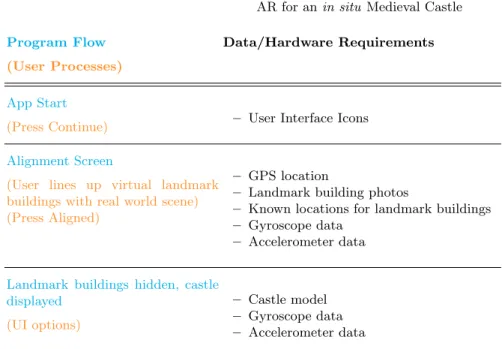
Figure 1 shows the various components of our AR application and the data required for each stage. Stage 1 provides instructions to the user, including a map of the area and recommended viewing points. Stage 2 includes the alignment process where, after an initial coarse check on viewing position and direction using the GPS and compass sensors on the smartphone, the user aligns a virtual 3D model of the area containing various ‘landmark buildings’ with the real world view. Stage 3 is the viewing stage, where the castle is seen in situ using AR, correctly aligned and positioned relative to the user. Thereafter, tracking of orientation is done using the smartphone’s gyroscope and accelerometer sensors. The app is developed using theUnity game engine and built for Android. The phone used for development and testing was a Motorola Moto Z (Snapdragon 820 processor, 1.8 GHz Quad-core CPU, Adreno 530 integrated GPU). The following subsections will describe the components of the system.
3.1 Data
The data required for the application consists of a model of the Castlegate area, photographs of the front of specific landmark buildings, and a model of the castle. The 3D model of the Castlegate area was produced by MArch students at The University of Sheffield’s School of Architecture and is illustrated in Figure 2 using
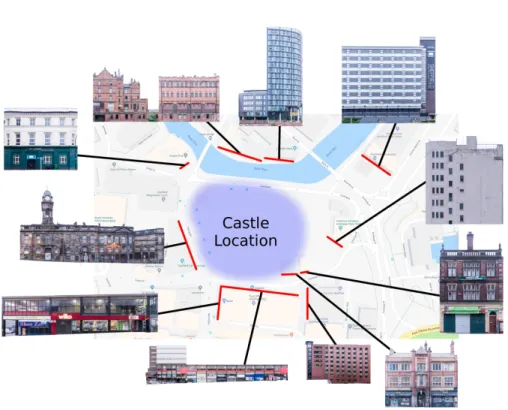
SketchUp11. The model is made up of approx. 55,000 triangles. This relatively small memory footprint lessens the burden on the smartphone’s processor and is sufficient to support the user alignment process and the depth masking aspects of the AR application. The initial model is untextured – it is the geometry that is important for the depth masking stage. However, to support the user alignment process (see later), photographs of the fronts of ‘landmark buildings’ (buildings that are easily distinguishable within the Castlegate area) are added to relevant parts of the model as texture maps, as illustrated in Figures 3 and 4.
11
Program Flow
(User Processes)
Data/Hardware Requirements
App Start
(Press Continue) – User Interface Icons
Alignment Screen
(User lines up virtual landmark buildings with real world scene) (Press Aligned)
– GPS location
– Landmark building photos
– Known locations for landmark buildings – Gyroscope data
– Accelerometer data
Landmark buildings hidden, castle displayed
(UI options)
– Castle model – Gyroscope data – Accelerometer data
Fig. 1.An overview of the components of the system.
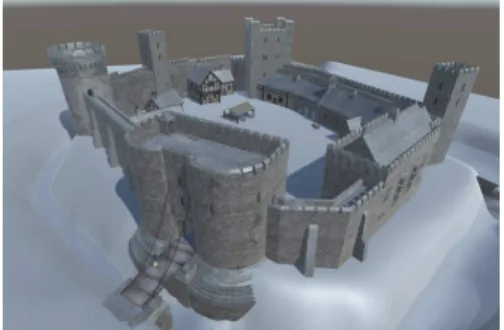
The model of Sheffield Castle (Figure 5) was created by Human12, a Sheffield-based creative agency. It is Sheffield-based on archaeological and historical evidence for what the castle was like, drawn from research on the unpublished archives from mid-twentieth-century excavations, with inspiration also drawn from surviving castles of similar type (Richmond, Helmsley and Barnard), for the architectural details. The castle is modelled as a set of distinct pieces as shown in Figure 6 so as to support only rendering those that are visible during rendering. Each of the pieces is hidden or shown depending on the viewing location. The complete model
12
http://humanstudio.com/
Fig. 2.The model of the Castlegate area viewed in Sketchup. Castlegate, which is where the castle was situated, is oulined in red.
Fig. 4.The various landmark buildings and their locations. Map data c2018 Google.
consists of 3100 triangles and uses 69 textures, 50 with resolution 2048x2048, 16 with resolution 1024x1024 and 3 with resolution 512x512. Figure 7 shows how the castle sits in the Castlegate model from Figure 2. A key part of this stage is to make sure the ground level of the two models is aligned – this is important for later stages. The ground heights of each of the area and castle models follows the current land height for the Castlegate area, although the castle model includes a moat.
3.2 Alignment Processes
This section focusses on stage 2 in Figure 1. An initial viewpoint is established using GPS, followed by a user alignment process between the model and the real world view. Orientation tracking is also required.
Fig. 5. The textured, full resolution model of the castle. The model includes a surrounding landscape and moat (in grey in this image).
Fig. 6.An exploded view of the separate parts of the castle.
Fig. 7.The model of Sheffield Castle po-sitioned at its historic location in the Castlegate model.
This selection process takes place when the app is started, and every 10 seconds thereafter – a continuous update would use unnecessary resources, both com-putationally and in terms of battery power on the user’s device. A time of 10 seconds is considerably shorter than it would take to walk between any of the defined viewpoints, ensuring that when the user reaches such a point, the app will have updated their location.
Figures 3 illustrates one of the landmark buildings, as described in Section 3.1. From the user’s position, the landmark buildings are displayed in their cor-rect position relative to the virtual Castlegate model – the white Castlegate area model is not visible, only the landmark buildings. The user can swipe on the screen to rotate the scene until the relevant virtual landmark buildings line up with the real ones, based on the current viewpoint position. The Castlegate model is now aligned with the real world from the user’s viewpoint. However, other processes are happening in parallel – user orientation and perspective cor-rection – which must be considered before the alignment process is complete.
The user’s orientation is tracked so that the correct view of the castle model can be presented in relation to the real world view. The smartphone’s gyroscope and accelerometer sensors are used for this. The gyroscope sensors give a very accurate reading for the angular velocity of the device around each of the main axes. By integrating this we can determine the total angle the device has moved through. An issue, however, is that error accumulation in the integration causes drift. Initial experiments used a Kalman filter [18] to mitigate this. This worked well for correcting pitch measurements, but absolute heading values from the compass were incorrect and, since the Kalman filter used these to update its state, the results were poor, converging to the wrong angle and producing jittery behaviour. Instead, a complementary filter [6] was used with a small timestep in the Euler integrator. Since only minor drift corrections were required, this worked well. In addition, the complementary filter has a lower performance impact than a Kalman filter requiring only a simple multiplication and addition, rather than an iterative matrix solve or approximation. This was two orders of magnitude faster in testing.
Camera perspective must also be considered. From the defined viewpoints process, the user’s location is known. The roll, pitch and yaw of the smartphone are tracked by the user orientation process. The roll and pitch can be determined purely from the accelerometer and gyroscope data, whilst the user has completed the alignment process to ensure the correct yaw. These transformation values are applied to the Unity camera. With the real and virtual cameras’ positions matching, the fields of view must be matched to ensure the same view is seen by both cameras. To match the field of view, the device camera’s field of view and aspect ratio are queried. This combined with the aspect ratio of the screen is sufficient information to produce the correct perspective matrix. As the screen and camera aspect ratios do not match, the actual camera image is cropped which affects the field of view. For a screen of wider aspect ratio than camera, the updated field of view can be computed according to the following formula:
θc
(Wc/Ws)
(Hc/Hs)
(1)
whereθc is the reported vertical camera field of view,Wcis the width of the
image returned from the camera,Wsis the width of the screen,Hc is the height
of the image returned from the camera andHsis the height of the screen. For
such the vertical component is scaled by three quarters to match the 16:9 screen aspect. This also reduces the effective vertical field of view by 3/4. The device camera reports a 50 degree vertical field of view, so three quarters of this, 37.5, is used for the vertical field of view of theUnity camera.
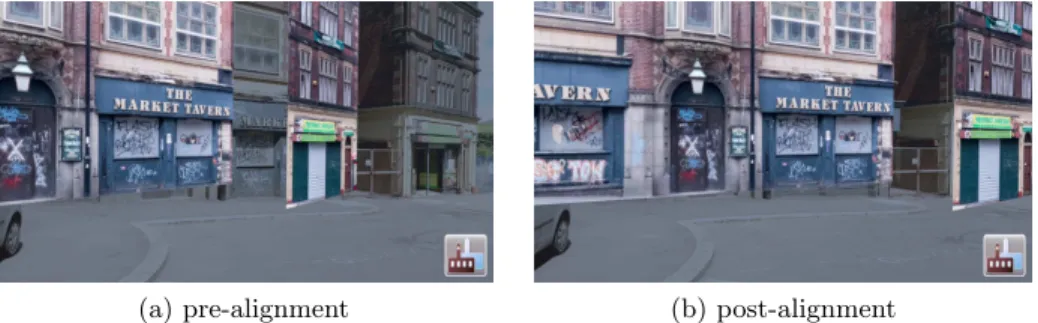
Figure 8 shows the alignment process in progress. For the building on the right in Figure 8a, both the virtual landmark building and its real counterpart are visible. The user then swipes to rotate the virtual scene until it matches the real scene as seen in Figure 8b. The user is free to look around during this process to also compare other buildings for alignment. When the user is happy with the alignment, a tap on the smartphone screen reveals the virtual castle model correctly augmented into the real world scene. One final part of the alignment process worth noting is the slowest part of the whole process was usingUnity’s WebCamTexture class to handle the video feed. Performance was improved significantly by using code to natively access the camera.
(a) pre-alignment (b) post-alignment
Fig. 8.User alignment with the frontages of the Market Tavern and the building to its right.
3.3 Rendering
After user alignment, the virtual castle model is displayed. This involves three aspects. First, to give a real sense that the castle is augmenting the real world, real buildings that are behind the castle should not be seen, and real buildings in front of the castle should obscure the virtual model. Second, the ground planes of the virtual model and the real world should be aligned. Third, the lighting of the virtual model should consider the position of the sun in the real world, so as to better match the lighting of the surrounding real world buildings.
landmark buildings and the real world. Since we have the full virtual Castlegate model aligned with the real world, and we know the castle’s position within the Castlegate model, we can use the Castlegate model to create a depth mask to stop portions of the virtual castle from being drawn, making it appear hidden by buildings in the foreground. We call this location knowledge-based depth masking. It is similar in concept to the approach used in [5, 9], but is extended to use 3D models. They are only interested in occluding small, ground height markers, however, for an object the size of a castle, only portions of it may be occluded, and it is larger than the occluding objects, so their ray based approach is not sufficient. Our method allows occlusion of only parts of objects.
Fig. 9. The Castlegate model buildings outlined in orange will act as a mask for the castle.
Fig. 10.The castle masked by the Castle-gate model buildings.
A multi-pass rendering approach is used. Initially, the depth and colour buffers are cleared. In the first pass, the video feed is rendered full screen. This ensures that a full background is available. In the second pass, occluding build-ings are rendered using a shader which writes only to the depth buffer. This masks out regions where the castle should not be drawn because buildings are present in front of it, as illustrated in Figure 9, and the actual buildings will be displayed in the correct location in the video feed assuming the alignment process was carried out correctly. In the final pass, the castle is rendered, with any masked portions failing the depth test, essentially cutting a hole in the castle model, as illustrated in Figure 10. Thus the castle will appear to be behind real foreground buildings.
Making AR objects appear as though they are correctly integrated with the ground is challenging. For small objects, a simple shadow surrounding it may be sufficient, but for a large object this is very difficult as correctly computing how the shadow should appear on the video feed is non-trivial. In addition, without proper depth information, even portions of the castle model that might be under the ground are rendered on top. To solve this, we use a virtual ground plane. The ground is modelled to match the layout of the real land. This approach means inclusion of the moat is trivial.
surrounding buildings. The sun’s position can be computed from the date, time of day and longitude and latitude of the area. This calculation involves using astronomical formulae, based on those found in the Astronomical Almanac13. Initially, the date is converted to Julian days and centuries. From these, side-real time is computed. Solar coordinates are determined from the results of the previous calculations, and these are used to calculate the right ascension and dec-lination. Finally, these are transformed to Alt/Az coordinates. A more detailed explanation can be found in the Appendix.
The final aspect of rendering to consider is performance, since a mobile device has limited processing power. The castle is composed of individual pieces (Figure 6) to help increase performance. Only those parts that are visible from the defined viewpoints in the application need to be rendered; those pieces that are entirely blocked by others do not need to be rendered. In addition, mipmapping and level of detail techniques are used to further reduce the rendering time.
4
Results and Discussion
Figures 11 and 12 show the view when the user is aligning the Old Town Hall landmark building texture with its real world counterpart. Once this is aligned, the virtual castle model is then displayed, as shown in Figure 13. Note how the real old town hall building is seen beyond the virtual castle. The user can then rotate her mobile device to show other parts of the scene. Figure 14 shows the scene once the viewpoint is rotated to the right along the castle wall to show the main gate. The real Market Tavern (also one of the landmark buildings in the Castlegate model) is shown in front of the castle demonstrating the effect of the depth masking process. Another example of the alignment process is given in Figures 15 and 16. Here, the Metropolitan hotel is used as the landmark building in the alignment process, and the user must then rotate her camera to see the castle (Figure 17).
Over time, with continuous changes in orientation, some calculation drift can occur, since this is based on integration of gyroscope data. The virtual model and the real world can become slightly misaligned. In general, a misalignment of a few degrees is not an issue at this scale as the castle sits well within the area of land – a small difference in location won’t be noticed. The drift does, however, create some problems in conjunction with the depth masking. The cutout in the castle model for a foreground building requires a good alignment, or the wrong portion of the video feed can be displayed in the hole (Figure 18). When this occurs, user alignment must be redone.
Figure 19 shows an enlarged portion of Figure 12. As can be seen, representing landmark buildings as textured planes works well for the flat frontage of the building. However, the tower of the old town hall is set back from the building face and, as such, appears in the wrong place for alignment, since it has been projected forwards into the textured plane. An alternative solution could use
13
Fig. 11.The view of the Old Town Hall during the alignment process.
Fig. 12.The view of the Old Town Hall after alignment. The row of shops on the left is also a landmark texture.
Fig. 13. The virtual castle viewed with the real Old Town Hall in the background.
Fig. 14. The depth masking technique cuts a hole in the castle, leaving the image of the real Market Tavern showing from the video feed.
Fig. 15. The Metropolitan hotel before alignment.
Fig. 16. The Metropolitan hotel after alignment.
multiple textured planes, but it is unclear if this extra complication would be of benefit, since the current alignment process, based on the building frontage, seems to work well.
Fig. 18. Over time, with continuous changes in orientation, calculation drift can occur, producing a slight misalign-ment between the virtual model and the real world, which affects the depth mask-ing process.
Fig. 19. An enlarged view of the Old Town Hall in Figure 12
5
Conclusions
A practical, working, outdoor AR system that runs on android phones with appropriate sensors has been presented. A user alignment process, together with the fusion of a range of sensors, produces a system that is stable and easy to use. The 3D model of the area is used both in the user alignment process and also as part of a depth masking process so that the 3D virtual castle is properly placed in the real world view. There are some drift issues over time, although these can be rectified by user re-alignment. Further work could consider how to retain the alignment for longer, perhaps using a lightweight version of SLAM, as well as how to remove the initial user alignment step.
Appendix
All trigonmetric functions listed operate in radians. Angles should be corrected to a range between 0 and 2πthroughout unless otherwise noted.
Compute the number of Julian days and Julian centuries since J2000:
dj= 367y−
7
4(y+⌊(m+ 9)/12)⌋
+ 275m
9
+d−730531.5
Cj =
dj
36525
wheredj is the Julian day,yis the year,mis the month in numerical form,dis
the day in numerical form andCj is the Julian century.
Compute the sidereal time:
Sh= 6.6974 + 2400.0513Cj
Sut=Sh+
366.2422 365.2422h
S= 15Sut+Lo
where Sh is the sidereal time in hours at midnight, Sut is the sidereal time
in hours including the current time, S is the local sidereal time andLo is the
longitude.
Update to fractional (including time of day) Julian days and centuries:
dj=dj+
h
24cj=
dj
36525 Compute solar coordinates:
GM eanLong =
2π
360(280.466 + 36000.77Cj)
GM eanAnom=
2π
360(357.529 + 35999.05Cj))
Ecen=
2π
360((1.915−0.005Cj) sin(GM eanAnom) + 0.02 sin(2∗GM eanAnom))
Leliptic=GM eanLong+Ecen
O= 2π
360(23.439−0.013Cj)
where GM eanLong is the mean solar longitude, GM eanAnom is the mean solar
anomaly,E+cenis the equation of center,Leliptic is the eliptical longitude and
O is the obliquity.
Compute right ascension and declination:
R= atan2(cos(O) sin(Leliptic),cos(Leliptic))
whereR is the right ascension andDis the declination.
Compute horizontal coordinates. The hour angle,H, should be brought into the range −πto π.
H = 2π 360S−R
Alt.= arcsin(sin(2π
360La) sin(D) + cos( 2π
360La) cos(D) cos(H)) whereH is the hour angle andAlt.is the altitude.
Compute the azimuth angle:
Az.= arctan
−sin(H)
tan(D) cos(2π
360La)−sin( 2π
360La) cos(H)
whereAz.is the azimuth angle.
Finally, adjust the azimuth angle to the correct quadrant.
Acknowledgements
This research was funded by a grant from the AHRC/EPSRC Immersive Experi-ence scheme (grant no. AH/R009392/1). Research on the archaeological archives relating to Sheffield Castle was funded by the Pamela Staunton Bequest (Uni-versity of Sheffield).
References
1. Bekele, M.K., Pierdicca, R., Frontoni, E., Malinverni, E.S., Gain, J.: A sur-vey of augmented, virtual, and mixed reality for cultural heritage. J. Com-put. Cult. Herit. 11(2), 7:1–7:36 (Mar 2018). https://doi.org/10.1145/3145534, http://doi.acm.org/10.1145/3145534
2. Buerli, M., Misslinger, S.: Introducing ARKit-augmented reality for iOS. In: Apple Worldwide Developers Conference (WWDC17). pp. 1–187 (2017)
3. Cirulis, A., Brigmanis, K.B.: 3D outdoor augmented reality for architec-ture and urban planning. Procedia Computer Science 25, 71–79 (2013). https://doi.org/10.1016/j.procs.2013.11.009
4. Durrant-Whyte, H., Bailey, T.: Simultaneous localization and mapping: part I. IEEE robotics & automation magazine 13(2), 99–110 (2006). https://doi.org/10.1109/MRA.2006.1638022
5. Galatis, P., Gavalas, D., Kasapakis, V., Pantziou, G., Zaroliagis, C.: Mobile aug-mented reality guides in cultural heritage. In: Proceedings of the 8th EAI Inter-national Conference on Mobile Computing, Applications and Services. pp. 11–19 (2016). https://doi.org/10.4108/eai.30-11-2016.2266954
7. H¨oft, N., Schulz, H., Behnke, S.: Fast semantic segmentation of RGB-D scenes with GPU-accelerated deep neural networks. In: Joint German/Austrian Confer-ence on Artificial IntelligConfer-ence (K¨unstliche Intelligenz). pp. 80–85. Springer (2014). https://doi.org/10.1007/978-3-319-11206-0 9
8. Huang, W., Sun, M., Li, S.: A 3D GIS-based interactive registration mechanism for outdoor augmented reality system. Expert Systems with Applications 55, 48–58 (2016). https://doi.org/10.1016/j.eswa.2016.01.037
9. Kasapakis, V., Gavalas, D.: Occlusion handling in outdoors augmented re-ality games. Multimedia Tools and Applications 76(7), 9829–9854 (2017). https://doi.org/10.1007/s11042-016-3581-1
10. Kim, H., Matuszka, T., Kim, J.I., Kim, J., Woo, W.: An ontology-based augmented reality application exploring contextual data of cultural heritage sites. In: 2016 12th International Conference on Signal-Image Technology & Internet-Based Systems (SITIS). pp. 468–475. IEEE (2016). https://doi.org/10.1109/SITIS.2016.79 11. Lee, G.A., D¨unser, A., Kim, S., Billinghurst, M.: CityViewAR: A mobile
out-door AR application for city visualization. In: 2012 IEEE International Sympo-sium on Mixed and Augmented Reality (ISMAR-AMH). pp. 57–64. IEEE (2012). https://doi.org/10.1109/ISMAR-AMH.2012.6483989
12. Murru, G., Fratarcangeli, M., Empler, T.: Practical augmented visualization on handheld devices for cultural heritage. In: Proc. 21st International Conference on Computer Graphics, Visualization and Computer Vision. pp. 97–103 (2013) 13. Paavilainen, J., Korhonen, H., Alha, K., Stenros, J., Koskinen, E., Mayra,
F.: The Pok´emon GO experience: A location-based augmented reality mo-bile game goes mainstream. In: Proceedings of the 2017 CHI Conference on Human Factors in Computing Systems. pp. 2493–2498. ACM (2017). https://doi.org/10.1145/3025453.3025871
14. Seo, B.K., Kim, K., Park, J., Park, J.I.: A tracking framework for augmented reality tours on cultural heritage sites. In: Proceedings of the 9th ACM SIGGRAPH Conference on Virtual-Reality Continuum and its Applications in Industry. pp. 169–174. ACM (2010). https://doi.org/10.1145/1900179.1900215
15. Simon, G., Fitzgibbon, A.W., Zisserman, A.: Markerless tracking using pla-nar structures in the scene. In: Proc. IEEE and ACM International Sympo-sium on Augmented Reality, 2000 (ISAR 2000). pp. 120–128. IEEE (2000). https://doi.org/10.1109/ISAR.2000.880935
16. Verykokou, S., Ioannidis, C., Kontogianni, G.: 3D visualization via augmented reality: The case of the Middle Stoa in the Ancient Agora of Athens. In: Ioan-nides, M., Magnenat-Thalmann, N., Fink, E., ˇZarni´c, R., Yen, A.Y., Quak, E. (eds.) Digital Heritage. Progress in Cultural Heritage: Documentation, Preserva-tion, and Protection. pp. 279–289. Springer International Publishing, Cham (2014). https://doi.org/10.1007/978-3-319-13695-0 27
17. Vlahakis, V., Ioannidis, M., Karigiannis, J., Tsotros, M., Gounaris, M., Stricker, D., Gleue, T., Daehne, P., Almeida, L.: Archeoguide: an augmented reality guide for archaeological sites. IEEE Computer Graphics and Applications22(5), 52–60 (2002). https://doi.org/10.1109/MCG.2002.1028726
18. Welch, G., Bishop, G.: An introduction to the Kalman filter: SIGGRAPH 2001 course 8. In: Computer Graphics. Annual Conference on Computer Graph-ics & Interactive Techniques, Los Angeles, CA, USA (August 12-17) (2001), https://sreal.ucf.edu/wp-content/uploads/2017/02/Welch2001.pdf