Tutorial Enhancement
and Automated Code Helper
by
David Burela (BCOMP)
A dissertation submitted to the School of Computing
in partial fulfillment of the requirements for the degree of
Master of Computing University of Tasmania
except where due reference is made in the text of the thesis.
Abstract
This work proposes a system, entitled TEACH (Tutorial Enhancement
and Automated Code Helper) which will allow students to complete
programming tutorials online with the ability to submit their work to a
server for instant analysis and receive meaningful feedback on any
errors found with the code. This is achieved through a chosen set of
analysis tools which have been brought together as a system and
presented here as the "Three Spheres of Analysis". The building of
TEACH will test the hypothesis that students will prefer learning in
the newly developed automated tutorial system over the current
tutorial system. The results show students are receptive to the system;
however are not convinced that it would replace the current tutorial
I would like to begin by expressing my extreme gratitude to my supervisor Dr. Julian
Dermoudy. Thanks to his experience and wisdom I was able to complete this thesis,
without him it would not have been possible. He was very accommodating with his
vision of the research allowing room to move, something he was not required to do
but it is very much appreciated. His guidance began in my 1 st year of computing and
continued through the last 5 years.
My partner Emma Woolford deserves my gratitude next. Emma's experiences in
writing a thesis last year helped prevent a lot of suffering on my part for which I am
grateful. Without her love and late nights of proofreading my thesis I would not have
completed it in time.
Finally a general recognition to all of my friends and family especially the ones that
helped me with minor tasks in the last week! (In no particular order) James Gourley,
UTA
SOR
UNIVERSITY OF TASMANIA ContentsTable of Contents
Table of Contents iii
List of Figures vi
List of Tables viii
1. Introduction 1
1.1. Thesis structure 1
2. Literature Review 3
2.1. Overview 3
2.2. Structure and Scope 3
2.3. Background 3
2.3.1. IOCT101 Programming and Problem Solving 3
2.3.2. Java Language 4
2.3.3. Common Beginner Programmer Mistakes 6
2.4. Related Systems 7
2.4.1. Environment for Learning to Program (ELP) 7
2.4.2. Automatic Assessment and Programming Tutor 8
2.4.3. Expresso 8
2.5. Matching Methods 9
2.5.1. Diff.exe 9
2.5.2. Regular Expressions 9
2.6. Style Checking 10
2.6.1. CheckStyle 10
2.6.2. Hammurapi 11
2.7. Static Analysis 11
2.7.1. Static Analysis using Source Code 13
2.7.2. Static Analysis using Java Byte Code 13
2.7.3. PMD 14
2.7.4. Bandera 14
2.7.5. FindBugs 15
2.7.6. JLint 16
2.8. Dynamic Analysis 16
2.8.1. Test-driven Development 17
2.8.2. Junit 17
2.9. Tools 18
2.9.1. Hyper Text Mark-up Language (HTML) 18
2.9.2. Extensible Mark-up Language (XML) 18
UTASM
3.1. Introduction 20
3.2. Development Platform 20
3.3. Base Framework 21
3.4. Choice of Analysis Methods 22
3.5. The 3 Spheres of Analysis 22
3.5.1. Sphere 1: Static Analysis 23
3.5.2. Sphere 2: Style Checking 25
3.5.3. Sphere3: Custom Matcher 26
3.6. Other Analysis 27
4. Architecture, Topology and Design 29
4.1. Introduction 29
4.2. Directory Structure 29
4.2.1. Core Components 29
4.2.2. External Resources 30
4.3. Database Design 30
4.4. Application Structure 32
4.4.1. Compilation of Source Code 32
4.4.2. Sphere 1: Static Analysis 33
4.4.3. Sphere 2: Style Checking 35
4.4.4. Sphere 3: Code Matching 35
4.4.5. Graphical Feedback 36
5. Evaluation 37
5.1. What the Students Will be Testing 37
5.1.1. Modules 37
5.1.2. Code Matching 37
5.2. Testing Session 37
5.3. Sample Programs 38
5.3.1. Division 39
5.3.2. Logic Error 39
5.3.3. Ignoring Return Value 40
5.3.4. String Buffer 41
5.4. Survey 41
5.4.1. About the Questions 42
5.4.2. How the students were Contacted 42
5.5. Ethics committee Approval 42
6. Results and Observations 43
6.1. Survey Results 43
6.1.1. Question 1 43
6.1.2. Question 2 43
6.1.3. Question 3 44
6.1.4. Question 4 45
6.1.5. Question 5 45
UTAS
UNIVERSITY OF TASMANIA Contents6.1.7. Question 7 47
6.1.8. Question 8 47
6.1.9. Question 9 48
6.1.10. Question 10 48
6.1.11. Freeform comments 49
7. Conclusion 50
7.1. Future Work 51
7.1.1. Security Issues 51
7.1.2. Infinite Loops 51
7.1.3. Code Input Enhancements 51
7.1.4. Showing the Error in Context 51
7.1.5. Background Processing 52
7.1.6. Distributed Processing 52
7.1.7. Dynamic Analysis 52
8. References 53
Appendix A: Information and Consent Forms 57
Appendix B: Survey Form 60
Appendix C — Tutorial Questions 63
Cl. Tutorial Question 1 — Division.java 63
C2. Tutorial Question 2— LogicProblem.java 64
C3. Tutorial Question 3 — ReturnValue.java 65
C4. Tutorial Question 4— StringBuffjava 66
C5. Tutorial Question 5— W2Swap.java 67
Appendix D: Reference of Available CheckStyle Checks 68
List of Figures
Figure 1 ELP and the program analysis framework integration (Truong, Bancroft et al. 2003) 8
Figure 2 Matching a regular expression on a piece of text 10
Figure 3 Regular expression for matching email addresses (Goyvaerts 2006) 10
Figure 5 Tree generated using parser (Amit 2005) 13
Figure 4 Example of bug found with Static Analysis tools 13
Figure 6 Code that exhibits the bug patterntaken from (Goetz 2006) 14
Figure 7 Bytecode listing for code in Figure 6 taken from (Goetz 2006) 14
Figure 8 A unit test written in Junit 4.0 taken from (Doshi 2005) 17
Figure 9 Graphical representation of the 3 Spheres of Analysis 23
Figure 10 Regular Expression to match a String or int declaration 27
Figure 11 TEACH database structure 31
Figure 12 TEACH architecture 32
Figure 13 TEACH default settings for FinclBugs 33
Figure 14 FindBugs call with selected visitors 34
Figure 15 Example executions of CheckStyle 35
Figure 16 Screenshot of TEACH: source code input(left) and the resulting feedback(right) 36
Figure 17 Error output of tutorial question 1 39
Figure 18 Error output of tutorial questsion 2 40
Figure 19 Error output from tutorial question 3 40
Figure 20 Error output from question 4 41
Figure 21 Responses to Question 1 43
Figure 22 Responses to Question 2 44
Figure 23 Responses to Question 3 44
Figure 24 Responses to Question 4 45
Figure 25 Responses to Question 5 45
Figure 26 Responses to Question 6 46
UTAS
UNIVERSITY OF TASMANIA ContentsFigure 28 Responses to Question 8 47
Figure 29 Responses to Question 9 48
UTAS
UNIVERSITY OF TASMANIA ContentsList of Tables
Table 1 Top 20 identified programming errors of beginning students (Hristova, Misra et al. 2003) 5
Table 2 Common Java programing mistakes (Topor 2002) 6
Table 3 Five distinguishing characteristics of the ELP system (Truong, Bancroft et al. 2005) 7
Table 4 Bug finding tools and their basic properties (Rutar, Almazan et al. 2004) 14
Table 5 Conclusion and future work (Hovemeyer and Pugh 2004) 16
Table 6 Design Goals for XML taken from (Bray, Paoli et al. 1997) 18
UTAS92
UNIVERSITY OF TASMANIA Chapter 1: Introduction1. Introduction
The aim of this thesis is to build and evaluate the effectiveness of a web-based tutorial
system. The system should allow students to enter code into a web page and have it
submitted to a server for compilation and assessment, for the purpose of assisting
beginner programmers learn programming basics. The hypothesis for the research is that
students will prefer learning in the newly developed automated tutorial system over the
current tutorial system.
"When learning to program, it is essential that students are given the opportunity to
practise in an environment where they can receive constructive and corrective feedback
Feedback is an especially important factor in the learning process when it is available
on request. However, with large class sizes, it is difficult for teaching staff to
synchronize their heavy schedules to provide additional help when the students need
it."(Truong, Bancroft et al. 2005)
The proposed system, entitled TEACH (Tutorial Enhancement and Automated Code
Helper), will allow students to select a tutorial question that they with to complete, the
selected tutorial being loaded onto the webpage allowing the student to modify it. Upon
completion of the required tutorial code the student will then submit it to the server
which will then compile and execute it. A series of analysis tools will then be run against
the student's code to detect and provide meaningful feedback on any errors found with
the code. The set of analysis tools run against the code has been brought together as a
system and presented here as the "Three spheres of analysis".
1.1. Thesis structure
Chapter 2 presents a review of the literature that will describe the context of all the
UTAS
UNIVERSITY OF TASMANIA Chapter 1: IntroductionChapter 3 explores the tools available for use by the system and the decisions on why
the final tools were chosen. The "Three Spheres of Analysis" will also be introduced in
this chapter.
Chapter 4 gives a detailed description on how the system was implemented and the
structure of each component.
Chapter 5 describes the testing process and how the testers were recruited to evaluate the
system.
Chapter 6 examines the results of the survey submitted by the testers.
UTAS
UNIVERSITY OF TASMANIA Chapter 2: Literature Review2. Literature Review
2.1. Overview
The purpose of this literature review is to present an exploration of tools which would be
of use in assisting students to learn more effectively. Various approaches and techniques
will be explored within this review to determine which are suitable to the architecture
and application. The major goal of this literature review is to provide an understanding
from which to select appropriate solutions, for later investigation within the thesis.
2.2. Structure and Scope
Section 2.3 outlines the background of the thesis and also the context of the research.
Section 2.4 explores any related work previously conducted in this field of research.
Section 2.5 will inspect matching methods that may be of use to this research.
Section 2.6 presents style checking of Java source code.
Section 2.7 introduces static analysis of source code, and investigates available software
solutions.
Section 2.8 examines dynamic analysis and its role in software testing.
Finally, Section 2.9 will investigate tools upon which TEACH is built.
2.3. Background
2.3.1. KXT101 Programming and Problem Solving
KXT101 Programming and Problem Solving is the first year programming unit at the
University of Tasmania. The focus of this thesis is to assist these beginner programmers.
IOCT101 teaches students the basics of Object Oriented programming in Java, and how
to test/debug programs. The unit is a requirement for certain degrees and a pre-requisite
for the study of further programming units, as it teaches programming fundamentals
problems defined by a program specification. They master fundamental concepts
relating to imperative, object-based programming and are introduced to concepts
relating to graphical user interfaces and event driven programs. Students are required
to demonstrate syntactic, logical and strategic knowledge of the programming
constructs introduced in the unit. They are expected to use systematic processes to plan,
document, debug and test their programs. Programming exercises are introduced in the
context of small problems." (UTAS 2006)
2.3.2. Java Language
The Java language was initially created by James Gosling at Sun Microsystems. The
initial aim of the project in 1991 was to create a tool which could be used to extend other
programming languages to handle programming tasks that were traditionally hard to do.
The first version of Java had been intended to be a cross platform environment for
developing software for home appliances. Java was meant to simplify development as
traditional languages like C++ are compiled to a processor specific binary, but home
appliances have a variety of different processors, meaning they required additional
development and testing time. As home appliances are usually a low cost item, keeping
development costs down is a large area of conern (Savitch 1999).
In 1994 James Gosling came to recognise that his language would be ideal for the
internet. In 1995 Netscape decided to make the next version of its web browser,
Netscape Navigator, capable of running Java programs(Savitch 1999). Java's initial
surge of popularity was due primarily to being one of the first programming languages
which deliberately embraced the concept of writing programs that can be executed using
the Internet (John Lewis 2001).
Java source code is not compiled into an executable binary, instead it is converted into
UTAS
UNIVERSITY OF TASMANIA Chapter 2: Literature Review"Java byte code executes inside a Java Virtual Machine (or VM). The Java VM provides host services for the Java application/applet. These services include memory
allocation, garbage collection, i/o, and basic graphics and windowing. The Java VM also enforces security, preventing Java byte code from interacting directly with the hardware on the host OS. Inside every Java-capable browser is a Java VM There are also stand-alone Java VMs that can execute Java applications outside of a browser."
(Sun 1998)
By compiling Java programs into bytecodes it allows the programs to be cross platform,
as it has not been tied to a specific processor. The first Java Virtual Machines interpreted
each bytecode instruction as it encountered it. All this parsing meant that Java was much
slower than traditional compiled languages like C++, but more recent versions of the
Java Virtual Machine include features such as JIT compilation (Just In Time) which
compile the bytecode form into machine-native, or operating-system-native instructions
[image:15.557.103.508.439.731.2]which greatly enhance the performance of the executing program.(Sun 1998)
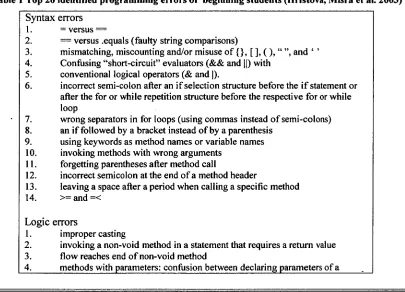
Table 1 Top 20 identified programming errors of beginning students (Hristova, Misra et al. 2003)
Syntax errors 1. = versus
2. = versus .equals (faulty string comparisons)
3. mismatching, miscounting and/or misuse of {}, [ ], ( ), " ", and " 4. Confusing "short-circuit" evaluators (&& and II) with
5. conventional logical operators (& and I).
6. incorrect semi-colon after an if selection structure before the if statement or after the for or while repetition structure before the respective for or while loop
7. wrong separators in for loops (using commas instead of semi-colons) 8. an if followed by a bracket instead of by a parenthesis
9. using keywords as method names or variable names 10. invoking methods with wrong arguments
11. forgetting parentheses after method call
12. incorrect semicolon at the end of a method header
13. leaving a space after a period when calling a specific method 14. >= and =<
Logic errors
1. improper casting
2. invoking a non-void method in a statement that requires a return value 3. flow reaches end of non-void method
method and passing parameters in a method invocation
5. incompatibility between the declared return type of a method and in its invocation
6. class declared abstract because of missing function
2.3.3. Common Beginner Programmer Mistakes
When starting out, students new to programming frequently make the same mistakes
(Hristova, Misra et al. 2003). Gathering a list of these common mistakes can help focus
the learning exercises that are given, in order to help a student spot these problems in the
code by themselves.
Hristova, Misra et al (2003) describe an error detection tool that was created at Bryn
Mawr College, titled Expresso. The paper explains how they created a list of common
programming errors that students make and what these errors were. The researchers
surveyed a number of teaching staff and students and created a final list. They originally
had a list of 62 errors, but cut it down to a list of the top 20 errors that they felt were
[image:16.557.89.522.66.254.2]essential from an educational perspective as shown in Table 1.
Table 2 Common Java programing mistakes (Topor 2002)
1. Not specifying the size of a new array 2. Not using correct array bounds
3. Doing arithmetic on an instance of a wrapper class
4. Adding a value of a primitive type to a collection (a set or list) or a map 5. Not casting the value of type Object returned by listget(i) or map.get(key)
to the required type
6. Using static components unnecessarily 7. Not reading the next line inside a loop
8. Creating a string tokenizer for a line before checking the line is present 9. Reading all input before processing it
10. Threading code
11. Doing nontrivial computation in a class constructor. 12. Not using common API methods
13. Not breaking out of a loop when required
14. Not breaking at the end of each case in a switch-statement 15. Assigning constant values to Boolean variables in if-statements. 16. Declaring variables globally, unnecessarily
17. Repeating code that should be in a method called repeatedly 18. Being too complicated
UTAS
UNIVERSITY OF TASMANIA Chapter 2: Literature ReviewGriffith University compiles their own list of common programming errors for their
beginning programming course. Table 2 shows a summary of their commonly identified
errors. Many of these are similar to the errors previously discussed.
2.4. Related Systems
2.4.1. Environment for Learning to Program (ELP)
Environment for Learning to Program (Truong, Bancroft et al. 2003; Truong, Roe et al.
2004; Truong, Bancroft et al. 2005) was designed at the Queensland University of
Technology (QUT). The purpose of the system was to assist their first year Information
Technology students develop their programming skills. It is an interactive web based
environment for teaching programming basics. The system provides feedback to the
students via a static analysis framework, allowing the students to see potential errors in
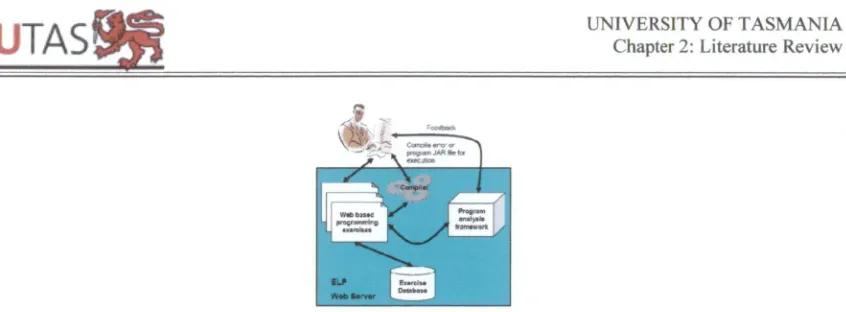
their program. Figure 1 provides an overview of the ELP architecture.
Table 3 Five distinguishing characteristics of the ELP system (Truong, Bancroft et al. 2005) 1. The system supports fill in the gap programming exercises and customized compilation
error messages which reduce the complexity of writing programs. This allows students to focus on the problem to be solved and engages them more actively in the learning process.
2. The system is web based which eliminates the programming environment difficulties that students usually encounter. This also enables smooth integration of programming with lecture notes, tutorials and other web based content.
3. The ELP incorporates a program analysis tool which provides instant feedback for students about the quality and correctness of their programs.
4. The ELP supports configurable exercises i.e. the exercises and the environment can be configured for different stages of students learning.
5. The system allows tutors to provide additional feedback through annotations on students' programs
Figure 1 ELP and the program analysis framework integration (Truong, Bancroft et al. 2003)
_ 2, Automatic Assessment and Programming Tutor
Loosely based on ELP, the Automatic Assessment and Programming Tutor (AAPT) was
created by University of Tasmania (UTAS) student Cynthia Sim in 2005. AAPT is a
web-based tutorial system created using JSP and being hosted on Apache Tomcat 3.3.2.
AAPT operates as follows; A student will load the exercise in a web browser and try to
finish the exercise by completing all required code. Once the student thinks they have
completed it, they submit the code to the server which then attempts to compile the code
and execute it. If there are any compile time or runtime errors, the system will report
them back to the student to review. Otherwise the system will return the output of the
student's code to the screen.
AAPT has the advantage of teaching students over the traditional method of text editor
and compiler, as it does not assume that the student has knowledge on how to install
compilers or how to operate them. The basic feedback system also assists in students
learning(Sim 2005).
2.4.3. Expresso
Expresso(Hristova, Misra et al. 2003) was created to assist beginner programmers
understand cryptic compiler error messages. The researchers compiled a list of the most
common Java errors that students make, by contacting professors at 58 universities as
well as special interest groups. They then split all the errors into 3 groups: syntax,
semantic and logic errors. Using this list of common mistakes as a base they were able to
create a program that does multi-pass pre-processing on the code to detect these
UNIVERSITY OF TASMANIA Chapter 2: Literature Review
UTAS 9
2
,
error was in a more readable message, and also providing suggestions on how to fix the
error.
By assisting the student to be able to track down errors more easily than with the
standard compiler error messages, it allows the student to concentrate on figuring out
how to correct the code, instead of forcing them to first try to and locate where exactly
the error is, and then how to correct it. They see the need for the tool diminishing as the
student gains a better understanding of the language and compiler (Hristova, Misra et al.
2003).
2.5. Matching Methods
In order to allow the comparison of the student's code to possible problems and
solutions, a method of matching the code to the reference code is needed.
2.5.1. Diff.exe
The GNU diff utility is used to show differences between two text files. This set of
differences is often called a 'diff or 'patch'. Diff compares two files line by line, finds
groups of lines that differ, and reports each group of differing lines. GNU diff provides
ways to suppress certain types of differences that are not relevant, changes in the amount
of white space between words or lines a common option(Free Software Foundation
2000).
2.5.2. Regular Expressions
Regular expressions(Goyvaerts 2006) are used to do complex string matching on a piece
of text. They are expressed as a sequence of characters which describe a pattern to be
matched. The name regular expressions comes from the mathematical theory which they
are based on(Goyvaerts 2006).
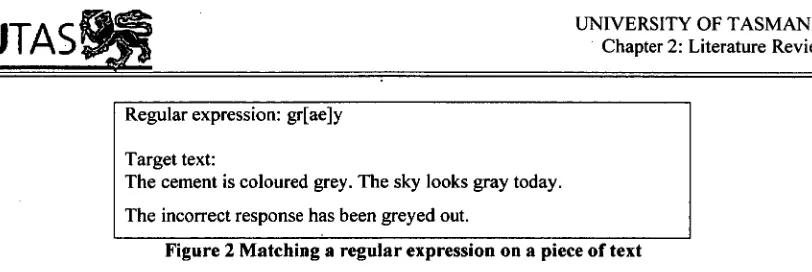
A simple example of using regular expressions is trying to find both spellings of the
colour grey/gray, in a piece of text. The regular expression shown in Figure 2 would
Target text:
[image:20.557.99.505.59.195.2]The cement is coloured grey. The sky looks gray today. The incorrect response has been greyed out.
Figure 2 Matching a regular expression on a piece of text
A much more advanced regular expression can be constructed that will find any email
address. Figure 3 has an example expression that would match any email address. The
expression can be modified by a programmer to verify that text entered is a valid email
address by replacing the first "\b" with a "^" and the last "\b" with a "$" symbol instead
(Goyvaerts 2006).
\b[A-Z0-9._%-]+@[A-Z0-9.-]+\.[A-Z]{2,4}th
Figure 3 Regular expression for matching email addresses (Goyvaerts 2006)
Many tools that can be used to assist in the creation of regular expressions can be found
at http://en.wikipedia.org/wiki/Regular expressions.
2.6. Style Checking
By keeping a consistent style across a project such as coding style, indentations,
methods, this will benefit the project by being easier to maintain (Hammurapi Group
2006). In addition, programming style is one of the most important foci of KXT101 —
more important perhaps than correctness. It is important for tools to be
developed/adopted which will aid in the identification of poor (aberrant) programming
style and aid in its correction.
2.6.1. CheckStyle
Checkstyle(CheckStyle 2006) is an open source tool freely available on the intemet,
which is used for checking Java source code ensuring it adheres to a specified standard.
Checkstyle can check for a variety of different coding conventions, including
indentation, white space and naming conventions. A full list of available checks is listed
UTAS
UNIVERSITY OF TASMANIA Chapter 2: Literature ReviewCheckstyle is fully customisable in the types of checks it performs. An XML file is used
to specify which style checks should be applied against the source code. Checkstyle can
also be extended by a developer. Custom checks or filters can be written and then
utilised in future checks. Reports can be exported and saved as either HTML or XML
files (CheckStyle 2006).
2.6.2. Hammurapi
Hammurapi(Hammurapi Group 2004) is a code review tool for Java. It scans Java
source files and inspects them to ensure they comply with coding standards. Reports can
then be generated in either HTML or XML for the user (Hammurapi Group 2004).
Hammurapi inspects a piece of java source code reporting the findings by creating
Violations, issuing Warnings, creating Annotations or gathering Metrics.
After analysis is completed Hammurapi accumulates the findings and generates a final
report (Hammurapi Group 2004).
2.7. Static Analysis
Static code analysis is a technique for checking an application for potential bugs without
actually executing it. It works at either the source-code level or byte code level of an
application. Bug patterns are specified within the analysis program, the source that is
provided by the user is then searched with any matches show where a potential problem
could exist. This is useful as the code that has been checked may be syntactically correct
but logic errors could be present within the code, which can be easily found with these
tools.
Hidden logic errors that are commonly present are:
• Trying to dereference a null pointer
• Mistakenly using the Boolean comparison shortcuts & and I instead of the full
UTAS
UNIVERSITY OF TASMANIA Chapter 2: Literature Review• Checking for a null pointer in one section of the code and then checking again
[image:22.557.76.529.296.741.2]shortly after (May indicate a misconception about the application)
Figure 5 shows a piece of example code which can cause a problem when the
application executes, the programmer has checked if the object is null, but then invokes
a method on the null object which will throw an exception, the error is obviously a
mistake by the programmer and should be fixed. Standard testing procedures may not
find the bug, as the execution path needed may not be called under most testing
conditions, leaving a hidden bug which may be hard to track down later (Hovemeyer and
Pugh 2004; Rutar, Almazan et al. 2004).
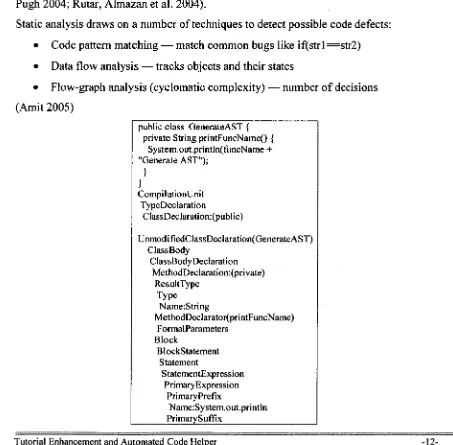
Static analysis draws on a number of techniques to detect possible code defects:
• Code pattern matching — match common bugs like iftstrl—str2)
• Data flow analysis — tracks objects and their states
• Flow-graph analysis (cyclomatic complexity) — number of decisions
(Amit 2005)
public class GenerateAST { private String printFuncName() {
System.out.println(funcName + "Generate AST");
CompilationUnit TypeDeclaration
ClassDeclaration:(publ ic)
UnmodifiedClassDeclaration(GenerateAST) ClassBody
ClassBodyDeclaration MethodDeclaration:(private)
ResultType Type
Name:String
MethodDeclarator(printFuncName) FormalParameters
Block
BlockStatement Statement
StatementExpression PrimaryExpression
PrimaryPrefix
UTAS
UNIVERSITY OF TASMANIA Chapter 2: Literature ReviewArguments ArgumentList
Expression
AdditiveExpression:+ PrimaryExpression
PrimaryPrefix Name:funcName PrimaryExpression
PrimaryPrefix
Literal: "Generate AST"
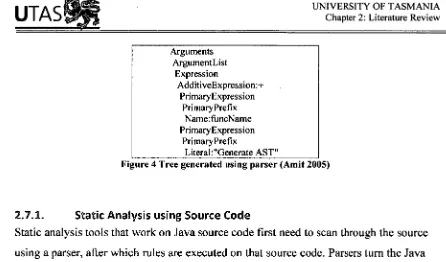
Figure 4 Tree generated using parser (Amit 2005)
2.7.1. Static Analysis using Source Code
Static analysis tools that work on Java source code first need to scan through the source
using a parser, after which rules are executed on that source code. Parsers turn the Java
source code into a simplified tree-like structure known as an "Abstract Syntax Tree", an
example can bee seen in Figure 4. Most static analysis tools execute an external parser to
do the base work for them allowing the analysis tool to concentrate in detecting . After
the tree is generated, the static analysis tool executes rules on the tree to find possible
problems (Amit 2005).
if (myObject = null)
[image:23.557.75.521.65.327.2]myObject.doSomething();
Figure 5 Example of bug found with Static Ana ysis tools
2.7.2. Static Analysis using Java Byte Code
Instead of running on the source code, some tools instead work on the bytecode of the
compiled Java Class files, an example of bytecode can be seen in Figure 6. As with
source-based static analysis tools, most bytecode-based tools employ the use of an
external parser first, after which the rules are executed on the parsers output. The types
of problems that can be found using the Java bytecode are similar to the ones that can be
found using source code analysis, neither approach has significant advantages or
disadvantages over the other; they are simply different approaches to the same task
UTA
SM
UNIVERSITY OF TASMANIA Chapter 2: Literature Reviewpublic class BadClass { public void doBadStuff() {
[image:24.557.72.510.67.342.2]System.gc();
Figure 6 Code that exhibits the bug patterntaken from (Goetz 2006)
public void doBadStuff(); Code:
0: invokestatic #2; //Method java/lang/System.gc:()V 3: return
Figure 7 Bytecode listing for code in Figure 6 taken from (Goetz 2006)
2.7.3. PMD
PMD (InfoEther 2006) is a static analysis tool which works on Java source code
searching for potential bugs. PMD is able to detect a wide range of potential problems:
unused local variables and parameters, wasteful String/StringBuffer usage, unnecessary
if statements, for loops that could be while loops and finally copy/pasted code. Rutar, N.,
C. B. Almazan, et al. (2004) states that in addition to the traditional bugs detected, PMD
also detects bugs that are stylistic conventions that may cause potential problems if used
inappropriately.
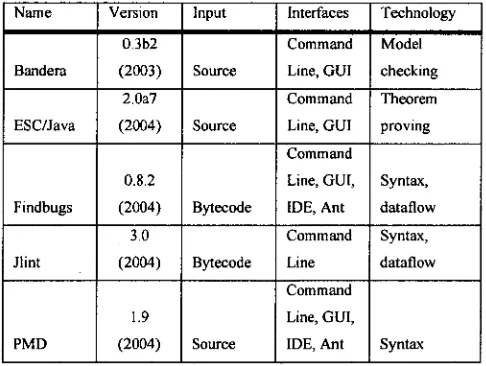
Table 4 Bug finding tools and their basic properties (Rutar, Almazan et al. 2004)
Name Version Input Interfaces Technology
0.362 Command Model
Bandera (2003) Source Line, GUI checking
2.0a7 Command Theorem
ESC/Java (2004) Source Line, GUI proving Command
0.8.2 Line, GUI, Syntax, Findbugs (2004) Bytecode IDE, Ant dataflow
3.0 Command Syntax,
Jlint (2004) Bytecode Line dataflow Command
1.9 Line, GUI,
PMD (2004) Source IDE, Ant Syntax
2.7.4. Bandera
Bendera (Bandera 2006) is a tool framework for model checking Java programs. The
Bandera framework is organized as a modular pipeline of tools, each tool
[image:24.557.179.422.447.630.2]UTAS
UNIVERSITY OF TASMANIA Chapter 2: Literature ReviewBandera requires the programmer annotate their source code with the type of checks to
be performed, or nothing specified if the programmer only wants to verify some
standard synchronization properties. Without annotations Bandera verifies the absence
of deadlocks (Rutar, Almazan et al. 2004).
2.7.5. FindBugs
FindBugs (FindBugs 2006) is an open source bug pattern matcher which works with
Java bytecode. The source, binaries and documentation are available from
http://findbugs.sourceforge.net/. It is a static analysis tool that is able to be extended by a
user to find custom defined patterns (Hovemeyer and Pugh 2004; Rutar, Almazan et al.
2004; CheckStyle 2006).
Currently, FindBugs contains detectors for about 50 bug patterns. All of the bug pattern detectors are implemented using BCEL, an open source bytecode analysis and
instrumentation library. The detectors are implemented using the Visitor design pattern;
each detector visits each class of the analyzed library or application. (Hovemeyer and Pugh 2004)
The bug detectors that FindBugs has implemented can be put into 4 main categories:
• Class structure and inheritance hierarchy detectors that look at the structure of
the classes.
• Linear code scan detectors that work on methods of classes to be analysed.
• Control sensitive detectors which use a control flow graph for analysed methods.
• Dataflow detectors are the most complex of the detectors; these use the control
and data flow of the application to find bugs. An example of a programming
error which dataflow detectors can find is the de-referencing of a null
reference-variable.
(Hovemeyer and Pugh 2004)
UTAS
UNIVERSITY OF TASMANIA Chapter 2: Literature Review1. Raising the awareness of developers of the usefulness of bug-finding tools
2. Incorporating bug-findings tools more seamlessly into the development process: for example, by providing them as part of Integrated Development Environments
3. Making it easier for developers to define their own (application-specific) bug patterns
4. Better ranking and prioritization of generated warnings 5. Identification and suppression of false warnings
6. Reducing the cost of bug-finding analysis, through incremental analysis techniques,
and background or distributed processing
Table 5 Conclusion and future work (Hovemeyer and Pugh 2004)
The paper "Finding bugs is easy" (Hovemeyer and Pugh 2004) makes suggestions on
future work that could be done with FindBugs; Table 5 shows these. The key points of
the suggestions are the raising of awareness of bug-finding tools, the integration of these
tools into a developer's workflow and the identification of ways to keep the detection at
a high quality so as to not overwhelm the developer with false positives.
2.7.6. Jlint
Mint (JLint 2006) is a pattern matching tool which works on Java bytecode. Mint is
similar to Findbugs as it also is an open-source tool which performs syntactic checks and
dataflow analysis. In addition to this, JLint also has an additional detector for finding
multi threaded problems and checking for deadlocks on resources by building a lock
graph and ensuring that there are never any cycles.
JLint is not easily extendable by the user to find additional patterns (Rutar, Almazan et
al. 2004).
2.8. Dynamic Analysis
Dynamic analysis is the process of testing an application at runtime; this is
predominately done by passing in various inputs and ensuring the expected output was
returned. Dynamic analysis can be automated to execute against an application during
UTASM
UNIVERSITY OF TASMANIA Chapter 2: Literature Review2.8.1. Test-driven Development
The idea behind test-driven development is to write a test case for a new piece of
functionality before the actual code is written, the code is then written to pass the test.
(Edwards 2003) discusses the benefits of students learning to program through this
methodology. By learning to code an application in smaller pieces instead of the usual
'big bang' approach taken by students, they learn to be more confident in the piece they
just wrote, thus allows them to make changes and additions with great confidence.
2.8.2. Junit
Junit is an open source unit testing framework for creating and running unit tests for the
Java programming language. Junk was created by Kent Beck and Erich Gamma. When
written, a unit test will test a piece of code to ensure the expected functionality of a piece
of code works as expected. A Junk test case works by calling pieces of code, asserting
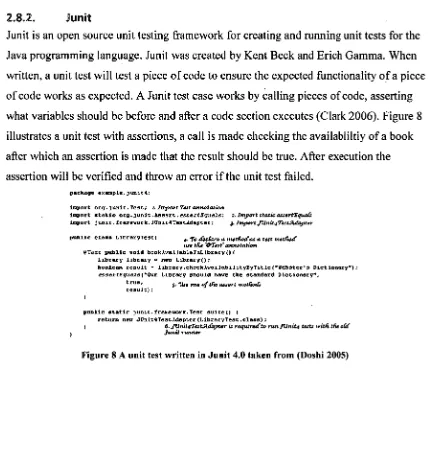
what variables should be before and after a code section executes (Clark 2006). Figure 8
illustrates a unit test with assertions, a call is made checking the availabliltiy of a book
after which an assertion is made that the result should be true. After execution the
assertion will be verified and throw an error if the unit test failed.
package example.junit4;
import org.)unit.Test; z. Import Test annotation
import static Org.]unit.ASSert. essectEguals; 2. Import static assertiquaa import junit.tramevork.JCn1t4TestAdapter; 3. Import Jilnit4TestAsfapter
public class LibraryTest( 4. TO 4cfare a rturtfuxe as a test metriod use tfie Wrest annotation
@Test public void bookivailableInLibrary01 Library library nro Library();
boolean result - library.checkAvailabilityByTitlerzlebster's Dictionary.); essee tEguais rOur Library should have the standard Dictionary",
true, 5. lise CMS of trill assert meths& result);
public static junit.fraraevork.Tesc suite() ( return flee JOnitiTestAdapter (LibraryTest .elass);
[image:27.559.85.513.252.703.2]6. fliniterest.ada,ster is required to ',tn./Unite tests tritfi tfie oar junit runner
2.9.1. Hyper Text Mark-up Language (HTML)
Hyper Text Mark-up Language (HTML) (Raggett, Le Hors et al. 1999) is the standard
language of the Internet. HTML was developed in the early 1990s by Tim Berners-Lee.
HTML files are simply text files consisting of text interspersed with standard tags used
to `mark-up' the formatting by specifying font type, where to place images, etc. A web
browser will read in the formatting and render the page onto the screen based on the
mark-up instructions. Links can be created between files to create a network of
information. HTML files were used early on to help people share information (Raggett,
[image:28.557.123.517.374.515.2]Le Hors et al. 1999).
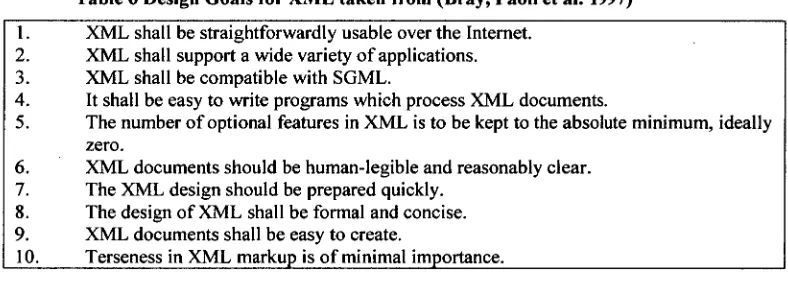
Table 6 Design Goals for XML taken from (Bray, Paoli et al. 1997) 1. XML shall be straightforwardly usable over the Internet.
2. XML shall support a wide variety of applications. 3. XML shall be compatible with SGML.
4. It shall be easy to write programs which process XML documents.
5. The number of optional features in XML is to be kept to the absolute minimum, ideally zero.
6. XML documents should be human-legible and reasonably clear. 7. The XML design should be prepared quickly.
8. The design of XML shall be formal and concise. 9. XML documents shall be easy to create.
10. Terseness in XML markup is of minimal importance.
2.9.2. Extensible Mark-up Language (XML)
Extensible Mark-up Language (XML) (Bray, Paoli et al. 1997) is a datastructure
consisting of a set of tags to mark-up the data. The design goals of XML can be seen in
Table 6. "... XML, describes a class of data objects called XML documents and partially
describes the behavior of computer programs which process them. XML is an application profile or restricted form of SGML, the Standard Generalized Markup Language [ISO 8879]. By construction, XML documents are conforming SGML documents.
UTA
SS
UNIVERSITY OF TASMANIA Chapter 2: Literature Reviewcharacter data, and some of which form markup. Markup encodes a description of the
document's storage layout and logical structure. XML provides a mechanism to impose constraints on the storage layout and logical structure." (Bray, Paoli et al. 1997)
2.9.3. ASP.NET 2.0
ASP.NET (Microsoft 2006) is a web programming technology created by Microsoft that
allows developers to create dynamic web pages. ASP.NET web pages consist of both
HTML mark-up and source code to enable the page to be dynamic. The source code of
an ASP.NET web page can be written in any one of a number of different programming
languages including C#, VB.NET and C++ (Mitchell 2006).
2.9.4. JavaServer Page (JSP)
"JavaServer Pages (JSP) technology provides a simplified, fast way to create web pages that display dynamically-generated content. The JSP specification, developed through
an industry-wide initiative led by Sun Microsystems, defines the interaction between the server and the JSP page, and describes the format and syntax of the page." (Sun 2005)
JavaServer Page (JSP) is a server side technology used for generating dynamic web
pages. JSP uses a combination of XML tags and scriptlets to define the logic of the page,
it also separates the formatting (HTML or XML) tags and returns these to the response
page. By using this approach the page logic is separated from the design and display.
JSP pages are compiled into servlets when it is called for the first time, subsequent
requests for the page do not require further compilation unless the original JSP is
modified (Sun 2005).
Although JSP pages are compiled into servlets, they have additional benefits over
straight Java servlets in that they are simpler to develop, and allow a logical separation
3. Module selection
3.1. Introduction
In designing a solution with which to either prove or disprove the hypothesis presented
above, a careful selection of components must be made to ensure that the final system is
suitable in testing the hypothesis. First the choice of development platform is explored in
Section 3.2 as the decision will affect all aspects of the system. Section 3.3 investigates
the base framework upon which the rest of the system will be built. Section 3.4 details
the importance of analysis tools in the system. Section 3.5 presents the 3 spheres of
analysis and their role in the system, an investigation into the choices of each sphere is
presented. The chapter concludes with Section 3.6 which explains which technologies
were excluded from the system.
3.2. Development Platform
The choice of development platform for TEACH is an important component. The
decision of development platform affects the ease at which the system can be developed;
a wrong decision can be detrimental to the project. The longer term issue of support and
further development must be taken into consideration when the decision is made.
The two leading web based platforms are Microsoft's ASP.NET (Microsoft 2006) and
Sun's JSP (Sun 2005). An overview of both platforms reveals similar feature sets, both
being well supported online, and both feature many tools to aid development.
A decision on development platform can't be done without looking at the overall
environment in which it would be placed. Future students that take on the
re-development or extension of the system may be at a disadvantage if ASP.NET were
chosen as the School of Computing currently only teaches Java and as a result, they may
not be able to easily build future work onto it. Additionally, the School of Computing
UTAS
UNIVERSITY OF TASMANIA Chapter 3: Module Selectiongreat advantage to utilise the existing facilities, rather than attempt to setup a new server
environment.
It was decided to use JSP as the development platform due to the set-up of the School of
Computing's web server infrastructure, policies, and teaching and learning curricula.
3.3. Base Framework
With the decision to go with JSP, the next issue was that of development. Should
TEACH be started from scratch so that it can be crafted with its needs being met
explicitly or should TEACH be built on top of an already existing framework?
Starting from scratch is always an attractive solution, as you get to build it to your vision
of the system without compromising with another person's decisions. Unfortunately
developing this way will drastically increase the development time of the system, and
would require reinventing the wheel, as well as reinventing the same bugs which will
require debugging.
Using a framework that has already been built will be advantageous. A framework
completed by Cynthia Sim is AAPT; which was developed as a base framework for a
web based programming tutor. AAPT contains many of the features required by
TEACH: tutorial selection, a compilation system and a database backend allowing
adding/updating of tutorials.
The decision was made to use AAPT as the base framework and to extend it. The
advantage of taking this approach is a reduction in development time, meaning more
time can be spent on the TEACH specific functionality, instead of the generic functions
of a web based tutorial system. One potential limitation of using AAPT is being required
to learn how the system is built and discovering where it can be extended potentially
taking a significant length of time; however this is a small price to pay for a
3.4. Choice of Analysis Methods
The choice of analysis methodology took a significant portion of the planning time. A
set of analysis tools would be required to run over a students work to detect problems,
bugs and errors.
Picking a single style of analysis would pickup a specific span of problems, but may not
cover a wide range leaving some errors unnoticed. After consultation with my
supervisor, an agreed set of analysis was decided to form the boundaries of the project.
These boundaries are discussed in the section 3.5.
3.5. The 3 Spheres of Analysis
The three spheres were designed to complement each other, each detecting a different
range of issues the student may encounter, or that the lecturer may want to detect.
By focusing each sphere on a specific set, the best solution can be found for each. By
combining the results of each, the union of the different test regimes can be provided.
Figure 9 shows how the different spheres could complement the others to provide
greater coverage.
With the wide range of solutions available for each of the spheres, it is important that the
chosen solution is extensible. Future requirements from the School of Computing may
require TEACH to be modified, by having the spheres able to be flexible and extensible
it will allow certain aspects to be changed by the lecturers without requiring code
UTAS*
UNIVERSITY OF TASMANIA Chapter 3: Module SelectionFigure 9 Graphical representation of the 3 Spheres of Analysis
1. Sphere 1: Static Analysis
Static code analysis is a technique for checking an application for potential bugs without
actually executing it. Static analysis works at the source level, or the byte code-level, of
an application.
This was seen to be an important module to TEACH as it would be the one to most
directly affect the students' perception of the system. The types of errors found and the
amount of feedback given was an important factor in deciding which tool to use in the
solution.
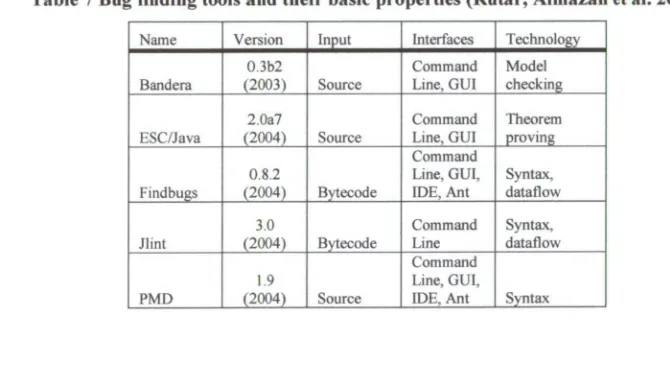
Table 7 Bug finding tools and their basic properties (Rutar, Almazan et al. 2004)
Name Version Input Interfaces Technology 0.3b2 Command Model Bandera (2003) Source Line, GUI checking
2.0a7 Command Theorem ESC/Java (2004) Source Line, GUI proving
Command
0.8.2 Line, GUI, Syntax, Findbugs (2004) Bytecode IDE, Ant dataflow
3.0 Command Syntax, Jlint (2004) Bytecode Line dataflow
Command 1.9 Line, GUI,
[image:33.558.117.452.528.717.2]UTAS
UNIVERSITY OF TASMANIA Chapter 3: Module SelectionThe decision on which tool to use was not affected by whether the analysis was done on
the source code, or the bytecode. In chapter 2 a number of tools were reviewed, Table 7
shows their some of their basic properties. Each will now be considered against the
criteria for this project and against each other.
Bandera
Bandera was not practical for standard use. It requires the programmer to annotate their
source code with the checks that should be performed. Without these assertions Bandera
does not run on any useful piece of Java code (Rutar, Almazan et al. 2004) and it is
difficult to see how students could easily produce these annotations without
complicating the tutorial system. Due to this limitation Bandera was not considered
further as a solution for the system.
JLint
JLint had many features that were desirable. For example it performs syntactic checks as
well as dataflow checks. However JLint was not easily extensible which ruled it out as a
viable choice when it was against similar tools which were extensible in an easier
manner. As mentioned earlier extensibility is an important criteria due to future
expansion.
PMD
PMD performs syntactic checks on a piece of source code, however it does not perform
dataflow checks. The dataflow checks will be advantageous for TEACH as problems
identified in the literature review would be detected.
Additionally many of the bugs detected in PMD depend on programming style "For
example, having a tly statement with an empty catch block might indicate
that the caught error is incorrectly discarded"(Rutar, Almazan et al. 2004), which may
UTAS
UNIVERSITY OF TASMANIA Chapter 3: Module SelectionFind Bugs
Similar to JLint, FindBugs possessed many features that were desirable for TEACH.
FindBugs performs dataflow checks on source code, which is advantageous due to the
type of errors that students commonly perform. FindBugs provides a GUI interface in
addition to the command line interface. The GUI assisted in learning how FindBugs
performed its analysis and the options available which would be invaluable when trying
to interface with TEACH. Reports are able to be exported to HTML or XML format,
allowing the results to be easily obtained.
Finally FindBugs is flexible both in execution and in extensibility. When called from the
command line parameters are passed to it to specify what checks to perform, allowing
each execution of it to perform differing analyses if desired by the lecturer. Extensibility
was previously mentioned as being an important feature as it will future proof the
TEACH solution.
3.5.2. Sphere 2: Style Checking
By keeping a consistent style across a project such as coding style, indentations,
methods, it will benefit the project by being easier to maintain (Hammurapi Group
2006).
A style checking module in TEACH ensures the students are learning to develop to a
consistent theme. Teaching students to code in a consistent manner as they are starting to
learn programming may help reinforce a good coding style.
Two different style checking applications were examined in the literature review. Both
were open source applications that covered a range of style errors. Checkstyle was
chosen, as it was better documented, possessed a solid list of the type of style errors that
are found, was very easily modifiable. CheckStyle was able to be quickly integrated into
TEACH as it had a simple command line interface and the XML reports were structured
Detecting logic and style problems is advantageous; however an application can
successfully compile, be bug free, but still may not do what is required.
Although satisfied with the static analysis and style checking, the supervisor required a
way to be able to detect if the student wrote the program to the specifications and didn't
program a series of 'print' lines that would output the expected result instead of
programming the required functionality.
It would be advantageous if more than one solution can be specified with a definition of
"This is a good solution" or "This is a bad solution".
Literal Matching
A method was required which could match the code submitted by the student to what the
lecturer expects from the student.
Literal matching of text was explored first. It had the positive aspect of the lecturer
explicitly defining what the student should type for their solution to be correct for the
tutorial. Unfortunately being this precise has the major disadvantage of being too strict
on what the student could do. In order for the student to have been deemed to have
coded a correct solution, they would have to have exactly the same text as the lecturer — the same variable names, the same white space, etc. This was too restrictive on the
student, and so other options were explored.
Diffutils
Unix diff is a suitable way to match to different pieces of source code (the one submitted
by the student, and the reference one from the lecturer) (Free Software Foundation
2000).
Diff was built for this kind of function, its sole purpose is to compare the differences
between two different source files. Unfortunately it was not suitable for this system. It
UTASOM
UNIVERSITY OF TASMANIA Chapter 3: Module Selectionbetween, for example, four possible solutions, the amount of data coming back would be
overwhelming and would take much development to create any meaningful feedback
from this system.
Regular Expressions
Without a suitable solution readily available, the decision was made to explore a custom
solution. Regular expressions came up as a way to have softer matching of text. Instead
of requiring an exact match of text, by using regular expressions it is more flexible. With
exact text matching, a simple task such as matching a variable declaration is difficult, as
there is a variable amount of white space that could be used eg.
int valuel = 5;
versus
int valuel=5;
By using regular expressions, the problem of white space can be easily overcome, as
well as handling the choice of identifier. Figure 10 shows a regular expression used in
TEACH to detect any String or int variable decl
a
ration.(StringlinO\S±4±(\s±\=1\=)(\s+1)4+;
Figure 10 Regular Expression to match a String or int declaration
Use of regular expressions also allows backtracking, meaning that a variable can be
matched in one section, and then be used to match further in the expression.
An example is a variable declaration then an assignment to that variable later in the
code.
3.6. Other Analysis
Dynamic analysis considered but was not included in TEACH. Although it would have
complemented the solution, the added complexity would not have been worth the
additional effort at this stage. Getting a solid focused analysis framework down was a
UTASSIA
UNIVERSITY OF TASMANIA Chapter 4: Architecture, topology and configuration4. Architecture, Topology and Design
4.1. Introduction
TEACH was built as an extension to the original AAPT system created by Cynthia Sim.
The development PC was an Athlon 3000+ with 512MB of RAM. Windows XP was
installed, with TEACH running on Tomcat 4.1.31, with Java 5.0 Release 6.
The remainder of this chapter will explain the architecture of TEACH, it will first give
an overview of the file system structure of the system, explain the database and finally
the chapter will cover the application and the software solution.
4.2. Directory Structure
The directory structure of TEACH — which is essentially inherited from the original
AAPT implementation — is split into two main components:
• The core components: the website, executable Java classes and databases
• External resources: tutorial questions, temporary submit directories, and other
executables
Each of these will now be elaborated.
4.2.1. Core Components
The core components sit inside the Tomcat \webapps \AAPT folder. There are a total of three folders:
• db. This directory contains the Microsoft Access database that is used to store settings.
• j sp. This directory contains all of the website pages, images, and j sp files
required for TEACH to run.
• WEB-INF. This directory contains all classes required to run the servlets.
• Access. This package contains all the classes required to retrieve information from the Access database.
• Application. This package contains the servlet classes used to submit code to be reviewed from the clients, and return the results to them.
o XML parser. This sub package of the Application package is used to parse the XML outputted from FindBugs and Checkstyle and create
objects to represent the information. This is explored further in sections
4.4.2 and 4.4.3
• Entity. This package contains all of the object classes: Questions, XML data, bugs, etc. It will be used by classes in the other packages.
(Sim 2005)
4.2.2. External Resources
The external resources folder is used to hold everything not directly related to the
website, including:
• Checkstyle. Holds the Checkstyle 4.2 application
o Check_settings. Stores the customisable style .XML files
• Exercises. The source files of the tutorials/exercises
• FindBugs. Holds the FindBugs 1.0.0 application.
• SubmitWork. When students submit their source code to be checked, it is temporarily stored here.
4.3. Database Design
TEACH uses a database to store information on the questions and solutions. The original
AAPT database was used with many modifications.
There are 4 tables which are used to define all of the customisable aspects of TEACH, a
dd pt_solution
s 'id (Lid s bcation
findbugs arguments checkstyle_xmlpath
(Lid q_name q_location q_desc q use
aapt_defa u Its
El
findbugs_arguments checkstyle_xmlpath
UTAS*
UNIVERSITY OF TASMANIAChapter 4: Architecture, topology and configuration
• aapt_question. Stores the questions name, the path to the tutorial source
code, the description displayed on the webpage, and whether it is enabled and
shown on the webpage.
• aapt_solutionweight s. This is used to define the search patterns and how
much each successful match is worth. Also definable is the maximum number of
times the pattern can be matched against the piece of source code.
• aapt_solution. This is used to allow the lecturer to override the default
settings used in FindBugs and Checkstyle and allows them to specify their own
settings. The naming of this table is due to its previous function with AAPT.
• a apt de f ault s. The default settings for FindBugs and Checkststyle
Although TEACH expanded on the original work of AAPT, to simplify the
implementation, all table names were kept to the original naming scheme of prefixing
each table name with "aapt_".
aa pt_q uestio ii aa p t_so lutio nweights
[image:41.552.171.424.418.613.2]ID q_id expression weight max matches
if
IC),"
I Return
errors •
H-YE
As indicated above, TEACH was built on top of the pre-existing web-based tutorial
system, AAPT, which simplified development of the system. More time was able to be
spent evaluating appropriate tools and implementing it well.
The majority of the development effort of TEACH was spent on the 3 spheres of
analysis: Static analysis, Style checking and Code matching. Figure 12 shows how the
three spheres are integrated into the system.
L Source
ompi
'errors? NO
1. Run additional
analysis
Static analysis
Style checking
+
Code Matching 41
[image:42.554.170.430.285.536.2]Parse XML
Figure 12 TEACH architecture
4.4.1. Compilation of Source Code
Compilation of the submitted code is the core required functionality of the system.
AAPT provided the functionality for compilation, with some slight modifications made
for TEACH. AAPT implemented the code compilation by creating a folder to store the
submitted code, with the folder name based upon the IP address of the client machine.
UTASg$
Chapter 4: Architecture, topology and configuration UNIVERSITY OF TASMANIAworking within multiple browser windows, or if it appears that many clients are
originating from the same IP. TEACH modified this to instead assign each submission a
unique number, creating a folder with this number to work within, thus preventing
concurrency issues.
Within the code of the tutorials, each may have its own class name, due to Java having a
strict file naming convention for Java files, when code is submitted it is saved in its
allocated folder named as the tutorial eg. Division.Java.
If there were any errors during compilation, the system records them, halts any further
analysis, and returns the error messages to the user. If compilation of the student's code
was successful, then further analysis is run. The code is compiled using the standard
Java compile tool (javac)
4.4.2. Sphere 1: Static Analysis
As discussed in section 3.5.1, FindBugs was chosen as the analysis tool for static
analysis of submitted code. It was integrated into the TEACH system to provide
feedback on the students work. This is achieved by invoking FindBugs on the folder
where the students work has been saved and compiled, Figure 13 shows the default
command line call TEACH uses. The FindBugs application will then proceed to detect
problems in the students code, the types of problems checked for is dependant upon the
command line call, Figure 14 shows an example of how different checks can be added
and removed.
findbugs -textui -low -xml:withMessages -outputFile bugs.xml -sourcepath filePath
Figure 13 TEACH default settings for FindBugs
Once analysis is complete FindBugs compiles a detailed report, exports it to an XML
Figure 14 FindBugs call with selected visitors
A custom XML parser (FindbugsParser. . java) processes the bug report and builds up a class object. This class object contains list of each bug's individual details:
type, short description, line where it occurs, etc. These details are used to present the
student with an understandable list of problems. The class object also contains the
detailed information on each bug type, which will enable the student to resolve the bug.
The final class object is passed onto the next servlet which handles the formatting of the
webpage and how the list of bugs will be displayed to the student.
As discussed in section 3.5.1, one of the features of FindBugs is its flexibility and ease
of being extendible. TEACH has embraced this and made it easy for the lecturer to
define what checks should be performed. Each tutorial is able to have the command line
call that will invoke FindBugs on student's code defined individually. This allows the
lecturer to define which type of bugs should be looked for, and also to define which of
the bugs found should be shown. Each bug has a priority level of how severe the bug is
(High, Medium and Low). It may be decided that for beginning tutorials, only High
priority bugs will be displayed, but for the more advanced (e.g. 2nd year students), all
levels of bugs should be displayed.
Lecturers are able to create their own custom bug detectors and place them into the
plug in subfolder. The lecturer may want to create custom detectors to detect of the student has made a call to a custom School of Computing class file. For example, it may
be advantageous to detect that the student initialised, used, and then destroyed the
custom classes.
If the tutorial has not defined its own FindBugs settings, then default settings will apply.
TEACH will call FindBugs to perform the FindBugs default checks, and to report High,
UNIVERSITY OF TASMANIA Chapter 4: Architecture, topology and configuration
UTASW
4.4.3. Sphere 2: Style Checking
As discussed in section 3.5.2, CheckStyle was chosen as the code style analysis tool. It
was integrated into the TEACH system to provide feedback on the students' work. This
is achieved by invoking CheckStyle on the folder where the student's code is held.
CheckStyle requires that when it is executed, the path of an XML file will be passed to
it. This XML file specifies the standards that the code being checked should adhere to.
TEACH allows the lecturer to define for each tutorial question, which coding style
should be followed. The setting for which XML file to use for each tutorial question is
retrieved from the database as required; if no file has been specified, then the default
TEACH coding style XML file is used.
This flexibility will allow a lecturer to define their own standard for style checking over
a set of tutorial questions, and allowing for individual questions to have their own style
if necessary. Figure 15 shows the default invocation of Checkstyle and a call using a
different XML file for that tutorial question.
checkstyle-all-4.2.jar -c TEACH_default_checks.xml -f xml -o checkstyle_errors.xml *java
checkstyle-all-4.2.jar -c Q37_checks.xml -f xml -o checkstyle_errors.xml *.java
Figure 15 Example executions of CheckStyle
4.4.4. Sphere 3: Code Matching
Sphere three required a custom analysis tool to be created. The Java regular expression
API was used to match the students' code against patterns defined by the lecturer. The
lecturer may define multiple patterns in the database to be matched for a tutorial. Each
pattern has other properties that can be defined: the point value for the pattern matching
and the maximum number of times the pattern can accrue points for matching.
The code matching module, when called on a source file, will lookup the tutorial
question in the TEACH database, and each pattern defined for the tutorial question will