Implementations of Virtual Organization in the Wireless Home Networking
Environments
Victor Chang
School of Electronics and Computer Science
University of Southampton, UK
[email protected]
Abstract
The objective and motivation for this paper is to simplify the deployment for Virtual Organization (VO) and investigate the possibilities to deploy in smaller areas and in the Wireless Local Area (WLAN) environments. This paper demonstrates a break-through in the current deployment, where large numbers of computers, software, resources, people and spaces are no longer required, and can be replaced by a small number of computers, resources and people in the secure Wireless Home Networking (WHN) environments. This successful deployment not only transforms the way we perceive about VO, but also further reduces the deployment costs, thus making the implementations of VO affordable, achievable, ‘portable’ and customizable suiting for different needs. This new concept is strongly supported in the deployment scenarios where two mainstreams of the wireless services were carefully examined, and both types of wireless services were successfully implemented, thus establishing two secure and robust Wireless Local Area Networks, where the interactions for resource sharing can take place in collaborative, convenient and secure ways. Furthermore, four different techniques for resource sharing and collaborative work are demonstrated in this WHN VO model, which are summarized as the lessons learnt for the next-generation WHN.
1. Introduction
Virtual Organization (VO), or Virtual Research Organization (VRO), is a group of Grid users with similar interests and requirements who are able to work collaboratively with other members of the group and/or share resources regardless of geographical location [6, 9]. The resources include data, software, CPU time, storage space, and collaboration allows researchers to solve problems simultaneously. When the term “Virtual Organization” (VO) is discussed and presented, the majority of papers emphasize on the high-level implementations of the Grid Infrastructure and Web Service, which include the implementation of different Grid-based technologies and integrations of all different Grid/Web Services in the collaborative and resource-sharing environments [7,8,9,11,14]. There is a common phenomenon among every VO, which is that all these implementations are based on a very large-scale development, or have taken place at several organizations
where the space for such implementation is considered huge comparing to the home environment. On the other hand, this paper attempts to demonstrate that a VO is not necessarily taking place on such a large scaled deployment, but the deployment can be set up and used in the wireless home networking environment.
The content of this paper is divided as follows. The first section demonstrates the wireless middleware technologies, where two different types of wireless home networks were built, with their advantages and disadvantages presented. The second section describes the implementation of workstations and two centralized servers in the Wireless Local Area Network (WLAN) environment, where Windows and Linux platforms on 32-bit and 64-bit computers have been deployed. The final section is a scenario based on the resource sharing and collaborative work between the two WLAN, and the summarized research contributions for the e-Science and e-Learning community.
2. Wireless Home Networking Overall View
There are several papers [4,5] describing the home wireless networking, but few of them have addressed the issue of different deployment scenarios where different combinations of the wireless services and middleware setting up, and the benefits and contributions are then summarized based on such experiences. In order to understand the differences between home wireless services, at least two different combinations of the home wireless technology need to be investigated. As a result, action research and experimentation are the research technique for this paper.
2.1 Comparisons between two mainstreams
router in the researcher’s sibling home, and the second wireless network was set up based on BT-Yahoo broadband and the 1800HG wireless router at the researcher’s home. Based on the action research, advantages and disadvantages are summed as Table 1. Combinations of
Wireless technology
Stream 1: AOL broadband + Belkin / Netgear ADSL wireless router
Stream 2: BT-Yahoo broadband + BT 1800 HG wireless router
Total expenses (if there are one router + 2 desktops + 2 laptops)
Approximately £100 (based on market price in February 2005).
Approximately £200 (August 2005). A more expensive package.
Additional equipment required
USB Adaptor for PC, none for laptops with wireless abilities.
Wi-Fi Adaptor for each PC, and wireless card for each laptop.
Monthly fees
(December 2005) £30 (unlimited, 2Mbps) £27 (30 GB, 2Mbps)
Purpose of uses Personal uses. May require additional set up for server-side uses.
Personal and server-side uses.
Level of
difficulties to set up internet connections
Easy to intermediate (though there were problems at the beginning)
Easy to intermediate.
Compatibility between router, broadband and operating system
Compatible on Windows 2000/ XP/ 2003/Macintosh.
Fully compatible on Windows 2000/XP/ 2003/Macintosh. Linux requires troubleshooting.
Operating systems for the connected PC/laptops
Windows, Linux (mainly Redhat and SuSE) and Macintosh
Windows, Linux (mainly Redhat and SuSE) and Macintosh
Security (which is
better?) -- Better. firewall. In-built Only HG1800 router can work with this specific broadband protocol.
Speed 11-108 Mbps depending on wired and wireless cards.
54 Mbps (wireless) and 100 Mbps (wired).
Upgradeability for hosting web servers
No. Required another Domain Service Provider.
Can upgrade to BT-Business. Minimum £45 a month.
Maximum number of PC/laptops connected
8 (6 is usually the
optimum number) 10
According to Table 1, it is obvious to identify that the second stream is more expensive if the home wireless networking is for personal uses but not for high-end server uses, however it offers a higher level of security due to the in-built encryption and firewall. Security features include Wired Equivalent Privacy (WEP), which is a technique of encoding the transmissions from PC-to-PC with the 64 and 128 bit encryption: This feature is also available within Windows XP with Service Pack 2. Wi-Fi (wireless fidelity) Protected Access (WPA) is a more advanced encryption mechanism for wireless connections, which is available in HG1800 as the 64-bit encryption with a serial number as the password. Another
feature is the Media Access Control (MAC), in which each machine address is given to each Wi-Fi Adaptor, so that other PC/laptops with the known addresses can be used in the Wireless Local Area Network (WLAN).
3. Deployment of Two Wireless Local Area Networks
The common technique for the wireless home networking environment is to set up a centralized server for information management and control [13], and this method can enhance a higher level of security. In order to perform Wireless Web Services applications and server-side administrations, both Windows and Linux platforms need be implemented. There are two central 32-bit servers on each site, one is based on Windows Server 2003 and the other is based on Redhat Enterprise Linux (RHEL) 4, which are used as the server for the wireless network management. The reason is that both 32-bit servers offer the stable and compatible environments between router’s driver, broadband, WS applications and OS. There is a distinguished difference between setting up wireless home servers and setting up organizational servers, the driving factor being “the easiness for maintenance”, which influences the designs (system and architecture) and implementations (single or multiple types of wireless communications) of the wireless home networking.
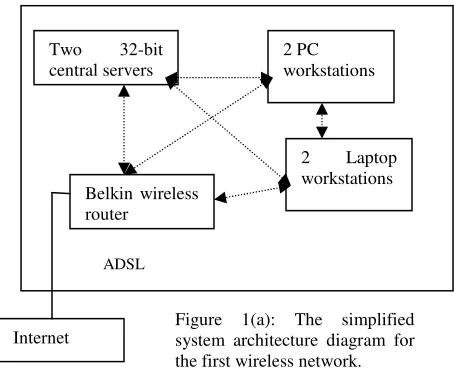
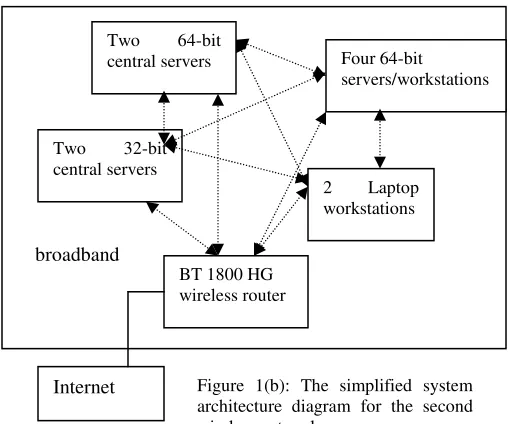
In the first wireless network, two desktops and two laptops were wirelessly connected to the internet with one centralized server, managed by the Windows Server 2003. In the second wireless network, four servers/workstations and two laptops are wirelessly connected to the internet with two 32-bit servers and two 64-bit servers managed by 1800 HG router, the network functionality of which is configured on the 32-bit Windows server. Figure 1(a) and Figure 1(b) show the simplified diagram for the System Architecture.
Belkin wireless router
Internet
ADSL
Two 32-bit
central servers 2 PC workstations
2 Laptop workstations
Figure 1(a): The simplified system architecture diagram for the first wireless network. Table 1: Comparisons between two main streams of home wireless
[image:2.612.27.298.98.572.2] [image:2.612.307.534.511.695.2]There are two common phenomenons between these two WLAN. Firstly, each central server and each workstation are dual-booted with XP/Server 2003 and RHEL4 with the Administrator privileges. However, the main difference is the central servers manage the router’s network configurations and user privileges, which include user name, passwords, files for sharing, levels of ‘accessibility’ between each computer, IP configuration and wireless management. All these privileges are maintained on the Windows and router configurations. Secondly, the work process for the application development is the same for both WLAN. The first step is to work under the local-host environment and ensure there is no bug on the development platform, and undergo a series of software engineering process, where development, debugging and testing take place within several software cycles. Once this stage is completed, the second step is to move the entire application onto the central server, and test whether the entire application can work smoothly. Before reaching this step, a mirror environment for both the workstation and server has been built, so that it takes little time for the application migration. Once this step is completed, the server can be used as a control center for the final versions software products, or as a portal gateway for the final version of Web Services.
The type of the software can also affect the work procedure. Taking the 64-bit .NET development as the example, the preferred way is to start the development and debugging process on the 32-bit Server 2003 platform, since the technique is to develop on the 32-bit platform first, before modifying it to the 64-bit applications [3]. Once the 32-bit .NET applications are running successfully, the next step is to port the entire application on the 64-bit platform and then undergo a series of 64-bit software engineering process. Figure 2 below is the diagram for 64-bit software engineering.
Figure 2: The work procedure for 64-bit .NET development
4. Virtual Organization – Key points in resource sharing and collaborative work in the wireless home environment
As “resource sharing” and “collaborative work” are amongst the two key factors for Virtual Organization (VO) [6, 7, 8, 12], at least two different networks are required for the demonstration, where different resources can be shared between people at two different places. Based on this analysis, “action research” and “experimentations” were carried out as the research technique. Two WLAN are integrated together, and each WLAN has its own versions of software for resource sharing. Each central server on two WLAN can be used for lending out its CPU time for Web Service job requests. There was a researcher on each side, whereas each tried to access to the other WLAN for resource sharing and Web Service jobs. A Virtual Private Network (VPN) was set up, and this was achieved by deploying each DrayTek router on each side, which was acting as the VPN server and gate-keeper for each server security. Figure Three on the next page is the simplified diagram. As discussed earlier, each sever is the main domain for its WLAN, hence the resource sharing route needs to pass through the server on the other WLAN. There are four ways for communications between these two WLAN, which include communications via browsers, or through “network mapping” on the Windows Explorer, or through “Remote Desktop”, or through “SSH Client” on remote shell. There are two sets of the passwords, and the first set of the passwords refer to the user password set by Windows Server 2003 or RHEL ES 4. The second set of the passwords refers to the user password on the .NET portal service, where the resources can be used and shared after the successful entry. The security is jointly managed by .NET authentication and the Stored Procedure on the SQL database server. On the central server itself, permission can be set on specific directories where only Administrators are allowed to access, but not with other users.
BT 1800 HG wireless router
Internet broadband
Two 64-bit
central servers Four 64-bit servers/workstations
2 Laptop workstations Two 32-bit
central servers
Figure 1(b): The simplified system architecture diagram for the second wireless network.
32-bit development
on a workstation Step 1: debugging
Porting 32-bit to
32-bit Server Step 2: testing
Step 3: moving to 64-bit platform
Go back if fail.
64-bit development
Work ok
Work ok
64-bit applications
[image:3.612.322.570.41.223.2] [image:3.612.44.299.43.255.2]The next-level of security is the X.509 certificate, which is issued by the central Windows 2003 server, and the purpose is to identify the right users for resource sharing. The X.509 certificate is centrally managed by the central servers, which act as the Certificate Authority (CA). Each client can selectively choose whether to include a X.509 certificate for additional authentication. When doing so, the server can first check the key-stores and finger-prints on the client and see whether it matches the registered ones on the CA. There is an additional security for wireless connections. On the router, wireless security can be configured on the web-based interface, whereby each user is required to enter the password before using Wireless Services: The passwords can be set for the automatic login.
5. Experiments and Testing Scenarios for Resource Sharing and collaborative work
The next objective is to demonstrate how resource sharing and collaborative work can effectively take place between these two WLAN. There are three scenarios, and each scenario is described below.
5.1 Scenario 1: Resource utilization through Remote Desktop and Windows Explorer
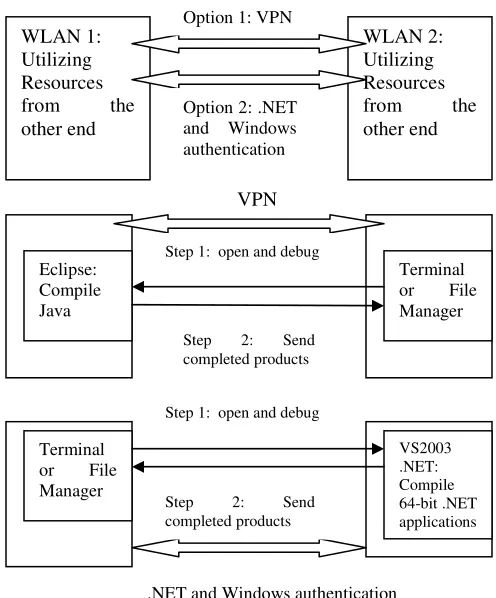
The term “Resource utilization” refers to “installing software, accessing to the shared files and opening the developer platforms (such as Eclipse) to compile software and delivering the finished products from the destination terminal to the request terminal through Remote Desktop and Windows Explorer”. There are two options for making this to happen. The first option is by using VPN and the second option is by using the .NET and Windows authentication on the internet.
Both options require a security mechanism: The first option requires a password authentication set on the VPN, and the second option requires the firewall configurations on the router, which allows a number of IPs to access to its computing resources. The second option offers a greater flexibility because of the possible implementation of the X.509 certificate. However, this adds additional levels of troubleshooting, which are not relevant to the secure WHN environment at this stage. Figure 4 below is the simplified diagram:
Belkin wireless router
Internet
ADSL
2 PC desktops
32-bit central server
2 Laptop workstations
BT 1800 HG wireless router
Internet
32-bit central
server (Windows) Four 4 64-bit server/ workstations (Windows/ Linux)
2 Laptop workstations Two 64-bit
central servers
Figure 3: Simplified Architecture for interactions between two WLAN. refers to the resource sharing option which requires authentication and authorization.
Authentication and authorization
V P N
.NET and Windows authentications
WLAN 1: Utilizing Resources from the other end
WLAN 2: Utilizing Resources from the other end
Option 1: VPN
Option 2: .NET and Windows authentication
Terminal or File Manager Eclipse:
Compile Java
VPN
Step 1: open and debug
Step 2: Send completed products
VS2003 .NET: Compile 64-bit .NET applications
Terminal or File Manager
Step 1: open and debug
Step 2: Send completed products
[image:4.612.62.553.39.290.2].NET and Windows authentication
[image:4.612.321.569.429.728.2]5.2 Scenario 2: Resource utilization and distributed computing on the Linux platforms via SSH Client and Exceed
This scenario is identical to Scenario 1, except (a) the use of Linux instead of Windows and (b) the job requests are distributed and shared amongst other Linux machines, including the high-end 64-bit applications. The SSH client is one of the best tools for command-line tasks, which are normally required in the Linux environment. Exceed is used, so that all the tasks on the Linux can be emulated on the Windows platforms. The Web Service software, OMII_2.3.1, is used for testing and resource sharing. OMII_2.3.1 is a collection of tested, documented and integrated software components that provide a standard platform for integrating e-Science middleware as well as a simple, secure web service-based Grid infrastructure for new e-Science users [10].
5.2.1 The JDK Testing: Utilizing GUI-Cauchy and Cauchy-GridSAM for running jobs and sharing jobs
The JDK testing was based on the top of multi-platform testing, which includes Redhat, SuSE and Windows platforms, and it also takes into consideration of (a) different JDK versions: Sun 1.4.2 (00 – 10), Sun 1.5.0 (01-05) and IBM JDK 1.4.2.1.0 (IBM Java142-2) and (b) postgres database 7.3.4 and 8.0.1 to test OMII_2.3.1. Before proceeding to carry out this testing, a matrix of different combinations of JDKs, certificates, databases and platforms was drawn. There were 64 combinations, out of which 14 combinations were selected for JDK testing. The OMII_2.3.1 application, also known as Graphical User Interface (GUI) Cauchy, was the core component used to test whether JDK testing was successful, because it took all the considerations of Tomcat, Axis and OMII_2.3.1 server-side components such as “Base/Extension” and “Services”. Upon the successful running of this application, it prompted for PlotWS services, which plotted the graph from the requested job. In order to test GUI-Cauchy, both clients GUI-Cauchy and server-side GUI-Cauchy should be installed, and at least one account should be open on the client and server side. To share jobs amongst distributed computers, the first task was to open an account with several service providers (SP), where each SP was assigned to each machine. There was not any need for any Condor Cluster pool, because the central server itself could act as a control center. After opening several accounts, the next task was to run GUI-Cauchy, which required
clicking “Run” on the GUI Interface. This implied that multiple job requests were distributed amongst different machines, where each machine was dedicated for a specific task. Upon the execution of the multiple tasks, it sent to the PlotWS service, where the final outcome was presented as a 3D Plot.
There was an advanced feature, Cauchy-GridSAM, which was specifically designed for multiple job sharing. Cauchy-GridSAM had the combination of three different OMII software components: GUI-Cauchy, GridSAM and Grimoires. In order to make this happen, several steps were required. The first step was to publish a ‘GridSAM’ service. The second step was to publish a ‘PlotWS’ service. The third step was to configure a FTP server in order to host the GUI-Cauchy and its output files. The fourth step was to configure the GUI-Cauchy and to make the multiple job sharing.
5.3 Scenario 3: Collaborations
The major purpose for this task was to mimic the scenario that a researcher can have real-time communications in two different places and can solve the scientific problems simultaneously. There was a wide range of software tools to assist real-time communications, which include Skype/VoIP, teleconferencing/live webcam, shared files and shared servers. Each researcher was to perform a specific task: The Researcher A from the Venue A was to access into the computing resources in the Venue B, and her task was to run the GUI-Cauchy on the computing resource of the Venue B. The Researcher B from the Venue B was to access to the computing resource on the Venue A. His task was to (a) install the Microsoft software products including Visual Studio .NET 2003; (b) developing and testing the .NET applications and finally (c) sending back the finished products back to computing resources on the Venue B. In order to understand more implications for collaboration, statistics such as time taken for each task and the level of difficulties (rated in the range of 1 to 5) were recorded down.
As an experienced .NET developer, Researcher B spent less than 1 hour to complete all the assigned tasks. The level of difficulties were not about how to install and compile .NET applications, but the time and channel to send the finished products back to his base. On the other hand, Researcher A experienced more difficulties at the beginning, including how to access, how to use SSH and command lines, how to run jobs and how to make GUI-Cauchy working. The initial intension was to mimic real-time communications with Researcher A. However while she experienced all these problems, there was a change of plan – Researcher B assisted Researcher A at the same place and same time. As a result, the whole process took about 2 hours to complete. This is also known as “Observatory and Interactive Usability” (OIU), which refers to “observing how people learn and use software, and providing assistance to users when they encounter problems”. As a new technique designed and implemented for
e-Running jobs SSH
Client and Exceed
Step 1: command-lines
Step 2: Send completed products
VPN
Learning and e-Science, OIU provides more added values for Usability, particularly for the e-Learning and e-Science community [2].
By reviewing publications on Virtual Organization (VO) [7, 8, 9, 12, 14], a majority of them are optimistic about global collaboration, and the successful examples are based on researchers (working in different terminals) who are familiar with the software tools. There are not many usability cases for those who are unfamiliar with the system. Therefore, another usability test was designed – getting another two new users (who were unfamiliar with the software tools), and both were asked to repeat the process that Researcher A undertook. Similarly, these two new users experienced the same problem. This further confirms the earlier statement that majority of VO publications are optimistic, as it requires highly-trained researchers who are familiar with the software tools and command lines. In this paper, another objective is to argue that VO should made the learning or collaborative process as easy as possible, otherwise it is difficult to justify the purpose of setting up the entire infrastructure. In the usability test, the presence of the trainer (Researcher B) had improved the learning curve for new users and has assisted the users to achieve their tasks. This type of learning is also known as Interactive Learning (IL), which is the combination of e-Learning and face-to-face learning [1]. Therefore, if IL can be fully integrated with VO, and the development, existence and added-values for VO can be fully justified.
6. Conclusion
This paper has introduced a new concept for Virtual Organization (VO) for the secure Wireless Home Networking (WHN) environments, where a large number of computers, resources, staff and spaces are no longer required, with various results being presented and analyzed. The discussions throughout this paper contribute to the existing knowledge, of which are summed up as follows: (a) proposing a secure Wireless Home Networking model, which can further reduce the deployment costs, and make the implementations of VO affordable, achievable, ‘portable’ and customizable suiting for different needs; (b) carefully examining the two mainstreams of the home-networking services in the UK, and implementing two different Wireless Local Areas Networks (WLAN) which include
Windows/Linux servers and
Windows/Linux/Macintosh workstations; (c) demonstration for VO, whereby two WLAN can communicate with each other via VPN and Windows/.NET authentication; (d) performing three sets of experiments and testing scenarios for resource sharing and collaborative work and finally (f) proposing the integrated use of “Observatory and Interactive Usability” and “Interactive Learning” for VO, so that its development, existence and added values can be fully justified. Currently, few papers can demonstrate point (c), (d) and (f), which are the main contributions being presented in this paper.
7. References
[1] Chang V, “The role and effectiveness of e-learning: key issues in an industrial context”, thesis, September 2002, University of Cambridge, UK.
[2] Chang V, “Web Service Testing and Usability for Mobile Learning. In Proceedings of IEEE Computer Society: The First Conference on Mobile Communications and Learning MCL 2006, April 23-27, 2006, Mauritius.
[3] Chang V, “The Three Elements in the 64-bit .NET Web Service: Mobile Framework; Web Service Testing and Interoperability between .NET/Windows and Java/Linux”, submitted to the 15th WWW 2006 Conference.
[4] Chown T.J., “Project Summary Report 1: Survey of Wireless LAN Usage and Issues”, UK JISC Mobile Ad-Hoc Wireless Access in Academia Project Report, June 2004.
[5] Dutton W. et al, “Broadband Internet: The Power to Reconfigure Access”, The Oxford Internet Institute Forum Discussion Paper, August 2003.
[6] The “Enabling Grids E-SciencE (EGEE) Project and Software website: http://public.eu-egee.org/faq/voexp.html
[7] Foster I, Jennings N, Kesselman C, “Brain Meets Brawn: Why Grid and Agents Need Each Other”, Proceeding, 3rd International. Conference on Autonomous Agents and Multi-Agent Systems, New York, USA, 8-15.
[8] Hall W., David H., et al, “A Grid Services Implementation for a Virtual Research Environment”, In Proceedings of 1st International ELeGI Conference on Advanced Technology for Enhanced Learning, Vico Equense - Napoli (Italy).
[9] Hey T, Trefethen A, “e-Science and its implications”, UK e-Science Core Programme Paper for the Royal Society, UK.
[10] The OMII Software and User Guide, which is accessible via the OMII website: http://www.omii.ac.uk
[11] Roure D, Shadbolt N, Jennings N, “The Semantic Grid: Past, Present and Future”, Procedings of the IEEE 93(3):pp. 669-681.
[12] Sim YW, Davis H, et al “A Web/Grid Services Approach for a Virtual Research Environment Implementation”, In Proceedings of the Fourth e-Science All Hands Meeting (AHM 2005), Nottingham, UK.
[13] Tsai C-S, Shen B-F, “Handoff Design For SIP Based Wireless Local Area Network”, Proceedings IADAT-tcn2005, IADAT Conference: Technological Advances in Telecommunications and Computer Networks, 7-9 September 2005, Portsmouth, UK.