Rochester Institute of Technology
RIT Scholar Works
Theses Thesis/Dissertation Collections
8-1-2013
Analyzing Android applications for specifications
and bugs
Danilo Dominguez
Follow this and additional works at:http://scholarworks.rit.edu/theses
Recommended Citation
Analyzing Android Applications for Specifications and
Bugs
APPROVED BY
SUPERVISING COMMITTEE:
Dr. Wei Le, Supervisor
Dr. Matthew Fluet, Reader
Analyzing Android Applications for Specifications and
Bugs
by
Danilo Dominguez, B.E.
THESIS
Presented to the Faculty of the Golisano College of Computer and
Information Sciences
Department of Computer Science
Rochester Institute of Technology
in Partial Fulfillment
of the Requirements
for the Degree of
Master of Science in Computer Science
Rochester Institute of Technology
Acknowledgments
I wish to thank my advisor Dr. Wei Le for all her support to finish
this work and the rest of my committee, Dr Matthew Fluet and Dr.
Hans-Peter Bischof, for their consideration on helping me in this thesis. In addition,
I would like to thank my family and my fiancee, Dayiris, for their support
Abstract
Analyzing Android Applications for Specifications and
Bugs
Danilo Dominguez, M.S.
Rochester Institute of Technology, 2013
Supervisor: Dr. Wei Le
Android has become one of the leader operating systems for
smart-phones. Moreover, Android has a big community of developers with over
696500 applications on its market. However, given the complexity of the
sys-tem, bugs are very common on Android applications–such as security
vulnera-bilities and energy bugs. Normally Android applications are written using the
Java programming language. In contrast to most Java applications, Android
applications does not have a single entry point (main function). In addition,
these applications can use some system calls and receive events from
exter-nal entities (such as the user) that affect how their control flows. Therefore,
a model of the Android system must be defined in order to understand the
behavior of Android applications and define how their control flows.
In this thesis, two approaches to define the behavior of Android
take take in account just the lifecycle of the main components in Android to
define control flow of the applications. This approach is evaluated applying
a specification miner for energy related specifications on 12 applications from
the Android market. We were able to mine 91 specifications on all the
applica-tions and 41 of them were validated. For 50% of the applicaapplica-tions analyzed, the
analysis had less than 40% of false positives specifications. However, for the
rest of the applications, the interaction between components was a important
factor that increased the false positives.
Therefore, the second approach is an inter-component approach that
takes in account both, the lifecycle of components and interaction between
components to define the control flow of Android applications. We evaluate
the approach checking the percentage of code coverage on 8 applications from
the Google market. The results are promising with an average coverage of 67%.
In addition, we were able to identify bugs related to violations of constraints
Table of Contents
Acknowledgments iii
Abstract iv
List of Tables viii
List of Figures ix
Chapter 1. Introduction 1
Chapter 2. Background and Related Work 5
2.1 Background . . . 5
2.1.1 Android Overview . . . 5
2.1.2 AndroidManifest, Intent and Intent Filters . . . 9
2.1.3 Interaction between components . . . 10
2.1.4 Energy related API in Android . . . 12
2.1.5 Control Flow Graph . . . 13
2.2 Related Work . . . 13
2.2.1 Security Analysis using Program Analysis for Android . 13 2.2.2 Energy Related Analysis . . . 15
2.2.3 Specification Mining . . . 16
2.2.4 Modeling Event-driven Systems . . . 17
Chapter 3. Mining Energy Specifications (E-Specs) 19 3.1 Modeling Intra-Component Control Flow . . . 20
3.2 Specification Miner . . . 20
3.3 Post-Processing . . . 22
3.4.1 Getting Intermediate Representation of Android
Appli-cations . . . 22
3.4.2 Optimizations . . . 23
3.4.3 Seed Classes from the Android API . . . 24
3.5 Experimental Results . . . 26
3.6 Conclusion . . . 33
Chapter 4. Building a Representation for Analyzing Android Applications 34 4.1 Motivation . . . 34
4.2 Modeling Inter-Component Control Flow . . . 35
4.3 Modeling Android using Event-driven Finite State Machines . 36 4.3.1 External Signals . . . 37
4.3.2 Internal Signals . . . 37
4.3.3 How External and Internal Signals are treated in our model 38 4.4 Models for Components . . . 39
4.4.1 Modeling Activities . . . 39
4.4.1.1 General Model . . . 42
4.4.2 Modeling Services . . . 45
4.4.2.1 General Model . . . 49
4.4.3 Modeling Broadcast Receivers . . . 52
4.5 Representation . . . 53
4.6 Construction of the AIG . . . 54
4.7 Experimental Results . . . 56
4.8 Conclusion . . . 59
Chapter 5. Conclusions and Future Work 60
List of Tables
3.1 Benchmarks . . . 27
3.2 General Specification Mining Results . . . 28
3.3 False Positives for the Specifications . . . 31
List of Figures
2.1 Stack of activities for a process [5] . . . 6
2.2 Activity lifecycle [1] . . . 7
2.3 Service lifecycles [4] . . . 8
2.4 Inter-component method calls . . . 11
3.1 Framework . . . 19
3.2 CFG example for linear marker . . . 24
3.3 Source Code example for linear marker . . . 25
3.4 Performance: No. of classes vs. Analysis time . . . 28
3.5 Source Code for Netflix Specification . . . 29
3.6 Example of results . . . 30
4.1 Inter-component specification . . . 35
4.2 Activity Launch Task State Machine . . . 40
4.3 startActivity from Activity . . . 40
4.4 Pause and Stop Activity . . . 41
4.5 Restart Activity . . . 41
4.6 Destroy Activity . . . 42
4.7 General Model for Activity . . . 42
4.8 startService when service is not running . . . 46
4.9 startService when service is bound . . . 46
4.10 stopService when service is Started . . . 47
4.11 stopService when service is Started and Bound . . . 47
4.12 bindService when service is not running . . . 47
4.13 bindService when service is started . . . 48
4.14 General Model for Service . . . 49
4.15 BroadcastReceiver Task State Machine . . . 52
4.17 Example of an AIG . . . 57
Chapter 1
Introduction
Android is an operating system developed by Google that targets
mo-bile devices. It has become the most used platform around the world with
over 400 million devices activated and another 1 millions activations every
day [2]. In addition, the marketplace has over 10 million application
pur-chases since 2012 [12], with over 696500 applications. These numbers have
called the attention of hundreds of programmers around the world that see
Android application development as a profitable market. Programmers
nor-mally use the Android SDK to develop, debug, deploy and launch Android
applications directly to the market. This SDK provides an application
pro-gramming interface (API) that let programmers’ code interact with the system
using the Java programming language for the development.
Moreover, it is well known that nowadays almost every piece of
soft-ware uses a third party API. Therefore, one of the main sources of softsoft-ware
bugs is the misuse of APIs [46]. In many cases, the misuse of APIs is due
to the lack of documentation or incorrect documentation regarding the API
implementation. Consequently, programmers can easily make false
or related websites leading to software bugs. Also, the Android system has
an event-driven architecture which uses a set of components to represent the
behavior of applications. Therefore, in order to develop and reason about
Android applications, programmers must understand the functionality of each
component, how each component interacts with the system, and how different
components interact with each other.
Along with all the complexity that programming with an API carries–
graphical user interface (GUI), networking, etc.– programming for mobile
de-vices adds more complexity. For instance, power consumption, memory
con-straints and CPU power concon-straints are some aspects programmers must take
in account at any time during the development of an Android application
(these constraints are faced by programmers of embedded systems).
There-fore, mobile devices’ programmers of Android applications face problems seen
by desktop and server computer programmers and problems seen by embedded
system programmers.
To illustrate these complexities, let us use power consumption as an
example. It is well known that one of the main problems in smartphones is their
power consumption. This can be due to the complexity of some computations,
networking communication, the use of the sensors and also the screen of the
device. That is why, systems such as Android have introduced mechanisms to
save energy. For instance, Android enforces strict power policies to keep every
sensor and CPU off (or in an idle state) unless an application tells the OS to
programmers introduce a new kind of energy bug: no-sleep bugs. Moreover,
other kind of bugs that can be seen in Java applications, can also affect Android
applications ( [10] show a list of bugs that can be found in Java applications).
Therefore, program analysis tools can be helpful for Android programmers.
However, given the Android’s architecture and its API, current Java
tools– such as FindBugs [9] and JLint [11]–are not very suitable for Android
application. One of the main challenges of analyzing Android applications is
their event-driven architecture. In contrast to most Java applications, Android
applications do not have a single entry point. Moreover, interactions with
the environment (user and network and sensor events) make the analysis and
development of Android application a very complex task. There are other
explicit system calls that can change the control flow in an Android application
that tools for analysis of Java applications does not take in account. Therefore,
before applying any kind of analysis on Android applications, the Android
system must be modeled. Then, this model can be used to generate a more
accurate representation of the execution of an Android application and how
the control of execution flows.
In this thesis two approaches to model and analyze Android
applica-tions were designed and implemented. The first approach is an intra-component
analysis that take in account just the lifecycle of the components to define
control flow of the applications. This approach is evaluated applying a
spec-ification miner for energy related specspec-ifications on 12 applications from the
applica-tions and 41 of them were validate. For 50% of the applicaapplica-tions analyzed,
the analysis had less than 40% of false positives specifications. However, for
the rest of the applications, the interaction between components was a
impor-tant factor that increased the false positives. Therefore, the second approach
is an inter-component approach that takes in account both, the lifecycle of
components and interaction between components to define the control flow
of Android applications. We evaluate the approach checking the percentage
of code coverage on 8 applications from the Google market. The results are
promising with an average coverage of 67%. In addition, we were able to
identify bugs related to violations of constraints regarding inter-component
Chapter 2
Background and Related Work
2.1
Background
2.1.1 Android Overview
Android is an operating system based on the Linux kernel developed
by Google, primarily targeting mobile devices. It offers an API that let
pro-grammers develop third party applications to run in the phone–with the API
programmers can access the different sensors, cameras and other components
the devices have. Each application runs on its own Linux user ID with its own
virtual machine (VM) [3]. Google developed its own virtual machine (Dalvik
VM) which runs different bytecode to the bytecode run by the Oracle Java
Virtual Machine.
Android applications are composed by four main components:
Activ-ity, Service, BroadcastReceiver and ContentProvider. Activity classes must
be subclasses ofandroid.app.Activity (and subclasses declared in the Android
API), services from the classandroid.app.Service orandroid.app.IntentService,
content providers from android.content.ContentProvider and broadcast
re-ceivers from the class android.app.BroadcastReceiver. Following a description
Activity
An activity provides an user interface that let users interact with an
appli-cation [3]. In Android each window can be taken as one activity. Moreover,
activities can call other activities from the same application and also from
other applications. For example, when an user opens a chat application, the
application shows a list of friends available for chatting. If the user tabs on
the name of the friend, the system will stop the activity that list the friends
and start an activity that let the user chat with the particular friend that was
[image:17.612.131.501.328.465.2]selected.
Figure 2.1: Stack of activities for a process [5]
All the activities for a particular process are stored in an stack (in
memory) and every time a new activity is started from another activity, the
caller activity is stopped, and the new activity is launch and put at the top
of the stack. If the user clicks that back button, the system stops the activity
at the top of the stack, remove it and restart the activity that is now at the
screen (see figure 2.1).
Figure 2.2: Activity lifecycle [1]
When the activity is launched, stopped or restart by the system, the
system notifies of these changes using lifecycle callback methods [1]. Figure 2.2
shows the lifecycle for activities and list the activities’ callback methods. These
lifecycle callback methods are vital for registering and releasing resources the
applications need.
Service
(a) Service lifecycle for startService (b) Service lifecycle for bindService
Figure 2.3: Service lifecycles [4]
the user in the foreground, a service is used for long-running tasks that are
executed in the background [3]. Services are normally started by activities,
broadcast receivers or other services and they can be called using two different
inter-component method calls (each form has a different lifecycle):
• startService: if the service is started, it runs in the background without
having any dependency to other component. Figure 2.3a shows the
life-cycle of a service when it is started. When a service is started it can be
stopped by calling the inter-component method call stopService or if the
service calls the method stopSelf. In case the service is anIntentService,
• bindService: when a service is bound, it is normally called to perform
a task that is delegated by the caller component which requires some
interaction from the component called. Multiple components and
appli-cations can bind the same service, but the service will run until there
are no more components bound to it [4] (the caller component must call
unbindService to unbind it). Figure 2.3b shows the lifecycle for services
that are bound.
BroadcastReceiver
A broadcast receiver is used to receive notifications mostly from the system
but also from applications [3]. When a broadcast receiver gets a notification,
the callback method onReceive is executed. After this callback finishes, the
life of the component finishes as well (it is not stored in memory as activities).
ContentProvider
Content providers are used as databases of applications and are normally used
if an application wants to share some data to other applications–although there
is no any constraint if they are used in the same application which declare it.
2.1.2 AndroidManifest, Intent and Intent Filters
The file where permissions, components and dependencies of libraries
are declared is AndroidManifest.xml. The programmer can also declare the
Java package for the application. Following, some of the most important
IntentFilter
From the four main components, activities, services and broadcast receivers are
called through objects of type Intent–this objects describes the components
to be called. In the AndroidManifest.xml each component declared, can have
zero or more intent filters. Intent filters are use to define the capabilities of the
components and what kind of intents they can receive. Therefore, a component
can have more than one intent filter if the programmer wants the component
to be executed by different kind of intents.
When an application uses an inter-component method call–such as
startService or sendBroadcast for broadcast receivers–the description of the
target components is stored in anIntent object. There are two kind of intents:
explicit and implicit intents. Explicit intents has the component’s name it
tar-gets, whereas implicit intents contains general information of the object(s) it
wants to target. The target components are matched by the system based
on the intent filters declared by each components across all the applications
installed. In a case where more than one activity match the intent sent, the
system prompts a list of the activities matched in order to let the user choose
which activity to execute. For services and broadcast receivers, there is not
any interaction from the user.
2.1.3 Interaction between components
There are different interactions that Android components can have.
asyn-chronouslyusing inter-component method calls and Intent objects.
Figure 2.4: Inter-component method calls
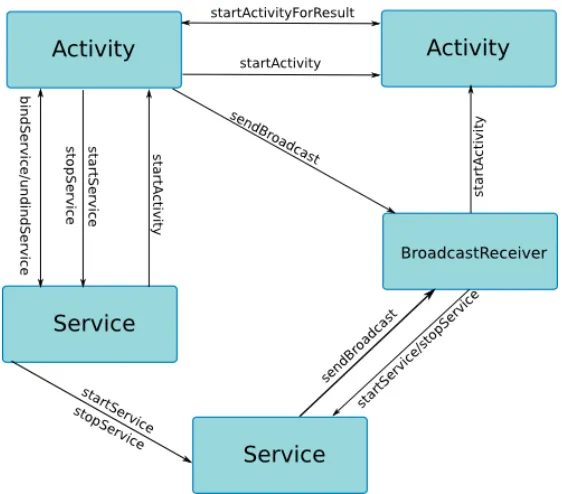
Android provides specific inter-component method calls that permit
the interaction between different components. Figure 2.4 shows these method
calls and what particular components can use them. Following, we list the
inter-component method calls categorized by component:
• Activity: startActivity, startActivities, startActivityForResult.
• Service: startService, stopService, bindService, unbindService.
• BroadcastReceiver: sendBroadcast, sendBroadcastAsUser,
sendOrdered-BroadcastAsUser, sendStickyOrderedBroadcast,
sendStickyOrderedBroad-castAsUser.
All these system calls are handled by the classandroid.app.ActivityThread.
The implementation of the class android.app.ActivityThread uses a queue task
within a loop to handle all inter-component method calls and other actions
posted by the system. For instance, when the application starts a service, the
service is not started immediately after the call (startService(Intent intent)).
Contrary, it is posted to the queue task and the actions can be performed in
the next iterations of the loop. Therefore, if we want to create a control flow
graph that is closer to the real execution of the system, we have to model how
the classandroid.app.ActivityThread executes the different tasks.
2.1.4 Energy related API in Android
As it was mentioned, Android enforces strict energy policies to
re-duce power consumption. Normally device components such as CPU, the
Wifi antenna and other sensors go to an idle state when the phone goes
to sleep. Nevertheless, there are some mechanisms that let third party
ap-plications keep these components awake even when the phone is sleeping.
One of these mechanisms is called wake locks. For instance, the class
an-droid.os.PowerManager.WakeLock can be used to maintain the CPU and even
the screen on when they are supposed to be off. This mechanism is very
im-portant for applications such as music players that keep playing music even
wants stop a component to go to an idle state, the application must acquire
a wake lock on the device component. Once the application is done with its
tasks, it must release the lock on the device component.
However, given the concurrent, event-driven Android’s architecture,
programmers make mistakes on releasing the locks for all the possible paths
the application can have. Therefore, the device component will not go to idle
state, causing a great amount of energy consumption. This kind of bugs are
called no-sleep bugs [45]. Moreover, the misused of these API can lead to
energy bugs that cause a great amount of power consumption.
2.1.5 Control Flow Graph
In this thesis, Control Flow Graphs (CFG) will be used to perform
different kind of analysis. A CFG is a directed graph the represents all the
possible execution paths that an application can have. In this graph nodes are
basic blocks and edges represents control flow from one basic block to another
[15]. A CFG is build for a particular method (intra-procedural), wheres an
Inter-procedural Control Flow Graph (ICFG) takes in account methods calls
and transfers the control to other methods (inter-procedural).
2.2
Related Work
2.2.1 Security Analysis using Program Analysis for Android
Security is another important problem that smartphones users face.
operating systems by security vulnerabilities. That is why, security is one of
the areas that has more research work. Researchers apply techniques such
as static analysis, dynamic analysis and testing to discover different kind of
security vulnerabilities in Android applications.
Permissions
Felt, et al. [25] build the tool Stowaway to detect if an Android application
is overprivileged (declares more permissions in the AndroidManifest.xml file
than it needs). They first map all API calls to permissions required by these
calls and then use this map to detect all the permissions that the Android
application needs. These permissions are checked against the ones declared by
the developers in the AndroidManifest.xml.
Security Vulnerabilities
Several efforts has been done to identify vulnerabilities regarding privilege
escalation attacks including [20, 21] and also proposing new techniques [48].
Moreover, privacy leaking is another problem that has been thoroughly
stud-ied by [22, 30, 34, 38, 61, 62]. Other approaches such as model checking (SMT
solvers) have been used to identify logical security errors in Android
applica-tions as well [39].
Malware Detection
Most of the previous approaches try to identify security vulnerabilities on
Android applications. However, RiskRanker [31] and DroidMat [59] try to
identify malicious behaviors directly on applications from the market using
be-nign and malicious applications using dynamic analysis. Different techniques
are also applied for malware detection. For instance, Shabtai et al. [50] use
machine learning to identify malicious behavior patterns.
Interaction between Components
There are different research problems that arise from the interactions between
components. For example, Chin et al. [24] examine the interaction of
compo-nents in Android applications in order to identify application communication
vulnerabilities. Their work tries to find whether an Android application is
vulnerable to attacks based on inter-component method calls from malicious
applications. In addition, Chaudhuri [23] and Fuchs et al. [27] create a typed
language to model interactions between Android main components to reason
about the dataflow security properties of the application.
2.2.2 Energy Related Analysis
As it was mentioned before, power consumption is one of the main
problems faced by smartphones. There are different approaches to identify
bottlenecks and bugs related to power consumption. One approach includes
profiling and debugging techniques to discover where Android applications
spend more energy. For instance, Eprof [45] is a fine grained energy profiler
which is capable of finding energy bugs and also capable of point these bugs in
the source code of Android applications. In addition,eCalc [32] andeLens [33]
uses cost functions–they compute the estimated energy cost for each function
Android application using execution traces generated from the application.
Another approach is to apply static analysis on Android applications to
check energy policies or protocols from the Android API. In this line, Pathak,
et. al. [43] adapt a reaching definitions dataflow analysis to detect no-sleep
bugs checking if all the acquiredwake locks are released through all the possible
paths. Vekris et al. [57] also uses a dataflow analysis to find bugs related to
wake locks using policies based on defined exit points in components lifecycles
where wake locks must be released. Both approaches try to model the order
of callback execution using the components lifecycles but they do not take in
account interactions between components.
2.2.3 Specification Mining
Mining specifications for program verification has become an important
technique to automatically learn API protocols. During the last years a lot of
research has been made in this field [16, 28, 29, 47, 51, 58, 60].
There are two main directions on mining specifications: dynamic
anal-ysis and static analanal-ysis. Most of the research done in this area uses a dynamic
analysis approach. However, in order to use dynamic analysis, the application
must be instrumented and then run in order to get dynamic traces from it.
This task can be executed manually or automatically. One drawback with this
approach is that the executions run have to cover all the code and in generate
cases that cover all the possible execution paths is also a research problem.
On the other hand, specification mining using static analysis does not
need to run the program, but it suffers of problems such as path explosion,
which does not make the approach scalable. It can be classified as
component-side and client-component-side [51]. A component-component-side approach uses directly the source
code of the API, whereas a client-side approach utilizes client applications of
the API.
In this thesis, a client-side static analysis specification mining approach
will be used. The clients will be Android applications obtained from the Google
Play market. We also make some optimizations to the analysis in order to make
it scalable.
2.2.4 Modeling Event-driven Systems
It was shown that Android is a very dynamic system in which different
components can be taken as entry points and inter-component method calls
can impact the control flow of and Android application. Therefore, in order
to statically analyze Android applications, we have to model this dynamic
behavior to recreate the control flow.
Research has been done on other kinds of event-driven systems. For
instance, Nguyen et al. [42] and Cheung et al. [35] focus on modeling Wireless
Sensor Network (WSN) applications. WSN are event-based, concurrent
sys-tems that like Android are not easy to model. Both papers [42] and [35] try
to define an accurate representation of WSNs.
event-based, they have different behaviors. Therefore, the approach to model
Chapter 3
Mining Energy Specifications (E-Specs)
The first approach that is going to be presented in the thesis, is an
intra-component control flow model. In this approach, just the component
lifecycles are taken in account, therefore, the interaction between components
does not have an impact in the control flow of the representation. Moreover,
a static analysis framework to mine energy related specifications in Android
applications is developed. We will use a summary approach applying
analy-sis to each callback separately and then composing the results based on the
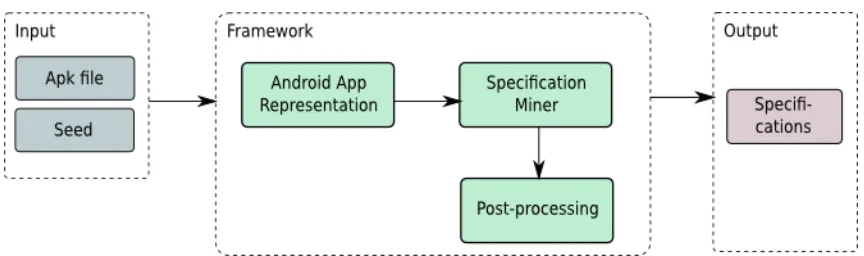
component lifecycles. The framework is composed of three main phases: the
generation of an intermediate representation of the Android application, the
[image:30.612.115.547.483.611.2]specification miner and a post-processing phase (see figure 3.1).
3.1
Modeling Intra-Component Control Flow
To model intra-component control flow of Android applications we are
going to use the lifecycles described in section 2.1 (figure 2.2 shows the lifecycle
for activities and figures 2.3a and 2.3b show the lifecycles for services). These
lifecycles give us a control flow of callbacks for each component, therefore,
we can simulate their behavior. For each callback we are going to generate
an Inter-procedural Control Flow Graph (ICFG). Theses ICFGs will be the
inputs of the specification miner.
3.2
Specification Miner
An inter-procedural, path-sensitive, context-sensitive, value-flow
anal-ysis is implemented in order to mine specifications. This analanal-ysis will take an
ICFG of a callback and a seed (which is a class from the Android API) and
generates a set of sequences of methods calls for each different instance of the
seed class found in the application.
The analysis must be path-sensitive since all the possible execution
paths of the application must be explored. By looking at all the execution
paths, we can discover whether there are paths where the specification mined
is broken. This approach has an advantage over testing since it covers all the
code and in testing, there might not be enough test cases to cover all the code.
However, this approach suffers from path explosion when the application is
big in terms of lines of code and complex in terms of possible execution paths.
losing precision (see section 3.4).
Another aspect of the analysis is that when recollecting the methods of
the seed API, the analysis must recognize to what particular object instance
the invocation belongs. Therefore, we must keep track of each instance of the
seed class through the program taking in account all the aliases the reference
can has. To solve this problem we have developed a value flow analysis that
tracks the different instances of the given seed class through each path in the
application. This analysis finds the creation of objects of the seed class and
tracks how its value is assigned to different variables through the ICFG.
There-fore, the analysis keeps all the aliases of the instance and use this information
to determine the instance of a particular method call of the seed class.
The result of this analysis must be a set of sequences in which each
sequence represents a list of methods calls of the seed class for a particular
path. Since the input is just a callback of a component, this sequences must be
composed with other sequences. The algorithm developed takes as inputs the
sets of sequences for each callback and the lifecycles of activities, services and
broadcast receivers. Then, it composes the sequences of callbacks of the same
component according to the lifecycle of the component using the information
gathered by the value flow analysis to avoid composing sequences of different
3.3
Post-Processing
After the specification miner finishes, we have specifications for each of
the applications analyzed. We analyzed different versions of the same
applica-tion because we wanted to compare if the specificaapplica-tions were consistent across
all the versions. All the specifications found for one version were compared
against each other version of the same application. In addition, we take all set
of sequences mined for all the versions and build a prefix tree acceptor (PTA).
A PTA is an automaton similar to a tree where every leaf is a accept state and
it is used by algorithms of specification learning such as k-tails FSA [37]. As
future work we can apply different algorithms, such as k-tails FSA, to generate
a final specification for energy related APIs.
3.4
Implementation
3.4.1 Getting Intermediate Representation of Android Applications
The framework described before, takes an intermediate representation
(ICFG) of the application it analyzes. Android applications are packaged in
Android application packages (APK) files which contains the bytecode of the
application (bytecode for the Dalvik VM) and its assets. Since most of the
tools to work on Java applications uses either source code or Java bytecode
for the Oracle JVM, Dex2Jar [7] is used to transform an APK file to a Jar file.
However, we still need an intermediate representation for our Specification
Miner. In order to get an intermediate representation from the Jar file we use
Soot is a framework that was created for optimizing Java bytecode [55].
It offers four intermediate representations from which we chose Jimple [56].
Jimple is a 3-address code (TAC), stackless intermediate representation. In
addition, since Soot offers also a CallGraph for the application, we can build an
ICFG for each callback of each component which are used by the specification
miner.
3.4.2 Optimizations
Path-sensitive, context-sensitive is a very expensive analysis. We apply
some optimizations to make the analysis scalable. For instance, to reduce the
space of the analysis, we apply a linear marker, which is a path-insensitive
analysis that scans through each statement in the ICFG of the callbacks and
marks the methods that contains method calls of the class under analysis
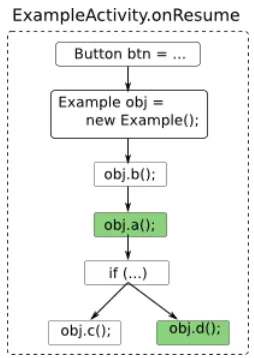
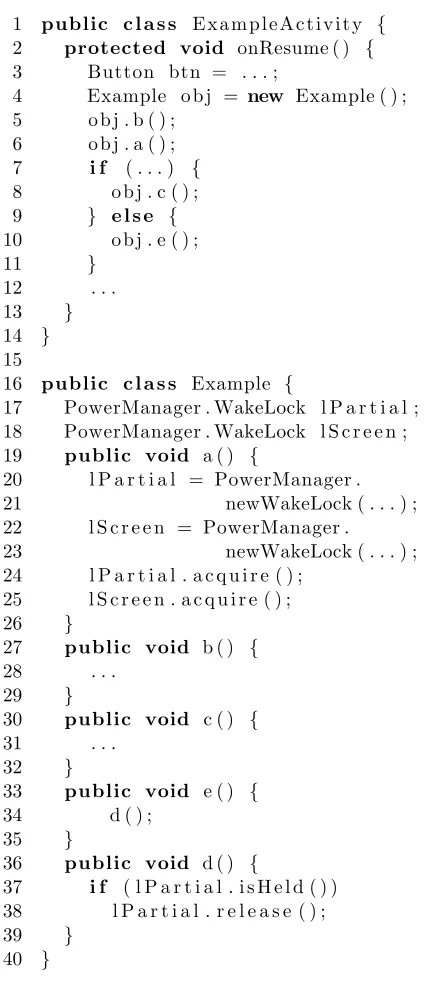
(seed) and the methods that call these methods. Figure 3.2 shows a CFG of a
simple activity (figure 3.3 shows its source code) for an Android application.
In this control flow graph, we see the implementation of the callback
onRe-sumewhich creates an object of the class Example. The Example class has the
methodsa,b,c,dandewhere justaande have calls of the class
PowerMan-ager.WakeLock (the input seed). In this case, the linear marker goes through
each statement marking all the method that has calls of the seed, the method
obj.a(). Since, the linear marker works inter-procedural, the methodobj.d() is
marked as well because it has a call to the methode() which contains calls of
Figure 3.2: CFG example for linear marker
3.4.3 Seed Classes from the Android API
The analysis was performed using six different classes from the Android
API as seeds. We focus on classes that perform any kind of lock on components
of the device such as CPU, GPS, Wifi radio, sensors, keyword and the camera.
The seeds we use are the following:
• android.os.PowerManager.WakeLock: the application can acquire a wake
lock on the CPU and even on the screen of the device.
• android.net.wifi.WifiManager.WifiLock: with this lock, the application
can apply a wake lock to the Wifi radio. This is useful for streaming
applications when the device has access to Wifi networks since the power
consumption is reduced significantly (tail energy is comparable, but the
1 public c l a s s E x a m p l e A c t i v i t y { 2 protected void onResume ( ) {
3 Button btn = . . . ;
4 Example o b j = new Example ( ) ;
5 o b j . b ( ) ; 6 o b j . a ( ) ;
7 i f ( . . . ) {
8 o b j . c ( ) ;
9 } e l s e {
10 o b j . e ( ) ;
11 }
12 . . .
13 }
14 }
15
16 public c l a s s Example {
17 PowerManager . WakeLock l P a r t i a l ; 18 PowerManager . WakeLock l S c r e e n ; 19 public void a ( ) {
20 l P a r t i a l = PowerManager .
21 newWakeLock ( . . . ) ;
22 l S c r e e n = PowerManager .
23 newWakeLock ( . . . ) ;
24 l P a r t i a l . a c q u i r e ( ) ; 25 l S c r e e n . a c q u i r e ( ) ;
26 }
27 public void b ( ) {
28 . . .
29 }
30 public void c ( ) {
31 . . .
32 }
33 public void e ( ) {
34 d ( ) ;
35 }
36 public void d ( ) {
37 i f ( l P a r t i a l . i s H e l d ( ) ) 38 l P a r t i a l . r e l e a s e ( ) ;
39 }
[image:36.612.203.416.114.610.2]40 }
• android.location.LocationManager: use to request updates of location
using the GPS or other techniques. If the request of updates is not
removed, then it can keep asking for location updates even when the
application is not been used.
• android.hardware.Camera: used to perform different actions with the
camera. The application can also lock the camera to exclusive use and
has to unlock it when it finishes the action it was doing.
• android.app.KeyguardManager.KeyguardLock: blocks the keyboard
dur-ing the execution of the application. The application has to release the
lock once it has finished the task it wanted to do without the keyboard.
• android.hardware.SensorManager: use to access the different sensors the
device has. After the application finishes using a sensor, it must disable
it [49].
3.5
Experimental Results
The specification miner analysis was applied to 13 applications from
the Google market and a number of different versions of each application. Our
experiments were run on a VM with AMD Opteron 6204 3.30 GHz (two CPUs)
and 64GB of RAM.
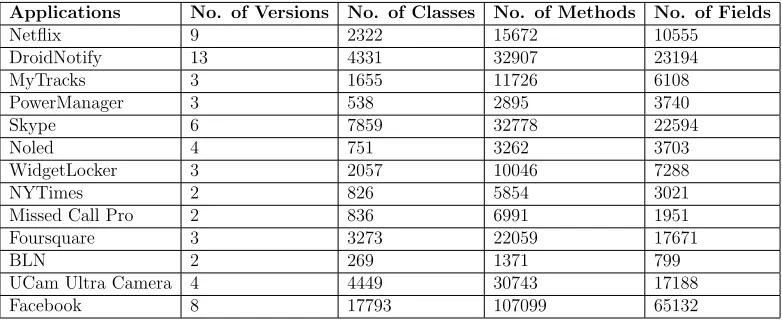
Table 3.1 shows the applications we analyzed; the number of versions;
the total number of classes, methods and fields (static and instance fields) per
approximate values since we are getting these numbers from a Jar file that
[image:38.612.120.511.192.353.2]was reversed engineered from an obfuscated Dalvik VM bytecode.
Table 3.1: Benchmarks
Applications No. of Versions No. of Classes No. of Methods No. of Fields
Netflix 9 2322 15672 10555
DroidNotify 13 4331 32907 23194
MyTracks 3 1655 11726 6108
PowerManager 3 538 2895 3740
Skype 6 7859 32778 22594
Noled 4 751 3262 3703
WidgetLocker 3 2057 10046 7288
NYTimes 2 826 5854 3021
Missed Call Pro 2 836 6991 1951
Foursquare 3 3273 22059 17671
BLN 2 269 1371 799
UCam Ultra Camera 4 4449 30743 17188
Facebook 8 17793 107099 65132
The specification miner and post-processing phases were applied on
the applications listed before getting acceptable results in terms of scalability.
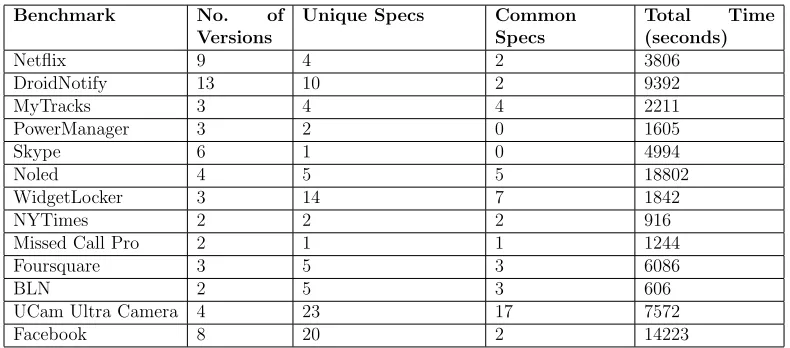
Table 3.2 shows the results of the specification miner analysis. The column
Common FSM shows the number of finite state machines found that were
present across all the versions. The Total Time column shows accumulate
time in seconds that the specification miner took for all the versions and all
the seeds for each application.
For the majority of the applications, the analysis took less than 3 hours
to run through all the seeds and all the versions. Figure 3.4 shows the relation
between the number of classes per application and the time the analysis took.
With the exception of Noled, the time spent by the analysis increases
Table 3.2: General Specification Mining Results
Benchmark No. of Versions
Unique Specs Common Specs
Total Time (seconds)
Netflix 9 4 2 3806
DroidNotify 13 10 2 9392
MyTracks 3 4 4 2211
PowerManager 3 2 0 1605
Skype 6 1 0 4994
Noled 4 5 5 18802
WidgetLocker 3 14 7 1842
NYTimes 2 2 2 916
Missed Call Pro 2 1 1 1244
Foursquare 3 5 3 6086
BLN 2 5 3 606
UCam Ultra Camera 4 23 17 7572
Facebook 8 20 2 14223
that may have contributed to the performance results on Noled such as the
complexity of the application in terms of possible paths.
Figure 3.4: Performance: No. of classes vs. Analysis time
[image:39.612.119.530.395.584.2]applica-tion and multiples components of one applicaapplica-tion, the number of specificaapplica-tions
found for the given seeds does not vary often (they are simple calls to acquire
and release locks on components of the device). The only exception found was
the specifications for the class android.hardware.Camera which can be used
for different tasks.
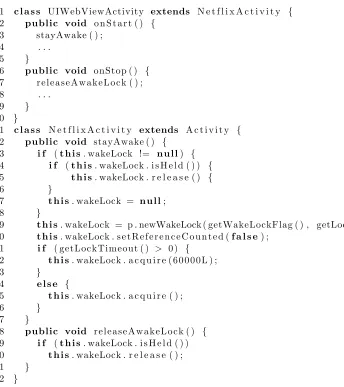
1 c l a s s UIWebViewActivity extends N e t f l i x A c t i v i t y { 2 public void o n S t a r t ( ) {
3 stayAwake ( ) ;
4 . . .
5 }
6 public void onStop ( ) { 7 r e l e a s e A w a k e L o c k ( ) ;
8 . . .
9 }
10 }
11 c l a s s N e t f l i x A c t i v i t y extends A c t i v i t y { 12 public void stayAwake ( ) {
13 i f (t h i s. wakeLock != n u l l) { 14 i f (t h i s. wakeLock . i s H e l d ( ) ) { 15 t h i s. wakeLock . r e l e a s e ( ) {
16 }
17 t h i s. wakeLock = n u l l;
18 }
19 t h i s. wakeLock = p . newWakeLock ( getWakeLockFlag ( ) , getLockName ( ) ) ; 20 t h i s. wakeLock . s e t R e f e r e n c e C o u n t e d (f a l s e) ;
21 i f ( getLockTimeout ( ) > 0 ) {
22 t h i s. wakeLock . a c q u i r e ( 6 0 0 0 0 L ) ;
23 }
24 e l s e {
25 t h i s. wakeLock . a c q u i r e ( ) ;
26 }
27 }
28 public void r e l e a s e A w a k e L o c k ( ) { 29 i f (t h i s. wakeLock . i s H e l d ( ) ) 30 t h i s. wakeLock . r e l e a s e ( ) ;
31 }
[image:40.612.111.455.234.621.2]32 }
1
start isHeld 2 release 3
(a) First Specification Mined
1
start 2
3
4 5
6 setReferenceCounted
acquire
acquire(long) isHeld isHeld
release
[image:41.612.172.518.108.344.2](b) Second Specification Mined
Figure 3.6: Example of results
The main focus of the evaluation of this project was to find whether the
intra-component approach for modeling Android applications was suitable to
perform static analysis and specially specification mining. We found that for
some applications given the logic the programmers used, the intra-component
approach was good enough. For instance, figure 3.5 shows a part of the class
UIWebViewActivityfound in all the versions of theNetflix Android application
use for the experiments. In this case, our analysis works perfectly, mining
two different specifications from the code across the different callbacks of an
activity. Figure 3.6a is mined from the lines 14-17 in 3.5. Since, in the line 19
a new instance of the class android.os.PowerManager.WakeLock is assign to
the variable wakeLock, the analysis recognizes all the following calls as part of
3.6b is generated.
Table 3.3: False Positives for the Specifications
Application False Positives Total Specs Percentage False Positives
Netflix 1 4 25.00%
DroidNotify 5 10 50.00%
MyTracks 0 4 0%
PowerManager 2 2 100.00%
Skype 1 1 100.00%
WidgetLocker 7 14 50.00%
NYTimes 2 2 100.00%
MissCallPro 1 1 100.00% Foursquare 3 5 60.00%
BLN 2 5 40.00%
Ucam Ultra Camera 13 23 57.00% Facebook 13 20 65.00%
In addition, table 3.3 shows the number of false positives/false
nega-tives found per application. To evaluate the specifications we did a manual
inspection on the code of the applications looking for the correctness of the
specifications mined. Specifications are categorized as false positives when
they are incomplete–for some reason the specification miner was not able to
find all the method calls of the seed class under analysis or the method calls of
one specification were sparse in more than one specification. We consider false
negatives as specifications that were not found by our specification miner.
We discover that most of the causes of false positives and false negatives
were related to threads, wrong instance information given by the value flow,
instances of the seed class under analysis that were used in different
compo-nents (inter-component specifications), and callbacks of GUI and sensor event
Inter-component specifications
We found that the intra-component approach did not work for some
applica-tions. There are some applications in which instances of the seed class flow
through different components. In other cases, the applications use a helper
class with static fields (including static fields for the wake lock objects) and
static methods that are called through different components. In addition, there
are other callbacks that must be taken in account besides lifecycle callbacks.
For instance, GUI and sensors callbacks are important to take in account in
order to improve the code coverage. Therefore, inter-component specifications
and GUI and sensors callbacks must be analyzed in order to improve the
ac-curacy of the results.
Aliasing
Aliasing is one of the main problem during mining specifications on object
oriented languages. Objects under analysis can flow through complex data
structures and keep track of them is a complex task. Therefore, for analysis of
object oriented languages having a precise information about how the objects
flow is important for the accuracy of the results.
Threads
Android applications are concurrent in nature. In Android, every application
runs on its own main thread (called UI thread). If the application tries to
do a task that runs for a considerable amount of time (normally more than 2
seconds), the system will raise a dialog asking the user if he/she wants to close
is why applications normally assign long-time running tasks to other threads
creating false positives and false negatives in our results. Thread analysis is
not the main purpose of this work, therefore, it can be considered as future
work.
3.6
Conclusion
In conclusion, in this chapter an intra-component specification mining
has been developed to analyzed Android applications. We discovered that for
some applications, the intra-component approach was good enough, whereas,
for other applications, an inter-component approach is needed to mine
specifi-cations. In addition, we discovered some sources of imprecision in the analysis
Chapter 4
Building a Representation for Analyzing
Android Applications
4.1
Motivation
As it was mentioned in the previous chapter, the main causes of false
positives and false negatives we discovered during analyzing Android
appli-cations were threads, inaccuracies of value flow or/and points to analysis,
and inter-components specifications (specifications that are found in more
than one component). From the three causes, thread analysis [52] and
alias-ing [17, 19, 36, 41, 54] are general static analysis challenges. However, we have
not found a work that tries to model Android applications taking in account
component control flow. Therefore, in this chapter we define an
inter-component approach to analyze Android applications
As a motivating example, figure 4.1 shows a source code found in
Droid-Notifyin which a powermanager wake lock object is instantiated andacquired
in a broadcast receiver. Then, the broadcast receiver starts a service which
performs some job and releases the same wake lock acquired previously. In
this case, the intra-component approach used to model Android applications
broadcast receiver and the other in the service– both mined specifications are
incomplete and therefore are false positives.
1 c l a s s C a l e n d a r N o t i f i c a t i o n A l a r m R e c e i v e r . . . {
2 public void o n R e c e i v e ( . . . ) {
3 I n t e n t l o c a l I n t e n t = new I n t e n t ( paramContext , 4 S e r v i c e 1 .c l a s s) ; 5 l o c a l I n t e n t . p u t E x t r a s ( p a r a m I n t e n t . g e t E x t r a s ( ) ) ; 6 W a k e f u l I n t e n t S e r v i c e . sendWakefulWork (
7 paramContext , l o c a l I n t e n t ) ; 8 . . .
9 }
10 }
11 c l a s s W a k e f u l I n t e n t S e r v i c e extends I n t e n t S e r v i c e {
12 public s t a t i c void sendWakefulWork ( Context c o n t e x t , 13 I n t e n t i n t e n t ) {
14 Common . a c q u i r e P a r t i a l W a k e L o c k ( c o n t e x t ) ; 15 paramContext . s t a r t S e r v i c e ( i n t e n t ) ; 16 }
17 public o n H a n d l e I n t e n t ( . . . ) {
18 doWakefulWork ( p a r a m I n t e n t ) ;
19 i f ( ! Common . i s F u l l W a k e l o c k I n U s e ( ) ) 20 Common . clearWakeLock ( ) ;
21 }
22 }
23 c l a s s S e r v i c e 1 extends W a k e f u l I n t e n t S e r v i c e {
[image:46.612.167.450.165.457.2]24 . . . 25 }
Figure 4.1: Inter-component specification
4.2
Modeling Inter-Component Control Flow
In this chapter, a model that takes into account both, component
life-cycles and interaction between components is going to be developed. We
should model the behavior of Android applications based on three of its main
components–Activity, Service, BroadcastReceiver–and its interactions.
event-driven finite state machines since they help us to represent the
knowl-edge we have from the system–the knowlknowl-edge is represented by signals or inputs
which trigger actions that change the state of the system [26]. We have studied
the Android system and found signals related with lifecycles and interactions
of the three components mentioned before. We will represent events related
with the system’s environment such as graphical user interface events (GUI),
sensor events and others as external signals. In addition, exceptional events,
such as system out of memory, are categorize as external signals. Internal
sig-nals are represented by inter-component method calls which basically start an
interaction between two components in an Android application: the caller and
the callee. For instance,startActivity launches an activity to the foreground.
Another example is how a component can use the method callsendBroadcast
to interact with broadcast receivers. Moreover, in this document we state
certain constraints that are applied to these calls.
4.3
Modeling Android using Event-driven Finite State
Machines
We model the Android system (we are going to use Android from now
on to refer the Android system) as a control system that uses input events
(signals) to determine the behavior of the application. We use event-driven
finite state machines to model the behavior of three of the four main
compo-nents in Android. The signals are organized in two categories: internal and
4.3.1 External Signals
We define external signals as events generated by the environment of
an Android application and not an event made directly by the application. For
instance, when the user tabs thehome button in an Android phone, the system
stops the current application (activity) and triggers the home application–tabs
to the back button is also taken as external signal. Another external signal is
when the system runs out of memory and releases some memory sometimes
releasing activities and services that are kept in memory affecting the lifecycle
of these components. In addition, all events related with sensors and GUI are
categorized as external. All these external signals have a direct impact in the
lifecycles of components.
4.3.2 Internal Signals
In contrast to external signals, internal signals are generated by method
calls found in the application’s code. We consider, as internal signals, all the
methods calls that affects the behavior of components in Android. We
catego-rize inter-component method calls (methods that allow the interaction between
two components) as internal signals since they also affect the behavior of
com-ponents. For instance, when an activity wants to do a long-running task in
the background, the activity can call a service to do that job. The activity can
uses inter-component calls bindService or startService which triggers actions
to create and run the service. The following list, show the inter-component
• for activities, the methods startActivity, startActivityIfNeeded and
star-tActivityForResult can be used to call activities.
• for services, Android defines the methodsstartService,stopService,
bind-Service, unbindService.
• to call broadcast receivers, the Android API has sendBroadcast and
sendOrderedBroacast (there are other variants of these two methods that
does not have an effect in our models).
In the following sections, we will define what is the behavior of each
method call and what constraints these calls have. In addition to
inter-component method calls, we also consider method calls that belong to the
component class which affect its lifecycle. For instance, in activities, when the
methodfinish is called, the system stops the activity immediately. Moreover,
for services the method stopSelf stops the service after it is called.
4.3.3 How External and Internal Signals are treated in our model
First of all, our main goal is to build an intermediate representation
of Android applications. Therefore, our model will take into account all the
possible execution paths the applications can have. In that regard, we will
assume that external signals will be sent, contrary to internal signals that
4.4
Models for Components
To model the behavior the three components mentioned and their
in-teractions, we have to identify which external and internal signals affect their
behavior. Following, models for activities, services and broadcast receivers are
presented.
4.4.1 Modeling Activities
Activities are the main components in Android applications. They
normally provide an user interface and are the main entry points for an
appli-cation. Activities can be triggered by internal and external signals. We also
have to take in account that these signals have different behaviors depending
on the state of the activity.
Activities can be activated and re-activated. For instance, when an
user tabs on the launcher for an application and the application has not been
run before (it is not in memory), the system will look for the main activity
declared in the AndroidManifest.xml file and launch it. If the application is
going to be accessed again (now the application is in memory), the system
will restart that last activity used. The following models show these and more
cases for activities (section 2.1).
Launch Activity. As we said before, the main activity declared in the
An-droidManifest.xml file is launched when the user tabs the launcher icon of the
call startActivity, startActivityIfNeeded or startActivityForResult. Figure 4.2
shows the behavior of an activity when it is launched as a main activity or
using startActivity from other components different of activities–services and
broadcast receivers. Once the activity is Active, it can receive events related
to GUI, sensors. It can also be relaunched (see General Model 4.4.1.1 for more
information).
Constraint: when thestartActivity method is called from another component,
which is not an activity, the intent must have the flagFLAG ACTIVITY NEW TASK
[1].
Initial launch Active event, relaunch
Figure 4.2: Activity Launch Task State Machine
When an activity is launched from another activity, the system will
pause the caller activity, then launch the callee activity and ultimately stop
the caller activity (see figure 4.3).
Active:Caller
[image:51.612.122.510.529.591.2]start pause(Caller)Paused:Callerlaunch(Callee)Active:Callee stop(Caller) Stopped:Caller
Figure 4.3: startActivity from Activity
activity, but it is still visible, the system just pauses it. Once, the second
activity is closed, the system executes the actionresumeto active the previous
activity. If the user is leaving the application (because of tab on the home
button for example), the system will execute the actions pause and stop in
sequence. In addition, thefinish method in activities stop them. Therefore, if
this method is called when the activity is active (or in process to be active),
the system will execute thestop action immediately.
Active Paused
Stopped pause
[image:52.612.248.380.283.414.2]stop resume
Figure 4.4: Pause and Stop Activity
Restart Activity. Once an activity is in memory (stopped), every time it is
called again, the system will execute therestart action. This action is similar
to launch, but it will not execute the callback onCreate. Instead it executes
the callbackonRestart (see section 4.4.1.1).
Active Stopped
restart
Figure 4.5: Restart Activity
components from memory including activities. An activity can be released
just if it is in thestopped state [1]. When the activity is released from memory,
the system executes the actiondestroy, which executes the callbackonDestroy
in the activity.
Stopped destroy Destroyed
Figure 4.6: Destroy Activity
4.4.1.1 General Model
Figure 4.7 shows a general model of the behavior of activities. This is a
composed model of all the previous models presented. Following, each of the
states and actions in the finite state machine are described.
Initial
start Active Paused
Stopped
launch pause
event, relaunch
stop
stop resume
destroy
[image:53.612.186.445.420.572.2]restart
Figure 4.7: General Model for Activity
• Initial: the activity has not been called or it was released from memory. • Active: the activity is visible and allows interaction with an user. • Paused: the activity is paused by different reasons. One is as part of its
life-cycle. When the activity is going to be closed, the system pauses the
activity first and then stop it. The other reason is when another activity
has opaque the current activity, although it is still visible [1].
• Stopped: the activity is not visible. There is another activity that is completely in the foreground. However, the system keeps the activity in
memory.
Description of actions
• launch: this action can be triggered by different signals. For instance,
if the activity is declared in the AndroidManifest.xml file as the main
activity, this activity will be launch at the time the user access the
application (external signal). The other signal is when the activity
is started using the inter-component method call startActivity
(inter-nal sig(inter-nal). The launch action has the following sequence of callbacks:
onCreate→onStart→onResume.
• event: once the activity is active, it can handle different events such as graphical user interface (GUI) events, sensor events and others. This
action will have just one method associate and it will be the handler
• relaunch: the action is normally triggered when the user changes the orientation of the phone. When the orientation changes, the system will
pause, stop, destroy the activity and then launch it again. Therefore
the sequence of callbacks will be the following: onP ause → onStop →
onDestroy → onCreate→onStart→ onResume (there are other
call-backs executed which we do not take in account for our model).
• pause: normally when the activity is going to be stopped, the system
will trigger the action pause first. This events can be caused because of
different signals such as the user clicks that home button or back button.
In addition, if there is a startActivity call, then the system pauses the
activity before the new activity is launched (see figure 4.3). The pause
action just has one callback associated, onPause.
• stop: there are two states where the action stop can be triggered from.
If the method finish is called within the activity, then it will close the
activity and triggers the stop action. In addition, if the method is called
in any of the launch callbacks, it will stop the execution of the following
callbacks in the action and it will trigger the action stop immediately
(and creates a transition in the model from the state Active to the state
Stopped with the action stop). The other state the action stop can be
triggered fromPaused. This will happen as part of the activity’s lifecycle
when an user click the back or the home button and the system puts in
is worth to mention that if the pause action is triggered because of a
startActivity signal, then the stop action will not be triggered until the
started activity has been launched. The callback associate to the stop
action is onStop.
• resume: if the activity loses focus to another activity but it is still visible, the system will pause the activity. Once it recovers the focus,
the system will trigger the action resume to active the activity again.
This action executes the callback onResume.
• restart: when the activity is stopped but is still in memory, the sys-tem does not have to create it again. Therefore, when the activity is
accessed again, the system restart the activity instead of launch it again.
The action execute the following sequence of callbacks: onRestart →
onStart→onResume.
• destroy: this action will be triggered when the system destroys the ac-tivity held to release memory. The acac-tivity can be killed just when the
activity is in the state Stopped [1].
4.4.2 Modeling Services
In contrast to activities, which normally offer a user interface to interact
with the user, a service is used for long-running tasks that are executed in the
signals). Following, all the inter-component calls related with services are
explained.
startService. Figure 4.8 shows the model for calling startService when the service (callee) is not created (running). After the service is created, all the
startService calls will just trigger the actionstart.
[image:57.612.196.432.240.306.2]Initial create Created start Started start
Figure 4.8: startService when service is not running
In case the service has been bound, a call to the method startService
will change the state of the service tostarted and bound. Figure 4.9 shows this
behavior.
Bound start StartedBound start,bind
Figure 4.9: startService when service is bound
stopService. In case there is a stopService inter-component call, the callee
service will be stopped–this call just triggers the action stop (see model in
[image:57.612.237.388.428.522.2]Started Initial destroy
Figure 4.10: stopService when service is Started
[image:58.612.247.385.206.257.2]StartedBound Bound destroy
Figure 4.11: stopService when service is Started and Bound
Constraints: the service must be started orstarted and bound.
bindService. Figure 4.12 shows the model of the behavior when the
inter-component method call bindService is executed and the service has not been
created. Once the service isbound, all the calls bindService will not affect the
state of the component.
Initial
start create Created bind Bound
[image:58.612.188.445.469.527.2]bind
Figure 4.12: bindService when service is not running
If the service has been started using the inter-component call
start-Service and the call bindService is executed, the system will trigger the bind
Started
[image:59.612.223.404.117.213.2]start bind StartedBound bind
Figure 4.13: bindService when service is started
Constraints: broadcast receivers cannot bind a service because the life span
of a broadcast receiver is too short. It is recommendable that if a broadcast
receiver wants to work with services, it must call startService. Another
con-straints is that there must be an unbindService call for each component that
bind the service. For example, if an activity binds a service, and then it is
stopped without unbinding the service, the service will remain running but
without interacting with the activity– if the programmer wants that behavior,
it is better to use startService.
unbindService In case there is a unbindService inter-component call, the
callee service will be unbound–this call just triggers the action unbind (see
model in figure 4.14). If there is no other component bound to the service, the
system will trigger the actiondestroy.
4.4.2.1 General Model
The general model is the composition of all the model described in the
previous section. Following, the description of each state and action in this
model.
Initial Created Started
Bound
Unboud StartedBound
create start
bind
destroy event, start
bind,rebind
event, bind
start
unbind destroy
rebind,bind unbind
[image:60.612.134.493.230.434.2]destroy start, bind, event
Figure 4.14: General Model for Service
Description of states
• Initial: the service has not been called or has been released from mem-ory.
• Created: the service was created and it is in memory.
call stopService is executed or the methodstopSelf is called. The service
is in this state after a startService inter-component call has been made.
• Bound: the service is bound to another component through the
inter-component call bindService. The service will be running until the
com-ponent that bound it call the inter-comcom-ponent call unbindService. It is
worth mentioning that multiple components can bind a service at the
same time. Therefore, the service will run until the last component that
bound it unbind it.
• Started and Bound: the service has either started first and then bound or bound first and then started. In this case the service will be kept alive
by two ways. Until the actions stop and unbind (in either order see figure
4.14) are triggered, the service will not be destroyed.
• Unbound: the service is unbound from the component that bound it. Since the service can be still running, the same component can bind
it again– the rebind action can also be triggered in case the onUnbind
callback returns true.
Description of actions
• create: when a service is called, either by the inter-component calls
startService or bindService, if the service has not been called before, the
system will create the service first. This action will execute the callback
• start: this action is triggered by the inter-component call startService.
The action will execute the callbackonStarCommand. If the service is an
IntentService, then the onHandleIntent callback will be executed after
onStartCommand.
• event: this action is triggered by any event that is handle in the service. For instance, a service can register handlers for network notifications.
• bind: inter-component calls ofbindService will trigger this action. As it
was mentioned before, thebindService call first checks if the system was
created, and then triggers this action. This action executes the callback
onBind.
• unbind: this action is triggered by the inter-component call
unbindSer-vice. This action executes the callback onUnbind.
• rebind: if the onUnbind callback returns true, the next time a com-ponent tries to bind the same service again, the system will trigger the
action rebind instead ofbind.
• destroy: this action can be triggered by a call of the methodstopSelf or
an inter-component call stopService. This action executes the callback
onDestroy. In addition, after theunbind action if there is no other
com-ponent bound to the service, the system will execute the action destroy.
The are external signals that can trigger the actiondestroy. For instance,
running. In addition, users can stop services from the
![Figure 2.1: Stack of activities for a process [5]](https://thumb-us.123doks.com/thumbv2/123dok_us/104134.9702/17.612.131.501.328.465/figure-stack-activities-process.webp)
![Figure 2.2: Activity lifecycle [1]](https://thumb-us.123doks.com/thumbv2/123dok_us/104134.9702/18.612.211.418.136.433/figure-activity-lifecycle.webp)
![Figure 2.3: Service lifecycles [4]](https://thumb-us.123doks.com/thumbv2/123dok_us/104134.9702/19.612.378.449.112.342/figure-service-lifecycles.webp)