SANS Institute
InfoSec Reading Room
This paper is from the SANS Institute Reading Room site. Reposting is not permitted without express written permission.
Web Application File Upload Vulnerabilities
Uploading files to a web application can be a key feature to many web applications. Without it cloud backup services, photograph sharing and other functions would not be possible.
GIAC (GWAPT) Gold Certification
Author: Matt Koch, [email protected] Advisor: Rob Vandenbrink
Accepted: 12/06/2015
Abstract
1. Introduction
Uploading files to a web application can be a key feature to many web applications. Without it cloud backup services, photograph sharing and other functions would not be possible. File upload functionality introduces a substantial risk to the web application (Barnett, 2013) and requires unexpected additional validation and system configuration to protect the web application. In!the!WPScan!WordPress!Vulnerability!Database!alone! there!are!approximately!240!file!upload!related!vulnerabilities!(The!WPScan!Team,! 2015).!Additionally!the!National!Vulnerability!Database!contains!approximately!541! unique!CVE!entries!(Common!Vulnerabilities!and!Exposures)!for!file!upload!related! vulnerabilities!(National!Institute!of!Standards!and!Technology,!2015).!!
1.1.
How HTTP File Upload Works
File!upload!capabilities!via!the!HTTP!protocol!are!primarily!defined!within! several!Requests!for!Comment!(RFC)!by!the!Internet!Engineering!Task!Force!(IETF).!! “Request!for!Comment”!or!RFC’s!are!general!guidelines!for!how!software!will! function.!!There!are!several!methods!for!uploading!a!file!using!a!web!application.! The!most!applicable!RFC’s!are!1867,!2388!and!7578.!In!order!to!upload!a!file,!the! web!application!must!present!a!<form>!HTML!tag!including!a!“method”,!“action”!and! “enctype”!(Nebel!&!Masinter,!1995).!A!simple!example!might!be:!! !<form!method="post"!enctype="multipart/form7data"!><input!type=”file”! name=”exampleupload”/>!</form>!
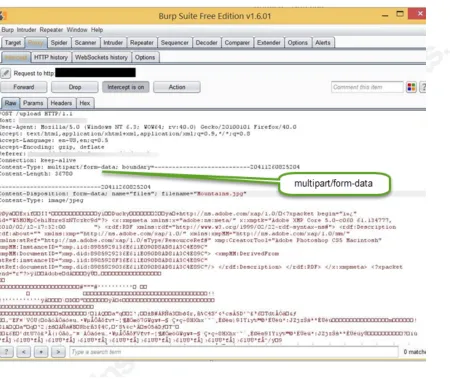
The form’s HTTP method would typically be a “POST” or “PUT” to submit data to the web server. The most common encoding types are “text/plain”, “application/x-www-form-urlencoded” “application/octet-stream”, part/mixed” and “multi-part/form-data”. The encoding or Content-Type HTTP headers are MIME (Multi-Purpose Internet Mail Extensions) media types. For example:
<form id="example" enctype="multipart/form-data" action=""
To summarize the relevant file upload RFC’s: All validation is the responsibility of the application receiving the request. It may be the web server, run time interpreter or web application itself responsible for the validation. For an application developer, this additional application-side validation may be easily overlooked leaving the web application vulnerable to attack.
1.2.
File Upload Vulnerability Taxonomy
Several distinct types of web application file upload vulnerabilities exist. The
[image:4.612.96.546.92.471.2]Common Weakness Enumeration (CWE), offers an industry standard list of unique types of software weaknesses (Mitre, 2015).
1.2.1. “Unrestricted file Upload with Dangerous type”
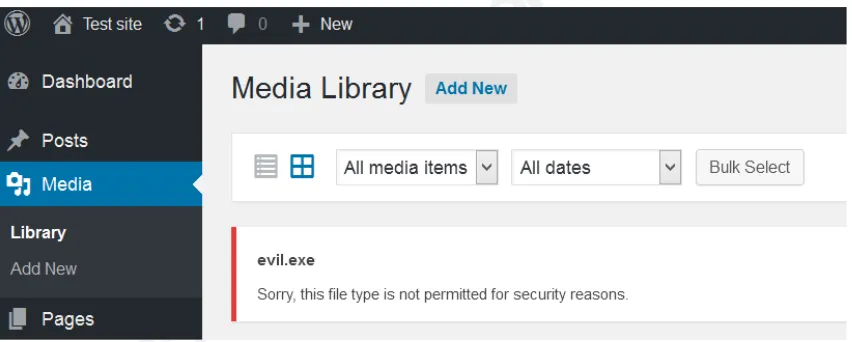
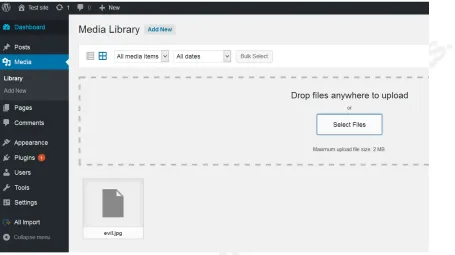
CWE-434 describes: “Unrestricted Upload of File with Dangerous Type” a system with this weakness may authenticate the upload function but fail to verify or restrict the file to the type intended by the software developer. For example uploading a malware executable instead of a picture file to a photograph sharing website. Per RFC 7578, the receiving application should not rely on the Content-Type HTTP header (MITRE, 2015). This requires the application developer to perform additional file type checking after the file has been uploaded. As shown in Figure!2 and Figure!3 many applications rely on the Content-Type header or the file extension allowing for dangerous files to be uploaded. In this example by simply by changing the file extension from evil.exe to evil.jpg allows the dangerous file to be uploaded.
[image:5.612.91.517.325.496.2]!
!
Figure 3: After renaming the file from evil.exe to evil.jpg WordPress accepts the same malicious file successfully
1.2.2. Arbitrary file upload
Usually!referred!to!as!“Arbitrary!File!Upload”!an!attacker!can!access!the!upload! function!of!the!application!without!authenticating!to!the!application.!Although!not! specifically!described!by!a!CWE,!indirectly!through!CWEa862!“Missing!
authorization”!(Mitre,!2015).!Arbitrary!file!upload!can!create!a!denial!of!service! condition!by!allowing!a!remote,!unauthenticated!user!to!fill!the!available!storage!of! the!application!with!files.!This!vulnerability!is!usually!the!caused!by!an!either! inadequate!or!omitted!authorization!check!to!the!upload!function.!!
1.2.4. File contents as an injection vector
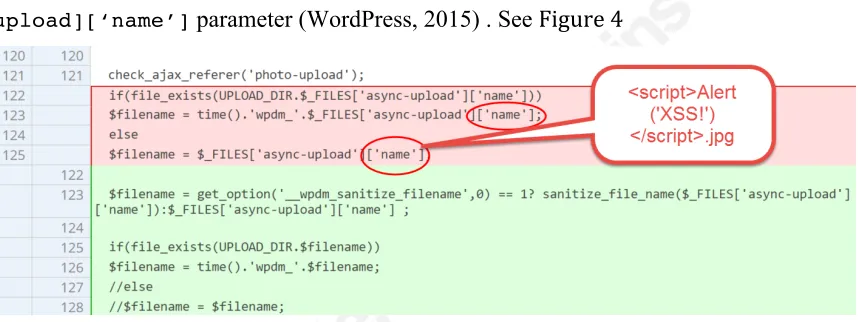
The contents of an uploaded file can be an unexpected vector for cross site scripting or SQL injection. If the web application is parsing or inserting data from the uploaded file into a database SQL injection is possible (Dionach, 2013). In addition to the content of the file, the name of the file can also be a vector for attack. For example, the “Download Manager” WordPress plugin: versions prior to 2.7.95 were vulnerable to cross site scripting via the name of the file being uploaded via the
[image:7.612.94.523.242.403.2]$_FILES[‘async-upload][‘name’] parameter (WordPress, 2015) . See Figure!4
Figure 4: WordPress Download manager plug-in: Patching a cross-site scripting vulnerability on the uploaded file name field https://plugins.trac.wordpress.org/changeset/1199505/download-manager.
2. Finding File Upload Vulnerabilities
Perhaps!the!most!important!phase!of!any!penetration!test!is!the!reconnaissance! phase.!During!this!phase!the!tester!will!gather!information!that!will!assist!and! expedite!the!penetration!test.!There!are!many!reconnaissance!techniques!available! but!this!paper!will!focus!on!techniques!that!may!assist!in!uncovering!file!upload! vulnerabilities.!
2.1.
Social Media and Code repositories
information!from!current!and!former!employees.!Github.com!and!other!source!code! repositories!can!also!reveal!application!source!code!or!portions!of!code!a!developer! may!have!posted!asking!for!help.!!
2.1.1. Static Source Code Analysis
If!the!source!code!is!available!to!the!penetration!tester,!there!are!both! automated!and!manual!detection!methods!available.!!
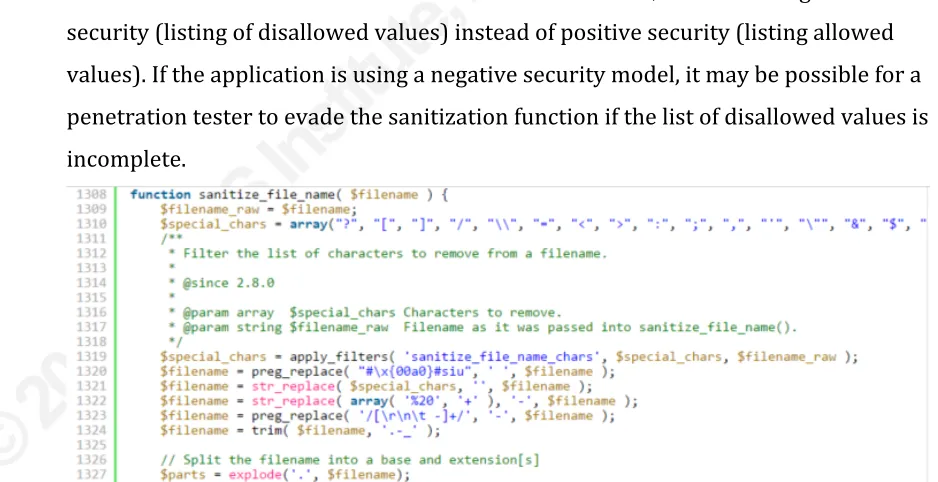
When!performing!a!manual!static!analysis!a!penetration!tester!should!expect!to! see!additional!checks!or!sanitization!functions!for!the!various!properties!of!the!file! being!uploaded!including:!file!name,!file!type,!authorization!checks!by!the!file!upload! function,!and!file!size.!If!the!code!lacks!this!logic,!further!investigation!or!dynamic! testing!may!reveal!a!file!upload!vulnerability.!An!example!of!this!missing!logic!is! highlighted!in!red!in!Figure!4:!the!application!accepts!any!filename!uploaded! without!further!validation.!!
If!the!source!code!does!contain!sanitization!functions,!review!for!negative! security!(listing!of!disallowed!values)!instead!of!positive!security!(listing!allowed! values).!If!the!application!is!using!a!negative!security!model,!it!may!be!possible!for!a! penetration!tester!to!evade!the!sanitization!function!if!the!list!of!disallowed!values!is! incomplete.!!!!!!
[image:8.612.57.526.395.636.2]!
2.2.
Web Server Configuration Settings
In!addition!to!the!web!application!itself,!the!configuration!of!operating!system! and!web!server!software!may!also!affect!the!ability!to!upload!files.!Understanding! these!default!operating!system!and!web!server!settings!may!provide!valuable! information!for!a!penetration!tester.!! One!method!of!determining!web!server!and!operating!system!versions!is!by! triggering!an!error!and!analyzing!the!response!HTTP!headers!and!contents.!By! default,!many!web!servers!will!return!version!information.!For!example!the!HTTP! request!to!http://192.168.0.172/showmethebanner shown!below. From!one!request!and!response!the!tester!can!determine!the!likely!operating!system!(CentOS),! web!server!type!and!version!(Apache!2.4.6),!OpenSSL!version!(1.0.1eafips)!and!PHP! version!(PHP!5.4.16).!Using!this!information!a!tester!can!research!file!upload!and! POST!method!limits!that!the!web!server!may!be!using.!!
GET /showmethebanner HTTP/1.1
Host: 192.168.0.172
User-Agent: Mozilla/5.0 (Windows NT 6.3; WOW64; rv:41.0)
Gecko/20100101 Firefox/41.0
Accept:
text/html,application/xhtml+xml,application/xml;q=0.9,*/*;q=0.8
Accept-Language: en-US,en;q=0.5
Accept-Encoding: gzip, deflate
Connection: keep-alive
HTTP/1.1 404 Not Found
Date: Sat, 14 Nov 2015 16:49:18 GMT
Server: Apache/2.2.15 (CentOS)
Content-Length: 292
Connection: close
<!DOCTYPE HTML PUBLIC "-//IETF//DTD HTML 2.0//EN">
<html><head>
<title>404 Not Found</title>
</head><body>
<h1>Not Found</h1>
<p>The requested URL /showmethebanner was not found on this
server.</p>
<hr>
<address>Apache/2.2.15 (CentOS) Server at 192.168.0.172 Port
80</address>
[image:10.612.62.541.47.713.2]</body></html>
Table 1: HTTP Request and Response to a CentOS 7.1 Apache web server hosting a WordPress application.
2.2.1. File Upload Size Limitations
Using!the!version!information!shown!in!Table!1:!a!CentOS!7!system!as!an!
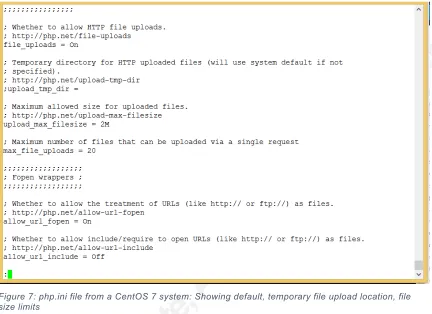
example,!a!penetration!tester!can!determine!the!default!file!upload!limitations!used! by!PHP.!As!shown!in!Figure!6!and!Figure!7:!overall!size!of!a!POST!request!(8!
Megabytes),!the!number!of!files!that!can!be!simultaneously!uploaded!(20),!and! maximum!size!per!file!(2!Megabytes).!!!
!
[image:10.612.85.541.84.333.2]!
Figure 7: php.ini file from a CentOS 7 system: Showing default, temporary file upload location, file size limits
2.3.
Dynamic Analysis: Existing Tools
If!the!software!being!tested!is!open!source!or!commercially!available,!
vulnerability!scanning!software!or!softwareaspecific!testing!tools!may!be!available.! For!example!WPScan!is!capable!of!scanning!WordPress!sites!including!their!
WordPress!plugins!for!known!vulnerabilities!including!file!upload!vulnerabilities! (The!WPScan!Team,!2015).!Other!examples!include!JoomScan!for!Joomla!websites! (OWASP,!2015)!and!DroopeScan!for!Drupal!websites!(Worcel,!2015).!
2.4.
Dynamic Analysis: Fuzzing tools
Burp!Suite,!Fiddler!and!a!variety!of!tools!are!available!to!perform!dynamic! application!analysis.!These!tools!can!offer!an!easy!way!to!test!file!upload!
2.4.1. Testing for Dangerous File Upload
When a web browser uploads a file, 2 pieces of information are generated by the browser during the request to upload the file. First, the extension of the file name “.jpg” for example. Second, the browser will typically set a “Content-Type:” HTTP Header indicating the type of file contents being uploaded such as “image/jpeg” for a JPEG image file.
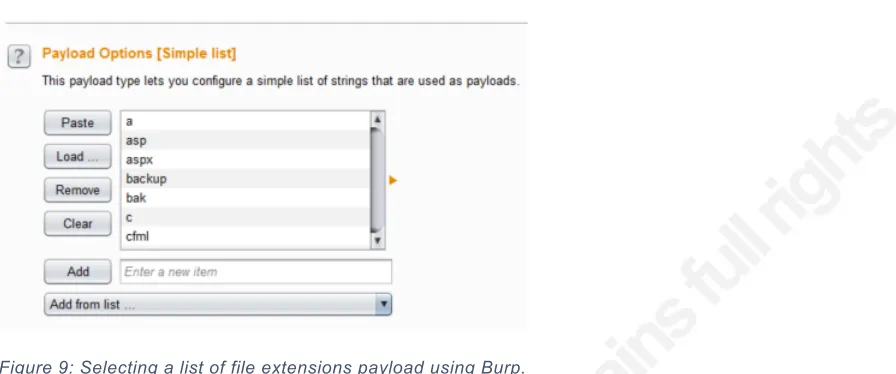
through the list of common file extensions shown in Figure 9.
Figure 9: Selecting a list of file extensions payload using Burp.
After!executing!the!file!extension!test!the!results!show!that!some!file! extensions!are!allowed!and!others!are!blocked!as!shown!in!Figure!10.!When!the! application!blocks!a!particular!file!extension,!the!error!message!returned!included! the!text!“not!permitted!for!security!reasons”.!This!would!indicate!that!Wordpress’! filter!is!based!on!the!file!extension!rather!than!the!actual!file!content!or!“Contenta Type”!HTTP!header!value.!!
!
Figure 10: Burp Intruder results, uploading filename evil.a, evil.asp, evil.aspx, etc. Showing a mixture of successful and failed payloads.
[image:14.612.47.514.288.610.2]have!a!ContentaType!Header!of!“image/jpeg”!assigned!by!the!browser.!After! iterating!through!the!possible!values!of!the!ContentaType!HTTP!header!shown!in!! Figure!12!reveals!that!WordPress!allows!any!ContentaType!Header!for!file!upload! and!restricts!solely!on!file!extension.!!
!
Figure 11: WordPress accepting a windows executable evil.jpg (renamed from evil.exe)
!
Figure 12: Testing Content-Type Headers while uploading “evil.jpg”: all Content-Type HTTP Headers are allowed by the WordPress upload function.
2.4.2. Testing for Arbitrary File Upload
Figure 13: Burp Comparison: the request on the left contains session cookies, the request on the right is unauthenticated (no session cookies). Submitted to version 3.2.3 and earlier of the “WP All Import” WordPress plugin with a known arbitrary file upload vulnerability.
!
[image:17.612.93.522.251.395.2]2.4.3. Testing for File Upload Denial of Service conditions
[image:18.612.89.436.255.536.2]If Denial of Service is within scope of a penetration test, testing denial of service feasibility should also be performed. When the web server and web application software do not validate the number, size and frequency of file uploads it is possible to fill the drive space of the web server. The speed of the denial of service attack will depend on the specifications of the victim system and how quickly files can be uploaded. As shown in Figure 24 and Figure 25, preparing a test involves encoding a file for upload, and iterating through unique file names.
Figure 16: Using Burp's Intruder function with a numeric counter to increment file names. For example: payload1.jpg, payload2,jpg, payload3.jpg…
Figure 17: Filling a hard drive space with uploaded files.File names starting with “You_Have_Been_Hacked” and the numeric counter.
In!the!example!shown!in!Figure!26,!a!single!valid!session!(represented!by!the! “PHPSESSID”!cookie)!was!able!to!upload!a!file!approximately!63,000!files!until!the! web!application!triggered!an!error!“No)space)left)on)device”.!The!error!message!also! revealed!additional!information!about!the!file!system!of!the!server.!
2.4.4. Testing Allowable File Size
2.4.5. Testing File Name and Extension
[image:21.612.89.521.160.472.2]Both!the!file!name!and!file!extension!should!be!fuzzed.!An!example!might!be! uploading!<script>alert(‘xss’)</script>.jpg)or!filename.<script>alert(‘xss’)</script>.!
Figure 18: Modifying file name in multipart/form-data request
Figure 19: CVE-2015-5074 Arbitrary File Upload in X2Engine CRM (Quatrini, 2015) screen captured from Github.com commit.
https://github.com/X2Engine/X2CRM/commit/10b72bfe7a1b9694f19a0adef72d85a754d4d3f8
2.4.6. Testing File Contents
If the web application contains a data import function such as uploading a spreadsheet or Comma Separated Value (CSV) file, the import or database insertion functionality should be tested for proper sanitization of the file contents. Testing of SQL injection payloads designed to work against INSERT or UPDATE database statements may also reveal a vulnerability. Given that data may be stored in the application after the data is imported, persistent cross-site scripting via the uploaded file content is also possible as shown in Figure 20, Figure 21 and Figure 22.
[image:22.612.66.468.444.656.2]!
Figure 21: Successful Cross-site scripting using the contents of a .csv file.
!
Figure 22: A Cross-site Scripting payload saved to a MYSQL database “user” field
3. Exploitation
[image:23.612.92.524.295.541.2]3.1.
Planning Exploitation
Exploiting!a!file!upload!vulnerability!allows!a!penetration!tester!to!perform! several!categories!of!attacks!against!the!web!application!and!its!users.!The!type!of! exploits!will!depend!on!the!rules!of!engagement!for!the!penetration!test!and!the! function!of!the!web!application.!
3.2.
Watering Hole Attacks
A!watering!hole!attack!is!subtle!exploitation!of!a!system!by!replacing!specific! files!served!by!the!affected!web!server!to!an!unsuspecting!victim.!An!example!might! be!replacing!a!hosted!advertisement!with!a!malicious!link!or!replacing!a!software! update!hosted!on!the!system!with!malware!(Donaldson,!Siegel,!Williams,!&!Aslam,! 2015).!In!the!context!of!a!web!application!penetration!test,!an!in!scope!intranet! application!or!internal!employee!portal!would!be!a!desired!host!for!content.!!
3.3.
Obfuscation and File Packing
Once an appropriate payload has been selected the tester should consider
obfuscation and file packing options. File obfuscation and packing techniques can avoid detection by antivirus, intrusion detection software or web application firewalls.
Obfuscation can be accomplished using a variety of tools depending on the type of payload and target system. If the intended payload is an executable, Metaploit’s
3.4.
Denial of Service via File Upload
[image:26.612.90.441.266.548.2]If Denial of Service is within scope of a penetration test, testing denial of service feasibility should also be performed. When the web server and web application software do not validate the number, size and frequency of file uploads it is possible to fill the drive space of the web server. The speed of the denial of service attack will depend on the specifications of the victim system and how quickly files can be uploaded. As shown in Figure 24 and Figure 25, preparing a test involves encoding a file for upload, and iterating through unique file names.
Figure 26: Filling a hard drive space with uploaded files.File names starting with “You_Have_Been_Hacked” and the numeric counter.
In!the!example!shown!in!Figure!26,!a!single!valid!session!(represented!by!the! “PHPSESSID”!cookie)!was!able!to!upload!a!file!approximately!63,000!files!until!the! web!application!triggered!an!error!“No)space)left)on)device”.!The!error!message!also! revealed!additional!information!about!the!file!system!of!the!server.!
4. Post-Exploitation
4.1.
Web Shells and other Reverse Shells.
Leaving!a!backdoor!or!other!malicious!code!on!the!system!allows!an!attacker! to!come!back!later!or!to!perform!multiple!tasks!on!the!web!application!server.! Performing!local!brute!force,!establishing!a!reverse!shell,!performing!local!privilege! escalation,!pivoting!attacks!to!other!systems!that!may!not!be!accessible!to!the! attacker.!!If!the!tester!can!upload!files!to!a!directory!that!is!accessible!via!the!web! server,!a!Web!Shell!offers!a!convenient!way!to!maintain!access!and!run!further! commands!on!the!system.!!Web!Shells!are!an!uploaded!web!application!that!allows!a! penetration!tester!to!run!commands!on!an!infected!system!or!establish!persistence! during!an!attack!(Donaldson,!Siegel,!Williams,!&!Aslam,!2015).!Features!vary!by! Web!Shell!author!and!web!application!programming!language.!Several!popular! webshells!include!WSO!Webshell!(shown!in!Figure!27),!R99!Webshell,!phpa backdoor!and!ASPXSpy.!Many!are!easy!to!use!and!can!be!customized!to!the! penetration!testers’!preference.!!
[image:29.612.66.524.375.634.2]!
5. Conclusion
File!upload!vulnerabilities!can!be!easy!to!test!for!and!can!yield!a!complete! compromise!of!a!web!server!hosting!a!vulnerable!application.!It!can!also!reveal!a! previously!unknown!vector!for!crossasite!scripting,!SQL!injection!and!other!injection! vulnerabilities.!Making!file!upload!testing!a!worthwhile!activity!during!a!web!
application!penetration!test.!Given!the!growing!number!of!uploadarelated! vulnerabilities!detected!in!commercial!and!open!source!software!it!is!import!to! include!file!upload!testing!in!the!penetration!testing!plan.!!
References
Apache!Software!Foundation.!(2015).!Apache)Core)Features.!Retrieved!from! httpd.apache.org:!
http://httpd.apache.org/docs/2.2/mod/core.html#limitrequestbody! Barnett,!R.!(2013).!Web)Application)Defender's)Cookbook.!!
Chen,!H.,!Li,!F.!H.,!&!Xiao,!Y.!(2011).!Handbook)of)Security)and)Networks.!World! Scientific!Publishing!Co.!
Dionach.!(2013).!Blind)SQL)injection)through)an)Excel)spread)sheet.!Retrieved!from! Dionach:!https://www.dionach.com/blog/blindasqlainjectionathroughaana excelaspreadasheet! Donaldson,!S.,!Siegel,!S.,!Williams,!C.!K.,!&!Aslam,!A.!(2015).!Enterprise)Cybersecurity:) How)to)Build)a)Successful)Cyberdefense)Program.!apress.! Gallagher,!S.!(2015,!August).!Newly)discovered)Chinese)hacking)group)hacked)100+) websites)to)use)as)“watering)holes”.!Retrieved!from!Ars!Technica:! http://arstechnica.com/security/2015/08/newlyadiscoveredachinesea hackingagroupahackeda100awebsitesatoauseaasawateringaholes/! Hope,!P.,!&!Walther,!B.!(2009).!Web)Security)Testing)Cookbook.!O'Reily!Media.! Kennedy,!D.,!O'Gorman,!J.,!Kearns,!D.,!&!Aharoni,!M.!(2011).!Metasploit:)The) Penetration)Tester's)Guide.!! Masinter,!L.!(1998).!Request)for)Comments:)2388)Returning)Values)from)Forms:) multipart/form`data.!Retrieved!from!The!Internet!Engineering!Task!Force:! https://www.ietf.org/rfc/rfc2388.txt! Masinter,!L.!(2015,!July).!Request)for)Comments:)7578)Returning)Values)from)Forms:) multipart/form`data.!Retrieved!from!https://tools.ietf.org/html/rfc7578! Mitre.!(2015).!About)CWE.!Retrieved!from!Common!Weakness!Enumeration:!
https://cwe.mitre.org/about/index.html!
MITRE.!(2015).!CWE`400:)Uncontrolled)Resource)Consumption)('Resource) Exhaustion').!Retrieved!from!CWE.Mitre.org:!
https://cwe.mitre.org/data/definitions/400.html!
MITRE.!(2015,!10).!CWE`434:)Unrestricted)Upload)of)File)with)Dangerous)Type.! Retrieved!from!cwe.mitre.org:!
https://cwe.mitre.org/data/definitions/434.html!
Mitre.!(2015).!CWE`862:)Missing)Authorization.!Retrieved!from!CWE.Mitre.org:! http://cwe.mitre.org/data/definitions/862.html! Molnar,!L.,!&!Oberhumer,!M.!(2015).!UPX:)the)Ultimate)Packer)for)eXecutables)`) Homepage.!Retrieved!from!Sourceforge.net:!http://upx.sourceforge.net/! National!Institute!of!Standards!and!Technology.!(2015).!National)Vulnerability) Database.!Retrieved!from!NIST.Gov:! https://web.nvd.nist.gov/view/vuln/searcha results?query=file+upload&search_type=all&cves=on! Nebel,!E.,!&!Masinter,!L.!(1995).!Request)For)Comments:)1867)Form`based)File)Upload) in)HTML.!Retrieved!from!The!Internet!Engineering!Task!Force:! https://www.ietf.org/rfc/rfc1867.txt!
Offensive!Security.!(2015).!Google)Hacking)Database.!Retrieved!from!ExploitDB:! https://www.exploitadb.com/googleahackinga
database/?action=search&ghdb_search_cat_id=0&ghdb_search_text=upload! OWASP.!(2014,!September!17).!OWASP)Testing)Guide)v4.!Retrieved!from!
OWASP.org:!
https://www.owasp.org/images/5/52/OWASP_Testing_Guide_v4.pdf! OWASP.!(2015).!Category:OWASP)Joomla)Vulnerability)Scanner)Project)`)OWASP.!
Retrieved!from!OWASP.org:!
php.net.!(2015).!PHP:)Description)of)core)php.ini)directives)`)Manual.!Retrieved!from! PHP:!Hypertext!Preprocessor:!
http://php.net/manual/en/ini.core.php#ini.fileuploads!
PHP.net.!(2015,!November).!POST)method)uploads.!Retrieved!from!PHP.net:! http://php.net/manual/en/features.fileaupload.postamethod.php! Quatrini,!S.!(2015).!Vulnerability)title:)Arbitrary)File)Upload)In)X2Engine)Inc.) X2Engine.!Retrieved!from!Portocullis!Security:!https://www.portcullisa security.com/securityaresearchaandadownloads/securityaadvisories/cvea 2015a5074/! Rashid,!F.!(2015,!February!11).!Chinese)Attackers)Hacked)Forbes)Website)in)Watering) Hole)Attack:)Security)Firms.!Retrieved!from!Security!Week:! http://www.securityweek.com/chineseaattackersahackedaforbesawebsitea wateringaholeaattackasecurityafirms! Request)for)Comments)(RFC).!(2015).!Retrieved!from!Internet!Engineering!Task! Force:!https://www.ietf.org/rfc.html! Schema,!M.!(2012).!Hacking)Web)Apps:)Detecting)and)Preventing)Web)Application) Security)Problems.!Elsevier,!Inc.! Stuttard,!D.,!&!Pinto,!M.!(2008).!The)Web)Application)Hacker's)Handbook:)Discovering) and)exploiting)Security)Flaws.!Wiley!Publishing,!Inc.!
The!WPScan!Team.!(2015).!WordPress)Vulnerability)Search.!Retrieved!from!WPScan! Vulnerability!Database:!
https://wpvulndb.com/search?utf8=%E2%9C%93&text=&vuln_type=13! TrustWave's!SpiderLabs.!(2014).!Apache)Commons)FileUpload)and)Apache)Tomcat)`)
Denial`of`Service.!Retrieved!from!ExploitaDB:!https://www.exploita db.com/exploits/31615/!
WordPress.!(2015).!Changeset)1199505)for)download`manager)–)WordPress)Plugin) Repository.!Retrieved!from!Wordpress.org:!
https://plugins.trac.wordpress.org/changeset/1199505/downloadamanager! Wordpress.!(2015).!WordPress)sanitize_file_name())|)Function)|)WordPress)Developer)
Resource.!Retrieved!from!developer.wordpress.org:!
Click Here for a full list of all Upcoming SANS Events by Location
SANS Tysons Corner 2016 Tysons Corner, VAUS Oct 22, 2016 - Oct 29, 2016 Live Event
SANS San Diego 2016 San Diego, CAUS Oct 23, 2016 - Oct 28, 2016 Live Event
SANS FOR508 Hamburg in German Hamburg, DE Oct 24, 2016 - Oct 29, 2016 Live Event
SOS SANS October Singapore 2016 Singapore, SG Oct 24, 2016 - Nov 06, 2016 Live Event
SANS Munich Autumn 2016 Munich, DE Oct 24, 2016 - Oct 29, 2016 Live Event
Pen Test HackFest Summit & Training Crystal City, VAUS Nov 02, 2016 - Nov 09, 2016 Live Event
SANS Sydney 2016 Sydney, AU Nov 03, 2016 - Nov 19, 2016 Live Event
SANS Gulf Region 2016 Dubai, AE Nov 05, 2016 - Nov 17, 2016 Live Event
SANS Miami 2016 Miami, FLUS Nov 07, 2016 - Nov 12, 2016 Live Event
DEV534: Secure DevOps Nashville, TNUS Nov 07, 2016 - Nov 08, 2016 Live Event
DEV531: Defending Mobile Apps Nashville, TNUS Nov 09, 2016 - Nov 10, 2016 Live Event
European Security Awareness Summit London, GB Nov 09, 2016 - Nov 11, 2016 Live Event
SANS London 2016 London, GB Nov 12, 2016 - Nov 21, 2016 Live Event
Healthcare CyberSecurity Summit & Training Houston, TXUS Nov 14, 2016 - Nov 21, 2016 Live Event
SANS San Francisco 2016 San Francisco, CAUS Nov 27, 2016 - Dec 02, 2016 Live Event
MGT517 - Managing Security Ops Washington, DCUS Nov 28, 2016 - Dec 02, 2016 Live Event
SANS Hyderabad 2016 Hyderabad, IN Nov 28, 2016 - Dec 10, 2016 Live Event
SANS Cologne Cologne, DE Dec 05, 2016 - Dec 10, 2016 Live Event
SEC560 @ SANS Seoul 2016 Seoul, KR Dec 05, 2016 - Dec 10, 2016 Live Event
SANS Dublin Dublin, IE Dec 05, 2016 - Dec 10, 2016 Live Event
ICS410 @ Delhi New Delhi, IN Dec 05, 2016 - Dec 09, 2016 Live Event
SANS Cyber Defense Initiative 2016 Washington, DCUS Dec 10, 2016 - Dec 17, 2016 Live Event
SANS Frankfurt 2016 Frankfurt, DE Dec 12, 2016 - Dec 17, 2016 Live Event
SANS Amsterdam 2016 Amsterdam, NL Dec 12, 2016 - Dec 17, 2016 Live Event
SANS Security East 2017 New Orleans, LAUS Jan 09, 2017 - Jan 14, 2017 Live Event
SANS Tokyo Autumn 2016 OnlineJP Oct 17, 2016 - Oct 29, 2016 Live Event