The Practice of System and
Network Administration
The Practice of System
and Network
Administration
Second Edition
Thomas A. Limoncelli
Christina J. Hogan
Strata R. Chalup
in all capitals.
The authors and publisher have taken care in the preparation of this book, but make no ex-pressed or implied warranty of any kind and assume no responsibility for errors or omissions. No liability is assumed for incidental or consequential damages in connection with or arising out of the use of the information or programs contained herein.
The publisher offers excellent discounts on this book when ordered in quantity for bulk pur-chases or special sales, which may include electronic versions and/or custom covers and content particular to your business, training goals, marketing focus, and branding interests. For more information, please contact:
U.S. Corporate and Government Sales, (800) 382-3419, [email protected]
For sales outside the United States please contact:
International Sales, [email protected]
Visit us on the Web: www.awprofessional.com
Library of Congress Cataloging-in-Publication Data
Limoncelli, Tom.
The practice of system and network administration / Thomas A. Limoncelli, Christina J. Hogan, Strata R. Chalup.—2nd ed.
p. cm.
Includes bibliographical references and index. ISBN-13: 978-0-321-49266-1 (pbk. : alk. paper)
1. Computer networks—Management. 2. Computer systems. I. Hogan, Christine. II. Chalup, Strata R. III. Title.
TK5105.5.L53 2007 004.6068–dc22
2007014507
Copyright c2007 Christine Hogan, Thomas A. Limoncelli, Virtual.NET Inc., and Lumeta Corporation.
All rights reserved. Printed in the United States of America. This publication is protected by copyright, and permission must be obtained from the publisher prior to any prohibited reproduction, storage in a retrieval system, or transmission in any form or by any means, electronic, mechanical, photocopying, recording, or likewise. For information regarding per-missions, write to:
Pearson Education, Inc.
Rights and Contracts Department 75 Arlington Street, Suite 300 Boston, MA 02116
Fax: (617) 848-7047
ISBN 13: 978-0-321-49266-1
ISBN 10: 0-321-49266-8
Contents at a Glance
Part I Getting Started 1
Chapter 1 What to Do When. . . 3
Chapter 2 Climb Out of the Hole 27
Part II Foundation Elements 39
Chapter 3 Workstations 41
Chapter 4 Servers 69
Chapter 5 Services 95
Chapter 6 Data Centers 129
Chapter 7 Networks 187
Chapter 8 Namespaces 223
Chapter 9 Documentation 241
Chapter 10 Disaster Recovery and Data Integrity 261
Chapter 11 Security Policy 271
Chapter 12 Ethics 323
Chapter 13 Helpdesks 343
Chapter 14 Customer Care 363
Part III Change Processes 389
Chapter 15 Debugging 391
Chapter 16 Fixing Things Once 405
Chapter 17 Change Management 415
Chapter 18 Server Upgrades 435
Chapter 19 Service Conversions 457
Chapter 20 Maintenance Windows 473
Chapter 21 Centralization and Decentralization 501
Part IV Providing Services 521
Chapter 22 Service Monitoring 523
Chapter 23 Email Service 543
Chapter 24 Print Service 565
Chapter 25 Data Storage 583
Chapter 26 Backup and Restore 619
Chapter 27 Remote Access Service 653
Chapter 28 Software Depot Service 667
Chapter 29 Web Services 689
Part V Management Practices 725
Chapter 30 Organizational Structures 727
Chapter 31 Perception and Visibility 751
Chapter 32 Being Happy 777
Chapter 33 A Guide for Technical Managers 819
Chapter 34 A Guide for Nontechnical Managers 853
Chapter 35 Hiring System Administrators 871
Chapter 36 Firing System Administrators 899
Epilogue 909
Appendixes
911
Appendix A The Many Roles of a System Administrator 913
Appendix B Acronyms 939
Bibliography 945
Contents
Preface xxv
Acknowledgments xxxv
About the Authors xxxvii
Part I Getting Started 1
1 What to Do When. . . 3
1.1 Building a Site from Scratch 3
1.2 Growing a Small Site 4
1.3 Going Global 4
1.4 Replacing Services 4
1.5 Moving a Data Center 5
1.6 Moving to/Opening a New Building 5
1.7 Handling a High Rate of Office Moves 6
1.8 Assessing a Site (Due Diligence) 7
1.9 Dealing with Mergers and Acquisitions 8
1.10 Coping with Machine Crashes 9
1.11 Surviving a Major Outage or Work Stoppage 10 1.12 What Tools Should Every Team Member Have? 11
1.13 Ensuring the Return of Tools 12
1.14 Why Document Systems and Procedures? 12
1.15 Why Document Policies? 13
1.16 Identifying the Fundamental Problems in
the Environment 13
1.17 Getting More Money for Projects 14
1.18 Getting Projects Done 14
1.19 Keeping Customers Happy 15
1.20 Keeping Management Happy 15
1.21 Keeping SAs Happy 16
1.22 Keeping Systems from Being Too Slow 16
1.23 Coping with a Big Influx of Computers 16
1.24 Coping with a Big Influx of New Users 17
1.25 Coping with a Big Influx of New SAs 17
1.26 Handling a High SA Team Attrition Rate 18
1.27 Handling a High User-Base Attrition Rate 18
1.28 Being New to a Group 18
1.29 Being the New Manager of a Group 19
1.30 Looking for a New Job 19
1.31 Hiring Many New SAs Quickly 20
1.32 Increasing Total System Reliability 20
1.33 Decreasing Costs 21
1.34 Adding Features 21
1.35 Stopping the Hurt When Doing “This” 22
1.36 Building Customer Confidence 22
1.37 Building the Team’s Self-Confidence 22
1.38 Improving the Team’s Follow-Through 22
1.39 Handling Ethics Issues 23
1.40 My Dishwasher Leaves Spots on My Glasses 23
1.41 Protecting Your Job 23
1.42 Getting More Training 24
1.43 Setting Your Priorities 24
1.44 Getting All the Work Done 25
1.45 Avoiding Stress 25
1.46 What Should SAs Expect from Their Managers? 26 1.47 What Should SA Managers Expect from Their SAs? 26 1.48 What Should SA Managers Provide to Their Boss? 26
2 Climb Out of the Hole 27
2.1 Tips for Improving System Administration 28
2.1.1 Use a Trouble-Ticket System 28
2.1.2 Manage Quick Requests Right 29
2.1.3 Adopt Three Time-Saving Policies 30
2.1.4 Start Every New Host in a Known State 32
2.1.5 Follow Our Other Tips 33
Contents ix
Part II Foundation Elements 39
3 Workstations 41
3.1 The Basics 44
3.1.1 Loading the OS 46
3.1.2 Updating the System Software and Applications 54
3.1.3 Network Configuration 57
3.1.4 Avoid Using Dynamic DNS with DHCP 61
3.2 The Icing 65
3.2.1 High Confidence in Completion 65
3.2.2 Involve Customers in the Standardization Process 66 3.2.3 A Variety of Standard Configurations 66
3.3 Conclusion 67
4 Servers 69
4.1 The Basics 69
4.1.1 Buy Server Hardware for Servers 69
4.1.2 Choose Vendors Known for Reliable Products 72 4.1.3 Understand the Cost of Server Hardware 72 4.1.4 Consider Maintenance Contracts and Spare Parts 74
4.1.5 Maintaining Data Integrity 78
4.1.6 Put Servers in the Data Center 78
4.1.7 Client Server OS Configuration 79
4.1.8 Provide Remote Console Access 80
4.1.9 Mirror Boot Disks 83
4.2 The Icing 84
4.2.1 Enhancing Reliability and Service Ability 84 4.2.2 An Alternative: Many Inexpensive Servers 89
4.3 Conclusion 92
5 Services 95
5.1 The Basics 96
5.1.1 Customer Requirements 98
5.1.2 Operational Requirements 100
5.1.3 Open Architecture 104
5.1.4 Simplicity 107
5.1.6 Machine Independence 109
5.1.7 Environment 110
5.1.8 Restricted Access 111
5.1.9 Reliability 112
5.1.10 Single or Multiple Servers 115
5.1.11 Centralization and Standards 116
5.1.12 Performance 116
5.1.13 Monitoring 119
5.1.14 Service Rollout 120
5.2 The Icing 120
5.2.1 Dedicated Machines 120
5.2.2 Full Redundancy 122
5.2.3 Dataflow Analysis for Scaling 124
5.3 Conclusion 126
6 Data Centers 129
6.1 The Basics 130
6.1.1 Location 131
6.1.2 Access 134
6.1.3 Security 134
6.1.4 Power and Cooling 136
6.1.5 Fire Suppression 149
6.1.6 Racks 150
6.1.7 Wiring 159
6.1.8 Labeling 166
6.1.9 Communication 170
6.1.10 Console Access 171
6.1.11 Workbench 172
6.1.12 Tools and Supplies 173
6.1.13 Parking Spaces 175
6.2 The Icing 176
6.2.1 Greater Redundancy 176
6.2.2 More Space 179
6.3 Ideal Data Centers 179
6.3.1 Tom’s Dream Data Center 179
6.3.2 Christine’s Dream Data Center 183
Contents xi
7 Networks 187
7.1 The Basics 188
7.1.1 The OSI Model 188
7.1.2 Clean Architecture 190
7.1.3 Network Topologies 191
7.1.4 Intermediate Distribution Frame 197
7.1.5 Main Distribution Frame 203
7.1.6 Demarcation Points 205
7.1.7 Documentation 205
7.1.8 Simple Host Routing 207
7.1.9 Network Devices 209
7.1.10 Overlay Networks 212
7.1.11 Number of Vendors 213
7.1.12 Standards-Based Protocols 214
7.1.13 Monitoring 214
7.1.14 Single Administrative Domain 216
7.2 The Icing 217
7.2.1 Leading Edge versus Reliability 217
7.2.2 Multiple Administrative Domains 219
7.3 Conclusion 219
7.3.1 Constants in Networking 219
7.3.2 Things That Change in Network Design 220
8 Namespaces 223
8.1 The Basics 224
8.1.1 Namespace Policies 224
8.1.2 Namespace Change Procedures 236
8.1.3 Centralizing Namespace Management 236
8.2 The Icing 237
8.2.1 One Huge Database 238
8.2.2 Further Automation 238
8.2.3 Customer-Based Updating 239
8.2.4 Leveraging Namespaces 239
8.3 Conclusion 239
9 Documentation 241
9.1 The Basics 242
9.1.2 A Simple Template for Getting Started 243
9.1.3 Easy Sources for Documentation 244
9.1.4 The Power of Checklists 246
9.1.5 Storage Documentation 247
9.1.6 Wiki Systems 249
9.1.7 A Search Facility 250
9.1.8 Rollout Issues 251
9.1.9 Self-Management versus Explicit Management 251
9.2 The Icing 252
9.2.1 A Dynamic Documentation Repository 252
9.2.2 A Content-Management System 253
9.2.3 A Culture of Respect 253
9.2.4 Taxonomy and Structure 254
9.2.5 Additional Documentation Uses 255
9.2.6 Off-Site Links 258
9.3 Conclusion 258
10 Disaster Recovery and Data Integrity 261
10.1 The Basics 261
10.1.1 Definition of a Disaster 262
10.1.2 Risk Analysis 262
10.1.3 Legal Obligations 263
10.1.4 Damage Limitation 264
10.1.5 Preparation 265
10.1.6 Data Integrity 267
10.2 The Icing 268
10.2.1 Redundant Site 268
10.2.2 Security Disasters 268
10.2.3 Media Relations 269
10.3 Conclusion 269
11 Security Policy 271
11.1 The Basics 272
11.1.1 Ask the Right Questions 273
11.1.2 Document the Company’s Security Policies 276
11.1.3 Basics for the Technical Staff 283
Contents xiii
11.2 The Icing 315
11.2.1 Make Security Pervasive 315
11.2.2 Stay Current: Contacts and Technologies 316
11.2.3 Produce Metrics 317
11.3 Organization Profiles 317
11.3.1 Small Company 318
11.3.2 Medium-Size Company 318
11.3.3 Large Company 319
11.3.4 E-Commerce Site 319
11.3.5 University 320
11.4 Conclusion 321
12 Ethics 323
12.1 The Basics 323
12.1.1 Informed Consent 324
12.1.2 Professional Code of Conduct 324
12.1.3 Customer Usage Guidelines 326
12.1.4 Privileged-Access Code of Conduct 327
12.1.5 Copyright Adherence 330
12.1.6 Working with Law Enforcement 332
12.2 The Icing 336
12.2.1 Setting Expectations on Privacy and Monitoring 336 12.2.2 Being Told to Do Something Illegal/Unethical 338
12.3 Conclusion 340
13 Helpdesks 343
13.1 The Basics 343
13.1.1 Have a Helpdesk 344
13.1.2 Offer a Friendly Face 346
13.1.3 Reflect Corporate Culture 346
13.1.4 Have Enough Staff 347
13.1.5 Define Scope of Support 348
13.1.6 Specify How to Get Help 351
13.1.7 Define Processes for Staff 352
13.1.8 Establish an Escalation Process 352
13.1.9 Define “Emergency” in Writing 353
13.2 The Icing 356
13.2.1 Statistical Improvements 356
13.2.2 Out-of-Hours and 24/7 Coverage 357
13.2.3 Better Advertising for the Helpdesk 358 13.2.4 Different Helpdesks for Service Provision and Problem Resolution 359
13.3 Conclusion 360
14 Customer Care 363
14.1 The Basics 364
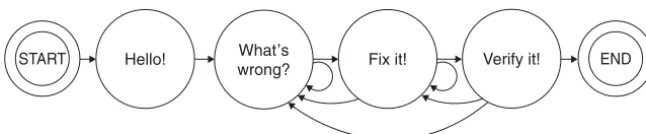
14.1.1 Phase A/Step 1: The Greeting 366
14.1.2 Phase B: Problem Identification 367
14.1.3 Phase C: Planning and Execution 373
14.1.4 Phase D: Verification 376
14.1.5 Perils of Skipping a Step 378
14.1.6 Team of One 380
14.2 The Icing 380
14.2.1 Based Model-Training 380
14.2.2 Holistic Improvement 381
14.2.3 Increased Customer Familiarity 381
14.2.4 Special Announcements for Major Outages 382
14.2.5 Trend Analysis 382
14.2.6 Customers Who Know the Process 384
14.2.7 Architectural Decisions That Match the Process 384
14.3 Conclusion 385
Part III Change Processes 389
15 Debugging 391
15.1 The Basics 391
15.1.1 Learn the Customer’s Problem 392
15.1.2 Fix the Cause, Not the Symptom 393
15.1.3 Be Systematic 394
15.1.4 Have the Right Tools 395
15.2 The Icing 399
15.2.1 Better Tools 399
15.2.2 Formal Training on the Tools 400
15.2.3 End-to-End Understanding of the System 400
Contents xv
16 Fixing Things Once 405
16.1 The Basics 405
16.1.1 Don’t Waste Time 405
16.1.2 Avoid Temporary Fixes 407
16.1.3 Learn from Carpenters 410
16.2 The Icing 412
16.3 Conclusion 414
17 Change Management 415
17.1 The Basics 416
17.1.1 Risk Management 417
17.1.2 Communications Structure 418
17.1.3 Scheduling 419
17.1.4 Process and Documentation 422
17.1.5 Technical Aspects 424
17.2 The Icing 428
17.2.1 Automated Front Ends 428
17.2.2 Change-Management Meetings 428
17.2.3 Streamline the Process 431
17.3 Conclusion 432
18 Server Upgrades 435
18.1 The Basics 435
18.1.1 Step 1: Develop a Service Checklist 436 18.1.2 Step 2: Verify Software Compatibility 438
18.1.3 Step 3: Verification Tests 439
18.1.4 Step 4: Write a Back-Out Plan 443
18.1.5 Step 5: Select a Maintenance Window 443 18.1.6 Step 6: Announce the Upgrade as Appropriate 445
18.1.7 Step 7: Execute the Tests 446
18.1.8 Step 8: Lock out Customers 446
18.1.9 Step 9: Do the Upgrade with Someone Watching 447
18.1.10 Step 10: Test Your Work 447
18.2 The Icing 449 18.2.1 Add and Remove Services at the Same Time 450
18.2.2 Fresh Installs 450
18.2.3 Reuse of Tests 451
18.2.4 Logging System Changes 451
18.2.5 A Dress Rehearsal 451
18.2.6 Installation of Old and New Versions on the 452 Same Machine
18.2.7 Minimal Changes from the Base 452
18.3 Conclusion 454
19 Service Conversions 457
19.1 The Basics 458
19.1.1 Minimize Intrusiveness 458
19.1.2 Layers versus Pillars 460
19.1.3 Communication 461
19.1.4 Training 462
19.1.5 Small Groups First 463
19.1.6 Flash-Cuts: Doing It All at Once 463
19.1.7 Back-Out Plan 465
19.2 The Icing 467
19.2.1 Instant Rollback 467
19.2.2 Avoiding Conversions 468
19.2.3 Web Service Conversions 469
19.2.4 Vendor Support 470
19.3 Conclusion 470
20 Maintenance Windows 473
20.1 The Basics 475
20.1.1 Scheduling 475
20.1.2 Planning 477
20.1.3 Directing 478
20.1.4 Managing Change Proposals 479
20.1.5 Developing the Master Plan 481
20.1.6 Disabling Access 482
20.1.7 Ensuring Mechanics and Coordination 483
20.1.8 Deadlines for Change Completion 488
Contents xvii
20.1.10 Postmaintenance Communication 490
20.1.11 Reenable Remote Access 491
20.1.12 Be Visible the Next Morning 491
20.1.13 Postmortem 492
20.2 The Icing 492
20.2.1 Mentoring a New Flight Director 492
20.2.2 Trending of Historical Data 493
20.2.3 Providing Limited Availability 493
20.3 High-Availability Sites 495
20.3.1 The Similarities 495
20.3.2 The Differences 496
20.4 Conclusion 497
21 Centralization and Decentralization 501
21.1 The Basics 502
21.1.1 Guiding Principles 502
21.1.2 Candidates for Centralization 505
21.1.3 Candidates for Decentralization 510
21.2 The Icing 512
21.2.1 Consolidate Purchasing 513
21.2.2 Outsourcing 515
21.3 Conclusion 519
Part IV Providing Services 521
22 Service Monitoring 523
22.1 The Basics 523
22.1.1 Historical Monitoring 525
22.1.2 Real-Time Monitoring 527
22.2 The Icing 534
22.2.1 Accessibility 534
22.2.2 Pervasive Monitoring 535
22.2.3 Device Discovery 535
22.2.4 End-to-End Tests 536
22.2.5 Application Response Time Monitoring 537
22.2.6 Scaling 537
22.2.7 Metamonitoring 539
23 Email Service 543
23.1 The Basics 543
23.1.1 Privacy Policy 544
23.1.2 Namespaces 544
23.1.3 Reliability 546
23.1.4 Simplicity 547
23.1.5 Spam and Virus Blocking 549
23.1.6 Generality 550
23.1.7 Automation 552
23.1.8 Basic Monitoring 552
23.1.9 Redundancy 553
23.1.10 Scaling 554
23.1.11 Security Issues 556
23.1.12 Communication 557
23.2 The Icing 558
23.2.1 Encryption 559
23.2.2 Email Retention Policy 559
23.2.3 Advanced Monitoring 560
23.2.4 High-Volume List Processing 561
23.3 Conclusion 562
24 Print Service 565
24.1 The Basics 566
24.1.1 Level of Centralization 566
24.1.2 Print Architecture Policy 568
24.1.3 System Design 572
24.1.4 Documentation 573
24.1.5 Monitoring 574
24.1.6 Environmental Issues 575
24.2 The Icing 576
24.2.1 Automatic Failover and Load Balancing 577
24.2.2 Dedicated Clerical Support 578
24.2.3 Shredding 578
24.2.4 Dealing with Printer Abuse 579
24.3 Conclusion 580
25 Data Storage 583
25.1 The Basics 584
Contents xix
25.1.2 Managing Storage 588
25.1.3 Storage as a Service 596
25.1.4 Performance 604
25.1.5 Evaluating New Storage Solutions 608
25.1.6 Common Problems 609
25.2 The Icing 611
25.2.1 Optimizing RAID Usage by Applications 611 25.2.2 Storage Limits: Disk Access Density Gap 613
25.2.3 Continuous Data Protection 614
25.3 Conclusion 615
26 Backup and Restore 619
26.1 The Basics 620
26.1.1 Reasons for Restores 621
26.1.2 Types of Restores 624
26.1.3 Corporate Guidelines 625
26.1.4 A Data-Recovery SLA and Policy 626
26.1.5 The Backup Schedule 627
26.1.6 Time and Capacity Planning 633
26.1.7 Consumables Planning 635
26.1.8 Restore-Process Issues 637
26.1.9 Backup Automation 639
26.1.10 Centralization 641
26.1.11 Tape Inventory 642
26.2 The Icing 643
26.2.1 Fire Drills 643
26.2.2 Backup Media and Off-Site Storage 644
26.2.3 High-Availability Databases 647
26.2.4 Technology Changes 648
26.3 Conclusion 649
27 Remote Access Service 653
27.1 The Basics 654
27.1.1 Requirements for Remote Access 654
27.1.2 Policy for Remote Access 656
27.1.3 Definition of Service Levels 656
27.1.4 Centralization 658
27.1.6 Authentication 661
27.1.7 Perimeter Security 661
27.2 The Icing 662
27.2.1 Home Office 662
27.2.2 Cost Analysis and Reduction 663
27.2.3 New Technologies 664
27.3 Conclusion 665
28 Software Depot Service 667
28.1 The Basics 669
28.1.1 Understand the Justification 669
28.1.2 Understand the Technical Expectations 670
28.1.3 Set the Policy 671
28.1.4 Select Depot Software 672
28.1.5 Create the Process Manual 672
28.1.6 Examples 673
28.2 The Icing 682
28.2.1 Different Configurations for Different Hosts 682
28.2.2 Local Replication 683
28.2.3 Commercial Software in the Depot 684
28.2.4 Second-Class Citizens 684
28.3 Conclusion 686
29 Web Services 689
29.1 The Basics 690
29.1.1 Web Service Building Blocks 690
29.1.2 The Webmaster Role 693
29.1.3 Service-Level Agreements 694
29.1.4 Web Service Architectures 694
29.1.5 Monitoring 698
29.1.6 Scaling for Web Services 699
29.1.7 Web Service Security 703
29.1.8 Content Management 710
29.1.9 Building the Manageable Generic Web Server 714
29.2 The Icing 718
29.2.1 Third-Party Web Hosting 718
29.2.2 Mashup Applications 721
Contents xxi
Part V A Management Practices 725
30 Organizational Structures 727
30.1 The Basics 727
30.1.1 Sizing 728
30.1.2 Funding Models 730
30.1.3 Management Chain’s Influence 733
30.1.4 Skill Selection 735
30.1.5 Infrastructure Teams 737
30.1.6 Customer Support 739
30.1.7 Helpdesk 741
30.1.8 Outsourcing 741
30.2 The Icing 743
30.2.1 Consultants and Contractors 743
30.3 Sample Organizational Structures 745
30.3.1 Small Company 745
30.3.2 Medium-Size Company 745
30.3.3 Large Company 746
30.3.4 E-Commerce Site 746
30.3.5 Universities and Nonprofit Organizations 747
30.4 Conclusion 748
31 Perception and Visibility 751
31.1 The Basics 752
31.1.1 A Good First Impression 752
31.1.2 Attitude, Perception, and Customers 756 31.1.3 Priorities Aligned with Customer Expectations 758
31.1.4 The System Advocate 760
31.2 The Icing 765
31.2.1 The System Status Web Page 765
31.2.2 Management Meetings 766
31.2.3 Physical Visibility 767
31.2.4 Town Hall Meetings 768
31.2.5 Newsletters 770
31.2.6 Mail to All Customers 770
31.2.7 Lunch 773
32 Being Happy 777
32.1 The Basics 778
32.1.1 Follow-Through 778
32.1.2 Time Management 780
32.1.3 Communication Skills 790
32.1.4 Professional Development 796
32.1.5 Staying Technical 797
32.2 The Icing 797
32.2.1 Learn to Negotiate 798
32.2.2 Love Your Job 804
32.2.3 Managing Your Manager 811
32.3 Further Reading 815
32.4 Conclusion 815
33 A Guide for Technical Managers 819
33.1 The Basics 819
33.1.1 Responsibilities 820
33.1.2 Working with Nontechnical Managers 835
33.1.3 Working with Your Employees 838
33.1.4 Decisions 843
33.2 The Icing 849
33.2.1 Make Your Team Even Stronger 849
33.2.2 Sell Your Department to Senior Management 849
33.2.3 Work on Your Own Career Growth 850
33.2.4 Do Something You Enjoy 850
33.3 Conclusion 850
34 A Guide for Nontechnical Managers 853
34.1 The Basics 853
34.1.1 Priorities and Resources 854
34.1.2 Morale 855
34.1.3 Communication 857
34.1.4 Staff Meetings 858
34.1.5 One-Year Plans 860
34.1.6 Technical Staff and the Budget Process 860
Contents xxiii
34.2 The Icing 863
34.2.1 A Five-Year Vision 864
34.2.2 Meetings with Single Point of Contact 866 34.2.3 Understanding the Technical Staff’s Work 868
34.3 Conclusion 869
35 Hiring System Administrators 871
35.1 The Basics 871
35.1.1 Job Description 872
35.1.2 Skill Level 874
35.1.3 Recruiting 875
35.1.4 Timing 877
35.1.5 Team Considerations 878
35.1.6 The Interview Team 882
35.1.7 Interview Process 884
35.1.8 Technical Interviewing 886
35.1.9 Nontechnical Interviewing 891
35.1.10 Selling the Position 892
35.1.11 Employee Retention 893
35.2 The Icing 894
35.2.1 Get Noticed 894
35.3 Conclusion 895
36 Firing System Administrators 899
36.1 The Basics 900
36.1.1 Follow Your Corporate HR Policy 900
36.1.2 Have a Termination Checklist 900
36.1.3 Remove Physical Access 901
36.1.4 Remove Remote Access 901
36.1.5 Remove Service Access 902
36.1.6 Have Fewer Access Databases 904
36.2 The Icing 905
36.2.1 Have a Single Authentication Database 905
36.2.2 System File Changes 906
Epilogue 909
Appendixes
911
Appendix A The Many Roles of a System Administrator 913
Appendix B Acronyms 939
Bibliography 945
Preface
Our goal for this book has been to write down everything we’ve learned from our mentors and to add our real-world experiences. These things are beyond what the manuals and the usual system administration books teach.
This book was born from our experiences as SAs in a variety of organi-zations. We have started new companies. We have helped sites to grow. We have worked at small start-ups and universities, where lack of funding was an issue. We have worked at midsize and large multinationals, where mergers and spin-offs gave rise to strange challenges. We have worked at fast-paced companies that do business on the Internet and where availability, high-performance, and scaling issues were the norm. We’ve worked at slow-paced companies at which high tech meant cordless phones. On the surface, these are very different environments with diverse challenges; underneath, they have the same building blocks, and the same fundamental principles apply.
This book gives you a framework—a way of thinking about system ad-ministration problems—rather than narrow how-to solutions to particular problems. Given a solid framework, you can solve problems every time they appear, regardless of the operating system (OS), brand of computer, or type of environment. This book is unique because it looks at system administration from this holistic point of view; whereas most other books for SAs focus on how to maintain one particular product. With experience, however, all SAs learn that the big-picture problems and solutions are largely independent of the platform. This book will change the way you approach your work as an SA.
The principles in this book apply to all environments. The approaches described may need to be scaled up or down, depending on your environment, but the basic principles still apply. Where we felt that it might not be obvious how to implement certain concepts, we have included sections that illustrate how to apply the principles at organizations of various sizes.
This book is not about how to configure or debug a particular OS and will not tell you how to recover the shared libraries or DLLs when someone accidentally moves them. Some excellent books cover those topics, and we refer you to many of them throughout. Instead, we discuss the principles, both basic and advanced, of good system administration that we have learned through our own and others’ experiences. These principles apply to all OSs. Following themwellcan make your life a lot easier. If you improve the way you approach problems, the benefit will be multiplied. Get the fundamentals right, and everything else falls into place. If they aren’t done well, you will waste time repeatedly fixing the same things, and your customers1 will be
unhappy because they can’t work effectively with broken machines.
Who Should Read This Book
This book is written for system administrators at all levels. It gives junior SAs insight into the bigger picture of how sites work, their roles in the organiza-tions, and how their careers can progress. Intermediate SAs will learn how to approach more complex problems and how to improve their sites and make their jobs easier and their customers happier. Whatever level you are at, this book will help you to understand what is behind your day-to-day work, to learn the things that you can do now to save time in the future, to decide policy, to be architects and designers, to plan far into the future, to nego-tiate with vendors, and to interface with management. These are the things that concern senior SAs. None of them are listed in an OS’s manual. Even senior SAs and systems architects can learn from our experiences and those of our colleagues, just as we have learned from each other in writing this book. We also cover several management topics for SA trying to understand their managers, for SAs who aspire to move into management, and for SAs finding themselves doing more and more management without the benefit of the title.
Throughout the book, we use examples to illustrate our points. The ex-amples are mostly from medium or large sites, where scale adds its own prob-lems. Typically, the examples are generic rather than specific to a particular OS; where they are OS-specific, it is usually UNIXor Windows.
One of the strongest motivations we had for writing this book is the understanding that the problems SAs face are the same across all OSs. A new
Preface xxvii
OS that is significantly different from what we are used to can seem like a black box, a nuisance, or even a threat. However, despite the unfamiliar interface, as we get used to the new technology, we eventually realize that we face the same set of problems in deploying, scaling, and maintaining the new OS. Recognizing that fact, knowing what problems need solving, and understanding how to approach the solutions by building on experience with other OSs lets us master the new challenges more easily.
We want this book to change your life. We want you to become so suc-cessful that if you see us on the street, you’ll give us a great big hug.
Basic Principles
If we’ve learned anything over the years, it is the importance of simplicity, clarity, generality, automation, communication, and doing the basics first. These six principles are recurring themes in this book.
1. Simplicitymeans that the smallest solution that solves the entire problem is the best solution. It keeps the systems easy to understand and reduces complex component interactions that can cause debugging nightmares.
2. Claritymeans that the solution is straightforward. It can be easily explained to someone on the project or even outside the project. Clarity makes it easier to change the system, as well as to maintain and debug it. In the system administration world, it’s better to write five lines of understandable code than one line that’s incomprehensible to anyone else.
3. Generalitymeans that the solutions aren’t inherently limited to a particular case. Solutions can be reused. Using vendor-independent open standard protocols makes systems more flexible and makes it easier to link software packages together for better services.
4. Automationmeans using software to replace human effort. Automa-tion is critical. AutomaAutoma-tion improves repeatability and scalability, is key to easing the system administration burden, and eliminates tedious repetitive tasks, giving SAs more time to improve services. 5. Communicationbetween the right people can solve more problems
toward the same goals. Lack of communication leaves people con-cerned and annoyed. Communication also includes documentation. Documentation makes systems easier to support, maintain, and upgrade. Good communication and proper documentation also make it easier to hand off projects and maintenance when you leave or take on a new role.
6. Basics firstmeans that you build the site on strong foundations by identifying and solving the basic problems before trying to attack more advanced ones. Doing the basics first makes adding advanced features considerably easier and makes services more robust. A good basic infrastructure can be repeatedly leveraged to improve the site with relatively little effort. Sometimes, we see SAs making a huge effort to solve a problem that wouldn’t exist or would be a simple enhancement if the site had a basic infrastructure in place. This book will help you identify what the basics are and show you how the other five principles apply. Each chapter looks at the basics of a given area. Get the
fundamentals right, and everything else will fall into place.
These principles are universal. They apply at all levels of the system. They apply to physical networks and to computer hardware. They apply to all operating systems running at a site, all protocols used, all software, and all services provided. They apply at universities, nonprofit institutions, government sites, businesses, and Internet service sites.
What Is an SA?
If you asked six system administrators to define their jobs, you would get seven different answers. The job is difficult to define because system admin-istrators do so many things. An SA looks after computers, networks, and the people who use them. An SA may look after hardware, operating systems, software, configurations, applications, or security. A system administrator influences how effectively other people can or do use their computers and networks.
A system administrator sometimes needs to be a business-process con-sultant, corporate visionary, janitor, software engineer, electrical engineer, economist, psychiatrist, mindreader, and, occasionally, a bartender.
Preface xxix
This book is for “all of the above.”
We have a very general definition of system administrator: one who man-ages computer and network systems on behalf of another, such as an employer or a client. SAs are the people who make things work and keep it all running.
Explaining What System Administration Entails
It’s difficult to define system administration, but trying to explain it to a nontechnical person is even more difficult, especially if that person is your mom. Moms have the right to know how their offspring are paying their rent. A friend of Christine Hogan’s always had trouble explaining to his mother what he did for a living and ended up giving a different answer every time she asked. Therefore, she kept repeating the question every couple of months, waiting for an answer that would be meaningful to her. Then he started working for WebTV. When the product became available, he bought one for his mom. From then on, he told her that he made sure that her WebTV service was working and was as fast as possible. She was very happy that she could now show her friends something and say, “That’s what my son does!”
System Administration Matters
System administration matters because computers and networks matter. Computers are a lot more important than they were years ago. What happened?
The widespread use of the Internet, intranets, and the move to a web-centric world has redefined the way companies depend on computers. The Internet is a 24/7 operation, and sloppy operations can no longer be tolerated. Paper purchase orders can be processed daily, in batches, with no one the wiser. However, there is an expectation that the web-based system that does the process will be available all the time, from anywhere. Nightly maintenance windows have become an unheard-of luxury. That unreliable machine room power system that caused occasional but bearable problems now prevents sales from being recorded.
The movie also showed how depending on one person is a disaster waiting to happen. IT is a team sport. If only Dennis Nedry had read this book.
In business, nothing is important unless the CEO feels that it is im-portant. The CEO controls funding and sets priorities. CEOs now consider IT to be important. Email was previously for nerds; now CEOs depend on email and notice even brief outages. The massive preparations for Y2K also brought home to CEOs how dependent their organizations have become on computers, how expensive it can be to maintain them, and how quickly a purely technical issue can become a serious threat. Most people do not think that they simply “missed the bullet” during the Y2K change but that prob-lems were avoided thanks to tireless efforts by many people. A CBS Poll shows 63 percent of Americans believe that the time and effort spent fixing potential problems was worth it. A look at the news lineups of all three major network news broadcasts from Monday, January 3, 2000, reflects the same feeling.
Previously, people did not grow up with computers and had to cautiously learn about them and their uses. Now more and more people grow up using computers, which means that they have higher expectations of them when they are in positions of power. The CEOs who were impressed by automatic payroll processing are soon to be replaced by people who grew up sending instant messages and want to know why they can’t do all their business via text messaging.
Computers matter more than ever. If computers are to work and work well, system administration matters. We matter.
Organization of This Book
This book has the following major parts:• Part I: Getting Started. This is a long book, so we start with an overview of what to expect (Chapter 1) and some tips to help you find enough time to read the rest of the book (Chapter 2).
• Part II: Foundation Elements. Chapters 3–14 focus on the foundations of IT infrastructure, the hardware and software that everything else depends on.
Preface xxxi
• Part IV: Providing Services. Chapters 22–29 offer our advice on building seven basic services, such as email, printing, storage, and web services. • Part V: Management Practices. Chapters 30–36 provide guidance—
whether or not you have “manager” in your title.
• The two appendixes provide an overview of the positive and negative roles that SAs play and a list of acronyms used in the book.
Each chapter discusses a separate topic; some topics are technical, and some are nontechnical. If one chapter doesn’t apply to you, feel free to skip it. The chapters are linked, so you may find yourself returning to a chapter that you previously thought was boring. We won’t be offended.
Each chapter has two major sections.The Basicsdiscusses the essentials that you simply have to get right. Skipping any of these items will simply create more work for you in the future. Consider them investments that pay off in efficiency later on.The Icingdeals with the cool things that you can do to be spectacular. Don’t spend your time with these things until you are done with the basics. We have tried to drive the points home through anecdotes and case studies from personal experience. We hope that this makes the advice here more “real” for you. Never trust salespeople who don’t use their own products.
What’s New in the Second Edition
We received a lot of feedback from our readers about the first edition. We spoke at conferences and computer user groups around the world. We received a lot of email. We listened. We took a lot of notes. We’ve smoothed the rough edges and filled some of the major holes.
on running web servers, because we felt that all one needed to know could be inferred by reading the right combination of the chapters: Data Centers, Servers, Services, and Service Monitoring. What more could people need?
My, how things have changed!
Linux is no longer considered a risky proposition, Google is on the rise, and offshoring is the new buzzword. The rise of India and China as economic superpowers has changed the way we think about the world. AJAX and other Web 2.0 technologies have made the web applications exciting again.
Here’s what’s new in the book:
• Updated chapters:Every chapter has been updated and modernized and new anecdotes added. We clarified many, many points. We’ve learned a lot in the past five years, and all the chapters reflect this. References to old technologies have been replaced with more relevant ones.
• New chapters:
– Chapter 9: Documentation – Chapter 25: Data Storage – Chapter 29: Web Services
• Expanded chapters:
– The first edition’s Appendix B, which had been missed by many read-ers who didn’t read to the end of the book, is now Chapter 1: What to Do When. . ..
– The first edition’s Do These First section in the front matter has ex-panded to become Chapter 2: Climb Out of the Hole.
• Reordered table of contents:
– Part I: Getting Started: introductory and overview material – Part II: Foundation Elements: the foundations of any IT system – Part III: Change Processes: how to make changes from the smallest
to the biggest
Preface xxxiii
What’s Next
Each chapter is self-contained. Feel free to jump around. However, we have carefully ordered the chapters so that they make the most sense if you read the book from start to finish. Either way, we hope that you enjoy the book. We have learned a lot and had a lot of fun writing it. Let’s begin.
Thomas A. Limoncelli Google, Inc. [email protected]
Christina J. Hogan BMW Sauber F1 Team [email protected]
Strata R. Chalup Virtual.Net, Inc. [email protected]
Acknowledgments
Acknowledgments for the First Edition
We can’t possibly thank everyone who helped us in some way or another, but that isn’t going to stop us from trying. Much of this book was inspired by Kernighan and Pike’sThe Practice of Programming(Kernighan and Pike 1999) and John Bentley’s second edition of Programming Pearls (Bentley 1999).
We are grateful to Global Networking and Computing (GNAC), Synop-sys, and Eircom for permitting us to use photographs of their data center fa-cilities to illustrate real-life examples of the good practices that we talk about. We are indebted to the following people for their helpful editing: Valerie Natale, Anne Marie Quint, Josh Simon, and Amara Willey.
The people we have met through USENIX and SAGE and the LISA con-ferences have been major influences in our lives and careers. We would not be qualified to write this book if we hadn’t met the people we did and learned so much from them.
Dozens of people helped us as we wrote this book—some by supplying anecdotes, some by reviewing parts of or the entire book, others by mentoring us during our careers. The only fair way to thank them all is alphabetically and to apologize in advance to anyone that we left out: Rajeev Agrawala, Al Aho, Jeff Allen, Eric Anderson, Ann Benninger, Eric Berglund, Melissa Binde, Steven Branigan, Sheila Brown-Klinger, Brent Chapman, Bill Cheswick, Lee Damon, Tina Darmohray, Bach Thuoc (Daisy) Davis, R. Drew Davis, Ingo Dean, Arnold de Leon, Jim Dennis, Barbara Dijker, Viktor Dukhovni, Chelle-Marie Ehlers, Michael Erlinger, Paul Evans, R´emy Evard, Lookman Fazal, Robert Fulmer, Carson Gaspar, Paul Glick, David “Zonker” Harris, Kather-ine “Cappy” Harrison, Jim Hickstein, Sandra Henry-Stocker, Mark Horton, Bill “Whump” Humphries, Tim Hunter, Jeff Jensen, Jennifer Joy, Alan Judge, Christophe Kalt, Scott C. Kennedy, Brian Kernighan, Jim Lambert, Eliot Lear,
Steven Levine, Les Lloyd, Ralph Loura, Bryan MacDonald, Sherry McBride, Mark Mellis, Cliff Miller, Hal Miller, Ruth Milner, D. Toby Morrill, Joe Mor-ris, Timothy Murphy, Ravi Narayan, Nils-Peter Nelson, Evi Nemeth, William Ninke, Cat Okita, Jim Paradis, Pat Parseghian, David Parter, Rob Pike, Hal Pomeranz, David Presotto, Doug Reimer, Tommy Reingold, Mike Richichi, Matthew F. Ringel, Dennis Ritchie, Paul D. Rohrigstamper, Ben Rosengart, David Ross, Peter Salus, Scott Schultz, Darren Shaw, Glenn Sieb, Karl Siil, Cicely Smith, Bryan Stansell, Hal Stern, Jay Stiles, Kim Supsinkas, Ken Thompson, Greg Tusar, Kim Wallace, The Rabbit Warren, Dr. Geri Weitz-man, PhD, Glen Wiley, Pat Wilson, Jim Witthoff, Frank Wojcik, Jay Yu, and Elizabeth Zwicky.
Thanks also to Lumeta Corporation and Lucent Technologies/Bell Labs for their support in writing this book.
Last but not least, the people at Addison-Wesley made this a particularly great experience for us. In particular, our gratitude extends to Karen Gettman, Mary Hart, and Emily Frey.
Acknowledgments for the Second Edition
In addition to everyone who helped us with the first edition, the second edi-tion could not have happened without the help and support of Lee Damon, Nathan Dietsch, Benjamin Feen, Stephen Harris, Christine E. Polk, Glenn E. Sieb, Juhani Tali, and many people at the League of Professional System Ad-ministrators (LOPSA). Special 73s and 88s to Mike Chalup for love, loyalty, and support, and especially for the mountains of laundry done and oceans of dishes washed so Strata could write. And many cuddles and kisses for baby Joanna Lear for her patience.
Thanks to Lumeta Corporation for giving us permission to publish a second edition.
Thanks to Wingfoot for letting us use its server for our bug-tracking database.
Thanks to Anne Marie Quint for data entry, copyediting, and a lot of great suggestions.
About the Authors
Tom, Christine, and Strata know one another through attending USENIX conferences and being actively involved in the system administration com-munity. It was at one of these conferences that Tom and Christine first spoke about collaborating on this book. Strata and Christine were coworkers at Synopsys and GNAC, and coauthored Chalup, Hogan et al. (1998).
Thomas A. Limoncelli
Tom is an internationally recognized author and speaker on system adminis-tration, time management, and grass-roots political organizing techniques. A system administrator since 1988, he has worked for small and large compa-nies, including Google, Cibernet Corp, Dean for America, Lumeta, AT&T, Lucent/Bell Labs, and Mentor Graphics. At Google, he is involved in improv-ing how IT infrastructure is deployed at new offices. When AT&T trivested into AT&T, Lucent, and NCR, Tom led the team that split the Bell Labs computing and network infrastructure into the three new companies.
In addition to the first and second editions of this book, his published works include Time Management for System Administration (2005), and papers on security, networking, project management, and personal career management. He travels to conferences and user groups frequently, often teaching tutorials, facilitating workshops, presenting papers, or giving invited talks and keynote speeches.
Outside of work, Tom is a grassroots civil-rights activist who has re-ceived awards and recognition on both state and national levels. Tom’s first published paper (Limoncelli 1997) extolled the lessons SAs can learn from activists. Tom doesn’t see much difference between his work and activism careers—both are about helping people.
He holds a B.A. in computer science from Drew University. He lives in Bloomfield, New Jersey.
For their community involvement, Tom and Christine shared the 2005 Outstanding Achievement Award from USENIX/SAGE.
Christina J. Hogan
Christine’s system administration career started at the Department of Mathe-matics in Trinity College, Dublin, where she worked for almost 5 years. After that, she went in search of sunshine and moved to Sicily, working for a year in a research company, and followed that with 5 years in California.
She was the security architect at Synopsys for a couple of years before joining some friends at GNAC a few months after it was founded. While there, she worked with start-ups, e-commerce sites, biotech companies, and large multinational hardware and software companies. On the technical side, she focused on security and networking, working with customers and helping GNAC establish its data center and Internet connectivity. She also became involved with project management, customer management, and people man-agement. After almost 3 years at GNAC, she went out on her own as an independent security consultant, working primarily at e-commerce sites.
Since then, she has become a mother and made a career change: she now works as an aerodynamicist for the BMW Sauber Formula 1 Racing Team. She has a Ph.D. in aeronautical engineering from Imperial College, London; a B.A. in mathematics and an M.Sc. in computer science from Trinity College, Dublin; and a Diploma in legal studies from the Dublin Institute of Technology.
Strata R. Chalup
Strata is the owner and senior consultant of Virtual.Net, Inc., a strategic and best-practices IT consulting firm specializing in helping small to midsize firms scale their IT practices as they grow. During the first dot-com boom, Strata architected scalable infrastructures and managed some of the teams that built them for such projects as talkway.net, the Palm VII, and mac.com. Founded as a sole proprietorship in 1993, Virtual.Net was incorporated in 2005. Clients have included such firms as Apple, Sun, Cimflex Teknowledge, Cisco, McAfee, and Micronas USA.
Strata joined the computing world on TOPS-20 on DEC mainframes in 1981, then got well and truly sidetracked onto administering UNIX by
About the Authors xxxix
unusual perspective of someone who has been both a user and an adminis-trator of Internet services since 1981 and has seen much of what we consider the modern Net evolve, sometimes from a front-row seat. An early adopter and connector, she was involved with the early National Telecommunica-tions Infrastructure Administration (NTIA) hearings and grant reviews from 1993–1995 and demonstrated the emerging possibilities of the Internet in 1994, creating NTIA’s groundbreaking virtual conference. A committed fu-turist, Strata avidly tracks new technologies for collaboration and leverages them for IT and management.
Always a New Englander at heart, but marooned in California with a snow-hating spouse, Strata is an active gardener, reader of science fic-tion/fantasy, and emergency services volunteer in amateur radio (KF6NBZ). She is SCUBA-certified but mostly free dives and snorkles. Strata has spent a couple of years as a technomad crossing the country by RV, first in 1990 and again in 2002, consulting from the road. She has made a major hobby of studying energy-efficient building construction and design, including taking owner-builder classes, and really did grow up on a goat farm.
Part
I
Chapter
1
What to Do When
. . .
In this chapter, we pull together the various elements from the rest of the book to provide an overview of how they can be used to deal with everyday situations or to answer common questions system administrators (SAs) and managers often have.
1.1 Building a Site from Scratch
• Think about the organizational structure you need—Chapter 30.
• Check in with management on the business priorities that will drive implementation priorities.
• Plan your namespaces carefully—Chapter 8.
• Build a rock-solid data center—Chapter 6.
• Build a rock-solid network designed to grow—Chapter 7.
• Build services that will scale—Chapter 5.
• Build a software depot, or at least plan a small directory hierarchy that can grow into a software depot—Chapter 28.
• Establish your initial core application services: – Authentication and authorization—Section 3.1.3 – Desktop life-cycle management—Chapter 3 – Email—Chapter 23
– File service, backups—Chapter 26 – Network configuration—Section 3.1.3 – Printing—Chapter 24
– Remote access—Chapter 27
1.2 Growing a Small Site
• Provide a helpdesk—Chapter 13.
• Establish checklists for new hires, new desktops/laptops, and new servers—Section 3.1.1.5.
• Consider the benefits of a network operations center (NOC) dedicated to monitoring and coordinating network operations—Chapter 22. • Think about your organization and whom you need to hire, and provide
service statistics showing open and resolved problems—Chapter 30.
• Monitor services for both capacity and availability so that you can pre-dict when to scale them—Chapter 22.
• Be ready for an influx of new computers, employees, and SAs—See Sections 1.23, 1.24, and 1.25.
1.3 Going Global
• Design your wide area network (WAN) architecture—Chapter 7.
• Follow three cardinal rules: scale, scale, and scale.
• Standardize server times on Greenwich Mean Time (GMT) to maximize log analysis capabilities.
• Make sure that your helpdesk really is 24/7. Look at ways to leverage SAs in other time zones—Chapter 13.
• Architect services to take account of long-distance links—usually lower bandwidth and less reliable—Chapter 5.
• Qualify applications for use over high-latency links—Section 5.1.2.
• Ensure that your security and permissions structures are still adequate under global operations.
1.4 Replacing Services
• Be conscious of the process—Chapter 18.
• Factor in both network dependencies and service dependencies in tran-sition planning.
1.6 Moving to/Opening a New Building 5
• Don’t hard-code server names into configurations, instead, hard-code aliases that move with the service—Section 5.1.6.
• Manage your DNS time-to-live (TTL) values to switch to new servers— Section 19.2.1.
1.5 Moving a Data Center
• Schedule windows unless everything is fully redundant and you can move first half of a redundant pair and then the other—Chapter 20. • Make sure that the new data center is properly designed for both current
use and future expansion—Chapter 6.
• Back up every file system of any machine before it is moved.
• Perform a fire drill on your data backup system—Section 26.2.1.
• Develop test cases before you move, and test, test, test everything after the move is complete—Chapter 18.
• Label every cable before it is disconnected—Section 6.1.7.
• Establish minimal services—redundant hardware—at a new location with new equipment.
• Test the new environment—networking, power, uninterruptable power supply (UPS), heating, ventilation, air conditioning (HVAC), and so on—before the move begins—Chapter 6, especially Section 6.1.4.
• Identify a small group of customers to test business operations with the newly moved minimal services, then test sample scenarios before moving everything else.
• Run cooling for 48–72 hours, and then replace all filters before occu-pying the space.
• Perform a dress rehearsal—Section 18.2.5.
1.6 Moving to/Opening a New Building
• Four weeks or more in advance, get access to the new space to build the infrastructure.
• Use a personal digital assistant (PDA) or nonelectronic organizer— Section 32.1.2.
• Order WAN and Internet service provider (ISP) network connections 2–3 months in advance.
• Communicate to the powers that be that WAN and ISP connections will take months to order and must be done soon.
• Prewire the offices with network jacks during, not after, construction— Section 7.1.4.
• Work with a moving company that can help plan the move.
• Designate one person to keep and maintain a master list of everyone who is moving and his or her new office number, cubicle designation, or other location.
• Pick a day on which to freeze the master list. Give copies of the frozen list to the moving company, use the list for printing labels, and so on. If someone’s location is to be changed after this date, don’t try to chase down and update all the list copies that have been distributed. Move the person as the master list dictates, and schedule a second move for that person after the main move.
• Give each person a sheet of 12 labels preprinted with his or her name and new location for labeling boxes, bags, and personal computer (PC). (If you don’t want to do this, at least give people specific instructions as to what to write on each box so it reaches the right destination.) • Give each person a plastic bag big enough for all the PC cables. Technical
people can decable and reconnect their PCs on arrival; technicians can do so for nontechnical people.
• Always order more boxes than you think you’ll be moving.
• Don’t use cardboard boxes; instead, use plastic crates that can be reused.
1.7 Handling a High Rate of Office Moves
• Work with facilities to allocate only one move day each week. Develop a routine around this schedule.
1.8 Assessing a Site (Due Diligence) 7
• Connect and test network connections ahead of time.
• Have customers power down their machines before the move and put all cables, mice, keyboards, and other bits that might get lost into a marked box.
• Brainstorm all the ways that some of the work can be done by the people moving. Be careful to assess their skill level; maybe certain people shouldn’t do anything themselves.
• Have a moving company move the equipment, and have a designated SA move team do the unpacking, reconnecting, and testing. Take care in selecting the moving company.
• Train the helpdesk to check with customers who report problems to see whether they have just moved and didn’t have the problem before the move; then pass those requests to the move team rather than the usual escalation path.
• Formalize the process, limiting it to one day a week, doing the prep work, and having a move team makes it go more smoothly with less downtime for the customers and fewer move-related problems for the SAs to check out.
1.8 Assessing a Site (Due Diligence)
• Use the chapters and subheadings in this book to create a preliminary list of areas to investigate, taking the items in the Basics section as a rough baseline for a well-run site.
• Reassure existing SA staff and management that you are here not to pass judgment but to discover how this site works, in order to understand its similarities to and differences from sites with which you are already familiar. This is key in both consulting assignments and in potential acquisition due-diligence assessments.
• Have a private document repository, such as a wiki, for your team. The amount of information you will collect will overwhelm your ability to remember it: document, document, document.
• Create or request physical-equipment lists of workstations and servers, as well as network diagrams and service workflows. The goal is to gen-erate multiple views of the infrastructure.
• Analyze the ticket-system statistics by opened-to-close ratios month to month. Watch for a growing gap between total opened and closed tickets, indicating an overloaded staff or an infrastructure system with chronic difficulties.
1.9 Dealing with Mergers and Acquisitions
• If mergers and acquisitions will be frequent, make arrangements to get information as early as possible, even if this means that designated peo-ple will have information that prevents them from being able to trade stock for certain windows of time.
• Some mergers require instant connectivity to the new business unit. Others are forbidden from having full connectivity for a month or so until certain papers are signed. In the first case, set expectations that this will not be possible without some prior warning (see previous item). In the latter case, you have some breathing room, but act quickly!
• If you are the chief executive officer (CEO), you should involve your chief information officer (CIO) before the merger is even announced. • If you are an SA, try to find out who at the other company has the
authority to make the big decisions.
• Establish clear, final decision processes.
• Have one designated go-to lead per company.
• Start a dialogue with the SAs at the other company. Understand their support structure, service levels, network architecture, security model, and policies. Determine what the new model is going to look like. • Have at least one initial face-to-face meeting with the SAs at the other
company. It’s easier to get angry at someone you haven’t met.
• Move on to technical details. Are there namespace conflicts? If so, determine how are you going to resolve them—Chapter 8.
• Adopt the best processes of the two companies; don’t blindly select the processes of the bigger company.
• Be sensitive to cultural differences between the two groups. Diverse opinions can be a good thing if people can learn to respect one another— Sections 32.2.2.2 and 35.1.5.
1.10 Coping with Frequent Machine Crashes 9
• Determine what the new network architecture should look like— Chapter 7. How will the two networks be connected? Are some remote offices likely to merge? What does the new security model or security perimeter look like?—Chapter 11.
• Ask senior management about corporate-identity issues, such as account names, email address format, and domain name. Do the corporate iden-tities need to merge or stay separate? What implications does this have on the email infrastructure and Internet-facing services?
• Learn whether any customers or business partners of either company will be sensitive to the merger and/or want their intellectual property protected from the other company—Chapter 7.
• Compare the security policies, mentioned in Chapter 11—looking in particular for differences in privacy policy, security policy, and how they interconnect with business partners.
• Check router tables of both companies, and verify that the Internet Protocol (IP) address space in use doesn’t overlap. (This is particularly a problem if you both use RFC 1918 address space [Lear et al. 1994, Rekhler et al. 1996].)
• Consider putting a firewall between the two companies until both have compatible security policies—Chapter 11.
1.10 Coping with Frequent Machine Crashes
• Establish a temporary workaround, and communicate to customers that it is temporary.
• Find the real cause—Chapter 15.
• Fix the real cause, not the symptoms—Chapter 16.
• If the root cause is hardware, buy better hardware—Chapter 4.
• If the root cause is environmental, provide a better physical environment for your hardware—Chapter 6.
• Replace the system—Chapter 18.
• Give your SAs better training on diagnostic tools—Chapter 15.
1.11 Surviving a Major Outage or Work Stoppage
• Consider modeling your outage response on the Incident Command Sys-tem (ICS). This ad hoc emergency response sysSys-tem has been refined over many years by public safety departments to create a flexible response to adverse situations. Defining escalation proceduresbefore an issue arises
is the best strategy.
• Notify customers that you are aware of the problem on the commu-nication channels they would use to contact you: intranet help desk “outages” section, outgoing message for SA phone, and so on.
• Form a “tiger team” of SAs, management, and key stakeholders; have a brief 15- to 30-minute meeting to establish the specific goals of a solution, such as “get developers working again,” “restore customer access to support site” and so on. Make sure that you are working to-ward a goal, not simply replicating functionality whose value is non-specific.
• Establish the costs of a workaround or fallback position versus down-time owing to the problem, and let the businesspeople and stakeholders determine how much time is worth spending on attempting a fix. If in-formation is insufficient to estimate this, do not end the meeting without setting the time for the next attempt.
• Spend no more than an hour gathering information. Then hold a team meeting to present management and key stakeholders with options. The team should do hourly updates of the passive notification message with status.
• If the team chooses fix or workaround attempts, specify an order in which fixes are to be applied, and get assistance from stakeholders on verifying that the each procedure did or did not work. Document this, even in brief, to prevent duplication of effort if you are still working on the issue hours or days from now.
• Implement fix or workaround attempts in small blocks of two or three, taking no more than an hour to implement total. Collect error message or log data that may be relevant, and report on it in the next meeting. • Don’t allow a team member, even a highly skilled one, to go off to try
1.12 What Tools Should Every SA Team Member Have? 11
• Appoint a team member who will ensure that meals are brought in, notes taken, and people gently but firmly disengaged from the problem if they become too tired or upset to work.
1.12 What Tools Should Every SA Team Member Have?
• A laptop with network diagnostic tools, such as network sniffer, DHCP client in verbose mode, encrypted TELNET/SSH client, TFTP server, and so on, as well as both wired and wireless Ethernet.
• Terminal emulator software and a serial cable. The laptop can be an emergency serial console if the console server dies or the data center console breaks or a rogue server outside the data center needs console access.
• A spare PC or server for experimenting with new configurations— Section 19.2.1.
• A portable label printer—Section 6.1.12.
• A PDA or nonelectronic organizer—Section 32.1.2.
• A set of screwdrivers in all the sizes computers use.
• A cable tester.
• A pair of splicing scissors.
• Access to patch cables of various lengths. Include one or two 100-foot (30-meter) cables. These come in handy in the strangest emergencies. • A small digital camera. (Sending a snapshot to technical support can
be useful for deciphering strange console messages, identifying model numbers, and proving damage.)
• A portable (USB)/firewire hard drive.
• Radios or walkie-talkies for communicating inside the building— Chapter 6 and Section 20.1.7.3.
• A cabinet stocked with tools and spare parts—Section 6.1.12.
• High-speed connectivity to team members’ home and the necessary tools for telecommuting.
• A library of the standard reference books for the technologies the team members are involved in—Sections 33.1.1, 34.1.7, and bibliography. • Membership to professional societies such as USENIX and LOPSA—
• A variety of headache medicines. It’s really difficult to solve big problems when you have a headache.
• Printed, framed, copies of the SA Code of Ethics—Section 12.1.2.
• Shelf-stable emergency-only snacky bits.
• A copy of this book!
1.13 Ensuring the Return of Tools
• Make it easier to return tools: Affix each with a label that reads, “Return to [your name here] when done.”
• When someone borrows something, open a helpdesk ticket that is closed only when the item is returned.
• Accept that tools won’t be returned. Why stress out about things you can’t control?
• Create a team toolbox and rotate responsibility for keeping it up to date and tracking down loaners.
• Keep a stash of PC screwdriver kits. When asked to borrow a single screw driver, smile and reply, “No, but you can have this kit as a gift.” Don’t accept it back.
• Don’t let a software person have a screwdriver. Politely find out what the person is trying to do, and do it. This is faster than fixing the person’s mistakes.
• If you are a software person, use a screwdriver only with adult super-vision.
• Keep a few inexpensive eyeglass repair kits in your spares area.
1.14 Why Document Systems and Procedures?
• Good documentation describes thewhyand thehow to.• When you do things right and they “just work,” even you will have forgotten the details when they break or need upgrading.
• You get to go on vacation—Section 32.2.2.