Elsevier, Inc., the author(s), and any person or fi rm involved in the writing, editing, or production (collectively “Makers”) of this book (“the Work”) do not guarantee or warrant the results to be obtained from the Work. There is no guarantee of any kind, expressed or implied, regarding the Work or its contents. The Work is sold AS IS and WITHOUT WARRANTY. You may have other legal rights, which vary from state to state. In no event will Makers be liable to you for damages, including any loss of profi ts, lost savings, or other incidental or consequential damages arising out from the Work or its contents. Because some states do not allow the exclusion or limitation of liability for consequential or incidental damages, the above limitation may not apply to you.
You should always use reasonable care, including backup and other appropriate precautions, when working with computers, networks, data, and fi les.
Syngress Media®, Syngress®, “Career Advancement Through Skill Enhancement®,” “Ask the Author
UPDATE®,” and “Hack Proofi ng®,” are registered trademarks of Elsevier, Inc. “Syngress: The Defi nition of
a Serious Security Library”™, “Mission Critical™,” and “The Only Way to Stop a Hacker is to Think Like
One™” are trademarks of Elsevier, Inc. Brands and product names mentioned in this book are trademarks
or service marks of their respective companies.
KEY SERIAL NUMBER
001 HJIRTCV764 002 PO9873D5FG 003 829KM8NJH2 004 BAL923457U 005 CVPLQ6WQ23 006 VBP965T5T5 007 HJJJ863WD3E 008 2987GVTWMK 009 629MP5SDJT 010 IMWQ295T6T PUBLISHED BY Syngress Publishing, Inc. Elsevier, Inc.
30 Corporate Drive Burlington, MA 01803
Reverse Engineering Code with IDA Pro
Copyright © 2008 by Elsevier, Inc. All rights reserved. Printed in the United States of America. Except as permitted under the Copyright Act of 1976, no part of this publication may be reproduced or distributed in any form or by any means, or stored in a database or retrieval system, without the prior written permission of the publisher, with the exception that the program listings may be entered, stored, and executed in a computer system, but they may not be reproduced for publication.
Printed in the United States of America 1 2 3 4 5 6 7 8 9 0
ISBN 13: 978-1-59749-237-9
Publisher: Andrew Williams Technical Editor: Dan Kaminsky Project Manager: Anne McGee Page Layout and Art: SPi
v
Established in 1998, IOActive has successfully positioned itself as an industry leader in the Northwest’s computer security community, where it specializes in infrastructure assessment services, application security services, managed services, incident response services, and education services. The company has helped various Fortune 500 organizations with services ranging from enterprise risk management to independent technical validations of security hardware and a wide range of applications. It has also been commissioned to work on IT disaster recovery and business continuity planning for major insurance companies, state organizations and energy companies. IOActive’s consultants are members and active contributors to local and nationally recognized computer security organizations such as SANS, Agora, CRIME, ISSA, CTIN, WSA, HoneyNet Research Alliance, OWASP, and the University of Washington Information Assurance School.
Dan Kaminsky is the Director of Penetration Testing for IOActive. Previously of Cisco and Avaya, Dan has been operating professionally in the security space since 1999. He is best known for his “Black Ops” series of talks at the well respected Black Hat Briefi ngs conferences. He is also the only speaker who has attended and spoken at every single “Blue Hat” Microsoft internal training event. Dan focuses on design level fault analysis, particularly against massive-scale network applications. Dan regularly collects detailed data on the health of the worldwide Internet, and recently used this data to detect the worldwide proliferation of a major rootkit. Dan is one of the few individuals in the world to combine both technical expertise with executive level consulting skills and prowess.
Justin Ferguson is a security consultant and researcher at IOActive. He is involved with helping Fortune 500 companies understand and mitigate risk introduced in complex software computing environments via the Application Security Practice at IOActive. Justin has over six years experience working as a reverse engineer, source code auditor, malware analyst, and enterprise security analyst for industries ranging from fi nancial institutions to the federal government.
I would like to thank my father, Bruce Dennis Ferguson, who was a great man; I regret never having apologized to you nor allowing you to see the man your son has become. I would like to thank all of the blue collar union workers from Boston who worked themselves to the bone to make sure their children had a better life. No mention of these men would be complete if I neglected the women who stood by their sides and saw them through each day; you all truly are beautiful. I’d like to take a moment to remember everyone from the South End and Brockton/South Shore who didn’t make it and for those still struggling; continue on with the belief that unearned suffering is redemptive. Saint Jude, pray for us all.
Jason Larsen has penetrated and owned some of the most integral systems on the planet. His career began when he was at Idaho State University and detected Internet-wide stealth scanning. He was awarded two scholarships in order to support his research into and creation of detection systems, including authorship of one of the fi rst Intrusion Prevention Systems that actually blocked penetration. Mr. Larsen has been unable to publish most of his work due to national security concerns. His work for the Department of Energy through the Idaho National Laboratories allowed him to develop even more elegant solutions to the security problems of major SCADA and PCS systems. His security work has benefi ted hundreds of clients among several industries, including US and foreign.
I’d like to dedicate this book to the infi nite patience and understanding of The Girlfriend. Thank you for the quiet nods when listening to the latest problem and the occasional push out the door to get some sunlight. Every geek should be required to have a permanent tattooed companion.
security product vendors and leading consulting fi rms. His interests include vulnerability research, binary analysis, and hardware/software reversal. In the past, he has worked in digital design and embedded programming. He has presented at CanSecWest, Black Hat, CCC Congress, XCon, REcon, DefCon, and other conferences worldwide. When he isn’t heads down in IDA or a circuit board, you will likely fi nd him boarding down some sweet powder.
I dedicate this book to my parents and brothers. I would like to thank Don Omar, Sister Nancy, and Nas for providing the coding soundtrack. I would like to send greetz to all my friends and let them know that, yes, I’m alive and no longer MIA. Thanks to Sebastian “topo” Muniz for the IDA discussions and bouncing ideas.
Walter Pearce provides application security and penetration testing services for IOActive, and is a regular contributor to the ongoing research and development of advanced tools that automate IT security testing and protective functions. His career began at 12, and his fi rst professional role was as the operator of a data center cluster for an online retailer, which led to Senior Programming Engineer positions at fi nancial service fi rms and institutions. During his time in the fi nance industry, Walter specialized in the conception of internal threats and designed mitigations to reduce incidence of such events. Mr. Pearce is often requested by clients to provide expert application security services involving a variety of platforms and languages.
ix
Chapter 1 Introduction . . . 1
An Overview of Code Debuggers . . . 2
Summary . . . 5
Chapter 2 Assembly and Reverse Engineering Basics . . . 7
Introduction . . . 8
Assembly and the IA-32 Processor . . . 8
The Stack, the Heap and Other Sections of a Binary Executable . . . 19
IA-32 Instruction Set Refresher and Reference . . . 24
Summary . . . 35
Chapter 3 Portable Executable and Executable and Linking Formats . . . 37
Introduction . . . 38
Portable Executable Format . . . 38
Executable and Linking Format . . . 50
Summary . . . 66
Chapter 4 Walkthroughs One and Two . . . 67
Introduction . . . 68
Following Execution Flow . . . 68
Reversing What the Binary Does . . . 72
The Processing Subroutine . . . 74
Solutions Fast Track . . . 84
Frequently Asked Questions . . . 85
Chapter 5 Debugging . . . 87
Introduction . . . 88
Debugging Basics . . . 88
Breakpoints . . . 89
Hardware Breakpoints . . . 89
Software Breakpoints . . . 89
Using Breakpoints . . . 90
Single Stepping . . . 90
Watches . . . 90
Exceptions . . . 91
Tracing . . . 91
Use of Debugging while Reverse Engineering . . . 94
Heap and Stack Access and Modifi cation . . . 102
Other Debuggers . . . 104
Windbg . . . 104
Ollydbg . . . 105
Immunity Debugger (Immdbg). . . 105
PaiMei/PyDbg. . . 105
GDB . . . 106
Summary . . . 107
Chapter 6 Anti-Reversing . . . 109
Introduction . . . 110
Debugging . . . 110
Example Overview . . . 114
Obfuscation. . . 116
Summary . . . 136
Chapter 7 Walkthrough Four . . . 137
The Protocol Problem . . . 138
Protocol Structure . . . 138
Framing and Reassembly . . . 138
Self Similarity . . . 140
Hit Marking . . . 153
Example Hitlist . . . 158
Chapter 8 Advanced Walkthrough . . . 165
Introduction . . . 166
Reversing Malware . . . 167
Chapter 9 IDA Scripting and Plug-ins . . . 199
Introduction . . . 200
Basics of IDA Scripting . . . 200
IDC Syntax . . . 201
Output . . . 201
Variables . . . 202
Conditionals . . . 203
Contents xi
Problem solving with IDC . . . 213
The Problem . . . 214
Problem Background . . . 214
Proposed solution . . . 216
Possible Improvements . . . 220
New IDC Debugger Functionality . . . 221
Useful IDC Functions . . . 222
Reading and Writing Memory . . . 222
Cross References . . . 222
Code Xrefs . . . 223
Data Xrefs . . . 224
Data Representation . . . 224
Comments . . . 225
Code Traversal . . . 225
Input and Output . . . 226
Basics of IDA Plug-ins . . . 227
Module/Plug-in Resources . . . 227
Introducing the IDA Pro SDK . . . 230
SDK Layout . . . 230
Plug-in Syntax . . . 231
Setting up the Development Environment . . . 232
Simple Plug-in Examples . . . 234
The Hello World Plug-in . . . 234
The fi nd memcpy Plug-in . . . 238
Collecting Data . . . 251
Displaying Data . . . 253
Conclusion . . . 255
The Indirect Call Plug-in. . . 256
Collecting Data . . . 256
User Interface . . . 258
Implementing the Callback . . . 260
dbg_bpt . . . 260
dbg_step_into . . . 262
dbg_process_exit . . . 262
Presenting Results . . . 263
Plug-in Development and Debugging Strategies . . . 301
Create a new IDA Development Directory . . . 301
Editing Confi guration Files . . . 302
Using an Unpacked Database . . . 302
Plug-in Arguments . . . 303
Scripting to Help Plug-in Development . . . 304
Loaders . . . 307
Processor Modules . . . 308
Third-party Scripting Plug-ins . . . 308
IDAPython . . . 309
Supported Platforms . . . 309
IDARub . . . 309
Frequently Asked Questions . . . 310
1
Chapter 1
Introduction
The theater of the information security professional has changed drastically in recent years. We are no longer tasked with defending critical organizational assets from the unwelcome inquiry of curious youth; we, as a community, are now faced with fending off relentless and technically sophisticated attacks perpetrated by organized and nation state-backed criminals motivated by fi nancial or geopolitical gain.
The prevalence of security holes in programs and protocols, the increasing size and complexity of the Internet, and the sensitivity of the information stored throughout have created a target-rich environment for our next-generation adversary. This criminal element is employing advanced polymorphic software that is specifi cally engineered to evade IDS, IPS and AV detection engines, and provide complete remote control and eavesdropping functionality on the victims’ computer. One of the few offenses we can deploy in order to understand and predict the impact of these malicious software programs is through employment of advanced reverse engineering techniques, leveraging industry-standard tools from companies like Data Rescue and Zynamics.
This book represents the leading thought from the reverse engineering world. The authors are tremendous people in their own right, and I trust you and your organization will fi nd a wealth of information that will help prepare you for the proactive computer security frontier.
A big thanks to Lauren Vogt, Ted Ipsen, Dan Kaminsky, Jason Larsen, Walter Pearce, Justin Ferguson, Luis Miras, and the kind folks at Syngress for making this book possible.
An Overview of Code Debuggers
Sooner or later you will want to know absolutely everything about an executable fi le. You may want to know, for instance:
■ The exact memory address that it is calling
■ The exact region of memory that it is writing to
■ What region it’s reading from
■ Which registers it’s making use of
Debuggers will aid you in reverse-engineering a fi le for which you don’t have the source code, by disassembling the fi le in question. This comes in handy when you’re analyzing malware, as you almost never have access to the executable’s original source code. The goal of this section is not to coach you in depth on how to use these debuggers, but simply to show you that they are out there and available for you to use. Debuggers are very powerful tools that take a long time to learn to use to their fullest extent.
The “cream of the crop” in debuggers and the focus of this book is Interactive
Disassembler Pro (IDA Pro), available from DataRescue. IDA Pro should be your fi rst choice of debuggers for an enterprise environment. It isn’t really expensive, and is well worth the nominal outlay for the features it offers.
T
IPDataRescue offers a demo version from their Web site at www.datarescue. com/idabase/index.htm. This version can only work with a limited range of fi le and processor types, is time limited, runs only as a Windows GUI application, and so on.
Introduction • Chapter 1 3
[image:16.612.161.467.100.340.2]www.syngress.com
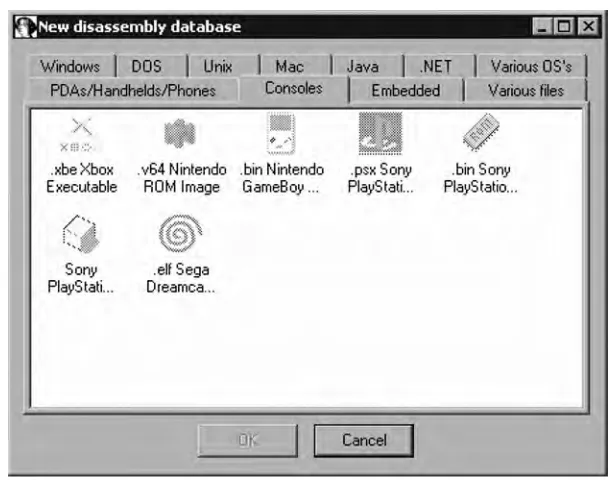
Figure 1.1 IDA Pro’s Disassembly Database Chooser Loads Upon Start
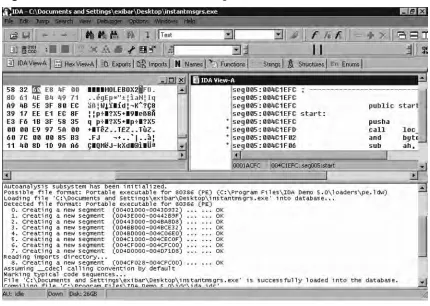
In Figure 1.2, IDA Pro has loaded and is disassembling a WootBot variant with fi le name
Introduction • Chapter 1 5
www.syngress.com
Summary
7
Chapter 2
Assembly and
Reverse Engineering
Basics
Solutions in this chapter:
■ Assembly and the IA-32 Processor
■ The Stack, the Heap and Other Sections of a Binary Executable
■ IA-32 Instruction Set Refresher and Reference
Introduction
In this chapter we will introduce basic items, providing a brief introduction to assembly and the Intel architecture processor and covering various other concepts that will help ease you into the subject matter. This book focuses on 32-bit Intel architecture (IA-32) assembly and deals with both the Windows and Linux operating systems. The reader is expected to be at least mildly familiar with IA-32 assembly (although the architecture and instruction set are covered to some degree in this chapter), and a fi rm grasp of C/C++ is expected. The point of this chapter is simply to give those who are either unfamiliar with or a little rusty on the subjects presented in this book a base to work from, and to provide a basic reference point to which the authors can refer should it be deemed necessary.
Assembly and the IA-32 Processor
Assembly is an interesting method for communicating with computers; Donald Knuth once said that “Science is what we understand well enough to explain to a computer. Art is everything else we do.” To me, this truth is most prevalent in assembly programming, because in so many areas as you write assembly you fi nd yourself doing things like abusing instruc-tions by using them for something other than their intended purpose (for instance, using the load effective address (LEA) instruction to do something other than pointer arithmetic). But what is assembly exactly? Assembly refers to the use of instruction mnemonics that have a direct one-to-one mapping with the processor’s instruction set; that is to say, there are no more layers of abstraction between your code and the processor: what you write is what it gets (although there are some exceptions to this on some platforms where the assembler exports pseudo-instructions and translates them into multiple processor instructions—but the prior statement is generally true).
If we take, for instance, the following single line of C code:
return 0;
we may end up with the following assembly being generated:
leave
xor eax, eax ret
N
OTEAssembly and Reverse Engineering Basics • Chapter 2 9
www.syngress.com
because it is the syntax used by IDA in its disassemblies and is indeed a more popular syntax overall. This means that there will generally be more books, white papers and people willing to answer questions when you use the Intel syntax.
The difference between AT&T and Intel syntax is outside the scope of this document, but just so you know what it looks like, the following example is given:
Intel:
leave
xor eax, eax ret
AT&T:
leave
xorl %eax, %eax ret
Note, however, that AT&T is still in use in many places and is generally the standard syntax used in the Unix world (although this is slowly changing on IA-32-based computers running Unix and Unix-like OSes). Therefore, it may not be a bad idea to spend a few extra clock cycles at least learning it, espe-cially if you intend to do much work on the various Unices or other
platforms.
Don’t worry if at the moment you’re not entirely sure what that means; I’m just hoping to get you into the groove of assembly. Just know that the previous code is IA-32 assembly, and it is the same as saying “return 0” in C. But this isn’t what the processor sees; assembly is the last layer of code that is considered human-readable. When your compiler comes through and compiles and assembles the code, it outputs what are known as “opcodes,” which are the binary representations of the instructions, or the on-off sequences necessary to execute individual instructions. Opcodes are typically represented in hexadecimal for humans though, since it tends to be easier to read than binary. The opcodes for the previous instructions are as follows:
0xC9 (leave)
0x31, 0xc0 (xor eax, eax) 0xC9 (ret)
sequences of ones and zeros being sent to the processor. For a more complete discussion of opcodes please refer to the Intel® 64 and IA-32 Architectures Software Developer’s Manual
Volume 2A, section 2.1.2.
Opcodes and shellcode
In almost everyone’s transition into the digitally sublime, we encounter the term shell-code, and it strikes fear deep into our hearts. We see these character arrays of cryptic hexadecimal numbers and we’re just not quite sure what they do. Anyone who has examined an exploit has probably run across it, and if you’re early enough into your career you probably don’t fully understand it.
Rest assured, however, that these mystical thoughts about it are overcompli-cated. Shellcode is simply a series of opcodes, typically stored in a C character array. The term shellcode derives from the fact that the series of opcodes are the instruc-tions necessary to execute a shell, such as /bin/sh or cmd.exe. In our case, if we take our previous example:
return 0;
to generate shellcode for that particular C level instruction, we would simply use the opcodes for that instruction, which are 0xC9, 0x31, 0xC0, 0xC9; if we put it into a C program it would probably look like this:
unsigned char shellcode[] = “\xc9\x31\xc0\xc9”;
Now that you know that, you might be inclined to feel a little silly for thinking it much more complicated than it is, but you shouldn’t. I think everyone goes through that stage in their path towards enlightenment—I know I did.
Tools & Traps …
So now we have some comprehension of what assembly instructions are, but how are they used? An instruction that takes an argument (also known as an operand) will, depending on the instruction, either take a constant, a memory variable or a register. Constants are simple; they are statically defi ned in the source code. For instance, if a section of code were to use the following instruction:
Assembly and Reverse Engineering Basics • Chapter 2 11
www.syngress.com
and are typically encoded directly into the instruction. One interesting subject, though, is that if you consider our prior example of returning zero in C, the astute reader may note that the assembly that was generated by the compiler doesn’t contain a constant even though the source-level code does contain one. This is the result of an optimization performed by the compiler and its recognizing that copying zero is a larger instruction than performing an exclusive or.
Next, we encounter registers. Registers are somewhat akin to a variable in C/C++. The general purpose register can contain an integer, an offset, an immediate value, a pointer or really anything that can be represented in 32 bits. It is basically a preallocated variable that physically exists in the processor and is always in scope. They are used a little differently from what we typically think of variables, however, as they are used and reused over and over again, whereas in a C or C++ program we will usually defi ne a variable for a single purpose and then never use it again for something else.
In IA-32 there are eight 32-bit general purpose registers, six 16-bit segment registers, one 32-bit instruction pointer register, one 32-bit status register, fi ve control registers, three memory management registers, eight debug registers, and so on. In most cases you will only be dealing with the general purpose registers, the instruction pointer, the segment registers and the status register. If you’re dealing with OS drivers or similar, you’re more likely to encounter the other registers. Here we’re going to cover the general purpose registers, the instruction pointer, the status register and the segment registers. As for the others, it’s probably good enough just to know they exist, although naturally the interested reader is encouraged to consult the Intel documentation for further details.
The eight 32-bit general purpose registers are as follows: EAX, EBX, ECX, EDX, ESI, EDI, EBP and ESP. These registers can mostly be used as one sees fi t, with a few notable exceptions. For instance, many instructions assign specifi c registers to certain arguments (or operands). As a specifi c example, many of the string instructions use ECX as a counter, ESI as a source pointer and EDI as a destination pointer. Furthermore, some of these instructions imply the use of a given segment as a base address in certain memory models (both are covered shortly). Finally, other registers are implied during certain operations. For instance, the EBP and ESP registers are used in many stack operations and their values containing an address that is not mapped into the current process’s address space will often result in the application crashing. The IA-32 architecture is almost entirely backwards compatible to the 8086 processor and this is refl ected in their registers; all of the general purpose registers can be accessed in a manner yielding the register’s full 32-bit contents or its lower 16 bits, and the EAX, EBX, ECX and EDX registers can have their high-order and lower-order 8 bits accessed as well. This is accomplished by using the names refl ected in Figure 2.1. For
the instruction pointer, EIP. The EIP register points to the next instruction to be executed by the processor and by implication the goal of almost any application-based attack is to control this register. Unlike the general purpose registers, however, it cannot be directly modifi ed. This is to say that you cannot execute an instruction to move a value into the register, but rather you would have to perform a set of operations that indirectly modify its value, such as a push onto the stack segment followed by a ret instruction. Don’t worry if that last sentence was a bit outlandish and you didn’t quite understand it yet; both of the instruc-tions referenced and the stack segment will be covered in detail later on in the chapter. Just for now, know that you cannot directly modify the value of the instruction pointer.
In addition to the EIP register and the general purpose register, we have six 16-bit segment registers: code segment (CS), data segment (DS), stack segment (SS), extra segment (ES), and FS and GS, which are extra general purpose segments. The segment registers contain a pointer to what are called segment selectors and these are often used as a base address from which to take an offset; for instance, consider the following instruction:
mov DS:[eax], ebx
In this instruction, the contents of the EBX register are copied into an offset into the data segment specifi ed by EAX. Think of this as saying “the address of DS plus the contents of EAX.” Segment selectors are a 16-bit identifi er for segments, which is to say the segment selector does not point directly to the segment, but rather to a segment descriptor that defi nes the segment. So, segment registers point to segment selectors, which are used to identify one of the 8192 possible segment descriptors that identify segments. Confused yet?
The segment selectors are relatively simple structures. The bits at 3 through 15 are used as an index into one of the descriptor tables (one of the three memory management registers), bit 2 specifi es which descriptor table exactly, and fi nally the low-order two bits specify a requested privilege level (ranging 0 through 3—privilege levels are discussed later
Assembly and Reverse Engineering Basics • Chapter 2 13
www.syngress.com
Intel developer manuals. Finally, in the description of the various relevant registers, we have the EFLAGS register, which contains groups of various fl ags that indicate the states of previous instructions, status, and things such as the current privilege level and whether interrupts are enabled or not. In the current context of things, the EFLAGS register can’t really make sense until we have a better grasp of some of the instructions that make use of it, and as such a thorough description of it is reserved until later in the chapter.
Now that we’ve described both constant and register operands, it’s time to discuss memory operands. Memory operands can be a little bit tricky, although at this stage in the game their description is pretty limited. A memory operand is by and large what a high-level language programmer thinks of as a variable. That is to say that when you declare a variable in a language like C or C++, it’s by and large going to exist in memory and thus it will often be a memory operand. These are typically accessed through a pointer, which when dereferenced will either result in the value being loaded into a register or accessed directly from memory. The concept itself is pretty simple, but truly understanding what is going on requires a bit deeper knowledge of how memory is addressed, which in turn depends on the memory model, mode of operation and privilege level being used. This provides an excellent lead into the next few paragraphs, which cover mode of operation.
In IA-32, there are three basic operating modes and one pseudomode of operation. They are protected mode, real-address mode and system management mode, with the pseudomode being a subset of protected mode called virtual-8086 mode. In the interest of brevity, only protected mode will be discussed in detail. The biggest difference between the various operating modes is that they modify what instructions and architectural features are present. For instance, RM (also often called real mode) is meant for backwards compatibility, and in RM only the real-address mode memory model is supported. The main thing of importance to note here (unless you’re reversing old DOS applications or similar), is that when you reset or fi rst power up an IA-32 PC, it is in real mode natively. System management mode (SMM), which has been in the Intel architecture since the 80386 and is used in implementing things such as power management and system hardware control, is also used. It basically stops all other operations and switches to a new address space. Generally speaking, however, almost everything you encounter and use will be in protected mode.
In the earlier days, such as with the 8086/80186 processor, or today when a modern processor is in real-address mode, the segment register represents the high-order 16 bits of a linear address, whereas in protected mode the selector is an index into one of the descriptor tables. Furthermore, as previously mentioned, with earlier CPUs there was no protection of memory or limit to instructions; in protected mode, there are four privilege levels called
rings. These rings are given numbers for identifi cation ranging from 0 to 3, with the lowest number being the highest privilege level. Ring-0 is typically used for the operating system, whereas ring-3 is where applications typically run. This protects the OS’s data structures and objects from modifi cation by a broken or rogue application and restricts instructions that those applications can run (what good would the levels be if the ring-3 application could just switch its privilege level?). In IA-32 there are three places to fi nd privilege level: in the low-order 2 bits of the CS register there is the Current Privilege Level (CPL), in the low-order 2 bits of a segment descriptor is the Descriptor Privilege Level (DPL), and in the low-order 2 bits of a segment selector is the Requestor’s Privilege Level (RPL). The CPL is the privilege level of the currently executing code, the DPL is the privilege level of the given descriptor, and, somewhat obviously, the RPL should be the privilege level of the code that created that segment.
The privilege levels restrict access to more trusted components of the system’s data; for instance, a ring-3 application cannot access the data of a ring-2 component. However, the ring-2 component can access the data of a ring-3 component. This is why you can’t arbitrarily read data from the Windows or Linux kernel but it can read yours. Another function of this privilege-level separation is that it performs checks on execution transfer control. A request to change execution from the current segment to another causes a check to be performed, ensuring that the CPL is the same as the segment’s DPL. Indirect transfers of execution occur via things such as call gates (which are briefl y covered later). Finally, privilege levels restrict access to certain instructions that would fundamentally change the environment of the OS or operations that are typically reserved for the OS (such as reading or writing from a serial port).
Assembly and Reverse Engineering Basics • Chapter 2 15
www.syngress.com
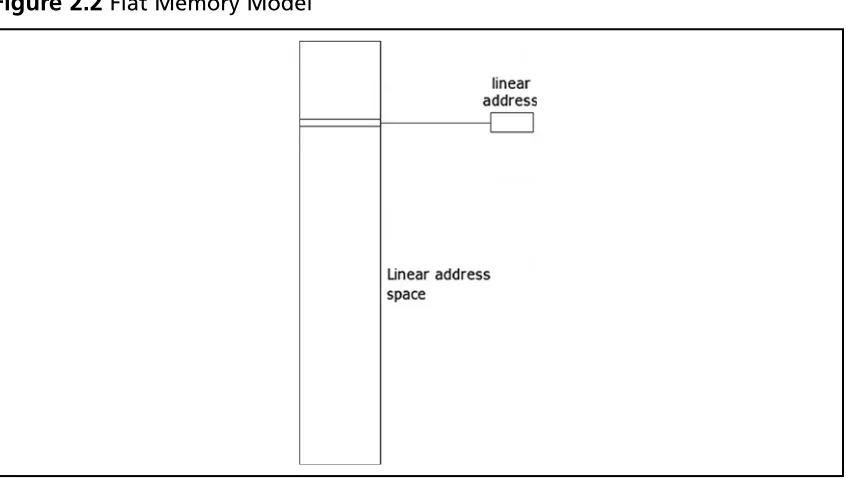
The fl at memory model in protected mode differs only in that the segment limits are set to ensure that only the range of addresses that actually exist can be accessed. This differs from other modes, where the entire address space is used and there may be gaps of unusable memory in the address space.
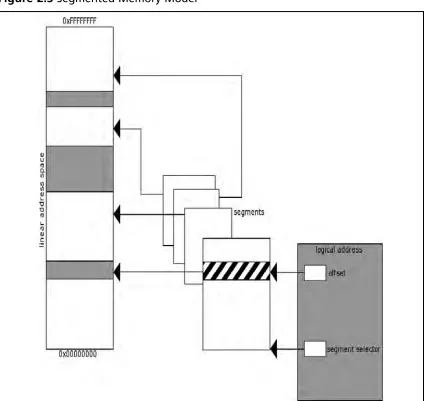
The next memory model is the segmented memory model. It was used in earlier operating systems and has seen somewhat of a comeback, as in some arenas it implies an increase in speed (due to the ability to skip relocation operations) and security. Nonetheless, this memory model is still pretty rare and whether it makes a full comeback is yet to be seen, although it’s a bit unlikely. It’s described here because, if you do much reverse engineering or exploit development under Linux, your likelihood of encountering it goes up considerably.
[image:28.612.106.529.91.331.2]In a segmented memory model, the systems memory is split up into subsections called segments. (See Figure 2.3.) These segments are kept independent and isolated from each other. To compare the segmented and fl at memory models for a moment, what is really different between them is their representation to an OS or application. In both instances, the data is still stored in a linear fashion; however, the view of that data changes. With segmented memory, instead of issuing a linear address to access memory, a logical address (also known as a far pointer) is used. A logical address is the combination of a base, which is stored in a
segment selector, and an offset. These two correspond to an address in that segment, which in turn maps to the linear address space. What this accomplishes is a higher degree of segmentation that is enforced by the processor, ensuring that one process does not run into another process (whereas in a fl at memory model the same result is hopefully accomplished by the OS). Thus, the base address plus the offset equals a linear address in the processor’s address space. Furthermore, a multiple segment model can be used that retains the same traits as a single segmented model, except each application is given its own set of segments and segment descriptors. At the present time, the author cannot think of an OS that employs this, so a further description of how it works is moot.
Assembly and Reverse Engineering Basics • Chapter 2 17
www.syngress.com
As a result of modern OSes often using larger address space than physical memory can accommodate, some form of addressing all of the necessary data without requiring that it be stored in physical memory is required. The answer comes in the form of paging and virtual memory, one of the fundamental tenets of modern computing that is often misunderstood by people with a more operations-oriented background. It’s not uncommon to encounter people who understand that a given application can be given 4 GB of memory but who don’t really comprehend how that could possibly work, given that they only have 1 or 2 GB of physical memory.
In short, paging takes advantage of the fact that only the currently necessary data needs to be stored in physical memory at any given moment; it stores what data it needs in physical memory and stores the rest on disk drive. The process of loading memory with data from disk, or writing data to disk, is known as swapping data, and this is why Windows boxes typically have swap fi les and Linux boxes usually have swap partitions. When paging is not enabled, a linear address (whether it be formed from a far pointer or not) has a one-to-one mapping with a physical address and no translation between it and the issued address occurs. However, when paging is enabled, all pointers used by an application are virtual addresses. (This is why two applications in a protected mode fl at memory model using paging
The Security of Segmentation
As mentioned earlier, the segmented memory model has recently regained some traction in various communities, particularly in the case of grsecurity (http://grsecurity. com/) and PaX (http://pax.grsecurity.net/), which are third-party Linux kernel patches that provide superior security to that of the vanilla kernel. The lead develop of grsecurity, Brad Spengler, demonstrated the insecurity that a fl at memory model can bring by product what is believed to be the fi rst exploitable Linux kernel NULL pointer dereference, the details of which can be found at the following URL: http://marc.info/ ?l=dailydave&m=117294179528847&w=2. Furthermore, the anonymous author of PaX has implemented a feature called UDEREF which attempts to stop accidental dereferences of pointers provided by user-space pointers in the kernel (and thus a potentially exploitable condition). This feature has been documented in regards to how it works and the interested reader is encouraged to read the brief write-up to further understand the security implications of the fl at memory model which UDEREF fi xes. At the time of this writing, it can be found at the following URL: http://grsecurity. net/~spender/uderef.txt
accessing the exact same address don’t trample each other.) These virtual addresses do not have a one-to-one mapping with a physical memory address.
When paging is employed, the processor splits the physical memory into 4 KB, 2 MB or 4 MB pages. When an address is turned into a linear address and then through the paging mechanism it is looked up, if the address does not currently exist in physical memory then a page-fault exception occurs, instructing the OS to load the given page into memory and then performing the instruction that generated the fault again.
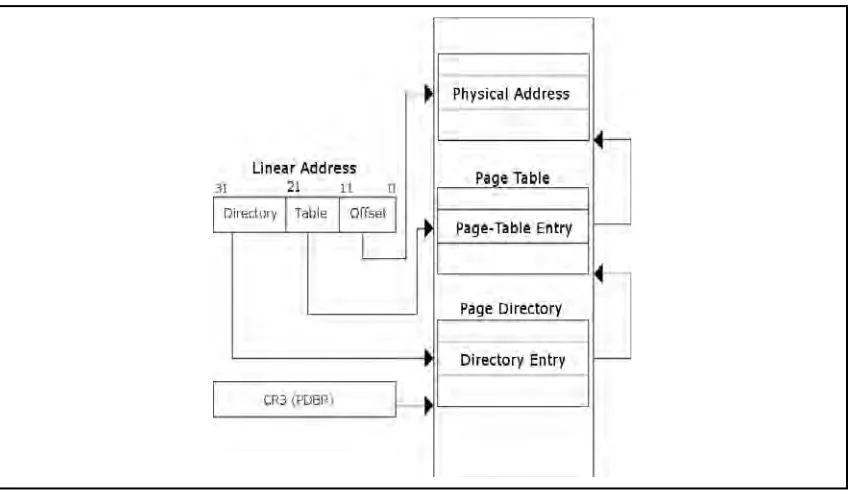
[image:31.612.86.510.407.652.2]The process of translating a virtual address to a physical address varies depending on the page size being used, but the basic concept is the same either way. A linear address is divided into either two or three sections. First the Page Directory Base Register (PDBR) or Control Register 3 (CR3) is used to locate a Page Directory. Following this, bits 22 through 31 in the linear address are used as an offset into the Page Directory which identifi es a given Page Table to use. (See Figure 2.4.) Once the Page Table has been located, the bits 12 through 21 are used to locate a Page Table Entry (PTE), which identifi es the page of memory to be used. Finally bits 0 through 11 of the linear address are used as an offset into the page to locate the data requested. When using other side pages, the process is nearly identical except that one layer of indirection is omitted; the directory entry points directly to the page and the page table and PTEs are completely omitted. The contents of Page Directory Entries (PDEs) and PTEs are not important for our purposes. If they become important to you at some point or if you’re just curious, please refer to the processor’s documentation.
Assembly and Reverse Engineering Basics • Chapter 2 19
www.syngress.com
Earlier we discussed the segment registers, in particular the CS, DS and SS segment registers, but we didn’t tell you what the code, data and stack segments were. In traditional design, an application has a few different basic sections (and a lot of implementation-specifi c ones). The basic ones employed are the code segment (or text segment or simply .text), the data segment (often simply .data), the block started by symbol (BSS/.bss) segment, the stack segment and the heap segment. As an example, the following C code will help demonstrate the differences between the various sections:
unsigned int variable_zero;
unsigned int variable_one = 0x1234; int
main(void) {
void * variable_two = malloc(0x1234); […]
}
Now that we have a decent understanding of instructions and operands, memory models, operating modes and so on, we can move on. Most of the terms employed later on in this chapter and throughout the book have now been defi ned, so you can refer back to this section should you feel like you don’t understand something as you work through the book.
The Stack, the Heap and Other Sections
of a Binary Executable
In the previous section we talked some about segments, segment registers, segment descriptors and segment selectors, but we really didn’t delve into the data that they contain.
Understanding these various sections is fairly important to understanding the layout of a binary executable. In this section we will discuss these concepts as much as possible, although in some areas, such as with the heap, it’s not really possible to jump into the depths of how it works exactly without a fairly in-depth analysis of a particular implementation; in those instances a generic high-level overview is provided and the understanding of the most minute details is left as an exercise for the reader.
W
ARNINGThe reader should understand that sections and segments as defi ned here do not implicitly or explicitly imply a segmented memory model. In all of the memory models, applications and OSes are split into various sections; an application is blissfully unaware of the implementation details. Furthermore, throughout this section, the terms segment and section are used
In this code example, we have three variables defi ned and one function. The fi rst variable, appropriately named variable_zero, is a variable of global scope that is uninitialized. In this instance, the C compiler will allocate space in the binary and fi ll it with zeros. The section of the binary it will exist in is the BSS section. The variable named variable_one is another globally scoped variable. However, in this instance it is initialized to the value 0×1234. In this instance, the compiler will preallocate the space for the variable in the binary and store the value in the data segment. Following this, we have the function main.
Main obviously is a function, and thus is in the code segment. After main we fi nd the vari-able called variable_two, which gives us an interesting predicament: we have a pointer whose scope is inside of main and the memory that it points to. The pointer itself is local to the function, is dynamically allocated and exists on the stack segment, giving it a lifetime of the function it exists in, whereas the pointer returned by malloc( ) exists on the heap, is dynamically allocated and has a global scope and a “use-until-free( )” life expectancy. There are also often other sections; for instance, in programs compiled by the GNU compiler collection (GCC) a constant string that is declared in the source fi le will often end up in a section named .rodata, for read-only data, or in the code segment.
The stack is one of the more important sections to understand, as it plays a vital role in the routine operations of an application. Those with a formal computer science
background will no doubt know what a stack is and how it works. A stack is a simple data structure that basically stacks data on top of each other and has elements added and removed in a last-in fi rst-out (LIFO) manner. When you add an item to the stack, you push it onto a stack, and when you remove an item from a stack, you pop it off the stack. (See Figure 2.5.) The stack is important for two basic reasons on most computing
platforms. The fi rst is that all automatic or local variables are stored on it; that is, when a function is called, any local variables it has declared that are not static or similar have their space allocated on the stack. This is usually realized by adding or subtracting a number from the current stack pointer. The stack pointer is the ESP register, and it normally points to the top of the stack segment, or rather SS:ESP points to the top of the stack segment. The top of the stack is the lowest currently in use address of the stack—the lowest because the stack grows down on IA-32. The bottom of the stack is usually bounded, not by the absolute bottom, but the bottom of the current stack frame and is pointed to by the EBP register.
Assembly and Reverse Engineering Basics • Chapter 2 21
www.syngress.com
next instruction in the calling frame onto the stack; next the current base (EBP) of the stack is saved onto the stack; the ESP register is then copied into the EBP register; and fi nally the ESP register is decremented to allocate space for variables in that function. When the function is called, the arguments to the function are pushed onto the stack in reverse order (or the last one is pushed fi rst). The assembly generated for the prologue is as follows:
push ebp mov ebp, esp sub esp, 0x1234
Figure 2.5 A Stack
What we see here is strangely missing the saving of the return address, or the address we will continue execution at in the calling routine. For instance, given the following C code:
A(); B();
when inside of the function A( ) the return address would be the address of the instruction
B( ). It’s a little tricky to understand at fi rst, especially because you don’t ever see the instruction that saves the address onto the stack, but rather it is implied by using the call instruction, which is discussed a little later on in the chapter. In addition to the procedure prologue, there is also the procedure epilogue. The procedure epilogue basically undoes everything that the prologue did. This includes incrementing the stack pointer to deallocate any local variables, and then calling the leave and ret instructions, which remove the saved frame pointer and return address and return execution fl ow to the calling function. So, to summarize the points on the stack:
■ The stack grows down, towards lower addresses on IA-32.
■ Items are removed and added onto a stack in LIFO order.
■ Variables that are locally scoped and only exist for the lifetime of the function end up on the stack.
■ Each function has a stack frame (unless specifi cally omitted by the compiler) that contains the local variables.
■ Prior to each function’s stack frame there is a saved frame pointer, return address and the parameters to the routine.
■ The stack frame is constructed during the procedure prologue and destructed during the procedure epilogue.
The heap is another important data structure, but not because any features of the
Assembly and Reverse Engineering Basics • Chapter 2 23
www.syngress.com
The heap, typically upon initialization, will request a fairly large section of memory from the OS, and will hand out smaller chunks of memory based upon requests from the application. These chunks will typically have inline metadata indicating the chunk’s size and other elements, such as the size of the previous block of memory.
The blocks of allocated memory are navigated by taking the pointer to a given chunk and adding its size to it to fi nd the next chunk, or by subtracting the previous size from the beginning of the chunk to fi nd the previous one. For instance, in Figure 2.7 you will fi nd an example of an allocated chunk as represented in Glibc. In this instance the pointer labeled
mem indicates that start of data returned to the API user by malloc( ) or similar, whereas the pointer labeled chunk marks the beginning of the actual chunk. There we fi nd that there is metadata including the size of the previous chunk and the size of the current chunk, along with fl ags indicating various status conditions. This chunk, while mostly used by Linux, is generically similar to chunks used by most operating systems and dynamic memory allocator implementation (with, of course, some key differences). Since initially obtaining that large chunk of memory from the OS or extending the size of the data segment are fairly
expensive operations, a cache of sorts is usually maintained. This cache usually comes in the form of a linked list of pointers to previously free( )’d chunks of memory. This list is typically fairly complex, with the blocks of memory being coalesced into adjacent free blocks of memory to reduce fragmentation, and with various lists sorted by size or some other characteristic to allow the most effi cient means possible of locating a candidate block of memory whenever an allocation request occurs.
To use a similar example to the previous one, in Figure 2.8 you will see the representation of a free block of memory as represented by Glibc. In this instance, the pointer labeled mem
indicates where the pointer returned to the API user used to be, and the one labeled chunk
points to the beginning of the physical data structure used. The biggest difference is that in what used to be user data, there are now two pointers stored pointing to the next free block of memory in the linked list and the previous block of memory in the linked list. This of course implies that, unlike allocated chunks which are navigated by size, a free block of
In the previous section, we’ve discussed the most common sections of a binary executables layout, including some of their functions, and took a more in-depth tour of the stack segment and the heap segment and talked about how they worked to some degree. This should be enough to provide a base to continue building your understanding. Of course, the interested reader is encouraged to refer to other works more specifi cally targeted at questions they may have on these subjects.
IA-32 Instruction Set Refresher
and Reference
In the prior sections, we talked briefl y about instructions and operands, but focused more on the architectural design of IA-32 and then delved into some common layouts for binary executable memory and their purposes and uses. In this section the intention is to provide you with a reference for some of the more commonly used instructions and talk to you some about their uses and operands. If by now you’ve already read the Intel developer memory is navigated directly by linked list. The specifi c details of the structure listed are, again, specifi c to Glibc; however, the concept itself is generic enough to apply to most implementations. Thus, as allocation and free requests come in and out, which happens quite frequently throughout the lifetime of your average application, chunks are taken away from the original chunk of memory obtained from the OS and returned to free lists, and then if possible further allocation requests make use of these blocks of memory on the free list, and so on until either all memory is in use, or the application terminates.
Assembly and Reverse Engineering Basics • Chapter 2 25
www.syngress.com
Table 2.1 Terminology Employed
Term Meaning
Reg32 Any 32-bit register
Reg16 Any 16-bit register
Reg8 Any 8-bit register
Mem32 32-bit memory operand
Mem16 16-bit memory operand
Mem8 8-bit memory operand
Sreg Segment register
Memoffs8 8-bit memory offset
Memoffs16 16-bit memory offset
Memoffs32 32-bit memory offset
Imm8 8-bit immediate (constant)
Imm16 16-bit immediate
Imm32 32-bit immediate
ptr16:16 absolute address given in operand ptr16:32 absolute address given in operand
mem16:16 absolute indirect address given in mem16:16 mem16:32 absolute indirect address given in mem16:32
rel8 8-bit relative displacement
rel16 16-bit relative displacement
rel32 32-bit relative displacement
Register name Any name of a register that has already
been introduced
Table 2.2mov Instruction
Destination Operand Source Operand
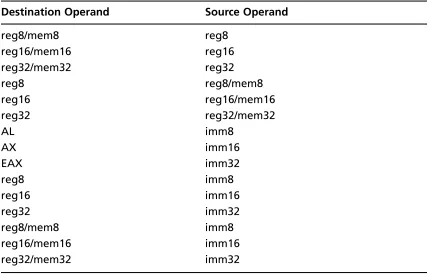
reg8/mem8 reg8 reg16/mem16 reg16 reg32/mem32 reg32 reg8 reg8/mem8 reg16 reg16/mem16 reg32 reg32/mem32 reg16/mem16 Sreg
Sreg reg16/mem16 AL memoffs8 AX memoffs16 EAX memoffs32 memoffs8 AL
memoffs16 AX memoffs32 EAX reg8 imm8 reg16 imm16 reg32 imm32 reg8/mem8 imm8 reg16/mem16 imm16 reg32/mem32 imm32
The mov instruction copies the source operand to the destination operands and can only be used to move certain types of operands; for instance, it cannot be used to set the Code segment, and it cannot be used to modify the EIP register. If a destination operand is of type
Sreg, then it must point to a valid segment selector. The next instructions introduced will be the various bitwise operations such as and and exclusive or.
Assembly and Reverse Engineering Basics • Chapter 2 27
www.syngress.com
Table 2.3and Instruction
Destination Operand Source Operand
reg8/mem8 reg8 reg16/mem16 reg16 reg32/mem32 reg32 reg8 reg8/mem8 reg16 reg16/mem16 reg32 reg32/mem32 AL imm8
AX imm16 EAX imm32 reg8 imm8 reg16 imm16 reg32 imm32 reg8/mem8 imm8 reg16/mem16 imm16 reg32/mem32 imm32
The next instruction referenced is the not instruction, another fairly simple but
commonly used instruction; it performs a bitwise NOT operation on a single operand and allows the operands shown in Table 2.4. This simply sets each 1 to 0 and vice versa in its operand.
Table 2.4not Instruction
Destination Operand Source Operand
reg8/mem8 N/A reg16/mem16 N/A reg32/mem32 N/A
Table 2.5or Instruction
Destination Operand Source Operand
reg8/mem8 reg8 reg16/mem16 reg16 reg32/mem32 reg32 reg8 reg8/mem8 reg16 reg16/mem16 reg32 reg32/mem32 AL imm8
AX imm16 EAX imm32 reg8 imm8 reg16 imm16 reg32 imm32 reg8/mem8 imm8 reg16/mem16 imm16 reg32/mem32 imm32
Next in the line-up we have the exclusive-or instruction, or xor. It performs a bitwise exclusive-or (XOR) on its operands and takes the operands shown in Table 2.6. The xor
instruction compares the source and the destination operands and stores the output in the destination operand. Each output bit is 1 if the two compared bits are different; otherwise the output bit is 0.
Table 2.6xor Instruction
Destination Operand Source Operand
Assembly and Reverse Engineering Basics • Chapter 2 29
www.syngress.com
Table 2.6 Continued
Destination Operand Source Operand
AX imm16 EAX imm32 reg8 imm8 reg16 imm16 reg32 imm32 reg8/mem8 imm8 reg16/mem16 imm16 reg32/mem32 imm32
The test instruction is commonly used to determine a specifi c condition and then modify control fl ow based on the results (see Table 2.7). The test instruction performs a bitwise AND of the fi rst and second operands, and then sets fl ags in the EFLAGS register accordingly. Following this, the result is then discarded.
The cmp instruction compares two operands; this comparison is performed by subtracting the source operands from the destination operands and setting fl ags in the EFLAGs register
Table 2.7test Instruction
Destination Operand Source Operand
Table 2.8cmp Instruction
Destination Operand Source Operand
reg8/mem8 reg8 reg16/mem16 reg16 reg32/mem32 reg32 reg8 reg8/mem8 reg16 reg16/mem16 reg32 reg32/mem32 AL imm8
AX imm16 EAX imm32 reg8 imm8 reg16 imm16 reg32 imm32 reg8/mem8 imm8 reg16/mem16 imm16 reg32/mem32 imm32
[image:43.612.83.513.174.448.2]accordingly (see Table 2.8). It is often used in a manner similar to the test instruction and is used to compare values like user input and return values from routines. If an immediate value is used as an operand, it is sign-extended to match the size of the other operand.
Table 2.9lea Instruction
Destination Operand Source Operand
reg8 mem8
Assembly and Reverse Engineering Basics • Chapter 2 31
www.syngress.com
Table 2.10jmp Instruction
Destination Operand Source Operand
rel8 N/A rel16 N/A rel32 N/A reg16/mem16 N/A reg32/mem32 N/A ptr16:16 N/A ptr16:32 N/A mem16:16 N/A mem16:32 N/A
Table 2.11jcc Instructions
Destination Operand Source Operand
rel8 N/A rel16 N/A rel32 N/A
The jmp instruction transfers execution control to its operand. This instruction can execute four different types of jumps: a near jump, a short jump, a far jump and a task switch (see Table 2.10). A near jump is a jump that occurs within the current code segment. A short jump is a jump to an address within −128 to 127 from the current address. A far jump can take control to any segment in the address space providing it is of the same privilege level as the current code segment. Finally, a task switch jump is a jump to an instruction in a
different task.
The jcc instructions are not one particular instruction, but rather a series of conditional jumps. The conditions vary with the instruction used, but they’re typically used in
collaboration with the test and cmp instructions. Table 2.11 shows destination operands for jcc
Table 2.12 Conditional Jump Registers
Instruction EFLAGS condition Description
ja CF = 0 && ZF = 0 Jump if above
jae CF = 0 Jump if above or equal
jb CF = 1 Jump if below
jbe CF = 1 || ZF = 1 Jump if below or equal
jc CF = 1 Jump if carry
jcxz CX = 0 Jump if CX is zero jecxz ECX = 0 Jump is ECX is zero
je ZF = 1 Jump if equal
jg ZF = 0 && SF = OF Jump if greater than
jge SF = OF Jump if greater than or equal to jl SF != OF Jump if less than
jle ZF = 1 || SF != OF Jump if less than or equal to jna CF = 1 || ZF = 1 Jump if not above
jnae CF = 1 Jump if not above or equal
jnb CF = 0 Jump if not below
jnbe CF = 0 && ZF = 0 Jump if not below or equal
jnc CF = 0 Jump if not carry
jne ZF = 0 Jump not equal
jng ZF = 1 || SF != OF Jump not greater
jnge SF != OF Jump not greater or equal
jnl SF = OF Jump not less
jnle ZF = 0 && SF = OF Jump not less or equal jno OF = 0 Jump if not overfl ow
jnp PF = 0 Jump not parity
jns SF = 0 Jump not signed
jnz ZF = 0 Jump not zero
jo OF = 1 Jump if overfl ow
p PF = 1 Jump if parity
jpe PF = 1 Jump if parity even
Assembly and Reverse Engineering Basics • Chapter 2 33
www.syngress.com
So, as you can see in Table 2.12, there are quite a few conditional jump registers, and all of them depend on the various states of the EFLAGS register, which we haven’t really described yet, but will do now. The EFLAGS register is a 32-bit register that contains a group of status and system fl ags, and a control fl ag. Each fl ag is represented by a single bit in this register, and moving from bit 0 to 31 we have the following fl ags:
CF Carry fl ag, indicates a carry or a borrow out of the most signifi cant bit of a register in an arithmetic operation. This fl ag is used in unsigned arithmetic.
PF Parity fl ag, set if the least signifi cant bit of the result contains an even number of bits turned on.
AF Adjust fl ag, set if an operation resulted in a carry or borrow from bit 3.
ZF Zero fl ag, set if the result of an operation is zero.
SF Sign fl ag, set to the most signifi cant bit of a result (which is the sign bit in a signed integer)
TF Trap fl ag, set to enable single-stepping debugging or when single-stepping debugging is enabled.
IF Interrupt enable fl ag, set when maskable interrupts are enabled, cleared when they are blocked.
DF Direction fl ag, used in string operations to determine whether the instructions increment or decrement
OF Set if the result of an operation resulted in an integer overfl ow when performing signed arithmetic.
IOPL fl ags (bits 12 and 13) I/O privilege level fl ags, indicates the current I/O privilege level of the currently running task
NF Nested task fl ag, set when the current task is associated with the previously executed task
RF Resume fl ag, controls the processor’s response to debug exceptions
VM Virtual-8086 fl ag, set to enable virtual 8086 mode
AC Alignment check fl ag, set to enable alignment checking of memory references
VIF Virtual interrupt fl ag, virtual image of the IF fl ag, used together with the VIP fl ag
VIP Virtual interrupt fl ag, used to determine if an interrupt is pending
ID Identifi cation fl ag, used to determine if the CPU supports the CPUID instruction.
The call instruction is somewhat akin to a more offi cial jump; it sets up the stack as previously described in a manner that will allow the processor to resume execution in the calling function when the executed function fi nishes. (See Table 2.13.)
Table 2.13call Instruction
Destination Operand Source Operand
rel16 N/A rel32 N/A reg16/mem16 N/A reg32/mem32 N/A ptr16:16 N/A ptr16:32 N/A mem16:16 N/A mem16:32 N/A
Table 2.14ret Instruction
Destination Operand Source Operand
N/A N/A imm16 N/A
The ret instruction is the inverse of the call instruction. It takes the metadata stored on the stack, pops it off and returns to that address (see Table 2.14). The optional immediate operand specifi es how many bytes to pop off of the stack after performing the return.
Assembly and Reverse Engineering Basics • Chapter 2 35
www.syngress.com
Summary
So now you’re at least familiar with assembly and the Intel architecture. You know how the memory models and operating modes work to some degree and have a decent general base of comprehension to build on. However, you might fi nd yourself thinking, “Yes, I understand some assembly now, but what is reverse engineering?”. Well, reverse engineering is a broad term and means different things to different people. In general, the answer is that it’s the process of taking an application that is in a form not meant for human readability or analysis and working backwards towards the beginning. Some people do this in order to regain lost source code, others do it to duplicate proprietary products, some reverse malicious applica-tions to know what they do, and fi nally others reverse engineer software to fi nd bugs and vulnerabilities in it.
37
Chapter 3
Portable Executable
and Executable and
Linking Formats
Solutions in this chapter:
■ Portable Executable Format
■ Executable and Linking Format
Introduction
In this chapter we will introduce two common binary executable formats, Portable
Executable (PE) and Executable and Linkable Format (ELF). PE is the binary format used in Windows, while ELF is used by many of the Unices. ELF is a replacement for the older a.out format that did not include standardized support for shared libraries. Furthermore, PE is an offshoot of the COFF format, which was used in an earlier Unix, and the authorís understanding is that this is by and large the result of many of the developers being hired at Microsoft.
At any rate, this chapter serves as an introduction to the physical layout of the Ý les, and details aspects of the Ý les that a reverse engineer would Ý nd interesting and/or important. Both of these Ý le formats have open documentation and, in places where readers Ý nd this chapter lacking, they are strongly encouraged to read the speciÝ cations themselves.
Portable Executable Format
Portable Executable format, more correctly termed the Portable Executable and Common Object File Format (PE-COFF), is a fairly simple format that is easily understood. Here we will cover the absolute basics and try to avoid covering topics that were deÝ ned in the previous section (for instance, little attention is given to the .text or code section, or .data section). Instead weíll focus on getting the reader up to speed on being able to open a Ý le in a hex editor and navigate to the various headers of the Ý le. With the exception of a few important sections, the internal format is not deÝ ned, with this left as an exercise for the reader.
In Figure 3.1 you will Ý nd a basic diagram dictating the general layout of a typical PE Ý le. At the beginning you will Ý nd a DOS stub program, with a header. This is a simple pro-gram designed to be run if the application is run in DOS; it is used for backwards compati-bility. To the reverse engineer, the only important part of this is that it contains an offset to the PE header. This can be found by simply seeking to the offset 0x3C from the beginning of the Ý le. This offset in turn dictates an offset relative to the beginning of the Ý le where the PE header can be found.
Portable Executable and Executable and Linking Formats • Chapter 3 39
www.syngress.com
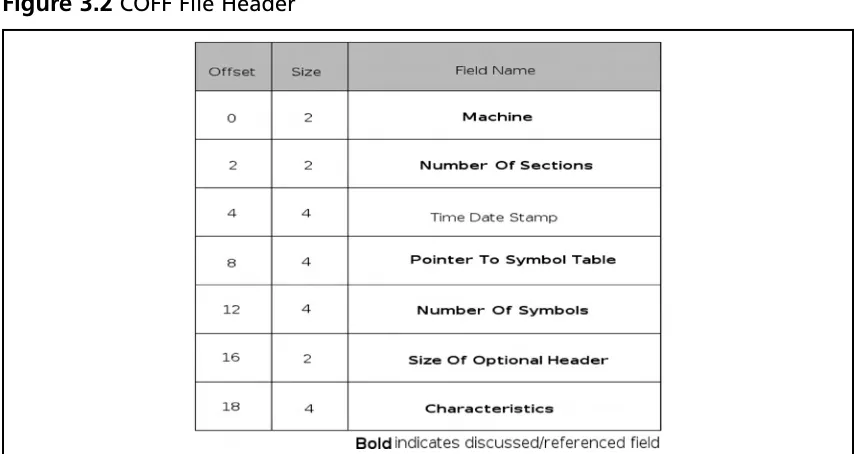
Ý eld that identiÝ es it as a PE Ý le, speciÝ cally the bytes PE\0\0, where \0 is a binary zero. Immediately following this signature, there is the COFF Ý le header (see Figure 3.2). The Ý rst Ý eld in the format is the machine type; it is two bytes long and will almost always be either 0x8664 (AMD64), 0x14c (IA32) or less often 0x200 for IA64 Itanium processors. Immediately following this Ý eld is one that indicates the number of sections in the Ý le. It is also a two-byte Ý eld, and, according to Microsoft documentation, the maximum value this can hold is 96. Skipping along to the next item of interest, we have a Ý le offset to the COFF symbol table. As a reverse engineer, you can almost guarantee that the Ý le youíre inspecting will not have symbols, so you can expect that this Ý eld will be zero, indicating that an offset does not exist. However, if an offset does exist, it will be speciÝ ed here. After this Ý eld, there is another four-byte Ý eld indicating the number of symbols present. Finally, the last two standard COFF Ý elds are both two bytes, one indicating the size of the
[image:52.612.104.529.102.366.2]optional header (which exists in images only) and a Ý eld called characteristics that deÝ nes speciÝ c attributes of the Ý le.
The characteristics specify various attributes of the Ý le, such as whether the Ý le is a dynamically loaded library (DLL) or not, if the Ý le is part of the system, if the Ý le has had its relocation information stripped, if the Ý le uses 32-bit words, and so on. For a full table describing this information, please consult the ofÝ cial Microsoft documentation.
[image:53.612.83.510.91.318.2]The optional header, if one exists (it does not exist in object Ý les), is broken into three major sections, the Ý rst being eight Ý elds that are generic to the COFF format, followed by 21 Windows-speciÝ c Ý elds, and Ý nally the data directories. (See Figure 3.3.) In the generic COFF section, the Ý elds that we would Ý nd most interesting are the magic, size of code, size of initialized data, size of uninitialized data, entry point and code base address, and data base address Ý elds. The magic Ý eld is another signature that can be used to identify PE versions; the valid Ý elds are 0x10B and 0x20B for PE32 and PE32+, respectively. This chapter will cover only the PE32 format, as it is more common, and will leave the PE32+ format as yet another exercise for the reader. The size Ý elds are relatively self-explanatory and indicate the size of the .text/code, .data and .bss sections of the Ý le. Finally, we have the relative virtual address (RVA) of the entry point, or place where the application should start executing. An RVA is just a complicated way of referring to an offset from the virtual address (VA) where the Ý le is loaded, and should be looked at as such. Finally, after all of the above, we have the base virtual addresses of the code and data sections. Next, in the
Portable Executable and Executable and Linking Formats • Chapter 3 41
www.syngress.com
Windows-speciÝ c section of the optional header, we Ý nd the following Ý elds of interest: image base, size of image, size of headers, DLL characteristics, and Ý nally the number of data-directory entries and their size.
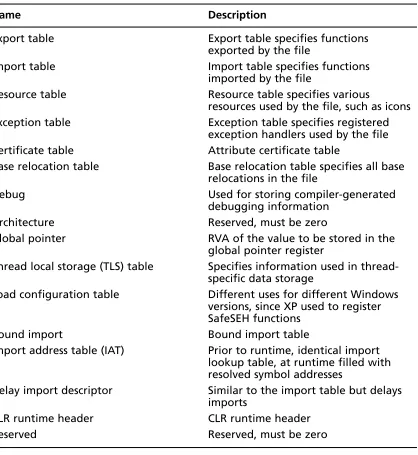
The image base speciÝ es the preferred address of the Ý rst byte of the image when loaded. According to Microsoft documentation, it must be a multiple of 64 K. The default varies by operating system and is not really important; itís merely a preference thing and the loader has the option of overriding what the Ý le thinks is right. Next, there is the size of the image and the size of the headers; the size of the image is the total size of the Ý le including all of the headers as loaded into memory, with the size of the headers specifying the size of the headers, obviously. The DLL characteristics Ý eld is obviously used only for DLLs and speciÝ es attributes speciÝ c to the DLL. To the reverser, the interesting Ý elds are 0x0040, which speciÝ es that the base address can be assigned dynamically and would allow for things such as address space layout randomization (ASLR), 0x0080 which speciÝ es that code integ-rity checks are made, 0x0100 which speciÝ es that the image is no-execute (NX) compatible, and Ý nally 0x0400 which indicates that the Ý le does not use structured exception handling
(SEH), effectively preventing any SEH handler from pointing into this DLL. Finally, the last element of interest speciÝ es the number of elements in the next subsection of the optional header. See Figure 3.4.