Xiaoming Gao
Hui Li
Outline
•
HBase and Bigtable Storage
•
HBase Use Cases
•
HBase vs RDBMS
•
Hands-on: Load CSV file to Hbase table with
Motivation
•
Lots of Semi structured data
•
Horizontal scalability
•
Commodity hardware
•
Tight integration with MapReduce
•
RDBMS don’t scale
Apache HBase
•
Open-source, distributed, column-oriented,
datastore.
•
Hosting of very large tables atop clusters of
commodity hardware.
•
When you need random, realtime read/write
access to your Big Data.
HBase and Hadoop
•
HBase is built on Hadoop
–
Fault tolerance
–
Scalability
•
HBase uses HDFS for storage
–
Adds random read/write capability
Data Model: A Big Sorted Map
• A big sorted sparse Map
• Tables consist of rows, each of which has a primary key (row key) • Each row can have any number of columns
• Multidimensional : map of maps • Versioned
Physical View
RowKey Column key Time Stamp value
HBase Cluster Architecture
•
Tables split into regions and served by region servers
HBase VS. RDBMS
RDBMS HBase
Data layout Row-oriented Column-family-oriented
Schema Fixed Flexible
Sparse data Not Good
Query language SQL (Join, Group) Get/Put/Scan (& Hive) Hardware requirement Large arrays of fast and
expensive disks Designed for commodity hardware
Max data size TBs ~1PB
Read/write throughput 1000s queries/second Millions of queries/second
Easy of use Relational data
When to Use HBase
•
Dataset Scale
–
Data sizes that cannot fit in a single node RDBMS
•
High throughput
–
reads/writes are distributed as tables are distributed
across nodes
•
Batch Analysis
–
Massive and convoluted SQL queries can be executed in
parallel via MapReduce jobs
•
Large cache
•
Sparse data
Use Cases:
•
Facebook Analytics
–
Real-time counters of URLs shared, preferred links
•
–
25 TB of message every month
•
Mozilla
Programming with HBase
1. HBase shell
–
Scan, List, Create, Get, Put, Delete
2. Java API
–
Get, Put, Delete, Scan,…
3. Non-Java Clients
–
Thrift
–
REST
4. HBase MapReduce API
–
hbase.mapreduce.TableMapper;
–
hbase.mapreduce.TableReducer;
5. High Level Interface
Hbase with Hadoop MapReduce
•
Work with MapReduce
–
TableInputFormat & TableOutputFormat
–
Provides Mapper and Reducer base classes
–
Utility methods
•
TableMapReduceUtil
Hbase with Hadoop
Configuration config = HBaseConfiguration.create();Job job = new Job(config,"ExampleSummary");
job.setJarByClass(MySummaryJob.class); // class that contains mapper and reducer
Scan scan = new Scan();
scan.setCaching(500); // 1 is the default , which will be bad for MapReduce jobs scan.setCacheBlocks(false); // don't set to true for MR jobs
……… // set other scan attrs
TableMapReduceUtil.initTableMapperJob(sourceTable,
scan, MyMapper.class, Text.class, IntWritable.class, job);
TableMapReduceUtil.initTableReducerJob(targetTable, MyTableReducer.class, job); job.setNumReduceTasks(1);
boolean b = job.waitForCompletion(true);
Hbase with Hadoop
public static class MyMapper extends TableMapper<Text, IntWritable> {
private final IntWritable ONE = new IntWritable(1);
private Text text = new Text();
public void map(ImmutableBytesWritable row,
Result value, Context context) ..{
String val = new String(
value.getValue(Bytes.toBytes("cf"), Bytes.toBytes("attr1")));
text.set(val);
context.write(text, ONE);
}
}
Hbase with Hadoop
public static class MyTableReducer extends
TableReducer<Text, IntWritable, ImmutableBytesWritable> {
public void reduce(Text key,
Iterable<IntWritable> values, Context context) ….. {
int i = 0;
for (IntWritable val : values) {
i += val.get();
}
Put put = new Put(Bytes.toBytes(key.toString()));
put.add(Bytes.toBytes("cf"),
Bytes.toBytes("count"), Bytes.toBytes(i));
context.write(null, put);
}
}
Hands-on HBase MapReduce Programming*
•
HBase MapReduce API
import org.apache.hadoop.hbase.HBaseConfiguration; import org.apache.hadoop.hbase.client.Result;
import org.apache.hadoop.hbase.client.Scan; import org.apache.hadoop.hbase.client.Put;
import org.apache.hadoop.hbase.mapreduce.TableMapper; import org.apache.hadoop.hbase.mapreduce.TableReducer; import org.apache.hadoop.hbase.io.ImmutableBytesWritable;
import org.apache.hadoop.hbase.mapreduce.TableMapReduceUtil; import org.apache.hadoop.hbase.util.Bytes;
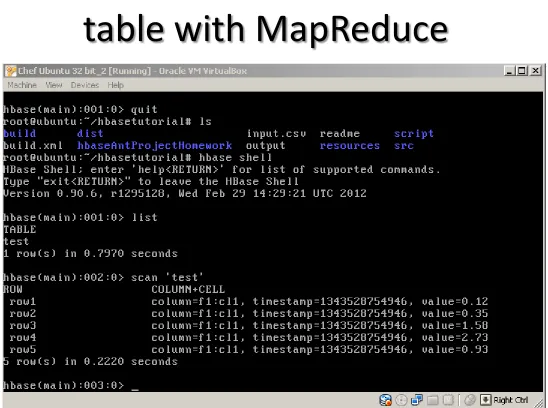
Hands-on: load CSV file into HBase
table with MapReduce
•
CSV represent for comma separate values
Hands-on: load CSV file into HBase
table with MapReduce
•
Main entry point of program
public static void main(String[] args) throws Exception {
Configuration conf = HBaseConfiguration.create();
String[] otherArgs = new GenericOptionsParser(conf, args).getRemainingArgs(); if(otherArgs.length != 2) {
System.err.println("Wrong number of arguments: " + otherArgs.length); System.err.println("Usage: <csv file> <hbase table name>");
System.exit(-1); }//end if
Job job = configureJob(conf, otherArgs);
Hands-on: load CSV file into HBase
table with MapReduce
•
Configure HBase MapReduce job
public static Job configureJob(Configuration conf, String [] args) throws IOException { Path inputPath = new Path(args[0]);
String tableName = args[1];
Job job = new Job(conf, tableName); job.setJarByClass(CSV2HBase.class);
FileInputFormat.setInputPaths(job, inputPath); job.setInputFormatClass(TextInputFormat.class); job.setMapperClass(CSV2HBase.class);
TableMapReduceUtil.initTableReducerJob(tableName, null, job); job.setNumReduceTasks(0);
return job;
Hands-on: load CSV file into HBase
table with MapReduce
•
The map function
public void map(LongWritable key, Text line, Context context) throws IOException { // Input is a CSV file Each map() is a single line, where the key is the line number // Each line is comma-delimited; row,family,qualifier,value
String [] values = line.toString().split(","); if(values.length != 4) { return; } byte [] row = Bytes.toBytes(values[0]); byte [] family = Bytes.toBytes(values[1]); byte [] qualifier = Bytes.toBytes(values[2]); byte [] value = Bytes.toBytes(values[3]); Put put = new Put(row);
put.add(family, qualifier, value);
try {
context.write(new ImmutableBytesWritable(row), put);
} catch (InterruptedException e) { e.printStackTrace(); } if(++count % checkpoint == 0) {
Hands-on: steps to load CSV file into HBase
table with MapReduce
1. Check Hbase installation in Ubuntu Sandbox
1. http://salsahpc.indiana.edu/ScienceCloud/virtualbox_appliance_guide.html
2. echo $HBASE_HOME 2. Start Hadoop and Hbase cluster
1. cd $HADOOP_HOME
2. . MultiNodesOneClickStartUp.sh $JAVA_HOME nodes 3. start-hbase.sh
3. Create hbase table with specified data schema 1. hbase shell
2. create “csv2hbase”,”f1” 3. quit
4. Compile the program with Ant 1. cd ~/hbasetutorial
2. ant
5. Upload input.csv into HDFS 1. hadoop dfs –mkdir input
2. hadoop dfs –copyFromLocal input.csv input/input.csv
6. Run the program: hadoop jar dist/lib/cglHBaseSummerSchool.jar iu.pti.hbaseapp.CSV2HBase input/input.csv “csv2hbase”
7. Check inserted records in Hbase table 1. hbase shell