Deploying OpenStack
Ken Pepple
Deploying OpenStack by Ken Pepple
Copyright © 2011 Ken Pepple. All rights reserved. Printed in the United States of America.
Published by O’Reilly Media, Inc., 1005 Gravenstein Highway North, Sebastopol, CA 95472.
O’Reilly books may be purchased for educational, business, or sales promotional use. Online editions are also available for most titles (http://my.safaribooksonline.com). For more information, contact our corporate/institutional sales department: (800) 998-9938 or [email protected].
Editors: Mike Loukides and Meghan Blanchette
Production Editor: O’Reilly Publishing Services Cover Designer:
Karen Montgomery
Interior Designer: David Futato
Illustrator: O’Reilly Publishing Services
Printing History:
July 2011: First Edition.
Nutshell Handbook, the Nutshell Handbook logo, and the O’Reilly logo are registered trademarks of O’Reilly Media, Inc. The image of a Tenrec and related trade dress are trademarks of O’Reilly Media, Inc. Many of the designations used by manufacturers and sellers to distinguish their products are claimed as trademarks. Where those designations appear in this book, and O’Reilly Media, Inc., was aware of a trademark claim, the designations have been printed in caps or initial caps.
While every precaution has been taken in the preparation of this book, the publisher and authors assume no responsibility for errors or omissions, or for damages resulting from the use of the information con-tained herein.
ISBN: 978-1-449-31105-6
[LSI]
Table of Contents
Preface . . . ix
1. The OpenStack Project . . . 1
What Is the OpenStack Project ? 1
Releases 2
Community 3
2. Understanding Swift . . . 5
Architecture 6
Presentation 6
Authentication 6
Resource 7
3. Understanding Glance . . . 9
Architecture 9
Image Support 11
API Support 12
Installation 13
4. Understanding Nova . . . 15
Nova Architecture 15
API 16
Scheduler 17
Compute Worker 17
Volume Worker 19
Network Worker 20
Queue 20
Database 21
5. Obtaining Nova . . . 23
Nova Versions and Packaging 23
Distributions 25
StackOps 25
Citrix “Project Olympus” 26
Nova Packages 26
Launchpad Ubuntu Packages 26
Ubuntu Distribution Packages 27
Red Hat Enterprise Linux Packages 28
Fedora Packages 28
Microsoft Windows 28
Source Code 28
6. Planning Nova Deployment . . . 31
Virtualization Technology 31
Authentication 33
API 33
Scheduler 33
Image Service 34
Database 34
Volumes 35
7. Installing Nova . . . 37
Installing Nova with StackOps 37
Check StackOps Requirements 38
Download StackOps 39
Install StackOps 39
Test StackOps Installation 46
Installing Nova from Packages 46
Install Base Operating System 46
Install Nova Packages 47
8. Using Nova . . . 53
Creating User and Projects 53
Uploading Images 54
Launching Instances 55
Configuring Network Connectivity 56
Accessing Instances 57
Attaching Volumes 57
Terminating Instances 59
9. Administering Nova . . . 61
Configuration Files 61
Configuration Tools 62
Service 63
Quotas 63
Database 64
Instance Types and Flavors 65
Virtual Machine 67
Network 67
Shell 68
Volumes 68
Preface
This book is aimed at developers, technologists, and system administrators eager to understand and deploy cloud computing infrastructure projects based upon OpenStack software. It is intended to provide the reader with a solid understanding of the Open-Stack project goals, details of specific OpenOpen-Stack software components, general design decisions, and detailed steps to deploy OpenStack in a few controlled scenarios. Along the way, readers would also learn common pitfalls in architecting, deploying, and im-plementing their cloud.
Intended Audience
This book assumes that the reader is familiar with public Infrastructure as a Service (IaaS) cloud offerings such as Rackspace Cloud or Amazon Web Services. In addition, it demands an understanding of Linux systems administration, such as installing serv-ers, networking with iptables, and basic virtualization technologies.
Conventions Used in This Book
The following typographical conventions are used in this book: Italic
Indicates new terms, URLs, email addresses, filenames, and file extensions.
Constant width
Used for program listings, as well as within paragraphs to refer to program elements such as variable or function names, databases, data types, environment variables, statements, and keywords.
Constant width bold
Shows commands or other text that should be typed literally by the user. Constant width italic
Shows text that should be replaced with user-supplied values or by values deter-mined by context.
This icon signifies a tip, suggestion, or general note.
This icon indicates a warning or caution.
Using Code Examples
This book is here to help you get your job done. In general, you may use the code in this book in your programs and documentation. You do not need to contact us for permission unless you’re reproducing a significant portion of the code. For example, writing a program that uses several chunks of code from this book does not require permission. Selling or distributing a CD-ROM of examples from O’Reilly books does require permission. Answering a question by citing this book and quoting example code does not require permission. Incorporating a significant amount of example code from this book into your product’s documentation does require permission.
We appreciate, but do not require, attribution. An attribution usually includes the title, author, publisher, and ISBN. For example: “Deploying OpenStack by Ken Pepple (O’Reilly). Copyright 2011 Ken Pepple, 978-1-449-31105-6.”
If you feel your use of code examples falls outside fair use or the permission given above, feel free to contact us at [email protected].
Safari® Books Online
Safari Books Online is an on-demand digital library that lets you easily search over 7,500 technology and creative reference books and videos to find the answers you need quickly.
With a subscription, you can read any page and watch any video from our library online. Read books on your cell phone and mobile devices. Access new titles before they are available for print, and get exclusive access to manuscripts in development and post feedback for the authors. Copy and paste code samples, organize your favorites, down-load chapters, bookmark key sections, create notes, print out pages, and benefit from tons of other time-saving features.
O’Reilly Media has uploaded this book to the Safari Books Online service. To have full digital access to this book and others on similar topics from O’Reilly and other pub-lishers, sign up for free at http://my.safaribooksonline.com.
How to Contact Us
Please address comments and questions concerning this book to the publisher: O’Reilly Media, Inc.
1005 Gravenstein Highway North Sebastopol, CA 95472
800-998-9938 (in the United States or Canada) 707-829-0515 (international or local)
707-829-0104 (fax)
We have a web page for this book, where we list errata, examples, and any additional information. You can access this page at:
http://www.oreilly.com/catalog/9781449311056
To comment or ask technical questions about this book, send email to: [email protected]
For more information about our books, courses, conferences, and news, see our website at http://www.oreilly.com.
Find us on Facebook: http://facebook.com/oreilly Follow us on Twitter: http://twitter.com/oreillymedia
Watch us on YouTube: http://www.youtube.com/oreillymedia
Acknowledgments
In general, I would like to thank the entire OpenStack community that gathers on the #openstack IRC channel, mail aliases, and forums. The help and encouragement from hoards of people I might never meet face-to-face has been of immeasurable value. Thank you.
More specifically, I would like to thank many people for their help both in the past and the present that led me to this place:
• A special thanks to Josh Kearney for collaborating with me on my first Nova blue-print, as well as technically reviewing this book.
• Jay Pipes, for walking me through my first halting few commits and his leadership of Glance.
• Vishvananda Ishaya, for generally being a fountain of cloud knowledge and for his technical leadership of the Nova project.
• Anne Gentle, for spearheading the awesome OpenStack wiki and documentation.
• The people at Cloudscaling, who have been helping customers around the world deploy OpenStack clouds. A special thanks to Francesco Paolo and Andrew Shafer for their support.
• Brian Pepple, for his technical review of the book, as well as his introduction to open source development.
• Diego Parrilla and the team at StackOps, for access to their distribution and for their technical review of the book.
• The fine people at Spark and Associates, especially Joon Lee, Nick Lee, and Sung Park.
• Shlomo Swidler, for insights into cloud infrastructures at levels above where I usu-ally contemplate.
• Dan Sanderson, who unlocked the riddle of using Scrivener, DocBook, Python, and subversion in harmony for me.
• All the great people that I worked with at Sun Microsystems over the years, espe-cially Dr. James Baty, Jason Carolan, John Stanford, SeChang Oh, Bonghwan Kim, Richard Qualls, Scott Radeztsky, Brad Vaughan, Ken Buchanan, Jeff McIver, Ed-ward Wustenhoff, Neeladri Bose, Bill Walker, and Gary Kelly. Many of them were pioneering dynamic infrastructures long ago and profoundly influenced my think-ing along the way.
Finally, but certainly not least, thanks to my amazing partner, Shelley, for her love and support.
CHAPTER 1
The OpenStack Project
The OpenStack project has been created with the audacious goal of being the ubiqui-tous software choice for building cloud infrastructures. In just over one year, it has gone from an idea to start collaborating to being the most talked-about project in open source. In this chapter, we will examine the project’s goals, history, and how you can participate in its future.
What Is the OpenStack Project ?
The OpenStack Project aims to create an open source cloud computing platform for public and private clouds aimed at scalability without complexity. Initially focusing on Infrastructure as a Service (IaaS) offerings, the project currently encompasses three components:
• OpenStack Compute: Software to orchestrate, manage, and offer virtual machines. The software for this is called “Nova.”
• OpenStack Object Store: Software for the redundant storage of static objects. The software for this is called “Swift.”
• OpenStack Image Service: Provides query and storage services for virtual disk im-ages. The software for this is called “Glance.”
One of the defining core values behind the project is its embrace of openness with both open standards and open source code. OpenStack has been released under the Apache 2.0 license. If you are unfamiliar with the license, you should review the full license or skip to the layman’s terms. In addition, OpenStack promotes open standards through the OpenStack API.
The OpenStack project began through the work of two organizations: Rackspace Host-ing (a large US hostHost-ing firm) and NASA (the US Space agency) decided to join forces and release their internal cloud object storage and cloud compute code bases (respec-tively) as a common open source project.
These releases were the basis for OpenStack Object Storage (“Swift”) and OpenStack Compute (“Nova”) projects. After the first release, another project (named “Glance”) was added to handle image storage. Currently, these are the only official components of the OpenStack project.
Releases
The code was first posted in July of 2010, and the first release (nicknamed “Austin”) was released to the public in November 2010. Following a short three-month devel-opment cycle, the second release (codenamed “Bexar” but pronounced “Bear”) deb-uted in February 2011, followed by “Cactus” in April, 2011.
[image:16.504.74.289.350.518.2]Release names are decided by popular vote by the community of devel-opers from a pool of city names near the site of the next OpenStack Developers Summit. For example, The Diablo release was named after Diablo, California, which is (somewhat) near Santa Clara, California, the site of the 2011 Spring OpenStack Developer Summit. In late June 2011, the developers choose the name “Essex” for the fifth release of OpenStack. Essex, Massachusetts is about 30 miles north of Boston, the announced site for the Fall 2011 OpenStack Developers Summit.
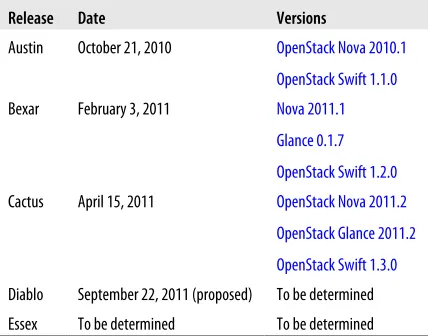
Table 1-1 shows OpenStack releases and the corresponding software versions.
Table 1-1. OpenStack Releases
Release Date Versions
Austin October 21, 2010 OpenStack Nova 2010.1 OpenStack Swift 1.1.0
Bexar February 3, 2011 Nova 2011.1
Glance 0.1.7 OpenStack Swift 1.2.0 Cactus April 15, 2011 OpenStack Nova 2011.2
OpenStack Glance 2011.2 OpenStack Swift 1.3.0 Diablo September 22, 2011 (proposed) To be determined Essex To be determined To be determined
You can always see a list of all (past and future) releases at http://wiki.openstack.org/ Releases.
Community
Much is made of the large community aspect of OpenStack, and with great reason: the community was created by end users (cloud service providers and large enterprise) with the active participation of large computing vendors and many other open source projects. In less than a year, OpenStack has become arguably the largest open source cloud project.
At the end of June 2010, the OpenStack community boasted 217 registered developers and 80 contributing companies. These 217 registered developers have been very active. In just the month of June 2010, OpenStack Compute (Nova) had 1,382 commits by 65 people, OpenStack Object Storage (Swift) had 101 commits by 12 people, and Open-Stack Image Registry (Glance) had 164 commits by 12 people.
The OpenStack community is extremely active and maintains many outlets for infor-mation about the project:
• Forums for active discussions on all OpenStack projects are located at http://forums .openstack.org/.
• The OpenStack wiki is hosted at http://wiki.openstack.org/StartingPage and is up-dated almost daily with new information.
• The official documentation for each of the OpenStack project releases is available at http://docs.openstack.org/.
• Mailing lists for OpenStack are detailed at http://wiki.openstack.org/MailingLists. Each of the lists are targeted to different audiences and have different volumes of email.
• Launchpad is the current home for source control and project management and is located at https://launchpad.net/nova. In the future, the codebase may be moving to http://github.com/.
• Blog posts from OpenStack developers and prominent community members are aggregated at http://planet.openstack.org/.
• Active, real-time discussion about OpenStack projects are held on IRC on the #openstack (general OpenStack discussions) and #openstack-dev (developer-ori-ented OpenStack discussion) on Freenode at irc://freenode.net/. As noted in the documentation, “This is usually the best place to ask questions and find your way around. IRC stands for Internet Relay Chat and it is a way to chat online in real time. You can also ask a question and come back to the log files to read the answer later.” The logs are available at http://eavesdrop.openstack.org/irclogs/.
CHAPTER 2
Understanding Swift
Swift is the oldest and probably the mature project within OpenStack. It is the under-lying technology that powers Rackspace’s Cloud Files™ service. While it only interacts tangentially with Nova (as shown in Chapter 3), it is still important in the overall scheme of understanding OpenStack.
Swift aims to provide a massively scalable and redundant object store conceptually similar to Amazon’s S3 service. To provide this scalability and redundancy, it writes multiple copies of each object to multiple storage servers within separate “zones.” Zones are a logical grouping of storage servers that have been isolated from each other to guard against failures. The level of isolation is up to the cloud operator; they can be isolated on differing servers (ability to lose individual servers), different racks (ability to lose entire rack), different sections of the data center, or even different data centers. Each choice provides a different level of isolation and cost.
Many beginners assume that Swift will take the place of their file server and that they will be able to easily mount volumes on their desktops to access their files. This is not the case. Swift is an object store, not a file server. While these sound similar, there are important differences. Ob-ject stores simply save files in logical groupings (called “containers” in Swift parlance) via a RESTful protocol. They do not provide a true fil-esystem, nor are they accessible through standard file sharing protocols like NFS (Network File System, the standard for UNIX), CIFS (Common Internet File System, the standard for Windows), or AFS (Appleshare Files System, the standard for Mac OS X). To access your files, you will need to use a the Swift API client. These are described later in this chap-ter.
Swift is configurable in terms of how many copies (called “replicas”) are written, as well as how many zones are configured. Current best practices call for three replicas written across five zones. As the number of replicas is less than or equal to the number of zones, Swift tries to balance the writing of objects to storage servers so that the write and read load is distributed. This is illustrated in Figure 2-1.
Figure 2-1. Swift Replicas And Zones
Architecture
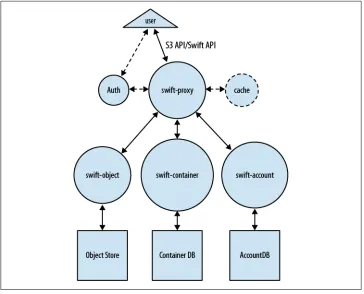
The logical view of Swift can be divided into two logical parts: presentation and re-source. The major components, data stores, and interactions are illustrated in Fig-ure 2-2.
Presentation
Swift accepts end user requests via swift-proxy processes. swift-proxy accepts incoming end user requests; optionally authorizes and authenticates them; then passes them on to the appropriate object, account, or container processes for completion. It can op-tionally work with a cache (memcached*) to reduce authentication, container, and ac-count calls. swift-proxy accepts requests via the OpenStack API on port 80. There is also an optional middleware to support the Amazon S3 protocol.
Authentication
Swift handles authentication through a three-step process:
• User authenticates through the authentication system (or middleware within swift-proxy) and receives a unique token (which is an operator-customizable string). This step is only required if the user doesn’t possess a valid token. Tokens are valid for an operator-configurable time limit (Rackspace Cloud Files™ uses a 24-hour time-out).
• User issues a second request to Swift (directly to swift-proxy), passing the token along with the request in the HTTP headers.
* Memcached is a free and open-source in-memory key-value store for caching small pieces of data.
• proxy validates the token and responds to user request with the help of swift-account, swift-container, and/or swift-object.
Swift authentication can be implemented through WSGI middleware or as a separate system. For most installations, the WSGI middleware option will be more straightfor-ward. However, some enterprises might find the separate system approach easier to integrate to their current authentication scheme. Swift ships with sample authentica-tion code called swauth, which stores the authentication database within Swift itself.
Resource
Swift manages a number of information sources through three processes that fulfill requests from swift-proxy. These three daemons are:
• swift-account, which manages a sqlite3 database of accounts defined with the ob-ject storage service.
[image:21.504.71.435.53.347.2]• swift-container manages another sqlite3 database, but contains a mapping of con-tainers (analogous to buckets in Amazon’s S3) within the object store service. • swift-object, a mapping of actual objects (i.e., Files) stored on the storage node.
Figure 2-2. Swift Logical Architecture
Each of these processes are responsible for fulfilling requests from the proxy node, as well as auditing their own mappings (database consistency) and replicating any incon-sistent information to other nodes in the ring.
CHAPTER 3
Understanding Glance
Glance is the newest OpenStack service. First debuting in the Bexar release, Glance provides a catalog service for storing and querying virtual disk images. Glance has been designed to be a standalone service for those needing to organize large sets of virtual disk images. However, when used along with Nova and Swift, it provides an end-to-end solution for cloud disk image management.
Architecture
There are three pieces to Glance architecture: glance-api, glance-registry, and the image store. As you can probably guess, glance-api accepts API calls, much like nova-api, and the actual image blobs are placed in the image store. The glance-registry stores and retrieves metadata about images. The image store can be a number of different object stores, including Swift. Figure 3-1 illustrates Glance’s logical architecture.
glance-api is similar in functionality to nova-api, in that it accepts incoming API requests and then communicates with the other components (glance-registry and the image store) to facilitate querying, retrieving, uploading, or deleting images. By default, glance-api listens on port 9292.
In the Cactus release, Glance lacks authentication and authorization, making it unsuitable for direct end user usage except in tightly control-led environments. The best way to use this is “behind” Nova, where
nova-api authenticates and authorizes requests for uploading, querying,
and using virtual disk images.
The glance-registry process stores and retrieves metadata about images. The version that ships with Glance is only considered a reference implementation, as most large installations will want a customized version for their service. The reference version uses sqlite3 to store the metadata and the Glance API for communications. By default, glance-registry listens on port 9191.
The Glance database contains only two tables: Image and Image Property. The image table represents the image in the datastore (disk format, container format, size, etc.), while the Image Property table contains custom image metadata. While the image rep-resentation and image metadata is stored in the database, the actual images are stored in image stores.
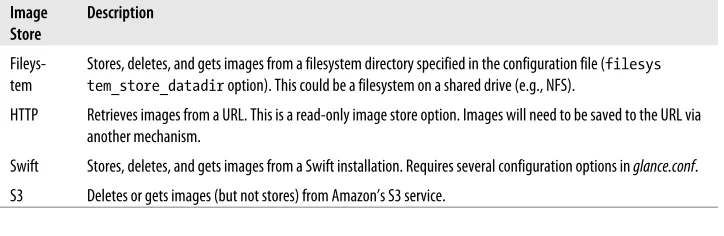
[image:24.504.74.435.53.348.2]Image stores are the storage places for the virtual disk image and come in a number of different options. The currently supported image stores are shown in Table 3-1.
Table 3-1. Glance Image Store Options
Image Store
Description
Fileys-tem Stores, deletes, and gets images from a filesystem directory specified in the configuration file (tem_store_datadir option). This could be a filesystem on a shared drive (e.g., NFS). filesys HTTP Retrieves images from a URL. This is a read-only image store option. Images will need to be saved to the URL via
another mechanism.
Swift Stores, deletes, and gets images from a Swift installation. Requires several configuration options in glance.conf. S3 Deletes or gets images (but not stores) from Amazon’s S3 service.
Figure 3-1. Glance Logical Architecture
[image:24.504.73.435.483.601.2]Each of these options have their own strengths and weaknesses. However, most large installations will use Swift, while smaller installations will probably gravitate to the simplicity of the filesystem option with a shared NFS server. The S3 or HTTP image stores are probably only useful for referencing publicly available images.
[image:25.504.76.434.156.203.2]With this overview of Glance, it should now be clear how Glance provides the “glue” between Swift and Nova. Figure 3-2 shows the interactions between OpenStack projects for virtual disk image storage and retrieval.
Figure 3-2. OpenStack Image Ecosystem
Image Support
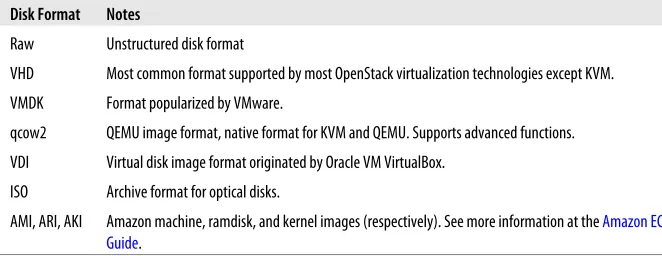
[image:25.504.73.404.338.466.2]Glance supports a wide array of virtual disk and container formats. Virtual disks are analogous to a physical server’s boot drives, only condensed into a file. Different vir-tualization technologies support different disk formats. Glance supports the disk for-mats shown in Table 3-2.
Table 3-2. Glance Supported Disk Formats
Disk Format Notes
Raw Unstructured disk format
VHD Most common format supported by most OpenStack virtualization technologies except KVM. VMDK Format popularized by VMware.
qcow2 QEMU image format, native format for KVM and QEMU. Supports advanced functions. VDI Virtual disk image format originated by Oracle VM VirtualBox.
ISO Archive format for optical disks.
AMI, ARI, AKI Amazon machine, ramdisk, and kernel images (respectively). See more information at the Amazon EC2 User Guide.
Glance also supports the concept of container formats, which describes the file format and contains additional metadata. Glance supports two container formats as well as the absence of a container format (bare), as shown in Table 3-3.
Table 3-3. Glance Container Formats
Container Format
Notes
OVF An open standard for distributing one or more virtual machine images. Read more about this standard at http: //www.dmtf.org/standards/ovf.
Container
Format Notes
aki, ari, ami Amazon kernel, ramdisk, or machine image (respectively). Read more about these container formats at Amazon EC2 User Guide.
Bare No container for this image.
API Support
The Glance API is a simple REST API for querying image metadata or storing or re-trieving actual images. Data is returned as a JSON-encoded mapping (query) or binary (image retrieval). Below is an example of querying Glance using curl for details on all images:
$ curl http://localhost:9292/images {"images":
[{"name": "natty-uec", "container_format": "ami", "disk_format": "ami",
"checksum": "b420e097baf54cd32af5970b3f0cb93b", "id": 6,
"size": 1476395008}] }
In this example, Glance shows that there is only one image in the registry.
The List Images and List Images Detail calls can return huge amounts of data for large image stores, as no record filtering exists in this version of Glance.
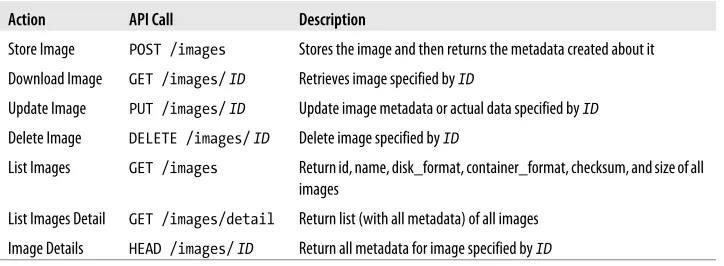
[image:26.504.74.436.416.549.2]The Glance API calls are detailed in Table 3-4.
Table 3-4. Glance API Calls
Action API Call Description
Store Image POST /images Stores the image and then returns the metadata created about it Download Image GET /images/ ID Retrieves image specified by ID
Update Image PUT /images/ ID Update image metadata or actual data specified by ID Delete Image DELETE /images/ ID Delete image specified by ID
List Images GET /images Return id, name, disk_format, container_format, checksum, and size of all images
List Images Detail GET /images/detail Return list (with all metadata) of all images Image Details HEAD /images/ ID Return all metadata for image specified by ID
The full API documentation can be viewed at the online documentation website.
Installation
If you are on Ubuntu 11.04 or later, Glance can be installed with a simple apt-get:
$ sudo apt-get install glance python-glance-doc
Glance requires a large number of dependencies.
Once installed, it needs to be started with the glance-control utility.
$ sudo glance-control all start
Glance is now ready for uploading and querying of virtual disk images. The glance index command shows all virtual disk images currently in Glance.
$ glance index
No public images found.
As you can see from the example above, Glance is currently empty. Let's put a image into it. The glance-upload command puts an image record into the glance-registry and stores the data file in the image store. It requires a the disk format and container format as a minimum set of arguments. In this example, the virtual disk is formatted as an AMI from the Ubuntu Enterprise Cloud image repository.
$ glance-upload natty-server-uec-amd64.img natty-uec --disk-format ami \ --container-format ami
Stored image. Got identifier: {u'checksum': u'b420e097baf54cd32af5970b3f0cb93b', u'container_format': u'ami', u'created_at': u'2011-07-06T00:54:23.600181', u'deleted': False, u'deleted_at': None, u'disk_format': u'ami', u'id': 6, u'is_public': True, u'location': u'file:///var/lib/glance/images/6', u'name': u'natty-uec',
u'properties': {u'type': u'raw'}, u'size': 1476395008,
u'status': u'active',
u'updated_at': u'2011-07-06T00:55:01.901066'}
Now that an image has been uploaded, Glance should show it via the glance index command.
$ glance index
Found 1 public images...
ID Name Disk Format Container Format Size
-- --- --- --- ---6 natty-uec ami ami 147---6395008
The glance show command is able to show details about the newly uploaded image.
$ glance show 6
URI: http://0.0.0.0/images/6 Id: 6
Public: Yes Name: natty-uec Size: 1476395008
Location: file:///var/lib/glance/images/6 Disk format: ami
Container format: ami Property 'type': raw
This image is now available for use.
CHAPTER 4
Understanding Nova
Nova seeks to provide a framework for the large-scale provisioning and management of virtual compute instances. Similar in functionality and scope to Amazon’s EC2 serv-ice, it allows you to create, manage, and destroy virtual servers based on your own system images through a programmable API.
Nova Architecture
Nova is architected as a distributed application with many components, but the ma-jority of these are custom-written Python daemons of two varieties:
• Web Server Gateway Interface (WSGI)* applications to receive and mediate API calls
• Worker daemons to carry out orchestration tasks
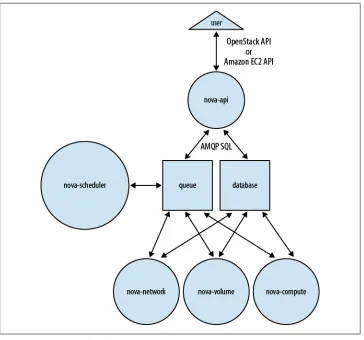
However, there are two essential pieces of the architecture that are neither custom written nor Python-based: the messaging queue and the database. These two compo-nents facilitate the asynchronous orchestration of complex tasks through message passing and information sharing. Piecing this all together we get a picture like Fig-ure 4-1.
This complicated diagram can be summed up in three sentences:
• End users who want to use Nova to create compute instances call nova-api with OpenStack API or EC2 API requests.
• Nova daemons exchange information through the queue (actions) and database (information) to carry out these API requests.
• Glance is a completely separate service that Nova interfaces through the Glance API to provide virtual disk imaging services.
* WSGI is a Python standard specification that defines the communications between web and application servers.
Now that we’ve seen the overview of the processes and their interactions, let’s take a closer look at each component.
API
[image:30.504.72.436.51.391.2]The nova-api daemon is the heart of Nova. You may see it illustrated on many pictures of Nova as API and “Cloud Controller.” While this is partly true, cloud controller is really just a class (specifically the CloudController in nova/api/ec2/cloud.py) within the nova-api daemon. Its primary purpose is to accept and fulfill incoming API requests. To accept and fulfill API requests, nova-api provides an endpoint for all API queries (accepting requests using either the OpenStack API or the Amazon EC2 API), initiates most of the orchestration activities (such as running an instance), and also enforces some policy (mostly quota checks). For some requests, it will fulfill the entire request itself by querying the database and then returning the answer. For more complicated
Figure 4-1. Nova Logical Architecture
requests, it will pass messages to other daemons through a combination of writing information to the database and adding messages to the queue.
By default, nova-api listens on port 8773 for the EC2 API and 8774 for the OpenStack API.
Scheduler
The nova-scheduler process is conceptually the simplest piece of code in Nova: it takes a virtual machine instance request from the queue and determines where it should run (specifically, which compute server host it should run on). In practice, however, this will grow to be the most complex piece, as it needs to factor in the current state of the entire cloud infrastructure and apply complicated algorithms to ensure efficient usage. To that end, nova-scheduler implements a pluggable architecture that lets you choose (or write) your own algorithm for scheduling. Table 4-1 details the current scheduler choices.
Table 4-1. Nova Schedulers
Scheduler Notes
Simple Attempts to find least loaded host.
Chance Chooses random available host from service table. This is the default scheduler. Zone Picks random host from within an availability zone.
To illustrate how simple nova-scheduler can be, here is the relevant code from the chance scheduler class in nova/schedule/chance.py:
class ChanceScheduler(driver.Scheduler):
"""Implements Scheduler as a random node selector.""" def schedule(self, context, topic, *_args, **_kwargs): """Picks a host that is up at random."""
hosts = self.hosts_up(context, topic) if not hosts:
raise driver.NoValidHost(_("Scheduler was unable to locate a host" " for this request. Is the appropriate" " service running?"))
return hosts[int(random.random() * len(hosts))]
As you can see from above code sample, the schedule method simply chooses a random host from the array of hosts that are currently known to be “up.”
Compute Worker
The nova-compute process is primarily a worker daemon that creates and terminates virtual machine instances. The process by which it does so is fairly complex, but the basics are simple: accept actions from the queue and then perform one or a series of
virtual machine API calls to carry them out while updating state in the database. An example of this would be nova-compute accepting a message from the queue to create a new instance and then using the libvirt library to start a new KVM instance. There are a variety of ways that nova-compute manages virtual machines. The most common is through a software package called libvirt. This is a toolkit (API, daemon, and utilities) created by Red Hat to interact with the capabilities of a wide range of Linux virtualization technologies. While libvirt may be the most common, nova-compute also uses the Xen API, vSphere API, Windows Management Interface, and others to support other virtualization technologies.
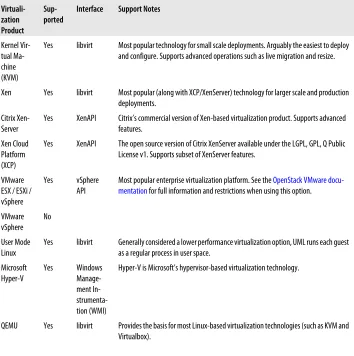
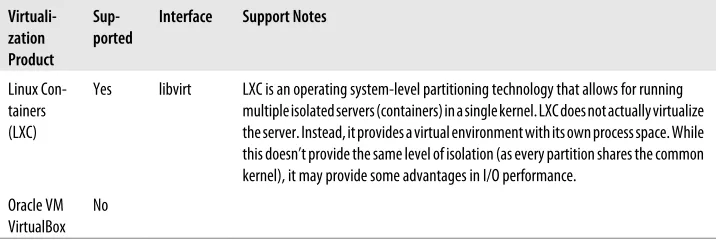
[image:32.504.77.431.234.590.2]One of strengths of Nova is its wide support for virtualization technologies. The vir-tualization technologies supported in the current release version of Nova are detailed in Table 4-2.
Table 4-2. Virtualization Support in Nova
Virtuali-zation Product
Sup-ported Interface Support Notes
Kernel Vir-tual Ma-chine (KVM)
Yes libvirt Most popular technology for small scale deployments. Arguably the easiest to deploy and configure. Supports advanced operations such as live migration and resize.
Xen Yes libvirt Most popular (along with XCP/XenServer) technology for larger scale and production deployments.
Citrix
Xen-Server Yes XenAPI Citrix’s commercial version of Xen-based virtualization product. Supports advancedfeatures. Xen Cloud
Platform (XCP)
Yes XenAPI The open source version of Citrix XenServer available under the LGPL, GPL, Q Public License v1. Supports subset of XenServer features.
VMware ESX / ESXi / vSphere
Yes vSphere
API Most popular enterprise virtualization platform. See the mentation for full information and restrictions when using this option.OpenStack VMware
docu-VMware
vSphere No
User Mode
Linux Yes libvirt Generally considered a lower performance virtualization option, UML runs each guestas a regular process in user space. Microsoft
Hyper-V Yes Windows Manage-ment In- strumenta-tion (WMI)
Hyper-V is Microsoft’s hypervisor-based virtualization technology.
QEMU Yes libvirt Provides the basis for most Linux-based virtualization technologies (such as KVM and Virtualbox).
Virtuali-zation Product
Sup-ported Interface Support Notes
Linux Con-tainers (LXC)
Yes libvirt LXC is an operating system-level partitioning technology that allows for running multiple isolated servers (containers) in a single kernel. LXC does not actually virtualize the server. Instead, it provides a virtual environment with its own process space. While this doesn’t provide the same level of isolation (as every partition shares the common kernel), it may provide some advantages in I/O performance.
Oracle VM VirtualBox No
“Virtualization Technology” on page 31 describes some important considerations that should be taken into account when choosing your virtualization technology.
Volume Worker
[image:33.504.74.435.55.175.2]As you can gather by the name, nova-volume manages the creation, attaching, and detaching of persistent volumes to compute instances (similar in functionality to Am-azon’s Elastic Block Storage). It can use volumes from a variety of providers such as iSCSI or AoE. Table 4-3 shows the current volume provider options.
Table 4-3. Nova Volume Provider Options
Volume
Provider Notes
AoE High performance layer 2 Ethernet technology that encapsulates SATA commands in Ethernet frames. Supported on Linux through the AoE Tools package, specifically the vblade program.
iSCSI A commonly used IP-based encapsulation of SCSI commands. This is supported by most modern operating systems, but the Nova implementation only currently supports Linux through with this implementation. This driver does support CHAP for authentication.
Solaris
iSCSI Supports Solaris-hosted iSCSI volumes and uses ZFS commands. Solaris server must be prepared by following theinstructions in the nova/volume/san.py file. Sheepdog An open-source, distributed storage system specifically designed for QEMU/KVM installations that is developed
by NTT Laboratories. More information is available at http://www.osrg.net/sheepdog/.
RBD RADOS block device (RBD) driver to interact with Ceph, a distributed file system based on a reliable and scalable distributed object store. As stated on http://ceph.newdream.net/ the wiki, “Ceph is under heavy development, and is not yet suitable for any uses other than benchmarking and review.”
LeftHand A driver for interacting with HP Lefthand SAN solutions (as of now known as “HP P4000 SAN Solutions”). Unlike other providers mentioned above, this provider does not run directly on the SAN hardware. Instead, it accesses it via SSH commands.
Network Worker
The nova-network worker daemon is very similar to nova-compute and nova-volume. It accepts networking tasks from the queue and then performs system commands to manipulate the network (such as setting up bridging interfaces or changing iptables rules).
Nova defines two different types of IP addresses for an instance: Fixed IPs and Floating IPs. These can be broadly thought of as private IPs (fixed) and public IPs (floating). Fixed IPs are assigned on instance startup and remain the same during their entire lifetimes. Floating IPs are dynamically allocated and associated to a domain to allow outside connectivity.
To support the assignment and connectivity of fixed IPs, Nova supports three net-working managers:
• Flat is the most basic network manager. Each new instance is assigned a fixed IP address and attached to a common bridge (which must be created by the admin-istrator). IP configuration information must be “injected” (written into the new instance virtual disk image) to configure the instance.
• FlatDHCP builds upon the Flat manager by providing DHCP services to handle instance addressing and creation of bridges.
• VLAN supports that most features. In this mode, nova-network creates a VLAN, a subnet, and a separate bridge for each project. Each project also receives a range of IP only accessible within the VLAN.
Of these three network managers, VLAN is the most featured, Flat is the most bare-bones (but flexible), and FlatDHCP strikes a nice balance between the two.
Queue
The queue provides a central hub for passing messages between daemons. This is cur-rently implemented with RabbitMQ today, but theoretically could be any AMPQ mes-sage queue supported by the Python ampqlib and carrot libraries.
Nova creates several types of message queues to facilitate communication between the various daemons. These include: topics queues, fanout queues, and host queues. Top-ics queues allow messages to be broadcast to the number of particular class of worker daemons. For example, Nova uses these to pass messages to all (or any) of the compute or volume daemons. This allows Nova to use the first available worker to process the message. Host queues allow Nova to send messages to specific services on specific hosts. For example, Nova often needs to send a message to a specific host’s compute worker to take action on a particular instance. Fanout queues are only currently used for the advertising of the service capabilities to nova-scheduler workers.
Here is an example of the queues created in RabbitMQ for a simple all-in-one node installation:
$ sudo rabbitmqctl list_queues Listing queues ...
scheduler_fanout_15b1731c5ac34aae8970369911f04542 0 volume 0
volume_fanout_e42438faedb84ab8aad8d85e29916424 0 compute_fanout_38a37d3dc7564b66a5a540a1e222b12b 0 compute.cactus 0 volume_fanout_d62eb016a76341f4899c91d5a8fbb0a9 0 volume_fanout_dcaebd5edb3045ff8b86636040d34071 0 volume.cactus 0 network_fanout_64b9cb80b2c34c7a8da983219c787147 0 compute 0
network_fanout_362393151e7c465a8e3ed003ac6dbc1b 0 compute_fanout_74165ee38c9d4c1ea1003ccd88a91c22 0 scheduler 0
network.cactus 0 network 0
scheduler_fanout_9444b4c8d5d6497b9b5e2df4eca33b0d 0 scheduler.cactus 0
As you can see from the example, topic, fanout, and host queues have been created for each service (nova-scheduler, nova-compute, nova-volume, nova-network).
Database
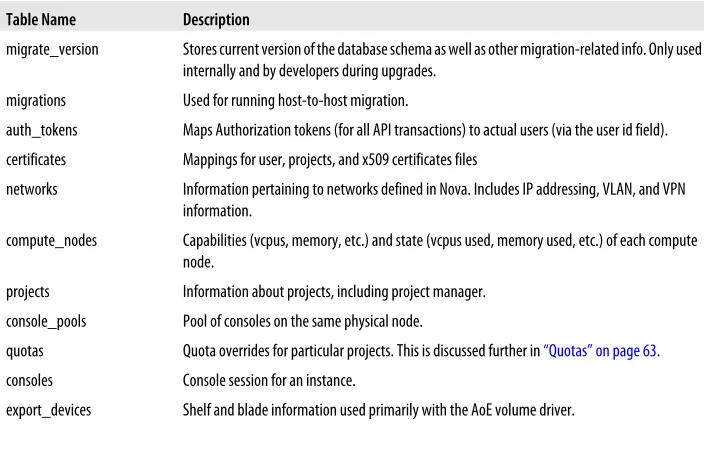
[image:35.504.90.293.53.238.2]The database stores most of the configuration and run-time state for a cloud infra-structure. This includes the instance types that are available for use, instances in use, networks available, and projects. Table 4-4 details all the tables in the current Nova database scheme.
Table 4-4. Nova Database Schema
Table Name Description
migrate_version Stores current version of the database schema as well as other migration-related info. Only used internally and by developers during upgrades.
migrations Used for running host-to-host migration.
auth_tokens Maps Authorization tokens (for all API transactions) to actual users (via the user id field). certificates Mappings for user, projects, and x509 certificates files
networks Information pertaining to networks defined in Nova. Includes IP addressing, VLAN, and VPN information.
compute_nodes Capabilities (vcpus, memory, etc.) and state (vcpus used, memory used, etc.) of each compute node.
projects Information about projects, including project manager. console_pools Pool of consoles on the same physical node.
quotas Quota overrides for particular projects. This is discussed further in “Quotas” on page 63. consoles Console session for an instance.
export_devices Shelf and blade information used primarily with the AoE volume driver.
[image:35.504.75.427.374.601.2]Table Name Description
security_group_rules, se-curity_groups and secur- ity_group_instance_associ-ation
Represent security groups and their associated rules.
fixed_ips and floating_ips Associates the fixed and floating IP addresses to instances.
services Listing off registered services (nova-scheduler, nova-compute and so on) and their current state. The updated_at field is used to determine if a given service is considered healthy or not. instance_actions Lists guest VM’s actions and results.
user_project_association, user_project_role_associ-ation and user_role_asso-ciation
Maintains relationship among users, projects, and roles.
instance_metadata Metadata key/value pairs for an instance that is used during instance startup.
instance_types Specifications (vCPUs, RAM, etc.) of flavors or instances types that users can use in this cloud. Described in much greater detail in “Instance Types and Flavors” on page 65.
instances Representation of virtual machine instances.
users Representations of users.
iscsi_targets Mapping of iSCSI targets, hosts, and volumes. volumes Representation of volumes in the cloud. key_pairs Public key pairs for SSH.
zones Represents a child zone of this zone. Only used in advanced configurations.
Nova supports a wide range of databases, including popular open-source stalwarts like MySQL and PostgreSQL. For more information on choosing an appropriate database for Nova, see “Database” on page 34.
CHAPTER 5
Obtaining Nova
Nova is distributed from several sources in many different packaging formats. As it is a relatively new project, it lacks the installation ease and universal portability of more established open source projects like Apache Web Server. As such, it is not easily in-stallable on every operating system distribution without significant administrative con-figuration. In this chapter, we will help you decide which version of the OpenStack code base is best suited to your deployment needs and show you how to obtain that version in your preferred packaging.
Nova Versions and Packaging
As Nova is a fast-moving and relatively young project, we need to make some decisions about the codebase that we want to use. There are two major decisions here:
• What version do we want to use?
• What form of packaging do we want to use to deploy Nova?
To adequately answer these questions, you need to ask yourself two tough questions: • How proficient am I with Python development, system administration, and Linux
packaging?
• How much stability am I willing to sacrifice to get the latest features?
To answer the proficiency question, you will need to honestly examine your skills across not just programming, but also system administration. If you don’t utilize the packaged versions of Nova, you will need to understand how Python applications are built and their dependent packages. If you want to use newer, non-production versions of the code, it is possible that you will run into bugs that you will need to troubleshoot or fix yourself. On the systems administration side, Nova has heavy dependencies of Linux networking and virtualization support. As stated earlier in the book, it is mostly a con-trol framework for virtual machines, storage, and networks. To apply its advanced configurations or options, you will need to understand the trade-offs you will be mak-ing. Rules of thumb for classifying skill level could be as follows:
Basic
Relatively unskilled in Python programming, but has basic system administration skills in Linux virtualization (specifically KVM) and networking (understanding of iptables and ifconfig).
Proficient
Beginner skills in Python (can read code, perhaps written basic Python scripts). Competent system administration skills, with advanced knowledge of key areas such as virtualization (perhaps deployed Xen or VMware at their company), storage (usage of iSCSI), and networking (understanding of VLANS and advanced switch-ing).
Expert
Well-versed in Python, including working with large open-source Python projects, knowledge of popular libraries (SQL-Alchemy, amqplib, etc.), and experience with WSGI applications. Advanced system administration skills such as writing libvirt templates, defining new iptables or ebtables rules, and administering message queuing software.
As noted earlier in the book, Nova is a rapidly moving project that changes daily. Having said that, there are still regular releases, as with any normal software project. For the purposes of this book, we will look at three possible code releases that you might want to deploy:
Release
This is the last “released” version of the codebase and is analogous to a product release. Released versions of the code are the most tested and polished versions of OS. Release versions are suitable for production environments. Releases are refer-red to by their version number or their release name. For example, “2011.2” or “Cactus” was the third release of Nova.
Milestone
Between release versions, milestone versions are produced. These let leading-edge users familiarize themselves and test upcoming releases. Milestones are usually fairly stable, but probably only suitable for test and development environments. Milestones are referred to by the name of the upcoming release and the milestone number (such as “Diablo-3”).
Trunk
Trunk refers to the most current version of the source code. After every update to the official Nova codebase (called a “commit”) from any developer on the project, trunk is updated. This is the most volatile, least-tested, but most up-to-date release of the code. On many workdays, the trunk will get updated multiple times. Trunk is only recommended for users who are actively developing Nova. Trunk versions of the code are referred to by their Launchpad commit revision number (or “re-vno”).
At the time of this writing (July 6th, 2011), the release version of Nova was “Cactus,” or 2011.2; “Diablo-3” was the current milestone version; and trunk was at revno 1245.
Table 5-1 provides some guidance on which version and packaging format you’ll be most successful at deploying depending on your proficiency and desired environment.
Table 5-1. Choosing Your Nova Version and Packaging
Production Proof of Concept / Test Development
Basic Product (Release-based) N/A N/A
Proficient Package (Release-based) Package (Milestone-based) N/A
Expert Source (Release-based) Source (Milestone-based) Source (Trunk-based)
Several of the cells within this table have been labelled “N/A” to indicate that these choices are not advised for the complexity of installation and skill level of the installer.
Distributions
Several companies are providing Nova as the basis of their distributions. For most people, this would be the equivalent of choosing Ubuntu or Red Hat Linux distributions instead of compiling their own Linux kernels. Distributions can provide installers, cus-tom documentation, tested configurations, and support. For most people, distributions provide the quickest and easiest path from bare metal servers to working Nova de-ployments.
StackOps
StackOps offers “a complete, ready-to-use OpenStack distribution verified, tested and designed to reach as many users as possible thanks to a new and simple installation process.” It is produced by a company of the same name.
The StackOps Distro installs on bare metal* (or virtual machine) via CD or USB drive and is based on a Ubuntu Linux Server 10.04 LTS. It features a “Smart Installer” that creates deployments with default settings in three different modes: single node, dual node, and multi node. The installer will also let you add more nodes to an existing installation.
With a focus on ease of installation and excellent documentation, this is an ideal choice for those looking to evaluate or test Nova. You can download or learn more about this distribution at http://www.stackops.com/.
* In this instance “bare metal” refers to a server without an operating system already installed.
Later in this book, we use StackOps to install and configure a single-system Nova de-ployment.
Citrix “Project Olympus”
Citrix has created “Project Olympus,” which aims to provide a “tested, certified and supported version of OpenStack” along with a “cloud-optimized version of XenServer.” While this is not yet a released project, you can learn more details and sign up for the early access program at http://deliver.citrix.com/projectolympus. It is slated for general availability later in 2011.
Nova Packages
For most competent system administrators, package installation is the preferred method of software installation. Like products or distributions, packages provide for easy and quick installations. However, unlike distributions, package installations tend to require more individual pieces (and dependencies) and do not provide assistance with configuration. On the other hand, they do provide more flexibility in that the administrator can pick and choose the pieces they would like to install. The sections below outline the methods to obtain packages for many of today’s popular server op-erating systems.
Launchpad Ubuntu Packages
The source of all Nova packages is the code repository at Launchpad. If you want to closely follow the codebase, you should configure your system to obtain its packages from the PPA repositories at Launchpad.
Personal Package Archives (PPAs) is a Launchpad feature that builds Ubuntu packages from a user’s hosted source code and then distributes them to the public. OpenStack has taken advantage of this automated feature to produce several different repositories of Nova packages, each containing different snapshots of Nova code. We’ll talk about the Nova PPAs later, but you can learn more about creating your own PPAs at https://help.launchpad.net/Packaging/PPA.
Release
If you want to run the latest release of Nova (2011.2 or “Cactus”) on Ubuntu, you can use the personal project archives (PPA) at Launchpad. You can enable packages from the PPAs by executing the following commands:
$ sudo apt-get install python-software-properties $ sudo add-apt-repository ppa:openstack-release/2011.2 $ sudo apt-get update
Replace the 2011.2 part of the add-apt-repository command above with any other OpenStack release designation to use that release. For exam-ple, you can access the “Bexar” packages with the sudo
add-apt-reposi-tory ppa:openstack-release/2011.1 command.
These releases are production quality.
Milestone
You can install slightly newer (which might provide additional functionality and bugs) by using development milestones that are released approximately every four weeks. You can enable those PPAs with the following commands:
$ sudo apt-get install python-software-properties $ sudo add-apt-repository ppa:nova-core/milestone $ sudo apt-get update
You can access the current development milestone schedule on the
OpenStack Wiki. For example, the current “Diablo” milestone schedule is located at http://wiki.openstack.org/DiabloReleaseSchedule.
These packages are not production quality. They should be used for testing and de-velopment.
Trunk
Just as you can get the last release or milestone packages, you can also get the latest trunk code as packages. This is the same command-line process as the release or mile-stone packages but specifies the trunk repository:
$ sudo apt-get install python-software-properties $ sudo add-apt-repository ppa:nova-core/trunk $ sudo apt-get update
As stated earlier in this chapter, trunk changes very rapidly and is the least stable of all the packages. It is prudent to review current bug reports on Launchpad before upgrading your packages on trunk, unless you’re actively trying to reproduce bugs.
These packages are not production quality and should only be used for development.
Ubuntu Distribution Packages
Ubuntu recently made the decision to include OpenStack (Nova, Glance, and Swift) as part of the official Ubuntu 11.04 “Natty” release. These packages are the latest release
(2011.2 “Cactus”) at the time of Ubuntu 11.04 debut. You’ll find these packages in the Ubuntu universe repository. They can be installed just like the Launchpad packages.
Red Hat Enterprise Linux Packages
A consulting company named Grid Dynamics provides Nova and Glance RPM pack-ages for Red Hat Enterprise Linux. However, there are some differences between these packages and the Ubuntu versions. These are summarized as:
• The packages use libguestfs instead of NBD for qcow2 image support.
• Network injection code (configuration of the instances’ networking) was patched for a new path (/etc/sysconfig/network-scripts) and template.
• Only KVM hypervisor has been tested.
Complete instructions and links to the development repositories can be found via the RHEL Packaging page on the OpenStack wiki or by going to their build page directly at http://yum.griddynamics.net/.
Fedora Packages
Another consulting company called Mirantis provides Nova Fedora packages based on the Red Hat Enterprise Linux packages. They provide both Cactus release and trunk packages.
Instructions for installing these RPMs and configuring them with a kickstart script are available at the Mirantis blog.
Microsoft Windows
It is unlikely that you will be able to fully install Nova on Microsoft Windows. Microsoft Windows lacks many of the Nova-supporting Python libraries and is not supported by Nova orchestration features (which are mostly Linux operating system commands). While Microsoft Windows is not suitable for the core Nova daemons, Microsoft Hyper-V is supported as a compute host.
For more information on using Hyper-V as a virtualization technology on your compute hosts, be sure to consult the Hyper-V development wiki page.
Source Code
Source code gives you access to the rawest, most flexible, and most up-to-date versions of Nova. However, that flexibility requires the most proficiency on the part of the end user to install, configure, and deploy. To gather Nova in source code format, you will need a few special tools, some knowledge of Python development, and a bit of patience.
The Nova source code can either be downloaded as a compressed tarball or via the bazaar source control system. Unless you already happen to develop with bazaar, it is easier to just download as the tarball. All the releases are available at https://launchpad .net/nova/+download. Instructions for installing from source are available on the Open-Stack wiki “Install From Source” article.
CHAPTER 6
Planning Nova Deployment
As Nova supports a wide range of technologies, configurations, and designs, it will be important to make a number of architectural and design decisions before looking to deploy it. This section guides you through the most important ones before you begin. Deployment of Nova can be painless with good planning. However, Nova does have a lot of moving parts, so it’s good to understand an overview of what is trying to be accomplished before you start installing software. Figure 6-1 illustrates the preferred workflow for installing, configuring, and launching your first instance on Nova. This is a three-step process:
• Planning Nova Deployment to decide on deployment scenario, finalize key design choices, and ensure hardware meets requirements
• Installing Nova to get the software, prerequisites, and configurations onto the servers
• Using Nova to prep the system for your initial users
This book covers the infrastructure for clouds. As such, it is out of scope of the book to describe everything that you will want to do with your cloud instance once you have it running.
At each phase of the installation, we will make sure to test the results of our actions. Without these tests, it is very easy to get to the last steps and find out you need to start over again due to error in an early phase.
Virtualization Technology
As you can see from the earlier discussion of Nova’s architecture, there are ample choices for virtualization products. I will not go into all the factors about the
priate virtualization technology to choose here, but if you have an installed base of hypervisors, that will need to be factored into your cloud platform choice.
Nova requires all compute hosts within a zone to use a single virtuali-zation technology. For example, you cannot mix VMware-based com-pute hosts with KVM-based comcom-pute hosts. They will all need to be one or the other. This may change in future releases.
Unless you already have extensive experience with particular virtualization technology, most people will gravitate toward either KVM or a Xen-based solution (Xen/XCP/Xen-Server). Each has its own advantages:
[image:46.504.76.433.53.389.2]• KVM ships with most operating systems and is easy to install and configure. It has arguably the best support within Nova (supporting advanced Nova features like live migration) and is easy to get support on, as it is used widely in the community.
Figure 6-1. Nova Installation Workflow
However, many people feel that it has greater overhead (especially in I/O) and doesn’t support some high-end virtualization like memory ballooning.
• Xen-based solutions, on the other hand, excel at performance and have been used in some of the largest clouds in the world. It is rumored to power Rackspace’s compute cloud, Amazon’s EC2, and GoGrid’s cloud. However, this comes at the price of complexity, as they are much more challenging to install, configure, and maintain for people inexperienced with enterprise virtualization products. The general rule of thumb at the current time is to configure KVM for small or non-production deployments but use a Xen-based technology for large-scale non-production installations.
Authentication
Nova can authenticate against a number of sources. By default, it will use the local configuration database (the one specified by the --sql_connection flag) for this. How-ever, the current version of Nova also supports LDAP for authentication. LDAP au-thentication requires significantly more setup. Setup help is available for OpenSSH, OpenLDAP, Sun’s LDAP, and OpenDJ. For more information about setting up these options, consult the nova/auth/ directory in the Nova source.
API
Nova features a pluggable architecture for API support. The current Nova incarnation supports:
• OpenStack API 1.0 (with preliminary OpenStack 1.1 API support) • Amazon EC2 API
Many customers will probably request the mostly compatible EC2 API interface, which supports about 90% of Amazon’s current implementation. However, the OpenStack API (especially the 1.1 version) will probably be the more widely implemented version in the long run, as it is an open API not controlled by a single company.
While there is no technical requirement to pick one API over the other, it will be con-fusing to your users if they need to use both. Very few users tools or libraries will support both and allow them to switch on an API by API call basis.
Scheduler
There are many choices for your scheduler. As stated earlier, this is a conceptually simple, but vitally important part of your deployment. The scheduler places instances (virtual servers) onto specific compute hosts. While this may not be vitally important if you only have one or two compute nodes, it is absolutely critical once you start to
grow. Most installations will start with the simple scheduler and then write their own scheduler as they grow. If writing your own scheduler is not feasible for your installa-tion, the next version of Nova (“Diablo”) will feature more choices.
Image Service
Images can be a management headache for many installations. While using Glance along with Swift is the clear choice for larger installations, its management overhead and additional configuration complexity may be too much for smaller deployments. In these cases, nova-objectstore is probably the best alternative.
Even if you choose Glance as your image catalog, you may still need the
nova-objectstore on your machine. For emulation of the Amazon EC2
AMI uploading and bundling semantics, Nova uses the
nova-object-store as a temporary holding space for various pieces of the AMI. Only
once all the pieces have arrived are they assembled and transported into Glance.
Database
As stated earlier, Nova uses a Python library called SQL-Alchemy for database abstrac-tion and access. As such, Nova can theoretically support any database product that SQL-Alchemy supports. However, in practice, there are only three with any level of testing and support within the Nova community:
sqlite3
While sqlite3 is the default database for development and testing, it is unsuitable for production installation due to scalability, availability, and performance con-cerns.
MySQL
MySQL is far and away the most popular database for Nova production deploy-ments. It is also arguably easiest to setup with Nova, and almost all of the docu-mentation assumes you are using it. It should be the default choice for most users. PostgreSQL
PostgreSQL is a distant third in usage within the Nova community. However, there is a dedicated group using it and it does possess many advantageous features for use in large-scale production sites. Users with strong experience in deploying and tuning PostgreSQL may find this an attractive option.
Assuming that you are looking for a production deployment, the decision for database product should come down to PostgreSQL or MySQL. Unless you have significant experience with PostgreSQL, MySQL will be a better choice, as all documentation is written with MySQL in mind and there is a larger support community.
Volumes
Volume storage design should be treated with particular care, as it is one of the few components of Nova that stores non-ephemeral data. Most large installations will look at using either the SAN or iSCSI options for this, as it allows them to utilize enterprise-class hardware and software for greater availability and redundancy. However, speci-alized installations (especially high-performance computing or research) may try the less production-ready drivers (RDB or Sheepdog) if their data survivability is not par-amount.
CHAPTER 7
Installing Nova
With the basics and theory behind us, it is time to get hands-on with Nova and install the code on a server. In this chapter, we will walk through the installation and config-uration of Nova on a single node with both the StackOps distro and Ubuntu packages. You’ll get a feeling for the complexities of implementing your design choices in actual usage. While these installations will be only single nodes, they will contain the entire array of OpenStack software and features.
Installing Nova with StackOps
As we described back in “StackOps” on page 25, StackOps provides a distro for Open-Stack with a bare metal installer. The bare metal installer automates most of the in-stallation and configuration tasks, leaving very little command line or configuration file editing for the administrator. It will install an operating system, necessary software packages, and Nova configuration files for us.
Installing StackOps will overwrite any operating system on your server. It is not intended to overlay Nova onto already installed servers.
Since our purpose is to get some hands-on experience with Nova, we will be installing a single node that runs all the services. As StackOps is a full distribution, it makes many of the cloud design choices for us. The single node installation has made the following design choices:
• nova-api supporting both the OpenStack API and EC2 API • nova-objectstore (instead of Glance) for an image service • nova-volume with iSCSI volumes
• nova-network using FlatDHCP manager (configurable) • MySQL for our database