City, University of London Institutional Repository
Citation
:
Buchanan, G. & Pearson, J. (2008). Improving Placeholders in Digital
Documents. Paper presented at the 12th European Conference on Digital Libraries (ECDL),
14-19 Sep 2008, Aarhus, Denmark.
This is the accepted version of the paper.
This version of the publication may differ from the final published
version.
Permanent repository link:
http://openaccess.city.ac.uk/14961/
Link to published version
:
Copyright and reuse:
City Research Online aims to make research
outputs of City, University of London available to a wider audience.
Copyright and Moral Rights remain with the author(s) and/or copyright
holders. URLs from City Research Online may be freely distributed and
linked to.
City Research Online:
http://openaccess.city.ac.uk/
[email protected]
Improving Placeholders in Digital Documents
George Buchanan, Jennifer Pearson
Future Interaction Technology Laboratory University of Wales, Swansea
{g.r.buchanan,csjen}@swansea.ac.uk
Abstract. Placeholders in physical documents provide critical support for the human reader in relocating material and their place in the text. However, the equivalent tools in digital documents have long been iden-tified as suffering from unintuitive interactions and low rates of use. This paper evaluates the current bookmarking technologies found in digital document readers, and identifies a number of specific and significant shortcomings in their support for user activity. We introduce some sim-ple interactions that close the gap between user requirements and the placeholder support in a simple document reader program. Through this, we demonstrate that improved interactions can be created that reduce the barriers that inhibit placeholder use in digital documents.
Keywords: Digital Libraries, Interaction Design, Document Triage
1
Introduction
The Internet has driven a rapid increase in the use of electronic documents. While electronic search for documents has been the focus of much research, there has been surprisingly little study of the effectiveness of digital documents in use. Reader tools have been investigated through appliances like XLibris [9], and interaction researchers have examined specific issues such as navigation [6]. The rising availability of dedicated reader devices (e.g. Amazon Kindle, Sony Reader) raises the significance of reader software design.
Placeholders, typically reified in the physical world as “bookmarks”, are a critical part of the tool repertoire of a reader of physical books. They allow the human reader to return to a specific point in the text, or place notes and commentaries in close proximity to the original prose that they relate to. This paper focuses on the provision of placeholder support in digital documents.
of the digital web page, and apply a complementary technique to the paginated formatting commonly seen in Adobe Acrobat (PDF) documents.
This paper is founded on two different studies of the use of placeholders: one that probes the use of digital and physical bookmarks by humanities academics through a field study; the second is a laboratory study of specific placeholder interfaces. These two approaches are used to elicit very different insights into how human readers use placeholders in the digital domain.
We commence by reviewing some of the current literature on digital place-holders, emphasising the issues of interaction. We then contrast the insights from this research against the patterns of use found by researchers studying placeholders in traditional printed material. Through this we motivate the field study, which uncovers a more concrete and specific set of user requirements than previously reported in the literature. These requirements then underpin the de-sign and implementation of a novel set of bookmarking features for a PDF reader application, which is finally evaluated through a focussed laboratory study. The paper concludes by returning to the original literature and contrasting our find-ings with current knowledge, and laying out a set of questions for future research.
2
Digital Placeholding
In this section, we review the current scientific knowledge of how users interact with their “bookmarks” in digital documents. We take two contrasting views: first, the use of bookmarks in web browsers; second, the support of bookmarks in paginated document readers.
2.1 Web Bookmarking
Bookmarks were a feature of web browsers from a very early stage in develop-ment. Observation and analysis of how users actually used them followed close behind. Abrams et al [1] demonstrated that the bulk of web browser bookmark use was for archival purposes, when users wanted to keep a permanent record of an important web page. Frequency of use was, perhaps surprisingly, not a key factor in determining whether an individual page was bookmarked. Many pages commonly visited by a user were not bookmarked, but instead the user either memorised the location (URL) or used other web pages (including search engines) to find them.
The infrequent use of browser bookmarks for navigation by web users, first noted by Tauscher and Greenberg [11], has caused considerable comment since. Research has recently reconfirmed bookmark navigation as a marginal feature of current web use [12]. Again, though users do return to particular web pages on a regular basis, these are not re–located via bookmarks, but rather by a wider repertoire, including the browser history list. Instead, bookmarks are used for infrequently used pages, where the user may forget how to locate them.
in digital documents. Though many web pages can be viewed as “documents”, a high volume of digital material in academic use is found in a different digital form: the paginated formatting of PDFs. There are also alternative digital for-mats such as DejaVu that contain paginated material, and a host of other forms for multimedia.
2.2 Bookmarking Document Parts
Documents in the web are complex. A document may appear as one web page or a set of linked pages. In either case, bookmarking one item in a web browser gives access to the whole. Where a “document” consists of different web pages, each part can be identified by a separate web bookmark. This approach has sig-nificant limitations. While the (sub–)document as awholemay be bookmarked, identifying a specific point in a document is not usually supported. Therefore, where a point or part of a document is to be marked, browser bookmarks or “favourites” do not provide the function that is required. In contrast, paginated document readers often provide just such a facility, typically at the page level.
While there is a large volume of material on web page bookmarking, within– document bookmarking in paginated texts is little studied. What evidence there is often appears in comparative literature, where digital behaviours are con-trasted with human actions in handling printed texts. One such example is Mar-shall’s 2005 paper [6], which demonstrated that users compare digital bookmarks unfavourably against physical placeholders, and they are much less frequently used. This conclusion can be found in many other articles, but usually with less direct evidence (e.g. [13]).
2.3 Summary
There is good evidence that current within–document placeholder provision in digital document readers is subjectively rated as poor by users. However, the underlying task requirements of the users is little understood. One germaine question, for example, is whether our knowledge of the use web bookmarks is also relevant to within–document placeholders? Is the goal of the task the same? If not, alternatively, do physical placeholders rather offer a support for recalling recently visited pages – a function more often served by a browser’s “history” list? The answer to each of these is not clear without a review of the literature on physical placeholders.
3
Placeholders in Printed Documents
other hand benefit from advantages such as within–document search. Therefore, the reasons that underpin readers’ use of, and associated tool requirements for, placeholders may differ significantly between the printed and online domains.
Cathy Marshall is one researcher who has taken a highly human–centred view of the reading task. Her recent research [6] has shown that many actions that cause the users only momentary distraction in printed material take considerably more effort in the digital world. When a user’s primary task is focussed upon the text, such cognitive distractions are obstructive. She notes, in particular, the weakness of digital documents in providing placeholding support. Whereas in a book, for example, one may quickly tip in a loose sheet of paper to mark the place where you are currently reading, in a digital domain this simple task seems burdensome. However, no solutions to this dilemma are suggested.
We previously noted the divergence in observed behaviours between different media when users engage in the task of comparing documents for relevance to a particular topic [3]. That study uncovered many discrepancies between the time spent actually reading document content when using digital and printed litera-ture. One difference relevant to this paper is that when using printed documents, users frequently interrupted the reading of one document to compare another, whereas this behaviour was almost entirely absent when using electronic texts. Comparative reading frequently used temporary placeholders (often the user’s own fingers), but no placeholders whatsoever were used in the electronic mode. As Marshall has briefly noted when studying the use of digital reader devices [8], users of printed literature use placeholders for a wide variety of purposes. Providing continuation between interruptions to reading is one driver of use, but there are also reasons related to comparing within and between documents, in-terpreting new material and noting down other literature that the reader intends to look up later. Thus, placeholders serve not simply one purpose, but rather support multiple tasks.
The answer, then, to the question of what are physical placeholders used for is that the placeholders are used for a variety of different purposes. This paper explores what those purposes are, and introduces new means for meeting the resulting needs in digital documents.
4
Understanding Placeholder Use
We wished to extend and deepen the picture of placeholder use that was sketched by Marshall [6]. In particular, we wanted to compare the different roles and uses of placeholders in print and digital media. Through this, we pursued a better understanding of current functional shortcomings in digital environments.
Our participants consisted of twelve humanities researchers (ten faculty), six from computer science and four from social science. Each participant was interviewed at their place of work, a U.K. research–centred university. Interviews lasted from 50 to 90 minutes. Ages ranged from 24 to 63, and the participants included nine females and thirteen males. Participants were asked to demonstrate examples of their information work, and this included examples of placeholding.
4.1 Placeholder Media
Participants used a variety of different media, each of which were exploited in a variety of ways. Fourteen users used “dog–earring”, the turning of a corner of a page, for placeholding. However, this was much lower amongst humanities researchers, due to the issues of handling historic material: “I really avoid doing that. The idea makes me cringe...it would be hideous to do that to an old book, so I really don’t do that at all”. Conversely, the method was often reported when using photocopies and printouts: “That happens all the time with downloads and so on, but I would never do it in a book!”. So, there is a sensitivity, particularly common in those using rarer material, regarding the use of the literature medium itself to provide placeholders. Two participants reported using dog–earring to act as a pointer to critical points in the text: an unusual and creative use of the foldable property of paper to provide two fuctions at once.
More common again was the use of “random” pieces of paper. This was re-ported in some degree by all participants. Materials used could include envelopes, notepaper and scrap paper. When probed about the selection of materials, par-ticipants were consistent in reporting the availablility of material at the point of need. A few plan for this eventuality by leaving appropriate paper at locations where they often read.
Paper was not the only medium in use. Three participants reported the oc-casional use of coloured paperclips, one reporting regular use. Eleven (including all paperclip users) reported using some form of sticky “post–its”. In terms of sticky notes, six reported frequent use, and these had stocks at their regular reading locations.
4.2 Uses of Placeholders
also occur, as a social scientist reported: “sometimes I know I’ll be coming back to something, but not for a while, perhaps because of other things I need to do or some distraction, so I’ll leave a marker on the important stuff so I can pick up the issues and the relationships between the texts later.”
This longer term comparison use also spills over into the need for reference. The same social scientist continued to describe this situation: “when I’m working on a bigger piece, then I’ll leave some marker in for the text I’ll be coming back to, to check details when I’m near the end.” For some people this would be a continuing use of one text. A computer scientist described his use of a programming reference book: “I’m always needing to check what calls to use, what the parameters are and I’m not so good at remembering that. So, I tag the pages, the chapters that I need a lot.” In contrast to the social scientist’s placeholding for one project, this user returns to one text for multiple jobs.
Finally, commentary was a third key element, with thirteen participants us-ing placeholders durus-ing analysis or interpretation of a document. A literature researcher reported her use of paper for this task: “So much of my work is inter-preting and mining a text for meaning, but I can’t bear to write on the books, so I leave notes in between the pages.” These notes bore ideas and insights given in repeated readings.
4.3 Summary
This section naturally can only extract a few highlights from what is, in fact, a very rich information ecology. What does clearly emerge, however, is that the pattern of use here intersects only partially with the predominantly archival use for web bookmarks: the provision of a long term re–location method for an important but seldomly used text. Instead, we see a mixture of short– and long–term reference use, and a variety of interpretative and compartive purposes.
5
Designing Digital Placeholders
This section reports the design and implementation of improved document reader software. We will draw on the previous two parts of the paper, and previous literature including existing hypertext research (e.g. [2]), to underpin the design of improved digital placeholders.
Our survey uncovered some striking differences between placeholders in phys-ical and digital documents. In printed books and photocopied documents, creat-ing and uscreat-ing placeholders was interactively lightweight. Furthermore, physical placeholders were readily used for multiple purposes. When using physical place-holders notes, comments and other material can be written and left in–situ. Some users also highlighted specific text by using placeholders such as post–its.
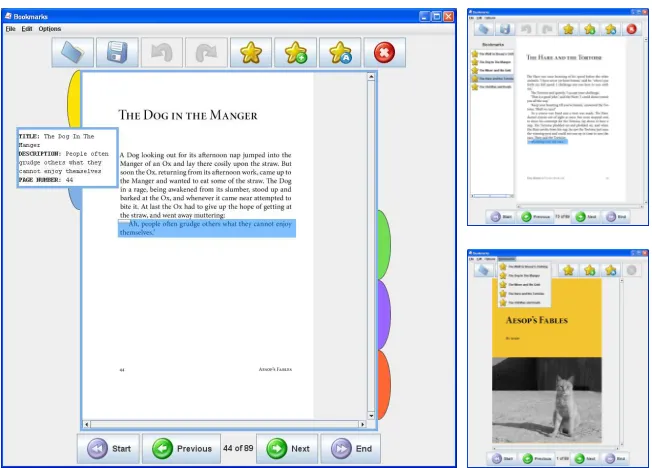
Fig. 1. Visual tabbed bookmarks (main figure); panel list (top right) and menu list (bottom right) interfaces for comparison
as placeholders (again see [5]). Though we have no direct confirming evidence, the typical contents (and thus user needs) are probably similar to the prose and diagrammatic material noted in annotations upon the document media.
Research in spatial hypertext [7] has demonstrated the importance in infor-mation tasks of supporting provisional mark–up in a lightweight manner, using colour, position and other visual cues. We next demonstrate how the same prin-ciples can be applied to placeholders in a novel reader application, and the needs for annotative prose and content highlighting can be supported in one tool.
5.1 System Design
Our new bookmarks system reconstitutes many of the properties of physical bookmarks. They appear as “tabs” beside the display area of the main text (see Figure 1. Each bookmark consists of a title, description, page number and colour. When a new bookmark is created, a bookmark ‘tab’ is produced and displayed to the right of the current page display.
The physical size of each of these bookmark ‘tabs’ is dependant upon how many of them there are; the height of each tab is calculated by dividing the height of the PDF viewing area by the number of bookmarks in the document. Bookmarks may be distinguished by its colour, as well as their position in the display. This colour is automatically assigned when the tab is created (using a colour not presently used), or can be manually configured as the user requires. Users can thus use colours meaningfully (e.g. red for important pages), or arbi-trarily as they choose.
As noted above, users can use a single physical placeholder (e.g. a post–it) as both bookmark and annotation. Each tab bookmark supports a title and de-scription (annotation). These details can be easily accessed through a lightweight interaction: the user simply moves the mouse pointer over the tab, and the anno-tationis displayed in a pop–up window. Annotation is optional, and can be used to discriminate between bookmarks when a reader returns to a text after some time. Our design thereby integrates three hypertext tools (bookmarks, thumb tabs, notes) depicted in Bernstein’s [2] taxonomy of placeholder functions for hypertext readers.
We provide a further element to each tab bookmark. When a user highlights a section of text (for annotating purposes, rather than as a temporary selection) a connected bookmark can, optionally, be automatically generated for that page. The text selected in the highlight is used to generate the default annotation, and may be edited as required.
Through this design, we return the user to the situation where annotation and placeholding can be interleaved. Furthermore, a reader can now quickly identify all their annotations in a document, navigate to any one swiftly, and read their selections in a lightweight manner, without either visually scanning the whole document or engaging in expensive page–to–page navigation.
5.2 Summary
Following our insight into the use of physical placeholders, we started a design process to reproduce the same properties and behaviours in digital bookmarks. Specifically, greater visibility, support for annotations, and lightweight interac-tion were required. Having developed a system that matched these requirements, we progressed to a user study to revalidate these hypotheses.
6
User Study
In order to evaluate the Visual Bookmarking system, we carried out a user study, recruiting 13 Computer Science Post-Graduate participants between the ages of 20 and 35. We used a comparative method, using a total of three systems that were implemented from the same code base. Two systems reify current methods, and the third the new design above:
Panel list : reflecting best–practice in current PDF readers, where the book-marks are ordered by page number, and displayed in a vertical panel on the left–hand side of the document display.
Tabs list : the Visual Bookmarking system described above.
Each system had the same basic interface and functionality including naviga-tion, highlighting and annotations. Differences were limited to the bookmarking features. Annotation and highlighting were available as separate tools in all three, and also integrated with bookmarking in the tabs interface. All three sys-tems were presented with page–based navigation, as opposed to scrolling. Using a scrolling navigation would add further variables to an experiment, such as redraw speeds and participant’s motor/spatial ability, hence the selection of a simpler underlying navigation tool.
Every participant used all three interfaces. The study of each system comm-menced with a tutorial to familiarise the user with its function and operation. The participant then undertook a set of nine tasks on a pair of documents. The tasks included creating, editing and deleting bookmarks, and navigating using the placeholders. The experiment concluded after all three systems were tested with a short interview session. Sessions lasted between 30 and 60 minutes. The experiment followed full squared-design principles to avoid ordering effects. As digital placeholders are known to be seldom used, the experiment was focussed on differentiating between the three systems using the subjective user criteria known to determine user adoption: ease of use and utility of function.
6.1 Findings
The participants in this second study reported a pattern of placeholder use broadly similar to our humanities academics. The dominant use of physical placeholders was to mark the current place in longer texts. Ten participants reported regularly using bookmarks to indicate useful, frequently referenced, or significant, occasionally referenced material. As was the case with their reading, however, placeholder use was less intensive than our literature–focussed human-ities researchers. Digital placeholding was rare: ten never using them, and only one reported their use in more than one in ten texts. Considering the differences one would expect between computer science and humanities researchers, this indicates consistently low uptake in both technical and literate disciplines.
paper bookmarks remained dominant, as another participant reported: “Paper is more physical and you can scribble your own notes on it.”
The qualitative feedback from the interview part of the study certainly re-confirmed our hypotheses. Turning to our experimental part, we see our expec-tations of the different systems confirmed. We anticipated that the menu–based placeholder system would be the poorest, based particularly on its low visibility. Indeed, it proved to be clearly the least popular method, with an average ease– of–use score of only 4.30 out of ten (sd=2.10). In comparison, the panel– and tab–based methods scored 6.30 (sd=1.37) and 7.69 (sd=0.81) respectively. Pair-wise comparison of these three sets yielded differences with over 95% statistical reliability using Student’s t–test.
Comparison of the utility of the different features was also insightful. Again, the menu mode represented a limited feature set, with only a user–editable ti-tle for each bookmark. In contrast, the tab–based interface provided a richer set of features, was highly visible, and editable via lightweight interactions (e.g. rollovers), whereas the panel–mode interface used a more traditional method of dialog access to the same features. As anticipated, the differences in func-tion were marked with participants assessing the interfaces with mean scores of 4.03 (sd=1.71), 6.08 (sd=1.75) and 8.21 (sd=0.89) for the menu–, panel– and tab– based modes repspectively. Again, statistical reliability in comparing the different modes in pairs resulted in consistent figures of 95% or above.
The qualitative feedback from our participants highlighted the causes of these differences. One particpant commented that “I’m a very visual person and seeing things rather than having to read them is nice.” Many positive comments were made about the opportunity of using colour to discriminate between tabs, e.g. “More like real life... pattern matching using the colours can be used for quicker reference.” The use of colour was rated as 7 on a seven–point Likert scale by 9 users, and only one rated it as less than 6. We also probed the significance of visibility of the bookmarks. The mean score was 5.46 (again from 7) and no rating was lower than 4. Our integration of annotation and highlighting support was positively rated (an average of 6), with participant comments confirming its importance in heavily–used material.
The only consistent reservation expressed about the tab interface – by six users – was that of screen estate when display space was limited. The same concern was raised by eleven participants concerning the panel mode.
7
Discussion
The menu–based method used by most existing sofware was described by participants as “clumsy”, “un–functional” and “rubbish”. Even the panel–view that is increasingly used in web–browsers and well–coded PDF documents was noted as requiring effort and “eats screen space”, which was an unwelcome com-plication. Our tab–based method provides stronger cues about the position of placeholders relative to the current document position, and continuously updates these based on the user’s reading position. Unlike Acrobat, we automatically order tabs by page number, and we also support associated highlighting and an-notation for each placeholder. Given the poor task fit of standard contemporary tools, improvement is readily made.
The tab–based interface was highly rated by our participants, and clearly out-performed the other designs. Our design applied principles from spatial hypertext [7] to placeholders. Qualitative feedback confirmed that the resulting design fo-cus on visual cues and lightweight interaction underpinned the users’ preference for the tab interface. These findings support Marshall’s view [6] that lightweight navigation and interaction will improve the usability of document reader soft-ware. Similar principles may improve other features of document reader softsoft-ware. Our investigations into navigation within documents (e.g. [3, 4]), provide con-sistent evidence that there is significant scope to improve the user interaction of document reader software. This current paper further confirms this pattern. Many research questions lie ahead: research indicates there are other problem-atic factors both within reader software and in their integration to the wider information seeking environment.
More narrowly, the quality of fit of our current “best” system with the dif-ferent uses of placeholders observed in Section 4.2 needs more examination. We also noted in Section 6.1 that participants reported using placeholders in lieu of search (and, implicitly, vice–versa). Again, further detailed study is required to determine the degree to which placeholder use can be beneficially technologised. Our future research will investigate methods for navigating in scroll–based reader software. The methods reported here can be applied with ease to a scrolling system, but while we would anticipate similar results, we would wish to uncover conclusive evidence. We also wish to investigate the timing differences between interfaces – which we know to be small – in a sufficiently large sample to provide a likelihood of significance if genuine differences exist.
8
Conclusion
re-search is now needed to understand what roles placeholders retain or obtain in digital documents, and what the specific requirements for them are. As it is, even relatively simple implementations improve significantly on the current “state–of–the–art”.
9
Acknowledgements
This research is supported by the Institute of Advanced Telecommunication, Swansea University. This work has been part-funded by the European Union through the Welsh Assembly Government.
References
1. D. Abrams, R. Baecker, and M. Chignell. Information archiving with bookmarks: personal web space construction and organization. InCHI ’98: Proceedings of the SIGCHI conference on Human factors in computing systems, pages 41–48, New York, NY, USA, 1998. ACM Press/Addison-Wesley Publishing Co.
2. M. Bernstein. The bookmark and the compass: orientation tools for hypertext users. SIGOIS Bull., 9(4):34–45, 1988.
3. G. Buchanan and F. Loizides. Investigating document triage on paper and elec-tronic media. In Proc. European Conference on Digital Libraries, pages 416–426. Springer, 2007.
4. G. Buchanan and T. Owen. Improving navigation interaction in digital documents. InProceedings of ACM/IEEE Joint Conference on Digital Libraries, page in press. ACM, 2008.
5. C. C. Marshall. Annotation: from paper books to the digital library. InDL ’97: Proceedings of the second ACM international conference on Digital libraries, pages 131–140, New York, NY, USA, 1997. ACM.
6. C. C. Marshall and S. Bly. Turning the page on navigation. InJCDL ’05: Proceed-ings of the 5th ACM/IEEE-CS joint conference on Digital libraries, pages 225–234, New York, NY, USA, 2005. ACM.
7. C. C. Marshall and I. Frank M. Shipman. Spatial hypertext: designing for change.
Commun. ACM, 38(8):88–97, 1995.
8. C. C. Marshall, M. N. Price, G. Golovchinsky, and B. N. Schilit. Introducing a digital library reading appliance into a reading group. In DL ’99: Proceedings of the fourth ACM conference on Digital libraries, pages 77–84. ACM, 1999. 9. B. N. Schilit, M. N. Price, and G. Golovchinsky. Digital library information
appli-ances. InProcs. ACM Conf. on Digital libraries, pages 217–226. ACM, 1998. 10. A. Tabard, W. Mackay, N. Roussel, and C. Letondal. Pagelinker: integrating
con-textual bookmarks within a browser. In CHI ’07: Procs. SIGCHI conference on Human factors in computing systems, pages 337–346. ACM Press, 2007.
11. L. Tauscher and S. Greenberg. How people revisit web pages: empirical findings and implications for the design of history systems. Int. J. Hum.-Comput. Stud., 47(1):97–137, 1997.
12. H. Weinreich, H. Obendorf, E. Herder, and M. Mayer. Off the beaten tracks: exploring three aspects of web navigation. InWWW ’06: Proceedings of the 15th international conference on World Wide Web, pages 133–142. ACM, 2006. 13. H. Woodward, F. Rowland, C. McKnight, C. Pritchett, and J. Meadows. Cafe jus: