12
Image Processing
• ImageObserver • ColorModel • ImageProducer • ImageConsumer • ImageFilter
The image processing parts of Java are buried within thejava.awt.imagepackage.
The package consists of three interfaces and eleven classes, two of which are abstract. They are as follows:
• TheImageObserverinter face provides the single method necessary to support the asynchronous loading of images. The interface implementers watch the production of an image and can react when certain conditions arise. We
briefly touched onImageObserverwhen we discussed theComponentclass (in
Chapter 5,Components), becauseComponentimplements the interface.
• TheImageConsumerandImageProducerinter faces provide the means for low
level image creation. TheImageProducerprovides the source of the pixel data
that is used by theImageConsumerto create anImage.
• The PixelGrabber and ImageFilter classes, along with the AreaAverag-ingScaleFilter, CropImageFilter, RGBImageFilter, and
ReplicateScale-Filter subclasses, provide the tools for working with images. PixelGrabber
consumes pixels from anImageinto an array. TheImageFilterclasses modify
an existing image to produce anotherImageinstance.CropImageFiltermakes
smaller images; RGBImageFilter alters pixel colors, while
AreaAverag-ingScaleFilter andReplicateScaleFilterscale images up and down using
different algorithms. All of these classes implement ImageConsumer because
they take pixel data as input.
• MemoryImageSourceandFilteredImageSourceproduce new images. Memory-ImageSource takes an array and creates an image from it.
FilteredImage-Sourceuses anImageFilterto read and modify data from another image and
produces the new image based on the original. BothMemoryImageSourceand
• ColorModeland its subclasses,DirectColorModel and IndexColorModel, pro-vide the palette of colors available when creating an image or tell you the
palette used when usingPixelGrabber.
The classes in the java.awt.image package let you create Imageobjects at
run-time. These classes can be used to rotate images, make images transparent, create image viewers for unsupported graphics formats, and more.
12.1 ImageObserver
As you may recall from Chapter 2,Simple Graphics, the last parameter to the
draw-Image()method is the image’sImageObserver. However, in Chapter 2 I also said
that you can usethisas the image observer and forget about it. Now it’s time to
ask the obvious questions: what is an image observer, and what is it for?
Because getImage() acquires an image asynchronously, the entire Image object
might not be fully loaded whendrawImage()is called. TheImageObserver
inter-face provides the means for a component to be told asynchronously when
addi-tional information about the image is available. TheComponentclass implements
theimageUpdate()method (the sole method of theImageObserverinter face), so that method is inherited by any component that renders an image. Therefore,
when you calldrawImage(), you can passthisas the final argument; the
compo-nent on which you are drawing serves as theImageObserverfor the drawing
pro-cess. The communication between the image observer and the image consumer happens behind the scenes; you never have to worry about it, unless you want to
write your ownimageUpdate()method that does something special as the image is
being loaded.
If you calldrawImage()to display an image created in local memory (either for
double buffering or from aMemoryImageSource), you can set theImageObserver
parameter ofdrawImage()tonull because no asynchrony is involved; the entire
image is available immediately, so anImageObserverisn’t needed.
12.1.1 ImageObserver Interface
Constants
The various flags associated with the ImageObserverare used for the infoflags
argument toimageUpdate(). The flags indicate what kind of information is
avail-able and how to interpret the other arguments to imageUpdate(). Two or more
public static final int WIDTH
When theWIDTH flag is set, thewidth argument to imageUpdate() correctly
indicates the image’s width. Subsequent calls to getWidth() for the Image
return the valid image width. If you call getWidth() before this flag is set,
expect it to return -1.
public static final int HEIGHT
When theHEIGHTflag is set, theheightargument toimageUpdate()correctly
indicates the image’s height. Subsequent calls to getHeight()for the Image
return the valid image height. If you callgetHeight()before this flag is set,
expect it to return -1.
public static final int PROPERTIES
When thePROPERTIES flag is set, the image’s properties are available.
Subse-quent calls togetProperty()return valid image properties.
public static final int SOMEBITS
When theSOMEBITSflag ofinfoflags(fromimageUpdate()) is set, the image
has started loading and at least some of its content are available for display.
When this flag is set, thex,y,width, andheightarguments toimageUpdate()
indicate the bounding rectangle for the portion of the image that has been delivered so far.
public static final int FRAMEBITS
When the FRAMEBITSflag of infoflags is set, a complete frame of a
multi-frame image has been loaded and can be drawn. The remaining parameters to
imageUpdate()should be ignored (x,y,width,height).
public static final int ALLBITS
When the ALLBITS flag of infoflags is set, the image has been completely
loaded and can be drawn. The remaining parameters to imageUpdate()
should be ignored (x,y,width,height).
public static final int ERROR
When theERRORflag is set, the production of the image has stopped prior to
completion because of a severe problem.ABORTmay or may not be set when
ERROR is set. Attempts to reload the image will fail. You might get an ERROR
because the URL of theImageis invalid (file not found) or the image file itself
is invalid (invalid size/content).
public static final int ABORT
When theABORTflag is set, the production of the image has aborted prior to
completion. IfERRORis not set, a subsequent attempt to draw the image may
Method
public boolean imageUpdate (Image image, int infoflags, int x, int y, int width, int height)
The imageUpdate() method is the sole method in the ImageObserver in-ter face. It is called whenever information about an image becomes available. To register an image observer for an image, pass an object that implements the ImageObserver inter face to getWidth(), getHeight(), getProperty(),
prepareImage(), ordrawImage().
The imageparameter toimageUpdate()is the image being rendered on the
obser ver. The infoflags parameter is a set of ImageObserver flags ORed
together to signify the current information available aboutimage. The
mean-ing of the x, y, width, and height parameters depends on the current
infoflagssettings.
Implementations ofimageUpdate()should returntrueif additional
informa-tion about the image is desired; returningfalsemeans that you don’t want
any additional information, and consequently,imageUpdate()should not be
called in the future for this image. The defaultimageUpdate()method returns
true if neither ABORT nor ALLBITS are set in the infoflags—that is, the
methodimageUpdate()is interested in further information if no errors have
occurred and the image is not complete. If either flag is set, imageUpdate()
returnsfalse.
You should not call imageUpdate() directly — unless you are developing an
ImageConsumer, in which case you may find it worthwhile to override the
defaultimageUpdate()method, which all components inherit from the
Compo-nentclass.
12.1.2 Overriding imageUpdate
Instead of bothering with theMediaTrackerclass, you can override the
imageUp-date() method and use it to notify you when an image is completely loaded.
Example 12-1 demonstrates the use of imageUpdate(), along with a way to force
your images to load immediately. Here’s how it works: theinit() method calls
getImage()to request image loading at some time in the future. Instead of waiting fordrawImage()to trigger the loading process, init()forces loading to start by
callingprepareImage(), which also registers an image observer.prepareImage()is
a method of theComponentclass discussed in Chapter 5.
Thepaint()method doesn’t attempt to draw the image until the variableloaded
is set totrue. TheimageUpdate()method checks theinfoflagsargument to see
whether ALLBITS is set; when it is set, imageUpdate() sets loaded to true, and
schedules a call to paint(). Thus, paint() doesn’t call drawImage() until the
Example 12–1: imageUpdate Override.
import java.applet.*; import java.awt.*;
import java.awt.image.ImageObserver;
public class imageUpdateOver extends Applet { Image image;
boolean loaded = false; public void init () {
image = getImage (getDocumentBase(), "rosey.jpg"); prepareImage (image, -1, -1, this);
}
public void paint (Graphics g) { if (loaded)
g.drawImage (image, 0, 0, this); }
public void update (Graphics g) { paint (g);
}
public synchronized boolean imageUpdate (Image image, int infoFlags, int x, int y, int width, int height) {
if ((infoFlags & ImageObserver.ALLBITS) != 0) { loaded = true;
repaint(); return false; } else {
return true; }
} }
Note that the call toprepareImage()is absolutely crucial. It is needed both to start
image loading and to register the image observer. IfprepareImage()were omitted,
imageUpdate()would never be called,loadedwould not be set, andpaint()would
never attempt to draw the image. As an alternative, you could use the
Media-Tracker class to force loading to start and monitor the loading process; that approach might give you some additional flexibility.
12.2 ColorModel
A color model determines how colors are represented within AWT.ColorModelis
an abstract class that you can subclass to specify your own representation for
col-ors. AWT provides two concrete subclasses ofColorModelthat you can use to build
your own color model; they areDirectColorModel and IndexColorModel. These
two correspond to the two ways computers represent colors internally.
represents the intensity of that color for the particular pixel. This arrangement yields the familiar “16 million colors” that you see in advertisements. It corre-sponds closely to Java’s direct color model.
However, 24 bits per pixel, with something like a million pixels on the screen, adds up to a lot of memory. In the dark ages, memory was expensive, and devoting this much memory to a screen buffer cost too much. Therefore, designers used fewer bits — possibly as few as three, but more often eight—for each pixel. Instead of representing the colors directly in these bits, the bits were an index into a color map. Graphics programs would load the color map with the colors they were inter-ested in and then represent each pixel by using the index of the appropriate color in the map. For example, the value 1 might represent fuschia; the value 2 might represent puce. Full information about how to display each color (the red, green, and blue components that make up fuschia or puce) is contained only in the color map. This arrangement corresponds closely to Java’s indexed color model.
Because Java is platform-independent, you don’t need to worry about how your computer or the user’s computer represents colors. Your programs can use an indexed or direct color map as appropriate. Java will do the best it can to render the colors you request. Of course, if you use 5,000 colors on a computer that can only display 256, Java is going to have to make compromises. It will decide which colors to put in the color map and which colors are close enough to the colors in the color map, but that’s done behind your back.
Java’s default color model uses 8 bits per pixel for red, green, and blue, along with another 8 bits for alpha (transparency) level. However, as I said earlier, you can
create your ownColorModelif you want to work in some other scheme. For
exam-ple, you could create a grayscale color model for black and white pictures, or an HSB (hue, saturation, brightness) color model if you are more comfortable work-ing with this system. Your color model’s job will be to take a pixel value in your rep-resentation and translate that value into the corresponding alpha, red, green, and blue values. If you are working with a grayscale image, your image producer could
deliver grayscale values to the image consumer, plus aColorModel that tells the
consumer how to render these gray values in terms of ARGB components.
12.2.1 ColorModel Methods
Constructors
public ColorModel (int bits)
There is a single constructor for ColorModel. It has one parameter, bits,
which describes the number of bits required per pixel of an image. Since this is an abstract class, you cannot call this constructor directly. Since each pixel
Pseudo -constructors
public static ColorModel getRGBdefault()
The getRGBdefault() method returns the default ColorModel, which has 8 bits for each of the components alpha, red, green, and blue. The order the pixels are stored in an integer is 0xAARRGGBB, or alpha in highest order byte, down to blue in the lowest.
Other methods
public int getPixelSize ()
The getPixelSize() method returns the number of bits required for each pixel as described by this color model. That is, it returns the number of bits passed to the constructor.
public abstract int getAlpha (int pixel)
The getAlpha() method returns the alpha component ofpixel for a color model. Its range must be between 0 and 255, inclusive. A value of 0 means the pixel is completely transparent and the background will appear through the pixel. A value of 255 means the pixel is opaque and you cannot see the back-ground behind it.
public abstract int getRed (int pixel)
ThegetRed()method returns the red component ofpixelfor a color model. Its range must be between 0 and 255, inclusive. A value of 0 means the pixel has no red in it. A value of 255 means red is at maximum intensity.
public abstract int getGreen (int pixel)
The getGreen() method returns the green component of pixelfor a color model. Its range must be between 0 and 255, inclusive. A value of 0 means the pixel has no green in it. A value of 255 means green is at maximum intensity.
public abstract int getBlue (int pixel)
The getBlue() method returns the blue component of pixel for a color model. Its range must be between 0 and 255, inclusive. A value of 0 means the pixel has no blue in it. A value of 255 means blue is at maximum intensity.
public int getRGB(int pixel)
The getRGB() method returns the color of pixel in the default RGB color model. If a subclass has changed the ordering or size of the different color
components,getRGB()will return the pixel in the RGB color model
public void finalize ()
The garbage collector calls finalize() when it determines that the
Color-Modelobject is no longer needed.finalize()frees any internal resources that theColorModelobject has used.
12.2.2 DirectColorModel
The DirectColorModel class is a concrete subclass of ColorModel. It specifies a color model in which each pixel contains all the color information (alpha, red,
green, and blue values) explicitly. Pixels are represented by 32-bit (int) quantities;
the constructor lets you change which bits are allotted to each component.
All of the methods in this class, except constructors, are final, because of
assump-tions made by the implementation. You can create subclasses of
DirectColor-Model, but you can’t override any of its methods. However, you should not need to
develop your own subclass. Just create an instance ofDirectColorModelwith the
appropriate constructor. Any subclassing results in serious performance degrada-tion, because you are going from fast, static final method calls to dynamic method lookups.
Constructors
public DirectColorModel (int bits, int redMask, int greenMask, int blueMask, int alphaMask)
This constructor creates a DirectColorModel in which bits represents the
total number of bits used to represent a pixel; it must be less than or equal to
32. TheredMask,greenMask,blueMask, andalphaMaskspecify where in a pixel
each color component exists. Each of the bit masks must be contiguous (e.g., red cannot be the first, fourth, and seventh bits of the pixel), must be smaller
than 2bits, and should not exceed 8 bits. (You cannot display more than 8 bits
of data for any color component, but the mask can be larger.) Combined, the
masks together should bebitsin length. The default RGB color model is:
new DirectColorModel (32, 0x00ff0000, 0x0000ff00, 0x000000ff, 0xff000000)
The run-time exceptionIllegalArgumentExceptionis thrown if any of the
fol-lowing occur:
• The bits that are set in a mask are not contiguous.
• Mask bits overlap (i.e., the same bit is set in two or more masks).
public DirectColorModel (int bits, int redMask, int greenMask, int blueMask)
This constructor forDirectColorModelcalls the first with an alpha mask of 0,
which means that colors in this color model have no transparency component. All colors will be fully opaque with an alpha value of 255. The same restrictions for the red, green, and blue masks apply.
Methods
final public int getAlpha (int pixel)
ThegetAlpha()method returns the alpha component ofpixelfor the color model as a number from 0 to 255, inclusive. A value of 0 means the pixel is completely transparent, and the background will appear through the pixel. A value of 255 means the pixel is opaque, and you cannot see the background behind it.
final public int getRed (int pixel)
The getRed() method returns the red component of pixel for the color model. Its range is from 0 to 255. A value of 0 means the pixel has no red in it. A value of 255 means red is at maximum intensity.
final public int getGreen (int pixel)
ThegetGreen()method returns the green component ofpixelfor the color model. Its range is from 0 to 255. A value of 0 means the pixel has no green in it. A value of 255 means green is at maximum intensity.
final public int getBlue (int pixel)
The getBlue() method returns the blue component of pixel for the color model. Its range is from 0 to 255. A value of 0 means the pixel has no blue in it. A value of 255 means blue is at maximum intensity.
final public int getRGB (int pixel)
The getRGB() method returns the color of pixel in the default RGB color model. If a subclass has changed the ordering or size of the different color
components,getRGB()will return the pixel in the RGB color model
(0xAAR-RGGBB order). The getRGB() method in this subclass is identical to the
method inColorModelbut overrides it to make it final.
Other methods
final public int getAlphaMask ()
The getAlphaMask() method returns the alphaMaskfrom the DirectColor-Model constructor (or 0 if constructor did not have alphaMask). The
final public int getRedMask ()
The getRedMask() method returns the redMaskfrom the DirectColorModel
constructor. TheredMaskspecifies which bits in the pixel represent the red
component of the color model.
final public int getGreenMask ()
The getGreenMask() method returns the greenMaskfrom the DirectColor-Modelconstructor. The greenMaskspecifies which bits in the pixel represent the green component of the color model.
final public int getBlueMask ()
ThegetBlueMask()method returns theblueMaskfrom theDirectColorModel
constructor. TheblueMaskspecifies which bits in the pixel represent the blue
component of the color model.
12.2.3 IndexColorModel
The IndexColorModel is another concrete subclass of ColorModel. It specifies a
ColorModel that uses a color map lookup table (with a maximum size of 256), rather than storing color information in the pixels themselves. Pixels are repre-sented by an index into the color map, which is at most an 8-bit quantity. Each entr y in the color map gives the alpha, red, green, and blue components of some color. One entry in the map can be designated “transparent.” This is called the “transparent pixel”; the alpha component of this map entry is ignored.
All of the methods in this class, except constructors, are final because of assump-tions made by the implementation. You shouldn’t need to create subclasses; you
can if necessary, but you can’t override any of the IndexColorModel methods.
Example 12-2 (later in this chapter) uses anIndexColorModel.
Constructors
There are two sets of constructors forIndexColorModel. The first two constructors
use a single-byte array for the color map. The second group implements the color map with separate byte arrays for each color component.
public IndexColorModel (int bits, int size, byte colorMap[], int start, boolean hasalpha, int transparent)
This constructor creates anIndexColorModel. bitsis the number of bits used
to represent each pixel and must not exceed 8. size is the number of
ele-ments in the map; it must be less than 2bits.hasalpha should betrue if the
color map includes alpha (transparency) components andfalseif it doesn’t.
The colorMap describes the colors used to paint pixels. start is the index
within thecolorMaparray at which the map begins; prior elements of the array
are ignored. An entry in the map consists of three or four consecutive bytes, representing the red, green, blue, and (optionally) alpha components. If
hasalpha isfalse, a map entry consists of three bytes, and no alpha
compo-nents are present; ifhasalphaistrue, map entries consist of four bytes, and all
four components must be present.
For example, consider a pixel whose value isp, and a color map with a
hasal-pha set to false. Therefore, each element in the color map occupies three
consecutive array elements. The red component of that pixel will be located atcolorMap[start + 3*p]; the green component will be atcolorMap[start + 3*p + 1]; and so on. The value of size may be smaller than 2bits, meaning that there may be pixel values with no corresponding entry in the color map.
These pixel values (i.e.,size ≤ p< 2bits) are painted with the color
compo-nents set to 0; they are transparent ifhasalphaistrue, opaque otherwise.
Ifbitsis too large (greater than 8),sizeis too large (greater than 2bits), or
the colorMap array is too small to hold the map, the run-time exception
ArrayIndexOutOfBoundsExceptionwill be thrown.
public IndexColorModel (int bits, int size, byte colorMap[], int start, boolean hasalpha)
This version of theIndexColorModelconstructor calls the previous constructor
with atransparentindex of -1; that is, there is no transparent pixel. Ifbitsis
too large (greater than 8), orsizeis too large (greater than 2bits), or the
col-orMaparray is too small to hold the map, the run-time exception,
ArrayIndex-OutOfBoundsExceptionwill be thrown.
public IndexColorModel (int bits, int size, byte red[], byte green[], byte blue[], int transparent)
The second set of constructors for IndexColorModel is similar to the first
group, with the exception that these constructors use three or four separate arrays (one per color component) to represent the color map, instead of a sin-gle array.
Thebitsparameter still represents the number of bits in a pixel.size
repre-sents the number of elements in the color map.transparentis the location of
the transparent pixel in the map (i.e., the pixel value that is considered
trans-parent). If there is no transparent pixel, settransparentto -1.
The red, green, and blue arrays contain the color map itself. These arrays
must have at leastsizeelements. They contain the red, green, and blue
com-ponents of the colors in the map. For example, if a pixel is at position p,
component; and blue[p] contains the blue component. The value of size
may be smaller than 2bits, meaning that there may be pixel values with no
cor-responding entry in the color map. These pixel values (i.e.,size ≤ p <2bits)
are painted with the color components set to 0.
Ifbitsis too large (greater than 8),sizeis too large (greater than 2bits), or
the red, green, and blue arrays are too small to hold the map, the run-time
exceptionArrayIndexOutOfBoundsExceptionwill be thrown.
public IndexColorModel (int bits, int size, byte red[], byte green[], byte blue[])
This version of theIndexColorModelconstructor calls the previous one with a
transparentindex of -1; that is, there is no transparent pixel. If bitsis too
large (greater than 8),sizeis too large (greater than 2bits), or the red, green,
and blue arrays are too small to hold the map, the run-time exception
ArrayIndexOutOfBoundsExceptionwill be thrown.
public IndexColorModel (int bits, int size, byte red[], byte green[], byte blue[], byte alpha[])
Like the previous constructor, this version creates anIndexColorModelwith no
transparent pixel. It differs from the previous constructor in that it supports
transparency; the array alpha contains the map’s transparency values. Ifbitsis
too large (greater than 8),sizeis too large (greater than 2bits), or the red,
green, blue, and alpha arrays are too small to hold the map, the run-time
exceptionArrayIndexOutOfBoundsExceptionwill be thrown.
Methods
final public int getAlpha (int pixel)
The getAlpha() method returns the alpha component ofpixel for a color model, which is a number between 0 and 255, inclusive. A value of 0 means the pixel is completely transparent and the background will appear through the pixel. A value of 255 means the pixel is opaque and you cannot see the background behind it.
final public int getRed (int pixel)
ThegetRed()method returns the red component ofpixelfor a color model, which is a number between 0 and 255, inclusive. A value of 0 means the pixel has no red in it. A value of 255 means red is at maximum intensity.
final public int getGreen (int pixel)
final public int getBlue (int pixel)
The getBlue() method returns the blue component of pixel for a color model, which is a number between 0 and 255, inclusive. A value of 0 means the pixel has no blue in it. A value of 255 means blue is at maximum intensity.
final public int getRGB (int pixel)
The getRGB() method returns the color of pixel in the default RGB color model. If a subclass has changed the ordering or size of the different color
components,getRGB()will return the pixel in the RGB color model
(0xAAR-RGGBB order). This version ofgetRGBis identical to the version in the
Color-Modelclass but overrides it to make it final.
Other methods
final public int getMapSize()
ThegetMapSize()method returns the size of the color map (i.e., the number of distinct colors).
final public int getTransparentPixel ()
The getTransparentPixel() method returns the color map index for the transparent pixel in the color model. If no transparent pixel exists, it returns -1. It is not possible to change the transparent pixel after the color model has been created.
final public void getAlphas (byte alphas[])
The getAlphas() method copies the alpha components of the ColorModel
into elements 0 through getMapSize()-1 of the alphas array. Space must
already be allocated in thealphasarray.
final public void getReds (byte reds[])
ThegetReds()method copies the red components of theColorModelinto
ele-ments 0 through getMapSize()-1 of the reds array. Space must already be
allocated in theredsarray.
final public void getGreens (byte greens[])
The getGreens() method copies the green components of the ColorModel
into elements 0 through getMapSize()-1 of the greens array. Space must
already be allocated in thegreensarray.
final public void getBlues (byte blues[])
ThegetBlues()method copies the blue components of theColorModelinto
elements 0 throughgetMapSize()-1of thebluesarray. Space must already be
12.3 ImageProducer
The ImageProducer inter face defines the methods that ImageProducer objects must implement. Image producers serve as sources for pixel data; they may com-pute the data themselves or interpret data from some external source, like a GIF file. No matter how it generates the data, an image producer’s job is to hand that data to an image consumer, which usually renders the data on the screen. The
methods in theImageProducerinter face let ImageConsumerobjects register their
interest in an image. The business end of anImageProducer—that is, the methods
it uses to deliver pixel data to an image consumer—are defined by the
ImageCon-sumerinter face. Therefore, we can summarize the way an image producer works as follows:
• It waits for image consumers to register their interest in an image.
• As image consumers register, it stores them in aHashtable,Vector, or some
other collection mechanism.
• As image data becomes available, it loops through all the registered consumers
and calls their methods to transfer the data.
There’s a sense in which you have to take this process on faith; image consumers
are usually well hidden. If you callcreateImage(), an image consumer will
eventu-ally show up.
Ever yImagehas anImageProducerassociated with it; to acquire a reference to the
producer, use thegetSource()method ofImage.
Because anImageProducermust call methods in theImageConsumerinter face, we
won’t show an example of a full-fledged producer until we have discussed
Image-Consumer.
12.3.1 ImageProducer Interface
Methods
public void addConsumer (ImageConsumer ic)
TheaddConsumer()method registersicas anImageConsumerinterested in the
Imageinformation. Once anImageConsumeris registered, theImageProducer
can deliver Image pixels immediately or wait until startProduction() has
been called.
Note that one image may have many consumers; therefore, addConsumer()
usually stores image consumers in a collection like a Vector or Hashtable.
memor y,addConsumer()can deliver the image to the consumer immediately. WhenaddConsumer()returns, it has finished with the consumer. In this case, you don’t need to manage a list of consumers, because there is only one image
consumer at a time. (In this case,addConsumer()should be implemented as a
synchronized method.)
public boolean isConsumer (ImageConsumer ic)
The isConsumer()method checks to see if icis a registeredImageConsumer
for thisImageProducer. Ificis registered,trueis returned. Ificis not
regis-tered,falseis returned.
public void removeConsumer (ImageConsumer ic)
TheremoveConsumer()method removesicas a registeredImageConsumerfor thisImageProducer. Ificwas not a registeredImageConsumer, nothing should
happen. This is not an error that should throw an exception. Once ic has
been removed from the registry, the ImageProducer should no longer send
data to it.
public void startProduction (ImageConsumer ic)
The startProduction()method registersicas anImageConsumerinterested
in the Image information and tells the ImageProducer to start sending the
Imagedata immediately. TheImageProducersends the image data toicand all
other registeredImageConsumerobjects, throughaddConsumer().
public void requestTopDownLeftRightResend (ImageConsumer ic)
The requestTopDownLeftRightResend() method is called by the ImageCon-sumer icrequesting that theImageProducerretransmit theImagedata in
top-down, left-to-right order. If theImageProduceris unable to send the data in
that order or always sends the data in that order (like with
MemoryImage-Source), it can ignore the call.
12.3.2 FilteredImageSource
TheFilteredImageSourceclass combines anImageProducerand anImageFilter
to create a newImage. The image producer generates pixel data for an original
image. TheFilteredImageSourcetakes this data and uses anImageFilterto
pro-duce a modified version: the image may be scaled, clipped, or rotated, or the
col-ors shifted, etc. The FilteredImageSource is the image producer for the new
image. TheImageFilterobject transforms the original image’s data to yield the
new image; it implements theImageConsumerinter face. We cover the
ImageCon-sumerinter face in Section 12.4 and theImageFilterclass in Section 12.5. Figure
12-1 shows the relationship between an ImageProducer, FilteredImageSource,
FilteredImageSource
image data ImageConsumer
ImageFilter
(ImageConsumer)
image data
ImageProducer (original)
[image:16.612.61.413.78.222.2]filtered image data (ImageProducer)
Figure 12–1: Image producers, filters, and consumers
Constructors
public FilteredImageSource (ImageProducer original, ImageFilter filter)
The FilteredImageSource constructor creates an image producer that
com-bines an image, original, and a filter,filter, to create a new image. The
ImageProducerof the original image is the constructor’s first parameter; given an Image, you can acquire its ImageProducer by using the getSource()
method. The following code shows how to create a new image from an origi-nal. Section 12.5 shows several extensive examples of image filters.
Image image = getImage (new URL
("http://www.ora.com/graphics/headers/homepage.gif")); Image newOne = createImage (new FilteredImageSource
(image.getSource(), new SomeImageFilter()));
ImageProducer interface methods
The ImageProducer inter face methods maintain an internal table for the image consumers. Since this is private, you do not have direct access to it.
public synchronized void addConsumer (ImageConsumer ic)
The addConsumer()method adds ic as an ImageConsumer interested in the pixels for this image.
public synchronized boolean isConsumer (ImageConsumer ic)
The isConsumer()method checks to see if icis a registeredImageConsumer
for thisImageProducer. Ificis registered,trueis returned. If not registered,
public synchronized void removeConsumer (ImageConsumer ic)
TheremoveConsumer()method removesicas a registeredImageConsumerfor thisImageProducer.
public void startProduction (ImageConsumer ic)
The startProduction()method registersicas anImageConsumerinterested
in the Image information and tells the ImageProducer to start sending the
Imagedata immediately.
public void requestTopDownLeftRightResend (ImageConsumer ic)
TherequestTopDownLeftRightResend()method registersicas an ImageCon-sumerinterested in theImageinformation and requests theImageProducerto
retransmit theImagedata in top-down, left-to-right order.
12.3.3 MemoryImageSource
TheMemoryImageSourceclass allows you to create images completely in memory;
you generate pixel data, place it in an array, and hand that array and aColorModel
to the MemoryImageSourceconstructor. The MemoryImageSourceis an image
pro-ducer that can be used with a consumer to display the image on the screen. For
example, you might use aMemoryImageSourceto display a Mandelbrot image or
some other image generated by your program. You could also use a
MemoryImage-Sourceto modify a pre-existing image; usePixelGrabberto get the image’s pixel
data, modify that data, and then use aMemoryImageSourceas the producer for the
modified image. Finally, you can useMemoryImageSourceto simplify
implementa-tion of a new image type; you can develop a class that reads an image in some unsupported format from a local file or the network; interprets the image file and
puts pixel data into an array; and uses aMemoryImageSourceto serve as an image
producer. This is simpler than implementing an image producer yourself, but it isn’t quite as flexible; you lose the ability to display partial images as the data becomes available.
In Java 1.1, MemoryImageSource supports multiframe images to animate a
sequence. In earlier versions, it was necessary to create a dynamicImageFilterto
animate the image.
Constructors
There are six constructors for MemoryImageSource, each with slightly different
parameters. They all create an image producer that delivers some array of data to an image consumer. The constructors are:
public MemoryImageSource (int w, int h, ColorModel cm, int pix[], int off, int scan)
public MemoryImageSource (int w, int h, ColorModel cm, int pix[], int off, int scan, Hashtable props)
public MemoryImageSource (int w, int h, int pix[], int off, int scan) public MemoryImageSource (int w, int h, int pix[], int off, int scan, Hashtable props)
The parameters that might be present are:
w Width of the image being created, in pixels.
h Height of the image being created, in pixels.
cm TheColorModelthat describes the color representation used in the pixel data.
If this parameter is not present, theMemoryImageSourceuses the default RGB
color model (ColorModel.getRGBDefault()).
pix[]
The array of pixel information to be converted into an image. This may be
either abytearray or anintarray, depending on the color model. If you’re
using a direct color model (including the default RGB color model),pixis
usually anintarray; if it isn’t, it won’t be able to represent all 16 million
possi-ble colors. If you’re using an indexed color model, the array should be abyte
array. However, if you use anintarray with an indexed color model, the
Memo-ryImageSource ignores the three high-order bytes because an indexed color model has at most 256 entries in the color map. In general: if your color
model requires more than 8 bits of data per pixel, use an int array; if it
requires 8 bits or less, use abytearray.
off
The first pixel used in the array (usually 0); prior pixels are ignored.
scan
The number of pixels per line in the array (usually equal tow). The number of
pixels per scan line in the array may be larger than the number of pixels in the scan line. Extra pixels in the array are ignored.
props
AHashtableof the properties associated with the image. If this argument isn’t present, the constructor assumes there are no properties.
ImageProducer interface methods
In Java 1.0, theImageProducerinter face methods maintain a single internal
vari-able for the image consumer because the image is delivered immediately and syn-chronously. There is no need to worry about multiple consumers; as soon as one registers, you give it the image, and you’re done. These methods keep track of this
singleImageConsumer.
In Java 1.1,MemoryImageSourcesupports animation. One consequence of this new
feature is that it isn’t always possible to deliver all the image’s data immediately. Therefore, the class maintains a list of image consumers that are notified when each frame is generated. Since this list is private, you do not have direct access to it.
public synchronized void addConsumer (ImageConsumer ic)
The addConsumer()method adds ic as an ImageConsumer interested in the pixels for this image.
public synchronized boolean isConsumer (ImageConsumer ic)
The isConsumer()method checks to see if icis a registeredImageConsumer
for thisImageProducer. Ificis registered,trueis returned. Ificis not
regis-tered,falseis returned.
public synchronized void removeConsumer (ImageConsumer ic)
TheremoveConsumer()method removesicas a registeredImageConsumerfor thisImageProducer.
public void startProduction (ImageConsumer ic)
ThestartProduction()method callsaddConsumer().
public void requestTopDownLeftRightResend (ImageConsumer ic)
The requestTopDownLeftRightResend()method does nothing since in-mem-or y images are already in this fin-mem-ormat in-mem-or are multiframed, with each frame in this format.
Animation methods
In Java 1.1, MemoryImageSource supports animation; it can now pass multiple
frames to interested image consumers. This feature mimics GIF89a’s multiframe
functionality. (If you have GIF89a animations, you can display them using
getIm-age()anddrawImage(); you don’t have to build a complicated creature using
Mem-oryImageSource.) . An animation example follows in Example 12-3 (later in this chapter).
public synchronized void setAnimated(boolean animated)★
ThesetAnimated()method notifies theMemoryImageSourceif it will be in
ani-mation mode (animatedistrue) or not (animatedisfalse). By default,
To prevent losing data, call this method immediately after calling the Memory-ImageSourceconstructor.
public synchronized void setFullBufferUpdates(boolean fullBuffers)★
The setFullBufferUpdates()method controls how image updates are done during an animation. It is ignored if you are not creating an animation. If
fullBuffers istrue, this method tells the MemoryImageSourcethat it should always send all of an image’s data to the consumers whenever it received new
data (by a call to newPixels()). If fullBuffersisfalse, the
MemoryImage-Source sends only the changed portion of the image and notifies consumers
(by a call toImageConsumer.setHints()) that frames sent will be complete.
Like setAnimated(), setFullBufferUpdates() should be called immediately
after calling the MemoryImageSource constructor, before the animation is
started.
To do the actual animation, you update the image arraypix[]that was specified in
the constructor and call one of the overloadednewPixels()methods to tell the
MemoryImageSource that you have changed the image data. The parameters to
newPixels()determine whether you are animating the entire image or just a por-tion of the image. You can also supply a new array to take pixel data from, replac-ingpix[]. In any case,pix[]supplies the initial image data (i.e., the first frame of the animation).
If you have not calledsetAnimated(true), calls to any version ofnewPixels()are
ignored.
public void newPixels()★
The version ofnewPixels()with no parameters tells theMemoryImageSource
to send the entire pixel data (frame) to all the registered image consumers
again. Data is taken from the original arraypix[]. After the data is sent, the
MemoryImageSource notifies consumers that a frame is complete by calling
imageComplete(ImageConsumer.SINGLEFRAMEDONE), thus updating the display when the image is redisplayed. Remember that in many cases, you don’t need to update the entire image; updating part of the image saves CPU time, which may be crucial for your application. To update part of the image, call one of
the other versions ofnewPixels().
public synchronized void newPixels(int x, int y, int w, int h)★
ThisnewPixels()method sends part of the image in the arraypix[]to the consumers. The portion of the image sent has its upper left corner at the
point (x,y), width wand heighth, all in pixels. Changing part of the image
this method to animate the steam rising from a cup of hot coffee, while leav-ing the cup itself static (an image that should be familiar to anyone readleav-ing JavaSoft’s Web site). After the data is sent, consumers are notified that a frame
is complete by a call to imageComplete(ImageConsumer.SINGLEFRAMEDONE),
thus updating the display when the image is redisplayed.
If setFullBufferUpdates() was called, the entire image is sent, and the dimensions of the bounding box are ignored.
public synchronized void newPixels(int x, int y, int w, int h, boolean frameNotify)★
This newPixels() method is identical to the last, with one exception:
con-sumers are notified that new image data is available only whenframeNotifyis
true. This method allows you to generate new image data in pieces, updating
the consumers only once when you are finished.
If setFullBufferUpdates() was called, the entire image is sent, and the dimensions of the bounding box are ignored.
public synchronized void newPixels(byte[] newpix, ColorModel newmodel, int offset, int scansize)★
public synchronized void newPixels(int[] newpix, ColorModel newmodel, int offset, int scansize)★
ThesenewPixels()methods change the source of the animation to thebyte
or int array newpix[], with a ColorModel of newmodel. offset marks the
beginning of the data innewpixto use, whilescansizestates the number of
pixels innewpixper line ofImagedata. Future calls to other versions of
new-Pixels()should modifynewpix[]rather thanpix[].
Using MemoryImageSource to create a static image
You can create an image by generating an integer or byte array in memory and
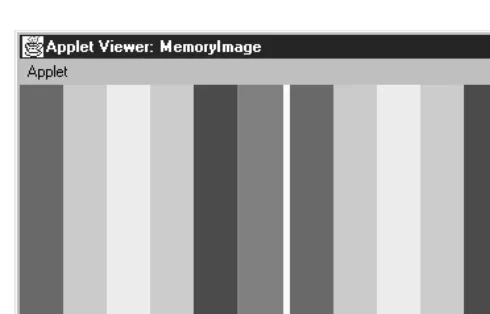
converting it to an image with MemoryImageSource. The following MemoryImage
applet generates two identical images that display a series of color bars from left to right. Although the images look the same, they were generated differently: the
image on the left uses the defaultDirectColorModel; the image on the right uses
anIndexColorModel.
Because the image on the left uses aDirectColorModel, it stores the actual color
value of each pixel in an array of integers (rgbPixels[]). The image on the right
can use a byte array (indPixels[]) because the IndexColorModelputs the color
information in its color map instead of the pixel array; elements of the pixel array need to be large enough only to address the entries in this map. Images that are
based onIndexColorModelare generally more efficient in their use of space
(inte-ger vs. byte arrays, althoughIndexColorModelrequires small support arrays) and
The output from this example is shown in Figure 12-2. The source is shown in Example 12-2.
Figure 12–2: Memor yImage applet output
Example 12–2: Memor yImage Test Program
import java.applet.*; import java.awt.*; import java.awt.image.*;
public class MemoryImage extends Applet { Image i, j;
int width = 200; int height = 200; public void init () {
int rgbPixels[] = new int [width*height]; byte indPixels[] = new byte [width*height]; int index = 0;
Color colorArray[] = {Color.red, Color.orange, Color.yellow, Color.green, Color.blue, Color.magenta};
int rangeSize = width / colorArray.length; int colorRGB;
byte colorIndex;
byte reds[] = new byte[colorArray.length]; byte greens[] = new byte[colorArray.length]; byte blues[] = new byte[colorArray.length]; for (int i=0;i<colorArray.length;i++) {
reds[i] = (byte)colorArray[i].getRed(); greens[i] = (byte)colorArray[i].getGreen(); blues[i] = (byte)colorArray[i].getBlue(); }
for (int y=0;y<height;y++) { for (int x=0;x<width;x++) {
if (x < rangeSize) {
Example 12–2: Memor yImage Test Program (continued)
colorRGB = Color.orange.getRGB(); colorIndex = 1;
} else if (x < (rangeSize*3)) { colorRGB = Color.yellow.getRGB(); colorIndex = 2;
} else if (x < (rangeSize*4)) { colorRGB = Color.green.getRGB(); colorIndex = 3;
} else if (x < (rangeSize*5)) { colorRGB = Color.blue.getRGB(); colorIndex = 4;
} else {
colorRGB = Color.magenta.getRGB(); colorIndex = 5;
}
rgbPixels[index] = colorRGB; indPixels[index] = colorIndex; index++;
} }
i = createImage (new MemoryImageSource (width, height, rgbPixels, 0, width));
j = createImage (new MemoryImageSource (width, height,
new IndexColorModel (8, colorArray.length, reds, greens, blues), indPixels, 0, width));
}
public void paint (Graphics g) { g.drawImage (i, 0, 0, this); g.drawImage (j, width+5, 0, this); }
}
Almost all of the work is done ininit()(which, in a real applet, isn’t a terribly
good idea; ideally init() should be lightweight). Previously, we explained the
color model’s use for the images on the left and the right. Toward the end of
init(), we create the imagesiandjby callingcreateImage()with a
MemoryIm-ageSourceas the image producer. For imagei, we used the simplest
MemoryImage-Sourceconstructor, which uses the default RGB color model. Forj, we called the
IndexColorModelconstructor within theMemoryImageSourceconstructor, to create a color map that has only six entries: one for each of the colors we use.
Using MemoryImageSource for animation
As we’ve seen, Java 1.1 gives you the ability to create an animation using a
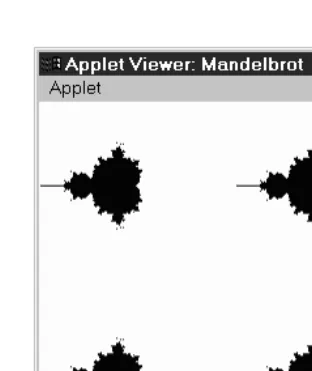
over writing the original image. The applet in Example 12-3 demonstrates Memory-ImageSource’s animation capability by creating a Mandelbrot image in memory, updating the image as new points are added. Figure 12-3 shows the results, using four consumers to display the image four times.
Example 12–3: Mandelbrot Program
// Java 1.1 only import java.awt.*; import java.awt.image.*; import java.applet.*;
public class Mandelbrot extends Applet implements Runnable { Thread animator;
Image im1, im2, im3, im4; public void start() {
animator = new Thread(this); animator.start();
}
public synchronized void stop() { animator = null;
}
public void paint(Graphics g) { if (im1 != null)
g.drawImage(im1, 0, 0, null); if (im2 != null)
g.drawImage(im2, 0, getSize().height / 2, null); if (im3 != null)
g.drawImage(im3, getSize().width / 2, 0, null); if (im4 != null)
g.drawImage(im4, getSize().width / 2, getSize().height / 2, null); }
public void update (Graphics g) { paint (g);
}
public synchronized void run() {
Thread.currentThread().setPriority(Thread.MIN_PRIORITY); int width = getSize().width / 2;
int height = getSize().height / 2; byte[] pixels = new byte[width * height]; int index = 0;
int iteration=0;
double a, b, p, q, psq, qsq, pnew, qnew;
byte[] colorMap = {(byte)255, (byte)255, (byte)255, // white (byte)0, (byte)0, (byte)0}; // black MemoryImageSource mis = new MemoryImageSource(
width, height,
new IndexColorModel (8, 2, colorMap, 0, false, -1), pixels, 0, width);
Example 12–3: Mandelbrot Program (continued)
im4 = createImage(mis); // Generate Mandelbrot final int ITERATIONS = 16; for (int y=0; y<height; y++) {
b = ((double)(y-64))/32; for (int x=0; x<width; x++) {
a = ((double)(x-64))/32; p=q=0;
iteration = 0;
while (iteration < ITERATIONS) { psq = p*p;
qsq = q*q;
if ((psq + qsq) >= 4.0) break;
pnew = psq - qsq + a; qnew = 2*p*q+b; p = pnew; q = qnew; iteration++; }
if (iteration == ITERATIONS) { pixels[index] = 1;
mis.newPixels(x, y, 1, 1); repaint();
} index++; }
} } }
Most of the applet in Example 12-3 should be self-explanatory. Theinit()method
starts the thread in which we do our computation.paint()just displays the four
images we create. All the work, including the computation, is done in the thread’s
run() method. run()starts by setting up a color map, creating a
MemoryImage-Sourcewith animation enabled and creating four images using that source as the producer. It then does the computation, which I won’t explain; for our purposes, the interesting part is what happens when we’ve computed a pixel. We set the
appropriate byte in our data array,pixels[], and then callnewPixels(), giving the
Figure 12–3: Mandelbrot output
12.4 ImageConsumer
TheImageConsumerinter face specifies the methods that must be implemented to
receive data from anImageProducer. For the most part, that is the only context in
which you need to know about theImageConsumerinter face. If you write an image
producer, it will be handed a number of obscure objects, about which you know
nothing except that they implement ImageConsumer, and that you can therefore
call the methods discussed in this section to deliver your data. The chances that you will ever implement an image consumer are rather remote, unless you are porting Java to a new environment. It is more likely that you will want to subclass
ImageFilter, in which case you may need to implement some of these methods. But most of the time, you will just need to know how to hand your data off to the next element in the chain.
Thejava.awt.imagepackage includes two classes that implementImageConsumer: PixelGrabber and ImageFilter(and its subclasses). These classes are unique in
that they don’t display anything on the screen.PixelGrabbertakes the image data
and stores it in a pixel array; you can use this array to save the image in a file,
gen-erate a new image, etc.ImageFilter, which is used in conjunction with
Filtered-ImageSource, modifies the image data; the FilteredImageSource sends the modified image to another consumer, which can further modify or display the new
image. When you draw an image on the screen, the JDK’sImageRepresentation
class is probably doing the real work. This class is part of thesun.awt.image
pack-age. You really don’t need to know anything about it, although you may see
12.4.1 ImageConsumer Interface
Constants
There are two sets of constants forImageConsumer. One set represents those that
can be used for the imageComplete() method. The other is used with the
setHints()method. See the descriptions of those methods on how to use them.
The first set of flags is for theimageComplete()method:
public static final int IMAGEABORTED
The IMAGEABORTEDflag signifies that the image creation process was aborted and the image is not complete. In the image production process, an abort could mean multiple things. It is possible that retrying the production would succeed.
public static final int IMAGEERROR
TheIMAGEERRORflag signifies that an error was encountered during the image creation process and the image is not complete. In the image production pro-cess, an error could mean multiple things. More than likely, the image file or pixel data is invalid, and retrying won’t succeed.
public static final int SINGLEFRAMEDONE
TheSINGLEFRAMEDONEflag signifies that a frame other than the last has com-pleted loading. There are additional frames to display, but a new frame is avail-able and is complete. For an example of this flag in use, see the dynamic
ImageFilterexample in Example 12-8.
public static final int STATICIMAGEDONE
TheSTATICIMAGEDONEflag signifies that the image has completed loading. If this is a multiframe image, all frames have been generated. For an example of
this flag in use, see the dynamicImageFilterexample in Example 12-8.
The following set of flags can be ORed together to form the single parameter to thesetHints()method. Certain flags do not make sense set together, but it is the
responsibility of the concreteImageConsumerto enforce this.
public static final int COMPLETESCANLINES
TheCOMPLETESCANLINESflag signifies that each call tosetPixels()will deliver at least one complete scan line of pixels to this consumer.
public static final int RANDOMPIXELORDER
TheRANDOMPIXELORDERflag tells the consumer that pixels are not provided in any particular order. Therefore, the consumer cannot perform optimization
that depends on pixel delivery order. In the absence of both
COMPLETESCAN-LINES and RANDOMPIXELORDER, the ImageConsumer should assume pixels will
public static final int SINGLEFRAME
TheSINGLEFRAMEflag tells the consumer that this image contains a single non-changing frame. This is the case with most image formats. An example of an image that does not contain a single frame is the multiframe GIF89a image.
public static final int SINGLEPASS
The SINGLEPASS flag tells the consumer to expect each pixel once and only once. Certain image formats, like progressive JPEG images, deliver a single image several times, with each pass yielding a sharper image.
public static final int TOPDOWNLEFTRIGHT
The finalsetHints()flag,TOPDOWNLEFTRIGHT, tells the consumer to expect the
pixels in a top-down, left-right order. This flag will almost always be set.
Methods
The interface methods are presented in the order in which they are normally
called by anImageProducer.
void setDimensions (int width, int height)
The setDimensions() method should be called once the ImageProducer
knows thewidthandheightof the image. This is the actualwidthandheight,
not necessarily the scaled size. It is the consumer’s responsibility to do the scal-ing and resizscal-ing.
void setProperties (Hashtable properties)
ThesetProperties()method should only be called by theImageProducerif the image has any properties that should be stored for later retrieval with the
getProperty()method ofImage. Ever y image format has its own property set.
One property that tends to be common is the “comment” property.
proper-tiesrepresents theHashtableof properties for the image; the name of each
property is used as theHashtablekey.
void setColorModel (ColorModel model)
ThesetColorModel()method gives theImageProducerthe opportunity to tell theImageConsumerthat theColorModel modelwill be used for the majority of
pixels in the image. TheImageConsumermay use this information for
optimiza-tion. However, each call tosetPixels() contains its ownColorModel, which
isn’t necessarily the same as the color model given here. In other words,
void setHints (int hints)
AnImageProducer should call the setHints()method prior to any setPix-els()calls. Thehintsare formed by ORing the constantsCOMPLETESCANLINES,
RANDOMPIXELORDER, SINGLEFRAME, SINGLEPASS, and TOPDOWNLEFTRIGHT. These hints give the image consumer information about the order in which the
pro-ducer will deliver pixels. When theImageConsumer is receiving pixels, it can
take advantage of these hints for optimization.
void setPixels (int x, int y, int width, int height, ColorModel model, byte pixels[], int offset, int scansize)
An ImageProducer calls thesetPixels()method to deliver the image pixel
data to theImageConsumer. The bytes are delivered a rectangle at a time. (x,
y) represents the top left corner of the rectangle; its dimensions are width
height.modelis the ColorModelused for this set of pixels; different calls to
setPixels()may use different color models. The pixels themselves are taken
from the byte arraypixels.offsetis the first element of the pixel array that
will be used.scansizeis the length of the scan lines in the array. In most cases,
you want the consumer to render all the pixels on the scan line; in this case,
scansizewill equalwidth. However, there are cases in which you want the con-sumer to ignore part of the scan line; you may be clipping an image, and the ends of the scan line fall outside the clipping region. In this case, rather than
copying the pixels you want into a new array, you can specify awidththat is
smaller thanscansize.
That’s a lot of information, but it’s easy to summarize. A pixel located at point
(x1,y1) within the rectangle being delivered to the consumer is located at
position ((y1 - y) * scansize + (x1 - x) + offset) within the array
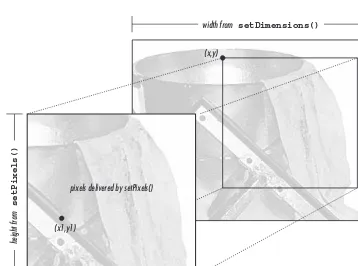
pix-els[]. Figure 12-4 shows how the pixels delivered bysetPixels()fit into the complete image; Figure 12-5 shows how pixels are stored within the array.
void setPixels (int x, int y, int width, int height, ColorModel model, int pixels[], int offset, int scansize)
The secondsetPixels()method is similar to the first.pixels[]is an array of
ints; this is necessary when you have more than eight bits of data per pixel.
void imageComplete (int status)
TheImageProducercallsimageComplete()to tell anImageConsumerthat it has transferred a complete image. The status argument is a flag that describes
exactly why theImageProducerhas finished. It may have one of the following
values:IMAGEABORTED(if the image production was aborted);IMAGEERROR(if an
error in producing the image occurred);SINGLEFRAMEDONE(if a single frame
of a multiframe image has been completed); orSTATICIMAGEDONE(if all pixels
have been delivered). WhenimageComplete()gets called, theImageConsumer
should call the image producer’sremoveConsumer()method, unless it wants to
(x,y)
height from
setDimensions()
width from setDimensions()
width from setPixels()
height from
setPixels()
(x1,y1)
[image:30.612.56.414.69.335.2]pixels delivered by setPixels()
Figure 12–4: Delivering pixels for an image
y1 = 0
offset width scansize - width width scansize - width
y1 = 1
unused data unused data
x1=0, x1=1, x1=2, … x1=0, x1=1, x1=2, … unused data
Figure 12–5: Storing pixels in an array
PPMImageDecoder
Now that we have discussed the ImageConsumer inter face, we’re finally ready to
give an example of a full-fledgedImageProducer. This producer uses the methods
of the ImageConsumer inter face to communicate with image consumers; image
consumers use the ImageProducerinter face to register themselves with this
pro-ducer.
Our image producer will interpret images in the PPM format.* PPM is a simple
image format developed by Jef Poskanzer as part of thepbmplusimage conversion
package. A PPM file starts with a header consisting of the image type, the image’s width and height in pixels, and the maximum value of any RGB component. The
[image:30.612.66.402.356.399.2]header is entirely in ASCII. The pixel data follows the header; it is either in binary (if the image type is P6) or ASCII (if the image type is P3). The pixel data is simply a series of bytes describing the color of each pixel, moving left to right and top to bottom. In binary format, each pixel is represented by three bytes: one for red, one for green, and one for blue. In ASCII format, each pixel is represented by three numeric values, separated by white space (space, tab, or newline). A com-ment may occur anywhere in the file, but it would be surprising to see one outside of the header. Comments start with # and continue to the end of the line. ASCII format files are obviously much larger than binary files. There is no compression on either file type.
The PPMImageDecodersource is listed in Example 12-4. The applet that uses this
class is shown in Example 12-5. You can reuse a lot of the code in the
PPMImageDe-coderwhen you implement your own image producers.
Example 12–4: PPMImageDecoder Source
import java.awt.*; import java.awt.image.*; import java.util.*; import java.io.*;
public class PPMImageDecoder implements ImageProducer {
/* Since done in-memory, only one consumer */ private ImageConsumer consumer;
boolean loadError = false; int width;
int height; int store[][];
Hashtable props = new Hashtable();
/* Format of Ppm file is single pass/frame, w/ complete scan lines in order */ private static int PpmHints = (ImageConsumer.TOPDOWNLEFTRIGHT |
ImageConsumer.COMPLETESCANLINES | ImageConsumer.SINGLEPASS | ImageConsumer.SINGLEFRAME);
The class starts by declaring class variables and constants. We will use the variable
PpmHints when we call setHints(). Here, we set this variable to a collection of “hint” constants that indicate we will produce pixel data in top-down, left-right order; we will always send complete scan lines; we will make only one pass over the pixel data (we will send each pixel once); and there is one frame per image (i.e., we aren’t producing a multiframe sequence).
The next chunk of code implements theImageProducerinter face; consumers use
/* There is only a single consumer. When it registers, produce image. */ /* On error, notify consumer. */
public synchronized void addConsumer (ImageConsumer ic) { consumer = ic;
try {
produce(); }catch (Exception e) {
if (consumer != null)
consumer.imageComplete (ImageConsumer.IMAGEERROR); }
consumer = null; }
/* If consumer passed to routine is single consumer, return true, else false. */
public synchronized boolean isConsumer (ImageConsumer ic) { return (ic == consumer);
}
/* Disables consumer if currently consuming. */
public synchronized void removeConsumer (ImageConsumer ic) { if (consumer == ic)
consumer = null; }
/* Production is done by adding consumer. */
public void startProduction (ImageConsumer ic) { addConsumer (ic);
}
public void requestTopDownLeftRightResend (ImageConsumer ic) { // Not needed. The data is always in this format. }
The previous group of methods implements the ImageProducer inter face. They
are quite simple, largely because of the way thisImageProducergenerates images.
It builds the image in memory before delivering it to the consumer; you must call thereadImage()method (discussed shortly) before you can create an image with this consumer. Because the image is in memory before any consumers can register
their interest, we can write an addConsumer()method that registers a consumer
and delivers all the data to that consumer before returning. Therefore, we don’t
need to manage a list of consumers in a Hashtable or some other collection
object. We can store the current consumer in an instance variableicand forget
about any others: only one consumer exists at a time. To make sure that only one
consumer exists at a time, we synchronize theaddConsumer(),isConsumer(), and
registering itself before the current consumer has finished. If you write an Image-Producerthat builds the image in memory before delivering it, you can probably use this code verbatim.
addConsumer()is little more than a call to the methodproduce(), which handles “consumer relations”: it delivers the pixels to the consumer using the methods in the ImageConsumer inter face. If produce() throws an exception, addConsumer()
calls imageComplete() with an IMAGEERROR status code. Here’s the code for the
produce()method:
/* Production Process:
Prerequisite: Image already read into store array. (readImage) props / width / height already set (readImage) Assumes RGB Color Model - would need to filter to change. Sends Ppm Image data to consumer.
Pixels sent one row at a time. */
private void produce () {
ColorModel cm = ColorModel.getRGBdefault(); if (consumer != null) {
if (loadError) {
consumer.imageComplete (ImageConsumer.IMAGEERROR); } else {
consumer.setDimensions (width, height); consumer.setProperties (props);
consumer.setColorModel (cm); consumer.setHints (PpmHints); for (int j=0;j<height;j++)
consumer.setPixels (0, j, width, 1, cm, store[j], 0, width); consumer.imageComplete (ImageConsumer.STATICIMAGEDONE);
} } }
produce() just calls the ImageConsumer methods in order: it sets the image’s
dimensions, hands off an emptyHashtableof properties, sets the color model (the
default RGB model) and the hints, and then callssetPixels()once for each row
of pixel data. The data is in the integer arraystore[][], which has already been
loaded by the readImage()method (defined in the following code). When the
data is delivered, the methodsetPixels()callsimageComplete()to indicate that
the image has been finished successfully.
/* Allows reading to be from internal byte array, in addition to disk/socket */
public void readImage (byte b[]) {
readImage (new ByteArrayInputStream (b)); }
/* closes inputstream when done */
public void readImage (InputStream is) { long tm = System.currentTimeMillis(); boolean raw=false;
DataInputStream dis = null; BufferedInputStream bis = null; try {
bis = new BufferedInputStream (is); dis = new DataInputStream (bis); String word;
word = readWord (dis); if ("P6".equals (word)) {
raw = true;
} else if ("P3".equals (word)) { raw = false;
} else {
throw (new AWTException ("Invalid Format " + word)); }
width = Integer.parseInt (readWord (dis)); height = Integer.parseInt (readWord (dis));
// Could put comments in props - makes readWord more complex int maxColors = Integer.parseInt (readWord (dis));
if ((maxColors < 0) || (maxColors > 255)) {
throw (new AWTException ("Invalid Colors " + maxColors)); }
store = new int[height][width];
if (raw) { // binary format (raw) pixel data byte row[] = new byte [width*3];
for (int i=0;i<height;i++){ dis.readFully (row);
for (int j=0,k=0;j<width;j++,k+=3) { int red = row[k];
int green = row[k+1]; int blue = row[k+2]; if (red < 0)
red +=256; if (green < 0)
green +=256; if (blue < 0)
blue +=256;
store[i][j] = (0xff<< 24) | (red << 16) | (green << 8) | blue; }
}
} else { // ASCII pixel data for (int i=0;i<height;i++) {
for (int j=0;j<width;j++) {
int red = Integer.parseInt (readWord (dis)); int green = Integer.parseInt (readWord (dis)); int blue = Integer.parseInt (readWord (dis)); store[i][j] = (0xff<< 24) | (red << 16) |