
eScience Workflows 9 years Out: Converging on a Vision
Beth Plale, Geoffrey Fox, Stacy Kowalczyk, Kavitha Chandrasekar
Indiana University
November 19, 2011 1 Introduction
Workflow orchestration tools have gained deserved recognition for their contributing role to scientific discovery. For example, a Taverna workflow designed to identify biological pathways implicated in the resistance to Trypanosomiasis was repurposed to study another parasite, Trichuris muris, by a change of data sets only. However, adoption of workflow systems is mixed for a tool that has been studied and applied since 2003. Why is that? We know now that the science discovery process is more nuanced and not as highly repeatable as we thought. Even when two modelers are using the same weather forecast model, for instance, they use different physics (requiring recompilation). It is difficult to establish a core set of workflows that a critical mass of scientists will use. Too, workflow systems abstract a set of tasks into a graph that is most often viewed through a workflow composer graphical user interface (GUI) [11]. It can be difficult for a domain researcher viewing a workflow through a GUI, or in any form (such as XML), to discern what the workflow is actually doing even when the domain scientist is familiar with the subject of the workflow.1 Guo et al. [14] point out that workflows have high adoption costs; it requires a team of vested interests to bring about a success. For simple tasks, the overhead of workflow creation, execution, and management is simply too high. Finally, when one takes a previously manual sequence of actions and automates them, some control is lost to the scientist as not every parameter can be exposed through the workflow interface.
But we remain optimistic about workflows. A sizeable benefit of the workflow system is its
1
As observed when talking with a domain scientist about the poster “Model calibration in the hydrologists workbench” by JM Perraud et al. WIRADA Science Symposium, Aug 2011
ability to capture relevant metadata and provenance about the complex task being
orchestrated and do so concurrently with execution [17]. As the volume of data increases, and the scientific questions broaden to encompass more complex and interrelated physical systems, continuing to rely on manual markup of important metadata grows more futile. Further, as the sharing of data sets moves beyond an exchange between two peers to embrace sharing between generations of researchers, researchers will count on metadata and provenance to contain the information from which they establish both the usability of the data and their trust in it. Good metadata and
provenance are critical to scientific data preservation, accountability, and enable proper governance (legal challenges) [24].
Computational science reproducibility, a utopian goal today, advances one step closer to reality through workflows [15]. Reuse, however, is guaranteed for only as long as the system on which it runs is operational. If workflow use proliferates, driven by reproducibility, users will expect to use workflow snippets from multiple workflow systems, and it’s not unreasonable for them to expect the snippets to compose into a single workflow.
Workflows provide a clear return on investment for operational use by their ability to handle repeatable analysis. Their potential for a sizeable role in the scientific data repository is expanded in Section 3.
Section 4 we discuss the pros and cons of subworkflow interoperability, which is, simply, higher level workflow systems handing off workflow snippets to other workflow systems for execution. In Section 5 we discuss key features of workflow systems including a summary of
workflow standards. In Section 6 we give the results of two assessment studies we carried out on existing workflow systems. Section 7 focuses on observations about the Trident Scientific
Workflow Workbench in particular.
2 The Workflow Dissected
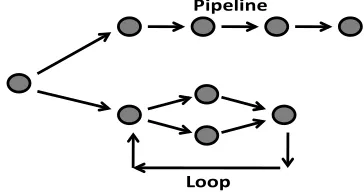
The e-Science workflow is often modeled as an activity graph where an activity is a single process block that can be linked to another process block if a control or data dependency exists between them, see Fig. 1. Activities in an activity graph are loosely coupled; with minimal communication existing between them. The granularity of
activities is most often coarse meaning the process block is generally larger than, say, a function. An example of an activity is an instance of a
hydrological forecast model. If the model runs in parallel, the activity graph might show this parallelism as multiple activities, one per instance or it might be modeled as a single activity that is deployed to an HPC system and runs as a large, tightly coupled parallel job. An activity might be as straightforward as a format conversion that converts a netCDF binary file to an HDF format. Or it could take complex model output from a 3-day weather forecast, extract precipitation readings, and write the readings out to a comma separated value (CSV) file [24].
Workflow systems often provide default activities that can be used as components of a workflow. These activities may be domain independent, such as third party data movement, or targeted towards a particular domain such as a BLAST gene sequence matching activity. Workflow systems can be categorized by their interaction with and
assumptions about back end compute resources. A system might be targeted to work with a back end Linux or Windows cluster, to run workflows on the user's workstation, or to submit jobs to a Grid, TeraGrid (Catlett 2002), or a cloud platform. As the size of the back end resource grows, the workflow system supporting it provides additional constructs for large-scale parallel execution of jobs.
Most workflows can be described by a graph that specifies the interaction between the multiple services or activities. The devil, however, is in the details. e-Science researchers who have workflow needs often have computational needs as well. The additional complexity brought about by the
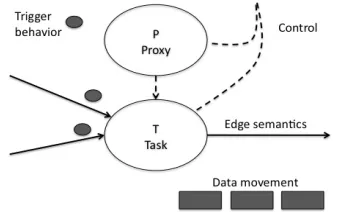
[image:2.612.342.524.207.303.2]computational needs surfaces a more nuanced version of node interaction shown in Figure 2.
Fig. 1. A workflow graph can include subgraphs, pipelines and loops
The nodes and edges themselves of a workflow can have different meanings as shown in Figure 2. A node could be a task, T, and this task has variation. Does the workflow orchestration engine expect that all tasks use a single programming language? Are there limits on the complexity of the
computation or on where it runs? A model found frequently in workflow systems that carry out execution on large-scale computational resources is the proxy model. The proxy, P, is an entity that mediates for a task or set of tasks. It enables legacy code to be used and provides a standard set of interfaces. A proxy can have its own
orchestration capability. Control flow captures how a node is invoked. Does P invoke T directly, as would be the case if P is a workflow engine? Or control may flow through P as would be the case if P were an interface layer that made it easier to bring legacy code, T, into a workflow.
The meaning of input and output edges can vary from system to system. Is the trigger behavior, which defines the conditions under which a node initiates execution, well defined as it is for pure dataflow computations [16] or less well so?
How well a workflow system can aid a user in assembling a workflow graph depends on the
Pipeline
semantics built into the system for understanding edge inputs and outputs. Is the edge input defined as any string, or is it known to be a parameter input file? Finally, often workflows in e-Science move serious volumes of data between nodes. How is this movement achieved? Is it an explicit part of the workflow, or carried out behind the scenes? The simplest choice is that each node reads from and writes to disk, allowing one to treat the execution of each node as an independent job invoked when all its needed input data are
available on disk. The cost of reading and writing is often quite acceptable and allows simpler fault tolerant implementations. One can use messaging systems to manage data transfer in a workflow and in extreme cases, simple models where all
communication is handled by a single central “control node”. Obviously this latter could lead to poor performance that does not properly scale as workflow size increases.
The interesting case is when a workflow has two proxy nodes, P1 and P2, where each represents a
workflow orchestration engine. P1 and P2 nodes
are triggered by a top-level workflow system, P0.
[image:3.612.313.554.269.652.2]How is data movement handled when multiple workflow systems are involved? The WS-VLAM system [30], for instance, uses a common event services bus. This proxy model can also be an agent framework [32]. We summarize the discussion of workflow system dimensions in Table 2.
Fig. 2. Dimensions of Variability in Workflow System Architecture
Workflow systems have four major components: workflow composition, workflow orchestration, task scheduling, and one or more application task interfaces. Workflow composition is the process by which a user chooses functions, describes inputs
and outputs, and determines dependencies to create the workflow. This process can be accomplished by a graphical user interface, a command line interface, a set of configuration files or any combination of these. Workflow orchestration is the process by which a workflow works– that is, how the processes are initiated and executed. Task scheduling is the process by which individual steps in a workflow are managed: determining the start time, marshaling the resources necessary, and coordinating multiple threads. An application task interface is the manner in which workflow systems communicate with applications: web services, plugins, and other domain specific executables.
Dimension Description Design space
Task Core logic executed as workflow node
Programming language or protocol
restrictions? Limits on computation?
Edge semantics
Level of required semantics of inputs and outputs to task
Limitations to types of edges? Role of semantics in
composing workflows.
Trigger behavior
Condition under which node is invoked
Common behavior is trigger when data object available on all input edges
Control Manner in which node is invoked. Involves entity that originates invocation.
Is task invoked by proxy, by workflow orchestration engine, or by another task?
Proxy Entity that mediates for task or set of tasks.
Enables legacy code to be used; has own orchestration capability; agent. Data
Movement
Manner in which data becomes available at task that needs input
Assumption of local file system? Data movement service? Embedded in invocation? Through message bus?
Table 1. Dimensions of variability in architecting a workflow system
[image:3.612.95.264.494.600.2]and “data” respectively. Obviously, the control communication would usually have small
messages and very different requirements from the data network. In this regard, one should mention the “proxy model” which is often used in Grid architectures and workflow [12]. The information flowing between proxy nodes is all essentially control information.
Some workflow systems are built around the dataflow concept, this being the original model [3, 27, 29] the interaction scripted in languages like JavaScript or PHP. Other workflow approaches extend the “remote method invocation” model coming from the distributed object paradigm. This model underlies the Common Component
Architecture2 (CCA) [13]. The Business Process Execution Language3 (BPEL), an OASIS4 standard executable language for specifying actions within business processes with web services, specifies the control and not data flow of a workflow. Of course, the control structure implies the dataflow structure for a given set of nodes; one simple but extremely important workflow structure is the pipeline. A more general workflow structure is that of the directed acyclic graph (or DAG) which is a collection of vertices and directed edges, each edge connecting one vertex to another, such that there are no cycles. That is there is no way to start at some vertex V and follow a sequence of edges that eventually loops back to that vertex V again. Dagman [8] used in Condor5 is a sophisticated DAG processing engine. This leads to a class of workflow systems like Pegasus6 aimed at scheduling the nodes of DAG based workflows. Karajan7 and Ant8 can also easily represent DAG’s.
Important workflow systems based on dataflow technologies are the Kepler9 [20, 21] and Triana10 [5, 28] projects; Kepler is still actively being developed. Pegasus is an active system
2
http://www.cca-forum.org/
3
www.oasis-open.org/committees/wsbpel/
4
http://www.oasis-open.org/
5
http://www.cs.wisc.edu/condor/
6
http://pegasus.isi.edu/
7
http://wiki.cogkit.org/index.php/Karajan
8
http://www.gridworkflow.org/snips/gridworkflow/spac e/GridAnt
9
http://kepler-project.org
10
http://www.trianacode.org/index.html
implementing the scheduling style of workflow. Taverna11 [23] from the myGrid project12 is very popular in the bioinformatics community and substantial effort has been put by the UK OMII effort13 into making the system robust. An innovative extension of this project is the
myExperiment scientific social networking site,14 which enables sharing of workflows. The WS-VLAM [30] system is a system of workflow systems, employing a common event service bus, the VL-e Workflow Bus that carries data and control flow to and from multiple remote workflow systems.
In spite of sophisticated specialized workflow systems, many workflows are custom-built with scripting and traditional languages and toolkits. These can be considered “mash ups” – informal and ad hoc software built from tools at hand. PHP must be the most popular environment building mash-ups but Python and JavaScript are also well used. It is highly likely that these mash-ups are the dominant workflow “systems” in use in research environments.
3 Case Study
Many workflow case studies exist to testify to the benefit gained through reapplication of a workflow to a slightly different domain to reveal interesting new science. We take a brief opportunity here to discuss one case that uses workflows in a less well explored application. One way to organize the scientific data output of a broad science discipline is as a federation of relatively independent
repositories. The topic of organizing scientific data is taking place, amongst other places, in the NSF EarthCube initiative. Through a model of independent repositories, the cost of maintenance of the federation can be amortized over multiple entities. A key player in the repository space is the institutional repository of the university.
University libraries possessing stronger
cyberinfrastructure are emerging with solutions to long-term data preservation. A university may choose to capture, catalogue and serve the
11
http://www.taverna.org.uk/
12
http://www.mygrid.org.uk/
13
http://www.omii.ac.uk/index.jhtml
.
14scientific data assets of their own researchers. Or it may emerge as stronghold for one or small number of domains nationwide.
Integrating data from multiple sources for research still remains a significant challenge. A discipline as broad as geosciences, which spans from climate to ocean, to earth surface, streams, environment and atmosphere is highly diverse, with numerous communities and subcommunities. A critical variable in any solution is that communities have their own vocabularies, whether encoded or simply verbal. They may have one or more community XML schemas, and some number of formats of data. Some of their data products are fully described (“curated”), however most are not. A repository must work within this diversity while still enabling various use modes on the data.
Data discovery has two partners: the repository that works to make its contents easily discoverable, and client side tools that are smart enough to know how to look for content.
The repository can be made customer friendly. Using an analogy of an ice cream shop in an ethnic neighborhood, the ice cream shop makes sure it speaks the multiple languages of the customer base, and expands its toppings to give the customer the options that they want. How does that translate? The spoken language of the ice cream shop
translates to a community’s vocabularies, schemas, and semantics in the repository. The data objects, the ice cream, is stored in the repository in a neutral object representation, and is then converted (sprinkled with toppings) before being returned to users. More formally, the OAIS model has a notion of the Dissemination Information Package (DIP) as the entity that is returned from the repository. Two ideas inherent in OAIS are relevant here. First, the DIP form is distinct from the internal form in which the data object is stored (i.e., the Archival Information Package (AIP)). The second point about the OAIS model is that the DIP will take many forms. For example, an image might be made available as a thumbnail, as a jpg, or as a png file.
Thus, a repository should offer a dissemination suite of tools for each community that has a need for its data. This suite is the set DIP for
community i as:
DIPi = {V/O, S, Wf}
where V/O is the vocabulary/ontology of the community i, S are its XML schemas, and Wf is a set of workflows embodying the transformations needed to translate the data to a form familiar to the community requesting the data. The benefit of such a model is the ability to add support for a new community, it becomes the simple act of including a new instance DIPj to the set of dissemination processes supported. This use of workflows, to encode community transformation processes, has the workflow be a portable, and encoded form of community norms. The model is discussed in more detail in Plale et al. [25], a whitepaper written as a contribution to EarthCube.
The recently funded NSF DataNet Sustainable Environments – Actionable Discovery15 (SEAD) project is targeting use of the university and academic research institutional repository as a long-term solution for scientific data. As an aside, it is working on reducing data curation costs by pushing automated metadata capture closer to the source of generation of the data. Plale is a co-PI on SEAD.
4 Sub-workflow Interoperability, Pros and Cons
Why would users want to compose workflow snippets taken from different workflow systems to form a single workflow? First, workflow systems have become specialized. A workflow system might be specialized to utilize a particular cloud platform, or provide special constructs for large-scale parallel execution of jobs. Second, since the likelihood of a workflow designed for one
workflow system running on another is low, researchers will use the functionality when and where it exists. In the end, as workflow adoption proliferates, users will seek to use each system for what it is best at, creating the scenario where a portion of a workflow is run on one system and another portion on another system. As with social media sites, working within a single framework can be limiting.
15
Interoperability between and across workflow systems, which is known as subworkflow interoperability, is possible. The WS-VLAM system is a case in point. WS-VLAM has a common event service bus, the VL-e Workflow Bus that carries data and control flow to and from multiple remote workflow systems. Such an approach seems highly desirable, but at what cost? We explore that question fully in Plale et al. [26] and summarize results here.
[image:6.612.329.500.341.481.2]Subworkflow interoperability takes several forms as illustrated in Fig. 3. System 1 is the top-level workflow system. Four our study, it sits on a user desktop. System 1 orchestrates activities A, B, E, and F. Activity B is called from System 1 by instructing System 2 to execute the activities. While B is seen as a single activity by System 1, it is actually a workflow system that executes the workflow C->D. Activity F is activated through an invocation of System 3 by System 1. System 3 is a proxy for an activity that runs remotely such as on grid middleware. Other forms of subworkflow interactivity exist, but this set of cases is rich enough to work with.
Fig. 3. Subworkflow interoperability shares workflows between systems.
A system that can utilize local machine resources for simple execution and remote resources for more complex tasks is simpler in the simple case. Workflow system to workflow system interaction is complex, and that programming complexity should not hurt the simple case, thus enforcing the adage that what a user doesn’t know should not hurt them. System 1 could be a user desktop workflow system like the Trident Scientific
Workflow Workbench used in our study. Trident is easy to use in the sense that it is integrated
with .NET and Workflow Foundation so writing a new activity is a straightforward coding effort.
4.1 Testing Subworkflows
Based on the model in Fig. 3, we construct a set of tests to assess the pros and cons of constructing a system that has a top-level workflow system calling out to lower level workflow systems and remote resources. This system of systems we assemble for testing has similarities to WS-VLAM except we did not integrate the event service bus that would provide a unified communication model. In our test system the top-level workflow
orchestration system is Trident. The remote workflow systems used are the Kepler workflow system and Apache ODE. Proxy execution (System 3) uses the GFac and Opal toolkits which proxy between a workflow environment and an arbitrary workflow graph node (such as legacy a Fortran code).
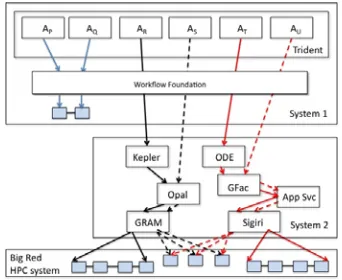
Fig. 4. Sub-workflow interoperability: local execution within System 1 is shown by activity AP and AQ invoking a local workflow. Activity AR communicates with the Kepler remote engine to run a sub-workflow on Big Red (solid black lines). Activity AS contacts grid services directly to invoke nodes individually (dotted black lines). Activity AT invokes the ODE workflow engine to run a sub-workflow on Big Red (solid red lines). Activity AU contacts grid services directly to invoke nodes individually (dotted red lines).
4.2 Architectural Organization
Our study decomposes Fig. 3 into four high level components described as follows and illustrated in Fig. 4:
[image:6.612.66.279.407.532.2]environment. Workflows are run locally. This shown as activities AP and AQ executing as part of a local workflow executed through Workflow Foundation.
• Remote workflow engine: AR and AT are the remote workflow engine case. AR invokes Kepler that contacts the Opal Toolkit to execute a sub-workflow on a supercomputer (called Big Red) through Globus GRAM. AT invokes the Apache ODE workflow engine that contacts GFac to execute a sub-workflow on Big Red using the Sigiri resource manager. • Remote grid/cloud middleware: AS and AU
illustrate activities which contact grid/cloud middleware directly. Activity AS contacts Opal. Since there is no orchestration at the remote system, the remote grid/cloud services are capable of executing only one task of a workflow. Shown in the black dotted lines is the Globus GRAM resource manager executing one of the three services of a sub-workflow similarly activity AU contacts GFac for execution of one of the three tasks pointed to by the dotted red lines.
• High performance computing resources: large scale supercomputers or cloud resources.
The workflows used in the study cover four cases over two workflow patterns as follows:
Data Intensive, Sequential Workflow: consists of 5 sequential MD5 tasks, each of which applies a data movement operation and a cryptographic hash function (i.e., MD5) on a 1.5 GB file.
Data Intensive, Parallel Workflow: consists of 5 parallel executed MD5 tasks, each of which is the same as in Data Intensive, Sequential Workflow.
Compute Intensive, Sequential Workflow: consists of 5 sequential Linpack tasks, each of which is configured to carry out execution on a 5000 x 5000 matrix, using double precision floating point coefficients. The inputs and outputs are small, on the order of 5KB.
Compute Intensive, Parallel Workflow: consists of 5 parallel Linpack tasks, each of which is configured the same as the Compute Intensive, Sequential Workflow.
We identified several metrics for key overheads. First is the time penalty of using a second workflow engine. This is measured as the time difference to invoke workflow instance i on local machine versus time to invoke workflow through a remote workflow engine. Second, remote services and remote workflow engines are both remote, so what is the cost of using a remote workflow engine specifically? Third, workflow systems show varying latencies for complex workflows. The third and final measure captures that variability.
4.3 Summary of Results
We experimentally evaluated two models of remote execution for a handful of scenarios to illuminate the latencies and variability inherent in different approaches. We capture an overall measurement of sub-workflow overhead by running a workflow directly within the Trident workstation and comparing that against the same workflow executed by a secondary workflow engine. In order to have a fairer comparison, we ignore waiting time in the job queue in the remote case. For the compute-intensive workflows, the remote ODE workflow engine version had only 2.4% higher execution time than local execution. The remote grid service version using Gfac/Sigiri, on the other hand, had 15.5% higher execution time than local machine execution. This difference is due to overhead in invoking GFac, the service factory, which uses a model of dynamic web service creation. Kepler sub-workflow and
Opal/GRAM grid services showed only 5% higher execution time than local machine execution. Hence, the difference in overhead can be attributed to the difference in architectural decisions in support of dynamic capabilities.
In the remote task approach, Trident has more activities to manage and track, whereas for the remote engine approach, the number of nodes in the Trident workflow is minimal. In sequential workflows, the remote workflow engine only adds 10% overhead to the overhead introduced by Trident. In the case of running parallel remote services in Trident, there is no concurrent execution, so the performance in Trident is up to 5 times worse than using sub-workflow engines which handle parallel execution.
same amount of time. Due largely to Sigiri, the ODE stack keeps the submission overhead within a small range. Kepler uses Globus GRAM as its job submission middleware and GRAM takes a varying amount of time to get the job scheduled and executed in the compute resource. The variability of Kelper/Opal Stack is 14 times worse than ODE/Sigiri stack. During this experiment we also experienced job failures caused by different GRAM failures and had to re-run our experiments on multiple occasions.
There are softer aspects about which comparison can be made including locus of control,
extensibility and architectural complexity.
Locus of Control. Remote grid/cloud services are capable of scheduling individual activities, since there is no orchestration at the remote system. In the case where the subworkflow system is invoked, the black-box nature of the subworkflow model relieves Trident of complex control because it hands that off to sub-workflow. The more minimal the control of Trident, the less the user has to understand the workflow.
Extensibility. Workflow engines are often bound to certain services to carry out tasks used during workflow execution which limits the functionality of the workflow engine. The ODE workflow engine, particularly through its instantiation in the OGCE tool suite is limited by its ability to add new workflow activities. New must be exposed as a Web service. Kepler and Trident workflow engines on the other hand are targeted to desktop
executions and thus allow new functionality to be more easily incorporated into the system. With the actor model in Kepler and activity model in Trident, a user can program any functionality into the workflow, enabling a wide variety of
functionality to be supported in the workflow. In experience gained in the research lab and in the classroom, Trident is easy to use in the sense that it is integrated with .NET and Workflow Foundation so writing a new activity is a straightforward coding effort.
Architectural complexity. Architectural complexity captures the number of components, fragility of interfaces, etc. of a system.
Architectural complexity is directly proportional to the availability and reliability of the system. The higher the complexity, the lower a system’s
availability unless significant and costly measures are put in place for fault monitoring, replication, and recovery. The remote task approach (over remote engine approach) gives the user more control over the execution of the experiment. But with this control comes maintenance overhead and complexity, because the user has to manage all the components and their interactions. From our experience with the LEAD Science Gateway (2003-2010), grid middleware adds complexity to the architecture. When Trident is expected to interact directly with Sigiri and Opal, the workflow author will have to handle the complexities for each activity, including authentication mechanisms, fault tolerance and checkpointing. In the sub-workflow sub-workflow engine approach, the user must provide perfect configuration parameters for the next workflow engine to function properly.
Grid middleware is responsible for a significant amount of overhead in a scientific workflow stack scheduling jobs into supercomputing resources. The job failures and the higher variation of overheads we experienced during our evaluation suggests that the instability and unpredictable behavior of grid middleware components have high impact on the scientific workflow systems that are using them. However efficient and optimized these workflow stacks are, the issues in middleware can make these workflow suites uncertain, if not unusable.
Similar to other workflow systems, Trident facilitates workflow runs in Windows based environments. But we think more improvements are necessary to make this toolkit more useable among the scientific research community. For example, Trident lacks the support for parallel execution constructs within it. Even though activities are picked up and scheduled in parallel, for a parallel workflow, they are executed sequentially.
through redundancy and resiliency measures, but often the latter are out of reach for open source research tools because of their substantially higher development and long term maintenance costs.
5 Workflow System Features
Most sophisticated workflow systems support hierarchical specifications; that is the nodes of a workflow can be either services or collections of services facilitating interoperability as well as reusability of sub-workflows [12]. Other key aspects of workflow are security [4] and fault-tolerance[7]. In the previous discussion, the four major components of workflow systems were described: workflow composition, workflow orchestration, task scheduling, and one or more application task interfaces (see Figure 2). Within each of these major functions, we further
demarcate the different workflow system functionalities:
Integral domain independent workflow tasks, nodes, or activities. What functions are built in to facilitate workflow creation? How can these functions be compounded to build complex activities?
Data movement/access between workflow nodes. Can the workflow tasks access files easily? What in memory functions are available? (For example in-memory streaming through distributed brokers, centralized allocation server, or other technologies.)
Provenance and metadata collection. What data is automatically collected to provide information on the execution, the purpose, and the results of the workflow? Fault tolerance. How well do these
systems recover from error? Within a workflow? Within a task or activity? From system errors? From application errors?
Parallel execution of workflows. To what extent can workflows be run in parallel? Sharing workflows. How can researchers share components of workflows, complete workflows, and the output data from workflows?
5.1 Current Workflow Systems
We identified the top workflow systems most used in research and business environments based on a literature review. These workflow systems focus on different segments of the market which in turn drives the functionalities implemented and the technologies used. Below is a brief overview of the 10 major workflow systems.
Kepler is adata-flow oriented workflow system with an actor/director model that is used in ecology and geology domains.
Taverna is primarily focused on supporting the Life Sciences community (biology, chemistry and medical imaging) and uses a data-flow oriented model.
Swift is data-flow oriented workflow that uses a scripting language called Swiftscript, to run the processes in the workflow.
Ode is not a full system, but a workflow engine that needs to be supported by other tools and components to design and execute workflows. It can be used with front end tools such as XBaya described below.
VisTrails is a scientific workflow and
provenance management system that provides support for data exploration and visualization.
Trident is a workflow workbench developed by Microsoft Research and relatively newer among the other workflow systems. It is based on the Windows Workflow Foundation (WF).
IBM smash makes use of enhanced BPEL Web 2.0 workflow environment for building and running dynamic Web 2.0-based applications using SOA principle.
Lims has elements of a workflow system, but is primarily designed as a laboratory information system to analyze experimental data using “G”, a data-flow oriented language.
Pipeline pilot has an integrated set of applications which model and simulate informatics and scientific businesses
intelligence needs of research and development organizations.
Triana is a graphical workflow and data
analysis tools for domains including signal, text, and image processing. It includes a library of tools and users can integrate their own tools, Web, and Grid Services. Triana is a Java application and will run on almost any computer. It hides the complexity of
programming languages, compilers, debuggers, and error codes.
XBaya is a graphic workflow front end for backend engines such as ODE and
ActiveBPEL. It can be used as a standalone application or as a Java Web Start application.
5.2 Workflow Standards
The period 2000-2005 produced a number of workflow standards that were viewed as essential to enable the Web Service dream of
interoperability by complete specification of service features. Recently there has been a realization that this goal produced heavyweight architectures where the tooling could not keep up with support of the many standards. Today we see greater emphasis on light weight systems where interoperability is achieved by ad hoc
transformations where necessary. A significant problem of the standardization work was that it largely preceded the deployment of systems; the premature standardization often missed key points. This background explains the many unfinished standards activities in Table 1. The successful activities have a Business process flavor; for scientific workflows, the most relevant standard is BPEL,16 [6, 19] which was based on earlier proposals WSFL and XLANG.
XML is not well suited to specifying programming constructs. Although XML can express data
16
OASIS Web Services Business Process Execution Language Version 2.0 BPEL available from:
http://docs.oasis-open.org/wsbpel/2.0/OS/wsbpel-v2.0-OS.html and ActiveBPEL Open Source workflow engine available from: http://www.activebpel.org/
structures well, it is possible, but not natural, to express loops and conditionals that are essential to any language and the control of a workflow. It may turn out that expressing workflow in a modern scripting language is preferable to XML based standards. However, exporting data or workflows as part of ad hoc transformations for
[image:10.612.313.552.215.718.2]interoperability might be an appropriate use of XML in workflow systems [12].
Table 2. Workflow Related Standards [12]
Standard Link Status
BPEL Business Process Execution Language for Web Services (OASIS) V2.0
http://docs.oasis-open.org/wsbpel/2.0 /wsbpel-v2.0.html; http://en.wikipedia.o rg/wiki/BPEL
April 2007
WS-CDL Web
Service Choreography Description Language (W3C)
http://www.w3.org/ TR/ws-cdl-10/
Nov 2005 Not final
WSCI Web Service Choreography Interface V1.0 (W3C)
http://www.w3.org/ TR/wsci/
Aug 2002 Note only
WSCL Web Services Conversation
Language (W3C)
http://www.w3.org/ TR/wscl10/
Mar 2002 Note only
WSFL Web Services Flow Language
http://www.ibm.co m/developerworks/ webservices/library/ ws-wsfl2/
Replaced by BPEL
XLANG Web
Services for Business Process Design (Microsoft)
http://xml.coverpag es.org/XLANG-C-200106.html
Jun 2001 Replaced by BPEL
WS-CAF Web
Services Composite Application
Framework including
WS-CTX, WS-CF
and WS-TXM
http://en.wikipedia.o rg/wiki/WS-CAF
Unfinish ed
WS-CTX Web
Services Context (OASIS Web Services Composite Application Framework TC)
http://docs.oasis- open.org/ws-caf/ws-context/v1.0/OS/ws ctx.html
Apr 2007
Web Services Coordination (BEA, IBM, Microsoft at OASIS)
open.org/ws-tx/wscoor/2006/06
WS-AtomicTransaction
Web Services Atomic Transaction (BEA, IBM, Microsoft at OASIS)
http://docs.oasis- open.org/ws-tx/wsat/2006/06
Feb 2009
WS-BusinessActivity
Web Services Business Activity Framework (BEA, IBM, Microsoft at OASIS)
http://docs.oasis- open.org/ws-tx/wsba/2006/06
Feb 2009
BPMN Business Process Modeling Notation (Object Management Group OMG)
http://en.wikipedia.o rg/wiki/BPMN; http://www.bpmn.or g/
Active
BPSS Business Process Specification Schema (OASIS)
http://www.ebxml.o rg/;
http://www.ebxml.o rg/specs/ebBPSS.pd f
May 2001
BTP Business Transaction Protocol (OASIS)
http://www.oasis-open.org/committee s/download.php/124 49/business_transact ion-btp-1.1-spec-cd-01.doc
Unfinish ed
6 Studies
To evaluate the existing field of workflow systems, we undertook two studies. In the fall of 2010, we carried out a heuristic evaluation of six workflow systems; and in spring 2011, we completed a hands-on usability study of four workflow systems. Both are summarized below.
6.1 Heuristic Evaluation
In the heuristic evaluation, six workflow systems were reviewed to determine the functional and technical capabilities. The systems reviewed were Trident, Swift, VisTrails, Kepler, Taverna, and Ode. This study evaluated each system based on the functions described above: specialized activities, the underlying back end engine, data
movement functions, the ability to interface to application code, the ability to share workflows, fault tolerance, and provenance and metadata collection. A summary of the evaluation follows.
Specialized Activities. Trident and Taverna provided many standards based interfaces. Trident allows for a standard scientific semantic and syntactic data format (NetCDF). Kepler is specifically tuned tows scientific workflows with internal functions for grid access, mathematical and statistical interfaces (such as R and Matlab), and support for multiple programming languages.
Underlying Back-end Engine. Each of the workflow systems in this study has their own engine. Trident uses Workflow Foundation. VisTrails has a cache manager model. Kepler uses the Ptolemy engine. Ode has a JDBC data store with a data access layer and the BPEL engine.
Data Movement. Trident has limited set of libraries for data movement out of the box. However it is flexible with the .Net framework to use memory, files, or databases for data
movements. Swift has a set of libraries for data movement including functions that map data and provide a number of grid functions including gridFTP. Kepler provides access to data within scientific domain specific repositories and has component libraries to read, write, and manipulate domain specific standard data formats.
Application Code Interface. Trident uses web services to interface to application code and can execute any function using the .Net framework. Swift has a propriety scripting language as well as a Java API to interact with grid services. VisTrails supports web services and python scripts. Kepler and ODE have APIs. Taverna has remote
execution services that allow it to be invoked from other applications.
Workflow Sharing. Ode and Swift did not provide functions that allow for easy workflow sharing, while Trident, Taverna, VisTrails, and Kepler did. Kepler provided a robust tagging and retrieval function for its sharing environment. VisTrails allows for versioning of workflows. In addition, Trident, Kepler, and Taverna can share workflows via the myExperiement website.
Swift supports internal exception handling and resubmission of jobs. Kepler supports dynamic substitution at the task level, rescue at the
workflow level and restart of the failed component. Taverna supports task level restart with dynamic substitution. Ode has a “failure policy” that can support activity retry, fault or cancel.
Provenance and Metadata Collection. Trident uses semantic tagging for provenance data. Swift, VisTrails, and Kepler have separate components for tracking provenance data. Taverna supports a sophisticated multi-level provenance data
collection, storage, and tracking mechanism. Ode stores provenance data within its internal data storage scheme of Data Access Objects.
6.1.1 Discussion
All of these workflow systems have infrastructures that provide libraries and functions for data transfer management, job submission, and execution management. Several of the systems repurpose engines such as the Workflow
Foundation or Ptolemy. While each may be tuned to a specific function set or market segment, all could be implemented and used by a wide range of users.
The major differentiators in the workflow systems studied are provenance collection and fault tolerance. Although provenance capture is
supported by most of the systems, the level of data collected, the data format and manner of storage, and the retrieval and display of the data varies widely. It is the post-process use of provenance that is both intriguing and underutilized. How can this provenance data be used to recreate
experiments or workflows? How could this data be used to determine which data should be
contributed to national reference databases (such as Protein Data Bank or the DataConservancy). Fault tolerance is a second differentiator. Providing a robust set of tools, functions, and options for recovering from failure, at the task or workflow level, is a significant user function that needs to be incorporated into all workflow systems. This set of services needs to be visible to the user and simple to configure and execute as well as be able to provide clear, consistent and usable feedback for correction of user contributed code, configuration errors, workflow errors, data errors, and operating system issues.
6.2 Usability study
The second study we carried out is a hands-on usability study. Three Computer Science Masters students in the Data to Insight Center of Indiana University installed, configured, and used four workflow systems and evaluated their experiences using Trident, IBM Smash, Taverna, and Triana. This graduate class project of Spring 2011 was carried on to completion through summer 2011 by a Master’s student. The primary evaluation criteria for this study were the ease of installation, the ease of creating and running a simple workflow, the ability to integrate a well-known external
application into a workflow, and overall usability including support options. A summary of the results of their evaluation follows.
Ease of setup - is defined as the total time to download all of the required software, install all of the components, run the setup and configuration process.
Trident. The Trident application itself was easy to download. But additional Microsoft packages were required. The other packages were in numerous locations and took
significant time to find. Installing the Trident application was simple and took less than 2 min; but the other packages required more effort to install and configure. We discovered that the Trident documentation was out of date and the version of SQL Server that was downloaded was incorrect. We had to download the new version of SQL Server, reinstall SQL Server, reconfigure SQL Server, and reinstall Trident. The total process took over 4 hours.
IBM Smash. The download and installation took less than 1 min to download and less than 2 min to install. However, since it only operates in a 32-bit environment, we had to install a Virtual-PC with a 32-bit OS. Taverna. Taverna was simple to download and install. The entire operation took less than 4 min.
Get simple workflow working. For this study, we designed a simple conditional workflow to add two integers. After implementing this workflow in each system, we evaluated the amount of effort to develop the code, the ability to collect provenance and metadata, and built-in fault tolerance
Trident. The sample workflow process required 40 lines of code in C#.NET and took approximately 30 min to write. To create and execute the workflow activity took less than 30 sec. The internal built-in functions were geared towards oceanographic work. Trident has an extensive and structured provenance data for the workflows and the data and manages versions to allow for tracking data changes. Trident has significant internal fault tolerance supporting failure tracking, new resource allocation, and workflow restart. IBM Smash. The sample workflow took approximately 6 lines of code to implement in Smash. The workflow required additional 10 lines of code. The documentation describing the input processing was incomplete and made this task more difficult. Smash had a number of built-in functions but most of them are orientated towards business applications rather than scientific functions. Smash does not support provenance data although it does have an extensive error logging process. It does have support workflow restarts and has low fault tolerance.
Taverna. To create the workflow required 20 lines of code and took approximately 15 min. Taverna has a wide selection of built-in functions as well as user-authored functions. Provenance management provides information on all data transforms as well as on the entire workflow process. Taverna has extensive fault tolerance and workflow restart.
Triana. To build a sample workflow required using the internal functions that are combined in a drag and drop environment. Triana has a wide range of built-in functions and provides users with the ability to input new toolboxes of functions. Provenance is collected at the organizational level and has no capability to collect provenance at the data level. Triana
has no support for workflow restart and has no fault tolerance.
Write workflow that calls out to web service. A simple workflow is written that calls out to BLAST – The Basic Local Alignment Search Tool – a biological sequence application supported by the National Institutes of Health and the National Center for Biotechnology Information (NCBI).17
Trident. To plug in another executable into Trident an argument written in C#.NET must be developed. This requires programming expertise.
IBM Smash. To integrate an external application in Smash requires a PHP or Groovy script or it can be executed from the command line.
Taverna. In Taverna, a beanshell script must be created to invoke an external application. Triana. Triana is designed to support plugin applications.
User experience - includes documentation, user support, and interface usability.
Trident. Trident has excellent documentation with many examples and code samples. The user support for Trident is a less active user forum. Trident has a very easy to use GUI, which is intuitive. But the .NET pre-requisite is a barrier.
IBM Smash. Smash has poor documentation and no viable web presence. Smash has both phone and email support as well as a moderated forum. Smash has an easy to use GUI as well as a command line interface.
Taverna. Taverna has excellent documentation with good examples and is integrated with the myExperiments portal. The user support via phone and email is prompt and accurate. The GUI for Taverna is complex and requires some effort to learn.
Triana. Triana has minimal documentation that hampers its usefulness. There is no discernable user support for Triana. Triana has a very easy to use interface that allows users to drag and
17
drop objects from the toolbox to create workflows.
Discussion. Scientific workflow systems are often used as a tool for domain scientists to “plug together” components for data acquisition, transformation, analysis and visualization to build complex data-analysis frameworks from existing building blocks, including algorithms available as locally installed software packages or globally accessible web services. Installing and configuring the systems behind the workflow nodes is not a trivial activity, however, and requires an
understanding of software components, database administration, scripting, and in some cases, programming with sophisticated languages. This is a significant barrier to adoption by many researchers, particularly those who not in computationally based sciences. Accessing the robust functionality of the systems often requires scripting or programming which poses barriers to researchers. As many domains embrace in silico research, the technical skills of researchers will increase and perhaps the barriers will not be as high. But in this transition phase, these tools may cost too much in terms of time and staff to implement.
7 Trident Scientific Workflow Workbench In this final section our analysis focuses on the Trident Scientific Workflow Workbench.
7.1 Trident in the Classroom
Integrating research into the classroom is an important component in disseminating new knowledge and engaging students. Spring 2011, Professor Plale offered a graduate level class in the School of Informatics and Computing at Indiana University titled CSCI B669, Scientific Data Management and Preservation. Readings were taken from “Scientific Data Management: Challenges, Technology, and Deployment” by A. Shoshani and D. Rotem Eds. CRC Press. 2010 and The Fourth Paradigm18. Trident was one of the
18
http://research.microsoft.com/en-us/collaboration/fourthparadigm/
platforms upon which students could base their final project.
Astrophysics PhD student taking the class, chose to develop a Trident workflow to simplify the process of calculating the magnitudes of telescopic
observations, specifically nightly extinction coefficients. The workflow applies the
transformation to the raw data to determine if the nightly data set is good. This process can be used in discovery process of new black holes and refining the understanding of the energy jets they radiate. The PhD student commented on the ease of use of Trident, despite his self-proclaimed weak computer science background. Despite the fact that the student had to learn basics of C#, he nonetheless had a workflow running in a short period of time (a couple weeks at the end of a semester). Trident will only produce one plot per workflow whereas the student needed to make several plots per workflow, each pot corresponding to a given star field. Our software engineer gave him code that allowed concurrent execution of threads from Trident, but he replied
“ I learned a lot as I worked on it, and I feel that the astronomy
community can benefit from using workflows. […] However, I haven't decided if I want to release my project to the general astronomy
community. Most astronomers use a Linux system or a Mac since IRAF, which is the bread & butter astronomy program, won't run on Windows and many astronomers are unaware of the likes of Cygwin. I get the feeling that my workflow would therefore be underutilized.”
7.2 Trident Usability and Community
In the spring of 2011, we carefully examined with public face of Trident – the CodePlex site. We reviewed the interaction with the research
community and determined that while the Trident Workflow System is an excellent product,
To facilitate communication, Trident should follow the lead of all of the other scientific workflow systems with which we are familiar and develop a community listserv. Email via listserv is the normal communication medium for academic scientific communities. While the
Trident/CodePlex systems allows for the
discussion to be read via email, it is not possible to contribute to the conversation without going to the Trident CodePlex site, signing in, going to the right tab, and then contributing. For most researchers, the number of steps and the time required will inhibit their contributions. Note that a LISTSERV list, trident-wf-l, was created Oct 2011. The email address for the list is [email protected]. It is moderated by Kavitha Chandrasekar.
Currently, it is difficult for knowledgeable people like our own developers to navigate the complex Microsoft/CodePlex organization, to get authorized ids, communicate the nature of the update (base code, not a sample). Compared to other open source sites, CodePlex is completely opaque. We acknowledge that controls need to be in place to monitor code contributions, but the current restrictions are too much. The barrier for non-Microsoft affiliated researchers to contribute code has been reduced with CodePlex, but it is still too high. Unlike contributing to the base source code, contributing samples should be simple and without overt approval. The community can police
samples by commenting, wiki text updates, and discussion. Currently, contributing samples has the same issues as contributing source code.
As described in the previous section, Trident requires that all executable code be in the .NET framework. While a powerful and highly useful technology, it can prove to be a barrier to use by non-programmers. It would be very useful to have a simpler way for researchers to develop code.
7.3 Short to Mid-Term Recommendations Currently, there are many approaches to workflow systems that are largely successful in prototype one-off situations. However experience has found that most are not really robust enough for
production use outside the development team. This observation motivated Microsoft to put their Trident workflow environment [2, 22] into open source for science. Trident is built on the
commercial quality Windows Workflow Foundation. Through the two studies already completed and our analysis of the wider scientific community, we have developed a list of
recommendation for Trident. While an excellent workflow system, we believe that with minimal effort, Trident can be improved to be useful to more researchers.
Better installation package that includes all required software components and the compatible versions of everything (such as versions of .Net between Visual Studio and Trident). The installation process should install and configure all software
components (SQL Server as an example) (see section 5.1.2 Summary item 1).
Several of the workflow systems have integrated scientific functions, most notably Kepler (see section 2.2.1 Specialized Activities). Trident could benefit by having more built-in functions for scientific data. Integrating the MBF would be an excellent first step.
The ability to use scripting languages as well as .NET would make Trident more
accessible to non-programming researchers. As described in section 5.1.2 Summary item 2, Trident required significantly more code to implement a simple function within a workflow than did other systems that supported scripting languages.
Improve the CodePlex site to better facilitate communication with the research community and to allow for easier code sharing as discussed in section 3.3.
Trident is an easy to use workflow system that has potential to significantly improve both the
productivity of researchers and the quality of research for research in social sciences,
8. Conclusion
Jim Gray's vision of the Laboratory Information Management System is one that seamlessly integrates scientific data management, data analysis, data visualization, new algorithms, and tools into an easy to use and useful “briefcase” for science. He saw the workflow as "a Beowulf-like package and some templates that would allow people who are doing wet-lab experiments to be able to just collect their data, put it into a database, and publish it.” This multistep pipeline differs in minor but important ways from the current scientific discovery workflow which we know to be an inherently difficult fit particularly for science domains that do not acknowledge a workflow in their discovery processes. LIMS is envisioned as a repeatable and reproducible multistep task with applicability to a broad audience. The vision Dr. Gray expresses is growing in relevance to
scientists however as funding agencies are pressing for archival and reuse of science and scholarly data. Funding agencies provide to scientists stronger motivation to adopt tools that help with metadata and provenance capture.
Finally, Jim Gray’s description of a LIMS bears similarity to another “briefcase”, the DIPi = {V/O,
S, Wf} where the workflow is a key component of data transformation and preservation. In both of these senses, the workflow is on a path to
convergence with the Gray vision in ways even Dr. Gray may not have envisioned.
Acknowledgements
We thank Bina Bhaskar for her committed effort and attention to a high quality workflow usability study. We thank Dr. Tony Hey for advancing the topic of studying the state of workflow systems, paying particular attention to the late Dr. Gray’s far reaching vision of the LIMS.
References
1. Altintas, I., C. Berkley, E. Jaeger, M. Jones, B. Ludascher, and S. Mock (2004). Kepler: An extensible system for design and execution of scientific workflows. Proceedings of 16th IEEE
Int’l Conference Scientific and Statistical Database Management, pp. 423-424.
2. Barga, R., J. Jackson, N. Araujo, D. Guo, N. Gautam, and Y. Simmhan (2008). The Trident scientific workflow workbench. IEEE Int’l Conference on eScience, 0:317-318.
3. Bhatia, D., V. Burzevski, M. Camuseva, G. Fox, W. Furmanski, and G. Premchandra (1997). WebFlow: A Visual Programming Paradigm for Web/Java Based Coarse Grain Distributed Computing.
Concurrency - Practice and Experience, 9(6): 555-577.
4. Chivers, H. and J. McDermid (2006). Refactoring service-based systems: how to avoid trusting a workflow service. Concurr. Comput. Pract. Exper.,
18(10): 1255-127 .
http://dx.doi.org/10.1002/cpe.v18:10
5. Churches, D., G. Gombas, A. Harrison, J. Maassen, C. Robinson, M. Shields, I. Taylor, and I. Wang (2006). Programming scientific and distributed workflow with Triana services. Concurr. Comput. Pract. Exper. , 2006. 18(10): p. 1021-1037. DOI:http://dx.doi.org/10.1002/cpe.v18:10 6. Curbera, F., R. Khalaf, W.A. Nagy, and S.
Weerawarana (2006). Implementing BPEL4WS: the architecture of a BPEL4WS implementation.
Concurr. Comput. : Pract. Exper., 18(10): 1219-1228.http://dx.doi.org/10.1002/cpe.v18:10 7. Deelman, E., D. Gannon, M. Shields, and I. Taylor
(2009). Workflows and e-Science: An overview of workflow system features and capabilities. Future Generation Computer Systems, 25(5): 528-540. DOI:http://dx.doi.org/10.1016/j.future.2008.06.012 8. Deelman, E., T. Kosar, C. Kesselman, and M. Livny
(2006). What makes workflows work in an opportunistic environment. Concurr. Comput. : Pract. Exper., 18(10).
DOI:http://dx.doi.org/10.1002/cpe.v18:10 9. De Rourea, D., C. Gobleb, R. Stevens (2009). The
Design and Realisation of the View the MathML Source Virtual Research Environment for Social Sharing of Workflows. Future Generation Computer Systems, 25(5): 561-567.
10. Elmroth, E., F. Hernandez, and J. Tordsson (2010). Three fundamental dimensions of scientific workflow interoperability: Model of computation, language, and execution environment. Future Generation Computer Systems, 26(2):245-256. 11. Fox, G.C. and D. Gannon (2006). Workflow in Grid
12. Fox, G.C. (2011). Service Oriented Architectures and Their Tools. In Distributed and Cloud Computing: Clusters, Grids, Clouds, and the Future Internet, Kai Hwang, Jack Dongarra & Geoffrey C. Fox (Editors). Morgan Kaufmann: Boston.
13. Gannon, D., S. Krishnan, L. Fang, G. Kandaswamy, Y. Simmhan, and A. Slominski (2005). On
Building Parallel & Grid Applications: Component Technology and Distributed Services. Cluster Computing, 8(4): 271-277.
DOI:http://dx.doi.org/10.1007/s10586-005-4094-2 14. Guo, D., L. Welicki, B. Plale, and E. Chinthaka
(2011). Workflow Automation Challenges, WIRADA Science Symposium, Melbourne, AU Aug 2011.
15. Gil, Y., E. Deelman, M. Ellisman, T. Fahringer, G. C. Fox, D. Gannon, C. Goble, M. Livny, L. Moreau, and J. Myers (2007). Examining the Challenges of Scientific Workflows. Computer, 40(12): 24-32, December, 2007.
http://doi.ieeecomputersociety.org/10.1109/MC.200 7.421
16. Herath, C. and B. Plale, (2010). Streamflow - A programming model for data streaming in scientific workflows. In IEEE/ACM International Symposium on Cluster, Cloud, and Grid
Computing, Melbourne Australia.
17. Jensen, S. and B. Plale (2010). Trading Consistency for Scalability in Scientific Metadata,
In Proceedings of the 2010 IEEE International Conference on e-Science, Brisbane,
Australia, December 2010.
18. Kandaswamy, G. and D. Gannon (2006). A Mechanism for Creating Scientific Application Services on Demand from Workflows. In Int’l Conference on Parallel Processing Workshops, pages 25-32.
19. Leyman, F. (2006). Choreography for the Grid: towards fitting BPEL to the resource framework.
Concurr. Comput. : Pract. Exper., 18(10): 1201-1217.http://dx.doi.org/10.1002/cpe.v18:10
20. Ludäscher, B., I. Altintas, C. Berkley, D. Higgins, E. Jaeger, M. Jones, E.A. Lee, J. Tao, and Y. Zhao (2006). Scientific workflow management and the Kepler system. Concurr. Comput. Pract. Exper.,
18(10): 1039-1065.
http://dx.doi.org/10.1002/cpe.v18:10 21. McPhillips, T., S. Bowers, D. Zinn, and B.
Ludäscher (2009). Scientific workflow design for mere mortals. Future Gener. Comput. Syst., 25(5): 541-551.
http://dx.doi.org/10.1016/j.future.2008.06.013
22. Microsoft. Project Trident: A Scientific Workflow Workbench. Available from:
http://tridentworkflow.codeplex.com/ and
http://research.microsoft.com/en-us/collaboration/tools/trident.aspx.
23. Oinn, T., M. Greenwood, M. Addis, J. Ferris, K. Glover, C. Goble, D. Hull, D. Marvin, P. Li, P. Lord, M.R. Pocock, M. Senger, A. Wipat, and C. Wroe (2006). Taverna: lessons in creating a workflow environment for the life sciences.
Concurr. Comput. Pract. Exper.,18(10): 1067-1100. DOI:http://dx.doi.org/10.1002/cpe.v18:10
24. Plale, B. (2011). Challenges and Opportunities of Workflow Systems in Environmental Research, invited, Water Information Research and Development Alliance (WIRADA) Science Symposium, Melbourne, AU, Aug 2011
25. Plale, B. et al. (2011). Atmospheric Sciences and Informatics EarthCube Whitepaper: Technical Infrastructure,
http://www.cs.indiana.edu/~plale/papers/AtmosEart hCube-TechnicalOct2011.pdf
26. Plale, B. et al. (2011). Strengths and Weaknesses of Sub-Workflow Interoperability. Tech. Rep. TR700, School of Informatics and Computing, Indiana University, Bloomington, Indiana
27. Rasure, J. and S. Kubica (1992). The Khoros Application Development Environment. In Khoral Research Inc.: Albuquerque, New Mexico. 28. Taylor, I., M. Shields, I. Wang, and A. Harrison
(2007). Workflows for e-Science, I. Taylor, et al., Editors. Springer: New York: 320-339.
29. Upson, C., T.F. Jr., D.H. Laidlaw, D. Schlegel, J. Vroom, R. Gurwitz, and A.v. Dam (1989). The Application Visualization System: A
Computational Environment for Scientific
Visualization. IEEE Comput. Graph. Appl.: 30-42. 30. Wibisono. A. et al. (2007). WS-VLAM: Towards a scalable workflow system on the Grid, 16th IEEE Int’l Symposium on High Performance Distributed Computing
31. van Der Aalst, W., A. Ter Hofstede, B.
Kiepuszewski, and A. Barros (2003). Workflow patterns. Distributed and parallel databases, 14(1):5-51.
32. Yu and R. Buyya (2005). A taxonomy of scientific workflow systems for grid computing. ACM SIGMOD Record, 34(3): 44-49.
34. Zhao, Y., M. Hategan, B. Clifford, I. Foster, G. Von Laszewski, V. Nefedova, I. Raicu, T. Stef-Praun, and M. Wilde (2007). Swift: Fast, reliable, loosely coupled parallel computation. 2007 IEEE Congress onServices, pages 199-206.
![Table 2. Workflow Related Standards [12]](https://thumb-us.123doks.com/thumbv2/123dok_us/8130811.242180/10.612.313.552.215.718/table-workflow-related-standards.webp)
