City, University of London Institutional Repository
Citation
:
Roper, A. ORCID: 0001-6950-6294, Davey, I., Wilson, S. ORCID:
0000-0001-6445-654X, Neate, T., Marshall, J. ORCID: 0000-0002-6589-221X and Grellmann, B.
(2018). Usability Testing – An Aphasia Perspective. In: ASSETS '18 Proceedings of the 20th
International ACM SIGACCESS Conference on Computers and Accessibility. (pp. 102-106).
New York, USA: ACM. ISBN 978-1-4503-5650-3
This is the accepted version of the paper.
This version of the publication may differ from the final published
version.
Permanent repository link:
http://openaccess.city.ac.uk/20242/
Link to published version
:
http://dx.doi.org/10.1145/3234695.3241481
Copyright and reuse:
City Research Online aims to make research
outputs of City, University of London available to a wider audience.
Copyright and Moral Rights remain with the author(s) and/or copyright
holders. URLs from City Research Online may be freely distributed and
linked to.
City Research Online:
http://openaccess.city.ac.uk/
[email protected]
Usability Testing – An Aphasia Perspective
Abi Roper , Ian Davey , Stephanie Wilson ,
1 2 1
Timothy Neate , Jane Marshall , Brian Grellmann
1
Centre for Human-Computer Interaction Design, Division of Language and Communication
2Science, City, University of London
London, UK
[email protected], [email protected],
{S.M.Wilson, Timothy.Neate, J.Marshall, Brian.Grellmann}@city.ac.uk
1,2 1 1
ABSTRACT
This paper reports the experience of participating in usability testing from the perspective of a person with aphasia. We briefly report adaptations to classic usability testing to enable the participation of people with aphasia. These included the use of short, direct tasks and physical artefacts such as picture cards. Authors of the paper include Ian, a user with aphasia who participated in adapted usability testing and Abi, a speech and language therapist researcher who facilitated sessions. Ian reports that these methods allowed him, as a person with aphasia, to engage with the usability testing process. We argue that such adaptations are essential in order to develop technologies which will be accessible to people with aphasia. This collaborative report provides a case for both how and why these adaptations can be made.
Author Keywords
Aphasia; Usability Testing; Accessibility.
1. INTRODUCTION
In order for digital technology to become truly accessible to people with varying abilities, we need to enable their participation in the processes used to create that technology. This experience report considers one of those processes: usability testing of technology. Classic usability testing involves techniques such as think-alouds and written task scenarios [10] that require a minimum degree of linguistic competence. This can result in the exclusion of users with language needs including those with aphasia (a language impairment acquired following brain injury). McGrenere and colleagues [9] identify some of the challenges that traditional usability techniques present and report a rare example of a usability study involving users with aphasia [1]. Aside from this work, there are limited examples in the literature.
We summarise how we have adapted usability testing to make it accessible to people with aphasia and report the experience of participating in the adapted usability testing from the perspective of a person with aphasia. Ian (second author and a user with aphasia) presents his personal experience of aphasia and technology and his reflections on participating in the adapted usability testing process. Abi (first author and a clinically trained speech and language therapist) presents her perspective on aphasia and technology and describes the process of implementing the adapted usability testing. To facilitate the writing of this report, Ian's contributions were made in a question and answer format which he completed via email. Further specific details about the writing process can be found in section 7.
2. APHASIA AND TECHNOLOGY
This section introduces the reader to two perspectives on aphasia and its impact on technology use. Ian’s personal perspective is presented first, and then Abi’s clinical perspective. Ian is an industrial surveyor by background. He is now retired. He currently uses his personal computer to write emails, access Facebook, and search for information. He uses a basic mobile telephone for calls and text messages but does not use a smartphone or tablet device.
2.1 A Personal Perspective – Ian
Background
Question 1. What is aphasia to you?
Aphasia is a frustrating affliction which causes interference in communication, perhaps due to a head trauma or bleed on the brain but most often associated with strokes. In my case it was caused by a stroke 7 years ago. My intelligence is unaffected: I could understand what was being said and done around me but I was just unable to respond at that time. I gradually recovered most of my abilities but although my speech is so much better now, I suspect I will never again be free of Aphasia.
Question 2. How does your aphasia affect the way you use technology?
Before my stroke I was competent on the computer and telephone, writing my own letters and compiling reports. Since the stroke, I can generally use the TV, though I sometimes press the wrong command on Catch Up, but I
Permission to make digital or hard copies of all or part of this work for personal or classroom use is granted without fee provided that copies are not made or distributed for profit or commercial advantage and that copies bear this notice and the full citation on the first page. Copyrights for components of this work owned by others than the author(s) must be honored. Abstracting with credit is permitted. To copy otherwise, or republish, to post on servers or to redistribute to lists, requires prior specific permission and/or a fee. Request permissions from
ASSETS '18, October 22–24, 2018, Galway, Ireland
© 2018 Copyright is held by the owner/author(s). Publication rights licensed to ACM.
ACM ISBN 978-1-4503-5650-3/18/10…$15.00
find the computer much harder. I can no longer use expansive language and really have to concentrate on what I am trying to say. The telephone is also difficult, particularly if I am put on the spot. I get by but some calls are better than others and I cannot tell in advance how it will go.
2.2 A Clinical Perspective - Abi
Question 1. What is aphasia to you?
As a speech therapist, I understand aphasia as a language difficulty arising from damage to the brain (often due to a stroke). It can affect speaking, understanding, reading and writing - to varying degrees. Some people with aphasia have severe difficulties with all of these things (described as global aphasia) and others have more difficulty with one thing than another. For example, some people understand the spoken language of people around them more easily than they can find words to express their own thoughts through speech. Everybody with aphasia is different. Another important thing to understand about aphasia is that it does not affect a person's ability to think for themselves. A person who has aphasia will retain the ability to understand the world but will no longer use language as effectively to navigate through it.
Question 2. How does your aphasia affect the way people use technology?
I have worked with lots of people who have aphasia using technology. With demonstration and practice, they have all been able to achieve some level of independent use of specifically-designed therapy technology [8,11,12]. However, many of them report that they cannot achieve this level of access to mainstream technologies – even for technologies that they were highly skilled at using prior to the onset of their aphasia. Common difficulties reported include not being able to remember passwords, no longer being able to read text on websites or on navigation menus, not being able to type words reliably and being overwhelmed by busy screens or input interfaces.
3. USABILITY TESTING – ADAPTATION OF EXISTING METHODS
First, Abi reports the process of usability testing two mainstream social networking apps on an iPad: Facebook and Tumblr. We then summarise the key differences between this and classic usability testing.
3.1 Methods - Abi
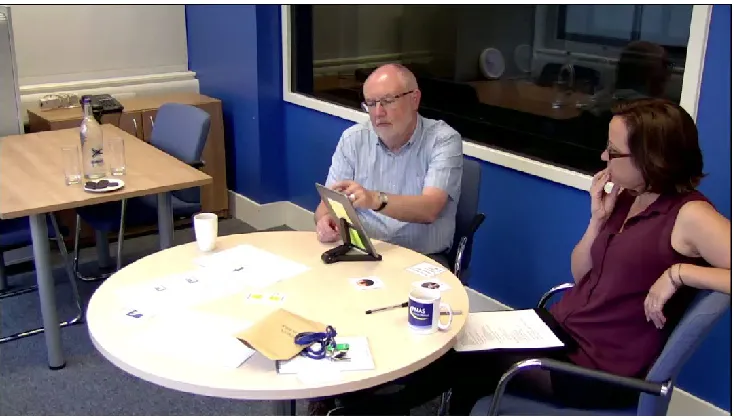
Ian took part in two usability testing sessions at City, University of London. Session one explored Facebook – which Ian uses outside of testing. Session two explored Tumblr – which Ian had not used before. For both Facebook and Tumblr, we set up temporary accounts in Ian’s name in advance of testing. During sessions, I acted as a facilitator - adjusting the testing setup to make it accessible (Figure 1). At the start of each session, I introduced Ian to the selected iPad app and supported him to explore a series of tasks within the app. Tasks were chosen to address commonly used features using a variety
of interactions and interface elements. Tasks included pening the application and exploring the home feed, inding friends to follow and writing a post, changing a rofile picture and writing a profile bio. The same set of asks was used with both apps. During testing, I spoke to an after each task to find out his thoughts. At the end of the et of tasks, I asked him some general questions about his xperience of using each app. At the end of the second ession, Ian also completed a standardised assessment of phasia – the Western Aphasia Battery [7].
o f p t I s e s a
During testing, a user researcher (Brian) managed data capture and supported the technical setup. Each session was video recorded and screen recorded. Video and screen recordings were then transcribed and analysed to identify usability issues (summarized briefly in section 5).
3.2 Key Techniques
We have worked with people who have aphasia on the design and evaluation of technology for over 8 years [3– 5,13]. During this time, we have experienced both failures and successes when introducing new technologies people with aphasia and our approaches have gradually evolved [13]. The emphasis is on collaboration, a partnership between the person with aphasia and the researcher. This is reflected in the approach we employed during usability testing with Ian which differed from classic usability testing in a number of key ways:
A series of short, direct tasks were used in place of open ended scenarios.
All tasks were introduced verbally, one-at-a-time, by the facilitator (e.g. by instructing; “open the app” and later, “have a look through your home feed and explore”)
The facilitator used communicative gesture and physical artefacts such as picture cards to facilitate communication and shared understanding (see Figure 1)
Think-alouds were discarded in favor of intermittent reflections and probes from the facilitator during pauses in the tasks. For example, after being instructed to add a comment to a Tumblr post, Ian wrote some text and then spent some time visually searching the page. The facilitator asked “so, what were you looking for just now? It looked like you were looking for something?”. Ian responded, “something to confirm it”. This technique supported Ian to report, almost synchronously, on the process without requiring him to divert cognitive resources to challenging linguistic composition.
Additional time was factored in to the sessions to allow for the appropriate pacing of activities and the opportunity to use alternative communication supports to supplement or extend speech and understanding between the user and the facilitator.
It is worth acknowledging that the data elicited through these techniques may well have a different quality to that elicited through more traditional techniques. We argue that these alternative techniques support people with aphasia to engage meaningfully in the usability testing process in a way that would not otherwise be possible.
4. EXPERIENCE – IAN
Question 3. Comment on how you felt about the tasks we set you. Were they too long, too short?
They were about right. The questions were designed to make it easy for the participant and I doubt if I could have coped with longer or multi versions. It helped having an experienced interviewer who kept things moving. I was tired after I had completed the sessions but I would expect that after my stroke.
Question 4. To what extent did you feel that you could express your views in the session?
The atmosphere created during the sessions made me feel at ease and I felt I could express my views if I wanted to. I did not consciously hold anything back and maybe I was commenting more than I realized. I do not think there was a time though when I thought I was meant to comment. It certainly did not occur to me that any faults may lie with the software and not with me.
Question 5. What could we do differently to make the session easier for you?
Since my stroke I have held the view that instructions should be expressed as simply as possible, even if that means that the task may appear childish to others. I would rather build things up as I go along, than give up on the test because I could not manage it due to questions being too difficult to comprehend. I personally would not have thought to do it any another way: I take whatever is given to me and deal with it rather than look to see if things could be done more easily and thereby running the risk of cutting corners.
5. SESSION OUTCOMES
Testing in the above way allowed us to uncover a number of usability challenges within the two apps. We identified accessible tasks – such as opening and exploring the apps, liking and commenting. We also identified challenging tasks – such as changing a profile picture, writing a bio and searching for information about a topic.
In an interview after the usability testing, Ian reported that he had found buttons, drop down menus and tags challenging. In particular, a lack of familiarity with the icons used in Tumblr had created barriers to him achieving tasks within this novel context.
The outcomes of the standardised assessment (WAB-R) classified Ian’s language difficulties at the time of testing as “mild aphasia with anomia”. This means that finding specific words presents a key problem for Ian and that his difficulties are on the less severe (though nonetheless impactful) end of the aphasia scale.
6. REFLECTIONS ON USABILITY TESTING – IAN & ABI
This section reports general reflections on including people with aphasia in usability testing from both Ian and Abi.
6.1 A Personal Perspective - Ian
Question 6. Why should usability testing be adapted for people with aphasia?
[image:4.612.128.495.50.259.2]Classic usability techniques assume a minimum degree of literal competence. Just as there is a danger of jargon being over-used in an industry, similarly there is the potential for computer programmers to assume that users will know what they mean. Instructions could be quite straightforward to other users, but an aphasia sufferer through inability to fully understand what they are doing can quickly lose interest in a task that should otherwise be relatively easy. Therefore, usability testing has to be adapted if aphasia sufferers are to fully take part.
Question 7. How should researchers and practitioners change their practice to do usability testing with people with aphasia?
They should be prepared to adapt their standard practices. For example, they should give more time for answers and be prepared to ask more basic questions in order to get an understanding of the person’s experience of technology. Questions should not be too long or complex.
6.2 A Clinical Perspective - Abi
There are millions of people worldwide living with aphasia (an estimated 0.1-0.4% of the population of the developed world [2]). This is a non-trivial number! Given the increasing dependence on technology within daily life – from social to civic situations, it is critical that we include people with aphasia in the testing of technology.
Question 7. How should researchers and practitioners change their practice to do usability testing with people with aphasia?
I feel my professional clinical training played an important part in the planning and facilitation of our adapted usability testing sessions. I would encourage other researchers and practitioners to seek similar support from a speech and language professional when undertaking usability testing with people with aphasia. At a more practical level, testing sessions should employ short, direct tasks, and multimodal presentation of information. Users should be given regular opportunities for reflection and also opportunities for rest breaks. Finally, session planning should factor in additional time to ensure activities are fully explained and supported and to allow participants to contribute their feedback.
7. DESCRIPTION OF THE WRITING PROCESS FOR THIS PAPER
Following the descriptions of aphasia in section 2, it should be clear that aphasia has implications for the process of co-authoring an experience report. Therefore, we now describe the steps taken to author this document.
First, the authors met to discuss how they would co-write. For Ian’s contribution, it was decided that a question and answer format would allow the writing process to be broken down into discrete sections. Tim and Steph drafted a set of questions which were emailed to Ian one at a time. Tim, Ian and Abi then reviewed footage from the original usability sessions and carried out a face-to-face question and answer session about the experience of taking part. This was filmed and provided to Ian for subsequent review, along with a printed list of the questions and a photocopy of the schedule and annotated script from the original usability sessions. Ian used these as a reference when writing his contribution. In his own time, Ian composed written responses to the individual emailed questions. This allowed Ian to focus on one issue at a time. It also employed a writing format that he had practised extensively through
previous speech and language therapy and avoided the risk of a lengthy piece of writing not being saved correctly. Moreover, this structured response style allowed Ian to optimize his time as his aphasia becomes increasingly challenging throughout the day.
Ian's emailed responses were incorporated into a written eport framework composed by the remaining co-authors. ndividual turns of phrase used in direct written response to
uestions 1 to 7 were retained for authenticity. After this, sing principles outlined by the Stroke Association to ncrease accessibly of written materials [6], the draft article as double-spaced and sent in both hard copy and digital orm to Ian so it could be read in his own time. Co-authors an, Abi and Steph then met one more time in person to iscuss the overall format of the paper and decide upon hared conclusions. The remaining text was re-edited and roofread by the whole authorship team and mutually pproved before submission.
r I q
Question 6. Why should usability testing be adapted for u people with aphasia?
i w f I d s p a
8. LESSONS AND SHARED CONCLUSIONS 8.1 Lessons
The experiences reported here suggest that our adapted approach to usability testing was accessible and acceptable to Ian and, hopefully, to other people with mild to moderate aphasia. Ian’s report has endorsed elements of the approach, in particular, making a case for facilitation by a speech and language professional and the use of short and structured tasks. Ian further commented that he personally benefitted from participation because he learned new features of the apps. Shortcomings of the methods that should be acknowledged include the tiring nature of testing (section 5, question 3) and the need for a clear indication that it is the technology being explored for its shortcomings and not the user (section 5 question 4). Further adaptations may be necessary for users with severe aphasia.
8.2 Shared Conclusions
To conclude, if we want technology to be more accessible to people with aphasia, we need to work closely with people with aphasia. To achieve this, the design and evaluation techniques employed by accessibility and user experience practitioners must be accessible to people with aphasia. Our approach emphasises collaboration, where user and researcher work together, as a means to achieve this goal. We hope this collaborative user experience report offers new understanding of how and why usability testing methods should be adapted to accommodate users with aphasia.
8. ACKNOWLEDGEMENTS
This work was funded by a grant from the UK Engineering and Physical Sciences Research Council (EP/P025587/1)
REFERENCES
on Accessible Computing Pub. date 1, 5. https://doi.org/10.1145/1361203.1361208
2. Chris Code and Brian Petheram. 2011. Delivering for aphasia. International Journal of Speech-Language Pathology 13, 1: 3–10.
https://doi.org/10.3109/17549507.2010.520090 3. Julia Galliers and Stephanie Wilson. 2013. An
exploratory study into the accessibility of a multi-user virtual world for young people with Aphasia. HCI 2013 - 27th International British Computer Society Human Computer Interaction Conference: The Internet of Things. Retrieved from
http://www.scopus.com/inward/record.url?eid=2-s2.0-84916908551&partnerID=tZOtx3y1
4. Julia Galliers, Stephanie Wilson, Sam Muscroft, Jane Marshall, Abi Roper, Naomi Cocks, and Tim Pring. 2011. Accessibility of 3D game environments for people with aphasia: An exploratory study. In The proceedings of the 13th international ACM SIGACCESS conference on Computers and accessibility, 139–146.
5. Julia Galliers, Stephanie Wilson, Abi Roper, Naomi Cocks, Jane Marshall, Sam Muscroft, and Tim Pring. 2012. Words are not enough: empowering people with aphasia in the design process. In Proceedings of the 12th Participatory Design Conference: Research
Papers-Volume 1, 51–60.
6. Ruth. Herbert. 2012. Accessible information
guidelines : making information accessible for people with aphasia. Stroke Association.
7. Andrew Kertesz. 2006. Western aphasia battery-revised (WAB-R): Examiner’s manual. PsychCorp.
Harcort Assessment Incorporation.
8. Jane Marshall, Abi Roper, Julia Galliers, Stephanie Wilson, Naomi Cocks, Sam Muscroft, and Tim Pring. 2013. Computer delivery of gesture therapy for people with severe aphasia. Aphasiology 27, 9: 1128–1146.
https://doi.org/10.1080/02687038.2013.786803 9. Joanna McGrenere, Rhian Davies, Leah Findlater,
Peter Graf, Maria Klawe, Karyn Moffatt, Barbara Purves, Sarah Yang, Joanna McGrenere, Rhian Davies, Leah Findlater, Peter Graf, Maria Klawe, Karyn Moffatt, Barbara Purves, and Sarah Yang. 2003. Insights from the aphasia project. In Proceedings of the 2003 conference on Universal usability - CUU ’03, 112. https://doi.org/10.1145/957205.957225 10. Jenny Preece, Yvonne Rogers, and Helen Sharp.
Interaction design : beyond human-computer interaction.
11. Abi Roper, Jane Marshall, and Stephanie Wilson. 2016. Benefits and Limitations of Computer Gesture Therapy for the Rehabilitation of Severe Aphasia. Frontiers in
Human Neuroscience 10: 595.
https://doi.org/10.3389/fnhum.2016.00595 12. Rosemary Varley, Patricia E Cowell, Lucy Dyson,
Lesley Inglis, Abigail Roper, and Sandra P Whiteside. 2016. Self-Administered Computer Therapy for Apraxia of Speech: Two-Period Randomized Control Trial With Crossover. Stroke 47, 3: 822–8.
https://doi.org/10.1161/STROKEAHA.115.011939 13. Stephanie Wilson, Abi Roper, Jane Marshall, Julia