Rochester Institute of Technology
RIT Scholar Works
Theses
Thesis/Dissertation Collections
2008
Role-based file archiving
Jean Paul Bourget
Follow this and additional works at:
http://scholarworks.rit.edu/theses
Recommended Citation
Role-Based File Archiving
By
Jean Paul Bourget
Thesis submitted in partial fulfillment of the requirements
for the degree of
Master of Science in
Computer Security and Information Assurance
Rochester Institute of Technology
B. Thomas Golisano College
of
Computing and Information Sciences
May 20, 2008
Committee: Charlie Border (Chair)
Abstract
A file server, one of the places where a company stores it data, is a goldmine. In the
beginning, we had filing cabinets managed by individuals and departments who had policies for
archiving and purging documents over time due to space limitations or organization. This paper
explores possible solutions for archiving a network file system.
When we switched from filing cabinets to digital data storage, two things were not added
to file systems. First, there is a tendency for data to grow at a dramatic rate without the benefit of
archiving. This leads to adding more disk space. Clearly, this cannot go on forever. Secondly,
role-based security and auditing measures were never implemented to limit data access rights to
select individuals easily.
Aside from the geographic challenges a company has in archiving data, many companies
do not have a system for archiving data, audit usage and/or permissions of what they have, and
the location of data in the future. This paper documents my research and approach to solving this
problem. I wrote a C# program which can inventory files on a server as well as report relevant
file and directory properties to enable the business to make decisions about what to do with this
data. This information is stored in a SQL 2005 database. I surveyed part of my current company
to assess what role-based needs were present. Once this data was archived, the system provides a
log of when and what was archived. This paper outlines my results of the above tasks in the
Table of Contents
1. INTRODUCTION ... 1
2. LITERATURE REVIEW ... 2
3. METHODOLOGY ... 5
4. FINDINGS... 5
5. RESULTS ... 9
6. CODE AND DIAGRAMS... 11
6.1 Archive File Code ... 12
6.2 Save Role Selections to Database Code ... 13
6.3 Code Populating Tree View with Enumerated File System... 14
7. CONCLUSION... 15
8. APPENDICES ... 16
8.1 Appendix 1: Survey Email ... 16
8.2 Appendix 2 – Example Survey Spreadsheet... 17
8.3 Appendix 3 – Sample of Returned Surveys... 17
8.4 Appendix 4: Application Code C# ... 18
8.4.1 Final Code ... 18
8.4.2 Tree View Testing Code used to learn to ennumerate filesystem ... 26
8.5 Appendix 5: Graphical User Interface Code... 30
8.6 Appendix 6: Entity Relationship Diagram ... 38
1.
INTRODUCTION
A file server, one of the places where a company stores it data, is a goldmine. In the
beginning, we had filing cabinets managed by individuals and departments who had policies for
archiving and purging documents over time due to space limitations or organization. If data was
sensitive, these filing cabinets were locked up at night, Some filing cabinets were further locked
in offices.
Now we have network drives, which are digital, high capacity filing cabinets. Using
network drives, you may implement the same organization, access restrictions, as well as
perform other useful electronic tasks. When we switched from filing cabinets to digital data
storage, two things were forgotten. First, there is a tendency for data to grow at a dramatic rate
without the benefit of archiving. This leads to adding more disk space. Clearly, this cannot go on
forever. Secondly, role-based security and auditing measures were never implemented to limit
data access rights to select individuals.
Aside from the geographic challenges a company has in archiving data, many companies
do not have a system for archiving data, audit usage and/or permissions of what they have, and
the location of data in the future. This paper documents my research and approach to solving this
problem. I wrote a C# program which can inventory files on a server as well as report relevant
file and directory properties to enable the business to make decisions about what to do with this
data. This information is stored in a SQL 2005 database. I surveyed part of my current company
to assess what role-based needs were present. Once this data was archived, the system provides a
log of when and what was archived. I will outline my results of the above tasks in the following
2.
LITERATURE REVIEW
File archiving has had its fair share of researchers coming up with new approaches to
dealing with this problem. There are two major types of archiving: online and offline. Online
archiving is generally used for data accessed fairly regularly. Data access times are fairly quick -
approximately a few minutes. Offline archives are used for material that will not be needed again
online, but may be needed sometime in the future. As such, the data user can wait a period of
time before accessing the data.
Online archiving has many weaknesses such as: “deletion due to hackers and viruses,
accidental deletions, natural disasters, and bankruptcy of the holding entity” (Garcia-Molina and
Cooper 2001). One approach to dealing with online archiving is replication, where you need to
“select remote sites to hold copies of your data. There are budgetary constraints for disk space,
administrators, and bandwidth”(Garcia-Molina and Cooper 2001). Corruption is also a problem,
especially if it’s replicated. “There are many storage mediums we can use, such as a Storage
Area Network (SAN), Network Attached Storage (NAS), or a disk array. We could also offload
data to being stored on USB drives that aren’t access that often” (Satchell 2003).
Offline file archiving is also popular, but has a separate purpose. Offline storage
represents the fact “that there is little need to hold archive data in a ready environment,
mitigating the risk of accidental change or deletion. Storage of archived data can also be done
with much less space and reduced cost than online data.” (Satchell 2003). The media choice for
offline data is influenced by different requirements, such as restorability, integrity, and shelf-life.
being obsolete,” (Satchell 2003) not that it won’t happen. There are also Write Once Read Many
(WORM) drives which allow one write to a disc and sometimes one delete, and infinite reads of
the data.
The need is also present for security in archiving. Common security topics are
“Authentication and Authorization, Availability, Confidentiality and Integrity, Key Sharing and
Key Management, Auditing and Intrusion Detection, and Usability Manageability and
Performance.” (Kher and Kim 2005). Kher and Kim’s list of security topics can be applied to
offline storage and is a consideration for all offline backups – with or without sensitive data. It
should also have a reasonable expectation of integrity and reliability.
There are many other areas tertiary work has been done with digital archiving. The
National Library of the Netherlands started a project in 2003 which explores the problem of
changing, evolving hardware and media used for storing data. “The Preservation Manager,
Preservation Processor, and the Permanent Access Toolbox are the three systems we propose to
manage PDF, JPEG, and other important files to guarantee long term access to files” (Oltmans,
van Diessen and van Wijngaarden 2004) There are also many companies offering outsourced
storage. “Storage may be better managed and cost-effective when handled as an outsourced
service; which has contractual properties; instead of capital intensive locally managed storage”
(Hassan, Yurick and Myagmar 2005). There is also work done attempting to find better
approaches to creating a client to manage data better for PCs and “post-PC” devices. Katz and
Gummadi explain there are many “obstacles to overcome as devices become more mobile and
have end user, critical data on them. The challenge is to come up with a client that can report
home to a ‘base’ and send data back. There are many issues getting in the way of this approach,
move this data off the device and enable logging, file archiving, and backup of this critical data.
This is a difficult task to solve technologically because most or all separate devices do not share
one common management tool. We solve this problem with a small client, which runs in a Java
Virtual Machine (JVM); reports back to a Concurrent Versioning System (CVS); and maintains a
change log of the data as well as an off-device backup” (Gummandi and Katz 1999).
The Xerox Palo Alto Research Center has done extensive research on managing
documents with meta-data. “Document properties are a compelling infrastructure on which to
develop document management applications. A property-based approach avoids many of the
problems of traditional hierarchal storage mechanisms; reflects document organizations
meaningful to user tasks; provides a means to integrate the perspectives of multiple individuals
and groups; and does all this within a uniform framework. We have observed that strict
hierarchal filing can make it difficult for users to file, manage, locate, and share documents. We
propose using placeless documents which use meta-data to create views of documents; thus,
enabling the end user to see all relevant information” (Dourish, et al. 2000). Using meta-data
fields to apply backup properties would be the evolution of this system. If metadata is used to
assign properties to documents dictating when to archive them or delete them, many archiving
3.
METHODOLOGY
I started out with a survey to my current users to find out what type of time frame they
wanted for archiving. This survey gave insight as to how to better define roles for meeting
business needs. This is explained in a later section. It also helped in defining a baseline with
which to identify roles in my application.
While focusing on the ability to design a versatile archiving utility, I was also interested
in the response of a non-technical user base with regards to archive requirements. While the
results were surprising, I also wanted to stay within the scope of creating an archive utility.
I split my technical goals into two parts. Part 1 will be our scripts/code, which will take
inventory and perform actions on the file system. These included functions for detailed reporting
and logging to a log file the files and folders being moved based on roles. I used C#, a .NET
programming language, to create my application as well as SQL 2005 for my database backend.
4.
FINDINGS
My first learning experience was learning C#. I had a beginning java competence level
and an intermediate Visual Basic 6 competence level when I began my research into how I
would write my archive utility. I spent about ten hours researching different approaches, such as:
VBScript and Windows Management Instrumentation (WMI), Windows Powershell, JavaScript,
Visual Basic.NET, PERL, and C#. I also looked at some of the Windows command line utilities;
these provided very discrete options and were very limiting for a project of this scope.
I decided upon C# for a few practical reasons as well it having the most future potential
in a professional environment. C# was powerful enough to do all the automated file system
enumerations I needed. In addition, it was also simple to create a Graphical User Interface (GUI).
Finally C# and .NET are here to stay. So I took this opportunity to learn a new language I would
not have experienced otherwise. I spent about 30 hours becoming acclimated to the language and
after this period, my development sped up dramatically. I also had help from a few of my peers
in my degree program.
The reason I did not select another language was due in part to the level of difficulty in
creating a GUI. I would have had to learn and create a significant amount of code to get the same
functionality I was able to get with C#. In addition, database access was not easily implemented
in many of these languages. I looked into PERL for some of my file operations, but C# won
again for consistency.
My next major finding was the unanticipated difficulty I had in defining what a role
meant. A
role
is defined as a task or a function. See Table 1 for some of my initially defined
[image:13.612.196.417.427.633.2]example roles.
Table 1: Initial List of Roles
Role
Sales
Scanned Documents
Accounting
Purchase Orders
While I first tried to fit my roles to the textbook definition, I realized after the survey that
this approach was insufficient. I had to expand my understanding of roles to be a functional
method of organizing or grouping tasks meeting end user needs. I had a difficult time explaining
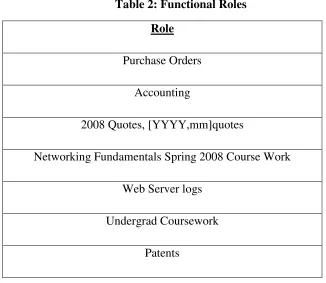
my dictionary definition of roles to users. As a result, the above approach was needed. Table 2
[image:14.612.137.463.243.526.2]lists some more functional and user requested role classifications.
Table 2: Functional Roles
Role
Purchase Orders
Accounting
2008 Quotes, [YYYY,mm]quotes
Networking Fundamentals Spring 2008 Course Work
Web Server logs
Undergrad Coursework
Patents
After trying out many different database table combinations, I settled on a simple two
table solution. These two tables are called tbl_Roles and tbl_Selections, where a role with
multiple selections can have multiple rows in the tbl_Selections table. I did not have any trouble
writing the code to access the database as there was a lot of instruction available online on how
to do this. A benefit of using SQL was I was able to further refine my Structured Query
base is security auditing. Using triggersin a database can allow for robust auditing for
nonrepudiation by creating a log table of everything that happens in the database.
To repudiate is to reject or disown or disclaim as invalid.
Nonrepudiation
, in our
scenario, is defined as using technology to remove the ability to repudiate. This concept, while
not part of my initial research proposal, surfaced as a major problem with archiving. I discovered
I needed a way to preserve the Modified, Accessed, and Created (MAC) time stamps. While I
did not experience any problems with the Created and Modified timestamps, there is a great deal
to do in terms of maintaining the Accessed time stamp. My application also assumes there is
sufficient Access Control Lists (ACLs) on the file system and that the RBFA application user has
the necessary rights to archive all necessary files.
Next, the survey I prepared and presented to some key users at my company took more
work than anticipated. See Appendix 1 for the e-mail I sent to users requesting information from
them. Appendix 2 is the example/blank spreadsheet for users to fill out to answer the survey.
Most users needed additional help in understanding what was requested of them for the survey.
I ended up spending about 30 minutes with each user who filled out the survey. At first, I
tried to explain roles to them as a function or task. After my second attempt in explaining roles to
a user, I realized I needed to adjust my explanation of roles to better fit the needs of the user. It
was at this time I changed my methodology and asked them to define functional roles useful to
them in their daily or repeating work patterns. This is when I started to receive good results.
Appendix 3 shows two completed surveys with the network paths removed for security reasons. I
user perceive existed; and once defined, how long before we can take them offline, or nearline in
order to archive them, and if so, can we delete them.
Another major hurdle to provide a system to achieve RBFA that I found from my survey
is defining role responsibility. This goes hand in hand with designing file system organization
with roles in mind. If we apply these two steps to our roles (meaning our groups of files to
archive) we can remove complexity and obtain better manageability of our data to archive. This
problem becomes obvious as users from different backgrounds start to identify their archiving
needs. This is more an organizational or corporate culture problem. As such, there is no one
solution. Rather each network will have to tweak their file systems based on their individual
business need.
5.
RESULTS
From my survey, I found my requirements varied widely among different stakeholders.
Some examples:
•
Accounting: ~7 years offline, 2 years nearline
•
Engineering: 4 years nearline, archived forever
•
Sales:
30, 60, 90 day and 1 year nearline, 1-4 years offline.
Between analyzing the results and applying a role-based approach to the archiving, our
survey results indicated that we needed to have an organized file system. In addition, we needed
to delegate responsibilities to individuals to keep the file system clean and organized. Only then
can we have faith that our archiving software will be archiving the necessary components of the
defined roles.
In designing my application, I ended up with a C# proof of concept application that can
•
Archive files and folders while preserving the MAC time stamps
•
Log to a file what is archived and at what time
•
Load and save roles to and from a database
•
Edit roles and their file/folder selections.
•
Create and delete roles
•
Can select folder paths from a TreeView Control
One key result I discovered was the lack of the NTFS file system to allow me to
copy/backup/archive a file without changing the last accessed time stamp on a file. This has
implications for non-repudiation and auditing as you lose the last true time stamp of an accessed
file. I worked around this limitation by reading the last accessed time from the file before
accessing, then writing this last access time back to the archived file. All other files remained the
same. There was no quick solution to this problem as I found conflicting reports on when and
how the time stamp is updated from Microsoft: “The Last Access Time on disk is not always
current because NTFS looks for a one-hour interval before forcing the Last Access Time updates
to disk. NTFS also delays writing the Last Access Time to disk when users or programs perform
read-only operations on a file or folder, such as listing the folder’s contents or reading (but not
changing) a file in the folder. If the Last Access Time is kept current on disk for read operations,
all read operations become write operations, which impacts NTFS performance.” (Microsoft
2003) Other situations led me to believe that more research was needed as to how Windows and
NTFS deal with timestamps. I found an unreliable source online stating that some applications
Another thing I found was that enumerating a file system in C# into a treeview control
(the same “control” that you would browse the directory structure in Windows Explorer, or
hardware devices in device manager) was much less intuitive than expected. Once I got a grip on
how to do this, I was able to programmatically traverse through the directory tree quite well with
many options that may not have been possible with a more automated approach.
Finally, although I didn’t use them in my code, I learned the importance of stored
procedures for database integrity and to control what changes users and/or groups can make to
your data. This greatly enhances application data security because you now let the database do
the data manipulation. The only data needed by the database are the input variables. The stored
procedure is then run and our resulting data is returned. In essence, you are writing data
manipulation classes and doing the grunt work on the database server, but only allowing code
you wrote to manipulate the data. Another way to explain a stored procedure is: “Stored
procedures assist in achieving a consistent implementation of logic across applications. The SQL
statements and logic needed to perform a commonly performed task can be designed, coded, and
tested once in a stored procedure. Each application needing to perform that task can then simply
execute the stored procedure.” (Microsoft 2000)
6.
CODE AND DIAGRAMS
I will present some of my key code here. You can find the complete code in Appendix 4.
6.1
Archive File Code:
This code will recursively copy all the files and directories in our
Role’s selections. Note the line
destFile.LastAccessTime = beforeCopyStamp;
which restores
the original Last Access timestamp.
public bool RecursiveCopy(string origDir, string destDir) {
bool status = false;
DateTime dt = new DateTime();
string strNow = System.DateTime.Now.ToString("yyyy/MM/dd"); string parp = "C:\\Documents and Settings\\jp\\Desktop"; //create logfile (Logfile path/RoleName/datedlog
DirectoryInfo ddir = new DirectoryInfo(parp); //open logfile for writing
FileInfo logfile = new FileInfo(parp + "/tmp.log"); StreamWriter lw = logfile.CreateText();
lw.WriteLine(strNow + ": Begin Archive Job: " +
cbEditSelectRole.Text.ToString());
lw.WriteLine(strNow + ": Starting Archive...");
//get all the info about the original directory
DirectoryInfo dirInfo = new DirectoryInfo(origDir); //retrieve all the _fileNames in the original directory
FileInfo[] files = dirInfo.GetFiles("*"); //always use a try...catch to deal
//with any exceptions that may occur
try
{
//loop through all the file names and copy them
foreach (string file in Directory.GetFiles(origDir))
{
FileInfo origFile = new FileInfo(file);
DateTime beforeCopyStamp = new DateTime();
//get last access time --> tmp variable
beforeCopyStamp = origFile.LastAccessTime;
//copy file
FileInfo destFile = new FileInfo(file.Replace(origDir, destDir));
//copy the file, use the OverWrite overload to overwrite
//destination file if it exists
System.IO.File.Copy(origFile.FullName, destFile.FullName, true);
status = true;
}
MessageBox.Show("All files in " + origDir + " copied successfully!"); }
catch (Exception ex) {
status = false;
//handle any errors that may have occurred
//MessageBox.Show(ex.Message);
}
lw.Close(); return status; }
6.2
Save Role Selections to Database Code:
Note the three sql strings:
updatesql, which updates our role’s selections in the database;
dsql, which removes any removed selections; and
nsql, which adds any new role selections.
private void btnEditSave_MouseClick(object sender, MouseEventArgs e) //adds or updates role, removes old paths (if they exist), adds all selected paths
{
int lbcount = listboxRoleMgmt.Items.Count;
//create role
String strSelectedIndex = cbEditSelectRole.Text.ToString();
string strRN = tbRoleName.Text;
string strComments = tbRoleComments.Text;
tbArrTest.Text = dateTimePicker1.Value.ToString();
string cn = "Data Source=JP-XP-HOME;Initial
Catalog=MainPage;Integrated Security=True";
string updatesql = "UPDATE dbo.tbl_Roles SET RoleName = '"
+tbEditRole.Text+"', Comments = '"+tbEditComments.Text+"', ArchiveDate =
'"+dateTimePicker1.Value+"' WHERE RoleName = '"+strSelectedIndex+"'";
SqlConnection conn = new SqlConnection(cn);
SqlCommand cmd = new SqlCommand(updatesql, conn);
cmd.Connection.Open(); cmd.ExecuteNonQuery(); cmd.Connection.Close();
//remove old selections
int rint = Convert.ToInt32(tbTestRoleID.Text);
string dsql = "DELETE FROM dbo.tbl_Selections WHERE RoleID = '" +
rint + "' ";
SqlCommand dcmd = new SqlCommand(dsql, conn);
foreach (string s in listboxRoleMgmt.Items) //saves paths to database
{
string nsql = "insert into dbo.tbl_Selections(RoleID,
Selection) values ('" + rint + "', '" + s + "')";
SqlCommand ncmd = new SqlCommand(nsql, conn);
ncmd.Connection.Open(); ncmd.ExecuteNonQuery(); ncmd.Connection.Close(); }
cbEditSelectRole_Load(null, null);
} //edit/save role and selections
6.3
Code Populating Tree View with Enumerated File System:
In this code block, we
have assigned a fixed drive to the TreeNodeCollection nodes, and now for each node, we are
going to populate the root and child nodes. This will allow us to recursively go all the through
the file system by re-calling populateNodes for each child node until all paths are exhausted.
private void populateNodes(TreeNodeCollection nodes, string sel)
{
foreach (TreeNode node in nodes)
{
populateChildNodes(node, sel); populateNodes(node.Nodes, sel); }
}
private void populateChildNodes(TreeNode node, string sel)
{
string n = node.FullPath.ToString();
string dblslash = @"\\\\";
string trimmedPath = Regex.Replace(n, dblslash, "\\");
if (trimmedPath == sel)
{
node.Checked = true;
node.Expand(); }
7.
CONCLUSION
By writing the code for this paper, and soliciting input, I have discovered there is a lot
more to learn about Role-Based File Archiving. The two major finding were that roles cannot be
easily defined to the strict definition. We need to adjust our understanding of roles to better fit
the functional need for the user.
I also discovered there is a strong case for more research into understanding the Windows
NTFS file system’s method for changing MAC timestamps. This case becomes stronger once an
entity is concerned about nonrepudiation in respect to backing up or archiving files. Currently,
depending on the application or interface used to access files, my understanding is that the
behavior of NTFS is at best unreliable, which can cripple the evidence collection process in one
click, or an entity’s auditing of file system access.
Furthermore, I learned that it is not easy to explain the any type of role-based concept to
the average user. I had to spend at least 30 minutes with each user, rendering my initial e-mail
useless other than getting them committed to helping me.
Finally, I became comfortable with the .NET language C# as well as its strengths and
limitations; learned about the importance of stored procedures as well as brushed up on my
knowledge of Structured Query Language. I was also able to use some of the lessons I learned
from my secure software engineering course, as well as how to plan a larger project, breaking it
8.
APPENDICES
8.1
Appendix 1: Survey E-Mail
From: Jean Paul Bourget Sent: Sun 4/20/2008 6:48 PM To: <redacted>
Subject: Help! -- I need some sample data -- 5-10 minutes of your time
Hi,
I am doing a school project (My thesis) on Role-Based File Archiving for my thesis and I need 5-10 minutes of your time. (If you can :) )
Role Based file archiving would be archiving files based on their role (QA, quotes, Purchasing, HR, Job
applications… etc.) roles can be just about anything, kind of like security groups in Windows. One role may have multiple paths, or multiple paths may have one role…
My goal is to get some sample data to better understand what types of archiving you would think may be done if you were able to archive data off the N: drive, and have access to it, just somewhere that wasn't a live file system.
If you could take some data (for example: End of Month data over 24 months old or customer drawings over three years old, quotes over 12 months old, or even scanned POs over 3 months old) then move it to a still accessible network location. This will help us reduce our "load"/amount of data on the N: drive (or your local network drive, S:, O: whatever…). Once in the specified location, I am interested in knowing three things about the data in that location:
1. What is that location?
2. What is it's Shelf Life? (i.e. files over the Shelf Life age (30 day, 3 years, 4 months, etc..,would then be actioned upon)
3. What action would you take? (delete, archive, archive and delete)
I have attached a spreadsheet for you to input this data. I'm looking for 5-10 "paths" (such as: N:\user\jbourget, or n:\department\importantfolder) from everyone. If you cannot come up with ten, there is no need to worry. Five or more would be awesome.
If you have someone else you think would have good input for something like this, let me know, or forward them this e-mail. If you could respond by Friday ( that would be great)
Thanks for your help and time, I know you are all very busy, and no! I'm not going to go and archive all your stuff, this is just a survey...
And if you need further instructions or anything, please let me know!
Regards,
8.2
Appendix 2 – Example Survey Spreadsheet
8.4
Appendix 4: Application Code C#
8.4.1
Final Code
using System;
using System.Collections.Generic;
using System.ComponentModel;
using System.Data;
using System.Drawing;
using System.Text;
using System.Text.RegularExpressions;
using System.Windows.Forms;
using System.IO;
using System.Diagnostics;
using System.Data.SqlClient;
using System.Collections;
using System.Configuration;
namespace RBAF {
public partial class RoleMgmt : Form {
public RoleMgmt()
{
InitializeComponent();
dateTimePicker1.MinDate = new DateTime(1985, 6, 20);
dateTimePicker1.MaxDate = DateTime.Today;
cbEditSelectRole_Load(null,null);
PopulateTreeView(); }
private void PopulateTreeView()
{
DriveInfo[] allDrives = DriveInfo.GetDrives();
//take allDrives and iterate through them, choosing hard drives to
add to Tree View
foreach (DriveInfo dirInfo in allDrives)
{
if ((dirInfo.DriveType == DriveType.Network) ||
(dirInfo.DriveType == DriveType.Fixed))
{
// Set the drive node.
TreeNode driveNode = new
TreeNode(dirInfo.RootDirectory.Name);
// Fill the first level and expand it.
Fill(driveNode);
tvCreate.Nodes[0].Expand(); }
} }
private void Fill(TreeNode dirNode)
{
string fullP = dirNode.FullPath;
string myC = @"My Computer\\";
string trimmedPath = Regex.Replace(fullP, myC, "");
DirectoryInfo dir = new DirectoryInfo(trimmedPath);
// An exception could be thrown if we don't
// have sufficient security permissions for a file or directory.
try
{
foreach (DirectoryInfo dirItem in dir.GetDirectories())
{
// Add node for the directory.
TreeNode newNode = new TreeNode(dirItem.Name);
dirNode.Nodes.Add(newNode); newNode.Nodes.Add("*"); }
}
catch (System.UnauthorizedAccessException)
{
} }
private void tvCreate_BeforeExpand(object sender,
TreeViewCancelEventArgs e) {
// If a dummy node is found, remove it and read the
// real directory list.
if (e.Node.Nodes[0].Text == "*") {
e.Node.Nodes.Clear(); Fill(e.Node);
} }
private void cbEditSelectRole_Load(object sender, EventArgs e) //loads
edit text boxes for editing a different role
{
//Clear and collapse Tree View for new Selections
string cn = "Data Source=JP-XP-HOME;Initial
string sqlq = "SELECT rolename FROM dbo.tbl_roles";
using (SqlConnection sqlconn = new SqlConnection(cn))
{
sqlconn.Open();
DataSet dset = new DataSet("Roles");
//Create a SqlDataAdapter for the Roles table.
SqlDataAdapter adapter = new SqlDataAdapter(sqlq,cn);
// A table mapping names the DataTable.
adapter.TableMappings.Add("Table", "Roles"); adapter.Fill(dset);
// Open the connection.
DataViewManager dsview = dset.DefaultViewManager;
cbEditSelectRole.DataSource = dsview;
cbEditSelectRole.DisplayMember = "Roles.RoleName";
sqlconn.Close();
} }
private void clearChildTVCheckExpand(TreeNode tn)
{
tn.Collapse();
tn.Checked = false;
}
private void clearTreeViewCheckExpand(TreeNodeCollection ctnc)
{
foreach (TreeNode ctn in ctnc)
{
clearChildTVCheckExpand(ctn);
clearTreeViewCheckExpand(ctn.Nodes); }
}
private void cbEditSelectRole_SelectedIndexChanged(object sender,
EventArgs e) //on selection of a role, display it's info
{
int rint = new int();
DateTime tdt = new DateTime();
clearTreeViewCheckExpand(tvCreate.Nodes);
try
{
String strSelectedIndex = cbEditSelectRole.Text.ToString();
string cn = "Data Source=JP-XP-HOME;Initial
Catalog=MainPage;Integrated Security=True";
{
SqlCommand cmd = new SqlCommand();
cmd.Connection = sqlconn; cmd.CommandText = sqlq; sqlconn.Open();
SqlDataReader rdr = cmd.ExecuteReader();
tbEditRole.Text = strSelectedIndex; rdr.Read();
tbTestRoleID.Text = rdr.GetInt32(0).ToString(); rint = rdr.GetInt32(0);
tbEditComments.Text = rdr.GetString(1); tdt = rdr.GetDateTime(2);
dateTimePicker1.Value = tdt; rdr.Close();
sqlconn.Close();
string sqlloadSelections = "SELECT Selection FROM
dbo.tbl_Selections Where roleID = '" + rint + "' "; cmd.CommandText = sqlloadSelections; sqlconn.Open();
rdr = cmd.ExecuteReader();
while (rdr.Read())
{
string sPath = (string)rdr["Selection"]; populateNodes(tvCreate.Nodes, sPath); } rdr.Close(); sqlconn.Close(); } }
catch (System.Exception)
{ } }
private void populateNodes(TreeNodeCollection nodes, string sel)
{
foreach (TreeNode node in nodes)
{
populateChildNodes(node, sel); populateNodes(node.Nodes, sel); }
}
private void populateChildNodes(TreeNode node, string sel)
{
string n = node.FullPath.ToString();
string dblslash = @"\\\\";
string trimmedPath = Regex.Replace(n, dblslash, "\\");
if (trimmedPath == sel)
node.Checked = true; node.Expand();
} }
private void button2_MouseClick(object sender, MouseEventArgs e)
//clear edit fields
{
tbRoleName.Clear(); tbRoleComments.Clear(); }
private void btncreateClose_MouseClick(object sender, MouseEventArgs
e)
{
this.Close();
} //close role editing
private void btnEditSave_MouseClick(object sender, MouseEventArgs e)
//adds or updates role, removes old paths (if they exist), adds all selected paths
{
int lbcount = listboxRoleMgmt.Items.Count;
//create role
String strSelectedIndex = cbEditSelectRole.Text.ToString();
string strRN = tbRoleName.Text;
string strComments = tbRoleComments.Text;
tbArrTest.Text = dateTimePicker1.Value.ToString();
string cn = "Data Source=JP-XP-HOME;Initial
Catalog=MainPage;Integrated Security=True";
string updatesql = "UPDATE dbo.tbl_Roles SET RoleName = '"
+tbEditRole.Text+"', Comments = '"+tbEditComments.Text+"', ArchiveDate =
'"+dateTimePicker1.Value+"' WHERE RoleName = '"+strSelectedIndex+"'";
SqlConnection conn = new SqlConnection(cn);
SqlCommand cmd = new SqlCommand(updatesql, conn);
cmd.Connection.Open(); cmd.ExecuteNonQuery(); cmd.Connection.Close();
//remove old selections
int rint = Convert.ToInt32(tbTestRoleID.Text);
string dsql = "DELETE FROM dbo.tbl_Selections WHERE RoleID = '" +
rint + "' ";
SqlCommand dcmd = new SqlCommand(dsql, conn);
dcmd.Connection.Open(); dcmd.ExecuteNonQuery(); dcmd.Connection.Close();
foreach (string s in listboxRoleMgmt.Items) //saves paths to
ncmd.ExecuteNonQuery(); ncmd.Connection.Close(); }
cbEditSelectRole_Load(null, null);
} //edit/save role and selections
private void btnCreateSave_MouseClick(object sender, MouseEventArgs e)
//save role
{
string strRN = tbRoleName.Text;
string strComments = tbRoleComments.Text;
string cn = "Data Source=JP-XP-HOME;Initial
Catalog=MainPage;Integrated Security=True";
string sql = "insert into dbo.tbl_Roles(RoleName, Comments) values
('" + tbRoleName.Text + "', '" + tbRoleComments.Text + "')";
SqlConnection conn = new SqlConnection(cn);
SqlCommand cmd = new SqlCommand(sql, conn);
cmd.Connection.Open(); cmd.ExecuteNonQuery(); cmd.Connection.Close();
}
private void btnCancelEdit_MouseClick(object sender, MouseEventArgs e)
{
tbEditRole.Clear(); tbEditComments.Clear(); }
public void ProcessNodes(TreeNodeCollection nodes )
{
foreach (TreeNode node in nodes)
{
ProcessNode(node);
ProcessNodes(node.Nodes);
} }
private void tvCreate_AfterCheck(object sender, TreeViewEventArgs e)
{
listboxRoleMgmt.Items.Clear(); //clear for list for rewrite
ProcessNodes(tvCreate.Nodes); }
public void ProcessNode(TreeNode node)
{
// Check whether the node interests us ( is it checked? )
// then puts it into the listboxRoleMgmt listbox which we will
ArrayList al = new ArrayList();
if (node.Checked.Equals(true))
{
String checkedNode;
checkedNode = node.FullPath; string dblslash = @"\\\\";
string trimmedPath = Regex.Replace(checkedNode, dblslash,
"\\");
listboxRoleMgmt.Items.Add(trimmedPath); }
}
private void btnEdDelete_MouseClick(object sender, MouseEventArgs e)
{
string cn = "Data Source=JP-XP-HOME;Initial
Catalog=MainPage;Integrated Security=True";
SqlConnection conn = new SqlConnection(cn);
//remove old selections
int rint = Convert.ToInt32(tbTestRoleID.Text);
string dsql = "DELETE FROM dbo.tbl_Selections WHERE RoleID = '" +
rint + "' ";
SqlCommand dcmd = new SqlCommand(dsql, conn);
string delRoleSql = "DELETE FROM dbo.tbl_Roles WHERE RoleID = '"
+ rint + "' ";
SqlCommand delRole = new SqlCommand(delRoleSql, conn);
dcmd.Connection.Open(); dcmd.ExecuteNonQuery(); dcmd.Connection.Close(); delRole.Connection.Open(); delRole.ExecuteNonQuery(); delRole.Connection.Close();
cbEditSelectRole_Load(null, null);
}
private void dateTimePicker1_ValueChanged(object sender, EventArgs e)
{
tbArrTest.Text = dateTimePicker1.Value.Date.ToString("yyyy MMM
dd"); }
private void textBox1_MouseClick(object sender, MouseEventArgs e)
{
folderBrowserDialog1.ShowDialog(); tbArchivePath.Text =
folderBrowserDialog1.SelectedPath.ToString();
//define archive path
string tarp = tbArchivePath.Text.ToString();
//string parp = "C:\\Documents and Settings\\jp\\Desktop";
foreach (string s in listboxRoleMgmt.Items) {
RecursiveCopy(s,tarp); }
}
public bool RecursiveCopy(string origDir, string destDir) {
bool status = false;
DateTime dt = new DateTime();
string strNow = System.DateTime.Now.ToString("yyyy/MM/dd"); string parp = "C:\\Documents and Settings\\jp\\Desktop"; //create logfile (Logfile path/RoleName/datedlog
DirectoryInfo ddir = new DirectoryInfo(parp); //open logfile for writing
FileInfo logfile = new FileInfo(parp + "/tmp.log"); StreamWriter lw = logfile.CreateText();
lw.WriteLine(strNow + ": Begin Archive Job: " +
cbEditSelectRole.Text.ToString());
lw.WriteLine(strNow + ": Starting Archive...");
//get all the info about the original directory
DirectoryInfo dirInfo = new DirectoryInfo(origDir); //retrieve all the _fileNames in the original directory
FileInfo[] files = dirInfo.GetFiles("*"); //always use a try...catch to deal
//with any exceptions that may occur
try
{
//loop through all the file names and copy them
foreach (string file in Directory.GetFiles(origDir))
{
FileInfo origFile = new FileInfo(file);
DateTime beforeCopyStamp = new DateTime();
//get last access time --> tmp variable
beforeCopyStamp = origFile.LastAccessTime;
//copy file
FileInfo destFile = new FileInfo(file.Replace(origDir, destDir));
//copy the file, use the OverWrite overload to overwrite
//destination file if it exists
System.IO.File.Copy(origFile.FullName, destFile.FullName, true);
lw.WriteLine(strNow + " " + origFile.FullName + " copied");
//set last access time on archived file
lw.WriteLine(strNow + " " + origFile.FullName + " stamped");
//File.Delete(origFile.FullName);
status = true;
}
MessageBox.Show("All files in " + origDir + " copied successfully!"); }
catch (Exception ex) {
status = false;
//handle any errors that may have occurred
//MessageBox.Show(ex.Message);
}
lw.Close(); return status; }
} }
8.4.2
Tree View Testing Code used to learn to ennumerate filesystem
using System;
using System.Collections.Generic;
using System.ComponentModel;
using System.Data;
using System.Drawing;
using System.Linq;
using System.Text;
using System.Text.RegularExpressions;
using System.Windows.Forms;
using System.IO;
using System.Diagnostics;
using System.Data.SqlClient;
namespace RBAF {
public partial class MainPage : Form {
public MainPage()
{
InitializeComponent();
MainPage_Load(null,null);
}
private void MainPage_Load(object sender, EventArgs e)
{
// If a dummy node is found, remove it and read the
// real directory list.
if (e.Node.Nodes[0].Text == "*") {
e.Node.Nodes.Clear(); Fill(e.Node);
} }
private void Fill(TreeNode dirNode)
{
string fullP = dirNode.FullPath;
string myC = @"My Computer\\";
string trimmedPath = Regex.Replace(fullP, myC, "");
DirectoryInfo dir = new DirectoryInfo(trimmedPath);
// An exception could be thrown in this code if you don't
// have sufficient security permissions for a file or directory.
// You can catch and then ignore this exception.
try
{
foreach (DirectoryInfo dirItem in dir.GetDirectories())
{
// Add node for the directory.
TreeNode newNode = new TreeNode(dirItem.Name);
dirNode.Nodes.Add(newNode); newNode.Nodes.Add("*");
toolStripStatusLabel1.Text = "Idle";
} }
catch (System.UnauthorizedAccessException)
{ } }
private void PopulateTreeView()
{
toolStripStatusLabel1.Text = "Refreshing Folders and Files.
Please wait...";
//Add root My Computer node to Tree View (myCnode = My Computer
Node)
//treeDirectory.Nodes.Clear();
//TreeNode myCrootnode = new TreeNode("My Computer",0,0);
//treeDirectory.Nodes.Add(myCrootnode);
////Create Collection of Drives
//Get Logical Drives
DriveInfo[] allDrives = DriveInfo.GetDrives();
//take allDrives and iterate through them, choosing hard drives
to add to Tree View
foreach (DriveInfo dirInfo in allDrives)
{
if ((dirInfo.DriveType == DriveType.Network) ||
(dirInfo.DriveType == DriveType.Fixed ))
{
// Set the drive node.
TreeNode driveNode = new
TreeNode(dirInfo.RootDirectory.Name);
treeDirectory.Nodes.Add(driveNode);
//Nest under "My Computer" TreeNode
// TreeNode driveNode =
myCrootnode.Nodes.Add(dirInfo.RootDirectory.Name);
// Fill the first level and expand it.
Fill(driveNode);
treeDirectory.Nodes[0].Expand(); }
} }
private void ProcessNodes(TreeNodeCollection nodes)
{
foreach (TreeNode node in nodes)
{
ProcessNode(node);
ProcessNodes(node.Nodes); }
}
private void ProcessNode(TreeNode node)
{
// Check whether the node interests us ( is it checked? )
if (node.Checked.Equals(true))
{
String checkedNode;
checkedNode = node.FullPath; Files.Items.Add(checkedNode);
//Fill ListView
String dirLastWrite;
dirLastWrite = node.FullPath.ToString();
strLastAccessed =
Directory.GetLastAccessTime(dirLastWrite).ToString();
ListViewItem item = new ListViewItem(new string[]
{node.FullPath, DirSize(d).ToString(), strDirLastWrite, strLastAccessed});
lvSelected.Items.Add(item); }
}
public static long DirSize(DirectoryInfo d)
{
try
{
long Size = 0;
// Add file sizes.
FileInfo[] fis = d.GetFiles();
foreach (FileInfo fi in fis)
{
Size += fi.Length; }
// Add subdirectory sizes.
DirectoryInfo[] dis = d.GetDirectories();
foreach (DirectoryInfo di in dis)
{
Size += DirSize(di); }
Size = Size / 1024;
return (Size);
}
catch (System.UnauthorizedAccessException)
{
long Size = 0;
return (Size);
} }
private void treeDirectory_AfterCheck(object sender,
TreeViewEventArgs e) {
Files.Items.Clear(); //clear for list for rewrite
lvSelected.Items.Clear(); //clear listview for rewrite
ProcessNodes(treeDirectory.Nodes); }
public void openDatabase() //create db connection
{
//string provider= "System.Data.
////Create Connection
//SqlConnection conn = new SqlConnection(connstr);
//conn.Open();
////
private void btnLoadRole_MouseClick(object sender, MouseEventArgs e) {
Form RM= new RoleMgmt();
RM.Show();
}
} }
8.5
Appendix 5: Graphical User Interface Code –
This is the code that compromised my
GUI.
namespace RBAF {
partial class RoleMgmt {
/// <summary>
/// Required designer variable.
/// </summary>
private System.ComponentModel.IContainer components = null;
/// <summary>
/// Clean up any resources being used.
/// </summary>
/// <param name="disposing">true if managed resources should be disposed; otherwise, false.</param>
protected override void Dispose(bool disposing)
{
if (disposing && (components != null)) {
components.Dispose(); }
base.Dispose(disposing);
}
#region Windows Form Designer generated code /// <summary>
/// Required method for Designer support - do not modify
/// the contents of this method with the code editor.
/// </summary>
private void InitializeComponent()
{
this.btnCreateSave = new System.Windows.Forms.Button();
this.tbRoleName = new System.Windows.Forms.TextBox();
this.tabPage2 = new System.Windows.Forms.TabPage();
this.btnEditArchive = new System.Windows.Forms.Button();
this.tbArchivePath = new System.Windows.Forms.TextBox();
this.label6 = new System.Windows.Forms.Label();
this.dateTimePicker1 = new System.Windows.Forms.DateTimePicker();
this.btnEdDelete = new System.Windows.Forms.Button();
this.tbTestRoleID = new System.Windows.Forms.TextBox();
this.btnEditClose = new System.Windows.Forms.Button();
this.btnEditSave = new System.Windows.Forms.Button();
this.btnCancelEdit = new System.Windows.Forms.Button();
this.label5 = new System.Windows.Forms.Label();
this.label4 = new System.Windows.Forms.Label();
this.tbEditComments = new System.Windows.Forms.TextBox();
this.tbEditRole = new System.Windows.Forms.TextBox();
this.label3 = new System.Windows.Forms.Label();
this.cbEditSelectRole = new System.Windows.Forms.ComboBox();
this.tvCreate = new System.Windows.Forms.TreeView();
this.listboxRoleMgmt = new System.Windows.Forms.ListBox();
this.tbTestCounter = new System.Windows.Forms.TextBox();
this.tbArrTest = new System.Windows.Forms.TextBox();
this.folderBrowserDialog1 = new
System.Windows.Forms.FolderBrowserDialog();
this.tabControl1.SuspendLayout(); this.tabPage1.SuspendLayout(); this.tabPage2.SuspendLayout(); this.SuspendLayout(); // // btnCreateSave //
this.btnCreateSave.Location = new System.Drawing.Point(14, 94);
this.btnCreateSave.Name = "btnCreateSave";
this.btnCreateSave.Size = new System.Drawing.Size(75, 23);
this.btnCreateSave.TabIndex = 2;
this.btnCreateSave.Text = "Create Role";
this.btnCreateSave.UseVisualStyleBackColor = true;
this.btnCreateSave.MouseClick += new
System.Windows.Forms.MouseEventHandler(this.btnCreateSave_MouseClick);
//
// tbRoleName
//
this.tbRoleName.Location = new System.Drawing.Point(80, 6);
this.tbRoleName.Name = "tbRoleName";
this.tbRoleName.Size = new System.Drawing.Size(100, 20);
this.tbRoleName.TabIndex = 8;
//
// tabControl1
//
this.tabControl1.Controls.Add(this.tabPage1);
this.tabControl1.Controls.Add(this.tabPage2);
this.tabControl1.Location = new System.Drawing.Point(13, 13);
this.tabControl1.Name = "tabControl1";
this.tabControl1.SelectedIndex = 0;
this.tabControl1.Size = new System.Drawing.Size(423, 402);
this.tabControl1.TabIndex = 4;
//
// tabPage1
this.tabPage1.Controls.Add(this.btncreateClose);
this.tabPage1.Controls.Add(this.button2);
this.tabPage1.Controls.Add(this.label2);
this.tabPage1.Controls.Add(this.tbRoleComments);
this.tabPage1.Controls.Add(this.label1);
this.tabPage1.Controls.Add(this.btnCreateSave);
this.tabPage1.Controls.Add(this.tbRoleName);
this.tabPage1.Location = new System.Drawing.Point(4, 22);
this.tabPage1.Name = "tabPage1";
this.tabPage1.Padding = new System.Windows.Forms.Padding(3);
this.tabPage1.Size = new System.Drawing.Size(415, 376);
this.tabPage1.TabIndex = 0;
this.tabPage1.Text = "Create Roles";
this.tabPage1.UseVisualStyleBackColor = true;
//
// btncreateClose
//
this.btncreateClose.Location = new System.Drawing.Point(17, 342);
this.btncreateClose.Name = "btncreateClose";
this.btncreateClose.Size = new System.Drawing.Size(75, 23);
this.btncreateClose.TabIndex = 9;
this.btncreateClose.Text = "Close";
this.btncreateClose.UseVisualStyleBackColor = true;
this.btncreateClose.MouseClick += new
System.Windows.Forms.MouseEventHandler(this.btncreateClose_MouseClick);
//
// button2
//
this.button2.Location = new System.Drawing.Point(105, 94);
this.button2.Name = "button2";
this.button2.Size = new System.Drawing.Size(75, 23);
this.button2.TabIndex = 7;
this.button2.Text = "Cancel";
this.button2.UseVisualStyleBackColor = true;
this.button2.MouseClick += new
System.Windows.Forms.MouseEventHandler(this.button2_MouseClick);
//
// label2
//
this.label2.AutoSize = true;
this.label2.Location = new System.Drawing.Point(14, 39);
this.label2.Name = "label2";
this.label2.Size = new System.Drawing.Size(56, 13);
this.label2.TabIndex = 6;
this.label2.Text = "Comments";
//
// tbRoleComments
//
this.tbRoleComments.Location = new System.Drawing.Point(80, 32);
this.tbRoleComments.Name = "tbRoleComments";
this.label1.Name = "label1";
this.label1.Size = new System.Drawing.Size(60, 13);
this.label1.TabIndex = 4;
this.label1.Text = "Role Name";
//
// tabPage2
//
this.tabPage2.AutoScroll = true;
this.tabPage2.Controls.Add(this.btnEditArchive);
this.tabPage2.Controls.Add(this.tbArchivePath);
this.tabPage2.Controls.Add(this.label6);
this.tabPage2.Controls.Add(this.dateTimePicker1);
this.tabPage2.Controls.Add(this.btnEdDelete);
this.tabPage2.Controls.Add(this.tbTestRoleID);
this.tabPage2.Controls.Add(this.btnEditClose);
this.tabPage2.Controls.Add(this.btnEditSave);
this.tabPage2.Controls.Add(this.btnCancelEdit);
this.tabPage2.Controls.Add(this.label5);
this.tabPage2.Controls.Add(this.label4);
this.tabPage2.Controls.Add(this.tbEditComments);
this.tabPage2.Controls.Add(this.tbEditRole);
this.tabPage2.Controls.Add(this.label3);
this.tabPage2.Controls.Add(this.cbEditSelectRole);
this.tabPage2.Location = new System.Drawing.Point(4, 22);
this.tabPage2.Name = "tabPage2";
this.tabPage2.Padding = new System.Windows.Forms.Padding(3);
this.tabPage2.Size = new System.Drawing.Size(415, 376);
this.tabPage2.TabIndex = 1;
this.tabPage2.Text = "Edit Roles";
this.tabPage2.UseVisualStyleBackColor = true;
this.tabPage2.MouseClick += new
System.Windows.Forms.MouseEventHandler(this.btncreateClose_MouseClick);
//
// btnEditArchive
//
this.btnEditArchive.Location = new System.Drawing.Point(177,
196);
this.btnEditArchive.Name = "btnEditArchive";
this.btnEditArchive.Size = new System.Drawing.Size(75, 23);
this.btnEditArchive.TabIndex = 16;
this.btnEditArchive.Text = "Archive";
this.btnEditArchive.UseVisualStyleBackColor = true;
this.btnEditArchive.MouseClick += new
System.Windows.Forms.MouseEventHandler(this.btnEditArchive_MouseClick);
//
// tbArchivePath
//
this.tbArchivePath.ForeColor =
System.Drawing.SystemColors.MenuBar;
this.tbArchivePath.Location = new System.Drawing.Point(90, 163);
this.tbArchivePath.Name = "tbArchivePath";
this.tbArchivePath.Size = new System.Drawing.Size(253, 20);
this.tbArchivePath.TabIndex = 15;
this.tbArchivePath.Text = "Click Here to set path";
this.tbArchivePath.MouseClick += new
System.Windows.Forms.MouseEventHandler(this.textBox1_MouseClick);
// label6
//
this.label6.AutoSize = true;
this.label6.Location = new System.Drawing.Point(15, 163);
this.label6.Name = "label6";
this.label6.Size = new System.Drawing.Size(68, 13);
this.label6.TabIndex = 14;
this.label6.Text = "Archive Path";
//
// dateTimePicker1
//
this.dateTimePicker1.Location = new System.Drawing.Point(90,
131);
this.dateTimePicker1.Name = "dateTimePicker1";
this.dateTimePicker1.Size = new System.Drawing.Size(200, 20);
this.dateTimePicker1.TabIndex = 13;
this.dateTimePicker1.Value = new System.DateTime(2008, 4, 22, 0,
0, 0, 0);
this.dateTimePicker1.ValueChanged += new
System.EventHandler(this.dateTimePicker1_ValueChanged);
//
// btnEdDelete
//
this.btnEdDelete.Location = new System.Drawing.Point(96, 196);
this.btnEdDelete.Name = "btnEdDelete";
this.btnEdDelete.Size = new System.Drawing.Size(75, 23);
this.btnEdDelete.TabIndex = 12;
this.btnEdDelete.Text = "Delete";
this.btnEdDelete.UseVisualStyleBackColor = true;
this.btnEdDelete.MouseClick += new
System.Windows.Forms.MouseEventHandler(this.btnEdDelete_MouseClick);
//
// tbTestRoleID
//
this.tbTestRoleID.Location = new System.Drawing.Point(15, 273);
this.tbTestRoleID.Name = "tbTestRoleID";
this.tbTestRoleID.Size = new System.Drawing.Size(100, 20);
this.tbTestRoleID.TabIndex = 11;
//
// btnEditClose
//
this.btnEditClose.Location = new System.Drawing.Point(74, 318);
this.btnEditClose.Name = "btnEditClose";
this.btnEditClose.Size = new System.Drawing.Size(75, 23);
this.btnEditClose.TabIndex = 10;
this.btnEditClose.Text = "Close";
this.btnEditClose.UseVisualStyleBackColor = true;
this.btnEditClose.MouseClick += new
System.Windows.Forms.MouseEventHandler(this.btncreateClose_MouseClick);
//
this.btnEditSave.UseVisualStyleBackColor = true;
this.btnEditSave.Click += new
System.EventHandler(this.btnEditSave_Click);
this.btnEditSave.MouseClick += new
System.Windows.Forms.MouseEventHandler(this.btnEditSave_MouseClick);
//
// btnCancelEdit
//
this.btnCancelEdit.Location = new System.Drawing.Point(260, 196);
this.btnCancelEdit.Name = "btnCancelEdit";
this.btnCancelEdit.Size = new System.Drawing.Size(75, 23);
this.btnCancelEdit.TabIndex = 8;
this.btnCancelEdit.Text = "Cancel";
this.btnCancelEdit.UseVisualStyleBackColor = true;
this.btnCancelEdit.MouseClick += new
System.Windows.Forms.MouseEventHandler(this.btnCancelEdit_MouseClick);
//
// label5
//
this.label5.AutoSize = true;
this.label5.Location = new System.Drawing.Point(12, 102);
this.label5.Name = "label5";
this.label5.Size = new System.Drawing.Size(72, 13);
this.label5.TabIndex = 5;
this.label5.Text = "Edit Comment";
//
// label4
//
this.label4.AutoSize = true;
this.label4.Location = new System.Drawing.Point(12, 65);
this.label4.Name = "label4";
this.label4.Size = new System.Drawing.Size(50, 13);
this.label4.TabIndex = 4;
this.label4.Text = "Edit Role";
//
// tbEditComments
//
this.tbEditComments.Location = new System.Drawing.Point(90, 95);
this.tbEditComments.Name = "tbEditComments";
this.tbEditComments.Size = new System.Drawing.Size(227, 20);
this.tbEditComments.TabIndex = 3;
//
// tbEditRole
//
this.tbEditRole.Location = new System.Drawing.Point(90, 58);
this.tbEditRole.Name = "tbEditRole";
this.tbEditRole.Size = new System.Drawing.Size(227, 20);
this.tbEditRole.TabIndex = 2;
//
// label3
//
this.label3.AutoSize = true;
this.label3.Location = new System.Drawing.Point(12, 27);
this.label3.Name = "label3";
this.label3.Size = new System.Drawing.Size(62, 13);
this.label3.TabIndex = 1;
//
// cbEditSelectRole
//
this.cbEditSelectRole.FormattingEnabled = true;
this.cbEditSelectRole.Location = new System.Drawing.Point(90,
19);
this.cbEditSelectRole.Name = "cbEditSelectRole";
this.cbEditSelectRole.Size = new System.Drawing.Size(245, 21);
this.cbEditSelectRole.TabIndex = 0;
this.cbEditSelectRole.SelectedIndexChanged += new
System.EventHandler(this.cbEditSelectRole_SelectedIndexChanged);
//
// tvCreate
//
this.tvCreate.CheckBoxes = true;
this.tvCreate.ForeColor = System.Drawing.SystemColors.WindowText;
this.tvCreate.Location = new System.Drawing.Point(454, 35);
this.tvCreate.Name = "tvCreate";
this.tvCreate.Size = new System.Drawing.Size(277, 376);
this.tvCreate.TabIndex = 11;
this.tvCreate.AfterCheck += new
System.Windows.Forms.TreeViewEventHandler(this.tvCreate_AfterCheck);
this.tvCreate.BeforeExpand += new
System.Windows.Forms.TreeViewCancelEventHandler(this.tvCreate_BeforeExpand);
//
// listboxRoleMgmt
//
this.listboxRoleMgmt.FormattingEnabled = true;
this.listboxRoleMgmt.Location = new System.Drawing.Point(737,
35);
this.listboxRoleMgmt.Name = "listboxRoleMgmt";
this.listboxRoleMgmt.Size = new System.Drawing.Size(256, 381);
this.listboxRoleMgmt.TabIndex = 12;
//
// tbTestCounter
//
this.tbTestCounter.Location = new System.Drawing.Point(737, 9);
this.tbTestCounter.Name = "tbTestCounter";
this.tbTestCounter.Size = new System.Drawing.Size(100, 20);
this.tbTestCounter.TabIndex = 13;
//
// tbArrTest
//
this.tbArrTest.Location = new System.Drawing.Point(454, 13);
this.tbArrTest.Name = "tbArrTest";
this.tbArrTest.Size = new System.Drawing.Size(140, 20);
this.tbArrTest.TabIndex = 14;
//
// RoleMgmt
//
this.Controls.Add(this.tabControl1); this.Name = "RoleMgmt";
this.Text = "RoleMgmt";
this.tabControl1.ResumeLayout(false);
this.tabPage1.ResumeLayout(false);
this.tabPage1.PerformLayout();
this.tabPage2.ResumeLayout(false);
this.tabPage2.PerformLayout();
this.ResumeLayout(false);
this.PerformLayout();
}
#endregion
private System.Windows.Forms.Button btnCreateSave;
private System.Windows.Forms.TextBox tbRoleName;
private System.Windows.Forms.TabControl tabControl1;
private System.Windows.Forms.TabPage tabPage1;
private System.Windows.Forms.Label label1;
private System.Windows.Forms.TabPage tabPage2;
private System.Windows.Forms.Button button2;
private System.Windows.Forms.Label label2;
private System.Windows.Forms.Text