Getting back to basics: Bimanual interaction on mobile
touch screen devices
1st Author Name
Affiliation
City, Country
e-mail address
2nd Author Name
Affiliation
City, Country
e-mail address
3rd Author Name
Affiliation
City, Country
e-mail address
ABSTRACT
The availability, and popularity, of touch screen tablets is drastically increasing with over 30% of internet users now owning one. However the lack of bimanual interaction in touch screen tablets is presenting product designers with serious challenges. Several attempts have been made to facilitate bimanual interaction in such products but results are not comparable to that of their non-mobile cousins, e.g. laptops. This paper presents the finding of a group collaboration aimed at prototyping a mobile touch screen device which supports bimanual interaction during internet browser navigation through rear mounted inputs.
The researchers found it problematic to add basic bimanual interactions for internet browser navigation to the rear of a prototype mobile touch screen device due to issues regarding grip type, finger movement and hand position. This paper concludes that in order to achieve bimanual interaction researchers need to return to basics and consider how to free the hand and fingers from current constraints.
Author Keywords
Bimanual interaction; human computer interaction; mobile touch screen; tablets; prototyping.
ACM Classification Keywords
H.5.2 User Interfaces; D.2.2 Evolutionary prototyping.
INTRODUCTION
Bimanual interaction (interaction using both hands) is fundamental to individuals interacting with the environment. Bimanual interaction has been a chief component of Human Computer Interaction (HCI) with the main input devices of computers, the keyboard and mouse, providing a wide range of bimanual interactions. However recent evolutions in computing technology, i.e. the rise of mobile computing in the form of touch screen tablets has
presented product designers with serious challenges in regard to facilitating bimanual interaction.
The availability, and popularity, of touch screen tablets is drastically increasing with over 30% of internet users now owning one. Wagner et al [1] explain that one of the key benefits of tablets is that their composition facilitates use in situations which are unavailable to traditional computing devices, for example while standing, or walking. However, they argue that while tablets make use of some intuitive interaction techniques, such as pointing and swiping, that they fail to support the most critical interaction possibilities. More specifically, tablets are not sufficiently designed to support bimanual interaction, despite the overwhelming evidence [2,3,4,5,6] that bimanual inputs drastically increase both user satisfaction and performance.
This paper presents the findings of a group collaboration aimed at prototyping a mobile touch screen device which supports bimanual interaction during internet browser navigation through rear mounted inputs. The paper begins by explaining and categorizing bimanual interaction, and then a review of the research which influenced the prototyping is provided, followed by an overview of the prototyping and the wider implications of the research.
BIMANUAL CATEGORISATION
Guiard [7], one of the key authors in the field of bimanual interaction, explains that hand interactions initially fall into three categories:
Unimanual - using one had (e.g. tossing a coin, or throwing ball or Frisbee)
Asymmetric bimanual - using two hands for different bimanual activities (e.g. playing the violin, or unscrewing the lid of a bottle)
Symmetric bimanual - using two hands in symmetry to complete the same task (e.g. push ups, using skipping ropes)
However Guiard argues that when it comes to carrying out tasks the unimanual distinction may in fact be redundant. When faced with a task that involves the use of two manual roles X and Y, there are two possible hand assignments 1-right and 2-left, providing the following possible role assignments (X-1 Y-2, or X-2 Y-1). The same selection process occurs in unimanual tasks with the difference being
that one of the roles consists of nothing, but under further scrutiny the role of nothing becomes ambiguous. Consider the case of a ten pin bowler; at first it would seem like a task that could clearly be defined as unimanual with one hand bowling the ball and the other doing nothing. However, on closer examination it becomes clear that the free hand is at work, contributing to the posture and motion of the body. According to Guiard we can never claim with certainty that a free hand is contributing nothing to a task. Therefore, it is easier to simply incorporate the unimanual category into the asymmetric bimanual category rather to run the risk of incorrect categorization.
Asymmetric Bimanual Interaction
Asymmetric interactions constitute the majority of everyday interactions, which is to say that more often than not our hands do not mirror each other's actions as an individual interacts with their surroundings. However, that does not imply that there is not a distinct relationship between the between the two hands. Guiard maintains that the relationship between the two hands is analogous to the elements in a kinematic chain where the dominant hand acts in relation to the non-dominant hand. Initially this may seem counter intuitive however when further scrutinized the relationship becomes clear. Consider the examples of opening a bottle or hammering in a nail, the dominant hand carries out the tasks of opening and hammering, but not until the bottle and the nail have been secured by the non-dominant hand.
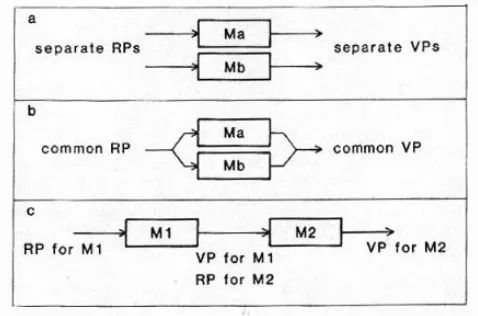
[image:2.612.58.297.440.598.2]Guiard views the hands akin to a pair of motors, working together to complete a task, which can be assembled in three different: Orthogonal, Parallel, and Serial Assemblies.
Figure 1 - Three assemblies (from Asymmetric Division of Labor in Human Skilled Bimanual Action - Yves Guiard)
Orthogonal
Orthogonal assemblies occur in the cases where the two hands are acting separately, but simultaneously, to control two dimensions of motions. In order for an assembly to be considered orthogonal the motions produced by the two hands must be independent and there should be an symmetrical division of labor (Note a symmetrical division
of labor is not the same as a symmetric bimanual interaction where the key component is the symmetry of the interaction movements). An example of an orthogonal assemblies would be an 'etch a sketch' drawing toy. On an etch a sketch toy one of the inputs controls the drawing motion on the X axis and the other controls the drawing motion on the Y axis.
Parallel
Parallel assemblies occur when the two hands act in symbiosis with each other to complete a task, essentially mimicking each other's actions. Pushups are an example of a parallel assembly where there is mutual dependence between the two actions. Parallel assemblies fall under symmetric bimanual interaction, however, as explained by Balakrishnan and Hinckley [8] such interactions can easily transpose into asymmetric interactions as the movement of one hand may be inaccurate resulting a need for correction from the other hand, throwing the interaction out of synchronization. Furthermore just because it is possible to complete a task in parallel does not mean an individual will chose to continue that way. Often the tasks may also be completed in series and it may be possible for an individual to switch between a parallel and series assembly, i.e. in the case of pushups it is not inconceivable that an individual may switch to single hand pushups, or alternate between single hand pushups.
Serial Assemblies
Serial Assemblies are when the two hands are working together to complete the same task, where the output of one of the hand's action serves as the input of the other hand's action. In a series assembly the two hands work together to produce a single output. For example, the case of opening the bottle discussed above. Securing the bottle with the left hand serves as the input for the right hand to open the lid of the bottle, which is the single output of the task. Guiard considers serial assemblies to be best method for modeling the general case of asymmetrical interactions as, comparatively speaking, there are very few day to day tasks fall into the other two categories.
RELATED RESEARCH
Touch screen tablets present a unique interaction challenge, whereas small hand held devices are designed for single handed interaction [9] touch screen tablets use software, and critically product conventions, that are descended from desktop computer, e.g. web browsers.
bar at the side of a screen is an example of a convention, while the scroll bar may be limited to vertical movement the user is not. In order to operate the bar the user must learn to hold the mouse button down on the bar while moving the mouse vertically. In the same regard even although the physical location and movements of faucets are fixed, a user must learn to twist the tap in order to operate it correctly.
Many of the conventions found on current tablets are direct emulations of PC conventions, which support bimanual interaction. Tablets on the other hand restrict bimanual interaction as one of the hands is immobilised through having to hold the device; a problem which is having a detrimental impact on tablet operation [1,11]. Consequently, due to the adoption and alteration of pre-existing conventions tablet users are stuck with conventions that were not truly designed for the interactions they are carrying out. Obvious examples being: The size of the web browsing buttons and icons that were designed for mouse interactions, consider the relative size of a finger in comparison to a mouse pointer; Users having to type on virtual keyboards with one hand when they are designed for bimanual interaction.
Currently researchers have developed both hardware and software solutions in order to address this issue and design tablets with greater bimanual capabilities. Scott [12] developed the RearType system, a text system for tablets that involved mounting a QWERTY keyboard to the rear of a tablet. Their findings showed that with a hour of training users typing times were not significantly different to their typing times on the touch screen keyboard. However they were, as expected, significantly slower than on normal keyboards. Furthermore they highlighted several ergonomic issues, with the users struggling to reach certain keys.
Schoenleben [13] attached a multi-touch sensor to the rear of a tablet in order to support inputs from all ten fingers with the goal of achieving rapid typing. Qwerty users, after eight hours of training, managed to achieve speeds of 64% of a physical keyboard with an error rate of 12.6%. However, they do add, anecdotally, that the author managed to achieve far better results (150% with an error rate of 2.9%) after 12 days of training. Nonetheless, authors concede that lack of physical inputs raised several issues, e.g. the lack of haptic feedback and the inability to support preparatory finger movements.
A similar approach was adopted by Buschek [14] who also attached a multi-touch sensor to the rear of a tablet. Their results mirrored that of Schoenleben in terms of speed and error rate with users achieving nearly 70% of the speed of physical qwerty keyboards after seven hours of training, with an error rate of 12%.
Rear mounted sensor keyboards have the capability to address certain ergonomic issues associated with rear mounted physical keyboards, as sensor keyboards can adapt
to hand size. Whereas the physical keyboard layout is fixed, in both of the above studies the sensor keyboard altered the position of the keys to suit the current user. While this approach initially addresses the problem highlighted by the RearType research, it in turn presents its own issue, namely when users put the device down then pick it up again the keyboard is out of position resulting in a need for recalibration.
Other hardware modifications aimed at facilitating bimanual interaction include LucidTouch [15] a transparent device that allows users to control applications through touching the rear of the device and Gummi [16] a device that physically bends as an input method. Both of these devices offer unique and novel interaction approaches, however both sets of researchers accept that further development is required for their product.
Perhaps the main issue facing researchers is hand posture and grip type. McLachlan [17] elucidates that while at least one hand is required to hold touch screen deceives it can do so in a variety of ways. Consequently, Wagner [1] argue that bimanual solutions should take into account a range of potential user grips. Furthermore, while many peers implement additional hardware Wagner et al's goal is to incorporate bimanual interaction into tablets using current technology through making changes to software, not through additional hardware. Wagner et al highlighted five main holds which facilitate bimanual interaction ranging from the thumb gripping the bottom of the device to arms wrapping round the device and fingers gripping the side. Consequently, they identified finger and thumb areas that users can operate depending on their grip type. Their results shows a significant improvement from bimanual tapping interactions, however, bimanual gestures only showed small improvements with users complaining they were uncomfortable and difficult to perform.
PROTOTYPING
Overview
The initial aim of the prototyping was to construct a variety of prototypes that would be tested against each other in regard to facilitating bimanual interactions during internet navigation. Internet browser navigation was selected due to the free access and familiarity of the software, i.e. all of the group members were familiar with and had access to internet browsers (e.g. Internet Explorer). Consequently, the group members understood all the main navigation interactions and were therefore prototyping for software that they were all familiar with. Furthermore internet browsing is relatively simple in comparison some software systems, this allowed for the exploration of bimanual interactions in a basic setting, avoiding the potential of complexity to negatively impact the results.
web-browsing. The developed prototypes were fully functional on desk top computer internet browsers. The objects of the prototyping were as follows:
The device can be held and operated using a single handed grip.
The device utilise simplistic interactions.
The device covers a range of bimanual interaction through supporting both orthogonal and serial assemblies.
The prototyping explore a variety of hand grips and positions.
These objectives were a direct result of the background research and related research which highlighted the following concerns:
One of the key benefits of tablets is that their composition facilitates use in situations which are unavailable to traditional computing devices. Therefore, we considered it vital that the tablet could be operated while being held with one hand and retain its pick-up and play usability as opposed to, for example, having to reconfigure touch sensor keyboards when placed down.
Many of the products discussed in the related research involved complex bimanual interactions which required hours of practice. Aside from the time constraints, achieving good performances with simplistic bimanual interactions would serve as sound basis for progressing to more complex interactions. It is worth noting that many of the interactions highlighted in the background research would, e.g. typing, are complex regardless of the situation and it could be argued that the population as a whole has had more time and incentives to practice typing on desktops compared to tablets, hence the disparity in performance. However until that can be demonstrated it is hypothetical and does not impact the authors position that the successful addition of basic bimanual interactions is a rational starting point.
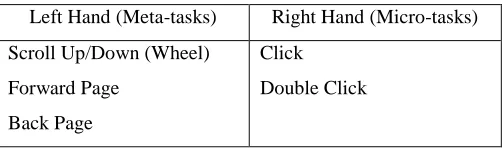
[image:4.612.50.301.598.672.2]Consequently key navigation tasks were highlighted and separated across the hands as follows:
Table 1 – Inputs categorized by hand
Left Hand (Meta-tasks) Right Hand (Micro-tasks)
Scroll Up/Down (Wheel)
Forward Page
Back Page
Click
Double Click
The navigation tasks were selected in order to emulate the most fundamental aspects of internet browsing. The tasks
were separated into meta and micro tasks and assigned to different hands. Meta tasks refer to tasks which involve the navigation on a page-wide sense while the micro tasks involve navigation within the current page or selecting aspects of the current page, e.g. scrolling will control the movement of the page as a whole while clicking will select something which is currently displayed on the page. It could be argued that clicking a link is a meta task given that it also changed the page on a meta scale. However while the result is on a metal level the interaction itself is micro.
Click & Double Click: Clicking is the primary input method for selecting objects and a critical aspect of internet browsing.
Forward Page & Back Page: Forward and back page were
selected to allow the meta task of moving backward and forward to be assigned to the right hand. This allowed the rear hand to control all the meta aspects of internet navigation.
Scrolling: Scrolling was selected to allow the meta task of moving backward and forward to be assigned to the right hand. Furthermore, according to Byrne [18] scrolling if a significant aspect of internet browsing with users spending around 40 minutes of every 5 hours scrolling while browsing the internet.
Splitting the tasks across the hands as described above allowed for both orthogonal and serial bimanual interaction even for identical tasks, i.e. the operator could was not restricted to a single interaction type. For example an individual could scroll to position then select a link (serial), or an individual could simultaneously scroll which preparing to click the link (orthogonal).
Development
The prototyping group consisted of six individuals (4 male and 2 female), ranging in age from 27 to 40 and representing a variety of backgrounds (2 software developers, 1 teacher, 1 sound engineer, 1 airline pilot, and the 1st author as the chair). Four of the individuals owned
and used tablets, the exceptions being 1 software developer and the chair, whom has a background in HCI. The individuals were given following (figure 2):
A section of hard foam in the dimensions of a large tablet (height – 24cm, width – 19 cm). However the foam was slightly thicker than a tablet at 2cm and the finished products were lighter, around 60% of a tablet weight at 400 grams.
A stripped Microsoft Intellimouse which provided the scroll wheel and buttons for the rear of the device (allowing for USB operation on PC). A Logitech Touchpad for the for the front of the
prototype (allowing USB operation on PC).. The necessary tools and equipment to embed the
The materials were selected for practical reasons, specifically they are low cost and easy to manipulate. Consequently the group members could rapidly experiment with a variety of different designs.
The users were given the following criteria for their designs:
The designs should be comfortable and easy to use. The buttons should be placed in a position that is easily accessible and the does not require awkward manipulation of the rear hand.
The device should retain its mobility. Users should be able to operate the device whether seated or standing.
The device must retain is pick up and play nature. Users should be able to pick up the device and operate it without need for significant adjustment. The retention of pick up and play capabilities was considered critical by the authors. For, while it may be argued that researchers such as [13] have successfully implemented bimanual interactions to the rear of tablets the authors believe that this has not been achieved without the loss of the of the pick and play nature of the tablet which is a core aspect of such devices.
The prototyping was to be carried out in four sections:
1. Initial users designs - one design from each member.
2. Review of the initial designs - each design to be critiqued by the other members through surfing the web with the device plugged into a desktop PC. 3. Collaborative redesigns - based on the reviews the
best designs were to be optimised and submitted for testing.
4. Design testing - the competing designs tested in regard to facilitating bimanual interactions.
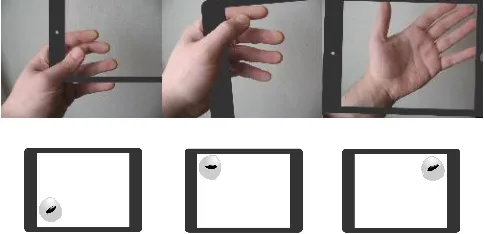
Three main designs originated from the initial prototyping, with three different grip types (figures 2 & 3). Two of which involved grasping the device with the thumb and fingers and one which involved resting the tablet on the four arm: Design one - Bottom Corner Grip; Design two - Top Corner Grip; Design three - Arm Rest Grip.
Figure 2 - Initial materials, preferred grip positions & resulting rear control positions.
Out of the three different design's, three of the individuals created a design that could be categorized under design one, two created a design that could be categorized under design two, and one created a design that could be categorized under design three. However the designs were all unique in regard to exact control positions, i.e. even although the category was the same the controls were slightly different distances from the edges.
Review of the initial designs & Discussion
The members were then asked to review the other member’s designs, including the ones that fell under the same category. The members’ feedback was gathered using think aloud protocols which the chair noting taking. The members were then encouraged to discuss any issues as a group. The critiques raised several key issues that not only resulted in the discontinuation of the prototyping but also have wider reaching implications that question the feasibility of many of the current approaches aimed at delivering bimanual interaction to touch screen tablets: In particular those approaches that involve additional hardware. The issues can be broken down into three main categories: Grips; finger movements; and hand positioning. Grips & Finger Movements
The very nature of certain single handed grips drastically impacted the ability to manipulate rear mounted controls. The act of gripping the product tenses muscles are is widely understood to restrict movement. Furthermore the nature of how fingers interact exacerbates this problem. Consider interacting with scroll wheel on a normal mouse. This is typically conducted using the index finger which switches between scroll wheel and
[image:5.612.318.560.62.179.2]the left mouse button while
[image:5.612.55.296.610.672.2]the middle ringer operates the right mouse button. However, typically when individuals hold an object such as a tablet they use a pinch grip and such grips create pressure between the thumb and the index and middle finger (figure 4), which drastically restricts their movement.
A potential solution is to make use of the ring finger to operate controls while the index and middle finger grip, but again the nature of gripping drastically effects this solution as the act
applying pressure with the middle finger severely impacts the movement of the ringer finger. The reason this relationship has little impact while using traditional input devices like a desktop keyboard is with no gripping required the index finger and the ring finger are free to move together.
Gripping resulted in another complication that severely impacted the usability of the device. Typically when users interact with products their hands will rest on the controls without necessarily operating them, e.g. resting a hand on a mouse without pushing any of them buttons, or positioning a finger over a key preparatory finger movement. As a consequence the user faces either increased error rates, repositioning the inputs to a less suitable area to make room for the gripping hand, or changing the grip to a less natural grip, e.g. shortening the grip by curling the fingers. A potential solution to this problem would be to increase the level of strength needed compress the inputs, however, such an approach could have negative consequences, e.g. slowing down interactions.
The third design avoided most of the issues highlighted above due to the fact that the product was supported by the arm and therefore no grip was needed. However, this presented a bigger issue in the fact the product needed to be operated from a still position, and at times the product had to be secured with the right hand, defeating the purpose of the design.
Hand Positions
Perhaps the most detrimental effect of gripping the product was the impact on the positioning of the hand, i.e. gripping the product fixes and immobilizes the hand. Consequently, even slight changes in the positioning of the controls (in this case all within 1.5 cm of each other) impact user satisfaction and cause discomfort. A theme that was observed in the related research [1,11] During the prototype reviews every member complained about the positioning of the rear mounted inputs on the other prototypes, even the ones that fell under the same categories of their designs.
In order to adequately grip the prototype the edge of the device needed to be flush against the purlicue of the hand; as such a device is moved toward the tip of the fingers more pressure is required to grip it, increasing the impact of the issues discussed in the previous sections. Consequently the nature of gripping fixes the hand positions which impact the scope for positional adjustment.
Consider operating a traditional keyboard, the user simply places their hands in a comfortable position to line their fingers up with the 'home row' of the keyboard. More specifically the fingers are lined up with the interaction and the position of the hands adjust, the opposite of gripping the prototype; where in the resulting designs the grip position, and therefore members hand length, was the determining factor in positioning the inputs. This also impacted the 3rd design as even although the hand is free to move to the inputs it is limited by the need to balance the product on the wrist which means the inputs are a direct relationship between the balancing point and the hand length.
Double Hand Grips
It could be argued that double handed grips are a solution to the above issues, and double handed grips are seen in some of the contemporary designs which were covered in the related research section. However, double handed grips have several issues associated with them:
Firstly, the act of gripping, and therefore to a degree incapacitating a hand, is one of the core issues impacting bimanual interaction it therefore seems counter intuitive to attempt to solve the issue of one restricted hand though restricting the other hand.
Secondly, and perhaps more importantly, as tablet interfaces are currently designed nearly all of the conventions and interactions are accesses though the main interface device which is the touch screen. Bimanual interaction should be used to complement the main interaction device, therefore retaining the pick up and play, mobile nature of the product.
CONCLUSION
[image:6.612.54.305.124.218.2]The lack of bimanual interaction in mobile touch screen devices is a growing area of HCI research and has prompted the design of several products. However, as of yet no product has been able to match the performance of their traditional counterparts. Contemporary researchers have highlighted the impact that having to hold a product has on bimanual interaction action, yet most of the solutions have circumvented the key issues associated with gripping the product. Furthermore, many of these contemporary designs involve relatively complex interactions which could be masking underlying issues.
This research found it problematic to add even basic bimanual interactions for internet browsing to the rear of a prototype mobile touch screen device due to the issues regarding grip type, finger movement and hand position. Contrary current the current state of research the author of this paper maintain that in order to achieve bimanual interaction researchers need to return to basics and consider how to free the hand and fingers from current constraints. For given the current constraints the addition of interactions many indeed be pointless as the hands are not equipped to adequately utilize them.
The current constrictions placed on the holding hand is not only drastically impacting bimanual interaction, but may be rendering it, to a certain degree, impossible.
ACKNOWLEDGMENTS
We thank all the volunteers who participated in the group prototyping.
REFERENCES
1. Wagner, J., Huot, S. & Mackay, W. BiTouch and BiPad: designing bimanual interaction for hand-held tablets. Proceedings of the SIGCHI Conference on Human Factors in Computing Systems, 2012. ACM, 2317-2326.
2. Butler, C. G. & St Amant, R. HabilisDraw DT: a bimanual tool-based direct manipulation drawing environment. CHI'04 extended abstracts on human factors in computing systems, 2004. ACM, 1301-1304. 3. Buxton, W. & Myers, B. A study in two-handed input.
ACM SIGCHI Bulletin, 1986. ACM, 321-326. 4. Casalta, D., Guiard, Y. & Beaudouin-Lafon, M.
Evaluating two-handed input techniques: rectangle editing and navigation. CHI'99 extended abstracts on human factors in computing systems, 1999. ACM, 236-237.
5. Esenther, A. & Ryall, K. Fluid DTMouse: better mouse support for touch-based interactions. Proceedings of the working conference on Advanced visual interfaces, 2006. ACM, 112-115.
6. Wu, M. & Balakrishnan, R. Multi-finger and whole hand gestural interaction techniques for multi-user tabletop displays. Proceedings of the 16th annual 7. Guiard, Y. 1987. Asymmetric division of labor in
human skilled bimanual action: The kinematic chain as a model. Journal of motor behavior, 19, 486-517 8. Balakrishnan, R. & Hinckley, K. Symmetric bimanual
interaction. Proceedings of the SIGCHI conference on Human Factors in Computing Systems, 2000. ACM, 33-40.
9. Pascoe, J., Ryan, N. & Morse, D. 2000. Using while moving: HCI issues in fieldwork environments. ACM
Transactions on Computer-Human Interaction (TOCHI), 7, 417-437.
10. Norman, Donald A. "Affordance, conventions, and design." interactions 6.3 (1999): 38-43.
11. Trudeau, M. B., Catalano, P. J., Jindrich, D. L. & Dennerlein, J. T. 2013. Tablet keyboard configuration affects performance, discomfort and task difficulty for thumb typing in a two-handed grip. PloS one, 8, e67525.
12. Scott, J., Izadi, S., Rezai, L. S., Ruszkowski, D., Bi, X. & Balakrishnan, R. RearType: text entry using keys on the back of a device. Proceedings of the 12th
international conference on Human computer interaction with mobile devices and services, 2010. ACM, 171-180.
13. Schoenleben, O. & Oulasvirta, A. Sandwich keyboard: fast ten-finger typing on a mobile device with adaptive touch sensing on the back side. Proceedings of the 15th international conference on Human-computer interaction with mobile devices and services, 2013. ACM, 175-178.
14. Buschek, D., Schoenleben, O. & Oulasvirta, A. Improving accuracy in back-of-device multitouch typing: a clustering-based approach to keyboard updating. Proceedings of the 19th international conference on Intelligent User Interfaces, 2014. ACM, 57-66.
15. Wigdor, D., Forlines, C., Baudisch, P., Barnwell, J. & Shen, C. Lucid touch: a see-through mobile device. Proceedings of the 20th annual ACM symposium on User interface software and technology, 2007. ACM, 269-278.
16. Schwesig, C., Poupyrev, I. & Mori, E. Gummi: a bendable computer. Proceedings of the SIGCHI conference on Human factors in computing systems, 2004. ACM, 263-270.
17. McLachlan, R. & Brewster, S. A. 2013. Novel Modalities for Bimanual Scrolling on Tablet Devices. Human-Computer Interaction–INTERACT 2013. Springer.
18. Byrne, Michael D., et al. "The tangled Web we wove: a taskonomy of WWW use." Proceedings of the SIGCHI
conference on Human Factors in Computing Systems.