City, University of London Institutional Repository
Citation:
Griffiths, M. K., Reyes-Aldasoro, C. C., Savas, D. and Greenfield, T. (2009). IOME, A Toolkit for Distributed and Collaborative Computational Science and Engineering. Paper presented at the UK e-science All Hands Meeting, 07-12-2009 - 09-12-2009, Oxford, UK.This is the accepted version of the paper.
This version of the publication may differ from the final published
version.
Permanent repository link:
http://openaccess.city.ac.uk/4649/Link to published version:
Copyright and reuse: City Research Online aims to make research
outputs of City, University of London available to a wider audience.
Copyright and Moral Rights remain with the author(s) and/or copyright
holders. URLs from City Research Online may be freely distributed and
linked to.
City Research Online: http://openaccess.city.ac.uk/ [email protected]
IOME, A Toolkit for Distributed and Collaborative
Computational Science and Engineering
M.K.Griffiths1, C.C.Reyes-Aldasoro2 , D.Savas1 , and T.Greenfield3
1 Corporate Information and Computing Services, The University of Sheffield, 285 Glossop Rd., Sheffield, S10 2HB, U.K.
2 Cancer Research UK Tumour Microcirculation Group, Department of Oncology, School of Medicine & Biomedical Sciences, The University of Sheffield, Beech Hill
Road, Sheffield S10 2RX, U.K.
3 ISRU, School of Maths and Stats, Herschel Building, Newcastle University, Newcastle upon Tyne, NE1 7RU
24thJune 2009
Abstract
The internet provides a media rich communications platform enabling communities to share content. Alongside the increased activity in collaborative work, recent developments on workflow tools are now enabling researchers from different disciplines to collaborate by feeding data and results between large multi-disciplinary, optimization problems.
Researchers developing computational models require development kits and tools
enabling them to provide simulations with a range of methods that facilitate collaboration.
This paper presents a unique, multi-purpose tool-kit, enabling researchers to easily develop simulations which may be run as web services and accessed interactively. The development kit is based on a protocol that uses an XML markup called IOME ML, "the Interactive Object Management Environment Markup Language". The paper describes the IOME ML and it's development kit.
We illustrate the capabilities of IOME with two case studies. Firstly, a medical image processing application which is wrapped as a web service and accessed through a web browser offering medical professionals image analysis tools. Secondly, a method of collaborative visualisation and computational steering of a tsunami simulation based on a shallow water wave model.
1. Introduction
The internet provides a media rich communications platform enabling communities to share content. This paper presents a toolkit enabling researchers to easily develop novel mechanisms of information sharing. Two case studies are presented, one illustrating a web site offering medical professionals image analysis tools and another providing a computationally steered simulation of a tsunami based on a shallow water wave model. Researchers developing computational models require development kits and tools enabling them to provide simulations with a range of methods that facilitate collaboration. Alongside the increased activity in collaborative work, recent developments on workflow tools are now enabling researchers from different disciplines to collaborate in a unique way leading to new knowledge discovery mechanisms. This arises from the way in which data is shared and results generated for example between large multi-disciplinary, optimization problems. This paper presents a novel, multi-purpose toolkit and protocol enabling researchers to easily develop simulations which can be run as web services, accessed interactively and enabled to annotate data sets automatically. The simulations can be controlled by client applications such as visualisation tools, web accessible portlets, popular web API tools and other bespoke clients. By using the IOME toolkit scientists and engineers can develop collaborative computational models without requiring an in depth knowledge of the web service protocols. The IOME toolkit has been developed for a range of popular modelling tools including Matlab, Scilab, python, php, C++ and FORTRAN. IOME provides researchers with a range of benefits by enabling
data sharing between heterogeneous applications and platforms which can be running within different administrative domains,
publication of computational models as web services and provides tools for building clients,
automated generation of metadata which may be used for managing distributed data collections and for automated laboratory notebook generation,
The next section provides an overview of the architecture of the IOME toolkit. Section 3 provides example applications demonstrating how the IOME toolkit is used in practice. We demonstrate the model as a web service use case, using as an example an application from the on line algorithm repository for cancer image analysis. We also describe a collaborative and computational steering example of a study of tsunamis using a shallow water wave propagation model with Scilab or Matlab. Section 4 gives an outline of application development using IOME. In section 5 we provide conclusions and review some of the further developments that would be required in a collaborative research computation facility.
2. Design of the IOME Toolkit
To facilitate collaborative working, it is necessary to communicate information about a simulation between resources and collaborating researchers. IOME achieves this by providing a system for efficiently managing a collection of data. The web services standards define the responses and requests for services and the simple object access protocol is used to convey the messages.
the data to be shared amongst collaborating applications. A range of operations are
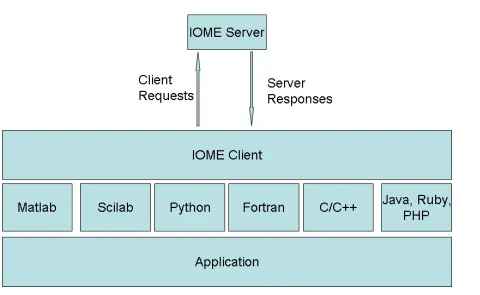
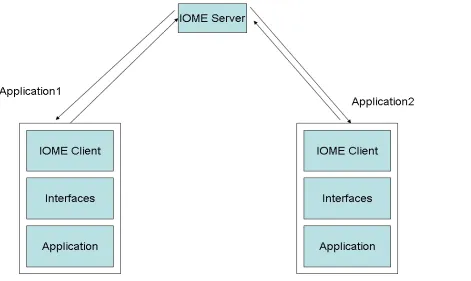
available for adding and removing data items from the store. There are also operations for inspecting, modifying and listing the contents of the data store. Figure 1 illustrates the architecture of an IOME application. An IOME client provides an application interface that communicates with the remote IOME server. Clients can be developed for applications using a range of different development tools for example;
•C/C++,
•Python,
•Fortran,
•Matlab,
•PHP and
•Scilab.
The IOME server application was developed using the gsoap toolkit [1]. A range of tools are available for developing web service clients for C/C++ and FORTRAN, we use the gsoap toolkit [1]. For Matlab, php and python the client toolbox was developed using;
•the ZSI library for python[2],
•the web service tools provided with matlab and
•the php soap plugin.
[image:4.595.55.535.369.664.2]
Object Management Environment Markup Language. The purpose of the markup language is to,
•provide a framework for describing simulations and models,
•enable interoperability between different simulations with differing data formats and
•enable the movement of data between local, heterogeneous and geographically distributed simulations.
There is an abundance of mark up languages for describing simulations, including mark up languages for systems engineering such as Boeing's Simulation Reference markup
language (SRML) [6]. The X-Machines Markup language (XMML) is used to describe and generate simulations of complex systems[3], XMML is used by the flexible agent modelling environment. More domain specific mark up languages include the Fusion Simulation markup language for magnetohydrodynamics [5] and systems biology markup language [4] for describing networks of biological interactions this was originally inspired by the unified modelling language for engineering object oriented systems. These domain specific markup languages exhibit the required features for describing generic simulations. We have attempted to encapsulate the most appropriate features within IOME ML.
IOME ML has a collection of XML elements used to describe a simulation this features a range of elements including
•metadata elements for storing metadata names and properties,
•arrays of parameter elements containing data of different types.
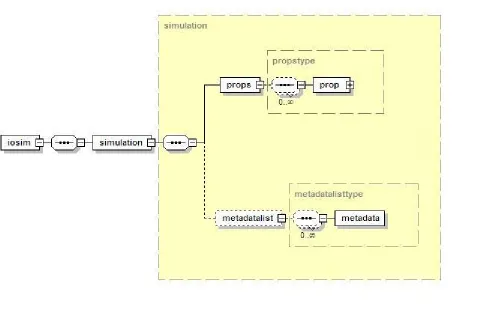
In the IOME-ML, as illustrated in the schema representation in figure 2 and figure 3 the metadata elements are agregated by the metadatalist element and the parameter elements are aggregated within a props element which contains a sequence of prop elements, representing the parameters themselves.The IOME toolkit is based on a library of C++ classes which can be used to parse and write IOME-ML documents. These tools make use of the Apache XML libraries known as Xerces-C and Xalan-C. The IOME toolkit has an IoXMLSimulation class which can be used to create objects for containing the simulation data. The IOME server and client tools use the IoGenericSimulation class this is a child class deriving methods and properties from the IoXMLSimulation class. The special feature about the CIoGenericSimulation class is that it allows dynamic creation of the data structures used to describe our simulation. The main application in the IOME toolkit is the iogs application, the iogs application is based on a realization of the
Figure 2. Diagrammatic Representation of the IOME Mark Up Language
3. Example Simulations
3.1 An on-line algorithm repository for Cancer Image Analysis
The need for image analysis is ever growing in many fields and cancer diagnostics is not an exception. With the advent of new imaging techniques such as intravital, confocal and multiphoton microscopy, researchers can visualise physiological and pharmacological processes together with the traditional anatomical images, such as Computed Tomography (CT) or Magnetic Resonance Imaging (MRI). Once the imaging of subjects has been achieved, sometimes there is a lack of resources to properly analyse and process the data and the wealth of the information contained in images and videos remains to be extracted in the near future. There are many software tools for analysis and processing of images, which are not restricted to biological images: some have a basic platform to which modules are added (ImageJ, Imaris, AxioVision, Volocity …), others are highly flexible and powerful and offer high-level programming with a wide variety of toolboxes (Matlab, Scilab,…) and also some graphically-oriented packages (Photoshop, Corel,…) are used to analyses biomedical images. Even when some of these tools are open source and freely available, the user needs to develop an expertise of the software to obtain quantitative results of the images that have been produced, and this is not always simple. In some cases, academic collaboration between areas like mathematics, computer science and physics with clinicians and biologists has lead to development of mathematical models that describe biological processes, but in many cases, groups work isolated and there is a lack of communication between interested parties.
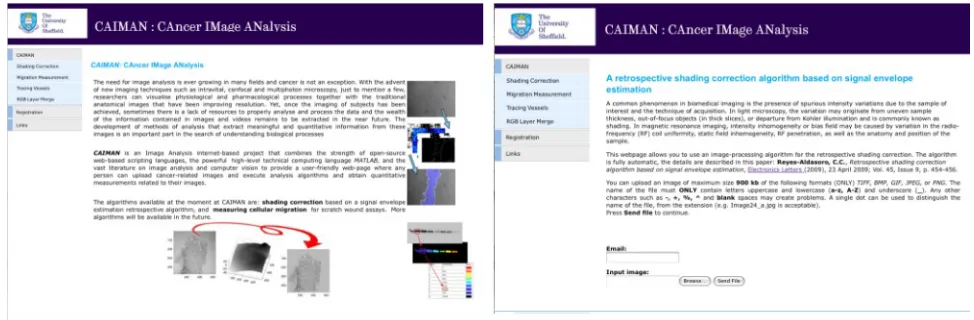
CAIMAN (CAncer IMage ANalysis) is an Image Analysis internet-based project that combines the strength of open-source web-based scripting languages, the powerful high-level technical computing language MATLAB, and the vast literature on image analysis and computer vision. CAIMAN provides a user-friendly web-page where any person can upload cancer-related images and execute analysis algorithms and obtain quantitative measurements related to their images.
The algorithms currently available at CAIMAN are:
•measuring cellular migration for scratch wound assays,
•tracing vasculature using scale-space ridge tracing, and
•shading correction based on a signal envelope estimation retrospective algorithm.
Fig 4 CAIMAN home page and a specific algorithm webpage.
Once the images have been uploaded to the web server , the IOME php toolbox provides methods for making a web service request to the image analysis service. This request is made using IOME-ML. For the CAIMAN service the request contains the file name of the image to be analysed, the analysis task to be performed and the e-mail of the recipient for the result. The service request is made by calling the submitsimulation method.
To set up the CAIMAN service the application developer must also create a running
instance of the IOME web service (IOME-WS) that will handle potentially multiple incoming requests. The IOME-WS instance runs on iceberg, the head node of the high performance computing service at The University of Sheffield. The compute resource comprises a head node, connected to a farm of execution nodes, accessible to networked computers at Sheffield. On iceberg, a job is queued via the Sun Grid Engine scheduler to the farm of execution nodes where each image will be individually processed according to the
algorithm selected on the front-end. We now describe the steps the developer must take in order to set up the IOME-WS instance, this instance will run on the head node of the
compute service and may be secured using https. The service runs the job using a generic script file from the developers user account on the compute service. The developer
provides an initial IOME-ML simulation file and a script file to run the job, in this case the job will be a Sun grid engine script file that runs the image processing matlab job. The
submitsimulation method creates a folder using the job id and time stamp and writes the IOME-ML file for the requested job this new file contains all the required parameters and data to run the job. The simulation is started by running a script called
•Edit the iogenericsim script this will need to start a local IOME server, load the simulation file generated by the request, initiate the matlab job and finally delete the simulation when it has completed
•add IOME client calls to the matlab script, enabling it to set the correct job parameters
•start the IOME web service which will be running on the head node.
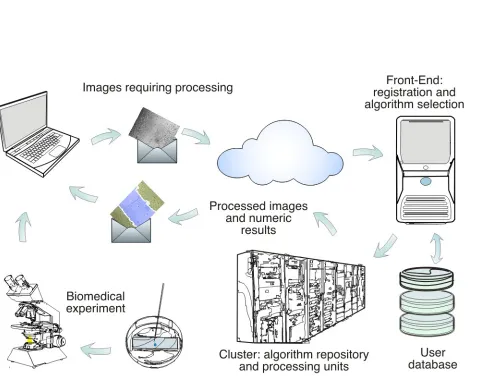
The results of the analysis will be later sent to the user via email. The process is described in Fig. 5.
[image:9.595.60.540.220.596.2]
Fig 5 Graphical description of CAIMAN
Only two examples of algorithms available in CAIMAN will be presented: measuring cellular migration and shading correction.
processes such as wound healing or the activity of metastatic tumour cells. The algorithm is described in detail in [6], but briefly: the segmentation algorithm consisted of the
following steps: frequency low-pass filtering and thresholding, closing and opening
[image:10.595.56.532.169.301.2]morphological operations to consolidate the cellular regions, approximation of boundaries and calculation of distances. The results consist of an image with the boundaries labelled in white lines, the region of the wound in a different colour and a list of the measurements calculated (fig 6).
The second example describes an additive retrospective non-parametric algorithm for the correction of inhomogeneous intensity background of images, commonly known as
[image:11.595.62.539.276.428.2]shading. A common unwanted phenomenon in biomedical imaging is the presence of intensity variations due to the sample of interest and the technique of acquisition. In light microscopy, the variation may originate from uneven sample thickness, out-of-focus objects (in thick slices), or departure from Köhler illumination and is commonly known as shading. It was assumed that an original unbiased image was corrupted by a slowly-varying shading that could be estimated from the signal envelope in a process analogous to amplitude modulation detection. The estimation could be understood as the iterative stretching of a thin flexible surface under which a series of objects are placed. Initially, the surface was identical to the signal intensity but after a series of stretches, the surface adapted to the peaks (or lowest points) of the objects, and intermediate values in between them. The algorithm is described in detail in [7]. Fig 7 shows a shaded image (notice the difference in intensity between the corners of the image and it corrected version, where the intensity of the background is uniform.
3.2 Computational Steering and Collaborative visualisation
We describe the development of a steered computation and collaborative visualisation of a model used for simulating a tsunami using the shallow water equations. With its epicentre located off the coast of Indonesia, the Indian ocean tsunami of 2004 resulted in the deaths of over 250'000 people the hardest hit countries were Indonesia, Thailand, Sri Lanka and India. The event was the result of a so called thrust under sea earthquake where one tectonic plate is forced under another, earthquakes of this type can achieve magnitudes exceeding 9. Given the nature of such events the success of tsunami early warning systems is dependent on the positioning of networks of seismic detectors and sea depth monitoring systems. It is possible for such systems to function because of the difference in speed between a seismic wave and the tsunami itself. The success of such detection systems is dependent on sufficiently validated computational models. Because ocean depth is sufficiently less than the propagation distance for a tsunami, the shallow water equations provide a suitable approximation for solving the conservative partial differential equations of a mass of water moving under the influence of gravity. Most sophisticated methods make use of adaptive mesh techniques here we present a simplified approach using the Crank-Nicholson method to solve the shallow water equations.
Computational steering is a form of feedback control of computational processes and is applicable to a wide range of problems including, fluid simulation, optimization and probems involving dynamic complex populations. Resolving a problem using a computational steering approach requires a number of components.
•A simulation with well defined control parameters,
•a visualisation of the system under study and
•user tools for modifying the simulation control parameters
Setting up these features for a simulation using the IOME toolkit, simplified significantly. Figure 8 illustrates the architectural approach using IOME which applies to the components identified above.
Many researchers are collaborating using text based messaging as well as visual and audio communications using the internet. However it still remains quite difficult for researchers to compare results and work collaboratively with the visualization of computation results and information. Very often the difficulty is exacerbated by the size and complexity of data sets. This is an area that has been the subject of a large amount of research [8], [9], [10]. A form of collaborative visualisation is the use of desktop sharing tools such as Real VNC [11] and Microsoft’s remote desktop. IBM's Deep Computing Visualisation product [12] provides fully shared control through the compression of a shared OpenGL data stream. These applications may require higher bandwidths particularly with visualization applications with large frame rates. Collaborative visualisation can be classified in a number of different ways [8].
•Local control.
The IOME server is the collaboration server and the visualisation applications are the IOME clients exchanging parameters with the central server. Using the IOME tool kit we developed an application enabling a researcher to develop a steered simulation or collaborative visualisation using the popular visualisation tool IBM data explorer. One of the reasons for IBM data explorer's popularity is because of its visual programming interface enabling researchers to rapidly develop applications by dragging a dropping components from a toolbox and connecting those components together. The IOME visualisation tool for IBM data explorer uses the interface tool-kit provided with data explorer to enable data explorer applications to move data between a custom application and a visual program.
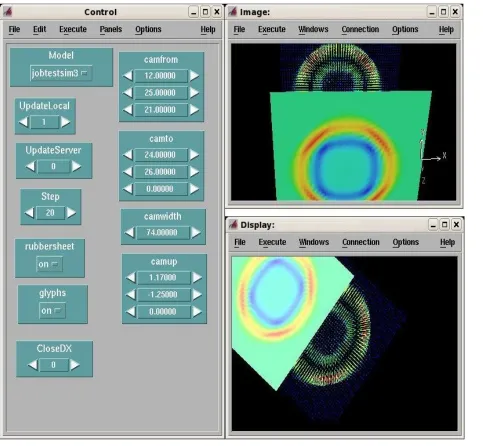
The steps to develop our steered or collaborative simulation proceed as follows. We develop a visualisation and decide which control parameters will be shared by collaborators for visualising the data sets. Having decided which parameters will be shared we start the collaboration server which is initialised with the required parameters. This provides the data explorer IOME client application with the correct data to send or request from the collaboration server. If the user clicks update local the local visualisation client is updated with parameters currently stored on the server. If the user clicks the update server button the server is updated with the users shared view parameters. Figure 9 shows an example visualisation for the shallow water wave problem. Three windows are observed the control panel on the left shows the visualisation view parameters which are shared, changing the camera parameters modifies the camera view parameters for the shared display illustrated on the lower image on the right hand side of figure 9. The upper image on the right of figure 9 is controlled soley by the local user without any input from the shared data server.
[image:13.595.62.533.413.694.2]
Figure 9. Collaborative Visualisation of a Tsunami Simulation Using IBM Open Data Explorer.
4. Application Development Using IOME
Application development using IOME requires making a series of client calls or by
providing an IOME ML file that is loaded when an IOME server starts up. The researcher generates client applications using the various toolboxes that have been provided with IOME. It is then necessary to set up the application so that an IOME server may be started and populated with the data. In order to use the tool-kit effectively, the researcher will need to identify which one of the following case scenarios matches the type of problem under investigation. As identified in the introduction, this may be any of the following scenarios.
•Sharing data between different client applications running in different locations - this can be used for collaborative working or in a computational steering scenario,
•generate simulation metadata which may be used to manage distributed data collections and/or for automated laboratory notebook generation.
To handle these use cases, IOME provides a suite of applications as described in Table 1.
Application Description
iogs Start the iome server and
for making iome client calls
iogsproxy IOME proxy server
Table 1. Applications provided with the IOME toolkit.
Help for the applications shown in table 1 is obtained by starting each application with a single input option, this is the --help option . The iogs application is used to start the IOME server and may also be used to make client calls to an IOME server. When
starting iogs, parameters provided as input include the command name, the name of the simulation, the name of a stylesheet file and the port. The server will start on the first port available or the port specified on the command line, the XSL file provided on the command line can be used to automatically transform output XML files into a user presentable form. When the service starts the port is written to an output file with a name generated from the simulation name, the processor id and the word 'port'. By default all of the web services are enabled. There exists an option to determine which services are activated, these services are flagged in a file called iogs.config. If the service is started correctly it may be populated with data by making a sequence of IOME client add-parameter requests, alternatively we can request the server to load an IOME-ML file and the server state may be saved at any point. For IOME servers running inside a cluster we may use
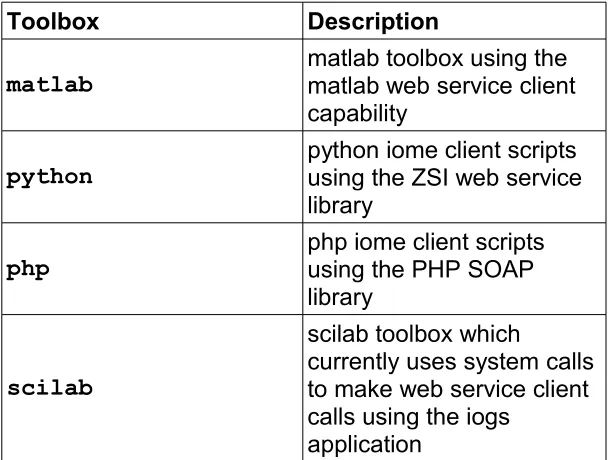
the iogsproxy application which may be used to relay requests to the actual server. The IOME src/tools directory of the IOME distribution includes the following folders containing scripts for generating IOME client applications, these toolboxes are listed in table 2. Each toolbox provides the same set of calls to the IOME server. Help for using the matlab and scilab toolboxes may be obtained from the respective help utility or the wikki provided by google code for the IOME. For each of the toolboxes there is a number of methods including;
•addparam
•setparam
• getparam
•listparam
•deleteparam
These methods may be applied to variables of type double, int, string, mat or vec (matrix and vector variables respectively), get and set methods for mat and vec types also require size information about the matrix or vector. There are also get, set, add and delete
server. Each toolbox has a parser enabling it to read IOME-ML files directly parsig data into a generic simulation structure for use by a client application.
Toolbox Description
matlab matlab toolbox using the matlab web service client capability
python python iome client scripts using the ZSI web service library
php php iome client scripts using the PHP SOAP library
scilab
scilab toolbox which
currently uses system calls to make web service client calls using the iogs
[image:16.595.43.531.100.721.2]application
[image:16.595.53.358.125.355.2]5. Conclusion and Future Developments
The examples presented here demonstrate that researchers using IOME can easily develop modelling, visualisation and analysis applications that are able to communicate useful data and results between geographically separated researchers. It has also been demonstrated that researchers can develop practical web interfaces which allow collaboration partners to run simulations [13]. The main benefit is that researchers can set up these models without a detailed understanding of the web services and protocols such as SOAP. These tools may be employed to build diverse applications, running across heterogeneous platforms. It has been seen that the IOME tool-kit provides the benefits listed below ;
•allows data sharing between client applications running in different locations for collaborative working or in a computational steering scenario,
•allows researchers to publish a simulation as a web accessible service,
•enables the automated generation of simulation metadata which may be used to manage distributed data collections.
Experience with the CAIMAN project has demonstrated that IOME provides an effective and useful mechanism for making simulations accessible as web services. Web service based work flow engines such as Taverna [14] provide an easy programming interface and enable different applications to be merged into a single workflow. This approach to application development makes it possible for research teams to readily solve multidisciplinary optimisations problems. Multidisciplinary optimisation problems will typically explore large parametric spaces and have the potential to consume huge quantities of computational clock cycles. If such a service is to be made available, the computation facility would need to provide a service for hosting and managing the simulation services. The current implementation of IOME assumes a service provision model for which the services are static and stateless. In a service model with multiple applications a more appropriate approach is to make use of a stateful service model. In this model we have a continuously running service factory and registry that can start an instance of an IOME service. It is therefore necessary to provide a system enabling the dynamic invocation of web services and a registery service that provides information about the currently available services. The service must enable a researcher to make requests which results in an application being published by the service manager which also registers the service as available. Researchers developing workflow applications must be able to find information about available services and how they are called. The final requirement is therefore an application request mechanism that a user application must make, this service requester would query the service registry, determine the state of the service, if necessary dynamically create the service and return an end point for the invoked service. This application request mechanism would then use the returned end point to request the actual service, some of these processes are illustrated in figure 9. Much effort has already been invested in developing the standards to resolve such dynamic service provision models and this is one of the reasons for modern standards such as the web services resource framework [15]. Tools such as dynasoar [16] are available for dynamic creation of web services and registry services such as grimoires are available for discovering information about services and workflows[17].
use secure shell enabled tunnelling. With a view to enhancing the current security arrangements it is proposed that the following gsoap tools are use;
•use secure sockets layer plugin with gsoap
•use the gsoap wsse plugin, i.e. the WS-Security standard
•a further possibility for enabling access to globus GSI authenticated facilities is to ensure the secure availability of web services and clients provided grid facilities using X-509 based digital certificates for authentication.
Finally, we remark that the IOME-ML has provided a useful model for describing parametric data used by a diverse range of simulations, we anticipate further benefits through further reviews of the IOME-ML.
6. References
[1] Gsoap toolkit, http://www.cs.fsu.edu/~engelen/soap.html
[2] Joukl, Holger: Interoperable WSDL/SOAP web services introduction: Python ZSI, Excel XP, gSOAP
[3] Reichental, S, “SRML – Simulation Reference Markup Language” W3C Note 18 December 2002 http://www.w3.org/TR/SRML/
[4] Holcombe et al “A General Framework for Agent Based Modelling of Complex Systems” in the proceedings of EUROPEAN CONFERENCE on COMPLEX SYSTEMS
ECCS ‘06,2006
http://sbs-xnet.sbs.ox.ac.uk/complexity/complexity_PDFs/ECCS06/Conference_Proceedings/PDF/p 25.pdf
http://en.wikipedia.org/wiki/X-machine
[5] Shasharina, S et al “FSML: Fusion Simulation Markup. Language for Interoperability of Data and Analysis Tools” http://www.txcorp.com/pdf/FSML_GRIDL-poster.pdf This paper appears in: Challenges of Large Applications in Distributed Environments, 2005. CLADE
2005. Proceedings
Publication Date: 24 July 2005
[6] C. C. Reyes-Aldasoro, D. Biram, G. M. Tozer, and C. Kanthou, "Measuring cellular migration with image processing," Electronics Letters, vol. 44, pp. 781-U27, 2008.
[7] C. C. Reyes-Aldasoro, "Retrospective shading correction algorithm based on signal envelope estimation," Electronics Letters, vol. 45, pp. 454-455, 2009.
[8] G. Johnson, “Collaborative Visualization 101”, In ACM SIGGRAPH - Computer Graphics, pages 8-11, volume 32 number 2 May 1998 and at http://www.sdsc.edu/~johnson/papers/ACM_1998/cg_1998may.html
[10] K Brodlie et al, “Distributed and Collaborative Visualization”, Visualization, 2004. IEEE
10-15 Oct. 2004, page(s): 155-
162, http://www.comp.leeds.ac.uk/vvr/gViz/publications/CGF_dcvstar.pdf
[11] REAL vnc, the Virtual Network Computing (VNC) protocol http://www.realvnc.com/ [12] IBM Deep Computing Visualization version 1.4 solution brief, http://www-03.ibm.com/systems/resources/systems_deepcomputing_visualization_d ownloads_DCV_1.4_Solution_Brief.pdf
[13] M.K.Griffiths, “The Grid Application Portal for Glass Technology. (GAP-GT) ”, Proceedings of the UK e-Science All Hands Meeting 2004, Available at
http://www.allhands.org.uk/2004/proceedings/papers/74.pdf
[14] Taverna project website, http://taverna.sourceforge.net/
[15] Banks, T, "Web Services Resource Framework(WSRF) – Primer v1.2", OASIS
Committee Draft 02 - 23 May 2006, http://docs.oasis-open.org/wsrf/wsrf-primer-1.2-primer-cd-02.pdf
[16] Watson P, Fowler C.P, Kubicek C,et al. "Dynamically Deploying Web Services on a Grid using Dynasoar, In Proceedings of the Ninth IEEE International Symposium on Object and Component-Oriented Real-Time Distributed Computing (ISORC 2006). Gyeongju, Korea, April 24-26 2006 Lee S, Brinkschulte U, Thuraisingham B. et al (eds), pp 151-158. IEEE Computer Society Press 2006,
http://www.neresc.ac.uk/projects/dynasoar/pubs/DynasoarISORC2006.pdf
7. Abbreviations
IOME Interactive Object Management Environment
ML Markup Language
MPI Message Passing Interface
PVM Parallel Virtual Machine
OpenMP Open Message Passing
POSIX Portable Operating System Interface (UniX)
SOAP Simple Object Access Protocol
WSDL Web Service Description Language
SAAS Software As A Service
VTK Visualisation Tool Kit
RAVE Resource Aware Visualisation Environment
SGI Silicon Graphics International
VUE Visual User Environment
IBM International Business Machines
XML Extensible Markup Language
HTML Hypertext Markup Language
XMML X-Machine Markup Language
FSML Fusion Simulation Markup Language
SBML Systems Biology Markup Language
SRML Simulation Reference Markup Language
SISO Simulation Interoperability Standards Organisation
IEEE Institute of Electrical and Electronics Engineers
MHD Magneto-Hydrodynamics
PISE Pasteur Institute Software Environment
GUI Graphical User Interfaces
SAAS software as a service
SOA Service Oriented Architecture
EASA Enterprise Accessible Software Applications
FUSE File system in user space
OpenAFS Open Andrews file system
iRODS Integrated Rule-Oriented Data System
SETI Search for Extra Terrestrial Intelligence
WS Web Services
8. Acknowledgements
The authors acknowledge the EPSRC for funding, WRG Phase III: The White Rose Grid e-Science Centre EPSRC reference EP/F057644/1