This is a repository copy of Teaching clinical reasoning and decision-making skills to nursing students: Design, development, and usability evaluation of a serious game. White Rose Research Online URL for this paper:
http://eprints.whiterose.ac.uk/118341/ Version: Accepted Version
Article:
Johnsen, H.M., Fossum, M., Vivekananda-Schmidt, P. orcid.org/0000-0003-1629-6574 et al. (2 more authors) (2016) Teaching clinical reasoning and decision-making skills to nursing students: Design, development, and usability evaluation of a serious game. International Journal of Medical Informatics, 94. pp. 39-48. ISSN 1386-5056
https://doi.org/10.1016/j.ijmedinf.2016.06.014
Article available under the terms of the CC-BY-NC-ND licence (https://creativecommons.org/licenses/by-nc-nd/4.0/).
[email protected] https://eprints.whiterose.ac.uk/
Reuse
This article is distributed under the terms of the Creative Commons Attribution-NonCommercial-NoDerivs (CC BY-NC-ND) licence. This licence only allows you to download this work and share it with others as long as you credit the authors, but you can’t change the article in any way or use it commercially. More
information and the full terms of the licence here: https://creativecommons.org/licenses/
Takedown
If you consider content in White Rose Research Online to be in breach of UK law, please notify us by
1
Teaching clinical reasoning and decision-making skills to nursing students:
Design, development, and usability evaluation of a serious game
Hege Mari Johnsen, RN, MSc a), Mariann Fossum, RN, PhD a), Pirashanthie
Vivekananda-Schmidt, DPhil, C.Psychol b), Ann Fruhling, PhD c), Åshild Slettebø, RN, PhD a)
a) Department of Health and Nursing Science, Faculty of Health and Sport Sciences,
University of Agder, Grimstad, Norway
b) Medical Education, The Medical School, University of Sheffield, UK
c) College of Information Science and Technology, University of Nebraska, Omaha,
USA
Correspondence to:
Hege Mari Johnsen
Department of Health and Nursing Science,
Faculty of Health and Sport Sciences,
University of Agder,
PO Box 509
4898 Grimstad
Norway
E-mail: [email protected]
Telephone: +47 97515773
Keywords: clinical decision-making, community health nursing, computer simulation,
2
Teaching clinical reasoning and decision-making skills to nursing students:
Design, development, and usability evaluation of a serious game
ABSTRACT
Background: Serious games (SGs) are a type of simulation technology that may provide
nursing students with the opportunity to practice their clinical reasoning and decision-making
skills in a safe and authentic environment. Despite the growing number of SGs developed for
healthcare professionals, few SGs are video based or address the domain of home health care.
Aims: This paper aims to describe the design, development, and usability evaluation of a
video based SG for teaching clinical reasoning and decision-making skills to nursing students
who care for patients with chronic obstructive pulmonary disease (COPD) in home healthcare
settings.
Methods: A prototype SG was developed. A unified framework of usability called TURF
(Task, User, Representation, and Function) and SG theory were employed to ensure a
user-centered design. The educational content was based on the clinical decision-making model,
Bloom’s taxonomy, and a Bachelor of Nursing curriculum. A purposeful sample of six
participants evaluated the SG prototype in a usability laboratory. Cognitive walkthrough
evaluations, a questionnaire, and individual interviews were used for the usability evaluation.
The data were analyzed using qualitative deductive content analysis based on the TURF
framework elements and related usability heuristics.
Results: The SG was perceived as being realistic, clinically relevant, and at an adequate level
of complexity for the intended users. Usability issues regarding functionality and the user–
computer interface design were identified. However, the SG was perceived as being easy to
learn, and participants suggested that the SG could serve as a supplement to traditional
3 Conclusions: Using video based scenarios with an authentic COPD patient and a home
healthcare registered nurse as actors contributed to increased realism. Using different
theoretical approaches in the SG design was considered an advantage of the design process.
The SG was perceived as being useful, usable, and satisfying. The achievement of the desired
functionality and the minimization of user–computer interface issues emphasize the
importance of conducting a usability evaluation during the SG development process.
Keywords:
Clinical decision-making
Community health nursing
Computer simulation
Education
Problem-based learning
User–computer interface
1. Introduction
Education and training that develops healthcare professionals’ clinical reasoning skills is
emphasized as an important strategy to improve diagnostic performance and reduce overt
diagnostic errors. Registered nurses (RNs) play a key role in the diagnostic process while
caring for patients. The performance of clinical reasoning among nurses is defined as “the
process by which nurses collect cues, process the information, come to an understanding of a
patient problem or situation, plan and implement interventions, evaluate outcomes, and reflect
on and learn from the process” [1]. RNs with effective clinical reasoning skills may anticipate
or identify deteriorating patients and prevent serious adverse events [1,2].
Recent demographic changes and care reforms [3,4] have resulted in a change in
4 increased number of patients with chronic diseases living at home. For instance, the group of
patients with chronic obstructive pulmonary disease (COPD) is highly represented in home
healthcare services. COPD is expected to become the third leading cause of death worldwide
by 2030 [5]. Therefore, it is essential for home healthcare RNs to have a high level of clinical
reasoning skills combined with evidence-based knowledge to provide effective and efficient
clinical practice and to maintain high-quality nursing care [6,7].
To enable nursing students to respond effectively to the current changes in the healthcare
environment, curricula and skills training need to adapt to the evolving healthcare needs in
home healthcare services [8-10]. This includes an increased focus on improving nursing
students’ ability to prevent, recognize, and treat any deteriorating patients to avoid
unnecessary hospitalization [3]. Furthermore, nursing education needs to provide simulation
training where students are able to apply different types of knowledge in novel, authentic, and
practice-based situations [6,8,10].
Recently, simulation technology known as “serious games” (SGs) has appeared in the
educational games market [11,12]. SGs are computer-based simulations that combine
knowledge and skills development with video game-playing aspects to enable active,
experiential, situated, and problem-based learning [13]. SGs represent a learner-centered
educational approach in which users control their learning process through interactivity
[14,15]. Recently, SGs have been proposed as a type of technology-enhanced simulation that
may provide nursing students with an opportunity to practice their clinical reasoning and
decision-making skills in a realistic and safe environment [14,16].
The usability issues of some SGs can negatively impact users’ experiences and intended
learning outcomes [17,18]. Focusing too much on the development of the entertainment-based
counterparts of an SG may result in sacrificing learning effectiveness. Learning may also be
5 decreases their motivation to play the game [17]. To ensure a user-centered design, it is
important that the SG contents fit the intended users’ learning objectives [17,19,20].
Therefore, it is important to conduct a usability evaluation as part of the development process
to ensure the usability and learnability of the SG [17,18,21].
Despite the growing number of SGs developed for healthcare professionals [15,22],
limited research addresses the development process of SGs in the domain of nursing
education [15,23]. Few researchers have specifically addressed the domain of home health
care [20,24,25]. Thus, the aim of this paper is to describe the design, development, and
usability evaluation of a video based SG for teaching clinical reasoning and decision-making
skills to nursing students who are caring for patients with COPD in home healthcare settings.
2. Materials and methods
2.1. Design and development of the SG
The SG prototype used in this study is a single-player online game that was applied to the
Bachelor of Nursing program in the domain of home health care. This SG may be categorized
under the genre of simulation games because it attempts to realistically mimic a particular
clinical work environment [16,22,26].
The development of the SG required a close collaboration with domain experts [22,27].
The development team consisted of a doctoral student and four Bachelor of Multimedia
Technology and Design students. The development team collaborated with a RN practicing
home health care, lecturers from the Bachelor of Nursing program, and a physician from a
local hospital for quality assurance of the SG content.
In addition to the interdisciplinary collaboration with professionals within the university
and from clinical practice, the development of the SG involved different considerations,
6 2.1.1. Target users
The target users of the SG were second-year Bachelor of Nursing students. Because the
content and objectives of the SG needed to fit the users’ knowledge and experience [2,17,22],
the syllabus was examined to determine their current expected level of competencies in
anatomy, physiology, and subjects in medical treatment and nursing. Based on their level of
use of computers and e-learning, we concluded that the nursing students’ information and
communications technology (ICT) skills were average or above average.
2.1.2. Educational content
In our study, the learning objectives of the SG were to increase nursing students’
perception and confidence in clinical situations, to promote their systematic assessment of
patients as well as choose appropriate actions in specific situations. In accordance with the
clinical decision-making model proposed by O’Neill et al. [28], the intention of the SG was to
provide nursing students with a learning environment that promoted situated cognition and
fostered experiential learning.
The SG prototype provided a video based simulated scenario set in a home healthcare
clinical practice. The scenario was based on an RN’s visit to a patient who was recently
diagnosed with COPD. Information about the patient, cues about his condition, and different
quiz-based tasks or questions were provided during the scenario. For example, users needed
to provide the patient with information about his diagnosis, treatment, and exacerbation
prevention. In addition, the user needed to respond to a situation in which the patient
developed a noninfectious exacerbation of his COPD. Tasks and questions were based on
evidence-based knowledge and the Bachelor of Nursing curriculum [29,30], and the
formulation of questions was guided by Bloom’s taxonomy of educational objectives [31].
Bloom’s Taxonomy categorizes learning into the domains of cognitive knowledge,
7 knowledge, comprehension, application, analysis, synthesis, and evaluation [31]. To promote
the development of clinical reasoning and decision-making skills, tasks and questions were
formulated to encourage students to apply, analyze and synthesize knowledge based on cues
in the scenarios.
2.1.3. User–computer interface design
To ensure a user-centered SG prototype design, we employed a unified framework of
usability called TURF (Task, Users, Representation, and Function) [32]. In TURF, usability is
referred to as “how useful, usable, and satisfying a system is for the intended users to
accomplish goals in the work domain by performing certain sequences of tasks” [32]. This
framework was developed for the healthcare environment and is often the underpinning
framework for ensuring good usability within the design. Furthermore, it is often a method for
usability evaluation. The TURF framework was used as a foundation when designing the
different components (gameplay and rules, challenges, interaction, and objectives) of the SG
described below.
The SG gameplay [22,27] was designed for users to take part in a home healthcare RN’s
home visit to a patient. For increased fidelity, filmed video clips were used as the graphical
basis, using a female RN and a person with COPD as actors. The intention was for a user to
identify with the nurse [33]. The users interacted with the SG by watching a video based
scenario (visual/audio) and by using a mouse or touchpad (physical) to solve different
quiz-based tasks or questions in the scenario [22,27,34]. Tasks and questions that fit the target user
were employed to challenge and engage the user [22,33,34] and meet the SG learning
objectives [2,22,26]. Variation in the types of questions (single or multiple answer and
drag-and-drop questions) were employed to increase immersion [33]. The rules of the SG [22,27]
were that users were allowed only one attempt for each task or question, and they needed to
8 have the autonomy to direct the RN and change paths based on their choices. Users were not
able to harm the patient as a consequence of their poor choices.
Through their answers, the users dictated the actions for the RN character. When the
users submitted their answer(s), the RN in the SG scenario provided feedback by
demonstrating the proper things to do and/or say. In addition, users were able to view the
correct answers through a link. Users received points for each correct answer, which were
summarized and provided as a final score at the end of the scenario. The embedded
assessment and feedback in the SG provided informed teaching and active, instructional
learning [33]. A tutorial was provided before users started playing the SG to give them the
necessary instructions about how to play the SG [34].
2.1.4. Technology
The Bachelor of Multimedia Technology and Design students provided the necessary
equipment and technical solutions to create the SG, such as video cameras and microphones.
Adobe Captivate 8, Adobe Premiere Pro CC, and Adobe Photoshop CS6 (Adobe Systems
Incorporated, San Jose, CA, USA) were the development software programs used in this
project. HTML5 (World Wide Web Consortium, Cambridge, MA, USA) was used for
programming and uploading to an Internet address. An Internet address was used to avoid
limiting students’ access through the nursing course’s online-learning platform, which made
the tool available to collaborative institutions and universities and to RNs working in clinical
practice. The SG was made available on several platforms, including personal computers,
laptops, and the newest tablets.
2.2. Prototype development
The scenario was video recorded in an apartment at a nursing home facility. A home
9 Kaczmarczyk et al. [35] and Olsen et al. [17], a storyboard that contained numbered
descriptions of each video and questions with correct answers was used as a manuscript. In
addition, the actors were asked to improvise if needed.
The video clips and questions were assembled, and the necessary information and
instruction of use were integrated. The SG was named “Jeg får ikke puste” (I cannot breathe).
As suggested by Olsen et al. [17], the development process included repeated testing of the
prototype prior to the usability evaluation. Screenshots of the SG prototype are presented in
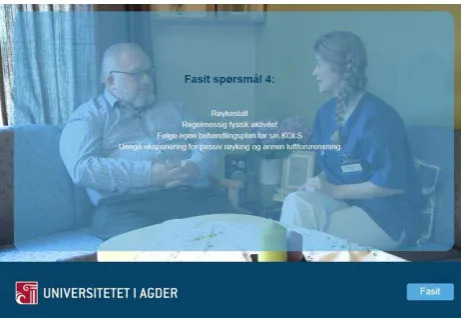
[image:10.595.188.409.319.469.2]Figs. 1-3 with permission from the actors.
[image:10.595.177.415.511.672.2]Fig. 1. Screenshot of the home healthcare setting in the SG scenario.
Fig. 2. Screenshot of the multiple-choice question about how the patient can prevent the
10 Fig. 3. Screenshot of the RN explaining the right answers, which is overlaid by a transparency
showing the correct answers when the user presses the “Fasit” button to pause the scenario.
2.3. Usability evaluation
2.3.1. Methods
The usability evaluation for the SG prototype involved both in-game and postgame
assessment [36] and included the following methods: cognitive walkthrough evaluations,
observations, a posttest usability questionnaire, and a follow-up interview with each
participant.
The cognitive walkthrough method is used to explore how users interact with an
interface, identify where and why problems occur, and suggest areas for improvement [21].
During the usability evaluation, the participants were instructed to vocalize their thoughts
when they were having difficulty and had questions or comments while interacting with the
game. Users’ interactions with the game were recorded using written notes, audio, and video
recording [17,18,21].
The survey instrument was developed based on 12 questions from the validated
Post-Study System Usability Questionnaire (PSSUQ), which is a research instrument developed for
use in scenario-based usability evaluations [37]. The TURF framework and research on the
11 contained 20 questions. A seven-point Likert scale, ranging from strongly disagree (1) to
strongly agree (7), was used. Two questions had negative wording [38]. The survey
instrument was pretested [38] with four colleagues from health and social science
departments.
A semi-structured interview guide for the follow-up interview was developed to evaluate
user satisfaction and possible recommendations for improvements. Questions asked were: 1)
“What did you like best about the system?” 2) “What did you like least about the system?” 3)
“Can you recommend any changes to improve this system?” 4) “Would you recommend this
way of learning to others?” and 5) “Any other comments?”
2.3.2. Recruitment
To assess all the components of TURF (task, user, representation and function) in the
usability evaluation, a convenience sample of six participants was recruited: two third-year
nursing students, two university lecturers from the Bachelor of Nursing program, and two
RNs from home healthcare settings. Teachers and nurses were included because they could
also be potential users and could identify possible flaws concerning the quiz-based tasks, the
difficulty levels of the tasks, and the alignment with curricula and clinical practice. According
to Lazar et al. [21], six participants is an acceptable sample in usability evaluations, as long as
the aim is to identify usability issues and improve a prototype.
2.3.3. Location and recording of data
The usability evaluation was conducted in a usability laboratory. The evaluation facility
contained a test room and an observation room, with a one-way mirror between the rooms.
There was a laptop for task performance on a desk in the test room and two video cameras for
recording the test. There were four computer screens in the observation room to follow the
12 participant and the computer screen, respectively, during the usability evaluation. In addition,
all activities on the test computer screen were recorded. To enable participants to comment on
survey questions and note possible flaws or ideas for improvement on the SG, the survey and
interview were conducted in the test room after the usability evaluation was finished.
2.3.4. Evaluation team
The doctoral student acted as the test leader and moderator in the test room. In case of
technical issues during the SG evaluation, one of the four bachelor ICT students was present
in the test room. The three other bachelor ICT students were responsible for starting and
ending the recordings as they followed the test session through the window and computer
screens in the observation room. A technician was available if technical problems occurred.
2.3.5. Procedure
As suggested by Olsen et al. [17], a pretest of the procedure was conducted before the
actual usability evaluation. The pretest was conducted to test the equipment and the final pilot
version of the SG and to practice the different roles in the usability evaluation.
Before the usability evaluation sessions started, each participant was asked to sign written
informed consent. Next, the moderator gave a brief introduction to the content of the SG to
participants before their cognitive walkthrough evaluation began. The following instructions
were given: interact with the prototype, try to understand how to use the game without
receiving any explanation, and vocalize your thoughts, feelings, and opinions about any
aspect of the game [21]. The participants were informed that they could receive help from the
moderator or technician if they encountered problems or could not manage to go further in the
SG. Following the cognitive walkthrough usability evaluation, the participants were asked to
complete the survey questionnaire and were interviewed.
13 was employed during transcription of the videos to take notes on actions and issues related to
the different tasks/questions presented during the scenario, such as the time to complete the
scenario, the time to complete the different questions, and the number of errors made. These
were recorded to identify questions that were perceived as difficult or complex or caused
errors.
2.3.6. Analysis
Data from the usability sessions were analyzed using qualitative deductive content
analysis [38]. The transcribed data were imported into QSR NVivo 10 (QSR International,
Burlington, MA, USA). The text was reviewed and categorized into the different elements of
the TURF framework and related Nielsen–Shneiderman usability heuristics [32]. To ensure
consistency and reliability, the first author (moderator) conducted the usability evaluations,
transcription, and analysis. However, the results from the analysis were reviewed and
discussed within the research team.
2.3.7. Ethical considerations
The actors in the SG scenario signed an informed consent that indicated that the videos
could be used for educational purposes within and outside the university. The SG was
designed and developed in an ethical manner with regard to patient–healthcare professional
interaction and how the actors appeared in the scenario [39]. Because the RN in the scenario
was considered a potential role model, she did not demonstrate any incorrect responses in the
scenario.
The participants in the usability evaluation received oral and written information about
the usability evaluation with the assurance of confidentiality, and they signed an informed
consent. Approval for the study was obtained from the Norwegian Social Science Data
14 3. Results
The results from the cognitive walkthrough, survey, and interviews are presented
according to the components of TURF [32]: “task” indicated whether the users perceived the
system as easy to learn, easy to use, and error tolerant; “users” showed whether the users
perceived the system as useful, usable, and satisfying; “representation” showed whether the
users perceived the formats of representation of the system as usable; and “function”
represented the system’s fit with a specific work domain and intended users [32]. The
perceived representation or user–computer interface will be presented according to the
following TURF-related usability heuristics [32]: consistency, visibility, match, minimalism,
memory, feedback, flexibility, message, error, closure, undo, language, control, and
document.
3.1. Tasks
The time to complete the scenario was between 27 and 40 minutes, with an average time
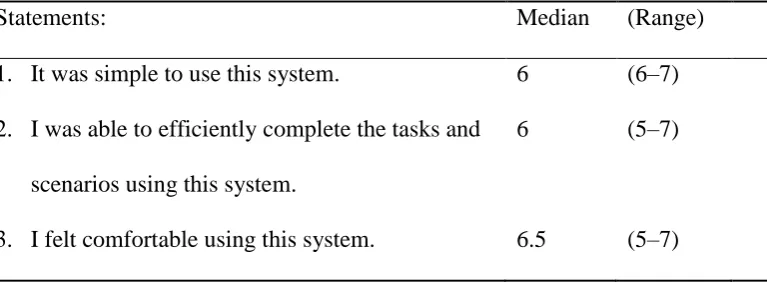
of 32 minutes. However, as shown in Table 1, most participants agreed that they were able to
efficiently complete the tasks and scenarios using this system (median = 6) and disagreed that
[image:15.595.79.463.613.754.2]it was difficult to learn to use the SG (median = 1).
Table 1
Responses to usability scale statements (n = 6).
Statements: Median (Range)
1. It was simple to use this system. 6 (6–7)
2. I was able to efficiently complete the tasks and
scenarios using this system.
6 (5–7)
15 4. It was difficult to learn to use the system. 1 (1–6)
5. The information (such as online help, on-screen
messages, and other documentation) provided
with this system was clear.
5.5 (4–6)
6. It was easy to find the information I needed. 6 (3–7)
7. The information provided for the system was
easy to understand.
6 (6)
8. The information was effective in helping me to
complete the tasks and scenarios.
6 (6–7)
9. The organization of information on the system
screens was clear.*
6 (3–6)
10. The interface of this system was pleasant. 7 (6–7)
11. This system has all of the functions and
capabilities I expected it to have.
5.5 (3–7)
12. The sequence/flow of the tasks in the scenarios
was appropriate.
7 (6–7)
13. The system provided informative feedback
during the scenarios.*
6 (3–7)
14. The healthcare-related concepts provided in the
system were easy to understand.
5.5 (5–7)
15. The learning objectives in the scenarios were
difficult to understand.
2 (1–3)
16. The tasks presented in the scenarios were
clinically relevant.
7 (6–7)
16 of complexity.
18. Overall, I am satisfied with this system. 6 (5–7)
19. Overall, I find the content of the system
relevant for use in nursing education.
7 (6–7)
20. Overall, I find the content of the system
relevant for use in healthcare organizations.
7 (6–7)
Scoring was based on a seven-point Likert scale from 1 = strongly disagree to 7 = strongly
agree. *n = 5.
Three of the participants had some trouble knowing how to start the scenario. All
participants perceived the drag-and-drop task about COPD medication to be too difficult and
verbose. These findings were supported by the time it took to complete this task and the
number of errors made by the participants. Five of the six participants did not notice a
message at the bottom of the page stating they had only one attempt at the drag-and-drop
tasks and could not alter their choices. Consequently, some participants became a bit
frustrated and gave up trying to complete this task. However, one of the student participants
stated that this question motivated her to learn more about these medications.
Five of the six participants did not notice the two buttons visible at the bottom of the
page: one button link was for viewing the correct answers, and the other was for viewing
values for measures conducted by the RN, such as pulse and respiration frequency.
Consequently, the agreement among the survey participants (Table 1) varied according to
whether the organization of information on the system screens was clear (median = 5.5,
range = 4-6), and whether it was easy to find the information they needed (median = 6,
range = 3-7). Most participants eventually noticed the buttons because they were asked to
17 was very straightforward and simple to use the buttons when I became aware of them.” Two
participants stated that even if they did not notice the button for viewing the correct answers,
they felt they received the correct answers through the RN’s demonstration in the scenario.
During the usability test, three of the six participants commented that they would like to
be able to view their answers to evaluate what was right or wrong. The lack of functionality
for receiving informative feedback about both correct and incorrect answers was also
reflected in the survey responses.
Some participants felt that several of the answers on tasks concerning observations or
interventions could be correct, even if they were not among the correct answers. Two
participants said: "If measuring his blood pressure would not cause harm, I would have done
that."
3.2. Users
From the results in the survey, five participants judged their computer skills as average
and one as above average compared with other students/colleagues. Four out of six had
experience with e-learning resources from the field of nursing. Only one had experience with
a similar e-learning resource. Based on their experience with computers and e-learning, most
participants agreed that the SG was simple (median = 6) and comfortable (median = 6) to use
(Table 1). Overall, most participants (median = 6) agreed that they were satisfied with the SG.
One participant perceived the variation in types of tasks/questions (multiple-choice questions
and drag-and-drop tasks) as motivating. Both teacher participants thought this SG was an
effective way of teaching students about caring for patients with COPD. However, one of the
teacher participants found the game somewhat tedious and suggested that the scenario could
be more “to the point.”
Neither of the two student participants had experience with caring for patients with
18 Both student participants stated that it would have been useful for them to play this SG before
attending clinical placement in home health care. One of the students stated that it was useful
to learn through the observation of situations in practice instead of just reading books about it.
In correlation with the student participants, the teacher participants thought it would be useful
for nursing students to watch the communication between a patient and an RN in real
situations and that the scenario presented relevant issues regarding patients with COPD that
could help prepare students for clinical practice. The teacher participants thought this SG
could be a good supplement to training in laboratory and clinical settings. All participants
agreed that they would recommend this way of learning to others.
3.3. Representation
The results from the survey regarding the perceived user–computer interface, the
sequence/flow of tasks, the organization/provision of information, and feedback in the SG is
provided in Table 1. Usability issues identified during the usability evaluation and interviews
are presented according to the TURF-related usability heuristics [32] in Table 2.
Table 2
Usability heuristics and issues identified during usability evaluation and interviews.*
Consistency and
minimalism
Visibility and
documentation
Some specific screens (i.e., the screen about medications and
interventions) were perceived to have too much information, and
the text sometimes was a bit small.
One participant proposed choosing another color for the buttons
and messages at the bottom of the screen so they would be more
visible and catch the users’ attention more easily.
19 the Introduction on how to use the buttons for viewing correct
answers and measures.”
Match Two cases of mismatch between tasks or questions and the
scenario were noted. The patient was prescribed only three of
the six medications in the presented task, and the temperature in
one case was improperly taken because the nurse merely placed
a hand on the patient’s forehead.
Memory Five of the participants had trouble remembering what they had
read in the Introduction about the ability to view measures and
correct answers during the scenario. Furthermore, two
participants had trouble remembering what they had answered in
some of the questions about observations and interventions
because of the large amount of possible answers.
Feedback and closure One participant reported that she missed an explanation from the
nurse on what she was going to do and why. Another participant
wished for an explanation on why the correct answers were more
correct than others.
Participants’ need to view their own answers varied. One stated
that she needed to see her own answers to be able to learn from
them. Another participant stated that she would prefer to view
the correct answers without being reminded of her own
mistakes. Three of the participants proposed showing correct
and wrong answers with green and red marks on the screen.
Flexibility, undo, and
control
Some participants wished for the ability to solve the same task
20 pause or move forward in the scenario.
Message and error Only one of the participants noticed the message on the bottom
of the screen saying that they could not undo their answer.
Language Five of the participants misinterpreted the first question in the
scenario.
One of the participants stated: “The abbreviation of medication
names was confusing because I have never used them before.”
One of the participants said she had trouble understanding one of
the questions because she was not Norwegian.
*Based on Nielsen–Shneiderman usability heuristics [32].
3.4. Function
According to the survey response (Table 1), all participants (median = 7) found the
content of the SG relevant for use in nursing education and healthcare organizations and that
tasks or questions presented in the scenarios were clinically relevant. The participants also
agreed that the tasks/questions in the scenarios had an adequate level of complexity for the
intended users (median = 6.5) and disagreed that the learning objectives were difficult to
understand (median = 2). This was also expressed during the interviews. In addition,
participants expressed that this was a realistic scenario from the domain of home health care
and that many important principles regarding care for patients with COPD were present. One
of the teacher participants suggested that the SG could serve as a nursing student entrance test
21 4. Discussion
4.1. Participants’ perception of the SG
The participants perceived the clinical scenario in the SG as realistic. Overall, the content
in the SG was perceived as clinically relevant for both students and healthcare personnel. The
SG was perceived as useful, usable, and satisfying. However, usability issues were identified.
The use of video based scenarios with an RN and a person with COPD as actors
contributed to creating a realistic scenario. Despite correlating evidence of positive
experiences with simulations using standardized patients in nursing and medical education
[40,41], a review of Internet-based simulations showed that video based scenarios have been
used less than virtual simulations and that professional actors have most often been used to
play patients in previous video based scenarios [16]. Simulated scenarios are also perceived to
lack nurse caring aspects [42] because they often focus on teaching acute nursing care
[43-45]. On the contrary, the participants in our study perceived that the video based SG managed
to demonstrate the caring relationship between the RN and her patient and contributed to
immersion.
In addition to providing realistic situations from clinical practice, the content of SGs
needs to correspond with course material and learning objectives [33]. The student
participants stated that they perceived the content in the SG to be clinically relevant and that it
would have been useful to play the SG before attending clinical placement in home health
care. Statements such as these correspond with evidence that the use of simulation training in
home healthcare visits increased students’ confidence to complete home visits [46,47].
To be able to teach clinical reasoning skills to nursing students, an SG should focus on
enabling nursing students to develop the ability to understand the nature of a situation by
detecting relevant cues and to take the appropriate action at the right time for the right reason
22 questions were designed to comply with the appropriate actions to take in the particular
situations in the scenario. For example, measuring the patient’s blood pressure was not the
most important assessment at an early point during the scenario and was therefore not among
the correct answers. As described earlier, this correspondence between specific situations and
correct answers was perceived as challenging by some participants. This result indicates that
more feedback should be incorporated in the SG to explain why some actions were more
essential and therefore more correct than others.
Another question in developing SGs for nursing education is whether the SG should
provide users with the ability to choose incorrect answers deliberately and view the
consequences of their choice. Some SGs provide this ability [35,48], while others [34] argue
against it. As the RN in this SG plays herself and acts as a role model in the scenario, it would
be unethical to request the RN to demonstrate the incorrect answers or to let the patient die.
An SG should provide sufficient feedback within the game [33]. As in the study by
Kaczmarczyk et al. [35], some participants wished for more feedback. Some participants
wished for an explanation of why some answers were “more right” than others and wanted the
ability to view both correct and incorrect answers. One important limitation of
computer-based simulations compared with classroom simulations is the lack of debriefing after
students have finished the scenario. Debriefing has been shown to be an essential component
in simulation [49,50]. To meet nursing students’ need for in-game and/or endgame feedback
in SGs, an alternative way to play the SGs could be in groups with a teacher present or
providing debriefing after the participants complete the game.
Several usability issues were identified in the SG concerning functionality and user–
computer interaction. Similar to other studies, our usability evaluation revealed issues with
the length of the videos, complex tasks, the lack of ability to skip back and forth in the
23 Kaczmarczyk et al. [35], our SG had some technical glitches. These technical issues may have
been attributed to the project’s low-budget development, where Bachelor of Multimedia
Technology and Design students used Adobe Captivate 8, which did not provide all of the
functionalities we had planned in the SG design. Consequently, the students had to make
appropriate adjustments to the current version of Adobe Captivate 8. This caused some of the
usability and technical issues identified in the usability evaluation. For example, participants
could not undo drag-and-drop tasks or go back and view their answers, and the SG was not
compatible with a Sharable Content Object Reference Model (SCORM). To be
SCORM-compatible, the SG has to have the ability to be uploaded directly in a learning management
system and to communicate with this system without modifications. Despite these technical
issues, participants were still able to complete their assigned tasks successfully.
Improvements in the SG design were conducted based on usability issues identified
during the usability evaluation [18] and what was possible within the scripted version of the
Adobe Captivate 8 software. Based on lessons learned from this project and the theory
employed in the study, Table 3 shows the considerations that should be employed in the SG
design process.
Table 3
Usability principles to consider in SG design.*
Consistency/
Minimalism
There should be consistency throughout the SG concerning the
font/capitalization, color/layout, and positioning. Avoid elements that
distract or cause slowdown, such as too much text, too many features, and
long and/or complex questions. Variation in the types of tasks and questions
(single or multiple answers and drag-and-drop tasks) may increase perceived
24 that are too long because they can decrease perceived immersion.
Visibility/
Documentation
Information/documentation, such as how to play the SG, possibilities of
action, and how to use the different features on the screen should be provided
and/or visible on the screen. The SG should be instinctive to use. Colors used
on text and screens may influence visibility.
Match There should be a match between the content of the SG and the real world.
Avoid irrelevant information. All answers in the quiz-based tasks or
questions should connect to the question and be plausible answers.
Memory Avoid the need for users to memorize a lot of information about how to play
the SG or information related to the story in the SG.
Feedback/
Closure
Both in-game and endgame feedback should be provided about users’ actions
and performance. Consider the need for debriefing.
Flexibility/
Control/Undo
Consider providing the ability to move back and forth in the SG, pause the
game, undo answers, view own answers, and view both right and wrong
answers in red and green. Consider the ability to enter wrong answers and
view the consequences in the SG.
Error/Message Prevent errors in the SGs during design. Provide messages/alerts on the
screen about possible errors and how to recover from these errors.
Language Provide clear language and concepts understandable for the intended users.
* Based on Nielsen–Shneiderman usability heuristics [32]
4.2. Methodological considerations and limitations
The results show that it is an advantage to combine different approaches such as theory in
human–computer interaction, decision-making, and learning theory in SG design and
25
framework” approach (learner specification, context, mode of representation, and pedagogic
considerations) proposed by de Freitas and Liarokapis [19] for the development of
educational games and simulation. However, as suggested by Thompson and Stapley [51], we
employed decision theory alongside pedagogical approaches. In addition, we employed a
user–computer interaction design framework. The combination of the different approaches
enabled us to design a usable, useful, and satisfying SG and to provide educational content
and objectives for future measures of effectiveness of the SG. In accordance with Kato [52]
and Vivekananda-Schmidt [39], we also found it advantageous that the researchers were
involved in the processes of design, development, and usability evaluation of the SG.
As proposed by Olsen et al. [17] and Mayer et al. [36], a mixed-method approach was
used in the usability evaluation of the SG prototype. The use of a mixed-method design
provided comprehensive information about how the users perceived the SG and enabled us to
identify possible improvements. However, widely used usability instruments valid for
management tools and applications fall short when applied to SG applications [17,18]. In
accordance with Fossum et al. [53] and Fruhling and Lee [54], we found questions from the
PSSUQ instrument to be highly relevant in the usability assessment of the SG. Our survey
instrument (questionnaire) was validated through pretesting on four colleagues from different
disciplines within the health and social science departments. This resulted in rephrasing of
difficult words such as “interface” and removing two questions that were too detailed. Three
questions about positioning and experience with computers and e-learning resources were
added.
Instead of summarizing the number of appearances of the predefined system and user
event categories proposed by Moreno-Ger et al. [18] for the usability evaluation of SGs, we
chose to employ well-established usability principles used in the heuristic evaluation [55].
26 analysis of the data from the usability evaluation. However, some of the heuristics were
perceived to be similar and overlapping, such as the heuristics “consistency” and
“minimalism” in regard to the graphical user interface and “flexibility,”“undo,” and “control”
in regard to user options within the SG. The researchers also found the heuristic “feedback”
difficult to separate from the other heuristics because it could have included participants
going back to review their own answers.
A possible limitation of this study is that most participants had experience with other
e-learning resources, which may have influenced their evaluation of the functionality of the SG.
However, in accordance with findings of other studies [35,57,58], the participants perceived
the interactive game-based learning resource as a good supplement to traditional learning
methods.
4.3. Implications of results for SG design and clinical practice
The reported challenges that impact the ability to provide clinical teaching in current
nursing education include limits in the resources and capacity of laboratory-based
simulations; a lack of clinical placements; restrictions on the number of students placed in
units; and clinical teaching of long-distance students [10]. SGs are computer-based
simulations that allow healthcare professionals to experience situations that can be difficult to
achieve in reality without compromising patient care or patient safety. In addition, SGs
provide active, experiential, situated, and problem-based learning [13]. As the SG in this
project proposes a method of enhancing nursing students’ clinical reasoning, decision-making
skills and evidence-based knowledge, it informs the discussion on how to improve nursing
education and especially the transition of nursing students from training to practice [3,8,9].
Furthermore, as this SG is developed in collaboration with professionals from home
healthcare services, it may contribute to improving the match between RNs’ education and the
27 This project shows that useful, usable, and satisfying SGs can be developed at a low cost
by a multidisciplinary in-house team in collaboration with clinical practice. However,
technical solutions are important features to consider when developing SGs [22,34]. For
example, it is important to choose design software that fits with the planned quiz-based tasks
and questions and user–computer interaction. However, currently, there are few development
tools (game engines and frameworks) designed specifically for SG development [59]. This
has implications for the further exploration of potential design software appropriate for SG
design.
5. Conclusion
The SG was perceived by the study participants as being useful, usable, and satisfying.
They proposed that the SG could serve as a supplementary tool to traditional training in
laboratory and clinical settings. Using video based scenarios with an authentic COPD patient
and a home healthcare registered nurse as actors contributed to increased realism. In addition,
using different theoretical approaches in the SG design was considered an advantage of the
design process. The achievement of the desired functionality and the minimization of user–
computer interface issues emphasizes the importance of conducting a usability evaluation
during the SG development process. Further research will focus on the assessment of nursing
students’ perception of the face, content and construct validity of the SG prototype and their
preferences for using this type of e-learning resource in nursing education.
The contribution of this paper is twofold: 1) it describes the development of an SG for
nursing education in the domain of home health care, and 2) it provides a description of the
development and evaluation process that may serve as a guide for others to develop more SGs
28 Acknowledgements
We would like to give a special thanks to associate professor Morgan Konnestad,
assistant professor Halvard Øysæd, assistant professor Rune Andersen, and Svein Even
Skogen, Daniel Møller-Stray, Christina Terese Lien and Elise Birgitsdatter Haugland, all four
bachelor students, who made the development of the SG possible. In addition, we would like
to thank the people who contributed as consultants and actors in the development of the SG
and the participants in the usability evaluation. We would also like to thank the providers of
the usability laboratory for all their support related to the usability evaluation of the SG,
associate professor and usability specialist Santiago Martinez and PhD student Berglind
Smaradottir.
The research project was financial supported by the Norwegian Nurse Association.
However, the funding source had no role in the design or conduct of the study or preparation
and approval of the paper.
References
[1] T. Levett-Jones, K. Hoffman, J. Dempsey, S.Y.-S. Jeong, D. Noble, C.A. Norton, J. Roche, N. Hickey, The ‘five rights’ of clinical reasoning: An educational model to enhance
nursing students’ ability to identify and manage clinically ‘at risk’ patients, Nurse Educ.
Today, 30 (2010) 515-520, doi:http://dx.doi.org/10.1016/j.nedt.2009.10.020
[2] K. Hoffman, J. Dempsey, T. Levett-Jones, D. Noble, N. Hickey, S. Jeong, S. Hunter, C. Norton, The design and implementation of an Interactive Computerised Decision Support Framework (ICDSF) as a strategy to improve nursing students' clinical reasoning skills, Nurse Educ. Today, 31 (2011) 587-594, doi:http://dx.doi.org/10.1016/j.nedt.2010.10.012
[3] Ministry of Health & Care Services, White Paper No. 47 (2008-2009), The Coordination Reform [Samhandlingsreformen: Rett behandling - på rett sted - tilrett tid], Ministry of Health & Care Services [Helse- og omsorgsdepartementet], Oslo, 2009.
[4] Ministry of Health & Care Services, White Paper No. 29 (2012-2013), Future Care [Morgendagens omsorg], Ministry of Health & Care Services [Helse- og
29 [5] WHO, Chronic obstructive pulmonary disease (COPD).
http://www.who.int/respiratory/copd/en/, 2015 (accessed 18.02.16)
[6] P. Benner, M. Sutphen, V. Leonard, L. Day, Educating nurses: A Call for Radical Transformation, Jossey-Bass, San Francisco, Calif, 2010.
[7] J. Higgs, M.A. Jones, Clinical decision making and multiple problem spaces, in: J. Higgs, M.A. Jones, S. Loftus, N. Christensen (Eds.), Clinical Reasoning in the Health Professions, Butterworth Heinemann ELSEVIER, UK, 2008, pp. 3-17.
[8] WHO, Transforming and scaling up health professionals´ training: WHO Education Guidelines 2013, http://apps.who.int/iris/bitstream/10665/93635/1/9789241506502_eng.pdf, 2013 (accessed 18.02.16).
[9] Ministry of Education & Research, White Paper No.13 (2011-2012), Education for
Welfare: Interaction as Key [Utdanning for velferd: Samspill i praksis], Ministry of Education & Research [Kunnskapsdepartementet], Oslo, 2012.
[10] K.B. Gaberson, M.H. Oermann, T. Shellenbarger, Clinical Teaching Strategies in Nursing, Springer, New York, 2014.
[11] C. Girard, J. Ecalle, A. Magnan, Serious games as new educational tools: how effective are they? A meta-analysis of recent studies, J. Comput. Assist. Learn., 29 (2013) 207-219, doi:10.1111/j.1365-2729.2012.00489.x
[12] M. Ma, L.C. Jain, P. Anderson, Future Trends of Virtual, Augmented Reality, and Games for Health, in: M. Ma, L.C. Jain, P. Anderson (Eds.) Virtual, Augmented Reality and Serious Games for Healthcare 1, Springer, UK, 2014, pp. 1-6.
[13] T.M. Connolly, E.A. Boyle, E. MacArthur, T. Hainey, J.M. Boyle, A systematic literature review of empirical evidence on computer games and serious games, Comput. Educ., 59 (2012) 661-686, doi:http://dx.doi.org/10.1016/j.compedu.2012.03.004
[14] S.de Ribaupierre, B. Kapralos, F. Haji, E. Stroulia, A. Dubrowski, R. Eagleson, Healthcare Training Enhancement Through Virtual Reality and Serious Games, in: M. Ma, L.C. Jain, P. Anderson (Eds.) Virtual, Augmented Reality and Serious Games for Healthcare 1, Springer, UK, 2014, pp. 9-27.
[15] F. Ricciardi, L.T. De Paolis, A Comprehensive Review of Serious Games in Health Professions, International Journal of Computer Games Technology, (2014) 1-11,
doi:http://dx.doi.org/10.1155/2014/787968
[16] R.P. Cant, S.J. Cooper, Simulation in the Internet age: The place of Web-based
simulation in nursing education. An integrative review, Nurse Educ. Today, 34 (2014) 1435-1442, doi:http://dx.doi.org/10.1016/j.nedt.2014.08.001
30 Usability. Theory, Methods, Tools and Practice Springer, 2011, pp. 625-634, doi:
http://dx.doi.org/10.1007/978-3-642-21708-1_70
[18] P. Moreno-Ger, J. Torrente, Y.G. Hsieh, W.T. Lester, Usability testing for serious games: Making informed design decisions with user data, Advances in Human-Computer Interaction, (2012) 1-13, doi:http://dx.doi.org/10.1155/2012/369637
[19] S. de Freitas, F. Liarokapis, Serious Games: A New Paradigm for Education, in: M. Ma, A. Oikonomou, L.C. Jain (Eds.) Serious Games and Edutainment Applications, Springer London, 2011, pp. 9-23, doi:10.1007/978-1-4471-2161-9_2
[20] P. Stuckless, M. Hogan, B. Kapralos, Virtual Simulations and Serious Games in
Community Health Nursing Education: A Review of the Literature, in: M. Ma, L.C. Jain, P. Anderson (Eds.) Virtual, Augmented reality and Serious Games for Healthcare 1, Springer, UK, 2014, pp. 145-158.
[21] J. Lazar, J.H. Feng, H. Hochheiser, Research Methods in Human-Computer Interaction, John Wiley & Sons, UK, 2010.
[22] V. Wattanasoontorn, I. Boada, R. García, M. Sbert, Serious games for health, Entertain. Comput., 4 (2013) 231-247, doi:http://dx.doi.org/10.1016/j.entcom.2013.09.002
[23] C. Foronda, L. Godsall, J. Trybulski, Virtual Clinical Simulation: The State of the Science, Clinical Simulation in Nursing, 9 (2013) e279-e286,
doi:http://dx.doi.org/10.1016/j.ecns.2012.05.005
[24] M. Hogan, B. Kapralos, S. Cristancho, K. Finney, A. Dubrowski, Bringing community health nursing education to life with serious games, Int. J. Nurs. Educ. Scholarsh., 8 (2011), 1-8, doi:http://dx.doi.org/10.2202/1548-923X.2072
[25] I. Popil, D. Dillard-Thompson, A Game-Based Strategy for the Staff Development of Home Health Care Nurses, The Journal of Continuing Education in Nursing, 46 (2015) 205-207, doi:http://dx.doi.org/10.3928/00220124-20150420-14
[26] O.J. Petit dit Dariel, T. Raby, F. Ravaut, M. Rothan-Tondeur, Developing the Serious Games potential in nursing education, Nurse Educ. Today, 33 (2013) 1569-1575,
doi:http://dx.doi.org/10.1016/j.nedt.2012.12.014
[27] A.F.S. Barbosa, P.N.M. Pereira, J.A.F.F. Dias, F.G.M. Silva, A New Methodology of Design and Development of Serious Games, International Journal of Computer Games Technology, 2014 (2014) 1-8, doi:10.1155/2014/817167
[28] E.S. O'Neill, N.M. Dluhy, E. Chin, Modelling novice clinical reasoning for a computerized decision support system, J. Adv. Nurs., 49 (2005) 68-77,
31 [29] The Norwegian Dictorate of Health, COPD: National guideline [KOLS: Nasjonal faglig retningslinje og veileder for forebygging, diagnostisering og oppfølging av personer med kols], The Norwegian Dictorate of Health [Helsedirektoratet], Oslo, 2012.
[30] H. Almås, J. Bakkelund, B.H. Thorsen, A. Dichmann Storknæs, Sykepleie ved
lungesykdommer [Nursing at Lung Diseases], in: H. Almås, D.-G. Stubberud, R. Grønseth, K.C. Toverud (Eds.) Klinisk sykepleie : 1, Gyldendal akademisk, Oslo, 2010, pp. 107-163.
[31] B. S. Bloom, M. D. Engelhart, E. J. Furst, W. H. Hill, D. R. Krathwohl, Taxonomy of Educational Objectives: Handbook II. Cognitive Domain, David McKay, New York, NY, 1956.
[32] J. Zhang, M.F. Walji, TURF: Toward a unified framework of EHR usability, J. Biomed. Inform., 44 (2011) 1056-1067, doi:10.1016/j.jbi.2011.08.005
[33] L.A. Annetta, The “I's” have it: A framework for serious educational game design, Rev. Gen. Psychol., 14 (2010) 105-112, doi:http://dx.doi.org/10.1037/a0018985
[34] F. Laamarti, M. Eid, A. El Saddik, An Overview of Serious Games, International Journal of Computer Games Technology, 2014 (2014) 1-15,
doi:http://dx.doi.org/10.1155/2014/358152 doi:10.1155/2014/358152
[35] J. Kaczmarczyk, R. Davidson, D. Bryden, S. Haselden, P. Vivekananda Schmidt, Learning decision making through serious games, Clin. Teach., 12 (2015) 1-6,
doi:10.1111/tct.12426
[36] I. Mayer, G. Bekebrede, C. Harteveld, H. Warmelink, Q. Zhou, T. Ruijven, J. Lo, R. Kortmann, I. Wenzler, The research and evaluation of serious games: Toward a
comprehensive methodology, Br. J. Educ. Technol., 45 (2014) 502-527, doi:10.1111/bjet.12067
[37] J.R. Lewis, Psychometric evaluation of the PSSUQ using data from five years of usability studies, Int. J. Hum. Comput. Interact., 14 (2002) 463-488,
doi:10.1080/10447318.2002.9669130
[38] D.F. Polit, C.T. Beck, Essentials of Nursing Research: Appraising Evidence for Nursing Practice, Wolters Kluwer/Lippincott Williams & Wilkins, Philadelphia, 2010.
[39] P. Vivekananda-Schmidt, Ethics in the Design of Serious Games for healthcare and medicine, in: S. Arnab, I. Dunwell, K. Debattista (Eds.) Serious Games for healthcare: Applications and Implications, Medical Information Science Reference, USA, 2013, pp. 91-106.
32 [41] Y. Kowitlawakul, Y.L. Chow, Z.H.A. Salam, J. Ignacio, Exploring the use of
standardized patients for simulation-based learning in preparing advanced practice nurses, Nurse Educ. Today, 35 (2015) 894-899, doi:http://dx.doi.org/10.1016/j.nedt.2015.03.004
[42] E. Diener, N. Hobbs, Simulating Care: Technology-Mediated Learning in Twenty-First Century Nursing Education, Nurs. Forum, 47 (2012) 34-38,
doi:http://dx.doi.org/10.1111/j.1744-6198.2011.00250.x doi:10.1111/j.1744-6198.2011.00250.x
[43] F. Buttussi, T. Pellis, A. Cabas Vidani, D. Pausler, E. Carchietti, L. Chittaro, Evaluation of a 3D serious game for advanced life support retraining, Int. J. Med. Inform., 82 (2013) 798-809, doi:http://dx.doi.org/10.1016/j.ijmedinf.2013.05.007
[44] Y.S. Liaw, F.L. Wong, W.-C.S. Chan, Y.J.T. Ho, Z.S. Mordiffi, L.S.B. Ang, S.P. Goh, K.E.N. Ang, Designing and Evaluating an Interactive Multimedia Web-Based Simulation for
Developing Nurses’ Competencies in Acute Nursing Care: Randomized Controlled Trial, J.
Med. Internet Res., 17 (2015) e5, doi:http://www.jmir.org/2015/1/e5/ doi:10.2196/jmir.3853
[45] N.F. Cook, T. McAloon, P. O'Neill, R. Beggs, Impact of a web based interactive simulation game (PULSE) on nursing students' experience and performance in life support training - A pilot study, Nurse Educ. Today, 32 (2012) 714-720
doi:http://dx.doi.org/10.1016/j.nedt.2011.09.013
[46] E.L. Richards, V. Simpson, P. Aaltonen, L. Krebs, L. Davis, Public health nursing student home visit preparation: the role of simulation in increasing confidence, Home Healthc. Nurse, 28 (2010) 631-638, doi:10.1097/NHH.0b013e3181f85e10
[47] S.T. Yeager, B. Gotwals, Incorporating High-fidelity Simulation Technology into Community Health Nursing Education, Clinical Simulation in Nursing, 6 (2010) e53-e59, doi:10.1016/j.ecns.2009.07.004
[48] J.M. Tiffany, B.A. Hoglund, Facilitating Learning Through Virtual Reality Simulation: Welcome to Nightingale Isle, in: M. Ma, L.C. Jain, P. Anderson (Eds.) Virtual, Augmented Reality and Serious Games for Healthcare 1, Springer, Berlin, Heidelberg, 2014, pp. 159-174.
[49] K.T. Dreifuerst, Using debriefing for meaningful learning to foster development of clinical reasoning in simulation, J. Nurs. Educ., 51 (2012) 326-333, doi:10.3928/01484834-20120409-02
[50] W.M. Nehring, F.R. Lashley, Nursing Simulation: A Review of the Past 40 Years, Simul. Gaming, 40 (2009) 528-552, doi:10.1177/1046878109332282
[51] C. Thompson, S. Stapley, Do educational interventions improve nurses’ clinical decision
33 [52] P.M. Kato, The Role of the Researcher in Making Serious Games for Health, in: S. Arnab, I. Dunwell, K. Debattista (Eds.) Serious Games for Healthcare: Applications and Implications, Medical Information Science Reference, USA, 2013, pp. 213-231.
[53] M. Fossum, M. Ehnfors, A. Fruhling, A. Ehrenberg, An evaluation of the usability of a computerized decision support system for nursing homes, Appl. Clin. Inform., 2 (2011) 420-436, doi:10.4338/ACI-2011-07-RA-0043
[54] A.L. Fruhling, S.M. Lee, The influence of user interface usability on rural consumers' trust of e-health services, Int. J. Electron. Healthc., 2 (2006) 305-321,
doi:http://dx.doi.org/10.1504/IJEH.2006.010424
[55] M.W. Jaspers, A comparison of usability methods for testing interactive health
technologies: methodological aspects and empirical evidence, Int. J. Med. Inform., 78 (2009) 340-353, doi:10.1016/j.ijmedinf.2008.10.002
[56] J. Zhang, T.R. Johnson, V.L. Patel, D.L. Paige, T. Kubose, Using usability heuristics to evaluate patient safety of medical devices, J. Biomed. Inform., 36 (2003) 23-30,
doi:10.1016/S1532-0464(03)00060-1
[57] M.V. López-Pérez, M.C. Pérez-López, L. Rodríguez-Ariza, Blended learning in higher
education: Students’ perceptions and their relation to outcomes, Comput. Educ., 56 (2011)
818-826, doi:10.1016/j.compedu.2010.10.023
[58] S.E. Kirkley, J.R. Kirkley, Creating next generation blended learning environments using mixed reality, video games and simulations, TechTrends, 49 (2004) 42-54.