Build your Web Development
career with Wrox
Programmer’s Reference
JavaScript
JavaScript
JavaScript Programmer's Reference
Cliff Wootton
© 2001 Wrox Press
All rights reserved. No part of this book may be reproduced, stored in a retrieval system or transmitted in any form or by any means, without the prior written permission of the publisher, except in the case of
brief quotations embodied in critical articles or reviews.
The author and publisher have made every effort in the preparation of this book to ensure the accuracy of the information. However, the information contained in this book is sold without warranty, either express or implied. Neither the authors, Wrox Press nor its dealers or distributors will be held liable for
any damages caused or alleged to be caused either directly or indirectly by this book.
Published by Wrox Press Ltd,
Arden House, 1102 Warwick Road, Acocks Green, Birmingham, B27 6BH, UK
Trademark Acknowledgements
Wrox has endeavored to provide trademark information about all the companies and products mentioned in this book by the appropriate use of capitals. However, Wrox cannot guarantee the accuracy of this information.
Credits
Author Technical Reviewers
Cliff Wootton Alex Abacus
Jonny Axelsson
Category Manager Chong Chang
Dave Galloway Andrew Van Heusen
Martin Honnen Technical Editors Ron Hornbaker
Timothy Briggs Kenneth Lo
Howard Davies Jim Macintosh
Phillip Jackson Jon Stephens
Amanda Kay Peter Torr
Simon Mackie Chris Ullman
Chris Mills Paul Vudmaska
Peter Morgan Paul Wilton
Project Manager Figures
Chandima Nethisinghe Shabnam Hussain
Production Coordinator Cover
Tom Bartlett Shelley Frazier
Additional Layout Proofreaders
Simon Hardware Ian Allen
Pippa Wonson Christopher Smith
Agnes Wiggers e-Book Production
Tom Bartlett Index
Andrew Criddle Production Manager
Cliff Wootton lives in the south of England and works on multimedia systems and content management software for large data driven web sites. Currently he is developing interactive TV systems for BBC News Online in London (http://www.bbc.co.uk/news) and previously worked for other commercial broadcasters on their web sites. Before that he spent several years developing geophysical software and drawing maps with computers for oil companies.
Cliff is married with three daughters and a growing collection of bass guitars.
Acknowledgements
It's hard to believe I've actually reached the stage of writing the introductory pages to this book. It's been a long process and I don't think I would have reached this point without the help of Tim Briggs at Wrox, who very gently urged me onwards and gave me encouragement when I needed it. Tim's contribution to this project was vital to its success because he developed the process which converted my DOCBOOK output into something the Wrox editors could turn into a book. Tim also prepared the CD-ROM content from the same XML files; truly amazing!
Thanks also to all the other folks at Wrox who have helped, organised, checked and collated my material to present it in the form you now see it. Grateful thanks to my reviewers, who in a very short time provided me with some useful guidance and support; in particular Jon Stephens and Martin Honnen, who also provided some amazingly clever example code fragments for use as examples.
There are many other people who contributed without realising it. In particular Nick Cohen (formerly of the BBC and now at Turner Broadcasting) who provided some helpful insights into TV set-top-box workings. Also Matt Karas and Emyr Tomos (both ex-BBC, now at Talkcast) who threw down the gauntlet of several interesting challenges for me to implement on the BBC News Online web site. I also wouldn't be sitting here if it weren't for Bruce Morris at Carlton Online. It was through the happy chance of an article I wrote for Bruce's Web Developer's Journal (WDJ) web site that led to Wrox contacting me and the BBC inviting me to do some JavaScript work. What an amazing thing the web is.
Introduction
The JavaScript language is constantly developing, and continues to increase in popularity. Its evolution into a general purpose scripting language from what started life purely for scripting web browsers, is a great success story. You can now find JavaScript interpreters in many different environments and there are sure to be other new and interesting uses for the language in the future, especially now that embeddable interpreters are available.
In this book, we have attempted to snapshot the browsers that exist currently, which need to be supported by web sites, and collate that information together in a form that has broad scope and is deep enough to be useful on a day-to-day basis. As the language is growing all the time, this is likely to be an ongoing task.
Who is This Book For?
The book is aimed at people who already have some knowledge of JavaScript and need a
companion volume to their daily work. It is primarily aimed at the experienced practitioner, and so does not attempt to be a tutorial for the beginner.
For a tutorial book, we suggest Paul Wilton's Beginning JavaScript (Wrox Press, ISBN 1-861004-06-0).
Typical uses of the book include times when you:
❑ Need to check out the specific details of a particular language construct or object property
❑ Know what you want to do, but want to know how JavaScript helps you achieve that
❑ Want information on cross-browser compatibility issues for your script
❑ Have encountered a problem in your script and need help to debug it
The Structure of the Book
To make it easy to navigate through the topics, titles describe the topic content and the topic type and are organized alphabetically. Where a topic might be referred to using several headings, a brief entry in the cross-reference at the end of the book shows the main topic for that subject.
I used a great deal of software automation to manage the book content and the whole thing was built in a database and exported as an XML file set using the DocBook DTD. There are now in excess of 3500 individual topics in this work. That is more than twice as many as we have room for in the printed book, so we’ve had to put a useful subset of the reference into the printed book, and the complete set of material onto the CD-ROM, which is available both in PDF and HTML formats. Some additional reference information that is not strictly part of the JavaScript language, but that you may find useful, is also included, such as country codes and MIME types.
Where we discuss an object all the important properties, methods, events, and any supporting material are broken out into their own topics, and these detailed entries are included on the CD. Where objects inherit properties and methods, they are listed in the object coverage, but to avoid duplication the information about the inherited properties is described as a member of the super-class. This slightly detracts from the lexical referencing but it saves space. In some cases these inherited
properties/methods are deemed important enough to merit a cross-referencing entry of their own.
This allows us to indicate availability of features at a very fine level of detail. Within each topic we can also discuss bugs, gotchas, and areas of difficulty in a focused way.
Language syntax is illustrated by way of example code fragments that show how to access an object, method, or property. More extensive examples are given where necessary.
Because of the scoping rules, properties are available without the need for the window object to be specified as a prefix. Thus navigator as a topic is available under the window.navigator topic as well. Once you have found an entry topic, you can then use the cross-referencing listings to locate other related material.
The book content was developed inside a database system, which provided tools to relate topics. The benefit is a rich source of cross-referencing links between topics. The cross-reference in the printed book is complete; that is, it also includes entries found only on the CD. The italicized cross-references in the printed book can also be found in the printed book.
We will now look at some of the 'features' of JavaScript programming, as an introduction to what topics in the book will address.
Differences between Browsers
For some time, the most popular browsers have been Netscape Navigator 4.7 and Microsoft Internet Explorer 5.0 (MSIE). Other, newer browsers make a point of being standards compliant and so if your script conforms to the standards for core JavaScript as laid down by ECMA and the W3C DOM specifications, it should function correctly.
Introduction
Because of the proliferation of browser versions and platforms, features are generally referred to as being available in the revision in which they were first introduced. As the Netscape browser is available on so many different platforms, to test for compliance across all platforms would require a test suite of a dozen machines and 30 or more different installations of browser applications. Indeed, when building such a test suite just prior to starting on this book, I found more than a dozen distinctly different browser versions just for the Macintosh platform and many more than that for Windows. Similarly, MSIE comes in a bewildering variety of versions and platform variants. In addition, the JScript interpreter is a replaceable component that can be upgraded without changing the containing browser.
Browsers and Standards
There is still much that is ambiguous or not yet defined in the standards and the browser manufacturers continue to add new features in competition with one another. Even though they are standards
compliant at a functional level, there are still significant differences if you 'look under the hood'.
We have included coverage of the following standards:
❑ ECMAScript core language up to edition 3 of the standard
❑ DOM coverage to level 1
❑ Some DOM coverage of level 2 where implemented in Netscape 6
❑ Discussion of the features being added at DOM level 3
JavaScript implementations we cover include:
❑ Netscape 3.0, 4.0, 4.05, 6.0 (the final release came out as we went to press)
❑ MSIE version 3.0, 4.0, 5.0, 5.5
❑ Opera 3, 4, 5
❑ Netscape Enterprise Server
By implication that means we cover JavaScript versions up to 1.5 and JScript up to 5.5. The
coverage of Netscape 6.0 is based on it supporting the W3C DOM standards and several bugs in the currently released version prevented the verification of some functionality although that may be platform dependent. There are also some new and unexpected features.
We concentrate our discussions on the peculiarities of Netscape and MSIE because the other browsers that support JavaScript attempt to provide a fault-free standards-based implementation. Since this is a sub-set of the functionality of Netscape and MSIE, other platforms should be adequately covered.
Features and Versions
There are now a wide variety of sources of information about JavaScript and they don't all agree. In particular there is some uncertainty over which release of JavaScript introduces certain features.
Where there is some room for doubt, we have documented the release at which the feature became useful. This is because in earlier releases it may have had a serious flaw or been significantly revised later to make it work properly. Any implementation prior to that may be unreliable. So where we may appear to disagree with other commentators our coverage is based on whether it is practical to use a particular feature at a certain release.
Some browser features are available at an earlier release on some platforms than others are. We take the Windows 32-bit release as our baseline although significant testing was also done on the Macintosh versions, which disappointingly lagged somewhat in performance and feature availability. Both platforms exhibited instabilities and crash-prone behavior but in quite different areas of the language.
As there are so many variants of the browsers, the availability matrix for objects and their member properties/methods is huge and requires a large amount of work to test on all the available combinations. So far, no single reference source has proven to be error free and whilst the information here has been examined and cross-checked it is still likely that there are errors. If, in your work, you disagree with the information provided here, please send feedback (see the end of the Introduction for how to do this).
Core JavaScript
At first glance, the JavaScript environment appears to be built around a small core of objects and it is easy to fall into the trap of assuming the language is small and compact. That is certainly true if you are only considering core JavaScript functionality. The core language is defined by ECMA and both Netscape and MSIE both claim to be ECMA compliant. They may well be, but you cannot write much useful JavaScript for deployment in a web page by confining yourself only to the functionality of the ECMA standard. It is at that point that the two browsers begin to diverge.
DOM Support
Likewise, both browsers (MSIE 5 upwards and Netscape 6) claim to be DOM compliant. Browser support for the DOM is slowly converging but if you need to do any esoteric code development that involves DOM traversal and class names, they are still somewhat different.
MSIE implements a DOM model that is structurally right, but the class names of the objects that comprise that model are certainly not correct and do not conform to the DOM standard. Netscape 6 implements a DOM compliant model that does use the correct class names. Another slight
difference is that MSIE implements distinctly different classes for some objects whereas Netscape Navigator instantiates the same class for several purposes.
These differences don't cause much grief to you when you are constructing simple scripts and web page enhancements but can be quite a problem if you need to manipulate the DOM structure and operate on objects by means of their class names. This difference did not become apparent until I used inspection scripts to examine internal document structures.
Introduction
Object Classes
You might also assume that there is a small and finite set of different object types. However if you inspect the constructor properties and examine the function names, you will find the opposite, there are a large number of object types. For example, the applets property that returns a list of applets in a document will give you an AppletArray object and not a Collection object in Netscape. Trying to work out class names on MSIE is a bit more problematic and it tends to provide generic Collection
objects instead. By building fragments of JavaScript to inspect objects, you can determine these class names and learn a lot about how the browser maintains the internal model of the page.
The topics are constructed around a browser-centric model. The objects are defined based on their instantiation by an HTML tag in a web browser window. MSIE creates a distinct object class for each tag. Netscape does a similar trick, but not so convincingly in earlier versions. At version 6, the objects are DOM compliant and named differently to those in MSIE and earlier Netscape browsers. Netcsape 6 is so different as to be a new browser with little similarity to the earlier versions of Netscape.
There is an emerging standards-based model that frames the object hierarchy much more logically and, while it is still evolving, it may become a more robust way of describing the catalog of available classes. For now, though, the web and browser dominate use of JavaScript, so this seems like the more appropriate model.
Document Objects
Another area of debate is the document object. Typically, the previous documentation describes access to it as if there is only one document object. This is true within the context of a single script within a page. However, it is not necessarily true of a window in a web browser. A window may contain many frames or layers. Each one will have its own private document object. If you are writing scripts that operate across multiple frames or windows, you may refer to several document objects, so the syntax examples are designed to accommodate the different ways in which objects can be accessed.
The Future
JavaScript is becoming available in an ever-wider variety of applications. It is used in:
❑ PDF forms for validation
❑ For modifying the behavior of the GUI in developer tools
❑ Embedded interpreters in cell phones and television set-top boxes
There was not space enough or time to cover these extensively. They are also changing continually and will not be stable enough to document for a while yet.
What Do I Need to Use This Book?
All that is needed to use this book is a text editor and a JavaScript-enabled browser, such as Microsoft Internet Explorer or Netscape Navigator.
To use the CD you will need a browser to read the HTML files and a copy of Adobe Acrobat Reader/Adobe Acrobat eBook Reader to read the PDF files, which are freely available from www.adobe.com. To make navigation easier, the PDF files contain interactive bookmarks, thumbnails, and hyperlinks in the entries.
Conventions Used in This Book
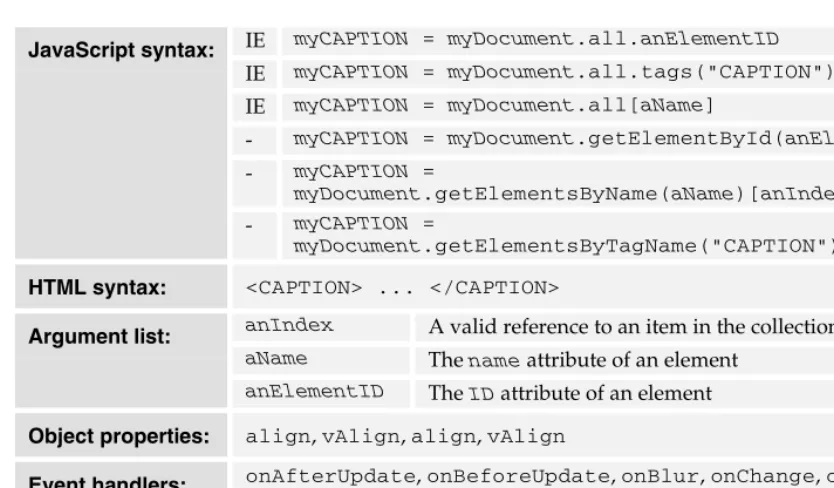
The convention used for syntax naming is that a variable created within the local scope would be prefixed with my while a global variable would be prefixed with the. Parameters passed into function and method calls are prefixed with a, an, or some.
The syntax description for an object shows how a reference to an object of that class can be
retrieved via a property or method on another object. The syntax for properties and methods show them as members of an object that is referred to with a variable. This manifests itself as an object reference like this:
myDocument = document
myDocument = myElement.parentNode myDocument = myFrame.document myDocument = myLayer.document
Then a property reference looks like this,
myDocument.cookie
and not:
document.cookie
Of course you can omit the indirection through a referencing variable and any of these would be equally valid:
document.cookie
myElement.parentNode.cookie myFrame.document.cookie myLayer.document.cookie
But by using the indirection, the syntax descriptions for the member properties and methods are simplified.
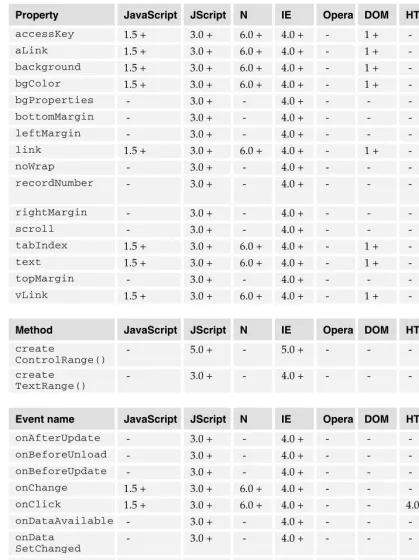
In the tables, we have used the abbreviations N for Netscape, NES for Netscape Enterprise Server, and IE for Internet Explorer.
As for styles in the text:
❑ Filenames, and code in the text appear like so: dummy.xml
Introduction
Customer Support
Wrox has three ways to support books. You can:
❑ Post and check for errata at www.wrox.com
❑ Enroll at the peer-to-peer forums at p2p.wrox.com
❑ Email technical support a query or feedback on our books in general
Errata
You can check for errata for the book at our web site; www.wrox.com, simply navigate to the page for this book. There will be a link to the list of errata.
P2P Lists
You can enroll in our peer to peer discussion forums at p2p.wrox.com. The JavaScript list is available in the 'Web Design' section.
Email Support
If you wish to point out an errata to put up on the website or directly query a problem in the book with an expert who knows the book in detail, then e-mail [email protected]. A typical email should include the following things:
❑ The name of the book, the last four digits of the ISBN and the entry name for the problem in the Subject field
❑ Your name, contact info and the problem in the body of the message
A object (Object/HTML)
An object that represents an <A> element when instantiated in MSIE.
Availability: JScript – 1.0
Internet Explorer – 3.02
Inherits from: Element object, Node object
IE myA = myDocument.all.anElementID
IE myA = myDocument.all.tags("A")[anIndex]
IE myA = myDocument.all[aName]
IE myA = myDocument.anchors.item(aName)[anIndex]
- myA = myDocument.anchors[aName]
- myA = myDocument.anchors[anIndex]
- myA = myDocument.getElementById(anElementID)
- myA = myDocument.getElementsByName(aName)[anIndex]
- myA = myDocument.getElementsByTagName("A")[anIndex]
IE myA = myDocument.links.item(aName)[anIndex]
- myA = myDocument.links[aName]
JavaScript syntax:
- myA = myDocument.links[anIndex]
HTML syntax: <A> ... </A>
anIndex A reference to an element in a collection aName An associative array reference
Argument list:
anElementID The ID value of an Element object
Object properties: accessKey, dataFld, dataSrc, hash, host, hostname, href, Methods,
mimeType, nameProp, pathname, port, protocol, protocolLong, rel,
search, tabIndex, target
Event handlers: onBlur, onClick, onDblClick, onFocus, onHelp, onKeyDown,
onKeyPress, onKeyUp, onMouseDown, onMouseMove, onMouseOut,
onMouseOver, onMouseUp, onSelectStart
See also: Element object, Input.accessKey, Map object, Anchor object
A – A object (Object/HTML)
Property JavaScript JScript N IE Opera DOM HTML Notes
accessKey - 3.0 + - 4.0 + - 1 + - -dataFld - 1.0 + - 3.02 + - - - -dataSrc - 1.0 + - 3.02 + - - -
-hash - 1.0 + - 3.02 + - - -
-host - 1.0 + - 3.02 + - - -
-hostname - 1.0 + - 3.02 + - - -
-href - 1.0 + - 3.02 + - 1 + -
-Methods - 1.0 + - 3.02 + - - - -mimeType - 1.0 + - 3.02 + - - - -nameProp - 1.0 + - 3.02 + - - - -pathname - 1.0 + - 3.02 + - - -
-port - 1.0 + - 3.02 + - - -
-protocol - 1.0 + - 3.02 + - - - -protocolLong - 1.0 + - 3.02 + - - -
-rel - 1.0 + - 3.02 + - - -
-search - 1.0 + - 3.02 + - - - -tabIndex 1.5 + 3.0 + 6.0 + 4.0 + - 1 + - -target - 1.0 + - 3.02 + - 1 + -
-Event name JavaScript JScript N IE Opera DOM HTML Notes
-ABBR object (Object/HTML)
An object representing the HTML content (an abbreviation) delimited by the <ABBR> HTML tags.
Availability: HTML version – 4.0 JScript – 3.0
Internet Explorer – 4.0
Inherits from: Element object, Node object
IE myABBR = myDocument.all.anElementID
IE myABBR = myDocument.all.tags("ABBR")[anIndex]
IE myABBR = myDocument.all[aName]
- myABBR = myDocument.getElementById(anElementID)
- myABBR =
myDocument.getElementsByName(aName)[anIndex]
JavaScript syntax:
- myABBR =
myDocument.getElementsByTagName("ABBR")[anIndex]
HTML syntax: <ABBR> ... </ABBR>
anIndex A reference to an element in a collection aName An associative array reference
Argument list:
anElementID The ID value of an Element object
Event handlers: onClick, onDblClick, onHelp, onKeyDown, onKeyPress,
onKeyUp, onMouseDown, onMouseMove, onMouseOut, onMouseOver, onMouseUp
See also: style.speak, Element object
Event name JavaScript JScript N IE Opera DOM HTML Notes
A – about: URL (Request method)
about: URL (Request method)
This is a special kind of URL that fetches content from a storage area inside the Netscape browser instead from using HTTP to get it from a web server.
Availability: JavaScript – 1.1 JScript – 3.0
Internet Explorer – 4.0 Netscape – 3.0
This is a special request method provided by the Netscape browser to gain access to local client-side resources. The resources are loaded from inclient-side the application itself.
In the Macintosh version of Navigator, this means they are stored in the resource fork of the browser application. If you need to deploy a custom version of Navigator within an intranet environment, with some care you can modify these resources with a resource-editing tool, such as ResEdit. Always work on a copy of the application and test the changes thoroughly.
On other platforms, the resources are likely to be stored in files located in folders adjacent to the application. You will need to study your own copy of Netscape to see what you can change.
These special URLs are mostly not present in early versions of MSIE, although there will be some internal resources, which may provide customization opportunities. MSIE also supports an about:blank URL that provides a blank page. There may be others hidden away inside the application.
You may also be able to obtain administration tools from Netscape and Microsoft to carry out legitimate customizations on the browsers before deploying them throughout your organization.
The following special URLs seem to work when typed into the location box:
URL Description
about:logo Netscape logo
about:mozilla A fire & brimstone quote from the book of Mozilla (Yes it's really there –
at least on some versions)
about:authors Shows a cryptic message about the page having been removed, although
the authors.html file is still present inside the application
about:cache Displays a disk cache report about:document Displays the document info console about:fonts Displays the font info console about:global A global history report
about:image-cache A report on the internal image cache
URL Description
about:memory-cache A report on the memory cache about:pics Generates a security exception
about:plugins A page of information about the plugins
about:security?advisor=XXX Brings up a security console where XXX indicates
the window to operate on.
about:security?banner-insecure Serves an unlocked padlock image about:security?banner-secure Serves a locked padlock image
about:security?issuer-logo=XXX Returns a graphic where XXX identifies which one about:security?subject-logo=XXX Returns a graphic where XXX identifies which one about:coslogo2 Cosmo logo
about:fclogo Full Circle software logo about:hslogo Beatnik logo
about:hype An audio clip about:insologo Inso logo
about:javalogo Java compatible logo about:litronic Litronic logo
about:mclogo Marimba Castanet logo about:mmlogo Macromedia logo about:ncclogo Netcast logo about:odilogo Object Design logo about:qtlogo Apple QuickTime logo about:rsalogo RSA secure logo about:symlogo Symantec logo about:tdlogo TrueDoc logo about:visilogo VisiGenic logo
about:blank Presents a blank page on Netscape Navigator 3 and
MSIE version 5; used to create a blank page when a new window is opened
Some of these URLs can be used in frames, but others can't. A few can be used as HREF values. JavaScript complains that the about: request method is illegal. This means you cannot change the location.href within a page to any of the "about:" URLs. However, you might be able to write some innerHTML content into a <DIV> or <SPAN> to place a link to these assets.
A – abstract (Reserved word)
The interesting thing about this is that you are effectively serving assets out of a static cache in the client file system.
The URL that points at the license document may be useful as it is possible you might want to display the Netscape license if you are redistributing the browser.
The about:plugins URL yields a page containing some useful JavaScript that displays the plugins page. You may find some useful techniques in here for managing plugin facilities although they may be Netscape compatible only.
Mostly, these special URLs will be useful for debugging. Getting details of the disk cache, for example, may be useful. Pulling up the JavaScript debugger page if you detect an error in your script might also be a cool trick.
The MSIE and Netscape browsers can both use the about:blank URL value as a default page when the browser is started up.
Warnings:
❑ The UniversalBrowserRead privilege is required for access to internal browser values and state information such as the cache contents.
See also: javascript: URL, nethelp: URL, UniversalBrowserAccess,
UniversalBrowserRead, URL
abstract (Reserved word)
Reserved for future language enhancements.Refer to:
Reserved word
Cross-references:
ECMA 262 edition 2 – section – 7.4.3
ECMA 262 edition 3 – section – 7.5.3
AbstractView object (Object/DOM)
An object that belongs to the DOM level 2 views module.Availability: DOM level – 2 JavaScript – 1.5 Netscape – 6.0
N myAbstractView = myMouseEvent.view
JavaScript syntax:
This is part of a new suite of functionality introduced at DOM level 2, which provides a way of looking at documents from alternative points of view. At present only the Abstract and Document views are standardized and, because the capabilities are quite new, implementations may be incomplete at this stage.
See also: MouseEvent object, MouseEvent.initMouseEvent(),
UIEvent object
Accessor method (Definition)
A method for accessing publicly available object properties.Availability: ECMAScript edition – 2
A method used to store or retrieve property values contained in objects.
In ECMAScript-compliant implementations, this is accomplished with internal functions named
Get() and Put().
If you add new properties to an object of your own, you may want to implement functions that operate by using the 'this' variable to access properties. These functions are then associated with the object or its prototype, so that they can be shared. They are then referred to as methods rather than functions.
See also: function( ... ) ..., Get(), Method, Put()
Cross-references:
ECMA 262 edition 2 – section – 8.6.2
ECMA 262 edition 3 – section – 8.6.2
ACRONYM object (Object/HTML)
An object representing the HTML content delimited by the <ACRONYM> HTML tags.
Availability: JScript – 3.0
Internet Explorer – 4.0
Inherits from: Element object, Node object
IE myACRONYM = myDocument.all.anElementID
IE myACRONYM = myDocument.all.tags("ACRONYM")[anIndex]
IE myACRONYM = myDocument.all[aName]
- myACRONYM = myDocument.getElementById(anElementID)
- myACRONYM =
myDocument.getElementsByName(aName)[anIndex]
JavaScript syntax:
- myACRONYM =
A – Activation object (Object/internal)
HTML syntax: <ACRONYM> ... </ACRONYM>
anElementID The ID value of the element required anIndex A reference to an element in a collection
Argument list:
aName An associative array reference
Event handlers: onClick, onDblClick, onDragStart, onFilterChange,onHelp, onKeyDown, onKeyPress, onKeyUp, onMouseDown,
onMouseMove, onMouseOut, onMouseOver, onMouseUp, onSelectStart
See also: style.speak, Element object
Event name JavaScript JScript N IE Opera DOM HTML Notes
onClick 1.5 + 3.0 + 6.0 + 4.0 + 3.0 + - 4.0 + Warning onDblClick 1.5 + 3.0 + 6.0 + 4.0 + 3.0 + - 4.0 + Warning onDragStart - 3.0 + - 4.0 + - - - -onFilterChange - 3.0 + - 4.0 + - - - -onHelp - 3.0 + - 4.0 + - - - Warning onKeyDown 1.5 + 3.0 + 6.0 + 4.0 + 3.0 + - 4.0 + Warning onKeyPress 1.5 + 3.0 + 6.0 + 4.0 + 3.0 + - 4.0 + Warning onKeyUp 1.5 + 3.0 + 6.0 + 4.0 + 3.0 + - 4.0 + Warning onMouseDown 1.5 + 3.0 + 6.0 + 4.0 + 3.0 + - 4.0 + Warning onMouseMove 1.5 + 3.0 + 6.0 + 4.0 + - - 4.0 + Warning onMouseOut 1.5 + 3.0 + 6.0 + 4.0 + 3.0 + - 4.0 + Warning onMouseOver 1.5 + 3.0 + 6.0 + 4.0 + 3.0 + - 4.0 + Warning onMouseUp 1.5 + 3.0 + 6.0 + 4.0 + 3.0 + - 4.0 + Warning onSelectStart - 3.0 + - 4.0 + - - -
-Activation object (Object/internal)
The activation object is created when the flow of control first enters an execution context.
Availability: ECMAScript edition – 2
As the activation object is created, it is associated with the execution context. On initialization, it has a property called arguments that cannot be deleted and that refers to an arguments object.
This activation object is then used as the variable object for instantiating all the argument variables. The activation object is discarded when the function returns its result to the caller. The activation object is an internal mechanism and so cannot be passed to the outside world, although members of the activation object may well be accessible to a running script.
See also: Execution context, function(…) ...
Cross-references:
ECMA 262 edition 2 – section – 10.1.6
ECMA 262 edition 3 – section – 10.1.6
Active Server Pages (Product)
A Microsoft web server product.This is a server-side programming framework that supports JavaScript. More accurately, it supports JScript, which is Microsoft's flavor of JavaScript.
For more information, see ASP 3.0 Programmer's Reference, ISBN 1-861003-23-4 from Wrox Press.
See also: BODY.recordNumber, Event.bookmarks[], Event.boundElements[],
Input.recordNumber, SCRIPT.recordNumber, Server-side JavaScript,
TextStream object
ActiveX (Product)
This is a Microsoft technology for embedding and sharing code.
In MSIE (on Windows), interactions between scripts and applets takes place by means of ActiveX. Microsoft prefers to treat applets as a special kind of ActiveX object. Netscape shows a similar preference towards treating applets as Java components.
If you are developing web-based applications for a captive audience who you know will be running MSIE on Windows, then this technology may be appropriate for your project.
However, ActiveX is not supported on Netscape and, in fact, is unlikely to be well supported on any other browsers aside from MSIE.
A – ActiveXObject object (Object/JScript)
For a high degree of Windows integration and a very Microsoft-oriented solution, ActiveX is ideal. For portability across platforms and browsers, it's likely you'll do much better to select Java.
See also: Applet object, Dictionary object, Glue code, LiveConnect
Web-references:
http://msdn.microsoft.com/scripting/
ActiveXObject object (Object/JScript)
A Windows and MSIE specific object that allows various document components to be embedded.
Availability: JScript – 3.0
Internet Explorer – 4.0
IE myActiveX = ActiveXObject
JavaScript syntax:
IE myActiveX = new ActiveXObject (anApplication)
Argument list: anApplication References an external application
Collections: Depends on the object created by the constructor
This is an object for embedding other applications into web pages on the Windows platform. The example shows the creation of an object that is managed by the Word application.
This is also used to create Dictionary objects by using the Scripting application to create a new
Dictionary object.
Warnings:
❑ This is totally non-portable and non-standard, but if your scripts are likely to be deployed in a Windows-only environment, it may be useful.
❑ Using this construct in client-side scripting is subject to security restrictions. If a script in a web browser could just instantiate Word, then that implies that it has rights of access to the local file system. The normal IE security settings disallow that level of access.
Example code:
// An example that opens a Word document and writes // text into it.
var myActiveX = new ActiveXObject("Word.Document"); myActiveX.Application.Visible=true;
myString="Some text to be written to the document"; // now write the text to the word document
myActiveX.application.selection.typeText(myString);
ActiveXObject() (Constructor)
Used for manufacturing new ActiveX objects.Availability: JScript – 3.0
Internet Explorer – 4.0
IE new ActiveXObject(anObjectType)
JavaScript syntax:
IE new ActiveXObject(anObjectType, aLocation)
anObjectType What sort of application and object class type
to be created Argument list:
aLocation A server name where the source object is
located
You can use this constructor for creating new objects. You need to specify the kind of object to be created in the string argument value.For example, to create a Microsoft Word document, pass the string "Word.Document" to the constructor.
You can also specify a second optional argument to locate the application on a remote server.
Here are some example applications you can invoke:
❑ Word.Document – Create an empty Word document
❑ Excel.Sheet – Create an empty Excel spreadsheet
❑ Microsoft.XMLDOM – Create a new XML document
Other alternatives depend on the applications you have installed on your client system.
See also: GetObject()
Add (+) (Operator/additive)
Add two numeric operands together. See concatenation for Strings.
Availability: ECMAScript edition – 2 JavaScript – 1.0
JScript – 1.0
Internet Explorer – 3.02 Netscape – 2.0
Netscape Enterprise Server – 2.0 Opera – 3.0
Property/method value type: Number primitive
JavaScript syntax: - anOperand1 + anOperand2
anOperand1 An expression that evaluates to a number
Argument list:
anOperand2 Another expression that evaluates to a
A – Add (+) (Operator/additive)
The addition operator adds two numeric values together or concatenates one string onto another.
When used with numeric operands, the plus sign adds the values together.
The addition is commutative, meaning that the order of the operands does not affect the outcome of the calculation. However, the calculation is not always associative (so (a+b)+c is not always the same as a+(b+c)) and so the precedence established with the grouping operator might affect the outcome.
The associativity is left to right.
Refer to the operator precedence topic for details of execution order.
If either operand is NaN, the result will be NaN.
The sum of infinity and minus infinity will be NaN; they do not cancel one another out.
The sum of two infinity values of the same sign will be the infinity of that sign.
The sum of infinity and a finite value is equal to the infinite operand.
Internally the sum of two negative zero values is -0. However, the sum of two positive zero value or a positive and negative zero value added together will be +0. At the scripting level however, you cannot determine whether a zero is positive or negative, but its sense may affect subsequent computations.
The sum of zero and a non-zero value will be the non-zero value.
The sum of two non-zero finite values of the same magnitude but opposite signs will be zero.
Provided neither an infinity, a zero nor NaN is involved, adding two finite values results in the sum of the two values given that the result will be rounded to its nearest representable value. Where the result exceeds the largest presentable value, infinity will be substituted. A negative infinity may result from an underflow.
The addition/concatenation operator looks at the arguments and if either is a String already or preferentially converts to one, then a concatenation occurs. If neither operator prefers to be a String, then a Number conversion happens and the values are added.
See also: Add then assign (+=), Additive expression, Additive operator, Associativity, Negation operator (-), Operator Precedence, String concatenate (+), Subtract (-), Type conversion, Unary expression, Unary operator
Cross-references:
ECMA 262 edition 2 – section – 11.6.1
ECMA 262 edition 2 – section – 11.13
ECMA 262 edition 3 – section – 11.6.1
Add then assign (+=) (Operator/assignment)
Add two numeric operands and assign the result to the first. See concatenation for Strings.Availability: ECMAScript edition – 2 JavaScript – 1.0
JScript – 1.0
Internet Explorer – 3.02 Netscape – 2.0
Netscape Enterprise Server – 2.0 Opera – 3.0
Property/method value type: Number primitive
JavaScript syntax: - anOperand1 += anOperand2
anOperand1 An expression that evaluates to a number
Argument list:
anOperand2 Another numeric value
Add the right operand to the left operand and assign the result to the left operand.
This is functionally equivalent to the expression:
anOperand1 = anOperand1 + anOperand2;
Although this is classified as an assignment operator, it is really a compound of an assignment and an additive operator.
It also works with string values and will concatenate the second onto the first.
The associativity is right to left.
Refer to the operator precedence topic for details of execution order.
The new value of anOperand1 is returned as a result of the expression.
Warnings:
❑ The operand to the left of the operator must be an LValue. That is, it should be able to take an assignment and store the value.
Example code:
// Initialize with numeric valuesmyVar1 = 100;myVar2 = 1000; // After this myVar1 contains 1100, myVar2 is unchanged myVar1 += myVar2;
A – Adding JavaScript to HTML (Advice)
Cross-references:
ECMA 262 edition 2 – section – 11.13
ECMA 262 edition 3 – section – 11.13
Adding JavaScript to HTML (Advice)
The most popular use of JavaScript is in web pages. Adding it is quite simple.To add JavaScript to a web page, you can use the following techniques:
❑ The <SCRIPT> HTML tag containing the script source text
❑ From an external file using the <SCRIPT SRC="filename.js"> HTML tag and attribute
❑ From an external file using the <SCRIPT ARCHIVE="" SRC=""> HTML tag and attributes
❑ With an event handler attribute
❑ In a javascript: URL
❑ By means of a JavaScript style sheet
❑ As a JavaScript entity value for an HTML attribute
❑ Within a conditional comment
Refer to the individual topics for specific details covering each case.
See also: <SCRIPT ARCHIVE="...">, <SCRIPT SRC="...">, <SCRIPT>, <STYLE
TYPE="...">, Conditional comment, Event handler, JavaScript entity,
javascript: URL
Additive expression (Definition)
This is an expression that adds or subtracts values.Availability: ECMAScript edition – 2
Additive expressions use the additive operators to yield a result by operating on two values, which may themselves be expressions.
See also: Add (+), Decrement value (--), Expression, Increment value (++), Negation operator (-)
Cross-references:
ECMA 262 edition 2 – section – 11.6
Additive operator (Definition)
An operator that adds or subtracts values.Availability: ECMAScript edition – 2
Here is a table summarizing all operators that can be classified as additive, even those which are primarily classified in other categories:
Value Meaning
+ Add
- Subtract
+= Add and assign
-= Subtract and assign
++ Increment
-- Decrement
Additive operators perform numeric addition and subtraction or string concatenation depending on the native type of the operands.
It might seem perverse to call a subtraction symbol an additive operator, but the word additive is used in the same context as multiplicative when talking about division. That is, a negative value is added to perform subtraction. It's all about the kind of logic used in the interpreter kernel.
See also: Add (+), Add then assign (+=), Arithmetic operator, Associativity, Decrement value (--), Increment value (++), Negation operator (-), Operator, Operator Precedence, Positive value (+), Postfix expression, Prefix decrement (--), Prefix expression, Prefix increment (++), String concatenate (+), String operator, Subtract (-), Subtract then assign (-=)
Cross-references:
ECMA 262 edition 2 – section – 11.6
ECMA 262 edition 3 – section – 11.6
ADDRESS object (Object/HTML)
An object representing the HTML content delimited by the <ADDRESS> HTML tags.
Availability: JScript – 3.0
Internet Explorer – 4.0
Inherits from: Element object, Node object
A – ADDRESS object (Object/HTML)
IE myADDRESS = myDocument.all.anElementID
IE myADDRESS = myDocument.all.tags ("ADDRESS")[anIndex]
IE myADDRESS = myDocument.all[aName]
- myADDRESS =
myDocument.getElementById(anElementID)
- myADDRESS = myDocument.getElementsByName (aName)[anIndex]
JavaScript syntax:
- myADDRESS = myDocument.getElementsByTagName ("ADDRESS")[anIndex]
HTML syntax: <ADDRESS> ... </ADDRESS>
anIndex A reference to an element in a collection aName An associative array reference
Argument list:
anElementID The ID value of an Element object
Event handlers: onClick, onDblClick, onDragStart, onFilterChange,onHelp, onKeyDown, onKeyPress, onKeyUp, onMouseDown,
onMouseMove, onMouseOut, onMouseOver, onMouseUp, onSelectStart
See Also Element object
Event name JavaScript JScript N IE Opera DOM HTML Notes
-ADO (Product)
ActiveX Data Objects is a Microsoft technology for accessing data.
This is a technology that enables an ASP server to access data from a data source. It provides an easy-to-use object interface to the OLE database access mechanisms.
The ADO object model is built around a set of objects of the following kinds:
❑ Command
❑ Connection
❑ Record
❑ Recordset
❑ Stream
The ADO object model includes the following collections containing objects of these types:
❑ Errors
❑ Fields
❑ Parameters
❑ Properties
This is all covered in greater depth in the Wrox book ASP 3.0 Programmers Reference, ISBN 1-861003-23-4.
See also: BODY.recordNumber, Event.bookmarks[], Input.recordNumber,
SCRIPT.recordNumber, Window furniture
Adornments (Definition)
The various control items that form the window border and can be selectively enabled as needed.
Aggregate type (Definition)
Data types built from several atomic components.An aggregate data type is built by combining one or more atomic data types to build a more sophisticated data type. In compiled non-object-oriented languages one might create structures as aggregates of member variables. These are analogous to object classes.
Arrays are another example of an aggregate data type.
Other aggregate types include the various collection-based objects.
A – alert() (Method)
alert() (Method)
Present the alert dialog box to the user.
Availability: JavaScript – 1.0 JScript – 1.0
Internet Explorer – 3.02 Netscape – 2.0
Opera – 3.0
Property/method value type: undefined
- alert(aString)
JavaScript syntax:
- myWindow.alert(aString)
Argument list: aString Some text to display in the alert box
See Also Window.alert()
Alias (Definition)
An indirect reference to an object.By assigning an object to a variable, you are not copying that object but instead making a reference to it. A reference is sometimes called an alias. The same technique is used in Java, and in non-object-oriented languages you accomplish something similar with pointers.
See also: Object
Alpha() (Filter/visual)
A visual filter for controlling transparency.Availability: JScript – 3.0
AlphaImageLoader() (Filter/visual)
An image is displayed in the object, with some additional control over how it is displayed.
Availability: JScript – 5.5
Internet Explorer – 5.5
See Also Filter – AlphaImageLoader()
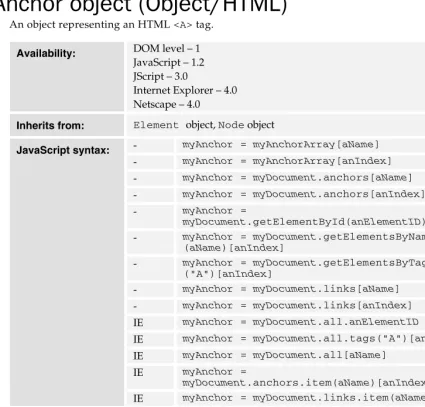
Anchor object (Object/HTML)
An object representing an HTML <A> tag.Availability: DOM level – 1 JavaScript – 1.2 JScript – 3.0
Internet Explorer – 4.0 Netscape – 4.0
Inherits from: Element object, Node object
- myAnchor = myAnchorArray[aName]
- myAnchor = myAnchorArray[anIndex]
- myAnchor = myDocument.anchors[aName]
- myAnchor = myDocument.anchors[anIndex]
- myAnchor =
myDocument.getElementById(anElementID)
- myAnchor = myDocument.getElementsByName (aName)[anIndex]
- myAnchor = myDocument.getElementsByTagName ("A")[anIndex]
- myAnchor = myDocument.links[aName]
- myAnchor = myDocument.links[anIndex]
IE myAnchor = myDocument.all.anElementID
IE myAnchor = myDocument.all.tags("A")[anIndex]
IE myAnchor = myDocument.all[aName]
IE myAnchor =
myDocument.anchors.item(aName)[anIndex]
JavaScript syntax:
IE myAnchor = myDocument.links.item(aName)[anIndex]
HTML syntax: <A> ... </A>
aName An associative array reference to the anchor object.
aName The name property of the anchor object
anIndex An index into the anchors collection
someText The text (or innerText) property of the anchor
Argument list:
[image:31.612.48.473.216.623.2]A – Anchor object (Object/HTML)
Object properties: accessKey, charset, coords, dataFld, dataSrc, hash, host,
hostname, href, hreflang, Methods, mimeType, name, nameProp,
pathname, port, protocol, protocolLong, recordNumber, rel,
rev, search, shape, tabIndex, target, text, type, urn, x, y
Object methods: blur(), focus()
Event handlers: onClick, onMouseDown, onMouseOut, onMouseOver, onMouseUp
See Also: Filter – Alpha()
This object represents a named location in the HTML document. Only those <A> HTML tags that have a NAME attribute will have anchor objects created for them. All the anchors are listed in the
anchors[] array object that belongs to the document object that represents the HTML.
Although the <A> tag is also used to create links using the HREF attribute, they are not anchors unless they are named. Any <A> tags that have HREF attributes (whether or not they have NAME
attributes) will be listed in the links[] array.
In Netscape, you can construct new instances of the Anchor object, but there is no constructor property in MSIE to support this.
<A> tags and the objects that represent them are inline elements. Placing them into a document does not create a line break.
Warnings:
❑ If you put an anchor object into a document.write(), in Netscape you get a string containing the object class. In MSIE, you will get the HREF string if there is one and an empty string if there isn't.
❑ MSIE provides access to properties that would normally be considered part of the link object. Internally MSIE probably maintains a single object type for anchors and links, whereas Netscape implements two quite different classes.
❑ Netscape supports an associative reference to an anchor object within the anchors[] array according to the value of its NAME tag attribute. MSIE does not support this means of locating an
anchor object in quite the same way.
❑ Note that although the syntax examples illustrate the use of an innerText property, Netscape does not support this mode of access and it will generate an error.
Example code:
<!-- Example showing how to dynamically replace --> <!-- the anchor text -->
<HTML>
<HEAD></HEAD> <BODY>
<A NAME="A2" HREF="www.wrox.com">Click here</A> <BR>
<A NAME="A3" HREF="www.msdn.com">Click here</A> <BR>
<BR> <HR> <SCRIPT>
myLength = document.anchors.length;
for (myEnumerator=0; myEnumerator<myLength; myEnumerator++ ) {
document.anchors[myEnumerator].innerText = document.anchors[myEnumerator].name;}
</SCRIPT> </BODY> </HTML>
See also: Document.anchors[], Document.links[], Element object,
Element.all[], Input.accessKey, LINK object, Location object,
String.anchor(), Subclasses, Superclasses, URL, Url object,
Window.scrollTo()
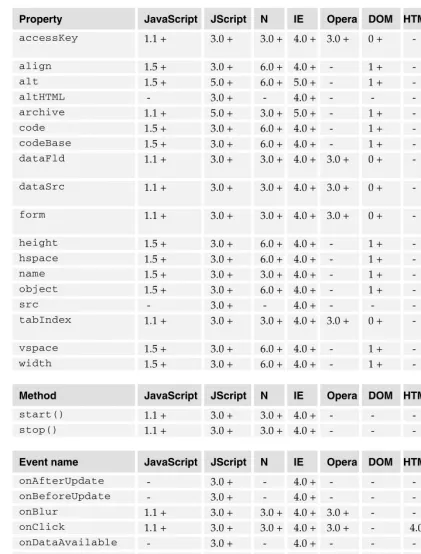
Property JavaScript JScript N IE Opera DOM HTML Notes
accessKey 1.5 + 3.0 + 6.0 + 4.0 + - 1 + - Warning charset 1.5 + 5.0 + 6.0 + 5.0 + - 1 + - -coords 1.5 + 5.0 + 6.0 + 5.0 + - 1 + - -dataFld - 3.0 + - 4.0 + - - - -dataSrc - 3.0 + - 4.0 + - - -
-hash 1.2 + 3.0 + 4.0 + 4.0 + - - - Warning
host 1.2 + 3.0 + 4.0 + 4.0 + - - - Warning
hostname 1.2 + 3.0 + 4.0 + 4.0 + - - - Warning
href 1.2 + 3.0 + 4.0 + 4.0 + - 1 + - Warning
hreflang 1.5 + 5.0 + 6.0 + 5.0 + - 1 + - -Methods - 3.0 + - 4.0 + - - -
-mimeType - 3.0 + - 4.0 + - - - Warning,
ReadOnly
name 1.2 + 3.0 + 4.0 + 4.0 + - 1 + - Warning
nameProp - 3.0 + - 4.0 + - - - ReadOnly pathname 1.2 + 3.0 + 4.0 + 4.0 + - - - Warning
port 1.2 + 3.0 + 4.0 + 4.0 + - - - Warning
protocol 1.2 + 3.0 + 4.0 + 4.0 + - - - Warning protocolLong - 3.0 + - 4.0 + - - - ReadOnly recordNumber - 3.0 + - 4.0 + - - - ReadOnly
rel 1.5 + 3.0 + 6.0 + 4.0 + - 1 + -
-rev 1.5 + 3.0 + 6.0 + 4.0 + - 1 + -
A – Anchor() (Constructor)
Property JavaScript JScript N IE Opera DOM HTML Notes
search 1.2 + 3.0 + 4.0 + 4.0 + - - - Warning shape 1.5 + 5.0 + 6.0 + 5.0 + - 1 + - -tabIndex 1.5 + 3.0 + 6.0 + 4.0 + - 1 + - -target 1.2 + 3.0 + 4.0 + 4.0 + - 1 + - Warning
text 1.2 + - 4.0 + - - - - Warning,
ReadOnly
type 1.5 + 3.0 + 6.0 + 4.0 + - 1 + -
-urn - 3.0 + - 4.0 + - - -
-x 1.2 + - 4.0 + - - - - Warning,
ReadOnly
y 1.2 + - 4.0 + - - - - Warning,
ReadOnly
Method JavaScript JScript N IE Opera DOM HTML Notes
blur() 1.5 + 3.0 + 6.0 + 4.0 + - 1 + - -focus() 1.5 + 3.0 + 6.0 + 4.0 + - 1 + -
-Event name JavaScript JScript N IE Opera DOM HTML Notes
onClick 1.2+ 3.0 + 4.0 + 4.0 + 3.0 + - 4.0 + Warning onMouseDown 1.2 + 3.0 + 4.0 + 4.0 + 3.0 + - 4.0 + Warning onMouseOut 1.2 + 3.0 + 4.0 + 4.0 + 3.0 + - 4.0 + Warning onMouseOver 1.2 + 3.0 + 4.0 + 4.0 + 3.0 + - 4.0 + Warning onMouseUp 1.2 + 3.0 + 4.0 + 4.0 + 3.0 + - 4.0 + Warning
Anchor() (Constructor)
You can construct new Anchor objects in Netscape.
Availability: JavaScript – 1.2 Netscape – 4.0
Property/method value type: Anchor object
N new Anchor
N new Anchor()
JavaScript syntax:
N new myAnchor.constructor
Although you can construct new anchors in Netscape, inserting them into a document is somewhat problematic since the correct way to do that would be to rewrite a fragment of HTML. You may find that replacing an anchor object in the document.anchors array links your new object to the
Warnings:
❑ This is only available on Netscape and is therefore not recommended for use in deployable applications. MSIE generates a run-time error if you attempt to make a new Anchor object.
See also: Anchor object, Anchor.host
Anchor.accessKey (Property)
A key that needs to be pressed before the anchor object will respond to data entry.
Availability: DOM level – 1 JavaScript – 1.5 JScript – 3.0
Internet Explorer – 4.0 Netscape – 6.0
Property/method value type: String primitive
JavaScript syntax: - myInputObject.accessKey
This is an extension that allows the anchor elements to be deadlocked unless a certain key is held down.
On some browsers and operating systems, you may need to hold down one of the modifier keys for this to work. The modifier key required depends on the environment you are using.
Warnings:
❑ This is not supported in some versions of the MSIE browser on Macintosh.
Anchor.blur() (Method)
Remove input focus from the Anchor object.Availability: DOM level – 1 JavaScript – 1.5 JScript – 3.0
Internet Explorer – 4.0 Netscape – 6.0
JavaScript syntax: - myInputObject.blur()
A – Anchor.charset (Property)
Anchor.charset (Property)
This property indicates the character encoding of the document at the location specified by the URL.
Availability: DOM level – 1 JavaScript – 1.5 JScript – 5.0
Internet Explorer – 5.0 Netscape – 6.0
Property/method value type: String primitive
JavaScript syntax: - myAnchor.charset
This would contain the character set being used by the document. For example the value "iso-8859-1" is likely to be returned, but the local variant of the browser and OS may affect the value you get.
This property might contain a value such as:
csISO5427Cyrillic
Details of other aliases can be located at the IANA registry. In that registry are listed the names and aliases of a wide variety of character sets. Even though there are nearly 800 names and aliases, it seems on inspection that there are items missing.
See also: LINK.charset, Url.charset
Web-references:
ftp://ftp.isi.edu/in-notes/iana/assignments/character-sets
Anchor.coords (Property)
This defines an area map within an image that is inside the <AREA> HTML tags.
Availability: DOM level – 1 JavaScript – 1.5 JScript – 5.0
Internet Explorer – 5.0 Netscape – 6.0
Property/method value type: String primitive
JavaScript syntax: - myAnchor.coords
When a shaped area is defined within an image map, the rectangle around the shape is defined with the coords property. The value is defined with the COORDS HTML tag attribute.
Anchor.dataFld (Property)
This binds the anchor object to a remote data source in MSIE.
Availability: JScript – 3.0
Internet Explorer – 4.0
Property/method value type: String primitive
JavaScript syntax: IE myInputObject.dataFld
This is part of the MSIE data-binding mechanism that associates a column name in the data source with the value property of an Anchor object. You must also set the dataSrc property for the object. Normally, both the dataFld and dataSrc values would be defined with the DATAFLD and
DATASRC HTML tag attributes in the document source.
Note that the value is case-sensitive and must refer to a column that exists within the data source.
Setting both the dataFld and dataSrc properties to an empty string will disconnect the element from the database.
Anchor.dataSrc (Property)
The name of a remote ODBC data source is stored in this property.
Availability: JScript – 3.0
Internet Explorer – 4.0
Property/method value type: String primitive
JavaScript syntax: IE myInputObject.dataSrc
This is part of the MSIE data-binding support. It contains the name of an ODBC data source (which might be any kind of SQL database that supports such an adapter). The data source and element are bound together with each column of the data source providing a source value to different element objects through their dataFld property.
Normally, both the dataFld and dataSrc values would be defined with the DATAFLD and
DATASRC HTML tag attributes in the document source.
A – Anchor.focus() (Method)
Anchor.focus() (Method)
Brings input focus back to the anchor object.Availability: DOM level – 1 JavaScript – 1.5 JScript – 3.0
Internet Explorer – 4.0 Netscape – 6.0
JavaScript syntax: - myInputObject.focus()
The receiving Anchor object will receive a Focus event trigger and execute its function referred to by the onfocus event handler property.
The element that previously had focus (if any element did) will receive a Blur event trigger.
Anchor.hash (Property)
On MSIE the Url.hash property is also available as the Anchor.hash property.
Availability: JavaScript – 1.2 JScript – 3.0
Internet Explorer – 4.0 Netscape – 4.0
Property/method value type: String primitive
- myAnchor.hash
JavaScript syntax:
- myAnchor.hash = newValue
HTML syntax: <A HREF="...">
This yields the hash suffix of the HREF value in an <A> tag.
You can assign a new value to this property, which will become a new anchor location within the document.
Warnings:
❑ This attribute may not work correctly when URLs are accessed from one frame to another in some versions of MSIE. You should check your target platforms for compliance.
❑ If you assign a value to this property in MSIE, you should omit the leading hash.
❑ Since the hash property of an Anchor object is not portable in all older browser versions, you should use the pathname property of the corresponding Url object to be able to work across MSIE and Netscape.
See also: Anchor object, Anchor.host, Anchor.hostname,
Anchor.href, Anchor.pathname, Anchor.port,
Anchor.protocol, Anchor.search, Anchor.target, URL,
Url.hash, Url.host, Url.hostname, Url.href,
Url.pathname, Url.port, Url.protocol, Url.search,
Url.target
Anchor.host (Property)
On MSIE the link.host property is also available as the anchor.host property.
Availability: JavaScript – 1.2 JScript – 3.0
Internet Explorer – 4.0 Netscape – 4.0
Property/method value type: String primitive
- myAnchor.host
JavaScript syntax:
- myAnchor.host = newHostPort
HTML syntax: <A HREF="...">
This yields the host and port value of the HREF value in an <A> tag.
You can redefine the host to request the URL by assigning a new value to this property.
Warnings:
❑ Since the host property of an Anchor object is not portable in all older browser versions, you should use the pathname property of the corresponding Url object to be able to work across MSIE and Netscape.
❑ As features become deprecated, it may become necessary to support both techniques in browser-specific code according to your needs regarding the support of legacy browsers.
See also: Anchor object, Anchor(), Anchor.hash, Anchor.href,
Anchor.pathname, Anchor.port, Anchor.protocol,