Mobile Tasks
Max L. Wilson, Alistair Russell, Daniel A. Smith,
m.c. schraefel
IAM Research Group
School of Electronics and Computer Science
University of Southampton, UK
{mlw05r, ar5, das05r, mc}@ecs.soton.ac.uk
In the following paper we present a formative study comparing two Web application interfaces, mSpace Mobile and Google Local in supporting Web-based location discovery tasks on mobile devices while stationary and while on the move. While mSpace Mobile performed well in both stationary and mobile conditions, performance in Google Local dropped significantly in the mobile condition. We postulate that mSpace Mobile performed better because it breaks the paradigm of the page for delivering Web content, thereby enabling new and more powerful interfaces to be used to support mobility.
Keywords: mSpace Mobile, evaluation, mobility, mobile devices, Performance, Design, Human Factors.
1
Introduction
Increasing ubiquitous connectivity with the Internet for mobile devices such as PDAs and smartphones, via cellular networks and wifi-hotspots, means that progressively more Web-based information services are accessed from such devices while on the move. Mobile device access to the Web has motivated considerable research into dynamically re-presenting full size web pages more effectively for small screens [Baudisch et al. 2004; Kamba et al. 1996]. This work, however, has been mainly focused on viewing a single page (implicitly, while stationary), rather than on carrying out tasks while mobile which may require access, back and forth, to multiple pages to address even a simple query such as “where is a Japanese restaurant near a cinema showing this film I wish to see?” In such mobile information foraging activities, the page-as-unit paradigm gets in the way of the information the person wishes to access, as people must scan through superfluous-to-task content on numerous pages to get at just the data they want.
mSpace Mobile (http://mSpace.fm/mobile) is an approach to support mobile
approach allows us to use more effective UI techniques like focus+context zooming to support rapid exploration of an area of interest. This paper reports on the study we ran to compare mSpace Mobile with current state of the art smartphone/PDA devices for carrying out these explorations and planning activities. The study considered both stationary and mobile performance in order to understand whether there were performance differences between the two interfaces in mobile activities in particular, and to begin to tease out from the comparison the interface attributes contributing to these differences. In the rest of this paper we describe the related work, mSpace Mobile itself and the formative study. In the discussion of the results, we are able to begin to use these findings to move towards design heuristics to support design for mobile information foraging activities.
2
Related Work
Beyond repackaging Web pages for small screens, visual UI research has looked at mechanisms to leverage focus+context displays to cope with small screens, the exemplar of which has been Bederson’s DateLens work [Bederson et al. 2004]. Likewise, multimodal research has looked at controlling applications with touch and audio, eliminating video entirely, assuming the video channel is being used for other tasks [Pirhonen et al. 2002]. These examples however have not been concerned with interaction performance with the device while a person uses the interface while mobile. Earlier work on mobile systems in changing contexts has focused on applications like tour guide systems: how well the information adapts to location; how location awareness can be represented. The GUIDE system and its follow-on work using multi-modal interactions for the delivery of information on a location-aware device is an exemplar of this kind of work [Bornträger et al. 2003], while more recent work [Fujii et al. 2005; Kim et al. 2005] focuses on the effectiveness of more dynamically constructed, location aware tours. While changing context is an important aspect of mobile device interaction especially that which is focused on location discovery tasks, mobility per se and its effect on performance, is not a core part of design or evaluation in these systems.
Indeed, from what we can find, work on effect of mobility on task performance with mobile devices is recent, and has focused primarily on performance in target acquisition tasks. For instance, recent work has shown unsurprisingly that text entry on mobile devices is either slowed by being in motion or slows the walking speed of the user; increased text box size reduces the difficulty [Mizobuchi et al. 2005]. Similar work has shown that larger zones enabled by interactions like tap and drag are more effective than small scroll bar targets when moving with mobile devices [Mackay et al. 2005]; tap and drag is used where possible within the mSpace mobile interface. Further work has evaluated screen tapping accuracy and frequency relative to gait phase and shown that the majority of tapping occurs most, and most accurately, in the latter phases that precede each new step; this is when the device hand is lowering away from the stylus [Crossan et al. 2005].
are interested in activities which involve a set of compound queries to complete a task - such as finding a restaurant near by a cinema that is showing a film of interest – while mobile.
3
mSpace mobile: ZedPanes
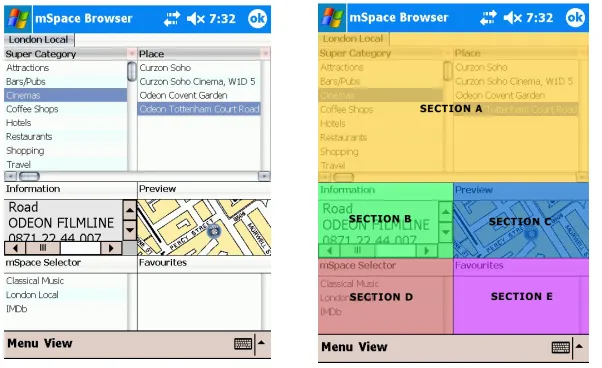
mSpace Mobile (Figure 1), rather than presenting information in a page, represents information as areas of information or domains, where each domain contains a set of associated dimensions.
FIGURE 1: The left panel shows the mSpace Mobile interface. The right panel shows the overlays on areas of the interface: A – the columnar entity selector; B – the information box; C – a context graphic – here, a map; D – an mSpace selector and E – an Interest list, in
this case labelled Favourites
A location domain, as an example, may have the dimensions Transport, Cuisine, Entertainment, Sites, Clean Public Toilets, and so on, whereas a film domain might have Actors, Producers, Countries, Genres. It is beyond the scope of this paper to describe how these dimensions are generated or populated. Suffice it to say that the data is from existing Web resources and uses next-generation Web protocols; an overview of the approach is available at [Harris et al. 2004].
To facilitate interaction on mobile devices, mSpace uses a combination of a spatial, multicolumn display with a zoomable focus+context interface called ZedPanes as shown in Figure 1. The spatial layout of the multicolumn UI enables a person to select a dimension element like Japanese in the dimension Cuisine. The next column then lists the names of restaurants near the currently selected location as shown in the map pane, and the map reflects the positions of the restaurants in the list. Selecting any element in a dimension (Figure 1, Section A) also brings up information about that element (Figure 1, Section B). For instance, by selecting a particular restaurant, a description of the restaurant, its location, web site and menu if available is rendered. It is therefore easy for people to see the associated contexts of any selection and switch between them rapidly for comparison and
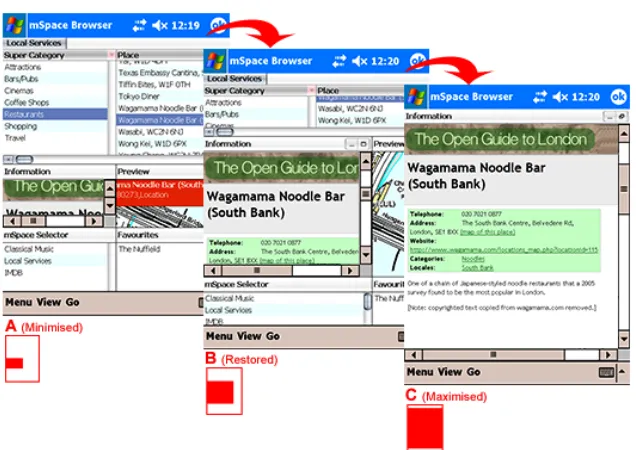
[image:3.595.88.389.174.358.2]contrast. Double tapping an item adds it to a pane for Finds pane (Figure 1, Section E, a feature not used in the study, below). Selecting an item in the Favourites list recovers its associated information. If a person wishes to focus on any particular pane to see it in more detail, ZedPanes enables that pane to be zoomed up two additional levels: focussed (where other panels are reduced) and full screen (Figure 2). In this way people have persistent control over area of interest and can readily switch focus among panes. ZedPanes has been inspired by Bederson’s DateLens [Bederson et al. 2004], expanding it such that where DateLens is restricted to zooming on tabular data like calendars, ZedPanes can support any number of nested hierarchical panes; each pane also has its own three-level zoom. The mSpace multi-paned display facilitates rapid domain exploration by enabling easy selection and focus on individual elements while maintaining persistent context.
FIGURE 2: mSpace Mobile ZedPanes: A shows the default equal zoom level; B shows the info box expanded to the take up more of the screen but with other areas of the screen still
visible; C shows the info box pane expanded to full screen. Any of the panes can be expanded or contracted in this way by a single click.
4
Study
restaurants within a certain distance to that cinema that will be open after the film finishes. Sequences of compound queries like these are natural (and necessary) for carrying out even simple plans: can we have dinner close to the theatre, for instance. By using a sequence rather than a discrete task, we considered we would be better able to explore why either interface performed better or worse in realistic scenarios.
As a context for stepping through a sequence, we built a scenario of an evening out (dinner and a movie), where the participants needed to find appropriate resources to support these activities. There were 6 activities in each scenario. The scenario started with an activity such as finding cinemas showing a given film “near by” the starting location for the trial. Each following activity built on the previous step. For instance, from the cinema, participants were asked to find restaurants near it that feature a particular cuisine, and then of those, to find ones which also have take-out. Some tasks were completable within the main interface, by which we mean they could be completed without clicking to a remote web page; others required clicking to an external web site linked from the main interface as well as the information available in the main interface itself. Each scenario was balanced to have equivalent steps within the main interface and jumps out to external web sites.
This focus on location-as-context let us compare mSpace Mobile with the popular Google Local (http://local.google.co.uk), a Web state of the art application with an interface that, like mSpace Mobile, supports discovery of entities like restaurants and cinemas (via keyword search), plots these locations on a zoomable map, lists the finds beside the map, and provides information about an entity when selected, including a link, when available, to that business’s site, all in one view. Google Local also supports associated information discovery. Reviews of discovered locations, for example, are often made available within the context of a place plotted on a Google Local map.
While Google Local has not been optimized for mobile appliances such as phones, it is still useful and usable on a PDA. Our concern with this study, however, is not to carry out a head to head competition between mSpace Mobile and Google local, but to use the comparison as a way to tease out specific design attributes that may affect performance under two specific conditions: first, when actually moving and using the device, and second when carrying out a sequence of tasks rather than a single lookup.
4.1
Method and Apparatus
A 2X2 within-group repeated measures design was used: the two interfaces, mSpace Mobile and Google Local, were tested in two conditions, stationary and mobile. Exposure to each interface was counterbalanced. Stationary trials, however, always preceded mobile trials: we were keen to ensure comfort with the devices in a seated environment before we asked participants to walk about using them. The stationary condition was performed sitting in a chair in a private office.
outdoor environment both for value of results and safety of participants. As found by Kjeldskov, Als and Hoegh [2004], the added time and complexity of carrying out in the field experiments is not outweighed by the value of the results returned. Indeed, their work shows that while many critical usability issues were found in both in lab and field studies (8 to 7 respectively) significantly more of what they class as “serious” usability issues were discovered in the lab than in the field. Since our goal was primarily to discover whether or not there were significant differences in mobile performance between application interface designs, it seemed we would be able to make this determination, perhaps more effectively, without introducing undue complexity and safety issues of carrying out the study in the field. In order to simulate safely the kind of split attention to both the task and the environment a walker requires in a live environment, participants were therefore asked to navigate both around and between well-marked objects on the track. Simulated obstacles included a road crossing, where participants were required to take notice of the obstacle and stop. Similarly, participants had to walk between two closely located chairs; this requires users to realise a narrowing pathway. Finally, chairs were placed randomly on the ground, simulating the need to avoid objects such as posts and bins. Real obstacles included walking through doors and avoiding on-coming participants who were navigating the course in the opposite direction. Beyond the benefits of safety by using an indoor course (participants were not in danger of being hit by a car), the controlled environment supported close monitoring of participants and detailed recording of their actions. An equal number and kind of objects were used for both interfaces, but the course was adjusted for each UI to reduce learning effect.
For the study we sought participants who identified themselves as comfortable with using mobile devices, who used them regularly and who said that they did indeed carry out tasks with them while walking. The study included 6 men and 3 women ranging in age from 18 and 45, all experienced with computing technology and familiar with using PDAs. Thirty percent of participants regularly used a PDA; all however owned at least one portable device, such as a mobile phone and/or personal stereo. All reported experiences they characterized as “regular” in using these portable devices (making calls, choosing music) while walking with them.
5
Results
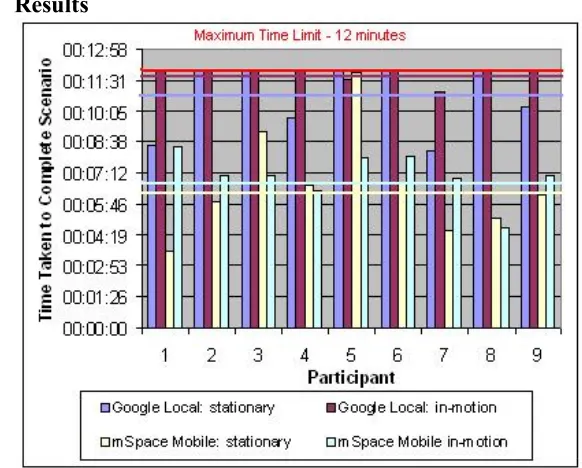
FIGURE 3: Graph showing the performance times of each participant in the four conditions.
5.1
Quantitative Measures
interfaces, particularly in the in-motion condition, suggests that evaluating mobile devices both in-motion and with sequential tasks are an effective metric for assessing mobile UI performance.
5.2
Observations
The time required to load external pages requested from within Google Local had an effect on performance in both conditions. Each click in Google Local is a call out to the Web, which can increase interaction time, depending on network performance. In mSpace Mobile information associated with a selection, such as the next column entities, their map locations and information views is transported in smaller chunks and cached: calls to the network are reduced, overall interface response is faster.
While performance time for mSpace Mobile across conditions was largely similar, Google Local’s performance dropped considerably from the stationary to the mobile condition. While network performance remained equivalent between conditions, it became apparent from observing participants that scrolling and text entry in Google Local took longer to carry out while mobile than while stationary; this supports the work done by Mizobuchi et al [2005] and Mackay et al [2005].
Participants commented on this difference themselves during interviews. We also noticed that participants frequently slowed their pace when entering text in Google Local, whereas there was less pace slowing observed with mSpace Mobile. One participant noted that target acquisition was challenging for selecting individual items within the columns of mSpace Mobile, though this did not seem to have a noticeable effect on their performance between the conditions. In cases where participants knew the location of something, they preferred Google Local for its text entry. For this reason, some participants said they would appreciate a text search box in mSpace Mobile as a complement to the UI (this has since been added). Overall participants said they preferred the direct manipulation of mSpace Mobile.
6
Discussion
This finding suggests that mSpace Mobile’s non-page paradigm for presenting Web data, with resulting reduced calls to the network, its largely persistent views of information in a domain, and its focus+context interface may reduce cognitive load and improve performance by improving recognition rather than recall in the interface, particularly when on the move. Further study will be needed to tease out these factors’ effects
7
Conclusions
In this paper we have carried out a formative, exploratory study to consider the effects of being mobile on the ability to carry out sequential tasks like resource discovery and planning activities when accessing the Web via mobile devices. In contrast to typical mobile device Web viewers, we have proposed a non-page based paradigm for exploration of Web information. The approach foregrounds persistent domain overviews from which selections can be made utilizing direct manipulation techniques. To optimize screen space, the UI for exploration is a focus+context, multi-paned display. We have shown that first, when tested against Google Local, a Web application designed to support the kinds of location discovery tasks we tested, mSpace Mobile performed significantly better in both mobile and stationary conditions. Second we have shown that mobility – in this case walking – has a significant degradation effect on sequential task performance when using a traditional Web page-as-unit model.
These early findings point to interesting directions for designing devices to support network-dependent activities on mobile devices for both stationary and in-motion usability. It seems that, in general, better UI paradigms for access, exploration and planning are enabled when breaking the current page paradigm for delivering network-based content. In terms of design and evaluation heuristics, use-in-motion may be a significant factor for evaluating interaction design effectiveness for mobile devices. Likewise, testing for sequential rather than single task performance seems to be an important criterion for evaluating on-the-move interaction performance. We propose these criteria to be considered as a part of a potential taxonomy of design criteria for mobile devices the community may evolve.
Acknowledgements
Thanks to the EPSRC AKT project (GR/N15764/01), DTC Knowledge Fusion Project (C/N03751/8.14) and the School of Electronics and Computer Science, University of Southampton, for their support. Thanks also to Sacha Brostoff, Stephen Brewster and Alan Dix for their insights into the statistical analysis.
References
Baudisch, P., Xie, X., Wang, C., & Ma, W.-Y. [2004]. Collapse-to-zoom: viewing web pages on small screen devices by interactively removing irrelevant content.
Proceedings of the 17th annual ACM symposium on User interface software and technology, Santa Fe, NM, USA. 91-94.
Bornträger, C., Cheverst, K., Davies, N., Dix, A., Friday, A., & Seltz, J. [2003].
Experiments with Multi-modal Interfaces in a Context-Aware City Guide. Mobile HCI 2003, Udine, Italy. 116-130.
Crossan, A., Murray-Smith, R., Brewster, S., Kelly, J., & Musizza, B. [2005]. Gait phase effects in mobile interaction. CHI '05 extended abstracts on Human factors in computing systems, Portland, OR, USA. 1312-1315.
Fujii, S., Takahashi, Y., Fukuoka, H., Ichikawa, T., Sakai, S., & Mizuno, T. [2005]. Development of Ubiquitous Historical Tour Support System. 9th International Conference on Knowledge-Based Intelligent Information and Engineering Systems, KES 2005. 412-417.
Harris, C., Owens, A., Russel, A., & Smith, D. A. [2004]. mSpace: Exploring The Semantic Web. A Technical report in Support of the mSpace software framework
(Technical report): University of Southampton, UK.
Kamba, T., Elson, S. A., Harpold, T., Stamper, T., & Sukaviriya, P. [1996]. Using small screen space more efficiently. Proceedings of the SIGCHI conference on Human factors in computing systems: common ground, Vancouver, British Columbia, Canada. 383-390.
Kim, J.-W., Kim, J.-Y., Hwang, H.-S., & Kim, C.-S. [2005]. Location-Sensitive Tour Guide Services Using the Semantic Web. 9th International Conference on Knowledge-Based Intelligent Information and Engineering Systems, KES 2005. 908-914.
Kjeldskov, J., Skov, M. B., Als, B. S., & Hoegh, R. T. [2004]. Is it Worth the Hassle? Exploring the Added Value of Evaluating the Usability of Context-Aware Mobile Systems in the Field. Proceedings of Mobile HCI 2004, Glasgow, Scotland. 61-73.
Mackay, B., Dearman, D., Inkpen, K., & Watters, C. [2005]. Walk 'n scroll: a comparison of software-based navigation techniques for different levels of mobility. Mobile HCI 2005, Salzburg, Austria. 183-190.
Mizobuchi, S., Chignell, M., & Newton, D. [2005]. Mobile text entry: relationship between walking speed and text input task difficulty. Mobile HCI 2005, Salzburg, Austria. 122-128.