Abstract
Grids are managed Internet scale distributed services supporting collaboration and virtual organization. Collaboration over networks is becoming more and more popular and important in such areas as online conferencing, distance education, Science, e-Business, and e-Learning. We research the topic of shared event collaboration on Grid; we build three prototypes to investigate the issues from different software models and languages; we demonstrate this by making clients (collaboration entities) collaborate on events, taking advantages of the Grid for delivery of event messages and the computing powers of the clients’ host computers. Grids are built from Web Services exchanging messages.
Interactive Data language (IDL), where the complete and proper definitions of event structures are supplied and elegant mechanisms of widget programming are guaranteed; the events are systematically and completely defined with respect to structures, levels, configurations, and associated types of event handler routines. The prototypes are
instantiations of the Shared Event Model and demonstrations of the collaborative Peer-to-peer Grids.
In order to promote the collaborative applications’ usefulness and universal accessibility, we investigate a “Thin Client Collaboration Web Services” client
GRID-BASED COLLABORATION
By
M
INJUNW
ANGB.S. Jilin University, 1989
M.S.
Syracuse University, 1998
DISSERTATION
Submitted in partial fulfillment of the requirements for the
degree of Doctor of Philosophy in Computer Engineering
in the Graduate School of Syracuse University
August 2006
Approved_______________________
Professor Geoffrey C. Fox
©
Copyright 2006 M
INJUNW
ANGTable of Contents
List of Figures... xii
List of Tables ... xviii
Acknowledgements ... xix
Chapter 1 Introduction... 1
1.1 Research in the Context of Previous State of the Art ... 2
1.2 Introduction of Our Work ... 4
1.3 Related Work ... 11
1.4 Motivation... 15
1.5 Research Questions... 19
1.6 Organization of the Dissertation ... 20
Chapter 2 Collaboration Entities on Deterministic Finite Automata... 22
2.1 Introduction... 23
2.2 The Finite Automaton ... 27
2.3 Characteristics of the DFA for Collaboration Entities... 28
2.4 Unification of the Collaboration Entities... 29
2.5 A DFA Example in Collaborative PowerPoint and Impress Applications ... 31
2.6 Issues about DFA with Collaborative ReviewPlus Applications ... 36
2.7 Extended Transition Function with Collaboration Entities ... 41
2.7.1 Extended Transition Function... 42
2.7.2 The Language of a DFA ... 43
2.7.4 Reverse Indexing on Event Messages... 45
2.8 Logical Consensus ... 46
2.8.1 Units and Unity... 46
2.8.2 Divergence and Convergence ... 47
2.8.3 Collaboration on Event and Transition Function... 49
Chapter 3 Collaborative PowerPoint Applications ... 58
3.1 The Big Picture ... 59
3.2 The Master Client ... 60
3.3 The Participating Clients... 62
3.4 The Event Models... 64
3.5 NaradaBrokering Message Service... 66
3.6 Collaboration on Deterministic Finite Automaton ... 68
3.7 Instant-Messaging as a Web Service ... 70
3.8 Metadata and On-demand Education... 72
3.9 The Extended Transition Function and Access to Metadata ... 74
Chapter 4 Collaborative OpenOffice Applications... 76
4.1 The Big Picture ... 77
4.2 Shared Event Model... 78
4.3 Collaboration Structure... 80
4.4 New Concept for Collaboration... 81
4.4.1 Universal Network Object ... 82
4.4.2 Diverse Programming Environment ... 83
4.4.4 Frame-Controller-Model Paradigm ... 85
4.5 The Client/Server Communication Bridge ... 88
4.6 The Master Client ... 95
4.7 The Participating Clients... 98
4.8 Collaboration on Deterministic Finite Automaton ... 99
Chapter 5 Collaborative Interactive Data Language (IDL) Applications... 105
5.1 The Big Picture ... 107
5.2 Grid-based Collaboration Model ... 109
5.3 Shared Event Model... 111
5.4 Notifying Structure ... 113
5.5 Polling Structure ... 118
5.6 Collaboration on Deterministic Finite Automaton ... 123
5.7 Further Implementations of Research Deductions... 134
5.7.1 The Problem... 134
5.7.2 Dynamic Structure ... 135
5.7.3 Embedded Structure... 141
Chapter 6 Comparisons... 148
6.1 Technologies and Languages Used... 149
6.2 Implementing Structures... 150
6.2.1 The Collaborative PowerPoint Applications ... 150
6.2.2 The Collaborative Impress Applications ... 153
6.2.3 The Collaborative ReviewPlus Applications ... 157
6.3 Event Structures ... 161
6.3.1 The Collaborative PowerPoint Applications ... 161
6.3.2 The Collaborative Impress Applications ... 163
6.3.3 The Collaborative ReviewPlus Applications ... 163
6.3.4 Differences in Event Processing and Implications ... 165
6.4 Shared Event Model... 168
6.5 Grid-based Collaboration Model ... 170
6.6 Implications... 171
6.7 Implementations of the Deductions from the General Principle ... 174
6.8 From Collaboration Services to Web Services ... 175
Chapter 7 Thin Client Collaboration Web Services... 176
7.1 Introduction... 177
7.2 The Problems ... 179
7.3 Thin Client Collaboration Web Services ... 181
7.4 Thin Client Web Services in Collaboration ... 184
7.4.1 Scenario 1... 184
7.4.2 Scenario 2... 186
7.4.3 Scenario 3... 188
7.4.4 Scenario 4... 189
7.4.5 Potential Problems and Solutions ... 192
7.5 Deployment and Usage of the Collaboration Web Services... 195
7.7 Conclusion ... 197
Chapter 8 Conclusion, Contribution, and Future Work ... 199
8.1 Conclusion ... 201
8.1.1 Aspect: Grid-based Messaging Scenario ... 203
8.1.2 Aspect: Shared Event Model ... 204
8.1.3 Aspect: Structure of Collaborative Events... 204
8.1.4 Aspect: Details of Collaborative IDL ... 205
8.1.5 Aspect: Grid-base Collaboration Paradigm ... 207
8.1.6 Aspect: Peer-to-Peer Grid Computing... 207
8.1.7 Aspect: Theoretical Framework of Deterministic Finite Automata ... 208
8.1.8 Aspect: Thin Client Collaboration Web Services... 209
8.1.9 Aspect: Collaborative Event-based Languages ... 210
8.2 Contribution ... 212
8.3 Future Work ... 214
8.3.1 System Enhancements ... 214
8.3.2 Exploration of Implications ... 216
8.3.3 Web Services ... 216
8.3.4 New Requirements... 217
8.3.5 New Categories... 218
8.3.6 New Strategies and Approaches ... 218
Appendix A Applications of Event Modeling with Petri Net in Collaboration... 222
A.1 The Petri Net Structure ... 224
A.3 The Petri Net Markings... 228
A.4 The Petri Net Execution Rules... 230
A.5 The Petri Net State Spaces ... 232
A.6 Characteristics of the Petri Net for Collaboration Entities ... 235
A.7 Unification of the Collaboration Entities with Petri Net... 239
A.8 A Petri Net Example for the Collaborative PowerPoint and the Collaborative Impress... 241
A.9 Further Discussion on Petri Nets for Collaboration Entities... 247
A.10 Comparisons... 249
Appendix B A Description of the Implementation of Collaborative ReviewPlus ... 251
B.1 Units and Unity ... 252
B.2 Divergence and Convergence... 252
B.3 Collaboration on Event and Transition Function ... 254
Bibliography ... 301
List of Figures
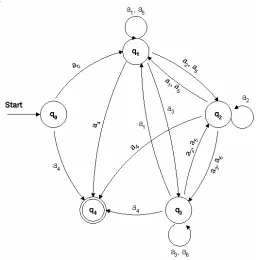
Figure 2.1 The transition diagram for the DFA of the collaboration entities working on a presentation file in PowerPoint or Impress of OpenOffice. 33
Figure 2.2 Widgets captured from the interfaces of ReviewPlus that each corresponds to the transition to one state of the DFA when it is triggered at a step of a session. 38
Figure 2.3 Widgets captured from an interface of ReviewPlus that each corresponds to
the transition to one state of the DFA when it is triggered by the event of the carriage return. 39
Figure 2.4 Widgets captured from the interfaces of ReviewPlus that each corresponds to the transition to one or more states of the DFA when the input is finished. 40
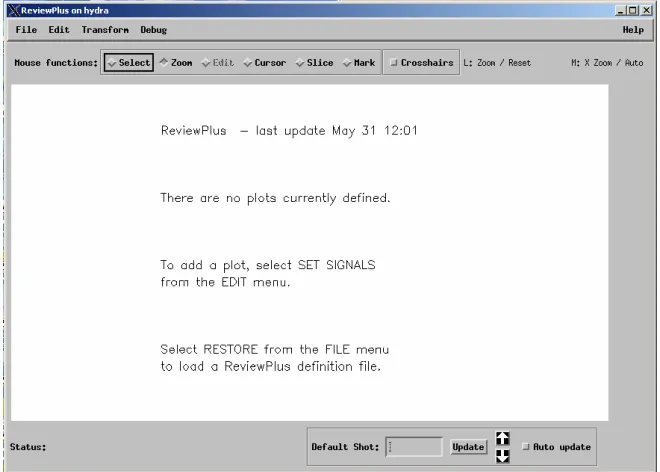
Figure 2.5 The initial interface and display of ReviewPlus. 50
Figure 2.6 A sub-menu from the main menu of ReviewPlus. 50
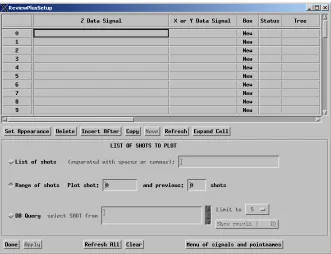
Figure 2.7 A part of a big interface in ReviewPlus for setting up and managing of signals.
56
Figure 2.8 Another part of the big interface in ReviewPlus for setting up and managing of signals. 57
Figure 3.2 The event messages invoke methods of the wrapper class; the methods then are mapped to functions of PowerPoint application through Dispatch Map/DISPID; the functions are executed and result/status codes are returned. 63
Figure 3.3 The collaboration structure for the Master client and the Participating clients with the NaradaBrokering Message Service as the underlying communication system. 67
Figure 3.4 Instant-messaging web services with the collaborative PowerPoint
applications. 72
Figure 4.1 The collaboration between the Master client and the Participating clients via the NaradaBrokering Message Service. 81
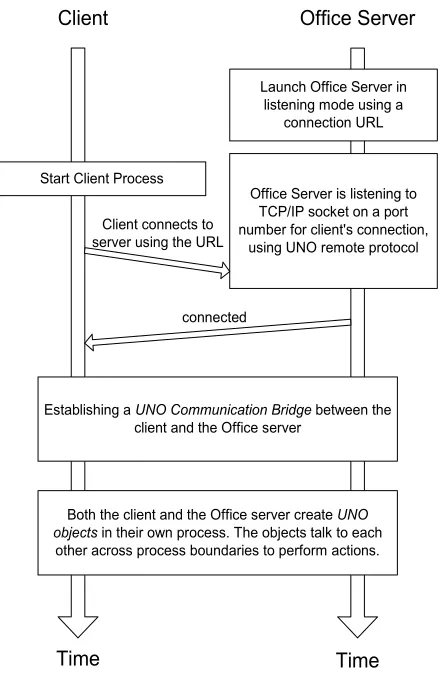
Figure 4.2 The process of the launch, connection, and interaction between the Client and the Office Server. 89
Figure 4.3 Establishing of a Communication Bridge between the Client and the Office
Server. 91
Figure 4.4 The client’s accessing of the Office Server’s functionality through the established UNO communication bridge. 95
Figure 4.5 The function structure in the side of the Master client applications. 96 Figure 4.6 The function structure in the side of the Participating client applications. 98 Figure 4.7 The environments and an output display at an event on the side of the Master client of the collaborative Impress applications. 103
Figure 4.8 The environments and the corresponding output display at the same event as
Figure 5.1 A grid-based collaboration model. 109
Figure 5.2 The interface and a display from a collaborative IDL application. 113 Figure 5.3 The mechanism of the Master client. 115
Figure 5.4 Generating of a shared library. 116
Figure 5.5 The mechanism of the Participant client. 117
Figure 5.6 The mechanism of the Participant client in a polling structure. 120 Figure 5.7 One interface and display from ReviewPlus IDL application. 121 Figure 5.8 The initial interface and display of ReviewPlus. 124
Figure 5.9 A sub-menu from the main menu of ReviewPlus. 125
Figure 5.10 A part of a big interface in ReviewPlus for setting up and managing of signals. 131
Figure 5.11 A screen capture of the environments and the output displays of the Master client and the Participant client of the collaborative ReviewPlus applications running on a single desktop computer. 132
Figure 5.12 Another screen capture of the environments and the output displays of the Master client and the Participant client of the collaborative ReviewPlus applications running on a single desktop computer. 133
Figure 6.2 The event messages invoke the methods of the wrapper class; the methods are then mapped to the functions of the PowerPoint application through the Dispatch
Map/DISPID; the functions are executed and the result/status codes are returned. 153 Figure 6.3 The function structure of the Master client of the collaborative Impress applications. 155
Figure 6.4 The function structure of the Participating client of the collaborative Impress applications. 156
Figure 6.5 The mechanism of the Master client of the collaborative ReviewPlus
applications. 158
Figure 6.6 The mechanism of the Participant client of the collaborative ReviewPlus applications. 160
Figure 6.7 A grid-based collaboration model. 170
Figure 6.8 Entities of paradigms linked by message in collaboration. 172
Figure 7.1 The structure of the web service with the user-facing input/output ports and the resource-facing input/output ports. 182
Figure 7.2 Instances of a thin client web service in collaboration, with only one instance for the Master client and at least one instance for each of the Participant clients. 185 Figure 7.3 Instances of a thin client web service in collaboration, with two or more instances for the Master client and at least one instance for the Participant client. 187 Figure 7.4 Instances of a thin client web service in collaboration, with the instances hooked up with the Master client only. 189
Figure 7.6 The web service published to a service broker and used later in an application. 195
Figure A.1 The equivalent Petri Net graph representation for the Petri Net structure of Example 1. 228
Figure A.2 A marking of the Petri Net graph for the Petri Net structure of Example 1. 230
Figure A.3 The result marking after the firing of the transition t9 in the Petri Net graph of
Figure A.2. 232
Figure A.4 The transitions ti1, ti2, …, tik are enabled by the token in pi. After the firing of
the transition ti1, the token is removed from pi and is deposited into pj1 by the Petri Net
execution rules. By now, none of the other transitions ti2, …, tik is enabled. 237
Figure A.5 The graph of the marked Petri Net for the collaboration entities working on a presentation file in PowerPoint or Impress of OpenOffice. 244
Figure B.1 The initial interface and display of ReviewPlus. 255
Figure B.2 A sub-menu from the main menu of ReviewPlus. 255
Figure B.3 A part of a big interface in ReviewPlus for setting up and managing of signals. 261
Figure B.4 Another part of the big interface in ReviewPlus for setting up and managing of signals. 262
Figure B.5 Data entered in the big interface in ReviewPlus for setting up and managing of signals. 269
Figure B.6 The display of a signal in ReviewPlus. 270
Figure B.8 The display of a signal in the main interface of ReviewPlus and another interface of it for grid control of plot window. 272
Figure B.9 The effect to the graphics output in the main interface of ReviewPlus when dragging the widget slider “Number of rows” in the interface of grid control of plot window and changing its value from 1 to 2. 278
Figure B.10 The ReviewPlus Preferences interface that mainly contains a tab widget. 279
Figure B.11 The ReviewPlus Preferences interface that currently shows the page under
the tab of “GAPlotObj Settings.” 287
Figure B.12 The effect to the output display in the main interface of ReviewPlus when setting up the “White on Black” for the screen foreground/background colors in the ReviewPlus Preferences interface. 298
List of Tables
Table 2.1 The transition table for the DFA of the collaboration entities working on a presentation file in PowerPoint or Impress 35
Table 3.1 The events that are posted in EApplication interface of PowerPoint and that can be captured and processed 65
Table 3.2 The types of events that are absent in PowerPoint but potentially useful in further application developing 66
Table 4.1 Event listener interfaces and their corresponding event types 85
Table 6.1 Hexadecimal codes and their corresponding text named strings for the events
in the “EApplication” dispatch interface of PowerPoint 162
Acknowledgements
First of all, I would like to thank my advisor, Dr. Geoffrey C. Fox, for his guidance and instructions during my years of research. They are invaluable for my achievements.
I would like to thank Dr. Marlon Pierce, Dr. Brian Carpenter, and Dr. Shrideep Pallickara for their kind help in the Community Grid Lab at Indiana University.
I would like to show my gratitude for the people at the General Atomics and Affiliated Companies, San Diego, California, such as Mr. David Schissel, Mr. Justin Burruss, and Ms. Kristi Keith. They kindly helped me and generously provided me with their computing environments, tools, and software in the research.
For my Ph.D. proposal research exam committee members, Dr. Jae Oh, Dr. Roman Markowski, Dr. Vojtek Furmanski, and Dr. Geoffrey Fox, I would like to say thank you very much for your kind help and invaluable guidance for my further dissertation research.
For my Ph.D. final defense exam committee members, Dr. Jae Oh, Dr. Roman Markowski, Dr. Amrit Goel, Dr. Simon Catterall, Dr. Marlon Pierce, and Dr. Geoffrey Fox, I would like to say thank you very much for your kind help and invaluable advices for my future research.
in my further study, research, and more to come. I appreciate your patience and help very much.
Our department staff, such as Ms. Barbara Hazard and Ms. Maureen Marano, has been very helpful during all the years of my academic life in the Electrical Engineering and Computer Science department of Syracuse University. I appreciate your great service.
I owe my family and relatives countlessly; they have sacrificed so much for me. My parents (especially my mother) and my sisters have missed me so much during the long years of separation. Yet, everyone has been showing me great love and support; everyone has been encouraging me all the time, on the phone, in the mail, in the package … Without this, I wouldn’t have gone so far; without this, I wouldn’t have achieved this much.
Last but not least, I would like to show my gratitude to my friends, such as Gang Lu, Bin Li, and Xi Rao, for their help and friendship all these years, through the sunny days and raining days, sharing the happiness and burdens. Thank you, Jennifer Carter, for your prayers; your good words and encouragements really have enlightened my soul and lifted me high across the hot waters.
Chapter 1
Introduction
This dissertation is about Grid-based collaboration. In this chapter, we summarize key issues that we determined in the dissertation research about possible architectures and implementations for collaboration on a Grid. They span both theoretical principles and frameworks and practical engineering issues from our three major prototypes –
1.1 Research in the Context of Previous State of the Art
Grids can be considered as managed Internet scale distributed services and are often thought of as supporting collaboration [Fox+CTS, Fox+P2PGrid, Snelling+GGF16]; they are substrate supporting the virtual organization that corresponds to the international team, as in modern scientific research. However, most work on Grids focuses on the hard and important problem of secure efficient sharing of data and compute resources. The virtual observatory in Astronomy (International Virtual Observatory Alliance) [IVOA] and the TeraGrid (Teragrid.org) [TeraGrid] are good examples in data and compute areas,
respectively. These Grid applications are asynchronous collaboration problems that differ significantly in terms of key issues from the synchronous collaboration considered in this dissertation. Nevertheless, there are common points and often one wants to support both synchronous and asynchronous applications. Peer-to-peer systems and many recent Web 2.0 community (social networking) tools are further important asynchronous Internet collaboration systems [Fox+CTS’06]. Grids are built today totally in web service architecture and are natural for supporting collaboration as all interactions between components in terms of explicit SOAP messages.
support collaboration with flexibility intrinsic from its architecture, and that a 1-2
millisecond overhead that was negligible. Two upcoming theses (by Mr. Oh and Aydin of CGL of Indiana University) discuss how high bandwidth systems can be designed using the SOAP Infoset. Our thesis tackles complex collaborative applications that refine the requirements for the NaradaBrokering messaging system built in CGL based on the original Dr. Pallickara’s dissertation [Pallickara+Dissertation] of Syracuse University, which was partly motivated by the TangoInteractive collaboration system [CollabWorx] built at Northeast Parallel Architectures Center (NPAC) of Syracuse University.
The generality of the shared display approach is obtained at large cost in network traffic. Most approaches to collaboration use what CGL calls major and minor events. Major events contain a complete state description of the finite automata and are used to cope with transmission errors (inevitable in UDP based audio-video conferencing) and new clients that arrive after the session has started. Minor events contain updates and must be applied in order after the preceding major event. Major events require more processing and are only sent occasionally so they impact the overall performance by much.
Peer-to-peer Grids [Hwang, Fox+ACM] exploit the observation that the entities in both P2P systems and Grids are autonomous agents (peers, services) whose state is determined by exchanging messages. Grids typically have identified “central” servers and “thin” peer clients while P2P systems combine client and server (service) in the same machine. Our work addresses both of these cases.
“applications” (such as PowerPoint or an audio-video stream) together with a set of authorization attributes. The session service specifies which clients participate in which applications and their roles that include administrative privileges, and possession of the master token (floor control). XML General Session Protocol (XGSP) has been developed in CGL to support this, but it is incomplete and not integrated with approaches like Virtual Organization Management System (VOMS) [VOMS] from the Grid. Our thesis research showed how complex applications can use this VO model.
1.2 Introduction of Our Work
The Internet is a network of networks. It brings intelligence, knowledge, computing power, data, and people together from virtually every corner of the world. The
advantages of it are enormous. Cooperation across the boundaries of companies,
organizations, and institutions is becoming more regular; collaboration within or between groups of people is becoming more important. Grids offer consistent computational and informational environments that enable applications to make use of resources managed by diverse organizations worldwide. Grid-based collaboration has many strengths in respect to such areas as management performance, fault tolerance, and security.
This means – among other things – that distance or location is no longer a barrier or restriction, and time, resources, and money are saved. Communication systems and brokers are used to communicate the information among the collaborators.
One way of collaboration is to actually transfer huge amounts of data over the Internet to the collaborators for rendering. In Shared Display such as Virtual Network Computing (VNC) [VNC], it is based on transferring image data like bitmaps. In
Audio/Video conferencing systems, it is based on transferring blocks of audio and video data, as shown in Dr. Ahmet Uyar’s dissertation [Uyar+Dissertation]. These cases are suitable in dynamic situations such as impromptu conferencing, and they need heavy network traffic.
Another way of collaboration is to collaborate between the collaborators by transferring small text event messages and rendering the same results on the event messages. It is suitable in less dynamic situations such as using presentation slides, files, and interactive interfaces in the collaboration. Before the session of the collaboration, the necessary prepared data (slides, files, etc.) for the presentation are deployed or
downloaded to the host computers of the collaborators in consistent directories, and the relative supporting software (e.g., PowerPoint) is installed on all the host computers.
In this dissertation we explore the concept of Grid-based collaboration using event. We demonstrate the concept by making three interface applications collaborative between computers over networks, using a common message broker as the underlying
and technologies. We represent the applications’ event structures in messages, which are coordinating the Grid-based collaboration.
We have explored the Grid collaboration architecture with the three collaborative applications, which are Grid-based collaboration tools using the Shared Event Model. These applications are the Collaborative PowerPoint applications [Wang+JDIM, Wang+CATE’04], the Collaborative Impress applications [Wang+KSCE], and the Collaborative ReviewPlus IDL applications [Wang+ITCC’05]. They are instantiations of the Shared Event Model [Wang+SCI, Wang+KSCE] in Grid-base Collaboration and can be used in e-Learning, distance education, online conference, and e-Science.
We have designed the overall structure of each type of the three collaborative applications to consist of a Master (or Master Client) and a Participant (or Participating Client) using small text event messages for the communication between them. During a session, the Master captures events in its process, deals with them, generates delimited event messages, and sends the event messages to the Participant for rendering the displays in the Participant’s process, so that both of them can share the screen displays simultaneously. There can be multiple Participants working with the Master concurrently and independently.
We have used a common message broker – the NaradaBrokering Message Service [Fox+JGI, Pallickara+JDIM, Pallickara+Dissertation] – as the media for message
communication implied by the Shared Event Model. The supporting software – Microsoft Office, OpenOffice/Star Office, or RSI IDL – is installed on both the host computers of the Master and the Participant. If files are needed in a session, they are deployed
files’ access is correct on the hosts under the control of the event messages. All clients are required to be in a session and keep in that session for the whole collaboration session, because an event message coordinates each client to change its current status, and the correct transition to a subsequent status depends on the previous one.
Although the three types of collaborative applications are developed in different languages, technologies, structures, and strategies suitable for their native systems, they share a common nature – collaboration on event messages, which decreases the traffic on the Networks and increases the usage of the computing powers of the clients’ host
computers. This nature therefore highlights the main tenet of this dissertation: Grid-based collaboration on event messages.
We have realized the shared event idea in the collaboration. We use event messages in the coordinating and controlling of a presentation process between the clients.
Compared to Shared Display and Audio/Video conferencing, the short event messages save great bandwidth over the Internet and better leverage the computing powers of the hosts. This realization is fast and efficient.
The clients of each of the three collaborative applications work on Peer-to-Peer Grid computing. There are two categories of systems in this: the Grid system and the Peer-to-Peer systems. High-performance and stable services are in the Grids, such as the Web Services, the Grid Services, and the Common Message Brokers, while the services of the Peers are more convenient and accessible, such as the user developed applications and the commodity applications.
categories so that they complement each other. The Peer-to-Peer Grid computing is the basis of the collaboration. The Grid system largely comprises stable, formal, efficient, and high-functionality services, such as the Web Services, the Grid Services, and the Common Message Brokers, which are deployed in the Grid on structured, well-organized, and powerful supercomputers. The Peer-to-Peer system offers user-friendly, convenient, intuitive, and easy accessible applications and services, such as the popular commodity software used daily and everywhere. They are installed on a variety of personal devices, such as desktops, laptops, PDA’s, and smart phones. The Grid system offers robust, structured, and security services that scale well in pre-existing hierarchically arranged enterprises or organizations; it is largely asynchronous and allows seamless access to supercomputers and their datasets. The Peer-to-Peer system is more convenient and efficient for the low-end clients to advertise and access the files on the communal computers; it is more intuitive, unstructured, and largely synchronous.
We have designed and developed the collaborative applications to demonstrate the Peer-to-Peer Grid computing idea. We deploy the NaradaBrokering Message Service as the broker in the Grids and use it for event message communications between the Master and Participants of the collaborative applications; we deploy the Master and Participants as the Peers at the edge so that they collaborate on event messages through the Grids in the core.
Entities in Peer-to-Peer Grid [Oram, Foster+Kesselman, Berman+Fox+Hey]. The elements in all the collaborative applications are just different types of entities. These entities are finite automaton-based in a collaboration session; in essence, they are just finite automata, or deterministic finite automata in the session. Intuitively, the entities in collaboration (the Master and Participants) collaborate on events to keep showing the same output displays at each step, with the Master in controlling by capturing events, generating, and sending out event messages to Participants through a message broker, and with the Participants in responding by rendering the received event messages.
Specifically, they collaborate to share a common finite automaton in their respective instantiations (the finite automata in them are the same) and reach a common state of the finite automaton at any collaboration step. Collaboration of the entities is therefore defined by being in a same state of the finite automaton at each event.
We demonstrate that the collaboration entities of a type converge on a common state of the deterministic finite automata at a collaboration step, even though they diverge in many other respects. The Master and Participant are designed for different purposes, in different architectures, implementing mechanisms, and shapes of codes; they are
divergent. At the same time, they have the same logic as to the state transitions on events and get to the same state at the end of the process of each event; they are convergent.
such software to be Web Service, propose and focus on discussing the idea of Thin Client Collaboration Web Services, and explore some potential scenarios of this idea in which it shows its merit and the freedom resulted in collaboration.
The idea of the Thin Client Collaboration Web Services is as follows: instead of packaging the whole package of a collaboration software application as Web Service, it separates the native interfaces from the rest of the software; it correlates the native
interfaces (in whatever format and language) to web service friendly user interfaces (such as in SVG format and Java language), including their screen displays and events
originated from the triggering of the widgets inside the displays; the users access the resulting user interfaces as if they were the native interfaces, relying on the fact that the Web Service has made them one-to-one correspondence functionally, both on the corresponding parts of the displays and on the corresponding events of the widgets.
Such a Web Service has two sets of ports: User-facing Input/Output ports and Resource-facing Input/Output ports. The user-facing I/O contacts a Web Service viewer, and the resource-facing I/O contacts a collaboration application. Hence, the role of the Web Service is to transcode in both directions between the two sets of ports with respect to displays and events, so that the user accesses the Web Service viewer as if he were accessing the collaboration application itself. We use the three types of collaborative applications as resources and projects in SVG as the demonstration of our initial effort toward the implementation of a General Thin Client Collaboration Web Service.
1.3 Related Work
Our research is related to the technologies and researches in areas including online conferencing, distance education, e-Learning, e-Science, and e-Business. Some products in the areas are already prospering in industry, and the others are in earnest research and of great interest to many people. We outline some of the areas as follows.
WebEx [WebEx] is a commercial package of services for web conferencing and online meetings. It offers video conferencing service via web browser and audio conferencing service via phone. It uses a private, global network called WebEx
MediaTone Network for the on-demand delivery of WebEx applications, and it is secure. Microsoft Office Live Meeting [Placeware] is an online, hosted service for
conferencing. It allows people to collaborate online either in individuals or with large groups. It offers media-rich set of tools such as Whiteboard, Text Slide, Web Slide, Annotations, and Chat. The feel and look of Live Meeting is as Microsoft Office. Live Meeting enables users to initiate meetings from Microsoft Office applications such as Word, Excel, PowerPoint, Outlook, Project, and Visio, or from instant messaging applications such as MSN Messenger and Microsoft Windows Messenger, so that Windows/Microsoft Office users feel at home in using the service.
With it, you can even access any computer in any platform from a Java Viewer or Java-capable browser. Therefore, it creates a hot-desking and road-warrior environment. People can access their desktops and severs in office from their PCs at home or from wireless devices on their trip. VNC can also allow simultaneously access one computer from multiple computers. This can be used in distance education. Students from different locations can access their instructor’s computer at the same time and share the same contents as in a virtual classroom. Likewise, the instructor can access the students’ computers and provide assistance.
Blackboard Learning System [Blackboard] and WebCT Learning System [WebCT] are commercial software that innovate education and learning throughout educational institutions worldwide. They make use of the full power of the Internet, bring students together who are distributed around the world, and promote e-Learning. In other words, they help breakdown all kinds of barriers and increase learning opportunities. Through the Internet, they enable collaboration between the instructor and students in the form of a virtual classroom, or among students in the forms of study groups. They facilitate education, learning, and management.
applications to enhance the quality and performance of its global audiovisual conferencing.
JXTA peer-to-peer technology [JXTA] is a set of open protocols that allow diverse connected devices (ranging from cell phones, personal digital assistants (PDA), personal computers, to servers) to communicate and collaborate in a peer-to-peer manner. It is platform independent, embracing diverse languages, platforms, and networks. It allows different peer-to-peer systems and communities to interoperate. Its interesting usage includes 1) finding peers and resources on the network, even those behind firewalls and NATs; 2) sharing files with peers online; 3) dynamically creating groups of peers across different networks; 4) communicating with peers securely via the open networks.
CollabWorx [CollabWorx] is a package of Integrated Web Collaboration Solutions. It is based on web browsers with collaboration tools added to the browsers, so that collaboration is achieved in the cyberspace through the users’ familiar browser
environments. The collaboration tools serve in areas of audio, video, instant messaging, browsing, and file and application sharing. The solutions include communication and collaboration web services (e.g., secure audio and video conferencing, secure instant messaging, and secure virtual meeting), knowledge management web services (e.g., virtual classroom, courseware management system), and on-line customer support.
Java applets, ActiveX controls, and scripted web pages, which are added to the standalone browsers to make them collaborate. The CollabWorx platform uses event sharing technology, which synchronizes the states of a session on events. An event occurs when a URL is loaded in a browser, data are input in a web page’s form, or a page is scrolling. The collaboration tools for the instances of the browsers cooperate with each other on the events (through the middleware plug-ins and the messaging servers), so that browsers are now collaborating. For audio and video collaboration, the CollabWorx platform differentiates the events and the media data and processes them differently; after the events, the media data are transmitted on Real Time Streaming Protocol (RTSP) or Real Time Protocol (RTP) via the private channels of native applications. Compared to the media data, the size of event data is much smaller. Document Object Model (DOM) is used for communication between system objects for the collaborative browsers.
Other related areas in industry include Polycom Conferencing Environment [Polycom], Groove Desktop Collaboration Software [Groove], Centra Collaboration Environment [Centra], Interwise Enterprise Communications Platform [Interwise], Jetspeed Enterprise Portal from Apache [Jetspeed], and Jabber Instant Messenger [Jabber].
messaging in Peer-to-Peer Grid environment; it uses a generalized publish/subscribe mechanism; it handles dynamic protocol choice and tunneling through firewalls; it supports TCP, UDP, multicast, SSL and RTP; it can run in client-server mode as Java Message Service (JMS) or in distributed Peer-to-Peer mode like JXTA; it can be used in real-time synchronous collaboration.
1.4 Motivation
Collaboration over the Internet is becoming more and more popular and important in learning, education, engineering, science, and business. It presents itself mainly as a humble prefix e- to the categories (e.g., e-Learning), yet it transforms them magically and brings new life and challenges to them. “e” is for electronic. To collaborate electronically needs huge amounts of information communicated, as in the cases of Virtual Network Computing (VNC) and Audio/Video conferencing. This causes great traffic on Network, and the bandwidth of Network becomes the bottleneck for the performance of the
collaboration. While people can always improve the bandwidth and ability of Networks, it is a good effort to try other ways of collaboration that will reduce the traffic on
Networks and make full use of the computing powers of host computers. This motivates us to do the research: Grid-based collaboration on events.
Centra Collaboration Environment, and Interwise Enterprise Communications Platform, are basically working on the Shared Display model. However, few collaboration tools are taking the advantages of event sharing technology. A very successful company new in industry is CollabWorx, Inc., which uses its patented event sharing technology in developing collaborative web browsers. An event occurs when a URL is loaded in a browser, data are input in a web page’s form, or a page is scrolling; the collaborative web browsers collaborate on the event. The whole software package is called CollabWorx. CollabWorx has integrated web collaboration solutions in areas of audio, video, instant messaging, browsing, and file and application sharing. It offers distinct benefits over other products, such as its extensive set of collaboration tools, adaptability, extensibility, scalability, open platform, low total cost of ownership for end users, authoring system independence, and easy data sharing [CollabWorx]. Take its scalability for an example, CollabWorx can handle even thousands of concurrent users (depending on the network conditions and the event interactivity level), while the other Shared Display based
products break down when the number of users exceeds a handful. The achievements and potentials of CollabWorx (former Tango) further motivate us and encourage us to do the research: Grid-based collaboration on events.
The collaboration also takes advantages of the high performance of the Grid
infrastructure and services for the deliverance of the event messages, and the computing powers of the host computers of the clients. The clients work on a Grid-based
Collaboration Paradigm, in which the Shared Event Model acts as the messenger and the Peer-to-Peer Grid computing acts as the basis. There are two categories of systems in this paradigm: the Grid system and the Peer-to-Peer systems. The Grid is in the core and the Peers are at the edge of the paradigm. High-performance and stable services are in the Grid, such as Web Services, Grid Services, and Common Message Brokers; the services of the Peers are more convenient and accessible, such as user developed applications and commodity applications. The Peer-to-Peer Grid computing is the basis of the
collaboration. It is a new trend in scientific computing and collaboration. It is based on the Peer-to-Peer and Grid technologies and leverages the advantages of both.
We will demonstrate the idea by making three interface applications collaborative between computers over networks, using a common message broker as the underlying communication system. The three types of collaborative applications will be the Collaborative PowerPoint applications, the Collaborative Impress applications, and the Collaborative ReviewPlus IDL applications. They will be instantiations of the Shared Event Model in Grid-base collaboration and collaboration tools that can be used in e-Learning, distance education, online conference, and e-Science.
at the edge so that they collaborate on event messages through the Grid in the core. This process will be demonstrations of Peer-to-Peer Grid computing.
The success of our prototypes and demonstrations will imply that the idea can be applied to the Microsoft office suite, OpenOffice suite, and other IDL applications, because PowerPoint is one application of Microsoft office suite, Impress is one
application of OpenOffice suite, and ReviewPlus is one application in IDL. It will also imply that it can be applied to other categories, such as Matlab, Mathematica, and Maple.
In engineering, we will make the clients have the same output displays at each event (or collaboration step) so that collaboration is achieved. In science, we will generalize the efforts behind all the types of the collaborative applications; we will model and analyze the collaboration process. Theories like finite automaton and Petri net will be good candidates for the purpose regarding the idea of Grid-based collaboration on events. We will also research the timing issues in collaboration with respect to the clients, message brokers, and the networks.
In order to promote the collaborative applications in areas such as usefulness, availability, and universal accessibility, we will explore and resort to solutions in web services; we will try to find some possible ways of making such software to be web services or making use of the software in some web services. Scalable Vector Graphics (SVG) is W3C’s vector representation of text and graphics. SVG data can be rendered in popular web browsers and various SVG viewers, on workstations, desktops, and wireless devices like PDA’s. If the web services can translate the native interfaces of the
browsers and SVG viewers as if they were accessing the native interfaces of the collaborative applications, that will fulfill the goal of promotion. The collaborative applications can be deployed globally on powerful servers, and the web services can use the collaborative applications on the servers that are closest to them. The collaborative applications can be used by themselves alone; the web services will make them more useful, available, and universally accessible.
We will always like to find new approaches for collaboration over the networks. We will try to find some general solutions or ideas for the literature, at least in a category (such as IDL).
1.5 Research Questions
Driven by the motivation, we have the following research questions.
1. Is it possible and how is it possible to achieve Grid-based collaboration on events or event messages? Please demonstrate the idea using implementations or prototypes that are developed in different technologies, structures,
programming languages, and platforms.
2. Given the diverse collaboration prototypes, what is the common model in them that coordinates the collaborations on events?
3. What are the strategies and therefore the implementing structures for the collaborative applications as to capturing of events and generating of events? 4. How does Peer-to-peer Grid computing play important roles in Grid-based
brokers serve as the demonstrations of the idea of Peer-to-peer Grid computing?
5. What are the scientific bases that serve to model and analyze the Grid-based collaboration on events?
6. How to promote the collaborative applications’ usefulness and universal accessibility with the aids of dedicated web services?
With the research questions as guidelines, we unfold the rest of the dissertation with descriptions, illustrations, demonstrations and conclusions.
1.6 Organization of the Dissertation
We organize the rest of the dissertation as follows. In Chapter 2, we describe the theory of finite automaton and the characteristics of our usage with the Deterministic Finite Automaton (DFA) in the modeling and analysis for the prototypes. We point out that the Master and Participant clients of a prototype diverge in many other respects, but in logic they converge at a same state of the DFA at each event or collaboration step. The chapters following it are basically demonstrations, proofs, or highlights for this idea. This chapter is the theory basis for the other chapters.
Chapter 3 describes the implementation of the collaborative PowerPoint applications and the logic in collaboration with respect to the DFA. Chapter 4 describes the
with respect to the DFA. Chapter 5 describes the implementation of the collaborative ReviewPlus IDL applications and the logic in collaboration with respect to the DFA.
Chapter 6 compares all the three prototypes in respects of implementing structures and event structures. It further implies that in engineering the prototypes are quite different from each other; in science the modeling with DFA generalizes them and the like.
In order to promote the collaborative applications in areas such as usefulness, availability, and universal accessibility, we have proposed and focused on discussing the idea of Thin Client Collaboration Web Services in Chapter 7, and explored some
Chapter 2
Collaboration Entities on Deterministic
Finite Automata
automaton at any collaboration step. Collaboration of the entities is therefore all about being in a same state of the finite automaton at each event.
2.1 Introduction
We have developed Collaborative PowerPoint applications [Wang+JDIM,
Wang+CATE’04], Collaborative Impress applications [Wang+KSCE], and Collaborative ReviewPlus IDL applications [Wang+ITCC’05]. They are instantiations of Shared Event Model [Wang+SCI, Wang+KSCE] in Grid-base Collaboration, and can be used in e-Learning, distance education, online conference, and e-Science. They work on a Grid-based Collaboration Paradigm [Wang+SCI], in which Shared Event Model as messenger and Peer-to-Peer Grid computing [Fox+CTS, Berman+Fox+Hey, Wang+JDIM] as basis.
They are desktop windows collaborative applications. They are based on the stand-alone PowerPoint, Impress, and ReviewPlus applications; they are developed as
collaborative applications that enable the otherwise stand-alone ones of each type to collaborate within themselves over the networks. Impress of OpenOffice is a presentation application similar to Microsoft PowerPoint and has similar functionality. ReviewPlus is a general-purpose data visualization tool developed in Interactive Data Language (IDL) by General Atomics of USA. It is used in physics and engineering for displaying 2D and 3D graphs and signals.
session, the Master captures events in its process, deals with them, generates delimited event messages, and sends the event messages to the participant for rendering the displays in the participant’s space, so that both of them can share the screen displays simultaneously. The Master is in active mode and controls the process of a session. The Participant is in passive mode and is not in control of the process; it just receives the event messages and renders the displays. There can be multiple Participants working with the Master concurrently and independently.
The collaboration is on the Shared Event Model; small size text event messages are communicated between the Master and Participants to synchronize their displays. Compared to other approaches of achieving synchronized views such as Shared Display (that communicates image data like bitmap) in Virtual Network Computing, this method uses small network traffic.
We use a common message broker – NaradaBrokering (NB) Message Service – as the underlying message communication system between the Master and Participant clients. NB is deployed in Grid as a Grid service; the clients are deployed on user computers and are running as Peers using the service for message communication; together they perform Peer-to-Peer Grid computing.
current status, and the correct transition to a subsequent status depends on the previous one.
In a collaboration session, we can generalize the collaborative applications on PowerPoint, Impress, and ReviewPlus to “Deterministic FiniteAutomaton-based Collaboration Entities.” In the session, we can think of the elements of these
collaborative applications (the Master and Participant clients) as Collaboration Agents in Peer-to-Peer Grid [Oram, Foster+Kesselman, Berman+Fox+Hey], or preferably,
Collaboration Entities. The elements in all the collaborative applications are just different types of entities. We can model the entities of a type in a collaboration session using finite automata; these entities in the session are finite automaton-based; in essence, they are just finite automata, or deterministic finite automata.
It is viable of this modeling. First, a collaboration session is finite, because human life is finite, and we are only interested in modeling those adequate and meaningful sessions that are finite in time and started and ended normally. Therefore, the events invoked (by a user’s interaction with the interfaces on the Master client) and the event messages communicated (between the Master and Participants) are finite.
Third, since all our collaborative applications are designed to collaborate on events, we are only interested in the events that actually happened in a collaboration session and model the process of the session on those events. Those events are finite. The occurrence and sequence of events in a session may be different from that in another session, and so the associated modeling finite automata.
The meaning of this modeling is that, we can get a simple, clear, and consistent picture with regard to the collaboration between the entities in a session; we can see through the differences between the entities and logically abstract them to share a common finite automaton in their instantiations in collaboration; we can see the important roles of events and the shared event model in collaboration. The Master and Participant collaboration entities are designed for different purposes, in different
2.2 The Finite Automaton
There are two types of Finite Automaton: the Deterministic Finite Automaton (DFA) and the Nondeterministic Finite Automaton (NFA) [Hopcroft]. Both of them can be represented as a five-tuple notation as follows.
A = (Q, Σ, δ, q0, F), where
A is the name of the automaton;
Q is the finite set of states of the automaton; Σ is the finite set of input symbols;
q0 is the start state;
F is the finite set of final or accepting states, which is a subset of Q;
δ is the transition function, which takes as parameters a state from Q and a symbol from Σ and returns a state in Q for DFA or a set of states from Q for NFA.
The difference between a DFA and an NFA is that, for a DFA, it is in a single state at any time, while for an NFA, it has the power to be in multiple states at a time. NFA is more succinct and easier to design, while DFA is more feasible and safe in
implementation and programming. Any NFA can be converted to a DFA using subset construction (the power set of the set of states of the NFA), and the two are
eliminated. A useful technique in doing so is the one called lazy evaluation, which is effective in keeping all those accessible or reachable states in the power set.
Deterministic Finite Automata are suitable for each case of our projects in collaborative PowerPoint, OpenOffice, and IDL applications; the collaboration entities in them are in essence Deterministic Finite Automata. We show the characteristics and demonstrations of the cases in the following sections.
2.3 Characteristics of the DFA for Collaboration
Entities
There are characteristics in the Deterministic Finite Automata of the collaboration entities in our projects. They are the specialties in the set of input symbols Σ and hence the transition function δ. Traditionally, the symbols in Σ are alphabets, digits, or any printable ASCII characters; the transition function δ takes as parameters a state qi in Q
and a single symbol si in Σ (a, b, c, 1, 2, 3, %, $, &, etc.) and returns a state in Q.
By doing so, we encapsulate the low level chores – such as capturing events and getting the event messages, serializing them in text strings for transmitting (on the Master side), de-serializing and parsing the message strings, and building up the event structures (on the Participant side) – into the collaboration entities, thus simplify the modeling, and make it clear that the Deterministic Finite Automata in them are all about collaborations on event messages. This is to use semantically complete event messages as the basic units in the set of input symbols Σ and make the automata concentrate on describing the
message-based collaborations.
2.4 Unification of the Collaboration Entities
the Participant. They are unity so that they have the same logic state at any collaboration step in the form of the same output screen.
In more detail, on the entity of the Master client, the user controls the process of a session by physically controlling the interface of the entity using mouse clicks,
keystrokes, etc., which we can call physical events. The entity responds to these physical events and navigates through each of the corresponding states; at the same time for each of these events, it builds up an event message regarding information about the event. The event message is a delimited text string and the intermediate representation of the event for transmission / broadcasting via the message broker.
On the entity of the Participant client, it parses the delimited text string [Aho] after receiving it; based on the information, it arranges which function to call, converts all the types of data represented in string to its system’s interior representation, and builds up the native event structure. It then automates through each of the states as in the Master by calling a function, mostly with a property or an event structure as the parameter. It is controlled during the process of a session programmatically, which is called automation.
Considered logically, both the Master and Participant entities can be modeled as a DFA in a session. They maintain the same set of states and collaborate on event to be in a same state at any step. The transition function δ takes the current state q and an event message (for convenience, we use event message to refer to even the native event representation of a system) as parameters and transits to the next state p of the DFA.
devices of printing hardware as well as the monitor screen. In Peer-to-Peer Grid
computing, we can use polymorphism in higher level to reference the instantiations of the collaboration entities (the Master and Participant clients), which are different in shapes, builds, and configurations, but are same in logic of the unity of the Deterministic Finite Automata. This is the Unification of the Collaboration Entities.
2.5 A DFA Example in Collaborative PowerPoint and
Impress Applications
Let us use a DFA example suitable in collaborative PowerPoint and Impress of OpenOffice to demonstrate the idea of finite automaton-based collaboration entities. Suppose there is a presentation file either in the format of .ppt for PowerPoint or .sxi for Impress. There are three slides in this file: slide 1, 2, and 3. Accordingly, the finite set of states is as follows.
Q = {q0, q1, q2, q3, q4}, where
q0 is the state when the application is started;
q1 is the state for slide 1;
q2 is the state for slide 2;
q3 is the state for slide 3;
The finite set of input symbols is as follows.
Σ = {a0, a1, a2, a3, a4, a5, a6}
Each ai is an event message, with
a0 =“Openfile;C:/file1.ppt” (or file1.sxi, meaning open this file),
a1 =“Goto;1” (meaning go to slide 1),
a2 =“Goto;2” (meaning go to slide 2),
a3 =“Goto;3” (meaning go to slide 3),
a4 =“Exit” (meaning the application exits),
a5 =“Previous” (meaning go to the previous slide),
a6 =“Next” (meaning go to the next slide).
The start state is q0.
The finite set of accepting states is
F = {q4}
We define q4 – the state when the application is exited – to be the accepting state of
the automaton. That means the presentation session is normally and adequately finished. As for the transition function δ is concerned, instead of using many equations δ (qi, ai) =
make use of two more convenient and clearer means to do the job. They are the transition diagram and the transition table. We will demonstrate them with the example next.
So, the five-tuple notation A = (Q, Σ, δ, q0, F) for the DFA in this example becomes
A = ({q0, q1, q2, q3, q4}, {a0, a1, a2, a3, a4, a5, a6}, δ, q0, {q4})
Transition Diagram
[image:53.612.195.454.379.639.2]Next, we give the transition diagram for the transition function δ and explain how the transitions go through the states of Q in this example. The transition diagram is in Figure 2.1.
Figure 2.1 The transition diagram for the DFA of the collaboration entities working
Explanation of the Example
After a collaboration entity is instantiated, it is in state q0,which is the start state and
denoted by an arrow. From here, it can exit immediately without doing anything by going to state q4 (on message a4 =“Exit”), or it can go to state q1 (on message a0 =
“Openfile;C:/file1.ppt”), at which the presentation file is opened and by default is on slide 1.
From state q1 it can go to state q2 (on message a2 =“Goto;2” or a6 =“Next”), which is
the state for slide 2, or it can go to state q3 (on message a3 =“Goto;3”), which is the state
for slide 3, or it can go to state q1 itself (on message a1 =“Goto;1” or a5 =“Previous”), or
it can go to state q4 (on message a4 =“Exit”), which is the state when the collaboration
entity is killed. For slide 1, there is no previous slide for it; so it stays on message a5.
From state q2 it can go to state q1 (on message a1 =“Goto;1” or a5 =“Previous”),
which is the state for slide 1, or it can go to state q3 (on message a3 =“Goto;3” or a6 =
“Next”), or it can go to state q2 itself (on message a2 =“Goto;2”), or it can go to state q4
(on message a4 =“Exit”).
From state q3 it can go to state q1 (on message a1 =“Goto;1”), or it can go to state q2
(on message a2 =“Goto;2” or a5 =“Previous”), or it can go to state q3 itself (on message
a3 =“Goto;3” or a6 =“Next”), or it can go to state q4 (on message a4 =“Exit”). For slide 3,
there is no next slide for it, so it stays on message a6.
State q4 is the state when the collaboration entity is ended and is the accepting state.
In this example, we have discussed all flow possibilities for a 3-slide presentation. It implies many possible collaboration sessions. For example, in one session slides 1, 2, and 3 are presented in that order and then the session is ended; in another session the slides may be presented randomly and in any number. In the modeling of one actual
collaboration session, the corresponding deterministic finite automaton is a sub-graph of the transition diagram of Figure 2.1.
Transition Table
The transition table is a two dimensional array representation of the DFA; it is functionally equivalent to the transition diagram. The transition table and the transition diagram can be converted to each other. The transition table for the example is as follows in Table 1. It describes the same results as we mentioned above.
Table 2.1 The transition table for the DFA of the collaboration entities working on a
presentation file in PowerPoint or Impress
a0 a1 a2 a3 a4 a5 a6
→q0 q1 ø ø ø q4 ø ø
q1 ø q1 q2 q3 q4 q1 q2
q2 ø q1 q2 q3 q4 q1 q3
q3 ø q1 q2 q3 q4 q2 q3
*q4 ø ø ø ø ø ø ø
q1, q1 is the next state from q0 on input symbol a0. The start state q0is preceded by an
“→” sign, and the final state q4 is preceded by an “*” sign. The ø in the cells of the table
represents “not applicable”, “not defined”, “ignored”, or “dead state”. Take the last row of state q4 as an example. Because q4 is the final state, any attempt to get to any other
state on any input symbol is just meaningless or will lead to a dead state.
2.6 Issues about DFA with Collaborative ReviewPlus
Applications
In a session, the DFA is determined by the instantiation of the collaboration entity and its inputs later on. In some DFA, all their states are built at early stage; in the others, some of their states are built up on the fly because of interactive inputs. For example, in the example above, all the states of the DFA are decided as early as when the
collaboration client is instantiated (state q0) and loads the presentation file (state q1), as δ
(q0, a0) = q1. At this stage, all the states are known and also the relationships between
them (decided by the presentation file itself), as shown by the labeled arcs between states in the transition diagram in Figure 2.1.
Collaboration here is all about the synchronization of the interfaces between the Master and Participant clients at each step. In IDL, the interface consists of all kinds of widgets such as buttons, lists, sliders, tabs, and text fields. The constitution, configuration, and layout of the widgets in the interfaces of an application are coded in its widget
programs. The states of the DFA in question are based on the widgets. The relationships between the widgets and the states may be one-to-one correspondence, such as simple button widget (one button click causes the DFA to transit to the next state), or it may be one-to-many, in which one widget corresponds to many states, such as the text field widget. For example, if the text field widget is configured using keyword “/all_events” that means an event is fired whenever the contents of the text field have changed, then it is associated with all the states. Each of the states is the result of an event.
Hence, when the collaboration entity is instantiated (the application is invoked), the initial states associated with the widgets in the interfaces of menus and sub-menus are built up with the instantiation; these are the original states which are determined by the widget programs with their initial values. More states are built up on the fly with new context, contents, and inputs.
We list some parts of the interfaces in ReviewPlus below in Figure 2.2 and 2.3. The widgets in these parts are of the type of one-to-one correspondence; each widget
Figure 2.2 Widgets captured from the interfaces of ReviewPlus that each
corresponds to the transition to one state of the DFA when it is triggered at a step of
a session.
Example 1: If we click on the “Set Signals” button from the sub-menu of “Edit” in the main menu, the DFA goes from the current state to the next state, which brings up an input table.
Figure 2.3 Widgets captured from an interface of ReviewPlus that each corresponds
to the transition to one state of the DFA when it is triggered by the event of the
carriage return.
Example 3: All the “cw_field” widgets in Figure 2.3 above are configured with the
keyword “return_events” in the widget program, which means that an event is fired when the carriage return key is pressed in the text field. The fields that are titled “Plot Title:,” “X axis label:,” “Y axis label:,” and “Subtitle:” are of string type. Any string content typed in the field is reflected in the event structure as a single string value after the pressing of the return key, and the DFA transits to the next state with this value. The same is true for the last two fields titled “Symbol size:” and “Character size:” except that they are of floating-point type.
Figure 2.4 Widgets captured from the interfaces of ReviewPlus that each
corresponds to the transition to one or more states of the DFA when the input is
finished.
where only the final values in the fields are collaborated, without showing the details of the inputs in the participant clients.
2.7 Extended Transition Function with Collaboration
Entities
The type of collaboration entities we have described so far is synchronous; the Master and Participants are cooperating in the same session and sharing the same output displays in real time. The other type of collaboration entities we need to describe is asynchronous. The data about the collaboration during a synchronous session are
recorded and saved. The asynchronous entities can access the data at any time thereafter, in any possible way, taking advantage of the Extended Transition Function∆ [Hopcroft]. More specifically, we can make the synchronous entities save the event messages ai in a
session in the order they happened and connect them in a string ω, as in
ω = a0a1 … an
Later on in the asynchronous access, the Extended Transition Function ∆ makes use of any prefix of the string ω (e.g., a0a1…ai with 0 ≤ i ≤ n) and transits to state qi+1. This
2.7.1 Extended Transition Function
The Extended Transition Function ∆ is a function that takes a state q and a string ω and returns a state p, as
∆ (q, ω) = p
The automaton starts at state q, processes the sequence of string ω, and finally reaches state p. It is defined by induction on the length of the string ω, as follows.
BASIS: ∆ (q, ε) = q. That is, if the automaton is in state q and reads no input or a null string, it is still in state q.
INDUCTION: Suppose ω = a0a1 … an, x = a0a1 … an-1, a = an, we can write ω = xa,
in which “a” is the last symbol of the string ω and “x” is the rest of it. Then,
∆ (q, ω) = δ (∆ (q, x), a)
The Extended Transition Function ∆ is based on the Transition Function δ. Let
∆ (q, x) = p