International Journal of Innovative Technology and Exploring Engineering (IJITEE) ISSN: 2278-3075, Volume-8 Issue-10, August 2019
Abstract: Since in the recent years the architecture software have completely changed the work of architects, today, the architects begin to use software to achieve every kind of design that they are working for from the very beginning until the end. As presented in this paper, the choice of architectural software depends on the specific needs of the designs ranging from two-dimensional design to three-dimensional or BIM technologies. Since some architects prefer to use different software specific for the design that they are working on and they combine the results to produce the intended ultimate result, while some prefer only one software for the entire work, in this paper, it has been attempted to cover both cases.The main aim of this paper is to introduce the most used architectural and building design software from two-dimensional to BIM technologies to cover the needs of architects in the presentation and design of buildings. Twelve architectural and building design software were selected and classified depending on the purpose of their application. The selected software have been analyzed according to the BIM levels, and most commonly used software in every BIM level and their advantages and disadvantages are presented. Two software from BIM level 0, three software from BIM level 1, and four software from BIM level 2, together with 3 software for the design of buildings, a total of twelve software have been selected and technically described by giving the technical specifications, characteristics, application domains, limitation, technical popularity and capabilities that can be a complete guideline for architects and building designers to choose the suitable software to be applied in architectural and building design professions. Finally for the architectural presentation the software of BIM level 0 (AutoCAD LT and DraftSight), BIM level 1 (AutoCAD Architecture, Chief Architect and TurboCAD), BIM level 2 (ArchiCAD, Revit, Vectorworks Architect and Allplan Architecture), and for the buildings design the CSI software packages (SAP 2000, ETABS and SAFE) and STAAD.PRO software are recommended to be employed.
Keywords: Software, Architecture, Presentation, Design, Computer-Aided Design, Cad, Bim, Csi.
I.INTRODUCTION
Nowadays, the software are employed in addition to the science and technology fields, in the art and architecture design as well. Some of them have the multi-functional ability, combining architectural, structural and construction management aspects together. The software employed for the architectural items should have some characteristics; they
Revised Manuscript Received on August 05, 2019
Zeynep Onur Professor Architecture Department, Near East University, Nicosia, North Cyprus, via Mersin 10, Turkey.
Dr. Fatemeh Nouban Assist. Prof., Civil Engineering Department, Near East University, Nicosia, North Cyprus, via Mersin10, Turkey
should be flexible, fast, friendly-user, contained the developed planning and design items, considering different materials, light technics, space, and forms and can be integrated to the structural design and construction management parts.
Architects used to draw their projects (plans, sections, and elevations) with pencil and ink. Still, the images related to architects include big drafting tables, T square, rolls of paper, and many sketch papers thrown on the table. While these images still reflect an architect, in the nineteen-eighties this screen has been completely changed with the integration of computers. Today, the architect’s office is full of computers in relatively small desks and big meeting tables with computer technologies [1].
Since 1982 Computer-Aided Design (CAD)
technologies have changed the way the world works in the field of architecture. It has been replaced the traditional drafting and design methods, allowing the industries to plan, simulate and produce their new ideas in a single program. CAD made it possible to view different aspects and perspectives of the buildings’ forms within a single program and allowed them to locate and fix problems quickly and efficiently.
After twenty years of Building Information modeling (BIM) technologies appeared as another computer technology and today professionals began making the transition to BIM technologies in their workflow.
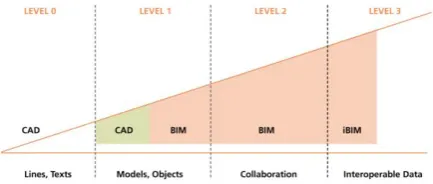
[image:1.595.317.534.529.621.2]The software used in architectural presentations according to BIM levels may be classified as shown in Fig. 1.
Fig. 1. Classification Of The Software Used In Architectural Presentations According To BIM Levels
BIM level 0 is the process of creating lines and texts, only in two dimensions. Meaning the lack of BIM, no collaboration between the parties collating information actually represents a lack of Building Information Modelling BIM level 1 is the process of creating models and objects, that the design of the two and three-dimension side by side but separate from each other. BIM level 2 is the process of collaboration of whole documentation. Any data
collected about a built asset is now shared [2].
Software in the Architectural Presentation
And Design Of Buildings: State-Of-The-Art
Before the BIM level 2 process, the computer programs were used for the opportunity to store information in electronic form. A certain amount of work, the interrelation between the needed data had to be integrated manually.
As mentioned, the overall design process of the architects has been completely changed when BIM level 2 technologies have appeared since 2002. BIM level 2-technology made it possible to collect all the needed data to be included in the model such as the computations of the expected cost and performance of infrastructure and buildings, for making decisions regarding the replacement and restoration of old buildings. [3].
BIM level 3 is the process of Interoperable data
The main objective of this paper is to look over the software used to in architectural design along with the main features of the software, and the capabilities of BIM; “a model-based process that provides insight to help the experts to plan, design, construct, and manage buildings and infrastructure [4]”.
Although all BIM level software has been exampled with the most popular ones, BIM 2 level has changed the work of an architect entirely. Since architectural software discussed in Level 0, level 1 were tools for drawing, beginning from the Level 2 the software is a tool for building. It presents a virtual reality of a building process.
Lallotra and Singhal [5] checked the reliability of the results found from some common software such as STAAD PRO, SAP2000 and ETABS with manual calculations to find the differences between the two methods, the results showed that the results obtained from software are close to the results obtained from hand calculations except for frames there was a big difference. Kumar and Saikiran [6] modeled and analyzed a 10-story reinforced concrete (RC) building using SAP2000 to investigate the effect of the earthquake on different types of foundations considering soil-structure interaction. Srinivasa et al. [7] investigated the effect of blast load using 100 kg of TNT explosion on a seven-story RC building using STAAD.PRO [8].
II.METHODOLOGY
The application domains, characteristics, limitation, technical popularity and capabilities of the existing most common used software in architecture and building design subjects were investigated and compared. Based on the performed research, twelve software were selected and a significant guideline including all required technical information for architectures as well as engineers to choose the suitable software to analyze and design the buildings is presented. In this study, for the selection of suitable software, the following aspects were considered as main criteria: - To be flexible, fast, and friendly-user,
- Containing the developed planning and design items, - Considering different materials, light technics, space, and forms,
- Can be integrated into the structural design and construction management parts.
- The ability to model buildings of any shape and size easily, - Flexibility in editing the created model,
- Design codes incorporated in the software, - Types of analysis supported by the software.
- Design modules built in the software to ease the design process.
Based on the above-mentioned criteria (similar to the criteria applied by Sadeghi and Ghaboun [9]), a complete guideline for choosing the software to analyze and design the buildings is presented.
III. ARCHITECTURAL SOFTWARE
A.BIM level 0
Today, the 2-D, as well as the 3-D abilities, are offered by the popular architectural CAD software. Meanwhile, in this paper, several 2-D packages are investigated for some designers that do not essentially require the 3-D abilities. Planning is the first stage of every design in any types and forms of buildings. Prior to creating a 3-D plan, a 2-D plan has to be made. Elevations and plans can be created by 2-D CAD. Therefore both 2-D and 3-D abilities are required in powerful CAD software.
A1. AutoCAD LT
Operating system: Mac, Windows
Every operating system is related to the CAD giant Autodesk. In the CAD business, AutoCAD is among the leading actors. Here, it is focused on the LT version. AutoCAD LT is an economical version of AutoCAD with compact abilities and functionality. Even though AutoCAD LT is not the best selection for the certified designers, it`s a great means for the beginners as an initial level CAD set. The set is suitable for individuals who are work on a financial plan or not considering 3-D abilities. LT version lets the users to design and outline in 2-D which is very suitable for drawing plans and beginning stages of the design development in all architectural proposals, including the selection of components, starting from the famous command-line component, customized user interface and tool palettes to accelerate the design process. When compared with AutoCAD, the LT version can be narrow, nevertheless, cross-hatching, transparency choices and dimension tools are only some of the features to benefit from. Dissimilar to AutoCAD, 3-D modeling or adaptation of ARX, LISP or VBA is not promoted in LT [10].
A.2. DraftSight
O
perating system: Mac, Windows, Fedora, Ubuntu The Scan2CAD blog regulars certainly are acquainted by DraftSight. DraftSight is a 2-D design and drafting software set. Using DraftSight makes possible to manage and share 2-D representations. DraftSight is offered in three different set alternatives as a freemium invention.The professional version should be considered if the architecture is a major design field in your life. The professional version allows users to admit online backup and a wide-ranging educational source index.
Besides, it is possible to approach the toolbox; an automated icon collection and annotation supplement along with the design collection that offers a space for user-defined components like blocks.
International Journal of Innovative Technology and Exploring Engineering (IJITEE) ISSN: 2278-3075, Volume-8 Issue-10, August 2019
items are deeply effective in architectural design. Users of DraftSight are also able to, generate and manage the two files of DXF and DWG. This broad rapport is very helpful during collaboration with groups [10].
B.BIM level 1
After understanding the initial phases of 2-D drawing and design, the following phase is 3-D modeling. For sure, the 2-D software could be passed up entirely and software, which allows both 3-D and 2-D abilities could be considered. As you might expect, the 3-D CAD has lots to suggest to the architects. With the 3-D CAD, one can foresee unbelievable exactness while drawing and modeling in 3-D. Rendering is an extra advantage put forward by 3-D CAD, which allows users to present realistic renderings. The educational phase is for sure tougher when it comes to 3-D software. Drawing in 3-D is essential if one is struggling with architecture [10].
B.1. AutoCAD Architecture
Operating system: Mac, Windows, Linux
AutoCAD LT has been already argued, rather passing directly to conventional AutoCAD, it will be more proper to talk about Autodesk’s production-specialized AutoCAD Architecture. Produced especially for architects, AutoCAD Architecture enables designers to draw both 2-D and 3-D. regardless of the kind of architectural design; it is possible to realize it with modeling commands such as mesh, solid and surface. Besides, it includes elevated 3-D performance to introduce industry-specific items such as doors, walls, and windows. During an architectural design process, 2-D floor plans and 3-D models are prepared. In AutoCAD Architecture, it is possible to shift between 2-D and 3-D images of the model with only one click.
AutoCAD Architecture is not famous just because of the design abilities that it possesses, the documentation and simulation are also rewarding among its characteristics. Rather than waiting until the construction phase to notice errors, it is possible to discover them prior to construction by simulation. Educational phase for AutoCAD Architecture might be compelling in case of insufficient knowledge in Autodesk software [10].
B.2. Chief Architect
Operating system: Mac, Windows
A more marketable choice, Chief Architect is a 3-D architectural house design software set for interior designers, constructors, architects, and amateurs. It is mentioned as the most known software for the house designing. Chief Architect is offering designers an easier educational phase. This is because it is dominantly promoted for professionals and amateurs at the same time. With Chief Architect, it is possible to design small-scale projects like houses as well as large-scale projects. Questionably, this distinguishes it from AutoCAD greatly, it is not necessary to worry too much to come to grips with it.
By the usage of quick building tools, Chief Architect allows designers to form a 3-D model of the desired building; it also creates building systems of the houses spontaneously. These intelligent building tools create an instinctive user interface as well [10].
B.3. TurboCAD
Operating system: Mac, Windows
An option for innovative drawers, TurboCAD is offered in a variety of sets. Pro Platinum will be introduced, as it is
offered with more abilities for architects who seeking for more for their designs. With this potent 2-D and 3-D CAD set, a huge drafting palette is accessible by users, ACIS solid modeling and finest realistic rendering; easy in reach when it is needed to show users an image of what to imagine as a finished model. The interface is simpler practically simulating AutoCAD-beneficial if the users are acquainted with Autodesk.
Indeed, this is only a few benefits of TurboCAD. It also offers progressive mechanical and architectural tools. For instance, the house wizard tool creates floor plans with each room as an automatic course; it is possible to place items like garages, closets, and decking. It is not necessary to bother about the doors inside the house; they routinely placed once the home is developed. Moreover, TurboCAD is offered with five hundred ready-made floor plans, huge collections of items and settings to alter information such as shadows and light. For general users, TurboFloorPlan 3-D is within easy reach [10].
C. BIM level 2
BIM, Building Information Modeling is a developing area of attention in the CAD business that is the reason many inventers have started to include BIM in their software. With BIM, users can join workflows and generate large files that stock all the data needed concerning models, from cost to floor plans to materials. This joint workflow tolerates full teamwork, accelerating the whole design and building processes [10]. The BIM is a collective information model for the construction objective. Applying BIM, the calculation of the building is performed considering a single-whole. Variation in a parameter of BIM involves an automatic variation of the remaining.
C.1. ArchiCAD
Operating system: Mac, Windows
GRAPHISOFT flared up the BIM innovation in 1984 with ArchiCAD, the first industry-based BIM software for architects. GraphiSoft keeps leading the field with groundbreaking resolutions such as its innovative BIMcloud, the world’s leading real-time BIM teamwork setting;
EcoDesigner STAR, the world’s first entirely
BIM-integrated GREEN design solution; and BIMx, the world’s major smartphone application for BIM picturing [11].
. ArchiCAD is a BIM CAD software set devoted only to architecture. Each of its abilities and utilitie6 offers clarifications for all features of aesthetics and engineering through the design development of construction. Designed for urban planners, architects, and designers. Its CAD solutions are calculated to provide all features of architectural and engineering [12].
With ArchiCAD, it is possible to develop plans, elevations, construction details, and sections. Formation of staircases is clarified by the tool called stair tool, calculating many design decisions and putting forward the ideal staircase designs. For the moment, to form connected balustrades for roofs, meshes, slabs, walls, and stairs in just one click, the railing tool might be used as well. Mentioned as the main industrial BIM
software for PC’s,
software. With the abilities of BIM, designers are able to stock huge quantities of data for their 3-D drawings; it is also possible to observe the models in a VR headset by exporting them into BIM X. It is possible to assemble items like costs, materials and more. Besides, it is possible to compile aspects like types of materials, overhead costs and much more. Additionally, synchronization amongst engineers and architects come to be better restructured when it becomes possible to visualize all design parts in only one interface [10].
Pros: One of the most groundbreaking stages for BIM, which is obtainable through stores, is ArchiCAD. Accommodating to all design needs of urban and landscape planners, interior designers as well as architects ArchiCAD is an influential software. It is possible to import 2-D drawings to develop them into 3-D models or to start drawing in ArchiCAD on Plan mode and let the software to create 3-D views, elevations and sections. While working on multi-story buildings, it is quite easy to spot on any mistakes in drawing (which could be overlooked in the plan mode) by the 3-D viewer that creates a faultless atmosphere to identify any inaccuracies.
In AutoCAD, there is a great characteristic named Solibri Model Checker which precisely analysis the BIM drawing to determine any possible mistakes in drawing and determine clashing items. It is also a wonderful tool to evaluate the energy requirements of construction. Additionally, EcoDesigner STAR plug-in allows thermal zoning, energy performance simulations, and energy model visualization. ArchiCAD is one of the best 3-D modeling software in the opinion of many users and they have never felt the need to switch to another software.
Cons: To run ArchiCAD particularly during rendering a robust system with a great degree of RAM is needed. While initiating an information-loaded file the software lowers the speed of the system. In addition, the educational phase is quite hard but it is possible to conquer with a study plan. Other than those two weak points, there is no any other important matter that would disturb the attitude of users for this exceptional software [11].
C.2. Revit
Operating system: Windows
It is practically impossible to discuss architectural software without stating Revit. A huge software in the architecture business, Revit allows designers to form 2-D building designs and data, 3-D renderings and models. Concentrating overall, integrated models, Revit allows designers to form in both 2-D and 3-D, from the exterior and interior construction to actual data for every design component. Revit permits to rationalize chores as well, it is possible to program definite practices to be able to trigger the design development. Another ability that triggers the design process is the capacity to routinely update every drawing with the latest modifications together with elevations and plans. Meaning, users waste less time revising the drawings and management amongst different design phases becomes easier. It is possible to distribute models for other teams to draw on the same file, simplification of teamwork through different groups. Revit is planned especially for drawings to be built in reality [10]. Revit is the robust platform offers an intelligent model-based approach for planning, designing, and constructing
infrastructures and buildings. Designed for MEP engineers, architects, designers, contractors, and landscape architects, among others. All process goes through a single system, so it minimizes the risk of errors caused by miscommunication [12].
Autodesk’s BIM software Revit assists interdisciplinary groups during the whole project more efficiently than before. A previsioned interface gives the designer the switch of display real estate with tabbed visions that can be tiled, docked and transferred into another monitor. For a mesmerizing design practice, it is possible to use 3-D view during most of the modeling time [11].
Pros: This software is planned to form constructions directly in 3-D. Revit already counts as “out of the box” offering a huge diversity of built-in items (stairs, roofs, floors, walls, etc.). It is possible to view the drawings in 2-D (elevation, section, and plan) interim as in 3-D. Revit has a high degree of accurateness when compared to other software. It is possible to export Revit drawings to a broad range of other majors. Revit holds a robust rendering power as well. There are many external resources available for extra construction items.
Cons: Revit files might turn out to be large models. Many free online copies are available [11].
C.3. Vectorworks Architect Operating system: Mac, Windows
Vectorworks, a preferred software at Scan2CAD, is definitely a leader in the CAD business. Arranged for construction engineers, the software offers complete BIM performance along with 2-D and 3-D modeling. It is possible for designers to generate virtual design prototypes using variable parametric items with the desired range of detail. Advanced by Nemetschek, Architect places BIM at the core of its design development. Architects are able to look at costs, improve construction features and grow production with Vectorworks Architect. It is also probable to create collaborative timetables whereas examining and editing a building.
Vectorworks Architect provides NURBS modeling, full rendering, divided surface modeling, and cloud-based storing for distribution. Making it possible to share projects throughout the world. Project sharing add-on allows groups to merge progress, therefore engineers and architects are all functioning on the identical drawing at the same time. In Renderworks, It is possible to generate realistic renders with chosen materials and shadow as well [10].
All included software package of 2-D drawing, 3-D CAD and BIM for Windows and Mac. Along with improved recording, quicker rendering, effective drawing, and simpler modeling. By this cross-platform program, users are able to create information-loaded, image-based models. Designers can build data-rich, visual models without sacrificing the design process. [11]. It has design-oriented capabilities that have more design options while supporting comprehensive construction [12].
International Journal of Innovative Technology and Exploring Engineering (IJITEE) ISSN: 2278-3075, Volume-8 Issue-10, August 2019
be arranged so it is as simple as drawing on a drawing board. With the use of hatch, opacity, patterns, and colors, it is possible to create attractive drawings, which are very simple to comprehend and take to mean. It is also possible to complete drawings much faster than AutoCAD users by the use of tailoring shortcuts. The software has possible selections for BIM and 3-D modeling. It offers a system to collect information and saving.
Cons: Software has had some problems with updating in former times and caused a lot of time lost to cover. Irregularly the program crashes for unusual causes [11].
C.4. Allplan Architecture Operating system: Windows
Allplan Architecture is an object-determined 3-D design set, another software advanced by Nemetschek. Allplan, just like Vectorworks, brings huge importance on BIM to streamline managerial processes for designers and this is the reason why it is very well-known among architects. It can be talked about improved information transference in BIM projects with the innovative and enhanced IFC4 data export; it is possible to distribute every kind of BIM drawing information counting freeform geometry. Designers are able to impose upon immediate cooperation with other teams throughout the world with the exact same information.
With Allplan Architecture, it is possible to create building designs with more flexibility and freedom [13].
This is only the beginning of BIM abilities, to deal with the interchange of huge numbers of data in BIM drawings, Allplan Bimplas can be used. It is possible to describe the data and practice in altered systems during the entire process of a building design. A special great tool for designers is the ActionBar that is composed of constructing tools in accordance with function.
For example visualization tools, drawing, and modeling. Also with the use of MAXON’s CineRender, users are able to attain hyper-realistic results in rendering [10].
IV. BUILDINGS DESIGN SOFTWARE
In this Section, the most common software for the design of reinforced concrete buildings are presented.
D. CSI Software Packages
The most well-known structural and earthquake engineering Software Company called Constellation Software Incorporation (CSI) [14] that provides much software to help engineers to speed up the analysis and design of RC, steel, and composite structures. The company provides a variety of software for different uses that some of them are listed below [8]:
* SAP 2000:
The software is used to analyze and design the structures. * ETABS:
Designers use ETABS to analyze and design the buildings of different materials.
* SAFE:
The best tool to design RC foundation and floors.
The most common software packages used by many users around the world are SAP 2000, ETABS and SAFE. The common advantages of the three-dimensional software are:
- Single-user interface for modeling, analysis, and design. - Wide range of templates to build a new model.
- Simplicity in editing model database.
- Wide range of design codes for different materials. - Specific tool for load optimization.
- Section designer tool to allow for creating a section of any shape.
- Powerful export and import capabilities by supporting different file formats.
- Different types of analysis are included. [8]
- The software can be used to design other types of structures. It may be applied to the design of onshore and offshore structures’ elements as well [15, 16].
E. STAAD.PRO Software
This software is provided to help engineers to analyze and design buildings. The company provides the software in three versions [8, 17]:
- STAAD.PRO: This version contains the most basic options of the software with the FEA method.
- STAAD.PRO Advanced: The version is devoted to solving the most complex problems with high speed than the previous version.
- Structural Enterprise: This software is used to analyze, design and produce calculation sheets for steel buildings and trusses.
The main advantages of STAAD.PRO software is: - Wide range of material libraries to be used in the design. - The models can be viewed and edited from mobile devices. - Over 90 design codes are included in the software for RC, steel, timber, aluminum, and cold-formed steel structure buildings.
- STAAD’s cloud services enable users to try different design alternatives for comparisons.
- Use of CAD and DXF file format to build the structural model.
- Use of API protocol to extract data from STAAD.PRO models into other software such as Microsoft word and excel.
E.1. Design codes
STAAD.PRO supports many international codes for RC structures’ design [8, 18]:
- ACI 318-95, - BS 8110, - AS3600,
- CAN3-A23.3-M84, - IS 456,
- EC2,
- German code: DIN 1045, - BAEL,
- Japanese code: AIJ, - GBJ10-89,
- Norwegian code: NS 3473, - Finnish code: B4,
- Dutch code: DS 412.
E.2. Analysis and Design Modules
Analysis types built-in STAAD.PRO are [8, 19]: - P-Delta analysis for small and large P-Delta, - Elastic linear analysis,
- Imperfection analysis due to inaccuracy in modeling structure geometry,
- Dynamic analysis such as time-history, response spectrum, steady-state, and Eigen analysis,
- Design modules for RC buildings in STAAD.PRO includes:
- Pushover analysis,
- Geometric nonlinear analysis, - Seismic analysis,
- Buckling analysis.
Design modules for RC buildings in STAAD.PRO includes: STAAD.Foundation for the RC buildings design
V. CONCLUSIONS
Based on the comparisons carried out on the existing most common used software, two software from BIM level 0, three software from BIM level 1, and four software from BIM level 2 have been selected and technically described by giving the technical specifications, characteristics, application domains, limitation, technical popularity and capabilities that can be a complete guideline for architects to choose the suitable software to be used in architectural and design of buildings professions. A complete guideline has been presented to analyze and choose the best architecture and building design software fit on some parameters like compatibility with other software, cost, and the time needed for the drawing preparation procedure. To aid the architects and designers to choose the best-fit software, the following listed software along with their technical specifications and their advantages and disadvantages were evaluated and presented. For the architectural presentation the software of BIM level 0 (AutoCAD LT and DraftSight), BIM level 1 (AutoCAD Architecture, Chief Architect and TurboCAD), BIM level 2 (ArchiCAD, Revit, Vectorworks Architect and Allplan Architecture), and for the buildings design the CSI software packages (SAP 2000, ETABS and SAFE) and STAAD.PRO software are recommended to be employed.
REFERENCES:
1. Dib C., 2017,”5 key differences between AutoCAD and Revit” Linked in online. Available:
https://www.linkedin.com/pulse/5-key-differences-between-autocad-revit-carole-dib
2. Stroma Certification Ltd2019 Retrieved from: https://www.stroma.com/certification/bim/levels
3. Vatin N.G. O., “BIM-technology in architectural design” Advanced Materials Research Vols. 1065-1069 (2015) pp 2611-2614.
4. Dat L., 2016, “The Importance of AutoCAD in the BIM World”, Online Available:
https://www.augi.com/articles/detail/the-importance-of-autocad-in-the-bi m-world
5. Lallotra B. and Singhal B. (2017). A compatibility study on design and analysis of reinforced concrete structural design using the software. International Journal of Engineering and Technology (IJET), vol. 9(2), 1012-1021.
6. Kumar V. P. and K. Saikiran (2018). Non-Linear Dynamic Analysis of Multistoried Reinforced Concrete Building by Considering Soil-Structure
Interaction (SSI). International Journal of Innovative Technology and Exploring Engineering, 7(7), 5-9.
7. Srinivasa P. R. et al. (2019). Study the Impact of Blast Load on G+7 Multistoried RCC Structure with Varied Distances. International Journal of Innovative Technology and Exploring Engineering, 8(4), 615-621. 8. Strusoft Software, (2019). Retrieved from:
https://strusoft.com/products/femdesign/concrete-design
9. Sadeghi K., Ghaboun N., (2019, June) “Significant Guidance to Employ the Software to Analyze and Design the Reinforced Concrete Structures: State-Of-The-Art”, International Journal of Innovative Technology and Exploring Engineering (IJITEE) [Online]. 8(9), 1160-1169, Available: https://www.ijitee.org/wp-content/uploads/papers/v8i9/I8035078919.pdf 10. Bethany, 2017, “Which Architecture Software Should I Use?” Scan2CAD,
Available: https://www.scan2cad.com/architecture/architecture-software/ 11. ArchiCAD, by Graphisoft, 2019, Retrieved from:
https://www.capterra.co.uk/software/2018/archicad
12. Best 20 Building Information Modeling (BIM) Software in 2019, Retrieved from:
https://financesonline.com/building-information-modeling/ 13. What is Allplan Architecture?, Retrieved from:
http://comparecamp.com/allplan-architecture-review-pricing-pros-cons-fe atures/
14. Computers and Structures Incorporation (CSI), (2019). Retrieved from: https://www.csiamerica.com/products.
15. Sadeghi K., Abdeh A., Al-Dubai S., (2017, December) “An Overview of Construction and Installation of Vertical Breakwaters”, International Journal of Innovative Technology and Exploring Engineering (IJITEE)
[Online]. 7(3), 1-5, Available:
https://www.ijitee.org/download/volume-7-issue-3/
16. Sadeghi K., Al Haj Houseen Q., Abo Alsel S., (2017, December) “Gravity Platforms: Design and Construction Overview”,
International Journal of Innovative Technology and Exploring Engineering (IJITEE) [Online]. 7(3), 6-11, Available: https://www.ijitee.org/download/volume-7-issue-3/
17.. Bentley Systems Incorporated (2019). Retrieved from: https://www.bentley.com/en/products/product-line/structural-analysis-soft ware/staadpro.
18. Research Engineers (REI), (2019). Retrieved from: https://www.reig.de/en/our-software-solutions-at-a-glance/staadpro/intern ational-design-codes/.
19. Bentley Systems, Incorporated (2019). Retrieved from: https://www.bentley.com/en/products/product-line/structural-analysis-soft ware/staadpro-advanced.
AUTHORSPROFILE
Prof. Dr. Zeynep Onur [email protected]
Near East University, Nicosia, North Cyprus
Prof. Zeynep Onur is graduated from the State Academy of Engineering and Architecture, Department of Architecture. She obtained a Master degree in MBA from the Academy of Administrative and Economic Sciences and she completed the Ph.D. degree from the Gazi University in Architecture. Professor Onur worked at Gazi University in the Department of Architecture between 1978-2002, at the Girne American University between 2002-2011. Between 2011-2016 she was the Dean of Faculty of Architecture of the Çankaya University, and between 2011-2016 she was the Dean of Faculty of Architecture at AHEP University in Turkey. She is a Member of the Board of Directors of the International Association of Semiotic Studies (IASS) as a Representative of Turkey. She is the author of the book of “Modern Sonrası Mimarlık Üzerine Notlar” (with Ziya Tanalı in 2008) and she is the editor of the architectural monography of the Turkish architect Ziya Tanalı (since 2010). She received the “Asia Region Award” for the work of "Ankara Meeting" from the
International Journal of Innovative Technology and Exploring Engineering (IJITEE) ISSN: 2278-3075, Volume-8 Issue-10, August 2019
Assist. Prof. Dr. Fatemeh Nouban [email protected]
Near East University, Nicosia, North Cyprus
Assistant Professor Nouban has a Ph.D. degree in Construction Management, received in January 2015 from the Girne American University, an MSc degree got in 2005 from the Science and Research Campus of the IAU University, and a BSc degree received in 2002 from the Central Tehran Campus of the IAU University. Dr. Nouban has proposed two new analytical models and algorithms to find the best location for the construction of new harbors and a rough estimation of breakwaters’ materials. Assistant Professor Nouban has had experience as project manager and supervisor in construction of residential and industrial buildings and also in preparing the technical contracts' documentation of offshore petroleum structures for an international offshore petroleum company. She has published many technical papers in the science citation index (SCI) journals, international journals, and international conferences. Since 2008, she has taught/researched as an academic staff in the Girne American University and the Near East University. Currently, Assistant Professor Nouban is teaching/researching in the Civil Engineering Department of the Near East University as a full-time Assistant Professor.