by Doug Lowe, Jeff Cogswell,
and Ken Cox, Microsoft MVP
ASP.NET 2.0
A L L - I N - O N E D E S K R E F E R E N C E
FOR
by Doug Lowe, Jeff Cogswell,
and Ken Cox, Microsoft MVP
ASP.NET 2.0
A L L - I N - O N E D E S K R E F E R E N C E
FOR
ASP.NET 2.0 All-in-One Desk Reference For Dummies®
Published by
Wiley Publishing, Inc.
111 River Street Hoboken, NJ 07030-5774
www.wiley.com
Copyright © 2006 by Wiley Publishing, Inc., Indianapolis, Indiana Published by Wiley Publishing, Inc., Indianapolis, Indiana Published simultaneously in Canada
No part of this publication may be reproduced, stored in a retrieval system or transmitted in any form or by any means, electronic, mechanical, photocopying, recording, scanning or otherwise, except as permit-ted under Sections 107 or 108 of the 1976 Unipermit-ted States Copyright Act, without either the prior written permission of the Publisher, or authorization through payment of the appropriate per-copy fee to the Copyright Clearance Center, 222 Rosewood Drive, Danvers, MA 01923, (978) 750-8400, fax (978) 646-8600. Requests to the Publisher for permission should be addressed to the Legal Department, Wiley Publishing, Inc., 10475 Crosspoint Blvd., Indianapolis, IN 46256, (317) 572-3447, fax (317) 572-4355, or online at
http://www.wiley.com/go/permissions.
Trademarks:Wiley, the Wiley Publishing logo, For Dummies, the Dummies Man logo, A Reference for the Rest of Us!, The Dummies Way, Dummies Daily, The Fun and Easy Way, Dummies.com, and related trade dress are trademarks or registered trademarks of John Wiley & Sons, Inc. and/or its affiliates in the United States and other countries, and may not be used without written permission. All other trademarks are the property of their respective owners. Wiley Publishing, Inc., is not associated with any product or vendor mentioned in this book.
LIMIT OF LIABILITY/DISCLAIMER OF WARRANTY: THE PUBLISHER AND THE AUTHOR MAKE NO REPRESENTATIONS OR WARRANTIES WITH RESPECT TO THE ACCURACY OR COMPLETENESS OF THE CONTENTS OF THIS WORK AND SPECIFICALLY DISCLAIM ALL WARRANTIES, INCLUDING WITHOUT LIMITATION WARRANTIES OF FITNESS FOR A PARTICULAR PURPOSE. NO WARRANTY MAY BE CREATED OR EXTENDED BY SALES OR PROMOTIONAL MATERIALS. THE ADVICE AND STRATEGIES CONTAINED HEREIN MAY NOT BE SUITABLE FOR EVERY SITUATION. THIS WORK IS SOLD WITH THE UNDERSTANDING THAT THE PUBLISHER IS NOT ENGAGED IN RENDERING LEGAL, ACCOUNTING, OR OTHER PROFESSIONAL SERVICES. IF PROFESSIONAL ASSISTANCE IS REQUIRED, THE SERVICES OF A COMPE-TENT PROFESSIONAL PERSON SHOULD BE SOUGHT. NEITHER THE PUBLISHER NOR THE AUTHOR SHALL BE LIABLE FOR DAMAGES ARISING HEREFROM. THE FACT THAT AN ORGANIZATION OR WEBSITE IS REFERRED TO IN THIS WORK AS A CITATION AND/OR A POTENTIAL SOURCE OF FURTHER INFORMATION DOES NOT MEAN THAT THE AUTHOR OR THE PUBLISHER ENDORSES THE INFORMATION THE ORGANIZATION OR WEBSITE MAY PROVIDE OR RECOMMENDATIONS IT MAY MAKE. FURTHER, READERS SHOULD BE AWARE THAT INTERNET WEBSITES LISTED IN THIS WORK MAY HAVE CHANGED OR DISAPPEARED BETWEEN WHEN THIS WORK WAS WRITTEN AND WHEN IT IS READ.
For general information on our other products and services, please contact our Customer Care Department within the U.S. at 800-762-2974, outside the U.S. at 317-572-3993, or fax 317-572-4002. For technical support, please visit www.wiley.com/techsupport.
Wiley also publishes its books in a variety of electronic formats. Some content that appears in print may not be available in electronic books.
Library of Congress Control Number: 2006922516 ISBN-13: 978-0-471-78598-9
ISBN-10: 0-471-78598-9
Manufactured in the United States of America 10 9 8 7 6 5 4 3 2 1
About the Author
Doug Lowehas written a bevy of computer books, including more than 35 For Dummies books. Among his most recent are ASP.NET Everyday Applications For Dummies, Java All-In-One Desk Reference For Dummies, Networking For Dummies, 7thEdition, Networking For Dummies All-In-One
Desk Reference, Second Edition, PowerPoint 2003 For Dummies, and Word 2003 All-In-One Desk Reference For Dummies. He lives in sunny Fresno, California, where the weather is always bad for half of the farmers, with his wife, the youngest of three daughters, and a couple of crazy dogs. He is the Information Technology Director for Blair, Church & Flynn Consulting Engineers, an engineering firm in nearby Clovis, CA.
Jeff Cogswellis a software engineer and trainer living in the Cincinnati area. He has written several books, including two previous Dummies books, one on C++ and one on LAMP. When not programming or writing about computers, he enjoys traveling and writing fiction and screenplays. Jeff also conducts ASP.NET training sessions; contact him at [email protected] visit www.jcogs.comfor more information.
Ken Coxis a Canadian writer and programmer whose claim to fame is that he has chatted in English and French with Queen Elizabeth II of England. His degree in Radio and Television Arts from Ryerson University led to a 25-year career as a broadcast journalist in Toronto and Quebec City. Waving his col-lege certificate in Technical Communication, he launched a second career as a technical writer for companies including Nortel (yes, before it wilted).
Somehow, he parlayed zero/zilch formal training in computers into a third career as a programming writer, technical editor, and Web developer. Microsoft has repeatedly honoured him as a Most Valuable Professional (MVP) for ASP.NET in recognition of his contributions to the .NET developer community.
Dedication
To Debbie, who wondered where I was.
— Doug Lowe
To my wife, Vilia, for encouraging me to pursue my dreams.
— Ken Cox
Author’s Acknowledgments
I’d like to thank everyone who helped make this book happen, starting with project editor Blair Pottenger, who did a great job guiding this project through from start to finish. I’d also like to thank my co-authors Ken Cox and Jeff Cogswell, and copy editor Barry Childs-Helton who dotted my t’s and crossed my eyes, or something like that, and managed to turn my strange ramblings into readable English. And, as always, thanks to all the behind-the-scenes people who chipped in with help whenever help was needed.
— Doug Lowe
Thanks to Scott Guthrie, Nikhil Kothari, Rich Ersek and the the rest of Microsoft’s Web Platform & Tools team for creating the fascinating ASP.NET technologies.Thanks also to Katie Feltman, Blair Pottenger, and Doug Lowe for giving me the opportunity to contribute to this book.
Publisher’s Acknowledgments
We’re proud of this book; please send us your comments through our online registration form located at www.dummies.com/register/.
Some of the people who helped bring this book to market include the following:
Acquisitions, Editorial, and Media Development
Project Editor:Blair J. Pottenger
Acquisitions Editor:Katie Feltman
Copy Editor:Barry Childs-Helton
Technical Editor:Ken Cox
Editorial Manager:Kevin Kirschner
Media Development Specialists:Angela Denny, Kate Jenkins, Steven Kudirka, Kit Malone, Travis Silvers
Media Development Coordinator:
Laura Atkinson
Media Project Supervisor:Laura Moss
Media Development Manager:
Laura VanWinkle
Media Development Associate Producer:
Richard Graves
Editorial Assistant:Amanda Foxworth
Sr. Editorial Assistant:Cherie Case
Cartoons:Rich Tennant (www.the5thwave.com)
Composition Services
Project Coordinator: Jennifer Theriot
Layout and Graphics: Claudia Bell, Carl Byers, Andrea Dahl, Denny Hager, Joyce Haughey, Stephanie D. Jumper, Barry Offringa, Melanee Prendergast, Julia Trippetti
Proofreaders: John Greenough, Leeann Harney, Christy Pingleton, Linda Quigley
Indexer: Kevin Broccoli
Publishing and Editorial for Technology Dummies
Richard Swadley,Vice President and Executive Group Publisher
Andy Cummings,Vice President and Publisher
Mary Bednarek,Executive Acquisitions Director
Mary C. Corder,Editorial Director
Publishing for Consumer Dummies
Diane Graves Steele,Vice President and Publisher
Joyce Pepple,Acquisitions Director
Composition Services
Gerry Fahey,Vice President of Production Services
Table of Contents
Introduction...1
About This Book...2
How to Use This Book ...3
How This Book Is Organized...3
Book I: ASP.NET Basics ...3
Book II: Web Controls...3
Book III: HTML ...3
Book IV: C# ...4
Book V: Visual Basic...4
Book VI: Database Programming ...4
Book VII: Using the .NET Framework ...4
Book VIII: Advanced ASP.NET Programming...4
Icons Used in This Book...4
Where to Go from Here...5
Book I: ASP.NET Basics ...7
Chapter 1: Welcome to ASP.NET Programming . . . .9
What Is ASP.NET, and Why Is It So Great? ...9
Windows and IIS dependence ...10
Object orientation ...11
Choice of languages ...11
Visual Studio ...12
Understanding Web Servers and Browsers ...12
Understanding Static Web Pages...13
Understanding Dynamic Web Pages ...14
Looking at a Simple ASP.NET Application...15
The .aspx (Markup) File for the Simple Calculator Application ...17
The Code-Behind File of the Simple Calculator Application ...18
Chapter 2: Installing Visual Studio Web Developer 2005
Express Edition or Visual Studio 2005 . . . .21
Looking at Visual Studio 2005 Editions ...21
Considering Visual Web Developer 2005 Express Edition ...22
Installing Visual Web Developer 2005 Express Edition ...22
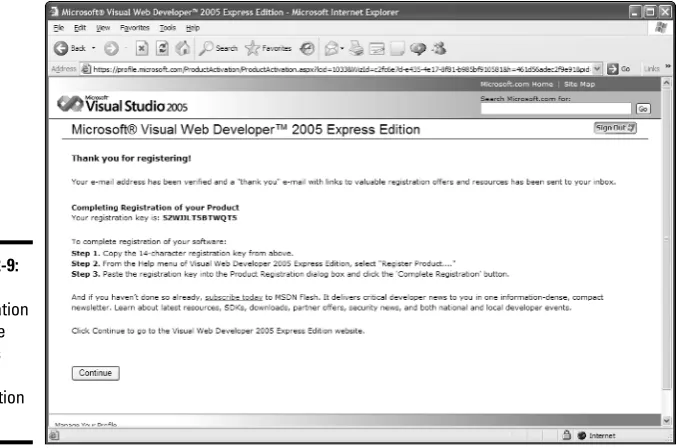
Registering Visual Web Developer 2005 Express Edition...27
ASP.NET 2.0 All-in-One Desk Reference For Dummies
viii
Chapter 3: Creating Your First ASP.NET 2.0 Application . . . .35
Understanding Visual Studio Projects...35
Creating a New Web Site...36
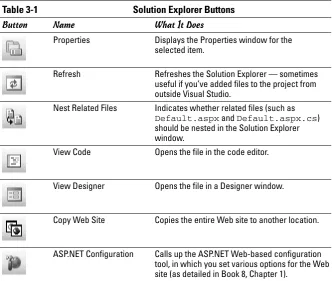
Using the Solution Explorer ...39
Working with Controls...40
Setting Properties ...44
Setting the Page Title ...46
Looking at the Source Code ...47
Adding Some Code ...48
Running the Application...51
Chapter 4: Understanding Postback, Events, and Code-Behind . . . . .53
Understanding Postback ...53
Using the IsPostBack Variable ...54
Understanding Events ...55
Using the Handles Clause in Visual Basic ...56
Designating an Event Handler in C# ...58
Using C#’s Auto Event Wireup ...58
Understanding Code-Behind...59
Using Single-File Pages ...60
Chapter 5: Creating Multipage Applications . . . .63
Understanding the Basics of a Multipage Application ...63
Adding Pages ...66
Redirecting to Another Page...67
Adding Classes ...68
Using Session State ...71
Looking into Data Binding...74
Using Master Pages...75
Creating a Master Page ...75
Creating a content page...78
The C# Version of the Shopping Cart Application ...79
The VB.NET Version of the Shopping Cart Application ...83
Chapter 6: Testing and Debugging Your ASP.NET Applications . . . . .87
Creating a Simple Calculator Application ...87
Running an ASP.NET Application ...89
Dealing with Errors ...91
Working in Break Mode ...93
Displaying Variable Data ...93
Stepping Through a Program...95
Setting Breakpoints...96
Table of Contents
ix
Book II: Web Controls ...99
Chapter 1: Using Basic Web Server Controls . . . .101
Using Label Controls...101
Using TextBox Controls ...103
Using Button Controls ...105
Using CheckBox Controls...107
Checking the Checked property...108
Another way to check the Checked property...109
Using RadioButton Controls ...111
Using Image Controls...112
Chapter 2: Using Validation Controls . . . .115
Validating the Hard Way ...115
Validation Controls to the Rescue!...117
Using the RequiredFieldValidator Control ...118
Using the CompareValidator Control...120
Using the RangeValidator Control...122
Using the RegularExpressionValidator ...123
Using a CustomValidator Control...125
Using the ValidationSummary Control ...126
Using the CausesValidation and ValidationGroup Properties ...128
Chapter 3: Using List Controls . . . .131
Using the CheckBoxList Control ...131
Creating columns...133
Aligning text with check boxes...134
Spacing things out ...135
Working with ListItem Elements...135
Using the Text property...135
Using the Value property...136
Determining which items are selected ...136
Using the Collection Editor dialog box ...137
Toiling with the RadioButtonList Control ...138
Utilizing ListBox Controls ...139
Employing DropDownList Controls ...141
Accomplishing More with List Items in Code...143
Adding an item to a list...143
Clearing the list...143
Selecting and deselecting items ...144
ASP.NET 2.0 All-in-One Desk Reference For Dummies
x
Chapter 4: Using Advanced Web Server Controls . . . .147
Using the MultiView Control...147
Utilizing the Wizard Control ...152
Creating steps in Visual Studio ...154
Using Wizard events...156
Looking at the code for a Wizard control...157
Working with the Calendar Control ...160
Making Use of the FileUpload Control ...163
Chapter 5: Working with User Controls . . . .165
Introducing User Controls...165
Creating a User Control ...167
Adding a User Control to a Page ...169
Adding Properties to a User Control ...170
Putting User-Control Properties to Work ...173
Book III: HTML ...175
Chapter 1: HTML Basics . . . .177
XHTML Rulez! ...177
XHTML and the W3C ...178
The strict upbringing of XHTML...178
Making your HTML well-formed ...179
More XHTML requirements...180
Taking characters as an entity...181
VWDE’s Support for XHTML ...181
A solemn DOCTYPE declaration...181
Validity spy...182
Letting VWDE fix old code...185
You can go your own way...189
Editing Code in Source View ...190
Preserving source code ...191
Cleaning up source code ...192
Using the Tag Navigator ...192
Collapsing and outlining...193
No Comment! ...193
Editing Pages in Design View ...194
Establishing a position in Design view ...194
Positioning a Single Control ...197
Viewing an HTML document’s structure ...197
Manipulating the DOM...198
Formatting Text ...198
The Formatting toolbar ...199
The Format menu ...199
Table of Contents
xi
Chapter 2: Creating Tables . . . .201
Some Basic Table Talk ...202
Adding headers, a caption, and a summary ...202
Grouping and spanning columns and rows...205
Creating Tables in the Designers...207
The Toolbox table ...207
The table designer...208
The ASP.NET table tool ...209
Creating Tables Programmatically...212
Building a table by using the Repeater control ...212
Building an ASP.NET table from scratch...215
Creating a Table-Based Framework ...217
Chapter 3: Working with Forms . . . .221
Understanding Forms ...221
Creating a Form ...223
A call to action — sent by post ...223
Staying on target...224
Your special events form...224
Working with Text Boxes...225
Creating text fields with <input> ...226
Creating a password text box ...227
Super-sizing a text field...227
Working with Buttons ...229
Creating a submit button...229
Creating a reset button ...230
Creating an ordinary button ...230
Creating an image button ...230
Creating submit, reset, and ordinary buttons another way ...231
Working with Check Boxes and Radio Buttons ...232
Creating a check box...232
Creating a radio button...232
Using Drop-Down Lists and List Boxes...233
Creating a drop-down list ...233
Creating a list box...234
Creating a hierarchical drop-down list and list box...235
Checking Form Submissions with ASP.NET ...237
Setting the Tab Order ...238
Chapter 4: Using Styles and Style Sheets . . . .241
Understanding Styles...241
Cascading Style Sheets ...242
ASP.NET 2.0 All-in-One Desk Reference For Dummies
xii
Working with Styles in Visual Studio 2005 and
Visual Web Developer ...246
Setting the CSS validation schema ...246
Creating inline styles in Design view ...248
Creating inline styles in Source view ...252
Building external style sheets...254
Creating a class with style...256
Using Span and Div for Styles and Positions ...257
Highlighting text with <span> ...258
Creating a layer with <div>...259
Showing and hiding the <div>...260
Creating and Applying Styles in Code ...261
Applying inline styles in code...261
Inserting embedded styles with code...262
Letting users choose their style sheet ...263
Chapter 5: Using Client-Side Script . . . .267
Sampling Client-Side Script on Microsoft.com ...267
Compensating for browser differences ...268
Embedding multimedia content ...268
Tracking page views and statistics ...269
Making the page interactive...270
Creating random content and surveys ...270
Embedding Script in an ASP.NET Page ...271
Embedding a block of script ...272
Inserting a hidden field into a page...274
Embedding code so that it executes on startup ...275
Embedding code to catch a page submit ...277
Capturing the hidden field ...278
Referencing external scripts ...279
Storing an array of values in a page ...280
Using Client-Side Scripts in ASP.NET ...281
Identifying page elements by using script ...282
Using alert( ) to stop users cold ...284
confirm( ) a drastic action...285
Creating a rollover effect ...286
Client-Side Script and Validation Controls...287
How Auto-Postback Uses Client-Side Script ...289
Using Client-Side Callbacks...291
Creating the Web page interface ...292
Preparing the JavaScript ...293
Building the server-side algorithm ...294
Implementing ICallbackEventHandler ...294
Generating the callback code ...296
Making the callback call ...297
Table of Contents
xiii
Book IV: C# ...301
Chapter 1: C# Programming Basics . . . .303
Dealing with Keywords...303
Working with Statements ...304
Types of statements ...304
White space...305
Working with Blocks ...306
Creating Identifiers ...307
Crafting Comments ...307
Single-line comments ...307
Delimited comments ...308
Introducing Object-Oriented Programming ...308
Understanding classes and objects ...308
Coding a class ...309
Creating an object from a class ...310
Using .NET Framework Classes ...311
Declaring Variables ...312
Declaring two or more variables in one statement...313
Declaring instance variables...313
Declaring local variables ...314
Initializing Variables...315
Initializing variables with assignment statements ...315
Initializing variables with initializers ...315
Working with Built-in Data Types...316
Integer (int) types ...317
Floating-point types ...318
The decimal type ...319
The char type...319
The boolean type...320
Working with Strings...320
Declaring and initializing strings ...321
Combining strings ...321
Converting strings to primitives ...322
Working with Arithmetic Operators ...323
Dividing Integers ...325
Combining Operators ...326
Using the Unary Plus and Minus Operators ...327
Using Increment and Decrement Operators ...328
Using the Assignment Operator ...329
ASP.NET 2.0 All-in-One Desk Reference For Dummies
xiv
Chapter 2: Doing Things Conditionally in C# . . . .333
Using Simple boolean Expressions ...333
Using if Statements ...335
Simple if statements...335
if-else statements...338
Nested if statements ...339
else-if statements...341
Mr. Spock’s Favorite Operators (the Logical Ones, of Course) ...343
Using the ! operator ...344
Using the & and && operators...345
Using the | and || operators ...346
Pulling the Ol’ Switch-er-oo ...347
Creating else-if monstrosities ...347
Using the switch statement...348
A better version of the Voter-Error-Code Decoder program ...349
Chapter 3: Going Around in Circles (Or, Looping in C#) . . . .351
Your Basic while Loop ...351
The while statement ...352
A counting loop ...352
Breaking Out of a Loop...353
Looping Forever ...354
Using the continue Statement ...355
Understanding do-while Loops ...356
The Famous for Loop...358
The formal format of the for loop ...358
Scoping out the counter variable ...360
Counting even numbers ...361
Counting backward ...361
for loops without bodies ...362
Ganging up your expressions ...362
Omitting expressions ...363
Breaking and continuing your for loops...364
Nesting Your Loops...365
Chapter 4: Using Methods and Exceptions . . . .367
The Basics of Making Methods...367
A Simple Example...368
Methods that Return Values ...369
Declaring the method’s return type ...370
Using the return statement to return the value...370
Using Methods that Take Parameters ...371
Declaring parameters ...371
Table of Contents
xv
Understanding Exceptions...373
Catching Exceptions ...374
Catching Different Exception Types ...375
Using the Exception Message ...376
Using a finally Block...376
Chapter 5: Getting into Object-Oriented Programming . . . .377
What Is Object-Oriented Programming? ...377
Understanding Objects...379
Objects have identity...379
Objects have type...380
Objects have state...381
Objects have behavior...381
The Life Cycle of an Object ...382
Working with Related Classes...383
Inheritance ...383
Interfaces ...384
Declaring a Class ...385
Picking class names ...385
What goes in the class body ...385
Using Fields...386
Creating Properties ...387
Using Methods...389
Creating Constructors ...390
Basic constructors ...391
Default constructors ...392
Using this...392
Working with Static Members...393
Working with static fields or properties...394
Using static methods ...394
Chapter 6: Working with Inheritance . . . .397
Understanding Inheritance ...397
A real-world explanation ...398
A fun explanation ...399
A business-world explanation...399
Inheritance hierarchies...400
Creating Derived Classes ...400
Overriding Methods...401
Protecting Your Members ...402
Using this and base in Your Derived Classes...403
Inheritance and Constructors ...404
Casting Up and Down ...405
Determining an Object’s Type: The is Operator ...406
ASP.NET 2.0 All-in-One Desk Reference For Dummies
xvi
Book V: Visual Basic ...409
Chapter 1: Mastering the Basics of Visual Basic . . . .411
Looking at Classes, Structures, and Modules...411
Working with Source Files...412
Creating Sub Procedures...413
Working with Statements ...414
Creating Identifiers ...415
Adding Comments to Your Code...416
Declaring Variables ...416
Working with Data Types ...417
Integer types ...418
Floating-point types ...419
The decimal type ...419
The char type...420
The Boolean type ...420
Working with Strings...420
Declaring and initializing strings ...420
Combining strings ...421
Converting strings...421
Working with Arithmetic Operators ...422
Combining Operators ...423
Using Assignment Statements ...424
Using Assignment Operators...425
Chapter 2: Controlling Your Programs . . . .427
Using If Statements ...427
The basic If statement ...428
The single-line If...429
The Else clause ...429
Nesting If statements ...430
The ElseIf structure...430
Using Conditional Expressions...433
Getting Logical...434
Using the Not operator ...435
Working with the And operator ...435
Utilizing the AndAlso operator ...435
Using the Or and OrElse operators ...436
Using the Select Case Statement ...436
Working with For/Next Loops...438
Using While loops...439
Utilizing Do loops ...440
Exiting a loop ...441
Table of Contents
xvii
Chapter 3: Working With Procedures, Exceptions, and Arrays . . . .443
Using Sub Procedures...444
Working with Functions...445
Getting Finicky about Parameters...446
Understanding Exceptions...448
Catching exceptions...448
Using a Finally block ...450
Using Arrays ...450
Creating an array ...451
Initializing an array...451
Using For loops with arrays ...452
Using two-dimensional arrays ...452
Chapter 4: Exploring Object-Oriented Programming . . . .455
Introducing Object-Oriented Programming ...455
Objects have identity...456
Objects have type...456
Objects have state...456
Objects have behavior...457
Creating Objects from Classes ...458
Declaring Classes ...458
Using fields ...459
Creating properties ...460
Using methods ...462
Creating constructors ...463
Using Shared Members...464
Chapter 5: Demystifying Inheritance in VB.NET . . . .467
Understanding Inheritance ...467
Understanding Inheritance Hierarchies ...469
Creating a Derived Class ...469
Overriding Methods...470
Using Protected Members...471
Using the MyBase Keyword ...472
Using Casting with Inheritance...472
Determining an Object’s Type ...474
Confronting Polymorphism ...474
Book VI: Database Programming ...477
Chapter 1: Accessing Data with ADO.NET . . . .479
Understanding the Basics of Relational Databases ...480
Gathering data into tables...480
ASP.NET 2.0 All-in-One Desk Reference For Dummies
xviii
Distinguishing data with primary keys and foreign keys ...481
Indexing your data for fast retrieval ...484
Working with Databases Using SQL ...485
Creating a table with CREATE TABLE...486
Deleting a table with DROP TABLE...489
Getting data with SELECT...490
Selecting only specific rows with the WHERE clause ...491
Adding data with INSERT ...491
Modifying data with UPDATE ...492
Removing data with DELETE ...493
Piecing Together SQL Statements ...494
Connecting to Data with ADO.NET ...495
Issuing Database Commands...498
Calling statements that return no data...498
Calling a stored procedure...499
Calling statements that return one data item ...500
Displaying Data on a Web Page ...501
Retrieving Data from a Table ...503
Adding Security to Your SQL Statements — Read This!...504
Chapter 2: Displaying and Editing Data for the Web . . . .507
Writing Data to a Page with a Label ...507
Binding to Data ...509
Creating a data source ...509
Using a data source ...516
Repeating Through a Result Set ...518
Setting server control properties in a Repeater control ...519
Adding some style to the Repeater control ...520
Altering the look of the Repeater control’s rows ...521
Creating a Data-Entry Page ...523
Chapter 3: Displaying and Editing with the GridView Control . . . . .529
Setting Up the AdventureWorks Database...529
Creating a GridView Control ...530
Formatting the Display ...532
Editing and Deleting Data with a GridView ...534
Sorting and Paging the Data in Your Grid ...540
Customizing the Columns in a Grid ...542
Specifying headers ...546
Displaying formatted text with the BoundField type...546
Table of Contents
xix
Chapter 4: Displaying and Editing Detail Data . . . .551
Introducing the DetailsView and FormView Controls ...552 Displaying a Record with a DetailsView Control...552 Moving through data by paging...556 Using GridView and DetailsView controls together ...556 Editing Data with a DetailsView...560 Searching and displaying details...564 Displaying Record Details with a FormView Control...566 Using GridView and FormView controls together...567 Editing data with a FormView ...569
Chapter 5: Advanced Data Retrieval . . . .575
Ditching the Eval Method...575 Binding to Different Kinds of Data ...578 Skipping the SQLDataSource...578 Binding SqlDataAdapter results to controls ...580 Attaching arrays to data-bound controls ...581 Advanced Usage of Repeater Controls ...584 Creating a table around a Repeater ...584 Handling Repeater events ...586
Chapter 6: Reading XML and Generic Data . . . .591
Putting Together Some XML ...591 Transforming XML into a Formatted Table...594 Displaying XML in a TreeView Control ...600 Accessing Generic Data with an ObjectDataSource Control ...604
Book VII: Using the .NET Framework ...609
Chapter 1: Handling Strings . . . .611
ASP.NET 2.0 All-in-One Desk Reference For Dummies
xx
Chapter 2: Manipulating Dates and Times . . . .629
Getting the Current Date and Time...629 Reading the Components of a DateTime Structure ...630 Streaming a DateTime Structure ...632 Handling Local Times Versus Universal Times ...634 Calculating with Dates...637 Parsing a Date-Time String...642
Chapter 3: Storing Objects in Specialized Collections . . . .647
Iterating Through a Collection ...647 Using the ArrayList Class ...651 Sorting a list ...652 Comparing different types ...655 Using the Hashtable Class...657 Using the Stack Class...660 Using the Queue Class ...662 Collecting Strings ...664 Using the StringCollection class ...664 Using the StringDictionary class ...664 Ordering Associations with the OrderedDictionary...665
Chapter 4: Building Strongly Typed Collections
with Generic Classes . . . .667
Understanding the Name Game ...668 Using the Generic List Class ...668 Working with the Generic LinkedList Class ...670 Employing the Generic Dictionary Class ...676 Using the Generic SortedDictionary Class...679 Using the Generic Stack Class ...679 Working with the Generic Queue Class ...681
Book VIII: Advanced ASP.NET Programming ...683
Chapter 1: Security: Using Login Controls . . . .685
Table of Contents
xxi
Using the LoginStatus control...701 Using the LoginView control ...702 Using the PasswordRecovery control ...703 Using the ChangePassword control ...705 Assigning users to roles...706 Giving permissions to a role ...707 Peering into the Application Programming Interface (API)...709 Using the Membership and MembershipUser classes ...709 Using the Roles class ...711
Chapter 2: Using Profiles . . . .715
Understanding Profiles...715 Enabling Anonymous User Profiles...716 Deciding what data to store ...717 Enabling profiles in the configuration file ...717 Generating the database ...719 Exploring the profile database...719 Building the Profile-Based Web Page ...721 Adding control markup to the page ...721 Adding code to retrieve profile values ...723 Displaying the date and time in the chosen language ...723 Storing the language choice in the profile ...724 Storing the image choice in the profile...724 Storing the background color in the profile...725 Testing the profile properties ...725 Using Profiles with Authenticated Users ...726 Viewing the list of profiles...727 Maintaining the Profiles Database ...729 Deleting inactive profiles...730 Deleting a specific profile ...731 Using a Custom Profile Provider ...732 Obtaining the Access provider ...733 Building the Access provider...733
Chapter 3: Site Navigation . . . .739
ASP.NET 2.0 All-in-One Desk Reference For Dummies
xxii
Using the Menu Control...756 Creating a Menu in Design view...756 Creating a Menu programmatically...760 Creating a Menu from a sitemap...764 Using the SiteMapPath Control ...764 Creating a SiteMapPath in Design view ...765 Creating a SiteMapPath control programmatically...766 Using an image as a path separator ...768
Chapter 4: Working with Themes . . . .771
Understanding Site Themes...771 Creating an Opening Theme ...772 Adding the App_Themes folder...773 Adding a .skin file ...774 Creating rough skin ...775 Refining the skin properties...776 Testing the skin...776 Letting Users Choose a Theme...777 The Normal theme ...778 The Accountant theme ...779 A theme for lawyers ...779 Applying a Theme Programmatically ...780 Storing the Theme in a Profile ...782 Dos and Don’ts for Themes ...783 Shifting Definitions to Styles...783 Overriding Themes and Who’s the Boss...784 Theme vs StyleSheetTheme ...784 Implementing a global theme ...786 Exempting a page from theming...787 Exempting a control from theming ...787 Where to Get Themes ...787
Chapter 5: Building Portals with Web Parts . . . .789
Table of Contents
xxiii
Creating a Simple Web Part...796 Faking a login for development purposes ...796 Create a page and Web-part zones ...798 Add some Web-part content ...800 Test the Web-part page...801 Oops, I closed the Web part and it’s gone!...804 Letting the User Move Web Parts Around ...805 Adding code to support Web-part Design mode ...805 Playing with Web-part Design mode ...807 Connecting Web Parts Together...809 Creating a data consumer Web part ...809 Creating a data provider Web part...811 Creating a connectable data provider ...812 Creating a data exchange interface...813 Getting Web parts on the same page ...814 Connecting Web Parts Dynamically...820 Web parts à la mode ...821 Creating a mode selector...821 Adding a ConnectionsZone interface...823 Making connections ...824 Breaking connections ...826 Using the Editor Controls...827 Adding EditorZone and AppearanceEditorPart controls ...827 Changing a Web part’s appearance...828 Using other editor parts ...829 Letting Users Select Their Web Parts ...829 Adding CatalogZone and DeclarativeCatalogPart controls ...830 Selecting a part from the catalog ...831
Chapter 6: Creating and Consuming Web Services . . . .833
ASP.NET 2.0 All-in-One Desk Reference For Dummies
xxiv
Consuming a Web Service...846 Using the service in a Web page and project...847 Using the service from Windows Forms...852 Using the service from VBScript ...853 Pick a platform...855 Serving a Larger Helping of Data...856 Preparing the RockHits Web service ...856 Securing a Web Service ...860
Introduction
W
elcome to ASP.NET 2.0 All-in-One Desk Reference For Dummies, the one ASP.NET programming book that’s designed to replace an entire shelf full of the dull and tedious ASP.NET books you’d otherwise have to buy. This book contains all the basic and not-so-basic information you need to know to get going with ASP.NET Web programming, including the basics of working with Visual Studio or Visual Web Developer Express, using Web controls, working with databases, and learning the basics of both C# and Visual Basic .NET.Of course, you can — and probably should — eventually buy separate books on each of these topics. It won’t take long before your bookshelf is bulging with 10,000 or more pages of detailed information about every imag-inable nuance of ASP.NET programming. But before you’re ready to tackle each of those topics in depth, you need a birds-eye picture. That’s what this book is about.
And if you already own 10,000 pages or more of ASP.NET information, you may be overwhelmed by the amount of detail and wonder, do I really need to read 1,200 pages about the .NET Framework classes just to create a simple Web page? And do I really need a five pound book on ADO.NET?
Truth is, most 1,200 page programming books have about 200 pages of really useful information — the kind you use every day — and about 1,000 pages of excruciating details that apply mostly if you’re writing guidance-control programs for nuclear missiles or trading systems for the New York Stock Exchange.
The basic idea here is that we’ve tried to wring out the 100 or so most useful pages of information on eight different ASP.NET programming topics: basic programming, Web controls, HTML, C#, Visual Basic, database program-ming, the .NET Framework, and advanced programming topics. Thus, here’s a nice, trim 900-or-so-page book that’s really eight 100-page books. (Well, they didn’t allcome out to 100 pages each. But close!)
About This Book
2
About This Book
ASP.NET 2.0 All-in-One Desk Reference For Dummies is intended to be a refer-ence for all the great things (and maybe a few not-so-great things) that you may need to know when you’re writing ASP.NET programs. You can, of course, buy a huge 1,200-page book on each of the programming topics covered in this book. But then, who would carry them home from the bookstore for you? And where would you find the shelf space to store them? In this book, you get the informa-tion you need all conveniently packaged for you in between one set of covers.
This book doesn’t pretend to be a comprehensive reference for every detail on these topics. Instead, it shows you how to get up and running fast so you have more time to do the things you reallywant to do. Designed using the easy-to-follow For Dummies format, this book helps you get the information you need without laboring to find it.
ASP.NET 2.0 All-in-One Desk Reference For Dummiesis a big book made up of several smaller books — mini-books, if you will. Each of these mini-books covers the basics of one key element of programming, such as installing ASP.NET and compiling and running programs, or using basic ASP.NET statements, or using ADO.NET to write database programs.
Whenever one big thing is made up of several smaller things, confusion is always a possibility. That’s why this book is designed to have multiple access points to help you find what you want. At the beginning of the book is a detailed table of contents that covers the entire book. Then, each mini-book begins with its own mini-table of contents that shows you at a mini-glance what chapters are included in that mini-book. Useful running heads appear at the top of each page to point out the topic discussed on that page. And handy thumbtabs run down the side of the pages to help you quickly find each mini-book. Finally, a comprehensive index lets you find information anywhere in the entire book.
This isn’t the kind of book you pick up and read from start to finish, as if it were a cheap novel. If we ever see you reading it at the beach, we’ll kick sand in your face or toss you an inflatable shark in a Hawaiian shirt. This book is more like a reference, the kind of book you can pick up, turn to just about any page, and start reading. You don’t have to memorize anything in this book. It’s a “need-to-know” book: You pick it up when you need to know something. Need a reminder on the properties for the ListBox control? Pick up the book. Can’t remember the goofy syntax for C# foreachloops? Pick up the book. After you find what you need, put the book down and get on with your life.
How This Book Is Organized
3
How to Use This Book
This book works like a reference. Start with the topic you want to find out about. Look for it in the table of contents or in the index to get going. The table of contents is detailed enough that you can find most of the topics you’re looking for. If not, turn to the index, where you can find even more details — and (just as important) what pages they’re on.
Of course, the book is loaded with information, so if you want to take a brief excursion into your topic, you’re more than welcome. If you want to know (for example) the big picture on database programming, read all of Book 6. But if you just want the details on using the GridViewcontrol, go straight to Book 6, Chapter 3.
How This Book Is Organized
Each of the eight mini-books contained in ASP.NET 2.0 All-in-One Desk Reference For Dummies can stand alone. Here is a brief description of what you find in each mini-book.
Book I: ASP.NET Basics
This mini-book contains the information you need to get started with ASP.NET. It includes a brief introduction to what ASP.NET is and why it’s so popular, pro-vides instructions on how to install Visual Studio .NET, and serves up the basics you need to know to create simple applications.
Book II: Web Controls
This mini-book covers all the basic server controls you’ll use in your ASP.NET Web pages. You get familiar with basic controls such as labels and text boxes, and get the word on how to use validation controls to make sure the users of your application don’t enter bad data. You’ll also learn about more advanced controls such as list boxes, calendars, and wizards.
Book III: HTML
Icons Used in This Book
4
Book IV: C#
This mini-book focuses on the C# programming language. You’ll get a handle on data types, basic statements, and how to create classes that include fea-tures such as inheritance and polymorphism.
Book V: Visual Basic
If you don’t want to use C#, you can turn to this mini-book to learn the alter-native: Visual Basic. Here you find all the important details about how to code Visual Basic statements, how to work with classes, how to use arrays, and so on.
Book VI: Database Programming
Database programming is the heart of most ASP.NET applications. In this mini-book, you’ll learn how to work with ASP.NET’s powerful data sources and database controls, including the GridView, FormView, DetailsView, and Repeatercontrols. You also sneak up on a bit of XML in its native habi-tat, just for good measure.
Book VII: Using the .NET Framework
ASP.NET is a part of the .NET Framework, which provides thousands of classes that you can use as you develop your programs. The books in this part cover the .NET classes that are most useful for ASP.NET programming. You’ll learn how to use classes that manipulate strings, dates, and collec-tions. In addition, you’ll learn how to use the new generic collection classes that were added for version 2.0 of ASP.NET and the .NET Framework.
Book VIII: Advanced ASP.NET Programming
This last mini-book gets into some of the more interesting aspects of ASP.NET programming, many of them new with version 2.0. Specifically, you get a shot at working with login controls, site navigation, themes, portals, and much more.
Icons Used in This Book
Like any For Dummiesbook, this book is chock-full of helpful icons that draw your attention to items of particular importance. You find the following icons throughout this book:
Where to Go from Here
5
Danger, Will Robinson! This icon highlights information that may help you avert disaster.
Did we tell you about the memory course we took?
Hold it — overly technical stuff is just around the corner. Obviously, because this is a programming book, almost every paragraph of the next 900 or so pages could get this icon. So we reserve it for those paragraphs that go into detail explaining how something works under the hood — probably deeper than you really need to know to use a feature, but often enlightening.
You also sometimes find this icon when we want to illustrate a point with an example that uses some ASP.NET feature that hasn’t been covered so far in the book, but that is covered later. In those cases, the icon is just a reminder that you shouldn’t get bogged down in the details of the illustration, and instead focus on the larger point.
Where to Go from Here
Book I
Contents at a Glance
Chapter 1: Welcome to ASP.NET Programming...9
Chapter 2: Installing Visual Studio Web Developer 2005 Express Edition
or Visual Studio 2005 ...21
Chapter 3: Creating Your First ASP.NET 2.0 Application ...35
Chapter 4: Understanding Postback, Events, and Code-Behind ...53
Chapter 5: Creating Multipage Applications ...63
Chapter 1: Welcome to
ASP.NET Programming
In This Chapter
⻬Zeroing in on the advantages of ASP.NET
⻬Getting the hang of Web servers and Web browsers
⻬Comparing static and dynamic Web pages
⻬Dissecting a typical ASP.NET application
T
his chapter is a gentle introduction to the world of ASP.NET program-ming. In the next few pages, you’ll learn what ASP.NET is and how it can be used to create Web applications. You’ll also learn about the various ver-sions of Visual Studio 2005 used to create ASP.NET applications. And, you’ll also discover some features unique to the newest version of ASP.NET, known as ASP.NET 2.0.Throughout this chapter, you’ll find little snippets of ASP.NET program code. Some of this code will be in C# and some will be in Visual Basic. These are the two most commonly used programming languages for ASP.NET. If you aren’t experienced with either of these languages, don’t worry. The code shown here is pretty simple and straight forward, and you can always turn to Book 4 for more information about C# or Book 5 for more information about Visual Basic.
All code listings used in this book are available for download at www.dummies. com/go/aspnetaiofd.
What Is ASP.NET, and Why Is It So Great?
What Is ASP.NET, and Why Is It So Great?
10
ASP.NET isn’t the only platform available for creating Web applications. Popular alternatives to ASP.NET include PHP, ColdFusion, and several Java-based tools such as Java Server Pages and Java Servlets. ASP.NET differs from these alternatives in several significant ways. The following sections describe the most important distinguishing features of ASP.NET.
Windows and IIS dependence
Unlike most alternatives, ASP.NET will only work on Microsoft Windows– based Web servers. That means the operating system must be a recent ver-sion of Windows, and the HTTP server software must be Microsoft’s Internet Information Services,also known as IIS.
Specifically, ASP.NET 2.0 requires the following support software:
✦ Windows 2000 Server (with Service Pack 3) or Windows Server 2003. (For development systems, Windows 2000 with SP3 or Windows XP Professional is required.)
✦ Internet Information Services 5.0 or later. (IIS 6.0 is recommended.)
✦ Microsoft .NET Framework 2.0.
One practical advantage of ASP.NET is that it works entirely on Microsoft software — you don’t have to fuss with installing and configuring software from multiple suppliers. However, the flipside of that advantage is that ASP.NET locks you into using the Microsoft platform. (Most of ASP.NET’s alternatives will run on Linux, which is available from a variety of sources.) But if yours is already a Microsoft shop, you should be in good shape.
Note that although ASP.NET is tied to Windows and IIS, you do have alterna-tives to the Microsoft platform in two areas:
✦ You don’t have to use Microsoft’s SQL Server as your database engine.
ASP.NET works well with Oracle and other database servers. (For more information, refer to Book 6.)
✦ Your users don’t have to use Internet Explorer as the default browser.
Users can access ASP.NET applications using other browsers such as Netscape and Mozilla’s Firefox.
Book I Chapter 1
W
elcome to
ASP
.NET
Programming
What Is ASP.NET, and Why Is It So Great?
11
Object orientation
ASP.NET is inherently object-oriented. If you’re new to programming, that probably doesn’t mean much. But if you’re familiar with programming and have worked with object-oriented programming languages such as C++ or Java, you’ll appreciate the benefits immediately.
ASP.NET applications are made up from self-contained programming ele-ments called objects. Simply put (don’t you love it when you read that in a computer book?), an objectis a programming entity that represents either some real-world object or an abstract concept. In ASP.NET, the most common type of object is a Page, which represents (you guessed it) an HTML page that can be displayed in a Web browser. Each ASP.NET page is derived from a class called System.Web.Page. (The term class refers to the code you write to define an object such as a page. For more information about what this means, refer to Chapter 3 of this mini-book.)
A major attraction of ASP.NET’s object orientation is that it allows you to take advantage of a vast library of predefined classes known as the .NET Framework. (The part with the extra period is pronounced “DOT-net.”) Many .NET Frame-work classes are designed specifically for Frame-working with ASP.NET — for exam-ple, those that represent controls such as text boxes, radio buttons, and drop-down lists. You’ll also find classes that simplify the task of accessing data in a database. Plus, you’ll find a host of useful, general-purpose classes that aren’t specifically related to Web applications. (For more information about such classes, refer to Book 7.)
Choice of languages
Most Web-development platforms tie you to a specific language. For exam-ple, Java-based tools such as Java Server Pages tie you to the Java language; other tools, such as ColdFusion, use their own proprietary languages. But ASP.NET gives you the choice of two languages to use for your Web pages:
✦ Visual Basic .NET:Visual Basic .NET (VB.NET) is a modern version of the venerable Basic programming language. Basic was originally intended as a limited language designed for beginners, but the current version of Visual Basic is as powerful a language as you’ll find.
✦ C#:C# (pronounced C-Sharp) is a relatively new language designed by Microsoft specifically for .NET. Its syntax is similar to Java, so if you’re an experienced Java programmer, you won’t have much trouble learning C#.
Understanding Web Servers and Browsers
12
Visual Studio
One of the best features of ASP.NET is Visual Studio, the integrated develop-ment environdevelop-ment that combines a Web-page editor, a code editor, a debug-ger, and several other development tools into one easy-to-use program. The more you work with Visual Studio, the more you come to appreciate the many ways it simplifies the job of creating ASP.NET Web applications.
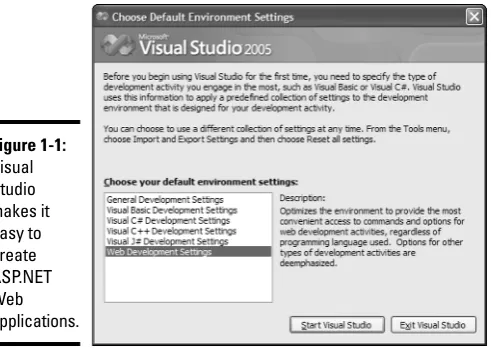
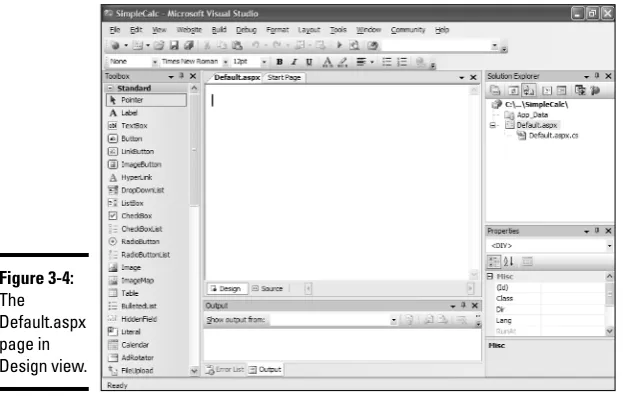
Figure 1-1 shows an ASP.NET Web application being developed in Visual Studio, using a what-you-see-is-what-you-get Web-page editor. This approach is especially useful for designing Web pages by dragging and dropping con-trols such as labels, text boxes, and buttons onto the page. If you prefer to work directly with code, you can switch to Source view, call up the HTML that defines the application’s pages, and edit it directly.
For more about how Visual Studio works, dig into Chapter 3 of this mini-book; no need to obsess over it just now.
Understanding Web Servers and Browsers
[image:39.531.89.335.259.434.2]One crucial point to understand about Web applications is that they work by using both client and server software:
Figure 1-1:
Book I Chapter 1
W
elcome to
ASP
.NET
Programming
Understanding Static Web Pages
13
✦ The client is a Web browser that runs on the end-user’s computer. In most cases, the Web browser is Microsoft Internet Explorer, but other programs such as Mozilla Firefox can be used as the client.
✦ The server is software that runs on the server computer that hosts the Web application. For ASP.NET applications, the server software is always Microsoft Internet Information Services (also known as IIS). The server computer must also have Microsoft .NET Framework software installed, as ASP.NET is a part of the .NET Framework.
The server computer also typically has database serversoftware (such as Microsoft SQL Server) installed. In some cases, the database server may run on a separate computer to improve the main server machine’s performance.
You’ll run into these two other alphabet-soup buzzwords constantly as you develop ASP.NET applications:
✦ HTML(short for Hypertext Markup Language) is a standardized set of markup tags used to format the Web pages displayed by a Web browser.
✦ HTTP(short for Hypertext Transfer Protocol) is the standardized protocol that Web browsers and Web servers use to communicate with each other. You’ll learn more about how HTTP works in the next section.
Understanding Static Web Pages
The World Wide Web was originally designed to display static pages— that is, pages that are the same every time they are displayed. In fact, many pages available on the Internet today are still static pages.
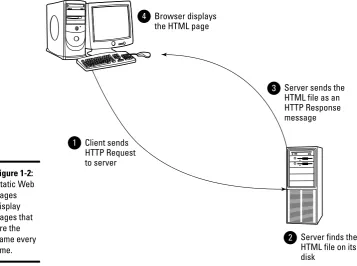
A typical way to initiate display of a static Web page is for a user to enter the Web address of the page in a browser’s address bar, or for a user to click a link that leads to the page. Either way, the browser sends an HTTP message called an HTTP request to the server specified by the Web address. This request message includes the name of the HTML file that defines the page being requested by the user. In addition, the request message includes the address of the browser that’s requesting the file.
When the server machine receives the request, it locates the HTML file on its disk and sends the HTML back to the browser by way of an HTTP Response
Understanding Dynamic Web Pages
14
Understanding Dynamic Web Pages
Although the World Wide Web was originally designed for static Web pages, most Web pages these days display dynamic content — that is, content that changes each time the page is retrieved. Instead of retrieving HTML data from a file, dynamic Web pages work by running a program that generates
the HTML sent back to the browser. The program can generate different HTML each time the page is requested.
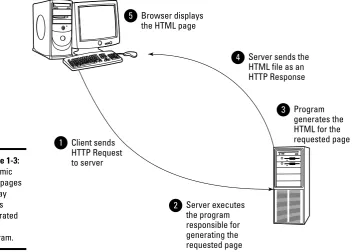
Figure 1-3 shows how dynamic HTML pages work. As you can see, the first and last steps are the same as for static Web pages: The browser sends an HTTP request to the server to request the page, and when the browser receives the HTTP response, it displays the page. However, what goes on at the server is different: Instead of locating an HTML file on the disk, the server runs a program to generate the HTML for the requested page — and that’s what returns to the user via an HTTP response.
Browser displays the HTML page 4
Client sends HTTP Request to server
1
Server sends the HTML file as an HTTP Response message 3
Server finds the HTML file on its disk
[image:41.531.89.447.91.357.2]2
Figure 1-2:
Book I Chapter 1 W elcome to ASP .NET Programming
Looking at a Simple ASP.NET Application
15
The usefulness of dynamic Web pages is that the program that generates them can do just about anything necessary to generate the requested page. In some cases, this might be simple. For example, the requested page might consist mostly of static data, but might include the current date in a header or footer. Then, the program that generates the page simply reads the static part of the page from an HTML file, adds the current date, and sends the page on to the user.
Sometimes the page consists almost entirely of dynamic data. For example, the result page displayed by a search engine is mostly a set of search results generated to show data retrieved from a database.
Looking at a Simple ASP.NET Application
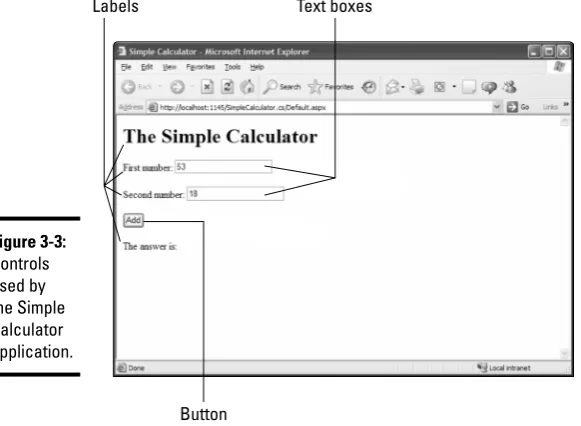
To help you understand how a typical ASP.NET application works, Figure 1-4 presents a simple calculator application: It lets the user enter two numbers, and when the user then clicks the Add button, the application adds up the two numbers and displays the result.
Browser displays the HTML page 5
Client sends HTTP Request to server
1
Server sends the HTML file as an HTTP Response 4
Program generates the HTML for the
requested page 3
Server executes the program
responsible for
generating the
[image:42.531.91.444.91.343.2]Looking at a Simple ASP.NET Application
16
Although this application is simple enough, it illustrates many basic notions that underlie ASP.NET programming. Most importantly, the Simple Calculator application demonstrates how you can use ASP.NET controlson a Web page to retrieve data entered by a user, write code that processes the data, and modify the page that’s sent back to the user so it shows the results of the page processing.
The Simple Calculator page includes four controls:
✦ A text box that lets the user enter the first number to be added.
✦ Another text box that lets the user enter the second number to be added.
✦ A button the user can click to submit the page and calculate the sum of the two numbers.
✦ A label that displays the result of the addition.
Of course, this sample ASP.NET application is trivial. More realistic ASP.NET applications consist of more than one page and usually retrieve information from a database. Still, this simple application is a good place to start learning about ASP.NET.
To develop a single-page ASP.NET application such as the Simple Calculator application, you create two source files:
✦ The markup file (or the .aspxfile)defines the appearance of the Web page.
✦ The code-behind fileprovides the code that’s executed when the user submits the page.
Figure 1-4:
Book I Chapter 1
W
elcome to
ASP
.NET
Programming
The .aspx (Markup) File for the Simple Calculator Application
17
Separating the code that defines the appearance of the page from the code that defines the processing performed for the page is called code separation, and is considered by most programming gurus to be a good idea.
Although it’s possible to write ASP.NET applications that combine the two types of code into a single file, Visual Studio uses a separate code-behind by default. Chapter 4 of this mini-book tells you more about how code separa-tion works in ASP.NET.
The .aspx (Markup) File for the
Simple Calculator Application
Listing 1-1 shows the file that defines the appearance of the Simple Calculator page in the previous section. (Note that this file assumes that the application is written using C#. If you’re using Visual Basic, you’ll see a few minor differences.)
Listing 1-1: The appearance of the Simple Calculator (C#)
<%@ Page Language=”C#” AutoEventWireup=”true”
CodeFile=”Default.aspx.cs” Inherits=”_Default” %> <!DOCTYPE html PUBLIC “-//W3C//DTD XHTML 1.0
Transitional//EN” “http://www.w3.org/TR/xhtml1/DTD/xhtml1-transitional.dtd”>
<html xmlns=”http://www.w3.org/1999/xhtml” > <head runat=”server”>
<title>Simple Calculator</title> </head>
<body>
<form id=”form1” runat=”server”> <div>
<h1>The Simple Calculator</h1> First number:
<asp:TextBox ID=”txtFirst” runat=”server” /> →1 <br /><br />
Second number:
<asp:TextBox ID=”txtSecond” runat=”server” /> →2 <br /><br />
<asp:Button ID=”btnAdd” runat=”server” →3 OnClick=”btnAdd_Click” Text=”Add” />
<br /><br /> The answer is:
<asp:Label ID=”lblAnswer” runat=”server” /> →4 </div>
The Code-Behind File of the Simple Calculator Application
18
I don’t expect you to leap to instant mastery of all (or even any) details of this file at this early stage, but take a look at this code now so you’ll have an idea of what ASP.NET coding looks like. You’ll be writing a lot of code that looks like this as you develop ASP.NET applications.
I would like to draw your attention to a few sections of this listing:
✦ →1:This line defines the text box for the first number to be entered by the user. This text box is named txtFirst.
✦ →2:This line defines the text box for the second number. This text box is named txtSecond.
✦ →3:This line and the next line define the button the user clicks to add the number. The name of the button is btnAdd, the text displayed on the button is “Add”and the C# code that’s run when the user clicks the button is called btnAdd_Click.
✦ →4:This line defines the label that displays the result of the addition. The label is named lblAnswer.
The Code-Behind File of the Simple
Calculator Application
After a look at the markup file for the Simple Calculator application, check out Listing 1-2: It shows the C# code-behind file. Don’t be concerned if the details of this listing seem arcane at the moment; it’s an early glimpse of what C# coding looks like for a simple ASP.NET Web page.
Listing 1-2: The code-behind file of the Simple Calculator (C#)
using System; using System.Data;
using System.Configuration; using System.Web;
using System.Web.Security; using System.Web.UI;
using System.Web.UI.WebControls;
using System.Web.UI.WebControls.WebParts; using System.Web.UI.HtmlControls;
public partial class _Default : System.Web.UI.Page {
Book I Chapter 1
W
elcome to
ASP
.NET
Programming
The Code-Behind File of the Simple Calculator Application
19
{
decimal a = decimal.Parse(txtFirst.Text); decimal b = decimal.Parse(txtSecond.Text); decimal c = a + b;
lblAnswer.Text = c.ToString(); }
}
The part of this code you should focus on is identified with the btnAdd_ Clickroutine (properly called a methodin C#), marked by the →1 in the list-ing. This code converts the values entered by the user in the two text boxes to decimal values, adds the two values together, and displays the result in the label.
If you have done some C# (or perhaps Java) programming, you may be alarmed to notice that this code doesn’t do any error checking. As a result, if the user doesn’t enter a valid number in both text boxes, the program will crash with what’s called an unhandled exception in .NET lingo.
Don’t be concerned — this time. I didn’t fall asleep while I was writing this program; I left out the error checkout on purpose, for two reasons. First, it keeps the example program simple; second, it provides a natural way to introduce the basic concepts of debugging in Chapter 4 of this mini-book.
Chapter 2: Installing Visual Studio
Web Developer 2005 Express
Edition or Visual Studio 2005
In This Chapter
⻬Comparing the editions of Visual Studio
⻬Registering and test-driving Visual Web Developer Express
⻬Installing Visual Studio successfully
B
efore you can use Visual Studio to develop ASP.NET 2.0 applications, you must install the Visual Studio software. This chapter introduces you to the various versions of Visual Studio available for you to choose from, and then walks you through the process of installing the most popular ver-sion for ASP.NET Web development — Visual Studio Web Developer Express Edition. (The setup process for other versions of Visual Studio is similar.)Looking at Visual Studio 2005 Editions
Like most Microsoft software, Visual Studio 2005 comes in several different versions. Here’s the rundown on each one:
✦ Visual Studio 2005 Standard Edition: This is the basic version of Visual Studio 2005. It includes everything you need to develop Windows appli-cations using Visual Basic, C#, or C++, or ASP.NET 2.0 Web appliappli-cations using Visual Basic or C#. It also comes with SQL Server Express Edition, a scaled-back version of SQL Server that’s designed to use while you’re developing applications that access a database.
✦ Visual Studio 2005 Professional Edition:This is a beefed-up version of the Standard Edition, with added features that are useful for professional developers — in particular, advanced debugging features and the capa-bility to create complex Setup projects for deploying your applications.
✦ Visual Studio 2005 Team Edition:This is the top-of-the-line Visual Studio edition. It includes all the features of the Professional Edition, plus advanced features designed specifically for large development projects, such as built-in code profiling, unit testing, and project management features.
Considering Visual Web Developer 2005 Express Edition
22
Web developers. This edition of Visual Studio is sometimes referred to as VWD Express or even just VWD. VWD is described in greater detail in the next section.
Considering Visual Web Developer
2005 Express Edition
For most people getting started with ASP.NET 2.0, Visual Web Developer 2005 Express Edition (VWD) is the tool of choice. It includes everything you need to create basic Web applications in Visual Basic or C#. We recommend using this version while you’re learning ASP.NET Web programming, for two rea-sons. First, it’s simpler to use because it isn’t cluttered up with features that aren’t related to ASP.NET Web development. Second, it’s cheap. In fact, you can download it for free from Microsoft until November 7, 2006. After that, it will cost a mere $49. That means major savings over the other editions, as summarized in Table 2-1.
Table 2-1 Pricing for Visual Studio 2005 Editions
Edition Price
Visual Web Developer Free download until November 7, 2006.
2005 Express Edition After that, $49.
Visual Studio 2005 Standard Edition $299
Visual Studio 2005 Professional Edition $799
Visual Studio 2005 Team Edition $5,469
The following are some important things you need to know about VWD:
✦ VWD supports Web applications developed in either Visual Basic or C#.
✦ VWD includes SQL Server Express Edition, so you can use it to develop sophisticated database applications.
✦ Microsoft does not place any limits on how you can use VWD. Thus you can use VWD to develop commercial applications.
✦ VWD provides most of the same features as other editions of Visual Studio 2005 for Web development. However, there are a few features missing, such as advanced deployment tools.
Installing Visual Web Developer 2005 Express Edition
Book I Chapter 2
Installing V
isual
Studio 2005
Editions
Installing Visual Web Developer 2005 Express Edition
23
1.
Go to Microsoft’s Web site and locate the Visual Web Developer 2005 Express Edition download page.At the time we wrote this, the download page was located at
http://msdn.microsoft.com/vstudio/express/vwd/download/
Microsoft has been known to change things around on its Web site, so if this address doesn’t get you there, poke around a bit until you find it.
2.
Click the Download link.Opening the link begins the download. If a Security Warning dialog box appears, click Run to allow the download.
The initial download may take a minute or two, so please be patient. Eventually the Setup program shown in Figure 2-1 appears.
You can download Visual Web Developer 2005 Express Edition for free from Microsoft until November 7, 2006. After that, it will cost $49.
3.
Click Next.A screen displaying the license agreement appears. The license agree-ment was written by and for lawyers. Read it if you enjoy such things.
4.
Check the “I accept the terms of the License Agreement” check box, then click Next.The next dialog box asks whether you want to install two optional com-ponents: the product documentation and SQL Server 2005 Express Edition, as shown in Figure 2-2.
Figure 2-1:
Installing Visual Web Developer 2005 Express Edition
24
5.
Check both options, then click Next.Doing so indicates that you want to install both the product documenta-tion and SQL Server 2005 Express Edidocumenta-tion.
The next dialog box, shown in Figure 2-3, lets you specify where you want the software installed on your hard drive. We suggest you accept the default.
Figure 2-3:
Choose where to install the software.
Figure 2-2: