promoting access to White Rose research papers
White Rose Research Online
Universities of Leeds, Sheffield and York
http://eprints.whiterose.ac.uk/
This is an author produced version of a paper published in
Lecture Notes In
Computer Science
White Rose Research Online URL for this paper:
http://eprints.whiterose.ac.uk/3949/
Published paper
Petrelli, D., Lanfranchi, V. and Ciravegna, F. (2005)
Working out a common task:
design and evaluation of user-intelligent system collaboration.
In: Costabile, M.F.
and Paternò, F., (eds.) Human-Computer Interaction - INTERACT 2005. Interact
2005: IFIP TC13 International Conference, 12 - 16 September 2005, Rome, Italy.
Lecture Notes in Computer Science (3585/2005). Springer , Berlin / Heidelberg,
pp. 309-322.
Working Out a Common Task: Design and Evaluation
of User-Intelligent System Collaboration
Daniela Petrelli1, Vitaveska Lanfranchi2, Fabio Ciravegna2
1 Information Studies, Sheffield University, Regent Court, 211 Portobello St
Sheffield S1 4DP, UK
{d.petrelli}@shef.ac.uk
2 Computer Science, Sheffield University, Regent Court, 211 Portobello St.
Sheffield S1 4DP, UK
{v.lanfranchi, f.ciravegna}@dcs.shef.ac.uk
1
Abstract. This paper describes the design and user evaluation of an intelligent user interface intended to mediate between users and an Adaptive Information Extraction (AIE) system. The design goal was to support a synergistic and co-operative work. Laboratory tests showed the approach was efficient and effec-tive; focus groups were run to assess its ease of use. Logs, user satisfaction questionnaires, and interviews were exploited to investigate the interaction ex-perience. We found that user’ attitude is mainly hierarchical with the user wish-ing to control and check the system’s initiatives. However when confidence in the system capabilities rises, a more cooperative interaction is adopted.
1 Introduction
Intelligent interfaces have been proposed as a way to help users dealing with informa-tion overload, complex decision making, and topic learning. However there are other areas of human interaction with computers that can be lightened by means of artificial intelligence. Repetitive tasks, like text annotation or classification [7, 12], can be carried out by computers under human supervision. An analogy is the role robots have taken in assembly-belt activities: humans are no longer required to execute the same action hour after hour but only to monitor that the machine is working properly. Machine Learning (ML) has been demonstrated to be a successful technique to enable computers to become skilled at simple human tasks. In the context of assisted text annotation, ML systems have demonstrated to be efficient (annotation time: -80%), and effective (interannotator agreement: +100%) [3]. However, good algorithms are not enough for setting up a synergistic collaboration. The user interface has to intelli-gently split the work between the two agents and has to orchestrate their activities by properly deciding when computer intervention is appropriate. The interaction must be designed in such a way that users perceive the benefit of a proactive system that pro-gressively takes over a tedious task but at the same time they do not feel ousted.
This paper describes our experience in designing and evaluating such an intelligent interface. The next section (2) introduces text annotation and discusses the proposed approach. Some considerations on collaboration are presented in section 3. Interface layout and interaction are discussed in section 4, the user evaluation in 5. Section 6 discusses data analysis and observations. Reflections on cooperative user-intelligent system interaction conclude the paper (section 7).
2 Computer-Assisted Text Annotation
Semantic annotation is used to structure information in a document in order to sup-port information access by content rather than via keywords. For example, “20 Jan 1998”, “20th January 1998”, and “20-1-1998” all represent instances of the same concept, a date. Annotating the three snippets as date makes such a correlation ex-plicit. Adding semantic transforms sequence of words into knowledge ready to be reused. Areas such as Semantic Web and Knowledge Management need text annota-tion, e.g. for document indexing, for populating ontologies with instances extracted from text [1, 2].
Text annotation is performed by trained users who work on restricted domains, e.g. annotators at intelligence agencies look for details of crimes in hundreds of docu-ments a day. Manual annotation is critical and knowledge intensive: the text must be read in full, relevant snippets must be identified and the appropriate concept assigned. The process is slow and time-consuming; it rapidly becomes tedious, tiring and thus potentially error prone. Adaptive Information Extraction (AIE) can help automating the annotation task, either in an unsupervised (e.g. automatic annotation of documents [5]) or semi-automatic way (e.g. as support to human annotators [3, 8, 13]).
Computer-assisted (or semi-automatic) text annotation is a two-phases process that requires both users and AIE to accomplish tasks:
1) Training: the AIE observes the annotations made by a user and the context they occur in; it infers rules and generalizes them (i.e. learning by examples). 2) Active annotation: using the rules learnt, the AIE system identifies potential annotations (i.e. similar cases were seen in training) and marks them. This is when the advantage of a computer-assisted annotation becomes apparent as the amount of manually inserted annotations decreases. Correcting annota-tions is simpler than annotating raw texts and is less time consuming.
2.1 The Sequential Model
In the sequential mode documents are managed in batches and user and system work in a rigid sequence [8]1[13]: the user annotates a batch of texts; then the AIE is
trained on the whole batch. When the user annotates another batch of texts the system proposes annotations. Additional learning can occur if the second batch of annotated text is re-entered in learning mode. The role of the user interface is solely to pass the output of an agent as input to the other (Fig. 1).
Fig. 1 The simplistic turn-taking interaction (training left, active annotation right). The grey arrows represent the user interface that mediates between user and AIE.
This sequential, turn-taking organization is not the most efficient and effective. Train-ing on blocks of texts implies a time gap between when the user inserts annotations and when the system learns from them, with drawbacks for both. If the batch contains similar documents, users spend time annotating without any help from the system, as no learning session has been scheduled. The AIE system does not benefit from the user effort either: very similar cases do not offer the variety of phenomena that em-power learning. The bigger the size of the batch the worse become the problem. How timely the system learns from the user’s actions is an essential user-centred measure of interaction efficacy: ideally the system should use each example provided by the user for learning or checking purposes. Moreover the more dissimilar the ex-amples the better the learning: ideally the user should annotate first those texts that are more problematic for the system thus supporting a faster learning. We call this feature timeliness. It is the responsibility of the intelligent user interface to organize user and AIE system work and to properly and promptly react to the user’s annota-tions, i.e. to increase timeliness.
In a sequential model (Fig.1) it is difficult to avoid annoying users with wrong anno-tations generated by unreliable rules (e.g. induced using an insufficient number of cases). A way of letting the user controlling this behaviour is by setting a confidence threshold: suggestions are provided only when those are good enough. Designers have to mediate between the numerical value needed by the system and a qualitative definition that can be easily grasped by the user.
Another source of annoyance for the user is the rigid sequencing itself as it hampers user annotation activity while the AIE system is learning as the CPU is allocated to it. Scheduling the learning as a background activity is a better design choice.
1 S-CREAM uses the same AIE algorithm but has a different interface and interaction mode.
batch of bare
text (I) user annotates learning rules batch of user annotated text Annotation Annotation Annotation Annotation Annotation Annotation Annotation Annotation Annotation Annotation Annotation Annotation Annotation Annotation Annotation Annotation Annotation Annotation Annotation Annotation Annotation Annotation Annotation Annotation batch of bare text (II)
[image:4.595.130.466.259.304.2]This level of disturbance of the AIE system in the user’s natural flow of activity is called intrusiveness and represents the second user-centred principle we considered when designing the interaction.
More integrated work between user and AIE system can lead to the better accom-plishment of the common goal, i.e. the efficient and effective annotation of docu-ments. Fails and Olsen [7] expressed similar criticisms and found a definite improve-ment in image classification.
2.2 The Collaborative Model
Conversely from the sequential model, the collaborative model does not force explicit turn-taking. Rather the two agents work simultaneously. Collaboration imposes a new organization of the work, with finer grained activities and parallel execution. The training is split into (a) bootstrapping and (b) training with verification. In bootstrap-ping (Fig.2a) the system learns from the user’s annotations and documents are ana-lysed one by one. Learning time is not fixed as it depends on the minimum number of examples needed for minimum training2. During the training with verification
(Fig.2b), the user continues the unassisted annotation while the AIE uses the learnt rules to compete with the user in annotating. The two annotations are compared by the interface, which calculates accuracy. Missing annotations or mistakes are used to retrain the learner. The training phase ends when the accuracy reaches the user’s preferred level of pro-activity leading to the active annotation phase.
Fig.2 Training is split into bootstrapping (left) and training with verification (right).
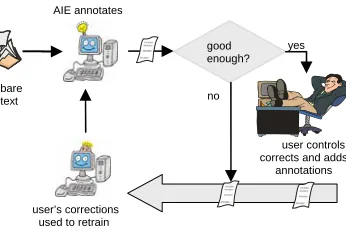
As for the training, the active annotation phase is enriched. The intelligent user inter-face monitors the quality of the annotations proposed by the AIE system (Fig. 3) and decides if these are good enough to be displayed to the user. The user becomes the supervisor and their task is to correct and integrate the suggested annotations. Human actions are returned to the AIE system for retraining. This is when the real user-system cooperation takes place: the user-system helps the user in annotating; the user feeds back mistakes and confirmations to help the system perform better.
2 Features like text variety and complexity impact on the time needed to learn.
bare text user annotates
AIE monitors the user and learns in background Annotation Annotation Annotation Annotation Annotation Annotation Annotation Annotation Annotation Annotation Annotation Annotation bare text user annotates AIE annotates
more learning needed
Annotation Annotation Annotation Annotation Annotation Annotation Annotation Annotation missing tags, mistakes increase confidence rate correct!
Fig. 3 Active annotation with revision.
To summarise, an intelligent user interface that supports collaboration between the user and the AIE system must act at different points:
• During the bootstrapping it collects all the annotations made by the user and passes them to the learning agent;
• In the training with verification it compares the texts annotated by the learning agent against the same ones annotated by the user; it provides feedback to the learner on how good its performance was and requires retraining if needed;
• During active annotation with revision it filters the annotations proposed by the AIE system and displays the good ones; collects the user’s amendments and feeds them back to the learner.
It is therefore the responsibility of the interface to decide if the general quality of suggestions is good enough (intrusiveness) and to manage the timing of the display of these suggestions (timeliness). We consider these user-centred criteria to be the base for effective user intelligent-interface collaboration3.
3 Key points in Interactive Collaboration
The intelligent user interface is in charge of synchronising activities into a synergistic effort. To improve the timeliness in the collaboration model we propose that learning is a continuous activity that goes on in the background. This way the system can start proposing annotations as soon as the level of accuracy is reached. It is a case of sim-ple concepts with few variations, e.g. the location where an event takes place. The accuracy increases as the training progresses and more cases and corrections are seen by the learner. Conversely in the sequential mode, the quality of suggestions im-proves during the active annotation phase. The positive effect is that the more accu-rate the suggestions are, the less intrusive is the system.
As stated before, timeliness represents how timely the system learns from the user’s actions. The best learning occurs when completely new examples are shown. Thus the best collaboration between annotator and learner occurs when the user annotates
3 Eric Horvitz [9] discusses many more factors besides these two; however many of those are
not relevant here, for example, the user’s goal or attention are fixed and defined by the na-ture of the annotation activity.
user controls, corrects and adds annotations bare
text
AIE annotates
good enough?
Annotation Annotation
Annotation Annotation
no
yes
user’s corrections used to retrain
Annotation Annotation
Annotation Annotation
Annotation Annotation
documents that are problematic for the system. Given a corpus, the interface can rank the texts with respect to the global annotation confidence: texts can then be listed starting from the most promising in terms of knowledge acquisition (i.e. those for which the number of suggestions is low). This scheduling is recalculated when a new annotated text is saved and a new learning step has occurred. How this principle has been included in the interaction is presented in section 4. Laboratory experiments [3, 4] showed that when ranked documents are chosen, annotating 30 documents gives the same performance as annotating 50 random ones. However this policy might affect the user’s judgement of system usefulness, since when annotating the most problematic texts the number of suggestions is fewer. This was taken into account when the data of the user evaluation were analysed.
A key factor in the failure of user-intelligent system interaction is the quality of sug-gestions; whereas giving users control of their own system is a success factor [9]. To let the user decide on the quality of displayed suggestions and thus to control system intrusiveness, a qualitative slidebar has been designed (see section 4).
4 Interface Layout and Interaction
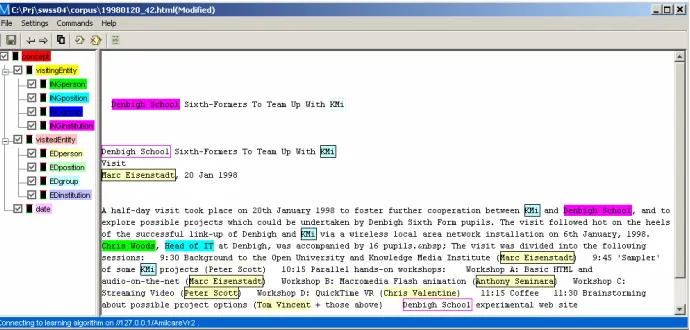
How the principles of timeliness and intrusiveness have been captured inside the design has been discussed in sections 2 and 3. This section presents the interface layout and discusses the interaction. The design rational follows Horvitz’s principles of “minimizing the cost of poor guess” while “providing genuine value over […] direct manipulation [i.e. manual annotation]” [9]. The interface in displayed in Fig.5:
1. The ontology, on the left, contains the description of the domain. Each item in the hierarchy is a concept in the ontology and is colour coded (e.g. visitor is green, date is pink)4. To insert an annotation the user selects a concept by clicking on it
and highlights the text in the right hand side. Colour crowding is controlled by the user by ticking off concepts thus preventing the display of those annotations. 2. The document under annotation, on the right, shows user inserted annotations as
well as system suggestions. Users’ annotations are shown by changing the back-ground of the annotated text portion into the colour of the ontology concept (e.g. the background for a date becomes pink). The same colour coding is used to show system suggestions; but the layout depends on the current certainty matched with the acceptance levels set by the user in the slidebar (Fig. 4):
- High confidence: if the blue line is over the ‘reliable suggestions’ threshold then the suggestion is assumed correct and is displayed by colouring the back-ground; a black border distinguishes it from the user’s annotations. No con-firmation is needed to have this suggestion recorded when the file is saved. - Lower confidence: if the blue line is in between the two thresholds (over the
‘tentative suggestions’ but below the ‘reliable suggestions’) the suggestion is
4 Colours are set by the system as each must uniquely represent a concept; allowing users to
displayed by colouring just the border around the text; the user is required to explicitly accept it by clicking inside the border (a double click will instead remove it). No action by the user is interpreted as a reject of the suggestion which will not be recorded at saving time.
3. The command bar displays some useful commands: ‘accept all’ and ‘reject all’ (paper-and-pen icons) accept/reject all suggestions with a single click; the two ar-rows allow moving between documents. Those buttons implement the policy (dis-cussed in section 3) of ranking the remaining texts respect to how difficult they are for the system to annotate. The most problematic document is displayed when clicking the ‘next document’ button (a right-pointing arrow). The list of documents with their confidence values can also be displayed.
4. The Setting Slidebar: a qualitative slidebar has been designed (Fig. 4) to allow users controlling the quality of suggestions. It shows the current level of confidence on a % scale, i.e. a blue bar overlaps the scale as in a thermometer metaphor. Two markers set the preferred level of proactivity. The lower sets the minimum level for ‘tentative suggestions’, the higher sets the level of ‘reliable suggestions’. Users can tune the system accu-racy to their preference by moving the markers: those who find it annoying to receive wrong suggestions will set both markers very high, others may accept a big gap between the levels if they want to receive more sugges-tions sooner. The system displays a suggestion when the
blue line is over the low confidence level, but the layout and the interaction differ when the line is over the high certainty level. A bar is available for each concept in the ontology; a global one to tune the whole system at once is also provided.
[image:8.595.125.470.483.648.2]Fig. 5 The interface: concepts listed in the ontology (left) are annotated in the text (right).
5 The User Evaluation
The whole interaction was designed to support a real collaboration between the user and the AIE system. Two extensive quantitative evaluations of the performance had already been done at the time of this study (on corpora of 250 job announcements [4] and 483 seminar announcements [3]). Those assessed efficiency and effectiveness (measured by Precision, Recall and f-measure). Results showed that the cooperative model considerably reduces the number of annotations needed for triggering reliable suggestions (a minimum of 75% correct was set). However it was discovered that the minimum of documents needed widely varied from concept to concept, from a low 5 documents needed to detect ‘salary’ or 10 for ‘city’ and ‘country’, to a top 75 docu-ments needed to identify ‘speaker’ or 100 for the ‘employer’.
Those tests proved the system to be efficient and effective. A user evaluation was set up to complement those results with user satisfaction. It was conducted over two days in late July 2004 during the 2nd European Summer School on Ontological Engineer-ing and the Semantic Web held in Cercedilla (Spain). BeEngineer-ing at the Summer School provided us with a good sample of sufficiently knowledgeable naïve participants who used the system in an explorative way. As potential users are trained annotators, this is a realistic setting that resembles the initial approach of users to the system.
5.1 Setting and Participants
The annotation interface (the client) was installed on six computers used by students during the practical session. The AIE and the coordination core, on the other hand, were installed on two servers, each serving three clients5.
Thirty-one students participated in the study as part of a practical tutorial on the use of annotation tools for the Semantic Web. They came from different Universities and all were Ph.D. students in Computer Science, mainly in the areas of Natural Language Processing, Knowledge Representation, Information Retrieval, Web Services, or the Semantic Web. 68% of them knew about Semantic Web annotation, but were new to annotation tools (77%) and adaptative systems (88%).
The evaluation was organized as a task-based self-directed focus group: working in groups participants had to carry out the assigned task. A total of 7 valid sessions were recorded: 2 the first day, 5 the second day. The condition of working in groups stimu-lated discussion and participants discovered the system functionalities by trial and
error. Though positive for the inquisitive approach it generates, groupwork requires initial agreement on the meaning of the ontology and the annotation process. For three groups this proved to be a problem as recorded in two questionnaire-interviews where students complained that they couldn’t work as they would have liked to. Apart from the first disappointment relating to the limited log availability, we recog-nized that this represents the natural “inter-annotator disagreement”, a well known phenomenon occurring when comparing individual judgements.
5.2 Procedure, Tasks, and Data Recording
Initially a 20 minutes introductory lecture on the tool interface and functionalities was given and a printed manual distributed. Participants filled in a brief personal profile questionnaire and received written instruction on the task. Working in groups they had to annotate 10 documents using a provided ontology. The corpus consisted of 42 news reports on visits in a research centre; concepts to annotate where (among others) date of visit, name of visitors and visited persons, visiting and visited institutions. The evaluation task was articulated in two parts corresponding roughly to the training and the active annotation discussed above:
1. to annotate (at least) 5 documents without any AIE help6. Suggestion display was
inhibited to let students better familiarise with the interface without the further hur-dle of understanding adaptivity;
2. to annotate further 5 documents with the help of the AIE. Suggestions from the system were displayed and the group had to decide which action to take, i.e. accept or reject the suggestions, add new ones.
The groups were requested to start with the same specified document, they had 90 minutes to complete the task.
It must be noted that 5 documents provide a very limited amount of learning material for the AIE system. Compared to the recommended 30 documents [3, 4], this number was largely insufficient to produce robust and correct suggestions. However marking 30 documents with an average of 5 minutes each would require at least 2 and a half hours, an excessively high time for any user evaluation. As efficiency and effective-ness had already been addressed [3, 4] we focused on users’ first impression and satisfaction, aspects of user-intelligent system interaction never analysed in detail.
Groups’ activity was logged and time stamped. Data included: user’s annotations, system suggestions, annotations accepted (“accept all” included); annotations rejected (“reject all” included); file opened and saved. After the exercise participants were asked to fill in a user satisfaction questionnaire (derived from QUIS [11]) and, if willing, to participate in an individual interview.
During the evaluation an experimenter was unobtrusively walking around the room observing groups’ behaviour. Different strategies were recorded and were later com-pared against the log files.
6 Data Analysis and Results
This study focuses on first time users, on their behaviour and perception. Therefore the analysis is qualitative and inductive.
6.1 Annotation Strategies
Log analysis was used to extract patterns of behaviours and to infer annotation strate-gies. This data was compared with the observations noted by the experimenter. We expected a decrease in the annotation time as the interaction progresses and more suggestions were given by the system. The first 4 documents7 were annotated in an
average time of 12 minutes each (min 2.15, max 17), while the remaining ones were done far more quickly, around 3 minutes per document (min 50 sec., max 8.17). This is a combination of having learnt how to use the system plus the suggestions being displayed.
When suggestions started, Group 1, 5, and 6 carefully considered each suggestion for the rest of the evaluation, rarely using the ‘accept all’ button. Group 2, 3, and 4 started by carefully considering each suggestion in the first few documents, then accepting all the suggestions. Group 7 sometime accepted all system suggestions, sometime considered every single suggestion before accepting it. It appears that all groups were monitoring the system behaviour at first and then started accepting sug-gestions when they trusted the system; when this shifting occurred depended on the group.
A few behaviours are worth a deeper discussion:
• Group 3 and 5 seem to follow in their annotation process a precise, and different, mental model. Group 3 annotated following the order of concepts as listed in the ontology (concept-driven annotation); whereas Group 5 followed the textual structure and selected the concepts in the ontology accordingly (text-driven anno-tation).
• When the learning algorithm was enabled and the suggestions started to appear, Group 4 always used ‘accept all’ but then deleted the disliked ones. They also browsed through all the files just watching the suggestions made and then started a new annotation on the one that (apparently) had the most done, thus ignoring the ranking. Then they stopped to actively annotate and simply accepted all sys-tem suggestions. This may show an excessive confidence in syssys-tem’s capabilities but may also indicate boredom or carelessness. Indeed a check of their tagged documents revealed that the system suggestions were correct but further annota-tions were possible.
• Group 2 and Group 3 used the ‘reject all’ button as a way to clear the document. Their use was not the intended of rejecting wrong suggestions but of restarting the process, of clearing the document, as confirmed in interviews. As the system
7 As 2 groups did not annotate the 5 assigned documents in 45 minutes, the number of
would actually re-display the suggestions, clicking the ‘reject all’ would only remove user’s annotations.
6.2 User Satisfaction
The questionnaire had 5 main sections discussed below. Questions to address the distinctiveness of interacting with an intelligent system were included.
All questions asked the user to judge a specific statement on a 5 point scale. Ad-hoc opposites were used for each question, e.g. “system speed” ranged from “too slow” to “fast enough”; “quality of the suggestions provided” had “extremely poor” and “ex-cellent”. At the end of the questionnaire users were invited to state their opinion on the most positive and most negative aspects of the system. A total of 31 question-naires were used in the analysis.
Overall Judgement: The overall reaction to the system was positive, though the result of the first day was more critical. The system was judged easy to use by the majority of participants, with more satisfaction among the second day users (40% found it easy, 13% very easy). Only 10% gave a negative opinion, while 37% were neutral.
The questions “frustrating-satisfying” collected a total of 29% satisfied participants, 49% were neutral and 21% felt frustrated.
The “dull-stimulating” question was less critical: 38% considered the system stimu-lating, while 49% were neutral and 13% thought it was dull.
The opinions on the cooperativeness of the system were again positive: 42% were satisfied, and 13% very satisfied, and 45% were neutral (no negative opinion re-corded). This result is consistent with the questions on timeliness, and quality of sug-gestions discussed below in System Capabilities and Performance.
Layout: Users were satisfied with the layout (16% positive, 45% neutral), organiza-tion (55% satisfied, 35% neutral), and posiorganiza-tion of informaorganiza-tion (61% satisfied, 25% neutral). Difference opinion on menu vs. the toolbar was recorded: the majority pre-ferred using the toolbar (75%) as opposed to the menu (50%). This result challenges designers of intelligent user interfaces as commands for controlling or setting system features should be represented with a single, small icon. While we were helped in this task by the known icons Word uses for accepting/rejecting changes, this design phase may not be as easy when complex behaviours have to be controlled.
an indication of the violation of the principle of transparency: let the user (partially) see/understand what the adaptive system is doing [10].
Getting Acquainted: Learning to use the system was easy for the majority (62%), 29% were neutral and 5% had difficulties. Performing tasks was considered straight-forward by 51%, while 26% were neutral. Opinions on the easiness of correcting mistakes were less positive: 39% were not satisfied, 32% were neutral and only 19% were positive (10% did not answer). Similar numbers for the questions on the useful-ness of help messages: 36% not satisfied, 26% neutral (38% no answer).
System Capabilities and Performance: Questions on system speed and reliability showed the lowest satisfaction, particularly among users of the first day when slow-ness and system instability occurred most. The system speed was largely criticized with only 12% moderately satisfied users (21% were neutral and 67% were not satis-fied). The opinions from the first day were more negative, with 90% of not satisfied users and 10% of neutral users. Reliability was also a weak point: 29% users were satisfied, 26% were neutral, 29% were not satisfied. Worst judgement the first day: 10% satisfied, 60% not satisfied (30% no answer).
Answers to questions specifically related to the system intelligence were instead en-couraging even though not always positive. Notably numbers are consistent in the two days showing that participants were able to distinguish and prize the innovative-ness of the tool despite the technical problems. Users had a good opinion of the qual-ity of the suggestions, with 46% of satisfied/very satisfied users (40% and 6% respec-tively), 26% of neutral, and only a 25% of not satisfied. The timing in providing sug-gestions was satisfying for 24%, while half were neutral (49%) and the remaining 27% was not satisfied. System intrusiveness was unobtrusive for 16% and neutral for 49%, while 32% considered the system too intrusive.
6.3 Interviews
Six users volunteered for the interview and, quite obviously, were positive about their experience. Features appreciated were the easiness of selecting and highlighting con-cepts, the possibility of accepting all the suggestion and the opposite of removing them all.
The different layout used to display which agent inserted the annotation was also pointed out as a useful feature, however it was suggested to distinguish user’s from system’s annotations in the long term, e.g. when re-opening an annotated file. Cur-rently when the user accepts a suggestion the layout is turned into the user one under the assumption that after acceptance the two would be equally true. Keeping a differ-ent layout indefinitely would help in assessing the contdiffer-ent of an annotated file. A similar idea of keeping and showing who-marked-what comes from another inter-viewee who did not agree with the group choices, showing once more the effect of the “inter-annotator disagreement”. Interestingly both comments required more trans-parency not at interaction time, but at a more generic and wide level of task.
A user commented on the ontology (Fig. 5): all the levels are displayed equal but only some can be meaningfully used. The proposal was to “grey-out” the abstract levels while keeping visible the relations with the concrete ones. Indeed the ontology is actually a separated entity developed outside the annotation tool though this comment clearly shows how it is perceived as part of it. Ontology creation and use should then be coordinated to create a more consistent context of use.
7 Conclusions
Designing collaboration was our goal, but other forms of interaction could emerge depending on the degree of inter-relationships the user would establish with the intel-ligent system. Options include: Collaboration a relation between peers working to-gether towards the same goal; Coordination a hierarchical relation where actors (or actions) are in a specific position respect to each other; Conflict: clashing of opposed principles, statements, or goals.
Coordination was prevalent at the beginning. The many checking behaviours dis-played during the evaluation indicate the need of building trust before a partnership, therefore a true collaboration, can be set up. How long this would take seems to be very subjective and may also never materialise in full, as for the student who wanted to keep distinguished computer suggestions from human annotations. Factors like transparency, predictability, and trust deeply affect the interaction with intelligent user interfaces (as discussed by Höök [10] and confirmed by Cortellessa et al [6]) even in the simple and narrow context of shared annotation of text.
Group 4 (accepting all and then correcting the wrong ones) or Group 2 and 3 (reject-ing all was a way of clear(reject-ing their own annotations) can be properly interpreted. ‘Accept all’ showed to be a very useful command, but also a risky one as accepted and closed files did not contained only correct annotations. Although fully trusting the system might appear as a good cooperation, the negative side effect is that the system will stop learning and the quality of suggestions might decrees. This phe-nomenon is expected to mitigate with professional users as neglecting behaviors should be rare, however strategies to rise user’s attention (e.g. explicitly ask the user to check tricky phrases) should be considered.
Definitely encouraging for us and intelligent interface designers is the fact that con-flicts occurred only when problems in the system usability were faced (e.g. frustrating system speed) while the acceptance of and satisfaction with the system intelligence was good. This reinforces the opinion that intelligent features should gracefully inte-grate into a well designed direct manipulation interface. An effective intelligent inter-face design should then consider both levels of tasks scheduling and userinteraction.
When organising the tasks scheduling, designers should try to exploit system capa-bilities (e.g. timeliness and intrusiveness) whereas when planning the interaction user needs and preferences should be the leading criteria (e.g. guidelines in [9]). However our work shows that applying generic guidelines is not enough as the use of com-mands can be different from the intended. As user actions are interpreted by the intel-ligent interface in a certain way the correspondence must be correct to avoid misin-terpretations that could mine the collaboration.
Acknowledgements
EPSRC AKT partially supported this research. We thank the organizers of SSSW-2004 and all the students who participated in the study. Our gratitude to Dr. Alexiei Dingli who developed the intelligence core used in the experiment.
References
1. Alani, H., Kim, S., Millard, D. E., Weal, M. J., Hall, W., Lewis, P. H. Shadbolt, N. R.
Auto-matic Ontology-Based Knowledge Extraction from Web Documents. IEEE Intelligent
Sys-tems 18(1) 14-21. 2003
2. Celjuska, D. Vargas-Vera, M. Semi-Automatic Population of Ontologies from Text. In
Paralic J., Rauber A. (eds.) Workshop on Data Analysis WDA-2004, Slovakia, 2004.
3. Ciravegna, F., Dingli, A., Wilks, Y., Petrelli, D. Using Adaptive IE for Effective Human-Centred Document Annotation. Franke J, Nakhaeizadeh, Renz I. (eds.) Text Mining, Theo-retical Aspects and Applications. Physica-Verlag, 153-164. 2003.
4. Ciravegna F., Dingli A., Petrelli D. Wilks Y. User-System Cooperation in Document
Annta-tion based on InformaAnnta-tion ExtracAnnta-tion. Proc. EKAW02, 2002.
5. Ciravegna F., Chapman S., Dingli A., Wilks Y. Learning to Harvest Information for the
Semantic Web. Proc 1st European Semantic Web Symposium, Heraklion, Greece, May
6. Cortellessa, G., Cesta, A., Oddi, A., Policella N. User Interaction with an Automated Solver: The Case of a Mission Planner. PsychNology Journal (2004) 2 (1) 140-162.
7. Fails, J. Olsen, D. Interactive Machine Learning. Proc. IUI’03, ACM Press, 39-45, 2003.
8. Handschuh S., Staab S. Ciravegna F. S-CREAM - Semi-automatic CREAtion of Metadata,
Proc. 13th EKAW02, Sigüenza, Spain, 2002.
9. Horvitz., E. Principles of Mixed-Initiative User Interfaces. Proc. CHI99. 159-166, 1999.
10. Höök, K.: Steps to Take before Intelligent User Interfaces Become Real. Interacting with Computers (2000) 12 (4) 409-426
11.Chin J., Diehl V., Norman K. Development of an instrument measuring user satisfaction of the human-computer interface. Proc. CHI ’88 (1988) 213-218
12.Segal R., Kephart J. Swiftfile: An intelligent assistant for organizing e-mail. AAAI 2000
Spring Symposium on Adaptive User Interfaces. Stanford CA.
13.Vargas-Vera M., Motta E., Domingue J., Lanzoni M., Stutt A. Ciravegna F. MnM:
Ontol-ogy driven semi-automatic or automatic support for semantic markup, Proc. 13th EKAW02,