2007
Restricting wireless network access within the
classroom
Andrew Daniel Buschbom
Iowa State UniversityFollow this and additional works at:
https://lib.dr.iastate.edu/rtd
Part of the
Computer Sciences Commons
, and the
Library and Information Science Commons
This Thesis is brought to you for free and open access by the Iowa State University Capstones, Theses and Dissertations at Iowa State University Digital Repository. It has been accepted for inclusion in Retrospective Theses and Dissertations by an authorized administrator of Iowa State University Digital Repository. For more information, please [email protected].
Recommended Citation
Buschbom, Andrew Daniel, "Restricting wireless network access within the classroom" (2007).Retrospective Theses and Dissertations. 15017.
by
Andrew Daniel Buschbom
A thesis submitted to the graduate faculty
in partial fulfillment of the requirements for the degree of
MASTER OF SCIENCE
Co-majors: Information Assurance; Computer Engineering
Program of Study Committee: Morris Chang, Major Professor
Doug Jacobson Sree Nilakanta
Iowa State University
Ames, Iowa
2007
1443162
2007
UMI Microform
Copyright
All rights reserved. This microform edition is protected against unauthorized copying under Title 17, United States Code.
ProQuest Information and Learning Company 300 North Zeeb Road
P.O. Box 1346
Ann Arbor, MI 48106-1346
TABLE OF CONTENTS
LIST OF TABLES . . . v
LIST OF FIGURES . . . vi
ACKNOWLEDGEMENTS . . . vii
ABSTRACT . . . viii
CHAPTER 1. Introduction . . . 1
1.1 Motivation . . . 1
1.2 Why There is a Need . . . 1
1.3 Current Solutions . . . 3
1.3.1 Banning Laptops . . . 4
1.3.2 Opening and Closing laptops . . . 4
1.3.3 Jamming the Wireless Signal . . . 5
1.3.4 Installing Software on Students Computer . . . 5
1.3.5 One Access Point Per Classroom . . . 5
1.4 Improvements . . . 6
CHAPTER 2. Overview . . . 7
2.1 Discovering Traffic to Monitor . . . 7
2.1.1 MAC address List . . . 8
2.1.2 Localization . . . 8
CHAPTER 3. Related Work . . . 10
3.1 Traffic Monitoring . . . 10
3.1.2 Web Interface . . . 11
3.2 Sniffing Wireless Traffic . . . 13
3.2.1 Hypothesis . . . 14
CHAPTER 4. Testing RSS . . . 15
4.1 RSSI Overview . . . 15
4.1.1 AVS Header . . . 17
4.1.2 Prism2 Header . . . 17
4.1.3 Radiotap Header . . . 17
4.1.4 Monitor Mode . . . 18
4.2 Attenuation . . . 18
4.3 Testing Hypothesis . . . 19
4.3.1 KisMAC . . . 19
4.3.2 Measuring RSS . . . 20
4.3.3 Results . . . 21
4.4 Possible Problems . . . 22
CHAPTER 5. Design . . . 23
5.0.1 Monitoring System . . . 24
5.0.2 Web Interface . . . 24
5.0.3 Sniffer . . . 25
5.1 Security . . . 25
5.1.1 Web Interface . . . 25
5.1.2 Sniffer Security . . . 25
CHAPTER 6. Conclusion . . . 27
CHAPTER 7. Future Work . . . 28
7.1 Sniffer . . . 28
APPENDIX A. Additional Material . . . 30
A.1 Radio Header Formats . . . 30
A.1.1 AVS . . . 30
A.1.2 Radiotap . . . 31
A.1.3 Prism2 . . . 31
LIST OF TABLES
Table 4.1 Attenuation Rates of Different Materials . . . 19
Table 4.2 802.11g RSS Percentage of Change . . . 20
Table 4.3 802.11b RSS Percentage of Change . . . 21
Table A.1 802.11 Sniffed Frame Format . . . 30
Table A.2 AVS Frame Format . . . 30
LIST OF FIGURES
Figure 1.1 Wireless Classroom Coverage . . . 2
Figure 3.1 Possible CNAC locations . . . 12
Figure 4.1 802.11g RSS Readings . . . 20
Figure 4.2 802.11b RSS Readings . . . 21
Figure A.1 Ethereal Setup to capture packets using Prism2 header. . . 32
Figure A.2 Prism2 header capture. . . 32
Figure A.3 Iowa State University’s Gerdin Business Building Rooms 1148 & 1127 33 Figure A.4 Iowa State University’s Gerdin Business Building Room 2133 . . . 34
ACKNOWLEDGEMENTS
This work would not have been possible without the support of a number of individuals.
I would like to recognize and thank the following people. Dr. Morris Chang, for all of his
guidance, time, and suggestions. Both Dr. Doug Jacobson and Dr. Sree Nilakanta for their
participation on my thesis committee and valuable insights. My parents for all of their support
and encouragement. My friends for never giving me too hard of a time for constantly staying
home to work on my thesis. Finally, Amber for her advice, support, and time correcting my
ABSTRACT
Wireless Local Area Networks (WLANs) are fast becoming the networks of choice. With
the availability of cheap wireless solutions, WLANs are seeing exponential growth which is
expected to continue in the years to come. Over 50% of college classrooms have wireless
network availability. Instructors have discovered that along with the benefits of WLANs there
are also many students misusing the wireless network during class. This paper provides a
solution to the multiple access point problem and proposes a system that can be used to
control wireless network access in the classroom. The wireless network control system is based
off of CNAC(7) and uses passive wireless sniffers to determine wireless clients location. The
wireless sniffer is placed in the classroom and passively monitors all wireless traffic and records
Received Signal Strength(RSS). The sniffing of RSS allows the system to know what wireless
clients are broadcasting from inside of the room. This information is then passed onto the
monitoring system that is placed on the network in a location that is able to see all network
CHAPTER 1. Introduction
1.1 Motivation
The initial motivation for this project came from hearing instructors express their
frus-trations about students misusing the wireless network during classtime. Instead of using the
wireless network to enhance learning, students browse the Internet and chat with friends online
while in class. There are many tools available to monitor and restrict wired network access but
they have not effectively been applied to the wireless network. With the use of this system,
both students and teachers will benefit from a learning environment free from unnecessary
distractions.
1.2 Why There is a Need
Wireless Local Area Networks (WLANs) are fast becoming the networks of choice. With
the availability of cheap wireless solutions, WLANs are seeing exponential growth which is
expected to continue in the years to come. The lack of cables makes WLANs easy to install
and allows portability for users without concerns of being disconnected. Bandwidth speeds are
increasing and with the implementation of 802.11n are quickly approaching the speed of wired
networks. This ease of installation and low price, without a noticeable drop in bandwidth, has
led to the wide adaptation of WLAN’s in the classroom.
According to the Campus Computing Project, 51.2% of college classrooms now have wireless
network availability. This is up from 31.1% in 2004, with wireless coverage only expected to
expand within the next few years across college campuses. 68.8% of colleges surveyed have
plans for the deployment of more wireless networks. Data from the 2006 survey reveal that
for the current academic year. Figure 1.2 shows the increase of WLANs at various learning
facilities.
Public
University Private University Public 4-Yr. College Private 4-Yr. College Communi-ty College 0 5 10 15 20 25 30 35 40 45 50 55 60 2004 2005 2006
Figure 1.1 Wireless Classroom Coverage
With wireless networks becoming more prevalent in the classroom, instructors are becoming
more and more concerned about keeping their students attention. Instead of using the wireless
network to facilitate learning, many students use the network to browse the Internet looking at
sites such as Facebook or use instant messaging to talk with friends. This misuse of the network
has led to some professors banning laptops in the classroom in an effort to help students stay
focused on the material being discussed. However, banning laptops eliminates a key learning
tool for students. Laptops enable students to use the network to download power point slides,
articles, and other information valuable to the students learning.
The problem is that students often expect to be entertained during class and if the teacher is
not entertaining then the student will often turn to the Internet for entertainment. In the 1970s,
author Eda LaShan described a phenomenon known as The Sesame Street Syndrome(1). This
syndrome explains that because children have grown up learning via fast-paced and entertaining
learning tools such as Sesame Street, they now expect to be entertained as they learn. In a
college classroom, a professor has a tough time competing with the entertainment value that
in the classroom, they claim they are multitasking. According to Jordan Grafman, Chief of
Cognitive Neurological Science at the National Institute of Neurological Disorders and Stroke
in Bethesda, MD, students who multitask during class fare worse then their non multitasking
peers. He states that when students are multitasking they are not actually performing tasks
simultaneously, but instead are making decisions about what is more important to attend to
at the moment. Grafman goes on to describe students being in a constant Evaluate, Choose,
and Move process that has them often choosing the more entertaining route. As a result,
instructors struggle for classroom attention because students have unrestricted access to the
wireless network.
Kenneth Brown, Associate Professor at the University of Iowa, asked the technology staff
at the University to install an Internet kill switch in classrooms. Mr. Brown stated, ”I don’t
want to ban laptops across the board because increasingly we have a lot of students who are
using laptops to take notes, and they seem to get some real advantage out of that.” However,
he remains concerned about the kind of distractions that the Internet allows. Mr. Brown
compared having the ability to control what students are doing online during class to having
the ability to control whether or not a student is reading the newspaper during class.
The problem with wireless networks is that they are deployed to cover the most area without
any concern about control. With the mass deployment of wireless networks universities are
now facing problems of controlling access to the wireless network.
1.3 Current Solutions
Currently, there are a few solutions being used at universities but they are very limited
and provide minimal benefits. These solutions include banning laptops, only allowing students
to use laptops during certain times, blocking the wireless signal in the classroom, monitoring
1.3.1 Banning Laptops
The cheapest and easiest way to control students access to the network in the classroom is
to ban laptops. However, students gain no benefits from technology when laptops are banned.
Not only is this detrimental to students learning, but it also wastes money as universities
spend thousands of dollars providing wireless access in classrooms. When laptops are banned
students are not able to misuse the network but they are not able to use their laptop for taking
notes or viewing presentation slides either.
Banning laptops creates additional problems as some students resist giving up their
lap-top privileges. For example, Professor June Entman of the University of Memphis’s Cecil
B. Humphreys School of Law banned laptops in her class during March of 2006(2). Her
unhappy students circulated a petition and even brought the cause to the American Bar
As-sociation(ABA) claiming that the ban went against the ABA rule protecting students from
”inadequate technological capacities ... that have a negative and material effect” on learning.
The case was dismissed and left up to the university to decide on a proper course of action.
This action forced the dean and university faculty to look at future solutions as the school
will be moving to a new facility downtown that is much more technologically advanced. The
issue of using technology in the classroom is an issue that all universities will need to face as
technology becomes cheaper.
1.3.2 Opening and Closing laptops
Opening and closing laptops is another easy way to control student usage of the wireless
network. With this solution students will only be able to use their laptops during certain parts
of the class as specified by the instructor. However, it takes away a lot of benefits that laptops
provide. Students are not be able to use their laptops to take notes, it takes away from valuable
class time and it is distracting as students have to open and close their laptops several times
1.3.3 Jamming the Wireless Signal
Some universities have tried jamming the wireless signal in classrooms. The University of
California at Los Angeles, the University of Virginia’s Darden Graduate School of Business
Administration, and the University of Houston have each investigated the use of devices to
block wireless access in the classroom after faculty complaints of out-of-control Web surfing(3).
This solution didn’t work as well as expected at UCLA because the jammers also interfered
with wireless access in nearby offices and hallways. In June of 2005, a faculty committee at
UCLA concluded that stopping the wireless signals amounted to a technology arms race that
couldn’t be won and removed the blocking devices.
1.3.4 Installing Software on Students Computer
Some companies produce software that can be installed on computers that will allow
in-structors to monitor and control what students are doing on their computer. Most universities
do not own the students’ laptop’s so they cannot force students to use a piece of software.
Stu-dents would most likely refuse to allow the software to be installed on their personal laptops.
If the software was installed it would be difficult to make sure the software was not disabled or
modified to allow unrestricted access to the network. Also, there is a wide range of operating
systems used by students in a university setting so the software would need to be platform
independent. This option is not feasible in a university setting unless the university provides
laptops to the students.
1.3.5 One Access Point Per Classroom
Bentley College is currently the only college in the United States with a system that allows
them to control wireless access in the classroom. This system is provided by Enterasy and
consists of a simple web interface menu displayed on the instructor podium PC. The instructor
may select any of the following options:
1. Disable Internet access
3. Disable Internet and e-mail access
4. Disable all access. If Internet access is disabled
5. Allow all access
The system cost $43,500 for initial purchase and there is an annual maintenance contract
fee(4). Bentley’s system does not take into account the problem of neighboring access points.
This is because each classroom is only covered by one wireless access point, so the system
does not have to take into account neighboring wireless access points(WAP). If a student is
able to connect to a neighboring WAP then they will have unrestricted network access. Most
universities’ wireless networks are set up in such a way to provide maximum coverage and
classrooms are usually covered by multiple APs. The system must be improved to handle
multiple APs.
1.4 Improvements
Of all the current solutions, Bentley College has the right idea but improvements need to
be made. The cost of the system must be reduced, ease of installation improved, and it must
be able to handle multiple access points(AP). The solution is neither to ban laptops nor to
allow unrestricted network access in the classroom. There must be a compromise as technology
can benefit the learning environment if implemented correctly (5). This paper will present a
solution to the multiple access point problem through the use of received signal strength(RSS).
A complete low cost system that can be integrated with a university’s current infrastructure
CHAPTER 2. Overview
There are two issues to address when controlling wireless network access in a classroom:
locating clients within the classroom and monitoring or modifying the network traffic from the
classroom. In the past there has been much work done on the monitoring of network traffic.
What has yet to be addressed, however, is the issue of locating wireless clients within specific
classrooms.
Due to the design of 802.11, it is difficult to locate users within a specific location. 802.11
was designed to allow users the freedom to move around. If only one AP covered one classroom
it would be relatively easy to monitor traffic; however in most university settings wireless clients
are able to see multiple APs from one location. Even if a classroom is only covered by one
AP, that AP might also provide wireless access to other areas besides the classroom. Thus,
monitoring all traffic from that AP could affect other users besides those within the classroom.
One of the major problems when designing a system to control wireless network resources in
a classroom is finding out what traffic is coming from the classroom. There is always the
possibility that several access points cover the classroom and a wireless client can log onto any
of the APs.
2.1 Discovering Traffic to Monitor
In order for the system to monitor specific traffic, the system must be provided with a list
of MAC addresses to monitor the appropriate traffic. This list of MAC addresses will be the
MAC addresses of the wireless clients in the classrooms that will be monitored.
There are a few possible ways to find out what traffic is coming from a specific classrooms.
correlated with a list of students registered for the class. Other ways include using position
location techniques to determine where clients are located and using Received Signal Strength
(RSS) to tell if traffic is coming from within a classroom.
2.1.1 MAC address List
Another solution is to have a list with MAC addresses associated with students’ usernames,
which could then be correlated with a list of students in the class. This would allow a system
to filter requests from specific MAC addresses during certain times of the day. Unfortunately,
this solution would be fairly easy to circumvent. Because MAC addresses can be changed
easily, students can use a friend’s login credentials or use an entirely different computer.
A solution like this could easily be implemented at Iowa State University as students
already have to register their MAC address when they first access the network. This means
that the student’s MAC is associated with their NetID. Instructors would have access to a
list of students in their class along with the MAC addresses registered to the student’s NetID.
Unfortunately, as stated previously there are several problems with this: MAC addresses can
easily be changed, a student could use a friend’s laptop, or a student could re-register their
laptop with a friend’s NetID. All of this would allow the student to bypass a monitoring system
that was based on a predefined list of MAC addresses. Because of the many ways to circumvent
predefined MAC lists, this solution is inefficient.
2.1.2 Localization
Much work has been done in the area of localization in 802.11 networks. Wireless
localiza-tion work generally focuses on the accuracy of measurements, with the systems accurate within
one to three meters. Bhargava (6) provides an overview of localization techniques, specifically
the use of RSS. After evaluating current localization techniques, the use of RSS was
deter-mined to be the most suitable compared to triangulation. RSS can easily be measured without
disrupting the network by using a passive sniffer. Currently, RSS localization uses multiple
well, they are complex and provide more information than is needed for the purpose of wireless
network resource control. Accuracy is important in the proposed system but only to the point
of determining whether a client is inside or outside of a classroom.
The next section provides an overview of Classroom Network Access Control(CNAC) and
wireless sniffing. CNAC is a wireless monitoring system that is based on open source software
and provides the basic framework of the proposed monitoring system. Wireless sniffers will
CHAPTER 3. Related Work
3.1 Traffic Monitoring
Zhang and Almeroth(7) present a system to monitor wireless traffic in a university setting
called CNAC. CNAC was designed with several key points in mind: it can monitor network
traffic, it does not change the network topology, and it can be administered and managed by
non-technical staff. Their approach was to use a transparent Ethernet bridge with a web-based
control panel. An Ethernet bridge was utilized to control and monitor network access because
this guaranteed no changes to the current network topology. In order to make the system user
friendly a web-based control panel was designed.
3.1.1 CNAC Implementation
CNAC is a network traffic monitoring system running Linux 2.6 using IPtables and Ebtables
to monitor the wireless network traffic. Linux 2.6 was chosen because it already comes with
bridge and netfilter functions, which are called the bridge-nf module. The bridge-nf modules
in Linux are operating system level programs that provide the needed functions of bridging,
monitoring, and filtering of network traffic. As the traffic passes through CNAC it is either
filtered by Ebtables or IPtables. Ebtables and IPtables handle different traffic based on the
OSI layer that the network traffic belongs to. Ebtables handles Layer 2 traffic while IPtables
handles Layers 3 and 4 traffic. Ebtables is less complicated than IPtables, due to the fact that
the Ethernet protocol is much simpler than the IP and TCP protocols.
(7) mention that traditional firewalls and classroom network control systems have
com-pletely different goals. Firewalls aim to keep certain external traffic from reaching the internal
major problem with traditional firewalls is that they are considered static and are not intended
to be changed frequently. CNAC is different then a firewall because it has the ability to be
changed and modified in realtime.
Since CNAC was designed to be transparent, it is possible to install the system virtually
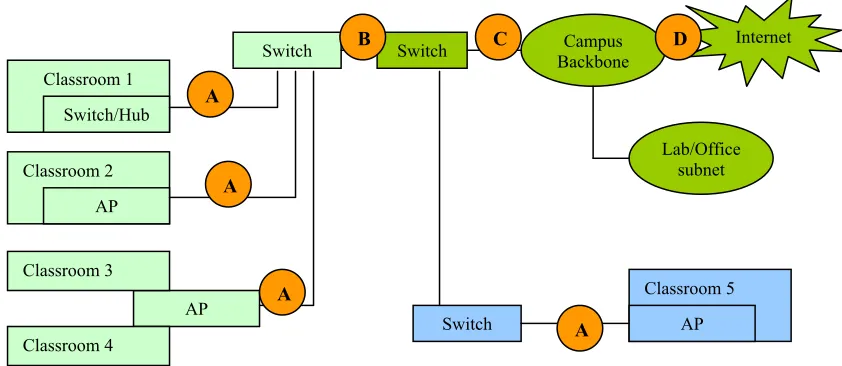
anywhere on the network. Figure 3.1.1 shows a conceptual campus network topology. Points A,
B, C, and D are all good candidate locations at which to install CNAC. There are advantages
and disadvantages to each location. When selecting an installation point for CNAC, it is best
to place it at a network traffic aggregation point to see the most traffic. In Figure 3.1.1, Point
D has the most amount of aggregation, and Point A has the least. The higher the aggregation
level, the broader the network coverage. For example, if CNAC is installed at Point D, one
system can cover all classrooms on the campus. But if Point A is selected, only a few classrooms
are covered; thus, multiple CNAC systems are needed to achieve full coverage. (7) states that
the higher the amount of aggregation chosen, the more impact on the rest of the network.
If Point D is selected, not only are the classroom networks affected, but the lab and office
networks are affected as well. While most side effects can be corrected through specific rule
sets (e.g., rules that consider the source of the packets and whether it is from a classroom or
lab) such rule sets become more complicated and prone to error. Therefore, the installation
decision needs to take into account the topology of the network in order to properly balance
locality and simplicity.
3.1.2 Web Interface
Instructors access CNAC by using a web-based login. After login, the page lists all
class-rooms that are controllable. The instructor, after selecting the desired classroom, enters the
classroom-specific page and is able to set restrictions for the classroom. CNAC was designed
with the thought that it would be used by instructors not network administrators. In order
to provide both simplicity and flexibility, CNAC has two levels for the user interface, a basic
interface and an advanced interface.
12
OUTPUT. The ebtables target can be one of these values: ACCEPT, DROP, CONTINUE, or RETURN. The following is an example of an iptables command to control network access:
iptables -A FORWARD -s 0/0 -i eth0 -d 128.111.52.12 -o eth1 -p TCP --sport 1024:65535 --dport 80 -j ACCEPT This command allows the bridging firewall to accept TCP packets when they enter on interface “eth0” from any IP address and are destined for IP address “128.111.52.12”, which is reachable via interface “eth1”. Furthermore, the source port must be in the range 1024 to 65535, and the destination port must be “80” (i.e., HTTP traffic). This rule translates into the policy that traffic in the classroom is only allowed to and from the course web server (128.111.52.12).
Where to Deploy the Bridge
Since the bridging firewall is transparent, it is possible to install the bridge at virtually any place in the network. Figure 2 shows a conceptual campus network topology. In Figure 2, we show points A, B, C, and D. These are all good candidate locations at which to install a bridging firewall.
The flexibility of installing a bridging firewall at multiple points does not mean that each point is not without its own advantages and disadvantages. In selecting an installation point, the rule-of-thumb is to install the bridge at an aggregation point. In practice, there are usually several locations with different levels of aggregation. In Figure 2, Point D has the most amount of aggregation, and Point A has the least. The higher the aggregation level, the broader the network coverage. For example, if we choose to install the bridge at Point D, one single bridging firewall can cover all classrooms on the campus. But if we select Point A, a bridging firewall will only cover one or a few classrooms, thus we would need to deploy multiple bridging firewalls to achieve full coverage. On the other hand, the higher amount of aggregation we choose, the more impact on the rest of the network. For example, if we select Point D, not only are the classroom networks affected, but so are the lab and office networks. While most side effects can be corrected through specific rule sets, e.g., rules that consider the source of the packets and whether it is from a classroom or lab, such rule sets become more complicated and prone to error. Therefore, the installation decision needs to properly balance locality and simplicity. In a network like the one shown in Figure 2, Points B or C likely offer a good balance between these two factors.
AP Classroom 1 Switch/Hub Classroom 2 AP Classroom 3 Classroom 4 Switch Classroom 5 AP Campus Backbone Switch Lab/Office subnet Internet A Switch
B C D
A
[image:22.612.100.521.89.272.2]A A
Figure 2. Conceptual campus network topology with potential bridging firewall locations.Figure 3.1 Possible CNAC locations
platform; instead, it only provides a few fixed-access control templates. CNAC contains four
fixed connection types: allow all traffic, allow web traffic only, allow on-campus traffic only,
and block all traffic. Simple requests such as temporarily turning network connectivity on/off,
or enabling/disabling all off-campus web traffic can be performed using the basic web interface
with a few mouse clicks.
In addition to the basic options, an instructor may want more finer-grained control. For
example, during a lecture, an instructor may want to allow web traffic to and from the class
web server, but may want to disable all other web traffic. In this situation, the option can be
pre-configured and made available as a choice on the basic interface menu, or the instructor
can use the advanced interface. The advanced interface simply ”wraps” iptables commands,
and sends the commands to CNAC. The advanced interface is more sophisticated then the
basic interface and provides greater flexibility but also requires more knowledge about CNAC.
The web interface works by invoking a script to execute the corresponding iptables/ebtables
command on CNAC. In order for CNAC to receive the web-generated rules, the bridge must be
assigned an IP address through which the web-server-side script sends the control commands.
This IP address is used to communicate with the web server only which prevents CNAC from
One drawback of CNAC is that it is unable to handle situations where multiple APs cover
a single room. To solve this problem CNAC must be able to receive a list of clients in a
classroom. (9) discuss the use of pre-defined MAC address lists, but as discussed earlier this
solution can be circumvented quickly. To address the issue of multiple APs we are proposing
the use of RSS to locate clients.
3.2 Sniffing Wireless Traffic
In order to capture clients’ RSS, a wireless sniffer will be used. Wireless sniffers have been
widely used for research and network managment because of their ability to monitor network
traffic at the MAC layer and above. Commercial sniffers are often costly, complex, and do
not provide the flexibility of open source sniffing applications. Li, Claypool, and Kinicki (8)
describe how to build a low-cost sniffer by using open source software and off-the-shelf wireless
networking hardware.
(9) use open source sniffers to monitor RSS of clients in order to triangulate their position
with a system called Planatir. The sniffers used in Planatir are built on a single board computer
platform with a dual Ethernet interface and PCMCIA slot for a wireless card. This hardware
can be purchased from Soekris Engineering for 100 to 200 dollars depending on the quantity
ordered.
The sniffers operate in passive mode and can monitor all 802.11 channels. In the United
States 802.11 uses channel’s one through eleven (10). Ganu et. al. (9) assumed that Planatir
would be implemented in an area that had APs using multiple channels. Planatir’s sniffers had
the ability to sweep through all channels or remain on one certain channel. The system had
to be able to locate two types of clients: clients who had associated with an AP and clients
who had not been associated. Clients who were associated were operating on the same channel
as the AP they were associated with. Clients unassociated with an AP could be sniffed on a
channel ± one from the channel that the clients were broadcasting on. When implementing
wireless sniffers the channels in use must be considered because as a sniffer scans channels it
The sniffers used in Planatir mainly captured and monitored unencrypted 802.11 header
data. The header information contained things such as; MAC address, SSID , and RSSI. The
sniffer’s wireless side is completely passive and all communication with the database is done
through Ethernet. The sniffers could be placed anywhere that had an Ethernet jack and power
outlet. The same sniffer setup used in Planatir could be used in the system proposed in this
paper. The only difference would be how the captured information is used.
3.2.1 Hypothesis
Current position location techniques are too complex and expensive to be installed in most
university settings. Another issue is that current position location techniques focus on locating
a client within a few meters, when all this system needs to do is determine whether or not a
client is inside or outside of the classroom. With the use of sniffers and RSS it is plausible
that clients can be localized to a classroom. Based on previous RSS localization work(6) it is
reasonable to assume that a sniffer can be used to capture all 802.11 traffic and then compare
RSS to determine if a client is located within a classroom.
The use of a sniffer has several benefits to the other proposed location techniques. These
benefits include constantly monitoring clients broadcasting from the room, which removes
worries of students changing MAC addresses or using other students’ laptops. The hardware
can be purchased for less than one hundred dollars and the software is open source. The next
CHAPTER 4. Testing RSS
802.11 is susceptible to interference from different objects in the environment. This causes
the Received Signal Strength (RSS) to drop depending on the location of the sniffer. RSS is
a measure of the energy observed by the physical layer at the antenna of a receiver. In IEEE
802.11 networks, the RSS indication (RSSI) value is used when performing medium access
control clear channel assessments and in roaming operations. The strength of RF signals
undergoes some attenuation during transmission after leaving the sender’s radio. This signal
strength deterioration is governed by a variety of factors, such as RF interferences, the distance
between communicating nodes, and obstacles.
The walls of a classroom should decrease the RSS of clients outside of the classroom by
a large enough margin that clients can be determined to be inside or outside the classroom.
In order to determine if the RSS drops by a significant amount, a wireless sniffer was used to
measure the RSS strength of clients inside and outside of different classroom environments.
There are several ways to measure RSS. (11) describes the four units of measurement that can
be used to represent RSS. These measurements are: mW (milliwatts), dBm(”db”-milliwatts,
RSSI (received signal strength indicator), and a percentage signal strength measurement. The
proposed system will rely on the use of RSSI, which will be converted to a percentage.
4.1 RSSI Overview
The IEEE 802.11 standard(10) states that; ”The received signal strength indicator (RSSI)
is an optional parameter that has a value of 0 through RSSI Max. This parameter is a measure
by the PHY sublayer of the energy observed at the antenna used to receive the current PPDU.
of the PLCP header error check (HEC). RSSI is intended to be used in a relative manner.
Absolute accuracy of the RSSI reading is not specified.”
The last two sentences of the above passage are particularly important as they signify
that there is neither a stipulated accuracy required for the RSSI nor a relationship with any
particular energy level which is measured in mW or dBm. Thus, individual vendors can provide
their own levels of accuracy, granularity or range for the RSSI values. Although different
manufactures use different RSSI scales, this is irrelevant for the purpose of this system because
all of the 802.11 packets will be captured by the same wireless card. All RSSI measurements
will be based on the same standard of measurement. In the event that different cards are used
to monitor RSSI, the RSSI would need to be converted to a percentage to ensure that the
measurements are consistent.
To convert RSSI to a percentage, the RSSI for a particular packet is divided by the
RSSI Max value and then multiplied by 100 to derive a percentage. For example, a 50%
signal strength with a Symbol card converts to an RSSI of 16 (because their RSSI Max = 31).
Atheros, with RSSI Max=60, has a RSSI=30 at 50% signal strength. Cisco uses an RSSI Max
=100, so 50% is RSSI=50. Examples such as these illustrate how the use of a percentage for
signal strength provides a reasonable metric for use in network analysis and site survey work.
Using percentages allows a reasonable comparison between environments even though different
vendors’ wireless cards were used to take the measurements. Ultimately, the generalized nature
of a percentage measurement allows the integer nature of the RSSI to be overlooked.
RSSI is an eight-bit field in the 802.11 header and a vendor-specific value because each
vendor has the liberty to choose their own scale for its measurement. For example, Orinoco
cards have a RSSI Max of 127, Cisco cards have an RSSI Max of 100, and Symbol cards use an
RSSI Max of 60. In order to view a client’s RSSI the complete 802.11 header must be captured
by the receiving station. The complete 802.11 header is visible only when packets are captured
in the monitor mode. There are currently three different header formats that can be used
to capture RSSI information: the Absolute Value System (AVS) WLAN header, the Prism2
lack of documentation. The next section provides an overview of the information available on
the three header formats. Unfortunately, minimal documentation is provided for the AVS and
Prism2 headers. The Radiotap header is better documented as it is a newer implementation.
4.1.1 AVS Header
The AVS header is an extra header that is created by the wireless driver when operating
in monitor mode. It adds only 64 bytes to the standard 802.11 frames. The AVS header was
introduced by Absolute Value Systems for the linux-wlan-ng drivers. Linux-wlan-ng drivers
are used by Prism54 and several other wireless cards.
AppendixA.2 displays the format of the AVS header. ssi signal in the AVS is the field that
will be used to monitor RSS. ssi signal can have three different outputs: ”None”, ”Normalized
RSSI” or ”dBm” depending on what is specified in the ssi type field. ”None” indicates that the
underlying WLAN device does not supply any signal strength and the ssi * values are unset.
”Normalized RSSI” values are integers in the range [0-1000] where higher numbers indicate a
stronger signal. ”dBm” values indicate an actual signal strength measurement quantity and
are usually in the range [-108 - 10].
4.1.2 Prism2 Header
The Prism2 header adds 144 bytes to the beginning of each 802.11 packet. Prism2 headers
are generated by the wireless driver, and contain information such as received signal strength
(RSSI), capture device, channel, and other signal/noise quality information. A.1.3 shows actual
packet capture with Prism2 header information.
4.1.3 Radiotap Header
The radiotap header was originally designed for Berkley Software Distribution. The work on
the Radiotap header was done by BSD wireless hackers and is more future-proof and
hardware-independent than the AVS and Prism2 headers, although it is a little harder to parse because
The most important information shows the rate at which the packet was captured and the
channel in which the card was tuned when the packet was captured.
4.1.4 Monitor Mode
Raw monitor mode/rfmon is a sniffing mode that allows the wireless card to report radio
headers from the 802.11 layer. Without this mode, sniffing is only possible on the data layer
of the associated network and the wireless sniffer will not be able to capture packets from all
wireless nodes in its range. Also if the card is not in monitor mode, the network interface
converts the 802.11 header into a fake 802.3 ethernet header, which strips off any RSS
infor-mation that will be needed. Many open source sniffers, such as Kismet and Airsnort, require
rfmon support for 802.11 data capture. Appendix A.1.3 contains a screen capture of Ethereal
running in monitor mode using Prism2 headers.
Not all wireless cards have the ability to be placed in monitor mode/rfmon. Some cards
require special drivers to be placed into monitor mode. An example of special drivers is the
Orinoco monitor-mode patches from the Shmoo Group, which enable an Orinoco wireless card
to be put into monitor mode. Once an Orinoco wireless card is in monitor mode, it receives
raw packets and makes them available to an application- layer program via the PF PACKET
interface used by the packet-capturing library.
4.2 Attenuation
Wireless networks must abide by the laws of physics, which is an advantage when
identi-fying wireless clients. As wireless signals propagate through the air, they lose strength while
encountering natural and manmade obstacles. Typical office obstacles such as doors, windows
and walls offer fairly well-known levels of attenuation, and are in addition to the path loss.
Table 4.1 shows examples of attenuation commonly found in buildings.
Attenuation of the wireless signal benefits the proposed system because it provides a
distin-guishable characteristic between clients in a room and clients outside of the classroom. (8) lists
depen-dent on the location of the sniffer. This is because the sniffer’s position can greatly affect the
amount of obstacles and distance the wireless signal encounters, which causes higher amounts
of attenuation. The perceived disadvantage actually improves the ability of the wireless sniffer
to identify wireless clients in the same room. This is possible because the attenuation of the
walls may decrease the RSSI enough to determine which clients are outside of the classroom
and which clients are inside.
4.3 Testing Hypothesis
In order to test if there is a distinguishable difference between RSS inside and outside of
a classroom, the RSSI of known clients was sniffed both inside and out side of the room. The
sniffing platform was an Apple MacBook running OS X 10.4.8 and RSS was measured using
KisMAC 0.21a. Both 802.11b and 802.11g cards were tested. An Apple Airport Extreme was
used to test 802.11g and an Lucent Orinoco Gold was used to test 802.11b. The RSS was
measured in dBm since this is the only measurement available with KisMAC.
4.3.1 KisMAC
KisMAC is an OS X based GUI version of Kismet. KisMAC is an 802.11 layer2 wireless
network detector/sniffer that can sniff 802.11b, 802.11a, and 802.11g traffic (12). KisMAC has
the ability to be implemented in passive mode which makes it completely invisible and it sends
no probe requests.
Table 4.1 Attenuation Rates of Different Materials
Material Amount of Attenuation
Plasterboard Wall 3dBm
Office Window 3dBm
Wooden Door 3dBm
Cinder Block Wall 4dBm
Glass Wall with Metal Frame 6dBm
Metal Door 6dBm
Brick Wall 8dBm
4.3.2 Measuring RSS
RSS was measured at four locations, (see Appendix A for floorplans of the locations). Room
1148 is a large lecture hall, Room 1127 is a computer lab with desktops and monitors at each
seat, Room 2133 is a standard class room with only desks and chairs, and Room 214a is a
conference room with only one large table. The record RSS values can be seen in Figure’s 4.3.2
and 4.3.2.
Room 1148 Room 1127 Room 2133 Room 214a
0 5 10 15 20 25 30 35 40 45 50
39 41 40
47 20 27 17 27
802.11g
Inside Classroom Outside ClassroomR
S
S
m
ea
su
re
d
in
d
B
m
Figure 4.1 802.11g RSS Readings
Table 4.2 802.11g RSS Percentage of Change
Room Percentage of Change
Room 1148 48.7
Room 1127 21.7
Room 2133 60
The percentage of change can be seen in Table 4.2.
Room 1148 Room 1127 Room 2133 Room 214a 0 2.5 5 7.5 10 12.5 15 17.5 20 22.5 25 27.5 30 32.5 35 37.5 32 35 37 27 10 19 12 7
802.11b
Inside Classroom Outside ClassroomR
S
S
m
ea
su
re
d
in
d
B
m
Figure 4.2 802.11b RSS Readings
The percentage of change can be seen in Table 4.3.
Table 4.3 802.11b RSS Percentage of Change
Room Percentage of Change
Room 1148 68.7
Room 1127 45.7
Room 2133 67.6
Room 214a 74
4.3.3 Results
Due to attenuation, the RSS of clients outside of the classroom drops noticeably compared
to those inside. 802.11g clients had an average drop of 43.4% when measured outside of the
64% when the RSS is measured outside of the classroom. This is an important finding because
it provides a way to identify wireless clients inside the classroom and solves the problem of
multiple access points.
4.4 Possible Problems
There are still problems with sniffing the RSS to localize clients. One way to circumvent
this system is to intentionally cause interference to reduce RSS below the cut off point. The
system would then think that the client is broadcasting from outside of the room due to the
low RSS. The wireless client could also reduce the transmit power of their wireless card so that
CHAPTER 5. Design
This is a general overview of how the proposed system can be designed and implemented
in various university settings. Client traffic can be monitored because the software is open
source, the system is highly customizable, and clients can be identified to a specific classroom.
At a university, the proposed system will work as follows. Instructors will first inform the
universitys Information Technology (IT) department that they are planning to monitor traffic
during their classtime. The IT department will take a sniffer to the classroom and compare
RSSI inside and outside of the classroom. These RSSI will then be converted to a percentage
and the IT department will come up with a cutoff point where anything above a certain RSS
will be monitored. For example, if all clients tested within the classroom have an RSSI of 35%
or above and clients outside of the classroom have an RSSI of 28% or below, the IT department
would set the cutoff point at 32%. This means that if the sniffer detected a MAC address with
an RSSI higher than 32%, it would send that MAC address to the wireless network control
system. Ideally, in the future an algorithm will be implemented to compare RSS and will
automatically come up with a cutoff point in real time. Once the sniffer has been configured
by the IT department, it will be given to the instructor to be used during classtime. For
instance, in Figure 4.3.2 the system would parse the list for all clients with an RSS above
30dBm. The sniffer will be connected to the network through an Ethernet port. The list of
MAC addresses will then be sent to a database, which will be used by the system responsible
for applying rules to the network traffic. These rules will be defined by the instructors. The
5.0.1 Monitoring System
The monitoring part of the system will be based on the work of (7). The university IT
department will evaluate the current network topology and decide on the appropriate placement
of the traffic monitoring system. As discussed earlier, there are generally a few places that the
system can be placed, depending on the network topology. Once the system is installed , a
few things will need to be configured that were not discussed in (7), such as when to start and
stop monitoring traffic and how to determine what traffic to monitor.
The monitoring system will be setup to start monitoring the traffic of a classroom during
a time specified by the professor. The network monitoring system will connect to a database
containing a list of classrooms and MAC addresses that are inside of those classrooms (this
database will automatically be updated by the sniffer). For example, if a sniffer is placed in
Room 1132, it will monitor the classroom and determine clients inside of the classroom. Once
a client is determined to be in the classroom, the sniffer will connect to the database and enter
the clients MAC address into the table for Room 1132. The network monitoring system will
also contain a stop time specified by the professor and, when this time is reached, the network
monitoring system will clear all MAC addresses from the classroom.
5.0.2 Web Interface
A few issues not addressed in the paper are having multiple web-pages and rulesets for
multiple classes. The IT department will make a unique webpage for each classroom, allowing
only the instructor of that class to log on. This will enable each class to have its own set
of rules. The instructor will log on to a web interface and select what traffic to allow and
traffic to block. Normally, this will be done before class, but can also be changed and modified
in realtime. If an instructor decides to allow student access to a specific website when all
web traffic has been blocked, they can add the website to an approved list of websites during
classtime. This ability to modify the system in realtime will allow instructors to have complete
5.0.3 Sniffer
Instructors will be issued a sniffer from the IT department, which will link the MAC address
and the IP of the sniffer to the classroom. When the system receives the list of MAC addresses,
it will know which rule set it needs to apply to these MAC addresses. The instructor will bring
the sniffer to class and plug it into an Ethernet jack in the classroom. The sniffer will then
monitor RSSI and report the findings to the system controlling traffic. The concern of students
modifying their MAC addresses or using a friends laptop will be eliminated because as soon
as the 802.11 signal is determined to be coming from the room, that MAC will be blocked.
5.1 Security
Security is an important issue that must be taken into consideration. The proposed system
deals with user and location information, which could be considered a privacy concern. If
someone is able to gain access to the system, they could affect network traffic for the whole
university. To ensure the security of the network, the web interface must be password protected,
the database must only accept access control lists from the sniffers, and the sniffers themselves
must be secured.
5.1.1 Web Interface
The web interface will need to be password protected. CNAC currently has instructors
login and then select their class. In order to provide a more secure environment, instructors
will have their own passwords and only be able to access the webpage specifically for their
classes. This prevents an instructor from accidentally selecting a class that is not theirs.
5.1.2 Sniffer Security
The monitoring system and database will have a predefined access control list that only
accepts connections from sniffers that are assigned static IP addresses. The database will also
to upload MAC addresses to the database. The sniffer itself will need to be password protected
CHAPTER 6. Conclusion
This paper has provided a cost efficient and flexible system that can be used to monitor
wireless networks in the classroom, there are still other distractions technology provides. There
is the possibility that students can use cellphones to access the Internet. This system does
not prevent students from using resources that are already on their computer. For example,
students will still be able to watch DVDs or play games that are already installed on their
computer. This system still relies on the instructor to also monitor the classroom.
The goal of this system was to provide instructors with the ability to control wireless
network access in the class room. Through testing, it was determined that clients can be
located within a classroom using RSS. This location information can be used to specify the
network traffic that will be monitored. The work presented in this paper with the use of
CNAC provides a complete system to monitor wireless traffic in the classroom. The solution is
neither to ban laptops nor allow unrestricted network access in the classroom. There must be
a middle ground as technology can benefit the learning environment if implemented correctly.
The system proposed in this paper provides an effective way to monitor wireless traffic and
allow students the benefits provided by wireless technology.
There are areas with this system that still need extended work; however, due to time
constraints they were not able to be expanded upon. A complete system needs to be fully
CHAPTER 7. Future Work
Each part of the proposed system needs to be fully implemented and documented. The
system needs to then be evaluated for effectiveness and whether or not there is any performance
degradation to the network. After the system has been fully tested and implemented an
algorithm needs to be developed for determining RSS of clients inside the classroom, a portable
platform for the sniffer needs developed, and uses for the system in the business world need to
be researched.
7.1 Sniffer
The sniffer needs the ability to automatically determine RSSI that are inside and outside
of the room. There needs to be an algorithm designed to do this, one which might take the
low and high end of all captured RSSI and start looking for a gap where the RSSI dropped
by 15%(if one is not found, 16% could be tried). Once a gap is found, determine whether or
not it is in the bottom 25%. If the gap is in the bottom 25% it would probably be safe to
assume that the cut-off point has been determined. If the gap is in the upper 80%, it would
be reasonable to assume that this would not be a good cut off point.
Another goal is to implement the sniffer on a standard wireless router using a modified
version of the Openwrt firmware. This would allow the sniffer to be in a small and convenient
form-factor, allowing for easy portability. A wireless router would also already contain a
wireless card to be used for sniffing and an Ethernet port to provide network connectivity
to transmit data to the server. Another benefit of the wireless router is its low cost and
7.2 Traffic
More research needs to be done on how traffic would be filtered, modified, and monitored.
Besides filtering and modifying traffic, an instructor might want to monitor and log the traffic.
If the network traffic is only monitored and logged, it is transparent to the students and seems
less intrusive but still gives the instructor the opportunity to review logs and see if students are
following network use policies. Research about privacy concerns, how much storage is needed
APPENDIX A. Additional Material
A.1 Radio Header Formats
A.1.1 AVS
Table A.1 802.11 Sniffed Frame Format
Offset Name Size Description
0 CaptureHeader 0 AVS capture metadata header
64 802.11Header [10-30] 802.11 frame header
?? 802.11Payload [0-2312] 802.11 frame payload
?? 802.11FCS 4 802.11 frame check sequence
Table A.2 AVS Frame Format
Offset Name Type
0 version uint32
4 length uint32
8 mactime uint64
16 hosttime uint64
24 phytype uint32
28 channel uint32
32 datarate uint32
36 antenna uint32
40 priority uint32
44 ssi type uint32
48 ssi signal int32
52 ssi noise int32
56 preamble uint32
Table A.3 Radiotap Header Structure
Offset Name Type
/* set to 0 */ it version uint8 t
it pad uint8 t
/* entire length */ it len uint16 t
/* fields present */ it present uint32 t
A.1.2 Radiotap
Supported list of radiotap header fields
enum ieee80211 radiotap type
IEEE80211 RADIOTAP TSFT = 0,
IEEE80211 RADIOTAP FLAGS = 1,
IEEE80211 RADIOTAP RATE = 2,
IEEE80211 RADIOTAP CHANNEL = 3,
IEEE80211 RADIOTAP FHSS = 4,
IEEE80211 RADIOTAP DBM ANTSIGNAL = 5,
IEEE80211 RADIOTAP DBM ANTNOISE = 6,
IEEE80211 RADIOTAP LOCK QUALITY = 7,
IEEE80211 RADIOTAP TX ATTENUATION = 8,
IEEE80211 RADIOTAP DB TX ATTENUATION = 9,
IEEE80211 RADIOTAP DBM TX POWER = 10,
IEEE80211 RADIOTAP ANTENNA = 11,
IEEE80211 RADIOTAP DB ANTSIGNAL = 12,
IEEE80211 RADIOTAP DB ANTNOISE = 13,
IEEE80211 RADIOTAP FCS = 14,
IEEE80211 RADIOTAP EXT = 31 ;
Figure A.1 Ethereal Setup to capture packets using Prism2 header.
BIBLIOGRAPHY
[1] Dennis Adams. (2006). Wireless laptops in the classroom (and the Sesame Street
syn-drome). Communications of the ACM. (Vol. 49, No. 9), 25–27.
[2] Chloe Gotsis. (2006). Classroom laptop ban sparks law students’ dissent. The Daily Free
Press, 4/18/2006.
[3] Gary McWillianms (2005). Laptops in classrooms not working out as hoped. The Wall
Street Journal. Friday, October 14, 2005.
[4] Enterasys. (2005). Classroom Network Control System. http:
www.educause.edu/content.asp?page id=705&ITEM ID=75&bhcp=1.
[5] Stephen Jeffries. (2000).Technology Integration in the Classroom: A Perspective from a
Future Teacher. http://pt3.nmsu.edu/educ621/steve4.html.
[6] Vishal Bhargava. (2003).Localization For Intrusion Detection in Wireless Local Area
Net-works. www.ece.ncsu.edu/pubs/etd/id/etd-10172003-081419.
[7] Hangjin Zhang, Kevin C. Almeroth. (2006). A Simple Network Access Control System
imj.gatech.edu/papers/EDMEDIA-ZHANG-06.pdf.gz.
[8] Mingzhe Li, Mark Claypool, and Robert Kinicki. Wireless Sniffing by Example.
http://perform.wpi.edu/wsniffer/.
[9] Sachin Ganu, A. S. Krishnakumar, and P. Krishnan. (2004).
Infrastructure-based location estimation in WLAN networks.
[10] (1999).ANSI/IEEE Std 802.11(R2003).
http://standards.ieee.org/getieee802/download/802.11-1999.pdf.
[11] J. Bardwell. (2000).Converting Signal Strength Percentage to dBm Values.
http://www.wildpackets.com/elements/whitepapers/Converting Signal Strength.pdf.
[12] http://kismac.de/.
[13] Bruce M. Simpson, and Darron Broad. (2006). textitNetBSD Kernel
Devel-oper’s Manual IEEE80211 RADIOTAP.
http://netbsd.gw.com/cgi-bin/man-cgi?ieee80211 radiotap+9+NetBSD-current.
[14] Juan M Torrescusa. (2006). Multiple WiFi Clients on a Single Wireless Card.
http://www.cs.ucl.ac.uk/staff/a.bittau/finalreport3.pdf
[15] VAIBHAV GUPTA. (2006). A CHARACTERIZATION OF
WIRE-LESS NETWORK INTERFACE CARD ACTIVE SCANNING
ALGORITHMS .