The Official Samba-3
HOWTO and
B
RUCE
P
ERENS
’ O
PEN
S
OURCE
S
ERIES
http://www.phptr.com/perens
◆ Java™ Application Development on Linux® Carl Albing and Michael Schwarz ◆ C++ GUI Programming with Qt 3
Jasmin Blanchette and Mark Summerfield
◆ Managing Linux Systems with Webmin: System Administration and Module Development Jamie Cameron
◆ The Linux Book David Elboth
◆ Understanding the Linux Virtual Memory Manager Mel Gorman
◆ PHP 5 Power Programming
Andi Gutmans, Stig Bakken, and Derick Rethans ◆ Linux® Quick Fix Notebook
Peter Harrison
◆ Linux Desk Reference, Second Edition Scott Hawkins
◆ Implementing CIFS: The Common Internet File System Christopher Hertel
◆ Open Source Security Tools: A Practical Guide to Security Applications Tony Howlett
◆ Apache Jakarta CommonsReusable Java™ Components Will Iverson
◆ Embedded Software Development with eCos Anthony Massa
◆ Rapid Application Development with Mozilla Nigel McFarlane
◆ Subversion Version Control: Using the Subversion Version Control System in Development Projects
William Nagel
◆ Linux Assembly Language Programming Bob Neveln
◆ Intrusion Detection with SNORT: Advanced IDS Techniques Using SNORT, Apache, MySQL, PHP, and ACID
Rafeeq Ur Rehman
◆ Cross-Platform GUI Programming with wxWidgets Julian Smart and Kevin Hock with Stefan Csomor
◆ Samba-3 by Example: Practical Exercises to Successful Deployment John H. Terpstra
◆ The Official Samba-3 HOWTO and Reference Guide John H. Terpstra and Jelmer R. Vernooij, Editors ◆ Real World Linux Security, Second Edition
Bob Toxen
The Official Samba-3
HOWTO and
Reference Guide
Second Edition
John H. Terpstra and Jelmer Vernooij, Editors
Prentice Hall Professional Technical Reference
Upper Saddle River, NJ • Boston • Indianapolis • San Francisco
New York • Toronto • Montreal • London • Munich • Paris • Madrid
Many of the designations used by manufacturers and sellers to distinguish their prod-ucts are claimed as trademarks. Where those designations appear in this book, and the publisher was aware of a trademark claim, the designations have been printed with initial capital letters or in all capitals.
The author and publisher have taken care in the preparation of this book, but make no expressed or implied warranty of any kind and assume no responsibility for errors or omissions. No liability is assumed for incidental or consequential damages in connec-tion with or arising out of the use of the informaconnec-tion or programs contained herein. The publisher offers excellent discounts on this book when ordered in quantity for bulk purchases or special sales, which may include electronic versions and/or custom covers and content particular to your business, training goals, marketing focus, and branding interests. For more information, please contact:
U.S. Corporate and Government Sales (800) 382-3419
For sales outside the U.S., please contact: International Sales
Visit us on the Web: www.phptr.com
Library of Congress Control Number: 2005928765 Copyright© 2006 John H. Terpstra
This material may be distributed only subject to the terms and conditions set forth in the Open Publication License, v1.0 or later (the latest version is presently available at https://www.opencontent.org/openpub/).
Printed in the United States of America. ISBN 0-13-188222-8
Text printed in the United States on recycled paper at Courier in Stoughton, Massachusetts.
ABOUT THE COVER ARTWORK
The cover artwork of this book continues the freedom theme of the first edition of “The Official Samba-3 HOWTO and Reference Guide.” We may look back upon the past to question the motives of those who have gone before us. Seldom do we realise that the past owes us no answer, and despite what we may think of the actions of those who have travelled lifes’ road before us, we must feel a sense of pride and gratitude for those who, in the past, have protected our liberties.
Developments in information technology continue to move at an alarming pace. Human nature causes us to adopt and embrace new developments that appear to answer the needs of the moment, but that can entrap us at a future date. There are many examples in the short history of information technology. MS-DOS was seen as a tool that liberated users from the tyranny of large computer system operating costs, and that made possible the rapid progress we are beneficiaries of today. Yet today we are inclined to look back with disdain on MS-DOS as an obsolete and constraining technology that belongs are an era that is best forgotten.
The embrace of Windows networking, Windows NT4, and MS Active Directory in more recent times, may seem modern and progressive today, but sooner or later something better will replace them. The current preoccupation with extended identity management solutions and with directories is not unexpected. The day will come that these too will be evaluated, and what may seem refreshing and powerful may be better recogized as the chilly winds of the night. To argue against progress is unthinkable, no matter what may lie ahead.
The development of Samba is moving forwards. The changes since Samba 3.0.0 are amazing, yet many users would like to see more and faster progress. The benefits of recent devel-opments can be realized quickly, but documentation is necessary to unlock the pandora’s box. It is our hope that this book will help the network administrator to rapidly deploy the new features with minimum effort. As you deploy and gain mileage from the new en-ablement, take the time to think through what may lie ahead. Above all, take stock of the freedom of choice that Samba provides in your world, and enjoy the new potential for seamless interoperability.
ATTRIBUTION
Chapter 1, “How to Install and Test SAMBA”
• Andrew Tridgell <<[email protected]>1>
• Jelmer R. Vernooij <<[email protected]>2>
• John H. Terpstra <<[email protected]>3>
• Karl Auer<<[email protected]>4>
• Dan Shearer <<[email protected]>5>
Chapter 2, “Fast Start: Cure for Impatience”
• John H. Terpstra <<[email protected]>6>
Chapter 3, “Server Types and Security Modes”
• Andrew Tridgell <<[email protected]>7>
• Jelmer R. Vernooij <<[email protected]>8>
• John H. Terpstra <<[email protected]>9>
Chapter 4, “Domain Control”
• John H. Terpstra <<[email protected]>10>
• Gerald (Jerry) Carter<<[email protected]>11>
• David Bannon <<[email protected]>12>
• Guenther Deschner <<[email protected]>13>(LDAP updates) Chapter 5, “Backup Domain Control”
• John H. Terpstra<<[email protected]>14> 1<mailto:[email protected]>
2<mailto:[email protected]> 3<mailto:[email protected]> 4<mailto:[email protected]> 5<mailto:[email protected]> 6<mailto:[email protected]> 7<mailto:[email protected]> 8<mailto:[email protected]> 9<mailto:[email protected]> 10<mailto:[email protected]> 11<mailto:[email protected]> 12<mailto:[email protected]> 13<mailto:[email protected]> 14<mailto:[email protected]>
viii Attribution
• Volker Lendecke<<[email protected]>15>
• Guenther Deschner <<[email protected]>16>(LDAP updates) Chapter 6, “Domain Membership”
• John H. Terpstra<<[email protected]>17>
• Jeremy Allison<<[email protected]>18>
• Gerald (Jerry) Carter<<[email protected]>19>
• Andrew Tridgell <<[email protected]>20>
• Jelmer R. Vernooij <<[email protected]>21>
• Guenther Deschner <<[email protected]>22>(LDAP updates) Chapter 7, “Standalone Servers”
• John H. Terpstra<<[email protected]>23>
Chapter 8, “MS Windows Network Configuration Guide”
• John H. Terpstra<<[email protected]>24>
Chapter 9, “Network Browsing”
• John H. Terpstra<<[email protected]>25>
• Jelmer R. Vernooij <<[email protected]>26>
Chapter 10, “Account Information Databases”
• Jelmer R. Vernooij <<[email protected]>27>
• John H. Terpstra <<[email protected]>28>
• Gerald (Jerry) Carter<<[email protected]>29>
• Jeremy Allison<<[email protected]>30>
• Guenther Deschner <<[email protected]>31>(LDAP updates)
15<mailto:[email protected]> 16<mailto:[email protected]>
Attribution ix
• Olivier (lem) Lemaire<<[email protected]>32>
Chapter 11, “Group Mapping: MS Windows and UNIX”
• John H. Terpstra<<[email protected]>33>
• Jean Fran¸cois Micouleau
• Gerald (Jerry) Carter<<[email protected]>34>
Chapter 12, “Remote and Local Management: The Net Command”
• John H. Terpstra<<[email protected]>35>
• Volker Lendecke<<[email protected]>36>
• Guenther Deschner <<[email protected]>37>
Chapter 13, “Identity Mapping (IDMAP)”
• John H. Terpstra<<[email protected]>38>
Chapter 14, “User Rights and Privileges”
• Gerald (Jerry) Carter<<[email protected]>39>
• John H. Terpstra<<[email protected]>40>
Chapter 15, “File, Directory, and Share Access Controls”
• John H. Terpstra<<[email protected]>41>
• Jeremy Allison<<[email protected]>42>
• Jelmer R. Vernooij <<[email protected]>43>(drawing)
Chapter 16, “File and Record Locking”
• Jeremy Allison<<[email protected]>44>
• Jelmer R. Vernooij <<[email protected]>45>
• John H. Terpstra <<[email protected]>46> 32<mailto:[email protected]>
33<mailto:[email protected]> 34<mailto:[email protected]> 35<mailto:[email protected]>
36<mailto:[email protected]> 37<mailto:[email protected]>
x Attribution
• Eric Roseme<<[email protected]>47>
Chapter 17, “Securing Samba”
• Andrew Tridgell <<[email protected]>48>
• John H. Terpstra <<[email protected]>49>
Chapter 18, “Interdomain Trust Relationships”
• John H. Terpstra<<[email protected]>50>
• Rafal Szczesniak <<[email protected]>51>
• Jelmer R. Vernooij <<[email protected]>52>(drawing)
• Stephen Langasek<<[email protected]>53>
Chapter 19, “Hosting a Microsoft Distributed File System Tree”
• Shirish Kalele<<[email protected]>54>
• John H. Terpstra<<[email protected]>55>
Chapter 20, “Classical Printing Support”
• Kurt Pfeifle<<[email protected]>56>
• Gerald (Jerry) Carter<<[email protected]>57>
• John H. Terpstra<<[email protected]>58>
Chapter 21, “CUPS Printing Support”
• Kurt Pfeifle<<[email protected]>59>
• Ciprian Vizitiu <<[email protected]>60>(drawings)
• Jelmer R. Vernooij <<[email protected]>61>(drawings)
Chapter 22, “Stackable VFS modules”
• Jelmer R. Vernooij <<[email protected]>62> 47<mailto:[email protected]>
Attribution xi
• John H. Terpstra <<[email protected]>63>
• Tim Potter<<[email protected]>64>
• Simo Sorce (original vfs skel README)
• Alexander Bokovoy (original vfs netatalk docs)
• Stefan Metzmacher (Update for multiple modules)
• Ed Riddle (original shadow copy docs)
Chapter 23, “Winbind: Use of Domain Accounts”
• Tim Potter<<[email protected]>65>
• Andrew Tridgell <<[email protected]>66>
• Naag Mummaneni <<[email protected]>67>(Notes for Solaris)
• John Trostel<<[email protected]>68>
• Jelmer R. Vernooij <<[email protected]>69>
• John H. Terpstra <<[email protected]>70>
Chapter 24, “Advanced Network Management”
• John H. Terpstra<<[email protected]>71>
Chapter 25, “System and Account Policies”
• John H. Terpstra<<[email protected]>72>
Chapter 26, “Desktop Profile Management”
• John H. Terpstra<<[email protected]>73>
Chapter 27, “PAM-Based Distributed Authentication”
• John H. Terpstra<<[email protected]>74>
• Stephen Langasek<<[email protected]>75>
Chapter 28, “Integrating MS Windows Networks with Samba”
63<mailto:[email protected]> 64<mailto:[email protected]> 65<mailto:[email protected]> 66<mailto:[email protected]> 67<mailto:[email protected]> 68<mailto:[email protected]> 69<mailto:[email protected]> 70<mailto:[email protected]> 71<mailto:[email protected]> 72<mailto:[email protected]> 73<mailto:[email protected]> 74<mailto:[email protected]>
xii Attribution
• John H. Terpstra <<[email protected]>76>
Chapter 29, “Unicode/Charsets”
• Jelmer R. Vernooij <<[email protected]>77>
• John H. Terpstra <<[email protected]>78>
• TAKAHASHI Motonobu <<[email protected]>79> (Japanese character sup-port)
Chapter 30, “Backup Techniques”
• John H. Terpstra<<[email protected]>80>
Chapter 31, “High Availability”
• John H. Terpstra<<[email protected]>81>
• Jeremy Allison<<[email protected]>82>
Chapter 32, “Handling Large Directories”
• Jeremy Allison<<[email protected]>83>
• John H. Terpstra<<[email protected]>84>
Chapter 33, “Advanced Configuration Techniques”
• John H. Terpstra<<[email protected]>85>
Chapter 34, “Upgrading from Samba-2.x to Samba-3.0.20”
• Jelmer R. Vernooij <<[email protected]>86>
• John H. Terpstra <<[email protected]>87>
• Gerald (Jerry) Carter<<[email protected]>88>
Chapter 35, “Migration from NT4 PDC to Samba-3 PDC”
• John H. Terpstra<<[email protected]>89>
Chapter 36, “SWAT: The Samba Web Administration Tool”
Attribution xiii
• John H. Terpstra <<[email protected]>90>
Chapter 37, “The Samba Checklist”
• Andrew Tridgell <<[email protected]>91>
• Jelmer R. Vernooij <<[email protected]>92>
• Dan Shearer <<[email protected]>93>
Chapter 38, “Analyzing and Solving Samba Problems”
• Gerald (Jerry) Carter<<[email protected]>94>
• Jelmer R. Vernooij <<[email protected]>95>
• David Bannon <<[email protected]>96>
• Dan Shearer <<[email protected]>97>
Chapter 39, “Reporting Bugs”
• John H. Terpstra <<[email protected]>98>
• Jelmer R. Vernooij <<[email protected]>99>
• Andrew Tridgell <<[email protected]>100>
Chapter 40, “How to Compile Samba”
• Jelmer R. Vernooij <<[email protected]>101>
• John H. Terpstra <<[email protected]>102>
• Andrew Tridgell <<[email protected]>103>
Chapter 41, “Portability”
• Jelmer R. Vernooij <<[email protected]>104>
• John H. Terpstra <<[email protected]>105>
Chapter 42, “Samba and Other CIFS Clients”
xiv Attribution
• Jelmer R. Vernooij <<[email protected]>106>
• John H. Terpstra <<[email protected]>107>
• Dan Shearer <<[email protected]>108>
• Jim McDonough <<[email protected]>109>(OS/2) Chapter 43, “Samba Performance Tuning”
• Paul Cochrane<<[email protected]>110>
• Jelmer R. Vernooij <<[email protected]>111>
• John H. Terpstra <<[email protected]>112>
Chapter 46, “DNS and DHCP Configuration Guide”
• John H. Terpstra <<[email protected]>113>
CONTENTS
LIST OF EXAMPLES xxxvii
LIST OF FIGURES xliii
LIST OF TABLES xlv
FOREWORD xlvii
PREFACE xlix
INTRODUCTION li
Part I
General Installation
PREPARING SAMBA FOR CONFIGURATION
Chapter 1 HOW TO INSTALL AND TEST SAMBA 3
1.1 Obtaining and Installing Samba 3
1.2 Configuring Samba (smb.conf) 3
1.2.1 Configuration File Syntax 3
1.2.2 Starting Samba 4
1.2.3 Example Configuration 5
1.2.3.1 Test Your Config File with testparm 6
1.2.4 SWAT 6
1.3 List Shares Available on the Server 7
1.4 Connect with a UNIX Client 7
1.5 Connect from a Remote SMB Client 7
1.5.1 What If Things Don’t Work? 8
1.5.2 Still Stuck? 8
1.6 Common Errors 8
1.6.1 Large Number of smbd Processes 9
1.6.2 Error Message: open oplock ipc 9
1.6.3 “The network name cannot be found” 9
Chapter 2 FAST START: CURE FOR IMPATIENCE 11
2.1 Features and Benefits 11
xvi Contents
2.2 Description of Example Sites 12
2.3 Worked Examples 12
2.3.1 Standalone Server 12
2.3.1.1 Anonymous Read-Only Document Server 13
2.3.1.2 Anonymous Read-Write Document Server 15
2.3.1.3 Anonymous Print Server 15
2.3.1.4 Secure Read-Write File and Print Server 17
2.3.2 Domain Member Server 20
2.3.2.1 Example Configuration 21
2.3.3 Domain Controller 24
2.3.3.1 Example: Engineering Office 25
2.3.3.2 A Big Organization 27
Part II
Server Configuration Basics
FIRST STEPS IN SERVER CONFIGURATION
Chapter 3 SERVER TYPES AND SECURITY MODES 33
3.1 Features and Benefits 33
3.2 Server Types 34
3.3 Samba Security Modes 34
3.3.1 User Level Security 35
3.3.1.1 Example Configuration 36
3.3.2 Share-Level Security 36
3.3.2.1 Example Configuration 37
3.3.3 Domain Security Mode (User-Level Security) 37
3.3.3.1 Example Configuration 38
3.3.4 ADS Security Mode (User-Level Security) 39
3.3.4.1 Example Configuration 39
3.3.5 Server Security (User Level Security) 39
3.3.5.1 Example Configuration 40
3.4 Password Checking 41
3.5 Common Errors 42
3.5.1 What Makes Samba a Server? 42
3.5.2 What Makes Samba a Domain Controller? 43
3.5.3 What Makes Samba a Domain Member? 43
3.5.4 Constantly Losing Connections to Password Server 43
Chapter 4 DOMAIN CONTROL 45
4.1 Features and Benefits 46
4.2 Single Sign-On and Domain Security 48
4.3 Basics of Domain Control 50
4.3.1 Domain Controller Types 50
4.3.2 Preparing for Domain Control 52
4.4 Domain Control: Example Configuration 55
Contents xvii
4.6 Domain and Network Logon Configuration 57
4.6.1 Domain Network Logon Service 57
4.6.1.1 Example Configuration 57
4.6.1.2 The Special Case of MS Windows XP Home Edition 58
4.6.1.3 The Special Case of Windows 9x/Me 58
4.6.2 Security Mode and Master Browsers 60
4.7 Common Errors 61
4.7.1 “$” Cannot Be Included in Machine Name 61
4.7.2 Joining Domain Fails Because of Existing Machine Account 62
4.7.3 The System Cannot Log You On (C000019B) 62
4.7.4 The Machine Trust Account Is Not Accessible 62
4.7.5 Account Disabled 63
4.7.6 Domain Controller Unavailable 63
4.7.7 Cannot Log onto Domain Member Workstation After Joining Domain 63
Chapter 5 BACKUP DOMAIN CONTROL 65
5.1 Features and Benefits 65
5.2 Essential Background Information 66
5.2.1 MS Windows NT4-style Domain Control 66
5.2.1.1 Example PDC Configuration 68
5.2.2 LDAP Configuration Notes 68
5.2.3 Active Directory Domain Control 70
5.2.4 What Qualifies a Domain Controller on the Network? 70
5.2.5 How Does a Workstation find its Domain Controller? 70
5.2.5.1 NetBIOS Over TCP/IP Enabled 70
5.2.5.2 NetBIOS Over TCP/IP Disabled 71
5.3 Backup Domain Controller Configuration 71
5.3.1 Example Configuration 72
5.4 Common Errors 73
5.4.1 Machine Accounts Keep Expiring 73
5.4.2 Can Samba Be a Backup Domain Controller to an NT4 PDC? 74
5.4.3 How Do I Replicate the smbpasswd File? 74
5.4.4 Can I Do This All with LDAP? 74
Chapter 6 DOMAIN MEMBERSHIP 75
6.1 Features and Benefits 75
6.2 MS Windows Workstation/Server Machine Trust Accounts 76
6.2.1 Manual Creation of Machine Trust Accounts 77
6.2.2 Managing Domain Machine Accounts using NT4 Server Manager 78
6.2.3 On-the-Fly Creation of Machine Trust Accounts 79
6.2.4 Making an MS Windows Workstation or Server a Domain Member 79
6.2.4.1 Windows 200x/XP Professional Client 79
6.2.4.2 Windows NT4 Client 80
6.2.4.3 Samba Client 80
6.3 Domain Member Server 80
6.3.1 Joining an NT4-type Domain with Samba-3 81
xviii Contents
6.4 Samba ADS Domain Membership 84
6.4.1 Configure smb.conf 84
6.4.2 Configure /etc/krb5.conf 85
6.4.3 Create the Computer Account 87
6.4.3.1 Possible Errors 88
6.4.4 Testing Server Setup 88
6.4.5 Testing with smbclient 88
6.4.6 Notes 88
6.5 Sharing User ID Mappings between Samba Domain Members 89
6.6 Common Errors 89
6.6.1 Cannot Add Machine Back to Domain 89
6.6.2 Adding Machine to Domain Fails 90
6.6.3 I Can’t Join a Windows 2003 PDC 90
Chapter 7 STANDALONE SERVERS 91
7.1 Features and Benefits 91
7.2 Background 91
7.3 Example Configuration 92
7.3.1 Reference Documentation Server 92
7.3.2 Central Print Serving 93
7.4 Common Errors 95
Chapter 8 MS WINDOWS NETWORK CONFIGURATION GUIDE 97
8.1 Features and Benefits 97
8.2 Technical Details 97
8.2.1 TCP/IP Configuration 97
8.2.1.1 MS Windows XP Professional 98
8.2.1.2 MS Windows 2000 99
8.2.1.3 MS Windows Me 101
8.2.2 Joining a Domain: Windows 2000/XP Professional 103
8.2.3 Domain Logon Configuration: Windows 9x/Me 104
8.3 Common Errors 105
Part III
Advanced Configuration
VALUABLE NUTS AND BOLTS INFORMATION
Chapter 9 NETWORK BROWSING 115
9.1 Features and Benefits 115
9.2 What Is Browsing? 116
9.3 Discussion 117
9.3.1 NetBIOS over TCP/IP 117
9.3.2 TCP/IP without NetBIOS 119
9.3.3 DNS and Active Directory 120
9.4 How Browsing Functions 122
Contents xix
9.4.2 Domain Browsing Configuration 124
9.4.3 Forcing Samba to Be the Master 125
9.4.4 Making Samba the Domain Master 126
9.4.5 Note about Broadcast Addresses 126
9.4.6 Multiple Interfaces 126
9.4.7 Use of the Remote Announce Parameter 127
9.4.8 Use of the Remote Browse Sync Parameter 127
9.5 WINS: The Windows Internetworking Name Server 128
9.5.1 WINS Server Configuration 129
9.5.2 WINS Replication 130
9.5.3 Static WINS Entries 130
9.6 Helpful Hints 131
9.6.1 Windows Networking Protocols 131
9.6.2 Name Resolution Order 132
9.7 Technical Overview of Browsing 132
9.7.1 Browsing Support in Samba 133
9.7.2 Problem Resolution 133
9.7.3 Cross-Subnet Browsing 134
9.7.3.1 Behavior of Cross-Subnet Browsing 135
9.8 Common Errors 138
9.8.1 Flushing the Samba NetBIOS Name Cache 138
9.8.2 Server Resources Cannot Be Listed 138
9.8.3 I Get an ”Unable to browse the network” Error 138
9.8.4 Browsing of Shares and Directories is Very Slow 139
Chapter 10 ACCOUNT INFORMATION DATABASES 141
10.1 Features and Benefits 141
10.1.1 Backward Compatibility Account Storage Systems 142
10.1.2 New Account Storage Systems 142
10.2 Technical Information 143
10.2.1 Important Notes About Security 144
10.2.1.1 Advantages of Encrypted Passwords 146
10.2.1.2 Advantages of Non-Encrypted Passwords 147
10.2.2 Mapping User Identifiers between MS Windows and UNIX 147
10.2.3 Mapping Common UIDs/GIDs on Distributed Machines 147
10.2.4 Comments Regarding LDAP 148
10.2.4.1 Caution Regarding LDAP and Samba 149
10.2.5 LDAP Directories and Windows Computer Accounts 149
10.3 Account Management Tools 150
10.3.1 The smbpasswd Tool 150
10.3.2 The pdbedit Tool 151
10.3.2.1 User Account Management 152
10.3.2.2 Account Migration 158
10.4 Password Backends 159
10.4.1 Plaintext 159
10.4.2 smbpasswd: Encrypted Password Database 159
xx Contents
10.4.4 ldapsam 160
10.4.4.1 Supported LDAP Servers 161
10.4.4.2 Schema and Relationship to the RFC 2307 posixAccount 162
10.4.4.3 OpenLDAP Configuration 162
10.4.4.4 Initialize the LDAP Database 164
10.4.4.5 Configuring Samba 166
10.4.4.6 Accounts and Groups Management 167
10.4.4.7 Security and sambaSamAccount 168
10.4.4.8 LDAP Special Attributes for sambaSamAccounts 168
10.4.4.9 Example LDIF Entries for a sambaSamAccount 169
10.4.4.10 Password Synchronization 170
10.4.4.11 Using OpenLDAP Overlay for Password Syncronization 170
10.4.5 MySQL 170
10.4.5.1 Creating the Database 170
10.4.5.2 Configuring 171
10.4.5.3 Using Plaintext Passwords or Encrypted Password 171
10.4.5.4 Getting Non-Column Data from the Table 172
10.4.6 XML 172
10.5 Common Errors 172
10.5.1 Users Cannot Logon 172
10.5.2 Users Being Added to the Wrong Backend Database 173
10.5.3 Configuration of auth methods 173
Chapter 11 GROUP MAPPING: MS WINDOWS AND UNIX 177
11.1 Features and Benefits 177
11.2 Discussion 179
11.2.1 Warning: User Private Group Problems 180
11.2.2 Nested Groups: Adding Windows Domain Groups to Windows Local
Groups 181
11.2.3 Important Administrative Information 182
11.2.3.1 Applicable Only to Versions Earlier than 3.0.11 183
11.2.4 Default Users, Groups, and Relative Identifiers 183
11.2.5 Example Configuration 184
11.3 Configuration Scripts 185
11.3.1 Sample smb.conf Add Group Script 185
11.3.2 Script to Configure Group Mapping 185
11.4 Common Errors 186
11.4.1 Adding Groups Fails 186
11.4.2 Adding Domain Users to the Workstation Power Users Group 187
Chapter 12 REMOTE AND LOCAL MANAGEMENT: THE NET
COM-MAND 189
12.1 Overview 189
12.2 Administrative Tasks and Methods 190
12.3 UNIX and Windows Group Management 190
12.3.1 Adding, Renaming, or Deletion of Group Accounts 191
Contents xxi
12.3.1.2 Mapping Windows Groups to UNIX Groups 193
12.3.1.3 Deleting a Group Account 194
12.3.1.4 Rename Group Accounts 194
12.3.2 Manipulating Group Memberships 195
12.3.3 Nested Group Support 197
12.3.3.1 Managing Nest Groups on Workstations from the Samba
Server 198
12.4 UNIX and Windows User Management 199
12.4.1 Adding User Accounts 199
12.4.2 Deletion of User Accounts 200
12.4.3 Managing User Accounts 200
12.4.4 User Mapping 201
12.5 Administering User Rights and Privileges 201
12.6 Managing Trust Relationships 204
12.6.1 Machine Trust Accounts 204
12.6.2 Interdomain Trusts 206
12.7 Managing Security Identifiers (SIDS) 208
12.8 Share Management 209
12.8.1 Creating, Editing, and Removing Shares 210
12.8.2 Creating and Changing Share ACLs 211
12.8.3 Share, Directory, and File Migration 211
12.8.3.1 Share Migration 212
12.8.3.2 File and Directory Migration 213
12.8.3.3 Share-ACL Migration 214
12.8.3.4 Simultaneous Share and File Migration 214
12.8.4 Printer Migration 215
12.9 Controlling Open Files 217
12.10 Session and Connection Management 217
12.11 Printers and ADS 217
12.12 Manipulating the Samba Cache 218
12.13 Other Miscellaneous Operations 218
Chapter 13 IDENTITY MAPPING (IDMAP) 221
13.1 Samba Server Deployment Types and IDMAP 222
13.1.1 Standalone Samba Server 222
13.1.2 Domain Member Server or Domain Member Client 222
13.1.3 Primary Domain Controller 224
13.1.4 Backup Domain Controller 225
13.2 Examples of IDMAP Backend Usage 225
13.2.1 Default Winbind TDB 225
13.2.1.1 NT4-Style Domains (Includes Samba Domains) 225
13.2.1.2 ADS Domains 227
13.2.2 IDMAP RID with Winbind 228
13.2.3 IDMAP Storage in LDAP Using Winbind 230
13.2.4 IDMAP and NSS Using LDAP from ADS with RFC2307bis Schema
Extension 233
xxii Contents
13.2.4.2 IDMAP, Active Directory and AD4UNIX 234
Chapter 14 USER RIGHTS AND PRIVILEGES 235
14.1 Rights Management Capabilities 236
14.1.1 Using the “net rpc rights” Utility 236
14.1.2 Description of Privileges 238
14.1.3 Privileges Suppored by Windows 2000 Domain Controllers 238
14.2 The Administrator Domain SID 240
14.3 Common Errors 241
14.3.1 What Rights and Privileges Will Permit Windows Client
Administra-tion? 241
Chapter 15 FILE, DIRECTORY, AND SHARE ACCESS CONTROLS 243
15.1 Features and Benefits 244
15.2 File System Access Controls 244
15.2.1 MS Windows NTFS Comparison with UNIX File Systems 245
15.2.2 Managing Directories 246
15.2.3 File and Directory Access Control 247
15.2.3.1 Protecting Directories and Files from Deletion 248
15.3 Share Definition Access Controls 250
15.3.1 User- and Group-Based Controls 250
15.3.2 File and Directory Permissions-Based Controls 250
15.3.3 Miscellaneous Controls 250
15.4 Access Controls on Shares 250
15.4.1 Share Permissions Management 251
15.4.1.1 Windows NT4 Workstation/Server 252
15.4.1.2 Windows 200x/XP 253
15.5 MS Windows Access Control Lists and UNIX Interoperability 254
15.5.1 Managing UNIX Permissions Using NT Security Dialogs 254
15.5.2 Viewing File Security on a Samba Share 255
15.5.3 Viewing File Ownership 255
15.5.4 Viewing File or Directory Permissions 256
15.5.4.1 File Permissions 256
15.5.4.2 Directory Permissions 256
15.5.5 Modifying File or Directory Permissions 257
15.5.6 Interaction with the Standard Samba “create mask” Parameters 258 15.5.7 Interaction with the Standard Samba File Attribute Mapping 259
15.5.8 Windows NT/200X ACLs and POSIX ACLs Limitations 259
15.5.8.1 UNIX POSIX ACL Overview 260
15.5.8.2 Mapping of Windows File ACLs to UNIX POSIX ACLs 261 15.5.8.3 Mapping of Windows Directory ACLs to UNIX POSIX ACLs 261
15.6 Common Errors 262
15.6.1 Users Cannot Write to a Public Share 262
15.6.2 File Operations Done asrootwithforce user Set 264
15.6.3 MS Word with Samba Changes Owner of File 264
Contents xxiii
16.1 Features and Benefits 265
16.2 Discussion 266
16.2.1 Opportunistic Locking Overview 266
16.2.1.1 Exclusively Accessed Shares 268
16.2.1.2 Multiple-Accessed Shares or Files 269
16.2.1.3 UNIX or NFS Client-Accessed Files 269
16.2.1.4 Slow and/or Unreliable Networks 269
16.2.1.5 Multiuser Databases 269
16.2.1.6 PDM Data Shares 270
16.2.1.7 Beware of Force User 270
16.2.1.8 Advanced Samba Oplocks Parameters 270
16.2.1.9 Mission-Critical, High-Availability 270
16.3 Samba Oplocks Control 271
16.3.1 Example Configuration 272
16.3.1.1 Disabling Oplocks 272
16.3.1.2 Disabling Kernel Oplocks 272
16.4 MS Windows Oplocks and Caching Controls 273
16.4.1 Workstation Service Entries 276
16.4.2 Server Service Entries 276
16.5 Persistent Data Corruption 277
16.6 Common Errors 277
16.6.1 locking.tdb Error Messages 278
16.6.2 Problems Saving Files in MS Office on Windows XP 278
16.6.3 Long Delays Deleting Files over Network with XP SP1 278
16.7 Additional Reading 279
Chapter 17 SECURING SAMBA 281
17.1 Introduction 281
17.2 Features and Benefits 281
17.3 Technical Discussion of Protective Measures and Issues 282
17.3.1 Using Host-Based Protection 282
17.3.2 User-Based Protection 282
17.3.3 Using Interface Protection 283
17.3.4 Using a Firewall 283
17.3.5 Using IPC$ Share-Based Denials 284
17.3.6 NTLMv2 Security 284
17.4 Upgrading Samba 284
17.5 Common Errors 285
17.5.1 Smbclient Works on Localhost, but the Network Is Dead 285
17.5.2 Why Can Users Access Other Users’ Home Directories? 285
Chapter 18 INTERDOMAIN TRUST RELATIONSHIPS 287
18.1 Features and Benefits 288
18.2 Trust Relationship Background 288
18.3 Native MS Windows NT4 Trusts Configuration 289
18.3.1 Creating an NT4 Domain Trust 289
xxiv Contents
18.3.3 Interdomain Trust Facilities 289
18.4 Configuring Samba NT-Style Domain Trusts 290
18.4.1 Samba as the Trusted Domain 290
18.4.2 Samba as the Trusting Domain 291
18.5 NT4-Style Domain Trusts with Windows 2000 292
18.6 Common Errors 292
18.6.1 Browsing of Trusted Domain Fails 293
18.6.2 Problems with LDAP ldapsam and Older Versions of smbldap-tools 293
Chapter 19 HOSTING A MICROSOFT DISTRIBUTED FILE SYSTEM
TREE 295
19.1 Features and Benefits 295
19.2 Common Errors 296
19.2.1 MSDFS UNIX Path Is Case-Critical 296
Chapter 20 CLASSICAL PRINTING SUPPORT 299
20.1 Features and Benefits 299
20.2 Technical Introduction 300
20.2.1 Client to Samba Print Job Processing 301
20.2.2 Printing-Related Configuration Parameters 301
20.3 Simple Print Configuration 301
20.3.1 Verifying Configuration with testparm 302
20.3.2 Rapid Configuration Validation 303
20.4 Extended Printing Configuration 305
20.4.1 Detailed Explanation Settings 306
20.4.1.1 The [global] Section 306
20.4.1.2 The [printers] Section 308
20.4.1.3 Any [my printer name] Section 309
20.4.1.4 Print Commands 310
20.4.1.5 Default UNIX System Printing Commands 311
20.4.1.6 Custom Print Commands 311
20.5 Printing Developments Since Samba-2.2 313
20.5.1 Point’n’Print Client Drivers on Samba Servers 313
20.5.2 The Obsoleted [printer$] Section 314
20.5.3 Creating the [print$] Share 315
20.5.4 [print$] Stanza Parameters 315
20.5.5 The [print$] Share Directory 317
20.6 Installing Drivers into [print$] 318
20.6.1 Add Printer Wizard Driver Installation 318
20.6.2 Installing Print Drivers Using rpcclient 319
20.6.2.1 Identifying Driver Files 319
20.6.2.2 Obtaining Driver Files from Windows Client [print$] Shares 321
20.6.2.3 Installing Driver Files into [print$] 322
20.6.2.4 smbclient to Confirm Driver Installation 323
20.6.2.5 Running rpcclient with adddriver 324
20.6.2.6 Checking adddriver Completion 325
Contents xxv
20.6.2.8 Specific Driver Name Flexibility 326
20.6.2.9 Running rpcclient with setdriver 327
20.7 Client Driver Installation Procedure 328
20.7.1 First Client Driver Installation 328
20.7.2 Setting Device Modes on New Printers 329
20.7.3 Additional Client Driver Installation 330
20.7.4 Always Make First Client Connection as root or “printer admin” 331
20.8 Other Gotchas 332
20.8.1 Setting Default Print Options for Client Drivers 332
20.8.2 Supporting Large Numbers of Printers 333
20.8.3 Adding New Printers with the Windows NT APW 335
20.8.4 Error Message: “Cannot connect under a different Name” 336
20.8.5 Take Care When Assembling Driver Files 337
20.8.6 Samba and Printer Ports 340
20.8.7 Avoiding Common Client Driver Misconfiguration 340
20.9 The Imprints Toolset 341
20.9.1 What Is Imprints? 341
20.9.2 Creating Printer Driver Packages 341
20.9.3 The Imprints Server 341
20.9.4 The Installation Client 342
20.10 Adding Network Printers without User Interaction 342
20.11 The addprinter Command 344
20.12 Migration of Classical Printing to Samba 344
20.13 Publishing Printer Information in Active Directory or LDAP 345
20.14 Common Errors 345
20.14.1 I Give My Root Password but I Do Not Get Access 345
20.14.2 My Print Jobs Get Spooled into the Spooling Directory, but Then
Get Lost 345
Chapter 21 CUPS PRINTING SUPPORT 347
21.1 Introduction 347
21.1.1 Features and Benefits 347
21.1.2 Overview 347
21.2 Basic CUPS Support Configuration 348
21.2.1 Linking smbd with libcups.so 348
21.2.2 Simple smb.conf Settings for CUPS 349
21.2.3 More Complex CUPS smb.conf Settings 350
21.3 Advanced Configuration 351
21.3.1 Central Spooling vs. “Peer-to-Peer” Printing 351
21.3.2 Raw Print Serving: Vendor Drivers on Windows Clients 351
21.3.3 Installation of Windows Client Drivers 352
21.3.4 Explicitly Enable “raw” Printing forapplication/octet-stream 352
21.3.5 Driver Upload Methods 353
21.4 Advanced Intelligent Printing with PostScript Driver Download 354
21.4.1 GDI on Windows, PostScript on UNIX 354
21.4.2 Windows Drivers, GDI, and EMF 354
xxvi Contents
21.4.4 PostScript and Ghostscript 356
21.4.5 Ghostscript: The Software RIP for Non-PostScript Printers 357
21.4.6 PostScript Printer Description (PPD) Specification 358
21.4.7 Using Windows-Formatted Vendor PPDs 359
21.4.8 CUPS Also Uses PPDs for Non-PostScript Printers 360
21.5 The CUPS Filtering Architecture 360
21.5.1 MIME Types and CUPS Filters 361
21.5.2 MIME Type Conversion Rules 362
21.5.3 Filtering Overview 363
21.5.3.1 Filter Requirements 363
21.5.4 Prefilters 363
21.5.5 pstops 364
21.5.6 pstoraster 365
21.5.7 imagetops and imagetoraster 365
21.5.8 rasterto [printers specific] 366
21.5.9 CUPS Backends 366
21.5.10 The Role of cupsomatic/foomatic 369
21.5.11 The Complete Picture 370
21.5.12 mime.convs 370
21.5.13 “Raw” Printing 370
21.5.14 application/octet-stream Printing 371
21.5.15 PostScript Printer Descriptions for Non-PostScript Printers 372
21.5.16cupsomatic/foomatic-ripVersusNative CUPSPrinting 372
21.5.17 Examples for Filtering Chains 374
21.5.18 Sources of CUPS Drivers/PPDs 375
21.5.19 Printing with Interface Scripts 376
21.6 Network Printing (Purely Windows) 377
21.6.1 From Windows Clients to an NT Print Server 377
21.6.2 Driver Execution on the Client 377
21.6.3 Driver Execution on the Server 377
21.7 Network Printing (Windows Clients and UNIX/Samba Print Servers) 378
21.7.1 From Windows Clients to a CUPS/Samba Print Server 378
21.7.2 Samba Receiving Job-Files and Passing Them to CUPS 379
21.8 Network PostScript RIP 380
21.8.1 PPDs for Non-PS Printers on UNIX 380
21.8.2 PPDs for Non-PS Printers on Windows 380
21.9 Windows Terminal Servers (WTS) as CUPS Clients 381
21.9.1 Printer Drivers Running in “Kernel Mode” Cause Many Problems 381
21.9.2 Workarounds Impose Heavy Limitations 381
21.9.3 CUPS: A “Magical Stone”? 381
21.9.4 PostScript Drivers with No Major Problems, Even in Kernel Mode 382
21.10 Configuring CUPS for Driver Download 382
21.10.1cupsaddsmb: The Unknown Utility 382
21.10.2 Prepare Your smb.conf for cupsaddsmb 383
21.10.3 CUPS “PostScript Driver for Windows NT/200x/XP” 383
21.10.4 Recognizing Different Driver Files 385
Contents xxvii
21.10.6 ESP Print Pro PostScript Driver for Windows NT/200x/XP 386
21.10.7 Caveats to Be Considered 386
21.10.8 Windows CUPS PostScript Driver Versus Adobe Driver 388
21.10.9 Run cupsaddsmb (Quiet Mode) 389
21.10.10 Run cupsaddsmb with Verbose Output 389
21.10.11 Understanding cupsaddsmb 391
21.10.12 How to Recognize If cupsaddsmb Completed Successfully 392
21.10.13 cupsaddsmb with a Samba PDC 392
21.10.14 cupsaddsmb Flowchart 393
21.10.15 Installing the PostScript Driver on a Client 393
21.10.16 Avoiding Critical PostScript Driver Settings on the Client 394 21.11 Installing PostScript Driver Files Manually Using rpcclient 395
21.11.1 A Check of the rpcclient man Page 395
21.11.2 Understanding the rpcclient man Page 396
21.11.3 Producing an Example by Querying a Windows Box 396
21.11.4 Requirements for adddriver and setdriver to Succeed 397
21.11.5 Manual Driver Installation in 15 Steps 398
21.11.6 Troubleshooting Revisited 403
21.12 The Printing *.tdb Files 404
21.12.1 Trivial Database Files 404
21.12.2 Binary Format 404
21.12.3 Losing *.tdb Files 405
21.12.4 Using tdbbackup 405
21.13 CUPS Print Drivers from Linuxprinting.org 405
21.13.1 foomatic-rip and Foomatic Explained 406
21.13.1.1 690 “Perfect” Printers 407
21.13.1.2 How the Printing HOWTO Started It All 407
21.13.1.3 Foomatic’s Strange Name 407
21.13.1.4 cupsomatic, pdqomatic, lpdomatic, directomatic 408
21.13.1.5 TheGrand UnificationAchieved 408
21.13.1.6 Driver Development Outside 409
21.13.1.7 Forums, Downloads, Tutorials, Howtos (Also for Mac OS X
and Commercial UNIX) 410
21.13.1.8 Foomatic Database-Generated PPDs 410
21.13.2 foomatic-rip and Foomatic PPD Download and Installation 411
21.14 Page Accounting with CUPS 413
21.14.1 Setting Up Quotas 413
21.14.2 Correct and Incorrect Accounting 414
21.14.3 Adobe and CUPS PostScript Drivers for Windows Clients 414
21.14.4 The page log File Syntax 414
21.14.5 Possible Shortcomings 415
21.14.6 Future Developments 416
21.14.7 Other Accounting Tools 416
21.15 Additional Material 416
21.16 Autodeletion or Preservation of CUPS Spool Files 417
21.16.1 CUPS Configuration Settings Explained 417
xxviii Contents
21.16.3 Manual Configuration 418
21.17 Printing from CUPS to Windows-Attached Printers 419
21.18 More CUPS Filtering Chains 420
21.19 Common Errors 420
21.19.1 Windows 9x/Me Client Can’t Install Driver 420
21.19.2 “cupsaddsmb” Keeps Asking for Root Password in Never-ending Loop 420
21.19.3 “cupsaddsmb” or “rpcclient addriver” Emit Error 421
21.19.4 “cupsaddsmb” Errors 421
21.19.5 Client Can’t Connect to Samba Printer 422
21.19.6 New Account Reconnection from Windows 200x/XP Troubles 422 21.19.7 Avoid Being Connected to the Samba Server as the Wrong User 422
21.19.8 Upgrading to CUPS Drivers from Adobe Drivers 422
21.19.9 Can’t Use “cupsaddsmb” on Samba Server, Which Is a PDC 423
21.19.10 Deleted Windows 200x Printer Driver Is Still Shown 423
21.19.11 Windows 200x/XP Local Security Policies 423
21.19.12 Administrator Cannot Install Printers for All Local Users 423
21.19.13 Print Change, Notify Functions on NT Clients 423
21.19.14 Win XP-SP1 423
21.19.15 Print Options for All Users Can’t Be Set on Windows 200x/XP 424 21.19.16 Most Common Blunders in Driver Settings on Windows Clients 424 21.19.17 cupsaddsmb Does Not Work with Newly Installed Printer 425 21.19.18 Permissions on /var/spool/samba/ Get Reset After Each Reboot 425
21.19.19 Print Queue Called “lp” Mishandles Print Jobs 425
21.19.20 Location of Adobe PostScript Driver Files for “cupsaddsmb” 425
21.20 Overview of the CUPS Printing Processes 425
Chapter 22 STACKABLE VFS MODULES 429
22.1 Features and Benefits 429
22.2 Discussion 429
22.3 Included Modules 430
22.3.1 audit 430
22.3.2 extd audit 430
22.3.2.1 Configuration of Auditing 431
22.3.3 fake perms 431
22.3.4 recycle 431
22.3.5 netatalk 432
22.3.6 shadow copy 432
22.3.6.1 Shadow Copy Setup 433
22.4 VFS Modules Available Elsewhere 436
22.4.1 DatabaseFS 436
22.4.2 vscan 437
Chapter 23 WINBIND: USE OF DOMAIN ACCOUNTS 439
23.1 Features and Benefits 439
23.2 Introduction 440
23.3 What Winbind Provides 441
Contents xxix
23.3.2 Handling of Foreign SIDs 442
23.4 How Winbind Works 442
23.4.1 Microsoft Remote Procedure Calls 442
23.4.2 Microsoft Active Directory Services 443
23.4.3 Name Service Switch 443
23.4.4 Pluggable Authentication Modules 443
23.4.5 User and Group ID Allocation 444
23.4.6 Result Caching 444
23.5 Installation and Configuration 445
23.5.1 Introduction 445
23.5.2 Requirements 445
23.5.3 Testing Things Out 445
23.5.3.1 Configure nsswitch.conf and the Winbind Libraries on Linux
and Solaris 446
23.5.3.2 NSS Winbind on AIX 447
23.5.3.3 Configure smb.conf 448
23.5.3.4 Join the Samba Server to the PDC Domain 448
23.5.3.5 Starting and Testing the winbindd Daemon 449
23.5.3.6 Fix the init.d Startup Scripts 451
23.5.3.7 Configure Winbind and PAM 454
23.6 Conclusion 457
23.7 Common Errors 458
23.7.1 NSCD Problem Warning 458
23.7.2 Winbind Is Not Resolving Users and Groups 458
Chapter 24 ADVANCED NETWORK MANAGEMENT 461
24.1 Features and Benefits 461
24.2 Remote Server Administration 461
24.3 Remote Desktop Management 462
24.3.1 Remote Management from NoMachine.Com 462
24.4 Network Logon Script Magic 463
24.4.1 Adding Printers without User Intervention 466
24.4.2 Limiting Logon Connections 466
Chapter 25 SYSTEM AND ACCOUNT POLICIES 467
25.1 Features and Benefits 467
25.2 Creating and Managing System Policies 467
25.2.1 Windows 9x/ME Policies 468
25.2.2 Windows NT4-Style Policy Files 469
25.2.2.1 Registry Spoiling 469
25.2.3 MS Windows 200x/XP Professional Policies 469
25.2.3.1 Administration of Windows 200x/XP Policies 470
25.2.3.2 Custom System Policy Templates 471
25.3 Managing Account/User Policies 471
25.4 Management Tools 472
25.4.1 Samba Editreg Toolset 472
xxx Contents
25.4.3 Samba PDC 473
25.5 System Startup and Logon Processing Overview 473
25.6 Common Errors 474
25.6.1 Policy Does Not Work 474
Chapter 26 DESKTOP PROFILE MANAGEMENT 475
26.1 Features and Benefits 475
26.2 Roaming Profiles 475
26.2.1 Samba Configuration for Profile Handling 476
26.2.1.1 NT4/200x User Profiles 476
26.2.1.2 Windows 9x/Me User Profiles 476
26.2.1.3 Mixed Windows Windows 9x/Me and NT4/200x User Profiles477
26.2.1.4 Disabling Roaming Profile Support 477
26.2.2 Windows Client Profile Configuration Information 478
26.2.2.1 Windows 9x/Me Profile Setup 478
26.2.2.2 Windows NT4 Workstation 480
26.2.2.3 Windows 2000/XP Professional 481
26.2.3 User Profile Hive Cleanup Service 482
26.2.4 Sharing Profiles between Windows 9x/Me and NT4/200x/XP
Work-stations 483
26.2.5 Profile Migration from Windows NT4/200x Server to Samba 483
26.2.5.1 Windows NT4 Profile Management Tools 483
26.2.5.2 Side Bar Notes 484
26.2.5.3 moveuser.exe 484
26.2.5.4 Get SID 484
26.3 Mandatory Profiles 484
26.4 Creating and Managing Group Profiles 485
26.5 Default Profile for Windows Users 485
26.5.1 MS Windows 9x/Me 486
26.5.1.1 User Profile Handling with Windows 9x/Me 486
26.5.2 MS Windows NT4 Workstation 486
26.5.3 MS Windows 200x/XP 488
26.6 Common Errors 491
26.6.1 Configuring Roaming Profiles for a Few Users or Groups 491
26.6.2 Cannot Use Roaming Profiles 491
26.6.3 Changing the Default Profile 493
26.6.4 Debugging Roaming Profiles and NT4-style Domain Policies 493
Chapter 27 PAM-BASED DISTRIBUTED AUTHENTICATION 495
27.1 Features and Benefits 495
27.2 Technical Discussion 497
27.2.1 PAM Configuration Syntax 497
27.2.1.1 Anatomy of /etc/pam.d Entries 497
27.2.2 Example System Configurations 501
27.2.2.1 PAM: Original Login Config 502
27.2.2.2 PAM: Login Using pam smbpass 502
Contents xxxi
27.2.4 Remote CIFS Authentication Using winbindd.so 504
27.2.5 Password Synchronization Using pam smbpass.so 505
27.2.5.1 Password Synchronization Configuration 505
27.2.5.2 Password Migration Configuration 506
27.2.5.3 Mature Password Configuration 507
27.2.5.4 Kerberos Password Integration Configuration 507
27.3 Common Errors 507
27.3.1 pam winbind Problem 507
27.3.2 Winbind Is Not Resolving Users and Groups 508
Chapter 28 INTEGRATING MS WINDOWS NETWORKS WITH SAMBA511
28.1 Features and Benefits 511
28.2 Background Information 512
28.3 Name Resolution in a Pure UNIX/Linux World 512
28.3.1 /etc/hosts 512
28.3.2 /etc/resolv.conf 513
28.3.3 /etc/host.conf 514
28.3.4 /etc/nsswitch.conf 514
28.4 Name Resolution as Used within MS Windows Networking 515
28.4.1 The NetBIOS Name Cache 516
28.4.2 The LMHOSTS File 516
28.4.3 HOSTS File 518
28.4.4 DNS Lookup 518
28.4.5 WINS Lookup 519
28.5 Common Errors 519
28.5.1 Pinging Works Only One Way 519
28.5.2 Very Slow Network Connections 520
28.5.3 Samba Server Name-Change Problem 520
Chapter 29 UNICODE/CHARSETS 523
29.1 Features and Benefits 523
29.2 What Are Charsets and Unicode? 523
29.3 Samba and Charsets 524
29.4 Conversion from Old Names 524
29.5 Japanese Charsets 524
29.5.1 Basic Parameter Setting 525
29.5.2 Individual Implementations 528
29.5.3 Migration from Samba-2.2 Series 529
29.6 Common Errors 529
29.6.1 CP850.so Can’t Be Found 529
Chapter 30 BACKUP TECHNIQUES 531
30.1 Features and Benefits 531
30.2 Discussion of Backup Solutions 531
30.2.1 BackupPC 531
30.2.2 Rsync 532
xxxii Contents
30.2.4 BOBS: Browseable Online Backup System 533
Chapter 31 HIGH AVAILABILITY 535
31.1 Features and Benefits 535
31.2 Technical Discussion 535
31.2.1 The Ultimate Goal 536
31.2.2 Why Is This So Hard? 536
31.2.2.1 The Front-End Challenge 537
31.2.2.2 Demultiplexing SMB Requests 537
31.2.2.3 The Distributed File System Challenge 537
31.2.2.4 Restrictive Constraints on Distributed File Systems 538
31.2.2.5 Server Pool Communications 538
31.2.2.6 Server Pool Communications Demands 538
31.2.2.7 Required Modifications to Samba 538
31.2.3 A Simple Solution 539
31.2.4 High-Availability Server Products 539
31.2.5 MS-DFS: The Poor Man’s Cluster 539
31.2.6 Conclusions 540
Chapter 32 HANDLING LARGE DIRECTORIES 541
Chapter 33 ADVANCED CONFIGURATION TECHNIQUES 543
33.1 Implementation 544
33.1.1 Multiple Server Hosting 544
33.1.2 Multiple Virtual Server Personalities 544
33.1.3 Multiple Virtual Server Hosting 545
Part IV
Migration and Updating
Chapter 34 UPGRADING FROM SAMBA-2.X TO SAMBA-3.0.20 549
34.1 Quick Migration Guide 549
34.2 New Features in Samba-3 549
34.3 Configuration Parameter Changes 550
34.3.1 Removed Parameters 550
34.3.2 New Parameters 551
34.3.3 Modified Parameters (Changes in Behavior) 554
34.4 New Functionality 555
34.4.1 Databases 555
34.4.2 Changes in Behavior 555
34.4.3 Passdb Backends and Authentication 556
34.4.4 LDAP 556
34.4.4.1 New Schema 556
34.4.4.2 New Suffix for Searching 557
34.4.4.3 IdMap LDAP Support 558
Chapter 35 MIGRATION FROM NT4 PDC TO SAMBA-3 PDC 559
Contents xxxiii
35.1.1 Objectives 559
35.1.1.1 Domain Layout 560
35.1.1.2 Server Share and Directory Layout 561
35.1.1.3 Logon Scripts 562
35.1.1.4 Profile Migration/Creation 562
35.1.1.5 User and Group Accounts 562
35.1.2 Steps in Migration Process 562
35.2 Migration Options 563
35.2.1 Planning for Success 563
35.2.2 Samba-3 Implementation Choices 564
Chapter 36 SWAT: THE SAMBA WEB ADMINISTRATION TOOL 567
36.1 Features and Benefits 567
36.2 Guidelines and Technical Tips 568
36.2.1 Validate SWAT Installation 568
36.2.1.1 Locating the SWAT File 568
36.2.1.2 Locating the SWAT Support Files 569
36.2.2 Enabling SWAT for Use 570
36.2.3 Securing SWAT through SSL 572
36.2.4 Enabling SWAT Internationalization Support 572
36.3 Overview and Quick Tour 573
36.3.1 The SWAT Home Page 573
36.3.2 Global Settings 573
36.3.3 Share Settings 574
36.3.4 Printers Settings 574
36.3.5 The SWAT Wizard 574
36.3.6 The Status Page 575
36.3.7 The View Page 575
36.3.8 The Password Change Page 575
Part V
Troubleshooting
Chapter 37 THE SAMBA CHECKLIST 577
37.1 Introduction 577
37.2 Assumptions 577
37.3 The Tests 578
Chapter 38 ANALYZING AND SOLVING SAMBA PROBLEMS 585
38.1 Diagnostics Tools 585
38.1.1 Debugging with Samba Itself 585
38.1.2 Tcpdump 586
38.1.3 Ethereal 586
38.1.4 The Windows Network Monitor 587
38.1.4.1 Installing Network Monitor on an NT Workstation 587
38.1.4.2 Installing Network Monitor on Windows 9x/Me 588
xxxiv Contents
38.3 Getting Mailing List Help 588
38.4 How to Get Off the Mailing Lists 589
Chapter 39 REPORTING BUGS 591
39.1 Introduction 591
39.2 General Information 591
39.3 Debug Levels 592
39.3.1 Debugging-Specific Operations 592
39.4 Internal Errors 593
39.5 Attaching to a Running Process 593
39.6 Patches 594
Part VI
Reference Section
Chapter 40 HOW TO COMPILE SAMBA 595
40.1 Access Samba Source Code via Subversion 595
40.1.1 Introduction 595
40.1.2 Subversion Access to samba.org 595
40.1.2.1 Access via SVNweb 595
40.1.2.2 Access via Subversion 596
40.2 Accessing the Samba Sources via rsync and ftp 596
40.3 Verifying Samba’s PGP Signature 597
40.4 Building the Binaries 597
40.4.1 Compiling Samba with Active Directory Support 599
40.4.1.1 Installing the Required Packages for Debian 599
40.4.1.2 Installing the Required Packages for Red Hat Linux 599
40.4.1.3 SuSE Linux Package Requirements 600
40.5 Starting the smbd nmbd and winbindd 600
40.5.1 Starting from inetd.conf 600
40.5.2 Alternative: Starting smbd as a Daemon 601
40.5.2.1 Starting Samba for Red Hat Linux 602
40.5.2.2 Starting Samba for Novell SUSE Linux 603
Chapter 41 PORTABILITY 605
41.1 HPUX 605
41.2 SCO UNIX 605
41.3 DNIX 606
41.4 Red Hat Linux 607
41.5 AIX: Sequential Read Ahead 607
41.6 Solaris 608
41.6.1 Locking Improvements 608
41.6.2 Winbind on Solaris 9 608
Chapter 42 SAMBA AND OTHER CIFS CLIENTS 609
42.1 Macintosh Clients 609
Contents xxxv
42.2.1 Configuring OS/2 Warp Connect or OS/2 Warp 4 609
42.2.2 Configuring Other Versions of OS/2 610
42.2.3 Printer Driver Download for OS/2 Clients 610
42.3 Windows for Workgroups 611
42.3.1 Latest TCP/IP Stack from Microsoft 611
42.3.2 Delete .pwl Files After Password Change 611
42.3.3 Configuring Windows for Workgroups Password Handling 611
42.3.4 Password Case Sensitivity 612
42.3.5 Use TCP/IP as Default Protocol 612
42.3.6 Speed Improvement 612
42.4 Windows 95/98 612
42.4.1 Speed Improvement 612
42.5 Windows 2000 Service Pack 2 613
42.6 Windows NT 3.1 614
Chapter 43 SAMBA PERFORMANCE TUNING 615
43.1 Comparisons 615
43.2 Socket Options 615
43.3 Read Size 616
43.4 Max Xmit 616
43.5 Log Level 616
43.6 Read Raw 617
43.7 Write Raw 617
43.8 Slow Logins 617
43.9 Client Tuning 617
43.10 Samba Performance Problem Due to Changing Linux Kernel 617
43.11 Corrupt tdb Files 618
43.12 Samba Performance is Very Slow 618
Chapter 44 LDAP AND TRANSPORT LAYER SECURITY 619
44.1 Introduction 619
44.2 Configuring 620
44.2.1 Generating the Certificate Authority 620
44.2.2 Generating the Server Certificate 621
44.2.3 Installing the Certificates 623
44.3 Testing 624
44.4 Troubleshooting 625
Chapter 45 SAMBA SUPPORT 627
45.1 Free Support 627
45.2 Commercial Support 628
Chapter 46 DNS AND DHCP CONFIGURATION GUIDE 631
46.1 Features and Benefits 631
46.2 Example Configuration 632
46.2.1 Dynamic DNS 632
xxxvi Contents
Chapter 47 MANUAL PAGES 637
47.1 net 637
47.2 nmbd 647
47.3 nmblookup 650
47.4 pdbedit 653
47.5 profiles 659
47.6 rpcclient 660
47.7 smbcacls 669
47.8 smbclient 672
47.9 smb.conf 685
47.10 smbcquotas 791
47.11 smbd 794
47.12 smbpasswd 800
47.13 smbpasswd 802
47.14 smbstatus 806
47.15 smbtree 807
47.16 tdbbackup 809
47.17 tdbdump 811
47.18 testparm 811
47.19 wbinfo 813
47.20 winbindd 816
Appendix A GNU GENERAL PUBLIC LICENSE 823
A.1 Preamble 823
A.2 TERMS AND CONDITIONS FOR COPYING, DISTRIBUTION AND
MOD-IFICATION 824
A.2.1 Section 0 824
A.2.2 Section 1 824
A.2.3 Section 2 824
A.2.4 Section 3 825
A.2.5 Section 4 826
A.2.6 Section 5 826
A.2.7 Section 6 826
A.2.8 Section 7 827
A.2.9 Section 8 827
A.2.10 Section 9 827
A.2.11 Section 10 828
A.2.12 NO WARRANTY Section 11 828
A.2.13 Section 12 828
A.3 How to Apply These Terms to Your New Programs 828
GLOSSARY 831
LIST OF EXAMPLES
Chapter 1
1.2.1 A minimal smb.conf 4
1.2.2 Another simple smb.conf File 5
Chapter 2
2.3.1 Anonymous Read-Only Server Configuration 13
2.3.2 Modified Anonymous Read-Write smb.conf 15
2.3.3 Anonymous Print Server smb.conf 16
2.3.4 Secure Office Server smb.conf 18
2.3.5 Member Server smb.conf (Globals) 21
2.3.6 Member Server smb.conf (Shares and Services) 22
2.3.7 Engineering Office smb.conf (globals) 25
2.3.8 Engineering Office smb.conf (shares and services) 26
2.3.9 LDAP backend smb.conf for PDC 28
2.3.10 Remote LDAP BDC smb.conf 31
Chapter 4
4.4.1 smb.conf for being a PDC 55
4.6.1 smb.conf for being a PDC 57
Chapter 5
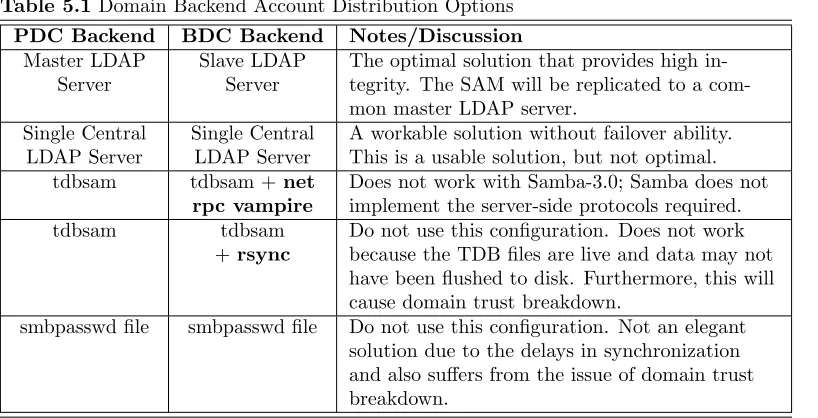
5.2.1 Minimal smb.conf for a PDC in Use with a BDC — LDAP Server on PDC 68
5.2.2 Multiple LDAP Servers in smb.conf 69
5.3.1 Minimal Setup for Being a BDC 72
Chapter 7
7.3.1 smb.conf for Reference Documentation Server 92
7.3.2 smb.conf for Anonymous Printing 94
xxxviii List of Examples
Chapter 9
9.4.1 Domain Master Browser smb.conf 123
9.4.2 Local master browser smb.conf 124
9.4.3 smb.conf for Not Being a Master Browser 124
9.4.4 Local Master Browser smb.conf 124
9.4.5 smb.conf for Not Being a master browser 125
Chapter 10
10.2.1 Example Configuration with the LDAP idmap Backend 147
10.4.1 Configuration with LDAP 167
10.4.2 Example Configuration for the MySQL passdb Backend 172
Chapter 11
11.3.1 smbgrpadd.sh 185
11.3.2 Configuration of smb.conf for the add group Script 185
11.3.3 Script to Set Group Mapping 186
Chapter 12
12.3.1 Script to Auto-add Domain Users to Workstation Power Users Group 198
12.3.2 A Magic Netlogon Share 198
Chapter 13
13.2.1 NT4 Domain Member Server smb.conf 226
13.2.2 ADS Domain Member Server smb.conf 227
13.2.3 ADS Domain Member smb.conf using idmap rid 228
13.2.4 ADS Domain Member Server using LDAP 230
13.2.5 ADS Domain Member Server using RFC2307bis Schema Extension Date via NSS 233
Chapter 15
15.2.1 Example File 248
Chapter 16
16.3.1 Share with Some Files Oplocked 273
List of Examples xxxix
Chapter 19
19.1.1 smb.conf with DFS Configured 296
Chapter 20
20.3.1 Simple Configuration with BSD Printing 302
20.4.1 Extended BSD Printing Configuration 306
20.5.1 [print$] Example 315
Chapter 21
21.2.1 Simplest Printing-Related smb.conf 349
21.2.2 Overriding Global CUPS Settings for One Printer 350
21.10.1 smb.conf for cupsaddsmb Usage 383
Chapter 22
22.2.1 smb.conf with VFS modules 429
22.2.2 smb.conf with multiple VFS modules 430
22.3.1 Share With shadow copy VFS 435
Chapter 23
23.5.1 smb.conf for Winbind Setup 448
Chapter 24
24.4.1 Script to Enforce Single Resource Logon 466
Chapter 29
xl List of Examples
Chapter 33
33.1.1 Elastic smb.conf File 546
33.1.2 CDROM Server smb-cdserver.conf file 546
33.1.3 Master smb.conf File Global Section 547
33.1.4 MERLIN smb-merlin.conf File Share Section 548
33.1.5 SAURON smb-sauron.conf File Share Section 548
Chapter 37
37.2.1 smb.conf with [tmp] Share 577
37.3.1 Configuration for Allowing Connections Only from a Certain Subnet 580
37.3.2 Configuration for Allowing Connections from a Certain Subnet and localhost 580
Chapter 42
LIST OF FIGURES
4 Domain Control
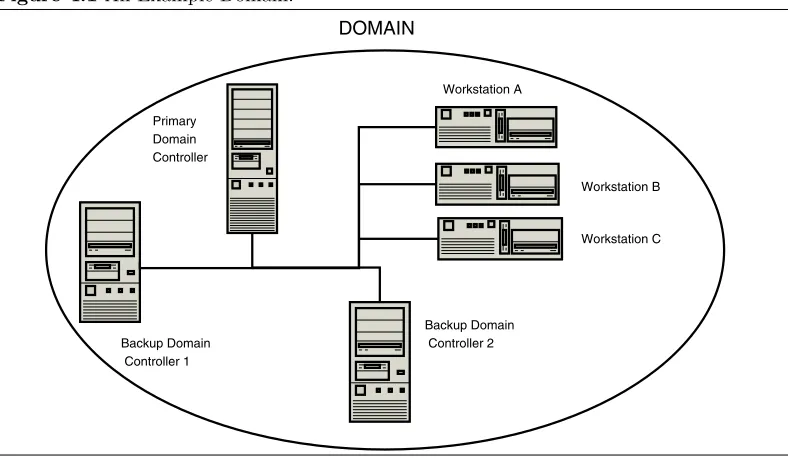
4.1 An Example Domain. 46
8 MS Windows Network Configuration Guide
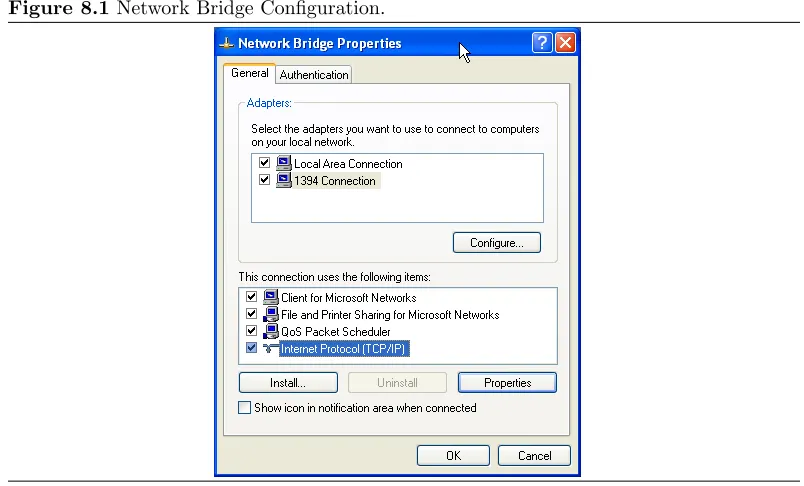
8.1 Network Bridge Configuration. 98
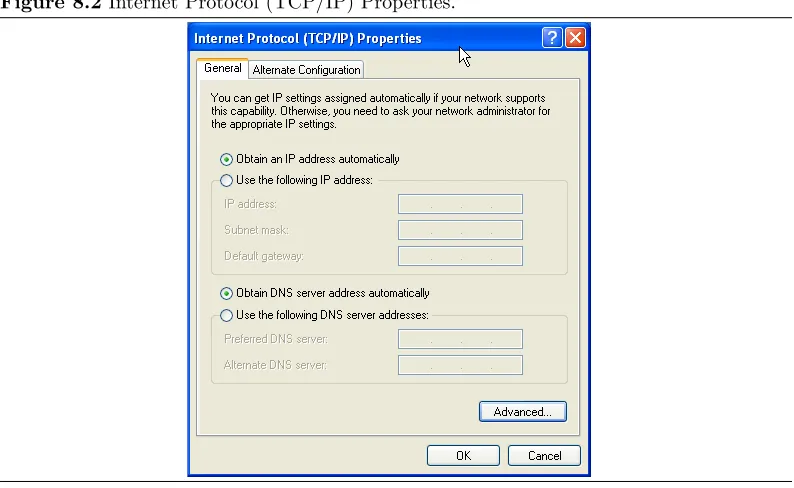
8.2 Internet Protocol (TCP/IP) Properties. 99
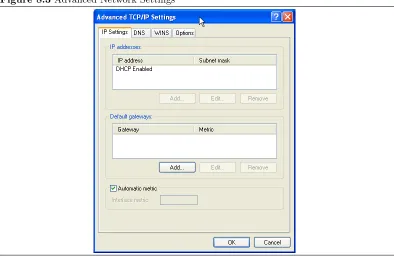
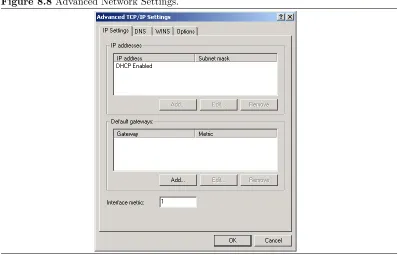
8.3 Advanced Network Settings 100
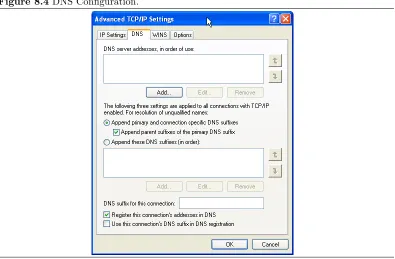
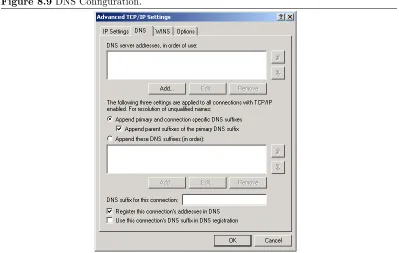
8.4 DNS Configuration. 101
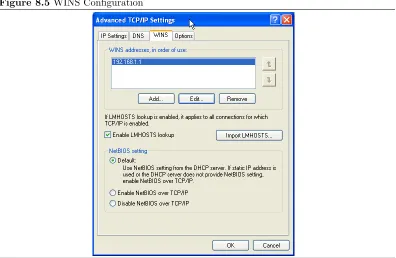
8.5 WINS Configuration 102
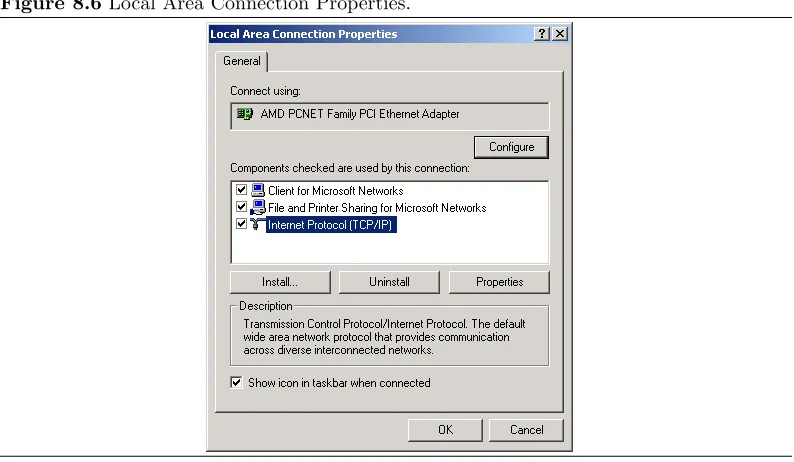
8.6 Local Area Connection Properties. 103
8.7 Internet Protocol (TCP/IP) Properties. 104
8.8 Advanced Network Settings. 105
8.9 DNS Configuration. 106
8.10 WINS Configuration. 107
8.11 The Windows Me Network Configuration Panel. 107
8.12 IP Address. 108
8.13 DNS Configuration. 108
8.14 WINS Configuration. 109
8.15 The General Panel. 109
8.16 The Computer Name Panel. 110
8.17 The Computer Name Changes Panel. 110
8.18 The Computer Name Changes Panel — Domain MIDEARTH. 111
8.19 Computer Name Changes — Username and Password Panel. 111
8.20 The Network Panel. 112
8.21 Client for Microsoft Networks Properties Panel. 112
8.22 Identification Panel. 113
8.23 Access Control Panel. 113
9 Network Browsing
9.1 Cross-Subnet Browsing Example. 135
10 Account Information Databases
10.1 IDMAP: Resolution of SIDs to UIDs. 144
10.2 IDMAP: Resolution of UIDs to SIDs. 145
11 Group Mapping: MS Windows and UNIX
11.1 IDMAP: Group SID-to-GID Resolution. 178
xlii List of Figures
11.2 IDMAP: GID Resolution to Matching SID. 179
11.3 IDMAP Storing Group Mappings. 179
15 File, Directory, and Share Access Controls
15.1 Overview of UNIX permissions field. 247
18 Interdomain Trust Relationships
18.1 Trusts overview. 289
21 CUPS Printing Support
21.1 Windows Printing to a Local Printer. 355
21.2 Printing to a PostScript Printer. 357
21.3 Ghostscript as a RIP for Non-PostScript Printers. 357
21.4 Prefiltering in CUPS to Form PostScript. 364
21.5 Adding Device-Specific Print Options. 364
21.6 PostScript to Intermediate Raster Format. 365
21.7 CUPS-Raster Production Using Ghostscript. 366
21.8 Image Format to CUPS-Raster Format Conversion. 367
21.9 Raster to Printer-Specific Formats. 368
21.10 cupsomatic/foomatic Processing Versus Native CUPS. 373
21.11 PDF to Socket Chain. 375
21.12 PDF to USB Chain. 375
21.13 Print Driver Execution on the Client. 377
21.14 Print Driver Execution on the Server. 378
21.15 Printing via CUPS/Samba Server. 379
21.16 cupsaddsmb Flowchart. 393
21.17 Filtering Chain 1. 421
21.18 Filtering Chain with cupsomatic 426
21.19 CUPS Printing Overview. 427
23 Winbind: Use of Domain Accounts
23.1 Winbind Idmap 440
38 Analyzing and Solving Samba Problems
38.1 Starting a Capture. 586