Multi-robotic teamwork in
AgentSpeak
Thesis submitted in accordance with the requirements of the
University of Liverpool for the degree of Master of Philosophy
by
A
LIB
OJARPOURContents
1 Introduction and Background 4
1.1 Robotics . . . 7
1.2 Urban Search and Rescue . . . 8
1.3 Multiagent Programming languages . . . 8
1.4 Motivation . . . 9
2 Programming primitives for robotic teamwork 11 2.1 Plans and actions . . . 12
2.2 Requirements . . . 13
2.3 Seeking assistance . . . 13
2.4 Performing the plan . . . 15
2.5 BDI programming in AgentSpeak using Jason . . . 16
2.6 A framework for multi-robotic teamwork . . . 17
2.7 Recognition . . . 19
2.8 Team formation . . . 21
2.8.1 Plan execution cycle . . . 25
3 Case study 27 3.1 Start . . . 29
3.2 Rescuer needs help . . . 31
3.3 Finding the help . . . 32
3.4 Team to the rescue . . . 33
4 Implementation 35 4.1 Sensors . . . 35
4.3 The robot . . . 40
4.4 AgentSpeak . . . 43
4.5 Rescuer agent . . . 46
4.6 Doctor agents . . . 52
4.7 Evaluation . . . 54
Abstract
Within the multiagent community, agent programming languages and theories of agent teamwork are used together to create teams of cooperative agents to achieve goals in dynamic environments. Multi-robotic research studies robots working together in a team to perform a task and achieve a goal. In this thesis we propose a set of programming constraints for multi-robotic cooperation. We then use these programming constraints to build a multi-robotic coopera-tion framework. This framework is a bridge between multiagent programming languages and multi-robotic teamwork. The framework uses the natural and intuitive programming style that AgentSpeak provides for multiagent cooper-ation to create multi-robotic teams. We then use a group of LEGO® NXT 2.0
1
Introduction and Background
field that had been laid with land mines. This group of agents believes that it is possible to achieve the task but it has not yet been achieved. Each agent in the group has the team task as his own task. He retains this task until he be-lieves that the termination condition holds: i.e. when the agent bebe-lieves that the task is achieved or is impossible to achieve or the motivation to complete this task has been lost. Meanwhile once any agent realises that the termination condition has been reached then he has the task of making this known to other agents and keeps this task until it is mutually known.
[8]uses the above idea to present the concept of joint responsibility. Joint re-sponsibility requires that all the agents in a group have a joint persistent goal to achieve the group’s task. They also should remain committed and perform actions that they have agreed to undertake. This is unless an agent realises him-self or is told by another agent in the group that the action is not necessary any more for one of the following reasons: (i) the outcome of the action is already available (ii) it will not result in the outcome (iii) it cannot be performed or (iv) has not been performed properly. Agents will communicate this information to each other.
Building on the above models,[18]presents a four stage formal model that cov-ers the whole process of teamwork from beginning to end. The first stage is when an agent recognises the potential for cooperation. He may come to this recognition because he cannot complete the task alone or because he prefers a cooperative solution. In the second stage this agent solicits assistance from other agents and tries to form a team with them. In the third stage the agents negotiate a joint plan and in the final stage they perform the agreed joint plan. Agent-oriented programming[14]proposes a new programming paradigm in which agents are directly programmed in terms of their beliefs, desires and intentions. Several multiagent programming languages have been developed based on this idea[2]. AgentSpeak is among the most successful of these lan-guages. Originally proposed by Rao[13], the main idea of this language is to define the know-how of a program in the form of plans. Agents use plans to achieve their goals. Plans are also used to respond to events. This means that agents use the know-how provided in the form of the plans in order to achieve their tasks as well as to respond to the changing environment.
AgentSpeak and in particular its implementation Jason which we used in our framework is designed with cooperation in mind. Agents can communicate and coordinate with one another. This communication is in knowledge level which means that agents can exchange beliefs and delegate goals to each other. We discus AgentSpeak and Jason in more detail in section 2.5.
imple-mented in previous years are food gathering, herding and gold mining. Formal models of agents cooperation and multiagent programming languages have been used together to create teams of agents that solve these tasks. Multia-gent programming languages and theories of aMultia-gent teamwork have proven to be successful in developing teams of cooperative agents.
1.1
Robotics
Robotics has recently became part of the multiagent community and in recent years the interest in applying multiagent theories to robotics increased. Inter-national Conference on Autonomous Agents and Multiagent Systems (AAMAS), the most prominent venue for multiagent research, hosts a robotics workshop, Autonomous Robots and Multirobot Systems (ARMS),since 20111. ARMS
ad-dress the significant overlap between robotics research and multiagent systems and provides a forum for the researchers in these two fields to interact. Robots are agents which means that agents theories and practices can be applied to them. This provides us with a different insight into these theories than would have otherwise been possible[10]. Motors and sensors and their uncertainties and latencies are now to be considered. Communication is not flawless any more and robots are living in a three dimensional world. The environment now follows the laws of physics and needs to be well understood.
Agents that are operating in dynamic environments use their beliefs and goals to manage their planning process. These environments are often the setting for robots as well. Multiagent programming languages allow for representation of beliefs, goals and plans.
The robotic community has taken little notice of these theoretical
works for agents’ teamwork[9].
1.2
Urban Search and Rescue
Urban Search and Rescue (USAR) is a test course designed for measuring and evaluating the performance of robots[7]. In these environments injured peoples’ location must be found quickly and their condition must be established as soon as possible. Delays can result in lose of life which means that robots need to sense and plan accordingly and haste. Search and rescue missions are time critical and they are performed in dynamic unstructured environments. There is often very little information available about the environment. The avail-able information also may be obsolete due to the collapse of buildings. These conditions make USAR an attractive scenario for measuring the intelligence of robots. The complexity of scenarios demands sophisticated decision making skills from the robots.
USAR scenarios also provide an interesting environment for robotics’ coopera-tion. A team of robots can start with an initial strategy. While performing their plans they communicate with each other and adapt further plans based on the information exchanged. Robots in the same team can have different capabilit-ies. Therefore they are required to cooperate and coordinate to perform their plans.
1.3
Multiagent Programming languages
concept of agent-oriented programming and a sample language, called AGENT0. This language embodied some of the ideas that he felt would be central to this new programming paradigm. Since those days, Shoham’s ideas have been modified, refined and taken up in mutiagent community research. After that many multiagent programming languages were born. For example Jason2which
is the interpreter for an extended version of AgentSpeak. It implements the op-erational semantics of AgentSpeak. Another example of multiagent program-ming languages is 2APL3. This language is intended for practical development
of multiagent systems. This language provides programming constraints to specify a multi-agent system in terms of a set of individual agents and a set of environments in which they can perform actions. 2APL provides BDI archi-tecture.This means an agent can be implemented using beliefs, plans, goals, actions, events and rules. The agent can use these rules to decide which action to perform. 2APL supports the implementation of both reactive and pro-active agents.
1.4
Motivation
In this thesis we present a pragmatic and comprehensive framework for robotic teamwork. This framework, which is built upon AgentSpeak, covers the entire process of robotic teamwork from recognition stage in which a robot realises that he cannot achieve a task alone, to finding other robots and forming a team with them and finally performing a joint plan and completing the task together. Chapter 2 discusses each stage of robotic teamwork. It looks at the program-ming primitives for each of these stages and presents then in AgentSpeak. It
then uses these programming primitives to create a framework for multi-robotic teamwork.
We evaluate this framework in a case study in Chapter 3. This case study looks at the well known domain of search and rescue. We use our framework to create a team of LEGO®NXT 2.0 robots that save injured people affected by an
2
Programming primitives for robotic teamwork
In this section we look at robots that cannot achieve tasks in isolation. We will see the steps they take from realising this to accomplishing the task in a team. Robots are programmed to achievetasks. They are the duties that are assigned to robots. For example a team of minesweeper robots has the task of clearing a minefield of land mines. This requires the team to detect, disarm and remove mines from the minefield. To achieve a task a robot normally needs to move, observe and make changes to the environment. To detect a mine, minesweeper robots move in the field whilst scanning for land mines. When they find one they attempt to disarm and remove the mine from the field. Minesweepers use actuators to move, sensors to scan and detect land mines and a combination of sensors and robotic arms to disarm and remove mines. By doing so they are moving toward achieving their task: to clear the minefield. Clearing the mine-field is a complicated task. Robots often face tasks that are complicated and cannot be achieved alone. These tasks often require robots with many different capabilities. These robots can vary in shape, size and in the types of sensors and actuators they have. Each of these robots performs certain parts of the task based on his capabilities. To clear a minefield a team of minesweepers needs to work together. A robot in this team with the right sensor scans for mines. When he finds a mine he communicate this with the other robots. A second robot then disarms the mine. After the mine is disarmed a third robot removes it from the field. The robots use teamwork to clear the minefield from mines. When these robots work in a team they can achieve their task.
skills may be common amongst the team. In the minesweeper example, the first robot has the skill of finding land mines, the second robot can disarm them and the third one removes them from the field. These three robots, when work-ing together, have all the abilities needed to clear a minefield and achieve their task.
2.1
Plans and actions
A robot involved in the clearing of a minefield needs to carry out several activit-ies. For example he uses a metal detector to scan for mines a few inches in front of him before any movement or lifting a disarmed mine from the minefield. A robot uses these actions to accomplish his task. Anactionis a basic operation that the robot performs in order to update his beliefs or to change the environ-ment[3]. By scanning a few inches a head of him the robot updates his belief about the safety of the path. By lifting the mine the robot changes the environ-ment and clears that area from mines.
Aplanis a series of these actions that defines a way in which robots can act to accomplish the task[3]. A team of minesweepers may have a plan to: (i) scan a path every few inches to detect a mine; (ii) to stop when the sensor detects a mine; (iii) cut the right wire in order to defuse the mine, etc. Minesweepers that are performing the series of these actions, the plan, are moving towards accomplishing their task.
2.2
Requirements
A robot normally needs some requirements to perform an action successfully. Requirements are the capabilities or resources that a robots who wishes to per-form an action needs to have. For example a metal detector is a resource re-quired to scan for mines. The robot who wants to find mines needs to have a metal detector. Another example is a robot who wants to remove mines. He needs to have the capability of removing mines. He needs to be able to use his arm to grab and pull the mine from the ground.
A robot can only perform an action when he has all the requirements for that action. Thus prior to performing an action the robot needs to check the re-quirements. If he does not have the requirements then he cannot perform the action. However if there are other robots who do have those requirements then they can perform that action instead. A minesweeper that does not have the capability of removing a mine can ask another robot with this capability to re-move the mine for him. We can see that the lack of requirements motivates a robot to seek help from others.
2.3
Seeking assistance
A minesweeper needs to disarm mines, among other things, in the process of cleaning a minefield. To disarm a mine a voltage sensor is needed to detect the right wire to cut. If he cannot disarm mines because he does not have the voltage sensor then he sends a message to other robots. In this help seeking message he states his task, which is to clean the minefield, the plan he has to achieve this task, and the requirements that are missing. The requirement he asks for is the voltage sensor. A robot nearby that receives this message wants to help. He starts by checking his beliefs to see if he knows the plan proposed for this task. He can only help if he is aware of plan that completes this task. He then checks to see if he has the voltage sensor. If so he replies with his name, the plan he will participate in, and that he is providing a voltage sensor. By this reply he volunteers to join the team that is about to be formed.
2.4
Performing the plan
A team with a plan is expected to perform actions and move towards attain-ing its task. Each robot chooses an appropriate action and performs it. They choose actions based on the requirements that actions may have. Some actions can start only after another action is finished. The outcome of the finished ac-tion normally determines how the next acac-tion should be performed. A robot needs to consider this outcome when choosing an action. A mine can only be removed from a minefield after it has been disarmed. A robot that wants to re-move a mine that has not yet been disarmed, needs to wait for another robot to disarm the mine first. A robot that chooses to remove a mine needs to consider the requirements which is disarming the mine. After he has been informed that the mine is now disarmed then he can start removing the mine.
Robots may need to perform an action many times. For example normally several mines are concealed in a minefield. The minesweeper team will cycle through detecting, disarming, and removing every mine. They repeat each ac-tion and the the whole cycle several times.
When a robot from this team realises that the entire field has been cleaned and all the mines are removed then he is expected to inform others that the task is achieved. A robot which realises that the task is finished is expected to inform other team members[5].
In summary a robot with a task that cannot be achieved in isolation follows the following steps[18]:
• Cooperative solution: finding others committed to his course of action toward the task
• Team formation: forming a functional team to achieve the task
• Team plan execution: performing actions accordingly in the team
2.5
BDI programming in AgentSpeak using Jason
AgentSpeak introduced in [13] is a multiagent programming language based on the Belief-Desire-Intention model. Jason[3]is an implementation of an ex-tended version of AgentSpeak. Agents in Jason have three main components: Belief, Plan and Goal. Beliefs represent the information available to an agent. colour(box1, blue)means that the agent believes that the colour of box1 is blue. Goals represent states of affairs the agent wants to bring about. They are denoted by a “!” operator. !find(box1)means that the agent has the goal of achieving a certain state of affairs in which he believes that box1 is found. Ad-dition of a belief or a goal is denoted by a “+” operator.
Agents use plans to react to events. Events happen as a consequence of changes in an agent’s beliefs or goals. A Plan consists of three distinct parts: the trigger-ing event, the context and the body. Each part is syntactically separated by “:” and “<-” as follows:
triggering_event: context <- body.
is believed true at the time a plan is being chosen to handle the event. For example an agent can use the following plan to achieve the goal!open(door):
+!open(X): close(X) <- !move_to(X);
!push(X).
This plan means that for a triggering event that matches!open(X)for example !open(door), if the conditionclose(X)holds meaning that the agent believes close(door)then perform the body of the plan. In this example the body itself consists of two sub-goals. They are!move_to(X)and!push(X), each of which will trigger other plans.
2.6
A framework for multi-robotic teamwork
We start with a number of heterogeneous robots with complementary skills. To clear a minefield every mine needs to be detected, disarmed and removed. Some robots can detect mines while others can disarm and remove them. These robots have complementary skills for the task of cleaning a minefield. Those who can detect mines start finding them and informing others who disarm and remove them from the field. As a team they have all the skills required to clear the minefield.
approach the task. There are many ways to clean a minefield. Each of these ways is a plan for clearing the minefield. If the team fails while performing one of these plans, then they may be able to use another plan to achieve their task. For now the robot selects the first one of these plans for his task. He now has a mission; that is the task and a plan to accomplish it. He is now to perform the plan to complete the task. If the robot has the tasktand the planpthen he believes:
mission(t,p).
This basically means that the robot has amissionto achieve tasktfor which he will be using planp. A plan is a series of actions. A plan to clear a minefield consists of actions such as scanning five inches in front of the robot using a metal detector, checking for the voltage passing though a fuse and sending the coordinates of a mine to another robot. The robot has these actions in his initial beliefs. A robot with planp which is a series of atomic actions froma1 toan
believes:
plan(p,[a1,...,an]).
action(a,[r1,...,rm]).
In order to perform actionasuccessfully, a robot or a team of robots needs to have requirementsr1torm.
Often a single robot does not have all the requirements he needs to perform all the actions. As said above the group of robots we are talking about have complementary skills. A single robot may not have all the requirements but to-gether they have all that is needed to perform all the actions successfully. For example a robot may have a metal detector sensor to find mines but not a ro-botic arm that can grab and pull them from the ground. The robot that has the requirementsr1,r2, etc, believes:
available_requirements([r1, r2, ...]).
Later we will see that when a robot want to perform an action he uses the above beliefs to infer whether or not he has the requirements needed to successfully perform the action. We have seen that a robot starts with a set of initial beliefs. They are: (i) the task he may have, (ii) a set of plans and the actions that form these plans and (iii) the requirements that are available to him for these actions.
2.7
Recognition
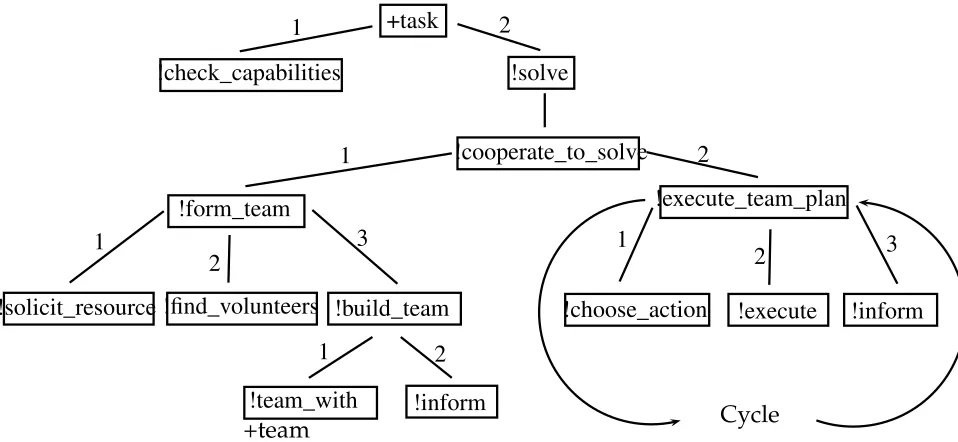
+task
!check_capabilities !solve
!cooperate_to_solve
!form_team !execute_team_plan
!solicit_resource !find_volunteers !build_team
!team_with !inform
+team
!choose_action !execute !inform
Cycle
1 2
1
1
2
3
1 2
1
2 3
[image:21.612.112.591.124.345.2]2
Figure 1: Robotic teamwork process
whom he can team, then they can perform the actions together and achieve the task. If there are other robots who can perform the actions he cannot, for example detect the mine for him, then they can work in a team and clear the minefield.
This means that the robot first needs to check the requirements which are avail-able to him to know if he has all that is needed for his plan. He starts by checking the available requirement against the requirements of the plan.
Pseudocode 1: Mission
1 + m i s s i o n ( Task , Plan )
<-2 + c h e c k _ r e q u i r e m e n t s ( Task , Plan , R e q u i r e m e nts ,
M i s s i n g _ r e q u i r e m e n t s ) ;
M i s s i n g _ r e q u i r e m e n t s ) .
When the robot believes that he has amission, that is when he chooses a plan for his task, then he needs to know the requirements for thisPlan. When he find out the requirements then he can check them against hisavailable_requirements to know which are available to him and which are missing. As we said above some of the requirements for this plan are available to him and some are not. !check_requirementsunifies the requirements for thePlanwithRequirements and the requirements he is missing for this plan withMissing_requirements. It is important to node that pseudocode 1, as the name suggested is a Jason style pseudocode and not a Jason application code. It is intended to capture and dis-play the idea we are discussing in a similar style of code that AgentSpeak used. The robot is now ready to solve the task. He has a plan for this task and knows what the requirements for this plan are. He also knows what requirements are available to him and what he should seek from other robots. If he can find other robots who have these missing requirements then he can form a team with them to perform the joint plan. This is when the robot recognises the potential for a cooperative solution. Cooperative solution requires a team of robots committed to a plan. The robot who seeks a cooperative solution is ex-pected to start forming a team.
2.8
Team formation
to perform the plan together.
Pseudocode 2: Cooperative solution
1 +! c o o p e r a t e _ t o _ s o l v e ( Task , Plan , R e q u i r e m e n ts ,
M i s s i n g _ r e q u i r e m e n t s )
<-2 ! f o r m _ t e a m ( Task , Plan , M i s s i n g _ r e q u i r e m e n t s , Team ) ;
3 ! e x e c u t e _ t e a m _ p l a n ( Plan , Team ) .
When the robot chooses!cooperate_to_solvehe knows what requirements are missing for his plan, i.e. Missing_requirements. He uses this to form a team, to find others who can provide him with these missing requirements and are also committed to his plan.
Therefore the first step to form a team is to solicit for the missing requirements.
Pseudocode 3: Team formation
1 +! f o r m _ t e a m ( Task , Plan , M i s s i n g _ r e q u i r e m e n t s , Team )
<-2 ! s o l i c i t _ r e q u i r e m e n t s ( Plan , M i s s i n g _ r e q u i r e m e n t s )
;
3 ! f i n d _ v o l u n t e e r s ( Plan , M i s s i n g _ r e q u i r e m e n t s ,
V o l u n t e e r s ) ;
4 ! b u i l d _ t e a m ( Plan , Volunteers , Team ) .
receives a request for requirements, he checks if he knows the plan mentioned in this request and has the requirements that are asked for. If he knows the plan and has any of those requirements then he will reply to the robot who is asking for assistance. The reply consist of his name, the plan he is committing to and the requirements he is providing.
After a deadline the robot who is seeking for help finds those who became
vo-lunteers (!find_volunteers) and continues to build a team with them (!build_team). The deadline is certain amount of time that agent waits for others to reply.
Based on the environment that the agents or robots are implemented and the communication media they use, this deadline time can be adjusted. When finding volunteers the robot checks the requirements they are providing. He is looking for the missing requirements for his plan.
Volunteers share the same plan. This means that they are all committed to the same course of action that is to be carried out to achieve the task. The team is built upon a plan to which the team members are committed. When a robot sends a request for help using!solicit_resourcehe informs other robots of the plan he has chosen for this task. When the volunteers reply they show their commitment to this plan. Later when the team is formed this will be the plan they will perform together.
remove robots manually. The early commitment to the plan, whilst the team is being formed, is a pragmatic approach that eliminates the need for later nego-tiation. This removes the chance of failure in negotiation which may result in some robots not participating in the plan. When the team is formed the mem-bers already know the plan to perform and therefore they continue to perform this plan.
A team consists of team members — formerly volunteers —A,B,...,Q, and the re-quirementsLA,LB,...,LQthey are providing, where, for each robotR,LRis a list of
requirementsr1,r2,...,rR. It also includes the tasktthey are trying to complete
and the planpthey are using for this. Pseudocode 4 gives our representation of a team.
Pseudocode 4: Team
1 + team (t ,p ,[ A , LA] ,[ B , LB] ,. . .,[Q , LQ]) .
This team is working towards accomplishing tasktusing planp. Tasktwhich originally belonged to the robot who initiated cooperative solution is now the task of the team. Team members are working together to accomplish this task. The robot who initiated the teamwork process uses !build_team to build a team with volunteers. He will then inform team members of this new team. The team knows the task they are trying to complete and the plan they are us-ing for this. They know who else is in the team and what resources they are providing. The volunteers are called team members from now on.
originally had the task, of this new team after it is formed. Robots are now ready to start performing team actions and move toward accomplishing the task.
2.8.1 Plan execution cycle
We now have a team of robots committed to a joint plan. The next stage is to start performing this plan. A team plan is a series of actions that will be per-formed by team members based on the requirements available to them. The plan execution cycle starts by a robot choosing an action. Before choosing an action the robot needs to consider certain elements. First and foremost are the requirements for that action. Only the robot who has the necessary require-ments can perform an action successfully.
robot needs to make sure that the prerequisites of an action are complete be-fore he starts performing that action.
A robot selects an action, performs it and communicates the outcome to the team. He then chooses the next action and the plan execution cycle continues.
Pseudocode 5: Execution cycle
1 +! e x e c u t e _ t e a m _ p l a n ( Plan , Team )
<-2 ! c h o o s e _ a c t i o n ( Plan , Action , R e q u i r e m e n t s ) ;
3 ! e x e c u t e ( Action , O u t c o m e ) .
4 ! i n f o r m ( Team , Action , O u t c o m e ) .
The robotic team cycles through the!execute_team_planto complete the Plan. They repeatedly choose an action to perform, execute the action and in-form the outcome to other team members. This cycle starts by!choose_action. A robot, based on the requirements, selects an action. He then uses!executeto perform the action. Actions normally have outcomes. The robot uses!inform to communicate this outcome to the team.
Robots may need to repeat actions and the plan execution cycle multiple times to achieve the task.
detail in future.
Robots start the plan execution phase by selecting suitable actions, executing them and informing the team. This cycle continues until the task is achieved, found irrelevant or impossible to complete.
3
Case study
Section 2 described a framework for multi-robotic teamwork. This sections ex-plain how this framework is used in a multi-robotic search and rescue scenario. For this example we use LEGO®NXT 2.0 robots running LeJOS4Java virtual
ma-chine. These robots are programmed using NXJ which is a modified version of Java for LeJOS. The robots use Bluetooth to communicate with a PC that is run-ning Jason. Locomotion and sensory data collection is programmed in NXJ. For example moving in a random path, avoiding obstacles including other robots and detecting the change in colour of the surface of the table is programmed in NXJ. Higher level operations such as choosing the appropriate plan to perform are programmed in Jason.
Search and rescue has long been studied in multi-robotic teamwork [11]. A search and rescue team consists of a group of robots that are working in an area dangerous or inaccessible to humans. For example in an area affected by an earthquake, robots find and save injured people. Robots in these cases are often heterogeneous. Some may specialise in finding injured people and oth-ers in providing basic medical care. Later the injured poth-erson will be moved to a hospital for further medical attention. In this case study we are looking at two types of robots; rescuers who finds injured people and doctors who provide
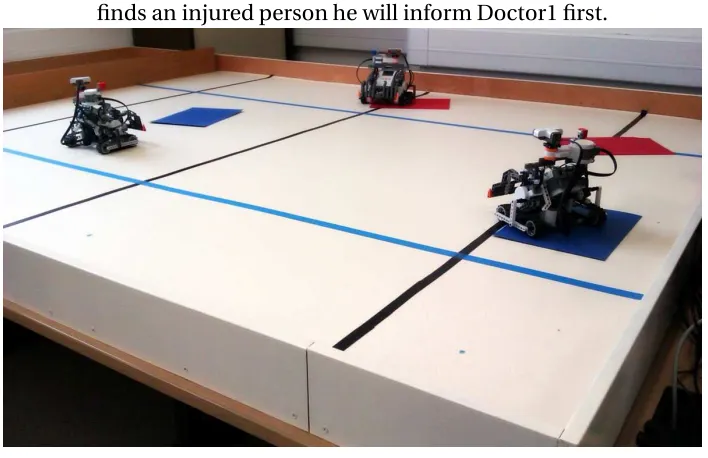
Dcotor1 has informed Rescuer that he is free which means that when Rescuer finds an injured person he will inform Doctor1 first.
Figure 2: Multi-robot search and rescue
medical care.
Scenario 1. Three robots, a Rescuer and two doctors, are placed in an area af-fected by an earthquake. Four people are injured in this area, some with more severe injuries than others. Rescuer has the task of saving the injured people. Rescuer finds them and the doctors provide medical care. Rescuer and the doc-tors need to work in a team to save people injured by the earthquake.
The colour sensor is facing down toward the surface of the table and is used to identify the coloured paper. The ultrasonic and touch sensors are used to avoid collision with other robots and the wall of the table. Robots use dead reckon-ing to keep track of their coordinates. A robot uses these coordinates to inform others when he finds an injured person. Robots are also aware of their starting position5.
3.1
Start
Rescuer has the task of saving injured people. To save an injured person, he first needs to locate them. Rescuer needs to move in a random path and use the colour sensor to find a sheet of coloured paper. After an injured person is found he needs to receive basic medical care. The doctor should move to the location of the injured person and spend a certain amount of time with him. The doctor provides basic medical care to the injured person whilst he is there. The doctor robot moves over the sheet of coloured paper and waits in that location for ten seconds. After the doctor has provided the care, the injured person is ready to be sent to a hospital for further medical attention. The rescuer sends a message to the operator who sends an ambulance to collect the injured person. In our example the rescuer robot sends a message to the PC and the operator removes the sheet of coloured paper from the table.
The plan to save injured people consists of three basic actions:
• a1: Scan for sheets of coloured paper
• a2: Spend ten seconds over a sheet of coloured paper
• a3: Send the location of the sheet to the PC
The rescuer has the task of saving injured people. He has a plan for this task which is the series of the above actions. The rescuer believes mission(t,p) wheretis saving four injured people andpis the above series of actions. The rescuer also believesplan(p,[a1,a2,a3])which means that planpis a series
of actions from a1to a3.
Each of these actions has some requirements. The first action, a1, requires a
robot with a colour sensor to find sheets of coloured paper. It also needs a robot that moves randomly on the table and scans for coloured papers. The third action, a3, needs a robot that keeps track of all the injured people that
are found. This robot should also send a message to the operator PC when an injured person has been attended by the doctor and is ready to be taken to hospital.
We give the name r1to the collection of all the requirements needed for actions
a1and a3. This means that both a1and a3have the same requirements which
is r16. Therefore a robot that wants to perform a1 and a3 needed to have r1.
Action a2 requires a robot that can receive coordinates of an injured person
locations and move there. This robot then needs to provide medical care to the injured person. In our example he spends ten seconds over the sheet of coloured paper. We give the name r2 to the requirements that are needed to
perform a2. Therefore a robot that wants to perform a2needs to have r2.
The robots believe:
action(a1,r1).
6We need to clarify that although a
1and a3are two different actions but they they both have
the same set of requirements which we are calling r1. If an agent or robot has this requirement,
r1, then he can perform both actions: a1and a3. This choice is made to display that Rescuer
action(a2,r2).
action(a3,r1).
The robots also know the requirements that are available to them. The rescuer
believesavailable_requirements(r1)and the doctor believesavailable_requirements(r2).
The rescuer has the requirements for actionsa1anda3and the doctors have the
requirements for actiona2. To perform the plan, they need to work together in
a team.
3.2
Rescuer needs help
The rescuer needs to perform planpto achieve his task. This plan consists of actiona1toa3. The rescuer does not have the requirements that are needed for
these actions, namely r2. He needs to find other robots who can provide this
missing requirement, form a team with them and together they perform the plan.
Initially the rescuer does not know what actions he can or cannot perform. He needs to check his available requirements to find this out. The rescuer uses pseudocode 1 to find this out. The rescuer has a mission consisting of task t, finding four injured people and plan p which is actionsa1 to a3. He now
needs to check for the requirements that are needed for his actions. He uses +check_requirementswhereTaskandPlanaretandp.+check_requirements unifies Requirements with r1,r2,r3. These are the requirements needed to
perform planp. Missing_requirementsalso unifies withr2. The rescuer has
r1andr3but he is missingr2. This is when the rescuer realises the potential for
perform planptogether to achieve the task.
3.3
Finding the help
In the last section we have seen that the rescuer chooses a cooperative solu-tion to complete his task. The first step in a cooperative solusolu-tion is to form a team. The team will then work together to complete the task. In pseudocode 2 the cooperative solution starts with !form_team. A team is formed based on tasktand planp. Missing_requirementsisr2. If forming a team is
suc-cessful then it will be unified withTeam. After the team is formed they will use !execute_team_planto jointly perform planp.
The rescuer now uses!form_teamfrom pseudocode 3 to form a team. He needs
to find robots that can provider2. He broadcasts a message using!solicit_requirements
to find robots who can provide him with Missing_requirementswhich isr2
and are willing to be committed to planp. The doctors who receive this mes-sage, first check their initial beliefs to see if they know the planp. They also need to check theiravailable_requirementsforr2. The doctors will now reply with
their names,doctor1anddoctor2, the plan they commit to perform,p, and the requirement that they are providing, r2. By doing this they are becoming
volunteers for the team that is about to be formed. The rescuer, after a dead-line, uses!find_volunteersto find thevolunteerswhich will be unified with [doctor1,doctor2]. The rescuer now knows that there are two robots with whom he can build a team with. The rescuer uses!build_teamto team with the doctors. Former volunteers,[doctor1,doctor2], are called team members from now on. The team, that!build_teamunifies withTeam, is:
The rescuer now needs to communicate this to all team members. He sends a message to the team members and informs them of this newly buildteam. Each member now knows that he is part of a team committed to planpto complete taskt. He also knows who else is in the team and which requirements they are providing. Note that tasktis now the team’s task. The team is formed and the members are ready to perform the plan.
3.4
Team to the rescue
The rescuer and the doctors are now ready to save injured people. They are going to perform the joint plan and complete the task. They will use pseudo-code 5 to cycle through the actions until the task is attained (or the team fails to complete the task). Each robot uses!execute_team_planto choose an action, perform it and communicate the outcome to the team.
The rescuer uses!choose_actionto selecta1. The requirement fora1 is[r1]
which he has. He then uses !executeto performa1. The rescuer moves on
a random path until, using his colour sensor, he finds a sheet of coloured pa-per. At this moment performinga1 is finished. The outcome of this action is
the the location of the sheet of paper and the colour of the sheet. The colour indicates the severity of the injure. This will be unified withOutcome. The res-cuer now needs to inform the doctors. The resres-cuer uses!informto send the outcomes of this action to the team. He informs them ofa1which is the action
he has performed and the outcomes of this action. They are the coordinates and the severity of the injury. Both doctors have been waiting to performa2
and provide medical care to the injured person. However they first need to know the coordinates of an injured person. This is a prerequisite ofa2. Now
doc-tor that receives the outcome message from the rescuer takes the job and starts performinga2. He informs the team and hence the second doctor waits for
an-other injured person to be found. Assuming thatdoctor1received the message first then he choosesa2 and moves towards the injured person. He provides
medical care to the injured person by spending ten second on that location. After the time is over the injured person is ready to be discharged to the hos-pital. This is whena2ends. doctor1communicates the outcome of this to the
team. He informs the team that this injured person is ready to be removed to a hospital for further medical care. Meanwhile the rescuer is cycling though the !execute_team_planand searching for other injured people. When he finds one he sends the coordinates to the team.
When a rescuer receives discharge message from a doctor, he chooses a3. That
4
Implementation
This chapter explains how the multi-robotic programming constraints that we discussed above are implemented. We start by looking at how a multi-robotic framework based on the constraints explained above is built. This framework consists of two parts, one that runs on robots, codded in Java and running on the lejos virtual machine and a second part codded in AgentSpeak which run on the PC. As mentioned before they communicate using Bluetooth.
4.1
Sensors
We make use of three different sensors for each robot. They are the Ultrasonic, Colour and Touch sensors. As mentioned in chapter 3, Ultrasonic and Touch sensors are used to avoid collision with other robots and the wall of the table. Colour sensor is used to detect sheets of coloured paper. These sensors are managed by dedicated classes. These classes share a common design pattern. Each sensor needs to run on a separate thread. This is because the robot needs to have access to sensory data at all time. To make use of multithreading, the classes implement thejava.lang Runnableinterface. Using theRunnable in-terface is common multithreading practice in Java.
We will look at the ultrasonic class as an example. The color and touch sensor classes follow the same pattern.
Code 6: Snippet from the ultrasonic sensor class (Ultrasonic.java)
1 int d i s t a n c e ;
2 p u b l i c void run () {
3 while ( true ) {
5 if ( distance > = 1 0 0 ) T h r e a d . sleep ( 4 0 0 0 ) ;
6 else if ( distance >=50) T h r e a d . sleep ( 2 0 0 0 ) ;
7 else T h r e a d . sleep (100) ;
8 }
9 }
10 p u b l i c int g e t D i s t a n c e () {
11 r e t u r n d i s t a n c e ;
12 }
The ultrasonic class -Ultrasoic.java- accesses the Ultrasonic sensor using the thelejos.nxt UltrasonicSensorclass. Sensor classes are deigned to have an internal process that keeps updating a local variable using the sensory read-ing at a certain time interval. The local process runnread-ing on a dedicated thread uses an infinite while loop to (i) read the sensory data, (ii)update a local variable and (iii) place the thread on hold for a certain amount of time. This time may differ based on the data read by the sensor and, of course, the type of sensor used. The Ultrasonic sensor class also has a public method that returns the local value holding the sensory reading.
provide a chance to other threads to perform as well7. getDistance()is the
public getter fordistance. It is used by other classes to read the distance. An alternative method of implementing a sensor class is to read the sensory data on request and directly from the sensor. That is rather than having a sep-arate class to provide the sensory data, the application reads the sensory data when needed directly from the sensor. In this method the sensory data, when it becomes available to the application, is the most recent reading of the sensor. However that comes with cost of a slow application. Accessing the sensors and reading data from them is a considerably slower compared to performing op-erations in the processor and memory. If an application, while running on the main thread, needs to access a sensor, the main thread would have to wait until a reply from the sensor arrives. This means that the whole robot operation will come to a halt until the main thread resumes, which, of course, is not desir-able. The method discussed above and implemented in this project is a reliable approach that keeps the main thread unblocked and thus the robot responsive at all times. Thread.sleep()can be adjusted when higher accuracy of sens-ory data is needed. In code 6, the seconds that the thread is set to sleep was adjusted to give us an accurate reading from the Ultrasonic sensor.
4.2
Communication
Robots and the PC communicate through Bluetooth. They send and receive messages to and from the PC which often happens simultaneously. This means that whilst the robot is sending a message he may also be receiving one from the PC. Similar to how the sensory data was managed by different threads, sending
7LEGO NXT robot possessor has a single core and is only able to execute a single thread at a
and receiving massages also need to take advantage of multithreading. An in-terface needs to be provided to the robot for sending messages to the PC. We provide this interface though theBTSend.javaclass.
Code 7: Snippet from the Bluetooth massage sender class (BTSend.java)
1 N X T C o n n e c t i o n conn = B l u e t o o t h . w a i t F o r C o n n e c t i o n () ;
2 D a t a I n p u t S t r e a m in = conn . o p e n D a t a I n p u t S t r e a m () ;
3 Queue < String > q = new Queue < String >() ;
4 p u b l i c void run () {
5 while ( true ) {
6 while ( q . empty () ) T h r e a d . yield () ;
7 out . w r i t e U T F (( S t r i n g ) q . pop () ) ;
8 }
9 }
10 p u b l i c void write ( S t r i n g m e s s a g e ) {
11 q . push ( m e s s a g e ) ;
12 }
Code 7 is a snippet from theBTSend.java. Lines 1 useslejos.nxt.comm NXTConnection to create a Bluetooth connection and line 2 uses this Bluetooth connection to
Reasons for this are loss of Bluetooth connection and the need to reconnect, or delay in receiving a message from the PC due to the PC processing a mes-sage from another robot. When the robot want to send a mesmes-sage it will use the public methodwrite(String message)at line 10 and 11 to add the message to the queue. When the class is initiated on a separate thread, therun()at line 4 is called which in order runs the infinitewhileloop at line 5. Line 6 places the Thread on hold usingThread.yield()whilst the queue is empty. When a message is added to the queue by the robot, line 7 extracts it from the queue -q.pop()- and writes it to the stream.
Additionally when a massage arrives from the PC, there needs to be a re-ceiver to collect and parse the massage and provide the information to the robot. The message receiver needs two main components: (i) a continuous listener for arriving messages from the PC and (ii) a message parser. This job is done byBTReceive.java.
Code 8: Snippet from the bluetooth massage receiver class (BTReceive.java)
1 N X T C o n n e c t i o n conn = B l u e t o o t h . w a i t F o r C o n n e c t i o n () ;
2 D a t a I n p u t S t r e a m in = conn . o p e n D a t a I n p u t S t r e a m () ;
3 p u b l i c void run () {
4 while ( true ) parse ( in . r e a d U T F () ) ;
5 }
6 p r i v a t e parse ( S t r i n g m e s s a g e ) {
7 // parse the m a s s a g e and pass it to the robot
Code 8 is a snippet used in the BTReceive.javaclass. Lines 1 and 2 create a Bluetooth connection and stream. run()at line 3 is called once the thread starts. The method will start an infinitewhileloop at line 4 in which the read-ing stream,in.readUTF(), waits for a message to arrive. Here we do not need to
useThread.yieldbecause this is already implemented in thejava.io DataInputStream class. When a message is received it will be passed to theparse(String message)
method at line 6. This method will extract and parse information from the mes-sage passes it to the robot8.
4.3
The robot
In this section we discuss the main class that controls the behaviour of the ro-bot. This class makes use of three main components. They are locomotion, sensors and communication. We discussed in the above sections how the sensors and communication are implemented. In this section we will see how the ro-bot uses this implementation to function. We will also see how the roro-bot uses the navigation and localisation mechanism provided by the LeJOS platform for locomotion.
The robot class makes use of a scanner class. The scanner is used to inform the robot of any obstacles that will be on its path. The scanner makes use of the Ultrasonic and Touch sensor classes, discussed above, to scan and detect obstacles. To improve the functionality of the ultrasonic sensor, it is moun-ted over a rotating motor placed at top of the robot. The motor performs a 25 degrees rotation to left and right and covers a wide angle in front of the robot
for the ultrasonic sensor. Lego NXT Ultrasonic sensors have a range of 30 de-grees. This means that a static ultrasonic sensor can detect any object within a 30 degree angle in front of it. In addition to this 30 degree angle our 50 degree rotating angle makes a wide area in front of the robot detectable by the ultra-sonic sensor. The speed which the motor rotates needs to be adjusted based on the environment in which the robot is operating.
The Scanner class -Scaner.java- has internal thread that operated the motor.
Code 9: Scanner motor rotation system (Scanner.java)
1 p r i v a t e void s t a r t R a d a r () t h r o w s E x c e p t i o n {
2 final int ANGLE = 25;
3 Motor . C . s e t S p e e d (750) ;
4 while ( true ) {
5 Motor . C . r o t a t e T o ( ANGLE ) ;
6 Motor . C . r o t a t e T o ( - ANGLE ) ;
7 }
8 }
Code 9 shows how the scanner motor operates. Lines 2 and 3 set the rotation angle and the speed of the motor and the infinite while loop at line 4 rotates the motor back and forth. This methed runs on a separated background thread. The while loop terminates when the main thread reaches the end (i.e. when the application ends).
NXJ API provide a variety of classes for locomotion. We useDifferentialPilot, OdometryPoseProvider andNavigator in this project. DifferentialPilot provides methods for control of robots’ movements: travelling forward and backward in a straight line or moving in a circular path and rotating to a new directions. This class automatically updates theOdometryPoseProviderwith the robots new location and heading. A robot’s wheel diameter and track width will be passed to theDifferentialPilotupon initialisation of this class. The unit of measure for travel distance, acceleration and speed is the same as the one used for wheel and track diameter and width 9. Motors used for tracks
movement are also passed to theDifferentialPiloton initialisation.
Code 10: Robot’s locomotion control
1 D i f f e r e n t i a l P i l o t pilot = new
2 D i f f e r e n t i a l P i l o t (3.25 f ,19.8 f , Motor . B , Motor . A ) ;
3 O d o m e t r y P o s e P r o v i d e r p o s e P r o v i d e r = new
4 O d o m e t r y P o s e P r o v i d e r ( pilot ) ;
5 p o s e P r o v i d e r . s e t P o s e ( new Pose (20 ,100 ,0) ) ;
6 N a v i g a t o r robot = new
7 N a v i g a t o r ( pilot , p o s e P r o v i d e r ) ;
Lines 1 and 2 in code 10 create and initialise a newDifferentialPilot.3.25f and19.8fare wheel diameter and track width andMotor.BandMotor.Aare the motors used.
OdometryPoseProviderkeeps track of robots location and heading. We men-tioned in chapter 3 that robots use dead reckoning to keep track of their co-ordinates.OdometryPoseProvideruses the odometry data for dead reckoning.
Lines 3 and 4 create and initialise a newOdometryPoseProviderby passing the DifferentialPilotcreated in the lines before. Line 5 sets the starting location and heading of the robot10.
Navigatorclass uses theDifferentialPilotto traverse a path while updating theOdometryPoseProvider. Lines 6 and 7 create and initialise theNavigator. From the point onward the robot class uses theNavigatorfor locomotion.
4.4
AgentSpeak
Jason provides a basic set of functionalities. More advanced features such as bluetooth communication can be added to Jason by means of user-defined in-ternal actions. These inin-ternal actions are programmed in Java. Jason is also dis-tributed with a set of standard internal actions. For example.sendfor agents to send messages to each other or.print to output a message to the Jason’s console.
In our scenario we created two user-defined internal actions for bluetooth com-munication and message parsing. Before we start looking at Jason code for each agent, let us explain how these internal actions perform.
Code 11: Agents communication (Communication.java)
1 L i n k e d B l o c k i n g Q u e u e < String > q =
2 new L i n k e d B l o c k i n g Q u e u e < String >() ;
3 N X T C o n n e c t o r conn =
4 new N X T C o n n e c t o r () ;
10In our scenario we use three robots each located 100 cm away from each other and facing
5 b o o l e a n c o n n e c t e d =
6 conn . c o n n e c t T o ( nxtName , n x t B T A d d r e ss ,2) ;
7 D a t a I n p u t S t r e a m dis = new D a t a I n p u t S t r e a m ( conn .
g e t I n p u t S t r e a m () ) ;
8 D a t a O u t p u t S t r e a m dos = new D a t a O u t p u t S t r e a m ( conn .
g e t O u t p u t S t r e a m () ) ;
Communication.javais a user-defined internal action which sends and receives message to and from the robot using bluetooth. This internal action has sim-ilar structure to the robots’ communication method discussed in the above sec-tion. Messages are stored in aBlockingQueueand an input and output streams -DataInputStreamandDataOutputStream- are used to read and write from the bluetooth channel. Line 1 of code 11 creates theBlockingQueueto store messages. Line 3 creates the communication channel and Line 5 connects to this channel. Upon initialisation of the class, robots’ bluetooth address and names, i.e. Rescuer, Doctor1 and Doctor2, are sent to the PC for identification. Lines 5 connects to the robot with the name ofnxtNameand bluetooth address ofnxtBTAddress. Lines 7 and 8 use the channel to create an input and output stream. These streams are used from this point onward to send and receive message between the robot and the PC where Jason agents are located.
A newly arrived message from the robot will be places in theBlockingQueue.
Code 12: Agents communication - reading from a stream
1 p u b l i c void run () {
2 while ( true ) {
3 q . put ( dis . r e a d U T F () ) ;
5 }
6 }
7 p u b l i c S t r i n g read () {
8 while ( q . size () ==0) T h r e a d . yield () ;
9 r e t u r n q . poll () ;
10 }
Methodrunat line 1 of code 12 which runs on a separate thread uses an infinite loop to continuously listen to and read messages arriving from the robot. Line 3 adds the message to theBlockingQueue. Methodreadis used for reading mes-sages from theBlockingQueue. At line 8 while theBlockingQueueis empty the thread is paused. Line 9 returns the earliest message from theBlockingQueue.
Code 13: Message parsing
1 S t r i n g c o l o u r =
2 inj . t o S t r i n g () . split ( " ; " ) [3]
3 . r e p l a c e ( ’" ’ , ’ ’ ) . trim () ;
4 if ( c o l o u r . e q u a l s ( " Red " ) ) s e v e r i t y L e v e l =3;
5 else if ( c o l o u r . e q u a l s ( " Navy " ) ) s e v e r i t y L e v e l =2;
6 else if ( c o l o u r . e q u a l s ( " Green " ) ) s e v e r i t y L e v e l =1;
7 N u m b e r T e r m r e s u l t =
8 new N u m b e r T e r m I m p l ( s e v e r i t y L e v e l ) ;
the doctors. We will see below how the doctor agents use these severity levels to decide in which order to attend for the injured people. The doctor agent then passes these values to the robot agent in Jason. Code 13 uses the arrived message from the robot to indicate the severity of the injury. Lines 4 to 6 set the level of severity and lines 7 and 8 pass the value to the agent. When all the injured people are found, Rescuer robot sends aendmessage which the agent uses to end the task.
4.5
Rescuer agent
In this section we look at the Jason code for Rescuer agent. All agents start with the initial beliefs offree. The two doctorssenda message to Rescuer totell him that they arefree. This essentially addsfree[source(Doc)], whereDocis unified with the Doctor that sent, the message to Rescuer’s beliefs.
Code 14: Free agents are added to the team
1 free [ s o u r c e ( r e s c u e r ) ].
2
3 + free [ s o u r c e ( S e n d e r ) ]: true <- + team ( S e n d e r ) ;
4 . b r o a d c a s t ( tell , team ( S e n d e r ) ) .
informed of this.
Rescuer agent starts by searching for injured people while initially the two doc-tors are free. Rescuer, thus, starts by the initial achievement goal of!rescue and doctors start with initial beliefs offree.
Code 15: Rescuer agent initialisation
1 ! r e s c u e .
2 +! r e s c u e <- . wait (500) ;
3 r e s c u e r . a1 ( Inj ) ;
4 ! c h e c k _ e n d ( Inj ) .
5 +! c h e c k _ e n d ( Inj ) : Inj == " end " <- ! c h e c k _ i n j u r e d s ;
6 . wait ( 1 0 0 0 ) ;
7 ! c h e c k _ e n d ( Inj ) .
8 +! c h e c k _ e n d ( Inj ) : Inj \== " end " <- . wait (500) ;
9 . print ( " Found " , Inj ) ;
10 + i n j u r e d ( Inj ) ;
11 ! c h e c k _ i n j u r e d s ( Inj ) ;
12 !! r e s c u e .
The agent will then pursue the goal of!check_injureds(Inj)at line 4.
If theendmessage is not communicated, the plan at line 8 is performed. The agent prints out the found injured person information in console and adds him to his beliefs. At line 10 of code 15 Rescuer agent uses +injured(Inj) to add the injured person to his beliefs. The next step is to pursue the goal of
!check_injureds(Inj)followed by!!rescueat lines 11 and 12.!check_injureds(Inj) starting with a single! means that it will be pursued as a separate intention
while!!rescuewith two! means that the agent will pursue another separate intention to achieve!!rescue. !! are often used at the end of recursive plans
11.
Code 16: Rescuer agent - checking for injured people
1 +! c h e c k _ i n j u r e d s : i n j u r e d ( Inj )
2 <- ! c h e c k _ i n j u r e d s ( Inj ) .
3 +! c h e c k _ i n j u r e d s : not i n j u r e d ( Inj )
4 <- . b r o a d c a s t ( tell , end ) .
5 +! c h e c k _ i n j u r e d s ( Inj ) : free [ s o u r c e ( Doc ) ]
6 <- . print ( " S e n d i n g " , Inj , " to " , Doc ) ;
7 - free [ s o u r c e ( Doc ) ];
8 . send ( Doc , achieve , go_to ( Inj ) ) ;
9 + a t t e n d i n g ( Inj ) [ s o u r c e ( Doc ) ];
10 - i n j u r e d ( Inj ) .
11 +! c h e c k _ i n j u r e d s ( Inj ) : not free [ s o u r c e ( Doc ) ]
12 <- . print ( " B r o a d c a s t i n g " ) ;
13 . b r o a d c a s t ( tell , check ( Inj ) ) .
So far we have seen how Rescuer agent checks for the incoming messages and identifies the injured person or theendmessage. Code 16 are the plans Rescuer has when an injured person is found which in essence is to inform the doctors. !check_injuredsare called by line 5 of code 15. If an injured person exists in the agents belief base - injured(Inj)- then this information is retrieved and passed to!check_injureds(Inj)at lines 5 or 11 of code 16. We will see later that doctor agents inform Rescuer when they are free, including at the initialisation of the program. When a doctor agent is free it sends a message addingfree[source(Doc)]to Rescuer agents belief base whereDocis unified with the name of the doctor agent i.e. doctor1 and doctor2. We discussed in chapters 2 and 3 that when teamwork is over, team members will be informed. Line 2 of code 16 sends a broadcastmessage to all the members to inform them that task is over.
If a doctor is free Rescuer agent performs the plan from line 5. It starts from line 6 by printing a message to the console followed by line 7, removing the belief that the doctor to whom it is about to send a message to is free. At line 8 it will send a message to the doctor. This is anachieve message,go_to(Inj), that informs the doctor of information about the injured person unified with Inj. This adds the !go_to(Inj)to doctor’s goals. Now that the doctor is in charge of the injured person Rescuer adds+attending(Inj)[source(Doc)]to its beliefs. This is to it keep track of doctors busy with injured people at any given time. Finally Rescuer agent removes the information about the injured person from its belief using-injured(Inj)at line 10.
Code 17: Doctor agent - check for severe injuries
1 + check ( Inj ) [ s o u r c e ( Res ) ]: free
3 + check ( Inj ) [ s o u r c e ( Res ) ]: s e v e r i t y _ c h e c k ( Inj )
4 <- -+ n e w _ i n j ( Inj ) ;
5 . print ( " S e v e r e i n j u r e d to be a t t e n d e d : " , Inj ) ;
6 - check ( Inj ) [ s o u r c e ( Res ) ].
7 + check ( Inj ) [ s o u r c e ( Res ) ]: not s e v e r i t y _ c h e c k ( Inj )
8 <- . print ( " I g n o r e d " , Inj ) ;
9 - check ( Inj ) [ s o u r c e ( Res ) ].
If there are no free doctors, Rescuer chooses the plan at line 11 of code 16. It broadcasts a message to all doctors using.broadcast(tell,check(Inj))at line 13. This broadcast message informs the currently busy doctors about the injured person,Inj.
Code 17 are doctor plans forcheck(Inj). When a doctor agent becomes free it will pursue the!go_to(Inj)[source(Res)]goal at line 1 and 2 of code 17. The doctor agent will also check for the severity of the person’s injury.
We explained above that doctors attend people with more severe injuries with a higher priority. If they are engaged with an injured person with a less severe injury they will leave the current injured person and attend the one with more severe injury. Lines 3 and 7 display that the doctor agent checks for level of severity of the person’s injury. severity_check(Inj)checks how severe is the injury. If the injury is more severe, line 4 replaces the current injured person with the more severely injured one. It does so by removing and adding the new_inj(Inj)belief. If the injury is not more severe then line 8 prints an ig-nored message to the console.
Code 18: Rescuer agent - discharge injured people
2 <- - i n j u r e d ( Inj ) ;
3 - a t t e n d i n g ( Inj ) [ s o u r c e ( Doc ) ];
4 - d i s c h a r g e ( Inj ) [ s o u r c e ( Doc ) ].
5 + a b a n d o n e d ( Inj ) [ s o u r c e ( Doc ) ]
6 <- - a t t e n d i n g ( Inj ) [ s o u r c e ( Doc ) ];
7 + i n j u r e d ( Inj ) ;
8 - a b a n d o n e d ( Inj ) [ s o u r c e ( Doc ) ].
An injured person will be ready for discharge after having been attended by a doctor. However it is Rescuer that discharges the injured person. Doctors in-form Rescuer that the injured person they attended is now ready for discharge. They do so by sending a message that addsdischarge(Inj)to Rescuers belief. Line 1 to 4 of code 18 display Rescuer agent’s plan for this belief addition. At line 2 Rescuer removes the injured person using-injured(Inj)from its be-liefs followed by removing the belief about the doctor who was attending this injured person,-attending(Inj)[source(Doc)]at line 3.
4.6
Doctor agents
Initially the doctors do not have any injured person to attend and they are free. A doctor starts with afreebelief.
Code 19: Doctor agent - initialisation
1 free .
2 + free : . send ( rescuer , tell , free ) .
3 s e v e r i t y _ c h e c k ( Inj ) : - robot . s e v e r i t y ( Inj , S ) &
4 i n j u r e d ( Inj_now , S_now ) &
5 S > S_now .
6 ! i n f o r m .
7 +! i n f o r m : free <- . send ( rescuer , tell , free ) .
severity_check(Inj)at line 2 of code 19 uses the user-defines internal action Severity.java, code 13, to inform the doctor if the current injured person he is attending has a more severe injury than the one broadcast by Rescuer. The doctor agent’s initial goal is to inform Rescuer that he isfree. Line 6 sends a message to inform Rescuer.
Code 20: Doctor agent - attending an injured person
1 +! i n j u r e d _ c h e c k ( Inj ) <- robot . s e v e r i t y ( Inj , S ) ;
2 -+ i n j u r e d ( Inj , S ) .
3 +! go_to ( Inj ) [ s o u r c e ( Res ) ]
4 <- - free ;
5 ! i n j u r e d _ c h e c k ( Inj ) ;
6 . print ( " A t t e n d i n g " , Inj ) ;
7 d o c t o r . a2 ( Inj , Done ) ;
9 ! h a s _ a t t e n d e d ( Inj ) .
We have seen at line 8 of code 16 that Rescuer sends an achieved message go_to(Inj)to the doctor. Code 20 is the plan a doctor uses to for this goal. It starts by removing the belief that he is free. He will then pursue the goal of !injured_check(Inj)which in consequence uses lines 1 and 2 of code 20 to check for severity and add the injured person to his belief. Line 7 is a user-defined internal action. It is to communicate with the robot to move to the location of the injured person and attend to the injuries. Basically that is for a doctor robot to spend a few seconds at that location which may vary based on the severity of the injury. Finally at line 9 it pursues!has_attended(Inj).
Code 21: Doctor agent - discharge or abandoned an injured person
1 +! h a s _ a t t e n d e d ( Inj ) : n e w _ i n j ( N e w _ i n j )
2 <- . print ( Inj , " a b a n d o n e d for " , N e w _ i n j ) ;
3 . send ( rescuer , tell , a b a n d o n e d ( Inj ) ) ;
4 - n e w _ i n j ( N e w _ i n j ) ;
5 !! go_to ( N e w _ i n j ) .
6 +! h a s _ a t t e n d e d ( Inj ) : not n e w _ i n j ( N e w _ i n j )
7 <- . print ( Inj , " ready for d i s c h a r g e . " ) ;
8 . send ( rescuer , tell , d i s c h a r g e ( Inj ) ) ;
9 . send ( rescuer , tell , free ) ;
10 - i n j u r e d ( Inj , S ) ;
11 + free .
doctor agent needs to move to an injured person with a more severe injury he uses line 3 to inform Rescuer that heabandonedthe injured person.
4.7
Evaluation
The above implementation can be viewed in action athttp://vimeo.com/42409674 and the source code is available athttps://github.com/alibojar/RoboticCPS. The video displays Rescuer robot and the two doctor robots. The Jason pro-gram running on the PC initiates a Bluetooth connection to the robots. Line 2 of Code 15 is a 500 milliseconds wait for this Bluetooth connection to be es-tablished. After experimenting with different delay times we found that 500 milliseconds is optimum time needed for a successful Bluetooth connection. It allows for sufficient time for the PC to connect to the robot but not too long to cause a significant delay in the performance of robots. After the Bluethooth connection is established other parts of the robot which are sensors and mo-tors will be initiated.
Setting up a Bluetooth connection is not always successful. In the same way as other Bluetooth devices such as earphone, mice and keyboards sometimes do not connect to mobile phones or computers as expected, NXT robots occa-sionally fail to connect to PC via Bluetooth. In these cases we have to restart the process on the PC and robots.
The first robot to connect to the PC is Rescuer followed by Doctor1 and Doc-tor2. Rescuer starts moving first because the goal he has to achieve -!rescue -requires him to move around and scan for injured people. At this point the two doctors remain still waiting for Rescuer to find an injured person.
will inform Rescuer. The/textttfree message send from Doctor1 often arrives at Rescuer first. This is due to the configuration of agents in Jason where agents will start running based on the order they are created. However this does not make any difference in the process of their teamwork. The next injured person can be assigned to any of the two doctors based on how severe the injury is and which of the doctors is free at that time. For example if Doctor1 is attending an injured person with a less severe injury and another person with a more severe injury is found, by Rescuer, then Doctor1 leaves the current injured person to attend the newly found injured person with a more severe injury.
Automatic robotic actions such as moving to a certain coordinate or avoid-ing an obstacle based on sensory scans are written usavoid-ing LeJOS platform. This basically means that they run on the robot rather than Jason. Scanning for sheets of coloured paper using a colour sensor or avoiding obstacles such as other robots or the walls of the environment, are programmed using API that LeJOS platform provides. Motors are also programmed using LeJOS. Inform-ation is exchanged using the communicInform-ation layer between the robot and its mirroring agent in Jason.
sensors.
AgentSpeak and Jason as intended for multi-agents programming while LeJOS is a robotic programming platform. In this project any aspects of robots related to agents and their communication and teamwork is programmed in Jason. Other parts such as robot locomotion and managing sensors are codded in Le-JOS.
AgentSpeak is a perfect choice for robotic programming however it comes with its limitations. Jason is written in JAVA and make a heavy use of multi-threading. This makes Jason slow at times. While operating robots, we occa-sionally came across situations that where due to slow replies from Jason ap-plication robots did not stop at the right positions. We also experienced cases where the messages send from doctors to the Rescuer did not get processed on time. Although the message was send by a doctor and arrived at the rescuer, the rescuer did not perform the corresponding plan. We believe this also due to Jason’s slow performance. Json’s slow performance in general was noticeable during execution of our scenarios. We used intentional suspense at parts of our code to minimize this slow performance. These delayed, for example line 2 of code 15 allows the other parts of the program to catch up with the rest.