Mastering Regular Expressions Table of Contents
Tables Preface
1 Introduction to Regular Expressions 2 Extended Introductory Examples
3 Overview of Regular Expression Features and Flavors 4 The Mechanics of Expression Processing
Mastering Regular Expressions
Powerful Techniques for Perl and Other Tools
Jeffrey E.F. Friedl
O'REILLY
Cambridge • Köln • Paris • Sebastopol • Tokyo
Mastering Regular Expressions
by Jeffrey E.F. Friedl
Copyright © 1997 O'Reilly & Associates, Inc. All rights reserved. Printed in the United States of America.
Published by O'Reilly & Associates, Inc., 101 Morris Street, Sebastopol, CA 95472.
Editor: Andy Oram
Production Editor: Jeffrey Friedl
Printing History:
January 1997: First Edition.
March 1997: Second printing; Minor corrections.
May 1997: Third printing; Minor corrections.
July 1997: Fourth printing; Minor corrections.
November 1997: Fifth printing; Minor corrections.
August 1998: Sixth printing; Minor corrections.
December 1998: Seventh printing; Minor corrections.
Nutshell Handbook and the Nutshell Handbook logo are registered trademarks and The Java Series is a trademark of O'Reilly & Associates, Inc.
Many of the designations used by manufacturers and sellers to distinguish their products are claimed as trademarks. Where those designations appear in this book, and O'Reilly & Associates, Inc. was aware of a trademark claim, the designations have been printed in caps or initial caps.
Page V
Table of Contents
Preface xv
1: Introduction to Regular Expressions 1
Solving Real Problems 2
Regular Expressions as a Language 4
The Filename Analogy 4
The Language Analogy 5
The Regular-Expression Frame of Mind 6
Searching Text Files: Egrep 7
Egrep Metacharacters 8
Start and End of the Line 8
Character Classes 9
Matching Any Character—Dot 11
Alternation 12
Word Boundaries 14
Other Quantifiers: Repetition 17
Ignoring Differences in Capitalization 18
Parentheses and Backreferences 19
The Great Escape 20
Expanding the Foundation 21
Linguistic Diversification 21
The Goal of a Regular Expression 21
Page vi
Regular Expression Nomenclature 24
Improving on the Status Quo 26
Summary 28
Personal Glimpses 30
2: Extended Introductory Examples 31
About the Examples 32
A Short Introduction to Perl 33
Matching Text with Regular Expressions 34
Toward a More Real-World Example 36
Side Effects of a Successful Match 36
Intertwined Regular Expressions 39
Intermission 43
Modifying Text with Regular Expressions 45
Automated Editing 47
A Small Mail Utility 48
That Doubled-Word Thing 54
The World According to Grep 60
The Times They Are a Changin' 61
At a Glance 63
POSIX 64
Care and Handling of Regular Expressions 66
Identifying a Regex 66
Doing Something with the Matched Text 67
Other Examples 67
Care and Handling: Summary 70
Engines and Chrome Finish 70
Chrome and Appearances 71
Engines and Drivers 71
Common Metacharacters 71
Character Shorthands 72
Strings as Regular Expression 75
Class Shorthands, Dot, and Character Classes 77
Grouping and Retrieving 83
Quantifiers 83
Alternation 84
Guide to the Advanced Chapters 85
Tool-Specific Information 85
4: The Mechanics of Expression Processing 87
Start Your Engines! 87
Two Kinds of Engines 87
New Standards 88
Regex Engine Types 88
From the Department of Redundancy Department 90
Match Basics 90
About the Examples 91
Rule 1: The Earliest Match Wins 91
The "Transmission" and the Bump-Along 92
Engine Pieces and Parts 93
Rule 2: Some Metacharacters Are Greedy 94
Regex-Directed vs. Text-Directed 99
DFA Engine: Text-Directed 100
The Mysteries of Life Revealed 101
Backtracking 102
A Really Crummy Analogy 102
Two Important Points on Backtracking 103
Saved States 104
Backtracking and Greediness 106
More About Greediness 108
Problems of Greediness 108
Multi-Character "Quotes" 109
Laziness? 110
Greediness Always Favors a Match 110
Is Alternation Greedy? 112
Uses for Non-Greedy Alternation 113
Greedy Alternation in Perspective 114
Character Classes vs. Alternation 115
NFA, DFA, and POSIX 115
Speed and Efficiency 118
Page viii
Practical Regex Techniques 121
Contributing Factors 121
Be Specific 122
Difficulties and Impossibilities 125
Watching Out for Unwanted Matches. 127
Matching Delimited Text 129
Knowing Your Data and Making Assumptions 132
Additional Greedy Examples 132
Summary 136
Match Mechanics Summary 136
Some Practical Effects of Match Mechanics 137
5: Crafting a Regular Expression 139
A Sobering Example 140
A Simple Change-Placing Your Best Foot Forward 141
More Advanced-Localizing the Greediness 141
Reality Check 144
Work Required During a Non-Match. 147
Being More Specific 147
Alternation Can Be Expensive 148
A Strong Lead 149
The Impact of Parentheses 150
Internal Optimization 154
First-Character Discrimination 154
Fixed-String Check 155
Simple Repetition 155
Needless Small Quantifiers 156
Length Cognizance 157
Match Cognizance 157
Need Cognizance 157
String/Line Anchors 158
Compile Caching 158
Testing the Engine Type 160
Traditional NFA vs. POSIXNFA Testing 161
Unrolling the Loop 162
The Real "Unrolling the Loop" Pattern. 164
Method 2: A Top-Down View 166
Method 3: A Quoted Internet Hostname 167
Observations 168
Unrolling C Comments 168
Regex Headaches 169
A Naive View 169
Unrolling the C Loop 171
The Freeflowing Regex 173
A Helping Hand to Guide the Match. 173
A Well-Guided Regex is a Fast Regex. 174
Wrapup 176
Think! 177
The Many Twists and Turns of Optimizations 177
6: Tool-Specific Information 181
Questions You Should Be Asking 181
In This Chapter 182
Awk 183
Differences Among Awk Regex Flavors 184
Awk Regex Functions and Operators 187
Tcl 188
Tcl Regex Operands 189
Using Tcl Regular Expressions 190
Tcl Regex Optimizations 192
GNU Emacs 192
Emacs Strings as Regular Expressions 193
Emacs's Regex Flavor 193
Emacs Match Results 196
Benchmarking in Emacs 197
Emacs Regex Optimizations 197
7: Perl Regular Expressions 199
The Perl Way 201
Regular Expressions as a Language Component 202
Perl's Greatest Strength 202
Page x
An Introductory Example: Parsing CSV Text 204
Regular Expressions and The Perl Way 207
Perl Unleashed 208
Regex-Related Perlisms 210
Expression Context 210
Dynamic Scope and Regex Match Effects 211
Special Variables Modified by a Match 217
"Doublequotish Processing" and Variable Interpolation 219
Perl's Regex Flavor 225
Quantifiers-Greedy and Lazy 225
Grouping 227
String Anchors 232
Multi-Match Anchor 236
Word Anchors 240
Convenient Shorthands and Other Notations 241
Character Classes 243
Match-Operand Delimiters 247
Match Modifiers 249
Specifying the Match Target Operand 250
Other Side Effects of the Match Operator 251
Match Operator Return Value 252
Outside Influences on the Match Operator 254
The Substitution Operator 255
The Replacement Operand 255
The /e Modifier 257
Context and Return Value 258
Using /g with a Regex That Can Match Nothingness 259
The Split Operator 259
Basic Split 259
Advanced Split 261
Advanced Split's Match Operand 262
Scalar-Context Split 264
Perl Efficiency Issues 265
"There's More Than One Way to Do It" 266
Regex Compilation, the /o Modifier, and Efficiency 268
The Efficiency Penalty of the /i Modifier 278
Substitution Efficiency Concerns 281
Benchmarking 284
Regex Debugging Information 285
The Study Function 287
Putting It All Together 290
Stripping Leading and Trailing Whitespace 290
Adding Commas to a Number 291
Removing C Comments 292
Matching an Email Address 294
Final Comments 304
Notes for Perl4 305
A Online Information 309
Page xiii
Tables
1-1 Summary of Metacharacters Seen So Far 15
1-2 Summary of Quantifier ''Repetition Metacharacters" 18
1-3 Egrep Metacharacter Summary 29
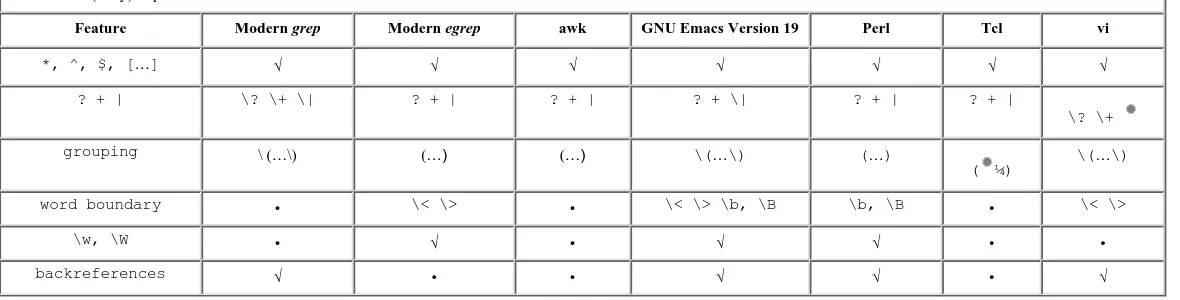
3-1 A (Very) Superficial Look at the Flavor of a Few Common Tools 63
3-2 Overview of POSIX Regex Flavors 64
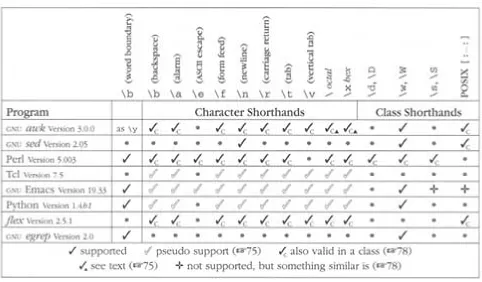
3-3 A Few Utilities and Some of the Shorthand Metacharacters They Provide 73
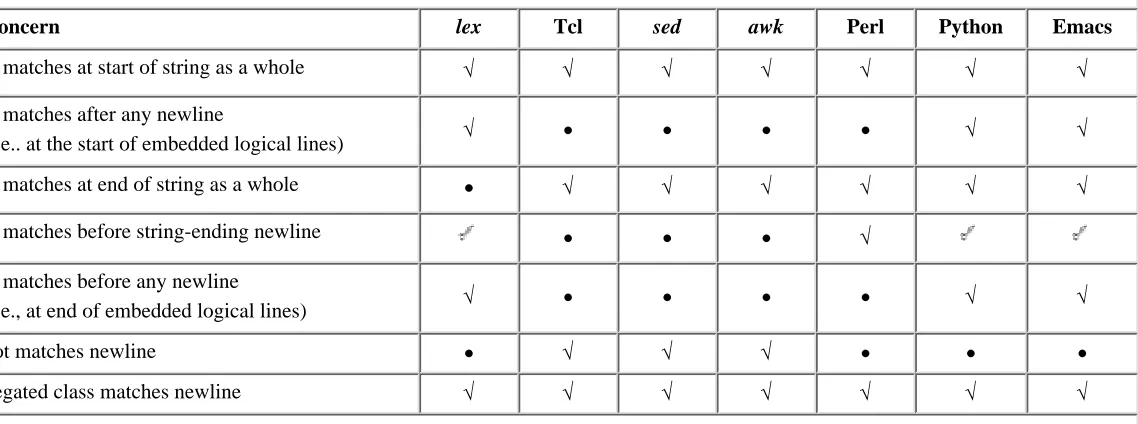
3-4 String/Line Anchors, and Other Newline-Related Issues 82
4-1 Some Tools and Their Regex Engines 90
5-1 Match Efficiency for a Traditional NFA 143
5-2 Unrolling-The-Loop Example Cases 163
5-3 Unrolling-The-Loop Components for C Comments 172
6-1 A Superficial Survey of a Few Common Programs' Flavor 182
6-2 A Comical Look at a Few Greps 183
6-3 A Superficial Look at a Few Awks 184
6-6 GNU Emacs's String Metacharacters 194
6-7 Emacs's NFA Regex Flavor 194
6-8 Emacs Syntax Classes 195
7-1 Overview of Perl's Regular-Expression Language 201
7-2 Overview of Perl's Regex-Related Items 203
7-3 The meaning of local 213
Page xiv
7-5 Overview of Newline-Related Match Modes 232
7-6 Summary of Anchor and Dot Modes 236
7-7 Regex Shorthands and Special-Character Encodings 241
7-8 String and Regex-Operand Case-Modification Constructs 245
7-9 Examples of m/…/g with a Can-Match-Nothing Regex 250
7-10 Standard Libraries That Are Naughty (That Reference $& and Friends) 278
Preface
This book is about a powerful tool called "regular expressions."
Here, you will learn how to use regular expressions to solve problems and get the most out of tools that provide them. Not only that, but much more: this book is about mastering regular expressions.
If you use a computer, you can benefit from regular expressions all the time (even if you don't realize it). When accessing World Wide Web search engines, with your editor, word processor, configuration scripts, and system tools, regular expressions are often provided as "power user" options. Languages such as Awk, Elisp, Expect, Perl, Python, and Tcl have regular-expression support built in (regular expressions are the very heart of many programs written in these languages), and regular-expression libraries are available for most other languages. For example, quite soon after Java became available, a
regular-expression library was built and made freely available on the Web.
Regular expressions are found in editors and programming environments such as vi, Delphi, Emacs, Brief, Visual C++, Nisus Writer, and many, many more. Regular expressions are very popular.
There's a good reason that regular expressions are found in so many diverse applications: they are extremely powerful. At a low level, a regular expression describes a chunk of text. You might use it to verify a user's input, or perhaps to sift through large amounts of data. On a higher level, regular expressions allow you to master your data. Control it. Put it to work for you. To master regular expressions is to master your data.
Page xvi
Why I Wrote This Book
You might think that with their wide availability, general popularity, and unparalleled power, regular expressions would be employed to their fullest, wherever found. You might also think that they would be well documented, with introductory tutorials for the novice just starting out, and advanced manuals for the expert desiring that little extra edge.
Sadly, that hasn't been the case. Regular-expression documentation is certainly plentiful, and has been available for a long time. (I read my first
regular-expression-related manual back in 1981.) The problem, it seems, is that the documentation has traditionally centered on the "low-level view" that I mentioned a moment ago. You can talk all you want about how paints adhere to canvas, and the science of how colors blend, but this won't make you a great painter. With painting, as with any art, you must touch on the human aspect to really make a statement. Regular expressions, composed of a mixture of symbols and text, might seem to be a cold, scientific enterprise, but I firmly believe they are very much creatures of the right half of the brain. They can be an outlet for creativity, for cunningly brilliant programming, and for the elegant solution.
I'm not talented at anything that most people would call art. I go to karaoke bars in Kyoto a lot, but I make up for the lack of talent simply by being loud. I do, however, feel very artistic when I can devise an elegant solution to a tough problem. In much of my work, regular expressions are often instrumental in developing those elegant solutions. Because it's one of the few outlets for the artist in me, I have developed somewhat of a passion for regular expressions. It is my goal in writing this book to share some of that passion.
Intended Audience
immediate use. The detail and thoroughness is simply not found anywhere else. Regular expressions are an idea—one that is implemented in various ways by various utilities (many, many more than are specifically presented in this book). If you master the general concept of regular expressions, it's a short step to
Page xvii
particular implementation. This book concentrates on that idea, so most of the knowledge presented here transcend the utilities used in the examples.
How to Read This Book
This book is part tutorial, part reference manual, and part story, depending on when you use it. Readers familiar with regular expressions might feel that they can immediately begin using this book as a detailed reference, flipping directly to the section on their favorite utility. I would like to discourage that.
This Book, as a Story
To get the most out of this book, read it first as a story. I have found that certain habits and ways of thinking can be a great help to reaching a full understanding, but such things are absorbed over pages, not merely memorized from a list. Here's a short quiz: define the word "between" Remember, you can't use the word in its definition! Have you come up with a good definition? No? It's tough! It's lucky that we all know what "between" means because most of us would have a devil of a time trying to explain it to someone that didn't know. It's a simple concept, but it's hard to describe to someone who isn't already familiar with it. To some extent, describing the details of regular expressions can be similar. Regular expressions are not really that complex, but the descriptions can tend to be. I've crafted a story and a way of thinking that begins with Chapter 1, so I hope you begin reading there. Some of the descriptions are complex, so don't be alarmed if some of the more detailed sections require a second reading. Experience is 9/10 of the law (or something like that), so it takes time and experience before the overall picture can sink in.
Page xviii
Organization
The seven chapters of this book can be logically divided into roughly three parts, with two additional appendices. Here's a quick overview:
The Introduction
Chapter 1 introduces the concept of regular expressions.
Chapter 2 takes a look at text processing with regular expressions.
Chapter 3 provides an overview of features and utilities, plus a bit of history.
The Details
Chapter 4 explains the details of how regular expressions work.
Chapter 5 discusses ramifications and practical applications of the details.
Tool-Specific Information
Chapter 6 looks at a few tool-specific issues of several common utilities. Chapter 7 looks at everything to do with regular expressions in Perl.
Appendices
Appendix A tells how to acquire many of the tools mentioned in this book. Appendix B provides a full listing of a program developed in Chapter 7.
The Introduction
The introduction elevates the absolute novice to "issue-aware" novice. Readers with a fair amount of experience can feel free to skim the early chapters, but I particularly recommend Chapter 3 even for the grizzled expert.
programming language that has regular-expression support. The additional examples provide a basis for the detailed discussions of later chapters, and show additional important thought processes behind crafting advanced regular expressions. To provide a feel for how to "speak in regular expressions," this chapter takes a problem requiring an advanced solution and shows ways to solve it using two unrelated regular-expression-wielding tools.
Page xix
end of this chapter also contains the "Guide to the Advanced Chapters." This guide is your road map to getting the most out of the advanced material that follows.
The Details
Once you have the basics down, it's time to investigate the how and the why. Like the "teach a man to fish" parable, truly understanding the issues will allow you to apply that knowledge whenever and wherever regular expressions are found. That true understanding begins in:
• Chapter 4, The Mechanics of Expression Processing, ratchets up the pace several notches and begins the central core of this book. It looks at the
important inner workings of how regular expression engines really work from a practical point of view. Understanding the details of how a regular expression is used goes a very long way toward allowing you to master them.
• Chapter 5, Crafting a Regular Expression, looks at the real-life ramifications of the regular-expression engine implemented in popular tools such as Perl, sed, grep, Tcl, Python, Expect, Emacs, and more. This chapter puts information detailed in Chapter 4 to use for exploiting an engine's strengths and stepping around its weaknesses.
Tool-Specific Information
Once the lessons of Chapters 4 and 5 are under your belt, there is usually little to say about specific implementations. However, I've devoted an entire chapter to one very notable exception, the Perl language. But with any implementation, there are differences and other important issues that should be considered.
• Chapter 6, Tool-Specific Information, discusses tool-specific concerns, highlighting many of the characteristics that vary from implementation to
Perl, arguably the most popular regular-expression-laden programming
Page xx
Typographical Conventions
When doing (or talking about) detailed and complex text processing, being precise is important. The mere addition or subtraction of a space can make a world of difference, so I use the following special conventions:
• A regular expression generally appears like this . Notice the thin corners which flag "this is a regular expression." Literal text (such as that being
searched) generally appears like 'this'. At times, I'll feel free to leave off the thin corners or quotes when obviously unambiguous. Also, code snippets and screen shots are always presented in their natural state, so the quotes and corners are not used in such cases.
• Without special presentation, it is virtually impossible to know how many spaces are between the letters in "a b", so when spaces appear in regular
expressions and selected literal text, they will be presented with the ' '
symbol. This way, it will be clear that there are exactly four spaces in 'a
b'. I also use visual tab and newline characters. Here's a summary of the three:
a space character
a tab character
a newline character
• At times, I use underlining, or shade the background to highlight parts of literal text or a regular expression. For example:
• Because cat matches 'It indicates your cat is…' instead of the word 'cat', we realize. . .
append a colon and a space. This yields
In this case, the underlines highlight what has just been added to an expression under discussion.
• I use a visually distinct ellipses within literal text and regular expressions. For example […] represents a set of square brackets with unspecified contents, while [. . .] would be a set containing three periods.
Exercises
Page xxi
also serve as checkpoints: if they take more than a few moments, it's probably best to go over the relevant section again before continuing on.
To help entice you to actually think about these questions as you read them, I've made checking the answers a breeze: just turn the page. Answers to questions
marked with are always found by turning just one page. This way, they're out of sight while you think about the answer, but are within easy reach.
Personal Comments and Acknowledgments
My Mom once told me that she couldn't believe that she ever married Dad. When they got married, she said, they thought that they loved each other. It was nothing, she continued, compared with the depth of what they now share, thirty-something years later. It's just as well that they didn't know how much better it could get, for had they known, they might have considered what they had to be too little to chance the future on.
The analogy may be a bit melodramatic, but several years ago, I thought I
understood regular expressions. I'd used them for years, programming with awk, sed, and Perl, and had recently written a rather full regular-expression package that fully supported Japanese text. I didn't know any of the theory behind it—I just sort of reasoned it out myself. Still, my knowledge seemed to be enough to make me one of the local experts in the Perl newsgroup. I passed along some of
my posts to a friend, Jack Halpern , who was in the process of learning Perl. He often suggested that I write a book, but I never seriously
considered it. Jack has written over a dozen books himself (in various languages, no less), and when someone like that suggests you write a book, it's somewhat akin to Carl Lewis telling you to just jump far. Yeah, sure, easy for you to say!
Then, toward the end of June, 1994, a mutual friend, Ken Lunde , also suggested I write a book. Ken is also an author (O'Reilly & Associates'
Understanding Japanese Information Processing), and the connection to O'Reilly was too much to pass by. I was introduced to Andy Oram, who became my editor, and the project took off under his guidance.
Page xxii
discovered (many of which have consequently been fixed). My guiding principle has been, as Ken Lunde so succinctly put it when I was grumbling one day: "you do the research so your readers don't have to."
Originally, I thought the whole project would take a year at the very most. Boy, was I wrong. Besides the research necessitated by my own ignorance, a few months were lost as priorities shifted after the Kobe earthquake. Also, there's something to be said for experience. I wrote, and threw out, two versions of this book before feeling that I had something worthy to publish. As I found out, there's a big difference between publishing a book and firing off a posting to Usenet. It's been almost two and a half years.
Shoulders to Stand On
As part of my research, both about regular expressions and their history, I have been extremely lucky in the knowledge of others that I have been able to tap. Early on, Tom Wood of Cygnus Systems opened my eyes to the various ways that a regular-expression match engine might be implemented. Vern Paxson (author of flex) and Henry Spencer (regular-expression god) have also been a great help. For enlightenment about some of the very early years, before regular expressions entered the realm of computers, I am indebted to Robert Constable and Anil Nerode. For insight into their early computational history, I'd like to thank Brian Kernighan (co-author of awk), Ken Thompson (author of ed and co-creator of Unix), Michael Lesk (author of lex), James Gosling (author of the first Unix version of Emacs, which was also the first to support regular expressions),
worked tirelessly to keep this project on track and focused. Detailed reviews of the early manuscripts by Jack Halpern saved you from having to see them. In the months the final manuscript was nearing completion, William F. Maton devoted untold hours reviewing numerous versions of the chapters. (A detailed review is a lot to ask just once William definitely went above and beyond the call of duty.) Ken Lunde's review turned out to be an incredibly detailed copyedit that
smoothed out the English substantially. (Steve Kleinedler did the official copyedit on a later version, from which I learned more about English than I did in 12 years of compulsory education.) Wayne Berke's 25 pages of detailed, insightful
comments took weeks to implement, but added substantially to the overall quality. Tom Christiansen's review showed his prestigious skills are not only
Page xxiii
are computational indeed: discussions resulting from Tom's review were eventually joined in by Larry Wall, who caught a few of my more major Perl gaffes. Mike Stok, Jon Orwant, and Henry Spencer helped with detailed reviews (in particular, I'd like to thank Henry for clarifying some of my misconceptions about the underlying theory). Mike Chachich and Tim O'Reilly also added
valuable feedback. A review by experts is one thing, but with a book designed to teach, a review by a non-expert is also important. Jack Halpern helped with the early manuscripts, while Norris Couch and Paul Beard were willing testers of the later manuscript. Their helpful comments allowed me to fill in some of the gaps I'd left.
Errors that might remain
Even with all the work of these reviewers, and despite my best efforts, there are probably still errors to be found in this book. Please realize that none of the reviewers actually saw the very final manuscript, and that there were a few times that I didn't agree with a reviewer's suggestion. Their hard works earns them much credit and thanks, but it's entirely possible that errors were introduced after their review, so any errors that remain are wholly my responsibility. If you do find an error, by all means, please let me know. Appendix A has information on how to contact me.
Appendix A also tells how to get the current errata online. I hope it will be short.
Other Thanks
There are a number of people whose logistic support made this book possible. Ken Lunde of Adobe Systems created custom characters and fonts for a number of the typographical aspects of this book. The Japanese characters are from Adobe Systems' Heisei Mincho W3 typeface, while the Korean is from the Korean
Ministry of Culture and Sports Munhwa typeface.
particular, (Keith Masuda) and (Yukio Takasaki), for their support and encouragement with this project. Having a 900dpi printer at my disposal made development of the special typesetting used in this book possible.
Very special thanks goes to (Kenji Aoyama): the mouse on my
Page xxiv
In the Future
I worked on this book for so long, I can't remember what it might feel like to spend a relaxing, lazy day and not feel guilty for it. I plan to enjoy some of the finer luxuries in life (folded laundry, a filled ice tray, a tidy desk), spend a few weekends taking lazy motorcycle rides through the mountains, and take a nice long vacation.
This will be nice, but there's currently a lot of excitement in the
1
Introduction to Regular Expressions
In this chapter:
• Solving Real Problems
• Regular Expressions as a Language
• The Regular-Expression Frame of Mind
• Egrep Metacharacters
• Expanding the Foundation
• Personal Glimpses
Here's the scenario: your boss in the documentation department wants a tool to check for doubled words (such as ''this this"), a common problem with documents subject to heavy editing. Your job is to create a solution that will:
• Accept any number of files to check, report each line of each file that has doubled words, highlight (using standard ANSI escape sequences) each doubled word, and ensure that the source filename appears with each line in the report.
• Work across lines, even finding situations when a word at the end of one line is found at the beginning of the next.
• Find doubled words despite capitalization differences, such as with 'The the ', as well as allow differing amounts of whitespace (spaces, tabs, newlines, and the like) to lie between the words.
That's certainly a tall order! However, a real problem needs a real solution, and a real problem it is. I used such a tool on the text of this book and was surprised at the way numerous doubled-words had crept in. There are many programming languages one could use to solve the problem, but one with regular expression support can make the job substantially easier.
remove, isolate, and generally fold, spindle, and mutilate all kinds of text and data. It might be as simple as a text editor's search command or as powerful as a full text processing language. This book will show you the many ways regular expressions can increase your productivity. It will teach you how to think regular expressions so that you can master them, taking advantage of the full magnitude of their power.
As we'll see in the next chapter, a full program that solves the doubled-word problem can be implemented in just a few lines of Perl or Python (among others), scripting languages with regular-expression support. With a single
regular-expression search-and-replace command, you can find and highlight doubled words in the document. With another, you can remove all lines without doubled words (leaving only the lines of interest left to report). Finally, with a third, you can ensure that each line to be displayed begins with the name of the file the line came from.
The host language (Perl, Python, or whatever) provides the peripheral processing support, but the real power comes from regular expressions. In harnessing this power for your own needs, you will learn how to write regular expressions which will identify text you want, while bypassing text you don't. You'll then combine your expressions with the language's support constructs to actually do something with the text (add appropriate highlighting codes, remove the text, change the text, and so on).
Solving Real Problems
As a simple example, I needed to check a slew of files (the 70 or so files
comprising the source for this book, actually) to confirm that each file contained 'SetSize' exactly as often (or as rarely) as it contained 'ResetSize'. To complicate matters, I needed to disregard capitalization (such that, for example,
an editor would have been truly arduous, what with all the files and all the possible capitalization differences.
Regular expressions to the rescue! Typing just a single, short command, I was able to check all files and confirm what I needed to know. Total elapsed time: perhaps 15 seconds to type the command, and another 2 seconds for the actual check of all the data. Wow! (If you're interested to see what I actually used, peek ahead to page 32).
As another example, the other day I was helping a friend, Jack, with some email problems on a remote machine, and he wanted me to send a listing of messages in his mailbox file. I could have loaded a copy of the whole file into a text editor and manually removed all but the few header lines from each message, leaving a sort of table of contents. Even if the file wasn't as huge as it was, and even if I wasn't connected via a slow dial-up line, the task would have been slow and
monotonous. Also, I would have been placed in the uncomfortable position of actually seeing the text of his personal mail.
Regular expressions to the rescue again! I gave a simple command (using the common search tool egrep described later in this chapter) to display the From:
and Subject: line from each message. To tell egrep exactly which kinds of lines I did (and didn't) want to see, I used the regular expression
^(From|Subject): Once Jack got his list, he asked me to send a particular (5,000-line!) message. Again, using a text editor or the mail system itself to extract just the one message would have taken a long time. Rather, I used another tool (one called sed) and again used regular expressions to describe
exactly the text in the file I wanted. This way, I could extract and send the desired message quickly and easily.
Regular Expressions as a Language
Unless you've had some experience with regular expressions, you won't
understand the regular expression ^(From|Subject): from the last example, but there's nothing magic about it. For that matter, there is nothing magic about magic. The magician merely understands something simple which doesn't appear to be simple or natural to the untrained audience. Once you learn how to hold a card while making your hand look empty, you only need practice before you, too, can "do magic." Like a foreign language—once you learn it, it stops sounding like gibberish.
The Filename Analogy
Since you have decided to use this book, you probably have at least some idea of just what a "regular expression" is. Even if you don't, you are almost certainly already familiar with the basic concept.
You know that report.txt is a specific filename, but if you have had any experience with Unix or DOS/Windows, you also know that the pattern
"*.txt" can be used to select multiple files. With such filename patterns like this (called file globs), there are a few characters* that have special meanings. The star means "match anything," and a question mark means "match any one
character." With "*.txt", we start with a match-anything * and end with the
literal .txt , so we end up with a pattern that means "select the files whose names start with anything and end with .txt".
Most systems provide a few additional special characters, but, in general, these filename patterns are limited in expressive power. This is not much of a
On the other hand, dealing with general text is a much larger problem. Prose and poetry, program listings, reports, lyrics, HTML, articles, code tables, the source to books (such as this one), word lists . . . you name it, if a particular need is specific enough, such as "selecting files," you can develop a specialized scheme or tool. However, over the years, a generalized pattern language has developed which is powerful and expressive for a wide variety of uses. Each program implements and uses them differently, but in general, this powerful pattern language and the
patterns themselves are called regular expressions.
The Language Analogy
Full regular expressions are composed of two types of characters. The special characters (like the * from the filename analogy) are called metacharacters, while everything else are called literal, or normal text characters. What sets regular expressions apart from filename patterns is the scope of power their
metacharacters provide. Filename patterns provide limited metacharacters for limited needs, but a regular expression "language" provides rich and expressive metacharacters for advanced uses.
It might help to consider regular expressions as their own language, with literal text acting as the words and metacharacters as the grammar. The words are
combined with grammar according to a set of rules to create an expression which communicates an idea. In the email example, the expression I used to find lines
beginning with 'From: ' or 'Subject: ' was ^(From|Subject):
. The metacharacters are underlined, and we'll get to their interpretation soon.
As with learning any other language, regular expressions might seem intimidating at first. This is why it seems like magic to those with only a superficial
understanding, and perhaps completely unapproachable to those that have never
seen it at all. But just as * would soon become clear to a student of Japanese, the regular expression in
s!<emphasis>([0-9]+(\.[0-9]+){3))</emphasis>!<inet>$1</inet>!
will soon become crystal clear to you, too.
This example is from a Perl language script that my editor used to modify a manuscript. The author had mistakenly used the typesetting tag <emphasis> to mark Internet IP addresses (which are sets of periods and numbers that look like
198.112.208.25). The incantation uses Perl's text-substitution command with the regular expression
to replace such tags with the appropriate <inet> tag, while leaving other uses of
<emphasis> alone. In later chapters, you'll learn all the details of exactly how this type of incantation is constructed, so you'll be able to apply the techniques to your own needs.
* "Regular expressions are easy!" A somewhat humorous comment about this: As Chapter 3 explains. the term regular expression originally comes from formal algebra. When people ask me what my book is about, the answer "regular
The goal of this book
The chances that you will ever want to replace <emphasis> tags with <inet>
tags is small, but it is very likely that you will run into similar "replace this with that" problems. The goal of this book is not to teach solutions to specific
problems, but rather to teach you how to think regular expressions so that you will be able to conquer whatever problem you may face.
The Regular-Expression Frame of Mind
As we'll soon see, complete regular expressions are built up from small
building-block units. Each building block is in itself quite simple, but since they can be combined in an infinite number of ways, knowing how to combine them to achieve a particular goal takes some experience.
Don't get me wrong—regular expressions are not difficult to learn and use. In fact, by the end of this very chapter, you'll be able to wield them in powerful ways, even if this is your first real exposure to them.
Still, as with anything, experience helps. With regular expressions, experience can provide a frame of mind, giving direction to one's thinking. This is hard to
describe, but it's easy to show through examples. So, in this chapter I would like to quickly introduce some regular-expression concepts. The overview doesn't go into much depth, but provides a basis for the rest of this book to build on, and sets the stage for important side issues that are best discussed before we delve too deeply into the regular expressions themselves.
While some examples may seem silly (because some are silly), they really do represent the kind of tasks that you will want to do—you just might not realize it yet. If each and every point doesn't seem to make sense, don't worry too much. Just let the gist of the lessons sink in. That's the goal of this chapter.
If you have some regular-expression experience
Searching Text Files: Egrep
Finding text is one of the simplest uses of regular expressions—many text editors and word processors allow you to search a document using a regular-expression pattern. Even more simple is the utility egrep.*Give egrep a regular expression and some files to search, and it attempts to match the regular expression to each line of each file, displaying only those lines that are successfully matched.
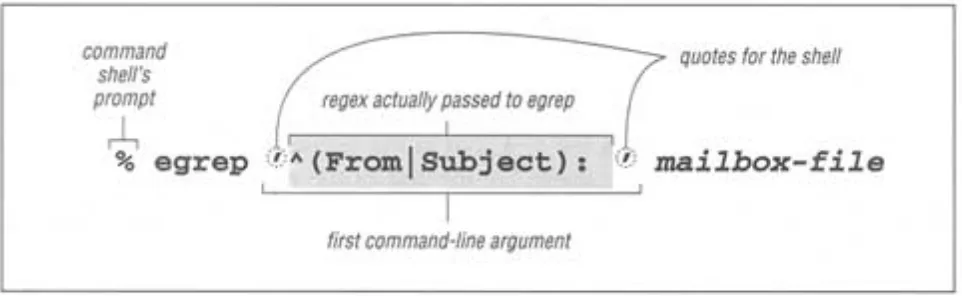
[image:55.612.66.547.356.504.2]Returning to the initial email example, the command I actually used is shown in Figure 1-1. egrep interprets the first command-line argument as a regular expression, and any remaining arguments as the file(s) to search. Note, however, that the quotes shown in Figure 1-1 are not part of the regular expression, but are needed by my command shell.** When using egrep, I almost always wrap the regular expression with quotes like this.
Figure 1-1:
Invoking egrep from the command line
If your regular expression doesn't use any of the dozen or so metacharacters that egrep understands, it effectively becomes a simple "plain text" search. For example,
searching for cat in a file finds and displays all lines with the three letters c·a·t
in a row. This includes, for example, any line containing vacation.
Even though the line might not have the word cat,the c·a·t sequence in
* egrep is freely-available for many systems, including DOS, MacOS, Windows, Unix, and so on (see Appendix A for information on how to obtain a copy of egrep for your system). Some users might be more familiar with the program egrep, which is similar in many respects. The discussion of the regular-expression landscape in Chapter 3 makes it clear why I chose egrep to begin with.
** The command shell is that part of the system that accepts your typed commands and actually executes the programs you request. With the shell I use, the quotes serve to group the command argument, telling the shell not to pay too much attention to what's inside (such as, for example, not treating *.txt as a filename pattern so that it is left for egrep to interpret as it sees fit, which for egrep means a regular expression). DOS users of
bytes and lines in a file, but it generally has no idea of English (or any other language's) words, sentences, paragraphs, or other high-level concepts.*
Egrep Metacharacters
Let's start to explore some of the egrep metacharacters that supply its
regular-expression power. There are various kinds which play various roles. I'll go over them quickly with a few examples, leaving the detailed examples and descriptions for later chapters.
Before we begin, please make sure to review the typographical conventions
explained in the preface (on page xx). This book forges a bit of new ground in the area of typesetting, so some of my notations will be unfamiliar at first.
Start and End of the Line
Probably the easiest metacharacters to understand are ^ (caret) and $
(dollar), which represent the start and end, respectively, of the line of text as it is
being checked. As we've seen, the regular expression cat finds c·a·t
anywhere on the line, but ^cat matches only if the c·a·t is at the beginning
of the line—the ^ is used to effectively anchor the match (of the rest of the
regular expression) to the start of the line. Similarly, cat$ finds c·a·t only at the end of the line, such as a line ending with scat.
Get into the habit of interpreting regular expressions in a rather literal way. For example, don't think
^cat matches a line with cat at the beginning
but rather:
^cat matches if you have the beginning of a line, followed immediately by c,
They both end up meaning the same thing, but reading it the more literal way allows you to intrinsically understand a new expression when you see it. How
would you read ^cat$ , ^$ , or even simply ^ alone? Turn the page to check your interpretations.
The caret and dollar are particular in that they match a position in the line rather than any actual text characters themselves. There are, of course, various ways to actually match real text. Besides providing literal characters in your regular
expression, you can also use some of the items discussed in the next few sections.
Character Classes
Matching any one of several characters
Let's say you want to search for "grey," but also want to find it if it were spelled
"gray". The […] construct, usually called a character class, lets you list the
characters you want to allow at that point: gr[ea]y . This means to find "g, followed by r, followed by an e or an a, all followed by y." I am a really poor speller, so I'm always using regular expressions like this to check a word list for
proper spellings. One I use often is sep[ea]r[ea]te , because I can never remember whether the word is spelled "seperate," "separate," "separete,' or what.
As another example, maybe you want to allow capitalization of a word's first
letter: [Ss]mith . Remember that this still matches lines that contain smith
(or Smith) embedded within another word, such as with blacksmith. I don't want to harp on this throughout the overview, but this issue does seem to be the source of problems among some new users. I'll touch on some ways to handle this embedded-word problem after we examine a few more metacharacters.
You can list in the class as many characters as you like. For example,
[123456] matches any of the listed digits. This particular class might be
useful as part of <H[123456]> , which matches <H1>, <H2>, <H3>, etc. This can be useful when searching for HTML headers.
Within a character class, the character-class metacharacter '-' (dash) indicates a
range of characters: <H[1-6]> is identical to the previous example. [0-9]
and [a-z] are common shorthands for classes to match digits and lowercase letters, respectively. Multiple ranges are fine, so
[0123456789abcdefABCDEF] can be written as [0-9a-fA-F] . Either of these can be useful when processing hexadecimal numbers. You can
Note that a dash is a metacharacter only within a character class—otherwise it matches the normal dash character. In fact, it is not even always a metacharacter within a character class. If it is the first character listed in the class, it can't possibly indicate a range, so it is not considered a metacharacter.
Consider character classes as their own mini language. The rules regarding which metacharacters are supported (and what they do) are completely different inside and outside of character classes.
Reading ^cat$ , ^$ , and ^
Answers to the questions on page 8.
^cat$
Literally: matches if the line has a beginning-of-line (which, of course, all lines have), followed immediately by c·a·t , and then followed immediately by the end of the line.
Effectively means: a line that consists of only cat—no extra words, spaces, punctuation . . . nothing.
^$
Literally: matches if the line has a beginning-of-line, followed immediately by the end of the line.
Effectively means: an empty line (with nothing in it, not even spaces).
∧
Literally: matches if the line has a beginning-of-line.
Effectivelymeaningless! Since every line has a beginning, every line will match—even lines that are empty!
Negated character classes
If you use [^…] instead of […] , the class matches any character that isn't listed. For example, [^1-6] matches a character that's not 1 through 6. More or less, the leading ^ in the class "negates" the list—rather than listing the characters you want to include in the class, you list the characters you don't want to be included.
You might have noticed that the ^ used here is the same as the start-of-line caret. The character is the same, but the meaning is completely different. Just as the English word "wind" can mean different things depending on the context (sometimes a strong breeze, sometimes what you do to a clock), so can a metacharacter. We've already seen one example, the range-building dash. It is valid only inside a character class (and at that, only when not first inside the class). ^ is an anchor outside a class, a class metacharacter inside, but only when it is immediately after the class's opening bracket (otherwise, inside a class it's not special).
Page 11
Here's what I typed:
% egrep 'q[^u]' word.list
Iraqi Iraqian miqra qasida qintar qoph zaqqum %
Two notable words not listed are ''Qantas", the Australian airline, and "Iraq".
Although both are in my list, neither were listed. Why? Think about it for a bit, then turn the page to check your reasoning.
Remember that a negated character class means "match a character that's not listed" and not "don't match what is listed." These might seem the same, but the
Iraq example shows the subtle difference. A convenient way to view a negated class is that it is simply a shorthand for a normal class which includes all possible characters except those that are listed.
Matching Any Character—Dot
The metacharacter . (usually called dot) is a shorthand for a character class that matches any character. It can be convenient when you want to have an "any
character here" place-holder in your expression. For example, if you want to search for a date such as 07/04/76, 07-04-76, or even 07.04.76, you could go to the trouble to construct a regular expression that uses character classes to explicitly allow '/', '-', or '.' between each number, such as
07[-./]04[-./]76 . You could also try simply using 07.04.76 .
Quite a few things are going on with this example that might be unclear at first.
In 07 [-./] 04 [-./] 76 , the dots are not metacharacters because they are within a character class. (Remember, the list of metacharacters and their
important to know that each dot can match any character at all, so it can match, say, 'lottery numbers: 19 207304 7639'.
07[-./]04[-./]76 is more precise, but it's more difficult to read and
Page 12
Why doesn't q[^u] match 'Qantas' or 'Iraq?
Answer to the question on page 11.
Qantas didn't match because the regular expression called for a lowercase q, whereas the Q in Qantas is
uppercase. Had we used Q[^u] instead, we would have found it, but not the others, since they don't
have an uppercase Q. The expression [Qq][^u would have found them all.
The Iraqexample is somewhat of a trick question. The regular expression calls for q followed by a character that's not u. But because egrep strips the end-of-line character(s) before checking with the regular expression (a little fact I neglected to mention, sorry!) there's no data at all after theq. Yes, there is nouafter theq, but there's no non-ueither!
Don't feel too bad because of the trick question.* Let me assure you that had egrep not stripped the newlines (as some
other tools don't), or had Iraq been followed by spaces or other words or whatnot, the line would have matched. It is eventually important to understand the little details of each tool, but at this point what I'd like you to come away with from this exercise is that a character class, even negated, still requires a character to match.
knowledge of the text being searched against the need to always be exact when writing an expression. For example, if you know that with your data it would be highly unlikely for 07.04.76 to match in an unwanted place, it would certainly be reasonable to use it. Knowing the target text well is an
important part of wielding regular expressions effectively.
Alternation
Matching any one of several subexpressions
A very convenient metacharacter is | , which means "or" It allows you to combine multiple
expressions into a single expression which matches any of the individual expressions used to make it up. For example, Bob and Robert are two separate expressions, while Bob|Robert is one expression that matches either. When combined this way, the subexpressions are called alternatives.
Looking back to our gr[ea]y example, it is interesting to realize that it can be written as
Page 13
Without the parentheses, gra|ey means " gra or ey ", which is not what we want here. Alternation reaches far, but not beyond parentheses. Another
example is (First|1st) [Ss]treet . Actually, since both First and
1st end with st , they can be shortened to (Fir |1)st [Ss]treet
, but that's not necessarily quite as easy to read. Still, be sure to understand that they do mean the same thing.
Although the gr[ea]y versus gr(a|e)y examples might blur the distinction, be careful not to confuse the concept of alternation with that of a character class. A character class represents a single character in the target text. With alternation, each alternative can be a full-fledged regular expression in and of itself. Character classes are almost like their own special mini-language (with their own ideas about metacharacters, for example), while alternation is part of the "main" regular expression language. You'll find both to be extremely useful.
Also, take care when using caret or dollar in an expression with alternation.
Compare ^From|Subject|Date: with ^(From|Subject|Date):
. Both appear similar to our earlier email example, but what each matches (and therefore how useful it is) differs greatly. The first is composed of three plain alternatives, so it will match when we have " ^From or Subject or
Date: , " which is not particularly useful. We want the leading caret and
trailing : to apply to each alternative. We can accomplish this by using parentheses to "constrain" the alternation:
^( From|Subject |Date):
This matches:
1) start-of-line, followed by F·r·o·m, followed by ': '
or 2) start-of-line, followed by S·u·b·j·e·c·t, followed by ': '
allows the wrapping ^…: to apply to each alternative, so we can say it matches:
^(From): or ^(Subject): or ^(Date):
Putting it less literally: it matches any line that begins with 'From: ',
'Subject: ', or 'Date: ', which is exactly what would be useful to get a listing of the messages in an email file.
Here's an example:
% egrep '^(From|SubjectlDate): ' mailbox
From: [email protected] (The King) Subject: be seein' ya around
Date: Thu, 31 Oct 96 11:04:13
From: The Prez <[email protected]> Date: Tue, 5 Nov 1996 8:36:24
Subject: now, about your vote...
Page 14
Word Boundaries
A common problem is that a regular expression that matches the word you want can often also match where the "word" is embedded within a larger word. I mentioned this in the
cat, gray, and Smith examples, but despite what I said about egrep generally not having any concept of words, it turns out that some versions of egrep offer limited support: namely the ability to match the boundary of a word (where a word begins or ends).
You can use the (perhaps odd looking) metasequences \< and \> if your version
happens to support them (not all versions of egrep do). Word-based equivalents of ^
and $ , they match the position at the start and end of a word, respectively (so, like the line anchors caret and dollar, they never actually consume any characters). The
expression \<cat\> literally means "match if we can find a start-of-word position, followed immediately by c·a·t , followed immediately by an end-of-word position ."
More naturally, it means "find the word cat." If you wanted, you could use \<cat or
cat\> to find words starting and ending with cat.
Note that < and > alone are not metacharacters when combined with a backslash, the sequences become special. This is why I called them "metasequences." It's their special interpretation that's important, not the number of characters, so for the most part I use these two meta-words interchangeably.
Page 15
In a Nutshell
Table 1-1: Summary of Metacharacters Seen So Far
Metacharacter Name Meaning
. dot any on character
[…] character class any character listed
[^…] negated character class any character not listed
^ caret the position at the start of the line
$ dollar the position at the end of the line
\< backslash less-than *the position at the start of a word
\> backslash greater-than *the position at the end of a word
*not supported by all versions of egrep
| or; bar matches either expression it separates
(…) parentheses
used to limit the scope of | ,plus additional uses yet to be discussed
Table 1-1 summarizes the metacharacters we have seen so far. In addition to the table, some important points to remember are:
• The rules about which characters are and aren't metacharacters (and exactly what they mean) are different inside a character class. For example, dot is a metacharacter outside of a class, but not within one. Conversely, a dash is a metacharacter within a class, but not outside. And a caret has one meaning outside, another if specified inside a class immediately after the opening [, and a third if given elsewhere in the class.
• Don't confuse alternation with a character class. The class [abc] and the alternation (a|b|c) effectively mean the same thing, but the similarity in this example does not extend to the general case. A character class can match exactly one character, and that's true no matter how long or short the specified list of acceptable characters might be. Alternation, on the other hand, can have arbitrarily long alternatives, each textually unrelated to the other:
\<(1,000,000|million|thousand thousand)\> . But alternation can't be negated like a character class.
• A negated character class is simply a notational convenience for a normal character class that matches everything not listed. Thus, [^x] doesn't mean " match unless there is an x ," but rather "match if there is something that is not x." The difference is subtle, but important. The first concept matches a blank line, for example, while, in reality,
[^x] does not.
Optional Items
Let's look at matching color or colour. Since they are the same except that
one has a u and the other doesn't, we can use colou?r to match either. The
metacharacter ? (question mark) means optional. It is placed after the character that is allowed to appear at that point in the expression, but whose existence isn't actually required to still be considered a successful match.
Unlike other metacharacters we have seen so far, the question-mark attaches only
to the immediately-preceding item. Thus colou?r is interpreted as " c ,
then o then l then o then u? then r . "
The u? part will always be successful: sometimes it will match a u in the text, while other times it won't. The whole point of the ?-optional part is that it's
successful either way. This isn't to say that any regular expression that contains ?
will always be successful. For example, against 'semicolon', both colo and
u? are successful (matching colo and nothing, respectively). However, the
final r will fail, and that's what disallows semicolon, in the end, from being
matched by colou?r .
As another example, consider matching a date that represents July fourth, with the July part being either July or Jul, and the fourth part being fourth, 4th, or
simply 4. Of course, we could just use (July|Jul) (fourth|4th|4) , but let's explore other ways to express the same thing.
First, we can shorten the (July\Jul) to (July?) . Do you see how they
are effectively the same? The removal of the | means that the parentheses are
no longer really needed. Leaving the parentheses doesn't hurt, but July? , with
them removed, is a bit less cluttered. This leaves us with July?
Moving now to the second half, we can simplify the 4th|4 to 4(th)? . As
you can see, ? can attach to a parenthesized expression. Inside the parentheses can be as complex a subexpression as you like, but "from the outside" it is
considered a unit. Grouping for ? (and other similar metacharacters that I'll introduce momentarily) is one of the main uses of parentheses.
Other Quantifiers: Repetition
Similar to the question mark are + (plus) and * (an asterisk, but as a
regular-expression metacharacter, I prefer the term star). The metacharacter + ,
means "one or more of the immediately-preceding item," and * means "any
number, including none, of the item." Phrased differently, …* means "try to match it as many times as possible, but it's okay to settle for nothing if need be."
The construct with plus, + , is similar in that it will also try to match as many times as possible, but different in that it will fail if it can't match at least once. These three metacharacters, question mark, plus, and star, are called quantifiers (because they influence the quantity of a match they govern).
Like …? , the …* part of a regular expression will always succeed, with the
onlyissue being what text (if any) will be matched. Contrast this to …+ which fails unless the item matches at least once.
An easily understood example of star is * , the combination with a space
allowing optional spaces. ( ? allows one optional space, while * allows any number.) We can use this to make page 9's <H[1-6]> example flexible. The HTML specification* says that spaces are allowed immediately before the closing
>, such as with <H3 > and <H4 >. Inserting * into our regular
expression where we want to allow (but not require) spaces, we get <H[1-6]
Exploring further, let's search for a particular HTML tag recognized by Netscape's
World Wide Web browser Navigator. A tag such as <HR SIZE=14> indicates that a line (a Horizontal Rule) 14 pixels thick should be drawn across the screen. Like the <H3> example, optional spaces are allowed before the closing angle bracket. Additionally, they are allowed on either side of the equal sign. Finally, one space is required between the HR and SIZE, although more are allowed. For
this last case, we could just insert * , but instead let's use + . The plus allows extra spaces while still requiring at least one. Do you see how this will match the same as * ? This leaves us with <HR +SIZE *= *14 *> .
Although flexible with respect to spaces, our expression is still inflexible with respect to the size given in the tag. Rather than find tags with only a particular size (such as 14), we want to find them all. To accomplish this, we replace the
14 with an expression to find a general number. Well, a number is one or more
digits. A digit is [0-9] , and "one or more" adds a plus, so we end up
replacing 14 by [0-9]+] . As you can see, a single character class is one "unit", so can be subject directly to plus, question mark, and so on, without the need for parentheses.
This leaves us with <HR +SIZE *= *[0-9]+ *> , which is certainly a mouthful. It looks particularly odd because the subject of most of the stars and pluses are space characters, and our eye has always been trained to treat spaces specially. That's a habit you will have to break when reading regular expressions, because the space character is a normal character, no different from, say, j or 4.
Continuing to exploit a good example, let's make one more change. With Navigator, not only can you use this sized-HR tag, but you can still use the standard sizeless version that looks simply like <HR>
(with extra spaces allowed before the >, as always). How can we modify our regular expression so
that it matches either type? The key is realizing that the size part is optional (that's a hint). Turn the page to check your answer.
Take a good look at our latest expression (in the answer box) to appreciate the differences among the question mark, star, and plus, and what they really mean in practice. Table 1-2 summarizes their meanings. Note that each quantifier has some minimum number of matches that it needs to be considered a successful match, and a maximum number of matches that it will ever attempt. With some, the minimum number is zero; with some, the maximum number is unlimited.
Table 1-2: Summary of Quantifier "Repetition Metacharacters"
Minimum Required
Maximum to Try
Meaning
? none 1 one allowed; none required ("one optional")
* none no limit unlimited allowed; none required ("any amount optional")
+ 1 no limit one required; more allowed ("some required")
Defined range of matches: intervals
Some versions of egrep support a metasequence for providing your own minimum and maximum :
¼{min,max} . This is called the interval quantifier. For example, ¼{3,12} matches up to 12 times if possible, but settles for three. Using this notation, {0,1} is the same as a question mark.
Not many versions of egrep support this notation yet, but many other tools do, so I'll definitely discuss it in Chapter 3 when I look in detail at the broad spectrum of metacharacters in common use today.
HTML tags can be written with mixed capitalization, so <h3> and <Hr Size=26> are both legal.
Modifying <H[1-6] *> would be a simple matter of using [Hh] for H , but it becomes more
troublesome with the longer HR and SIZE of the other example. Of course, we could use
easier to tell egrep to ignore case by performing the match in a case insensitive manner in which capitalization differences are simply ignored.
This is not a part of the regular-expression language, but is a related useful feature many tools provide. Use the -i option to tell egrep to do a case-insensitive match. Place -i on the command line before the regular expression:
% egrep -i '<HR( +SIZE *= *[0-9]+)? *>' file
In future chapters, we will look at many convenient support features of this kind.
Parentheses and Backreferences
So far, we have seen two uses for parentheses: to limit the scope of |, and to provide grouping for quantifiers, such as question mark and star, to work with. I'd like to discuss another specialized use that's not common in egrep (although GNU's popular version does support it), but which is commonly found in many other tools.
Parentheses can "remember" text matched by the subexpression they enclose. We'll use this in a partial solution to the doubled-word problem at the beginning of this chapter. If you knew the the specific doubled word to find (such as "the" earlier in this sentence—did you catch it?), you could search for it explicitly, such
as with \<the the>\ In this case, you would also find items such as the
theory, but you could easily get around that problem if your egrep supports
the \<…\> mentioned earlier: \<the the\> . We could even use +
for the space to make it more flexible.
However, having to check for every possible pair of words would be an
We start with \<the +the\> and replace the initial [the] with a regular
expression to match a general word, say [A-Za-z]+ . Then, for reasons that will become clear in the next paragraph, let's put parentheses around it. Finally, we replace the second 'the' by the special metasequence \1 . This yields
\<(A-Za-z]+) +\1\> .
With tools that support backreferencing, parentheses "remember" the text that the
subexpression inside them matches, and the special metasequence \1
represents that text later in the regular expression, whatever it happens to be at the time.
You can have more than one set of parentheses, of course, and you use \1 ,