Copyright © 2011 Joel Comm and Flying Monkey Media, Inc. – All Rights Reserved
1
What Google Never Told You
About Making Money with
AdSense: 5
th
Edition
Joel Comm
Copyright © 2011 Joel Comm and Flying Monkey Media, Inc. – All Rights Reserved
2
INDEX
LEGALESE ... 8
INTRODUCTION ... 9
MY EXPERIMENTS WITH ADSENSE ... 10
WHAT IS ADSENSE? ... 12
WHAT ADSENSE IS NOT ... 15
HOW TO USE THIS BOOK ... 16
1. THE BASICS: BUILDING AN ADSENSE-READY WEBSITE ... 19
1.1 UP AND ROLLING WITH TRAINING WHEELS ... 20
1.2 OFF WITH THE TRAINING WHEELS! ... 27
1.3DESIGNING A SITE FROM SCRATCH ... 32
1.4THE BASICS OF SEARCH ENGINE OPTIMIZATION ... 33
1.5FROM BLOGGER TO PUBLISHER ... 34
2. ADSENSE — MAKING THE MONEY! ... 35
2.1SIGNING UP MADE EASY ... 35
2.2 GOOGLE’S POLICIES —THEY’RE IMPORTANT! ... 37
2.3ADSENSE IN ALL ITS FORMS ... 39
3. HOW TO TWEAK YOUR ADS TO MAKE THEM CLICK! — THE PRINCIPLES OF OPTIMIZATION ... 65
3.1THE GOAL OF ADSENSE OPTIMIZATION ... 66
3.2CHANGING THE LOOK OF YOUR ADS ... 66
3.3 TEXT IS DESIGN TOO! ... 69
3.4DELIBERATE MISMATCHING —BREAKING THE RULES ... 70
3.5MAKE YOUR ADS LOOK NEAT WITH TABLES ... 71
3.6COMPLEMENTING YOUR ADS ... 73
4. CATCH FICKLE VISITORS WITH THE GOOGLE SEARCH BOX ... 76
4.1GOOGLE’S NEW CUSTOM SEARCH ENGINE ... 76
4.2 ADDING A GOOGLE CUSTOM SEARCH BOX TO YOUR WEB PAGE ... 77
4.3HOW TO FURTHER CUSTOMIZE YOUR CUSTOM SEARCH ENGINE ... 81
Copyright © 2011 Joel Comm and Flying Monkey Media, Inc. – All Rights Reserved
3
5. THE PRINCIPLES OF AD PLACEMENT: THE BEST PLACES TO PUT
YOUR ADS? ... 88
5.1THE RULES OF ADSENSE PLACEMENT ... 88
5.2 THE ACTION TAKES PLACE ABOVE THE FOLD ... 89
5.3PRESENTING YOUR ADS ... 91
5.4ADDING ADSENSE TO YOUR BLOG ... 92
5.5 DOES LOCATION MATTER FOR CPMADS? ... 93
5.6 GOING WITH THE 'FLOW' ... 94
5.7 PUTTING IT ALL TOGETHER ... 98
5.8LAYOUTS FOR WEB PAGE TYPES:ARTICLES,BLOGS AND MERCHANT SITES ... 98
6. INFLUENCING YOUR ADS ... 104
6.1KEEP THE TITLE,DIRECTORY AND HEADLINES RELEVANT ... 104
6.2 FINDING HIGH-PAYING KEYWORDS TO TARGET YOUR CONTENT CREATION ... 105
6.3 THE BLACK HOLE OF KEYWORD DENSITY ... 110
6.4 KEYWORD PLACEMENT ... 111
6.5 KEYWORD FRAMES AND SECTION TARGETING ... 113
6.6 THE PAIN OF PUBLIC SERVICE ADS AND HOW TO AVOID IT ... 114
6.7BLOCKING AND REVIEWING ADS ... 116
INVITING THE ROBOT TO REVIEW YOUR KEYWORDS ... 116
6.8AN INTRODUCTION TO PLACEMENT TARGETING ... 118
6.9KEEPING YOUR BLOG CONTENT TARGETED ... 121
6.10PREVIEWING YOUR ADS ... 121
7. FOLLOWING THE FIGURES — UNDERSTANDING YOUR ADSENSE STATS ... 123
7.1 HOW TO TRACK WITH CHANNELS ... 125
7.2 HOW TO CREATE AURLCHANNEL ... 126
7.3HOW TO CREATE ACUSTOM CHANNEL ... 128
7.4WHICH CUSTOM CHANNELS SHOULD YOU CREATE? ... 131
7.5YOUR CHANNEL NAMES —HOW TO KEEP YOUR CHANNELS SECRET AND WIN PLACEMENT TARGETED ADS ... 132
7.6 READING THE STATS FOR LINK UNITS ... 134
7.7FAST DECISION-MAKING WITH A/BTESTING ... 135
7.8THE TWO MOST IMPORTANT FIGURES:CTR AND REVENUES ... 137
7.9ADSENSE ARBITRAGE ... 139
8. READING GOOGLE ANALYTICS FOR ADSENSE OPTIMIZATION ... 142
8.1INTEGRATING ADSENSE WITH ANALYTICS ... 143
Copyright © 2011 Joel Comm and Flying Monkey Media, Inc. – All Rights Reserved
4
9. KEEP TRACK OF YOUR IMPROVEMENTS WITH AN ADSENSE
JOURNAL ... 151
9.1 ASAMPLE ADSENSE JOURNAL ... 151
10. SMART PRICING... AND WHAT IT MEANS FOR YOUR INCOME . 155 10.1 WHAT ELSE DO WE KNOW ABOUT SMART PRICING? ... 156
10.2 STRATEGIES TO BENEFIT FROM SMART PRICING ... 157
11. BUILDING CONTENT — THE KEY TO A PROFITABLE ADSENSE WEBSITE ... 160
11.1THE VALUE OF CONTENT ... 161
11.2TURN YOUR PASSION INTO CONTENT —CHOOSING YOUR SITE TOPIC ... 162
11.3 BUYING CONTENT AND HIRING WRITERS ... 165
11.4 GATHERING VOLUNTEER WRITERS TO CONTRIBUTE CONTENT FOR FREE ... 167
11.5BREATHING NEW LIFE INTO OLD CONTENT ... 169
11.6 ADD PUBLIC DOMAIN WORKS TO YOUR SITE ... 172
11.7 THE SIN OF ARTICLE SPINNING ... 176
12. MAKING ADSENSE WORK WITH INTERNET COMMUNITIES AND FORUMS ... 178
12.1 CREATING YOUR FORUM ... 179
12.2 GOOGLE’S FORUM HEAT MAP ... 180
13. EARNING FROM ADSENSE IN RSS FEEDS ... 187
13.1GET YOUR RSSFEED CONTENT RIGHT ... 189
13.2FORMATTING ADSENSE FOR RSS ... 190
14. ADSENSE ON MOBILE PHONES... 194
14.1CREATING A MOBILE WEB PAGE ... 194
14.2ADDING THE MOBILE ADS ... 196
14.3CHOOSING AN ADVERTISING NETWORK ... 197
14.4TURN YOUR WEBSITE INTO AN APP ... 199
15. OTHER CONTEXTUAL ADVERTISING PROGRAMS AND HOW TO USE THEM WITH ADSENSE ... 202
15.1 KONTERA —MAKING YOUR WORDS PAY ... 202
Copyright © 2011 Joel Comm and Flying Monkey Media, Inc. – All Rights Reserved
5
15.3 INFOLINKS JOINS THE FUN ... 206
15.3 CHITIKA —NO MORE MALLS,LOTS MORE MONEY ... 206
15.4ADBRITE —AN ADVERTISING CLEARING HOUSE ... 210
17.5KANOODLE –BRIGHT ADS ... 210
15.6THE BIG BOYS: EBAY AND MICROSOFT ... 211
16. GETTING TRAFFIC TO YOUR WEBSITE ... 214
16.1 ADVERTISING ... 214
16.2 GENERATING QUALITY BACKLINKS ... 214
16.3 SOCIAL MEDIA ... 215
16.4RSSFEEDS ... 215
16.5 OFFLINE MARKETING ... 216
16.6 PROMOTING YOUR BLOG ... 218
16.7 PUBLIC RELATIONS AND PUBLICITY ... 219
17. SEARCH ENGINE OPTIMIZATION ... 221
17.1 CONTROL YOUR SEARCH ENGINE APPEARANCES WITH ROBOTS.TXT ... 221
17.2 TITLES AND URLS TELL SEARCH ENGINES WHO YOU ARE ... 222
17.3LINKS BRING VISITORS AS WELL AS PAGE RANK ... 223
17.4 CREATE GATEWAYS TO BRING IN VISITORS FROM ALL DIRECTIONS ... 225
17.5 AUTOMATIC SUBMISSIONS TO SEARCH ENGINES ... 225
17.6 USE YOUR NEWSLETTER TO DRIVE TRAFFIC! ... 226
17.7 SEOTOOLS ... 227
17.8AWORD ABOUT CLOAKING ... 228
17.9TRAFFICANDCONVERSION.COM ... 229
18. SOCIAL MEDIA AND ADSENSE ... 230
18.1TWITTER’S REAL POWER ... 231
18.2WHEN FACEBOOK IS MORE THAN FUN ... 234
18.3CONNECTING WITH LINKEDIN ... 235
19. ADSENSE PROHIBITIONS, MISTAKES AND PROBLEMS ... 238
19.1THE BIGGEST MISTAKES THAT ADSENSE PUBLISHERS MAKE...AND HOW TO AVOID THEM ... 240
19.2WHAT TO DO IF YOUR ADSENSE ACCOUNT GETS CLOSED ... 245
20. TROUBLESHOOTING — WHAT TO DO IF YOU’RE NOT GETTING THE RESULTS YOU WANT ... 248
20.1LOW REVENUES ... 248
20.2LOW TRAFFIC LEVELS ... 249
Copyright © 2011 Joel Comm and Flying Monkey Media, Inc. – All Rights Reserved
6
20.4LOW CLICK PRICE ... 250
20.5LOW AD RELEVANCE ... 251
20.6TOO MANY PUBLIC SERVICE ADS ... 251
20.7MY ADS HAVE DISAPPEARED! ... 252
20.8TOO FEW ADS IN AUNIT ... 252
21. STAYING UP TO DATE AND LEARNING THE LATEST ADSENSE TIPS ... 253
22. CASE STUDIES ... 254
22.1JOURNEYAUSTRALIA.COM —UNMISSABLE ADS DOWN UNDER ... 254
22.2GREAT IDEAS FOR INTEGRATION FROM FREEAFTERREBATE.INFO ... 255
22.3 GIFTS-911.COM GETS EMERGENCY TREATMENT WITH MULTIPLE AD UNITS ... 257
22.4FIREFOX PLUGIN REVIEWS —GETTING YOUR CLICKS FASTER ... 258
22.5OFFSHOREBANKINGCENTRAL.COM BRINGS HOME THE BACON ... 259
22.6SUBTLE AD LINKING AT SUDOKU LINKS ... 261
22.7GO4TH.ORG TAKES ADSENSE FORWARD ... 262
22.8SMART AD PLACEMENT AT DOGTOYSMART.COM ... 264
22.9MATCHING ARTICLES TO ADS...AND CELL PHONES ... 266
22.10BREWING UP PROFITS WITH HERBAL TEA ... 267
22.11WHISPY MAKES AD UNITS DISAPPEAR! ... 269
22.12PUTTING EVERYTHING TOGETHER AT WORLDVILLAGE.COM ... 270
CONCLUSION ... 274
APPENDIX I. QUICKSTART ADSENSE: A STEP-BY-STEP GUIDE ... 275
ADSENSE QUICKSTART GUIDE #1:BUILDING ABLOGGER BLOG ... 275
ADSENSE QUICKSTART GUIDE #2:BUILDING ASITE FROM SCRATCH ... 276
APPENDIX II. WHAT TO DO BEFORE YOU APPLY TO GOOGLE ADSENSE ... 278
1. DON'T BUILD AWEBSITE THAT SPECIFICALLY TARGETS SEARCH SPIDERS,WITH NOTHING UNIQUE TO OFFER HUMAN VISITORS. ... 278
2. DON'T BUILD AWEBSITE JUST TO MAKE MONEY FROM ADSENSE ... 279
3. PROVIDE TARGETED CONTENT THAT WILL HELP GOOGLE ADVERTISERS TO CAPITALIZE YOUR TRAFFIC ... 279
4. DON’T BUILD AWEBSITE SPECIFICALLY TO TARGET HIGH-VALUE KEYWORDS UNLESS YOU PLAN ON DEVELOPING QUALITY CONTENT! ... 279
5. WEBSITES THAT RANK HIGHER IN AGOOGLE SEARCH WILL GET ABETTER PER-CLICK PAYOUT THAN WEBSITES WHICH RANK LOWER FOR THE SAME SEARCH TERM ... 280
6.INCREASE ‘READINESS TO BUY’ ... 281
Copyright © 2011 Joel Comm and Flying Monkey Media, Inc. – All Rights Reserved
7
APPENDIX III. RECOMMENDED RESOURCES: TRY THESE TOOLS AND
ADSENSE UTILITIES (SOME ARE FREE!) ... 283
1. GOOGLE’S WEBSITE OPTIMIZER ... 283
2. WORDTRACKER ... 283
3.TEST YOUR METTLE WITH THE ADSENSE SANDBOX! ... 285
4. GOOGLE ADSENSE PREVIEW TOOL ... 286
5.ULTIMATE SEOTOOL ... 286
6. KEYWORD RANKINGS TOOL ... 287
7. MASS KEYWORDS SEARCH ... 287
8.GUIDE TO GOOGLE-FRIENDLY DESIGN ... 287
Copyright © 2011 Joel Comm and Flying Monkey Media, Inc. – All Rights Reserved
8
Legalese
Every effort has been made to accurately represent this product and its potential. Even though this industry is one of the few where one can write their own check in terms of earnings, there is no guarantee that you will earn any money using the techniques and ideas in these materials. Examples in these materials are not to be interpreted as a promise or guarantee of earnings. Earning potential is entirely dependent on the person using our product, ideas and techniques. We do not purport this as a “get rich scheme.”
Your level of success in attaining the results claimed in our materials depends on the time you devote to the program, ideas and techniques mentioned, your finances, knowledge and various skills. Since these factors differ according to individuals, we cannot guarantee your success or income level. Nor are we responsible for any of your actions.
Materials in our product and our website may contain information that includes or is based upon forward-looking statements within the meaning of the securities litigation reform act of 1995. Forward-looking statements give our expectations or forecasts of future events. You can identify these statements by the fact that they do not relate strictly to historical or current facts. They use words such as “anticipate,” “estimate,” “expect,” “project,” “intend,” “plan,” “believe,” and other words and terms of similar meaning in connection with a description of potential earnings or financial performance.
Any and all forward looking statements here or on any of our sales material are intended to express our opinion of earnings potential. Many factors will be important in determining your actual results and no guarantees are made that you will achieve results similar to ours or anybody else’s, in fact no guarantees are made that you will achieve any results from our ideas and techniques in our material.
Copyright © 2011 Joel Comm and Flying Monkey Media, Inc. – All Rights Reserved
9
INTRODUCTION
In January 2005 I published an ebook called AdSense Secrets: What Google Never Told You About Making Money with AdSense. The book explained everything I’d discovered over the previous months while testing and experimenting with Google’s AdSense system.
It contained all the strategies, ideas, methods and approaches that I was using on my websites to generate five-figure checks every month from Google.
The book was just 66 pages long — and as soon as it hit the Web, it flew off the servers. Internet publishers couldn’t download it fast enough. They wanted to know what AdSense could do for them.
The success of that first edition took me by surprise. I was stunned at the rate at which people snapped it up.
But I shouldn’t have been surprised at all.
Google had launched AdSense in June 2003, eighteen months before the ebook came out. Until then, Google had been known mainly as a search engine that produced better results than AltaVista and was easier to use than Yahoo (which shows how long ago 2003 was!). It was running ads on its search results, which seemed to be doing well, but no one was sure what effect its content advertising program would have or whether it would be beneficial to anyone at all.
There was a lot of suspicion — and for good reason. It hadn’t been long since the Internet bubble had burst, shattering dreams of dotcom fortunes and wiping out millions of dollars of venture capital. After being told that buying a domain and picking up users would build an asset that could be sold for enough cash to buy a house in Cancun — heck, to buy half of South America — Internet companies suddenly discovered they didn’t have enough money to meet payroll.
I was just a small publisher when the crash happened, but I wasn’t the only one left wondering what to do next.
So when a company produced a product that promised it would change the Web, turn websites into cash cows, and allow people to give away content and still earn money, it was hardly surprising that it met with a touch of cynicism.
Copyright © 2011 Joel Comm and Flying Monkey Media, Inc. – All Rights Reserved
10
Critics wondered whether Google would be able to parse pages well enough to serve ads that users found helpful.
Experts questioned whether Google would be able to pick up enough inventory to fill all of the slots that would become available on the Web if anyone could place ads on their pages that easily.
And writers noted that contextual ads were all well and good, but it was user behavior that mattered more. A site about literature, for example, might serve ads for first editions but if it’s used by readers who have come from music sites, it might be smarter to serve ads for study guides and student loans. Google wasn’t tracking that data. (It does now.)
My first experiments with AdSense suggested that the critics were right. AdSense was a waste of time.
My Experiments with AdSense
I signed up with AdSense in June 2003, as soon as it became available, serving AdSense off just a few of the pages on my early websites. By the end of my first day with AdSense, I'd delivered several thousand AdSense impressions and earned the massive sum of… $3.00. I didn’t exactly burn down the house.
I didn’t see a great deal of potential based on that figure, but I figured it couldn’t hurt to place the AdSense code on more pages. Over the next couple of months, I increased my impressions 25-fold.
But my earnings didn’t go up 25-fold. The ads were on my site and people were seeing them, but no one was clicking them. And because of the way that Google was paying for the ads — on a cost-per-click (CPC) basis rather than the old cost-per-mille basis that paid a set amount for every thousand impressions whether users clicked them or not — those ads weren’t making money. My click-through ratios were so bad I needed thousands of visitors to net just $30 per day.
So I took the code off.
Copyright © 2011 Joel Comm and Flying Monkey Media, Inc. – All Rights Reserved
11
room, the person next to me had his laptop open and was looking at his AdSense report.
I could see he was making between $200 and $300 a day — more than ten times what I’d made on one of my best days!
It was one of those eureka moments, one of those times when you wonder how you could have missed something so obvious and so good.
I pulled out my own laptop and right there in that conference room I did what I should have done at the beginning. I started playing with my AdSense code.
I looked again at the different ad unit sizes. I tried out different color
schemes. And I adjusted where the ads appeared on the page. That day, my AdSense income rocketed to $80, about four times a typical day’s earnings that I had been making from AdSense. All of those impressions I’d been generating were starting to convert into clicks — and those clicks were bringing me real money.
That was when I realized that there really was something to AdSense, that this system really did have the ability to change the Internet.
It could let publishers write about whatever they want, give their content away for free, and still make enough money from advertising to make a very good living.
The critics were wrong. I’d been wrong. AdSense could work.
So far though, I’d just made a few quick changes to my AdSense units, based on instinct and curiosity. If I was going to maximize my earnings, I needed to know which were the best places on the page for which ad
formats, in which colors and on what content. I wanted to understand exactly how AdSense worked so that I could be sure that my Web pages were always making all the money they could.
Guesswork is fine when you want to play, but I was trying to build an
Internet business and that meant taking measurements, keeping records and coming up with strategies that had predictable, repeatable results. I needed to take an industrial approach to my revenues in the same way that a retail store tracks sales to know which products are the most popular and which shelves they need to put them on.
Copyright © 2011 Joel Comm and Flying Monkey Media, Inc. – All Rights Reserved
12
After a few months I was making at least $500 a day from AdSense and sometimes even $1,000.
And I found that once the ads were optimized, I didn't have to do another thing. As long as I continued to put up content, the ads — and the revenues — would take care of themselves.
I wasn’t the only one doing this though. Internet forums at the time were filled with people swapping ideas about what they had found worked for them while using AdSense. Whenever someone came up with an optimization technique that worked, they’d put it on a forum. Whenever someone asked how they could increase their earnings, their question would pick up a long list of answers.
I was sharing my findings too but the forums weren’t particularly user-friendly. If you were already using AdSense, the Internet marketing forums could help with troubleshooting and provide ideas to squeeze more money out of a site. But for people starting up, it was a horrible experience. The forums weren’t guides, and they weren’t meant to be.
A lot of the people I knew, though, needed information that was easier to use. They wanted to know what AdSense was and how it worked.
That was why the first edition of this book was such a success. Publishers were beginning to realize that AdSense could bring their sites money. It could do everything that the Web had promised in terms of freedom, independence, enjoyment and revenues, too.
In fact, the traditionally published edition of AdSense Secrets was a book titled The AdSense Code. The book went on to become a New York Times Best-Seller in the business category. That shows that hunger to learn hasn’t changed.
If anything, it’s grown as increasing numbers of people have come to understand what AdSense is, what it can do and what it can do for them.
What is AdSense?
Copyright © 2011 Joel Comm and Flying Monkey Media, Inc. – All Rights Reserved
13
Usually, the ad looks something like this:
The advertiser sets a monthly budget and decides the maximum amount that they’re willing to pay each time someone clicks on their ad. If no one clicks on their ads, they don’t pay.
The advertisers though don’t usually choose the sites that those ads are going to appear on. It’s an option, but most advertisers don’t take it, preferring instead to influence placement generally through the use of keywords and bid price.
They rely on Google to look at all the relevant websites in its AdWords content network and decide which are the best sites to run their ads.
That’s where AdSense, the other side of the coin, comes into play. Publishers sign up to AdSense and receive a code that they paste onto their Web pages. That code communicates with the Publisher's account to show the type of ad they've chosen to display, filters out the ads they don't wish to display, and an alllows AdSense to keep track of impressions, clicks and earnings, among other things.
But the most important task that the AdSense code does is to tell the AdSense system to place an ad in that spot.
AdSense takes the ads that it’s received from AdWords’ advertisers, and distributes them among the publishers and websites that have signed up to AdSense. Google is pretty secretive about the number of publishers that AdSense serves but in a blog post in 2010, the company mentioned a figure of over one million. Consider each publisher has multiple pages and sites, and that’s a lot of places to serve those ads.
What makes AdSense really special though isn’t just its size — which helps make it attractive to advertisers. It’s the matching technology.
Google matches its AdWords ads to its AdSense publishers through a combination of different criteria. The keywords the advertiser has included
Handmade furnishings
From baby cribs to walnut bookcases, we do it all.
Copyright © 2011 Joel Comm and Flying Monkey Media, Inc. – All Rights Reserved
14
with their ads will be one criterion. AdSense “reads” each Web page in its content network — the pages that carry AdSense’s code — and matches the keywords on those pages with the keywords supplied by AdWords’
advertisers. It also matches the ads to the keywords entered into the Google search engine, posting the ads next to the search results.
User behavior is another criterion. A page about astronomy, for example, could show ads for books and telescopes but if AdSense can see that the last three sites the user visited were about astrology, then it might offer an ad for astrology charts as well.
And price will be a factor, too. AdSense multiplies the maximum cost-per-click set by the advertiser with a score based on the ad’s cost-per-click rate to
determine the order in which ads appear in a unit and, in part, on which sites they appear.
Exactly how AdSense makes all these calculations is complex stuff, and Google doesn’t explain exactly how it does everything. As we’ll see, it is
possible to influence the ads that appear on your Web pages — and it’s important to use that influence — but for now imagine AdWords as a funnel into which advertisers pour their ads, and AdSense as the tube through which Google directs the flow outwards onto Web pages.
Once the ads are on the site, Google charges the advertiser for each click an ad receives. The company passes 68 percent of that revenue to the
publisher, keeping 32 percent for itself.
The calculations used to distribute the ads might be complex but the principle is simple enough. And it works. In the third quarter of 2010, Google reported revenues from AdSense alone of $2.2 billion — 30 percent of the company’s total revenues.
That means that just in July, August and September of 2010, Google paid out to its website publishers a total of $1.5 billion.
Clearly, not all of those publishers are making a lot of money. But many are. Google doesn’t cap the amounts that it can pay its publishers so those
publishers who know how to optimize their AdSense units, produce content that people want to read or use and bring in visitors can end up holding giant checks.
Copyright © 2011 Joel Comm and Flying Monkey Media, Inc. – All Rights Reserved
15
What AdSense Is Not
So AdSense is an advertising system. It’s a program that matches ads
submitted by advertisers to publishers who have signed up to receive them. It’s the matching technology that ensures users see ads they’re interested in that has made AdSense such a huge success.
But AdSense is open to everyone. Google will check a site that applies to join the AdSense program but as long your site isn’t pornographic, hateful, violent or generally nasty, Google will give you the chance to earn from AdSense.
And that’s the best description of AdSense: it’s an opportunity.
It’s an opportunity that anyone can take and anyone can make the most of. You don’t have to be a website developer, a technology geek or the neighbor of someone who once went to school with a leading venture capitalist to use it. You just have to be willing to create a website, place content on it, add AdSense and bring in the visitors.
Anyone can do it, and anyone can use it to earn money with a website. But AdSense is not a get-rich-quick scheme. As we’ll see in Chapter 1, you can be online with a website in minutes. You can have ads running on that site a day later. But you won’t be making a lot of money yet.
You might make a few cents as your friends and relations take a look at the site and click an ad. But that’s not going to be enough to make a difference to your life. Clicks from friends and family won’t be enough to let you give up the day job. And as you’ll discover later on, having friends and family click your ads can cause your AdSense account be permanently closed.
It will take time to produce enough content to attract visitors.
It will take time to build a reputation that will keep visitors coming back. It will take time to optimize your ads and figure out all of the best ways to turn your site into revenue.
It will take time, in short, to start generating significant income.
Copyright © 2011 Joel Comm and Flying Monkey Media, Inc. – All Rights Reserved
16
passive revenue stream. You can go on vacation for a week, come back and find that while you’ve been lying on the beach, your site has continued to bring in money.
But when you’re just starting out, that’s not going to happen. You’ll have to keep posting content, keep looking for new traffic sources, and keep testing ad options if you want to keep your income rising.
It’s work. It’s work that’s enjoyable, and it’s work that pays. But AdSense won’t make you rich quickly and it won’t make you rich effortlessly.
It can start paying some bills and much, much more though if you’re willing to invest time into learning how to use it, and putting it to work for you.
How To Use This Book
That’s what this book will help you to do. AdSense has changed a lot since the first edition of this book came out, but the basic principles remain the same: optimize your ads and produce good content, and you should find that you’re making money.
I’ll start then by talking you briefly through setting up a website. When I first came online, you had to read an HTML manual the size of a telephone book before you could build a website. Today, there are waiting for people who have never programmed anything more complex than a video recorder to pick up and publish. They’ll get you started — and I’ll tell you where to find them — but I’ll then point you in the direction of building a site that’s all yours, and bringing in traffic.
Then I’ll get down to the details of AdSense. I’ll explain the service’s policies, the ad formats, and talk you through the principles of AdSense optimization. I’ll explain how to choose your formats, arrange them on your Web pages, and even tweak your content to ensure that you’re getting the kinds of ads that bring in the highest revenues.
That alone should be enough to give you the foundation of a functioning, revenue-generating website. But there’s more you need to know to ensure that your pages are earning the most money you can for each user you bring in. That means learning how to read your figures, both those that AdSense supplies and the stats about your site that Google delivers through its Analytics service.
Copyright © 2011 Joel Comm and Flying Monkey Media, Inc. – All Rights Reserved
17
uses to reward sites with good content and punish those that were created to do nothing but serve ads.
And that’s why I’ll also explain how to create the kind of content that AdSense — and your users — will love.
If all you want to do is update your website and earn from your AdSense units, you could stop reading right there. But you’d be missing an
opportunity to grow even further.
AdSense for Content might be Google’s main product, but it’s not the only one. Google also offers AdSense units for RSS feeds, empty domains, mobile content, games, and video, opening up a whole load of new opportunities for entrepreneurs looking for new challenges. I’ll explain how to make the most of each of them.
And while AdSense remains the most effective way to turn users into cash through advertising on a website, it does have competitors, and some of them can complement rather than compete with AdSense, giving you yet another way to monetize those readers.
Of course, bringing those visitors in will be an important part of your success with AdSense, so I’ll also provide a brief section of traffic generation
strategies, including some advice on using social media to bring in visitors. Finally, towards the end of this book, you’ll also find a bunch of case studies and appendixes that can act as a useful guide for preparation,
troubleshooting and tools that can help you to get more out of AdSense. All of the information in this book has been based on the strategies that I’ve used with AdSense, that other publishers I know are using on AdSense and that I’ve seen being used around the Web to make AdSense work.
They’re approaches that work for me and for others.
But I can’t guarantee they’ll work for you. The most important lesson that you can take away from this book isn’t that you need to blend your ads into the page or that ads above the fold work best.
It’s that every site is unique and you have to test different strategies to see which approaches work best for you.
Your content will affect how readers react to ad units.
Copyright © 2011 Joel Comm and Flying Monkey Media, Inc. – All Rights Reserved
18
Certainly your optimization will affect how readers react to ad units. I can show you what usually works for most publishers but I can’t tell you what will definitely work best for you. You can only discover that for yourself by trying one approach, tracking the results, and comparing the figures to an alternative approach.
It’s a vital part of AdSense publishing, and I’ll explain how to do it in this book too.
It hasn’t been long since I produced that first edition of AdSense Secrets, the ebook that went on to become The AdSense Code, a New York Times
Copyright © 2011 Joel Comm and Flying Monkey Media, Inc. – All Rights Reserved
19
1. THE BASICS: BUILDING AN ADSENSE-READY
WEBSITE
After the first edition of this book came out lots of people started asking me how they can make money with AdSense. I’m always happy to help people make the most of Google, but many of these people didn’t even have a website!
Here’s the bad news: to make money with AdSense, you’ve got to have a website. There’s no getting around that. The good news though is that it’s never been easier to create a website from scratch and use it to generate real revenue.
There are all sorts of ways to build that site. The option you choose will depend on the level of your knowledge, on the size of your budget, and on the speed with which you learn and get to grips with the Internet and the way it works. I’m going to discuss all of those options here.
If you already have a site up and running — and you’re happy with it — you can just skip this bit, head down to Chapter Two and begin reading about how to improve your AdSense revenues… but I don’t recommend you do that just yet.
Few people use all of the methods now available for building websites. Most people will pick one — such as hiring a designer or using Wordpress, a content management system — and go back to it each time because it’s familiar and because it worked the first time. But each of these methods produces a different kind of site. Knowing at least about all of the different options will let you know that you have more tools available for growing your business.
If you want to get a new site up and running in a couple of hours — to test an idea perhaps or catch traffic from a specific link — you’ll know how to do it.
And if you want to branch out into a new niche with a slick, professional-looking website that you’ll still be able to control, you’ll know how to do that too.
Copyright © 2011 Joel Comm and Flying Monkey Media, Inc. – All Rights Reserved
20
1.1
Up and Rolling with Training Wheels
Let’s begin with the easiest methods. One of the most dramatic changes to have taken place on the Internet over the last few years has been the simplicity of creating certain kinds of website. Today, it’s possible to have Web pages online, publicly visible and even AdSense-ready in the space of minutes.
That’s a real revolution. It’s one of the changes that has put the Internet into the hands of anyone who wants to make the most of it. You don’t need to spend months pouring over an HTML manual to learn how to create websites any more. You don’t need to find a developer and shell out thousands on a site if you don’t want to.
You can simply write what you want, put it online and everyone will be able to see it immediately.
It really is that simple.
And there’s no shortage of ways to do it.
Simple Blogging Services: Blogger and Wordpress.com
Probably the simplest method is by blogging.
While traditional websites have tended to need unique designs and layouts, and required developers who know their way around code to create novel pages, blogs place a greater emphasis on content than on appearance. That doesn’t mean they’re ugly. But it does mean that users come to a blog expecting to read words on a page.
And that means that it’s possible to use templates that allow publishers to simply type in the posts they want to write and publish them directly onto the Web.
There are no technical requirements, and nothing more complicated than the ability to point and click. Success or failure depends primarily on the quality of the writing and the ability of the publisher to build an audience.
Although weblogs in one form or another had been around for a while the term “blogging” really originated with.
Copyright © 2011 Joel Comm and Flying Monkey Media, Inc. – All Rights Reserved
21
Blogger was originally an internal weblog used by the firm’s employees whose codebase was spun out with the aim of making it “easier for people to publish online no matter where one’s content was hosted.”
Blogger’s rise wasn’t smooth. It ran out of money, shrank to the size of co-founder Evan Williams’ bedroom, grew again, until by 2002 it had several hundred thousand users — and six staff supported by a paid version of the software.
Then, in 2003, Google bought it.
The sum that Google paid hasn’t been revealed but it was certainly a good deal for the cash-strapped company. It was also good for publishers. The kind of financial support that Google could supply meant that Blogger could be made free for everyone again.
And it was good for Google too. Making it easy for everyone to create Web pages meant more spots and easier integration for AdSense. (Money aside, the deal was also pretty good for Evan Williams. He worked for Google for a while before leaving to form Obvious Corp., then podcasting company Odeo. There, he would go on to create Twitter with Biz Stone and Jack Dorsey.) Simplicity remains Blogger’s greatest strength, but since Google’s acquisition, that simplicity has been enhanced by the ease with which it’s possible to integrate AdSense onto Blogger’s pages.
Rather than think of a blog on Blogger as a website, it might be best to think of it as a notebook that’s online and which anyone can read.
All you have to do is choose a name and title for your blog, take your pick of the good range of templates available and start writing.
Copyright © 2011 Joel Comm and Flying Monkey Media, Inc. – All Rights Reserved
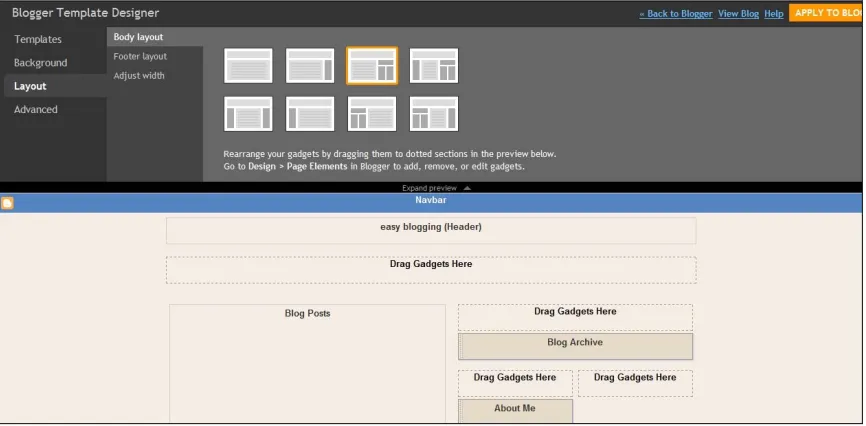
[image:22.612.91.524.79.292.2]22 Fig. 1.1 Blogger provides a range of different layouts to choose from. Make your selection then drag in the elements you want to place on the page.
All that’s left for you to do is create the content… and add AdSense. Even that’s been made easy for you.
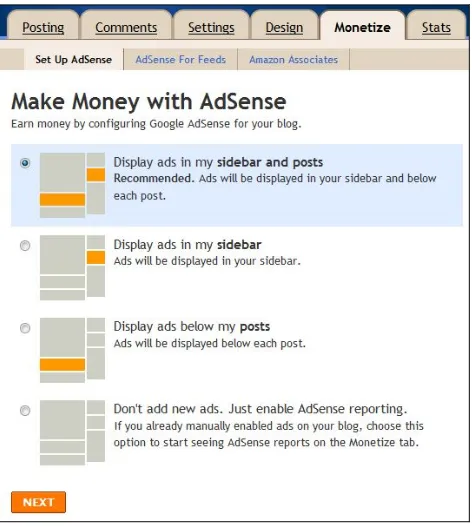
Blogger.com lets you apply for AdSense directly from its site. It even gives you a choice of locations to place the ads, with one option clearly
Copyright © 2011 Joel Comm and Flying Monkey Media, Inc. – All Rights Reserved
[image:23.612.189.425.77.340.2]23 Fig. 1.2 Blogger even tells you where to put your AdSense units.
You can certainly use that option to begin with. It’s a great way to get started, but there are plenty of limitations with this layout and with Blogger in general.
The layout, for example, leaves plenty of additional monetization strategies behind, and it doesn’t touch on optimization. It only deals with two ad formats in two spots. There’s a lot more to making money with AdSense — even on blogs — than that!
Using Blogger with your own domain name, with all of the search engine benefits that can bring is difficult, and some publishers have reported that their sites were deleted by Google who mistook them for spam sites.
When you use a free service to build your site, you’re always a guest, which means you can be asked to leave at any time.
But Blogger is still a great place to begin. If you’ve never built a website before, it will let you feel the thrill that comes with seeing your content online for the first time, and it can even give you the buzz that comes with your first paid clicks.
Copyright © 2011 Joel Comm and Flying Monkey Media, Inc. – All Rights Reserved
24
Wordpress.com
The biggest like-for-like rival to Blogger is probably Wordpress.com, a free and simple offshoot from Wordpress.org. I’ll come back to Wordpress.org later because it’s the next step on the publisher’s development path. Wordpress.org is publishing with the training wheels off and my #1
recommendation
Unlike the original open source program, Wordpress.com doesn’t require the publisher to already have a hosting service. There’s no installation and no documentation to read through before you can call yourself a “Wordpress expert.”
Like Blogger, it’s just a matter of signing up, choosing a template, writing your content and having the pleasure of seeing it online right away. But… there is a very big “but.”
There are also no ads. At least, none for the publisher. Wordpress.com
supports itself and pays for the hosting by placing ads on its publishers’ sites but it doesn’t allow those publishers to support themselves by putting ads on their own sites.
If you’re getting 25,000 views a month, Wordpress.com will let you split any revenues 50/50 — so they’ll let you keep half the money your successful site makes. If you want to become a VIP member, you can put on all the ads you want in return for a cool $15,000 to $150,000 a year. I can’t imagine that there are even many big firms willing to pay that.
Wordpress.com is really for small-scale bloggers who don’t want to make money from their websites. If it offers any advantage at all over Blogger, it’s that it lets you play around with the site without paying so that you’ll be ready to dive right in when you want to move up to Wordpress.org.
Otherwise you can do exactly the same thing on Blogger.com, and get paid for it.
Simple Sitebuilding Services: Google Sites, Moonfruit and More
Copyright © 2011 Joel Comm and Flying Monkey Media, Inc. – All Rights Reserved
25
Fortunately Blogger isn’t the only way to get online fast. Google’s Sites, the replacement for its Page Creator, makes building a static website as simple as point, click and type.
Again, you get a choice of templates that you can edit freely and simply by clicking buttons and typing in text boxes. It’s little different to using Word or any other piece of user-friendly software. And because its run by Google, placing your AdSense code onto the site is pretty painless too. Just click the “Insert” tab and one of the options, hidden alongside the calendar,
document, map, and photo widgets, is to place the AdSense code.
Again, it’s all very simple stuff. The foundation of the site is ready. All you have to do is paste in the content and you’re online.
Fig. 1.3 Google Sites give you a choice of templates and AdSense in the drop-down menu.
All you’ll have to do next is let people know where you are. And that’s where the disadvantages of creating a website using a free tool like Google Sites kicks in.
With a website created through Google Sites, search engine optimization becomes difficult. Your URL will be https://sites.google.com/site/[name]/, which is about as catchy a ball of slush. It’s unlikely to get very far in search engines and when you try to spread it around, it will simply make you look unprofessional, however great the template looks.
Google’s instant website machine can be a useful place to get started but it’s really designed to help people like teachers display information to a closed audience. It’s not a good way to earn a lot of money, and even for
Copyright © 2011 Joel Comm and Flying Monkey Media, Inc. – All Rights Reserved
26
Moonfruit
One way to do that and still keep the simplicity of Google Pages is to use a service like’s. Like Google Pages, Moonfruit — and there are plenty of other companies now offering similar services — provides templates and an editor that lets you move elements around on the page, write text and upload images, all without ever seeing a line of code — except for the AdSense code which you can also handle through the site itself.
You’ll have to figure out a design, something that might take a little effort but it’s good, creative fun, and you can do it for free as well, provided you’re willing to go in and make a change every few months. Moonfruit deletes free sites that it thinks aren’t being used.
If you’re willing to pay as little as $4.49 a month though, you can also buy a domain name (again, you can do that without even leaving Moonfruit, if you want) and pay Moonfruit for the hosting.
You’ll have your own site, with your own domain, with AdSense and even Google Analytics, without seeing a line of code or going anywhere near an ftp account.
One disadvantage with Moonfruit and its competitors though is that the reason you don’t have to see any code is that it’s built with Flash. You’re working with a graphic interface rather than the website itself.
That matters for two reasons: search engines can’t read Flash sites; and Apple devices such as iPhones and iPads can’t display them.
Moonfruit gets around those problems by translating everything you put on the site into an HTML version. That keeps the search engine robots happy but the translation isn’t great so the small number of people who reach the site with an Apple gadget are going to see something pretty unattractive.
Copyright © 2011 Joel Comm and Flying Monkey Media, Inc. – All Rights Reserved
27
1.2
Off with the Training Wheels!
Whether you decide to begin with a simple dynamic service like those
supplied by Blogger or Wordpress.com, or whether you go for an easy static site like the ones you can create with Google Sites or a website creator like Moonfruit’s, you’ll be up and running with your own website in minutes. That’s exciting.
If you’re building your first site, it really is a thrill to see something you’ve created on the Web. And when you realize how easy it is, you’ll wonder why you didn’t start earlier.
And once you’ve been doing it for a while, you’ll start to feel the restrictions of using services that have been supplied by other companies, that require you to use templates, host the site on their servers or limit what you can put on your pages.
You’ll want to pull off your training wheels and head out on your own.
Buying a Domain Name
That begins with buying a domain name.
Your own domain name is an essential part of your branding, and it’s a vital element in search engine marketing too. It’s the address by which the world knows you.
Finding a name though is easier said than done these days. All the best words in the dictionary — in fact, just about all of the words in the dictionary— have either already been bought and built by developers or they’ve been bought and offered by speculators.
But that doesn’t mean you can’t create a good name out of more than one word and buy the domain for just a few bucks. Putting two words together, sometimes with a hyphen, can work ) and there are plenty of good names available if you’re prepared to move outside the world of .coms into .net and .biz, etc. One recent trend has seen
Copyright © 2011 Joel Comm and Flying Monkey Media, Inc. – All Rights Reserved
28
streaming service willow.tv. However, (.com) is the gold standard and if you're going to buy a domain, (.com) is the way to go.
You can buy domains from any number of companies, and a lot of
sitebuilding firms will even handle the sale for you. If you want to keep your independence though, GoDaddy.com is one of the biggest domain and
hosting services. (I don't recommend their hosting or their numerous upsells though) You’ll be able to test a bunch of different options and the site will tell you which (if any) are available.
If you can’t find a name you like and that hasn’t already been grabbed, you can also find domain name marketplaces where you can purchase domains that are for sale. For example:
There’s a good chance you’ll find some good names at Sedo but they can cost you anything from $50 to $50,000. Before you part with a penny, think about the advantage that a good name can bring and ask yourself if you can’t get the extra traffic a cheaper way. Often, you can. At Flippa you can also buy sites that are already earning AdSense revenue. Please proceed with caution if you've never bought a site before.
Choosing a Hosting Service
Your site is going to be stored on a hosting company’s server. (You didn’t want thousands of people dialing into your computer every hour, did you?) Space on those servers is available for rent and again, there are lots of
different options available depending on how much you want to pay and what you need.
But you will get what you pay for with Web hosting. “Free” services will cost you more than you save in lost revenue, and you can pay up to $200 a month for dedicated servers. It’s unlikely you’ll need that until you’re handling cityloads of users an hour.
Copyright © 2011 Joel Comm and Flying Monkey Media, Inc. – All Rights Reserved
29
space.
Due to my relationship with HostGator, I have been able to negotiate a special offer for my readers. If you purchase the “baby” plan for $9.95 and enter coupon code “thejoelcommcode" at checkout, you will get your first month of hosting for one penny. Not a bad deal at all.
Most importantly, whichever hosting service you use should have 24-hour service. If your site goes down, you’ll be losing money every hour it’s offline. If there’s a problem with the server, you want to make sure it’s fixed right away.
While HostGator makes hosting fairly simply, other hosts aren’t always as straightforward. If you haven’t done it before, it’s going to feel a little unusual. But the steps are few and it’s actually very difficult to make a mistake. Placing a domain name that you’ve bought onto a host’s server, for example, will usually require filling in your personal details, choosing a payment plan, then providing your domain’s “nameservers” when asked. They will look something like this: “NS1.[domainname].com.” They just tell the new host where to find your domain name so that it can bring it onto its own server. You should receive that information by email when you buy the domain.
That will give you name and a place on the Web. But you still have to upload your content. The username and password supplied by your hosting company will give you access to a control panel, usually a program called cPanel, and it’s intuitive enough, with buttons for uploading and directories for organizing files and folders of information.
This is where learning about the Internet really begins. It’s not difficult, but it is a little technical and there are plenty of guides and manual around that will explain what the various buttons do, how you can create an FTP account to make the management easier, and even how to create sub-domains if you want them.
But coming to grips with this stuff will take a little time. It will take patience, practice and a little effort but it’s nothing that requires any major skills that the average person doesn’t possess. You just have to be willing to sit down and try it without being afraid to make mistakes.
The result of that practice will be complete control over your website — and that’s a goal worth attaining.
Copyright © 2011 Joel Comm and Flying Monkey Media, Inc. – All Rights Reserved
30
WordPress.Org, Movable Type — and SocratesTheme
I’ve already mentioned WordPress.com as one way to get online with a dynamic website quickly. WordPress.com though is a simplified, hosted version of Wordpress.org, an open source content management system that has been around since 2003. More than 12 percent of the largest million websites on the Internet are believed to have been built with WordPress, and the latest version, 3.0, has been downloaded more than 12.5 million times. The biggest strength of WordPress is that it’s open source. Because any developer can access the source code, they can add to it, creating applications, themes and plug-ins that extend the functionality of the program.
It’s also yours in a way that WordPress.com isn’t. Create a site using
WordPress.org, and you can put all the ads and monetization tools on it you want, help yourself to all of the plug-ins, themes and extensions you need, use your own domain name, with all of the branding and SEO benefits that can bring, and choose your own hosting service instead of relying on the one supplied by WordPress.com.
Like WordPress.com, it is also free but you’ll have to pay your own hosting fees — which, again, are usually around $5-$10 per month.
To use WordPress.org, you’ll first need to have bought a domain name and signed up for a hosting service. You can then either download WordPress on to your desktop from WordPress.org, or simply install the program by
choosing the option in the host’s cPanel.
There are other services that work in a similar way. MovableType is
WordPress’s closest competitor and is said to be more secure from hackers than WordPress. But that might be because it’s targeted less — and it’s targeted less because it’s used less. The last few years have seen MovableType chasing WordPress, even mimicking much of WordPress’s design and usability.
It’s a service that’s popular with some large media companies but I find WordPress easier to use, and it’s more than enough for most AdSense-supported businesses.
Copyright © 2011 Joel Comm and Flying Monkey Media, Inc. – All Rights Reserved
31
[image:31.612.94.523.121.426.2]And you’ll still have to look for and install all of the plug-ins and extras that will make your site more powerful.
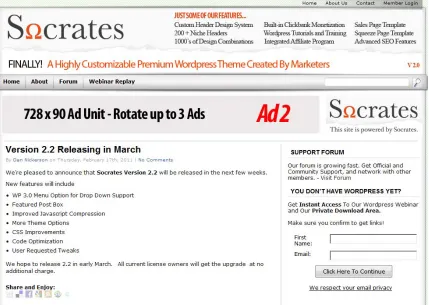
Fig. 1.4 A sample blog created using my Socrates Theme. Banners can rotate, designs are varied, and placement of AdSense units is completely down to you.
So together with Dan Nickerson, I produced SocratesTheme. It’s a flexible theme for WordPress that was built with monetization in mind. It contains over 220 niche header designs, multiple sidebar layouts and built-in AdSense, affiliate and ClickBank ad bars.
It’s a complete AdSense-ready website in a box.
For a single domain, it costs just $47 — and that includes access to a whole stack of tutorial videos that will talk you through WordPress set-up with cPanel, WordPress plug-ins, AdSense for WordPress, and everything else you need to get started and move forward, including a very active member
Copyright © 2011 Joel Comm and Flying Monkey Media, Inc. – All Rights Reserved
32
0 20 40 60 80 100
1st Qtr 2nd Qtr 3rd Qtr 4th Qtr
East West North
1.3 Designing a Site from Scratch
Programs like WordPress will provide a platform into which you can insert all the elements — the spaces for text and images, for headers and graphics, for menus and social media buttons, and for ads — that you can use to build a professional website.
You’ll always be working within the limitations of a set format — blogs, for example, are expected to look a certain way — but for the most part, those limitations are broad enough to give you enough room to do everything necessary to create a successful AdSense-supported website.
But what if you want to create something truly unique, a website that doesn’t depend on Blogger or WordPress, that’s been created completely from the ground up?
You can still do that, of course. You can install Adobe’s Dreamweaver or Microsoft’s Expression Web. You can learn about HTML5, PHP and CSS. You can create the site you’ve always dreamed of — if creating a site from scratch is something you’ve always dreamed of doing.
Or you can hire a professional Web designer to do it for you. Freelance sites like
Copyright © 2011 Joel Comm and Flying Monkey Media, Inc. – All Rights Reserved
33
You’ll need to know what you want built and what you want the site to do, but most importantly, you’ll need to have a good reason for paying
thousands of dollars for a unique handmade site instead of using a free service or a low-cost theme that allows for customization.
If you’re just hoping to monetize content, you really don’t need to hand-build any more.
1.4 The Basics of Search Engine Optimization
However you decide to build your first site, people have to know you’re there. One of the most important ways to do that is get yourself a high-ranking in a search engine.
There are lots of different search engines, but only three are really
important: Google, Yahoo! and Microsoft’s Bing. In Chapter 17, I’ll talk in more detail about improving your search engine rankings.
If you want to take a shortcut, there are plenty of companies which will make the submissions for you, and they’ll even optimize your site to get you as high on the rankings as possible.
In general though, your search engine ranking will depend on a number of factors. One of those factors is the number of sites that link to yours. As far as Google is concerned if lots of sites about model railways link to your model railway site, that must be a pretty good sign that people who like model railways think your site is good. So they’ll want to offer it to people who search for model railways, bringing you lots of free traffic.
It’s a model that Google’s founders, Sergei Brin and Larry Page, based on academia: the more researchers refer to a paper or a professor, the more important that paper or professor must be.
Once you’ve got your site up and running then you’ll want to persuade other sites to give you links. You could offer to exchange links with other websites and you could even set up a page that contains recommended links so that you’ll have somewhere to put them.
Guest posts on other blogs can help as well, as can a “lens,” a kind of expert Web page, on Squidoo, a site created by marketing expert and author Seth Godin.
Links are only one aspect of SEO though. Metatags — keywords that
Copyright © 2011 Joel Comm and Flying Monkey Media, Inc. – All Rights Reserved
34
Search engine optimization is a field in its own right, a practice that will be ongoing and time-consuming for a publisher. There’s a reason that many companies choose to outsource it. Initially though, just focus on getting your website up, filling it with content, and making money from AdSense.
Another reason I recommend Wordpress is that a lot site SEO is handled for you and as a Socrates Theme customer even more.
1.5 From Blogger to Publisher
So how should you start? How should someone who wants to make money from AdSense publishing, but who has never built a website, begin?
You can start wherever you feel most comfortable. If you’re confident enough to dive straight into WordPress or even create a site from scratch yourself, than that’s fine. Many people are likely to find that the best way is to begin with Blogger. Sign up, play with the templates, write some content, join AdSense and add some AdSense units.
Do it just for the pleasure of seeing your content online and of feeling the excitement that comes from receiving your first ad clicks.
Then, before you’ve produced too much content, sign up for your own hosting service and install WordPress (and ideally, upload SocratesTheme too.) You can copy your existing posts, get used to the interface and the way it works, and you are off and running!
Copyright © 2011 Joel Comm and Flying Monkey Media, Inc. – All Rights Reserved
35
2. ADSENSE — MAKING THE MONEY!
So creating your website can be pretty simple — and even the complicated stuff isn’t difficult. But you’ll also need to sign up for AdSense. If you’re using Blogger or a sitebuilder like Moonfruit, you’ll actually be able to join AdSense from within those programs. Choose to insert an AdSense unit and you’ll be asked to sign in to your AdSense account to fetch your code. If you don’t have an account, you’ll be offered a link to sign up.
Alternatively, you can join AdSense directly from Google itself at:
If you already have a Google account the process is faster. Here’s how you sign up.
2.1 Signing Up Made Easy
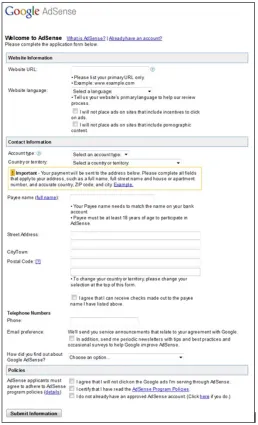
The sign-up page asks for a relatively small amount of information, not all of which is as obvious as you might like.
First, you’ll have to tell Google the “primary” site on which you want to place your ads. If you have more than one site, just pick the one that has the most traffic and content. You’ll also need to tell Google the language of your
website so that they can assign the site to the right person for review. You’ll then be offered two checkboxes. One of them requires you to state that you won’t be placing the ads on sites that contain pornographic content. The other indicates that you agree not to “place ads on sites that include incentives to click on ads.”
At the bottom of the page, you’ll also have to agree not to “click on the Google ads I’m serving through AdSense.”
Both of those are important and they’re themes that will run throughout your time as an AdSense publisher.
If you click on one of your own ads — even to see which companies are advertising on your pages or to make sure that the system is working — you’ll cost your advertisers money. They’ll have to pay for that click. Google can track suspicious clicks, and while it will take a few “mistakes” into
Copyright © 2011 Joel Comm and Flying Monkey Media, Inc. – All Rights Reserved
36
Many publishers have found that they’ve been permanently banned from AdSense for those sorts of practices, a very costly mistake.
[image:36.612.178.436.186.611.2]You can — and should — encourage people to click on affiliate ads because they only pay if someone actually buys. But you can never encourage people to click pay-per-click ads, like AdSense.
Fig. 2.1 The AdSense sign up page
Copyright © 2011 Joel Comm and Flying Monkey Media, Inc. – All Rights Reserved
37
Google where to send the money. Take a business account and the payments will be made in the name of your company; take an individual account, and they’ll be paid directly to you. You might wish to consult with a CPA to decide which is the most advantageous way for you to go.
Once, you’ve completed the basic details, you’ll be asked to confirm them. (Do check that the address is correct. Google likes to send out checks, so if you’ve put the wrong address, your neighbor will be receiving your AdSense payments instead of you. I like being nice to my neighbors… but not that much!) And you’ll be asked to log in using a Google Account such as your Gmail username and password, or to create a username and password if you don’t have one.
Google will then send you an email with a link to confirm that your details are correct. Click the link and someone will review your website to make sure that it’s appropriate for AdSense.
That process can take two or three days, although often it’s a lot faster, but it does mean that for those first two or three days, you won’t have any ads. Use that time to create more content so that you’ll have plenty of space to put your ads once the site has been approved. And the more original quality content you have on your site, the better. Likewise if your site is loaded with other advertising already it may not be approved.
2.2 Google’s Policies — They’re Important!
There are two fields on the AdSense registration form that are particularly important. The first is your address. You want to receive those AdSense checks!
The second is the check box that indicates that you’ve read AdSense’s program policies. (Google even makes reading the policies the first item on its checklist that can help to guide you through AdSense.)
That’s because those policies are important. You have to follow them and you have follow them without looking for shortcuts.
AdSense works. I know it works because I’ve got the stats, the checks and the bank balance to prove it. And all of the methods that I used to increase my AdSense revenues were completely legitimate and in line with Google’s policies.
Copyright © 2011 Joel Comm and Flying Monkey Media, Inc. – All Rights Reserved
38
thrown out by putting ads on pages without content or by persuading users to click on the ads is just plain crazy.
I’ve put a detailed list of Google’s “do’s and don’ts” at the back of this book but the things to look out for in particular are:
Incentives
When the ads appear on your page, you have to leave them
completely alone. You might be tempted to tell your users to “click here” or support your sponsors but if Google catches you, they could well cut you off. They want people to click because they’re genuinely interested in the ad. Get your optimization strategies right and they’ll do just that.
Content
Google doesn’t want advertisers complaining to them that their services were being promoted on a site that supports gambling or is filled with profanity or contains more ads than content. If your content doesn’t come up to scratch, you’ll need a site that does.
Code Modification
You have to paste the AdSense code onto your site as is. And you don’t need to do anything else! Your AdSense account will let you play with colors and placements (and getting those right is what will really boost your income) so why bother playing with Google’s HTML? It’s not necessary and it could get you a lifetime ban.
Prohibited Clicks
And nastiest of all are the people who either click on their own ads or create programs to do it for them. It’s true that you could give yourself some easy cash with just a little click as you’re sitting in a café
somewhere. But you’re taking money away from an advertiser. He wants to buy a lead not satisfy your curiosity. And Google might just take away your cash cow.
Copyright © 2011 Joel Comm and Flying Monkey Media, Inc. – All Rights Reserved
39
In theory, you could insert the AdSense code onto a Web page as many times as you wanted. But Google limits the number of ads you can place on a page. You can place up to three content ad units and up to three link units; no more than two Google AdSense for search boxes; and a single link unit or another search box on the search results page.
You really shouldn’t need more than those but as you start thinking about the best places to put your AdSense units, it is worth remembering that Google does have limits.
The other interesting rule is that Google does not allow AdSense to be “Placed on pages published specifically for the purpose of showing ads.” That can sound a little strange. When you’re building an Internet business, every page is published specifically for the purpose of showing ads!
Google is referring to pages that have very little content or no content at all but it does hit on an important point.
AdSense will support your site and it will turn your content into cash. But your site will be built on content, and that should always be your main focus. Keep that in mind as you build your business, and AdSense should always be working for you.
2.3 AdSense in All its Forms
When AdSense started it only came in one flavor: as content ads that placed text ads alongside search results and articles. Now Google comes in a variety of different forms that allow publishers to place AdSense units on a range of different platforms.
That provides for a huge amount of flexibility, and a great deal of
opportunity. Some of those forms you will certainly need to understand and use if you’re to maximize the revenues your site can earn.
Other forms you might never use, but they’re still worth knowing just in case the opportunity arises.
And some of those forms come in a number of different sizes, shapes and formats.
Copyright © 2011 Joel Comm and Flying Monkey Media, Inc. – All Rights Reserved
40
AdSense for Content
AdSense for Content is the richest of the different AdSense products both in terms of the size of its ad inventory and in terms of the range of different ad types available to publishers (not to mention the wealth it provides to those publishers.) These are the ads that run alongside content — the articles and copy that appear on your Web pages. Targeted by Google’s clever software, they’re unobtrusive, distinctive and they appear to add information to a page rather than get in the way of the user experience.
They can come in the form of text ads, link ads and display ads. Text Ads
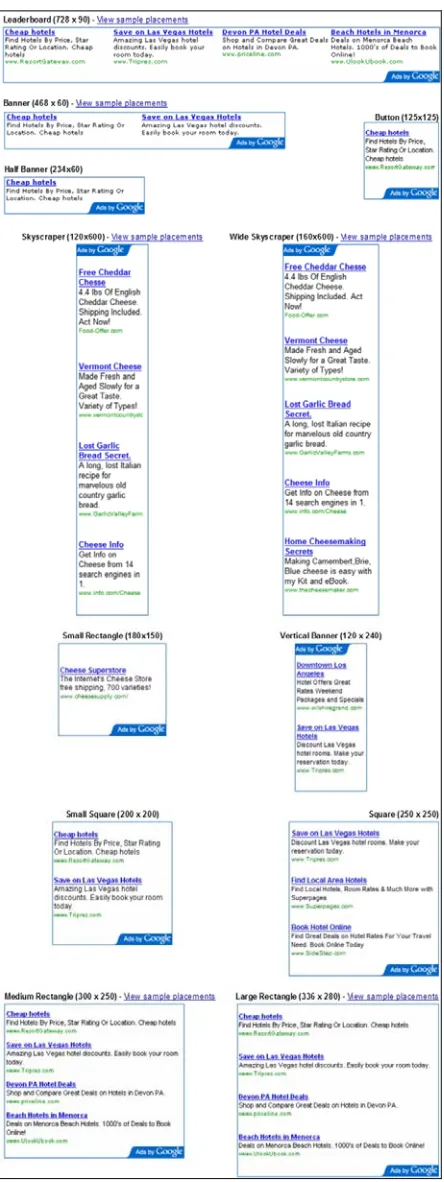
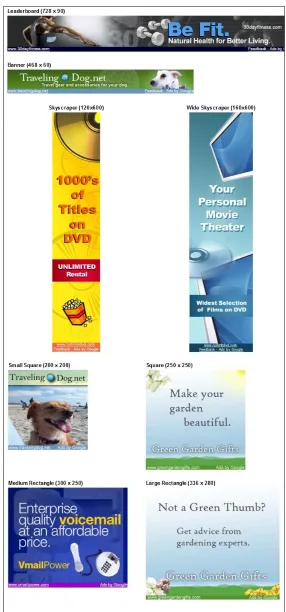
Text ads are the type that users are most familiar with. They take the form of a box containing one or a number of ads with a linked headline, a brief description and a URL. You also get the “Ads by Google” notice that appears on all AdSense ads. (Google changed this notice recently and it now blends in much better than it used to, sometimes disappearing to a single letter.) There are now twelve different types of text ad. They include horizontal units and vertical units, square units and rectangular units, large units and small units.
You won’t use all of them but you will need to know which units deliver the best results for the way your website is laid out. While that will vary from site to site, there are general guidelines that you should know when you start your testing.
One of the most popular formats is the leaderboard. At 728 x 90, it stretches pretty much across the screen and while it can be placed anywhere, it’s mostly used at the top of the page, above the main text.
Fig. 2.2 The leaderboard.
That’s a great location. It’s the first thing the reader sees and it offers a good selection of ads to choose from. When you’re just starting out and still
Copyright © 2011 Joel Comm and Flying Monkey Media, Inc. – All Rights Reserved
41
Of course, you can put it in other places too. Putting a leaderboard ad
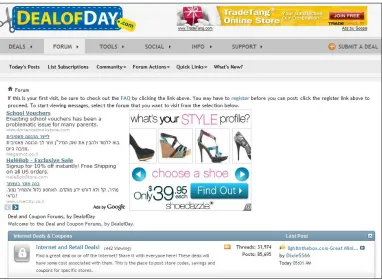
between forum entries for example can be a pretty good strategy sometimes and definitely worth trying. On the whole though, I think you’ll probably find that one of the smaller ads, such as a banner or half-banner might blend in better there and generate more clicks.
And you can often forget about putting a leaderboard at the bottom of the page, despite what Google’s samples show you. It would certainly fit there but you have to be certain that people are going to reach the bottom of the page, especially a long page.
You might find that only a small minority of readers would get that far, so you’re already reducing the percentage of readers who would click through. Overall, I’d say that leaderboards are most effective blended into the top of the page beneath the navigation bar and sometimes placed between forum entries.
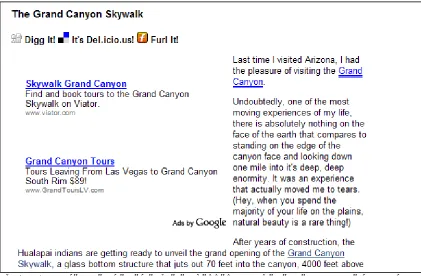
Fig. 2.3 A nicely optimized half banner on this Squidoo page.
Banners (468 x 60)and half-banners (234 x 60)are short versions of the leaderboard and much more flexible.
Like leaderboards you can certainly put these sorts of ads at the top of the page, and lots of sites do it. Again, that’s something worth trying. You can put up a leaderboard for a week or so, swap it for a banner for another week or so, and compare the results.
But at the top of the page, I’d expect the leaderboard to do better.
Copyright © 2011 Joel Comm and Flying Monkey Media, Inc. – All Rights Reserved
42
Copyright © 2011 Joel Comm and Flying Monkey Media, Inc. – All Rights Reserved
[image:43.612.196.418.74.665.2]