Developing Enterprise Java Applications with J2EE and UML
by Khawar Zaman Ahmed, Cary E. Umrysh• Paperback: 288 pages ; Dimensions (in inches): 0.66 x 9.28 x 7.32
• Publisher: Addison-Wesley Pub Co; ISBN: 0201738295; 1st edition (December 15, 2001)
Table of Contents
Copyright... 6
Dedication
... 7
Foreword... 8
Preface... 10
Intended Audience
... 10
How to Use This Book...11
Chapter Summaries
... 12
Conventions... 13
Acknowledgments
... 15
Chapter 1. Introduction to Enterprise Software
... 17
What Is Enterprise Software?... 17
Evolution of Enterprise Software
... 20
Enterprise Software and Component-Based Software
... 22
Summary... 23
Chapter 2. Introduction to the J2EE
... 24
What Is the Java 2 Platform, Enterprise Edition?
... 24
A Brief History of J2EE
... 25
Why J2EE?
... 27
A Brief Overview of J2EE... 30
Summary... 39
Chapter 3. Introduction to the UML
... 40
UML Overview
... 41
Why Use the J2EE and the UML Together?
... 43
Challenges in Modeling J2EE in the UML
... 45
Extension Mechanisms in the UML
... 46
The Approach to J2EE UML Modeling
... 49
Summary
... 50
Chapter 4. UML and Java... 51
Representing Structure... 51
Representing Relationships... 57
Summary... 69
Chapter 5. Overview of Activities
... 70
What Is a Software Development Process?... 70
Overview of Popular Approaches to Software Development
... 70
Approach Used in This Book
... 79
Overview of Major Activities
... 80
Summary... 82
Chapter 6. Architecture... 83
What Is Software Architecture?... 83
Why Architecture?
... 85
Key Concepts in Enterprise Application Architecture... 86
Putting It All Together...101
Summary
...102
Chapter 7. Analyzing Customer Needs
...103
Why Software Analysis and Design?
...103
Problem Analysis
...104
Use Case Modeling
...105
Identifying the Actors
...106
Finding the Use Cases
...107
Use Case Diagrams
...109
Use Case Relationships
... 110
Sequence Diagrams
... 113
Activity Diagrams
... 115
Summary... 118
Chapter 8. Creating the Design
...120
Use Case Analysis
...120
Use Case Realizations
...120
Refined Use Case Description...122
Sequence Diagrams
...124
Collaboration Diagrams
...129
Class Diagrams
...130
Coalescing the Analysis Classes
...134
Packaging
...138
Summary...140
Chapter 9. Overview of J2EE Technologies...142
The Big Picture...142
Servlets
...143
JavaServer Pages (JSP)
...143
Enterprise JavaBeans (EJB)...144
Session Beans
...144
Entity Beans...144
Message-Driven Beans
...145
Assembly and Deployment...145
Case Study...145
Summary...145
Chapter 10. Servlets...146
Introduction to Servlets...147
Servlet Life Cycle
...149
Request Handling...152
Response Generation...153
HTTP Request Handlers...155
The RequestDispatcher Interface
...156
Modeling Servlets in UML...157
Modeling Other Servlet Aspects
...159
Identifying Servlets in Enterprise Applications...165
Summary...169
Chapter 11. JavaServer Pages...170
Introduction to JSP
...171
Anatomy of a JSP...174
Tag Libraries...178
JSP and the UML
...180
JSP in Enterprise Applications
...185
Summary...189
Chapter 12. Session Beans...190
Introduction to Enterprise JavaBeans
...190
EJB Views and the UML
...192
Session Beans
...197
Types of Session Beans and Conversational State...198
Instance Passivation
...202
Transactions...203
Session Bean Technology
...209
Modeling Interface Behavior...213
Session Bean Life Cycle
...216
Session Bean Common Scenarios
...218
Modeling Session Bean Relationships...221
Managing Performance
...226
The Local Client
...227
Identifying Session Beans in Enterprise Applications
...227
Summary...230
Chapter 13. Entity Beans
...232
Introduction to Entity Beans...232
Entity Bean Views and the UML
...235
Persistence
...238
Abstract Persistence...240
Container-Managed Relationships...243
Entity Bean Technology
...246
Entity Bean Life Cycle
...254
Entity Bean Common Scenarios...256
Modeling Entity Bean Relationships...256
Identifying Entity Beans in Enterprise Applications
...263
Summary...267
Chapter 14. Message-Driven Beans...268
Introduction to Message-Driven Beans...268
Message-Driven Bean Views and the UML
...271
Message-Driven Bean Technology
...275
Message-Driven Bean Life Cycle...277
Message-Driven Bean Common Scenario
...278
Summary
...280
Chapter 15. Assembly and Deployment...281
Component Modeling
...281
Component Modeling of J2EE Technologies...282
Deployment Modeling...288
Traceability Revisited
...290
Assembly and Deployment of Enterprise Java Applications
...291
Summary
...294
Chapter 16. Case Study
...296
Case Study Background
...297
Problem Statement...297
Rationale and Assumptions
...298
HomeDirect Requirements...298
Inception Phase
...302
Elaboration Phase
...312
Remaining Phases
...326
Summary
...327
Glossary...328
References...346
Books...346
Copyright
Many of the designations used by manufacturers and sellers to distinguish their products are
claimed as trademarks. Where those designations appear in this book, and Addison-Wesley
Inc. was aware of a trademark claim, the designations have been printed with initial capital
letters or in all capitals.
The authors and publisher have taken care in the preparation of this book, but make no
expressed or implied warranty of any kind and assume no responsibility for errors or
omissions. No liability is assumed for incidental or consequential damages in connection with
or arising out of the use of the information or programs contained herein.
The publisher offers discounts on this book when ordered in quantity for special sales. For
more information, please contact:
Pearson Education Corporate Sales Division
201 W. 103rd Street
Indianapolis, IN 46290
(800) 428-5331
Visit AW on the Web: www.awl.com/cseng/
Library of Congress Cataloging-in-Publication Data
Ahmed, Khawar Zaman.
Developing Enterprise Java applications with J2EE™ and UML / Khawar Zaman Ahmed, Cary
E. Umrysh.
p. cm.
Includes bibliographical references and index.
1. Java (Computer program language) 2. Business—Data processing. I. Umrysh, Cary E. II.
Title.
QA76.73.J38 A35 2001
005.13'3—dc21 2001046452
Copyright © 2002 by Addison-Wesley
All rights reserved. No part of this publication may be reproduced, stored in a retrieval system,
or transmitted, in any form, or by any means, electronic, mechanical, photocopying,
recording, or otherwise, without the prior consent of the publisher. Printed in the United
States of America. Published simultaneously in Canada.
Text printed on recycled paper
1 2 3 4 5 6 7 8 9 10—CRS—0504030201
First printing, October 2001
Dedication
To my late father and my mother, and to Heike and Yasmeen.
—Khawar
To my wife Socorro for her support during this lengthy project, and to my sons Jordan and Joshua.
Foreword
The history of software engineering is, in effect, the history of abstraction. As complexity
rises, we respond by raising the level of abstraction in our programming languages and in our
methods. Thus, we have seen the move from C to Java, from structured methods to
object-oriented design, and from classes to design patterns to architectural frameworks.
J2EE, the Java 2 Platform, Enterprise Edition, is such a framework. J2EE is a comprehensive
platform for deploying complex systems. It raises the level of abstraction for the
development team by offering a set of mechanisms (JSP, Enterprise JavaBeans, servlets) and
services (JDBC, JNDI, JMS, and RMI to name a few), enabling the team to focus on its core
business value instead of building infrastructure.
As good as J2EE is, however, there is a large semantic gap between what J2EE provides and
what must be crafted for the business. Bridging that gap can only be achieved given a strong,
foundational understanding of J2EE together with a sound architecture for the
domain-specific system. The Unified Modeling Language (UML) comes into play here, for the
UML is essentially the language of blueprints for software. Visualizing, specifying,
constructing, and documenting the key elements of a system are essential as complexity
rises, and this is the very reason for the UML's existence.
Khawar and Cary bring all of these elements together in this book to help you bridge that
semantic gap. Not only do they cover all of the essential pieces of J2EE thus helping you build
a foundational understanding, they also explain how best to use J2EE's mechanisms and
services. This book will also guide you in applying the UML to model your systems built upon
J2EE, thus enabling you to better reason about and communicate the analysis and design
decisions your team must make in building quality software.
The authors have a deep understanding of J2EE and the UML and a strong sense of the best
practices that can lead you to the effective use of both. Their experience in building
production systems comes through in their writing, and especially in their comprehensive
case study.
There is an essential complexity in building enterprise systems; this book will help you master
—Grady Booch
Chief Scientist
Preface
Developing complex software requires more than just churning out lines of code. As a
software architect or developer involved in an industrial project, you must understand and be
able to leverage critical software subdisciplines such as architecture, analysis and design
techniques, development processes, visual modeling, and the underlying technology to be
successful.
This book brings all these diverse elements together from the Java 2 Platform, Enterprise
Edition (J2EE) development perspective to provide a holistic approach for the reader.
Specifically, this book tries to answer the following key questions:
• What is the Unified Modeling Language (UML), and how is it relevant to J2EE development?
• How do Java and UML relate to each other?
• What are the key concepts in software architecture?
• How does a software development process fit into the J2EE software development
equation?
• How can analysis and design help you to arrive at a better J2EE application design? • What are the key J2EE technologies, and how do they fit together?
• How can you leverage the UML for J2EE development?
Rather than reinvent the wheel, the approach taken in this book is that of bringing together
known works, such as Jim Conallen's Web Modeling Profile and the Sun Java Specification
Request-26 for UML/EJB Mapping Specification.
To provide a practical illustration of the topics discussed, this book guides you through a
sample J2EE application development project using the Rational Unified Process (RUP) and
the UML. A working implementation is provided. Suggestions for further enhanceme nts are
also listed to assist you in continuing your exploration of the UML and J2EE technologies.
Intended Audience
This book is suitable for anyone interested in learning about the UML and how it can be
applied to J2EE development. Current J2EE application developers will learn how to apply the
UML to J2EE application development. UML practitioners will benefit from learning about the
UML and J2EE will be able to get to a productive state faster facilitated by the intertwined
contextual discussion.
After reading the book, you will
• Be able to effectively utilize the UML for developing J2EE applications
• Learn about the key J2EE technologies (EJB, JSP, and servlets) at a technical level
• Know when to use Model 1 versus Model 2 architecture, and identify situations where patterns such as value object and session bean chaining may be appropriate
• Understand software architecture concepts such as decomposition, layering, components, frameworks, patterns, and tiers
• Be able to apply techniques such as use case analysis, analysis object discovery, and
analysis to design transformation to your J2EE project
• Understand the notion of software development processes and the fun damenta ls of
some of the currently popular processes
• Learn how to start using the RUP for your J2EE project
This book only covers the Java language to the extent of providing a mapping of key Java
concepts to the UML. Consequently, some familiarity with Java is assumed (knowing C++ or
a similar language should be sufficient to get the basics from the examples). Prior knowledge
of, or experience with, the UML, J2EE, or enterprise application development is not a
prerequisite, but is certainly helpful.
How to Use This Book
If you are new to the UML and J2EE, you will get the most out of this book by reading it
completely in a sequential manner.
Those who are comfortable with the UML and are primarily interested in learning about J2EE
(or how to apply the UML to J2EE) can jump directly to Chapters 9–1 6.
On the other hand, if you know J2EE and mostly want to learn about UML, you should
concentrate on Chapters 1–8, and then skim through the remaining portions of the book.
You will get the best results if you get your hands on a good modeling tool and try to apply
Chapter Summaries
Chapter 1: Introduction to Enterprise Software provides a high-level overview of enterprise software
development and related technologies.
Chapter 2: Introduction to the J2EE covers the basics of the Java 2 Platform, Enterprise Edition. It
provides an overview of the basic technologies and the APIs, which form the J2EE.
Chapter 3: Introduction to the UML provides an overview of the UML and a quick introduction to the
UML basics.
Chapter 4: UML and Java provides an overview of the Java language's mapping to the UML and
covers some of the basic UML constructs.
Chapter 5: Overview of Activities introduces the notion of software development processes and
outlines the approach taken in the book.
Chapter 6: Architecture, which is an important aspect of good software, introduces the notion of
software architecture and provides an overview of some of the concepts in software
architecture.
Chapter 7: Analyzing Customer Needs shows you how to apply UML use cases to better understand
customer requirements. No matter how cool the software, if it does not meet the customer's
requirements, it is a failure!
Chapter 8: Creating the Design focuses on analyzing the requirements further and creating the initial
design for the case study. This chapter discusses how to translate the requirements you have
gathered into software.
Chapter 9: Overview of J2EE Technologies lays the groundwork for the J2EE technologies we discuss in
the remaining chapters.
Chapter 10: Servlets provides an overview of the Java servlet technology, discusses how they are
modeled in the UML, and then shows a representative application of UML and servlets to the
Chapter 11: JavaServer Pages teaches you about JSPs, when to use them, and how to use them in
the sample project. JavaServer Pages (JSP) combine the power of servlets with the flexibility
of HTML pages.
Chapter 12: Session Beans discusses how session beans are used in the middle tier and how to best
model and utilize them. Session beans are one of the three types of enterprise beans
provided in the J2EE. The chapter concludes with the usage of session beans in the context of
the case study.
Chapter 13: Entity Beans focuses on the entity bean concept, its advantages and issues, and how
to effectively model it in the UML. Entity beans provide a convenient way to objectify the
stored data.
Chapter 14: Message-Driven Beans covers the technology and how to model them in the UML.
Message-driven beans are a new addition to the J2EE Enterprise JavaBean specification.
Chapter 15: Assembly and Deployment discusses how UML can help assembly and deployment of a
distributed application.
Chapter 16: Case Study discusses the details of the example used in this book including general
requirements, restrictions, and such.
References for further reading include books, articles, and online sources.
A Glossary containing specialized terms and their meanings is provided for quick reference. An
Index is provided for quick lookup and reference.
Conventions
We use several notational conventions throughout this book. A short list is provided for your
reference:
• Italicized words are used to highlight key concepts or terminology.
• References to terms such as javax.servlet.http.HttpServletResponse are used to
identify the exact J2SE or J2EE classes for further details. For example, in the
preceding term the user is being referred to the HttpServletResponse class, which is
• Boldface text is used to identify keywords and reserved words in the context of
Java/J2EE, for example, ejbCreate.
Acknowledgments
We would like to acknowledge the contributions of all those who helped make this book
possible.
Our sincere thanks to Kirk Knoernschid, Todd Dunnavant, Dave Tropeano, Atma Sutjianto,
Kevin Kelly, Terry Quatrani, Carolyn Hakansson-Johnston, Ingrid Subbotin, Jim Conallen,
Loïc Julien, Dave Hauck, James Abbott, Simon Johnston, Tommy Fannon, Hassan Issa, and
all others who provided direct or indirect input, clarifications, ideas, feedback, guidance, and
reviews at various stages, from before inception through to completion. Their help was
instrumental in defining and redefining the work, in eliminating inaccuracies, in creating
additional material, and in the end, the result is a better product overall.
A special thank you to Todd Dunnavant. He not only reviewed multiple drafts cover to cover,
he also generously provided in-depth written explanations, suggestions, and comments on
various topics that we were only too happy to incorporate in the book.
Kirk Knoernschid's succinct review was most helpful in getting us to focus and remedy some
of the key deficiencies in an earlier, draft version. Thank you for that.
Khawar would like to acknowledge and thank Kevin Kelly for his guidance and mentoring.
Kevin's insights and ideas were immensely useful throughout this project.
Dave Tropeano's review of a very early draft directly led to a revectoring of our overall
approach and the addition of at least two full chapters. The final version is better because of
it, and we have Dave to thank.
Our thanks to Rational Software and its management for fostering a work environment in
which such endeavors can be undertaken. We would especially like to thank Steve Rabuchin
for his willingness to go the extra mile to help others pursue their ideas and achieve their
goals. We would also like to thank Jim McGee, Roger Oberg, Magnus Christerson, John
Scumniotales, Matt Halls, and Eric Naiburg. Had it not been for the encouragement and
support of these individuals, this book would neither have been conceived nor written.
We are very grateful to the staff at Addison-Wesley for their support throughout this project.
We especially thank Paul W. Becker and his assistant Jessica Cirone who assisted, reminded,
who, through her thoughtful editing, transformed our semi-coherent passages into readable
paragraphs. Thanks also to Kathy Glidden of Stratford Publishing Services, Inc. for her skilled
project management in the critical production stage.
We benefited immensely from others who have worked on or written about the UML, J2EE,
and related topics. To that end, we would like to thank the various authors whose books,
articles, and Web sites are listed in the References section. Their works helped expand our
understanding of the subjects.
Last but most importantly, we would like to thank our families for their patience and support
throughout these last several months. Khawar would like to thank his wife Heike and his
daughter Yasmeen for their cheerful and understanding attitude and for their support during
this long commitment. Heike's diligent proofreading and corrections to the draft at various
stages were invaluable and resulted in the elimination of numerous late-night typos and
incoherent sentences. Cary would like to thank his wife Socorro for all her support and
helpfulness during this lengthy project.
—K.Z.A.
Chapter 1. Introduction to Enterprise Software
• What Is Enterprise Software?
• Evolution of Enterprise Software
• Enterprise Software and Component-Based Software • Summary
If you have heard of terms such as Business-to-Business (B2B) and Business-to-Consumer (B2C), you are already familiar with enterprise software at some level. B2B and B2C are just some of the more popular manifestations of enterprise software.
This introductory chapter offers a more in-depth exploration of enterprise software and the challenges and opportunities that accompany it.
What Is Enterprise Software?
The term enterprise refers to an organization of individuals or entities, presumably working
together to achieve some common goals. Organizations come in all shapes and sizes, large
and small, for-profit and nonprofit, governmental and nongovernmental.
Chances are, however, that when someone uses the term enterprise, they mean a large,
for-profit organization, such as Intel, General Motors, Wal-Mart, Bank of America, or eBay.
Enterprises generally have some common needs, such as information sharing and processing,
asset management and tracking, resource planning, customer or client management,
protection of business knowledge, and so on. The term enterprise software is used to
collectively refer to all software involved in supporting these common elements of an
enterprise.
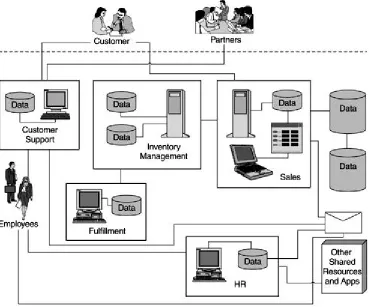
Figure 1-1. Enterprise and enterprise software
The figure shows an enterprise software setup that is essentially a collection of diverse
syste ms. Software is organized along the various functions within the organization, for
example, sales, human resources, and so on. A firewall is provided to safeguard enterprise
data from unauthorized access. Some software systems such as those for sales and inventory
management interact; however, most are fairly isolated islands of software.
Enterprise software may consist of a multitude of distinct pieces today, but enterprises have
gradually come to realize that there is a strong need for their diverse syste ms to integrate
well and leverage each other wherever appropriate for maximum enterprise benefit. B2B and
B2C are good examples of such integration and leveraging.
Some of the potential ways an enterprise hopes to leverage integrated enterprise software
follows:
• By integrating its customer support and in-house product knowledge, an enterprise
• By linking its marketing machine with the online world, an enterprise could reach a
much larger audience online.
• By linking its sales management and inventory, an enterprise may be able to devise
specific, lower cost Web sales channels to reach an untapped market segment.
• By providing a front end to one of the services used by its employees, such as the internal office supply ordering system, and tying it into the account ing system, the
enterprise could lower the overall cost and improve employee efficiency.
• Making the enterprise HR system available online could be used as a way to give employees more control over their health and 401(k) choices and reduce the overall
administrative costs to the enterprise.
• By automating one of its human resource intensive operations and making it
available on an anytime, anywhere basis, an enterprise could provide bette r service
to its customers while reducing the overall operational costs.
Challenges in Developing Enterprise Software
Successful enterprises tend to grow in size, hire more people, have more customers and
more Web site hits, have bigger sales and revenues, add more locations, and so on. In order
to support this growth, enterprise software must be scalable in terms of accommodating a
larger enterprise and its operations.
Enterprises encounter constraints as they grow. One common constraint is the computer
hardware's inability to scale as the enterprise's processing needs increase. Another
constraint is the enterprise's ability to put more people in the same physical or even
geographical location. Thus, the challenge of distribution comes into the picture. Multiple
physical machines solve the processing needs but introduce the challenge of distributed
software. New building or geographical locations address the immediate need, but they
introduce the challenge of bringing the same level of services to a diversely located
enterprise.
Connecting previously separate systems in order to gain enterprise-scale efficiencies can be
a major challenge. Legacy systems were typically designed with specific purposes in mind
and were not specifically conceived with integration with other systems in mind. For example,
human resource management perhaps was treated as a distinct need without much
with customer support. This disjointed approach to software development often resulted in
excellent point products being purchased to address specific needs, but it commonly resulted
in software architectures that were difficult to integrate.
A related challenge is the need to deal with a multivendor environment. Partly out of
evolution, and partly out of necessity, enterprise software has often ended up with similar
products from multiple vendors used for the same purpose. For instance, although the HR
application might be built on an Oracle 8i database, the customer support application might
rely on Microsoft SQL Server.
Enterprise software also typically requires some common capabilities, such as security
services to safeguard the enterprise knowledge, transaction services to guarantee integrity of
data, and so on. Each of these requires specific skills and knowledge. For instance, proper
transaction handling requires strategies for recovering from failures, handling multiuser
situations, ensuring consistency across transactions, and so on. Similarly, implementing
security might demand a grasp of various security protocols and security management
approaches.
These are just some of the common challenges that must be addressed when dealing with
enterprise software development.
Evolution of Enterprise Software
Not too long ago, mainframes ruled the world, and all software was tied to this central entity.
The advantages of such a centralized approach included the simplicity of dealing with a single
system for all processing needs, colocation of all resources, and the like. On the disadvantage
front, it meant having to deal with physical limitations of scalability, single points of failure,
limited accessibility from remote locations, and so on.
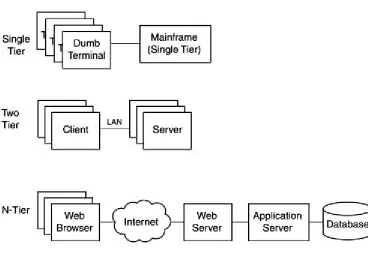
Such centralized applications are commonly referred to as single tier applications. The
Random House dictionary defines a tier as "one of a series of rows, rising one behind or above another." In software, a tier is primarily an abstraction and its main purpose is to help us
understand the architecture associated with a specific application by breaking down the
software into distinct, logical tiers. See Chapter 6 for a more detailed discussion of tiers.
From an application perspective, the single most problematic aspect of a single tier
instance, assume that a change was required to some aspect of the system. In a single tier
application, all aspects were pretty much fused; that is, the presentation side of the software
was tied to the business logic, and the business logic portion had intimate knowledge of the
data structures. So any changes to one potentially h ad a ripple effect and meant revalidation
of all aspects. Another drawback of such intermingling was the limitations it imposed on the
reuse of business logic or data access capabilities.
The client-server approach alleviated some of these major issues by moving the presentation
aspects and some of the business logic to a separate tier. However, from an application
perspective, the business logic and presentation remained very much intermingled. As well,
this two-tier approach introduced some new issues of its own, for instance, the challenge of
updating application software on a large number of clients with minimal cost and disruption.
The n-tier approach attempts to achieve a better balance overall by separating the
presentation logic from business logic a nd the business logic from the underlying data. The
term n-tier (as opposed to three-tier) is representative of the fact that software is not limited to three tiers only, and can be and indeed is, organized into deeper layers to meet specific
needs.
It should be noted that each tier in an n -tier does not imply a separate piece of hardware,
although that is certainly possible. A tier is, above all, a separation of concerns within the
software itself. The different tiers are logically distinct within the software but may physically
exist on the same machine or be distributed across multiple machines.
Some examples of the types of advantages and benefits offered by n -tier computing are
• Faster and potentially lower cost development: New applications can be developed faster by reusing existing, pretested business and data access components.
• Impact of changes is isolated: As long as interfaces remain unchanged, changes on one tier do not affect components on another tier.
• Changes are more manageable: For example, it is easier to replace one version of a
business component with a new one if it is residing on a business tier (on one or a few
dedicated servers) rather than having to replace hundreds or thousands of client
applications around town, or around the globe.
Figure 1-2. Architectural evolution of enterprise software
Enterprise Software and Component-Based Software
When the object-oriented software approach burst onto the software development scene, it
was widely expected that adoption of object-oriented software development techniques
would lead to reuse, but this hope was only partially realized. One of the reasons for this
partial success was the fine granularity of the objects and the underlying difficulty of
achieving large-scale reuse at that level due to the more strongly coupled nature of
fine-grained objects.
Software components are designed to address this precise issue. Unlike a n object, a software
component is designed at a much higher level of abstraction and provides a complete
function or a service. Software components are more loosely coupled. Using interfaces the
components have deliberately exposed, they can be combined together rapidly to build larger
applications quickly and are more cost-effective.
Component-based software, of course, requires that components from different sources be
compatible. That is, an underlying common understanding, a contract if you will, is required
Various component models have been developed over the years to provide the common
understanding. Microsoft's ActiveX, later COM, and Sun Microsystem's applets and JavaBeans
are examples of such component models.
Distributed component models have also been developed to address component-based
software in the context of distributed enterprise software and associated challenges
discussed earlier. Such component models essentially provide an "operating system" for
distributed and component-based software development. Examples of these include DCOM,
Microsoft DNA (now Microsoft.NET), and Sun Microsystem's Enterprise JavaBeans (EJB), which is
part of the Java 2 Platform, Enterprise Edition (J2EE).
Summary
Chapter 2. Introduction to the J2EE
• What Is the Java 2 Platform, Enterprise Edition? • A Brief History of J2EE
• Why J2EE?
• A Brief Overview of J2EE • Summary
Sun Microsystems has organized the Java 2 Platform along three specific focused areas, or editions: Micro Edition (J2ME), Standard Edition (J2SE), and Enterprise Edition (J2EE).
Of those products, J2EE is the most relevant to developing enterprise Java applications.
What Is the Java 2 Platform, Enterprise Edition?
The J2EE defines an architecture for developing complex, distributed enterprise Java
applications.
J2EE was originally announced by Sun Microsystems in mid-1999 and was officially released
in late 1999. The J2EE, being relatively new, is still undergoing significant changes from
release to release, especially in the area of Enterprise JavaBeans (EJB).
The J2EE consists of the following:
• Design guidelines for developing enterprise applications using the J2EE • A reference implementation to provide an operational view of the J2EE
• A compatibility test suite for use by third parties to verify their products' compliance
to the J2EE
• Several Application Programming Interfaces (APIs) to enable generic access to
enterprise resources and infrastructure
• Technologies to simplify enterprise Java development
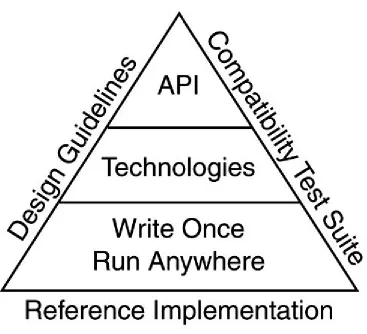
Figure 2-1. The J2EE platform elements
The platform builds on the Java mantra of "Write Once, Run Anywhere" via a group of
technologies and a set of APIs. These are, in turn, supported and bound by three key
elements, namely the reference implementation, the design guidelines, and the compatibility
suite.
A Brief History of J2EE
How J2EE came about is quite interesting. Java, originally named Oak, was conceived as a
software language for developing applications for household appliances and other such
devices. With the Internet revolution, Java gradually evolved into a language for client-side
development with capabilities such as applets and JavaBeans. Along the way, several Java
APIs, such as Java Database Connectivity (JDBC), were developed to address market needs
for generic access and usage of resources typically required by enterprise software
applications.
It was clear soon after Java's introduction that the use of Java on the client side in a
involved in the loading of Java libraries over the Internet before a client-side Java application
could start up. However, Java's relative simplicity, platform-independent architecture, and
rich set of APIs as well as its Web enabled nature were strong positives for its use in
enterprise software development.
This ease of use and Web enabled nature of Java led to a relatively wide adoption of Java for
Web-centric development. Developers used Java technologies, such as applets, for visuals
and dynamic output that could easily be added into standard HTML pages on Web sites.
Although Java applications could be run on servers, Java initially did not offer any specific
capabilities for server-side use. Sun realized the potential for using Java as a language for
Web-based applications and sought to adapt it for the server side via the Java Servlet
specification. Once the adaptation occurred, the Web client could call into a Java program
running on a remote server, and the server program could process the request and pass back
meaningful results. The concept of the servlet was born and has been utilized fairly heavily for enterprise application development. Servlets, however, were never really designed to handle
complex issues related to customer transactions, session concurrency, synchronization of
data, and so on.
EJB, originally released as an independent specification by Sun Micro systems, was intended
to simplify server-side development by providing a very large set of out-of-the-box services
to handle the key enterprise application development issues.
The concept of n-tier architecture has been around a long time and has been successfully
used for building enterprise-scale applications. Sun's embracement of the n -tier development
model for Java, and introduction of specific functionality to permit easier server-side
development of scalable Web-based enterprise applications, gave Java the critical missing
ingredient it needed in this arena.
The J2EE is the result of Sun's effort to align the disparate Java technologies and APIs
together into cohesive Java development platforms for developing specific types of
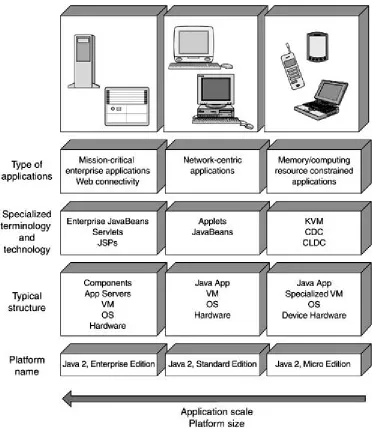
applications. Three Java platforms currently exist. Each successive one listed can
conceptually (but not necessarily technologically) be considered a superset of the previous
• Java 2 Platform, Micro Edition (J2ME): Platform for the development of software for
embedded devices such as phones, palm tops, and so on.
• Java 2 Platform, Standard Edition (J2SE): Most familiar of the Java 2 platforms. It is
also known as the Java Development Kit (JDK) and includes capabilities such as
applets, JavaBeans, and so on.
• Java 2 Platform, Enterprise Edition (J2EE): Platform for developing enterprise-scale applications. It is designed to be used in conjunction with the J2SE.
[image:27.596.112.484.303.740.2]Figure 2 -2 provides an overview of the three existing Java 2 platforms.
Figure 2-2. Overview of the Java 2 platforms
You are probably asking: So, why use the J2EE? Isn't it too new and unproven? What does it
really offer? Is it just another fad?
Let's start with the newness aspect. Although the J2EE packaging is new, specific pieces that
make up the J2EE have been around for a while. For instance, the JDBC API is well established.
Servlet technology has also been used for some time as a lightweight and maintainable
alternative to the Common Gateway Interface (CGI)[1] scripts.
[1] An older approach used for processing user input provided via the Web and for providing
dynamic content based on the input.
J2EE also offers some promising benefits. As described in the following paragraphs, these
include features that enable developers to focus on developing business logic, on
implementing the system without prior detailed knowledge of the execution environment,
and on creating systems that can be ported more easily between hardware platforms and
operating systems (OSs).
Enterprise software development is a complex task and can require extensive knowledge of
many different areas. For instance, a typical enterprise application development effort might
require that you be familiar with interprocess communication issues, security issues,
database specific access queries, and so on. J2EE includes built-in and largely transparent
support for these and similar services. As a result, developers are able to focus on
implementing business logic code rather than code that supports basic application
infrastructure.
The J2EE enterprise development model also encourages a cleaner partition between system
development, deployment, and execution. Because of this, developers can defer deployment
details, such as the actual database name and location, host specific configuration properties,
and so on, to the deployer.
J2EE supports hardware and OS independence by enabling system ser vices to be accessed
via Java and J2EE rather than underlying system APIs. For this reason, enterprise systems
that conform to the J2EE architectural specification can be ported fairly easily between
Perhaps one of the greatest J2EE benefits is its support for componentization.
Component-based software has numerous advantages over traditional, custom software
development:
• Higher productivity: Fewer developers can achieve more by putting together an application from prebuilt, pretested components rather than implementing a custom
solution from scratch.
• Rapid development: Existing components can be put together rapidly to create new applications.
• Higher quality: Rather than testing entire applications, component-based application developers can concentrate on testing the integration and the overall application
functionality achieved via the prebuilt components.
• Easier maintenance: Because components are stand-alone to begin with,
maintenance such as upgrades to individual components is much easier and more
cost-effective.
Although some level of software componentization does exist, it is a far cry from the typ e of
componentization prevalent in other industries, such as electronics or automobiles. Imagine
the diminished electronics industry if each and every chip required needed to be handcrafted
in order to put together a new electronic gadget.
J2EE facilitates componentization in many ways. A few examples follow:
• The "Write Once, Run Anywhere" nature of Java makes it appealing for developing components for a diverse set of hardware systems and operating systems.
• J2EE offers a well thought-out approach for separating the development aspects of a component from its assembly specifics and its assembly aspects from its deployment
details. Thus, components developed independently can be readily integrated into
new environments and applications.
• J2EE offers a wide range of APIs that can be used for accessing and integrating
products provided by third-party vendors in a uniform way, for example, databases,
mail systems, messaging platforms, and so on.
• J2EE offers specialized components that are optimized for specific types of roles in an
enterprise application. For example, enterprise components can be developed in
Component marketplaces have already started to emerge. A recent Gartner Group study
forecasted that by 2003, 70 percent of all new applications would be built from components.
J2EE, with its support for component-based development (CBD), rapid adoption, and broad
industry support, should play a prominent role in this switch to CBD.
A Brief Overview of J2EE
The J2EE technologies and APIs cover a broad spectrum of enterprise Java development. It is
unlikely you will use each and every aspect of the J2EE in your enterprise Java development
effort. But it is always helpful to have the big picture in mind, so the intent in this section is
to make you aware of what is in the J2EE.
In the rest of the book, we cover the technologies in the context of modeling them with the
Unified Modeling Language (UML). We also cover some, but not all, of the APIs. If you are
interested in a specific API, see the References section at the end of this book for a list of
resources for further reading.
Technologies
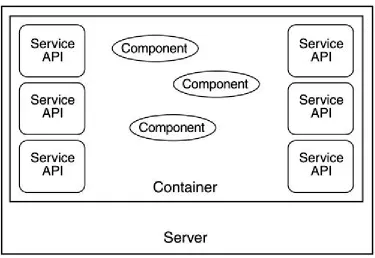
To understand the J2EE technologies, you must first understand the role of the container in
the J2EE architecture. All current technologies in the J2EE rely on this simple yet powerful
concept.
Figure 2-3. The container concept
A container is a software entity that runs within the server and is responsible for managing
specific types of components. It provides the execution environment for the J2EE
components you develop. It is through such containers that the J2EE architecture is able to
provide independence between development and deployment and provide portability
between diverse middle tier servers.
A container also is responsible for managing the life cycle of components deployed within it
and for things such as resource pooling and enforcing security. For instance, you can restrict
the ability to access a specific method to a small group of callers. The container would then
enforce this restriction by intercepting requests for that method and ensuring that the entity
requesting access is in the privileged list.
Depending on the container type, it may also provide access to some or all of the J2EE APIs.
All J2EE components are deployed and executed within some kind of a container. For instance,
EJBs run within the EJB container, and servlets run in the Web container. In all, the J2EE has
four different kinds of containers:
• Web container: Hosts the Web components, such as servlets and JavaServer Pages
(JSP)
• Enterprise container: Hosts EJB components
Servlets
Servlets are Web components capable of generating dynamic content. They are one of the
most frequently used J2EE components found on the World Wide Web today. They provide an
effective mechanism for interaction between the server-based business logic and the
Web-based client, and they provide a lightweight and more manageable alternative to the
popular CGI scripting approach.
Because servlets are simpler and require fewer resources in general, some develo pers prefer
to use these components along with JSPs almost exclusively in their implementations rather
than making use of the more complex EJB components. This practice might make sense for
very simple enterprise applications, but quickly becomes a less than optimal choice whenever
transaction support is needed in the application.
Servlets are best used to handle simpler tasks, like gathering and checking for valid inputs
from the entry fields of a Web page. When the preliminary checks are done, the data should
then be passed to a more suitable component to perform the actual task at hand.
Servlets run inside the servlet container (also referred to as the servlet engine) hosted on a
Web server. The servlet container manages the life cycle of a servlet and translates the Web
client's requests, made via protocols such as the Hypertext Transfer Protocol (HTTP), into
object-based requests. Likewise, the container translates the response from a servlet and
maps the response object to the appropriate Web protocol.
JSP
JSPs are another type of J2EE Web component and have evolved from servlet technology. In
fact, portions of JSPs are compiled into servlets that are then executed within the servlet
container environment.
JSPs came into being to make it easier for members of a Web team to maintain the portions
programmers. Nonprogrammers typically maintain the presentation code in the HyperText
Markup Language (HTML). This is harder to do when that HTML is generated by Java
statements contained within servlets.
JSPs permit Java code to be embedded within a structured document such as HTML or
eXtensible Markup Language (XML). This allows the presentation code to be easily
maintained a s regular HTML code and shields nontechnical contributors from code editors,
and so on.
Because JSPs allow for very complex Java code to be embedded within these HTML or XML
documents, some developers chose to use this method during the early days of JSP
technology. However, it is generally good practice to keep the Java code within a JSP
relatively simple.
Some other Java technologies that have been around for a while, like JavaBeans, also tie into
the use of JSPs. They help to make it less complicated to display larger amounts of data for
things like tables in Web pages.
EJB
The EJB specification is at the very core of the J2EE platform. It defines a comprehensive
component model for building scalable, distributed server-based enterprise Java application
components.
There are three types of EJBs:
• Session beans are best used for transient activities. They are nonpersistent and often encapsulate the majority of business logic within an enterprise Java application.
Session beans can be stateful, meaning they retain connections between successive
interactions with a client. The other type of session bean is stateless. In the case of
a stateless session bean, each successive invocation of the session bean by the same
client is treated as a new, unrelated activity.
• Entity beans encapsulate persistent data in a data store, which is typically a complete or partial row of information found in a database table. They provide automated
services to ensure that the object-oriented view of this persistent data stays
Entity beans also are often used to format this data, either to assist in the business
logic of the task at hand or to prepare the data for display in a Web page. As an
example, in a database table of employees, each record could map to an instance of
an entity bean.
• Message-driven beans are designed to be convenient, asynchronous consumers of Java Messaging Service (JMS) messages. Unlike session and entity beans,
message-driven beans do not have published interfaces. Rather, message-driven
beans operate anonymously behind the scenes. Message-driven beans are stateless
and are a new type of EJB component introduced in J2EE 1.3.
The Model-View-Controller (MVC) architecture, originally used in the Smalltalk programming
language, is useful in understanding how these different J2EE technologies fit and work
together. For those unfamiliar with MVC architecture, the basic idea is to minimize the
coupling among objects in a system by aligning them with a specific set of responsibilities in
the area of the persistent data and associated rules (Model), presentation (View), and the
application logic (Controller). This is illustrated in Figure 2 -4.
Figure 2-4. Model-View-Controller architecture
The Model is responsible for maintaining the application state and data. It can receive and
respond to queries from the View and can provide notifications to the View when things have
The Controller updates the Model based on execution of application logic in response to user
gestures (e.g., dialog buttons, form submit requests, etc.). It is also responsible for telling
the View what to display in response to user gestures.
The View is responsible for the actual rendering of the data provided by the Controller.
To illustrate, consider a simple clock application developed using the MVC approach. The
Model in this case is essentially responsible for keeping track of time. Time is automatically
updated at predefined intervals (a microsecond, millisecond, or some other unit) through
some built-in mechanisms in the Model. It also provides operations so other entities can
query the Model and obtain the current time, but it does not care or know how the time is to
be displayed.
The responsibility for displaying the time falls on the View; however, the View can take
different forms. For example, it may take the form of an analog display whereby two (or three)
hands are used to display the time. It can easily be a digital display consisting of several digits
as well. As time changes, the Model notifies the View, and the View updates to reflect the new
time.
Keep in mind that clocks require some mechanism for updating the time, for example, when
daylight savings time goes into effect. On a clock rendered in a Web browser, the user may
have the capability to indicate a change in time by using some Graphical User Interface (GUI)
controls or by typing in a new time. The Controller receives the user gestures for such
changes and updates the Model by calling the appropriate operations defined on the Model to
reflect the new time.
A Model may have several simultaneous Views. For instance, a clock application running on
the Web may have several users utilizing it at the same time, using different representations,
such as analog, digital, and so on.
APIs
There are several APIs within the J2EE. Some of the more popular ones are discussed in the
JDBC
Interaction with databases is an integral part of an enterprise Java application. The JDBC API
is squarely focused on making this aspect easier for the enterprise Java developer.
The JDBC API, which is similar in spirit to Microsoft's Open Database Connectivity (ODBC) API,
simplifies access to relational databases. It consists of a generic, vendor independent
interface to databases. Using the JDBC makes your applications portable and your database
skills applicable across a wider range of vendor platforms.
The majority of the JDBC API already exists as part of the J2SE. It is not limited to use only
with the J2EE. There are however a few extensions that the J2EE version adds, mostly to
support some advanced functions for the J2EE containers to use, like connection pooling as
well as some additional support for JavaBeans.
The JDBC API provides a common interface in order to shield the user from vendor specific
differences as much as possible. JDBC implementations are supplied by the database vendor,
so different databases can act differently under the covers.
In enterprise applications, you do not necessarily need to use JDBC directly. For example, you
can use entity beans to make the necessary database calls for you. The practice of using JDBC
directly is expected to become less common as application servers provide more
sophisticated and well-tuned support for entity beans.
Java Naming and Directory Interface (JNDI)
In the context of JNDI, "naming" actually refers to a naming service. Naming services allow
you to look up, or refer to, an object. A file system is an example of a naming service.
A directory service is similar to a naming service and provides enhanced searching
capabilities. In fact, a directory service always has a naming service (but not vice versa).
There are various naming and directory services available, so the challenges on this front are
quite similar to those in the area of databases. JNDI is designed to address those challenges
The complete JNDI API already exists as part of J2SE, although it is listed as an enterprise
feature. Most distributed enterprise applications make use of this service at some point. For
example, any use of EJBs in an enterprise application necessitates that JNDI be used to find
the associated EJB Home interfaces.
JMS
A messaging service allows communication among distributed applications using
self-contained entities called messages. Such communication is typically asynchronous.
Various vendors provide messaging oriented middleware. The JMS provides a uniform and
generic interface to such middleware.
JMS can be used directly in an enterprise application or via a type of EJB known as a
message-driven bean. Message-driven beans are new in J2EE 1.3.
Remote Method Invocation (RMI)
RMI enables access to components in a distributed environment by allowing Java objects to
invoke methods on remote Java objects. The method is actually invoked on a proxy object,
which then arranges to pass the method and parameters onto the remote object and provides
the response from the remote object back to the object that initiated the remote method
invocation.
RMI is not exclusive to J2EE. However, RMI is at the heart of some J2EE technologies, such as
EJB.
Other J2EE Technologies and APIs
In this section, we list some other J2EE technologies and APIs that are either in existence now
or are expected to become part of J2EE in the future.
J2EE Connectors
J2EE Connectors provide a common architecture to use when dealing with Enterprise
Information Systems (EIS) as the data store. These large systems tend to be prevalent in
Java Transaction API (JTA)
A transaction refers to a grouping of multiple operations into a single "atomic" operation.
Thus, if part of a transaction fails, the other, previously executed operations are "rolled back,"
that is, undone, to ensure sanity of the system.
The JTA provides a generic, high-level API for transaction management. It is primarily used
for large, distributed, often complex transaction processing, usually involving a number of
large, remotely connected systems.
Java IDL
The Java Interface Definition Language (IDL) provides interoperability support for the
Common Object Request Broker Architecture (CORBA) and the industry standard Internet
Inter-Orb Protocol (IIOP). It includes an IDL-to-Java compiler and a lightweight Object
Request Broker (ORB).
RMI-IIOP
RMI-IIOP refers to RMI using the IIOP as the communication protocol under the covers. IIOP
is an Object Management Group (OMG) standard. Because CORBA uses IIOP as the
underlying protocol, the use of RMI-IIOP makes interoperability between RMI and CORBA
objects simpler. RMI-IIOP is typically also more efficient than RMI over the Java Remote
Method Protocol (JRMP).
Java Transaction Service (JTS)
JTS is a transaction manager service that supports JTA and makes use of IIOP to
communicate between remote instances of the service. Like JTA, it is used in large d istributed
system situations.
JavaMail
JavaMail provides an API to facilitate interaction with e-mail messaging systems in a vendor
independent fashion. This API consists primarily of a set of abstract classes that model a
Note, however, that it is possible to provide e -mail support in an application without using the
JavaMail API.
Summary
J2EE offers a well thought-out architecture for developing complex enterprise Java
applications.
J2EE's combination of technologies—namely EJB, servlets, and JSPs—and its generic API
(JDBC, JavaMail, JMS, etc.) give its users various advantages. Thus, developing a J2EE
application simplifies the overall task of developing large-scale distributed applications.
Some of the key challenges that are simplified by J2EE include distribution of applications
across multiple processes and processors, security, transactions, persistence management,
Chapter 3. Introduction to the UML
• UML Overview
• Why Use the J2EE and the UML Together? • Challenges in Modeling J2EE in the UML • Extension Mechanisms in the U M L • The Approach to J2EE UML Modeling • Summary
The Unified Modeling Language (UML) is a graphical language for the modeling and development of software systems. It provides modeling and visualization support for all phases of software development, from requirements analysis to specification, to construction and deployment.
The UML has its roots in several preceding object-oriented notations.[1] The most prominent among them being the notations popularized by Booch, Rumbaugh, et al. and Jacobson, et al. So, even though the UML has been formalized for just a few years, its predecessors have been used to design and specify software-intensive systems since the early 1990s.
[1] The distinction between notation and methodology is a common source of confusion. The
UML is a notation that can be applied using many different approaches. These approaches are the methodologies.
The unification of the competing notations came about in the mid to late 1990s. In early 1997, several consortia submitted responses to an Object Management Group (OMG) Request for Proposal for a common metamodel to describe software-intensive systems. A consortium headed by Rational Software submitted the UML 1.0 specification. This incorporated the leading features of several modeling notations including those of Booch, Rumbaugh, and Jacobson. At the request of the OMG, most of the competing consortia cooperated with the group led by Rational to refine UML 1.0 into UML 1.1, which was accepted by the OMG in late 1997.
The UML has broad industry support. By virtue of being the specification supported by the 850+ member OMG, it is the de jure software industry standard for visual modeling and development. The fact that all leading tools for modeling software-intensive systems now support UML makes it the de facto standard as well.
UML Overview
The central idea behind using the UML is to capture the significant details about a system
such that the problem is clearly understood, solution architecture is developed, and a chosen
implementation is clearly identified and constructed.
A rich notation for visually modeling software systems facilitates this exercise. The UML not
only provides the notation for the basic building blocks, but it also provides for ways to
express complex relationships among the basic building blocks.
Relationships can be static or dynamic in nature. Static relationships primarily revolve around the structural aspects of a system. Inheritance relationship between a pair of classes,
interfaces implemented by a class, and dependency on another class are all examples of
static relationships.
Dynamic relationships, on the other hand, are concerned with the behavior of a system and
hence exist at execution time. The messages exchanged within a group of classes to fulfill
some responsibility and flow of control within a system, for example, are each captured in the
context of the dynamic relationships that exist within a system.
Both static and dynamic aspects of a system are captured in the form of UML diagrams. There
are several types of UML diagrams. They are organized along specific focal areas of visual
modeling called views.
The following types of diagrams are provided by the UML:
• Use case diagram: A use case diagram shows use cases, actors, and their relationships. Use case diagrams capture the precise requirements for the system
from a user's p erspective. See Chapter 7 for a detailed discussion of use cases in the
context of enterprise Java application development.
• Class diagram: A class diagram shows the static relationships that exist among a
inheritance, aggregation, and dependency. See Chapter 8 for more details on classes,
interfaces, and class diagrams.
• Object diagram: An object diagram provides a snapshot view of the relationships that
exist between class instances at a given point in time. An object diagram is useful for
capturing and illustrating, in a static fashion, complex and dynamic relationships
within the system. See Chapters 12 and 1 3 for additional coverage of how object
diagrams are used in the context of enterprise application design and development.
• Statechart diagram: State machines are excellent for capturing the dynamic behavior of the system. They are particularly applicable to event driven, reactive systems or
objects where event order is important. State charts are also useful for modeling the
behavior of interfaces. For more information on using statecharts in the context of
J2EE, see Chapter 12.
• Activity diagram: An activity diagram is an extension of a statechart diagram and is
similar in concept to a flowchart. An activity diagram allows you to model the
system's behavior in terms of interaction or flow of control among distinct activities
or objects. Activity diagrams are best used for modeling workflows and flow within
operations. See Chapter 7 for further discussion of activity diagrams.
• Interaction diagram: Interaction diagrams are used for modeling the dynamic behavior of a system. There are two kinds of interaction diagrams in the UML:
o Sequence diagram: Used for modeling the message exchange between
objects in a system. Sequence diagrams also capture the relative time
ordering of messages exchanged.
o Collaboration diagram: The message exchange is captured in the context of
the overall structural relationships among objects.
The two diagrams are equivalent, and it is possible to convert from one to the other
easily. Interaction diagrams are commonly used to model the flow of control in a use
case and to describe how objects interact during the execution of an operation, such
as the realization of an interface operation. Interaction diagrams are discussed in
Chapter 8.
• Component diagram: A component represents the physical manifestation of a part of
the system, such as a file, an executable, and so o n. A component diagram illustrates