International Journal of Innovative Technology and Exploring Engineering (IJITEE) ISSN: 2278-3075, Volume-8 Issue-12, October, 2019
Abstract—Attendance management system is one of the tremendous challenges in any organization to reduce the malpractices by the individual. This paper aims to design automatic system for attendance using the face detection using LabVIEW (Vision Assistance Module) in order to replace the manual system and makes easier for the user to calculate the number of individuals and reduces the burden in taking attendance. Face recognition is one of the biometrics used in security systems, human machine interaction and image processing techniques [5]. This system is mostly helpful in security purpose and in commercial applications. It can be done by taking the image of the individual which is been captured by camera so that this image is converted into digital form. From this digital data the pattern of individuals is extracted so that everyone will have unique patterns. These patterns are stored in the database in excel format. The identification of the person is done by comparing the image captured through camera with the database images. Initially before starting the Attendance every individual is marked absent. Once the individual comes across the camera, the Automated system will extract the information by pre-processing the image with the help of Vision Assistance and extracts the patterns from the digital data. This data is compared with the stored patterns in database if the pattern matches with the database it automatically marks present.
Keywords—Database, LabVIEW, Vision Assistance, Face Recognition, Patten.
I. INTRODUCTION
Maintaining the attendance is highly important in all the organizations for checking the performance of employees/students. Each organization has its own way in such manner, some are promoting participation physically by using the old paper or record-based processes and some have received strategies for programmed participation using some biometric systems. But sometimes people used to stay for long time in queues to enter in to the organizations. Each biometric framework undergoes some enrolment process in which highlights of an individual is kept in database after the procedures of recognizable proof check and verification. These processes compare the biometric features of a person with previously stored template captured at the time of enrolment. Face recognition comprises of two steps, initially faces are detected and then these detected faces are compared with the database for verification [1]. Face recognition is mostly used in various areas like security, access control, forensic medicine, police controls, and in
Revised Manuscript Received on August 05, 2019.
Dr. M. Sujatha, Professor, Department of Electronics and Communication Engineering, Saveetha School of Engineering, SIMATS , Chennai, TamilNadu. India.
Dr.ShymalaBharathi, Professor, Department of Electronics and Communication Engineering, Saveetha School of Engineering, SIMATS ,
attendance management system [2]. Pattern recognition and matching consists of classification, processing the input and matching it with a known pattern. Face recognition is high complex form of pattern recognition. It consists of highly ambiguous input signals, with multiple dimensions and matching them with the know „signals „. This requires many training samples. Several ways have been proposed to solve this problem [3]. Face recognition based on face prints can quickly and accurately detect target individuals when the conditions are favourable. If the subject„s face is partially detected or not facing forward, or if the light is not enough, the system is less reliable. However, the technology is developing quickly and there are several emerging approaches to solve this problem [4].
Figure.1: Block diagram for Attendance Management system
There are many methods implemented for face detection, one of the method is by using skin segmentation process.In this method, detecting face in a complex background is possible, when the image is given it will detect the skin cells by using threshold and image processing techniques [7], the time complexities will increase with the increase in size as it has to detect every pixel in the image. And face recognition can be done by using histogram matching technique under certain limitations, as the intensity of the natural light will have a huge impact on this technique and as the light intensity changes, the pixel values also changes, which results in error in the system [8]. To reduce these errors, an alternate method is used called as pattern matching in LabVIEW, which uses machine learning algorithm to match the template in given image and it is is more reliable than any other methods.
Attendance Management System using Face
Recognition
II. METHODOLOGY
A. Image Acquisition
[image:2.595.314.549.46.467.2]LabVIEW, vision development module contains NI-IMAQdx and Vision Express modules which are used to set up image acquisition systems and acquire images. These modules contain Virtual Instruments (VIs) which allow us to acquire images, open and close interface. In this project, Vision Express VIs are used to develop common image acquisition and processing the application. It contains step by step procedure to interface device. Once USB camera is connected, shown in select Acquisition source tab, select the device and click on next to navigate the Acquisition type. Here we are selecting continuous Acquisition mode, which will acquire images from camera continuously and most recent image is acquired and sent for further processing. By clicking on next it navigates to configure Acquisition settings where video mode is chosen as 640x480 YUV, so that the time for operating on the images is reduced as it requires small size. Then by clicking finish the device is configured and ready to grab these images from the camera as shown in figure 2.
Figure 2: Block diagram of vision Acquisition
B. Image Pre-Processing
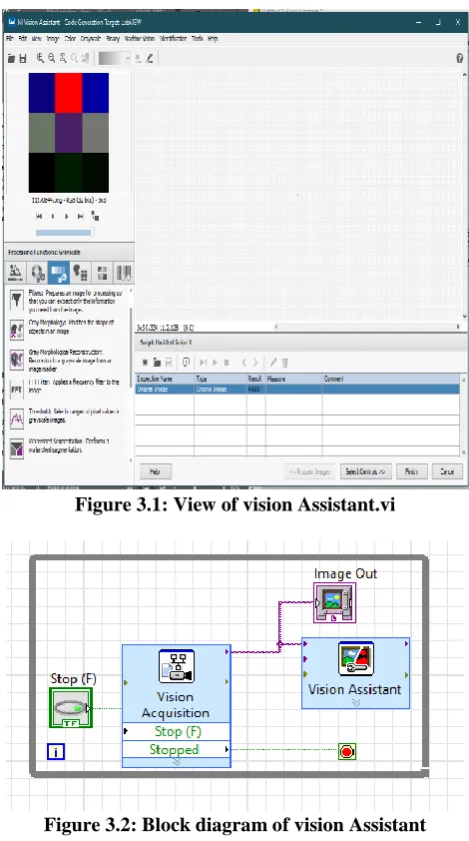
The image which is captured by the vision Acquisition is passed to next VI called as vision Assistant, which creates, edits, and runs vision algorithms using NI vision Assistant. When we place this VI on block diagram, NI vision Assistant Launches. It contains image processing functions like edge detection, morphology, filters, which are used to create an algorithm using these functions. This algorithm is used to select the required controls and indicators which is required to programmatically set in LabVIEW. In this Project the VI reduces the noise and fix the brightness in the input image and then convert it from RGB to grayscale as shown in figure 3.1 and 3.2. This image is passed to next step face Detection.
Figure 3.1: View of vision Assistant.vi
Figure 3.2: Block diagram of vision Assistant
C. Face Detection
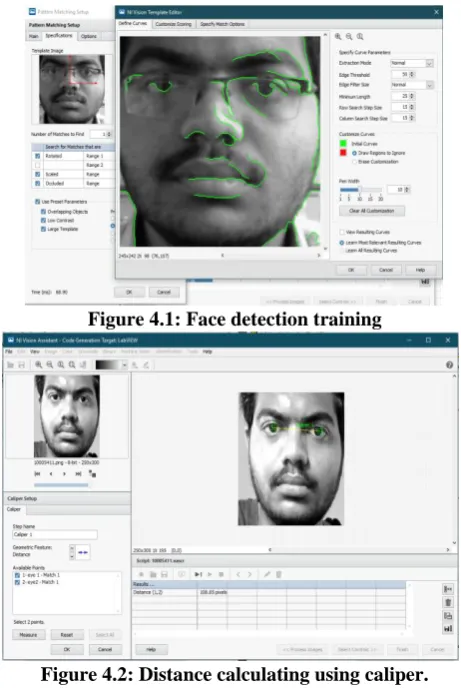
[image:2.595.57.287.313.496.2]International Journal of Innovative Technology and Exploring Engineering (IJITEE) ISSN: 2278-3075, Volume-8 Issue-12, October, 2019
Figure 4.1: Face detection training
Figure 4.2: Distance calculating using caliper.
D. Face Recognition
[image:3.595.56.287.60.406.2]Face Recognition can be done by using the pattern matching VI where the same steps are done as above to detect the face. The output is passed to IMAQ Match Pattern where it matches the input image with the DB and generates the score for each and every image and the highest score represents best match and passes the ID number to the output Data Base (DB) as shown in the figure 5.1 and figure 5.2 describes the block diagram of face recognition.
Figure 5.1: Score generation
Figure 5.2: Block diagram for face Recognition
E. Attendance Management
[image:3.595.313.561.453.630.2]A simple user interface is created for this process. The details of the individual can be verified by clicking on the check button in the interface as shown in the figure 6. And the attendance process can be started by clicking the process button. The common process is to detect the face and send the image for recognition process. After reorganization it gives a unique number which is allotted to that member called as UID. This number is searched in the data base and stored in EXCEL sheet. And then it returns the details of the individual. But whenever the process button is pressed the ID should match with the ID stored in the faculty/Authorized database. If not, it shows a pop-up message as “UNAUTHORIZED” access. If the details were not found it displays a message as please contact admin or no records found.
Figure 6: Interface VI.
III RESULT AND ANALYSIS
Attendance process:
[image:3.595.56.281.532.700.2]it starts the attendance process and the ID is noted as shown in figure 7, if not it displays an unauthorized message on the screen.
Figure 7: Facial Recognition
[image:4.595.56.297.95.248.2]And now it will start to record the attendance process and scans the faces of the student as shown in figure 8 and checks for the details in excel file and marks the attendance. It creates a new report file by taking all the student details and mark absent for everyone. So, by the end of the process the student who are present will be marked present. And whenever it detects the same faculty it stops the attendance process.
Figure 8: Student Recognition
The figure 9 displays the Student and faculty/Authorized details present in the excel Files
Figure 9.1: Details of faculty
Figure 9.2: Details of Student
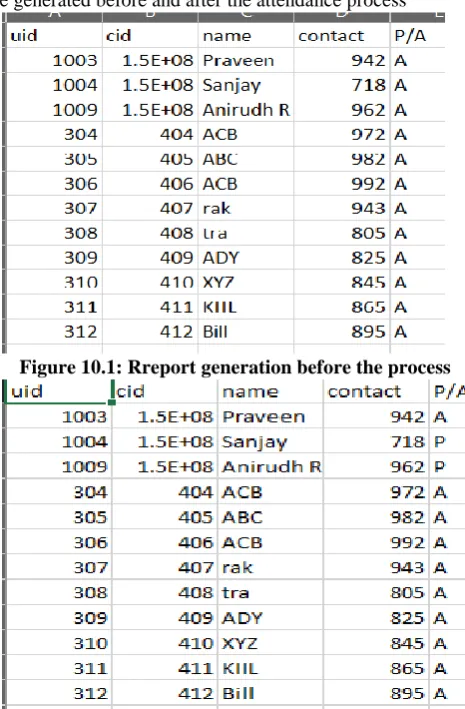
The figure 10.1 and figure 10.2 are displaying the report file generated before and after the attendance process
[image:4.595.314.547.240.595.2]Figure 10.1: Rreport generation before the process
Figure 10: Report generation after the process
IV. CONCLUSION
[image:4.595.73.287.347.479.2]International Journal of Innovative Technology and Exploring Engineering (IJITEE) ISSN: 2278-3075, Volume-8 Issue-12, October, 2019
based places, Organizations, also in schools and colleges. This face recognition is made by using Pattern Matching algorithm because the histogram values varies from place to place, so we may face difficulties in detecting the face. By using Pattern Matching this problem can be reduced and gives better result compared to histogram-based technique.
REFERENCES
1. FACE RECOGNITION BASED ATTENDANCE
MARKING SYSTEM, IJCSMC, Vol. 3, Issue. 2, February 2014, pg.337 – 342, K.Senthamil Selvi1.
2. Face Recognition based Attendance Management System using Machine Learning, (IRJET) Volume: 05 Issue: 06 | June-2018, AnushkaWaingankar, AkashUpadhyay, Ruchi Shah, NevilPooniwala, PrashantKasambe.
3. FACE RECOGNITION OFFICE SECURITY SYSTEM
USING LAB VIEW 8.6, SUDHA RANI K, T. C. SARMA2, K. SATYA PRASAD, (IJECIERD), Vol. 3, Issue 2, Jun 2013, 195-200.
4. Face Recognition and Detection for Attendance Application, Volume-5, Issue-2, April-2015 International Journal of Engineering and Management Research Page Number: 460-465, B.Manohar Reddy, M. Naveen Kumar, A. Prashanth Reddy, A. Ravi Teja, K. Rambabu, M.C.Chinnaiah.
5. Automated Student Attendance Management System Using Face Recognition International Journal of Educational Research and Information Science 2018; 5(4): 31-37, GodswillOfualagba, Federal University of Petroleum Resources, Ise Anderson Orobor, Federal University of Petroleum Resources
6. Smart Attendance Management System Based On Face Recognition Algorithm International Journal of Pure and Applied Mathematics, Volume 120 No. 5 2018, 1377-1384 ISSN: 1314-3395, M. Kasiselvanathan, Dr. A. Kalaiselvi, Dr. S.P. Vimal, V. Sangeetha, Department of Electronics and Communication Engineering Sri Ramakrishna Engineering College, Coimbatore, Tamilnadu, India
7. A LabVIEW Design for Frontal and Non- Frontal Human Face Detection System in Complex Background, Applied Mechanics and Materials • January 2014 DOI: 10.4028/www.scientific.net/AMM.490-491.1259,
MuralindranMariappan, University Malaysia Sabah (UMS), ManimehalaNadarajan, University Malaysia Sabah (UMS), Rosalyn R. Porle, University Malaysia Sabah (UMS), Brendan Khoo, University Malaysia Sabah (UMS)
8. FACE RECOGNITION OFFICE SECURITY SYSTEM