AUTOMATED PHYSICS DEMONSTRATIONS
CONTROLLED USING VISUAL BASIC
MUHAMAD FAREED BIN MOHD RAFI
B071110197
UNIVERSITI TEKNIKAL MALAYSIA MELAKA
UNIVERSITI TEKNIKAL MALAYSIA MELAKA
AUTOMATED PHYSICS DEMONSTRATIONS CONTROLLED
USING VISUAL BASIC
This report submitted in accordance with requirement of the Universiti Teknikal Malaysia Melaka (UTeM) for the Bachelor Degree of Engineering Technology
(Industrial Power) (Hons.)
by
MUHAMAD FAREED BIN MOHD RAFI B071110197
920830-04-5243
UNIVERSITI TEKNIKAL MALAYSIA MELAKA
BORANG PENGESAHAN STATUS LAPORAN PROJEK SARJANA MUDA
TAJUK: Automated Physics Demonstrations Controlled Using Visual Basic
SESI PENGAJIAN: 2014/15 Semester 1
Saya MUHAMAD FAREED BIN MOHD RAFI
mengaku membenarkan Laporan PSM ini disimpan di Perpustakaan Universiti Teknikal Malaysia Melaka (UTeM) dengan syarat-syarat kegunaan seperti berikut:
1. Laporan PSM adalah hak milik Universiti Teknikal Malaysia Melaka dan penulis. 2. Perpustakaan Universiti Teknikal Malaysia Melaka dibenarkan membuat salinan
untuk tujuan pengajian sahaja dengan izin penulis.
3. Perpustakaan dibenarkan membuat salinan laporan PSM ini sebagai bahan pertukaran antara institusi pengajian tinggi.
4. **Sila tandakan ( )
SULIT
TERHAD
TIDAK TERHAD
(Mengandungi maklumat yang berdarjah keselamatan atau kepentingan Malaysia sebagaimana yang termaktub dalam AKTA RAHSIA RASMI 1972)
(Mengandungi maklumat TERHAD yang telah ditentukan oleh organisasi/badan di mana penyelidikan dijalankan)
Alamat Tetap:
03-30 Blok 5 Taman Melor,
Tampoi, 81200 Johor Bahru,
Johor Darul Takzim.
Tarikh: 23/12/2014
Disahkan oleh:
Cop Rasmi:
Tarikh: _______________________
UNIVERSITI TEKNIKAL MALAYSIA MELAKA
BORANG PENGESAHAN STATUS LAPORAN PROJEK SARJANA MUDA
TAJUK: Automated Physics Demonstrations Controlled Using Visual Basic
SESI PENGAJIAN: 2014/15 Semester 1
Saya MUHAMAD FAREED BIN MOHD RAFI
mengaku membenarkan Laporan PSM ini disimpan di Perpustakaan Universiti Teknikal Malaysia Melaka (UTeM) dengan syarat-syarat kegunaan seperti berikut:
1. Laporan PSM adalah hak milik Universiti Teknikal Malaysia Melaka dan penulis. 2. Perpustakaan Universiti Teknikal Malaysia Melaka dibenarkan membuat salinan
untuk tujuan pengajian sahaja dengan izin penulis.
3. Perpustakaan dibenarkan membuat salinan laporan PSM ini sebagai bahan pertukaran antara institusi pengajian tinggi.
4. **Sila tandakan ( )
SULIT
TERHAD
TIDAK TERHAD
(Mengandungi maklumat yang berdarjah keselamatan atau kepentingan Malaysia sebagaimana yang termaktub dalam AKTA RAHSIA RASMI 1972)
(Mengandungi maklumat TERHAD yang telah ditentukan oleh organisasi/badan di mana penyelidikan dijalankan)
Alamat Tetap:
03-30 Blok 5 Taman Melor,
Tampoi, 81200 Johor Bahru,
Johor Darul Takzim.
Tarikh: 23/12/2014
Disahkan oleh:
Cop Rasmi:
Tarikh: _______________________
DECLARATION
I hereby, declared this report entitled “Automated Physics Demonstrations Controlled Using Visual Basic” is the results of my own research except as cited in
references.
Signature : ……….
Author’s Name : MUHAMAD FAREED BIN MOHD RAFI
APPROVAL
This report is submitted to the Faculty of Engineering Technology of UTeM as a partial fulfillment of the requirements for the degree of Bachelor of Engineering Technology (Industrial Power) (Hons.). The member of the supervisory is as follow:
i
ABSTRAK
ii
ABSTRACT
iii
DEDICATION
iv
ACKNOWLEDGEMENT
I would like to than I will like to express my gratitude to Universiti Teknikal Malaysia Melaka (UTeM) for giving me the opportunities and fully sponsored through Jabatan Perkhidmatan Awam (JPA) Scholarship to pursue my Bachelor's Degree in Electrical Engineering Technology.
I will like to express my profound gratitude to Mr. Shahrudin Bin Zakaria for his supervision, encouragement, suggestions and trusted throughout the duration of this research. A special thanks to Mr. Hanif Bin Harun for his support in my project.
Also not forgetting, I would like to express my big thanks to all my batch members from BETI and also from other class for their support, full cooperation, shared ideas and knowledge and time during the completion of this project. Without the cooperation from the entire group members of course this project cannot be finished completely.
Last but not least, I would like to thank my mother, and my family for giving me their full support, understanding and patience. Without their support and love, I would not have been able to finish my project.
v
TABLE OF CONTENT
Abstrak i
Abstract ii Dedication iii
Acknowledgement iv
Table of Content v List of Tables vii
List of Figures viii
CHAPTER 1: INTRODUCTION 1
1.1 Background 1
1.2 Problem Statement 2
1.3 Project Objectives 2
1.4 Project Scope 2
1.5 Project Outline 3
CHAPTER 2: LITERATURE REVIEW 5
2.1 Previous Project Study 5
2.1.1 Java 5
2.1.2 Visual Basic.Net 6
2.2 Best Choice for Programming Language 7
2.2.1 Java 7
2.2.2 Visual Basic.Net 8
2.3 Software 8
2.3.1 Microsoft Visual Basic 2010 Express Software 9
CHAPTER 3: METHODOLOGY 10
3.1 Project Methodology 10
vi
3.3 Software Development 12 3.4 Hardware Design 13 3.4.1 Visual Basic Program 13
3.5 The Making of a VB.NET Application 13
3.5.1 Short Description 14
3.5.2 Creating a Window Application 14
3.5.2.1 Begin a project 14
3.5.3 Forms 18
3.5.4 Sprucing up the Form 19
3.5.4.1 Change the display name and icon of the form 19 3.5.4.2 Change the background colour of the form 21
3.5.4.3 Add a button to the form 21
3.6 Adding Function to the Button 23
3.7 Application Creation Summary 25
3.8 Physics Principle/Experiment 25
3.8.1 Bernoulli’s Principle (Bouncing Balloon) 26
3.8.2 Electric motor with commutator 27
3.8.3 Electromagnetic Induction 28
3.8.4 Laser bending experiment 29
CHAPTER 4: RESULT & DISCUSSION 30
4.1 VB.NET Application 30
4.2 Result 31
4.2 Expected Result 38
CHAPTER 5: CONCLUSION & FUTURE WORK 39
5.1 Summary of Research 39
5.2 Problems Faced During Research 39
5.3 Suggestions for Future Work 40
5.4 Overall Conclusion 40
vii
LIST OF TABLES
2.1 Advantages and disadvantages of Java 8
viii
LIST OF FIGURES
2.1 Microsoft Visual Basic 2010 Express software 9
3.1 Project flow chart 11
3.2 Start screen of Visual Studio 2010 15
3.3 Creating a new project 16
3.4 New Project Selection screen 16
3.5 Start of New Project 18
3.6 Default application 19
3.7 Properties panel for Form1 20
3.8 VS10 Toolbox for forms 22
3.9 New Modified Form 23
3.10 Code for Form1 24
3.11 Message Code 24
3.12 Message Box on Button Click 25
3.13 Ball before air blow 26
3.14 Ball after air blow 26
3.15 A simplified diagram of the parts in an electric motor 27
3.16 Electromagnetic Induction 28
3.17 Laser bending experiment 29
4.1 First Interface Design 32
4.2 First Interface Code 32
4.3 Second Interface Design 33
4.4 Second Interface Code 33
4.5 Third Interface Design 34
4.6 Third Interface Code 34
4.7 Fourth Interface Design 35
4.8 Fourth Interface Code 35
viiii
4.10 Fifth Interface Code 36
4.11 Sixth Interface Design 37
1
The “Automated Physics Demonstrations Controlled Using Visual Basic ” is designed and built to accommodate the needs of educational process due to progressing towards teaching and learning process environments. This project using the physics principles as a main concept which is to demonstrate the experiments and also using a Visual Basic to run or controlled the demonstrations automatically by users. This project used to run 4 kinds of demonstrations related to physics principles. This chapter will briefly discuss the general background of this project, its concept, objectives, scope and the problem statement.
1.1 Background
Automated P hysics Demonstrations Controlled Using Visual Basic using the physics principles as a main concept which is to demonstrate the experiments and also using a Visual Basic to run or controlled the demonstrations automatically by users. This project used to run 4 kinds of demonstrations related to physics principles. The main objective for this project is used to provide a simple, versatile and study training kit. With this trainer kit, the process of learning physics principles can be achieved more quickly and easily. This trainer kit provided 4 sections physics demonstrations. The most interesting for this project is this trainer kit can be demonstrating the experiments automatically and the user just control the start and stop the demonstrations. Simple and easy for the objectives to achieve.
INTRODUCTION
2
1.2 Problem Statement
Nowadays, the physics subject is the most common subject that taught in most school. Students have troub le to understanding the physics principles that they have learned in class, so they have to do experiments to understand and proves the principles. . However, looking back at our country's school physics teaching process, the main teaching method is still that a teacher writes the formula using a piece of chalk. such a chalk, a blackboard teaching model makes the course which does strong efforts to improve students' ability to analyse problems and problem-solving ability become less practical, more abstract (Huang & Zhang, 2010).
1.3 Project Objectives
There are several objectives in this development of trainer kit such as:
• To design the program of Automated P hysics Demonstrations Controlled Using Visual Basic
• To develop the hardware of Automated P hysics Demonstrations Controlled Using Visual Basic
• To examine the compatibility of visual program and hardware
1.4 Project Scope
3
light. The main function of microcontroller is to save and run the program. This project is divided into two parts which is the software development using Microsoft Visual Basic and the hardware part, the trainer kit. The scope of this project is to use personal computer (PC) or notebook computer as an interface.
1.5 Project Outline
Chapter 1:
The general information of this project is provided in this part such as background project, problem statement, and objective of project and scope of project.
Chapter 2:
Journal and some references are explained in this part. There are might be in comparison explanation or some information that’s used in this project. There are too many comparison had done in this part. Furthermore, some discussion also made in this part after do the comparison.
Chapter 3:
4
Chapter 4:
The main concept which is to demonstrate the experiments and also using a Visual Basic to run or controlled the demonstrations automatically by users. Thus, some knowledge should be included in this report for reference.
Chapter 5:
5
This chapter will discuss mainly on the theory and current development in Automated Physics Demonstrations Controlled using Visual Basic. This chapter is divided into two parts, one for Vision System and the other is for Industrial Robot Application. Literature review is done by gathering information about this project from journal, article, and books. Literature review is necessary before initiate the project and literature researches regarding the project are important in understanding the concept of the overall project. This chapter discusses about Microsoft Visual Basic 2010 Express software.
2.1 Previous Project Study
Some case study and review of previous researches is performed to gain more information and understanding on programming language. Previous study shown there are some journals about demonstration of physics using various languages.
2.1.1 Java
Java is a cross-platform language with simple grammar which can achieve quantitative calculations (Huang & Zhang, 2010). The Java language was developed at Sun Microsystems in December 1990 as part of the Green project, a small research effort into consumer electronics (Gilbert-rainer, Eftimie, & Re, 2004). It is generally embedded in a web page when used (Huang & Zhang, 2010). First used to create
LITERATURE REVIEW
6
simple programs on World Wide Web pages, Java can be found today in a lot of, yesterday unusual, places (Gilbert-rainer, Eftimie, & Re, 2004). In addition, it supports a series of interactive Windows controls such as buttons, text boxes. Java is an object oriented programming language. He creates two kinds of programs: applications and applets (Gilbert-rainer, Eftimie, & Re, 2004). In my experience in teaching Machine dynamics I use to work with applets. Located in html files in a browser like Internet explorer it has the advantage to combine the possibilities of both. This are: the capability to present hypertext with the theoretical presentation, the possibility to link the student to appropriate or similar pages, the interactivity and visualization (Gilbert-rainer, Eftimie, & Re, 2004).
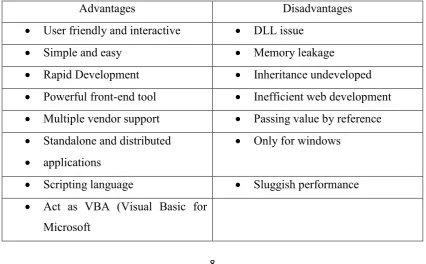
2.1.2 Visual Basic
7
on values and that the order of magnitude of physical parameters measured (Chitu & Inpuscatu, 2011).
2.2 Best Choice for Programming Language
The objective of this research is to determine which programming language among Java and VB .NET is the ideal choice for the Object-Oriented Programming (OOP) course in the Information Technology major. After discussing the fundamentals of OOP, this study compare OOP languages, Java and VB .N ET, with other procedural languages. It formulates six criteria, such as:
(a) The ease of development (b) Increased performance (c) Application development (d) Runtime possibilities (e) Application integration (f) Cost-efficiency
8
[image:23.595.109.532.135.392.2]2.2.1 Java
Table 2.1: Advantages and disadvantages of Java
Advantages Disadvantages
Automatic memory allocation and garbage collection
Slower than C, C++, and many other languages
Fully object-oriented language facilitating modular design
Strictly typed
Platform- independent Not suitable for scripting
Secure
Facilitates distributed programming
Strong multithreading support
Strictly type language promo ting
robust code development
[image:23.595.106.533.499.763.2]2.2.2 Visual Basic.Net
Table 2.2: Advantages and disadvantages of Visual Basic.Net
Advantages Disadvantages
User friendly and interactive DLL issue
Simple and easy Memory leakage
Rapid Development Inheritance undeveloped
Powerful front-end tool Inefficient web development
Multiple vendor support Passing value by reference
Standalone and distributed
applications
Only for windows
Scripting language Sluggish performance
9
Applications)
2.3 Software
The following software is used to develop the visual basic program interfacing. The combination between hardware and software already became necessity in engineering project. In fact, the suitable software selection is important to make sure the project successful. The software part involve in this project are the Microsoft Visual Basic 2010 Express software.
2.3.1 Microsoft Visual Basic 2010 Express Software