A Complete Approach to the Conversion of
Typewritten Historical Documents for Digital Archives
†A. Antonacopoulos and D. Karatzas
Pattern Recognition and Image Analysis (PRImA) group, Department of Computer Science University of Liverpool, Liverpool, L69 3BX, United Kingdom
http://www.csc.liv.ac.uk/~prima
Abstract. This paper presents a complete system that historians/archivists can use to digitize whole collections of documents relating to personal information. The system integrates tools and processes that facilitate scanning, image indexing, document (physical and logical) structure definition, document image analysis, recognition, proofreading/correction and semantic tagging. The system is described in the context of different types of typewritten documents relating to prisoners in World-War II concentration camps and is the result of a multinational collaboration under the MEMORIAL project funded (€1.5M) by the European Union (www.memorial-project.info). Results on a representative selection of documents show a significant improvement not only in terms of OCR accuracy but also in terms of overall time/cost involved in converting these documents for digital archives.
1 Introduction
The problem of converting collections of documents into digital archives or libraries raises a significant number of, often disparate, issues that are mostly specific to the given type of document or application. For instance, old/historical manuscripts suffer from ageing and often the main concern in their conversion into digital form (digital restoration) is the improvement in legibility by human readers (e.g., historians) who will most probably also transcribe the handwritten text [3]. Projects involving historical documents are, more often than not, small-scale vertical operations that require significant human input. On the other end of the spectrum, relatively modern printed documents do not suffer from significant substrate/ink degradation problems and lend themselves to a higher degree of automated processing, OCR (albeit not trivial) and more sophisticated content extraction and indexing [4]. Finally, there are specific applications such as the conversion of administrative documents, which are typically forms with fixed structure [1].
This paper presents a comprehensive approach to the conversion of large collections of documents that exhibit most of the issues outlined above. A complete framework is described that comprises software tools and quality evaluation driven workflow procedures that are intended to be used by historians/archivists (i.e.,
† This work is supported by the European Union grant IST-2001-33441.
technical but subject-conversant users) to convert a broad range of documents starting from scanning and achieving a semantic representation as the end goal.
Contrary perhaps to typical conversion applications where the documents to be converted are all present in one physical location, the approach described here is intended to address situations where historical documents are dispersed across different institutions of varying financial and technical means. Therefore, the approach has to be flexible, cost-effective and de-centralised, while ensuring high quality of results across a number of users and document classes.
The approach is being developed by an international consortium as the primary goal of the “MEMORIAL” project (www.memorial-project.info) funded by the European Union—Fifth Framework Programme: Information Society Technologies priority (€1.5M). The full title of the project is: “A Digital Document Workbench for Preservation of Personal Records in Virtual Memorials”, which also hints to the nature of the document dataset selected for study: documents that contain information about people.
The documents used to demonstrate the proposed conversion approach are all from the middle of the 20th century but in their majority suffer (sometimes severely) from age, handling and production-related degradation. The majority of the information on the documents is typewritten (handwritten annotations, signatures and stamps are also present) in a variety of formats and underlying logical (semantic) structures.
The particular documents constitute unique sources (no copies exist elsewhere) of personal information that amount to the only record and proof of existence for many thousands of people that passed through Nazi concentration camps. Large collections of documents containing this type of information are closely guarded in various individual museums and archives making access to the whole body of knowledge contained in them virtually inaccessible. Naturally, the significance of the whole approach and of the document image analysis methods involved, in particular, expands far beyond the chosen document class into practically any typewritten document (which includes enormous numbers of documents of the 20th century).
There is scarcely any report in the literature of conversion of this type of typewritten documents into a logically indexed, searchable form. A notable exception is a project to convert file cards from the archives of the Natural History Museum in London, UK [2]. This project involved the digitisation of (mostly typewritten) index cards with a bank-cheque scanner and the subsequent curator-assisted extraction and recognition of taxonomic terms and annotations. The results are indexed hierarchically in a database.
The implication of the above issues is that there is a requirement for more involved and, at the same time, more generic document analysis. The volume of text and the relatively unrestricted dictionary possibilities evident in many of the documents does not permit the use of experimental (purpose-built) OCR. An off-the-shelf OCR package is used, for which the characters are segmented and individually enhanced in advance by the methods developed for the project.
Two examples of document classes exhibiting typical characteristics of a variety of layouts and conditions are taken from the Stutthof camp (http://www.stutthof.pl):
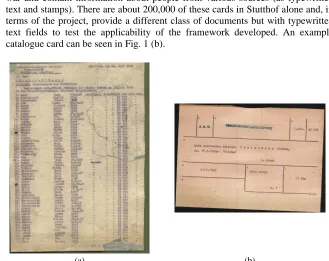
§ Transport lists – 3 kinds of documents, where names of Stutthof prisoners are present – 1) lists of prisoners that arrived at Stutthof, 2) lists of prisoners that were moved from Stutthof to other camps, and 3) lists of prisoners freed from the camp. A sample transport list can be seen in Fig. 1 (a). Similar transport lists (as compiled by the SS) exist in a number of museums and archives throughout Europe.
§ Catalogue cards – these are cards created by historians shortly after the end of the war and contain information about people from various sources (as typewritten text and stamps). There are about 200,000 of these cards in Stutthof alone and, in terms of the project, provide a different class of documents but with typewritten text fields to test the applicability of the framework developed. An example catalogue card can be seen in Fig. 1 (b).
[image:3.595.137.466.328.589.2](a) (b)
Fig. 1. (a) Example of a transport list. (b) Example of a catalogue card.
brief description of the final web-enabled system is given in Section 6. An assessment of the effectiveness of the whole approach concludes the paper in Section 7.
2 Document Input
The documents exist in a variety of physical conditions (in terms of damage and decay). The transport lists, especially, most often are the duplicate pages (carbon copies) produced when the original lists were typed. As such, the surviving documents are printed on rice (a.k.a. Japanese) paper, which is very thin, rendering the use of an automatic document feeder impossible.
There are other important issues raised by the type of the paper (see Fig. 1). First, there is a background texture, which is very prominent as multi-colour noise in the colour scans. Scanning can potentially improve the quality of the resulting image (studies were carried out with a variety of scanners and set-ups), although historians prefer to see a facsimile of the original (with the background texture) when they study the documents. The decision was made to retain the fidelity of the scanned documents to the originals and to place the burden on the image analysis stage.
Second, typewritten characters may not be sharply defined but blurred and often faint, depending on the amount of force used in striking the typewriter keys. This situation is exacerbated in the case of carbon copies (when the force was not enough to carry through to the rice paper or the quality of the carbon was not so good). The decision was made to scan the pages without any attempt to improve them during scanning and, therefore, defer processing to the image analysis stage.
One requirement imposed for consistency of further processing, is that documents are scanned against a dark colour background (covering the scanning area surrounding the paper document).
Documents are scanned in 300dpi, in 24-bit colour TIFF format (with lossless compression). An indexing tool created as part of the project handles the scanned documents, collects simple metadata information from the historian/archivist performing the scan, and enters the data into a working repository. The working repository is effectively an internal database, which is accessed from all the subsequent processes to retrieve and store information about a document.
3 Document Structure Definition
For many classes of archive documents, it is possible to define a correspondence between the physical and the logical structure of a document. This is especially the case for documents having a fixed form-type physical structure. In the case of the transport lists, there is definitely a logical structure (in an oversimplified way: certain blocks of information followed by lists of personal information, followed by certain closing blocks of information) but there is not a fixed layout correspondence. It is the responsibility of the historian/archivist user of the final system to group together very similar documents and, using a tool developed by the consortium, create a template
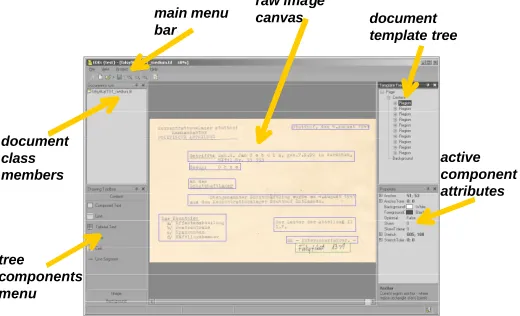
The template creation process takes into account an XML specification of a base (generic) document layout model [5]. An interactive template editor (Fig. 2) as well as two helper applications are provided in the system to facilitate the creation of template XML files for the documents to be converted. The template editor, allows the users to work directly on the document image canvas and define the layout components using easy drag and drop procedures.
raw image
canvas document template tree main menu
bar
document class members
tree components menu
[image:5.595.173.433.231.389.2]active component attributes
Fig. 2. A screenshot of the interactive template editor.
The subsequent extraction of the textual content of the document is guided by the document template. The template is an initially empty container XML structure. This structure specifies generic regions (as rectangles) of a predefined type of content (e.g. table block, salutation block etc.). Region specifications are interpreted by the document analysis methods to extract precise text regions (e.g. textlines, table cells etc.) from the scanned document pages. This (geometrical parameter) information is then inserted into the respective regions of the XML template to produce content XML files (“filled” document structure) – one for each respective page of input.
The OCR process subsequently looks up each of the content XML regions in correspondence with the enhanced image in order to resolve problems with recognising individual words and groups of characters (using corresponding dictionaries – peoples’ first names, geographical place names etc.). The recognised text (possibly after additional human editing) is the edited in the appropriate positions in the content XML, completing the document conversion process.
4 Document Image Analysis
background, paper discolouration, creases, and blurred, merged and faint text, to name but a few) the result must be a bi-level improved image where characters are enhanced (segmented, restored and faint ones retrieved from the background) as much as possible.
Second, individual semantic entities must be precisely located and described in the content XML structure. The required level of abstraction for the semantic entities is defined in advance. The document template XML structure coarsely outlines the location of regions in the image (e.g., there is a table region contained within a given notional rectangle). The document image analysis methods must locate the required instances of logical entities (e.g., individual table cells) and enter this information in the content XML. Using the resulting content XML as a map, the OCR process can be directed to that specific location in the image and fill-in the recognised text into the content XML structure.
The main steps of the document image analysis stage are: segmentation of background entities, character location and character improvement. Each of these steps is described in the remainder of this section.
4.1 Segmentation of Background Entities
The first step in the image analysis chain is to locate the paper document inside the document image. Due to the requirement to scan each document against a dark green background, a dark outer region surrounding the document exists in every image (Fig. 1). To identify the dark outer edge, the Lightness component of the HLS representation of each pixel is examined.
The process of outer edge segmentation starts by examining the edge pixels of the image in each of the four edges (top, left, bottom, right). Starting with each edge pixel, we move inwards, and the difference in Lightness of each pair of adjacent pixels is checked. If the difference is found to be above an experimentally defined threshold, the pixel is marked as a potential paper-edge one. A pixel is also marked as a potential paper-edge one, if the difference in Lightness between the current pixel and the average of the previous pixels examined (in this row or column) is above the same threshold as before. This ensures that gradient transitions from the dark outer-edge to paper will also be identified.
The paper edges are expected to be approximately straight; therefore, the pixels identified as potential paper-edge ones at the previous step, are further inspected and any existent spikes (pixels having a large displacement comparing to their neighbouring ones) are eliminated.
A straight line is subsequently fitted on each of the four potential paper edges, and a second check is performed, based on the straight lines identified, in order to eliminate any wider spikes that cross the fitted line and were missed in the first round. Finally, the outer edge pixels are labelled as such.
corner) of the page can be identified, which is important in terms of matching the template provided to the image at hand.
[image:7.595.126.472.185.394.2](a) (b)
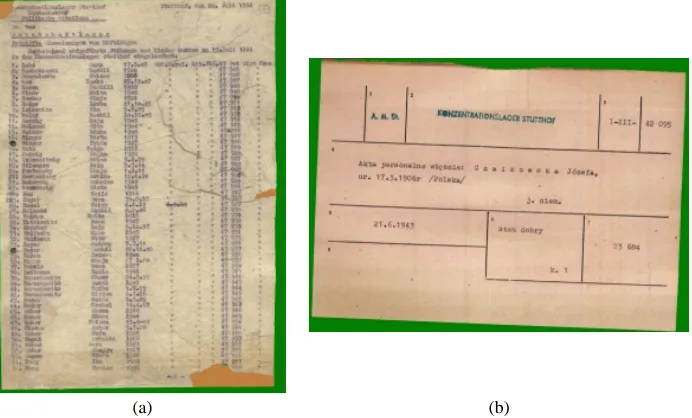
Fig. 3. The identified surrounding area (green) and the reconstructed paper areas (orange) for the documents in Fig 1.
A different type of background entity that is of interest and needs to be segmented is that of areas of reconstructed paper. The presence of this type of areas is an artefact resulting from earlier document restoration attempts, where missing paper (due to tears, holes etc.) is “grown” back using liquid paper (e.g., see especially the bottom-right and top-left corners of the page image in Fig. 1 (a)). Certain regions of printed information share similar colour characteristics as reconstructed paper areas; therefore, it is important that such areas are segmented before the character segmentation process takes place, to avoid any subsequent misclassification. The segmentation of reconstructed-paper areas is performed in two steps. First, potential areas of reconstructed paper are identified in the image, based on their colour characteristics. Subsequently, the identified regions are filtered based on their location in the image.
In order to segment the reconstructed-paper areas in an image, the Lightness and Saturation components of the HLS colour system are examined. During this analysis, all pixels having Saturation and Lightness values in certain ranges, experimentally derived, are labelled as potential parts of a reconstructed paper area.
and erosion operations), in order to close any internal gaps in the connected components identified.
The result of this pre-processing step can be seen in Fig. 3, where the identified surrounding area is shown in green and the reconstructed paper areas in orange.
4.2 Character Location
In order to improve the text regions to the effect that merged characters are separated, and faint ones are “lifted” from the background, the approach described here performs an individual character location and enhancement process. This approach is novel in this type of application and is afforded by the regularity of the typewriter font.
In order to locate individual characters in the image, a top-down approach is followed. First, the regions of interest are looked up in the XML document template. This minimizes the overall processing effort required, since character location only takes place within given areas instead of the whole image (although the methods can be extended to work with the whole image). For each text region of the template, a two-step process takes place to locate the characters: first, the identification of textlines in the region is performed, and then for each textline extracted, the characters within it are segmented.
Information retrieved by the document template is employed to facilitate character location. The main properties of the typewriter font exploited here are the constant font size (character height and maximum width) and the fact that there are no vertical overlaps between parts of adjacent characters. This a-priori knowledge of the character set used (provided in the document template) allows for an initial prediction about the spacing between textlines and between adjacent characters to be made.
The identification of textlines in a text region is based on the analysis of the vertical projection of the region (based on the Lightness component). Each textline is expected to contribute at least one local maximum (high count of dark pixels) in the vertical projection. Moreover, this local maximum is expected to appear close to the centre of each text line, thus to have a distance larger than a pre-defined threshold from its left and right minima. Based on this heuristic, an initial filtering of maxima in the vertical projection takes place, so that only those that potentially signify textlines are considered.
Finally, the separators produced for the textline are examined against previously identified textlines, and certain amendments take place to ensure that textlines appear in a continuous fashion and any white space between them is properly discarded.
For each of the textlines identified before, a similar strategy is followed to separate individual characters. The horizontal projection of each textline is used in this case. First, any white space found on the left of the characters needs to be discarded. In order to do so, the maxima of the projection histogram are located, and the first maximum of some importance (strength higher than a threshold) is identified.
Based on the position of the first important maximum (that corresponds to a character) the first character separator is placed on the local minimum on its left. Using information about the fixed width of the characters (character set information from the template), we can project the position of the next character separator based on the first one. Every minimum that lies plus or minus a fixed width from the projected separator is considered as a potential next character separator, and is scored according to its strength, and its distance from the projected character separator. The minimum with the highest score is labelled as the next character separator and the process is repeated.
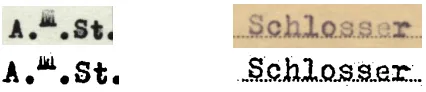
By locating individual characters within textlines, an important problem which often hinders the OCR stage is readily addressed: merged characters (characters that are touching in the original image) can now be separated. An example of individual characters precisely located within the document image can be seen in Fig. 4. It can be seen that, apart from the local thresholding of the characters, the separators correctly split characters that were merged in the original image (e.g. “GER” in “KONZENTRATIONSLAGER”).
Fig. 4. A field in a catalogue card and the corresponding result after character location and enhancement.
4.3 Image Based Character Enhancement
Having identified the position of all characters in the image, local processing can take place for each character. This processing, aims at improving the characters and producing a black and white image of the character, which will be used by OCR in the next stage. A local (individual character) approach produces much better results in the case of typewritten documents, since individual characters are usually pressed in different strengths.
equalisation techniques [8] and Weszka and Rosenfeld’s [9] approach). A key characteristic of Niblack’s method seems to be the accurate preservation of character edges while, however, it does not perform very well on areas of degraded background not containing any pixels of a character. A sample result can be seen in Fig. 5.
Fig. 5. Detail of text showing faint and strongly pressed characters properly recovered.
It should be noted that very encouraging results have been obtained, with merged characters correctly separated and faint characters (previously classified as background) recovered. The ability to locate individual characters constitutes a very significant benefit for any enhancement process and this is one of the characteristic advantages of this project.
5 Character Recognition and Post-processing
An off-the-shelf OCR package is given the enhanced image and the location of each logical entity (from the intermediate content XML structure). At the end of this step, the recognised characters are inserted in the content XML structure.
The OCR package cannot be trained directly on the document class in hand. However, the results of the OCR are post-processed taking into account the type of the logical entity to which they correspond. For instance, if the logical entity is a date, only digits and separators (e.g., hyphens) are considered and the result can be further validated. Similarly for surnames, names and placenames, although the frequent practice of using German spelling (and re-naming) of places and peoples’ names make the process more complicated.
Experiments are still being carried out to establish the full extent of measurable improvement in recognition rate as opposed to applying OCR to the original image (before enhancement). Initial figures (from a respresentative sample including images of different levels of quality) indicate that the whole approach presented here is beneficial to direct OCR. More specifically, 95.5% of the characters were recognised correctly as opposed to 71.4% with the direct OCR. Furthermore, 84.2% of the words were correctly recognized, in contrast to 52.3% with direct OCR. It should be noted, however, that the measure of overall effectiveness of the complete approach (Section 7) is a more meaningful measure and the reader is referred to that.
6 Web Database and User Access
www.memorial-project.info). The final approved content XML document structures will form the basis for extracting selected information to include in a web database application. Each type of user will be authenticated first and then receive the result of their query applied to each of the participating archives (appropriately censored according to their user status).
7 Effectiveness of the Approach
The MEMORIAL project is still under way, therefore any results obtained are preliminary at this point in time. Further development is taking place on the character enhancement stage and more document classes are being introduced to test each of the components of the approach. However, the results presented here are largely representative of the performance of the system, albeit they are given on a smaller number of document classes. The documents that contribute to the following discussion are the (original) file cards and the “transport list forgeries”. The latter are documents faithfully reproduced by historians on original paper and typewriters dating from the time of the transport lists and having the same layout structure as the originals. The reasons for creating these realistic “forgeries” is to initially test the system with realistic images that can be shown and published (as opposed to the original documents containing personal information) at an early stage of the project.
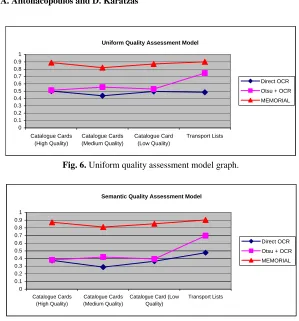
The effectiveness of the whole approach is assessed by evaluating acceptance-testing scenarios. Two are discussed here, for reasons of brevity (following each of the uniform and semantic models). Each model takes into account four metrics: the average OCR confidence level (as output by the package), the percentage of correctly recognised characters, the percentage of correctly recognised words and, finally, the document preparation time ratio (indicating time/cost savings as opposed to human transcription). Quality (effectiveness of the system) is expressed in the range of 0–1. Three different cases are compared in terms of quality value: the direct application of the off-the-shelf package to the document, the application of the OCR package following thresholding by Otsu’s method [7], and finally, the comprehensive approach of the MEMORIAL project.
Uniform Quality Assessment Model 0 0.1 0.2 0.3 0.4 0.5 0.6 0.7 0.8 0.9 1 Catalogue Cards (High Quality) Catalogue Cards (Medium Quality) Catalogue Card (Low Quality) Transport Lists Direct OCR Otsu + OCR MEMORIAL
Fig. 6. Uniform quality assessment model graph.
Semantic Quality Assessment Model
0 0.1 0.2 0.3 0.4 0.5 0.6 0.7 0.8 0.9 1 Catalogue Cards (High Quality) Catalogue Cards (Medium Quality)
Catalogue Card (Low Quality)
Transport Lists
[image:12.595.152.447.148.281.2]Direct OCR Otsu + OCR MEMORIAL
Fig. 7. Semantic quality assessment model graph.
8 Concluding Remarks
This paper has presented a series of processes and tools, with an emphasis on document analysis, that constitute a comprehensive framework to convert historical typewritten (but not necessarily limited to that) documents. Historical documents are unique in many ways and dealing with them requires special consideration both in terms of methods and in the overall thinking required. The richness of information contained in such documents (which needs to be reflected in the final digital representation) and the artefacts due to degradation / heavy use (rendering most well established methods useless) strongly indicate a necessity for a paradigm shift from methods designed to be used by technically-oriented people to systems to be used (and incorporate the significant expertise of) historians/archivists. This is the most important lesson learned.
degradation, rather) states encountered necessitates a large degree of flexibility even for documents produced with the same typewriter at the same point in time. Work continues on these aspects to improve the overall effectiveness of the approach and extend it for use with more types of documents.
References
1. Barrett, W., Hutchinson, L., Quass, D., Nielson, H., Kennard, D.: Digital Mountain: From Granite Archive to Global Access. Proceedings of the International Workshop on Document Image Analysis for Libraries (DIAL2004), Palo Alto, USA (2004) 104–121
2. Downton, A., Lucas, S., Patoulas, G., Beccaloni, G., Scoble, M., Robinson, G.: Computerising Natural History Card Archives. Proceedings of the 7th International Conference on Document Analysis and Recognition (ICDAR2003). Edinburgh, UK, August 3–6, (2003) 354–358
3. IsyReADeT project, IST-1999-57462, www.isyreadet.net.
4. Marinai, S., Marino, E., Cesarini, F., Soda, G.: A Geberal System for the Retrieval of Document Images from Digital Libraries. Proceedings of the International Workshop on Document Image Analysis for Libraries (DIAL2004), Palo Alto, USA (2004) 150–173 5. MEMORIAL Consortium.: Specification of a Personal Record Paper Document Layout,
Structure and Content. MEMORIAL (IST-2001-33441), Report D2 (2002)
6. Niblack, W.: An Introduction To Digital Image Processing, Prentice-Hall, London (1986) 7. Otsu, N.: A threshold selection method from gray-level histograms. IEEE Transactions on
Systems, Man and Cybernetics, Vol. SMC-9 (1979) 62–66
8. Sonka, M., Hlavac, V. and Boyle, R.: Image Processing, Analysis and Machine Vision, 2nd edn. PWS Publishing (1999)