Rochester Institute of Technology
RIT Scholar Works
Theses Thesis/Dissertation Collections
1996
Investigation into the use of the World Wide Web
as an interface for distributing electronic
documents to and from a remote digital color
printing site
Ronald J. Recene
Follow this and additional works at:http://scholarworks.rit.edu/theses
This Thesis is brought to you for free and open access by the Thesis/Dissertation Collections at RIT Scholar Works. It has been accepted for inclusion in Theses by an authorized administrator of RIT Scholar Works. For more information, please [email protected].
Recommended Citation
School of Printing Management and Sciences Rochester Institute of Technology
Rochester, New York
Certificate of Approval
— — — — — — — —
Master’s Thesis
— — — — — — — —
This is to certify that the Master’s Thesis of
Ronald James Recene, Jr.
With a major in Graphic Arts Publishing / Electronic Publishing has been approved by the Thesis Committee as satisfactory for the thesis requirement for the Master of Science degree
at the convocation of
November, 1996
Thesis Committee:
— — — — — — — — — — — — — —Thesis Advisor
Graduate Program Coordinator
An investigation into the use of the World Wide Web as an interface for distributing electronic documents
to and from a remote digital color printing site.
by
Ronald James Recene, Jr.
A thesis project submitted in partial fulfillment of the requirements for the degree of Master of Science in the
School of Printing Management and Sciences in the College of Imaging Arts and Sciences of the
Rochester Institute of Technology
November 1996
Permission to Reproduce an R.I.T. Thesis
An investigation into the use of the World Wide Web as an interface for
distributing electronic documents to and from a remote digital color printing site.
I, Ronald James Recene, Jr., prefer to be contacted each time a request for reproduction is made. I can be reached at the following address:
Ronald James Recene, Jr. 18 Sharon Lane
Wethersfield, CT 06109
iii
Acknowledgments
I would like to thank my family,—especially my mother, Mary Helen Wilde, who made this all possible—Maureen Grace Begley, William Hanna, Jamisen Gingerelli, Tim Conroy, Jennifer Kerrigan, and Vasuki Seshadri for their support and help with this thesis project.
I would also like to thank my Advisor, Frank Romano, and Program Coordinator, Marie Freckleton, as well as the following members of the RIT faculty for their support and assis-tance: Frank Cost and Archie Provan.
Table of Contents
Abstract ․ ․ ․ ․ ․ ․ ․ ․ ․ ․ ․ ․ ․ ․ ․ ․ ․ ․ ․ ․ ․ ․ ․ ․ ․ ․ ․ ․ ․ ․ ․ ․ ․ ․ ․ ․ ․ ․ ․ ․ vi
Chapter One—Introduction ․ ․ ․ ․ ․ ․ ․ ․ ․ ․ ․ ․ ․ ․ ․ ․ ․ ․ ․ ․ ․ ․ ․ ․ ․ ․ ․ ․ ․ ․ 1 The Statement of Problem․ ․ ․ ․ ․ ․ ․ ․ ․ ․ ․ ․ ․ ․ ․ ․ ․ ․ ․ ․ ․ ․ ․ ․ ․ ․ 1 Background and Significance ․ ․ ․ ․ ․ ․ ․ ․ ․ ․ ․ ․ ․ ․ ․ ․ ․ ․ ․ ․ ․ ․ ․ ․ 1 Reasons for Interest ․ ․ ․ ․ ․ ․ ․ ․ ․ ․ ․ ․ ․ ․ ․ ․ ․ ․ ․ ․ ․ ․ ․ ․ ․ ․ ․ ․ ․ 2 End Notes For Chapter One․ ․ ․ ․ ․ ․ ․ ․ ․ ․ ․ ․ ․ ․ ․ ․ ․ ․ ․ ․ ․ ․ ․ ․ ․ 4
Chapter Two—Background Theory․ ․ ․ ․ ․ ․ ․ ․ ․ ․ ․ ․ ․ ․ ․ ․ ․ ․ ․ ․ ․ ․ ․ ․ ․ ․ ․ 5 World Wide Web ․ ․ ․ ․ ․ ․ ․ ․ ․ ․ ․ ․ ․ ․ ․ ․ ․ ․ ․ ․ ․ ․ ․ ․ ․ ․ ․ ․ ․ ․ 5 Web Pages․ ․ ․ ․ ․ ․ ․ ․ ․ ․ ․ ․ ․ ․ ․ ․ ․ ․ ․ ․ ․ ․ ․ ․ ․ ․ ․ ․ 6 File Transfer Protocol (FTP) ․ ․ ․ ․ ․ ․ ․ ․ ․ ․ ․ ․ ․ ․ ․ ․ ․ ․ ․ 7 Security Overview ․ ․ ․ ․ ․ ․ ․ ․ ․ ․ ․ ․ ․ ․ ․ ․ ․ ․ ․ ․ ․ ․ ․ ․ 9 Adobe Acrobat․ ․ ․ ․ ․ ․ ․ ․ ․ ․ ․ ․ ․ ․ ․ ․ ․ ․ ․ ․ ․ ․ ․ ․ ․ ․ ․ ․ ․ ․ ․ 11 Structure․ ․ ․ ․ ․ ․ ․ ․ ․ ․ ․ ․ ․ ․ ․ ․ ․ ․ ․ ․ ․ ․ ․ ․ ․ ․ ․ ․ 11 Fonts․ ․ ․ ․ ․ ․ ․ ․ ․ ․ ․ ․ ․ ․ ․ ․ ․ ․ ․ ․ ․ ․ ․ ․ ․ ․ ․ ․ ․ ․ 11 Image Compression ․ ․ ․ ․ ․ ․ ․ ․ ․ ․ ․ ․ ․ ․ ․ ․ ․ ․ ․ ․ ․ ․ 12 Acrobat & PostScript․ ․ ․ ․ ․ ․ ․ ․ ․ ․ ․ ․ ․ ․ ․ ․ ․ ․ ․ ․ ․ ․ 12 Creating PDF Documents ․ ․ ․ ․ ․ ․ ․ ․ ․ ․ ․ ․ ․ ․ ․ ․ ․ ․ ․ 13 Editing PDF Documents․ ․ ․ ․ ․ ․ ․ ․ ․ ․ ․ ․ ․ ․ ․ ․ ․ ․ ․ ․ 13 Security Options ․ ․ ․ ․ ․ ․ ․ ․ ․ ․ ․ ․ ․ ․ ․ ․ ․ ․ ․ ․ ․ ․ ․ ․ 13 Color Management Systems ․ ․ ․ ․ ․ ․ ․ ․ ․ ․ ․ ․ ․ ․ ․ ․ ․ ․ ․ ․ ․ ․ ․ ․ 14 ColorSync ․ ․ ․ ․ ․ ․ ․ ․ ․ ․ ․ ․ ․ ․ ․ ․ ․ ․ ․ ․ ․ ․ ․ ․ ․ ․ ․ 15 ICC Profiles and Standardization․ ․ ․ ․ ․ ․ ․ ․ ․ ․ ․ ․ ․ ․ ․ ․ 16 Digital Color Presses․ ․ ․ ․ ․ ․ ․ ․ ․ ․ ․ ․ ․ ․ ․ ․ ․ ․ ․ ․ ․ ․ ․ ․ ․ ․ ․ ․ 16 On-Demand Printing ․ ․ ․ ․ ․ ․ ․ ․ ․ ․ ․ ․ ․ ․ ․ ․ ․ ․ ․ ․ ․ 16 Quality․ ․ ․ ․ ․ ․ ․ ․ ․ ․ ․ ․ ․ ․ ․ ․ ․ ․ ․ ․ ․ ․ ․ ․ ․ ․ ․ ․ ․ 17 Proofing ․ ․ ․ ․ ․ ․ ․ ․ ․ ․ ․ ․ ․ ․ ․ ․ ․ ․ ․ ․ ․ ․ ․ ․ ․ ․ ․ ․ 17 End Notes For Chapter Two ․ ․ ․ ․ ․ ․ ․ ․ ․ ․ ․ ․ ․ ․ ․ ․ ․ ․ ․ ․ ․ ․ ․ ․ 19
Chapter Three—Hypothesis․ ․ ․ ․ ․ ․ ․ ․ ․ ․ ․ ․ ․ ․ ․ ․ ․ ․ ․ ․ ․ ․ ․ ․ ․ ․ ․ ․ ․ ․ 22
Chapter Four—Methodology ․ ․ ․ ․ ․ ․ ․ ․ ․ ․ ․ ․ ․ ․ ․ ․ ․ ․ ․ ․ ․ ․ ․ ․ ․ ․ ․ ․ ․ 24
Chapter Five—The Results ․ ․ ․ ․ ․ ․ ․ ․ ․ ․ ․ ․ ․ ․ ․ ․ ․ ․ ․ ․ ․ ․ ․ ․ ․ ․ ․ ․ ․ ․ 26
World Wide Web Site as a Store Front ․ ․ ․ ․ ․ ․ ․ ․ ․ ․ ․ ․ ․ ․ ․ ․ ․ ․ ․ 26 Creation of the Site․ ․ ․ ․ ․ ․ ․ ․ ․ ․ ․ ․ ․ ․ ․ ․ ․ ․ ․ ․ ․ ․ ․ 26 Web Site Service Providers ․ ․ ․ ․ ․ ․ ․ ․ ․ ․ ․ ․ ․ ․ ․ ․ ․ ․ ․ 27 Web Site and FTP ․ ․ ․ ․ ․ ․ ․ ․ ․ ․ ․ ․ ․ ․ ․ ․ ․ ․ ․ ․ ․ ․ ․ 28 Color Management Systems ․ ․ ․ ․ ․ ․ ․ ․ ․ ․ ․ ․ ․ ․ ․ ․ ․ ․ ․ ․ ․ ․ ․ ․ 30 Creation of Profiles․ ․ ․ ․ ․ ․ ․ ․ ․ ․ ․ ․ ․ ․ ․ ․ ․ ․ ․ ․ ․ ․ ․ 30 Results of Implementation ․ ․ ․ ․ ․ ․ ․ ․ ․ ․ ․ ․ ․ ․ ․ ․ ․ ․ ․ 31 Digital Color Presses․ ․ ․ ․ ․ ․ ․ ․ ․ ․ ․ ․ ․ ․ ․ ․ ․ ․ ․ ․ ․ ․ ․ ․ ․ ․ ․ ․ 32 Adobe Acrobat Documents vs. Quark XPress Documents․ ․ ․ ․ 32 Endnotes For Chapter Five․ ․ ․ ․ ․ ․ ․ ․ ․ ․ ․ ․ ․ ․ ․ ․ ․ ․ ․ ․ ․ ․ ․ ․ ․ 35
Chapter Six—Summary and Conclusion․ ․ ․ ․ ․ ․ ․ ․ ․ ․ ․ ․ ․ ․ ․ ․ ․ ․ ․ ․ ․ ․ ․ ․ 36 Recommendations for Further Study․ ․ ․ ․ ․ ․ ․ ․ ․ ․ ․ ․ ․ ․ ․ ․ ․ ․ ․ ․ 37
Bibliography․ ․ ․ ․ ․ ․ ․ ․ ․ ․ ․ ․ ․ ․ ․ ․ ․ ․ ․ ․ ․ ․ ․ ․ ․ ․ ․ ․ ․ ․ ․ ․ ․ ․ ․ ․ ․ ․ 38
General References․ ․ ․ ․ ․ ․ ․ ․ ․ ․ ․ ․ ․ ․ ․ ․ ․ ․ ․ ․ ․ ․ ․ ․ ․ ․ ․ ․ ․ ․ ․ ․ ․ ․ ․ 41
Appendices42
Appendix A ․ ․ ․ ․ ․ ․ ․ ․ ․ ․ ․ ․ ․ ․ ․ ․ ․ ․ ․ ․ ․ ․ ․ ․ ․ ․ ․ ․ ․ ․ ․ ․ 43 Printout of Web Site at 90% ․ ․ ․ ․ ․ ․ ․ ․ ․ ․ ․ ․ ․ ․ ․ ․ ․ ․ 44 Appendix B ․ ․ ․ ․ ․ ․ ․ ․ ․ ․ ․ ․ ․ ․ ․ ․ ․ ․ ․ ․ ․ ․ ․ ․ ․ ․ ․ ․ ․ ․ ․ ․ 45 Printout of the Downloadable Directions.pdf Document․ ․ ․ ․ ․ 46 Appendix C ․ ․ ․ ․ ․ ․ ․ ․ ․ ․ ․ ․ ․ ․ ․ ․ ․ ․ ․ ․ ․ ․ ․ ․ ․ ․ ․ ․ ․ ․ ․ ․ 47 Printout of the Downloadable Suppliers.pdf Document ․ ․ ․ ․ ․ 48 Appendix D ․ ․ ․ ․ ․ ․ ․ ․ ․ ․ ․ ․ ․ ․ ․ ․ ․ ․ ․ ․ ․ ․ ․ ․ ․ ․ ․ ․ ․ ․ ․ ․ 49 B&W Printout of the Downloadable Quark Templates ․ ․ ․ ․ ․ 50 Appendix E ․ ․ ․ ․ ․ ․ ․ ․ ․ ․ ․ ․ ․ ․ ․ ․ ․ ․ ․ ․ ․ ․ ․ ․ ․ ․ ․ ․ ․ ․ ․ ․ 51 B&W Printout of the Final Documents ․ ․ ․ ․ ․ ․ ․ ․ ․ ․ ․ ․ 52 Appendix F ․ ․ ․ ․ ․ ․ ․ ․ ․ ․ ․ ․ ․ ․ ․ ․ ․ ․ ․ ․ ․ ․ ․ ․ ․ ․ ․ ․ ․ ․ ․ ․ 53 Printout of CGI Code used with the Hypertext Form․ ․ ․ ․ ․ ․ 54 Appendix G ․ ․ ․ ․ ․ ․ ․ ․ ․ ․ ․ ․ ․ ․ ․ ․ ․ ․ ․ ․ ․ ․ ․ ․ ․ ․ ․ ․ ․ ․ ․ ․ 55 Printout of the Information Returned to an Email Account․ ․ ․ 56
Abstract
The World Wide Web and Internet are the most talked about and fastest growing m e d i u m s for information and electronic document distribution. Their growth has, and will continue to have, a great impact on all forms of media, due to their potential to reach millions of indi-viduals. This project demonstrates the capabilities of the World Wide Web to perform, not only as a publishing vehicle, but as a means for communication and document distribution to and from a digital color printing facility.
In order to show this, a Web site was built that incorporated the utilities needed for the success-ful exchange of data, such as links to additional software applications available on the We b, d ownloadable ICC Color Management profiles of the the digital color press, a hypertext job estimate/information form, an uploadable FTP serve r, and directions on how to use the serv i c e and create the appropriate files. The result is a functional Web-based printing facility that elim-inates the restrictions associated with geographical boundaries. The test to see if this site func-tioned pro p e r l y, was the successful implementation of the aforemenfunc-tioned applications and tools to create actual documents. Those documents, when put through the developed workflow, must exhibit the designers original intent when re p roduced on a remote digital press and when c o m p a red to their originals re p roduced on that same press. The written portion of this thesis documents the pro c e d u res and rational behind the methodology used.
Chapter One
Introduction
The Statement of Problem
The development and growth of the World Wide Web (WWW) has brought about the need for the graphic arts industry to develop new production workflows which are designed to harness the technology of print-on-demand, coupled with the enhancement available through high-speed telecommunications networks.
“The World Wide Web has established itself as a viable medium for the distri-bution of electronic documents. So why can’t it be used as a vehicle for print-ing those documents as well? Technology is advancprint-ing ve ry rapidly and the time has come where printers can utilize the existing WWW networks to enhance their digital print-on-demand serv i c e s .”1
The objective of this project is to present one possible workflow solution that incorporates the use of a World Wide Web site, for a generic digital color printing facility; color management; and the Acrobat PDF document format, as the vehicle for the distributing and printing of color documents. This Web page will act as an interface where customers can electronically download and submit digital files with the final intention of having them reproduced on a digital color press.
Background and Significance
As new technologies develop, the graphic arts industry must develop with them. With the introduction of utilities that automate many of the conventional imaging and reproduction processes, the future role of printing is an area of major concern. “ For instance, in the are a concerning electronic document creation, we are seeing more and more digital input. A major-ity of pages are now being created electronically and reproduction services are being affected by the desire for on-demand reproduction and short turnaround times. Ten years ago the
age turnaround time was one week, today it’s probably less than 48 hours.”2If one looks at
w h a t’s happening to the re p roduction industry, the trends dictate various job and mark e t segments coming together. T h e re’s a blur taking place, many occupations and markets are start-ing to ove r l a p.
Since various segments are overlapping, printers are finding that they must investigate new approaches in order to stay competitive and to develop with the technology and c u r re n t customer demands. They must find new markets and communication methods to meet the demand for shorter run lengths and faster turnaround times, resulting in a re-configuration of the traditional work fl ows and the integration of new technologies that will automate many of the traditional craft-oriented processes of printing.
By combining four of the most current technologies, the World Wide Web, on-demand digi-tal printing, Adobe Acrobat, and color management, a printer can slightly modify their services and use the World Wide Web as a tool to meet an emerging market. The Web intro-duces a whole new market segment, providing access to thousands of customers. It has the ability to act as a communication tool as well as a means of file transportation. In conjunction with the We b, Adobe Ac robat offers a platform-independent solution for distributing c o m p ressed documents, while maintaining the original documents fidelity. By intro d u c i n g color management, printers can automate the color re p roduction process and condense it into a push-button operation, and there f o re bring color separation capabilities to the inexperienced computer user. Finally, by keeping files in a digital format, digital on-demand printing enables the production of short-run four color jobs with fast turnaround times. The combining of these four technologies creates the potential of eliminating many of the problems that are common to digital prepress, such as multiple file formats, computer platforms, color accept-ability, and turnaround time. Individually, none of these technologies have reached a stage of maturity, but with future enhancements, alone or in combinations, they have great potential.
Reasons for Interest
s h o rt runs, with quick turnaround times. As communication technologies develop and docu-ment distribution is simplified, printing companies will have to adapt to the on-demand, short run requests that are developing in order to stay competitive. Also, as the use of the Web grows and more and more people use it as a communication tool, companies are going to have to learn how to integrate their business to obtain that market and take full advantage of the opportunities it has to offer.
End Notes For Chapter One
1James Staten. (1995 June 28) News Extra: Xerox debuts Internet-based
print-on-demand services. MacWeek, (28 June 1995).
2Bob Barbera. “Chromapress, Agfa USA, Short Run Color & Digital Color
Printing: Market and Business Opportunities,” The Agfa/Apple Digital Color Printing World Tour 1995, World Wide Web Address: http:// www.agfahome.com.
Chapter Two
Background Theory
The evolution of distributed print on-demand and communication networks is changing the way the world thinks about printing and publishing. As requests for shorter and shorter print run-lengths increase, digital on-demand color printing equipment is coming to the forefront to meet the industry’s demands. Like traditional printers making investments in digital color presses, service providers are turning to communication networks, like the World Wide Web, as a medium to distribute and receive information. Any printing service, service bureau, or trade shop can now create a Web page, and post it on the World Wide Web. By doing so, it gives that company the potential of reaching thousands of customers and increasing their clientele by eliminating any sort of geographical boundary.
The creation of a Web site for this project is based upon the technological advancements that are occurring in four different areas of printing and communications. These four areas are the World Wide Web, Adobe Acrobat and the PDF (Portable Document Format), color manage-ment systems, and digital color printing presses.
World Wide Web
Before the explosion of interest in the World Wide Web, it was primarily used as a research-oriented tool. Many of the services created to search and view the vast amounts of informa-tion were geared toward computer programmers and were extremely hard to use. “Today the fastest growing segment of information placed on the Web is the commercial segment. In other words, people without a high level of computer-based knowledge. This change in emphasis and growth in audience has led to the development and acceptance of more user-friendly services and interf a c e s . ”1
The development of more user-friendly interfaces began in 1993 when the National Center for Supercomputing Applications (NCSA) introduced a user interface called Mosaic, which was to be followed by others like Netscape and MacWeb. Interfaces, like these Web browsers,
allow for a visual presentation of text, graphics, and video, while creating an easy to use graphic connection to the Web that has all of the technical structures and formal protocols buried beneath them. These interfaces have helped to revolutionize the use of the World Wide Web, bringing it down to a “point and click” level, just as the world of computing was revo-lutionized in the 1980’s partially due to the introduction of the Macintosh’s easy to use “point and click” interface.
Web Pages
Not only has the Web itself been transformed to run on a point and click interface, but the p rograms that are used to create Web pages have also been re t rofitted for the average user. The standard language the Web uses for creating and recognizing documents is the Hy p e r Te x t Ma rkup Language (HTML), which is related to, but technically not a subset of, the St a n d a rd Ge n e r a l i zed Ma rkup Language (SGML), a document formatting language. HTML is simply a document structure consisting of standard 7-bit ASCII files with formatting codes or tags that contain information about page layout. It tells the navigational software, Netscape or Mosaic, how to display text, hypertext links, images, sound files, and movie clips.2
Traditionally, to create a Web page a user was required to know HTML and its tagging schemes, which would look something like this:
Manufacturers have developed software applications, like Adobe’s PageMill Web page author-ing software, that are specifically designed for non-technical people who want to create or
<TITLE>The Jimmy Stewart Museum: Homepage</TITLE> <LINK REV="made" HREF="[email protected]"> </HEAD>
<BODY BACKGROUND="/images/default_bg.jpg"> <P ALIGN=CENTER>
<IMG SRC="/images/header.gif" ALT="The Jimmy Stewart Museum"></P> <HR>
<IMG ALIGN=RIGHT SRC="/images/sketch.gif" ALT=""> <!-- I'm keeping this for now. Text provided by client is ... dry. --> <P>
Perhaps more than any other actor, James Stewart represents America. His slow drawl, deliberate mannerisms and cool sarcasm made for an endearing persona of the wise boy--naiveté with a wink.</P>
<P>
Jimmy remains today a man of strong, quiet, confidence unmarred by arrogance. He is our big brother, our father, our peer, our hero.</P> </BODY>
</HTML>
maintain Web pages. These applications include eve rything one needs to create Web pages but eliminate the need to know the various HTML tags. The Web pages are written in what looks and feels like a normal word processor, and are displayed in the application exactly as they would be in a Web browser. In essence, the application is writing the HTML codes as one places text and graphics in the document. The process of applying styles, placing and resizing images, and dragging and dropping parts of your document from other locations is auto-mated, all of which used to be done through coding and manually keying in HTML text strings and links.3
“At the same time, vendors of popular applications packages are adding Web-publishing capabilities to their existing products. Just as word processors, spreadsheets, databases and page-layout programs can now output text, vendors are also building in HTML output. Vendors, such as Microsoft Corp. and Novell Inc., have added HTML capabilities to their word processors, while Adobe has developed a plug-in for PageMaker, and Lotus Development Corp.’s Notes has been adapted for use with the Web. Also widely available now are utilities that convert text, RTF and PostScript to HTML; tools for creating HTML pages from Eudora, Microsoft Excel, Adobe FrameMaker, PageMaker, Adobe Illustrator and XPress files; and page-creation tools for other formats, such as Adobe Acrobat’s Portable Document Format.”4
These tools are really good for getting up and rolling, but if you actually look at the most popular and successful sites, almost all of them have been done by hand, or at least fine-tuned by hand. In effect, what all of these aforementioned page-creation tools try to do is shield users from the monotony of HTML coding, allowing novices to create Web pages quickly and help even advanced users produce pages with a more unified look and fewer errors. However, to create something more than a basic page, there’s no getting around writing HTML tags that a browser uses to format and display text and graphics.5
File Transfer Protocol (FTP)
Since its inception, the main function of the World Wide Web is the transmission of digital information (transmitting documents from one place to another). One utility that lets you download files from a remote computer system and transfer them back to your computer, or upload a file from a local system to a remote system, is known as FTP (File Transfer Protocol). Strictly speaking, FTP refers both to an application program and a protocol the FTP program uses to communicate and transfer files from one mainframe to another.
Traditionally, moving files around the Web using FTP was rather complex. The process of FTPing a file had its own set of commands that a user had to learn and was done by manu-ally typing in the sites FTP identification number in the FTP utility. This meant that the user had to know the identification number for each site, as well as the type of server that was being used—because it could have an impact on file naming structure—the file name, and the type of file they wanted to transfer, whether it be an ASCII, binary, compressed, or uncompressed file. The proficiency of its use was up to the user, they had to read all of the introductory information at each site to learn important information such as login usernames, passwords, terminal emulation specs, and the proper key commands to exit the program— which could be a mind-blowing experience for the casual user.6
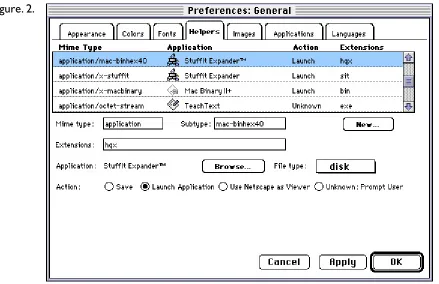
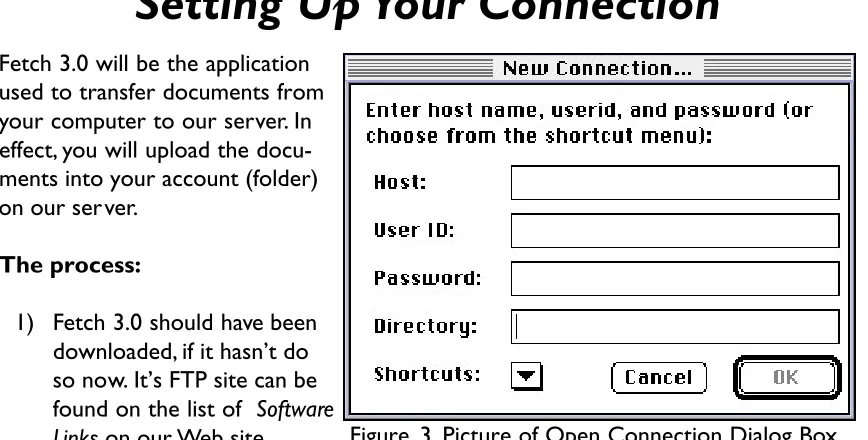
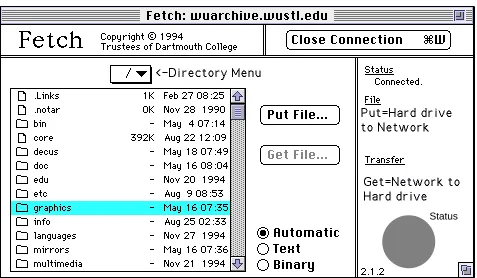
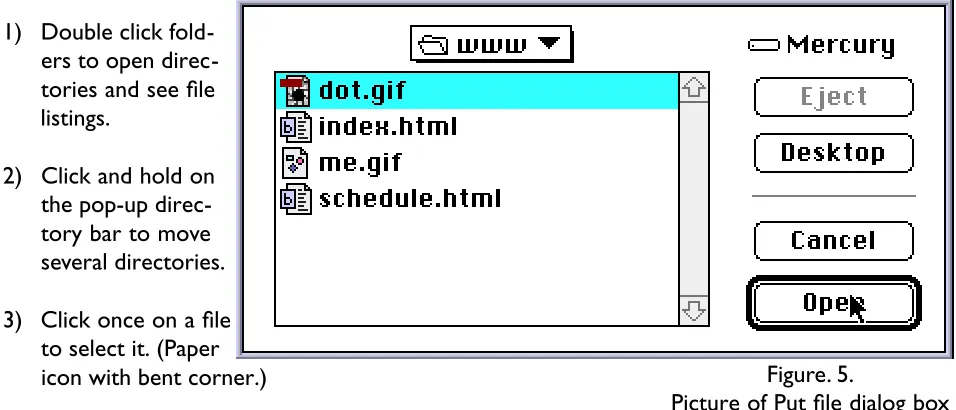
Now, FTPing a file has gotten much easier. Users can chose application programs such as Fetch or Web browsers such as Netscape to do FTP file transferring. Fetch is a Macintosh program for transferring files, which uses the File Transfer Protocol and therefore allows a networked Macintosh to transfer files with any connected machine that supports FTP. However, it is not a fully automated process and does still require users to know information about file types and some of the commands to transfer files.
Netscape, on the other hand, automatically communicates in FTP Protocol, so that when the browser encounters an FTP site it knows how to connect, login anonymously, read the contents of the site, make requests for files, and transfer them back to a site. This reduces the amount of information the user needs in order to access theses sites and re t r i e ve files. Bu t Netscape is limited in its ability, it does not provide the capability of uploading files from a local system to a remote FTP serve r. Regardless of the limitations, the automation of FTPing docu-ments has made Netscape popular for doing smaller tasks by individual users, like retrieving smaller files such as desktop computer programs, and freeware or shareware applications off of the Web.7
Security overview
because there is no reason for it to be unsafe. Security becomes an issue only when talking about filling out personal information such as credit card numbers on Web based hypertext forms, or when setting up a Web site and wanting to limit user access to ensure internal networks are secure from outsiders. In either case, there are many possible security layers that can be employed in order to deter “hackers” from acquiring confidential information.
In terms of the security of hypertext forms, the existing privacy regulations often fall short of consumer expectations. Without good security, the information filled out on Web forms could be intercepted and used for things other than their intended purpose.8
“Last October [1995], in response to consumers’ growing concerns ove r Internet priva c y, the National Telecommunications and In f o r m a t i o n Administration (NTIA) released Pr i vacy and the NII (National In f o rm a t i o n In f ra s t ru c t u re): Sa f e g u a rding Te l e c o m m u n i c a t i o n s - Related Personal In f o rm a t i o n . Its purpose is to provide a framew o rk for developing minimum privacy stan-d a rstan-ds that communications anstan-d information service provistan-ders, such as phone companies, video services, and online services would use to protect any personal information their subscribers generate.
Informed consent is the keystone of this framework, and the plan’s success depends on service providers’ willingness to be self-regulating. Before using information that a consumer has divulged to gain access to the network—tele-phone number, home address, credit card information, and service prefer-ences—or using that data for any non-service-related purpose, a service provider should have to disclose how it plans to use the information and obtain that consumer’s consent. Explicit customer consent should be required before sensitive information, such as financial history, political affiliation, medical records, or sexual orientation, could be used or disclosed.”9
Se rver administrators can also help in the battle to control security. They can set up their serve r to be a secure serve r, using something like Ne t s c a p e’s and RSA’s Se c u re Sockets Layer pro t o c o l (SSL). This technology is based upon public key encryption and is a technique that uses a pair of keys for encryption and decryption. For each pair of keys, one is called the public key, and one is called the private key. The public key is made public by distributing it widely. The priva t e key is never distributed, and is always kept secret. When data is encrypted using the public key it can only be decrypted using the private key. Conve r s e l y, when data is encrypted using the p r i vate key, it can only be decrypted using the public key. This pro p e rty is what makes public key cryptography so useful.
“With this technology users can enter their credit card numbers on a secure Web form and transmit the form over the Internet to a secure server without risk of an intermediary obtaining your credit card information. This type of security protects commercial transactions, as well as all other communica-tions, from misappropriation and fraud that could otherwise occur as informa-tion passes through Internet computers. Howe ve r, secure communicainforma-tions does not eliminate all of an Internet user’s concerns. For example, one must be willing to trust the server administrator with a credit card number before entering it into a commercial transaction. Security technology secures the routes of Internet communication; security technology does not protect one f rom unreputable or careless people with whom a user might choose to do b u s i n e s s . ”1 0
As for a network link, server administrators must take many additional precautions to prevent security breaches. A first step should be to make the internal network server and additional systems as secure as possible with passwords and other good security practices, backed up by a firewall, which controls traffic between the internal system and the Internet.11
If the Web is being used for the transmission of files, via FTP, and those files need to be secure for some reason, they can also be protected through third party encryption software. Much like the Secure Sockets Layer protocol, individuals can encrypt their documents and require a user password in order to access the document. However, these encryption methods are not the definitive means to secure documents. They are also susceptible to hackers that can crack the password-protection schemes. In general the best way to ensure security when using the Web is to treat it as a public system, even when one is just using e-mail. Remember that anyone at anytime could violate a users privacy so one must be cautious about giving out any “secure” information.
Adobe Acrobat
Adobe’s Acrobat is becoming the de facto standard of page description languages. Not only are companies managing their internal information by converting it into PDF (Portable Document Format) format, but many are also using Acrobat as a means to distribute infor-mation about their organizations on the World Wide Web, or as a way to send digital ads to printers—currently newspapers and advertisers.
Structure
“PDF is a PostScript-language–based file format that describes documents that contain any combination of text, graphics, grayscale images, and color images in a resolution and device independent meta-file format.”12 “The structure or makeup of a PDF file is a 7-bit ASCII file,
which means PDF files use only the printable subset of the ASCII character set to describe docu-ments—even those with images and special characters. As a result, converting a document into PDF format makes it “portable” or able to be accessed across diverse hardware and operating system environments, as long as there is a document reader available on that platform.”13However
to be completely portable a document must address at least two important issues: the use of fonts and the use of graphics.
Fonts
One goal of the PDF standard format is to allow one to distribute documents using any font, even though they may not be universally available. Acrobat provides three ways of creating documents using a variety of fonts. The first is to use standard fonts like Times and Helvetica, which are built into every PostScript printer and come with Acrobat. Those fonts are never embedded by the Distiller (even if the user tells it to embed the fonts), but one can be sure of excellent reproduction since the fonts come with all Acrobat viewers. Second, there is the use of Acrobat’s multiple master font technology to emulate the look of a wide variety of commonly used fonts. Adobe Sans and Serif Multiple Master typefaces are loosely based upon Adobe Myriad and Minion and effectively try to match the original font as closely as possi-ble. However this does not work well with all fonts, particularly symbol or dingbat based fonts. Finally, Acrobat allows font embedding. This allows the original font to be stored within the PDF document. Which, in effect, allows the viewer software to display the font exactly as it was originally intended.14
Image Compression
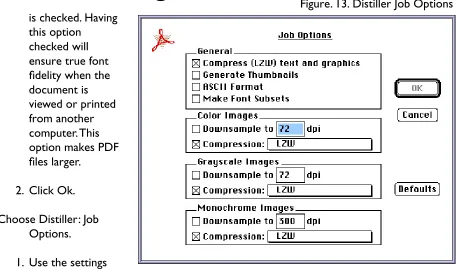
As with fonts Acrobat also supports many options for displaying graphic images within a PDF document. Pictures can range from monochrome, to grayscale, to RGB or CMYK 24-bit color. Since some of these images can have extremely large file sizes, Acrobat provides picture compression options. The options include JPEG (a lossy type of compression) and LWZ (a lossless type of compression) compression, and let the user select a good trade off between size of the compressed image and the quality of the resulting image in the PDF document coupled with the ability to downsample the DPI (Dots Per Inch) of each image in the document.15
means less storage space, so if you are using the document in conjunction with some type of digital transmission to send the documents to remote locations, whether it be via the World Wide Web or a modem, the smaller the document the less time it will take to send, and since it is a 7-bit ASCII file all of the documents attributes should be transmittable.
Acrobat & PostScript
Acrobat also readily lends itself to the printing prepress world; in fact, newspapers across the country are already using Acrobat as a means for digital distribution of a d ve rtising. W h e re a s digital ads for both magazines and newspapers generally originate in PostScript environments by taking them one more step into Acrobat’s portable document format creates a file that is m o re compact than EPS (Encapsulated PostScript), and since Ac robat embeds and compresses fonts and picture information, advertisers don’t have to send them along with their files.
“Ac robat software guarantees that a document created on one computer can be used and accessed by another, without losing crucial data or being completely unintelligible. And since Acrobat does not require the recipient of a document to have the same hardware and software as the author, PDF files can be viewed or printed from virtually any system without losing fidelity.”16
“In the past there has been no guarantee that a document created on one computer can be used or accessed by another. Documents can lose crucial data or be completely unintelligible unless the recipient has the same software and hardware as the author. Document exchange standards, such as ASCII or RTF, are useless for delivering richly formatted documents or graphics without common tools. And without the right tools, critical information can be no easier to find in electronic documents than in their paper counterparts.”17
Creating PDF Documents
imagesetters. By using Distiller, which is really a PostScript interpreter, the document will be processed to the PDF file much like it would be to a piece of film on an imagesetter. Since the PDFWriter is not a PostScript interpreter, it can introduce minor differences in position-ing of text and graphic matter which can produce unacceptable results. Second, Distiller can generate PDF from PostScript created on other computers not supported by the PDFWriter (Unix, Vax, etc).”18 This also means that PDF documents can be converted back into a
PostScript language where it can then be treated as if it were any other PostScript document intended for output; meaning it can be downloaded directly to a RIP or be placed into a page layout program such as Quark XPress.19
Editing PDF Documents
If alterations need to be made to a PDF file, they can be done in either Adobe Illustrator 6.0 or Macromedia FreeHand 5.5. Both do a decent job of opening and editing Acrobat P D F files, especially if one has the native fonts that we re used. If the fonts are not ava i lable they will be substituted by a default.20 However editing PDFs in general can get rather
compli-cated, even with basic files. The more complicated the file structure and initial page layout, the more time and labor intensive the editing procedure will be.
Security Options
Acrobat Exchange provides the option to add security to a PDF document in order to control access to its contents. “Acrobat uses RSA security encryption encoding techniques that are on par with those of some commercial security programs, which combines encryption with data compression. It provides one password to allow access to a document, and another to change security options. These options include allow i n g (or not allowing) recipients to print an Acrobat document, change it’s contents, select text and graphics, and add or change notes.”21
For example, when a password is selected for viewing the document Acrobat encrypts the contents of the text in the new file so that it cannot be viewed even by using another appli-cation. Choosing to encrypt a document not only encrypts each page description but also encrypts the document information such as title author and keywords.
longer the password the more difficult it is to hack.22 Acrobat allows a password to be up to
20 characters, and a good rule to follow is, if a user is password protecting a document with the intention of distributing it publically, use the maximum length password string.
Color Management Systems
The World Wide Web isn’t the only medium that has been re t rofitted for use by the masses, the printing industry — p re p ress more specifically—is also going through many changes, fro m the skilled craft that it once was to a digital process accessible to anyone with computer liter-a c y. One specific liter-areliter-a thliter-at hliter-as come under recent scrutiny is the incorporliter-ation of 4-color images into documents and how to successfully “m a n a g e” them so that they will re p ro d u c e p roperly upon final output, independently of the device used. The current name given to c o n t rolling this process is “color management.”
“Prior to the introduction of desktop publishing in 1985, color management wasn’t consid-ered a problem. Vendors of high end systems—one company who supplied all of the hard-ware and softhard-ware for the entire prepress production—produced closed architecture systems, meaning all their hardware and software elements were calibrated at the factory through color look up tables.”23This provided complete control over every component in the system, and
allowed the vendors to compensate for the individual characteristics of each input, display, and output device in their system. The result was a system that let users closely predict what the product would be on press.
It was the introduction, adoption, and advancements of desktop publishing that has changed our industry from a closed system to an open system based industry. Users can buy many different “brand name” components and connect the individual pieces together to achieve quality results. Color management is being redefined by the creation of new reproduction systems that have the ability to incorporate multiple components from many different vendors into one system. But with the flexibility comes greater variation, so users have to compensate for variables of each piece of equipment, such as: the color characteristics of monitors, scanners, proofers, and imagesetters. Color management programs are attempting to make what is printed or proofed match what is scanned and viewed on a monitor by cali-brating (testing for repeatable accuracy) and profiling (or characterizing) each device. T h e principle behind color management is that color should be able to be controlled thro u g h o u t the desktop environment, independent of any individual devices capabilities and limitations.
ColorSync
The current trends in color management start with the ability to automate the separation p rocess, making it a push button p rocess that will produce quality separations that eve n untrained users can master. The industry is striving for a system that will not only give quality results, but will totally automate the calibration and re p roduction process from scan to print and be accessible through any application. These needs and concerns have just started to be a d d ressed with the introduction of Ap p l e’s ColorSync 2.0.
“The major advancement that Ap p l e’s Color Sync 2.0 is addressing to help redefine color management is that instead of being an individually based soft-w a re process, it is bringing basic color management functions to the operating system level. This re vo l u t i o n i zes the idea and functionality of color manage-ment systems. It was not designed to compete against third party vendors but is ment to compliment their functionality. ColorSync is set up to be the base a rc h i t e c t u re that provides a, Linotype-Hell, color-matching engine at the oper-ating-system level, thus giving the availability for major color management vendors to build full-function color management system software on top of that operating system and take full advantage of its functionality. ”2 4
ColorSync does not provide a color management definitive solution, but it does present an application that will generate predictable results across multiple input and output devices, as well as from many applications.
ICC Profiles and Standardization
Another key concept that is being addressed in conjunction with Color Sync 2.0, which had been missing up until this point, is that there were no standard formats for device profiles. “A group calling themselves the ICC (International Color Consortium), founded by the likes of Apple, Adobe, Sun, SGI, Microsoft and Kodak to name a few, envisioned the idea of a stan-dardized file architecture that stores the device characterization as a separate file. This file can then be applied to any image regardless of the application.”25This file considerably expands
the amount of information contained in the profile about how a device renders color. The ICC published the specifications so hardware and software developers would build the option into new software packages, which in turn introduces the ability to use a single profile with a multitude of programs, any system level color management tool, and any Postscript output device to create truly device-independent color transformations and therefore perform color management across many platforms.26
Digital Color Presses
On-Demand Printing
“The predictions for the future of printing is heavily in favor of short -run production—defining short-run as anywhere from 50 to 5,000 copies. On-demand short-run printing is the fastest growing segment of the four color printing market. According to Charles A. Pesko Ventures, a market research and consulting firm in Massachusetts that specializes in on-demand short-run printing, the on-demand short-run market accounted for $7 billion of an $80 billion commercial printing market in 1992, or 9 percent. By 1997, that number is expected to catapult to $11 billion—a 58 percent increase—and by the year 2000, on-demand short-run printing will constitute 20 percent of the domestic commercial printing market.” 27
Those who are currently purchasing digital color presses are often prepress shops that have no actual operating experience with conventional printing presses, as well as commercial print-ers, high-volume digital service bureaus, and large companies with centralized reprographics departments; it is those whose products include direct-mail catalogues, periodicals, and customized forms that will want the presses’ quick turnaround, and good print quality.28
Along with the quick turnaround times, and good print quality comes the numerous adva n-tage of short - run digital printing. “One can easily interrupt, correct, and re-RIP jobs when mistakes are found. These digital devices generate less financial and environmental waste than traditional presses because they print exactly the number of copies wanted. If a printer is a l ready in a digital pre p ress environment, work fl ow isn’t disrupted by conve rting to a complete digital environment. And there is little to no make ready time at the beginning of new jobs to p re p a re the presses for printing.”2 9
Quality
The issue of quality is always a factor in the printing industry. If high quality reproductions are needed, digital printing may not be the way to go. The digitally printed images may appear different from what one is used to seeing come off a conventional press. This is due to the use of liquid inks or toners, which tend to sit on top of the paper, rather than being absorbed. The result is that it won’t produce the rich, deep tones that are characteristic of the conventional offset press. What must be remembered is that digital printing is not offset printing; it provides a very high quality result but it is not traditional offset printing.
“It is unfair to compare the quality of a digital press to that of a traditional press. They really aren’t comparable and aren’t intended to be. Digital ing is targeted at a specific market that wants low-cost, fast turn-around print-ing; its unlikely that annual report publishers will turn to this type of machine. Still, digital print quality is nothing to squawk at. A recent survey by Charles A. Pesko Ventures found that print buyers consider the quality of a 150-lpi offset work comparable to output from a digital printing press.”30
Proofing
Another problem that digital printing struggles with, in its attempt to gain acceptability, is proofing. In theory, if proofs are required, printers are able to provide a quick and easy press proof. The press becomes the most accurate method of proofing since the proof is an actual press sheet. Proofs can be inspected on-site, mailed overnight, or mailed next day service. However, according to Steve Koder of Accucolor, a digital prepress house in St Louis, “You can’t do one proof on a digital web press easily, it slows down production.” It defeats the purpose of fast-turnaround, on-demand printing.31 Instead, Accucolor uses an Iris ink-jet
printer to make off press proofs. Or if the customer insists on a press proof an extra fee is charged. In either case, he says that a proof is asked for only the first time a customer uses a digital press. It reassures them that the press is real, but after that they don’t ask to see one.
End Notes For Chapter Two
1Ma ry Ann Pike et. al. Using Mo s a i c ( Indianapolis: Que Corporation, 1994), 1.
2Michael Hughes. Macmillan’s HTML Survival Guide, tech. ed. Eric Garrison (1995:
Macmillan Publishing USA, a Simon and Schuster Company, 1995).
3Adobe Systems. “Adobe PageMill The Easiest Way to Create Pages for the World
Wide Web Now Available”, World Wide Web Address: http:// www.adobe.com, (Mountain View, CA: 1995), 1.
4Jeff Ubois. “Web page-creation tools simplify Internet publishing. But as HTML
evolves, users will need continual upgrades for their editors,” MacWeek 10, no. 5 (5 February 1996).
5Ibid.
6Charles C. White. “Chuck’s FTP Tips”, Internet Global Networking Cyberspace
Information Superhighway, (NY: Rochester Institute of Technology 1993): 1-2.
7Warren Ernst. Using Netscape, (Indianapolis: Que Corporation, 1995), 114,
119-128.
8John Dupuy. The complete idiot’s guide to Netscape, (IN : Que Corporation, 1995),
208-9.
9Larry Irving. “Progress Report on the Information Superhighway. Privacy high on
the Fed’s priority list—surprised?” MacWorld, March 1996, 260.
10Netscape Communications Corporation. “On Internet Security,” World Wide
Web Address: [email protected],1995.
11Grant Buckler. “Security Possible? At A Price,” Internet World, 12 January 1996,
12.
12Kenneth Grant and W. David Schwaderer. Adobe Acrobat Handbook, (Carmel, IN:
Sams Publishing, 1993), 29.
Chapter Three
Hypothesis
The primary goal of this thesis project was to create a Web site that acts as a remote digital color printing facility. The hypothesis is to show that a document created integrating the following technologies: the World Wide Web, color management, Acrobat’s PDF file format, and digital printing would reproduce on a digital color press the same as if the document was distributed using “sneaker net” or traditional mail. In order to reach this goal, many obstacles had to be overcome, including:
1. The development of a feasible work fl ow for a Web-based digital color printing facility, by modifying a current digital printing company’s model.
2. To learn Web publishing by:
• Creating a working Web site for the hypothetical printing facility, which i n c l u d e s : company information, software links, directions, and dow n l o a d a b l e document templates and ICC color management profiles.
• Placing the Web site on RIT ’s Web server.
• Setting up a FTP server with the ability to accept uploaded final (ready to be printed) documents.
• Implementing a hypertext quote and information form, with a CGI script that returns the form information to an assigned email account.
3. To investigate the incorporation of a color management system by:
• Creating a color management system that has the ability to incorporate profiles from both a customer and remote printing facility as well as introduces the possi-bility of remote contract proofing.
• Creating ICC input and output device profiles for a proofing device, a digital press, and a CCD scanner.
• Applying those profiles to images in the documents that will be uploaded to the remote printing facility and reproduced on the digital press.
4. To provide clear instructions on how to use the Web site and its various components to achieve effective results.
5. To investigate the Adobe Acrobat PDF document format as a file format of choice to p re s e rve document fidelity, insure document transmission across the We b, and for its compatibility with a digital color pre s s .
6. To verify that the original Quark documents and the PDF documents that were transmitted via the Web are capable of being reproduced on the same digital press at equivalent visual quality levels.
Chapter Four
Methodology
The following list shows the workflow process that was followed in order to complete this thesis project:
• To develop a feasible company workflow, one which is obtainable for the scope of this project, and incorporates the internet as a means of file delivery. The work fl ow was loosely based upon, Merlin International, a current digital printing company. It may not be the most current, economic, or applicable solution, but will be completely func-tional.
• To build a Web site for the hypothetical digital printing company and post it on R I T’s Web serve r. The web site includes the following: links to sites where one can a c q u i re many of the application programs used for this project, such as: St u f f It , Netscape, Fetch 3.0, etc, a hypertext Job Re q u e s t / Information form that replys to an email account, a downloadable PDF file listing color management suppliers, a ICC profile of a Xeikon Press, QuarkXPress templates necessary for building files intended to be printed on the digital press, a downloadable PDF file with a list of color management software vendors, directions that illustrate how to use the site and c o r rectly create documents for this digital press, and run an FTP s e rver able to handle uploaded “c u s t o m e r” final documents.
• To create a color management system that has the ability to successfully incorporate the prepress/press equipment from both a customer’s system and the remote printing facility. Its implementation will attempt to introduce the possible capability of remote contract proofing. In creating this system, ICC input and output device profiles were created, using ColorSynergy, for the following equipment at a hypothetical customer facility: a 3M Rainbow proofing device, and a HP ScanJet IIc scanner. No monitor profile was made since no image manipulation was done to the images, nor was a monitor being used as a proofing device, so there was no need to transform the images to a monitor profile space. For the hypothetical digital printing facility, a profile was created for the Xeikon DCP-1 digital press, still using ColorSynergy. The profile was then posted on the Web site making it available to be downloaded, which would complete the customers color management system when they were producing docu-ments intended for this printing facility.
The profile for the HP ScanJet IIc scanner was created by scanning ColorSynergy’s Q-60 target and measuring the patches with ColorSynergy’s p rovided software applica-tion. The profiles for the 3M Rainbow Proofer and the Xeikon DCP-1 we re created by printing ColorSy n e r g y’s test pattern, consisting of 504 color patches, and measuring each patch with a Xrite 938 colorimeter linked to a Macintosh—evaluated using a 2° observer, at D50. The data was formulated and output as ICC profiles through ColorSynergy.
• In order to create a hypothetical customer that tests the web based digital printing facility, the following steps were taken: downloading the appropriate Quark templates and ICC color management profiles from the Web site, building files based on those templates, applying the color management profiles to any TIFF images that are to included in documents, printing a internal proof—utilizing the color management capabilities—to a 3M Rainbow digital pro o f e r, conve rt i n g the final documents to PDF format, dialing in to the printers FTP site and uploading the final PDF documents to the printer, and finally, printing those documents out on the digital press.
In order to see how well this approach worked a second job was also printed. The second press run consisted of the original Quark files, pictures, color management utilities, and fonts that were use to create the PDF files. These files were not converted to PDF format, nor were they sent over the web, but were delivered to the printer on disk and in their original format.
• The completed press runs were then evaluated. The evaluation, which proves or disproves the validity of this thesis project, was based upon a visual comparison between the final prints of the PDF files—those delivered to the printer via upload to an FTP server—and the original Quark files that were delivered to the printer on disk.
Chapter Five
The Results
World Wide Web Site as a Store Front
Creation of the Site
The building of a basic Web page is well within the capabilities of most computer users, however, putting together a complete Web site can be quite complex, especially for non-tech-nical users. For most, it is worth buying some help, especially if there is a need to get a site on the Web quickly or the need to integrate the Web site with existing information systems.
“There are three other issues, besides complexity, why one would look for help with the creation of a Web site: reliability, or keeping the Mac running with some type of automatic-restart software; content management and keeping the information fresh; and statistical measurements that show traffic patterns and help with performance tuning. ‘You need to make sure yo u’re set up so the Mac can re s t a rt if there is a problem, and there is a lot of share-w a re that can do that, such as AutoBoot, Ke e p It Up and Ok e y - Do k e y,’ Shotton said. ‘[Fa r a l l o n Computing In c .’s] Timbuktu Pro will let you start applications as well as re s t a rt your Mac fro m a remote site, and that is ve ry import a n t .’ ”1
Information on the Web can become old rather quickly, so an important part of web site maintenance is to change the information on ones site frequently: Putting up a Web site is more a continuing commitment than a one-time investment. One must also realize that other Web pages change too, so it is important to continually check to see if the links on a web site still work, and update them accordingly. If one wants to take on the responsibility of site upkeep themselves there are a few site-management packages now available, such as SiteMill from Adobe of Mountain View, Calif.2However if a user takes on this responsibility, one must
keep in mind that this is a continuous effort that becomes time consuming as the site grows and when editing information on the site keep in mind that file size is a factor, and is depen-dent on an endusers modem speed and the current amount of web traffic, so files must be kept as small as possible.
Web Site Service Providers
“If one is not interested in purchasing all of the equipment needed to create an in-house web site there are many service providers that will allow businesses to have access to their Web space, but for a fee. Determining which is the right Internet service provider to use is a matter of balancing many considerations: cost, speed, reliability, security and type of service. However, there are a endless number of options one can choose from.
Although the Internet is a global network, Internet access is local, and what’s available varies tremendously from one place to another. Large cities may offer many low-cost options, while companies in smaller towns or rural areas will have far fewer choices.
One option is to rent or buy Web space from a local provider. This a p p ro a c h w o n’t get your company a customized address like ‘w w w. yo urcompany.com,’ but it can be as inexpensive as $20 a month or less. Another alternative is to put a Web page in an Internet mall such as OpenMarket, Branch Information Services or WebCom. These services host from a few dozen to a few hundred businesses, charge $20 to $500 a month, and can help draw new or casual Web users into your site. Some also provide help with order taking and other aspects of electronic commerce.
Users that want a custom domain name with minimal maintenance hassles may want to install, or co-locate, your server in a provider’s office. This option gives a high bandwidth connection at a comparatively low cost, typically in the low hundreds per month. A few services, such as Network Wizards’ Catalog.Com, offer a ‘virtual host’ service, which provides the domain name but runs on the provider’s server.
For those who already have e-mail or LAN connections to the Internet, adding a Web server may be a matter of simply plugging another machine into the LAN. For those who don’t, service providers are more than happy to sell a network connection and set up the service on your premises, though you will also need to make a deal with the local phone company. This gives the greatest degree of control, as well as other benefits such as e-mail and Internet access for employees. It is also the most complex option.”3
The web site created for this project was built by using Ad o b e’s Pa g e Mill to compose a ove r-all template and then had extra formatting added by hand in Si m p l e Text to refine each indi-vidual page. It is running on RIT’s Grace server on a account provided to each student e n rolled at RIT. The applications used to check the sites formatting and to upload the va r i-ous components to the Grace account we re Netscape 2.0 and Fetch 3.0 re s p e c t i ve l y.
Web Site and FTP
The application used for FTP purposes was a shareware application called FTPd. This appli-cation was chosen due to the fact that this site was only meant to be set up temporarily, for this one project, and the application was particularly easy to set up since its sharing functions were based on Macintosh’s AppleShare. There are more advanced FTP applications available that provide a better level of security, but since this site was only temporary, these options were not pursued. This FTP site was run on an Macintosh Quadra 840AV in the School of Printing Management and Sciences’ Dimple Lab at the Rochester Institute of Technology, connected to the internet by a 10 BaseT connection.
FTPd allows a Macintosh to become an FTP, WWW, or Gopher server so that other people can get information to or from a Macintosh Computer over the Internet. Basically it allows a Macintosh computer to act as an FTP server so anyone can access it from anywhere around the world.
FTPd runs using the Macintosh’s AppleShare, Users&Groups privileges and passwords and supports multiple logins, anonymous FTP (user name anonymous or ftp), and MacBinary and BinHex transfers. There were security considerations that had to be looked into before using this software, since once in operation the computer was accessible to everyone on a world wide network, and these considerations must be addressed no matter which application is chosen to run an FTP site. The following are a few of the considerations addressed:
• It is not wise to put an FTP site on the same server that is connected to an internal network, unless one is running a very good security application to protect the rest of the network. One doesn’t want users to have access to other volumes on the network, so access must be restricted. If the FTP site must be on a networked computer, get a very good security program and definitely inform any of the other networked server administrators that outside users will have access to them so the proper security measures can be taken.
secure than guest logins, since no matter how many people a user may tell the pass-word to, it will always be less than the number of people who could log in as guests.
• Only share a small portion of the computer’s file system. That way one does not have to worry about the rest of it. The owner can still get access to the whole system by giving themself unlimited access, in FTPd this is done by turning the See Entire Volume checkbox on for his or her user in the Users & Groups info.
• Keep passwords secure! Anyone on the Internet with your username, machine address and password will likely be able to delete every file on the computer’s hard disk. Don’t give password out randomly, instruct those you do give passwords to not to freely distribute them, and don’t use any obvious passwords. For a more in-depth explana-tion of proper password security techniques refer to Chapter 2: Adobe Acrobat— Security Options.
The use of FTPd has proven to be adequate for receiving uploaded documents, via Fetch 3.0, from the remote computers, however it was the enduser’s connection to the internet that was the major factor as to how quickly the documents were transmitted. For this project, a packet of 5 PDF files (22.3 MB all together) were sent from a Macintosh connected to the internet by a 10 BaseT connection to the Macintosh Computer running FTPd. A single “drop-off ” folder was setup on the server to upload the documents to. Theoretically, the “drop-off” folder would be set up for an individual company only, and would be secured by only providing that company with the password for that folder, while allowing no access to any other information on the server. It took approximately 8 minutes to transfer the 5 PDF files over the 10 Ba s e T connection. Complications occurred when the same files we re then sent to the same “d ro p - o f f ” folder using a remote dialup 28.8Kbs modem connection to the Internet. This proved to be a much slower transfer of approximately 3 hours 47 minutes (227 minutes). By looking at the numbers one can see that the modem connection is considerably slowe r. It is definitely a factor to be considered when using this service, and may even be a deterant for this type of informa-tion transfer. Howe ve r, the 3 hours 47 minutes is still a considerably faster delive ry time than traditional mail or shipping serv i c e s .
the FTP site, the issue of integrating them into the production workflow arose. Since there were only 5 files for this project, integration was not a major consideration, but if one was looking to implement this as a true production workflow solution, depending on the number of customers who will use this service, I would recommend looking into a more advanced file delivery and management solution such as Adobe’s new Virtual Network or Xerox’s Interdoc.
Color Management Systems
Creation of Profiles
It was not the intent of this thesis project to test the abilities or limits of color management. However, color management was a tool used to try to ensure color fidelity in an open docu-ment distribution environdocu-ment between the remote customer and the printing facility. The success or failure of this thesis project was not based upon the success or failure of the color management system itself. Color management was incorporated only as a possible means of achieving predictable color on a remote customer’s proofing device so that the following workflow cineareo would then be possible: a proof of a document could be made in-house at the remote customer facility who has a color management system installed, the document could then be distilled to a PDF file and uploaded to the printing site, at the printing site the PDF file is printed—no proof required—in confidence that the color of the final press sheets will be acceptable based on the output from the customers in-house proofer.
The color management system used for this thesis project was Apple’s ColorSync 2.0 in combination with Candela’s ColorSynergy 1.0, which was used to make the various profiles, and Helios’ ColorSync 2 XTension for QuarkXPress. The Helios XTension was used to apply the ICC profiles to each TIFF image in the QuarkXPress documents. It uses Ap p l e’s C o l o r Sync 2.0 transform engine to conve rt each TIFF image from one color space to another. This Qu a rk XTension allowed documents to be conve rted various ways depending upon which output device it was intended for.
For a more in-depth explanation of the use of the Helios ColorSync 2 XTension for Quark and the creation of each set of documents using the XTension, refer to Appendix B: A Guide for the Use of this Web Based Printing Facility.
Results of Implementation
the output from the 3M Rainbow didn’t visually match or even closely simulate any of the final press sheets from the Xeikon or the original reflective prints. Comparing the original reflective prints to the press sheets, two of the images, the interior of the house on the fact sheet, and the various images of the realtor, did reproduce to a relatively close match. But, the images of the house exterior were not close at all. In all fairness to the color management system, it must be stated that the house images which did not match on the press sheets were not ideal to begin with. The original reflective prints were difficult images to reproduce directly without any type of image manipulation—a step deliberately skipped in this project. Although hard images to reproduce, the fact that the 3M Rainbow proofs did not match the Xeikon press sheets and neither of those matched the original re fl e c t i ve prints with the use of color management, its implementation and success is highly questionable.
As previously stated color management was not the primary concentration of this thesis project. Even though everything done while creating the color management system was moni-tored and controlled, the color management workflow paradigm did not produce the intended results. However, it was only a single element, included to contribute only as a tool in the overall goal of this project, that goal being the successful integration of a World Wide Web site, color management, the Acrobat PDF document format, and digital color printing.
The failure of color management consequently leaves a missing link in the workflow in terms of proofing. Color management does not yet possess the ability to be relied upon completely to e n s u re color accuracy, nor does it possess the means of achieving a quality remote pro o f, which will need to be addressed in order for the proposed work fl ow to actually be implemented. In essence color management is not yet the push button solution to ensuring color accuracy and still needs some advancement before it is the end all means to remote contract proofing and perfect color every time.
Digital Color Presses
Adobe Acrobat Documents vs. QuarkXPress Documents
prints of the PDF documents match the Xeikon prints of the original Quark documents.
When comparing these two sets of five documents it is apparent that there are many unac-ceptable aspects in each. The unacunac-ceptable attributes are primarily due to problems experi-enced when RIPing and printing the documents, and are discussed later in this section. If one looks past the printing and RIPing problems and visually compares the reproductions one can see that—with considerations for slight press variation from one side of the sheet to the other—the information on the PDF press sheets match the press sheets printed from the orig-inal Qu a rk documents. The visual match ensures that the necessary information was preserved by the PDF files, even after transmission across the web; thus proving the workflow that was established for this project—minus the color managed proofing aspect—is a valid solution for distributing documents using the internet to Web based digital color printing sites.
After further evaluation of the documents, it is necessary to point out that their physical appearance would be considered unacceptable if evaluated from a production standpoint. The errors are primarily due to technical problems experienced with the color management aspect of the project or problems experienced at Merlin International when riping and or printing the documents to the Xeikon DCP-1.
The most obvious unacceptable characteristics are that the documents don’t back up front to back properly and some of the image areas are cut off at the bottom. These errors were a result of a riping problem. Originally when Merlin International supplied the Quark templates, which all of the documents were based upon, they were created to be output to a Barco RIP. It was later determined that the Barco RIP could not be used due to incompatibilities with TIFF files. So when the documents were switched to run on their Harlequin RIP, Merlin International determined, based upon time factors, that it would be much more labor inten-sive on their part to ensure that the documents would backup correctly when printed. So the documents were run as is, resulting in press sheets that do not back up correctly. Me r l i n International assured that this error can be fixed by either creating new templates based on the Harlequin RIP or by manually manipulating the information in each of the separate docu-ments before downloading them to the RIP. They also assured that these proposed solutions would remedy the image cutoff problems which were due to the change in setups when switching RIPs. However, Merlin International expressed no further interest in pursuing the time and expenses necessary to implement these solution.
Second, one will see that some of the fonts on the Quark based press sheets are bitmapped. Merlin International used an incorrect set of fonts when printing these Quark pages. T h e y used their version of Futura opposed to the version provided with the documents, and on the large post card the font Courier was substituted for He l vetica. This is a ve ry common mistake which is experienced often within this industry when the proper preflighting measures are not p e rformed, and it is this type of mistake that only helps promote the all inclusive PDF docu-ments. The PDF versions had all of the necessary fonts embedded within each file so no fonts were substituted or replaced even if Merlin International’s system did not contain them.
Third, the black areas, primarily black text, in the PDF documents seem to have been converted to a 4 color black, where the same areas in the Quark documents contain only a single color black. Upon further investigation into the individual Quark documents, the black areas in question were created using a single color black, and the text areas were assigned that single color black attribute. The discrepancy is puzzling since the PDF files were created directly from those Quark documents, without anything being changed. It is just as puzzling that the same 3 color black effect is apparent in the 3M Rainbow proofs made from the orig-inal Quark pages. This problem only occurs in the black areas assigned in the QuarkXPress application. The black in the Apex logo, which