Achieving Optional Android Permissions Without
Operating System Modifications
Greig Paul
Department of Electronic & Electrical Engineering University of Strathclyde
Glasgow, UK
Email: [email protected]
James Irvine
Department of Electronic & Electrical Engineering University of Strathclyde
Glasgow, UK
Email: [email protected]
Abstract—Since the release of the open-source Android op-erating system in 2009, considerable research has been carried out into various factors affecting the security and privacy of user data. As these devices become more widespread in usage, such as in vehicles with the announcement of Android Auto, the need for users to have control over the data available to applications is becoming important. A recurring theme from other works into this topic is that a more granular permissions model for Android applications would be beneficial, allowing users to understand which permissions their apps actually need, and to make decisions, rather than be forced to accept all of the requested permissions. A number of effective solutions have been presented, but these have required modifications be made to the core operating system, to enforce the existence of these new, optional permissions. We present an approach which permits an application developer to add optional permissions to their application, without any modifications being made to the underlying operating system. By not requiring rooting or other modifications to the device, this technique makes use of native Android functionality, and thus should remain operative between Android versions (which are increasingly difficult to gain root access on), unlike alternative techniques.
I. INTRODUCTION
Following the recent announcement of Android Auto [1], which will bring access to the Android operating system into consumer vehicles, the privacy and security considerations of the Android operating system are now a consideration for users of vehicles equipped with the technology. The Android operating system has, since its inception, used a model of install-time permissions to enforce restrictions upon the abili-ties of applications running on the platform. A well-researched downside of this approach is that users have no choice over the permissions an application is granted - the user can either accept the full permissions list, as requested by the developer of the application, or decline to install the application.
As early as 2010, Shin et al. described some limitations of the Android permissions scheme, including the fact that “the framework does not impose enough controls nor dynamic adjustment”, since permissions are accessible to an application throughout their entire lifespan. [2] As described in their overview of the permissions system, “no permission can be additionally given to the application nor can it be revoked”.
More recently, in 2014, Doet al. stated in [3] that Android privacy research is generally split into 2 fields - that of removing existing permissions from applications, and that
of creating narrower, more granular, permissions. They then proposed a model for the removal of application permissions through reverse engineering.
II. PREVIOUSRESEARCHAPPROACHES
As there have been a number of previous approaches towards the preservation of privacy on Android through over-hauling the permissions system, we attempt to categorise these approaches, and compare our implementation with the solutions that have emerged from previous research. Work by Stach and Mitschang [4] explained the motivation and justifications for offering greater privacy settings, modifiable at run-time, which would not cause applications to crash. Taking this into consideration, along with the findings by Johnson et al. that many applications over-specify their permissions [5], we believe a better approach to permission management is for applications to request minimal permissions at install time, and request further permissions at a later point, when required.
A. Permissions Removal
A popular proposed means of adding granularity to An-droid permissions is the use of various reverse engineering techniques to remove permissions from existing Android ap-plication packages. The main advantage of this approach is that, as stated by Do et al. in [3], no modification is needed to the Android operating system, while the majority of other presented approaches require modifications to the operating system, making their implementation much more difficult. Additionally, permissions removal requires no cooperation of the developer of an application, since the binary may be modified through reverse engineering techniques, to remove the permissions from the application.
signatures. Additionally, by modifying the application binaries, users would not be able to install official updates, due to the differing signing key.
Carrying out application binary modifications to remove permissions from an application requires users to maintain their own self-signed version of the application, and to repeat the permissions-removal process each time the upstream appli-cation is used. For frequently-updated appliappli-cations, this may present a significant workload for the user. Additionally, users cannot easily (and securely) share these modified versions of the application, as such redistribution would typically be pro-hibited by most license agreements. Even if it were permitted, users would not be able to easily verify that only desirable changes were made to the application binary code.
B. Install-time Granularity
One method used to increase user control over their device, while still retaining full compatibility with all applications is the technique of allowing users to set constraints upon the application’s use of permissions at install time. This was demonstrated by Nauman, Khan and Zhang in [6] with their Apex framework’s Poly installer, which contributed a modified Android installer environment, allowing for the selection of permissions. This approach of install-time granularity is con-venient (as users are already familiar with being prompted for permissions at install time), although it does naturally require its modifications to be made to the Android operating system, which may hinder wider adoption. Likewise, the SAINT [7] proposal introduced a modified install-time interface and pro-cedure for the granting and denying of permissions, as part of the installer.
C. Run-time Granulatity
Beresfod et al. proposed a set of modifications to the Android operating system entitled MockDroid, which intro-duced the ability for applications to be denied access to a resource through ‘mocking’ said access, and providing valid (but inaccurate) data. [8] Since their proposal, MockDroid, permits runtime adjustment of access to privileged data, this offers a flexible approach for users wishing to protect their privacy. Additionally, as valid mocking results are used (such as stating GPS is disabled, to prevent access to location), applications should not crash when using this approach, which is an important advantage over permissions removal.
A similar approach was proposed by Melo and Zorzo in [9], where users are able to control and personalise their own settings for privacy, after installation, using their PUPDroid framework. As with the MockDroid proposal, this technique requires modifications to be made to the Android operating system, in order to enforce the user’s selections.
D. Root-based Techniques
A number of other techniques involving modifications to the device operating system (or similar aftermarket root-level techniques) exist, such as that of XPrivacy [10] (based on the Xposed Framework [11] code injection and hooking framework). Techniques such as that employed by XPrivacy (hooking the API function calls used by applications to access potentially private data, and carrying out its own checks based
on user-defined policies) are highly flexible, but are limited by the need for root access to be available on the Android device in question, and for a suitable code hooking framework to be available for the version of Android in question. For example, Android 5.0, which was released in early November 2014, is not supported by the Xposed framework at time of writing.
Other root-based techniques are available, which do not depend on the use of the Xposed framework. These techniques obviously require root access to be gained on the device in question. While previously this was almost guaranteed to be achieved on a device, recent trends have seen steps taken to make it more difficult to gain root access on Android devices. Indeed, for many of the new and emerging uses of Android, gaining root access may be significantly more difficult than previously, given the introduction of SELinux in enforcing mode with Android 5.0 [12].
For this reason, we believe that, in future, root-based solutions for user privacy protection (by disabling applications from using permissions) are likely to become increasingly complex for users to deploy, and likely to discourage users from updating their Android operating system to accept im-portant security updates, for fear of no longer being able to root their device, or losing their manufacturer warranty as a result of modifying the device. In an automotive environment such as with Android Auto, this could potentially put not only the user, but also other road users at risk.
III. IDENTIFICATION OFPROBLEMS
Despite considerable research having already been carried out into the field, we identified that there was, to date, no clear means through which a developer can prompt a user to accept extra permissions, while still having these permissions enforced by the core Android operating system. In light of de-tailed analysis such as that conducted by Stach and Mitschang in [4], we believe that a key first step towards users having greater ability to protect their own privacy and security on their devices is to allow for selection of which permissions a user wishes to grant an application. Since at present this has not been demonstrated to be possible without modifications being made to the operating system, developers are unable to offer users this choice. We therefore present a practical approach towards offering developers a means to grant users control over permissions, such that they are no longer required to request every permission their application needs, if a user does not wish to make use of such functions.
From the previous work discussed above, we believe the key challenges which users of Android face, with regard to privacy and data disclosure, can be split into two:
• the requirement for users to accept all requested permissions (however many there may be), or not be able to use the application
• the lack of finelytunable controls for permissions -some are overly broad, granting access to all of a user’s contacts, or persistent and unannounced access to record video and audio from the device
should reduce the potential for applications that have not been designed for such a system to crash, or otherwise fail to work correctly. The process of adding this system to an application is relatively straightforward, and can be retrofitted to an existing application.
Despite a long-running feature request from January 2010 on Google’s Android Open Source Project (AOSP) issue tracker [13], there has been no clear progress in offering this functionality to developers. Indeed, many application developers specifically detail the reason for each permission being present in their application, including those of relatively high-profile and frequently downloaded applications. For ex-ample, the Pocket application has between 5 and 10 million installations, and has justification for its permissions at [14], which is linked from its Play Store entry. Indeed, the Facebook Messenger app, with between half a billion and one billion users [15] has its own designated help page, to explain which permissions are requested for each function of the application, and why [16]. As such, we believe that application developers would be willing to implement a more granular permissions system, if one were available, given the efforts taken currently to explain which features require which permissions.
IV. OVERVIEW OFMETHODOLOGY
When developing for the Android platform, permis-sions for an application are ordinarily declared in the
AndroidManifest.xml file, located within the source project. These permissions are evaluated by the Android package manager at time of installation, and are referenced by the system when evaluating access attempts being made by the running application to permission-protected functions. While Android itself does not support the concept of optional permissions, we present an after-market implementation of a user-friendly system to allow for optional permissions to be used. Users are able to install an application with a minimal set of permissions (our methodology does not require any permissions itself to operate). After installation, a user can be prompted to allow further permissions, and this will again be approved by the user, in a standard process, through the installation of a new (very small) application to the system.
At this point, the application will have access to its original permissions, as well as the new permissions agreed to by the user. The enforcement of permissions continues to be carried out by the operating system (there are no changes needed to the system), and therefore this implementation should not introduce any new security risks which are not already part of Android.
It is possible to both add, and revoke, an application’s permissions at run-time, without the need to stop the execution of the application. This assists in making our proposal more user friendly, since a user can accept a prompt to allow more access, and be able to make use of those new permissions without having to restart the application (and the task they were attempting to carry out).
V. IMPLEMENTATION
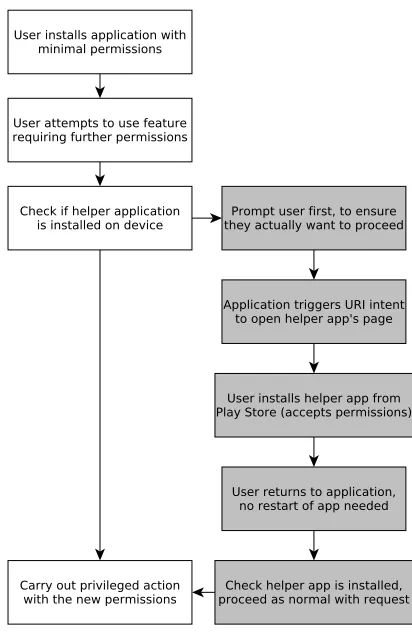
[image:3.612.319.525.53.369.2]In order to add permissions, after time of install, to an existing application, the Android shared user ID (UID) feature is used. Within Android, each installed application is assigned
Fig. 1. Flowchart illustrating process of accepting a new permission
a Linux UID, and permissions are assigned to these UIDs. All applications wishing to share a UID must be signed by the same developer key, and these share access to the same protected data files, as private data files created by the application are owned by the UID of the application, which is in this case shared between a group of applications. [9]
One additional feature of the shared UID facility on Android is the ability for permissions to be shared between different packages using the same UID. [8] In this manner, it is possible for an application with no permissions, which shares a UID with a privileged application, to make use of these privileged permissions, without itself requesting these permissions. By then detecting the presence of packages, it is possible for an application to make runtime decisions, based on the presence of these privileged helper applications.
A flowchart illustrating the workflow experienced by a user is shown in Figure 1.
A. Detection of Permissions
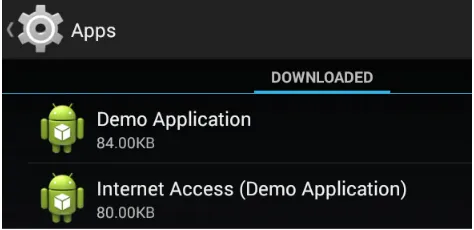
Fig. 2. Application listing showing main app and helper app
their developer key and using the specified package name, is present and installed on the system, and thus that the additional permissions are available for use. If an incorrect reply is received, the user has not yet chosen to allow these permissions.
The second means of detecting if extra permissions are available is to simply verify if the correct permissions package has been installed on the device by the user (by querying the PackageManager service on Android for the presence of the permissions package).
B. Installation of Extra Permissions
In the event of the helper permissions-granting ap-plication not being present on the device, this will be detected during the process of attempting to in-voke this function, as a NameNotFoundException or
ClassNotFoundException will be invoked, allowing a
developer to handle this exception with a prompt to the user to accept new permissions. If the user accepts the permissions request by the application, an intent would be invoked to dis-play the Google Play Store (or any other application delivery platform) on the installation page of the relevant permissions package, ready for installation. As the Play Store workflow handles permissions, this ensures users are aware of what they are installing.
C. User Perception of Permissions
Since the helper application itself is installed as normal on the device, it can also be seen within the system list of all installed applications, as shown in Figure 2. The optional permissions packages need not be visible to the user within their launcher or homescreen.
[image:4.612.48.285.56.171.2]Despite the permissions of a package not being declared at the time of installation, users can verify the permissions of an installed application using this technique in the usual manner - as shown in Figure 3, the shared permissions will appear listed for each application making use of a shared UID. Prior to the installation of the optional permissions, there were no permissions listed. This allows for easy auditing of the permissions which are accessible to an application, since only those permissions which the application has specifically been granted, either in the core package, or in one of the helper packages, will appear in this listing.
Fig. 3. Main app showing optional permissions
D. Runtime Permissions Modification
In order for this approach to optional permissions to be vi-able, users and developers must not be unduly inconvenienced by implementing a scheme such as this. We propose that any system requiring the application to be restarted every time permissions were added or removed would be unacceptable for users.
We have verified in our own testing that our implementation of optional permissions was able to both add and remove permissions from a running application, without any special measures being implemented within the application. The appli-cation did not need restarted, nor did the activity need restarted or refreshed, for updated optional permissions to take effect.
VI. EVALUATION OFPROPOSAL
The main limitation of the proposal, as described above, is that it requires users to be connected to the internet (in order to install the helper application from Google Play). It would be possible to remove this limitation, if users enable the option to allow installation of applications from unknown sources (which contravenes good security practices). In that case, the main application would store the APK files of the helper applications with its application assets, and prompt the user to accept the permissions of the application and install the helper application. This process would not require an internet connection. We have, however, chosen not to implement this technique, as we believe it to be sub-optimal, in that it requires users to accept and install packages from outwith the Play Store, which contradicts standard accepted best-practice for security. [17]
Our proposal does require that application developers elect to use this technique when developing their application, which may prove a barrier towards adoption, although likely a much smaller barrier than that experienced with techniques which require users to install a full custom operating system on their mobile device. Especially when considering the integration between Android devices and automobiles through the Android Auto scheme, we believe it is highly desireable for users to have the ability to have control over permissions in an out-of-the-box scenario.
using accurate titles for their helper applications. As these are entirely developer-defined, there is a potential risk that an unscrupulous developer could misleadingly name their helper applications.
In terms of application performance, we carried out run-time tracing of the execution of the program code for the
getDeviceId()function of the TelephonyManager service in Android, using the Android SDK tools. This function was selected as it is relatively simple, returning the device IMEI (if equipped with a modem), otherwise returning null. Two tests were carried out (as shown in Table I) - for the proposed optional permissions scheme, and for the status-quo with compile-time declared permissions. In each test, both a successful operation (permission was granted), and a failure operation (permission was not granted) were tested. In each case, the test duration was recorded through the tracing tool as the time taken from the system responding to a button’s
onClick() event, until the device IMEI was stored in a string variable. It is worth noting that the status-quo failure test time is not significant, as this resulted in a crash of the application. As such, a try-catch loop was placed around it, to demonstrate the approximate time taken.
TABLE I. PERFORMANCE COMPARISON OF STATUS-QUO IMPLEMENTATION WITH PROPOSED METHOD
Test Granted Denied Status-quo 45.3ms 40.8ms Proposed 49.8ms 44.1ms
From these results, it is clear that the impact on perfor-mance of our proposed implementation within the context of an Android application is negligible, given there was only an increase in execution time of around 5 milliseconds to carry out a permission availability check prior to carrying out an action.
VII. CONCLUSION
We have presented a means of achieving user-controllable optional permissions on the Android platform, without re-quiring any changes be made to the operating system, in a manner which can be implemented by developers, and used on a regular stock Android installation. By making use of the shared user ID facility of the Android platform, we are able to share permissions between the main application and a series of small helper applications, which exist solely to provide extra permissions to the main package. Applications can detect if permissions are available at runtime by looking for the presence of the helper application (using the same UID), and prompt the user to install a permissions helper package if it is not yet installed. It is not necessary for users to restart the application in order for the new permissions to take effect. Permissions can also be removed, again with no need for the main application to be restarted, simply by uninstalling the appropriate helper application.
ACKNOWLEDGMENT
This work was funded by EPSRC Doctoral Training Grant EP/K503174/1.
REFERENCES
[1] (2014, June) Android Auto. Google Inc. Retrieved 16 September 2014. [Online]. Available: http://www.android.com/auto/
[2] W. Shin, S. Kwak, S. Kiyomoto, K. Fukushima, and T. Tanaka, “A small but non-negligible flaw in the Android permission scheme,” in Policies for Distributed Systems and Networks (POLICY), 2010 IEEE International Symposium on. IEEE, 2010, pp. 107–110.
[3] Q. Do, B. Martini, and K.-K. R. Choo, “Enhancing user privacy on Android mobile devices via permissions removal,” inSystem Sciences (HICSS), 2014 47th Hawaii International Conference on. IEEE, 2014, pp. 5070–5079.
[4] C. Stach and B. Mitschang, “Privacy management for mobile platforms– a review of concepts and approaches,” in Mobile Data Management (MDM), 2013 IEEE 14th International Conference on, vol. 1. IEEE, 2013, pp. 305–313.
[5] R. Johnson, Z. Wang, C. Gagnon, and A. Stavrou, “Analysis of Android applications’ permissions,” inSoftware Security and Reliability Companion (SERE-C), 2012 IEEE Sixth International Conference on. IEEE, 2012, pp. 45–46.
[6] M. Nauman, S. Khan, and X. Zhang, “Apex: extending android permis-sion model and enforcement with user-defined runtime constraints,” in Proceedings of the 5th ACM Symposium on Information, Computer and Communications Security. ACM, 2010, pp. 328–332.
[7] M. Ongtang, S. McLaughlin, W. Enck, and P. McDaniel, “Semantically rich application-centric security in Android,”Security and Communica-tion Networks, vol. 5, no. 6, pp. 658–673, 2012.
[8] A. R. Beresford, A. Rice, N. Skehin, and R. Sohan, “Mockdroid: trading privacy for application functionality on smartphones,” inProceedings of the 12th Workshop on Mobile Computing Systems and Applications. ACM, 2011, pp. 49–54.
[9] L. L. de Melo and S. D. Zorzo, “Pupdroid-personalized user privacy mechanism for Android,” in Systems, Man, and Cybernetics (SMC), 2012 IEEE International Conference on. IEEE, 2012, pp. 1479–1484. [10] M. Bokhurst. XPrivacy. Retrieved 12 January 2015. [Online]. Available:
https://github.com/M66B/XPrivacy
[11] R. Vollmer. Xposed framework. Retrieved 13th January 2015. [Online]. Available: http://repo.xposed.info/module/de.robv.android.xposed.installer [12] (2014, November) Security-enhanced Linux in Android. Google
Inc. Retrieved 12th January 2015. [Online]. Available: http://source.android.com/devices/tech/security/selinux/index.html [13] (2010, January) Allow apps to specify optional permissions in the
manifest. Android Bug Tracker. Retrieved 13th January 2015. [Online]. Available: https://code.google.com/p/android/issues/detail?id=6266 [14] (2014, December) Pocket - Google Play Store. Read It
Later. Retrieved 12th January 2015. [Online]. Available: http://getpocket.com/permissions
[15] Facebook. (2014, December) Facebook - Google Play Store. Facebook. Retrieved 13th January 2015. [Online]. Available: https://play.google.com/store/apps/details?id=com.facebook.orca [16] ——. (2014, August) Why is the Messenger app requesting
permission to access features on my Android phone or tablet? Facebook. Retrieved 13th January 2015. [Online]. Available: https://www.facebook.com/help/347452185405260