Abstract Image Management and Universal Image
Registration for Cloud and HPC Infrastructures
Javier Diaz, Gregor von Laszewski, Fugang Wang and Geoffrey Fox
Pervasive Technology Institute, Indiana University
2729 E 10th St., Bloomington, IN 47408, U.S.A.
Email: [email protected], [email protected], [email protected] and [email protected]
Abstract—Cloud computing has become an important driver for delivering infrastructure as a service (IaaS) to users with demand for customized environments and sophisticated software stacks. Within the FutureGrid (FG) project we offer different IaaS frameworks as well as high performance computing infras-tructures allowing users to explore them as part of a testbed. To ease the of use of these infrastructures, as part of performance experiments, we have designed an image management framework that allows us to create user defined software stacks based on abstract image management and uniform image registration. As a consequence users can create their own customized environments very easily without worrying about the details of each of the underlying infrastructures. Besides being able to manage deployments on IaaS frameworks, we also allow the deployment of the images onto bare metal. This level of functionality is typically not offered in a HPC infrastructure. However, our approach provides users with the ability to create their own environments changing the paradigm of administrator-controlled
dynamic provisioning to user-controlled dynamic provisioning,
which we also call raining. Thus, users obtain access to a testbed with the ability to manage state-of-the-art software stacks that would otherwise not be supported in typical compute centers. In this paper we focus on the design and evaluation of image creation and image registration. We find that our design and implementation can support our current user community interested in such capabilities.
I. INTRODUCTION
FutureGrid (FG) [1] is a testbed providing users with grid, cloud, and high performance computing infrastructures. FG employs both virtualized and non-virtualized infrastructures. The testbed is composed of a high-speed network connected to distributed clusters of high-performance computers. This innovative infrastructure can support state-of-the-art research in distributed and parallel computing including grid, cloud computing, as well as HPC. As such, FG offers researchers a flexible reconfigurable testbed to test functionality, perfor-mance and interoperability of software systems in a repro-ducible fashion. Users can customize their environment and place suitable images onto the FG fabric. Therefore, users are not locked into a specific computational environment offered typically by HPC centers. Instead users may choose a
variety ofsoftware stacksthat are packaged as part of abstract
and reusable images. Such images may provide additional services while exposing platforms, libraries and tools to the users. Users do have the ability to select from a variety of preconfigured images that may suite their needs. If these needs cannot be met users can create their own images and share them with the community.
An important achievement of our image management
frame-work is the ability to support user-controlled dynamic
pro-visioning allowing users to create, deploy and register the images not only in virtualized, but also in non-virtualized infrastructures. Thus they have access to bare-metal provision-ing. This is a departure of the limited dynamic provisioning that may be provided by typical HPC centers where the administrator governs control about images available for use. To support our more general approach we have designed and implemented a set up tools expanding upon the traditional dynamic provisioning frameworks.
As the term dynamic provisioning is often not consistently used in the community, and our user-controlled dynamic provisioning drastically enhances the available functionality to integrate bare-metal resources, we instead will use the
term rain to indicate the process of placing a customized
environment onto resources. The process of raining goes
beyond the services offered by existing scheduling tools due to its higher-level toolset targeting virtualized and non-virtualized resources. We also use the termrainto refer to the toolkit that combines a set of tools enabling the process ofraining. In this context managing various image management workflows for a variety of distinct infrastructures becomes an essential part
of the overall components and services to supportrain.
In this paper we will focus on a subset of issues related to the process of raining that deal with image management. It addresses every stage of the image management life cycle, from the creation, adaptation, storage, registration, and the instantiation of images into virtualized and non-virtualized resources. Other aspects such as the experiment management design and scalability experiments anticipated to use the concept of raining are discussed ele management life cycle, from the creation, adsewhere [2].
II. BACKGROUND
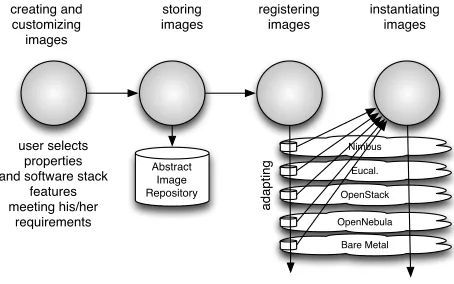
Image management is a key component in any modern com-pute infrastructure, regardless if used for virtualized or non-virtualized resources. We distinguish a number of important processes that are integral part of the life-cycle management of images. They include (a) image creation and customization, (b) sharing the images via a repository, (c) image registration into the infrastructure where the image is supposed to run, and (c) the image instantiation (see Figure 1). The problem of targeting not one, but multiple infrastructures amplifies the need for tools supporting these processes. Without them, only the most experienced users will be able to mange them under great investment of time.
creating and customizing
images
storing images
registering images
instantiating images
user selects properties and software stack
features meeting his/her
requirements
Nimbus Eucal. OpenStack
OpenNebula Bare Metal Abstract
Image Repository
[image:2.612.60.287.230.372.2]adapting
Fig. 1. Processof the image management framework
There are two interplaying approaches to simplify access. The first is the introduction of standards and best practices to interface with the infrastructure. The second is to provide a set of tools that interfaces with these standards and allow exposure of common functionality to the users while hiding the underlying complexities when dealing with subtle differ-ences between the solutions. Standrads relevant for our efforts include for example OVF which we plan to integrate in our design. Abstractions on the infrastructure level are provided by each of the different infrastructure supporting frameworks and tools. Of relevance are Nimbus, Eucalyptus, OpenStack, OpenNebula, and Moab. They are supported by various tools on the operating system level and configuration management tools including kickstart, chef, puppet, juju, to name only a few. A number of tools have recently been developed that allow the creation of images view a GUI or Web interface such as SUSE Studio [3] and Easyvmx [4].
One of the issues we see with such tools is that they are limited and bound to a particular infrastructure or have dependencies on a particular operating system.
While providing a higher level abstraction, we strive towards removing such dependencies and offer users a tool that can integrate much more easily with the different infrastructures. It will support the management of images for Nimbus, Euca-lyptus, OpenStack, OpenNebula, and bare-metal HPC.
III. PROCESSES
As are depicting in Figure 1 a number of processes that need to be coordinated to properly support abstract image
management and universal image registration for Cloud and HPC infrastructures. We explain in more detail the activities conducted in each of the processes.
a) Creating and Customizing Images: Advanced users of modern cyber-infrastructure demand creation and customiza-tion of images that fit their particular needs. The image creation can be performed using an interactive or a non-interactive method.
In case of the interactive method, a virtual machine (VM) image file is created as part of a semi-interactive process and delivers an image that is going to be booted with an OS media disk attached to it. It starts the installation process like if we were installing a physical machine. This process is achieved using the tools provided by the hypervisors to create and boot VMs.
The second method of creating images based on autom-atizing even this interactive process to the extend that no interaction is needed. This method can be more complicated but provides the opportunity for greater automation as part of processes that require the manipulation or update of images in a repetitive process. To support this automation, tools provided by most of the GNU/Linux OSs to bootstrap images can be used. They basically install a fresh copy of the OS into a directory. This installation will have the essential packages and binaries needed in a basic image and updates can be readily integrated. Examples of these tools are debootstrap in Debian/Ubuntu, yum in CentOS/RedHat or febootstrap in Fedora.
The problem of the first method lies in the need of human interaction that prevent us from automatizing the process or integrating it with other software. Moreover, they produce images aimed for an specific purpose like being compatible with a particular hypervisor or acting as liveCD. On the other hand, the second method is very flexible and allows us not only to integrate it with other software, but also to establish a clear separation between image creation and customization for a specific infrastructure.
While separating the steps that are dependent on a specific infrastructure it becomes possible for the same image to be slightly adapted and to be used in different infrastructures. Typically, this procedure is different for each infrastructure we target and is typically done by users or administrators. For example, in cloud frameworks users have to select or upload the kernel and ramdisk images to be used, which require strong knowledge of the OS. Hence they must either be experts in the field or they have to spend a considerable amount of time to accomplish this task. Moreover, after customizing the image, it has to be registered in the framework that manages the deployment of the image onto the selected infrastructure. In bare metal, this is usually restricted to system administrators while in the cloud frameworks it can be done by any user.
b) Storing Abstract Images: Once we have created an
image we have to store it into a repository. As there are significant differences on how images are managed between IaaS and bare-metal it is necessary to provide an image
repository in which we store abstract imagesthat get further
c) Registering Images: Once an Image is created we must register it with the infrastructure in which we intend to deploy it. Image registration is typically provided in some form by the underlying environment. As such Nimbus, Eucalyptus, OpenStack, as well as Moab provide their own mechanisms for image registration. However, the images need to be slightly modified to allow utilizing them. Furthermore, we need to provide a significant toolset to expose registration functionality in bare metal to non-administrators. To save space utilization of the images should be monitored and images rarely used should be purged from the infrastructure repository while replacing it with a mechanism to simply regenerate it on-demand.
d) Instantiating Images: Once the image is registered with the infrastructure, it can be instantiated by the user as part of the deployment framework available within the infrastructure.
IV. DESIGN
Our design targets support of an end-to-end workflow to support the desired customization by the users in order to simplify the processes and make abstract image management across different infrastructures available. Hence even non-experts can with our simple tools create images that can be run on Eucalyptus, Nimbus, OpenStack, or bare-metal. It is obvious that such a capability is advantageous to support repeatable performance experiments across a testbed such as FutureGrid. It supports the processes identified in Section III to be able to manage the life cycle of images in transparent fashion. Within this paper we will focus our attention on the first three processes as we are describing the last process in more detail elsewhere [5].
To summarize the idea behind our design we like users to be able to specify a list of requirements like OS, software, libraries, and more in order to generate a customized but abstract image. This image is generic enough that through small manipulations it can be customized for an IaaS or HPC environment with little effort by the users. As we have deployed in FG OpenStack [6], Eucalyptus [7], Nimbus [8] and OpenNebula [9], we are targeting deployment of such images in such infrastructures.
Image Management
Client
IaaS and Bare-Metal HPC Infrastructures
HPC Clusters Image
Management Server
API
Cloud IaaS Frameworks
Bare Metal Image
Repository Image Generation
External Services: Chef, Security tools
Image Registration FG Shell
Portal
Image Instantiation
Nimbus Eucalyptus
AWS OpenNebula
[image:3.612.46.301.579.728.2]OpenStack
Fig. 2. FutureGrid Image Management Architecture.
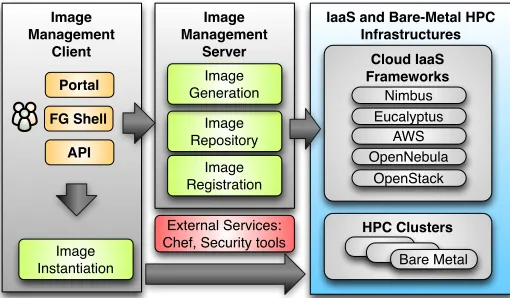
Figure 2 shows the architecture of the image management framework capable of supporting the required processes as identified earlier (see Figure 1). To support a modular design we have devised for each of the processes a component. This includes (a) the image generation component that cre-ates images following the user requirements, (b) the image repository component that is in charge of storing, cataloging and sharing images, and (c) the image registration component that prepares, upload and register the images into specific infrastructures like HPC or different clouds.
The components are conveniently separated in client and server components in order to allow users easily to interact with hosted services that mange our processes. Our design allows users to for access to the various processes via a python API a REST service, a convenient commandline shell, as well as a portal interface. The image management server has the task to generate, store, and register the images with the infrastructure. It also interacts with additional external tools as to utilize external services we can benefit from in our implementation. Such services include configuration management services and security services.
One important feature in our design is that we are not simply storing an image but rather focus on the way an image is created through abstract templating. Thus it is possible at any time to regenerate an image based on the template describing the software stack and services for a given image. This enables us also to optimize the storage needs for users that mange many such images. Instead of storing each image individually, we could just store the template or a pedigree of templates that are used to generate the images.
To aid storage reduction, our design also includes data that assists in measuring usage and performance. This data can be used to purge rarely used images, while they can be recreated on-demand by leveraging the use of templating. Moreover, the use of abstract image templating will allow us to automatically generate images for diverse environments including a variety of hypervisors and hardware platforms on-demand. Autonomous services could be added to reduce the time needed to create images or deploy them in advance. Reusing images amongst groups of users and the introduction of a cache as part of the image generation will reduce the memory footprint or avoid the generation all together if an image with the same properties is already available.
In the next sections we will describe in more detail the various components.
A. Image Generation
The image generator provides the first step in our image creation process allowing the specification of an image that is applicable for IaaS frameworks and the bare-metal deploy-ment. The benefit of our image generation tools and services is that we are not just targeting a single infrastructure type, but that we can generate images for a range of infrastructures. At this time we are able to generate images for Nimbus, Eucalyptus, OpenStack, Open Nebula, and bare-metal.
Command Line Tools
Update Image
User's Image Store in Image
Repository FG Software Cloud Software
User Software Requirements:
OS, version, hadrware,...
Base Image Matching Base
Image in the Repository?
Base OS Base Software Generate Image
Yes
No Retrieve
Image from Repository
[image:4.612.344.529.74.220.2]Install Software
Fig. 3. Image Generation Process.
can include the selection of the OS type, version, architecture, software, services, and more. First, the image generation tool looks into the image repository to identify a base image that can be cloned and if there is no good candidate the base image is created from scratch. Once we have a base image, the image generation tool installs the software required by the user. This software must be in the official OS repositories or in the FG software repository. The later contains software developed by FG team or other approved software. The instal-lation procedure may be aided by chef [10], a configuration management tools that ensures that the software is installed and configured properly. After updating the image, it is stored in the image repository and becomes available for registration into a FG infrastructure supported by our image management framework. Security tools and services could be integrated to identify if the generated and registered images fulfill a set of specifiable security requirements. For example, one of the tasks we envision is to keep images automatically up to date. We envision a service that takes a users image, applies the updates and lets the user test if the updates have successfully been installed. If they are not the user can still use his older image and identify pathways to complete the update. Other noteworthy envisioned workflows include the integration of authentication and authorization mechanisms readily available within FG. The process is able to leverage information about users and project groups stored in our LDAP server and managed via the FG portal.
In case an image is created from scratch, the base images are created using the tools provided by the different OS’es (yum for CentOS, deboostrap for Ubuntu, etc). Hence, our tool is general enough to deal with installation particularities of different operating systems and architectures. We have tackled this problem by making use of cloud technologies that allow us to manage a set of VMs in which we pre-stage the image by using the required OS and architecture. Consequently, each base image is created inside a VM dedicated for that purpose. While using a cloud within this process, we can add support for a variety of operating systems and architectures. It is obvious that this approach provides us with great flexibility, architecture independence and high scalability.
We can speed up the generation process by utilizing already created images because software and packages requested by the user may have already been installed previously and
TABLE I
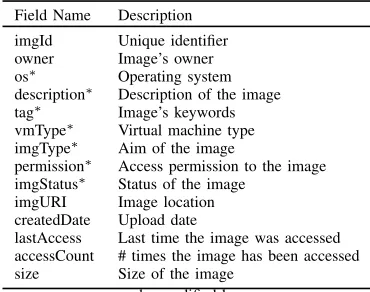
METADATA INFORMATION ASSOCIATED TO THE IMAGES.
Field Name Description imgId Unique identifier owner Image’s owner os∗ Operating system description∗ Description of the image
tag∗ Image’s keywords vmType∗ Virtual machine type imgType∗ Aim of the image
permission∗ Access permission to the image imgStatus∗ Status of the image
imgURI Image location createdDate Upload date
lastAccess Last time the image was accessed accessCount # times the image has been accessed size Size of the image
∗can be modified by users
some configuration steps are already completed. Our catalog describing the available base images can be accessed via a search function returning suitable candidates. To further automatize this process, our design includes mechanisms that record the number of successes and failures when an image creation requests tries to identify suitable base image candi-dates. Hence, even the image creation can be integrated as part of our design into an automatic service that gets started based on-demand and priorities of creating such images could be devised.
B. Image Repository
The image repository [11] catalogs and stores images in a unified repository. It offers a common interface that can distinguish image types for different IaaS frameworks, but also bare-metal images. This allows us to include a diverse image set not contributed not only be by the FG development team, but also by the user community that generates such images and wishes to share them. The images are augmented with information about the software stack that is installed on them including versions, libraries, and available services. This information is maintained in the catalog and can be searched by users and/or other FG services. Users looking for a specific image can discover available images fitting their needs using the catalog interface. In addition, users can also register customized images, share them among other users, and dynamically provision them. Through these mechanisms we expect our image repository to grow through community contributed images.
Customize Image for:
OpenStack Eucalyptus
Nimbus
OpenNebula Amazon Command Line Tools
Retrieve from Image Repository User's Image
Register Image in the Infrastructure HPC
Image Customized for the selected Infrastructure
Image is Ready for Instantiation in
the Infrastructure Upload Image to the Infrastructure
[image:5.612.103.247.53.194.2]Security Check
Fig. 4. Image Registration Process.
C. Image Registration
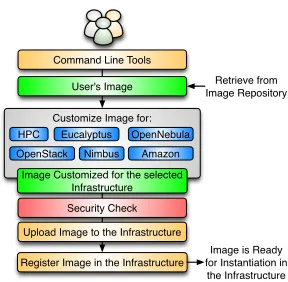
Once the image has been created and stored into the repository, we need to register it for the targeted infrastructure before we instantiate it. Registering an image also includes the process of adapting it for the infrastructure. Often we find subtle differences between them requiring us to provide further customizations, security check, the upload of the image to the infrastructure repository, and finally the registering it for use. The process of adaptation and registration is depicted in Figure 4 in more detail. Examples for customizations include for HPC and cloud infrastructures the configuration of network IP, DNS, file system table and kernel modules. Additional configuration is performed depending of the targeted deployed infrastructure.
In the HPC infrastructure the images are converted to network bootable images that can run on bare-metal machines. Here, the customization process configures the image so it can be integrated into the pool of deployable images accessible by the scheduler. In our case this is Moab. Hence, if such an image is specified as part of the job description the scheduler will conduct the provisioning of the image for us. These images are stateless and the system is restored by reverting to a default OS once the running job with a customized image is completed.
Images targeted for cloud infrastructures need to be con-verted into VM disks. These images also need some additional configuration to enable VM’s contextualization in the selected cloud. Our plan is to support the main IaaS clouds namely Eu-calyptus, Nimbus, OpenStack, OpenNebula and Amazon EC2. However, as our tool is extensible other cloud frameworks could be supported.
Of special importance is a security check for images to be registered in the HPC infrastructure. An image is considered secure when it has been generated and stored and is marked in the repository asapproved. Approval can be achieved either by review, or the invocation of tools minimizing and identifying security risks. Users may need to modify an image to install additional software that is not available during the image generation process or to configure additional services. Modi-fied images need to go through some additional tests before they can be registered in the infrastructure. To perform these security tests we plan to create a platform that instantiates the images in a controlled environment like a VM with limited network access. Hence, we can perform some tests
to verify the integrity of the image and detect vulnerabilities and possible malicious software. If the image passes all the tests, it is tagged asapproved. For virtualized infrastructures the approval process may include less strict testing.
The process of registering an image only needs to be done once per infrastructure. Therefore, after registering an image in a particular infrastructure, it can be used anytime to instantiate as many VMs or in case of HPC as many physical machines as available to meet the users requirements.
V. IMPLEMENTATION
Our implementation uses currently xCAT [12], Moab [13] and Torque [14] to manage HPC images. Although these tools should in theory simplify the management, we found that readily deployable patterns from Moab were not available. Furthermore, we identified hardware and operating system restrictions imposed by XCAT. This motivates us for our future development to remove the dependencies of both XCAT and MOAB while targeting alternatives providing more suitable free and opensource solutions. Our internal cloud to manage the image generation process for IaaS environments is based on OpenNebula. On the IaaS side we have already interface with Nimbus, Eucalyptus 2.0.3, OpenStack, and OpenNebula. We are targeting next AWS, and Eucalyptus 3.0. Our image generation is supported by a parallel virtual machine pool in order to support concurrent requests.
VI. EVALUATION
In this section we describe our newest performance experi-ments while focusing our attention on the analysis of the image generator and image registration process. The performance of the image repository was already evaluated earlier and the results are available in [11].
Our performance study uses resources and services de-ployed on FG. In particular we used the FG India cluster, which is composed by Intel Xeon X5570 servers with 24GB of memory, a single drive 500GB with 7200RPMm 3Gb/s, and an interconnection network of 1Gb Ethernet.
As part of our study, we configured the image management components as follows:
• The image repository has been configured using
Mon-goDB to store the image metadata. Cumulus is used to store the image files. This configuration was identified to be very good as part of our earlier experiments with the image repository, that are documented in [11].
• To be able to generate images (see Section IV-A) in
parallel, we are using OpenNebula. Although we could have used other IaaS frameworks, we chose open Nebula due to its easy of deployment as documented in [5]. In this setup we have instantiated a VM disk image targeting each of our supported operating systems. However, in our test reported here we only tested the creation of images based on Ubuntu and CentOS.
• In order to support the image registration we provide
0 200 400 600 800 1000 1200
1 2 4 8
Ti
me (
s)
Number of Concurrent Requests 1 Compute Node
[image:6.612.326.547.43.403.2]2 Compute Nodes 4 Compute Nodes
Fig. 5. Average wallclock time needed to process all image generation requests depending on the number of OpenNebula compute nodes. Each graph in the figure represents the number of available OpenNebula compute nodes.
the service to the xCAT image directory and execution permissions to use the xCAT client commands.
• The image management client has been deployed in the
India login node to allow access of the image manage-ment by authorized users.
Next we describe the tests performed and the results ob-tained in each case. All tests have been performed three times to obtain average results.
Image Generator:First we study the scalability of the image generator tool. We performed experiments that varied the number of concurrent image generation requests (from one to eight) to create CentOS images from scratch. As part of our experiments we increased the number of OpenNebula compute nodes from one to four to highlight the scalability of the ser-vice. Figure 5 shows the results of these tests. We observe that the overall performance using a single OpenNebula compute node is quite good as the minimum average wallclock time
to create an image with this setup is around six minutes for
a single request. When using the same node to handle eight requests we see an overall time of 16 minutes. To reduce this time, we can increase the number of compute nodes we can distribute the workload on other nodes. Finally, we observe that the performance degrades when we generate more than two images per compute node. Therefore, this limitation must be considered when deploying a production environment of our image management framework.
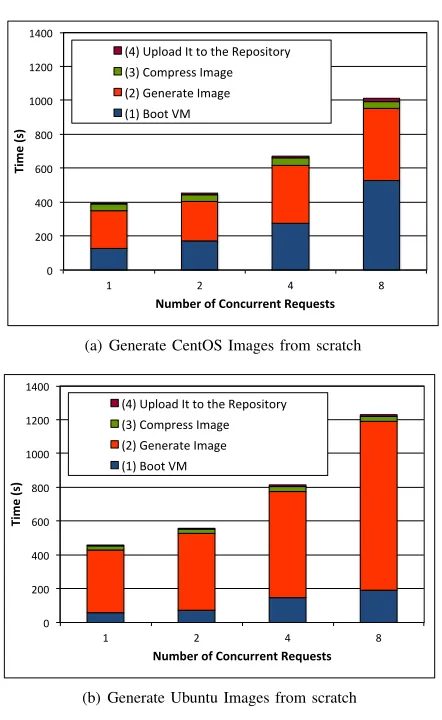
Next, we analyze where the time is spend within the image creation process. For these tests we used our lessons learned from the previous test and used a single OpenNebula com-pute node while varying over different number of concurrent requests to generate CentOS, as well as Ubuntu images. The results of these tests are shown in the stacked bar charts and include times for the sub processes to boot the VM, generate the image, compress the image, and upload the image to the repository; in particular, Figure 6 (a) for Centos and Figure 6 (b) for Ubuntu.
In the Figure 6 we observe that the virtualization layer in-troduces significant overhead in the process (1). This overhead is higher in the case of CentOS images and indicates that our
0 200 400 600 800 1000 1200 1400
1 2 4 8
Ti
me (
s)
Number of Concurrent Requests
(4) Upload It to the Repository (3) Compress Image (2) Generate Image (1) Boot VM
(a) Generate CentOS Images from scratch
0 200 400 600 800 1000 1200 1400
1 2 4 8
Ti
me (
s)
Number of Concurrent Requests (4) Upload It to the Repository (3) Compress Image (2) Generate Image (1) Boot VM
[image:6.612.50.301.52.226.2](b) Generate Ubuntu Images from scratch
Fig. 6. Average walltime needed to process all image generation requests with time associated to the different phases of the process.
CentOS golden image need to be optimized to speed up this phase.
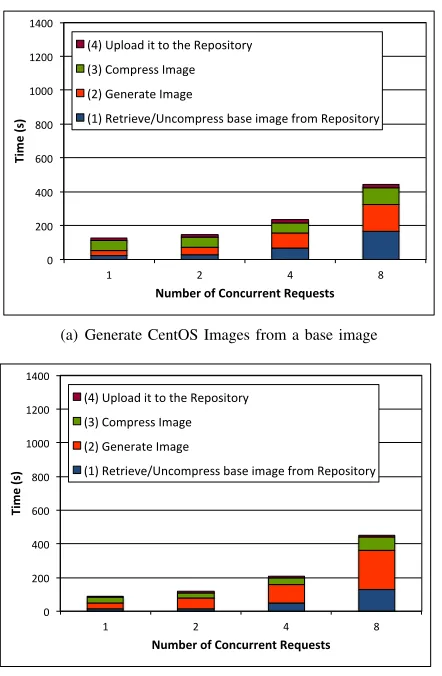
The time to create the base image and the installation of the software requested by the user is the most time consuming in this process (2) and is worse for Ubuntu. In particular the overall time use for this phase is up to a 69% for CentOS and a 83% for Ubuntu. The remaining time of this phase is spend to install the software and packages requested by the user. For this reason in our design, defined in Section IV-A, we consider to manage base images that can be used to save time during the image creation process. Thus, in Figure 7, we collect the results of performing the previous tests taking advantage of the base images stored in the image repository and introduce caching policies.
0 200 400 600 800 1000 1200 1400
1 2 4 8
Ti
me (
s)
Number of Concurrent Requests (4) Upload it to the Repository
(3) Compress Image (2) Generate Image
(1) Retrieve/Uncompress base image from Repository
(a) Generate CentOS Images from a base image
0 200 400 600 800 1000 1200 1400
1 2 4 8
Ti
me (
s)
Number of Concurrent Requests (4) Upload it to the Repository
(3) Compress Image (2) Generate Image
(1) Retrieve/Uncompress base image from Repository
[image:7.612.65.286.48.386.2](b) Generate Ubuntu Images from a base image
Fig. 7. Average walltime needed to process all image generation requests with time associated to the different phases of the process.
Our results show that the image repository we designed does not cause a bottleneck as the time to upload the images to the repository is negligible (see Figure 6 and 7).
Image Registration: Next we analyze the behavior of the image registration processes. For that, we registered the same CentOS image in different infrastructures namely OpenStack (version Cactus configured with KVM hypervisor), Eucalyptus (v2.03 configured with XEN hypervisor) and HPC (Moab v6.0.3 with Torque v2.5.5). For Eucalyptus and OpenStack we utilized concurrent registrations. In contrast, our service to register images in the HPC infrastructure, only processes a single request at a time because it modifies critical parts of our HPC infrastructure and at this time must be performed in an atomic section.
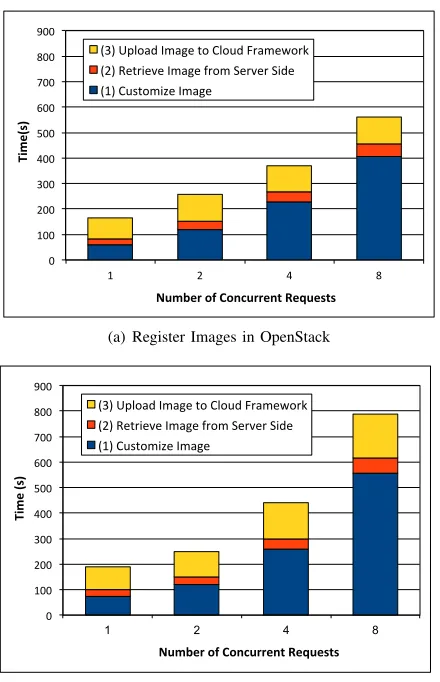
The results of registering images are shown in Figure 8 (a) for OpenStack and Figure 8 (b) for Eucalyptus. The figures use a stacked bar chart to depict the time spent in each phases of this process including (1) customization of the image, (2) retrieval of the image after customization, and (3) the upload of the image to the cloud framework into its own repository. It is to be noted that (1) is executed in the server side while (2) is executed in the client side. The reason for this is based on our authorization framework, as we need to use the user’s credentials to upload and register the image to the cloud infrastructure. Therefore, times associated with (2) represent
the time to send the image form the server to the client. We observe that the time needed to customize the image (1) increases with the number of concurrent requests. Part of this activity includes uncompressing the images in the server side to prepare them for being uploaded and registered with the IaaS framework. In our experiment we are concurrently processing all requests in the same machine. In practice this has so far been how our software is used, but as explained earlier we could increase the number of available servers to process these requests in order to avoid resource starvation and avoid scalability issues.
One of our observations is that the time to register an image in OpenStack is higher than in Eucalyptus. This is based on two factors. First, in OpenStack we need to include certain software to allow OpenStack to contextualize the VM during the instantiation time (included in (1)). Second, the process to upload the image to the OpenStack cloud takes longer than in Eucalyptus (2)). As part of this process, both frameworks compress and split the image in smaller tgz files that are uploaded to the IaaS server. The difference is that OpenStack uncompresses the image in the server side as part of this process, while Eucalyptus seems to maintain the compressed version. Additionally, we have noticed that occasionally OpenStack fails to upload some images when we perform several concurrent requests. Consequently, images get stuck as part of the untarring process and hence never complete the uncompression. While analyzing this problem further, we suspect that it may relate to a scalability issue of the messaging queue system within our OpenStack deployment. Another observation we made is that our logfiles generated by our deployed OpenStack infrastructure are not very helpful to debug this problem.
In Figure 9 we show our results of registering the image with our HPC environment utilizing Moab, and XCAT. Here we distinguish the following phases (see Section IV-C) : (1) retrieve the image from the repository, (2) uncompress the image, (3) retrieve kernels and update the xcat tables, and (4) package the image. To have minimal impact on our deployed HPC services we decided to only run one such process at a time. We observe that the overall process only takes about two minutes as no additional software is needed to be installed and everything is executed on the server. The most time consuming parts are uncompressing the image (2) and execute the xCAT packimage command (4). This command creates a tar/cpio image that will be used to netboot bare-metal machines when users request it. The final step of this process is the registration of the image with Moab and recycling the Moab scheduler. After the recycle step, the image becomes available to the users.
VII. CONCLUSIONS ANDFUTUREWORK
In this paper we have presented the FutureGrid user
controlled image management framework as a revolutionary
0 100 200 300 400 500 600 700 800 900
1 2 4 8
Ti
me(
s)
Number of Concurrent Requests
(3) Upload Image to Cloud Framework (2) Retrieve Image from Server Side (1) Customize Image
(a) Register Images in OpenStack
0 100 200 300 400 500 600 700 800 900
1 2 4 8
Ti
me (
s)
Number of Concurrent Requests (3) Upload Image to Cloud Framework (2) Retrieve Image from Server Side (1) Customize Image
[image:8.612.65.285.48.389.2](b) Register Images in Eucalyptus
Fig. 8. Average wallclock time needed to register all images in the infrastructure with time associated to the different phases of the process.
0 20 40 60 80 100 120 140
1
Ti
me (
s)
Number of Concurrent Requests
(4) Packimage (xCAT)
(3) Retrieve Kernels and Update xCAT Tables (2) Uncompress Image
(1) Retrieve Image from Repository
Fig. 9. Average walltime needed to register an image in the HPC infrastruc-ture with time associated to the different phases of the process.
our framework users are able to easily create and manage customized environments within FG. This is achieved by abstracts abstracting the underlining details of each underlying infrastructure. Hence users can with simple tools replicate software stack requirements on the supported IaaS and bare-metal systems.
In our evaluation we have identified the most time consum-ing parts of our software. Our results shows linear increases in response to concurrent requests. The image generation tool is able to create images from scratch in only six minutes. When modifying a base image it allows us to generate images in less than two minutes in many of our use cases. Additionally, we can scale the performance by adding more nodes that are used to generate the images. The image registration tool is
able to register images in any infrastructure in less than three minutes. Indirectly we have also seen that our image repository shows excellent behavior in our usecases and introduces only negligible overhead to the overall processes.
We are currently working towards supporting Amazon EC2 and Nimbus. Our plan also includes the integration of a messaging queue system and portal interface to allow queuing of concurrent image generation in case of resource starvation. This will also introduce a more robust fault tolerant behavior for user access. On-demand resource allocation for supporting peak access is part of this strategy. Our tools are currently used by a selected number of users on FG.
ACKNOWLEDGMENT
We thank Koji Tanaka, Sharif Islam and the rest of the FG team for their support. This work is supported by the National Science Foundation under Grant No. 0910812.
REFERENCES
[1] “FutureGrid Portal,” Webpage. [Online]. Available: http://portal. futuregrid.org
[2] G. von Laszewski, G. C. Fox, F. Wang, A. J. Younge, A. Kulshrestha, G. G. Pike, W. Smith, J. Voeckler, R. J. Figueiredo, J. Fortes, K. Keahey, and E. Delman, “Design of the FutureGrid Experiment Management Framework,” inGCE2010 at SC10, IEEE. New Orleans: IEEE, 2010. [3] “Suse Studio,” Webpage. [Online]. Available: http://susestudio.com/ [4] “EasyVMX,” Webpage. [Online]. Available: http://www.easyvmx.com/ [5] G. von Laszewski, J. Diaz, F. Wang, and G. C. Fox, “Towards Cloud
Deployments using FutureGrid,” Indiana University, Bloomington, IN, FutureGrid Draft Paper, April 2012.
[6] “OpenStack,” Webpage. [Online]. Available: http://openstack.org/ [7] “Open Source Eucalyptus,” Webpage. [Online]. Available: http:
//open.eucalyptus.com/
[8] “Nimbus Project,” Webpage. [Online]. Available: http://www. nimbusproject.org
[9] “OpenNebula,” Webpage. [Online]. Available: http://www.opennebula. org/
[10] “Open Cloud Computing Interface (OCCI),” Webpage. [Online]. Available: http://occi-wg.org/
[11] J. Diaz, G. von Laszewski, F. Wang, A. Younge, and G. Fox, “FutureGrid Image Repository: A Generic Catalog and Storage System for Hetero-geneous Virtual Machine Images,”Third IEEE International Conference on Coud Computing Technology and Science (CloudCom2011), 2011. [12] “xCAT Extreme Cloud Administration Toolkit,” Webpage. [Online].
Available: http://xcat.sourceforge.net/
[13] A. Computing, “MOAB Cluster Suit Webpage.” Webpage, Last access Feb. 2012. [Online]. Available: http://www.clusterresources.com/ products/moab-cluster-suite.php
[image:8.612.74.279.438.538.2]