A report for Becta by The Open University
Tablet PCs in schools
Case study report
PHOTO REDACTED DUE TO THIRD PARTY RIGHTS OR OTHER LEGAL ISSUES
PHOTO REDACTED DUE TO THIRD PARTY RIGHTS OR OTHER LEGAL ISSUES
Twining, P; Evans, D; Cook, D; Ralston, J;
Selwood, I; Jones, A; Underwood, J;
Dillon, G and Scanlon, E
with Heppell, S; Kukulska-Hulme, A;
McAndrew, P and Sheehy, K
Executive summary
This report provides an analysis of twelve case studies involving schools
in England that were using Tablet PCs. The analysis is complemented by
brief individual reports describing aspects of how each of these schools
was using Tablet PCs.
Key findings
The key findings emerging from the case studies were that Tablet PCs:
•
for maximum benefit, needed to be used in conjunction with a wireless network•
needed to be introduced in a planned way that took full account of the school’s vision, as well as of the technical infrastructure, support and staff development, and day-to-day management issues•
increased the amount of ICT use and the degree of integration of ICT across the curriculum•
at some schools were used effectively to replace an ICT suite and thus free up space•
increased motivation, and hence were likely to have a positive impact on learning outcomes•
supported moves to more independent and collaborative study•
used with a wireless data projector, provided a better solution than a desktop or laptop and hardwired interactive whiteboard•
were seen as being more versatile than laptops, although the higher price of Tablet PCs relative to similarly specified laptops was prohibitive.Summary of the case studies
Seven primary schools and five secondary schools (including one special school) were selected from over 90 schools in England that were identified as using Tablet PCs in late 2004. Data collection took place in December 2004 and early 2005.
Tablet PCs are a relatively new development, and none of the schools had been using them for more than two years. It seems likely that the practice documented here represents a period of transition during which schools were experimenting in order to find out how best to make full use of the potential offered by Tablet PCs.
Both slate and ‘convertible’ Tablet PCs were in use. The number of machines ranged from four to over 300. Schools varied as to whether they allocated Tablet PCs to staff or students, and whether the machines were shared between users or ‘owned’ by them. The resourcing levels that schools thought necessary for effective student use also varied considerably, in terms of both the number of Tablet PCs and also the amount of time that individual students needed to spend using a Tablet PC each week. These variations seemed to be closely linked with the school’s vision for education.
‘Ownership’, the use of champions and having a critical mass of staff and/or student users all seemed to be important factors contributing to effective Tablet PC use.
It was clear that the increase in ICT skills related to the amount of Tablet PC use and that, with Tablet PCs, ICT was much more integrated with other subject teaching. A timetabled class set of Tablet PCs could effectively replace an ICT suite, freeing up space and enhancing the amount of ICT undertaken and the degree of integration of ICT in the curriculum.
To support and extend whole-class teaching, Tablet PCs were used with data projectors in conjunction with wireless internet access to widen the range of resources available to teachers and students.
In many schools there was a move towards cross-curricular working and/or a greater emphasis on ‘independent research’.
All the schools found that Tablet PCs (when they worked) had a significant positive impact on motivation. All the schools felt that the Tablet PCs had enhanced learning, although the majority thought it was too soon to be able to see this in standard performance indicators. In some cases, introducing Tablet PCs had freed up other resources and extended learning beyond the confines of the school. Tablet PCs were seen as providing a particularly convenient interface between the physical spaces where staff and students were working and the school’s ‘virtual’ resources.
Staff tended to use Tablet PCs in laptop mode, except for marking or when working with children. Students tended to use the pen, except for extended writing, when they tended to use a physical keyboard. When using the pen for writing, students tended to use the onscreen keyboard or to leave their writing as digital ink. Few of the schools used handwriting recognition. There is scope for schools to explore the potential of handwriting recognition further, particularly in the light of the enhancements in the 2005 edition of the Tablet PC operating system.
Tablet PCs were almost universally seen as being more versatile than laptops, but around a third of the schools considered the price differential prohibitive. There were also concerns about security issues, battery life, screen size and glare, and the cost of replacing pens.
There was general agreement that the introduction of Tablet PCs required careful planning and extra (on-site) support. Where users were already confident with ICT they adapted easily to using Tablet PCs, which most people found to be very natural and intuitive.
Much of the work observed could, in the researchers’ view, have been achieved using a laptop. However, schools often did not share this view. There was a general consensus that Tablet PCs (in slate mode) were qualitatively different from laptops or other computers and that students related to them more intimately.
There is significant scope for further evaluation of the potential of Tablet PCs to enhance learning and teaching.
“Despite problems we are still optimistic that we will recoup on what has been a big
investment –there is no going back – they are so much more mobile and the children
really like them … It is always difficult to be a ‘lead school’ but we knew this and
accepted it. We are still convinced that this is a better solution than laptops or an ICT
suite but you need to stand by your beliefs and to persevere especially if there are
unexpected problems.”
Senior management team, St Peter’s
Contents
What is a Tablet PC?...1
Analysis...2
1 – Descriptions of practice...3
2 – Impact – staff...5
3 – Impact – curriculum...6
4 – Impact – students...8
5 – Features of Tablet PCs...10
6 – Complementary technologies...13
7 – Thresholds...15
8 – Support...16
9 – Staff and student development...17
10 – Comparison of mobile devices...18
11 – Learning spaces...19
12 – Lessons learned...20
Research conclusions...22
Further research...23
The case studies...24
Case study index grid...24
1 – St Mary’s RC Primary School...25
2 – Green Lane Infant School...28
3 – St Peter’s CE (C) Primary School...30
4 – St Willibrord’s Primary School...32
5 – Engayne Primary School...34
6 – St Francis RC Primary School...36
7 – Wylde Green Primary School...38
8 – Queensbury School...40
9 – Invicta Grammar School...42
10 – Cornwallis Technology College...45
11 – The Coleshill School...48
12 – Wilmslow High School...50
Benchmarking of the case study schools ...52
What is a Tablet PC?
A Tablet PC is a lightweight computer, similar to a notebook, which allows
the user to interact with software using a stylus (digitiser pen) as if writing
on a slate.
‘Microsoft and a number of hardware manufacturers (including Acer, Toshiba, Hewlett-Packard, Fujitsu Siemens and RM) launched the Tablet PC in November 2002.
The Tablet PC is a fully functional Windows XP portable computer that can be operated with a digital pen. The pen can be used to control the PC and also to ‘write’ on the screen of the device. Integrated handwriting recognition technology enables users to create handwritten documents. Handwriting can be saved as an image, converted into typed text, and some applications, such as Windows Journal, allow the user to save and search ‘digital ink’ documents. Tablet PCs offer an alternative to pen and paper, with a more natural and intuitive interface than a conventional laptop computer. Tablets can also be easily carried around providing enhanced mobility and ease of use.’ (Becta 2004, p1)
There are two basic types of Tablet PC:
•
‘slates’, which lack keyboards, although they can be connected to a USB keyboard or docking station•
‘convertibles’, which come with an attached keyboard and can be used in either slate or laptop mode.The case study index grid on p24 provides an overview of the numbers and types of Tablet PC used in the case study schools.
Tablet PCs typically do not have internal floppy, CD or DVD drives or ‘legacy ports’ (such as serial ports). This applied to all of the Tablet PCs in use in the case study schools, although many of the schools had a small number of external drives and/or port adaptors for use with their Tablet PCs.
Two versions of the Tablet PC operating system are available, and were in use in the case study schools:
•
the original Windows XP Tablet PC operating system (which we refer to as ‘the original Tablet operating system’ throughout this report), which is the same as Windows XP with the addition of functionality to support pen input•
Windows XP Tablet PC Edition 2005 – an enhanced version of the operating system, released in August 2004 (which we refer to as ‘Tablet 2005’).Both versions of the Tablet PC operating system provide handwriting recognition and are supplied with Journal and StickyNotes, which are note-taking applications that take advantage of pen input. However, Tablet 2005 provides enhanced handwriting-recognition features including:
•
more accurate word and character recognition•
an improved input panel, instantly accessible in all applications, that provides ‘real time’ conversion, more input modes (such as ‘free text’ and individual characters), and improved facilities for correcting mistakes in the conversion from handwriting to text•
handwritten annotation facilities that integrate with Office 2003.Seven of the case study schools were using the original Tablet operating system; three were using Tablet 2005; two were using a mixture of the two on different machines.
Example of original Tablet PC operating system input panel
‘As the initial level of ICT skills for some staff
was very low, their first step was to engage
them through administration, planning and a
limited range of teaching activities. This has
proved very successful and they are now
extending all aspects of Tablet PC use to take
full advantage of their potential. We’d need to
wait a year I think to see the real impact of this.’
Field notes, Wilmslow
“People want to do more things now: we
are getting to the stage where children can
access material from central resources on
the server… getting this in place takes time.”
Teacher, St Peter’s
Analysis
This report is based on 12 case studies carried out between the beginning
of December 2004 and early February 2005. The case studies set out to
address a number of key questions identified by the literature and projects
review that was carried out by the team in late 2004
(see Sheehy
et al
2005).
Each case study involved the same basic design, which included:
•
a questionnaire completed by the ICT co-ordinator and followed by an interview•
an interview with a member of the senior management team (SMT)•
separate observations of two key users, who were then interviewed•
portfolios illustrating how Tablet PCs were used, compiled by the two key users•
logs of Tablet PC use over a two-week period, compiled by the two key users•
further interviews with the two key users to follow up on the portfolios and usage logs.In practice, there were inevitably minor variations to the data collection across the case studies to take into account the local context. In all cases the data collection allowed the same set of key questions to be addressed.
It is worth highlighting a number of factors to bear in mind when reading this report.
Firstly, the longest that any of the schools had owned Tablet PCs was two years. One school had received all of its Tablet PCs only a matter of weeks before the data collection took place, though the school had been planning and trialling their implementation for considerably longer. Many of the schools felt that they had not had enough time to experiment with their Tablet PCs and were still exploring how to use them most effectively. It may well be that the practice documented here represents a period of transition from the use of traditional desktop and/or laptop PCs to the exploitation of the full potential offered by Tablet PCs.
Secondly, in around half of the case studies the introduction of Tablet PCs was accompanied by the simultaneous introduction of wireless networking and/or servers. The extent to which any issues or changes were due to the Tablet PCs, to the other changes in ICT infrastructure and/or to an interaction between the various systems was therefore not always clear.
Thirdly, in all the case studies the introduction of the Tablet PCs meant an increase in the level of ICT provision. Furthermore, their introduction often represented a school’s first move into using mobile technologies. Thus, many of the issues and changes identified in the data may be due to an increase in the overall level of ICT use and/or in the provision of mobile technologies in general rather than to Tablet PCs specifically.
‘Even though we’ve had the Tablets for two years we are still
learning and experimenting with them; there’s very little
guidance out there on the best way to use them.’
Tablet PCs were being organised and managed
in many different ways, which depended more
on the ‘vision’ underpinning their use rather
than on the number of machines available.
Where staff had ownership of a Tablet PC they
were using them for administration,
preparation, teaching and their own
professional development. Staff use often
involved whole-class teaching, using the Tablet
PC in conjunction with a data projector.
Where students had ownership of a Tablet PC
the Tablet PCs were in use for more of the
time than when Tablet PCs were shared
between classes. Students quickly learned
how to operate the features specific to
the Tablet PC, building upon their existing
ICT skills.
Descriptions of practice
The case study overviews (pp24–51) provide a rich picture of different
ways in which Tablet PCs were used in the 12 case study schools. The case
study index grid on p24 gives an overview of some of the key differences
between the schools. In this section we highlight a number of different
dimensions that were evident in the case study schools.
Tablet PCs are typically described as either slates or convertibles. Convertibles include an integral keyboard which you twist to convert the Tablet PC into slate mode, and which in some cases you can totally remove. Four of the case study schools used convertible-style Tablet PCs. The remaining eight provided slate-style Tablet PCs for their students. Two of the secondary schools in this latter group also provided convertible-style Tablet PCs for their staff. Where slate-style Tablet PCs were used, external keyboards and/or docking stations were sometimes also available.
The number of Tablet PCs in each of the case study schools varied from 4 to over 300. The way in which Tablet PCs were organised varied across two key dimensions: to whom they were allocated; and whether they were shared or ‘owned’. There was no clear pattern to the way in which the Tablet PCs were organised based on the number of machines available.
In two cases where there were only a few Tablet PCs, one or more of these was allocated to an individual child on a long-term basis, as part of support for a particular learning difficulty. Half the case study schools kept at least some of their Tablet PCs as sets, often on mobile charging trolleys, which were then timetabled for use by specific classes and/or were bookable. These sets varied in size from 4 to 30 machines, with 14 or 15 being the most common (three cases). In one secondary school, Tablet PCs (with associated data-projection equipment) were allocated to specific classrooms. In another secondary school, Tablet PCs (with associated data-projection equipment) were allocated to all staff in one department. In a third secondary school, class sets were allocated to specific subject areas. Two secondary schools and one primary school allocated each child in one or more classes their own Tablet PC for a prolonged period (at least one year). In these latter cases, teachers were also allocated their own Tablet PCs. This either meant one teacher (in the primary school this was the class teacher, who also had her own laptop) or most teachers in the school (in both secondary schools). In another primary school most of the staff were provided with a Tablet PC as their main computer. Most of the schools used their Tablet PCs with data projectors.
“Staff are making more effective use of electronic resources for
planning and delivery of lessons. They are using the network to
transfer files and use the Tablets to record notes at staff meetings,
thus reducing the amount of paper produced and carried.”
ICT consultant, Engayne
Advantages of ownership
Where staff and students ‘owned’ Tablet PCs, there seemed to be clear evidence that the impact was greater than when the equipment was being shared. This seems to have related to both the actual amount of time that was available for experimenting with the Tablet PCs and also the ‘convenience’ factor. Where staff were not allocated their own Tablet PC, they often had ownership of either a laptop or a PC at home, and this reduced their use of a shared staff Tablet PC. Where students were sharing a Tablet PC, the amount of time they spent using it was significantly less (often around 10% of the available time) than in those cases where the students ‘owned’ a Tablet PC (where estimates of use varied from 25% to 75% of the available time). It appeared that in most of the schools where the Tablet PCs were shared, these were not in use for much of the time, either because they had not been booked or because significant sections of the lessons where they were scheduled to be used involved whole-class teaching. In one observation of a literacy lesson, for example, the Tablet PCs were used for less than a third of the lesson time – and much of that use involved switching them on and locating the materials that the children were supposed to be using. In contrast, in two schools where children owned their Tablet PCs they used them for taking handwritten notes during whole-class sessions. This apparent difference may have been due to a range of factors, including the phase of education, but ownership of the Tablet PCs did seem to be important in that it increased familiarity and confidence, and children did not have to worry about printing out their notes or saving them to a network in order to retain them.
Why did schools buy Tablet PCs?
Five of the case study schools indicated that they had obtained Tablet PCs as part of a project that they were involved in. The remaining schools highlighted specific features of Tablet PCs which had led them to invest in them. The most commonly mentioned feature of Tablet PCs was their mobility (four cases), which was seen as being greater than that of a laptop. Another school specifically mentioned the need to save space by replacing their ICT suite with Tablet PCs. Two schools chose Tablet PCs because they represented the cutting edge of PC technology and the schools were keen to buy equipment that would not become obsolete too rapidly. Two schools mentioned the potential that they saw in the Tablet PC’s pen interface.
What surprises did they have on
introducing Tablet PCs?
The practical issues of introducing Tablet PCs surprised most of the schools. In some cases there were considerable technical problems, though these may often have been to do with the simultaneous introduction of new servers and/or wireless networking.
All the schools where pupils had ownership of the Tablet PCs commented on the children’s ability to come to grips with them, in terms of the speed with which they learned to use them and/or the imaginative ways in which they were using them. Even where the Tablet PCs were shared, there was considerable agreement that the children (and staff ) learned to use them quickly, building upon their existing ICT skills.
Many of the schools commented that they were now teaching ICT skills in context rather than as discrete ICT lessons, and that the general level of ICT competence had increased. However, nearly all the schools indicated that they needed more time to find out how to take full advantage of Tablet PCs.
All the schools seemed to be enthusiastic about increasing the use of Tablet PCs in the future, though several were uncertain whether they could justify the additional cost of Tablet PCs compared with laptops of similar specification.
“Tablet PCs had enough of a future model about them but were
not too far ahead, remaining compatible with the existing ICT
knowledge of staff and pupils … Laptops are dominated by
keyboard-using skills and the stylus input of the Tablet PCs offered
more intuitive potential.”
SMT, Engayne
Staff ownership seemed to be a very important
determinant of the level of impact that Tablet
PCs had on staff usage. Where staff were
making more extensive use of Tablet PCs –
even where this was limited to teaching time –
their ICT confidence and competence
increased.
All the case study schools reported using the
Tablet PCs for teaching, which often meant
using them in conjunction with a data
projector. Where sets of Tablet PCs were
available for student use, teachers often
noted planning for their use, though this
normally did not involve the teacher in using
a Tablet PC as part of the planning or
preparation process (except where the
teacher had ownership of a Tablet PC).
Impact – staff
We explored the extent to which staff were using Tablet PCs for
management (strategic planning and performance management, for
instance), administration (such as registration), planning, preparation,
teaching, marking, record keeping, communication (with colleagues,
students or parents) or in other ways.
Of the five schools in which staff had ownership of Tablet PCs, four used their Tablet PCs for most aspects of their work. In at least one case this included taking handwritten notes in staff meetings, as well as other administrative tasks. The staff in one of these four schools did not use their Tablet PCs for marking. In the fifth ‘staff ownership’ school the teacher also had her own laptop, which she tended to use instead of her Tablet PC, except for marking which she did on the Tablet PC. Communication via ICT with parents was uncommon in all the case study schools.
Where staff did not have ownership of a Tablet PC, they tended to have ownership of a laptop, which they used for most aspects of their work. In these cases, Tablet PC use was limited to preparation and teaching (which often included marking work on the children’s Tablet PCs). Preparation often only meant initial familiarisation with the Tablet PC and copying resources from their own computer (using a memory stick or over the local area network, for instance) onto the Tablet PC for use in the lesson. In a number of schools the Tablet PCs were configured so that they worked with the school network but could not be used at home, which staff commented on as being a
problem. Where this was the case, teachers tended to prepare their lessons on another computer or, in one case, on the Tablet PC in school during planning, preparation and assessment time.
Using the Tablet PC for teaching either meant supporting the children’s use of the Tablet PCs and/or using a Tablet PC with a data projector (for more on this, see 6 – Complementary technologies, p13). Many of the schools indicated that using Tablet PCs in their teaching had had an impact on their pedagogy, resulting in more independent work, often based around research using the internet (see also 3 – Impact – curriculum, p6).
Where staff were using the Tablet PCs extensively, they often reported that their own ICT skills had increased considerably. However, in at least one case this was clearly more to do with the amount of time they were spending using ICT than the fact that they were using Tablet PCs
per se. Indeed it was predominantly the case that staff reported using Tablet PCs outside class time as if they were laptops, except when marking children’s work (when they tended to use handwritten annotations).
“Tablets have renewed my enthusiasm for topics – they offer new
exciting approaches. I have begun to consider Tablets as a matter
of course when lesson planning. They offer another dimension
which embraces different learning styles.”
Deputy Head, St Mary’s
2
“I feel more professional. I’m not only
improving my knowledge but going into
class with PowerPoint presentations. It [the
Tablet PC] adds quality and can make me
more efficient.”
Tablet PCs were being used in ways that
supported, extended and transformed the
curriculum. The pace of lessons was improved,
as was the richness and variety of the
content examined.
In most schools, Tablet PC use led to more
cross-curricular work, in terms of integrating
ICT in other subjects and/or moving to more
multi-disciplinary or ‘topic’ types of activity,
that often involved more ‘independent’
research and collaborative work.
In a smaller number of cases, Tablet PCs
were seen as transforming the curriculum,
particularly where students had ownership
of the technology, or where Tablet PCs were
being used to extend learning outside the
formal classroom context.
Impact – curriculum
Support and Extend
The field researchers noted that most of the work that they observed or had described to them could, in their view, have been achieved using standard laptops. It was often the case that the same software was used on the Tablet PCs as on other computers in the school. Unpacking the relative importance of Tablet PCs compared with other aspects of a school’s ICT infrastructure – or indeed compared with the results that might have been achieved using a similar number of laptops – is difficult, if not impossible. It may also be unhelpful, as it is likely that the impacts on the curriculum that were identified are the result of a combination of factors, with the Tablet PCs being part of the whole. There may also be ‘subtle features’ of Tablet PCs which have a significant impact (see also 5 – Features of Tablet PCs, p10). What is clear is that the Tablet PCs were felt by all the case study schools to be having a positive impact on the curriculum.
There were many examples of using the Tablet PC – often in conjunction with a data projector – to support and extend whole-class teaching (see also
6 – Complementary technologies, p13).
The technology increased the pace of such lessons and the quality of the content being examined, but often without any impact on the subject matter being studied. When used in conjunction with the internet, Tablet PCs clearly extended the range of resources that students and teachers had access to. A Tablet PC plus local area network and internet access were
reported in several cases as altering the dynamic of a session, making it more flexible, spontaneous and at times opportunistic. For example, it enabled staff and students to refer back to previous lessons and/or to save multiple versions of their work so that they could examine how it had changed over time.
“The pen technology allows for very direct
cursor use with direct hand/eye
co-ordination and doesn’t rely on a remote
cursor/eye co-ordination. This must have
an impact on the way in which the pupils
remember what they are writing/doing.”
Project co-ordinator, Cornwallis
3
‘Their size and portability means they
can be used by the whole class in a
normal classroom, and this means they
can support and extend teaching and
learning anywhere.’
Field notes, Wylde Green
We examined the impact of Tablet PCs on the curriculum (what was
‘taught’ and how it was ‘taught’) using part of the Computer Practice
Framework (Twining 2002), which identifies three different possible levels
of impact:
•
Support – increasing efficiency without changing the curriculum
•
Extend – the curriculum is changed, but this could have been achieved without Tablet PCs
Many people regarded the pen as a more intuitive and direct physical interface with the PC compared with a mouse and keyboard (or touch-pad on a laptop). This was seen as making certain software more accessible, particularly where it involved selecting moving items on the screen. One specific example of this was using Wordshark, which the children found almost impossible with a standard laptop touch-pad, yet very easy with the Tablet PC pen.
Several schools commented on how the Tablet PCs had changed what the children were learning, though this often appeared to have more to do with the fact that they were using new software than that they were using Tablet PCs. For example, one school used Kar2ouche for the first time on Tablet PCs and felt that this had significantly altered the nature and content of the sessions.
One field researcher described how the Tablet PCs appeared to have ‘revitalised the teachers’, increasing their motivation in general and their enthusiasm for integrating ICT into the curriculum in particular. Many of the schools commented on the way in which the teaching of ICT had become an integral part of their teaching, in one case ‘doing away with the need for discrete ICT lessons’.
In four of the six primary schools, the teachers reported that using the Tablet PCs had led to a move back towards cross-curricular work, which in at least one case was accompanied by a loosening of the timetable and a move away from the constraints of the literacy and numeracy hours. There was evidence in many of the schools of a greater emphasis on ‘independent research’ and on collaborative work, with children asking questions, locating information, evaluating that information and then re-presenting it in different ways (often using multimedia).
Transform
The use of the pen input, which is a key feature of Tablet PCs, often indicated when a change was transformational (that is, making changes that could not have been achieved without Tablet PCs). Examples of this included:
•
one child who had poor motor control was able to use the handwriting-recognition facility of the Tablet PC to record her work, thus providing her with access to the curriculum from which she would otherwise have been excluded•
art work in several schools, where the use of the pen was clearly seen as changing the dynamic and providing a qualitatively different experience, even when using ‘standard’ painting and drawing packages•
in several of the case study schools, adding handwritten notes to work in Journal or OneNote and using Tablet 2005’s annotation facility in Office 2003 appeared to change qualitatively both the process of note taking in class and the process of marking work•
in one school the children created animations to illustrate and explain scientific process in a way that the field researcher felt they would not have been able to do using a standard laptop or PC.One field researcher described the way in which the children’s own Tablet PCs were used in conjunction with a data projector to develop ‘corporate note taking’: children’s individual notes were shared by connecting their Tablet PC to the data projector, in order to move towards a record that represented a class consensus.
In another school, the use of the Tablet PC had extended outside the classroom and was seen as changing the nature of field trips. In yet another, the mobility of the Tablet PCs had also helped to transform aspects of the PE curriculum, changing the way that teachers and pupils interacted with data and allowing sports analysis to be integrated into practical sessions rather than being restricted to formal classroom lessons.
“For some teachers it has been transformational. For some
students, it has completely changed the way they do things.
Others find the technological challenges more difficult and
therefore I would say it hinders their learning.”
Deputy Head, Invicta
‘It’s early days and it remains to be seen what
impact they will have on progress – there is an
impact on motivation and if they are
motivated and enjoying learning then there is
a higher chance that it will affect attainment
and progress.’
Field notes, St Peter’s
“What happens in the different locations has
become less rigid. The Tablets have enabled a
more varied programme, so boredom-related
behavioural problems are lessening.
Performance/achievements may be increasing
because of this – but it’s early days.”
ICT support officer, Wilmslow
Impact – students
We explored which students were using Tablet PCs, when and where they
used them and what impact, if any, the Tablet PCs were having on
students’ learning (including motivation, access to the curriculum, learning
outcomes, learning approaches and so on).
Which students were using the Tablet
PCs and where did they use them?
In two of the secondary schools where one Tablet PC was allocated to the classroom or teacher, direct student use of the Tablet PCs was quite limited. In one case the Tablet PC was sometimes passed around during whole-class presentations (using wireless data projection). In the other school, students entered and analysed data (including video) on their own performance as part of a circuit of activities.
In one school, where some Tablet PCs had been allocated to specific individuals as part of their SEN provision, those children used the Tablet PCs across all of their lessons and at home. This model of use was also in evidence in the two secondary schools where all the children in a class or year group had their own Tablet PC. Many of the children (around 80% in one of these schools) chose not to take their Tablet PC home regularly. The other school in which all of one class had their own Tablet PC (a primary school) did not allow the children to take them home. In contrast to this, one school had allocated most of its Tablet PCs to targeted individuals as part of a literacy project for half a term, and these children had kept their Tablet PCs at home, only bringing them in to school once or twice a week.
Children who shared access to the Tablet PCs used them for some lessons, often on a regular timetabled basis. This applied to one secondary school and six primary schools. In one of these primary schools, the Tablet PCs tended to be used by children who were withdrawn from the classroom for additional support and/or extension activities.
In most of the case study schools the Tablet PCs were used across all subject areas, though different year groups often used them for different subjects. In the primary schools this was often as part of a cross-curricular research activity. Two schools specifically used the Tablet PCs to teach ICT, though one of these schools integrated this with maths, science and literacy work. Another primary school specifically said that they did not use the Tablet PCs to teach discrete ICT, preferring to integrate it across the curriculum.
It was clear both from the interviews and observations in all of the schools that using the Tablet PCs had a substantial impact on students’ motivation. Two of the schools commented that motivation increased when the technology worked, but could decrease when the technology did not work. All the other schools were very clear about the positive impact of the Tablet PCs on motivation. One school noted a drop in absences on the days when the Tablets were due to be used. Four schools also noted that the children’s
concentration and time on task increased when using the Tablet PCs. Two other schools noted that the children’s behaviour improved when the Tablet PCs were available. One school explicitly stated that the level of motivation was greater than that when using laptops.
“Discrete ICT is becoming a thing of the past, as staff begin to
realise the importance of embedding ICT skills into other areas of
the curriculum. Spreadsheets are used to support the teaching of
maths, science, history, geography etc – not as cold, standalone
spreadsheet activities that bear no link to real-life application.”
ICT consultant, Engayne
All the schools seemed to think that the Tablet PCs had had an impact on learning by increasing:
•
access to and the range and diversity of resources (identified by four schools)•
learners’ independence, including choosing to do extra work outside school time (five schools)•
the variety in the lessons, which often meant making lessons more interactive and/or involving more collaborative work (five schools)•
the differentiation of work to meet the full range of needs of learners (four schools).There seemed to be universal agreement that using the Tablet PCs had a positive impact on ICT
competence: the greater the level of use of the Tablet PCs, the greater this impact. Evidence about the impact of the Tablet PC on learning outcomes in other curriculum areas was less clear. Four schools identified that their use had had an impact in one or more of the core curriculum areas. In three of these schools the children concerned had had ownership of their Tablet PC for at least half a term. In the fourth, the
introduction of the Tablet PCs was quite recent but represented a massive whole-school effort, involving all staff (most of whom had their own Tablet PC) and all the children (who shared class sets of Tablet PCs). A fifth school thought that using the Tablet PC had probably had an impact in maths. This view was echoed by the children, who felt that the Tablet PCs helped them learn by making learning more fun and by giving them different experiences in a number of subject areas.
Six of the schools felt that it was too early to say whether or not the Tablet PCs were affecting learning outcomes (other than in ICT). However, there seemed to be a general feeling that Tablet PCs were likely to have a positive impact owing to their effect on motivation, self-esteem, concentration and so on, which three of the schools explicitly mentioned.
‘In science there was no difference between students with and
without Tablets last year; however the end of year exams showed
that students with Tablets generally outperformed those without.’
ICT questionnaire, Cornwallis
“They love the Tablet PCs. Using maths games as a whole class
has motivated them to improve mental and oral numeracy skills
as a starter.”
ICT consultant, Engayne
4
“There are year on year tests. On average
[in the past] the test results go up by 2
sub-levels; 60% went up by 3 levels last
year [when the children had their own
Tablet PCs].”
Teacher, St Francis
Schools tended to provide keyboards for staff
and slates (without keyboards) for children.
Staff used the keyboards for preparation and
administration, but used their own Tablet PC in
slate mode in the classroom. Children
predominantly used pen input, even where
keyboards were available, except for longer
pieces of writing. However, handwriting
recognition was not used extensively in
most cases.
Many of the schools used their Tablet PCs
for art activities and/or used the drawing
facilities when taking notes, but used audio
facilities less extensively. There was a lack of
software that took full advantage of Tablet
PC features, and schools wanted more
(independent) advice about software. The
range of ‘negative features’ of Tablet PCs
identified related to their screens, battery
life and problems with pens.
Features of Tablet PCs
We explored a range of ‘features’ of Tablet PCs in order to see the extent to
which the features were used and what impacts they appeared to be
having on practice across the case study schools.
Type of Tablet PC
Eight of the schools had slate Tablet PCs, and one of these also had convertibles for staff use. The other four schools had convertibles: three had the type with a pivot/twist design and the fourth had the sort with a keyboard that could either be pivoted/twisted or removed totally.
Five schools had the model of Tablet PC they chose for themselves. Two of these schools chose slate-type machines, while the other three chose convertibles. In the other seven schools an external party (the LEA, their ‘partner school’ or the project they were involved in) determined the make and model of the (initial) machines. The decision about whether to go for slates or convertibles seemed to depend on four key factors: cost (slates were perceived as cheaper); reliability (several schools thought the pivot mechanism would be too flimsy and the slates more robust); versatility (convertibles offered ‘the best of both worlds’); vision
(several schools specifically wanted to take advantage of the potential they perceived in the more immediate and intuitive pen interface and were concerned that keyboards might detract from this).
Several schools reported that there were reliability issues with early models, but all these comments seemed to refer to slate-style machines from a single manufacturer.
Pen versus keyboard
Where Tablet PCs were for staff, the schools usually supplied keyboards (five schools used convertibles; two used slates with external keyboards; one school provided one staff slate-style Tablet PC without keyboard). Where schools were providing students with Tablet PCs, these tended to be slates (seven schools out of 10). Of these schools, five did not provide external keyboards or docking stations for students.
Even where keyboards were available, most schools claimed that the pen was the predominant mode of use by students and by staff when using the Tablet PCs during lessons – and our observations generally confirmed this. Staff tended to use the keyboards outside lessons, and students used them for longer pieces of writing and to log on or enter URLs. Even where keyboards were being used, the pen was usually the main means of navigation. When the Tablet PCs were being used ‘on the move’, such as in PE lessons, or being passed around as part of a whole-class lesson, they were almost always used in slate mode, with the pen as the means of input/navigation.
“The Tablet PC is particularly useful in subjects like maths and
science where the use of a pen has considerable advantages over
a mouse. Diagrams can be annotated more easily. Templates can
be filled in which saves the students time in copying diagrams. It is
possible to insert whole past papers into Journal which students
can then directly work on. The technology allows accelerated and
more independent learning.”
Deputy Head, Invicta
Handwriting recognition
There is a significant difference in handwriting-recognition facilities between the original Tablet operating system and Tablet 2005 (for more details, see What is a Tablet PC?, p1). Most of the case study schools did not know which version of the Tablet PC system they were using or what the differences were between them. Seven of the schools were using the original Tablet operating system, three were using Tablet 2005, and two were using a mixture of the two systems on different machines.
Nine of the case study schools reported little or no use of the handwriting-recognition facility. The remaining three schools, all of which were using the original Tablet operating system, made some use of it. In one case this was focused on improving children’s handwriting. In both the other cases it seemed to be a matter of student choice about whether to use a keyboard (external or onscreen) or handwriting recognition. In two of the schools which reported little or no use, there were specific individuals who did make extensive use of the handwriting recognition. In one case this was a member of staff who used it when on a course or at meetings to take notes, which she subsequently converted to text (using Tablet 2005). In the other school, a child with motor control difficulties made extensive use of the handwriting-recognition facility, and this was seen as having transformed her access to the curriculum – improving the quality and quantity of her writing as well as improving her handwriting on paper (using the original Tablet operating system).
Several schools commented that they did not use the handwriting recognition because it was not good enough. All of these schools were using the original Tablet operating system, and some of their specific criticisms (such as that you could not tell whether a word had been recognised or not in the input panel) have been resolved in Tablet 2005.
Several of the primary schools commented that handwriting recognition was something that they wanted to explore in more depth. A member of the senior management team in one school said that she was not unhappy that they had not yet made as much use of handwriting recognition as she had expected because she did not want the Tablet PCs to be seen as ‘limited to writing things down’.
Diagrams and symbols
Eight of the case study schools explicitly mentioned and/or provided evidence in their portfolios of using their Tablet PCs for art activities. This included six of the seven primary schools. In this context, pen input was seen as representing a significant advantage over other input devices, and particularly over the use of a mouse or track pad.
Seven schools identified that they made some use of the ability to add diagrams and symbols to notes or pieces of work. In three schools this use was
widespread. These three were all schools in which the students had ownership of their Tablet PCs and made extensive use of them in all of their lessons. In one other school, a member of staff reported making extensive use of diagrams and symbols in his teaching of maths, using a Tablet PC and data projection.
Specific software
Nine of the schools specifically mentioned using Journal, which is supplied with Tablet PCs. Two mentioned using OneNote. Seven schools mentioned using Office 2003, which provides (handwritten) annotation facilities that take advantage of pen input when used in conjunction with Tablet 2005. Several schools mentioned art packages, which had been adapted to take advantage of pressure-sensitive screens (and/or graphics pads). Two schools mentioned using one or more of the Tablet PC PowerToys, which can be downloaded free of charge from Microsoft [http://www.microsoft.com/ windowsxp/downloads/powertoys/tabletpc.mspx]. The PowerToys include a range of utilities and applications that enhance and/or take advantage of the features of Tablet PCs such as Art Tool, Calculator, Drawing Animator, Hold Tool, Ink Screen Saver, Physics Illustrator, My Font Tool, Power Paint Tool, Snipping Tool, Music Composition, Writing Practice and a range of other applications, including a collection of games.
Schools mentioned a wide range of other software, but this all appeared to be ‘conventional’ PC software, and was not designed to take advantage of the features of Tablet PCs. The shortage of specific software that takes full advantage of the features of Tablet PCs was raised by several schools, as was lack of access to ‘unbiased’ advice about suitable software.
‘Tablets offer an extremely powerful multi-sensory learning
experience, stimulating different parts of the brain. Pupils can see,
hear and touch their work as it progresses, becoming completely
absorbed and fascinated in the results of their own actions.’
Headteacher, Green Lane (Toshiba 2004)
5
Talking about using handwriting recognition,
a teacher reported that “the children felt that
even the mistakes look neat” and “even when
rushing it looked neat.”
Audio facilities
Six of the case study schools reported making some use of the audio facilities built into their Tablet PCs. Half of this use involved ‘feedback’ in the sense of having text that the children had written spoken back to them. In two other schools the children recorded themselves speaking and/or making music. In two schools the children used the recording and playback facilities, combined with the mobility of the Tablet PCs, to record information. For example, children kept an audio diary during a school trip.
Most of the use of audio facilities could have been replicated on a desktop or laptop machine with microphone and speakers, and running the same software. However, the convenience of having all of the audio facilities integrated into one mobile unit appeared to be an important facilitating factor.
Other features
Size and form factor were universally seen as important features. All but one of the schools which provided staff ownership of Tablet PCs chose convertible models, as they regarded the keyboard as essential for staff use. In most cases, convertible-type machines were considered preferable as they offered maximum versatility, providing the best of both worlds. Nonetheless, where schools were providing machines for students, they tended to provide slate models. This may have been because slates are generally cheaper than convertibles, but in at least one case it was in order to ensure that students utilised the features of Tablet PCs fully and did not just use them like laptops.
The Tablet PCs’ small size made it easy to incorporate them into normal classrooms. Used in slate mode, they were seen as being very portable, which was a particular advantage when using them with a wireless data projector as it meant that the Tablet PC could be passed to children. Schools commented on the more natural interaction between children and the computers in slate mode: children could use them on their laps, on the table or, if they were standing up, held in one arm.
Schools identified several negative features of Tablet PCs. The schools were using a mixture of 10.4” and 12.1” screens. While most schools felt the size of the Tablet PCs was about right, two felt that the screen size (12.1”) was too small. Lack of screen brightness and problems with glare were issues in half the schools, particularly when the Tablet PCs were being used outside or where internal lighting was very bright. Some schools felt that this was largely overcome by the ability to angle the screen.
Most schools considered battery life too short. While some indicated that their Tablet PCs lasted the whole of the morning or afternoon session, most reported battery life of roughly two hours (give or take 30 minutes).
Problems with pens were reported in several schools, either because they broke (two schools) or were lost too easily (in the case of Tablet PCs where the pen was not tethered).
Two schools wanted weatherproof Tablet PCs, while a third had overcome this problem by using their Tablet PCs inside see-through plastic zip wallets.
“The size and shape of the Tablets encourage empathy with
the machine; the children ‘wrap themselves around them’.”
ICT co-ordinator, Queensbury
5
“When you’re writing on the screen you
have to stop and pick it [the Tablet PC] up
so you can read your writing.”
Student, Wylde Green
‘Tablet PCs free up other school resources. … Students can
use their Tablets in any classroom.’
Children in one school explained why they
preferred using a Tablet PC and data projector
than the interactive whiteboard:
“Its easier to write on than the whiteboard,
nicer feel.”
“There’s no big shadow on the Tablet like there
is on the whiteboard when you write on it.”
“People can’t see what you are writing on the
whiteboard until you are finished cos you are
in the way.”
Year 6 pupils, Wylde Green
In another school children defined a Tablet PC
by saying “A Tablet PC is a little interactive
whiteboard.”
Year 3 pupil, St Peter’s
“Wireless operation [with the Tablet PC] was
the dream option for the short time that it
worked. … Interactive whiteboards rank
second – they work faultlessly and are
inspirational for the children. Data projection
and screen offer useful visual aids but lack the
magnetism of the interactive function.”
Headteacher, Green Lane
Complementary technologies
It was clear from the case studies that there were certain infrastructural
requirements and other technologies that significantly enhanced the
value of Tablet PCs and/or facilitated their effective use. We explore
these here.
Wireless networking
Ten of the 12 case study schools were using their Tablet PCs with a wireless network. All ten of these schools considered that wireless networking was essential and that using the Tablet PCs without it would render them ineffective. In the two cases where wireless networking was not available, the schools were making good use of their Tablet PCs, but were aware of limitations that this imposed. The wireless networks were used to access the internet, school servers and printers, and to install software.
Memory sticks
Memory sticks were considered essential by one of the schools which did not have a wireless network, as well as by two other schools (for staff use in one of these). Nine of the case study schools used memory sticks to some degree. They were seen as a failsafe for when there were problems with the wireless network. In one school, children used them to share what they were doing with their peers.
Data projectors
Eight of the case study schools thought that having data projection with the Tablet PC was essential or very useful. Six of the schools had experience of using data projection with a wireless connection to their Tablet PCs. Only two of the schools did not use data
projection with their Tablet PCs, in one case because the class teacher preferred to use her personal laptop instead and, in the other, because there were technical problems getting the Tablet PCs to work with the data projector and so staff were using their laptops instead. In several schools the children’s Tablet PCs were connected to the data projector so that everyone could share their displayed work. All of the schools had experience of using data projectors (with or without interactive whiteboards) with wired connections to desktops and/or laptops.
A data projector plus Tablet PC was generally seen as being better and more cost effective than either a laptop and data projector or an interactive whiteboard, particularly where there was a wireless connection between the Tablet PC and data projector. The advantages of a Tablet PC with wireless
connection to a data projector over an interactive whiteboard included that the teacher could move around the classroom rather than having to stand at the front; the Tablet PC could be passed to children (in a way that would not be possible with a laptop), which caused less disruption than children coming out to the whiteboard; everyone could see what was happening as there were no problems with shadows on the whiteboard; and you did not have to worry so much about where you positioned the whiteboard (because accessing it was not an issue). One school also found the touch screen on the Tablet PC far more sensitive than the interactive whiteboard.
6
“Teachers can prepare lessons more easily, making use of the
internet and by sharing and storing resources on the school
network. Electronic resources and good software are cost effective
as teachers are realising that they can find many resources on the
internet thus reducing the need to purchase physical resources like
reference books and posters that can easily become out of date.”
ICT consultant, Engayne
Other ‘peripherals’
Five schools saw a CD drive as a useful alternative means of accessing resources and/or saving work, for example when the wireless network was not working. Four schools had docking stations, although we saw them in use in only one school, which explained that they were used either when the Tablet PCs’ batteries were running low or to physically connect to the network when the wireless connection was not working. One school mentioned the importance of having stands which their (slate-style) Tablet PCs could be placed on to overcome problems with screen glare. In two other schools we saw children using pencil cases or books to achieve a similar effect.
Five of the schools explicitly mentioned having charging trolleys. These seemed to be seen as essential in those schools where classes shared sets of Tablet PCs. A small number of schools used digital cameras with their Tablet PCs and felt that this added value.
There was general agreement that there
needed to be enough Tablet PCs for a whole
group (which might mean a small group
within a class, a whole class, or a whole year
group) to be able to use them at one time.
However, some thought students needed one
each during the sessions where they were
using Tablet PCs, while others considered that
the machines could be shared between pairs
of children.
While many of the schools found the notion
of having too much resourcing rather odd,
several of the (primary) schools said they
would not want children working on screens
for too much time “…because a variety of
approaches to learning is essential.”
Teacher, St Willibrord’s
Student ‘ownership’ was seen as being optimal
in one primary and three secondary schools.
Thresholds
We asked schools to identify the minimum and optimum levels of
resourcing for Tablet PCs to have an impact.
Staff use
There was general agreement across those schools that commented on resourcing levels for staff that staff ownership was essential in order to enable preparation and to maximise ‘familiarisation opportunities’. In addition, these schools all agreed that a critical mass of staff needed to be involved.This might mean all the staff in a primary school, or all the staff in a department in a secondary school. This was seen as important not only so that staff could support each other and share ideas, but also to maximise the value of shared planning, record keeping and other administration systems.
Student use – minimum
resourcing levels
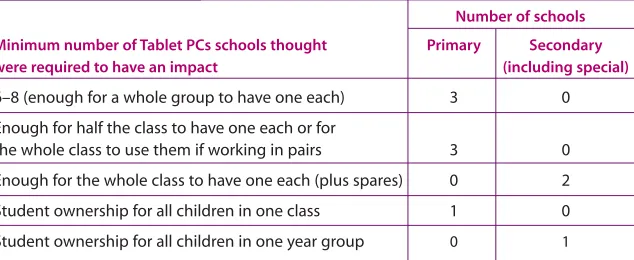
Perhaps not surprisingly, schools’ views on the minimum level of resourcing generally reflected the level of resourcing that they themselves already had, except in one case where they felt that they needed more Tablet PCs in order to reach the minimum threshold for impact. The table above summarises the responses from the 10 schools that provided Tablet PCs for student use. Two of these schools, one primary and one secondary, also indicated that one Tablet PC
was sufficient if being allocated to a specific individual as part of their SEN provision.
[image:20.595.33.350.348.478.2]For those schools where student ownership was not seen as being essential, there was general agreement that the amount of time that each student spent using a Tablet PC needed to be enough so that they did not to have to relearn how to use them each time. However, respondents were generally unclear about how much time this might mean: while several schools thought that it would need to be at least an hour a week per child, others seemed to think the figure should be considerably higher than this.
Student use – optimum level
One primary school thought that having eight Tablet PCs was best, as this would allow each child in a withdrawal group working with a teaching assistant to have their own. All the other nine schools that provided Tablet PCs for student use thought that each child having their own Tablet PC, when they were being used, was the ideal. There was a split between those schools which thought student ownership was optimal (three secondary and one primary) and those which felt that this was unnecessary because students could not and/or should not use them all the time (five primary). These five primary schools wanted one or more class sets, though several of them also expressed a wish to have additional machines in order to allow for spontaneous use, repairs, home use and community involvement.
7
Number of schools Minimum number of Tablet PCs schools thought Primary Secondary
were required to have an impact (including special)
6–8 (enough for a whole group to have one each) 3 0
Enough for half the class to have one each or for
the whole class to use them if working in pairs 3 0
Enough for the whole class to have one each (plus spares) 0 2
Student ownership for all children in one class 1 0
Student ownership for all children in one year group 0 1
“Yes, this [staff ownership] is crucial because
we have to do the lesson development in
our own time so need to have access.”
“I’d say that Tablet PCs are 50% per Tablet more
expensive to purchase and maintain – but we
are now getting some returns. They are very
much more cost effective as they offer a very
flexible solution worth the extra money
compared to laptops or desktops.”
ICT team, Engayne
Support
In examining the data, it was clear that ‘support’ was a significant issue.
Three distinct areas were evident: start-up issues; on-going technical
support; cost issues. (We discuss training in
9 – Staff and student
development
, p17.)
Start-up issues
Eight of the schools specifically mentioned the difficulties associated with setting up the Tablet PCs. Two of these schools identified the amount of planning and preparation that they had needed to do before the machines were rolled out to staff and students. The other six had extensive problems, most of which were not specific to Tablet PCs and which appeared to relate to configuration issues, wireless networking and/or connecting to servers. In several schools these problems carried on for months, and had a serious impact on the ability to use the Tablet PCs as well as on staff and student morale.
Several schools mentioned the need to budget for the cost of software, training, security and peripherals for Tablet PCs. The last two issues seemed to be particularly important, because of the portability and desirability of the schools’ Tablet PCs, and the fact that they did not have features such as internal CD drives.
On-going support
Nine of the schools identified that the level of technical support required, particularly on-site
support, had increased considerably – though several of them also acknowledged that this was at least in part due to the overall increase in the number of computers. Two schools, where there were large numbers of machines and where staff and/or children had ownership of their Tablet PCs, said that immediate or just-in-time support was essential. Several schools mentioned the time taken to repair or update machines as an issue, while others highlighted the need to have replacement Tablet PCs available.
Tablet PCs do seem to have particular on-going support issues, many of which are related to their mobility (and which thus may also apply to laptops). For example, two primary schools talked about the need for a teaching assistant or ICT technician to set up the equipment in the classroom. Others talked about issues of battery management. A number of schools commented on the unreliability of (early) Tablet PCs, although one other school thought them more robust than laptops. Several schools mentioned the cost of replacing damaged or lost pens.
Cost issues
Tablet PCs are more expensive to buy than laptops of an ‘equivalent’ specification and this was a major barrier to their uptake. While all the schools said they would like to extend their use of Tablet PCs, which they all seemed to feel were better than laptops, every school identified price as being an issue and, because of this, four have already bought or would in future buy laptops or desktops instead. Five of the schools thought that Tablet PCs were cost effective. Two schools felt that they were not currently taking full advantage of the potential of Tablet PCs, but that the machines would be cost effective once they were exploiting them fully. Three others did not think that their Tablet PCs were cost effective at present. Buying a Tablet PC and data projector was seen by many of the schools as cost effective.
8
“Storage of this equipment needs careful consideration. We spent
about 20% of the total budget on security measures including
lockable trolleys, shop front shutters for cupboards, Kensington
locks, screaming alarms for projectors and CCTV – all of this in what
might be considered a relatively low-crime area. It is vital to have
safe storage and effective staff training on being vigilant about
looking after the equipment. Engraving of equipment prior to
distribution is necessary…”
“It’s not the Tablet use itself – it’s the need to
save to the networks [the Tablet PCs were set
up so the children couldn’t save to Tablet]. You
need to train them to save work at intervals
and keep a check on the network connection.
… I used the Tablet with the interactive
whiteboard to demonstrate – children copied
on theirs.”
Teacher, St Francis
“After initial training we realised the
enormous potential of using Tablets in all
curriculum areas. … Time was needed to
play and explore.”
ICT co-ordinator, St Mary’s
‘Intuitive for some but difficult for others,
especially using the pen.’
Field notes, Invicta
“If familiar with ICT, not much training is
needed. The pen is easier than the mouse.”
Teacher, Queensbury
Staff and student development
We looked at the staff and student development that had been provided
in the case study schools and how easy or otherwise staff and students
found using the Tablet PCs.
Many of the issues raised in relation to staff development were those that would be raised in connection with any change in practice or technology:
•
It needs to be related to the level ofcompetence/confidence and needs of the users
•
It should focus on how to integrate the technology into practice, not just how to operate the software•
There needs to be sufficient time to practise, experiment and share ideas and resources.In many of the case study schools, the training issues were not related to the Tablet PCs themselves but to how to use the school servers, local area network or software.
Staff or students who were already confident users of computers found using Tablet PCs intuitive and adapted to them very rapidly. In three cases the teacher(s) concerned had little or no explicit training and learned how to use the Tablet PC quite easily on their own. Six of the schools commented on how quickly and easily the students learned to use the Tablet PCs, which they thought more intuitive than other PCs. However, training was needed on how to manage the equipment. This was particularly true where the Tablet PCs were shared and routines needed to be established for issuing them, battery management and so forth.
Five schools said that staff needed more support or time to experiment in order to understand the Tablet PCs’ potential. Several schools would have liked to be given examples of how other people were using them. One school mentioned the importance of having ‘champions’ who were given extra time to experiment and then cascade ideas to other staff. The importance of ‘champions’ was also evident in many of the other schools. Two schools identified the need for a critical mass of staff to be involved in using Tablet PCs, as this led to peer-to-peer support.
Teaching assistants or ICT technicians in at least four schools provided regular support to staff and students in the classroom. Two schools explicitly mentioned using students (‘expert users’) to support their peers and, sometimes, staff. Staff in two other schools acknowledged learning to use the Tablet PCs ‘alongside the children’, which appeared to mean that they learned from the children.
9
“Would you buy a £250,000 Bentley and never teach the person
how to drive it properly? Well the same goes for the Tablet PCs.
Effective training for staff at our school has been given a solid
foundation by three CPD days focusing on software awareness,
curriculum application, the pedagogy of Tablet PCs and
presentation technologies…”
“It’s a lot easier to move around with Tablets
than laptops – I would worry more about
sending them outside unsupervised. Laptops
seem more fiddly, easier to damage.”
Teacher, St Francis
“The machines are robust and a reasonable
weight and size, and this makes them ideal for
transporting in the children’s own bags. This is
important for security as the students only
have to carry one bag, and do not attract
attention by carrying a bag that looks like it is
designed for a laptop.”
ICT co-ordinator, Queensbury
Comparison of mobile devices
Where the case study schools had experience of using laptops as well as
Tablet PCs, they were asked to comment on the relative pros and cons of
Tablet PCs in relation to laptops.
Convertible-style Tablet PCs were seen as being more versatile than laptops – providing the best of both worlds. While slate-style Tablet PCs are less flexible than convertibles, they were recognised as having a number of advantages over laptops. These advantages of Tablet PCs (in slate mode) included:
•
taking up less space in the classroom•
being more mobile, both in terms of being easier and quicker to pass around and also for writing ‘on the go’•
providing a ‘more natural’ way of working, both in terms of the pen/screen interface and greater flexibility about the positions in which they could be used (on your knee, on the desk, in one arm)•
using a pen being more intuitive, and easier than a tracker pad•
being more robust (although several schools had problems with early models).However, a number of disadvantages of Tablet PCs compared with laptops were also identified. These included:
•
that screens were smaller and less easy to see•
that battery life was not as good as expected•
the lack of a CD or floppy drive, although one school identified this as an advantage, as it made it more difficult for students to install their own software (and viruses)•
and, most importantly, the cost differential – Tablet PCs being significantly more expensive than laptops of similar specification.Inevitably the lack of keyboard on slate-style Tablet PCs was seen as a disadvantage by some schools, while others saw it as a positive benefit, as it meant that children were not ‘distracted’ by trying to type.
Most of the schools seemed to think that Tablet PCs had more to offer than laptops. This appeared to be related to the feeling that the Tablet-specific features such as pen input and enhanced portability combined with other features such as wireless networking, and audio recording and playback, meant that they were at the very least an ‘enhanced laptop’. There was a general feeling that their use was qualitatively different from the use of laptops or other computers. This was not reflected in much of the practice that the researchers observed, but several of the schools explained that this was because they were just starting to understand the potential and experiment with different ways of using them.
10